WHAT IS MS
 Microsoft is a leading global vendor of computer software; hardware
for computer, mobile and gaming systems; and cloud services.
Microsoft's corporate headquarters is located in Redmond, Wash., and
it has offices in more than 60 countries.
 Bill Gates is the owner of Microsoft Company.
MICRO SOFT PRODUCTS
SOFTWARE PACKAGES
 MS-DOS
 MS Office Package
 Windows Operating Systems
 Windows Server Operating Systems
 Internet Explorer
 .Net Framework
MICRO SOFT PRODUCTS
HARDWARE PACKAGES
ActiMates toys.
Digital Sound System 80 speakers.
Microsoft Band smartbands.
Microsoft Broadband Networking products.
MICRO SOFT PRODUCTS
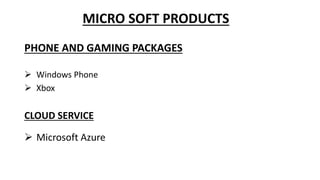
PHONE AND GAMING PACKAGES
 Windows Phone
 Xbox
CLOUD SERVICE
 Microsoft Azure
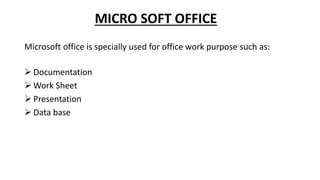
MICRO SOFT OFFICE
Microsoft office is specially used for office work purpose such as:
 Documentation
 Work Sheet
 Presentation
 Data base
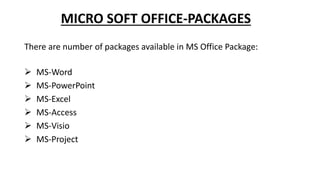
MICRO SOFT OFFICE-PACKAGES
There are number of packages available in MS Office Package:
 MS-Word
 MS-PowerPoint
 MS-Excel
 MS-Access
 MS-Visio
 MS-Project
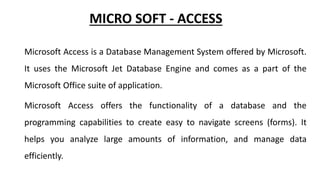
MICRO SOFT - ACCESS
Microsoft Access is a Database Management System offered by Microsoft.
It uses the Microsoft Jet Database Engine and comes as a part of the
Microsoft Office suite of application.
Microsoft Access offers the functionality of a database and the
programming capabilities to create easy to navigate screens (forms). It
helps you analyze large amounts of information, and manage data
efficiently.
MICRO SOFT - ACCESS
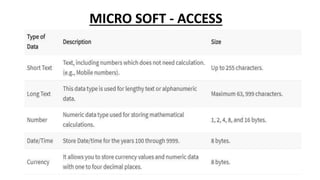
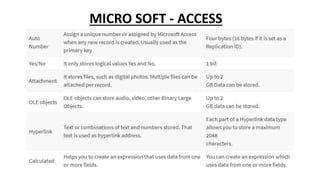
TABLE
 A Table is an object which stores data in Row & Column format to store
data.
 A Table is usually related to other tables in the database file.
 Each column must have Unique name
 We can also define Primary Key in a table
MICRO SOFT - ACCESS
QUERY
 Queries answer a question by selecting and sorting and filtering data
based on search criteria.
 Queries show a selection of data based on criteria (limitations) you
provide.
 Queries can pull from one or more related Tables and other Queries.
 Types of Query can be SELECT, INSERT, UPDATE, DELETE
MICRO SOFT - ACCESS
FORM
 A form is a database object that you can use to create a user interface
for a database application.
 Forms help you to display live data from the table. It mainly used to
ease the process of data entry or editing
MICRO SOFT - ACCESS
REPORT
 A report is an object in desktop databases primarily used for
formatting, calculating, printing, and summarizing selected data.
 You can even customize the report’s look and feel.
MICRO SOFT - ACCESS
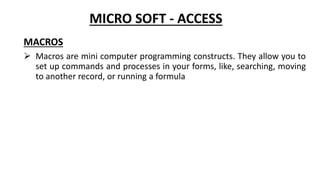
MACROS
 Macros are mini computer programming constructs. They allow you to
set up commands and processes in your forms, like, searching, moving
to another record, or running a formula
MICRO SOFT - ACCESS
MICRO SOFT - ACCESS
ADVANTAGES OF MS-ACCESS
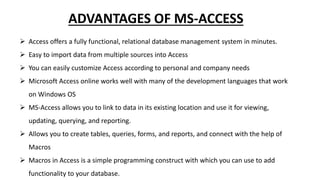
 Access offers a fully functional, relational database management system in minutes.
 Easy to import data from multiple sources into Access
 You can easily customize Access according to personal and company needs
 Microsoft Access online works well with many of the development languages that work
on Windows OS
 MS-Access allows you to link to data in its existing location and use it for viewing,
updating, querying, and reporting.
 Allows you to create tables, queries, forms, and reports, and connect with the help of
Macros
 Macros in Access is a simple programming construct with which you can use to add
functionality to your database.
DIS-ADVANTAGES OF MS-ACCESS
 Microsoft Access database is useful for small-to-medium business sectors.
However, it is not useful for large-sized organizations
 Lacks robustness compared to dbms systems like MS SQL Server or Oracle
 All the information from your database is saved into one file. This can slow down
reports, queries, and forms
 Technical limit is 255 concurrent users. However, the real-world limit is only 10 to
80 (depending on the type of application which you are using)
 It requires a lot more learning and training compares with other Microsoft
programs

MS ACCESS.pptx

  • 1.
    WHAT IS MS Microsoft is a leading global vendor of computer software; hardware for computer, mobile and gaming systems; and cloud services. Microsoft's corporate headquarters is located in Redmond, Wash., and it has offices in more than 60 countries.  Bill Gates is the owner of Microsoft Company.
  • 2.
    MICRO SOFT PRODUCTS SOFTWAREPACKAGES  MS-DOS  MS Office Package  Windows Operating Systems  Windows Server Operating Systems  Internet Explorer  .Net Framework
  • 3.
    MICRO SOFT PRODUCTS HARDWAREPACKAGES ActiMates toys. Digital Sound System 80 speakers. Microsoft Band smartbands. Microsoft Broadband Networking products.
  • 4.
    MICRO SOFT PRODUCTS PHONEAND GAMING PACKAGES  Windows Phone  Xbox CLOUD SERVICE  Microsoft Azure
  • 5.
    MICRO SOFT OFFICE Microsoftoffice is specially used for office work purpose such as:  Documentation  Work Sheet  Presentation  Data base
  • 6.
    MICRO SOFT OFFICE-PACKAGES Thereare number of packages available in MS Office Package:  MS-Word  MS-PowerPoint  MS-Excel  MS-Access  MS-Visio  MS-Project
  • 7.
    MICRO SOFT -ACCESS Microsoft Access is a Database Management System offered by Microsoft. It uses the Microsoft Jet Database Engine and comes as a part of the Microsoft Office suite of application. Microsoft Access offers the functionality of a database and the programming capabilities to create easy to navigate screens (forms). It helps you analyze large amounts of information, and manage data efficiently.
  • 8.
    MICRO SOFT -ACCESS TABLE  A Table is an object which stores data in Row & Column format to store data.  A Table is usually related to other tables in the database file.  Each column must have Unique name  We can also define Primary Key in a table
  • 9.
    MICRO SOFT -ACCESS QUERY  Queries answer a question by selecting and sorting and filtering data based on search criteria.  Queries show a selection of data based on criteria (limitations) you provide.  Queries can pull from one or more related Tables and other Queries.  Types of Query can be SELECT, INSERT, UPDATE, DELETE
  • 10.
    MICRO SOFT -ACCESS FORM  A form is a database object that you can use to create a user interface for a database application.  Forms help you to display live data from the table. It mainly used to ease the process of data entry or editing
  • 11.
    MICRO SOFT -ACCESS REPORT  A report is an object in desktop databases primarily used for formatting, calculating, printing, and summarizing selected data.  You can even customize the report’s look and feel.
  • 12.
    MICRO SOFT -ACCESS MACROS  Macros are mini computer programming constructs. They allow you to set up commands and processes in your forms, like, searching, moving to another record, or running a formula
  • 13.
  • 14.
  • 15.
    ADVANTAGES OF MS-ACCESS Access offers a fully functional, relational database management system in minutes.  Easy to import data from multiple sources into Access  You can easily customize Access according to personal and company needs  Microsoft Access online works well with many of the development languages that work on Windows OS  MS-Access allows you to link to data in its existing location and use it for viewing, updating, querying, and reporting.  Allows you to create tables, queries, forms, and reports, and connect with the help of Macros  Macros in Access is a simple programming construct with which you can use to add functionality to your database.
  • 16.
    DIS-ADVANTAGES OF MS-ACCESS Microsoft Access database is useful for small-to-medium business sectors. However, it is not useful for large-sized organizations  Lacks robustness compared to dbms systems like MS SQL Server or Oracle  All the information from your database is saved into one file. This can slow down reports, queries, and forms  Technical limit is 255 concurrent users. However, the real-world limit is only 10 to 80 (depending on the type of application which you are using)  It requires a lot more learning and training compares with other Microsoft programs