PCX2700 12 or 24V
Safe Guard 64
user
manual
“OEX. The Specialist’s Choice for quality,
reliability and value for money.
Every time”.
THE SPECIALIST’S CHOICE
contents
Overview..............................................................1
Connection...........................................................1
Typical Connection..............................................2
Alternate Connection...........................................3
Installation Guide.................................................4
Operation Overview.............................................5
Input Configuration..............................................8
Output Configuration...........................................9
DIP Switch Configuration...................................10
Output Status Indicator......................................13
Testing Procedure Park Brake Alarm.................14
Testing Procedure Daytime Running Lights......16
General Input Switch 1 and 2............................18
Electric Parameters............................................19
Mechanical Parameters.....................................19
Page 1
The Safe Guard 64 is an advance safety device aimed to simplify control, and to warn the
operator should a safety parameter be breached.
It utilises the latest digital micro-controller technology to ensure reliability and performance.
These instructions are intended for use by an authorised installer.
Modifications, manipulation or improper repairs can affect the operability and safety.
overview
connection
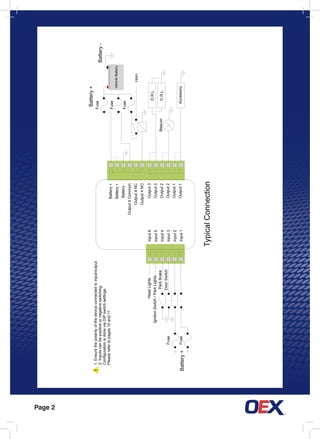
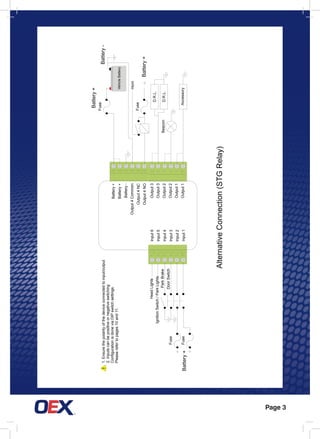
There are two connection options shown in the wiring diagrams on page 1 and 2. In the
typical connection, Output 4 Common should be connected to ground, if the accessory
requires negative switching.
The Alternative Connection shows the wiring required if the accessory running through
Output 4 requires positive switching.
Page 2
!
HeadLights
IgnitionSwitch/ParkLights
Fuse
FuseBattery+
VehicleBattery
Battery+
Fuse
Fuse
Fuse
Horn
D.R.L.
D.R.L.Beacon
Accessory
Output3
Output3
Output2
Output2
Output1
Output1
Input6
Input5
Input4
Input3
Input2
Input1
TypicalConnection
Battery-
1.Ensurethepolarityofthedeviceconnectedtoinput/output
2.Inputscanbepositiveornegativeswitching
ConfigurationisdoneviaDIPswitchsettings.
Pleaserefertopages10and11.
ParkBrake
DoorSwitch
Battery+
Battery+
Battery-
Output4Common
Output4NC
Output4NO
Page 3
!
HeadLights
IgnitionSwitch/ParkLights
Fuse
FuseBattery+
Battery+
Fuse
Horn
D.R.L.
D.R.L.Beacon
Accessory
AlternativeConnection(STGRelay)
Battery-1.Ensurethepolarityofthedeviceconnectedtoinput/output
2.Inputscanbepositiveornegativeswitching
ConfigurationisdoneviaDIPswitchsettings.
Pleaserefertopages10and11.
Battery+
ParkBrake
DoorSwitch
Fuse
Output3
Output3
Output2
Output2
Output1
Output1
Input6
Input5
Input4
Input3
Input2
Input1
Battery+
Battery+
Battery-
Output4Common
Output4NC
Output4NO
VehicleBattery
Page 4
installation guide
Mount the Safe Guard 64 in a dry safe, secure place away from heat and humidity.
If possible, select an inconspicuous area that will not be routinely accessed.
Make sure the device is kept clear of moving parts or debris.
Also ensure the device is safe from moisture or liquids.
Please ensure you read this complete manual as fitting instructions and testing
procedures are incorporated throughout.
Page 5
General Input 1 and 2 are momentary inputs. Depending on the DIP switch setting,
by briefly connecting the input to Battery Positive or Battery Negative, it will toggle on
and off General Output 1 and 2 respectively.
If General Input DIP switch is enabled (ON), releasing the Park brake will switch OFF
General Output 1 and 2.
The Door Switch and Park Brake switches are set to low active (by default, Switch to
Ground) but can be configured either way. If the Door Switch is active (open door)
while park brake is NOT active (OFF), the on board buzzer will immediately sound for
5 seconds before alarm (Output 4) is activated. Applying the Park Brake will disable
BOTH buzzer and alarm immediately. Once the door is opened, the alarms latch on
unless the Park Brake is applied. It is good practice to apply the park brake BEFORE
opening the door.
operation overview
Page 6
operation overview continued
If the Daytime Running Light function is set to be controlled by Battery Voltage
sensing, Day Time Running Light (Output 3) is turned ON with a delay of 5 seconds
once the engine is running and the Alternator is charging. If either the Head Light or
Park Light is turned ON the DRL’s are turned OFF immediately. The DRL’s are also
turned off with a delay of 20 seconds once the battery voltage falls below the pre set
threshold setting.
If the Daytime Running Light is set to be controlled by the Ignition Switch, Daytime
Running Light (Output 3) is turned ON with a delay of 5 seconds once the Ignition
Switch is turned ON. If the Head Light is turned ON the DRL are turned OFF
immediately. The DRL is turned OFF with a delay of 20 seconds once the Ignition
Switch is turned OFF.
If any of the DIP switches are changed, a power reset (remove power for 5 seconds
and re-connect) must be performed for the changes to take effect.
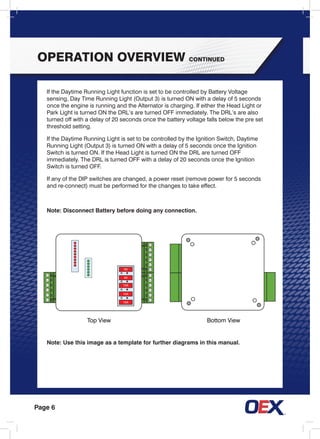
Note: Disconnect Battery before doing any connection.
Note: Use this image as a template for further diagrams in this manual.
5A
5A
10A
10A
15A
Bottom ViewTop View
Page 7
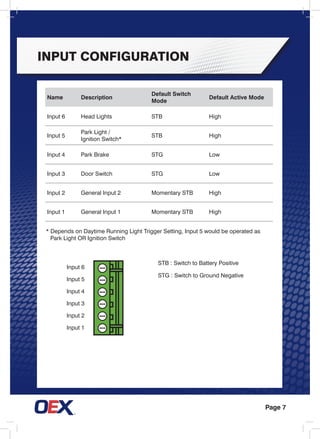
Input Configuration
Name Description
Default Switch
Mode
Default Active Mode
Input 6 Head Lights STB High
Input 5
Park Light /
Ignition Switch*
STB High
Input 4 Park Brake STG Low
Input 3 Door Switch STG Low
Input 2 General Input 2 Momentary STB High
Input 1 General Input 1 Momentary STB High
STB : Switch to Battery Positive
STG : Switch to Ground Negative
Input 6
Input 5
Input 4
Input 3
Input 2
Input 1
* Depends on Daytime Running Light Trigger Setting, Input 5 would be operated as
	 Park Light OR Ignition Switch
Page 8
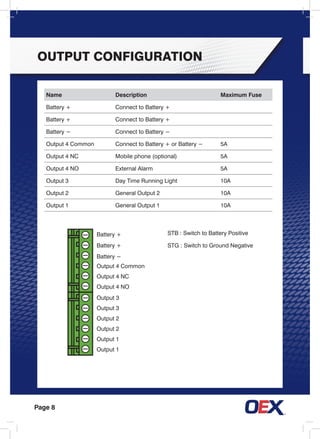
Name Description Maximum Fuse
Battery + Connect to Battery +
Battery − Connect to Battery −
Output 4 Common Connect to Battery + or Battery − 5A
Output 4 NC Mobile phone (optional) 5A
Output 4 NO External Alarm 5A
Output 3 Day Time Running Light 10A
Output 2 General Output 2 10A
Output 1 General Output 1 10A
Battery +
Battery +
Battery −
Output 4 Common
Output 4 nc
Output 4 no
Output 3
Output 3
Output 2
Output 2
Output 1
Output 1
STB : Switch to Battery Positive
STG : Switch to Ground Negative
output Configuration
Page 9
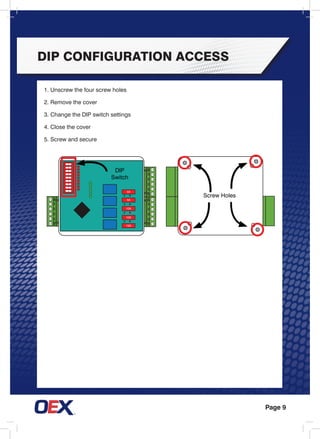
DIP Configuration Access
5A
5A
10A
10A
15A
DIP
Switch
Screw Holes
1. Unscrew the four screw holes
2. Remove the cover
3. Change the DIP switch settings
4. Close the cover
5. Screw and secure
Page 10
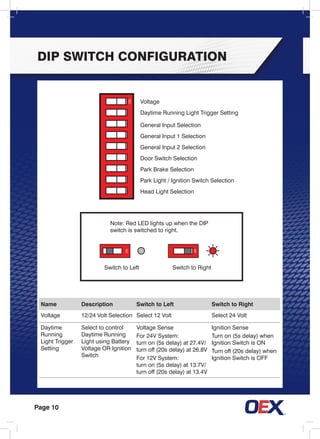
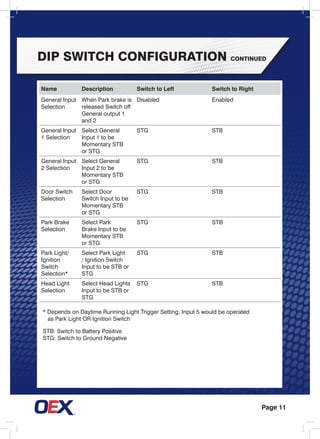
DIP Switch Configuration
Name Description Switch to Left Switch to Right
Voltage 12/24 Volt Selection Select 12 Volt Select 24 Volt
Daytime
Running
Light Trigger
Setting
Select to control
Daytime Running
Light using Battery
Voltage OR Ignition
Switch
Voltage Sense
For 24V System:
turn on (5s delay) at 27.4V/
turn off (20s delay) at 26.8V
For 12V System:
turn on (5s delay) at 13.7V/
turn off (20s delay) at 13.4V
Ignition Sense
Turn on (5s delay) when
Ignition Switch is ON
Turn off (20s delay) when
Ignition Switch is OFF
Voltage
Daytime Running Light Trigger Setting
General Input Selection
General Input 1 Selection
General Input 2 Selection
Door Switch Selection
Park Brake Selection
Park Light / Ignition Switch Selection
Head Light Selection
Note: Red LED lights up when the DIP
switch is switched to right.
Switch to Left Switch to Right
Page 11
DIP Switch Configuration continued
* Depends on Daytime Running Light Trigger Setting, Input 5 would be operated
	 as Park Light OR Ignition Switch
STB: Switch to Battery Positive
STG: Switch to Ground Negative
Name Description Switch to Left Switch to Right
General Input
Selection
When Park brake is
released Switch off
General output 1
and 2
Disabled Enabled
General Input
1 Selection
Select General
Input 1 to be
Momentary STB
or STG
STG STB
General Input
2 Selection
Select General
Input 2 to be
Momentary STB
or STG
STG STB
Door Switch
Selection
Select Door
Switch Input to be
Momentary STB
or STG
STG STB
Park Brake
Selection
Select Park
Brake Input to be
Momentary STB
or STG
STG STB
Park Light/
Ignition
Switch
Selection*
Select Park Light
/ Ignition Switch
Input to be STB or
STG
STG STB
Head Light
Selection
Select Head Lights
Input to be STB or
STG
STG STB
Page 12
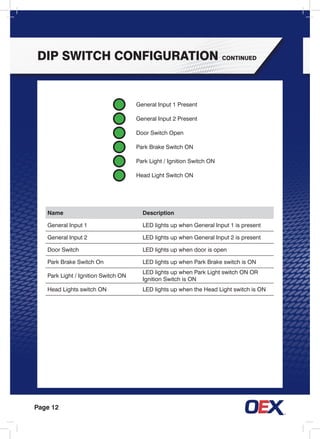
Name Description
General Input 1 LED lights up when General Input 1 is present
General Input 2 LED lights up when General Input 2 is present
Door Switch LED lights up when door is open
Park Brake Switch On LED lights up when Park Brake switch is ON
Park Light / Ignition Switch ON
LED lights up when Park Light switch ON OR
Ignition Switch is ON
Head Lights switch ON LED lights up when the Head Light switch is ON
DIP Switch Configuration continued
General Input 1 Present
General Input 2 Present
Door Switch Open
Park Brake Switch ON
Park Light / Ignition Switch ON
Head Light Switch ON
Page 13
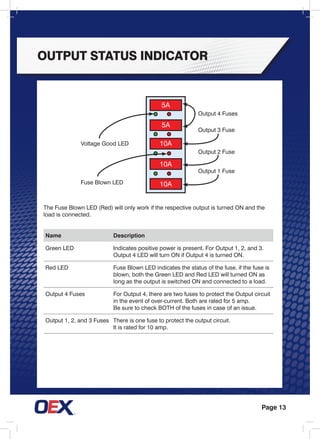
Output status indicator
5A
5A
10A
10A
10A
Name Description
Green Led Indicates positive power is present. For Output 1, 2, and 3.
Output 4 LED will turn ON if Output 4 is turned ON.
Red Led Fuse Blown LED indicates the status of the fuse, if the fuse is
blown, both the Green LED and Red LED will turned ON as
long as the output is switched ON and connected to a load.
Output 4 Fuses For Output 4, there are two fuses to protect the Output circuit
in the event of over-current. Both are rated for 5 amp.
Be sure to check BOTH of the fuses in case of an issue.
Output 1, 2, and 3 Fuses There is one fuse to protect the output circuit.
It is rated for 10 amp.
Voltage Good LED
Output 3 Fuse
Output 2 Fuse
Output 1 Fuse
Fuse Blown LED
Output 4 Fuses
The Fuse Blown LED (Red) will only work if the respective output is turned ON and the
load is connected.
Page 14
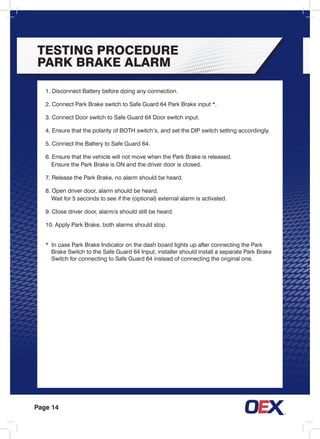
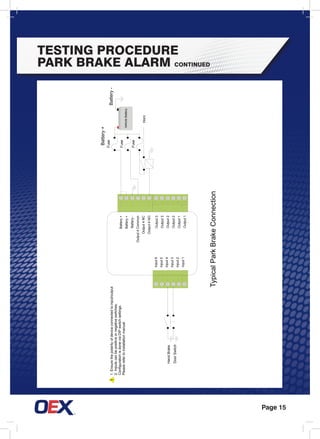
TESTING PROCEDURE
PARK BRAKE ALARM
1. Disconnect Battery before doing any connection.
2. Connect Park Brake switch to Safe Guard 64 Park Brake input *.
3. Connect Door switch to Safe Guard 64 Door switch input.
4. Ensure that the polarity of BOTH switch’s, and set the DIP switch setting accordingly.
5. Connect the Battery to Safe Guard 64.
6. Ensure that the vehicle will not move when the Park Brake is released.
	 Ensure the Park Brake is ON and the driver door is closed.
7. Release the Park Brake, no alarm should be heard.
8. Open driver door, alarm should be heard.
	 Wait for 5 seconds to see if the (optional) external alarm is activated.
9. Close driver door, alarm/s should still be heard.
10. Apply Park Brake, both alarms should stop.
* In case Park Brake Indicator on the dash board lights up after connecting the Park
	 Brake Switch to the Safe Guard 64 Input, installer should install a separate Park Brake
	 Switch for connecting to Safe Guard 64 instead of connecting the original one.
Page 15
TESTING PROCEDURE
PARK BRAKE ALARM continued
!
Battery+
Fuse
Fuse
Fuse
Horn
TypicalParkBrakeConnection
Battery-1.Ensurethepolarityofdeviceconnectedtoinput/output
2.Inputscanbepositiveornegativeswitches.
ConfigurationisdoneviaDIPswitchsettings.
Pleaserefertoinstallationmanual.
HandBrake
DoorSwitch
Output3
Output3
Output2
Output2
Output1
Output1
Input6
Input5
Input4
Input3
Input2
Input1
Battery+
Battery+
Battery-
Output4Common
Output4NC
Output4NO
VehicleBattery
Page 16
TEST PROCEDURE DAY
TIME RUNNING LIGHTS
1. Disconnect Battery before doing any connection.
2. Connect Park Light / Ignition to the Safe Guard 64 Park Light / Ignition inputs respectively.
3. Connect Daytime Running Light to Safe Guard 64 Daytime Running light output.
4. Ensure the polarity of Park Light / Ignition, and set the DIP switch setting accordingly.
5. Ensure the battery voltage is higher than the turn-on threshold.
	 The threshold can be adjusted via the DIP switch setting.
6. Connect the battery to the Safe Guard 64.
7.	 Switch OFF BOTH Park Light/Head Lights, Daytime Running Light should turn ON
	 after 5 seconds.
8.	 Switch on Park Light, Daytime Running Light should turn OFF immediately.
9.	 Switch off Park Light, Daytime Running Light should turn ON after 5 seconds.
10.	Switch on Head Lights, Daytime Running Light should turn OFF immediately.
11.	Switch off Head Lights, Daytime Running Light should turn ON after 5 seconds.
For more information on ignition switching see page 18.
Page 17
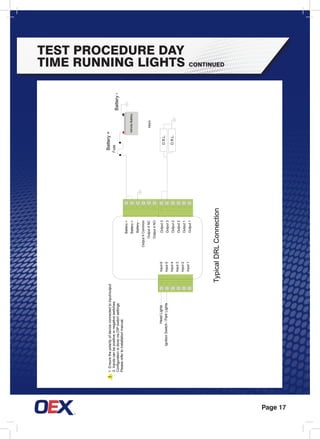
TEST PROCEDURE DAY
TIME RUNNING LIGHTS continued
!
HeadLights
IgnitionSwitch/ParkLights
Battery+
Fuse
Horn
D.R.L.
D.R.L.
TypicalDRLConnection
Battery-
1.Ensurethepolarityofdeviceconnectedtoinput/output
2.Inputscanbepositiveornegativeswitches.
ConfigurationisdoneviaDIPswitchsettings.
Pleaserefertoinstallationmanual.
Output3
Output3
Output2
Output2
Output1
Output1
Input6
Input5
Input4
Input3
Input2
Input1
Battery+
Battery+
Battery-
Output4Common
Output4NC
Output4NO
VehicleBattery
Page 18
GENERAL INPUT SWITCH 1 AND 2
For Ignition Switch Setting
1. Disconnect Battery before doing any connection.
2. Connect Momentary Switch 1 and 2 to the Safe Guard 64 respective inputs.
3. Connect device to be operated by General Input 1 and General Input 2 to
	 Safe Guard 64 respective outputs.
4. Connect the Battery to the Safe Guard 64.
5. Press Momentary Switch 1 once, the device connected to General Output 1 will switch
	 to ON / OFF. Press the Momentary Switch again to ensure it will switch ON/OFF.
6. Repeat the test for Input 2.
7. If General Input Selection DIP switch is enabled, release the Park Brake,
	 BOTH General Output 1 and General Output 2 will switch OFF.
1.	Disconnect Battery before doing any connection.
2.	Connect Ignition Switch to the Safe Guard 64 Ignition Switch input respectively.
3.	Connect Daytime Running Light to Safe Guard 64 Daytime Running Light Output.
4.	Ensure the polarity of Ignition Switch, and set the DIP switch setting accordingly.
5.	Connect the Battery to Safe Guard 64.
6.	Switch OFF BOTH Park Light / Ignition Switch, Daytime Running Light should turn OFF.
7.	Switch ON Ignition Switch, Daytime Running Light should turn ON after 5 seconds.
8.	Switch OFF Ignition Switch, Daytime Running Light should turn OFF after 20 seconds.
9.	Switch ON Ignition Switch again, Daytime Running Light should turn ON after 5 seconds.
10.	Switch ON Park Light, Daytime Running Light should turn OFF immediately.
11.	Switch OFF Park Light, Daytime Running Light should turn ON after 5 seconds.
Page 19
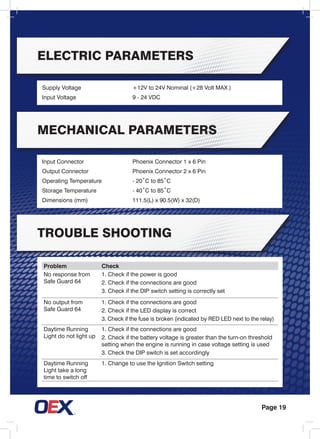
Electric Parameters
mechanical Parameters
tROUBLE sHOOTING
Supply Voltage	 +12V to 24V Nominal (+28 Volt MAX )
Input Voltage	 9 - 24 VDC
Input Connector	 Phoenix Connector 1 x 6 Pin
Output Connector	 Phoenix Connector 2 x 6 Pin
Operating Temperature	 - 20˚C to 85˚C
Storage Temperature	 - 40˚C to 85˚C
Dimensions (mm)	 111.5(L) x 90.5(W) x 32(D)
Problem Check
No response from
Safe Guard 64
1. Check if the power is good
2. Check if the connections are good
3. Check if the DIP switch setting is correctly set
No output from
Safe Guard 64
1. Check if the connections are good
2. Check if the LED display is correct
3. Check if the fuse is broken (indicated by RED LED next to the relay)
Daytime Running
Light do not light up
1. Check if the connections are good
2. Check if the battery voltage is greater than the turn-on threshold
setting when the engine is running in case voltage setting is used
3. Check the DIP switch is set accordingly
Daytime Running
Light take a long
time to switch off
1. Change to use the Ignition Switch setting
www.oex.com.au

Ms 12 0193 pcx2700 user manual press

  • 1.
    PCX2700 12 or24V Safe Guard 64 user manual “OEX. The Specialist’s Choice for quality, reliability and value for money. Every time”. THE SPECIALIST’S CHOICE
  • 2.
    contents Overview..............................................................1 Connection...........................................................1 Typical Connection..............................................2 Alternate Connection...........................................3 InstallationGuide.................................................4 Operation Overview.............................................5 Input Configuration..............................................8 Output Configuration...........................................9 DIP Switch Configuration...................................10 Output Status Indicator......................................13 Testing Procedure Park Brake Alarm.................14 Testing Procedure Daytime Running Lights......16 General Input Switch 1 and 2............................18 Electric Parameters............................................19 Mechanical Parameters.....................................19
  • 3.
    Page 1 The SafeGuard 64 is an advance safety device aimed to simplify control, and to warn the operator should a safety parameter be breached. It utilises the latest digital micro-controller technology to ensure reliability and performance. These instructions are intended for use by an authorised installer. Modifications, manipulation or improper repairs can affect the operability and safety. overview connection There are two connection options shown in the wiring diagrams on page 1 and 2. In the typical connection, Output 4 Common should be connected to ground, if the accessory requires negative switching. The Alternative Connection shows the wiring required if the accessory running through Output 4 requires positive switching.
  • 4.
  • 5.
  • 6.
    Page 4 installation guide Mountthe Safe Guard 64 in a dry safe, secure place away from heat and humidity. If possible, select an inconspicuous area that will not be routinely accessed. Make sure the device is kept clear of moving parts or debris. Also ensure the device is safe from moisture or liquids. Please ensure you read this complete manual as fitting instructions and testing procedures are incorporated throughout.
  • 7.
    Page 5 General Input1 and 2 are momentary inputs. Depending on the DIP switch setting, by briefly connecting the input to Battery Positive or Battery Negative, it will toggle on and off General Output 1 and 2 respectively. If General Input DIP switch is enabled (ON), releasing the Park brake will switch OFF General Output 1 and 2. The Door Switch and Park Brake switches are set to low active (by default, Switch to Ground) but can be configured either way. If the Door Switch is active (open door) while park brake is NOT active (OFF), the on board buzzer will immediately sound for 5 seconds before alarm (Output 4) is activated. Applying the Park Brake will disable BOTH buzzer and alarm immediately. Once the door is opened, the alarms latch on unless the Park Brake is applied. It is good practice to apply the park brake BEFORE opening the door. operation overview
  • 8.
    Page 6 operation overviewcontinued If the Daytime Running Light function is set to be controlled by Battery Voltage sensing, Day Time Running Light (Output 3) is turned ON with a delay of 5 seconds once the engine is running and the Alternator is charging. If either the Head Light or Park Light is turned ON the DRL’s are turned OFF immediately. The DRL’s are also turned off with a delay of 20 seconds once the battery voltage falls below the pre set threshold setting. If the Daytime Running Light is set to be controlled by the Ignition Switch, Daytime Running Light (Output 3) is turned ON with a delay of 5 seconds once the Ignition Switch is turned ON. If the Head Light is turned ON the DRL are turned OFF immediately. The DRL is turned OFF with a delay of 20 seconds once the Ignition Switch is turned OFF. If any of the DIP switches are changed, a power reset (remove power for 5 seconds and re-connect) must be performed for the changes to take effect. Note: Disconnect Battery before doing any connection. Note: Use this image as a template for further diagrams in this manual. 5A 5A 10A 10A 15A Bottom ViewTop View
  • 9.
    Page 7 Input Configuration NameDescription Default Switch Mode Default Active Mode Input 6 Head Lights STB High Input 5 Park Light / Ignition Switch* STB High Input 4 Park Brake STG Low Input 3 Door Switch STG Low Input 2 General Input 2 Momentary STB High Input 1 General Input 1 Momentary STB High STB : Switch to Battery Positive STG : Switch to Ground Negative Input 6 Input 5 Input 4 Input 3 Input 2 Input 1 * Depends on Daytime Running Light Trigger Setting, Input 5 would be operated as Park Light OR Ignition Switch
  • 10.
    Page 8 Name DescriptionMaximum Fuse Battery + Connect to Battery + Battery + Connect to Battery + Battery − Connect to Battery − Output 4 Common Connect to Battery + or Battery − 5A Output 4 NC Mobile phone (optional) 5A Output 4 NO External Alarm 5A Output 3 Day Time Running Light 10A Output 2 General Output 2 10A Output 1 General Output 1 10A Battery + Battery + Battery − Output 4 Common Output 4 nc Output 4 no Output 3 Output 3 Output 2 Output 2 Output 1 Output 1 STB : Switch to Battery Positive STG : Switch to Ground Negative output Configuration
  • 11.
    Page 9 DIP ConfigurationAccess 5A 5A 10A 10A 15A DIP Switch Screw Holes 1. Unscrew the four screw holes 2. Remove the cover 3. Change the DIP switch settings 4. Close the cover 5. Screw and secure
  • 12.
    Page 10 DIP SwitchConfiguration Name Description Switch to Left Switch to Right Voltage 12/24 Volt Selection Select 12 Volt Select 24 Volt Daytime Running Light Trigger Setting Select to control Daytime Running Light using Battery Voltage OR Ignition Switch Voltage Sense For 24V System: turn on (5s delay) at 27.4V/ turn off (20s delay) at 26.8V For 12V System: turn on (5s delay) at 13.7V/ turn off (20s delay) at 13.4V Ignition Sense Turn on (5s delay) when Ignition Switch is ON Turn off (20s delay) when Ignition Switch is OFF Voltage Daytime Running Light Trigger Setting General Input Selection General Input 1 Selection General Input 2 Selection Door Switch Selection Park Brake Selection Park Light / Ignition Switch Selection Head Light Selection Note: Red LED lights up when the DIP switch is switched to right. Switch to Left Switch to Right
  • 13.
    Page 11 DIP SwitchConfiguration continued * Depends on Daytime Running Light Trigger Setting, Input 5 would be operated as Park Light OR Ignition Switch STB: Switch to Battery Positive STG: Switch to Ground Negative Name Description Switch to Left Switch to Right General Input Selection When Park brake is released Switch off General output 1 and 2 Disabled Enabled General Input 1 Selection Select General Input 1 to be Momentary STB or STG STG STB General Input 2 Selection Select General Input 2 to be Momentary STB or STG STG STB Door Switch Selection Select Door Switch Input to be Momentary STB or STG STG STB Park Brake Selection Select Park Brake Input to be Momentary STB or STG STG STB Park Light/ Ignition Switch Selection* Select Park Light / Ignition Switch Input to be STB or STG STG STB Head Light Selection Select Head Lights Input to be STB or STG STG STB
  • 14.
    Page 12 Name Description GeneralInput 1 LED lights up when General Input 1 is present General Input 2 LED lights up when General Input 2 is present Door Switch LED lights up when door is open Park Brake Switch On LED lights up when Park Brake switch is ON Park Light / Ignition Switch ON LED lights up when Park Light switch ON OR Ignition Switch is ON Head Lights switch ON LED lights up when the Head Light switch is ON DIP Switch Configuration continued General Input 1 Present General Input 2 Present Door Switch Open Park Brake Switch ON Park Light / Ignition Switch ON Head Light Switch ON
  • 15.
    Page 13 Output statusindicator 5A 5A 10A 10A 10A Name Description Green Led Indicates positive power is present. For Output 1, 2, and 3. Output 4 LED will turn ON if Output 4 is turned ON. Red Led Fuse Blown LED indicates the status of the fuse, if the fuse is blown, both the Green LED and Red LED will turned ON as long as the output is switched ON and connected to a load. Output 4 Fuses For Output 4, there are two fuses to protect the Output circuit in the event of over-current. Both are rated for 5 amp. Be sure to check BOTH of the fuses in case of an issue. Output 1, 2, and 3 Fuses There is one fuse to protect the output circuit. It is rated for 10 amp. Voltage Good LED Output 3 Fuse Output 2 Fuse Output 1 Fuse Fuse Blown LED Output 4 Fuses The Fuse Blown LED (Red) will only work if the respective output is turned ON and the load is connected.
  • 16.
    Page 14 TESTING PROCEDURE PARKBRAKE ALARM 1. Disconnect Battery before doing any connection. 2. Connect Park Brake switch to Safe Guard 64 Park Brake input *. 3. Connect Door switch to Safe Guard 64 Door switch input. 4. Ensure that the polarity of BOTH switch’s, and set the DIP switch setting accordingly. 5. Connect the Battery to Safe Guard 64. 6. Ensure that the vehicle will not move when the Park Brake is released. Ensure the Park Brake is ON and the driver door is closed. 7. Release the Park Brake, no alarm should be heard. 8. Open driver door, alarm should be heard. Wait for 5 seconds to see if the (optional) external alarm is activated. 9. Close driver door, alarm/s should still be heard. 10. Apply Park Brake, both alarms should stop. * In case Park Brake Indicator on the dash board lights up after connecting the Park Brake Switch to the Safe Guard 64 Input, installer should install a separate Park Brake Switch for connecting to Safe Guard 64 instead of connecting the original one.
  • 17.
    Page 15 TESTING PROCEDURE PARKBRAKE ALARM continued ! Battery+ Fuse Fuse Fuse Horn TypicalParkBrakeConnection Battery-1.Ensurethepolarityofdeviceconnectedtoinput/output 2.Inputscanbepositiveornegativeswitches. ConfigurationisdoneviaDIPswitchsettings. Pleaserefertoinstallationmanual. HandBrake DoorSwitch Output3 Output3 Output2 Output2 Output1 Output1 Input6 Input5 Input4 Input3 Input2 Input1 Battery+ Battery+ Battery- Output4Common Output4NC Output4NO VehicleBattery
  • 18.
    Page 16 TEST PROCEDUREDAY TIME RUNNING LIGHTS 1. Disconnect Battery before doing any connection. 2. Connect Park Light / Ignition to the Safe Guard 64 Park Light / Ignition inputs respectively. 3. Connect Daytime Running Light to Safe Guard 64 Daytime Running light output. 4. Ensure the polarity of Park Light / Ignition, and set the DIP switch setting accordingly. 5. Ensure the battery voltage is higher than the turn-on threshold. The threshold can be adjusted via the DIP switch setting. 6. Connect the battery to the Safe Guard 64. 7. Switch OFF BOTH Park Light/Head Lights, Daytime Running Light should turn ON after 5 seconds. 8. Switch on Park Light, Daytime Running Light should turn OFF immediately. 9. Switch off Park Light, Daytime Running Light should turn ON after 5 seconds. 10. Switch on Head Lights, Daytime Running Light should turn OFF immediately. 11. Switch off Head Lights, Daytime Running Light should turn ON after 5 seconds. For more information on ignition switching see page 18.
  • 19.
    Page 17 TEST PROCEDUREDAY TIME RUNNING LIGHTS continued ! HeadLights IgnitionSwitch/ParkLights Battery+ Fuse Horn D.R.L. D.R.L. TypicalDRLConnection Battery- 1.Ensurethepolarityofdeviceconnectedtoinput/output 2.Inputscanbepositiveornegativeswitches. ConfigurationisdoneviaDIPswitchsettings. Pleaserefertoinstallationmanual. Output3 Output3 Output2 Output2 Output1 Output1 Input6 Input5 Input4 Input3 Input2 Input1 Battery+ Battery+ Battery- Output4Common Output4NC Output4NO VehicleBattery
  • 20.
    Page 18 GENERAL INPUTSWITCH 1 AND 2 For Ignition Switch Setting 1. Disconnect Battery before doing any connection. 2. Connect Momentary Switch 1 and 2 to the Safe Guard 64 respective inputs. 3. Connect device to be operated by General Input 1 and General Input 2 to Safe Guard 64 respective outputs. 4. Connect the Battery to the Safe Guard 64. 5. Press Momentary Switch 1 once, the device connected to General Output 1 will switch to ON / OFF. Press the Momentary Switch again to ensure it will switch ON/OFF. 6. Repeat the test for Input 2. 7. If General Input Selection DIP switch is enabled, release the Park Brake, BOTH General Output 1 and General Output 2 will switch OFF. 1. Disconnect Battery before doing any connection. 2. Connect Ignition Switch to the Safe Guard 64 Ignition Switch input respectively. 3. Connect Daytime Running Light to Safe Guard 64 Daytime Running Light Output. 4. Ensure the polarity of Ignition Switch, and set the DIP switch setting accordingly. 5. Connect the Battery to Safe Guard 64. 6. Switch OFF BOTH Park Light / Ignition Switch, Daytime Running Light should turn OFF. 7. Switch ON Ignition Switch, Daytime Running Light should turn ON after 5 seconds. 8. Switch OFF Ignition Switch, Daytime Running Light should turn OFF after 20 seconds. 9. Switch ON Ignition Switch again, Daytime Running Light should turn ON after 5 seconds. 10. Switch ON Park Light, Daytime Running Light should turn OFF immediately. 11. Switch OFF Park Light, Daytime Running Light should turn ON after 5 seconds.
  • 21.
    Page 19 Electric Parameters mechanicalParameters tROUBLE sHOOTING Supply Voltage +12V to 24V Nominal (+28 Volt MAX ) Input Voltage 9 - 24 VDC Input Connector Phoenix Connector 1 x 6 Pin Output Connector Phoenix Connector 2 x 6 Pin Operating Temperature - 20˚C to 85˚C Storage Temperature - 40˚C to 85˚C Dimensions (mm) 111.5(L) x 90.5(W) x 32(D) Problem Check No response from Safe Guard 64 1. Check if the power is good 2. Check if the connections are good 3. Check if the DIP switch setting is correctly set No output from Safe Guard 64 1. Check if the connections are good 2. Check if the LED display is correct 3. Check if the fuse is broken (indicated by RED LED next to the relay) Daytime Running Light do not light up 1. Check if the connections are good 2. Check if the battery voltage is greater than the turn-on threshold setting when the engine is running in case voltage setting is used 3. Check the DIP switch is set accordingly Daytime Running Light take a long time to switch off 1. Change to use the Ignition Switch setting
  • 22.