Crime Guard
      BACK COVER
    PRINTER’S NOTE:                                850i5
  production back cover
is to be printed with gray                        INSTALLATION
scale front cover; this is a
   place marker cover.
                                                  INSTRUCTIONS
                                                   FRONT COVER
                                                  PRINTER’S NOTE:
                                                production front cover
                                                is gray scale; this is a
                                                 place marker cover.

                                                COPYRIGHT 2007: OMEGA RESEARCH & DEVELOPMENT, INC.
                      03/07 MI-CG-850i5 REV1
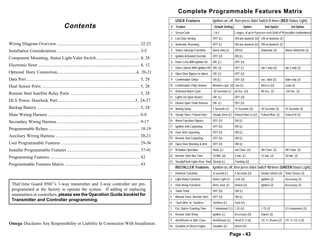
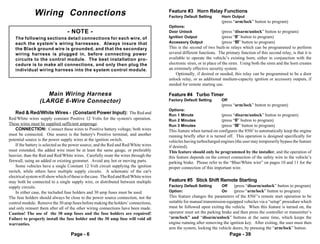
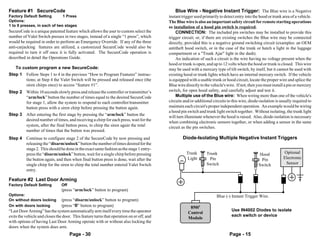
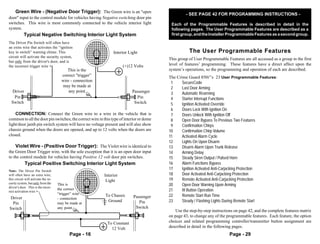
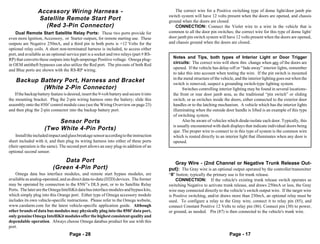
Complete Programmable Features Matrix
                                                                                                                               USER Features                Ignition on, off, then press Valet Switch 5 times (RED Status Light).
                                              Contents                                                                     #   Feature                       Default Setting             Option           2nd Option             3rd Option
                                                                                                                           1 SecureCode                     1&0                2 stages, of up to 9 presses each (total of 99 possible combinations)
                                                                                                                           2 Last Door Arming               OFF (L)            ON w/o doorlock (U) ON w/ doorlock (2)
Wiring Diagram Overview ........................................................................... 22-23                  3 Automatic Rearming             OFF (L)            ON w/o doorlock (U) ON w/ doorlock (2)

Installation Considerations ........................................................................... 3-5                4 Starter Interrupt Functions    Alarm only (L)     Off (U)                 Automatic (2)        Alarm+AntiGrind (3)
                                                                                                                           5 Ignition Activated Override    OFF (U)            ON (L)
Component Mounting, Status Light/Valet Switch ....................................... 4, 28
                                                                                                                           6 Doors Lock With Ignition On    ON (L)             OFF (U)
Electronic Siren ............................................................................................ 4, 12
                                                                                                                           7 Doors Unlock With Ignition Off ON (3)             OFF (L)                 o/p 1 only (U)       o/p 2 only (2)
Optional Horn Connection........................................................................4, 20-21                   8 Open Door Bypass to above      ON (L)             OFF (U)
Data Port ....................................................................................................... 5, 28    9 Confirmation Chirps            ON (L)             OFF (U)                 exc. Valet (2)       Valet only (3)

Dual Sensor Ports ......................................................................................... 5, 28         10 Confirmation Chirp Volume      Medium Loud (2) Low (L)                    Med Lo (U)           Loud (3)
                                                                                                                          11 Activated Alarm Cycle          30 Seconds (L)     60 Sec. (U)             90 Sec. (2)          120 Sec. (3)
Remote Start Satellite Relay Ports ............................................................... 5, 28
                                                                                                                          12 Lights On Upon Disarm          ON (L)             OFF (U)
DLS Power Doorlock Port.......................................................................5, 24-27
                                                                                                                          13 Disarm Upon Trunk Release      ON (L)             OFF (U)
Backup Battery ............................................................................................. 5, 28        14 Arming Delay                   3 Seconds (L)      15 Seconds (U)          30 Seconds (2)       45 Seconds (3)
Main Wiring Harness ................................................................................... 6-8               15 Steady Siren / Pulsed Horn     Steady Siren (L) Pulsed Horn Lo (U)        Pulsed Med. (2)      Pulsed Hi (3)

Secondary Wiring Harness ........................................................................... 9-17                 16 Alarm Functions Bypass         OFF (U)            ON (L)
                                                                                                                          17 Ignition Anti-Carjacking       OFF (U)            ON (L)
Programmable Relays ................................................................................... 18-19
                                                                                                                          18 Door Anti-Carjacking           OFF (U)            ON (L)
Auxiliary Wiring Harness ............................................................................ 20-21               19 Remote Anti-Carjacking         OFF (U)            ON (L)
User Programmable Features ....................................................................... 29-36                  20 Open Door Warning at Arm       OFF (U)            ON (L)
Installer Programmable Features .................................................................. 37-41                  21 III Button Operation           Panic (L)          3rd Chan. (U)           4th Chan. (2)        5th Chan. (3)
                                                                                                                          22 Remote Start Run Time          10 Min. (U)        5 min. (L)              15 min. (2)          20 min. (3)
Programming Features ................................................................................. 42
                                                                                                                          23 Steady/Flash Lights Rem. Start Steady (L)         Flashing (U)
Programmable Features Matrix .................................................................... 43
                                                                                                                               INSTALLER Features           Ignition on, off, then press Valet Switch 10 times (GREEN Status Light).
                                                                                                                          1    Doorlock Functions           .8 second (L)      3 Seconds (U)           Double Unlock (2)    Total Closure (3)
                                                                                                                          2    Light Relay Functions        Dome Light (L)     Lock (U)                Ignition (2)         Accessory (3)
  TheCrime Guard 850i5’s 1-way transmitter and 2-way controller are pre-                                                  3    Horn Relay Functions         Horn, med. (L)     Unlock (U)              Ignition (2)         Accessory (3)
  programmed at the factory to operate the system. If adding or replacing                                                 4    Turbo Timer                  OFF (U)            ON (L)
  transmitters or controllers, please see the Operation Guide booklet for                                                 5    Manual Trans. Remote Start   OFF (U)            ON (L)
  Transmitter and Controller programming.
                                                                                                                          6    “Tach Wire” or “Tachless “   Tachless (L)       Tach (U)
                                                                                                                          7    Ext. Starter Cranking Time   .7 (minimum) ( L) 1.25 (U)                 1.75 (2)             2.5 (maximum) (3)
                                                                                                                          8    Remote Start Relay           Ignition (L)       Accessory (U)           Starter (2)
                                                                                                                          9    Arm/Disarm or Add. Chan.     Arm/Disarm (L)     Arm/Ch. 5 (U)           Ch. 4 / Disarm (2)   Ch. 4 / Ch. 5 (3)
Omega Disclaims Any Responsibility or Liability In Connection With Installation.
                                                                                                                          10 Gasoline or Diesel Engine      Gasoline (L)       Diesel (U)

                                                                                                                                                                             Page - 43
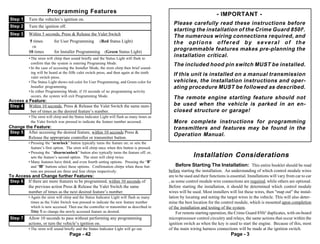
Programming Features                                                                                 - IMPORTANT -
Step 1    Turn the vehicles’s ignition on.
                                                                                                Please carefully read these instructions before
Step 2    Turn the ignition off.
                                                                                                starting the installation of the Crime Guard 850i5.
Step 3    Within 5 seconds, Press & Release the Valet Switchch either:
                                                                                                The numerous wiring connections required, and
           5 times        for User Programming          (Red Status Light)                      the options offered by several of the
            OR
          10 times        for Installer Programming         (Green Status Light)
                                                                                                programmable features makes pre-planning the
          • The siren will chirp then sound briefly and the Status Light will flash to
                                                                                                installation critical.
            confirm that the system is entering Programing Mode.                                The included hood pin switch MUST be installed.
          • In the case of accessing the Installer Mode, the siren chirp then brief sound-
            ing will be heard at the fifth valet switch press, and then again at the tenth
            valet switch press.
                                                                                                If this unit is installed on a manual transmission
          • The Status Light shows red color for User Programming, and Green color for          vehicles, the installation instructions and oper-
            Installer programming.                                                              ating procedure MUST be followed as described.
          • In either Programming Mode, if 10 seconds of no programming activity
            occurs, the system will exit Programming Mode.                                      The remote engine starting feature should not
Access a Feature:
Step 4 Within 10 seconds, Press & Release the Valet Switch the same num-                        be used when the vehicle is parked in an en-
          ber of times as the desired feature’s number.                                         closed structure or garage!
          • The siren will chirp and the Status Indicator Light will flash as many times as
            the Valet Switch was pressed to indicate the feature number accessed.               More complete instructions for programming
Change the Feature:                                                                             transmitters and features may be found in the
Step 5 After accessing the desired feature, within 10 seconds Press &
                                                                                                Operation Manual.
        Release the appropriate controller or transmitter button.
          • Pressing the “arm/lock” button typically turns the feature on; or sets the
            feature’s first option. The siren will chirp once when this button is pressed.
          • Pressing the “disarm/unlock” button also typically turns the feature off; or,
            sets the feature’s second option. The siren will chirp twice.                                    Installation Considerations
          • Many features have third, and even fourth setting options. Pressing the “II”
            and “III” buttons select these options. Confirmation chirps when these but-            Before Starting The Installation: This entire booklet should be read
            tons are pressed are three and four chirps respectively.                          before starting the installation. An understanding of which control module wires
To Access and Change further Features:                                                        are to be used and their functions is essential. Installations will vary from car to car
Step 6 If there are more features to be programmed, within 10 seconds of                      , as some control module wire connections are required, while others are optional.
        the previous action Press & Release the Valet Switch the same                         Before starting the installation, it should be determined which control module
        number of times as the next desired feature’s number.                                 wires will be used. Most installers will list these wires, then "map out" the instal-
          • Again the siren will chirp and the Status Indicator Light will flash as many      lation by locating and noting the target wires in the vehicle. This will also deter-
            times as the Valet Switch was pressed to indicate the new feature number          mine the best location for the control module, which is mounted upon completion
            which is now accessed. Then use the controller or transmitter as described in     of the installation and testing of the system.
            Step 5 to change the newly accessed feature as desired.                                For remote starting operation, the Crime Guard 850i5 duplicates, with on-board
Step 7    Allow 10 seconds to pass without performing any programming                         microprocessor control circuitry and relays, the same actions that occur within the
          actions, or turn the vehicle’s ignition on.                                         ignition switch as when the key is used to start the engine. Because of this, most
          • The siren will sound briefly and the Status Indicator Light will go out.          of the main wiring harness connections will be made at the ignition switch.
                                    Page - 42                                                                                       Page - 3
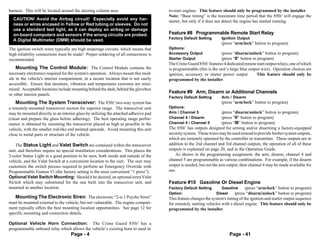
harness. This will be located around the steering column area.                        to-start engines. This feature should only be programmed by the installer.
                                                                                      Note: “Base timing” is the maximum time period that the 850i5 will engage the
  CAUTION! Avoid the Airbag circuit! Especially avoid any har-                        starter, but only if it does not detect the engine has started running.
  ness or wires encased in Yellow or Red tubing or sleeves. Do not
  use a standard test light, as it can deploy an airbag or damage
  on-board computers and sensors if the wrong circuits are probed.                    Feature #8 Programmable Remote Start Relay
                                                                                      Factory Default Setting        Ignition Output
  A Digital Multimeter (DMM) should be used.
                                                                                                                     (press “arm/lock” button to program)
The ignition switch wires typically are high amperage circuits, which means that      Options:
high reliability connections must be made! Proper soldering of all connections is     Accessory Output               (press “disarm/unlock” button to program)
recommended.                                                                          Starter Output                 (press “II” button to program)
                                                                                      The Crime Guard 850i5 features 4 dedicated remote start output relays, one of which
   Mounting The Control Module: The Control Module contains the                       is programmable (this is the unit’s large blue output wire). Operation choices are
necessary electronics required for the system's operation. Always mount this mod-     ignition, accessory or starter power output.       This feature should only be
ule in the vehicle's interior compartment, in a secure location that is not easily    programmed by the installer.
accessible. Ensure that moisture, vibration and temperature extremes are mini-
mized. Acceptable locations include mounting behind the dash, behind the glovebox
or other interior panels.
                                                                                      Feature #9 Arm, Disarm or Additional Channels
                                                                                      Factory Default Setting        Arm / Disarm
   Mounting The System Transceiver: The 850i5 two-way system has                                                     (press “arm/lock” button to program)
a remotely-mounted transceiver section for superior range. The transceiver unit       Options:
may be mounted directly to an interior glass by utilizing the attached adhesive pad   Arm / Channel 5                (press “disarm/unlock” button to program)
(clean and prepare the glass before adhering). The best operating range perfor-       Channel 4 / Disarm             (press “II” button to program)
mance is obtained by mounting the transceiver placed as high as possible in the       Channel 4 / Channel 5          (press “III” button to program)
vehicle, with the smaller rod-like end pointed upwards. Avoid mounting this unit      The 850i5 has outputs designed for arming and/or disarming a factory-equipped
close to metal parts or structure of the vehicle.                                     security system. These wires may be used instead to provide further system outputs,
                                                                                      which are remotely operated by the controller or transmitter. These outputs are in
    The Status Light and Valet Switch are contained within the transceiver            addition to the 2nd channel and 3rd channel outputs, the operation of all of these
unit, and therefore require no special installation considerations. This places the   outputs is explained on page 20, and in the Operation Guide.
2-color Status Light in a good position to be seen, both inside and outside of the        As shown in the programming assignment, the arm, disarm, channel 4 and
vehicle, and the Valet Switch at a convenient location to the user. The user may      channel 5 are programmable as various combinations. For example, if the disarm
customize the switch presses required to perform an Emergency Override with           output is needed, but not the arm output, then channel 4 may be made available for
Programmable Feature #1 (the factory setting is the most convenient “1 press”).       use.
Optional Valet Switch Mounting: Should it be desired, an optional extra Valet
Switch which may substituted for the one built into the transceiver unit, and         Feature #10 Gasoline Or Diesel Engine
mounted in another location.                                                          Factory Default Setting        Gasoline    (press “arm/lock” button to program)
                                                                                      Option:                     Diesel   (press “disarm/unlock” button to program)
   Mounting The Electronic Siren: The electronic “2-n-1 Psycho Siren”                 This feature changes the system's timing of the ignition and starter output sequence
must be mounted external to the vehicle, but not vulnerable. The engine compart-      for remotely starting vehicles with a diesel engine. This feature should only be
ment typically offers the best mounting location opportunities. See page 12 for       programmed by the installer.
specific mounting and connection details.

Optional Vehicle Horn Connection: The Crime Guard 850i5 has a
programmable onboard relay which allows the vehicle’s existing horn to used in
                                    Page - 4                                                                             Page - 41
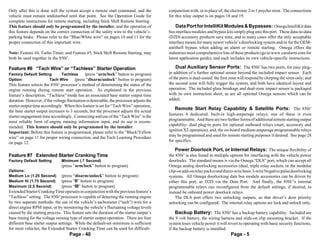
Only after this is done will the system accept a remote start command, and the           conjunction with, or in place of, the electronic 2-n-1 psycho siren. The connections
vehicle must remain undisturbed until that point. See the Operation Guide for            for this relay output is on pages 18 and 19.
complete instructions for remote starting, including Stick Shift Remote Starting.
This feature should only be programmed by the installer, and the operation of                Data Port for IntelliKit Modules & Bypasses: Omega IntelliKit data
this feature depends on the correct connection of the safety wire to the vehicle’s       bus interface modules and bypass kits simply plug into this port. These data-to-data
parking brake. Please refer to the “Blue/White wire” on pages 10 and 11 for the          (D2D) accessory products save time, and in many cases offer the only acceptable
proper connection of this important wire.                                                interface means for many newer vehicle’s doorlocking system and/or for the OEM-
                                                                                         antitheft bypass when adding an alarm or remote starting. Omega offers the
Note: Feature #4, Turbo Timer, and Feature #5, Stick Shift Remote Starting, may          industries most comprehensive line of these products (go to www.caralarm.com for
both be used together in the 850i5.                                                      latest application guide), and each includes its own vehicle-specific instructions.

Feature #6 “Tach Wire” or “Tachless” Starter Operation                                       Dual Auxiliary Sensor Ports: The 850i5 has two ports, for easy plug-
Factory Default Setting     Tachless    (press “arm/lock” button to program)             in addition of a further optional sensor beyond the included impact sensor. Each
Option:               Tach Wire   (press “disarm/unlock” button to program)              of the ports is dual-zoned: the first zone will respond by chirping the siren only; and
This feature selects the 850i5 processor’s method of determining the status of the       the second zone will fully trigger the system, and both have identical layout and
engine running during remote start operation. As explained in the previous               operation. The included glass breakage and dual-zone impact sensor is packaged
feature’s description, “Tachless” mode has an associated base starter output time        with its own instruction sheet, as are all optional Omega sensors which can be
duration. However, if the voltage fluctuation is detectable, the processor adjusts the   added.
starter output time accordingly. When this feature is set for “Tach Wire” operation,
the base starter output increases to 3 seconds, but the processor adjusts the actual
                                                                                            Remote Start Relay Capability & Satellite Ports: The 850i5
                                                                                         features 4 dedicated, built-in high-amperage relays; one of these is even
starter engagement time accordingly. Connecting and use of the “Tach Wire” is the
                                                                                         programmable. And there are two further forms of additional remote starting output
most reliable form of engine running information input, and its use is recom-
                                                                                         capability- dual plug-in ports for optional outboard relays (start, accessory and
mended. This feature should only be programmed by the installer.
                                                                                         ignition X2 operation); and, the on-board medium-amperage programmable relays
Important: Before this feature is programmed, please refer to the “Black/Yellow
                                                                                         may be programmed and used for remote starting purposes if desired. See page 28
wire” on page 11 for proper wiring connection, and the Tach Learning Procedure
                                                                                         for specifics.
on page 12.
                                                                                             Power Doorlock Port, or Internal Relays: The unique flexibility of
Feature #7 Extended Starter Cranking Time                                                the 850i5 is also found in multiple options for interfacing with the vehicle power
Factory Default Setting        Minimum (.7 Second)                                       doorlocks. The standard means is via the Omega “DLS” port, which can accept all
                               (press “arm/lock” button to program)                      Omega analog doorlocking accessories (dual, triple relay sockets, or the modular
Options:                                                                                 clip-on add-on relay packs) and direct-wire basic 3-wire Negative pulse doorlocking
Medium Lo (1.25 Second)        (press “disarm/unlock” button to program)                 systems. All Omega doorlocking data bus module accessories can be driven by
Medium Hi (1.75 Second)        (press “II” button to program)                            either this port, as D2D via the Data Port. And finally, the 850i5’s internal
Maximum (2.5 Second)           (press “III” button to program)                           programmable relays can reconfigured from the default settings, if desired, to
Extended Starter Cranking Time operates in conjunction with the previous feature’s       instead be onboard power doorlock relays.
“Tachless” setting. The 850i5 processor is capable of detecting the running engine           The DLS port offers two unlocking outputs, so that driver’s door priority
by two separate methods- the use of the vehicle’s tachometer (“tach”) wire for a         unlocking can be configured. The internal relay options are lock and unlock only.
direct engine RPM input, or by monitoring the vehicle’s fluctuating voltage levels
caused by the starting process. This feature sets the duration of the starter output’s      Backup Battery: The 850i5 has a backup battery capability. Included are
base timing for the voltage sensing type of starter output operation. There are four     the 9 volt battery, the wiring harness and slide-on clip mounting bracket. If the
different base starter output settings. While the default-set minimum is sufficient      system loses vehicle power it will revert to operating with basic security functions,
for most vehicles; the Extended Starter Cranking Time can be used for difficult-         if the backup battery is installed.
                                    Page - 40                                                                                 Page - 5
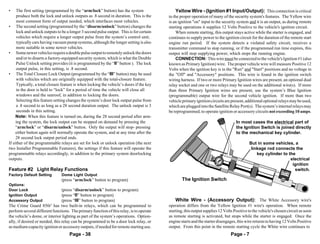
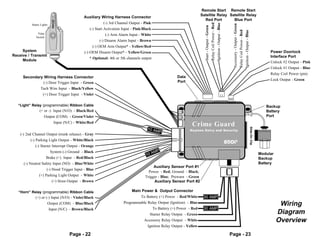
Wiring Connections                                                      Feature #3 Horn Relay Functions
                                                                                      Factory Default Setting        Horn Output
                                                                                                                     (press “arm/lock” button to program)
                                                                                      Options:
                                  - NOTE -                                            Door Unlock                    (press “disarm/unlock” button to program)
   The following sections detail connections for each wire, of                        Ignition Output                (press “II” button to program)
   each the system’s wiring harnesses. Always insure that                             Accessory Output               (press “III” button to program)
   the Black ground wire is grounded, and that the secondary                          This is the second of two built-in relays which can be programmed to perform
   wiring harness is plugged in, before connecting power                              several different functions. The primary function of this second relay, is that it is
   circuits to the control module. The best installation pro-                         available to operate the vehicle’s existing horn; either in conjunction with the
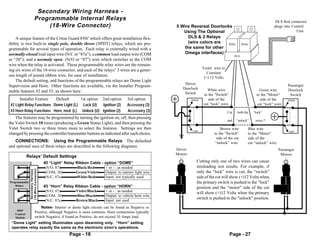
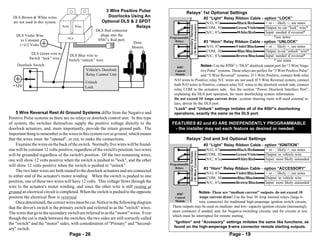
   cedure is to make all connections, and only then plug the                          electronic siren, or in place of the siren. Using both the siren and the horn creates
   individual wiring harness into the system control module.                          an extremely effective security system.
                                                                                          Optionally, if desired or needed, this relay can be programmed to be a door
                                                                                      unlock relay, or as additional medium-capacity ignition or accessory outputs, if
                                                                                      needed for remote starting use.

                    Main Wiring Harness                                               Feature #4 Turbo Timer
                 (LARGE 6-Wire Connector)                                             Factory Default Setting        Off
                                                                                                                     (press “arm/lock” button to program)
                                                                                      Options:
   Red & Red/White Wires - (Constant Power Input): The Red and                        Run 1 Minute                   (press “disarm/unlock” button to program)
Red/White wires supply constant Positive 12 Volts for the system's operation.         Run 2 Minutes                  (press “II” button to program)
These wires must be supplied sufficient amperage.                                     Run 3 Minutes                  (press “III” button to program)
    CONNECTION: Connect these wires to Positive battery voltage; both wires           This feature when turned on configures the 850i5 to automatically keep the engine
must be connected. One source is the battery's Positive terminal, and another         running briefly after it is turned off. This operation is designed specifically for
potential source is the power supply wires at the ignition switch.                    vehicles having turbocharged engines (the user may temporarily bypass the feature
    If the battery is selected as the power source, and the Red and Red/White wires   if desired).
must extended, the added wire must be at least the same gauge, or preferably          This feature should only be programmed by the installer, and the operation of
heavier, than the Red and Red/White wires. Carefully route the wires through the      this feature depends on the correct connection of the safety wire to the vehicle’s
firewall, using an added or existing grommet. Avoid any hot or moving parts.          parking brake. Please refer to the “Blue/White wire” on pages 10 and 11 for the
    Some vehicles have a single Constant 12 Volt circuit supplying the ignition       proper connection of this important wire.
switch, while others have multiple supply circuits. A schematic of the car's
electrical system will show which of these is the case. The Red and Red/White wires
may both be connected to a single supply wire, or distributed between multiple        Feature #5 Stick Shift Remote Starting
supply circuits.                                                                      Factory Default Setting        Off    (press “disarm/unlock” button to program)
    In either case, the included fuse holders and 30 amp fuses must be used.          Option:                        On     (press “arm/lock” button to program)
The fuse holders should always be close to the power source connection, not the       This feature changes the parameters of the 850i5’s remote start operation to be
control module. Remove the 30 amp fuses before making the holders’ connections,       suitable for manual transmission-equipped vehicles via a “setup” procedure which
and only reinsert them after all of the other wiring connections have been made.      must be followed upon exiting the vehicle. When this feature is turned on, the
Caution! The use of the 30 amp fuses and the fuse holders are required!               operator must set the parking brake and then press the controller or transmitter’s
Failure to properly install the fuse holder and the 30 amp fuse will void all         “arm/lock” and “disarm/unlock” buttons at the same time, which keeps the
warranties.                                                                           engine running after removing the ignition key. After exiting, the user must then
                                                                                      arm the system, locking the vehicle doors, by pressing the “arm/lock” button.
                                    Page - 6                                                                               Page - 39
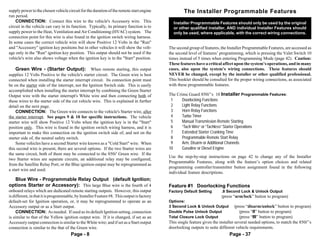
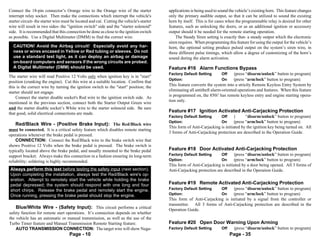
•    The first setting (programmed by the “arm/lock” button) has the system                  Yellow Wire - (Ignition #1 Input/Output): This connection is critical
     produce both the lock and unlock outputs as .8 second in duration. This is the      to the proper operation of many of the security system's features. The Yellow wire
     most common form of output needed, which interfaces most vehicles.                  is an ignition "on" input to the security system and it is an output, as during remote
• The second setting (programmed by the “disarm/unlock” button) changes the              starting operations it supplies 12 Volts Positive to the vehicle's ignition circuit.
     lock and unlock outputs to be a longer 3 second pulse output. This is for certain       When remote starting, this output stays active while the starter is engaged, and
     vehicles which require a longer output pulse from the system’s control unit;        continues to supply power to the ignition circuit for the duration of the remote start
     typically cars having vacuum pump systems, although the longer setting is also      engine run period. If the system detects a violated safety circuit, receives a
     more suitable in some newer vehicles.                                               transmitter command to stop running, or if the programmed run time expires, this
• Some newer vehicles require a double pulse output to remotely unlock the doors         output will stop supplying power, which stops the running engine.
     and/or to disarm a factory-equipped security system, which is what the Double           CONNECTION: This wire must be connected to the vehicle's Ignition #1 (also
     Pulse Unlock setting provides (it is programmed by the “II” button ). The lock      known as Primary Ignition) wire. The proper vehicle wire will measure Positive 12
     output pulse, in this setting, is .8 second.                                        Volts when the ignition key is in the "Run" and "Start" positions and no voltage in
• The Total Closure Lock Output (programmed by the “III” button) may be used             the "Off" and "Accessory" positions. This wire is found in the ignition switch
     with vehicles which are originally equipped with the total-closure feature.         wiring harness. If two or more Primary Ignition wires are present, an optional dual
     Typically, a total closure feature is when locking the vehicle’s doors if the key   relay socket and one or two relays may be used on the additional wire(s). If more
     in the door is held to “lock” for a period of time the vehicle will close all       than three Primary Ignition wires are present, use the system’s Blue Ignition
     windows and the sunroof, in addition to locking the doors.                          (programmable) output wire for the second vehicle ignition. If more than two
     Selecting this feature setting changes the system’s door lock output pulse from     vehicle primary ignition circuits are present, additional optional relays may be used,
     a .8 second to as long as a 28 second duration output. The unlock output is 3       which are plugged into the Satellite Relay Port(s). The system’s internal relays may
     seconds in this setting.                                                            be reprogrammed, to operate ignition or accessory circuits not exceeding 10 amps.
     Note: When this feature is turned on, during the 28 second period after arm-
     ing the system, the lock output can be stopped on demand by pressing the                                                     In most cases the electrical part of
     “arm/lock” or “disarm/unlock” button. Only the output will stop- pressing                                                    the Ignition Switch is joined directly
     either button again will normally operate the system, and at any time after the                                              to the mechanical key cylinder.
     28 second lock output period ends.
If either of the programmable relays are set for lock or unlock operation (the next                                                       But in some vehicles, a
two Installer Programmable Features), the settings if this feature will operate the                                                        linkage rod connects the
programmable relays accordingly, in addition to the primary system doorlocking                                                                key cylinder to the
outputs.                                                                                                                                                       electrical
                                                                                                                                                                ignition
Feature #2 Light Relay Functions                                                                                                                                 switch.
Factory Default Setting        Dome Light Output
                               (press “arm/lock” button to program)                              The Ignition Switch
Options:
Door Lock                      (press “disarm/unlock” button to program)
Ignition Output                (press “II” button to program)
Accessory Output               (press “III” button to program)                               White Wire - (Accessory Output): The White Accessory wire's
The Crime Guard 850i5 has two built-in relays, which can be programmed to                operation differs from the Yellow Ignition #1 wire's operation. When remote
perform several different functions. The primary function of this relay, is to operate   starting, this output supplies 12 Volts Positive to the vehicle's chosen circuit as soon
the vehicle’s dome, or interior lighting as part of the system’s operations. Option-     as remote starting is activated, but stops while the starter is engaged. Once the
ally, if desired or needed, this relay can be programmed to be a door lock relay, or     engine starts and the starter disengages, this wire returns to having 12 Volts Positive
as medium-capacity ignition or accessory outputs, if needed for remote starting use.     output. From this point in the remote starting cycle the White wire continues to
                                    Page - 38                                                                                  Page - 7
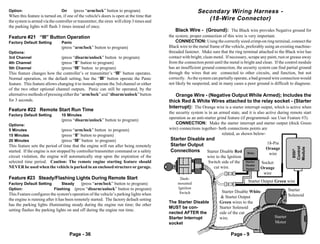
supply power to the chosen vehicle circuit for the duration of the remote start engine              The Installer Programmable Features
run period.
    CONNECTION: Connect this wire to the vehicle's Accessory wire. This                       Installer Programmable Features should only be used by the original
circuit in the vehicle can vary in its function. Typically, its primary function is to        or other qualified installer, AND individual Installer Features should
supply power to the Heat, Ventilation and Air Conditioning (HVAC) system. The                 only be used, where applicable, with the correct wiring connections.
connection point for this wire is also found in the ignition switch wiring harness.
In some cases the correct vehicle wire will show Positive 12 Volts in the "Run"
and "Accessory" ignition key positions but in other vehicles it will show the volt-         The second group of features, the Installer Programmable Features, are accessed as
age only in the "Run" ignition key position. This output should not be used if the          the second level of features’ programming, which is pressing the Valet Switch 10
vehicle's wire also shows voltage when the ignition key is in the "Start" position.         times instead of 5 times when entering Programming Mode (page 42). Caution:
                                                                                            These features have a critical affect upon the system’s operations, and in many
    Green Wire - (Starter Output): When remote starting, this output                        cases, also upon the system’s wiring connections. These features should
supplies 12 Volts Positive to the vehicle's starter circuit. The Green wire is best         NEVER be changed, except by the installer or other qualified professional.
connected when installing the starter interrupt circuit. Its connection point must          This booklet should be consulted for the proper wiring connections, as associated
be on the starter side of the interrupt, not the Ignition Switch side. This is easily       with these programmable features.
accomplished when installing the starter interrupt by combining the Green Starter
Output wire with the starter interrupt's White wire and then connecting both of             The Crime Guard 850i5’s 10 Installer Programmable Features:
these wires to the starter side of the cut vehicle wire. This is explained in further        1     Doorlocking Functions
detail on the next page.                                                                     2     Light Relay Functions
    CONNECTION: The Green wire connects to the vehicle's Starter wire, after                 3     Horn Relay Functions
the starter interrupt. See pages 9 & 10 for specific instructions. The vehicle               4     Turbo Timer
starter wire will show Positive 12 Volts when the ignition key is in the "Start"             5     Manual Transmission Remote Starting
position only. This wire is found in the ignition switch wiring harness, and it is           6     “Tach Wire” or “Tachless” Starter Operations
important to make this connection on the ignition switch side of, and not on the             7     Extended Starter Cranking Time
starter side of, the neutral safety switch.                                                  8     Programmable Remote Start Relay
    Some vehicles have a second Starter wire known as a "Cold Start" wire. When              9     Arm, Disarm or Additional Channels
this second wire is present, there are several options. If the two Starter wires are        10     Gasoline or Diesel Engine
the same circuit, both of them may be connected to the 850i5 Green wire. If the
                                                                                            Use the step-by-step instructions on page 42 to change any of the Installer
two Starter wires are separate circuits, an additional relay may be configured,
                                                                                            Programmable Features, along with the feature’s option choices and related
from the Satellite Relay Port; or the Blue ignition output may be reprogrammed as
                                                                                            programming controller/transmitter button assignment found in the following
a start wire and used.
                                                                                            individual feature descriptions.
  Blue Wire - Programmable Relay Output (default Ignition;
options Starter or Accessory): This large Blue wire is the fourth of 4                      Feature #1 Doorlocking Functions
onboard relays which are dedicated remote starting outputs. However, this output            Factory Default Setting        .8 Second Lock & Unlock Output
is different, in that it is programmable, by Installer Feature #8. This output is factory                                  (press “arm/lock” button to program)
default-set for Ignition operation, or, it may be reprogrammed to operate as an             Options:
Accessory output or as a Start output.                                                      3 Second Lock & Unlock Output         (press “disarm/unlock” button to program)
     CONNECTION: As needed. If used as its default Ignition setting, connection             Double Pulse Unlock Output               (press “II” button to program)
is similar to that of the Yellow ignition output wire. If it is changed, if set as an       Total Closure Lock Output                (press “III” button to program)
Accessory output connection is similar to the White wire; and if set as a Start output      This single feature gives the installer several needed options, to match the 850i5’s
connection is similar to the that of the Green wire.                                        doorlocking outputs to suite different vehicle requirements.
                                      Page - 8                                                                                 Page - 37
Option:                         On     (press “arm/lock” button to program)                                Secondary Wiring Harness -
When this feature is turned on, if one of the vehicle's doors is open at the time that
the system is armed via the controller or transmitter, the siren will chirp 3 times and
                                                                                                              (18-Wire Connector)
the parking lights will flash 3 times instead of once.
                                                                                              Black Wire - (Ground): The Black wire provides Negative ground for
Feature #21 “III” Button Operation                                                        the system; proper connection of this wire is very important.
Factory Default Setting         Panic                                                         CONNECTION: Using the correctly sized crimp-on ring terminal, connect the
                                (press “arm/lock” button to program)                      Black wire to the metal frame of the vehicle, preferably using an existing machine-
Options:                                                                                  threaded fastener. Make sure that the ring terminal attached to the Black wire has
3rd Channel                     (press “disarm/unlock” button to program)                 contact with bright, clean metal. If necessary, scrape any paint, rust or grease away
4th Channel                     (press “II” button to program)                            from the connection point until the metal is bright and clean. If the control module
5th Channel                     (press “III” button to program)                           has an insufficient ground connection, the security system can find partial ground
This feature changes how the controller’s or transmitter’s “III” button operates.         through the wires that are connected to other circuits, and function, but not
Normal operation, or the default setting, has the “III” button operate the Panic          correctly. As the system can partially operate, a bad ground wire connection would
feature. This feature allows changing it to instead operate the 3rd channel or either     not likely be suspected, and in many cases a poor ground is difficult to diagnose.
of the two other optional channel outputs. Panic can still be operated, by the
alternative methods of pressing either the “arm/lock” and “disarm/unlock” button             Orange Wire - (Negative Output While Armed); Includes the
for 3 seconds.                                                                            thick Red & White Wires attached to the relay socket - (Starter
                                                                                          Interrupt): The Orange wire is a starter interrupt output, which is active when
Feature #22 Remote Start Run Time
                                                                                          the security system is in an armed state, and it is also active during remote start
Factory Default Setting         10 Minutes
                                                                                          operation as an anti-starter grind feature (if programmed- see User Feature #3).
                                (press “disarm/unlock” button to program)
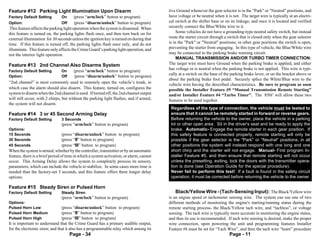
Options:                                                                                      CONNECTION: Make the starter interrupt and starter output (thick Green
5 Minutes                       (press “arm/lock” button to program)                      wire) connections together- both connections points are
15 Minutes                      (press “II” button to program)                                                            related, as shown below-
20 Minutes                      (press “III” button to program)                           Starter Disable and
                                                                                          Starter Output                                           18-Pin
This feature sets the period of time that the engine will run after being remotely


                                                                                                                                                                      Control
                                                                                                                                                                      Module
                                                                                                                                                   Orange
                                                                                          Connections Starter Disable Red


                                                                                                                                                                       850i5
started. If the engine is not stopped by controller/transmitter command or a safety                                                     Relay       wire
circuit violation, the engine will automatically stop upon the expiration of the                                wire to the Ignition
selected time period. Caution: The remote engine starting feature should                                        Switch side of the     Starter   Socket
                                                                                                                                       Disable
NEVER be used when the vehicle is parked in an enclosed structure or garage.                                       cut wire.           Socket    Orange
                                                                                                                                                  wire
Feature #23 Steady/Flashing Lights During Remote Start                                          Dash-
                                                                                               mounted
                                                                                                                                         Starter Output Green wire
Factory Default Setting     Steady   (press “arm/lock” button to program)
Option:                 Flashing (press “disarm/unlock” button to program)                     Ignition                                                             Starter
                                                                                                Switch                   Starter Disable White
This Feature configures the system's operation of the vehicle’s parking lights when                                                                                 Solenoid
                                                                                                                         & Starter Output
the engine is running after it has been remotely started. The factory default setting
                                                                                          The Starter Disable           Green wires to the
has the parking lights illuminating steady during the engine run time; the other
                                                                                          MUST be con-                  Starter Solenoid
setting flashes the parking lights on and off during the engine run time.
                                                                                          nected AFTER the              side of the cut
                                                                                          Starter Interrupt             wire.                             Starter
                                                                                          socket                                                          Motor

                                     Page - 36                                                                                Page - 9
Connect the 18-pin connector’s Orange wire to the Orange wire of the starter               applications is being used to sound the vehicle’s existing horn. This feature changes
interrupt relay socket. Then make the connections which interrupt the vehicle's            only the primary audible output, so that it can be utilized to sound the existing
starter circuit- the starter wire must be located and cut. Cutting the vehicle's starter   horn by itself. This is for cases when the programmable relay is desired for other
wire will result in two sides- the "ignition switch" side and the "starter solenoid"       features, such as unlocking the doors, or as an additional ignition or accessory
side. It is recommended that this connection be done as close to the ignition switch       output should it be needed for the remote starting operation.
as possible. Use a Digital Multimeter (DMM) to find the correct wire.                          The Steady Siren setting is exactly that- a steady output which the electronic
                                                                                           siren requires. When programming this feature for using the output for the vehicle’s
  CAUTION! Avoid the Airbag circuit! Especially avoid any har-                             horn, the optional setting produce pulsed output on the system’s siren wire, in
  ness or wires encased in Yellow or Red tubing or sleeves. Do not                         three different pulse timings, which allow a degree of customizing of the horn’s
  use a standard test light, as it can deploy an airbag or damage                          sound during the alarm activation.
  on-board computers and sensors if the wrong circuits are probed.
  A Digital Multimeter (DMM) should be used.                                               Feature #16 Alarm Functions Bypass
                                                                                           Factory Default Setting        Off    (press “disarm/unlock” button to program)
The starter wire will read Positive 12 Volts only when ignition key is in "start"
                                                                                           Option:                        On     (press “arm/lock” button to program)
position (cranking the engine). Cut this wire at a suitable location. Confirm that
this is the correct wire by turning the ignition switch to the "start" position; the       This feature converts the system into a strictly Remote Keyless Entry System by
                                                                                           eliminating all antitheft alarm-oriented operations and features. When this feature
starter should not engage.
                                                                                           is programmed on, the 850i5 has remote keyless entry and engine starting opera-
    Connect the starter disable socket's Red wire to the ignition switch side. As
                                                                                           tion only.
mentioned in the previous section, connect both the Starter Output Green wire
and the starter disable socket’s White wire to the starter solenoid side. Be sure
that good, solid electrical connections are made.
                                                                                           Feature #17 Ignition Activated Anti-Carjacking Protection
                                                                                           Factory Default Setting        Off    (      “disarm/unlock” button to program)
                                                                                           Option:                        On     (press “arm/lock” button to program)
    Red/Black Wire - (Positive Brake Input): The Red/Black wire
                                                                                           This form of Anti-Carjacking is initiated by the ignition key being turned on. All
must be connected. It is a critical safety feature which disables remote starting
                                                                                           3 forms of Anti-Carjacking protection are described in the Operation Guide.
operations whenever the brake pedal is pressed.
    CONNECTION: Connect the Red/Black wire to the brake switch wire that
shows Positive 12 Volts when the brake pedal is pressed. The brake switch is
typically located above the brake pedal, and usually mounted to the brake pedal            Feature #18 Door Activated Anti-Carjacking Protection
support bracket. Always make this connection in a fashion ensuring its long-term           Factory Default Setting        Off    (press “disarm/unlock” button to program)
reliability; soldering is highly recommended.                                              Option:                        On     (press “arm/lock” button to program)
                                                                                           This form of Anti-Carjacking is initiated by a door being opened. All 3 forms of
 Always perform this test before testing the safety input (next section).                  Anti-Carjacking protection are described in the Operation Guide.
 Upon completing the installation, always test the Red/Black wire's op-
 eration. Attempt to remotely start the vehicle while holding the brake
 pedal depressed; the system should respond with one long and four                         Feature #19 Remote Activated Anti-Carjacking Protection
 short chirps. Release the brake pedal and remotely start the engine.                      Factory Default Setting        Off    (press “disarm/unlock” button to program)
 Once running, pressing the brake pedal should stop the engine.                            Option:                        On     (press “arm/lock” button to program)
                                                                                           This form of Anti-Carjacking is initiated by a signal from the controller or
                                                                                           transmitter. All 3 forms of Anti-Carjacking protection are described in the
    Blue/White Wire - (Safety Input): This circuit performs a critical                     Operation Guide.
safety function for remote start operations. It’s connection depends on whether
the vehicle has an automatic or manual transmission, as well as the use of the
Turbo Timer feature and Manual Transmission Remote Starting feature.                       Feature #20 Open Door Warning Upon Arming
    AUTO TRANSMISSION CONNECTION: The target wire will show Nega-                          Factory Default Setting        Off    (press “disarm/unlock” button to program)
                                     Page - 10                                                                                  Page - 35
Feature #12 Parking Light Illumination Upon Disarm                                        tive Ground whenever the gear selector is in the "Park" or "Neutral" positions, and
Factory Default Setting         On     (press “arm/lock” button to program)               have voltage or be neutral when it is not. The target wire is typically at an electri-
Option:                         Off      (press “disarm/unlock” button to program)        cal switch at the shifter base or on its linkage, and once it is located and verified
 This feature affects the parking light operation when the system is disarmed. When       securely connect the Blue/White wire to it.
this feature is turned on, the parking lights flash once, and then turn back on for            Some vehicles do not have a grounding-type neutral safety switch, but instead
external illumination for 30 seconds unless the ignition key is turned on during that     route the starter circuit through a switch that is closed only when the gear selector
time. If this feature is turned off, the parking lights flash once only, and do not       is in the "Park" or "Neutral" positions; in other gear positions the switch is open,
illuminate. This feature only affects the Crime Guard’s parking light operation, and      preventing the starter from engaging. In this type of vehicle, the Blue/White wire
not the interior light operation.                                                         may be connected to the parking brake warning circuit.
                                                                                               MANUAL TRANSMISSION AND/OR TURBO TIMER CONNECTION:
Feature #13 2nd Channel Also Disarms System                                               The target wire must have Ground when the parking brake is applied, and either
                                                                                          has voltage or is neutral when the parking brake is not applied. This wire is typi-
Factory Default Setting         On     (press “arm/lock” button to program)
                                                                                          cally at a switch on the base of the parking brake lever, or on the bracket above or
Option:                         Off    (press “disarm/unlock” button to program)
                                                                                          about the parking brake foot pedal. Securely splice the White/Blue wire to the
“2nd channel” is most commonly used to remotely open the vehicle’s trunk, in
                                                                                          vehicle wire having the described characteristics. Be sure to program as soon
which case the alarm should also disarm. This feature, turned on, configures the          possible the Installer Feature #5 “Manual Transmission Remote Starting”
system to disarm when the 2nd channel is used. If turned off, the 2nd channel output      and/or Installer Feature #4 “Turbo Timer”. The 850i5 will allow these two
will still occur, with 2 chirps, but without the parking light flashes; and if armed,     features to be used together.
the system will not disarm.
                                                                                           Regardless of the type of connection, the vehicle must be tested to
Feature #14 3 or 45 Second Arming Delay                                                    ensure that it cannot be remotely started in forward or reverse gears.
Factory Default Setting         3 Seconds                                                  Before returning the vehicle to the owner, place the vehicle in a parking
                                (press “arm/lock” button to program)                       lot or other open area. Sit in the driver's seat and be ready to apply the
Options:                                                                                   brake. Automatic- Engage the remote starter in each gear position. If
15 Seconds                      (press “disarm/unlock” button to program)                  this safety feature is connected properly, remote starting will only be
30 Seconds                      (press “II” button to program)                             possible if the gear selector is the "Park" or "Neutral" positions; in all
45 Seconds                      (press “III” button to program)                            other positions the system will instead respond with one long and one
When the system is armed, whether by the controller, transmitter or by an automatic        short chirp and the starter will not engage. Manual- First program In-
feature, there is a brief period of time in which a system activation, or alarm, cannot    staller Feature #5, and then ensure that remote starting will not occur
occur. This Arming Delay allows the system to completely process its sensory               unless the presetting, exiting, lock the doors with the transmitter opera-
parameters, which can include the vehicle to stabilize. In some cases more time is         tion is done (see Operation Guide for the special procedure).
needed than the factory-set 3 seconds, and this feature offers three longer delay          Never fail to perform this test! If a fault is found in the safety circuit
options.                                                                                   operation, it must be corrected before returning the vehicle to the owner.

Feature #15 Steady Siren or Pulsed Horn
Factory Default Setting         Steady Siren                                                  Black/Yellow Wire - (Tach-Sensing Input): The Black/Yellow wire
                                (press “arm/lock” button to program)                      is an engine speed or tachometer sensing wire. The system can use one of two
Options:                                                                                  different methods of monitoring the engine's starting/running status during the
Pulsed Horn Low                 (press “disarm/unlock” button to program)                 remote starting process- the Black/Yellow tach wire, and “tachless”, or voltage
Pulsed Horn Medium              (press “II” button to program)                            sensing. The tach wire is typically more accurate in monitoring the engine status,
Pulsed Horn High                (press “III” button to program)                           and thus its use is recommended. If tach wire sensing is desired, make the proper
It is important to understand that the Crime Guard has a primary audible output,          wire connection, upon powering the unit and programming features Installer
for the electronic siren; and that it also has a programmable relay which among its       Feature #6 must be set for “Tach Wire”, and then the tach wire “learn” procedure
                                      Page - 34                                                                               Page - 11
must be performed.                                                                       Off                       (press “disarm/unlock” button to program)
     CONNECTION: Connect the Black/Yellow wire to the vehicle's tach wire,               Chirps Excepting Valet Mode               (press “II” button to program)
which is typically found in the engine compartment, although in some cases it may        Chirps in Valet Mode Only           (press “III” button to program)
also be located inside the vehicle. Caution! Route this wire carefully to prevent        This feature removes the system’s 1 arming and 2 disarming confirmation chirps.
its possible shorting to ground. To use a multimeter to verify the correct tach wire,    When this feature is used to remove these chirps, the system will still have 3 chirps
set it for AC Volts scale. The correct wire will read 1 to 6 volts AC with the engine    upon arming if a protected zone is violated, and still have 4 chirps upon disarming
idling, and the reading will increase when engine speed (RPM) increases.                 if the system was previously activated. Using this feature to turn off the arm and
                                                                                         disarming chirps will also not affect the Prewarning operation, Unauthorized
  TACH LEARNING PROCEDURE: As mentioned, the tach wire method is                         Transmitter Alert (if used), nor will it affect the chirps used when programming.
  typically more accurate in monitoring the engine status, and a special “learning            The other two settings will have the confirmation chirps operate only when the
  procedure” programs the tach signal to the 850i5’s microprocessor. The tach            system is in Valet Mode, and not otherwise; or, the chirps will operate except when
  learning procedure should be performed after the installation has been com-            the system is in Valet Mode.
  pleted, but before activating the remote start feature. To perform the proce-
  dure:                                                                                  Feature #10 Confirmation Chirp Volume
  Step 1 Turn the ignition switch “on”, then “off”.                                      Factory Default Setting        Medium High
  Step 2 Within 5 seconds, press the brake pedal 5 times.                                                               (press “II” button to program)
  Step 3 Use the key to start the engine; the siren will chirp to indicate the           Options:
            unit is in tach learning mode.                                               Low (softest)                  (press “arm/lock” button to program)
  Step 4 When the Status Light turns Green the tach signal is learned.                   Medium Low                     (press “disarm/unlock” button to program)
           Turning the ignition “off” or pressing the brake removes the unit from        High (loudest)                 (press “III” button to program)
            tach learning mode.                                                          This feature allows the choice of four different volume levels of the system’s
                                                                                         confirmation chirps, and when programming it, the buttons can be repeatedly and
    Brown Wire - (Positive Siren Output): The Brown wire is a 1 Amp                      sequentially pressed, thus making it easy to hear and choose the setting with the
                                                                                         best chirp volume.
Positive output designed to operate the electronic siren for audible confirmations,
                                                                                             This feature operates regardless of how feature #15, “Steady Siren” or “Pulsed
and to sound if the alarm is triggered.
                                                                                         Horn” is set.
   SIREN CONNECTION: The Brown wire may be connected directly to the
siren's Red wire, and the siren's Black wire is connected to (-) Ground.
   SIREN MOUNTING: Find a location in the engine compartment away from the               Feature #11 Alarm Duration
extreme heat of the engine and manifold. A suitable location will offer a firm           Factory Default Setting        30 Seconds
mounting surface, will also allow sound dispersion out of the engine compartment,                                       (press “arm/lock” button to program)
                                                                                         Options:
and not be accessible to a thief. The siren must be pointed downward to avoid
                                                                                         60 Seconds                     (press “disarm/unlock” button to program)
moisture getting inside it and to enhance sound dispersal.
                                                                                         90 Seconds                     (press “II” button to program)
   SIREN CHIRPS: The siren itself can be set for loud or less loud confirmation
                                                                                         120 Seconds                    (press “III” button to program)
chirps- cut the short Black wire loop on the siren for louder confirmation chirps.
The confirmation chirps volume may also be adjusted to four different volume             This feature allows four choices of the Alarm Duration, which is the period of time
levels by User Programmable Feature #10. User Programmable Feature #9 turns              for which the system sounding the siren (and/or horn, optionally) and flashes the
the chirps off completely, or it can also set the system to only chirps in valet mode,   parking lights when it is triggered. Caution: Before lengthening the Alarm
or to chirp except when the system is in valet mode.                                     Duration you should always check and determine if there are any local anti-
                                                                                         noise or nuisance ordinances to avoid the possibility of the system user
 HORN CONNECTION: The Crime Guard 850i5 can sound the vehicle’s                          receiving a violation citation.
 existing horn in addition to, or in place of, the electronic siren. Sounding the horn
 is accomplished by one of the programmable relays; see pages 18 and 19.
                                    Page - 12                                                                                Page - 33
Feature #6 Doors Lock With Ignition On                                                          White Wire - (Positive Flashing Light Output): This is a Positive
Factory Default Setting         On      (press “arm/lock” button to program)               12 Volt output to flash the vehicle's parking lights for visual arming confirmation,
Option:                         Off     (press “disarm/unlock” button to program)          to illuminate them for disarming confirmation, to confirm remote starting, and to
This feature configures the system to automatically lock the vehicle’s doors every         attract attention while the system is activated. The 850i5 also has a Negative
time that the ignition switch is turned on. An exception to this would be if feature       version of this wire- see the following White/Black wire description.
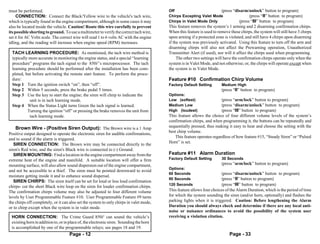
#8 is turned on, and a door being open when the ignition switch is turned on. The               CONNECTION: Connect this wire to the vehicle's Positive 12 Volt parking
following feature #7 controls the automatic unlocking operations, and feature #8           light circuit, which can usually be found at the following locations: at the headlight
provides for an override of this automatic locking if a door is open when the ignition     switch, at the fuse/junction block, or in the rear body harness in the driver kick
is turned on.                                                                              panel. Some vehicles have a parking light relay which is triggered by a Negative
                                                                                           Ground circuit from the headlight switch; for these vehicles, use the White/Black
Feature #7 Doors Unlock With Ignition Off                                                  Negative Flashing Parking Light output wire instead..
Factory Default Setting         On (all doors will unlock)*                                     The correct wire will show Positive 12 Volts when the headlight switch is in the
                                (press “III” button to program)                            "Parking Light" and "Head Light" positions. When such a wire is located, also test
Options:                                                                                   to ensure that it is non-rheostated: meter the wire operate the dash light dimmer
Off                         (press “arm/lock” button to program)                           control; the correct wire will show no voltage change when the dimmer is operated.
Driver’s Door Only*              (press “disarm/unlock” button to program)
All Doors Except Driver’s Door*        (press “II” button to program)                        Do not connect the White wire to a rheostated (dimmer) circuit!
Similar to the previous locking feature, except this feature controls the unlock             This will backfeed the parking lights through the rheostat or illumination
operations when the ignition is turned off, and it has more options because of the           control module, and possibly cause damage to the vehicle or security
850i5’s multiple unlocking outputs.                                                          system control unit. Flashing the headlights is not recommended.
    *Multiple unlock outputs offer the capability of unlocking only the driver’s
door when the system is disarmed (Driver Door Priority Unlocking), and then the            Another cautionary note is that the halogen headlights found in modern vehicles
option of unlocking all doors with a second press of the “disarm/unlock” button.           are not designed to be rapidly turned on and off, and if connected to the security
The driver’s door unlocking differently from the other doors must be config-               system, a reduction of their useful life may be occur. If flashing the headlights is
ured when the system is installed!                                                         still desired, a relay must be used, since the headlight's current draw exceeds the 10
    If the system is installed without the Driver’s Door Priority Unlocking                amp rating of the built-in relay. If flashing headlights and parking lights are desired,
interface, this feature unlocks all of the doors when the ignition switch is turned off.   use two relays - configure one relay to supply the parking lights and the other relay
If Driver’s Door Priority Unlocking is installed, this feature can control only the        to supply the headlights.       Caution: Do not connect to the dimmer circuit!
driver’s door unlocking when the ignition is turned, all doors unlocking, or all doors                                              Damage can occur to the unit & the vehicle.
except the driver’s. The following feature provides for an override of this automatic              54321                                                              7654321
                                                                                                                                                                      7654321
unlocking if a door is open when the ignition is turned off.
                                                                                                   54321
                                                                                                   54321                               White                          7654321
                                                                                                                                                                      7654321
                                                                                                   54321        Dash Lights                                           7654321
                                                                                                   54321
                                                                                                   54321                                wire                          7654321
                                                                                                                                                                      7654321
                                                                                                   54321                                            850i5
                                                                                                   54321                               10 Amp                        976543211
                                                                                                                                                                      8765432
                                                                                                                                                                      7654321
Feature #8 Open Door Bypass of Ignition Locking                                                    54321
                                                                                                   54321
                                                                                                                                                   Control           976543211
                                                                                                                                                                      8765432
                                                                                                                              21                   Module            987654321
                                                                                                                                                                     976543211
                                                                                                                                                                      76543211
                                                                                                                                                                      8765432
Factory Default Setting         On      (press “arm/lock” button to program)                                                  21
                                                                                                                              21
                                                                                                                                                                     97654321
                                                                                                                                                                      8764321
                                                                                                                                                                         5432
                                                                                                                  Dimmer      21                                     987654311
                                                                                                                                                                     976543211
                                                                                                                                                                         4322
                                                                                                                                                                    Parking
                                                                                                                                                                     987654311
                                                                                                                                                                      8765432
                                                                                                                                                                         4322
Option:                         Off     (press “disarm/unlock” button to program)                 Parking                                                                432
                                                                                                                                                                     987654311
                                                                                                  Lights                                                            Lights
                                                                                                                                                                         4321
                                                                                                                                                                            2
                                                                                                                                                                     987654311
                                                                                                                                                                      67654321
This feature cancels the automatic locking or unlocking of the vehicle’s doors                                                                    Head                6544322
                                                                                                                                                                       543211
                                                                                                                                                                     987654311
                                                                                                                                                                     98543212
                                                                                                                                                                         432
                                                                                                                                                                      6 321
                                                                                                                                                                         432
                                                                                                 654321                                                              987654311
                                                                                                                                                                      67654321
                                                                                                                                                                       543211
                                                                                                                                                                         4322
should one of the doors is open when the ignition switch is turned on or off.                    654321
                                                                                                 654321                                          Light               9854321
                                                                                                                                                                      6 432
                                                                                                                                                                     987643211
                                                                                                                                                                      6545432
                                                                                                 654321                                          Switch               654321
                                                                                                                                                                         321
                                                                                                 654321
                                                                                                 654321                                                               654321
                                                                                                                                                                      654321
                                                                                                 654321          Junction                                             654321
Feature #9 Confirmation Chirps                                                                   654321
                                                                                                 654321           Block               Rear Body Harness
                                                                                                                                                                      654321
                                                                                                                                                                      654321
                                                                                                 654321                                                               654321
Factory Default Setting         On                                                                                                                                    654321
                                (press “arm/lock” button to program)
Options:                                                                                        Recommended Connection Points For The White Wire
                                      Page - 32                                                                  Page - 13
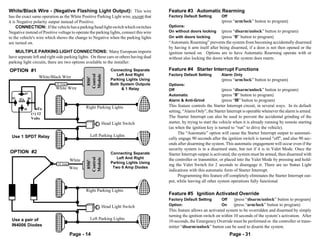
White/Black Wire - (Negative Flashing Light Output): This wire                          Feature #3 Automatic Rearming
has the exact same operation as the White Positive Parking Light wire, except that      Factory Default Setting        Off
it is Negative polarity output instead of Positive.                                                                    (press “arm/lock” button to program)
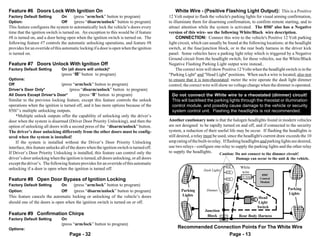
     CONNECTION: If the vehicle has a parking/head light switch which switches          Options:
Negative instead of Positive voltage to operate the parking lights, connect this wire   On without doors locking       (press “disarm/unlock” button to program)
to the vehicle's wire which shows the change to Negative when the parking lights        On with doors locking          (press “II” button to program)
are turned on.                                                                          “Automatic Rearming” prevents the system from becoming accidentally disarmed
                                                                                        by having it arm itself after being disarmed, if a door is not then opened or the
   MULTIPLE PARKING LIGHT CONNECTIONS: Many European imports                            ignition turned on. Options are to have Automatic Rearming operate with or
have separate left and right side parking lights. On these cars or others having dual   without also locking the doors when the system does rearm.
parking light circuits, there are two options available to the installer:
OPTION #1                                                     Connecting Separate       Feature #4 Starter Interrupt Functions
                                                                 Left And Right         Factory Default Setting        Alarm Only


                                                 Control
                                                 Module
                       White/Black Wire

                                                  850i5
                                                              Parking Lights Using                                     (press “arm/lock” button to program)
                               10 Amp                         Both System Outputs       Options:
                               White Wire                           & 1 Relay           Off                            (press “disarm/unlock” button to program)
             87                321
                               321                                           654321
                                                                             654321     Automatic                      (press “II” button to program)
  85   87a    86               321                                           654321
                               321
                               321
                                                                             654321
                                                                             654321     Alarm & Anti-Grind             (press “III” button to program)
                               321
                               321               Right Parking Lights
                                                                             654321
                                                                             654321     This feature controls the Starter Interrupt circuit, in several ways. In its default
         30            To      321                                           654321
                               321
                               321
                                                                             65432111
                                                                             8764322
                                                                                543
                                                                             67633211
                                                                             85442111   setting, “Alarm Only”, the Starter Interrupt is operable whenever the alarm is armed.
                   (+) 12                                                    6763212
                                                                                543
                                                                             85443211
                                                                             6543322
                                                                                543
                                                                             85442111
                                                                              763212
                                                                                543     The Starter Interrupt can also be used to prevent the accidental grinding of the
                   Volts                                                     6 5432
                                                                             87643211
                                                                             87643211
                                                                                5432
                                                         Head Light Switch   85443211
                                                                             85442111
                                                                             6763322
                                                                                543     starter, by trying to start the vehicle when it is already running by remote starting
                                                                             8544212
                                                                             6763212
                                                                                543
                                                                                543
                                                                             676332
                               321                                           85442111
                                                                             65433211
                                                                              763212
                                                                                543
                                                                             6544322    (as when the ignition key is turned to “run” to drive the vehicle).
                               321                                           6 543
                                                                             876321
                               321                                           654321           The “Automatic” option will cause the Starter Interrupt output to automati-
 Use 1 SPDT Relay
                               321
                               321                 Left Parking Lights       654321
                                                                             654321
                               321
                               321
                                                                             654321
                                                                             654321     cally engage 90 seconds after the ignition switch is turned "off", and also 90 sec-
                               321                                           654321
                               321
                               321                                           654321     onds after disarming the system. This automatic engagement will occur even if the
                                                                                        security system is in a disarmed state, but not if it is in Valet Mode. Once the
OPTION #2                                                     Connecting Separate       Starter Interrupt output is activated, the system must be armed, then disarmed with
                                                                 Left And Right
                                                 Control
                                                 Module


                                         White                                          the controller or transmitter, or placed into the Valet Mode by pressing and hold-
                                                  850i5


                                10 Amp                        Parking Lights Using
                                                                                        ing the Valet Switch for 2 seconds to disengage it. There are no Status Light
                                         Wire                  Two 6 Amp Diodes
                                                                                        indications with this automatic form of Starter Interrupt.
                               321                                           654321           Programming this feature off completely eliminates the Starter Interrupt out-
                               321                                           654321
                               321
                               321                                           654321
                                                                             654321     put, while leaving all other system operations fully functional.
                               321                                           654321
                               321
                               321                                           654321
                                                                             654321
                               321               Right Parking Lights        654321
                               321
                               321
                                                                             65432111
                                                                             8764322
                                                                                543
                                                                             67633211
                                                                             85443211
                                                                             85442111
                                                                             6763212
                                                                                543     Feature #5 Ignition Activated Override
                                                                             8544212
                                                                                543
                                                                             6763322
                                                                                543     Factory Default Setting        Off    (press “disarm/unlock” button to program)
                                                                             85442111
                                                                             67643211
                                                                                3322
                                                                                5432
                                                                             6763432
                                                                             854321
                                                                                5
                                                         Head Light Switch   85443211
                                                                             85442111
                                                                             6763212
                                                                                543
                                                                             676532
                                                                                  43    Option:                        On     (press “arm/lock” button to program)
                                                                             85442111
                                                                             65443211
                                                                              763212
                                                                                543
                               321                                           85433211
                                                                             6763212
                                                                             8 543
                                                                             6764322
                                                                                543     This feature allows an activated system to be overridden and disarmed by simply
                               321                                           654321
                               321
                               321
                                                                             654321
                                                                             654321     turning the ignition switch on within 10 seconds of the system’s activation. After
 Use a pair of                 321                 Left Parking Lights       654321
                               321
                               321                                           654321
                                                                             654321     10 seconds, the Emergency Override must be performed or the controller or trans-
 IN4006 Diodes                 321
                               321                                           654321
                                                                             654321     mitter “disarm/unlock” button can be used to disarm the system.
                               321
                               321
                                         Page - 14                                                                           Page - 31
Feature #1 SecureCode                                                                         Blue Wire - Negative Instant Trigger: The Blue wire is a Negative
Factory Default Setting       1 Press                                                     instant trigger used primarily to detect entry into the hood or trunk area of a vehicle.
Options:                                                                                  The Blue wire is also an important safety circuit for remote starting operations
1 to 9 presses, in each of two stages                                                     so installation of a hood pin switch is required.
SecureCode is a unique patented feature which allows the user to custom select the            CONNECTION: The included pin switches may be installed to provide this
number of Valet Switch presses in two stages, instead of a single “1 press”, which        trigger circuit; or, if there are existing switches the Blue wire may be connected
would be required in order to perform an Emergency Override. If any of the three          directly, provided this is a negative ground switching circuit (examples: an OEM
anti-carjacking features are utilized, a customized SecureCode would also be              antitheft hood switch, or in the case of the trunk or hatch a light in the luggage
required to turn it off once it is fully activated. The SecureCode operation is           compartment or a "Trunk Ajar" light in the dash).
described in detail the Operations Guide.                                                     An indication of such a circuit is the wire having no voltage present when the
                                                                                          hood or trunk is open, and up to 12 volts when the hood or trunk is closed. This wire
    To custom program a new SecureCode:                                                   may be used with a mercury type of tilt switch, by itself, but it cannot be used with
Step 1 Follow Steps 1 to 4 in the previous “How to Program Features” instruc-             existing hood or trunk lights which have an internal mercury switch. If the vehicle
       tions; at Step 4 the Valet Switch will be pressed and released once (the           is equipped with a usable trunk or hood circuit, locate the proper wire and splice the
       siren chirps once) to access “feature #1”.                                         Blue wire directly to the vehicle's wire. If not, then you must install a pin or mercury
Step 2 Within 10 seconds slowly press and release the controller or transmitter’s         switch, for open hood safety, and carefully adjust and test it.
       “arm/lock” button the number of times equal to the desired SecureCode                  Multiple use of the Blue wire: When wiring more than one of the vehicle's
       for stage 1, allow the system to respond to each controller/transmitter            circuits and/or additional circuits to this wire, diode-isolation is usually required to
       button press with a siren chirp before pressing the button again.                  maintain each circuit's proper independent operation. An example would be wiring
                                                                                          a hood pin switch and trunk light switch together. Without isolating, the trunk light
Step 3 After entering the first stage by pressing the “arm/lock” button the
                                                                                          will turn illuminate whenever the hood is raised. Also, diode-isolation is necessary
       desired number of times, and receiving a chirp for each press, wait for the
                                                                                          when combining electronic sensors together, or when adding a sensor in the same
       system, after the final button press, to chirp the siren again the total           circuit as the pin switches.
       number of times that the button was pressed.
Step 4 Continue to configure stage 2 of the SecureCode by now pressing and                        Diode-Isolating Multiple Negative Instant Triggers
       releasing the “disarm/unlock” button the number of times desired for the
       stage 2. This should be done in the exact same fashion as the stage 1 entry-
       press the “disarm/unlock” button, wait for a single chirp before pressing                    Trunk        Trunk                           Hood           Optional
       the button again, and then when final button press is done, wait after the                   Light         Pin                             Pin           Electronic
       single chirp for the siren to chirp the total number entered Valet Switch                                 Switch                          Switch          Sensor
       entry.

Feature #2 Last Door Arming
Factory Default Setting         Off
                                (press “arm/lock” button to program)
Options:                                                                                                               Blue (-) Instant Trigger Wire.
On without doors locking        (press “disarm/unlock” button to program)
On with doors locking           (press “II” button to program)                                        850i5
“Last Door Arming” has the system automatically arm itself every time the operator                                              Use IN4002 Diodes to isolate
                                                                                                     Control
exits the vehicle and closes the door. This feature turns that operation on or off, and                                         each switch or device
                                                                                                     Module
with options of having Last Door Arming operate with or without also locking the
doors when the system does arm.
                                     Page - 30                                                                                 Page - 15
Green Wire - (Negative Door Trigger): The Green wire is an "open                                  - SEE PAGE 42 FOR PROGRAMMING INSTRUCTIONS -
door" input to the control module for vehicles having Negative switching door pin
switches. This wire is most commonly connected to the vehicle interior light                  Each of the Programmable Features is described in detail in the
system.                                                                                       following pages. The User Programmable Features are described as a
            Typical Negative Switching Interior Light System                                  first group, and the Installer Programmable Features as a second group.
                                                      3210987654321
                                                      3210987654321
The Driver Pin Switch will often have                 3210987654321
                                                      3210987654321
an extra wire that activates the “ignition            3210987654321
                                                      3210987654321
key in switch” warning chime. This
                                                      3210987654321
                                                      3210987654321
                                                      3210987654321   Interior Light                    The User Programmable Features
circuit will activate the security system,            3210987654321
                                                      3210987654321
                                                      3210987654321                          This group of User Programmable Features are all accessed as a group in the first
but only from the driver's door, and is               3210987654321
the incorrect trigger wire >
                                                      3210987654321
                                                                           (+)12 Volts       level of features’ programming. These features have a direct affect upon the
                                          This is the                                        system’s operations, so the programming and operation of each are described.
        1                              correct "trigger”                    1                The Crime Guard 850i5’s 23 User Programmable Features:
        1                              wire - connection
                                                                            1
        1                                                                   1                 1     SecureCode
        1
        1                              may be made at                       1
                                                                            1                 2     Last Door Arming
  Driver
        1
        1121
        21                                 any point                        1
                                                                            1    Passenger
        2
        1
        1121
        21                                                                  1
                                                                            1                 3     Automatic Rearming
                                                  F
   Pin  2
        11
        2                                                                   1      Pin        4     Starter Interrupt Functions
  Switch1                                                                   1     Switch
        1                                                                   1                 5     Ignition Activated Override
        1                                                                   1                 6     Doors Lock With Ignition On
    CONNECTION: Connect the Green wire to a wire in the vehicle that is                       7     Doors Unlock With Ignition Off
common to all the door pin switches; the correct wire in this type of interior or dome        8     Open Door Bypass To Previous Two Features
light/door jamb pin switch system will have no voltage present and will also show             9     Confirmation Chirps
chassis ground when the doors are opened, and up to 12 volts when the doors are              10     Confirmation Chirp Volume
closed.                                                                                      11     Activated Alarm Cycle
                                                                                             12     Lights On Upon Disarm
    Violet Wire - (Positive Door Trigger): The Violet wire is identical to                   13     Disarm Alarm Upon Trunk Release
the Green Door Trigger wire, with the sole exception that it is an open door input           14     Arming Delay
to the control module for vehicles having Positive 12 volt door pin switches.                15     Steady Siren Output / Pulsed Horn
            Typical Positive Switching Interior Light System                                 16     Alarm Functions Bypass
Note: The Driver Pin Switch
                                               210987654321
                                               210987654321                                  17     Ignition Activated Anti-Carjacking Protection
                                               210987654321
will often have an extra wire;                 210987654321
                                               210987654321     Interior                     18     Door Activated Anti-Carjacking Protection
                                               210987654321
this circuit will activate the se-             210987654321
                                               210987654321      Light                       19     Remote Activated Anti-Carjacking Protection
curity system, but only from the     This is   210987654321
                                               210987654321                                  20     Open Door Warning Upon Arming
driver's door. This is the incor-              210987654321
                                     the correct
                                               210987654321                                  21     III Button Operation
rect activation wire >                         210987654321
                                               210987654321
                                     “trigger” wire              To Chassis                  22     Remote Start Run Time
Driver                               - connection                                Passenger
                                                                  Ground            Pin      23     Steady / Flashing Lights During Remote Start
 Pin                                 may be made at
Switch
    211
    211
    21
    21                                      F
                                     any point                                    Switch
                                                                                                 Use the step-by-step instructions on page 42, and the complete features matrix
    21                                                                                       on page 43, to change any of the programmable features. Each feature, the option
                                                                  To Constant                choices and related programming controller/transmitter button assignment are
                                                                    12 Volt                  described in detail in the following pages.
                                           Page - 16                                                                           Page - 29
Accessory Wiring Harness -                                                   The correct wire for a Positive switching type of dome light/door jamb pin
                                                                                            switch system will have 12 volts present when the doors are opened, and chassis
                  Satellite Remote Start Port                                               ground when the doors are closed.
                    (Red 3-Pin Connector)                                                      CONNECTION: Connect the Violet wire to a wire in the vehicle that is
    Dual Remote Start Satellite Relay Ports: These two ports provide for                    common to all the door pin switches; the correct wire for this type of dome light/
even more Ignition, Accessory, or Starter outputs, for remote starting use. These           door jamb pin switch system will have 12 volts present when the doors are opened,
outputs are Negative 250mA, and a third pin in both ports is +12 Volts for the              and chassis ground when the doors are closed.
optional relay coils. A short non-terminated harness is included, to access either
port, and available as an optional service part is a socket and two relays (part # RS-
RP) that converts these outputs into high-amperage Positive voltage. Omega plug-              Notes and Tips, both types of Interior Light or Door Trigger
in OEM antitheft bypasses can also utilize the Red port. The pin-outs of both Red             circuits: The correct wire will show this change when any of the doors are
and Blue ports are shown with the RS-RP wiring.                                               opened. If the vehicle has delay-off or “fade away” interior lights, remember
                                                                                              to take this into account when testing the wire. If the pin switch is mounted
                                                                                              in the metal structure of the vehicle, and the interior lighting goes out when the
    Backup Battery Port, Harness and Bracket                                                  switch is removed, suspect a grounding switch-type lighting system.
            (White 2-Pin Connector)                                                                 Switches controlling interior lighting may be found in several locations-
   If the backup battery feature is desired, insert the 9-volt battery and secure it into     the front or rear door jamb area, as the traditional “pin switch” or sliding
the mounting bracket. Plug the 2-pin wiring harness onto the battery; slide this              switch; or as switches inside the doors, either connected to the exterior door
assembly onto the 850i5 control module case (see the Wiring Overview on page 23)              handles or to the latching mechanism. A vehicle which has the interior lights
and then plug the 2-pin connector into the backup battery port.                               illuminating when the outside door handle is lifted is an example of this type
                                                                                              of switching system.
                           Sensor Ports                                                             Also be aware of vehicles which diode-isolate each door. Typically, this
                                                                                              is usually encountered with dash displays that indicate individual doors being
                      (Two White 4-Pin Ports)                                                 ajar. The proper wire to connect to in this type of system is the common wire
    Install the included impact and glass breakage sensor according to the instruction        which is routed directly to an interior light that illuminates when any door is
sheet included with it, and then plug its wiring harness into either of these ports           opened.
(their operation is the same). The second port allows an easy plug-in addition of an
optional second sensor.

                               Data Port                                                      Gray Wire - (2nd Channel or Negative Trunk Release Out-
                           (Green 4-Pin Port)                                               put): The Gray wire is an optional output operated by the controller/transmitter
    Omega data bus interface modules, and remote start bypass modules, are                  “II” button; typically the primary use is for trunk release.
available as analog-operated, and as direct data-to-data (D2D) devices. The former              CONNECTION: If the vehicle's existing trunk release switch operates as
may be operated by connection to the 850i5’s DLS port, or to its Satellite Relay            switching Negative to activate trunk release, and draws 250mA or less, the Gray
Ports. The later are the Omega IntelliKit data bus interface modules and bypass kits,       wire may connected directly to the vehicle’s switch output wire. If the target wire
which simply plug into this Orange port. Either type of Omega accessory module              is Positive switching, and/or draws more than 250mA, an optional relay must be
includes its own vehicle-specific instructions. Please refer to the Omega website,          used. To configure a relay to the Gray wire, connect it to relay pin (85), and
www.caralarm.com for the latest vehicle-specific application guide. Although                connect Constant Positive 12 Volts to relay pin (86). Connect pin (30) to power,
other brands of data bus modules may physically plug into the 850i5 data port,              or ground, as needed. Pin (87) is then connected to the vehicle's trunk wire.
only genuine Omega IntelliKit modules offer the highest consistent quality and
dependable operation. Always choose Omega databus product for use with this
port.
                                     Page - 28                                                                                  Page - 17
Secondary Wiring Harness -
                         Programmable Internal Relays                                                                                                                     DLS Red connector
                             (18-Wire Connector)                                                      5 Wire Reversal Doorlocks                                           plugs into Control
                                                                                                         Using The Optional                                                            Unit
     A unique feature of the Crime Guard 850i5 which offers great installation flex-                        DLS & 2 Relays
ibility is two built-in single pole, double throw (SPDT) relays, which are pro-                             (wire colors are  Relay                  Relay
grammable for several types of operation. Each relay is externally wired with a                           the same for other
normally-closed load input wire (N/C or “87a”); a common load output wire (COM                            Omega interfaces)
                                                                                                                                               DLS
or “30”); and a normaly open (N/O or “87”) wire which switches to the COM
wire when the relay is activated. These programmable relay wires are the remain-
                                                                                                                        Violet wire to
ing six wires of the 18-wire connector, and each of the relays’ 3 wires are a gener-
                                                                                                                           Constant
ous length of joined ribbon wire, for ease of installation.                                                              (+) 12 Volts.
     The default setting, and functions of the programmable relays are Dome Light
                                                                                                          Driver                                                                   Passenger
Supervision and Horn. Other functions are available, via the Installer Program-
                                                                                                         Doorlock         White wire                             Green wire        Doorlock
mable features #2 and #3, as shown here:                                                                  Switch        to the "Switch"                        to the "Motor"       Switch
      Installer Feature                     Default       1st option   2nd option    3rd option                Unlock      side of the                           side of the       Unlock

 #2 Light Relay Functions Dome Light (L)                   Lock (U)   Ignition (2)   Accessory (3)                      cut “lock” wire.                        cut “lock” wire.
 #3 Horn Relay Functions Horn, med. (L)                    Unlock (U) Ignition (2)   Accessory (3)                                       Cut    both the     “lock”
    The features may be programmed by turning the ignition on, off, then pressing
                                                                                                                                         and    “unlock”      wires.*
the Valet Switch 10 times (producing a Green Status Light), and then pressing the
Valet Switch two or three times more to select the features. Settings are then                                                      Brown wire           Blue wire
                                                                                                                Lock                                                                Lock
changed by pressing the controller/transmitter buttons as indicated after each choice.                                         to the "Switch"           to the "Motor"
                                                                                                                                 side of the cut         side of the
   CONNECTIONS: Using the Programmable Relays The defaulted                                                                     “unlock” wire.           cut “unlock” wire.
and optional uses of these relays are described in the following diagrams.
                                                                                                      Driver                                                                  Passenger
                                                                                                      Motors                                                                   Motors
             Relays’ Default Settings
                                     #2 “Light” Relay Ribbon Cable - option “DOME”                                 Cutting only one of two wires can cause
                                     -(N/O, 87)-      -Black/Red-    + or - : as needed                            misleading test results. For example, if
               (18-Wire Connector)
               Secondary Harness


                                     -(COM, 30)-     -Green/Violet   Output: to interior light wire                only the “lock” wire is cut, the “switch”
                                     -(N/C, 87a)-     -White/Red-    Input: not typically used                     side of the cut will show (+)12 Volts when
Programmable                                                                                                       the primary switch is pushed to the "lock"
    Relays                           #3 “Horn” Relay Ribbon Cable - option “HORN”                                  position and the “motor” side of the cut
                                     -(N/O, 87)-     -Violet/Black-  + or - : as needed                            will show (+)12 Volts when the primary
                                     -(COM, 30)-      -Blue/Black-   Output: to vehicle horn wire
                                     -(N/C, 87a)-    -Brown/Black-   Input: not used
                                                                                                                   switch is pushed to the "unlock" position.

                               Notes- Interior or dome light circuits can be found as Negative or
    850i5
   Control
                           Positive, although Negative is more common. Horn connections typically
   Module                  switch Negative; if found as Positive, do not exceed 10 Amps load.
 “Dome Light” setting illuminates upon disarming only. “Horn” setting
 operates relay exactly the same as the electronic siren’s operations.
                                                      Page - 18                                                                            Page - 27
3 Wire Positive Pulse                   Relays’ 1st Optional Settings
  DLS Brown & White wires                                      Doorlocks Using An                                #2 “Light” Relay Ribbon Cable - option “LOCK”
  are not used in this system.                               Optional DLS & 2 SPDT                               -(N/O, 87)-         -Black/Red-          + or - : likely +; see notes


                                                                                                        (18-Wire Connector)
                                                                                                        Secondary Harness
                                  Relay     Relay                           Relays                               -(COM, 30)-        -Green/Violet         Output: to car “lock” wire*
                                                         DLS Red connector                                       -(N/C, 87a)-        -White/Red-          Input: needed if reversal*
    DLS Violet Wire                                        plugs into the                                                                                        *see notes
                                     DLS                                                 Programmable
      to Constant                                         850i5’s Red port.                  Relays              #3 “Horn” Relay Ribbon Cable - option “UNLOCK”
                                                                              Door
     (+)12 Volts.                                                                                                -(N/O, 87)-        -Violet/Black-        + or - : likely +; see notes
                                                                              Motors
                                                                                                                 -(COM, 30)-         -Blue/Black-         Output: to car “unlock” wire*
             DLS Green wire to        DLS Blue wire to                                                           -(N/C, 87a)-       -Brown/Black-         Input: needed if reversal*
            Switch “lock” wire.       Switch “unlock” wire.                                                                                                      * see notes
     Doorlock Switch                                                                               5          Notes- Use the 850i5’s “DLS” doorlock output port for “3 Wire Nega-
                                                                                              850i
                                                    Vehicle's Doorlock                       Control          tive Pulse” systems. These relays are perfect for “3 Wire Positive Pulse”
                                                    Relay Control Unit                       Module           and “5 Wire Reversal” systems. If 3 Wire Positive, connect both relay
                                                                                            N/O wires to Positive; relay N/C wires are not used. If 5 Wire Reversal system, connect
                                                    Unlock
  +12V                                                                                      both N/O wires to Positive; connect relay N/C wires to the doorlock switch side, connect
                                                    Lock
                                                                                            relay COM to the actuators side. See the section “Power Doorlock Interface Port”,
                                                                                            explaining the DLS port operation, for more doorlocking system information.
                                                                                            Do not exceed 10 Amps current draw- systems drawing more will need external re-
                                                                                            lays, driven by the DLS port.
                                                                                            “Lock” and “Unlock” settings imitates all of the 850i5’s doorlocking
    5 Wire Reversal Rest At Ground Systems differ from the Negative and                     operations, exactly the same as the DLS port.
Positive Pulse systems as there are no relays or doorlock control unit. In this type
of system, the switches themselves supply the positive voltage directly to the            FEATURES #2 and #3 ARE INDEPENDENTLY PROGRAMMABLE
doorlock actuators, and, more importantly, provide the return ground path. The             - the installer may set each feature as desired or needed.
important thing to remember is the wires in this system rest at ground, which means
that the wires must be "opened", or cut, to make the connections.                                     Relays’ 2nd and 3rd Optional Settings
    Examine the wires on the back of the switch. Normally five wires will be found-                                           #2 “Light” Relay Ribbon Cable - option “IGNITION”
one will be constant 12 volts positive, regardless of the switch's position; two wires                                        -(N/O, 87)-      -Black/Red-    + or - : likely +; see notes


                                                                                                        (18-Wire Connector)
                                                                                                        Secondary Harness
will be grounded regardless of the switch's position. Of the two remaining wires,                                             -(COM, 30)-     -Green/Violet   Output: to vehicle wire
one will show 12 volts positive when the switch is pushed to "lock", and the other                                            -(N/C, 87a)-     -White/Red-    Input: most likely unneeded
will show 12 volts positive when the switch is pushed to "unlock".                       Programmable
                                                                                             Relays                           #3 “Horn” Relay Ribbon Cable - option “ACCESSORY”
    The two later wires are both routed to the doorlock actuators and are connected
                                                                                                                              -(N/O, 87)-     -Violet/Black-  + or - : likely +; see notes
to either end of the actuator's motor winding. When the switch is pushed to one                                               -(COM, 30)-      -Blue/Black-   Output: to vehicle wire
position, one of these two wires will have 12 volts. This voltage flows through the                                           -(N/C, 87a)-    -Brown/Black-   Input: most likely unneeded
wire to the actuator's motor winding, and since the other wire is still resting at
ground an electrical circuit is completed. When the switch is pushed to the opposite         850i5
                                                                                                          Notes- These are “medium current” outputs- do not exceed 10
position the electrical flow is reversed.                                                   Control       Amps current draw! Use the four 30 Amp internal relays (large 6-
                                                                                            Module        wire connector) for traditional high-amperage ignition switch circuits.
    Once determined, the correct wires must be cut. Notice in the following diagram
that the driver's switch is the primary switch and referred to as the "switch" wires.     These outputs may be used on medium- and low- capacity ignition circuits (increasingly
The wires that go to the secondary switch are referred to as the "motor" wires. Even      more common) if needed; and, for Negative-switching circuits, and for circuits at rest
                                                                                          which must be interrupted for remote starting.
though the cut is made between the switches, the two sides are still correctly called
the "switch" and the "motor" sides, with consideration of "Primary" and "Second-           “Ignition” and “Accessory” settings imitates the same like functions, as
                                                                                           found on the high-amperage 6-wire connector remote starting outputs.
ary" switch.
                                          Page - 26                                                                                         Page - 19
Auxiliary Wiring Harness -                                             3 Wire Negative
                                                                                                                               DLP-N4 harness (included) Red
                                                                                                                               connector plugs into the 850i5
                  (SMALL 6-Pin Connector)                                                Doorlocks Using                       control module’s Red DLS port
                                                                                         The Control Unit                                                         Door
   Yellow/Green Wire - (Factory Disarm Output): The Yellow/Green                         Outputs                                          Pink Wire is not used   Motors
wire produces a Negative pulse output whenever the 850i5 is disarmed or remotely                        Green wire to      Blue wire to
starts the engine. This output may be used to disarm a factory-installed alarm, if the               Switch Lock wire      Switch Unlock wire
vehicle is so equipped.                                                                         Doorlock Switch                         Vehicle's Doorlock
    CONNECTION: Connect the Yellow/Green wire to the vehicle's factory dis-                                                             Relay Control Unit
arm wire. Most commonly, the desired wire will show Negative polarity when a
key is held in the "unlock" position in the door key cylinder. This wire can usually                                                    Unlock
be located in either kick panel, in the wiring harness from the door, as it is routed
                                                                                                                                        Lock
between the door key cylinder and the factory alarm.                                        Ground

   OPTION Yellow/Green Wire - (Remote 4th Channel Output):
Installer Programmable Feature #9 can change the Yellow/Green wire to operate as
an additional remote channel output. The output obtained by this option is                   3 Wire Positive Pulse Systems are very similar to the Three Wire Negative
Negative, 250mA, and is operable by pressing and holding the controller/transmit-        Pulse system except the vehicle's doorlock switches use 12 volt positive pulses to
ter “arm/lock” and “II” buttons together. The 850i5 already has a 2nd channel            operate the vehicle's doorlock relays or control unit. Examine the three wires on
(which can disarm the alarm) and a 3rd channel output; this and the 5th channel          the back of the switch; if more than three, suspect a 5 Wire Reversal system. One
outputs’ options offer expanded versatility for complex or esoteric applications.        will be constant 12 volt positive, regardless of the switch's position. Of the two
    CONNECTION: Connect the Yellow/Green wire as a 4th channel as desired.               remaining wires, one will show Positive when the switch is pushed to "lock", and
                                                                                         the other will show Positive when the switch is pushed to "unlock".
     Yellow/Red Wire - (Factory Arm Output): The Yellow/Red wire                             CONNECTION: Several options are available for connecting to 3 Wire
produces a Negative pulse output whenever the system turns off the engine after it       Positive Pulse doorlocking systems- the DLP-P3 polarity reversal interface, the
has been remotely started. This output may be used to arm a factory-installed alarm,     DLS and two relays or DLS-C, and the internal programmable relays (see pages 18
or, if the vehicle is equipped with a Retained Accessory Power circuit, this output      & 19). If driver's door unlock priority is desired, use the optional DLS-3. The
can be used to “spike” the door pin switch wire, which will turn off the Retained        following diagrams show how to connect either of the optional DLP-P3 or the DLS
Accessory Power circuit.                                                                 and 2 relay interfaces.
     CONNECTION: To arm a factory alarm after remote start engine run stops,             3 Wire Positive Pulse
connect the Yellow/Red wire to the vehicle's factory arm wire. This wire will            Doorlocks Using An
show Negative polarity when a key is held in the "lock" position in the door key         Optional DLP-P3                              DLP-P3 Red connector


                                                                                                                            DLP-P3
cylinder. This wire can usually be located in either kick                                Polarity Converter                               plugs into the          Door


                                                                                                                    D/L+
                                                                                                                    D/U+
panel, in the wiring harness from the door, as it is routed between the door key                                                      850i5’s Red DLS port.       Motors
cylinder and the factory alarm.
                                                                                                DLP-P3 Green wire to       DLP-P3 Blue wire to
     To use this wire to turn off Retained Accessory Power, locate a vehicle wire
                                                                                                 Switch “lock” wire.       switch “unlock” wire.
within the door or doorjamb which shows Negative when the door is open. Should
such a wire be found which is positive, a relay is needed to reverse the Yellow/Red                                                     Vehicle's Doorlock
wire’s Negative output to Positive.                                                                                                     Relay Control Unit
   OPTION Yellow/Red Wire - (Remote 5th Channel Output):                                                                                Unlock
Installer Programmable Feature #9 can also change the Yellow/Red wire to operate                                                        Lock
as an additional remote channel output. The output obtained by this option is again         Doorlock Switch
                                    Page - 20                                                                                  Page - 25
Accessory Wiring Harness - DLS Port                                               Negative, 250mA, and is operable by pressing and holding the controller/transmit-
                                                                                          ter “disarm/unlock” and “III” buttons together. The 850i5 as mentioned has an
              (Red 4-Pin Connector)                                                       optional 4th channel output, in addition to the standard 2nd channel (for trunk or
                                                                                          hatch release) and a 3rd channel remote output.
                                                                                              CONNECTION: Connect the Yellow/Red wire as a 5th channel as desired.
  The Crime Guard 850i5 has great installation flexibility when interfacing
  it to the vehicle’s power doorlocking system.
       This Red DLS port can be directly connected to 3 Wire Negative                          Pink Wire - Negative 3rd Channel or Option Output: The 3rd
  doorlocking systems, or optional interfaces such as the DLS and 2                       Channel Pink wire is an optional output similar to the 2nd Channel Gray trunk or
  relays, DLR-C , or others will be needed for other types of power                       hatch release wire; however, this output is not capable of disarming the system when
  doorlocking systems. Omega also offers other specialty doorlocking                      it is used and therefore has no audible or visual confirmation.
  interfaces; all include their own detailed instructions.                                     CONNECTION: For most applications an optional relay will be needed;
       Or the 850i5’s internal programmable relays may be repurposed as                   typical connection is the Pink wire to relay pin #85, and connect Constant Positive
  described on pages 18-19 to operate as doorlock relays.                                 12 Volts to relay pin #86. Connect pin #30 to power, or ground, as needed. Pin #87
       This section describes the Red DLS port, and doorlock connections                  is the output, and connected to the target wire.
  with the included harness and optional interfaces.
                                                                                          Pink/Black Wire - (Remote Start External Activation Input): If the
    Plug-In DLS Power Doorlock Interface Port: The Red 4 pin port on the                  Pink/Black wire receives a Negative pulse the remote start operation will be
system's control module produces a negative pulse output for locking the doors, a         activated. Even if this wire is used to activate remote starting, the transmitter or
constant 12 volt pin for the optional relay coils only, a first negative pulse output     transceiver’s normal button assignment will also operate remote starting.
for driver door unlock, and a second negative pulse output for unlocking all other            CONNECTION: Connect the Pink/Black wire directly any output which gives
doors.                                                                                    a Negative pulse. If using the 850i5 with another device such as an Omega telematics
    The vast majority of power doorlocks are found as three system types: 3 wire          tracking system, connect the Pink/Black wire to the device’s accessory output
negative pulse, 3 wire positive pulse and 5 wire reversal, rest at ground. Other power    wire.
doorlock systems which may be encountered are the vacuum pump types found in
older Mercedes vehicles and the single wire, dual-voltage which has appeared in
                                                                                          White Wire - (Negative Arm Input) &
some late model vehicles. The best way to identify a doorlock system is to examine
the doorlock switch's wiring.                                                             Brown Wire (Negative Disarm Input): The White and Brown wires will
                                                                                          respectively arm and disarm the 850i5 when they receive Negative pulses. These
     3 Wire Negative Pulse Systems are typically indicated by the presence of             wires may be used to easily connect the 850i5 to another device, such as the Omega
three wires at the switch. Of these, one will show constant ground, regardless of         vehicle tracking system.
whether the switch is being operated or not (at rest); one will show ground when the          CONNECTION: To have another device arm and/or disarm the 850i5, the
switch is pushed to the "lock" position, and the other wire will show ground when         companion device must have available momentary Negative outputs. As an ex-
the switch is pushed to the "unlock" position. With the switch at rest, these two wires   ample, connecting the 850i5 to the Omega tracking system’s doorlock output wires
will read voltage, usually 12 volt positive but in some cases less. The wires from the    would have the tracking unit arm and disarm the alarm system, which in turn
switches operate doorlock relays or a doorlock control unit with built-in relays;         would operate the vehicle doorlocks. Similarly, the Pink/Black wiring connection
make the 850i5 connections between the switches and the relays.                           described above would have the companion device activate the 850i5’s remote
     CONNECTION: The included harness (DLP-N4) can allow direct connection                starting operation.
between the security system and a 3-Wire Negative Pulse system. If more than the
500mA Ground output that the security module can provide is required, use the
optional model DLS and two relays. When driver's door unlock priority is desired,
use the optional DLS-3.
                                     Page - 24                                                                               Page - 21
Remote Start Remote Start
                                                                                                                       Satellite Relay Satellite Relay
                                              Auxiliary Wiring Harness Connector


                           ( ( (ECHO
                                                                                                                         Red Port        Blue Port
                                                            (-) 3rd Channel Output - Pink


                                                                                                                         Relay Coil Power - Red
                                                                                                                         Ignition - Output - Blue


                                                                                                                                                       Accessory - Output - Green
           Status Lights


                                                                                                                         Start - Output - Green
                                                  (-) Start Activation Input - Pink/Black


                                                                                                                                                       Relay Coil Power - Red
                                                                                                                                                       Ignition - Output - Blue
               Valet                                         (-) Arm Alarm Input - White
              Switch
                                                         (-) Disarm Alarm Input - Brown
                                                    (-) OEM Arm Output* - Yellow/Red
     System                                   (-) OEM Disarm Output* - Yellow/Green                                                                                                                      Power Doorlock
Receive / Transmit                                                                                                                                                                                       Interface Port
                                                  * Optional: 4th or 5th channels output
     Module                                                                                                                                                                                              Unlock #2 Output - Pink
                                                                                                                                                                                                         Unlock #1 Output - Blue
                                                                                                                                                                                                         Relay Coil Power (pin)
     Secondary Wiring Harness Connector                                                                Data
                                                                                                       Port                                                                                              Lock Output - Green
              (-) Door Trigger Input - Green
             Tach Wire Input - Black/Yellow
              (+) Door Trigger Input - Violet

   “Light” Relay (programmable) Ribbon Cable                                                                                                                                                           Backup
                 (+ or -) Input (N/O) - Black/Red                                                                                                                                                      Battery
                    Output (COM) - Green/Violet                                                                                                                                                        Port
                          Input (N/C) - White/Red
                                                                                                               Crime Guard


                                                                                                                                                                                    Slide-On Clip
                                                                                      10 AM                   Keyless Entr y and Security
                                                                                           P
    (-) 2nd Channel Output (trunk release) - Gray
            (-) Parking Light Output - White/Black
                                                                                                                                                    85Oi5
                (-) Starter Interrupt Output - Orange
                           System (-) Ground - Black                                      P
                                                                                        AM                                                                                                          Modular
                                                                                     10
                        Brake (+) Input - Red/Black                                                                                                                                                 Backup
       (-) Neutral Safety Input (NO) - Blue/White                                                                                                                                                   Battery
                                                                                          Auxiliary Sensor Port #1
                        (-) Hood Trigger Input - Blue
                                                                                       Power - Red; Ground - Black;
                   (+) Parking Light Output - White                                  Trigger - Blue; Prewarn - Green
                            (+) Siren Output - Brown                                      Auxiliary Sensor Port #2

   “Horn” Relay (programmable) Ribbon Cable                                 Main Power & Output Connector
              (+) or (-) Input (N/O) - Violet/Black                             To Battery (+) Power - Red/White        30 AMP
                      Output (COM) - Blue/Black                        Programmable Relay Output (Ignition) - Blue
                                                                                                                                                                                                               Wiring
                       Input (N/C) - Brown/Black                                       To Battery (+) Power - Red       30 AMP
                                                                                     Starter Relay Output - Green                                                                                             Diagram
                                                                                  Accessory Relay Output - White                                                                                              Overview
                                                                                    Ignition Relay Output - Yellow

                                       Page - 22                                                                                                      Page - 23

850i5 Installation Paginated

  • 1.
    Crime Guard BACK COVER PRINTER’S NOTE: 850i5 production back cover is to be printed with gray INSTALLATION scale front cover; this is a place marker cover. INSTRUCTIONS FRONT COVER PRINTER’S NOTE: production front cover is gray scale; this is a place marker cover. COPYRIGHT 2007: OMEGA RESEARCH & DEVELOPMENT, INC. 03/07 MI-CG-850i5 REV1
  • 2.
    Complete Programmable FeaturesMatrix USER Features Ignition on, off, then press Valet Switch 5 times (RED Status Light). Contents # Feature Default Setting Option 2nd Option 3rd Option 1 SecureCode 1&0 2 stages, of up to 9 presses each (total of 99 possible combinations) 2 Last Door Arming OFF (L) ON w/o doorlock (U) ON w/ doorlock (2) Wiring Diagram Overview ........................................................................... 22-23 3 Automatic Rearming OFF (L) ON w/o doorlock (U) ON w/ doorlock (2) Installation Considerations ........................................................................... 3-5 4 Starter Interrupt Functions Alarm only (L) Off (U) Automatic (2) Alarm+AntiGrind (3) 5 Ignition Activated Override OFF (U) ON (L) Component Mounting, Status Light/Valet Switch ....................................... 4, 28 6 Doors Lock With Ignition On ON (L) OFF (U) Electronic Siren ............................................................................................ 4, 12 7 Doors Unlock With Ignition Off ON (3) OFF (L) o/p 1 only (U) o/p 2 only (2) Optional Horn Connection........................................................................4, 20-21 8 Open Door Bypass to above ON (L) OFF (U) Data Port ....................................................................................................... 5, 28 9 Confirmation Chirps ON (L) OFF (U) exc. Valet (2) Valet only (3) Dual Sensor Ports ......................................................................................... 5, 28 10 Confirmation Chirp Volume Medium Loud (2) Low (L) Med Lo (U) Loud (3) 11 Activated Alarm Cycle 30 Seconds (L) 60 Sec. (U) 90 Sec. (2) 120 Sec. (3) Remote Start Satellite Relay Ports ............................................................... 5, 28 12 Lights On Upon Disarm ON (L) OFF (U) DLS Power Doorlock Port.......................................................................5, 24-27 13 Disarm Upon Trunk Release ON (L) OFF (U) Backup Battery ............................................................................................. 5, 28 14 Arming Delay 3 Seconds (L) 15 Seconds (U) 30 Seconds (2) 45 Seconds (3) Main Wiring Harness ................................................................................... 6-8 15 Steady Siren / Pulsed Horn Steady Siren (L) Pulsed Horn Lo (U) Pulsed Med. (2) Pulsed Hi (3) Secondary Wiring Harness ........................................................................... 9-17 16 Alarm Functions Bypass OFF (U) ON (L) 17 Ignition Anti-Carjacking OFF (U) ON (L) Programmable Relays ................................................................................... 18-19 18 Door Anti-Carjacking OFF (U) ON (L) Auxiliary Wiring Harness ............................................................................ 20-21 19 Remote Anti-Carjacking OFF (U) ON (L) User Programmable Features ....................................................................... 29-36 20 Open Door Warning at Arm OFF (U) ON (L) Installer Programmable Features .................................................................. 37-41 21 III Button Operation Panic (L) 3rd Chan. (U) 4th Chan. (2) 5th Chan. (3) 22 Remote Start Run Time 10 Min. (U) 5 min. (L) 15 min. (2) 20 min. (3) Programming Features ................................................................................. 42 23 Steady/Flash Lights Rem. Start Steady (L) Flashing (U) Programmable Features Matrix .................................................................... 43 INSTALLER Features Ignition on, off, then press Valet Switch 10 times (GREEN Status Light). 1 Doorlock Functions .8 second (L) 3 Seconds (U) Double Unlock (2) Total Closure (3) 2 Light Relay Functions Dome Light (L) Lock (U) Ignition (2) Accessory (3) TheCrime Guard 850i5’s 1-way transmitter and 2-way controller are pre- 3 Horn Relay Functions Horn, med. (L) Unlock (U) Ignition (2) Accessory (3) programmed at the factory to operate the system. If adding or replacing 4 Turbo Timer OFF (U) ON (L) transmitters or controllers, please see the Operation Guide booklet for 5 Manual Trans. Remote Start OFF (U) ON (L) Transmitter and Controller programming. 6 “Tach Wire” or “Tachless “ Tachless (L) Tach (U) 7 Ext. Starter Cranking Time .7 (minimum) ( L) 1.25 (U) 1.75 (2) 2.5 (maximum) (3) 8 Remote Start Relay Ignition (L) Accessory (U) Starter (2) 9 Arm/Disarm or Add. Chan. Arm/Disarm (L) Arm/Ch. 5 (U) Ch. 4 / Disarm (2) Ch. 4 / Ch. 5 (3) Omega Disclaims Any Responsibility or Liability In Connection With Installation. 10 Gasoline or Diesel Engine Gasoline (L) Diesel (U) Page - 43
  • 3.
    Programming Features - IMPORTANT - Step 1 Turn the vehicles’s ignition on. Please carefully read these instructions before Step 2 Turn the ignition off. starting the installation of the Crime Guard 850i5. Step 3 Within 5 seconds, Press & Release the Valet Switchch either: The numerous wiring connections required, and 5 times for User Programming (Red Status Light) the options offered by several of the OR 10 times for Installer Programming (Green Status Light) programmable features makes pre-planning the • The siren will chirp then sound briefly and the Status Light will flash to installation critical. confirm that the system is entering Programing Mode. The included hood pin switch MUST be installed. • In the case of accessing the Installer Mode, the siren chirp then brief sound- ing will be heard at the fifth valet switch press, and then again at the tenth valet switch press. If this unit is installed on a manual transmission • The Status Light shows red color for User Programming, and Green color for vehicles, the installation instructions and oper- Installer programming. ating procedure MUST be followed as described. • In either Programming Mode, if 10 seconds of no programming activity occurs, the system will exit Programming Mode. The remote engine starting feature should not Access a Feature: Step 4 Within 10 seconds, Press & Release the Valet Switch the same num- be used when the vehicle is parked in an en- ber of times as the desired feature’s number. closed structure or garage! • The siren will chirp and the Status Indicator Light will flash as many times as the Valet Switch was pressed to indicate the feature number accessed. More complete instructions for programming Change the Feature: transmitters and features may be found in the Step 5 After accessing the desired feature, within 10 seconds Press & Operation Manual. Release the appropriate controller or transmitter button. • Pressing the “arm/lock” button typically turns the feature on; or sets the feature’s first option. The siren will chirp once when this button is pressed. • Pressing the “disarm/unlock” button also typically turns the feature off; or, sets the feature’s second option. The siren will chirp twice. Installation Considerations • Many features have third, and even fourth setting options. Pressing the “II” and “III” buttons select these options. Confirmation chirps when these but- Before Starting The Installation: This entire booklet should be read tons are pressed are three and four chirps respectively. before starting the installation. An understanding of which control module wires To Access and Change further Features: are to be used and their functions is essential. Installations will vary from car to car Step 6 If there are more features to be programmed, within 10 seconds of , as some control module wire connections are required, while others are optional. the previous action Press & Release the Valet Switch the same Before starting the installation, it should be determined which control module number of times as the next desired feature’s number. wires will be used. Most installers will list these wires, then "map out" the instal- • Again the siren will chirp and the Status Indicator Light will flash as many lation by locating and noting the target wires in the vehicle. This will also deter- times as the Valet Switch was pressed to indicate the new feature number mine the best location for the control module, which is mounted upon completion which is now accessed. Then use the controller or transmitter as described in of the installation and testing of the system. Step 5 to change the newly accessed feature as desired. For remote starting operation, the Crime Guard 850i5 duplicates, with on-board Step 7 Allow 10 seconds to pass without performing any programming microprocessor control circuitry and relays, the same actions that occur within the actions, or turn the vehicle’s ignition on. ignition switch as when the key is used to start the engine. Because of this, most • The siren will sound briefly and the Status Indicator Light will go out. of the main wiring harness connections will be made at the ignition switch. Page - 42 Page - 3
  • 4.
    harness. This willbe located around the steering column area. to-start engines. This feature should only be programmed by the installer. Note: “Base timing” is the maximum time period that the 850i5 will engage the CAUTION! Avoid the Airbag circuit! Especially avoid any har- starter, but only if it does not detect the engine has started running. ness or wires encased in Yellow or Red tubing or sleeves. Do not use a standard test light, as it can deploy an airbag or damage on-board computers and sensors if the wrong circuits are probed. Feature #8 Programmable Remote Start Relay Factory Default Setting Ignition Output A Digital Multimeter (DMM) should be used. (press “arm/lock” button to program) The ignition switch wires typically are high amperage circuits, which means that Options: high reliability connections must be made! Proper soldering of all connections is Accessory Output (press “disarm/unlock” button to program) recommended. Starter Output (press “II” button to program) The Crime Guard 850i5 features 4 dedicated remote start output relays, one of which Mounting The Control Module: The Control Module contains the is programmable (this is the unit’s large blue output wire). Operation choices are necessary electronics required for the system's operation. Always mount this mod- ignition, accessory or starter power output. This feature should only be ule in the vehicle's interior compartment, in a secure location that is not easily programmed by the installer. accessible. Ensure that moisture, vibration and temperature extremes are mini- mized. Acceptable locations include mounting behind the dash, behind the glovebox or other interior panels. Feature #9 Arm, Disarm or Additional Channels Factory Default Setting Arm / Disarm Mounting The System Transceiver: The 850i5 two-way system has (press “arm/lock” button to program) a remotely-mounted transceiver section for superior range. The transceiver unit Options: may be mounted directly to an interior glass by utilizing the attached adhesive pad Arm / Channel 5 (press “disarm/unlock” button to program) (clean and prepare the glass before adhering). The best operating range perfor- Channel 4 / Disarm (press “II” button to program) mance is obtained by mounting the transceiver placed as high as possible in the Channel 4 / Channel 5 (press “III” button to program) vehicle, with the smaller rod-like end pointed upwards. Avoid mounting this unit The 850i5 has outputs designed for arming and/or disarming a factory-equipped close to metal parts or structure of the vehicle. security system. These wires may be used instead to provide further system outputs, which are remotely operated by the controller or transmitter. These outputs are in The Status Light and Valet Switch are contained within the transceiver addition to the 2nd channel and 3rd channel outputs, the operation of all of these unit, and therefore require no special installation considerations. This places the outputs is explained on page 20, and in the Operation Guide. 2-color Status Light in a good position to be seen, both inside and outside of the As shown in the programming assignment, the arm, disarm, channel 4 and vehicle, and the Valet Switch at a convenient location to the user. The user may channel 5 are programmable as various combinations. For example, if the disarm customize the switch presses required to perform an Emergency Override with output is needed, but not the arm output, then channel 4 may be made available for Programmable Feature #1 (the factory setting is the most convenient “1 press”). use. Optional Valet Switch Mounting: Should it be desired, an optional extra Valet Switch which may substituted for the one built into the transceiver unit, and Feature #10 Gasoline Or Diesel Engine mounted in another location. Factory Default Setting Gasoline (press “arm/lock” button to program) Option: Diesel (press “disarm/unlock” button to program) Mounting The Electronic Siren: The electronic “2-n-1 Psycho Siren” This feature changes the system's timing of the ignition and starter output sequence must be mounted external to the vehicle, but not vulnerable. The engine compart- for remotely starting vehicles with a diesel engine. This feature should only be ment typically offers the best mounting location opportunities. See page 12 for programmed by the installer. specific mounting and connection details. Optional Vehicle Horn Connection: The Crime Guard 850i5 has a programmable onboard relay which allows the vehicle’s existing horn to used in Page - 4 Page - 41
  • 5.
    Only after thisis done will the system accept a remote start command, and the conjunction with, or in place of, the electronic 2-n-1 psycho siren. The connections vehicle must remain undisturbed until that point. See the Operation Guide for for this relay output is on pages 18 and 19. complete instructions for remote starting, including Stick Shift Remote Starting. This feature should only be programmed by the installer, and the operation of Data Port for IntelliKit Modules & Bypasses: Omega IntelliKit data this feature depends on the correct connection of the safety wire to the vehicle’s bus interface modules and bypass kits simply plug into this port. These data-to-data parking brake. Please refer to the “Blue/White wire” on pages 10 and 11 for the (D2D) accessory products save time, and in many cases offer the only acceptable proper connection of this important wire. interface means for many newer vehicle’s doorlocking system and/or for the OEM- antitheft bypass when adding an alarm or remote starting. Omega offers the Note: Feature #4, Turbo Timer, and Feature #5, Stick Shift Remote Starting, may industries most comprehensive line of these products (go to www.caralarm.com for both be used together in the 850i5. latest application guide), and each includes its own vehicle-specific instructions. Feature #6 “Tach Wire” or “Tachless” Starter Operation Dual Auxiliary Sensor Ports: The 850i5 has two ports, for easy plug- Factory Default Setting Tachless (press “arm/lock” button to program) in addition of a further optional sensor beyond the included impact sensor. Each Option: Tach Wire (press “disarm/unlock” button to program) of the ports is dual-zoned: the first zone will respond by chirping the siren only; and This feature selects the 850i5 processor’s method of determining the status of the the second zone will fully trigger the system, and both have identical layout and engine running during remote start operation. As explained in the previous operation. The included glass breakage and dual-zone impact sensor is packaged feature’s description, “Tachless” mode has an associated base starter output time with its own instruction sheet, as are all optional Omega sensors which can be duration. However, if the voltage fluctuation is detectable, the processor adjusts the added. starter output time accordingly. When this feature is set for “Tach Wire” operation, the base starter output increases to 3 seconds, but the processor adjusts the actual Remote Start Relay Capability & Satellite Ports: The 850i5 features 4 dedicated, built-in high-amperage relays; one of these is even starter engagement time accordingly. Connecting and use of the “Tach Wire” is the programmable. And there are two further forms of additional remote starting output most reliable form of engine running information input, and its use is recom- capability- dual plug-in ports for optional outboard relays (start, accessory and mended. This feature should only be programmed by the installer. ignition X2 operation); and, the on-board medium-amperage programmable relays Important: Before this feature is programmed, please refer to the “Black/Yellow may be programmed and used for remote starting purposes if desired. See page 28 wire” on page 11 for proper wiring connection, and the Tach Learning Procedure for specifics. on page 12. Power Doorlock Port, or Internal Relays: The unique flexibility of Feature #7 Extended Starter Cranking Time the 850i5 is also found in multiple options for interfacing with the vehicle power Factory Default Setting Minimum (.7 Second) doorlocks. The standard means is via the Omega “DLS” port, which can accept all (press “arm/lock” button to program) Omega analog doorlocking accessories (dual, triple relay sockets, or the modular Options: clip-on add-on relay packs) and direct-wire basic 3-wire Negative pulse doorlocking Medium Lo (1.25 Second) (press “disarm/unlock” button to program) systems. All Omega doorlocking data bus module accessories can be driven by Medium Hi (1.75 Second) (press “II” button to program) either this port, as D2D via the Data Port. And finally, the 850i5’s internal Maximum (2.5 Second) (press “III” button to program) programmable relays can reconfigured from the default settings, if desired, to Extended Starter Cranking Time operates in conjunction with the previous feature’s instead be onboard power doorlock relays. “Tachless” setting. The 850i5 processor is capable of detecting the running engine The DLS port offers two unlocking outputs, so that driver’s door priority by two separate methods- the use of the vehicle’s tachometer (“tach”) wire for a unlocking can be configured. The internal relay options are lock and unlock only. direct engine RPM input, or by monitoring the vehicle’s fluctuating voltage levels caused by the starting process. This feature sets the duration of the starter output’s Backup Battery: The 850i5 has a backup battery capability. Included are base timing for the voltage sensing type of starter output operation. There are four the 9 volt battery, the wiring harness and slide-on clip mounting bracket. If the different base starter output settings. While the default-set minimum is sufficient system loses vehicle power it will revert to operating with basic security functions, for most vehicles; the Extended Starter Cranking Time can be used for difficult- if the backup battery is installed. Page - 40 Page - 5
  • 6.
    Wiring Connections Feature #3 Horn Relay Functions Factory Default Setting Horn Output (press “arm/lock” button to program) Options: - NOTE - Door Unlock (press “disarm/unlock” button to program) The following sections detail connections for each wire, of Ignition Output (press “II” button to program) each the system’s wiring harnesses. Always insure that Accessory Output (press “III” button to program) the Black ground wire is grounded, and that the secondary This is the second of two built-in relays which can be programmed to perform wiring harness is plugged in, before connecting power several different functions. The primary function of this second relay, is that it is circuits to the control module. The best installation pro- available to operate the vehicle’s existing horn; either in conjunction with the cedure is to make all connections, and only then plug the electronic siren, or in place of the siren. Using both the siren and the horn creates individual wiring harness into the system control module. an extremely effective security system. Optionally, if desired or needed, this relay can be programmed to be a door unlock relay, or as additional medium-capacity ignition or accessory outputs, if needed for remote starting use. Main Wiring Harness Feature #4 Turbo Timer (LARGE 6-Wire Connector) Factory Default Setting Off (press “arm/lock” button to program) Options: Red & Red/White Wires - (Constant Power Input): The Red and Run 1 Minute (press “disarm/unlock” button to program) Red/White wires supply constant Positive 12 Volts for the system's operation. Run 2 Minutes (press “II” button to program) These wires must be supplied sufficient amperage. Run 3 Minutes (press “III” button to program) CONNECTION: Connect these wires to Positive battery voltage; both wires This feature when turned on configures the 850i5 to automatically keep the engine must be connected. One source is the battery's Positive terminal, and another running briefly after it is turned off. This operation is designed specifically for potential source is the power supply wires at the ignition switch. vehicles having turbocharged engines (the user may temporarily bypass the feature If the battery is selected as the power source, and the Red and Red/White wires if desired). must extended, the added wire must be at least the same gauge, or preferably This feature should only be programmed by the installer, and the operation of heavier, than the Red and Red/White wires. Carefully route the wires through the this feature depends on the correct connection of the safety wire to the vehicle’s firewall, using an added or existing grommet. Avoid any hot or moving parts. parking brake. Please refer to the “Blue/White wire” on pages 10 and 11 for the Some vehicles have a single Constant 12 Volt circuit supplying the ignition proper connection of this important wire. switch, while others have multiple supply circuits. A schematic of the car's electrical system will show which of these is the case. The Red and Red/White wires may both be connected to a single supply wire, or distributed between multiple Feature #5 Stick Shift Remote Starting supply circuits. Factory Default Setting Off (press “disarm/unlock” button to program) In either case, the included fuse holders and 30 amp fuses must be used. Option: On (press “arm/lock” button to program) The fuse holders should always be close to the power source connection, not the This feature changes the parameters of the 850i5’s remote start operation to be control module. Remove the 30 amp fuses before making the holders’ connections, suitable for manual transmission-equipped vehicles via a “setup” procedure which and only reinsert them after all of the other wiring connections have been made. must be followed upon exiting the vehicle. When this feature is turned on, the Caution! The use of the 30 amp fuses and the fuse holders are required! operator must set the parking brake and then press the controller or transmitter’s Failure to properly install the fuse holder and the 30 amp fuse will void all “arm/lock” and “disarm/unlock” buttons at the same time, which keeps the warranties. engine running after removing the ignition key. After exiting, the user must then arm the system, locking the vehicle doors, by pressing the “arm/lock” button. Page - 6 Page - 39
  • 7.
    The first setting (programmed by the “arm/lock” button) has the system Yellow Wire - (Ignition #1 Input/Output): This connection is critical produce both the lock and unlock outputs as .8 second in duration. This is the to the proper operation of many of the security system's features. The Yellow wire most common form of output needed, which interfaces most vehicles. is an ignition "on" input to the security system and it is an output, as during remote • The second setting (programmed by the “disarm/unlock” button) changes the starting operations it supplies 12 Volts Positive to the vehicle's ignition circuit. lock and unlock outputs to be a longer 3 second pulse output. This is for certain When remote starting, this output stays active while the starter is engaged, and vehicles which require a longer output pulse from the system’s control unit; continues to supply power to the ignition circuit for the duration of the remote start typically cars having vacuum pump systems, although the longer setting is also engine run period. If the system detects a violated safety circuit, receives a more suitable in some newer vehicles. transmitter command to stop running, or if the programmed run time expires, this • Some newer vehicles require a double pulse output to remotely unlock the doors output will stop supplying power, which stops the running engine. and/or to disarm a factory-equipped security system, which is what the Double CONNECTION: This wire must be connected to the vehicle's Ignition #1 (also Pulse Unlock setting provides (it is programmed by the “II” button ). The lock known as Primary Ignition) wire. The proper vehicle wire will measure Positive 12 output pulse, in this setting, is .8 second. Volts when the ignition key is in the "Run" and "Start" positions and no voltage in • The Total Closure Lock Output (programmed by the “III” button) may be used the "Off" and "Accessory" positions. This wire is found in the ignition switch with vehicles which are originally equipped with the total-closure feature. wiring harness. If two or more Primary Ignition wires are present, an optional dual Typically, a total closure feature is when locking the vehicle’s doors if the key relay socket and one or two relays may be used on the additional wire(s). If more in the door is held to “lock” for a period of time the vehicle will close all than three Primary Ignition wires are present, use the system’s Blue Ignition windows and the sunroof, in addition to locking the doors. (programmable) output wire for the second vehicle ignition. If more than two Selecting this feature setting changes the system’s door lock output pulse from vehicle primary ignition circuits are present, additional optional relays may be used, a .8 second to as long as a 28 second duration output. The unlock output is 3 which are plugged into the Satellite Relay Port(s). The system’s internal relays may seconds in this setting. be reprogrammed, to operate ignition or accessory circuits not exceeding 10 amps. Note: When this feature is turned on, during the 28 second period after arm- ing the system, the lock output can be stopped on demand by pressing the In most cases the electrical part of “arm/lock” or “disarm/unlock” button. Only the output will stop- pressing the Ignition Switch is joined directly either button again will normally operate the system, and at any time after the to the mechanical key cylinder. 28 second lock output period ends. If either of the programmable relays are set for lock or unlock operation (the next But in some vehicles, a two Installer Programmable Features), the settings if this feature will operate the linkage rod connects the programmable relays accordingly, in addition to the primary system doorlocking key cylinder to the outputs. electrical ignition Feature #2 Light Relay Functions switch. Factory Default Setting Dome Light Output (press “arm/lock” button to program) The Ignition Switch Options: Door Lock (press “disarm/unlock” button to program) Ignition Output (press “II” button to program) Accessory Output (press “III” button to program) White Wire - (Accessory Output): The White Accessory wire's The Crime Guard 850i5 has two built-in relays, which can be programmed to operation differs from the Yellow Ignition #1 wire's operation. When remote perform several different functions. The primary function of this relay, is to operate starting, this output supplies 12 Volts Positive to the vehicle's chosen circuit as soon the vehicle’s dome, or interior lighting as part of the system’s operations. Option- as remote starting is activated, but stops while the starter is engaged. Once the ally, if desired or needed, this relay can be programmed to be a door lock relay, or engine starts and the starter disengages, this wire returns to having 12 Volts Positive as medium-capacity ignition or accessory outputs, if needed for remote starting use. output. From this point in the remote starting cycle the White wire continues to Page - 38 Page - 7
  • 8.
    supply power tothe chosen vehicle circuit for the duration of the remote start engine The Installer Programmable Features run period. CONNECTION: Connect this wire to the vehicle's Accessory wire. This Installer Programmable Features should only be used by the original circuit in the vehicle can vary in its function. Typically, its primary function is to or other qualified installer, AND individual Installer Features should supply power to the Heat, Ventilation and Air Conditioning (HVAC) system. The only be used, where applicable, with the correct wiring connections. connection point for this wire is also found in the ignition switch wiring harness. In some cases the correct vehicle wire will show Positive 12 Volts in the "Run" and "Accessory" ignition key positions but in other vehicles it will show the volt- The second group of features, the Installer Programmable Features, are accessed as age only in the "Run" ignition key position. This output should not be used if the the second level of features’ programming, which is pressing the Valet Switch 10 vehicle's wire also shows voltage when the ignition key is in the "Start" position. times instead of 5 times when entering Programming Mode (page 42). Caution: These features have a critical affect upon the system’s operations, and in many Green Wire - (Starter Output): When remote starting, this output cases, also upon the system’s wiring connections. These features should supplies 12 Volts Positive to the vehicle's starter circuit. The Green wire is best NEVER be changed, except by the installer or other qualified professional. connected when installing the starter interrupt circuit. Its connection point must This booklet should be consulted for the proper wiring connections, as associated be on the starter side of the interrupt, not the Ignition Switch side. This is easily with these programmable features. accomplished when installing the starter interrupt by combining the Green Starter Output wire with the starter interrupt's White wire and then connecting both of The Crime Guard 850i5’s 10 Installer Programmable Features: these wires to the starter side of the cut vehicle wire. This is explained in further 1 Doorlocking Functions detail on the next page. 2 Light Relay Functions CONNECTION: The Green wire connects to the vehicle's Starter wire, after 3 Horn Relay Functions the starter interrupt. See pages 9 & 10 for specific instructions. The vehicle 4 Turbo Timer starter wire will show Positive 12 Volts when the ignition key is in the "Start" 5 Manual Transmission Remote Starting position only. This wire is found in the ignition switch wiring harness, and it is 6 “Tach Wire” or “Tachless” Starter Operations important to make this connection on the ignition switch side of, and not on the 7 Extended Starter Cranking Time starter side of, the neutral safety switch. 8 Programmable Remote Start Relay Some vehicles have a second Starter wire known as a "Cold Start" wire. When 9 Arm, Disarm or Additional Channels this second wire is present, there are several options. If the two Starter wires are 10 Gasoline or Diesel Engine the same circuit, both of them may be connected to the 850i5 Green wire. If the Use the step-by-step instructions on page 42 to change any of the Installer two Starter wires are separate circuits, an additional relay may be configured, Programmable Features, along with the feature’s option choices and related from the Satellite Relay Port; or the Blue ignition output may be reprogrammed as programming controller/transmitter button assignment found in the following a start wire and used. individual feature descriptions. Blue Wire - Programmable Relay Output (default Ignition; options Starter or Accessory): This large Blue wire is the fourth of 4 Feature #1 Doorlocking Functions onboard relays which are dedicated remote starting outputs. However, this output Factory Default Setting .8 Second Lock & Unlock Output is different, in that it is programmable, by Installer Feature #8. This output is factory (press “arm/lock” button to program) default-set for Ignition operation, or, it may be reprogrammed to operate as an Options: Accessory output or as a Start output. 3 Second Lock & Unlock Output (press “disarm/unlock” button to program) CONNECTION: As needed. If used as its default Ignition setting, connection Double Pulse Unlock Output (press “II” button to program) is similar to that of the Yellow ignition output wire. If it is changed, if set as an Total Closure Lock Output (press “III” button to program) Accessory output connection is similar to the White wire; and if set as a Start output This single feature gives the installer several needed options, to match the 850i5’s connection is similar to the that of the Green wire. doorlocking outputs to suite different vehicle requirements. Page - 8 Page - 37
  • 9.
    Option: On (press “arm/lock” button to program) Secondary Wiring Harness - When this feature is turned on, if one of the vehicle's doors is open at the time that the system is armed via the controller or transmitter, the siren will chirp 3 times and (18-Wire Connector) the parking lights will flash 3 times instead of once. Black Wire - (Ground): The Black wire provides Negative ground for Feature #21 “III” Button Operation the system; proper connection of this wire is very important. Factory Default Setting Panic CONNECTION: Using the correctly sized crimp-on ring terminal, connect the (press “arm/lock” button to program) Black wire to the metal frame of the vehicle, preferably using an existing machine- Options: threaded fastener. Make sure that the ring terminal attached to the Black wire has 3rd Channel (press “disarm/unlock” button to program) contact with bright, clean metal. If necessary, scrape any paint, rust or grease away 4th Channel (press “II” button to program) from the connection point until the metal is bright and clean. If the control module 5th Channel (press “III” button to program) has an insufficient ground connection, the security system can find partial ground This feature changes how the controller’s or transmitter’s “III” button operates. through the wires that are connected to other circuits, and function, but not Normal operation, or the default setting, has the “III” button operate the Panic correctly. As the system can partially operate, a bad ground wire connection would feature. This feature allows changing it to instead operate the 3rd channel or either not likely be suspected, and in many cases a poor ground is difficult to diagnose. of the two other optional channel outputs. Panic can still be operated, by the alternative methods of pressing either the “arm/lock” and “disarm/unlock” button Orange Wire - (Negative Output While Armed); Includes the for 3 seconds. thick Red & White Wires attached to the relay socket - (Starter Interrupt): The Orange wire is a starter interrupt output, which is active when Feature #22 Remote Start Run Time the security system is in an armed state, and it is also active during remote start Factory Default Setting 10 Minutes operation as an anti-starter grind feature (if programmed- see User Feature #3). (press “disarm/unlock” button to program) Options: CONNECTION: Make the starter interrupt and starter output (thick Green 5 Minutes (press “arm/lock” button to program) wire) connections together- both connections points are 15 Minutes (press “II” button to program) related, as shown below- 20 Minutes (press “III” button to program) Starter Disable and Starter Output 18-Pin This feature sets the period of time that the engine will run after being remotely Control Module Orange Connections Starter Disable Red 850i5 started. If the engine is not stopped by controller/transmitter command or a safety Relay wire circuit violation, the engine will automatically stop upon the expiration of the wire to the Ignition selected time period. Caution: The remote engine starting feature should Switch side of the Starter Socket Disable NEVER be used when the vehicle is parked in an enclosed structure or garage. cut wire. Socket Orange wire Feature #23 Steady/Flashing Lights During Remote Start Dash- mounted Starter Output Green wire Factory Default Setting Steady (press “arm/lock” button to program) Option: Flashing (press “disarm/unlock” button to program) Ignition Starter Switch Starter Disable White This Feature configures the system's operation of the vehicle’s parking lights when Solenoid & Starter Output the engine is running after it has been remotely started. The factory default setting The Starter Disable Green wires to the has the parking lights illuminating steady during the engine run time; the other MUST be con- Starter Solenoid setting flashes the parking lights on and off during the engine run time. nected AFTER the side of the cut Starter Interrupt wire. Starter socket Motor Page - 36 Page - 9
  • 10.
    Connect the 18-pinconnector’s Orange wire to the Orange wire of the starter applications is being used to sound the vehicle’s existing horn. This feature changes interrupt relay socket. Then make the connections which interrupt the vehicle's only the primary audible output, so that it can be utilized to sound the existing starter circuit- the starter wire must be located and cut. Cutting the vehicle's starter horn by itself. This is for cases when the programmable relay is desired for other wire will result in two sides- the "ignition switch" side and the "starter solenoid" features, such as unlocking the doors, or as an additional ignition or accessory side. It is recommended that this connection be done as close to the ignition switch output should it be needed for the remote starting operation. as possible. Use a Digital Multimeter (DMM) to find the correct wire. The Steady Siren setting is exactly that- a steady output which the electronic siren requires. When programming this feature for using the output for the vehicle’s CAUTION! Avoid the Airbag circuit! Especially avoid any har- horn, the optional setting produce pulsed output on the system’s siren wire, in ness or wires encased in Yellow or Red tubing or sleeves. Do not three different pulse timings, which allow a degree of customizing of the horn’s use a standard test light, as it can deploy an airbag or damage sound during the alarm activation. on-board computers and sensors if the wrong circuits are probed. A Digital Multimeter (DMM) should be used. Feature #16 Alarm Functions Bypass Factory Default Setting Off (press “disarm/unlock” button to program) The starter wire will read Positive 12 Volts only when ignition key is in "start" Option: On (press “arm/lock” button to program) position (cranking the engine). Cut this wire at a suitable location. Confirm that this is the correct wire by turning the ignition switch to the "start" position; the This feature converts the system into a strictly Remote Keyless Entry System by eliminating all antitheft alarm-oriented operations and features. When this feature starter should not engage. is programmed on, the 850i5 has remote keyless entry and engine starting opera- Connect the starter disable socket's Red wire to the ignition switch side. As tion only. mentioned in the previous section, connect both the Starter Output Green wire and the starter disable socket’s White wire to the starter solenoid side. Be sure that good, solid electrical connections are made. Feature #17 Ignition Activated Anti-Carjacking Protection Factory Default Setting Off ( “disarm/unlock” button to program) Option: On (press “arm/lock” button to program) Red/Black Wire - (Positive Brake Input): The Red/Black wire This form of Anti-Carjacking is initiated by the ignition key being turned on. All must be connected. It is a critical safety feature which disables remote starting 3 forms of Anti-Carjacking protection are described in the Operation Guide. operations whenever the brake pedal is pressed. CONNECTION: Connect the Red/Black wire to the brake switch wire that shows Positive 12 Volts when the brake pedal is pressed. The brake switch is typically located above the brake pedal, and usually mounted to the brake pedal Feature #18 Door Activated Anti-Carjacking Protection support bracket. Always make this connection in a fashion ensuring its long-term Factory Default Setting Off (press “disarm/unlock” button to program) reliability; soldering is highly recommended. Option: On (press “arm/lock” button to program) This form of Anti-Carjacking is initiated by a door being opened. All 3 forms of Always perform this test before testing the safety input (next section). Anti-Carjacking protection are described in the Operation Guide. Upon completing the installation, always test the Red/Black wire's op- eration. Attempt to remotely start the vehicle while holding the brake pedal depressed; the system should respond with one long and four Feature #19 Remote Activated Anti-Carjacking Protection short chirps. Release the brake pedal and remotely start the engine. Factory Default Setting Off (press “disarm/unlock” button to program) Once running, pressing the brake pedal should stop the engine. Option: On (press “arm/lock” button to program) This form of Anti-Carjacking is initiated by a signal from the controller or transmitter. All 3 forms of Anti-Carjacking protection are described in the Blue/White Wire - (Safety Input): This circuit performs a critical Operation Guide. safety function for remote start operations. It’s connection depends on whether the vehicle has an automatic or manual transmission, as well as the use of the Turbo Timer feature and Manual Transmission Remote Starting feature. Feature #20 Open Door Warning Upon Arming AUTO TRANSMISSION CONNECTION: The target wire will show Nega- Factory Default Setting Off (press “disarm/unlock” button to program) Page - 10 Page - 35
  • 11.
    Feature #12 ParkingLight Illumination Upon Disarm tive Ground whenever the gear selector is in the "Park" or "Neutral" positions, and Factory Default Setting On (press “arm/lock” button to program) have voltage or be neutral when it is not. The target wire is typically at an electri- Option: Off (press “disarm/unlock” button to program) cal switch at the shifter base or on its linkage, and once it is located and verified This feature affects the parking light operation when the system is disarmed. When securely connect the Blue/White wire to it. this feature is turned on, the parking lights flash once, and then turn back on for Some vehicles do not have a grounding-type neutral safety switch, but instead external illumination for 30 seconds unless the ignition key is turned on during that route the starter circuit through a switch that is closed only when the gear selector time. If this feature is turned off, the parking lights flash once only, and do not is in the "Park" or "Neutral" positions; in other gear positions the switch is open, illuminate. This feature only affects the Crime Guard’s parking light operation, and preventing the starter from engaging. In this type of vehicle, the Blue/White wire not the interior light operation. may be connected to the parking brake warning circuit. MANUAL TRANSMISSION AND/OR TURBO TIMER CONNECTION: Feature #13 2nd Channel Also Disarms System The target wire must have Ground when the parking brake is applied, and either has voltage or is neutral when the parking brake is not applied. This wire is typi- Factory Default Setting On (press “arm/lock” button to program) cally at a switch on the base of the parking brake lever, or on the bracket above or Option: Off (press “disarm/unlock” button to program) about the parking brake foot pedal. Securely splice the White/Blue wire to the “2nd channel” is most commonly used to remotely open the vehicle’s trunk, in vehicle wire having the described characteristics. Be sure to program as soon which case the alarm should also disarm. This feature, turned on, configures the possible the Installer Feature #5 “Manual Transmission Remote Starting” system to disarm when the 2nd channel is used. If turned off, the 2nd channel output and/or Installer Feature #4 “Turbo Timer”. The 850i5 will allow these two will still occur, with 2 chirps, but without the parking light flashes; and if armed, features to be used together. the system will not disarm. Regardless of the type of connection, the vehicle must be tested to Feature #14 3 or 45 Second Arming Delay ensure that it cannot be remotely started in forward or reverse gears. Factory Default Setting 3 Seconds Before returning the vehicle to the owner, place the vehicle in a parking (press “arm/lock” button to program) lot or other open area. Sit in the driver's seat and be ready to apply the Options: brake. Automatic- Engage the remote starter in each gear position. If 15 Seconds (press “disarm/unlock” button to program) this safety feature is connected properly, remote starting will only be 30 Seconds (press “II” button to program) possible if the gear selector is the "Park" or "Neutral" positions; in all 45 Seconds (press “III” button to program) other positions the system will instead respond with one long and one When the system is armed, whether by the controller, transmitter or by an automatic short chirp and the starter will not engage. Manual- First program In- feature, there is a brief period of time in which a system activation, or alarm, cannot staller Feature #5, and then ensure that remote starting will not occur occur. This Arming Delay allows the system to completely process its sensory unless the presetting, exiting, lock the doors with the transmitter opera- parameters, which can include the vehicle to stabilize. In some cases more time is tion is done (see Operation Guide for the special procedure). needed than the factory-set 3 seconds, and this feature offers three longer delay Never fail to perform this test! If a fault is found in the safety circuit options. operation, it must be corrected before returning the vehicle to the owner. Feature #15 Steady Siren or Pulsed Horn Factory Default Setting Steady Siren Black/Yellow Wire - (Tach-Sensing Input): The Black/Yellow wire (press “arm/lock” button to program) is an engine speed or tachometer sensing wire. The system can use one of two Options: different methods of monitoring the engine's starting/running status during the Pulsed Horn Low (press “disarm/unlock” button to program) remote starting process- the Black/Yellow tach wire, and “tachless”, or voltage Pulsed Horn Medium (press “II” button to program) sensing. The tach wire is typically more accurate in monitoring the engine status, Pulsed Horn High (press “III” button to program) and thus its use is recommended. If tach wire sensing is desired, make the proper It is important to understand that the Crime Guard has a primary audible output, wire connection, upon powering the unit and programming features Installer for the electronic siren; and that it also has a programmable relay which among its Feature #6 must be set for “Tach Wire”, and then the tach wire “learn” procedure Page - 34 Page - 11
  • 12.
    must be performed. Off (press “disarm/unlock” button to program) CONNECTION: Connect the Black/Yellow wire to the vehicle's tach wire, Chirps Excepting Valet Mode (press “II” button to program) which is typically found in the engine compartment, although in some cases it may Chirps in Valet Mode Only (press “III” button to program) also be located inside the vehicle. Caution! Route this wire carefully to prevent This feature removes the system’s 1 arming and 2 disarming confirmation chirps. its possible shorting to ground. To use a multimeter to verify the correct tach wire, When this feature is used to remove these chirps, the system will still have 3 chirps set it for AC Volts scale. The correct wire will read 1 to 6 volts AC with the engine upon arming if a protected zone is violated, and still have 4 chirps upon disarming idling, and the reading will increase when engine speed (RPM) increases. if the system was previously activated. Using this feature to turn off the arm and disarming chirps will also not affect the Prewarning operation, Unauthorized TACH LEARNING PROCEDURE: As mentioned, the tach wire method is Transmitter Alert (if used), nor will it affect the chirps used when programming. typically more accurate in monitoring the engine status, and a special “learning The other two settings will have the confirmation chirps operate only when the procedure” programs the tach signal to the 850i5’s microprocessor. The tach system is in Valet Mode, and not otherwise; or, the chirps will operate except when learning procedure should be performed after the installation has been com- the system is in Valet Mode. pleted, but before activating the remote start feature. To perform the proce- dure: Feature #10 Confirmation Chirp Volume Step 1 Turn the ignition switch “on”, then “off”. Factory Default Setting Medium High Step 2 Within 5 seconds, press the brake pedal 5 times. (press “II” button to program) Step 3 Use the key to start the engine; the siren will chirp to indicate the Options: unit is in tach learning mode. Low (softest) (press “arm/lock” button to program) Step 4 When the Status Light turns Green the tach signal is learned. Medium Low (press “disarm/unlock” button to program) Turning the ignition “off” or pressing the brake removes the unit from High (loudest) (press “III” button to program) tach learning mode. This feature allows the choice of four different volume levels of the system’s confirmation chirps, and when programming it, the buttons can be repeatedly and Brown Wire - (Positive Siren Output): The Brown wire is a 1 Amp sequentially pressed, thus making it easy to hear and choose the setting with the best chirp volume. Positive output designed to operate the electronic siren for audible confirmations, This feature operates regardless of how feature #15, “Steady Siren” or “Pulsed and to sound if the alarm is triggered. Horn” is set. SIREN CONNECTION: The Brown wire may be connected directly to the siren's Red wire, and the siren's Black wire is connected to (-) Ground. SIREN MOUNTING: Find a location in the engine compartment away from the Feature #11 Alarm Duration extreme heat of the engine and manifold. A suitable location will offer a firm Factory Default Setting 30 Seconds mounting surface, will also allow sound dispersion out of the engine compartment, (press “arm/lock” button to program) Options: and not be accessible to a thief. The siren must be pointed downward to avoid 60 Seconds (press “disarm/unlock” button to program) moisture getting inside it and to enhance sound dispersal. 90 Seconds (press “II” button to program) SIREN CHIRPS: The siren itself can be set for loud or less loud confirmation 120 Seconds (press “III” button to program) chirps- cut the short Black wire loop on the siren for louder confirmation chirps. The confirmation chirps volume may also be adjusted to four different volume This feature allows four choices of the Alarm Duration, which is the period of time levels by User Programmable Feature #10. User Programmable Feature #9 turns for which the system sounding the siren (and/or horn, optionally) and flashes the the chirps off completely, or it can also set the system to only chirps in valet mode, parking lights when it is triggered. Caution: Before lengthening the Alarm or to chirp except when the system is in valet mode. Duration you should always check and determine if there are any local anti- noise or nuisance ordinances to avoid the possibility of the system user HORN CONNECTION: The Crime Guard 850i5 can sound the vehicle’s receiving a violation citation. existing horn in addition to, or in place of, the electronic siren. Sounding the horn is accomplished by one of the programmable relays; see pages 18 and 19. Page - 12 Page - 33
  • 13.
    Feature #6 DoorsLock With Ignition On White Wire - (Positive Flashing Light Output): This is a Positive Factory Default Setting On (press “arm/lock” button to program) 12 Volt output to flash the vehicle's parking lights for visual arming confirmation, Option: Off (press “disarm/unlock” button to program) to illuminate them for disarming confirmation, to confirm remote starting, and to This feature configures the system to automatically lock the vehicle’s doors every attract attention while the system is activated. The 850i5 also has a Negative time that the ignition switch is turned on. An exception to this would be if feature version of this wire- see the following White/Black wire description. #8 is turned on, and a door being open when the ignition switch is turned on. The CONNECTION: Connect this wire to the vehicle's Positive 12 Volt parking following feature #7 controls the automatic unlocking operations, and feature #8 light circuit, which can usually be found at the following locations: at the headlight provides for an override of this automatic locking if a door is open when the ignition switch, at the fuse/junction block, or in the rear body harness in the driver kick is turned on. panel. Some vehicles have a parking light relay which is triggered by a Negative Ground circuit from the headlight switch; for these vehicles, use the White/Black Feature #7 Doors Unlock With Ignition Off Negative Flashing Parking Light output wire instead.. Factory Default Setting On (all doors will unlock)* The correct wire will show Positive 12 Volts when the headlight switch is in the (press “III” button to program) "Parking Light" and "Head Light" positions. When such a wire is located, also test Options: to ensure that it is non-rheostated: meter the wire operate the dash light dimmer Off (press “arm/lock” button to program) control; the correct wire will show no voltage change when the dimmer is operated. Driver’s Door Only* (press “disarm/unlock” button to program) All Doors Except Driver’s Door* (press “II” button to program) Do not connect the White wire to a rheostated (dimmer) circuit! Similar to the previous locking feature, except this feature controls the unlock This will backfeed the parking lights through the rheostat or illumination operations when the ignition is turned off, and it has more options because of the control module, and possibly cause damage to the vehicle or security 850i5’s multiple unlocking outputs. system control unit. Flashing the headlights is not recommended. *Multiple unlock outputs offer the capability of unlocking only the driver’s door when the system is disarmed (Driver Door Priority Unlocking), and then the Another cautionary note is that the halogen headlights found in modern vehicles option of unlocking all doors with a second press of the “disarm/unlock” button. are not designed to be rapidly turned on and off, and if connected to the security The driver’s door unlocking differently from the other doors must be config- system, a reduction of their useful life may be occur. If flashing the headlights is ured when the system is installed! still desired, a relay must be used, since the headlight's current draw exceeds the 10 If the system is installed without the Driver’s Door Priority Unlocking amp rating of the built-in relay. If flashing headlights and parking lights are desired, interface, this feature unlocks all of the doors when the ignition switch is turned off. use two relays - configure one relay to supply the parking lights and the other relay If Driver’s Door Priority Unlocking is installed, this feature can control only the to supply the headlights. Caution: Do not connect to the dimmer circuit! driver’s door unlocking when the ignition is turned, all doors unlocking, or all doors Damage can occur to the unit & the vehicle. except the driver’s. The following feature provides for an override of this automatic 54321 7654321 7654321 unlocking if a door is open when the ignition is turned off. 54321 54321 White 7654321 7654321 54321 Dash Lights 7654321 54321 54321 wire 7654321 7654321 54321 850i5 54321 10 Amp 976543211 8765432 7654321 Feature #8 Open Door Bypass of Ignition Locking 54321 54321 Control 976543211 8765432 21 Module 987654321 976543211 76543211 8765432 Factory Default Setting On (press “arm/lock” button to program) 21 21 97654321 8764321 5432 Dimmer 21 987654311 976543211 4322 Parking 987654311 8765432 4322 Option: Off (press “disarm/unlock” button to program) Parking 432 987654311 Lights Lights 4321 2 987654311 67654321 This feature cancels the automatic locking or unlocking of the vehicle’s doors Head 6544322 543211 987654311 98543212 432 6 321 432 654321 987654311 67654321 543211 4322 should one of the doors is open when the ignition switch is turned on or off. 654321 654321 Light 9854321 6 432 987643211 6545432 654321 Switch 654321 321 654321 654321 654321 654321 654321 Junction 654321 Feature #9 Confirmation Chirps 654321 654321 Block Rear Body Harness 654321 654321 654321 654321 Factory Default Setting On 654321 (press “arm/lock” button to program) Options: Recommended Connection Points For The White Wire Page - 32 Page - 13
  • 14.
    White/Black Wire -(Negative Flashing Light Output): This wire Feature #3 Automatic Rearming has the exact same operation as the White Positive Parking Light wire, except that Factory Default Setting Off it is Negative polarity output instead of Positive. (press “arm/lock” button to program) CONNECTION: If the vehicle has a parking/head light switch which switches Options: Negative instead of Positive voltage to operate the parking lights, connect this wire On without doors locking (press “disarm/unlock” button to program) to the vehicle's wire which shows the change to Negative when the parking lights On with doors locking (press “II” button to program) are turned on. “Automatic Rearming” prevents the system from becoming accidentally disarmed by having it arm itself after being disarmed, if a door is not then opened or the MULTIPLE PARKING LIGHT CONNECTIONS: Many European imports ignition turned on. Options are to have Automatic Rearming operate with or have separate left and right side parking lights. On these cars or others having dual without also locking the doors when the system does rearm. parking light circuits, there are two options available to the installer: OPTION #1 Connecting Separate Feature #4 Starter Interrupt Functions Left And Right Factory Default Setting Alarm Only Control Module White/Black Wire 850i5 Parking Lights Using (press “arm/lock” button to program) 10 Amp Both System Outputs Options: White Wire & 1 Relay Off (press “disarm/unlock” button to program) 87 321 321 654321 654321 Automatic (press “II” button to program) 85 87a 86 321 654321 321 321 654321 654321 Alarm & Anti-Grind (press “III” button to program) 321 321 Right Parking Lights 654321 654321 This feature controls the Starter Interrupt circuit, in several ways. In its default 30 To 321 654321 321 321 65432111 8764322 543 67633211 85442111 setting, “Alarm Only”, the Starter Interrupt is operable whenever the alarm is armed. (+) 12 6763212 543 85443211 6543322 543 85442111 763212 543 The Starter Interrupt can also be used to prevent the accidental grinding of the Volts 6 5432 87643211 87643211 5432 Head Light Switch 85443211 85442111 6763322 543 starter, by trying to start the vehicle when it is already running by remote starting 8544212 6763212 543 543 676332 321 85442111 65433211 763212 543 6544322 (as when the ignition key is turned to “run” to drive the vehicle). 321 6 543 876321 321 654321 The “Automatic” option will cause the Starter Interrupt output to automati- Use 1 SPDT Relay 321 321 Left Parking Lights 654321 654321 321 321 654321 654321 cally engage 90 seconds after the ignition switch is turned "off", and also 90 sec- 321 654321 321 321 654321 onds after disarming the system. This automatic engagement will occur even if the security system is in a disarmed state, but not if it is in Valet Mode. Once the OPTION #2 Connecting Separate Starter Interrupt output is activated, the system must be armed, then disarmed with Left And Right Control Module White the controller or transmitter, or placed into the Valet Mode by pressing and hold- 850i5 10 Amp Parking Lights Using ing the Valet Switch for 2 seconds to disengage it. There are no Status Light Wire Two 6 Amp Diodes indications with this automatic form of Starter Interrupt. 321 654321 Programming this feature off completely eliminates the Starter Interrupt out- 321 654321 321 321 654321 654321 put, while leaving all other system operations fully functional. 321 654321 321 321 654321 654321 321 Right Parking Lights 654321 321 321 65432111 8764322 543 67633211 85443211 85442111 6763212 543 Feature #5 Ignition Activated Override 8544212 543 6763322 543 Factory Default Setting Off (press “disarm/unlock” button to program) 85442111 67643211 3322 5432 6763432 854321 5 Head Light Switch 85443211 85442111 6763212 543 676532 43 Option: On (press “arm/lock” button to program) 85442111 65443211 763212 543 321 85433211 6763212 8 543 6764322 543 This feature allows an activated system to be overridden and disarmed by simply 321 654321 321 321 654321 654321 turning the ignition switch on within 10 seconds of the system’s activation. After Use a pair of 321 Left Parking Lights 654321 321 321 654321 654321 10 seconds, the Emergency Override must be performed or the controller or trans- IN4006 Diodes 321 321 654321 654321 mitter “disarm/unlock” button can be used to disarm the system. 321 321 Page - 14 Page - 31
  • 15.
    Feature #1 SecureCode Blue Wire - Negative Instant Trigger: The Blue wire is a Negative Factory Default Setting 1 Press instant trigger used primarily to detect entry into the hood or trunk area of a vehicle. Options: The Blue wire is also an important safety circuit for remote starting operations 1 to 9 presses, in each of two stages so installation of a hood pin switch is required. SecureCode is a unique patented feature which allows the user to custom select the CONNECTION: The included pin switches may be installed to provide this number of Valet Switch presses in two stages, instead of a single “1 press”, which trigger circuit; or, if there are existing switches the Blue wire may be connected would be required in order to perform an Emergency Override. If any of the three directly, provided this is a negative ground switching circuit (examples: an OEM anti-carjacking features are utilized, a customized SecureCode would also be antitheft hood switch, or in the case of the trunk or hatch a light in the luggage required to turn it off once it is fully activated. The SecureCode operation is compartment or a "Trunk Ajar" light in the dash). described in detail the Operations Guide. An indication of such a circuit is the wire having no voltage present when the hood or trunk is open, and up to 12 volts when the hood or trunk is closed. This wire To custom program a new SecureCode: may be used with a mercury type of tilt switch, by itself, but it cannot be used with Step 1 Follow Steps 1 to 4 in the previous “How to Program Features” instruc- existing hood or trunk lights which have an internal mercury switch. If the vehicle tions; at Step 4 the Valet Switch will be pressed and released once (the is equipped with a usable trunk or hood circuit, locate the proper wire and splice the siren chirps once) to access “feature #1”. Blue wire directly to the vehicle's wire. If not, then you must install a pin or mercury Step 2 Within 10 seconds slowly press and release the controller or transmitter’s switch, for open hood safety, and carefully adjust and test it. “arm/lock” button the number of times equal to the desired SecureCode Multiple use of the Blue wire: When wiring more than one of the vehicle's for stage 1, allow the system to respond to each controller/transmitter circuits and/or additional circuits to this wire, diode-isolation is usually required to button press with a siren chirp before pressing the button again. maintain each circuit's proper independent operation. An example would be wiring a hood pin switch and trunk light switch together. Without isolating, the trunk light Step 3 After entering the first stage by pressing the “arm/lock” button the will turn illuminate whenever the hood is raised. Also, diode-isolation is necessary desired number of times, and receiving a chirp for each press, wait for the when combining electronic sensors together, or when adding a sensor in the same system, after the final button press, to chirp the siren again the total circuit as the pin switches. number of times that the button was pressed. Step 4 Continue to configure stage 2 of the SecureCode by now pressing and Diode-Isolating Multiple Negative Instant Triggers releasing the “disarm/unlock” button the number of times desired for the stage 2. This should be done in the exact same fashion as the stage 1 entry- press the “disarm/unlock” button, wait for a single chirp before pressing Trunk Trunk Hood Optional the button again, and then when final button press is done, wait after the Light Pin Pin Electronic single chirp for the siren to chirp the total number entered Valet Switch Switch Switch Sensor entry. Feature #2 Last Door Arming Factory Default Setting Off (press “arm/lock” button to program) Options: Blue (-) Instant Trigger Wire. On without doors locking (press “disarm/unlock” button to program) On with doors locking (press “II” button to program) 850i5 “Last Door Arming” has the system automatically arm itself every time the operator Use IN4002 Diodes to isolate Control exits the vehicle and closes the door. This feature turns that operation on or off, and each switch or device Module with options of having Last Door Arming operate with or without also locking the doors when the system does arm. Page - 30 Page - 15
  • 16.
    Green Wire -(Negative Door Trigger): The Green wire is an "open - SEE PAGE 42 FOR PROGRAMMING INSTRUCTIONS - door" input to the control module for vehicles having Negative switching door pin switches. This wire is most commonly connected to the vehicle interior light Each of the Programmable Features is described in detail in the system. following pages. The User Programmable Features are described as a Typical Negative Switching Interior Light System first group, and the Installer Programmable Features as a second group. 3210987654321 3210987654321 The Driver Pin Switch will often have 3210987654321 3210987654321 an extra wire that activates the “ignition 3210987654321 3210987654321 key in switch” warning chime. This 3210987654321 3210987654321 3210987654321 Interior Light The User Programmable Features circuit will activate the security system, 3210987654321 3210987654321 3210987654321 This group of User Programmable Features are all accessed as a group in the first but only from the driver's door, and is 3210987654321 the incorrect trigger wire > 3210987654321 (+)12 Volts level of features’ programming. These features have a direct affect upon the This is the system’s operations, so the programming and operation of each are described. 1 correct "trigger” 1 The Crime Guard 850i5’s 23 User Programmable Features: 1 wire - connection 1 1 1 1 SecureCode 1 1 may be made at 1 1 2 Last Door Arming Driver 1 1121 21 any point 1 1 Passenger 2 1 1121 21 1 1 3 Automatic Rearming F Pin 2 11 2 1 Pin 4 Starter Interrupt Functions Switch1 1 Switch 1 1 5 Ignition Activated Override 1 1 6 Doors Lock With Ignition On CONNECTION: Connect the Green wire to a wire in the vehicle that is 7 Doors Unlock With Ignition Off common to all the door pin switches; the correct wire in this type of interior or dome 8 Open Door Bypass To Previous Two Features light/door jamb pin switch system will have no voltage present and will also show 9 Confirmation Chirps chassis ground when the doors are opened, and up to 12 volts when the doors are 10 Confirmation Chirp Volume closed. 11 Activated Alarm Cycle 12 Lights On Upon Disarm Violet Wire - (Positive Door Trigger): The Violet wire is identical to 13 Disarm Alarm Upon Trunk Release the Green Door Trigger wire, with the sole exception that it is an open door input 14 Arming Delay to the control module for vehicles having Positive 12 volt door pin switches. 15 Steady Siren Output / Pulsed Horn Typical Positive Switching Interior Light System 16 Alarm Functions Bypass Note: The Driver Pin Switch 210987654321 210987654321 17 Ignition Activated Anti-Carjacking Protection 210987654321 will often have an extra wire; 210987654321 210987654321 Interior 18 Door Activated Anti-Carjacking Protection 210987654321 this circuit will activate the se- 210987654321 210987654321 Light 19 Remote Activated Anti-Carjacking Protection curity system, but only from the This is 210987654321 210987654321 20 Open Door Warning Upon Arming driver's door. This is the incor- 210987654321 the correct 210987654321 21 III Button Operation rect activation wire > 210987654321 210987654321 “trigger” wire To Chassis 22 Remote Start Run Time Driver - connection Passenger Ground Pin 23 Steady / Flashing Lights During Remote Start Pin may be made at Switch 211 211 21 21 F any point Switch Use the step-by-step instructions on page 42, and the complete features matrix 21 on page 43, to change any of the programmable features. Each feature, the option To Constant choices and related programming controller/transmitter button assignment are 12 Volt described in detail in the following pages. Page - 16 Page - 29
  • 17.
    Accessory Wiring Harness- The correct wire for a Positive switching type of dome light/door jamb pin switch system will have 12 volts present when the doors are opened, and chassis Satellite Remote Start Port ground when the doors are closed. (Red 3-Pin Connector) CONNECTION: Connect the Violet wire to a wire in the vehicle that is Dual Remote Start Satellite Relay Ports: These two ports provide for common to all the door pin switches; the correct wire for this type of dome light/ even more Ignition, Accessory, or Starter outputs, for remote starting use. These door jamb pin switch system will have 12 volts present when the doors are opened, outputs are Negative 250mA, and a third pin in both ports is +12 Volts for the and chassis ground when the doors are closed. optional relay coils. A short non-terminated harness is included, to access either port, and available as an optional service part is a socket and two relays (part # RS- RP) that converts these outputs into high-amperage Positive voltage. Omega plug- Notes and Tips, both types of Interior Light or Door Trigger in OEM antitheft bypasses can also utilize the Red port. The pin-outs of both Red circuits: The correct wire will show this change when any of the doors are and Blue ports are shown with the RS-RP wiring. opened. If the vehicle has delay-off or “fade away” interior lights, remember to take this into account when testing the wire. If the pin switch is mounted in the metal structure of the vehicle, and the interior lighting goes out when the Backup Battery Port, Harness and Bracket switch is removed, suspect a grounding switch-type lighting system. (White 2-Pin Connector) Switches controlling interior lighting may be found in several locations- If the backup battery feature is desired, insert the 9-volt battery and secure it into the front or rear door jamb area, as the traditional “pin switch” or sliding the mounting bracket. Plug the 2-pin wiring harness onto the battery; slide this switch; or as switches inside the doors, either connected to the exterior door assembly onto the 850i5 control module case (see the Wiring Overview on page 23) handles or to the latching mechanism. A vehicle which has the interior lights and then plug the 2-pin connector into the backup battery port. illuminating when the outside door handle is lifted is an example of this type of switching system. Sensor Ports Also be aware of vehicles which diode-isolate each door. Typically, this is usually encountered with dash displays that indicate individual doors being (Two White 4-Pin Ports) ajar. The proper wire to connect to in this type of system is the common wire Install the included impact and glass breakage sensor according to the instruction which is routed directly to an interior light that illuminates when any door is sheet included with it, and then plug its wiring harness into either of these ports opened. (their operation is the same). The second port allows an easy plug-in addition of an optional second sensor. Data Port Gray Wire - (2nd Channel or Negative Trunk Release Out- (Green 4-Pin Port) put): The Gray wire is an optional output operated by the controller/transmitter Omega data bus interface modules, and remote start bypass modules, are “II” button; typically the primary use is for trunk release. available as analog-operated, and as direct data-to-data (D2D) devices. The former CONNECTION: If the vehicle's existing trunk release switch operates as may be operated by connection to the 850i5’s DLS port, or to its Satellite Relay switching Negative to activate trunk release, and draws 250mA or less, the Gray Ports. The later are the Omega IntelliKit data bus interface modules and bypass kits, wire may connected directly to the vehicle’s switch output wire. If the target wire which simply plug into this Orange port. Either type of Omega accessory module is Positive switching, and/or draws more than 250mA, an optional relay must be includes its own vehicle-specific instructions. Please refer to the Omega website, used. To configure a relay to the Gray wire, connect it to relay pin (85), and www.caralarm.com for the latest vehicle-specific application guide. Although connect Constant Positive 12 Volts to relay pin (86). Connect pin (30) to power, other brands of data bus modules may physically plug into the 850i5 data port, or ground, as needed. Pin (87) is then connected to the vehicle's trunk wire. only genuine Omega IntelliKit modules offer the highest consistent quality and dependable operation. Always choose Omega databus product for use with this port. Page - 28 Page - 17
  • 18.
    Secondary Wiring Harness- Programmable Internal Relays DLS Red connector (18-Wire Connector) 5 Wire Reversal Doorlocks plugs into Control Using The Optional Unit A unique feature of the Crime Guard 850i5 which offers great installation flex- DLS & 2 Relays ibility is two built-in single pole, double throw (SPDT) relays, which are pro- (wire colors are Relay Relay grammable for several types of operation. Each relay is externally wired with a the same for other normally-closed load input wire (N/C or “87a”); a common load output wire (COM Omega interfaces) DLS or “30”); and a normaly open (N/O or “87”) wire which switches to the COM wire when the relay is activated. These programmable relay wires are the remain- Violet wire to ing six wires of the 18-wire connector, and each of the relays’ 3 wires are a gener- Constant ous length of joined ribbon wire, for ease of installation. (+) 12 Volts. The default setting, and functions of the programmable relays are Dome Light Driver Passenger Supervision and Horn. Other functions are available, via the Installer Program- Doorlock White wire Green wire Doorlock mable features #2 and #3, as shown here: Switch to the "Switch" to the "Motor" Switch Installer Feature Default 1st option 2nd option 3rd option Unlock side of the side of the Unlock #2 Light Relay Functions Dome Light (L) Lock (U) Ignition (2) Accessory (3) cut “lock” wire. cut “lock” wire. #3 Horn Relay Functions Horn, med. (L) Unlock (U) Ignition (2) Accessory (3) Cut both the “lock” The features may be programmed by turning the ignition on, off, then pressing and “unlock” wires.* the Valet Switch 10 times (producing a Green Status Light), and then pressing the Valet Switch two or three times more to select the features. Settings are then Brown wire Blue wire Lock Lock changed by pressing the controller/transmitter buttons as indicated after each choice. to the "Switch" to the "Motor" side of the cut side of the CONNECTIONS: Using the Programmable Relays The defaulted “unlock” wire. cut “unlock” wire. and optional uses of these relays are described in the following diagrams. Driver Passenger Motors Motors Relays’ Default Settings #2 “Light” Relay Ribbon Cable - option “DOME” Cutting only one of two wires can cause -(N/O, 87)- -Black/Red- + or - : as needed misleading test results. For example, if (18-Wire Connector) Secondary Harness -(COM, 30)- -Green/Violet Output: to interior light wire only the “lock” wire is cut, the “switch” -(N/C, 87a)- -White/Red- Input: not typically used side of the cut will show (+)12 Volts when Programmable the primary switch is pushed to the "lock" Relays #3 “Horn” Relay Ribbon Cable - option “HORN” position and the “motor” side of the cut -(N/O, 87)- -Violet/Black- + or - : as needed will show (+)12 Volts when the primary -(COM, 30)- -Blue/Black- Output: to vehicle horn wire -(N/C, 87a)- -Brown/Black- Input: not used switch is pushed to the "unlock" position. Notes- Interior or dome light circuits can be found as Negative or 850i5 Control Positive, although Negative is more common. Horn connections typically Module switch Negative; if found as Positive, do not exceed 10 Amps load. “Dome Light” setting illuminates upon disarming only. “Horn” setting operates relay exactly the same as the electronic siren’s operations. Page - 18 Page - 27
  • 19.
    3 Wire PositivePulse Relays’ 1st Optional Settings DLS Brown & White wires Doorlocks Using An #2 “Light” Relay Ribbon Cable - option “LOCK” are not used in this system. Optional DLS & 2 SPDT -(N/O, 87)- -Black/Red- + or - : likely +; see notes (18-Wire Connector) Secondary Harness Relay Relay Relays -(COM, 30)- -Green/Violet Output: to car “lock” wire* DLS Red connector -(N/C, 87a)- -White/Red- Input: needed if reversal* DLS Violet Wire plugs into the *see notes DLS Programmable to Constant 850i5’s Red port. Relays #3 “Horn” Relay Ribbon Cable - option “UNLOCK” Door (+)12 Volts. -(N/O, 87)- -Violet/Black- + or - : likely +; see notes Motors -(COM, 30)- -Blue/Black- Output: to car “unlock” wire* DLS Green wire to DLS Blue wire to -(N/C, 87a)- -Brown/Black- Input: needed if reversal* Switch “lock” wire. Switch “unlock” wire. * see notes Doorlock Switch 5 Notes- Use the 850i5’s “DLS” doorlock output port for “3 Wire Nega- 850i Vehicle's Doorlock Control tive Pulse” systems. These relays are perfect for “3 Wire Positive Pulse” Relay Control Unit Module and “5 Wire Reversal” systems. If 3 Wire Positive, connect both relay N/O wires to Positive; relay N/C wires are not used. If 5 Wire Reversal system, connect Unlock +12V both N/O wires to Positive; connect relay N/C wires to the doorlock switch side, connect Lock relay COM to the actuators side. See the section “Power Doorlock Interface Port”, explaining the DLS port operation, for more doorlocking system information. Do not exceed 10 Amps current draw- systems drawing more will need external re- lays, driven by the DLS port. “Lock” and “Unlock” settings imitates all of the 850i5’s doorlocking 5 Wire Reversal Rest At Ground Systems differ from the Negative and operations, exactly the same as the DLS port. Positive Pulse systems as there are no relays or doorlock control unit. In this type of system, the switches themselves supply the positive voltage directly to the FEATURES #2 and #3 ARE INDEPENDENTLY PROGRAMMABLE doorlock actuators, and, more importantly, provide the return ground path. The - the installer may set each feature as desired or needed. important thing to remember is the wires in this system rest at ground, which means that the wires must be "opened", or cut, to make the connections. Relays’ 2nd and 3rd Optional Settings Examine the wires on the back of the switch. Normally five wires will be found- #2 “Light” Relay Ribbon Cable - option “IGNITION” one will be constant 12 volts positive, regardless of the switch's position; two wires -(N/O, 87)- -Black/Red- + or - : likely +; see notes (18-Wire Connector) Secondary Harness will be grounded regardless of the switch's position. Of the two remaining wires, -(COM, 30)- -Green/Violet Output: to vehicle wire one will show 12 volts positive when the switch is pushed to "lock", and the other -(N/C, 87a)- -White/Red- Input: most likely unneeded will show 12 volts positive when the switch is pushed to "unlock". Programmable Relays #3 “Horn” Relay Ribbon Cable - option “ACCESSORY” The two later wires are both routed to the doorlock actuators and are connected -(N/O, 87)- -Violet/Black- + or - : likely +; see notes to either end of the actuator's motor winding. When the switch is pushed to one -(COM, 30)- -Blue/Black- Output: to vehicle wire position, one of these two wires will have 12 volts. This voltage flows through the -(N/C, 87a)- -Brown/Black- Input: most likely unneeded wire to the actuator's motor winding, and since the other wire is still resting at ground an electrical circuit is completed. When the switch is pushed to the opposite 850i5 Notes- These are “medium current” outputs- do not exceed 10 position the electrical flow is reversed. Control Amps current draw! Use the four 30 Amp internal relays (large 6- Module wire connector) for traditional high-amperage ignition switch circuits. Once determined, the correct wires must be cut. Notice in the following diagram that the driver's switch is the primary switch and referred to as the "switch" wires. These outputs may be used on medium- and low- capacity ignition circuits (increasingly The wires that go to the secondary switch are referred to as the "motor" wires. Even more common) if needed; and, for Negative-switching circuits, and for circuits at rest which must be interrupted for remote starting. though the cut is made between the switches, the two sides are still correctly called the "switch" and the "motor" sides, with consideration of "Primary" and "Second- “Ignition” and “Accessory” settings imitates the same like functions, as found on the high-amperage 6-wire connector remote starting outputs. ary" switch. Page - 26 Page - 19
  • 20.
    Auxiliary Wiring Harness- 3 Wire Negative DLP-N4 harness (included) Red connector plugs into the 850i5 (SMALL 6-Pin Connector) Doorlocks Using control module’s Red DLS port The Control Unit Door Yellow/Green Wire - (Factory Disarm Output): The Yellow/Green Outputs Pink Wire is not used Motors wire produces a Negative pulse output whenever the 850i5 is disarmed or remotely Green wire to Blue wire to starts the engine. This output may be used to disarm a factory-installed alarm, if the Switch Lock wire Switch Unlock wire vehicle is so equipped. Doorlock Switch Vehicle's Doorlock CONNECTION: Connect the Yellow/Green wire to the vehicle's factory dis- Relay Control Unit arm wire. Most commonly, the desired wire will show Negative polarity when a key is held in the "unlock" position in the door key cylinder. This wire can usually Unlock be located in either kick panel, in the wiring harness from the door, as it is routed Lock between the door key cylinder and the factory alarm. Ground OPTION Yellow/Green Wire - (Remote 4th Channel Output): Installer Programmable Feature #9 can change the Yellow/Green wire to operate as an additional remote channel output. The output obtained by this option is 3 Wire Positive Pulse Systems are very similar to the Three Wire Negative Negative, 250mA, and is operable by pressing and holding the controller/transmit- Pulse system except the vehicle's doorlock switches use 12 volt positive pulses to ter “arm/lock” and “II” buttons together. The 850i5 already has a 2nd channel operate the vehicle's doorlock relays or control unit. Examine the three wires on (which can disarm the alarm) and a 3rd channel output; this and the 5th channel the back of the switch; if more than three, suspect a 5 Wire Reversal system. One outputs’ options offer expanded versatility for complex or esoteric applications. will be constant 12 volt positive, regardless of the switch's position. Of the two CONNECTION: Connect the Yellow/Green wire as a 4th channel as desired. remaining wires, one will show Positive when the switch is pushed to "lock", and the other will show Positive when the switch is pushed to "unlock". Yellow/Red Wire - (Factory Arm Output): The Yellow/Red wire CONNECTION: Several options are available for connecting to 3 Wire produces a Negative pulse output whenever the system turns off the engine after it Positive Pulse doorlocking systems- the DLP-P3 polarity reversal interface, the has been remotely started. This output may be used to arm a factory-installed alarm, DLS and two relays or DLS-C, and the internal programmable relays (see pages 18 or, if the vehicle is equipped with a Retained Accessory Power circuit, this output & 19). If driver's door unlock priority is desired, use the optional DLS-3. The can be used to “spike” the door pin switch wire, which will turn off the Retained following diagrams show how to connect either of the optional DLP-P3 or the DLS Accessory Power circuit. and 2 relay interfaces. CONNECTION: To arm a factory alarm after remote start engine run stops, 3 Wire Positive Pulse connect the Yellow/Red wire to the vehicle's factory arm wire. This wire will Doorlocks Using An show Negative polarity when a key is held in the "lock" position in the door key Optional DLP-P3 DLP-P3 Red connector DLP-P3 cylinder. This wire can usually be located in either kick Polarity Converter plugs into the Door D/L+ D/U+ panel, in the wiring harness from the door, as it is routed between the door key 850i5’s Red DLS port. Motors cylinder and the factory alarm. DLP-P3 Green wire to DLP-P3 Blue wire to To use this wire to turn off Retained Accessory Power, locate a vehicle wire Switch “lock” wire. switch “unlock” wire. within the door or doorjamb which shows Negative when the door is open. Should such a wire be found which is positive, a relay is needed to reverse the Yellow/Red Vehicle's Doorlock wire’s Negative output to Positive. Relay Control Unit OPTION Yellow/Red Wire - (Remote 5th Channel Output): Unlock Installer Programmable Feature #9 can also change the Yellow/Red wire to operate Lock as an additional remote channel output. The output obtained by this option is again Doorlock Switch Page - 20 Page - 25
  • 21.
    Accessory Wiring Harness- DLS Port Negative, 250mA, and is operable by pressing and holding the controller/transmit- ter “disarm/unlock” and “III” buttons together. The 850i5 as mentioned has an (Red 4-Pin Connector) optional 4th channel output, in addition to the standard 2nd channel (for trunk or hatch release) and a 3rd channel remote output. CONNECTION: Connect the Yellow/Red wire as a 5th channel as desired. The Crime Guard 850i5 has great installation flexibility when interfacing it to the vehicle’s power doorlocking system. This Red DLS port can be directly connected to 3 Wire Negative Pink Wire - Negative 3rd Channel or Option Output: The 3rd doorlocking systems, or optional interfaces such as the DLS and 2 Channel Pink wire is an optional output similar to the 2nd Channel Gray trunk or relays, DLR-C , or others will be needed for other types of power hatch release wire; however, this output is not capable of disarming the system when doorlocking systems. Omega also offers other specialty doorlocking it is used and therefore has no audible or visual confirmation. interfaces; all include their own detailed instructions. CONNECTION: For most applications an optional relay will be needed; Or the 850i5’s internal programmable relays may be repurposed as typical connection is the Pink wire to relay pin #85, and connect Constant Positive described on pages 18-19 to operate as doorlock relays. 12 Volts to relay pin #86. Connect pin #30 to power, or ground, as needed. Pin #87 This section describes the Red DLS port, and doorlock connections is the output, and connected to the target wire. with the included harness and optional interfaces. Pink/Black Wire - (Remote Start External Activation Input): If the Plug-In DLS Power Doorlock Interface Port: The Red 4 pin port on the Pink/Black wire receives a Negative pulse the remote start operation will be system's control module produces a negative pulse output for locking the doors, a activated. Even if this wire is used to activate remote starting, the transmitter or constant 12 volt pin for the optional relay coils only, a first negative pulse output transceiver’s normal button assignment will also operate remote starting. for driver door unlock, and a second negative pulse output for unlocking all other CONNECTION: Connect the Pink/Black wire directly any output which gives doors. a Negative pulse. If using the 850i5 with another device such as an Omega telematics The vast majority of power doorlocks are found as three system types: 3 wire tracking system, connect the Pink/Black wire to the device’s accessory output negative pulse, 3 wire positive pulse and 5 wire reversal, rest at ground. Other power wire. doorlock systems which may be encountered are the vacuum pump types found in older Mercedes vehicles and the single wire, dual-voltage which has appeared in White Wire - (Negative Arm Input) & some late model vehicles. The best way to identify a doorlock system is to examine the doorlock switch's wiring. Brown Wire (Negative Disarm Input): The White and Brown wires will respectively arm and disarm the 850i5 when they receive Negative pulses. These 3 Wire Negative Pulse Systems are typically indicated by the presence of wires may be used to easily connect the 850i5 to another device, such as the Omega three wires at the switch. Of these, one will show constant ground, regardless of vehicle tracking system. whether the switch is being operated or not (at rest); one will show ground when the CONNECTION: To have another device arm and/or disarm the 850i5, the switch is pushed to the "lock" position, and the other wire will show ground when companion device must have available momentary Negative outputs. As an ex- the switch is pushed to the "unlock" position. With the switch at rest, these two wires ample, connecting the 850i5 to the Omega tracking system’s doorlock output wires will read voltage, usually 12 volt positive but in some cases less. The wires from the would have the tracking unit arm and disarm the alarm system, which in turn switches operate doorlock relays or a doorlock control unit with built-in relays; would operate the vehicle doorlocks. Similarly, the Pink/Black wiring connection make the 850i5 connections between the switches and the relays. described above would have the companion device activate the 850i5’s remote CONNECTION: The included harness (DLP-N4) can allow direct connection starting operation. between the security system and a 3-Wire Negative Pulse system. If more than the 500mA Ground output that the security module can provide is required, use the optional model DLS and two relays. When driver's door unlock priority is desired, use the optional DLS-3. Page - 24 Page - 21
  • 22.
    Remote Start RemoteStart Satellite Relay Satellite Relay Auxiliary Wiring Harness Connector ( ( (ECHO Red Port Blue Port (-) 3rd Channel Output - Pink Relay Coil Power - Red Ignition - Output - Blue Accessory - Output - Green Status Lights Start - Output - Green (-) Start Activation Input - Pink/Black Relay Coil Power - Red Ignition - Output - Blue Valet (-) Arm Alarm Input - White Switch (-) Disarm Alarm Input - Brown (-) OEM Arm Output* - Yellow/Red System (-) OEM Disarm Output* - Yellow/Green Power Doorlock Receive / Transmit Interface Port * Optional: 4th or 5th channels output Module Unlock #2 Output - Pink Unlock #1 Output - Blue Relay Coil Power (pin) Secondary Wiring Harness Connector Data Port Lock Output - Green (-) Door Trigger Input - Green Tach Wire Input - Black/Yellow (+) Door Trigger Input - Violet “Light” Relay (programmable) Ribbon Cable Backup (+ or -) Input (N/O) - Black/Red Battery Output (COM) - Green/Violet Port Input (N/C) - White/Red Crime Guard Slide-On Clip 10 AM Keyless Entr y and Security P (-) 2nd Channel Output (trunk release) - Gray (-) Parking Light Output - White/Black 85Oi5 (-) Starter Interrupt Output - Orange System (-) Ground - Black P AM Modular 10 Brake (+) Input - Red/Black Backup (-) Neutral Safety Input (NO) - Blue/White Battery Auxiliary Sensor Port #1 (-) Hood Trigger Input - Blue Power - Red; Ground - Black; (+) Parking Light Output - White Trigger - Blue; Prewarn - Green (+) Siren Output - Brown Auxiliary Sensor Port #2 “Horn” Relay (programmable) Ribbon Cable Main Power & Output Connector (+) or (-) Input (N/O) - Violet/Black To Battery (+) Power - Red/White 30 AMP Output (COM) - Blue/Black Programmable Relay Output (Ignition) - Blue Wiring Input (N/C) - Brown/Black To Battery (+) Power - Red 30 AMP Starter Relay Output - Green Diagram Accessory Relay Output - White Overview Ignition Relay Output - Yellow Page - 22 Page - 23