<Insert Picture Here>
MRP Setup and Planning-11i
By
Shivana
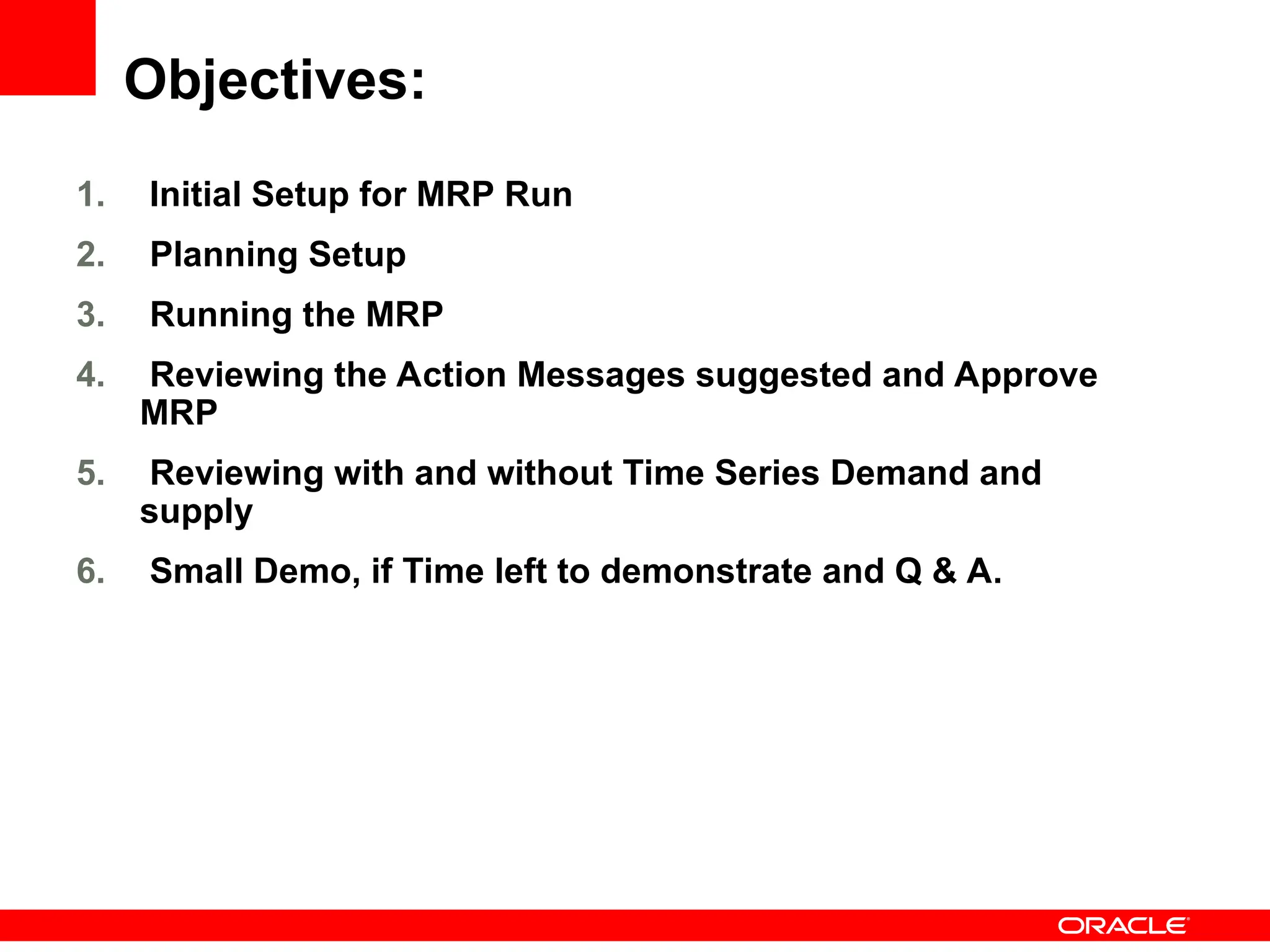
Objectives:
1. Initial Setup for MRP Run
2. Planning Setup
3. Running the MRP
4. Reviewing the Action Messages suggested and Approve
MRP
5. Reviewing with and without Time Series Demand and
supply
6. Small Demo, if Time left to demonstrate and Q & A.
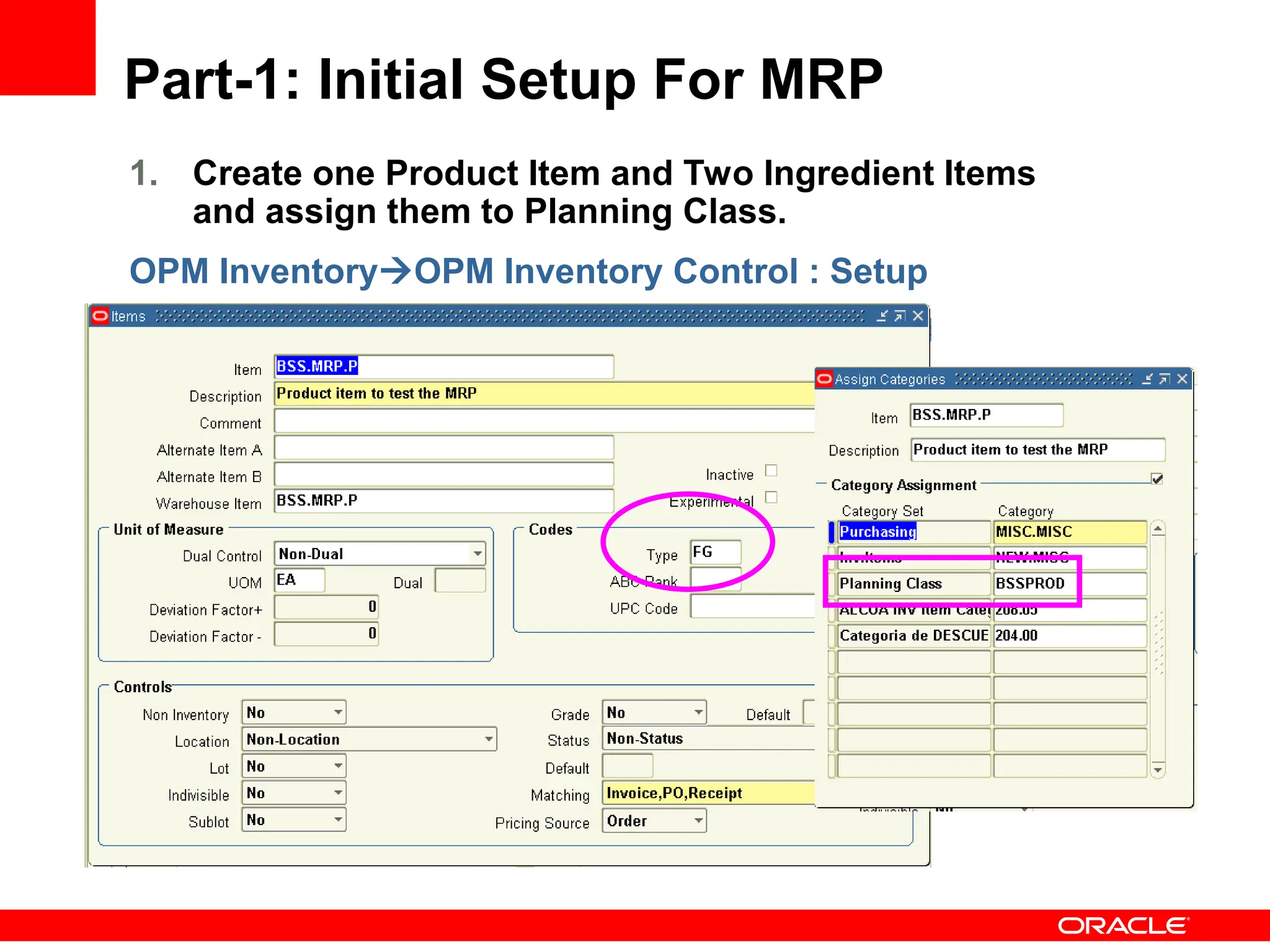
Part-1: Initial Setup For MRP
1. Create one Product Item and Two Ingredient Items
and assign them to Planning Class.
OPM InventoryOPM Inventory Control : Setup
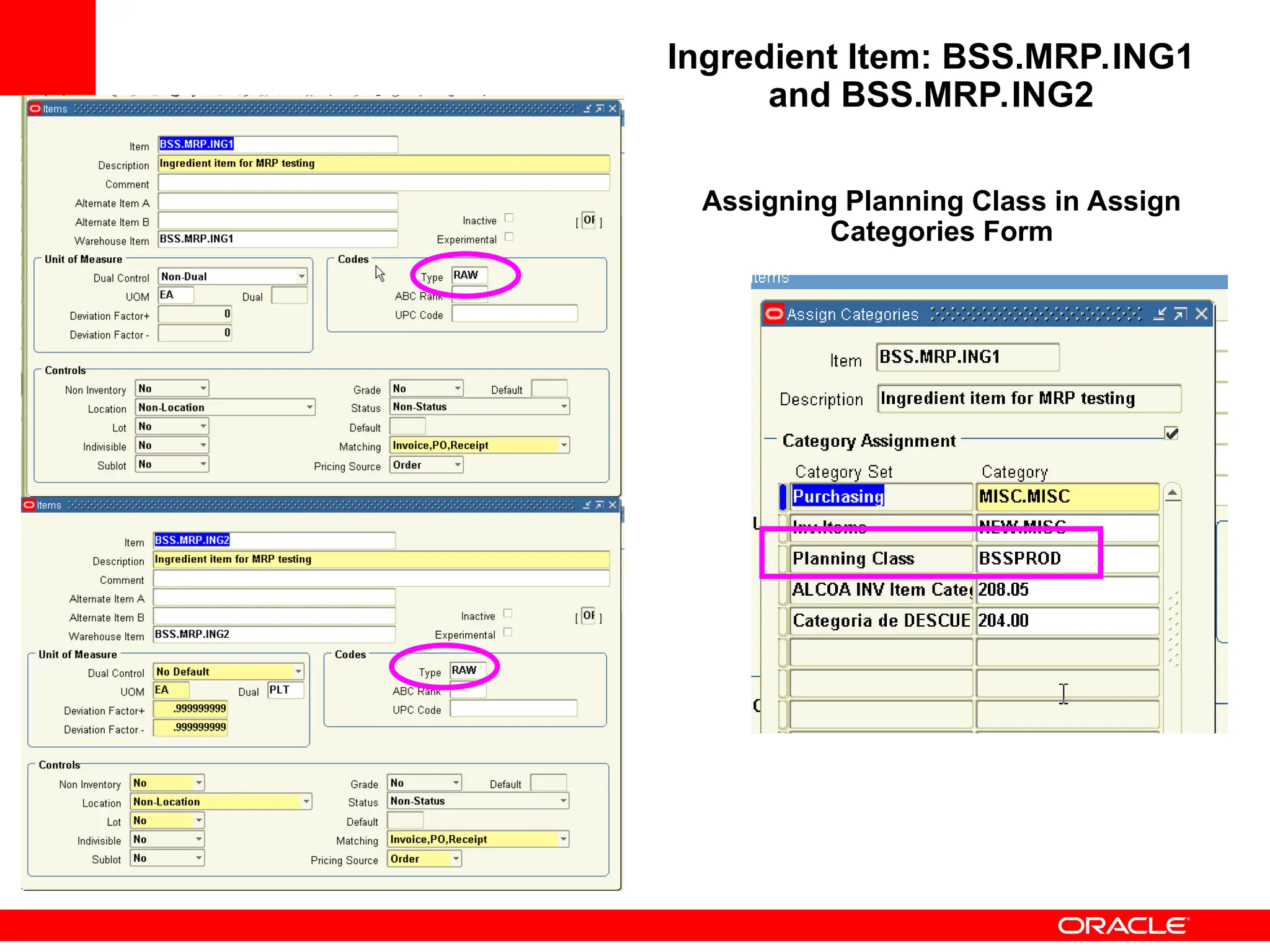
Ingredient Item: BSS.MRP.ING1
and BSS.MRP.ING2
Assigning Planning Class in Assign
Categories Form
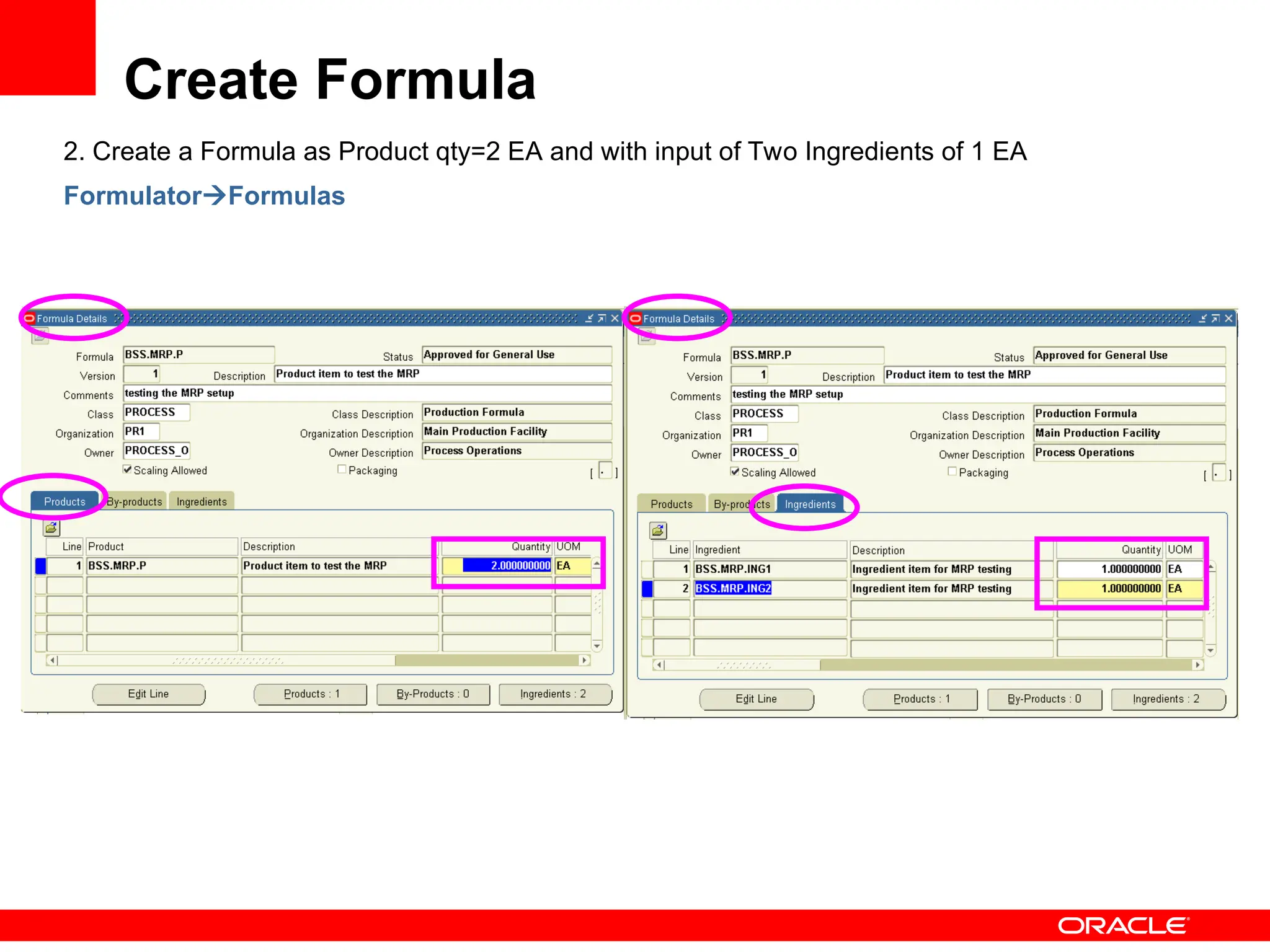
Create Formula
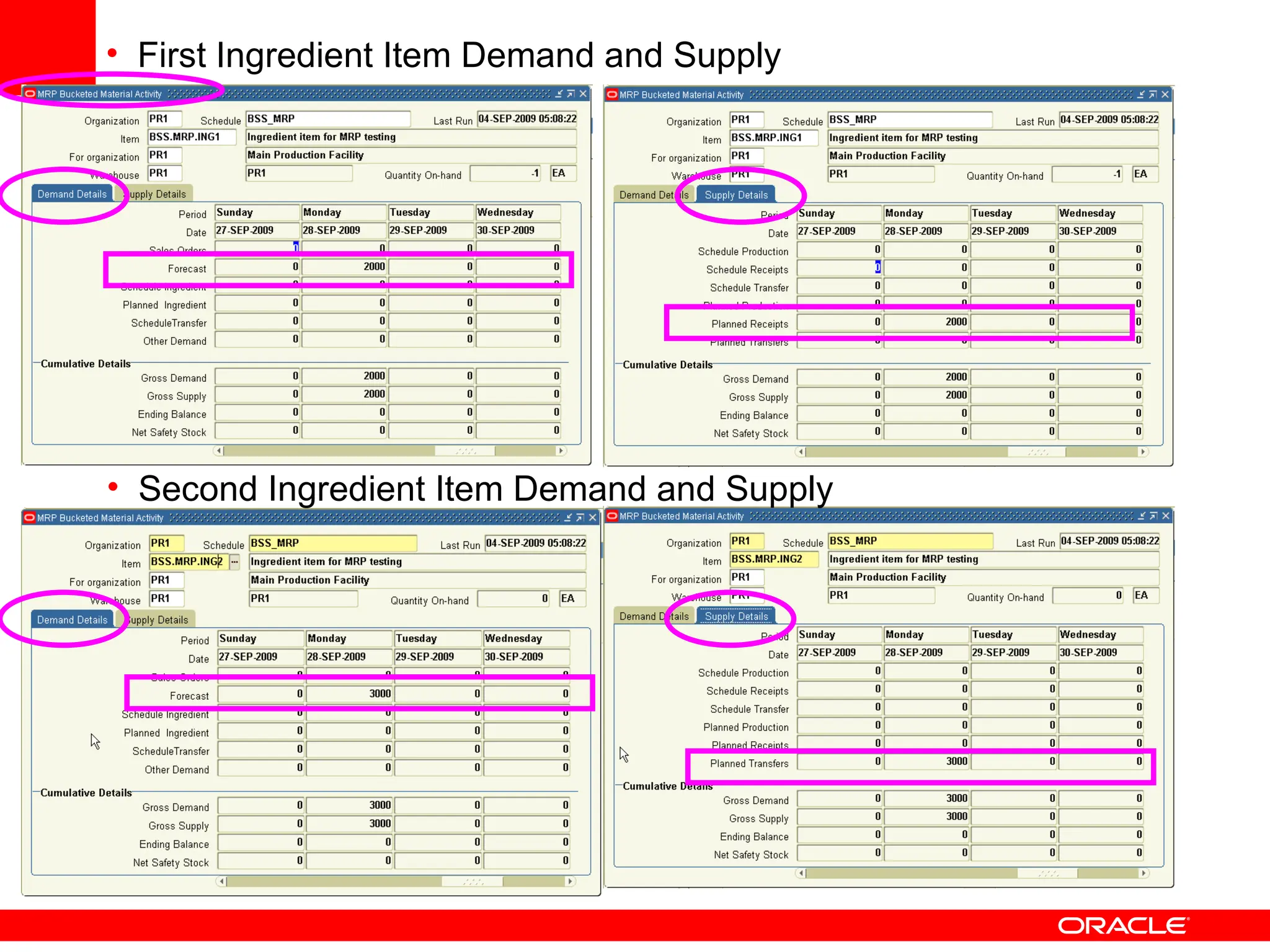
2. Create a Formula as Product qty=2 EA and with input of Two Ingredients of 1 EA
FormulatorFormulas
Create a Recipe and Validity Rule
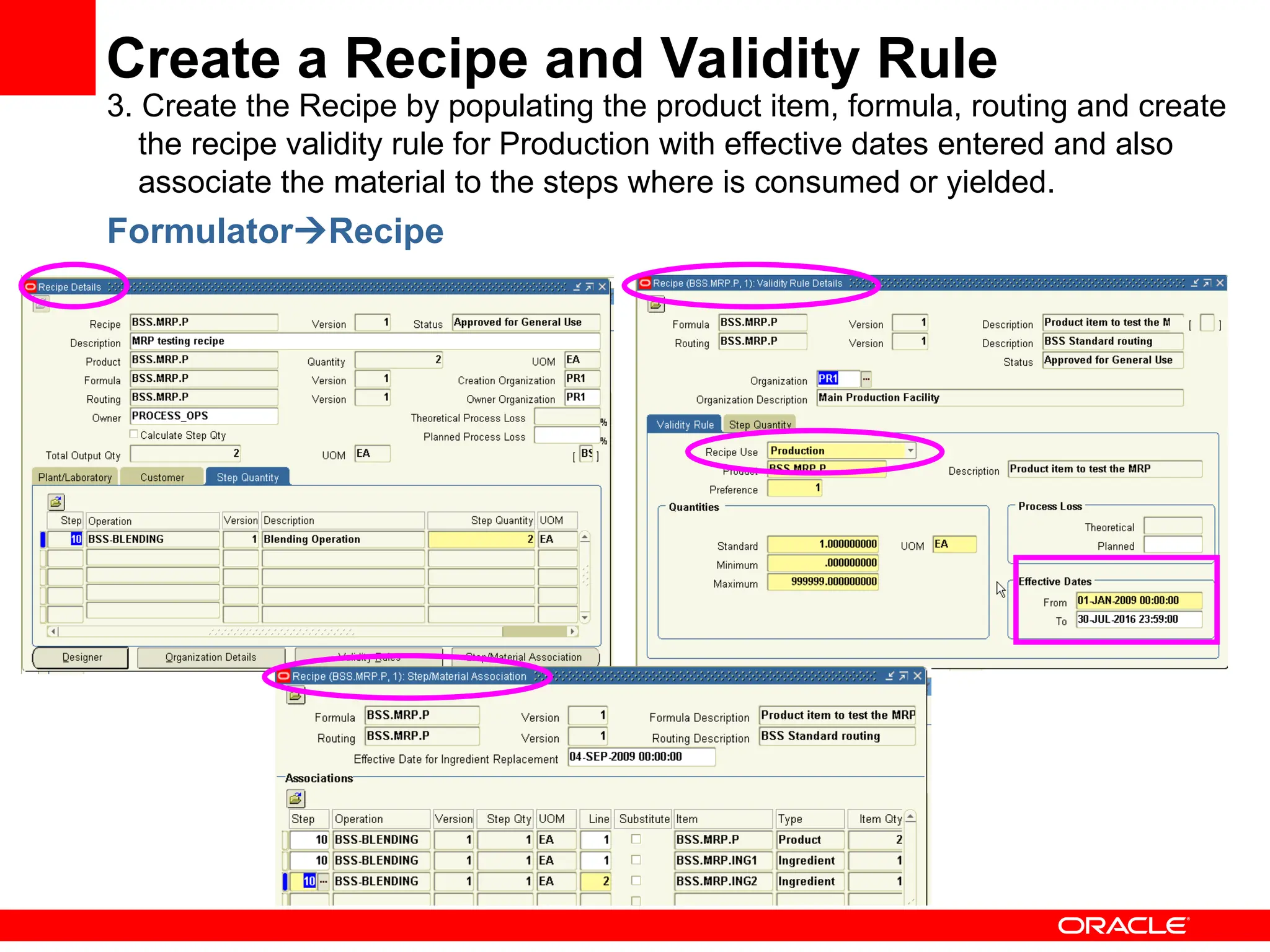
3. Create the Recipe by populating the product item, formula, routing and create
the recipe validity rule for Production with effective dates entered and also
associate the material to the steps where is consumed or yielded.
FormulatorRecipe
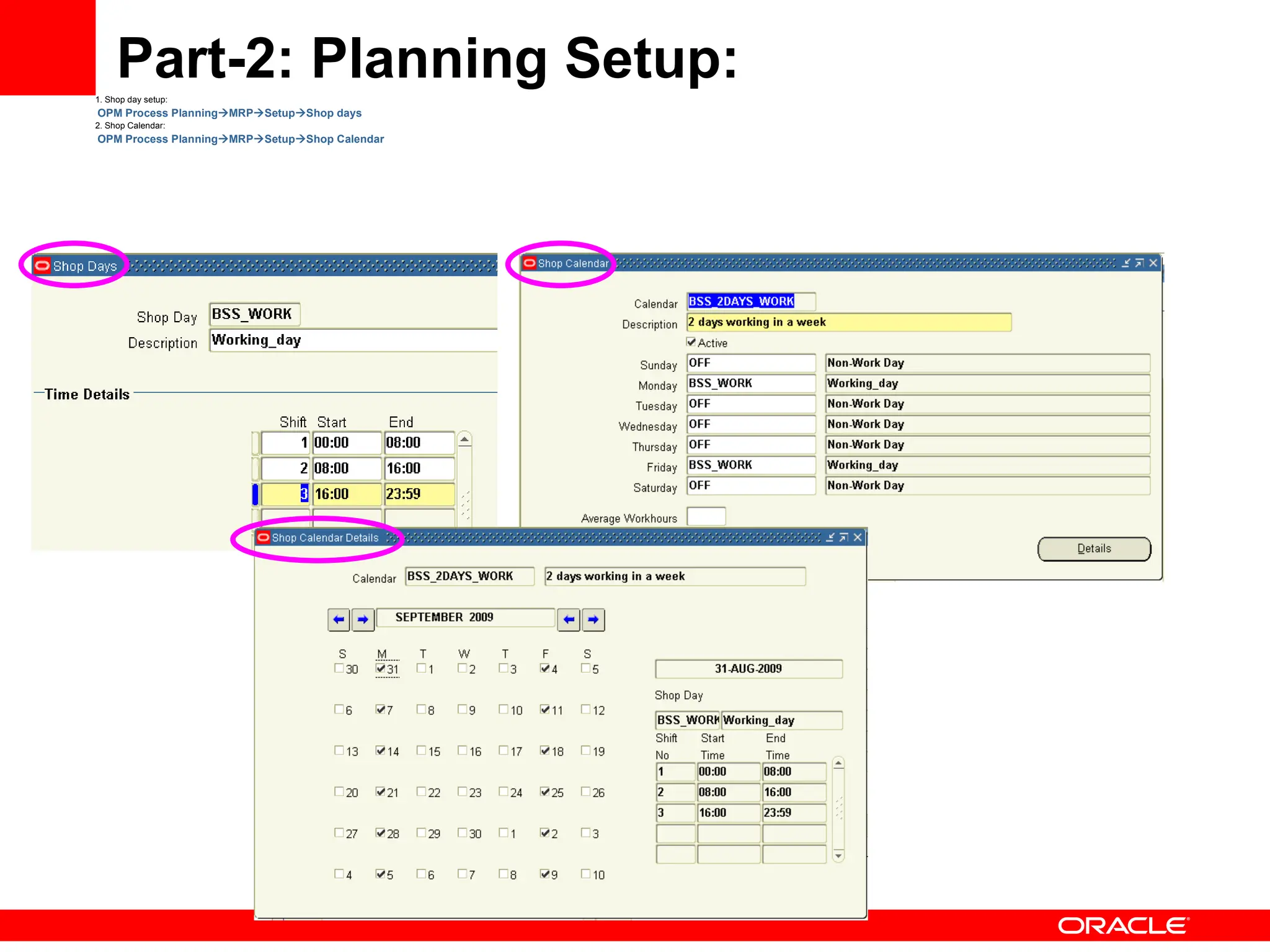
Part-2: Planning Setup:
1. Shop day setup:
OPM Process PlanningMRPSetupShop days
2. Shop Calendar:
OPM Process PlanningMRPSetupShop Calendar
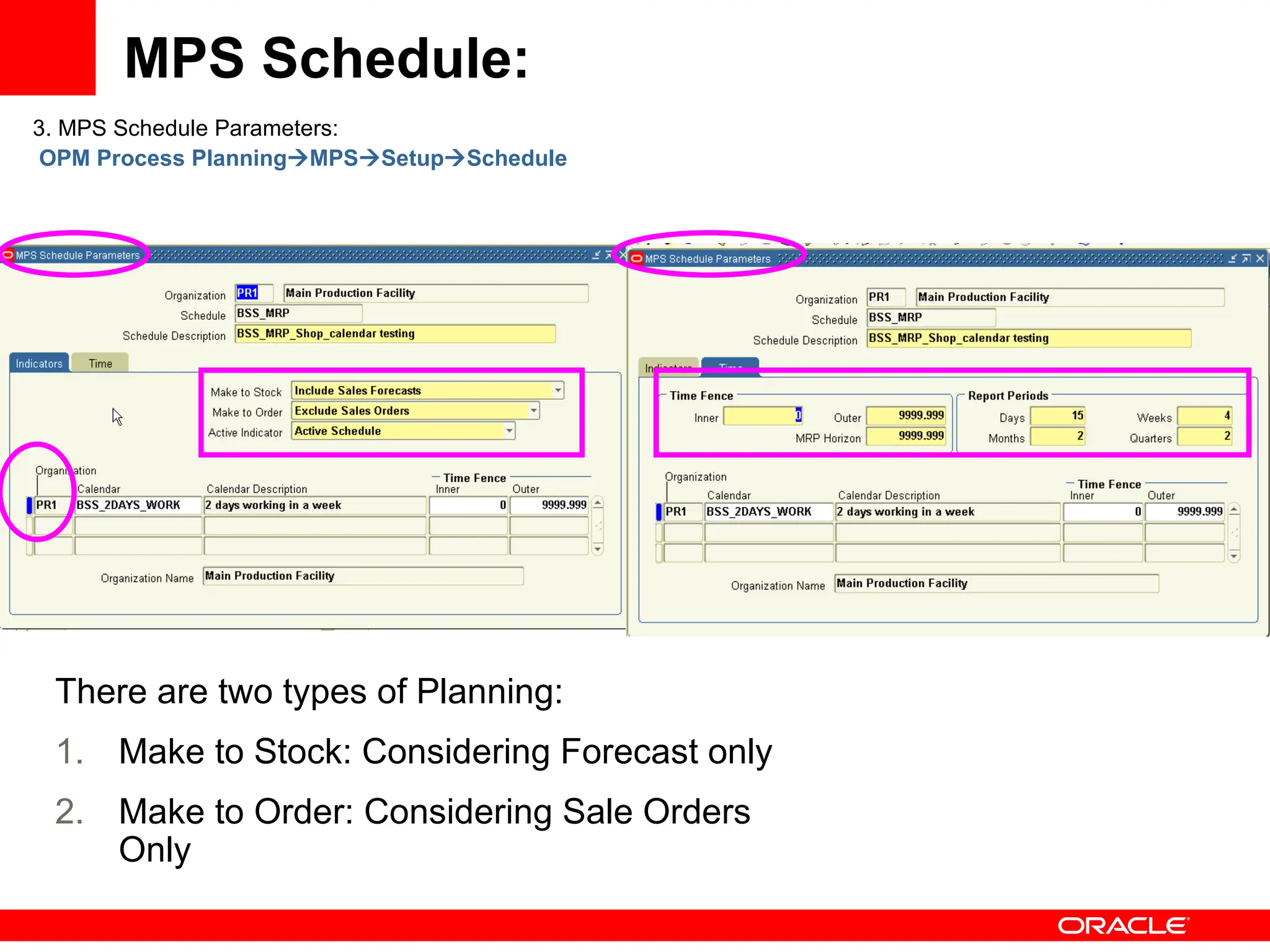
MPS Schedule:
3. MPS Schedule Parameters:
OPM Process PlanningMPSSetupSchedule
There are two types of Planning:
1. Make to Stock: Considering Forecast only
2. Make to Order: Considering Sale Orders
Only
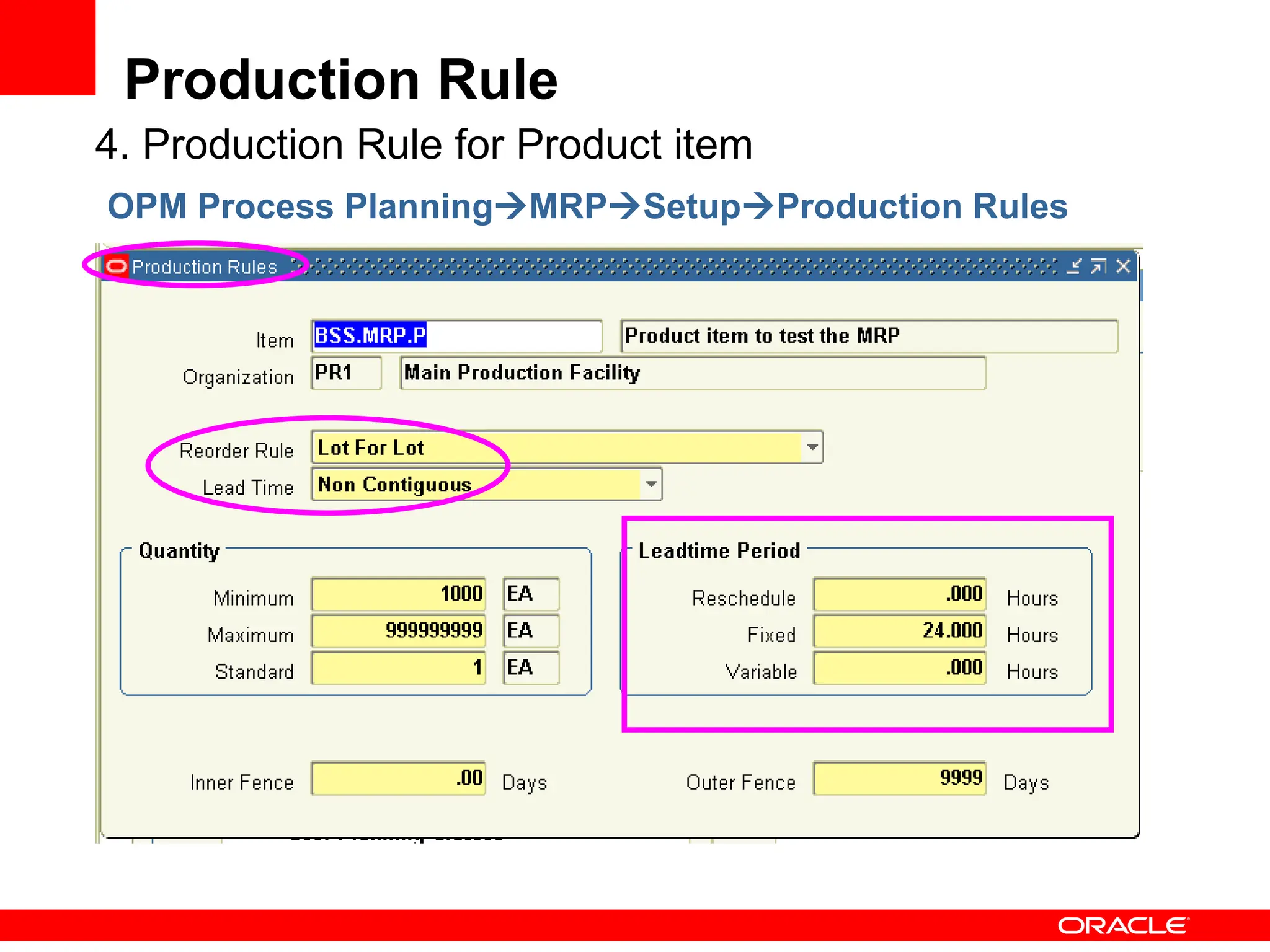
Production Rule
4. Production Rule for Product item
OPM Process PlanningMRPSetupProduction Rules
Warehouse Rules
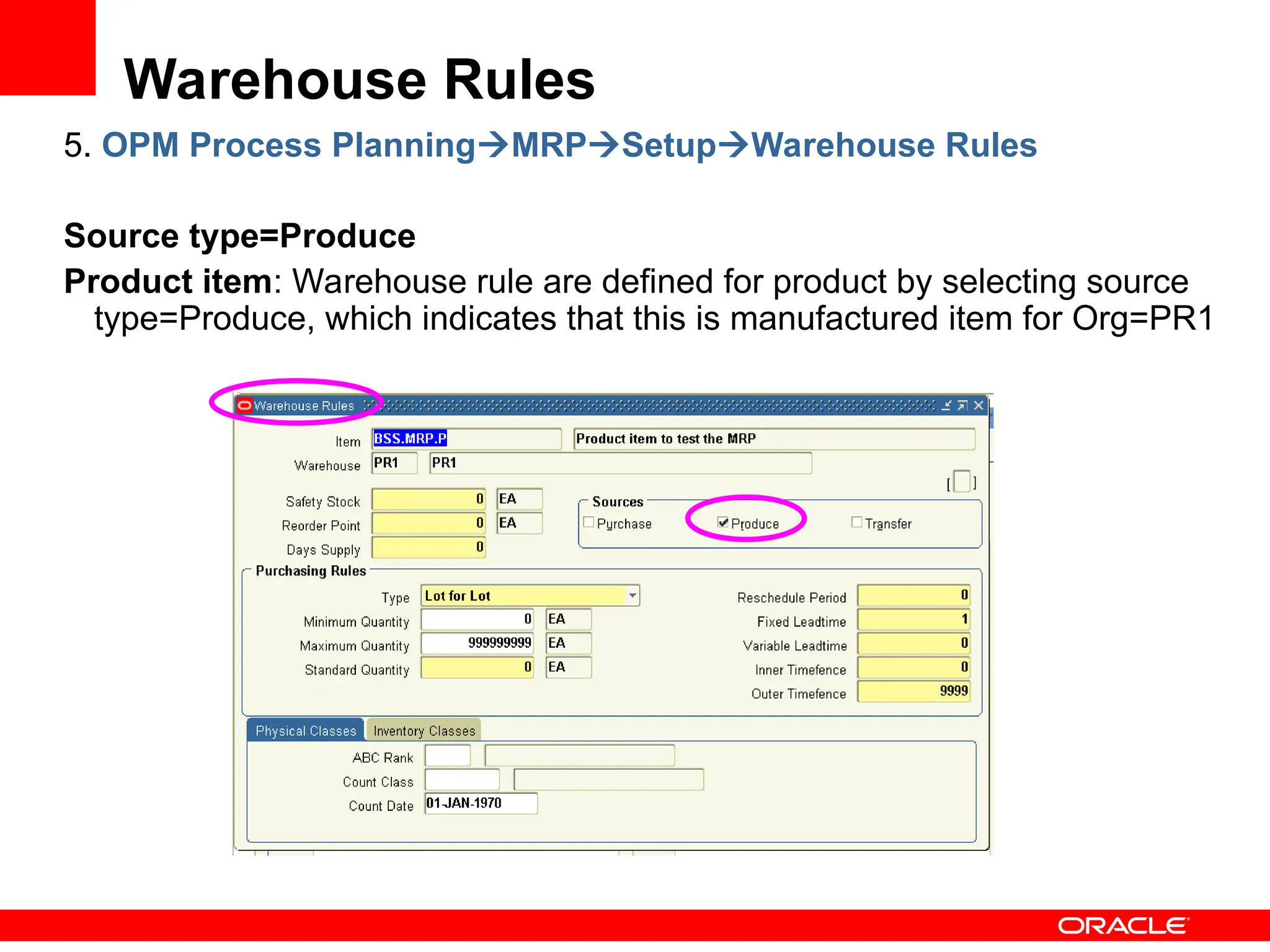
5. OPM Process PlanningMRPSetupWarehouse Rules
Source type=Produce
Product item: Warehouse rule are defined for product by selecting source
type=Produce, which indicates that this is manufactured item for Org=PR1
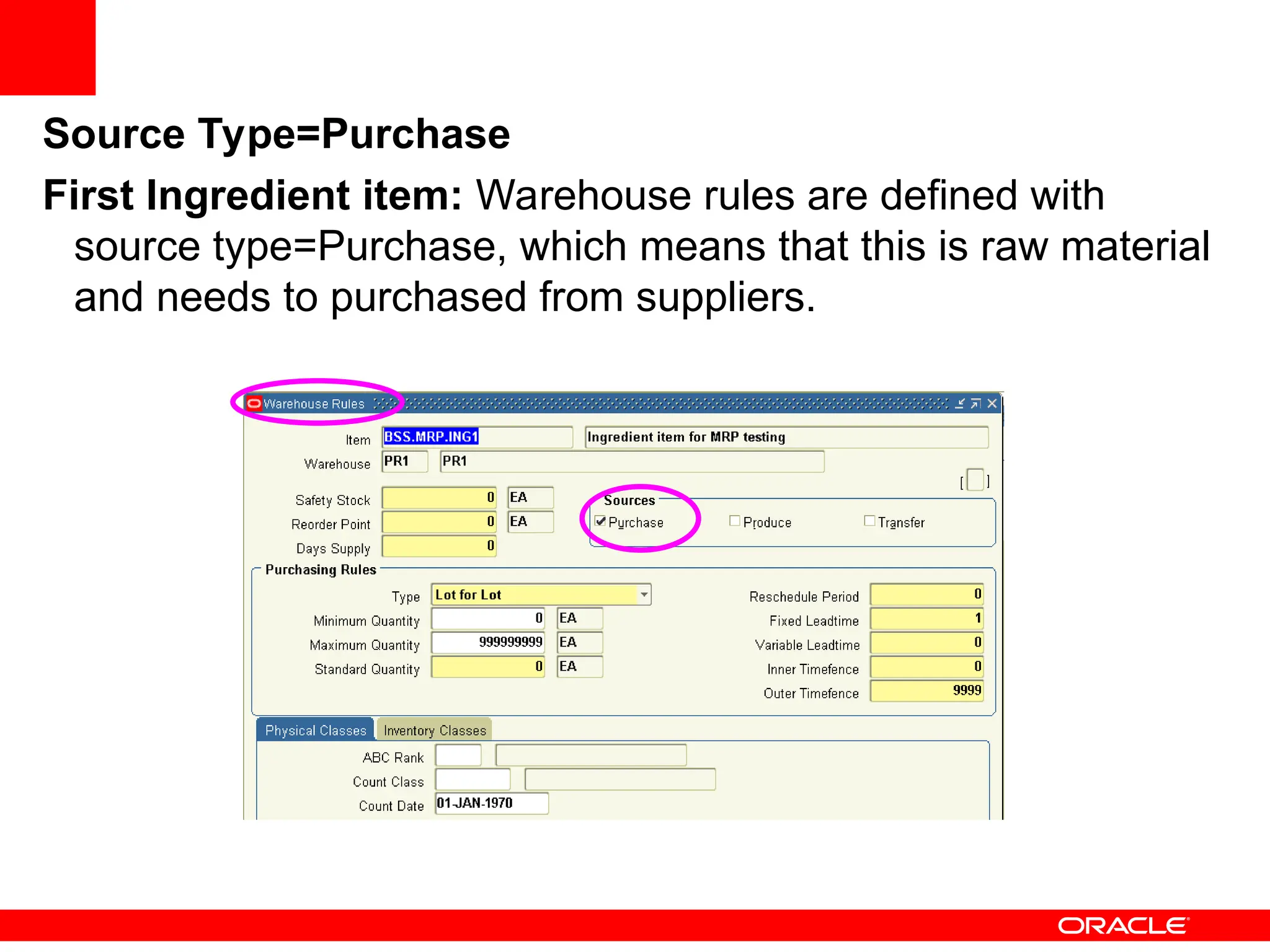
Source Type=Purchase
First Ingredient item: Warehouse rules are defined with
source type=Purchase, which means that this is raw material
and needs to purchased from suppliers.
Source Type= Transfer
Second Ingredient item for Org=PR1 and PR2 is selected with Transfer
type of source to bring the material from other warehouse.
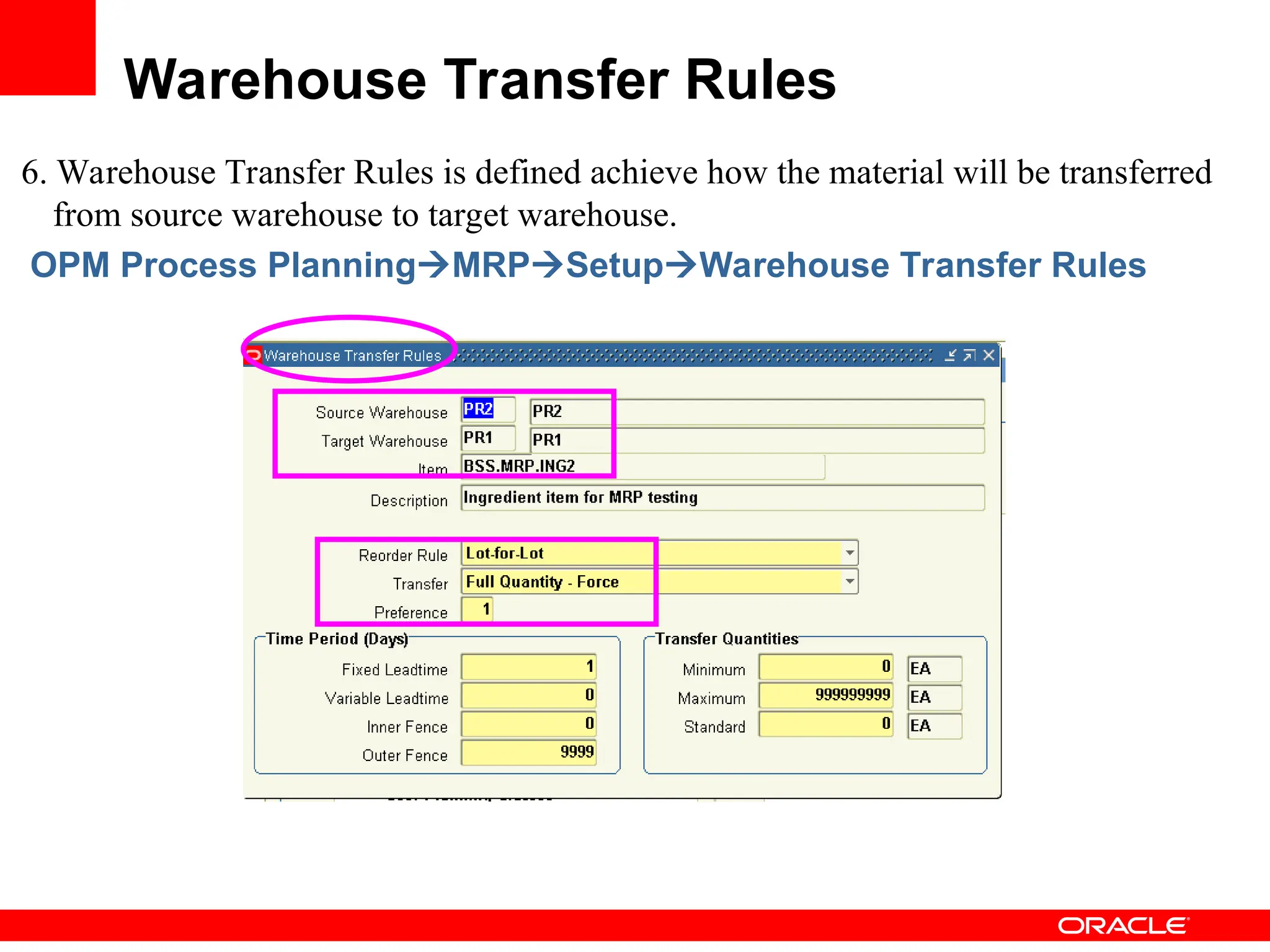
6. Warehouse Transfer Rules is defined achieve how the material will be transferred
from source warehouse to target warehouse.
OPM Process PlanningMRPSetupWarehouse Transfer Rules
Warehouse Transfer Rules
7. Plant-Warehouse relationship/rules are used to define relationship between the Plant
and warehouses to indicate Production or Replenished warehouse with plant.
OPM Process PlanningMPSSetupPlant-Warehouse
Plant-Warehouse Rules
8. Defining Forecast for the Items
OPM Process PlanningForecastingForecast
Defined the forecast for Product and two ingredient items for Org=PR1 and
Whse=PR1 with required qty and when requested date.
Demand: Forecast
Associated the Forecast to MPS/MRP Schedule to consider the forecast
as a demand to plan.
OPM Process PlanningForecastingSchedule Association
Associated Forecast to MPS/MRP
Schedule
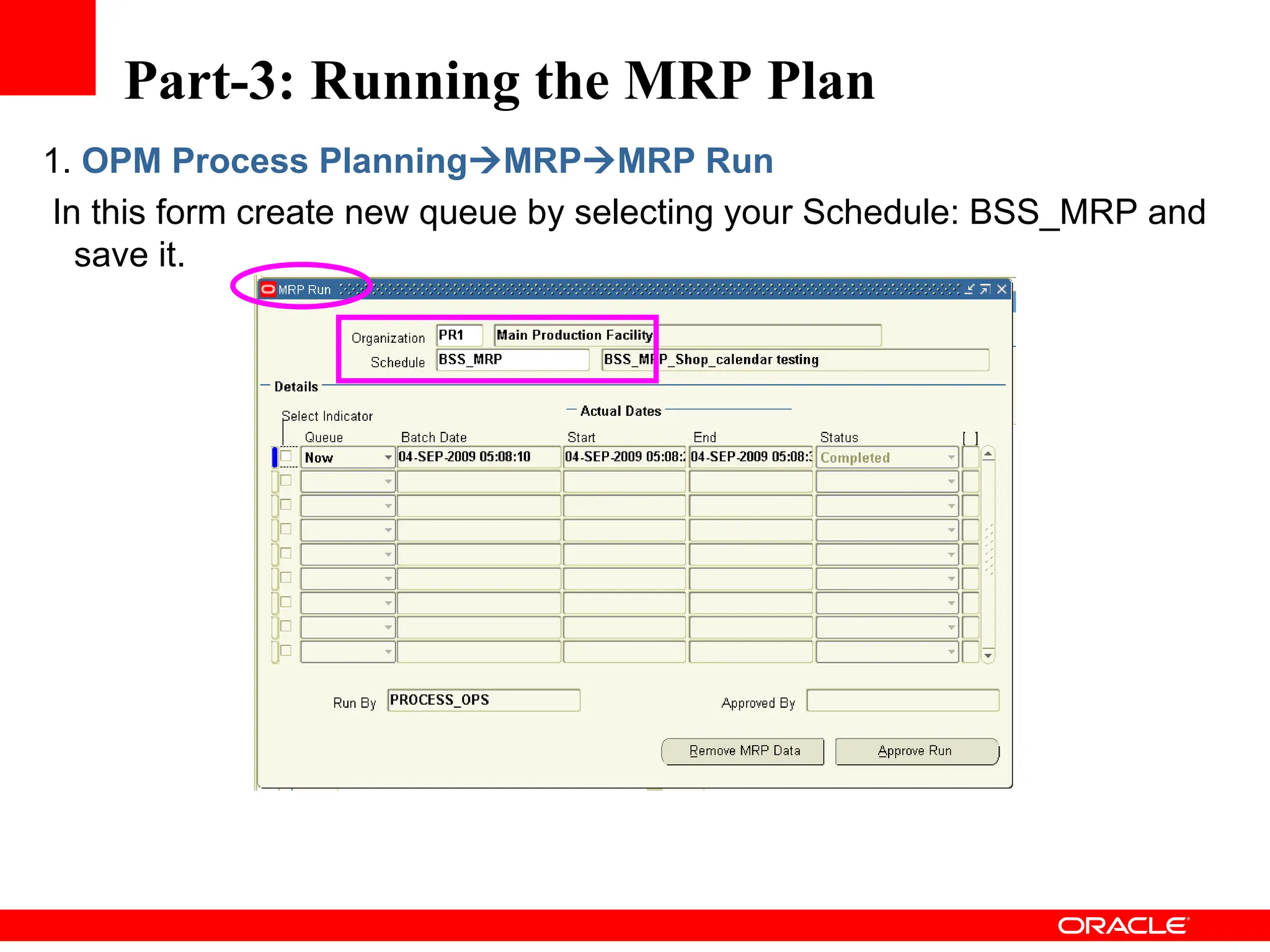
1. OPM Process PlanningMRPMRP Run
In this form create new queue by selecting your Schedule: BSS_MRP and
save it.
Part-3: Running the MRP Plan
2. Reviewing the Action messages suggested by MRP in MRP action Message Inquiry.
Enter the Org, Schedule, Item and warehouse and then move your cursor to the Action
Messages details section to display all the messages.
OPM Process PlanningMRP InquiriesAction Messages
Product Item:
Action Message Review
First Ingredient Item: Second Ingredient Item:
Second Ingredient Item for
Org=PR2 (Transfer Org)
Approve MRP Run
OPM Process PlanningMRPMRP RunActionApprove Run or
Select Approve Run button.
Demand & Supply can be viewed by Time series or summary of it by two
methods:
1. MRP Bucketed Material Activity Inquiry
2. MRP Material Activity Inquiry
Demand & Supply Review
MRP Bucketed Material Activity Inquiry
OPM Process PlanningMRP InquiriesMRP Bucketed
Product Item for Demand Details:
• First Ingredient Item Demand and Supply
• Second Ingredient Item Demand and Supply
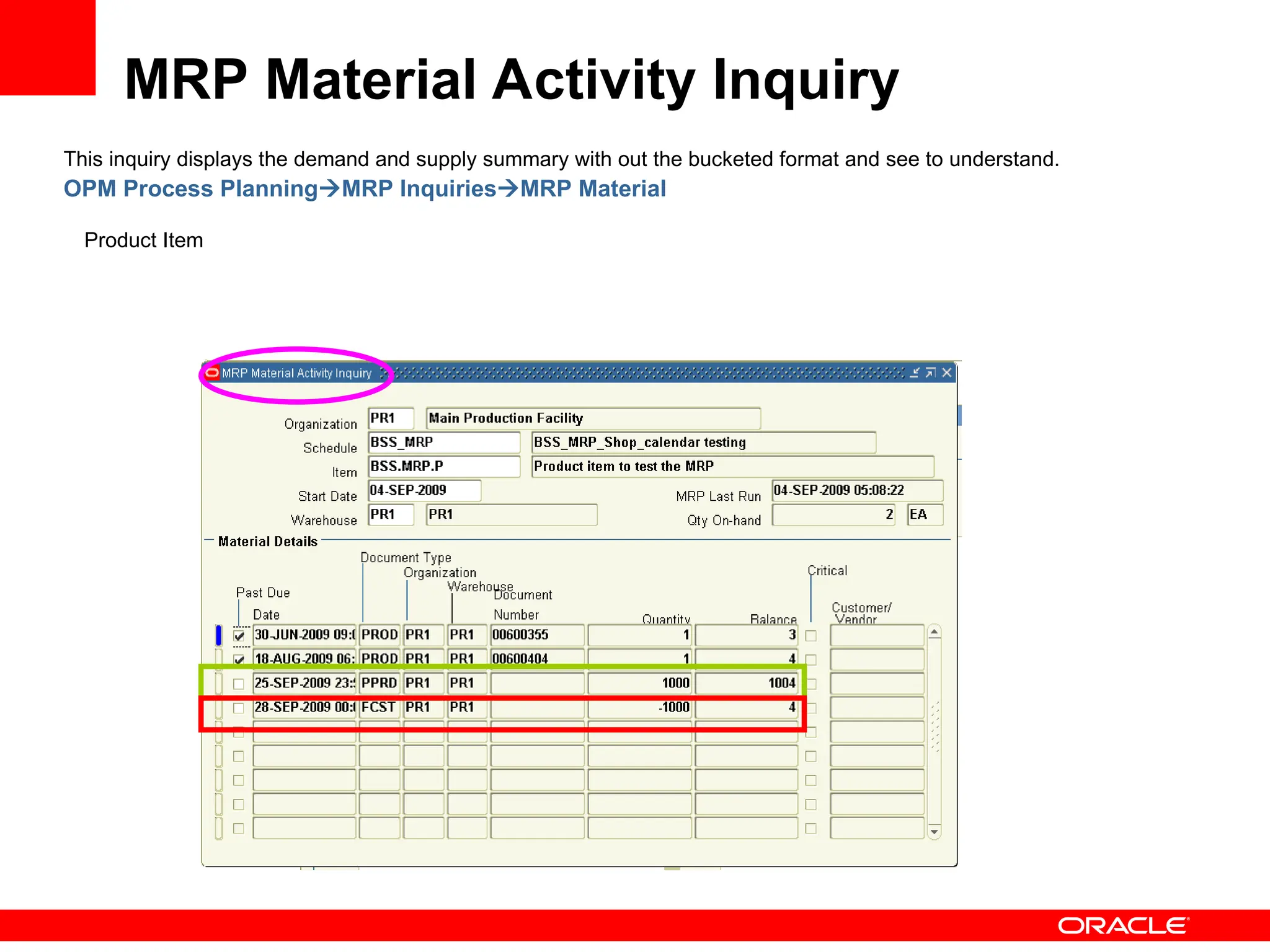
This inquiry displays the demand and supply summary with out the bucketed format and see to understand.
OPM Process PlanningMRP InquiriesMRP Material
Product Item
MRP Material Activity Inquiry
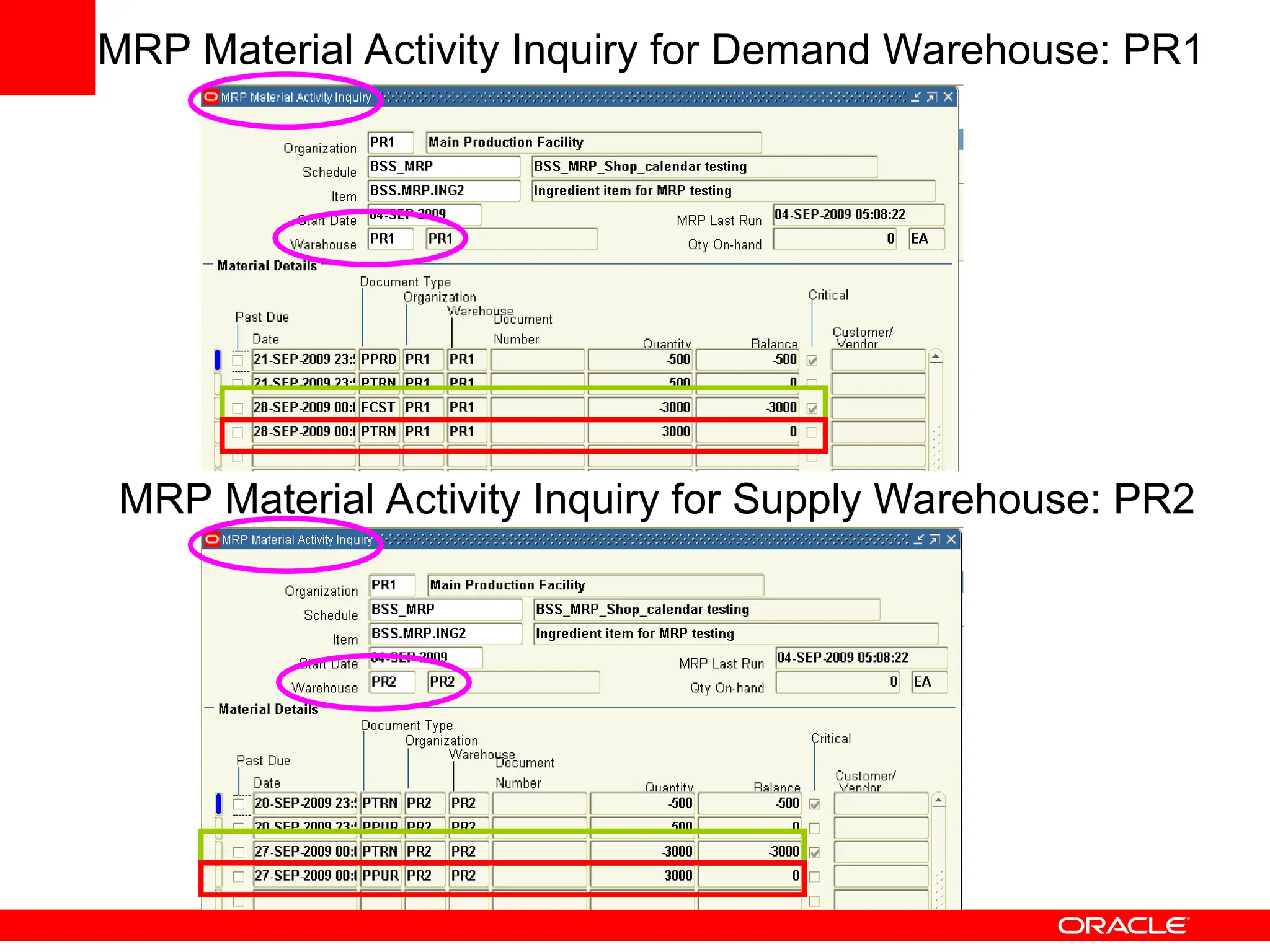
MRP Material Activity Inquiry for Demand Warehouse: PR1
MRP Material Activity Inquiry for Supply Warehouse: PR2
Conclusion and Q & A
• This concludes how the OPM MRP Setup and
Planning done.
• Question and Answer.
Thank You

MRP_Setup_Planning Oracle ebs manufacturing

  • 1.
    <Insert Picture Here> MRPSetup and Planning-11i By Shivana
  • 2.
    Objectives: 1. Initial Setupfor MRP Run 2. Planning Setup 3. Running the MRP 4. Reviewing the Action Messages suggested and Approve MRP 5. Reviewing with and without Time Series Demand and supply 6. Small Demo, if Time left to demonstrate and Q & A.
  • 3.
    Part-1: Initial SetupFor MRP 1. Create one Product Item and Two Ingredient Items and assign them to Planning Class. OPM InventoryOPM Inventory Control : Setup
  • 4.
    Ingredient Item: BSS.MRP.ING1 andBSS.MRP.ING2 Assigning Planning Class in Assign Categories Form
  • 5.
    Create Formula 2. Createa Formula as Product qty=2 EA and with input of Two Ingredients of 1 EA FormulatorFormulas
  • 6.
    Create a Recipeand Validity Rule 3. Create the Recipe by populating the product item, formula, routing and create the recipe validity rule for Production with effective dates entered and also associate the material to the steps where is consumed or yielded. FormulatorRecipe
  • 7.
    Part-2: Planning Setup: 1.Shop day setup: OPM Process PlanningMRPSetupShop days 2. Shop Calendar: OPM Process PlanningMRPSetupShop Calendar
  • 8.
    MPS Schedule: 3. MPSSchedule Parameters: OPM Process PlanningMPSSetupSchedule There are two types of Planning: 1. Make to Stock: Considering Forecast only 2. Make to Order: Considering Sale Orders Only
  • 9.
    Production Rule 4. ProductionRule for Product item OPM Process PlanningMRPSetupProduction Rules
  • 10.
    Warehouse Rules 5. OPMProcess PlanningMRPSetupWarehouse Rules Source type=Produce Product item: Warehouse rule are defined for product by selecting source type=Produce, which indicates that this is manufactured item for Org=PR1
  • 11.
    Source Type=Purchase First Ingredientitem: Warehouse rules are defined with source type=Purchase, which means that this is raw material and needs to purchased from suppliers.
  • 12.
    Source Type= Transfer SecondIngredient item for Org=PR1 and PR2 is selected with Transfer type of source to bring the material from other warehouse.
  • 13.
    6. Warehouse TransferRules is defined achieve how the material will be transferred from source warehouse to target warehouse. OPM Process PlanningMRPSetupWarehouse Transfer Rules Warehouse Transfer Rules
  • 14.
    7. Plant-Warehouse relationship/rulesare used to define relationship between the Plant and warehouses to indicate Production or Replenished warehouse with plant. OPM Process PlanningMPSSetupPlant-Warehouse Plant-Warehouse Rules
  • 15.
    8. Defining Forecastfor the Items OPM Process PlanningForecastingForecast Defined the forecast for Product and two ingredient items for Org=PR1 and Whse=PR1 with required qty and when requested date. Demand: Forecast
  • 16.
    Associated the Forecastto MPS/MRP Schedule to consider the forecast as a demand to plan. OPM Process PlanningForecastingSchedule Association Associated Forecast to MPS/MRP Schedule
  • 17.
    1. OPM ProcessPlanningMRPMRP Run In this form create new queue by selecting your Schedule: BSS_MRP and save it. Part-3: Running the MRP Plan
  • 18.
    2. Reviewing theAction messages suggested by MRP in MRP action Message Inquiry. Enter the Org, Schedule, Item and warehouse and then move your cursor to the Action Messages details section to display all the messages. OPM Process PlanningMRP InquiriesAction Messages Product Item: Action Message Review
  • 19.
    First Ingredient Item:Second Ingredient Item: Second Ingredient Item for Org=PR2 (Transfer Org)
  • 20.
    Approve MRP Run OPMProcess PlanningMRPMRP RunActionApprove Run or Select Approve Run button.
  • 21.
    Demand & Supplycan be viewed by Time series or summary of it by two methods: 1. MRP Bucketed Material Activity Inquiry 2. MRP Material Activity Inquiry Demand & Supply Review MRP Bucketed Material Activity Inquiry OPM Process PlanningMRP InquiriesMRP Bucketed Product Item for Demand Details:
  • 22.
    • First IngredientItem Demand and Supply • Second Ingredient Item Demand and Supply
  • 23.
    This inquiry displaysthe demand and supply summary with out the bucketed format and see to understand. OPM Process PlanningMRP InquiriesMRP Material Product Item MRP Material Activity Inquiry
  • 24.
    MRP Material ActivityInquiry for Demand Warehouse: PR1 MRP Material Activity Inquiry for Supply Warehouse: PR2
  • 25.
    Conclusion and Q& A • This concludes how the OPM MRP Setup and Planning done. • Question and Answer. Thank You

Editor's Notes

  • #7 Select the shop days defined in to your shop calendar and then click on the details to enter star and end of calendar year.
  • #8 3. MPS Schedule Parameters:   OPM Process PlanningMPSSetupSchedule   Define your know MPS/MRP schedule by associating the Org, Calendar and mentioning the time fence and also to include forecasts or sale orders.
  • #9 This will give to define the reorder rule and lead times i.e. fixed or variable etc.
  • #10 Warehouse Rules defined for items to indicate whether it’s a produced item or purchased or transfer item with purchasing rule and lead-time mentioned.
  • #12 Second Ingredient item also defined for Org=PR2 to supply the material to other warehouse.
  • #13 Warehouse Transfer Rules is defined to achieve how the material will be transferred from source warehouse to target warehouse. Transfer Type: This field Determines whether or not a transfer suggestion can be made if inventory falls below safety stock in the source warehouse. Full Quantity: No Transfer allowed from source warehouse if the stock falls below safety stock at source warehouse. Full Quantity-Force: Transfer of stock is forced, that means regardless of stock quantity in the source warehouse, transfer the stock to target warehouse. Partial Quantity: Partial Transfer of stock is allowed, so that sufficient stock is left in the source warehouse to meet its safety stock requirement. If there is still stock that needs to be transferred, then the balance will be taken from the other source warehouse (Providing that a transfer rule has been setup for other warehouses) in the order of preference specified for the other warehouses.
  • #14 Warehouse Transfer Rules is defined to achieve how the material will be transferred from source warehouse to target warehouse.
  • #20 Once the MRP Run approved, then you can approve the action messages suggested in to respective orders I.e. Production Batch(PROD) or Firm Planned Order (FPO), Purchase Order (PPUR) can also be automatically converted to actual Purchase Requisitions. After a line has been converted the ‘Converted’ flag will be checked.