Oracle Planning
Explanation and Guide
Agenda
 Current MRP Blueprint
• Overview of Process
• MRP Workbench
• How On Time Delivery is Affected
 Inventory Planning Options
• Min-Max
• Reorder Point Planning
 Demonstrate MRP Planning
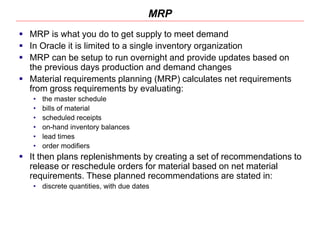
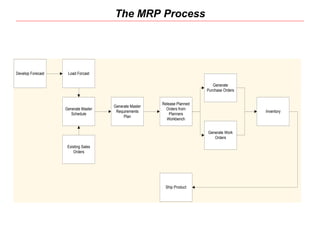
MRP
 MRP is what you do to get supply to meet demand
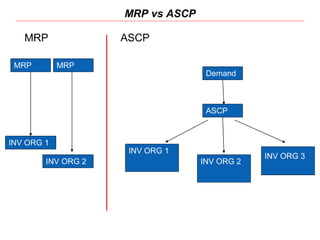
 In Oracle it is limited to a single inventory organization
 MRP can be setup to run overnight and provide updates based on
the previous days production and demand changes
 Material requirements planning (MRP) calculates net requirements
from gross requirements by evaluating:
• the master schedule
• bills of material
• scheduled receipts
• on-hand inventory balances
• lead times
• order modifiers
 It then plans replenishments by creating a set of recommendations to
release or reschedule orders for material based on net material
requirements. These planned recommendations are stated in:
• discrete quantities, with due dates
The MRP Process
Develop Forecast Load Forcast
Generate Master
Schedule
Existing Sales
Orders
Generate Master
Requirements
Plan
Release Planned
Orders from
Planners
Workbench
Generate
Purchase Orders
Generate Work
Orders
Ship Product
Inventory
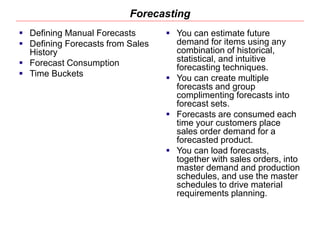
Forecasting
 Defining Manual Forecasts
 Defining Forecasts from Sales
History
 Forecast Consumption
 Time Buckets
 You can estimate future
demand for items using any
combination of historical,
statistical, and intuitive
forecasting techniques.
 You can create multiple
forecasts and group
complimenting forecasts into
forecast sets.
 Forecasts are consumed each
time your customers place
sales order demand for a
forecasted product.
 You can load forecasts,
together with sales orders, into
master demand and production
schedules, and use the master
schedules to drive material
requirements planning.
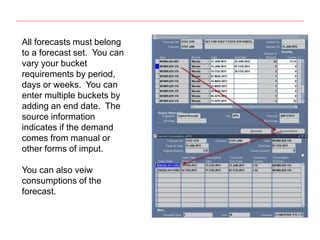
All forecasts must belong
to a forecast set. You can
vary your bucket
requirements by period,
days or weeks. You can
enter multiple buckets by
adding an end date. The
source information
indicates if the demand
comes from manual or
other forms of imput.
You can also veiw
consumptions of the
forecast.
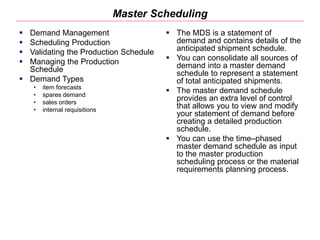
Master Scheduling
 Demand Management
 Scheduling Production
 Validating the Production Schedule
 Managing the Production
Schedule
 Demand Types
• item forecasts
• spares demand
• sales orders
• internal requisitions
 The MDS is a statement of
demand and contains details of the
anticipated shipment schedule.
 You can consolidate all sources of
demand into a master demand
schedule to represent a statement
of total anticipated shipments.
 The master demand schedule
provides an extra level of control
that allows you to view and modify
your statement of demand before
creating a detailed production
schedule.
 You can use the time–phased
master demand schedule as input
to the master production
scheduling process or the material
requirements planning process.
Master Scheduling
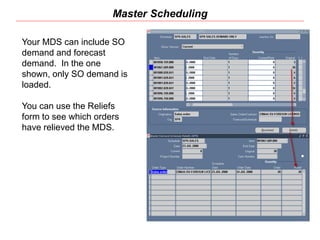
Your MDS can include SO
demand and forecast
demand. In the one
shown, only SO demand is
loaded.
You can use the Reliefs
form to see which orders
have relieved the MDS.
Planner Workbench
 Review your resources
 Review item details
 Review of supply/demand details
 Review components, using
assemblies, and end assemblies
 Review the horizontal, material,
and capacity plan
 Display a summary supply and
demand
 Implement and maintain planned
orders
 Create planned orders manually
 Implement repetitive schedules
 Release implemented orders
 You can review and implement
recommendations suggested by
the planning process with the
Planner Workbench.
 You can selectively implement
these recommendations as new
and rescheduled orders, and
release all or some of them.
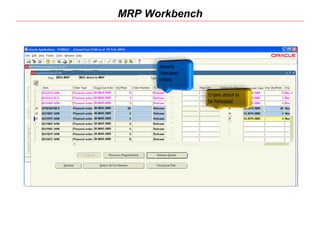
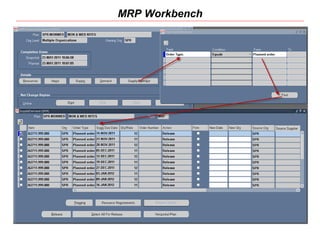
MRP Workbench
MRP Workbench
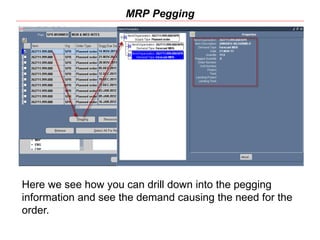
MRP Pegging
Here we see how you can drill down into the pegging
information and see the demand causing the need for the
order.
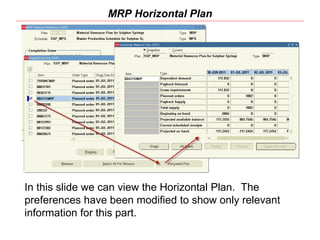
MRP Horizontal Plan
In this slide we can view the Horizontal Plan. The
preferences have been modified to show only relevant
information for this part.
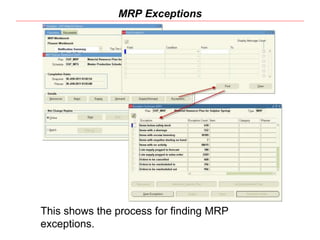
MRP Exceptions
This shows the process for finding MRP
exceptions.
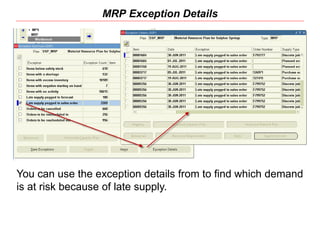
MRP Exception Details
You can use the exception details from to find which demand
is at risk because of late supply.
How On Time Delivery is Affected
 MRP Schedules Based on Order Deliver minus Lead
Times
 MRP is very Sensitive to Data Accuracy
 MRP Produces an Exceptions List on every MRP Run
 MRP Helps Maintain a Consistent Production Schedule
but Un-forecasted Demand can Effect OTD
Planning without MRP
Other Planning Options
Other Planning Processes
 Min/Max Planning
 Reorder Point Planning
 Kanban Replenishment
Beyond MRP
 Advanced Supply Chain Planning
Min/Max Planning
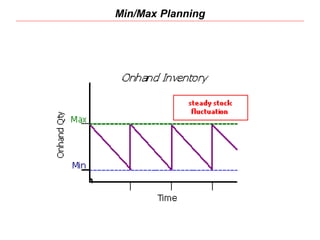
 With min-max planning, you specify minimum and
maximum inventory levels for your items. When the
inventory level for an item (on-hand quantities plus
quantities on order) drops below the minimum, Oracle
Inventory suggests a new purchase requisition, internal
requisition, move order, or job to bring the balance back
up to the maximum.
Min/Max Planning
Reorder Point Planning
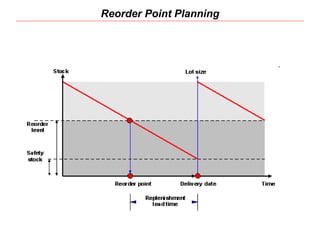
 Reorder point planning uses demand forecasts to decide when to
order a new quantity to avoid dipping into safety stock. Reorder point
planning suggests a new order for an item when the available
quantity-on-hand quantity plus planned receipts-drops below the
item’s safety stock level plus forecast demand for the item during its
replenishment lead time. The suggested order quantity is an
economic order quantity that minimizes the total cost of ordering and
carrying inventory.
Reorder Point Planning
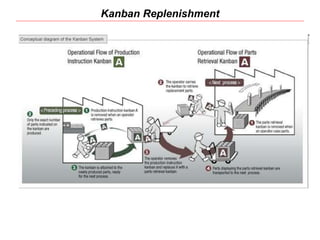
Kanban Replenishment
 Kanban is a means of supporting pull-based
replenishment in manufacturing systems. A Kanban
system is a self-regulating pull system that leads to
shorter lead times and reduced inventory. Kanban
systems are typically applied to items that have relatively
constant demand and medium-to-high production
volume.
 The system includes an API that can be called by
external systems, such as bar code readers, to trigger
replenishment signals.
Kanban Replenishment
Advanced Supply Chain Planning
 Oracle Advanced Supply Chain Planning (ASCP) is a
comprehensive, Internet-based planning solution that
decides when and where supplies (for example,
inventory, purchase orders and work orders) should be
deployed within an extended supply chain.
 ASCP works across many inventory organizations
 ASCP can run on a separate server to allow for multiple
planning runs during day or evening
INV ORG 1
INV ORG 2
INV ORG 3
Demand
ASCP
MRP vs ASCP
MRP
INV ORG 1
INV ORG 2
MRP
MRP ASCP
Questions

14457092-Oracle-Planning.pptx

  • 1.
  • 2.
    Agenda  Current MRPBlueprint • Overview of Process • MRP Workbench • How On Time Delivery is Affected  Inventory Planning Options • Min-Max • Reorder Point Planning  Demonstrate MRP Planning
  • 3.
    MRP  MRP iswhat you do to get supply to meet demand  In Oracle it is limited to a single inventory organization  MRP can be setup to run overnight and provide updates based on the previous days production and demand changes  Material requirements planning (MRP) calculates net requirements from gross requirements by evaluating: • the master schedule • bills of material • scheduled receipts • on-hand inventory balances • lead times • order modifiers  It then plans replenishments by creating a set of recommendations to release or reschedule orders for material based on net material requirements. These planned recommendations are stated in: • discrete quantities, with due dates
  • 4.
    The MRP Process DevelopForecast Load Forcast Generate Master Schedule Existing Sales Orders Generate Master Requirements Plan Release Planned Orders from Planners Workbench Generate Purchase Orders Generate Work Orders Ship Product Inventory
  • 5.
    Forecasting  Defining ManualForecasts  Defining Forecasts from Sales History  Forecast Consumption  Time Buckets  You can estimate future demand for items using any combination of historical, statistical, and intuitive forecasting techniques.  You can create multiple forecasts and group complimenting forecasts into forecast sets.  Forecasts are consumed each time your customers place sales order demand for a forecasted product.  You can load forecasts, together with sales orders, into master demand and production schedules, and use the master schedules to drive material requirements planning.
  • 6.
    All forecasts mustbelong to a forecast set. You can vary your bucket requirements by period, days or weeks. You can enter multiple buckets by adding an end date. The source information indicates if the demand comes from manual or other forms of imput. You can also veiw consumptions of the forecast.
  • 7.
    Master Scheduling  DemandManagement  Scheduling Production  Validating the Production Schedule  Managing the Production Schedule  Demand Types • item forecasts • spares demand • sales orders • internal requisitions  The MDS is a statement of demand and contains details of the anticipated shipment schedule.  You can consolidate all sources of demand into a master demand schedule to represent a statement of total anticipated shipments.  The master demand schedule provides an extra level of control that allows you to view and modify your statement of demand before creating a detailed production schedule.  You can use the time–phased master demand schedule as input to the master production scheduling process or the material requirements planning process.
  • 8.
    Master Scheduling Your MDScan include SO demand and forecast demand. In the one shown, only SO demand is loaded. You can use the Reliefs form to see which orders have relieved the MDS.
  • 9.
    Planner Workbench  Reviewyour resources  Review item details  Review of supply/demand details  Review components, using assemblies, and end assemblies  Review the horizontal, material, and capacity plan  Display a summary supply and demand  Implement and maintain planned orders  Create planned orders manually  Implement repetitive schedules  Release implemented orders  You can review and implement recommendations suggested by the planning process with the Planner Workbench.  You can selectively implement these recommendations as new and rescheduled orders, and release all or some of them.
  • 10.
  • 11.
  • 12.
    MRP Pegging Here wesee how you can drill down into the pegging information and see the demand causing the need for the order.
  • 13.
    MRP Horizontal Plan Inthis slide we can view the Horizontal Plan. The preferences have been modified to show only relevant information for this part.
  • 14.
    MRP Exceptions This showsthe process for finding MRP exceptions.
  • 15.
    MRP Exception Details Youcan use the exception details from to find which demand is at risk because of late supply.
  • 16.
    How On TimeDelivery is Affected  MRP Schedules Based on Order Deliver minus Lead Times  MRP is very Sensitive to Data Accuracy  MRP Produces an Exceptions List on every MRP Run  MRP Helps Maintain a Consistent Production Schedule but Un-forecasted Demand can Effect OTD
  • 17.
  • 18.
    Other Planning Processes Min/Max Planning  Reorder Point Planning  Kanban Replenishment Beyond MRP  Advanced Supply Chain Planning
  • 19.
    Min/Max Planning  Withmin-max planning, you specify minimum and maximum inventory levels for your items. When the inventory level for an item (on-hand quantities plus quantities on order) drops below the minimum, Oracle Inventory suggests a new purchase requisition, internal requisition, move order, or job to bring the balance back up to the maximum.
  • 20.
  • 21.
    Reorder Point Planning Reorder point planning uses demand forecasts to decide when to order a new quantity to avoid dipping into safety stock. Reorder point planning suggests a new order for an item when the available quantity-on-hand quantity plus planned receipts-drops below the item’s safety stock level plus forecast demand for the item during its replenishment lead time. The suggested order quantity is an economic order quantity that minimizes the total cost of ordering and carrying inventory.
  • 22.
  • 23.
    Kanban Replenishment  Kanbanis a means of supporting pull-based replenishment in manufacturing systems. A Kanban system is a self-regulating pull system that leads to shorter lead times and reduced inventory. Kanban systems are typically applied to items that have relatively constant demand and medium-to-high production volume.  The system includes an API that can be called by external systems, such as bar code readers, to trigger replenishment signals.
  • 24.
  • 25.
    Advanced Supply ChainPlanning  Oracle Advanced Supply Chain Planning (ASCP) is a comprehensive, Internet-based planning solution that decides when and where supplies (for example, inventory, purchase orders and work orders) should be deployed within an extended supply chain.  ASCP works across many inventory organizations  ASCP can run on a separate server to allow for multiple planning runs during day or evening
  • 26.
    INV ORG 1 INVORG 2 INV ORG 3 Demand ASCP MRP vs ASCP MRP INV ORG 1 INV ORG 2 MRP MRP ASCP
  • 27.