MongoDB Tips and Advance
Features
By
Sujith Sudhakaran
https://in.linkedin.com/in/sujithsudhakaran
Gearing up…
• Please open the url:
– https://github.com/ssujith87/mongodb-tips-and-advfeatures
• Choose the repo “mongodb-tips-and-advfeatures”
• Tools which we will be using
– PostMan: REST client on chrome
– NodeJS
– Mongoose: MongoDB ODM
– Express
• Do npm install in the root directory
https://in.linkedin.com/in/sujithsudhakaran
Restoring the dbDumps
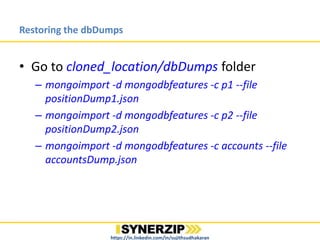
• Go to cloned_location/dbDumps folder
– mongoimport -d mongodbfeatures -c p1 --file
positionDump1.json
– mongoimport -d mongodbfeatures -c p2 --file
positionDump2.json
– mongoimport -d mongodbfeatures -c accounts --file
accountsDump.json
– mongoimport -d mongodbfeatures -c paging --file
pagingDump.json
https://in.linkedin.com/in/sujithsudhakaran
Basic overview
• Open-source, cross platform and document
oriented
• Data is saved in BSON; JSON is just a subset of
BSON
• Max limit of document is 16 MB
– What if my document or data is more than 16
MB?
• Schemaless
https://in.linkedin.com/in/sujithsudhakaran
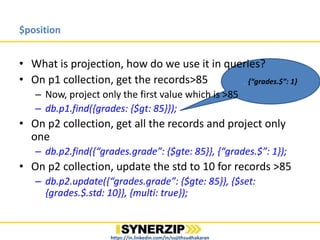
, {“grades.$”: 1}
$position
• What is projection, how do we use it in queries?
• On p1 collection, get the records>85
– Now, project only the first value which is >85
– db.p1.find({grades: {$gt: 85}});
• On p2 collection, get all the records and project only
one
– db.p2.find({“grades.grade”: {$gte: 85}}, {“grades.$”: 1});
• On p2 collection, update the std to 10 for records >=85
– db.p2.update({“grades.grade”: {$gte: 85}}, {$set:
{grades.$.std: 10}}, {multi: true});
https://in.linkedin.com/in/sujithsudhakaran
TTL(Time To Live)
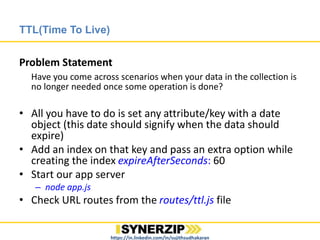
Problem Statement
Have you come across scenarios when your data in the collection is
no longer needed once some operation is done?
• All you have to do is set any attribute/key with a date
object (this date should signify when the data should
expire)
• Add an index on that key and pass an extra option while
creating the index expireAfterSeconds: 60
• Start our app server
– node app.js
• Check URL routes from the routes/ttl.js file
https://in.linkedin.com/in/sujithsudhakaran
Bulk Insert
Problem Statement
In Zulu, we had scenarios where we had to insert flight records in
Db, these records ranged till 25k records for a schedule of 1 month
• Types of bulk operation
– Ordered
– Unordered
• Size limit for a group is of 1000 records
• For a sharded system, an ordered operation would be much slower than
that of an unordered
• Check out the URL route from routes/bulkInsert.js file
– Just increase counter of the loop from 10000 -> 100000
• In our example we just added insert commands, but you can club insert,
update and remove queries
https://in.linkedin.com/in/sujithsudhakaran
$isolated
Problem Statement
What will happen when you are updating and read request comes
for the records which are getting updated(Dirty Read Problem)?
• Try this:
– db.bulk.update({}, {$set: {val: 1}, {multi: true});
• Once any one of the document is updated, it will make sure
that read for these docs will happen only after the records are
updated with this query
– db.bulk.update({$isolated : 1}}, {$set: {val: 2}, {multi: true})
https://in.linkedin.com/in/sujithsudhakaran
Paging
Problem Statement
In our application, we had UI where we had to show all the
flights in the schedule. But, user could not see all the flights in
one page view; so, there was a scope of improvisation.
• We can make smart use of
– skip()
– limit()
• Check out the URL routes from routes/paging.js file
• Use the GET method from the Postman and feed in the URL
params as:
– pageNumber: 1, size: 2
https://in.linkedin.com/in/sujithsudhakaran
GridFS
• Remember the question we asked about document size
being >16MB
• Divides the entire file into chunks of 255Kb
• Uses 2 collections:
– files: stores the metadata about the file
– chunks: stores the file chunks
These collections are placed under a bucket named as fs
• Lets start a new server to see this in action
– Run: node gridFSApp.js
– Test data for this example is available in testData folder
https://in.linkedin.com/in/sujithsudhakaran
Journaling
• MongoDB uses a journal file size limit of 100 MB
• For the journal files, MongoDB creates a subdirectory
named journal under the dbPath directory.
• Dbpath: /var/lib/mongodb
• Storage Engines
– MMAPv1 Storage Engine
– WiredTiger Storage Engine
https://in.linkedin.com/in/sujithsudhakaran
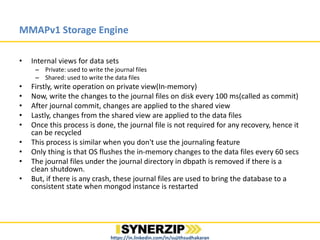
MMAPv1 Storage Engine
• Internal views for data sets
– Private: used to write the journal files
– Shared: used to write the data files
• Firstly, write operation on private view(In-memory)
• Now, write the changes to the journal files on disk every 100 ms(called as commit)
• After journal commit, changes are applied to the shared view
• Lastly, changes from the shared view are applied to the data files
• Once this process is done, the journal file is not required for any recovery, hence it
can be recycled
• This process is similar when you don't use the journaling feature
• Only thing is that OS flushes the in-memory changes to the data files every 60 secs
• The journal files under the journal directory in dbpath is removed if there is a
clean shutdown.
• But, if there is any crash, these journal files are used to bring the database to a
consistent state when mongod instance is restarted
https://in.linkedin.com/in/sujithsudhakaran
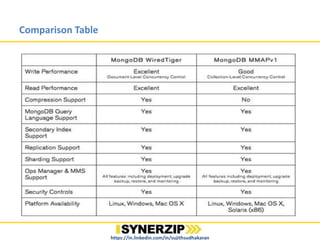
Comparison Table
https://in.linkedin.com/in/sujithsudhakaran
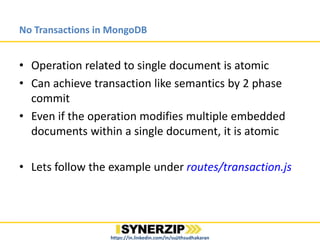
No Transactions in MongoDB
• Operation related to single document is atomic
• Can achieve transaction like semantics by 2 phase
commit
• Even if the operation modifies multiple embedded
documents within a single document, it is atomic
• Lets follow the example under routes/transaction.js
https://in.linkedin.com/in/sujithsudhakaran
Assignments
https://in.linkedin.com/in/sujithsudhakaran
• Assignment 1: Use TTL property
– Make a small UI, only the login page and welcome page. Initiate
a session after login, the session should timeout in 1 min. If you
reload the login page after 1 min, the session should
timeout(make use of the TTL feature)
• Assignment 2: Rollback the applied transaction
– We have seen a rollback scenario when the transaction is in
pending state. Implement a rollback scenario where the
transaction is in applied state but not completed. So, system
should be able to rollback the applied changes.
• Assignment 3: Implement Seek feature for video files
streaming
– This will be a more involved assignment. You might have to
check how to handle the seek functionality from the client side
Thank You
https://in.linkedin.com/in/sujithsudhakaran

Mongo db tips and advance features

  • 1.
    MongoDB Tips andAdvance Features By Sujith Sudhakaran https://in.linkedin.com/in/sujithsudhakaran
  • 2.
    Gearing up… • Pleaseopen the url: – https://github.com/ssujith87/mongodb-tips-and-advfeatures • Choose the repo “mongodb-tips-and-advfeatures” • Tools which we will be using – PostMan: REST client on chrome – NodeJS – Mongoose: MongoDB ODM – Express • Do npm install in the root directory https://in.linkedin.com/in/sujithsudhakaran
  • 3.
    Restoring the dbDumps •Go to cloned_location/dbDumps folder – mongoimport -d mongodbfeatures -c p1 --file positionDump1.json – mongoimport -d mongodbfeatures -c p2 --file positionDump2.json – mongoimport -d mongodbfeatures -c accounts --file accountsDump.json – mongoimport -d mongodbfeatures -c paging --file pagingDump.json https://in.linkedin.com/in/sujithsudhakaran
  • 4.
    Basic overview • Open-source,cross platform and document oriented • Data is saved in BSON; JSON is just a subset of BSON • Max limit of document is 16 MB – What if my document or data is more than 16 MB? • Schemaless https://in.linkedin.com/in/sujithsudhakaran
  • 5.
    , {“grades.$”: 1} $position •What is projection, how do we use it in queries? • On p1 collection, get the records>85 – Now, project only the first value which is >85 – db.p1.find({grades: {$gt: 85}}); • On p2 collection, get all the records and project only one – db.p2.find({“grades.grade”: {$gte: 85}}, {“grades.$”: 1}); • On p2 collection, update the std to 10 for records >=85 – db.p2.update({“grades.grade”: {$gte: 85}}, {$set: {grades.$.std: 10}}, {multi: true}); https://in.linkedin.com/in/sujithsudhakaran
  • 6.
    TTL(Time To Live) ProblemStatement Have you come across scenarios when your data in the collection is no longer needed once some operation is done? • All you have to do is set any attribute/key with a date object (this date should signify when the data should expire) • Add an index on that key and pass an extra option while creating the index expireAfterSeconds: 60 • Start our app server – node app.js • Check URL routes from the routes/ttl.js file https://in.linkedin.com/in/sujithsudhakaran
  • 7.
    Bulk Insert Problem Statement InZulu, we had scenarios where we had to insert flight records in Db, these records ranged till 25k records for a schedule of 1 month • Types of bulk operation – Ordered – Unordered • Size limit for a group is of 1000 records • For a sharded system, an ordered operation would be much slower than that of an unordered • Check out the URL route from routes/bulkInsert.js file – Just increase counter of the loop from 10000 -> 100000 • In our example we just added insert commands, but you can club insert, update and remove queries https://in.linkedin.com/in/sujithsudhakaran
  • 8.
    $isolated Problem Statement What willhappen when you are updating and read request comes for the records which are getting updated(Dirty Read Problem)? • Try this: – db.bulk.update({}, {$set: {val: 1}, {multi: true}); • Once any one of the document is updated, it will make sure that read for these docs will happen only after the records are updated with this query – db.bulk.update({$isolated : 1}}, {$set: {val: 2}, {multi: true}) https://in.linkedin.com/in/sujithsudhakaran
  • 9.
    Paging Problem Statement In ourapplication, we had UI where we had to show all the flights in the schedule. But, user could not see all the flights in one page view; so, there was a scope of improvisation. • We can make smart use of – skip() – limit() • Check out the URL routes from routes/paging.js file • Use the GET method from the Postman and feed in the URL params as: – pageNumber: 1, size: 2 https://in.linkedin.com/in/sujithsudhakaran
  • 10.
    GridFS • Remember thequestion we asked about document size being >16MB • Divides the entire file into chunks of 255Kb • Uses 2 collections: – files: stores the metadata about the file – chunks: stores the file chunks These collections are placed under a bucket named as fs • Lets start a new server to see this in action – Run: node gridFSApp.js – Test data for this example is available in testData folder https://in.linkedin.com/in/sujithsudhakaran
  • 11.
    Journaling • MongoDB usesa journal file size limit of 100 MB • For the journal files, MongoDB creates a subdirectory named journal under the dbPath directory. • Dbpath: /var/lib/mongodb • Storage Engines – MMAPv1 Storage Engine – WiredTiger Storage Engine https://in.linkedin.com/in/sujithsudhakaran
  • 12.
    MMAPv1 Storage Engine •Internal views for data sets – Private: used to write the journal files – Shared: used to write the data files • Firstly, write operation on private view(In-memory) • Now, write the changes to the journal files on disk every 100 ms(called as commit) • After journal commit, changes are applied to the shared view • Lastly, changes from the shared view are applied to the data files • Once this process is done, the journal file is not required for any recovery, hence it can be recycled • This process is similar when you don't use the journaling feature • Only thing is that OS flushes the in-memory changes to the data files every 60 secs • The journal files under the journal directory in dbpath is removed if there is a clean shutdown. • But, if there is any crash, these journal files are used to bring the database to a consistent state when mongod instance is restarted https://in.linkedin.com/in/sujithsudhakaran
  • 13.
  • 14.
    No Transactions inMongoDB • Operation related to single document is atomic • Can achieve transaction like semantics by 2 phase commit • Even if the operation modifies multiple embedded documents within a single document, it is atomic • Lets follow the example under routes/transaction.js https://in.linkedin.com/in/sujithsudhakaran
  • 15.
    Assignments https://in.linkedin.com/in/sujithsudhakaran • Assignment 1:Use TTL property – Make a small UI, only the login page and welcome page. Initiate a session after login, the session should timeout in 1 min. If you reload the login page after 1 min, the session should timeout(make use of the TTL feature) • Assignment 2: Rollback the applied transaction – We have seen a rollback scenario when the transaction is in pending state. Implement a rollback scenario where the transaction is in applied state but not completed. So, system should be able to rollback the applied changes. • Assignment 3: Implement Seek feature for video files streaming – This will be a more involved assignment. You might have to check how to handle the seek functionality from the client side
  • 16.

Editor's Notes

  • #2 - 5 mins Introduce yourself - With Synerzip for 3 and half years - Engagement with QuickOffice, Zulu - With this session, I have tried to showcase few of the learning from my experience Q1: How many of you have worked with any of the Relational databases? Q2: How many of you have used mongoDB in production? Q3: What sort of data are they storing? Q4: Reshuffle if required
  • #3  15 mins How many of you have some programming experience in Node? Q: How many of you would like to try out the examples which - Reshuffle if required Ask people to download the repo ODM is like ORM, just for the relational guys to related to it
  • #4 - 20 mins
  • #5  25 mins Characteristic of Relational databases: ACID
  • #6 35 mins Check if people have any UI mongo client or command line Give the co-relation with Zulu (Markets UI in Codeshare) 5 records for 1st query 2 records for 2nd query Relate it to the scenario in Zulu
  • #7  40 mins Relate with Zulu Assignment 1: Make a small UI, only the login page and welcome page. Start a session, the session should timeout in 1 min. If you reload the login page after 1 min, the session should timeout
  • #8  45 mins Scenario of unordered insertion, if any error occurs, mongodb will continue to insert the remaining records
  • #9 50 mins Please run bulk operation couple of times
  • #10  55 mins We found a way, but we didn’t implement it
  • #11 65 mins Zulu correlation about saving the text file(We found a better option) Use case of GridFS >16MB FS limits the number of files in a directory When not to use: when you will have to update your files saved atomically If you size is <16MB and you still want to store the binary data you can use the type BinData Assignmnent: Check if we can implement a seek feature with GridFS
  • #12 70 mins Show the journal files - WiredTiger was acquired by MongoDB in Dec, 2014 - With latest 3.2, WiredTiger is default storage engine
  • #13 - 75 mins
  • #14 - 78 mins
  • #15 88 mins What is the characteristic of transaction - How many of you know that mongoDB don’t support transactions
  • #16 - 93 mins So, there are many things which can be done. There are geo-spatial indexes which can be used to great advantage rather than calling Google maps API - There is a lot of promotion for BI with MongoDB connector, If anyone is interested we can explore this together
  • #17 - 95 mins