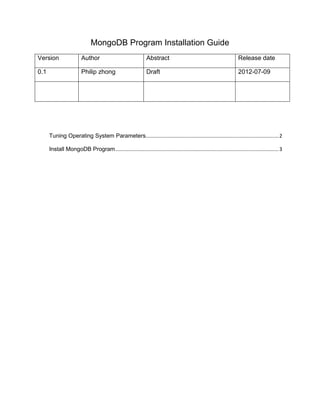
MongoDB Program Installation Guide
Version                  Author                                Abstract                                               Release date

0.1                      Philip zhong                          Draft                                                  2012-07-09


      Tuning Operating System Parameters............................................................................................ 2

      Install MongoDB Program ................................................................................................................. 3
Tuning Operating System Parameters


1. Check kernel version,make sure version great equal 2.6.32
  #cat /proc/version

2. Check File System Version, make sure is EXT4
  # df -Th -m|grep -i “ext4”

3. Set File Descriptor Limit and User process limit
  #vi /etc/sysctl.conf

  fs.file-max=65536


  #vi /etc/security/limits.conf

  *          soft   nproc 2047      --noproc max process

  *          hard    nproc 16384

  *          soft   nofile 1024     --nofile max files

  *          hard    nofile 65536

4. Tuning network
      #vi /etc/sysctl.conf

       net.ipv4.ip_local_port_range=1024 65000

       net.core.optmem_max = 262144

       net.core.rmem_default = 262144

       net.core.wmem_default = 262144

       net.core.rmem_max = 262144

       net.core.wmem_max = 262144

      # sysctl -p

5. Turn off atime for the data volume
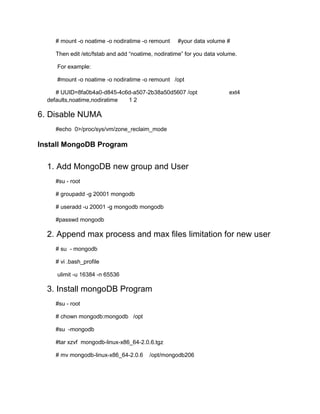
# mount -o noatime -o nodiratime -o remount    #your data volume #

    Then edit /etc/fstab and add “noatime, nodiratime” for you data volume.

     For example:

     #mount -o noatime -o nodiratime -o remount /opt

     # UUID=8fa0b4a0-d845-4c6d-a507-2b38a50d5607 /opt                   ext4
  defaults,noatime,nodiratime 12

6. Disable NUMA
    #echo 0>/proc/sys/vm/zone_reclaim_mode

Install MongoDB Program


  1. Add MongoDB new group and User
    #su - root

    # groupadd -g 20001 mongodb

    # useradd -u 20001 -g mongodb mongodb

    #passwd mongodb

  2. Append max process and max files limitation for new user
    # su - mongodb

    # vi .bash_profile

     ulimit -u 16384 -n 65536

  3. Install mongoDB Program
    #su - root

    # chown mongodb:mongodb /opt

    #su -mongodb

    #tar xzvf mongodb-linux-x86_64-2.0.6.tgz

    # mv mongodb-linux-x86_64-2.0.6     /opt/mongodb206

Mongo db program_installation_guide

  • 1.
    MongoDB Program InstallationGuide Version Author Abstract Release date 0.1 Philip zhong Draft 2012-07-09 Tuning Operating System Parameters............................................................................................ 2 Install MongoDB Program ................................................................................................................. 3
  • 2.
    Tuning Operating SystemParameters 1. Check kernel version,make sure version great equal 2.6.32 #cat /proc/version 2. Check File System Version, make sure is EXT4 # df -Th -m|grep -i “ext4” 3. Set File Descriptor Limit and User process limit #vi /etc/sysctl.conf fs.file-max=65536 #vi /etc/security/limits.conf * soft nproc 2047 --noproc max process * hard nproc 16384 * soft nofile 1024 --nofile max files * hard nofile 65536 4. Tuning network #vi /etc/sysctl.conf net.ipv4.ip_local_port_range=1024 65000 net.core.optmem_max = 262144 net.core.rmem_default = 262144 net.core.wmem_default = 262144 net.core.rmem_max = 262144 net.core.wmem_max = 262144 # sysctl -p 5. Turn off atime for the data volume
  • 3.
    # mount -onoatime -o nodiratime -o remount #your data volume # Then edit /etc/fstab and add “noatime, nodiratime” for you data volume. For example: #mount -o noatime -o nodiratime -o remount /opt # UUID=8fa0b4a0-d845-4c6d-a507-2b38a50d5607 /opt ext4 defaults,noatime,nodiratime 12 6. Disable NUMA #echo 0>/proc/sys/vm/zone_reclaim_mode Install MongoDB Program 1. Add MongoDB new group and User #su - root # groupadd -g 20001 mongodb # useradd -u 20001 -g mongodb mongodb #passwd mongodb 2. Append max process and max files limitation for new user # su - mongodb # vi .bash_profile ulimit -u 16384 -n 65536 3. Install mongoDB Program #su - root # chown mongodb:mongodb /opt #su -mongodb #tar xzvf mongodb-linux-x86_64-2.0.6.tgz # mv mongodb-linux-x86_64-2.0.6 /opt/mongodb206