1
@PhillyMUG | @MongoDB@PhillyMUG | @MongoDB
Your First MongoDB
Application
Michael Lynn, October 2017
Wifi: WeWork Guest (pw: ...)
2
@PhillyMUG | @MongoDB
Preparing for Beginner MongoDB MUG
1. Install MongoDB
a. See here: https://docs.mongodb.com/manual/installation/
2. Test Launching MongoDB
a. See here:
https://docs.mongodb.com/manual/tutorial/manage-mongodb-pr
ocesses/
3. Load Some Data
a. http://bit.ly/2xmQMYl
b. Once you have restaurants.json downloaded, use mongoimport
to import the collection.
c. http://bit.ly/2xZpUdX
3
@PhillyMUG | @MongoDB
Logistics
1. Want to follow along with the presentation?
a. https://bluejeans.com/345654833/5523
2. Need Wifi?
a. WWGuest - No Password
3. Pizza is on the way (7:30)
4. Questions during the preso are ok!
5. Please sign-in
a. http://signin.phillymug.org
6. https://github.com/mrlynn/phillymug-october-2017
7. Have a beer!
4
@PhillyMUG | @MongoDB@PhillyMUG | @MongoDB
1. Introduce you to NoSQL and related concepts
2. Increase your understanding of MongoDB through exposure
and exercise of the following activities
a. Install MongoDB
b. Create a Database, Collection, Document
c. Read from a Database, Collection, Document
d. Update a Document
e. Delete a Document
GOALS
We are here to:
5
@PhillyMUG | @MongoDB@PhillyMUG | @MongoDB
1. Do a technical deep dive.
2. Debate about the best way to choose a shard key, deploy a
cluster or convert a replica set to a sharded cluster or any
other 300 level topic.
3. Teach you about your operating system.
4. To sell you. I am not here to sell you on MongoDB.
5. Make you feel stupid… there are no stupid questions.
We are not here to:
6
@PhillyMUG | @MongoDB
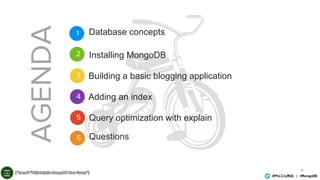
1
2
3
4
5
AGENDA
Database concepts
Installing MongoDB
Building a basic blogging application
Adding an index
Query optimization with explain
Questions6
7
@PhillyMUG | @MongoDB
Summary of Database Concepts
• Why NoSQL exists
• The types of NoSQL database
• The key features of MongoDB
• Data durability in MongoDB – Replica Sets
• Scalability in MongoDB - Sharding
8
@PhillyMUG | @MongoDB
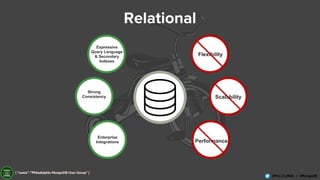
Expressive
Query Language
& Secondary
Indexes
Strong
Consistency
Enterprise
Integrations
Flexibility
Scalability
Performance
Relational
9
@PhillyMUG | @MongoDB
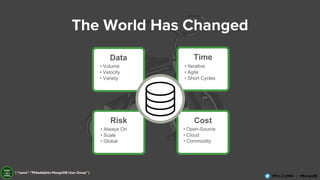
The World Has Changed
Data
• Volume
• Velocity
• Variety
Time
• Iterative
• Agile
• Short Cycles
Risk
• Always On
• Scale
• Global
Cost
• Open-Source
• Cloud
• Commodity
10
@PhillyMUG | @MongoDB
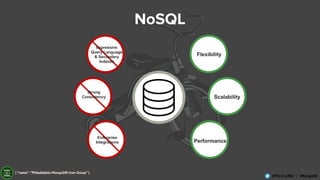
NoSQL
Flexibility
Scalability
Performance
Expressive
Query Language
& Secondary
Indexes
Strong
Consistency
Enterprise
Integrations
11
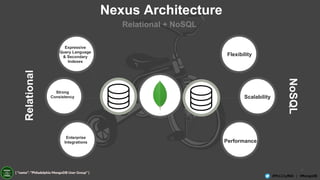
@PhillyMUG | @MongoDB
Flexibility
Scalability
Performance
Relational
NoSQL
Nexus Architecture
Relational + NoSQL
Expressive
Query Language
& Secondary
Indexes
Strong
Consistency
Enterprise
Integrations
12
@PhillyMUG | @MongoDB
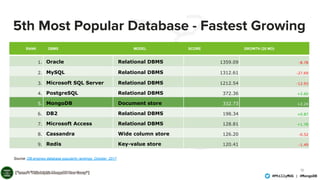
5th Most Popular Database - Fastest Growing
RANK DBMS MODEL SCORE GROWTH (20 MO)
1. Oracle Relational DBMS 1359.09 -8.78
2. MySQL Relational DBMS 1312.61 -27.69
3. Microsoft SQL Server Relational DBMS 1212.54 -12.93
4. PostgreSQL Relational DBMS 372.36 +2.60
5. MongoDB Document store 332.73 +2.24
6. DB2 Relational DBMS 198.34 +0.87
7. Microsoft Access Relational DBMS 128.81 +1.78
8. Cassandra Wide column store 126.20 -0.52
9. Redis Key-value store 120.41 -1.49
Source: DB-engines database popularity rankings; October 2017
13
@PhillyMUG | @MongoDB
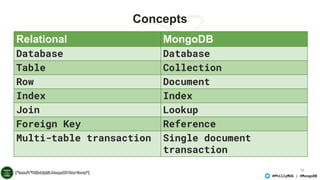
Concepts
Relational MongoDB
Database Database
Table Collection
Row Document
Index Index
Join Lookup
Foreign Key Reference
Multi-table transaction Single document
transaction
14
@PhillyMUG | @MongoDB
Document Store
{
name: “Michael Lynn”,
title: “Sr. Solutions Architect”,
address: {
address1: “1601 Market Street”,
address2: “19th Floor”,
city: “Philadelphia”,
state: “PA”,
zipcode: “19123”
},
expertise: [ “MongoDB”, “Python”, “Javascript” ],
employee_number: 798,
location: {
type: “point”,
coords: [ 39.953097, -75.167352]
}
}
15
@PhillyMUG | @MongoDB
Document Store
{
name: “Michael Lynn”,
title: “Sr. Solutions Architect”,
address: {
address1: “1601 Market Street”,
address2: “19th Floor”,
city: “Philadelphia”,
state: “PA”,
zipcode: “19123”
},
expertise: [ “MongoDB”, “Python”, “Javascript” ],
employee_number: 798,
location: {
type: “point”,
coords: [ 39.953097, -75.167352]
}
}
{
name: “Joe Drumgoole”,
title: “Director of Developer
Advocacy”,
address: {
address1: “Latin Hall”,
address2: “Golden Lane”,
eircode: “D09 N623”,
},
expertise: [ “MongoDB”, “Python”,
“Javascript” ],
employee_number: 320,
location: {
type: “point”,
coords: [ 53.34, -6.26 ]
}
POLYMORPHISM
16
@PhillyMUG | @MongoDB
Document Store
{
name: “Michael Lynn”,
title: “Sr. Solutions Architect”,
address: {
address1: “1601 Market Street”,
address2: “19th Floor”,
city: “Philadelphia”,
state: “PA”,
zipcode: “19123”
},
expertise: [ “MongoDB”, “Python”, “Javascript” ],
employee_number: 798,
location: {
type: “point”,
coords: [ 39.953097, -75.167352]
}
}
Strings
Nested
Document
Array
Geo
Location
17
@PhillyMUG | @MongoDB
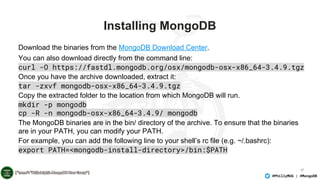
Installing MongoDB
Download the binaries from the MongoDB Download Center.
You can also download directly from the command line:
curl -O https://fastdl.mongodb.org/osx/mongodb-osx-x86_64-3.4.9.tgz
Once you have the archive downloaded, extract it:
tar -zxvf mongodb-osx-x86_64-3.4.9.tgz
Copy the extracted folder to the location from which MongoDB will run.
mkdir -p mongodb
cp -R -n mongodb-osx-x86_64-3.4.9/ mongodb
The MongoDB binaries are in the bin/ directory of the archive. To ensure that the binaries
are in your PATH, you can modify your PATH.
For example, you can add the following line to your shell’s rc file (e.g. ~/.bashrc):
export PATH=<mongodb-install-directory>/bin:$PATH
18
@PhillyMUG | @MongoDB
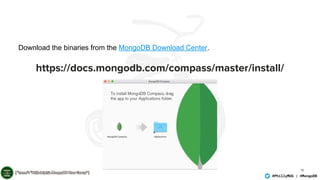
https://docs.mongodb.com/compass/master/install/
Download the binaries from the MongoDB Download Center.
19
@PhillyMUG | @MongoDB
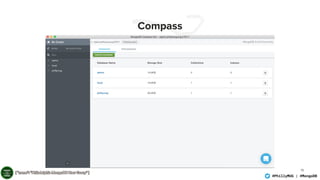
Compass
20
@PhillyMUG | @MongoDB
Running Mongod
Michaels-MBP-3:data mlynn$ mongod --dbpath /data/phillymug
2017-10-08T13:11:31.050-0400 I CONTROL [initandlisten] MongoDB starting : pid=64082 port=27017 dbpath=/data/phillymug 64-bit host=Michaels-MBP-3.fios-router.home
2017-10-08T13:11:31.051-0400 I CONTROL [initandlisten] db version v3.4.9
2017-10-08T13:11:31.051-0400 I CONTROL [initandlisten] git version: 876ebee8c7dd0e2d992f36a848ff4dc50ee6603e
2017-10-08T13:11:31.051-0400 I CONTROL [initandlisten] OpenSSL version: OpenSSL 0.9.8zh 14 Jan 2016
2017-10-08T13:11:31.051-0400 I CONTROL [initandlisten] allocator: system
2017-10-08T13:11:31.051-0400 I CONTROL [initandlisten] modules: enterprise
2017-10-08T13:11:31.051-0400 I CONTROL [initandlisten] build environment:
2017-10-08T13:11:31.051-0400 I CONTROL [initandlisten] distarch: x86_64
2017-10-08T13:11:31.051-0400 I CONTROL [initandlisten] target_arch: x86_64
2017-10-08T13:11:31.051-0400 I CONTROL [initandlisten] options: { storage: { dbPath: "/data/phillymug" } }
2017-10-08T13:11:31.051-0400 I STORAGE [initandlisten] wiredtiger_open config:
create,cache_size=7680M,session_max=20000,eviction=(threads_min=4,threads_max=4),config_base=false,statistics=(fast),log=(enabled=true,archive=true,path=journal,compres
sor=snappy),file_manager=(close_idle_time=100000),checkpoint=(wait=60,log_size=2GB),statistics_log=(wait=0),
2017-10-08T13:11:31.811-0400 I CONTROL [initandlisten]
2017-10-08T13:11:31.811-0400 I CONTROL [initandlisten] ** WARNING: Access control is not enabled for the database.
2017-10-08T13:11:31.811-0400 I CONTROL [initandlisten] ** Read and write access to data and configuration is unrestricted.
2017-10-08T13:11:31.811-0400 I CONTROL [initandlisten]
2017-10-08T13:11:31.970-0400 I FTDC [initandlisten] Initializing full-time diagnostic data capture with directory '/data/phillymug/diagnostic.data'
2017-10-08T13:11:32.294-0400 I INDEX [initandlisten] build index on: admin.system.version properties: { v: 2, key: { version: 1 }, name:
"incompatible_with_version_32", ns: "admin.system.version" }
2017-10-08T13:11:32.294-0400 I INDEX [initandlisten] building index using bulk method; build may temporarily use up to 500 megabytes of RAM
2017-10-08T13:11:32.306-0400 I INDEX [initandlisten] build index done. scanned 0 total records. 0 secs
2017-10-08T13:11:32.306-0400 I COMMAND [initandlisten] setting featureCompatibilityVersion to 3.4
2017-10-08T13:11:32.307-0400 I NETWORK [thread1] waiting for connections on port 27017
2017-10-08T13:11:32.644-0400 I NETWORK [thread1] connection accepted from 127.0.0.1:60241 #1 (1 connection now open)
21
@PhillyMUG | @MongoDB
Connecting Via The Shell
Michaels-MBP-3:phillymug-october-2017 mlynn$ mongo
MongoDB shell version v3.4.9
connecting to: mongodb://127.0.0.1:27017
MongoDB server version: 3.4.9
Server has startup warnings:
2017-10-08T13:12:42.791-0400 I CONTROL [initandlisten]
2017-10-08T13:12:42.791-0400 I CONTROL [initandlisten] ** WARNING: Access control
is not enabled for the database.
2017-10-08T13:12:42.791-0400 I CONTROL [initandlisten] ** Read and write
access to data and configuration is unrestricted.
2017-10-08T13:12:42.791-0400 I CONTROL [initandlisten]
2017-10-08T13:12:59.746-0400 E QUERY [thread1] uncaught exception: don't know how
to show [automationNotices]
22
@PhillyMUG | @MongoDB
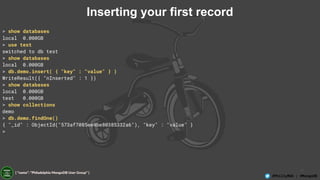
Inserting your first record
> show databases
local 0.000GB
> use test
switched to db test
> show databases
local 0.000GB
> db.demo.insert( { "key" : "value" } )
WriteResult({ "nInserted" : 1 })
> show databases
local 0.000GB
test 0.000GB
> show collections
demo
> db.demo.findOne()
{ "_id" : ObjectId("573af7085ee4be80385332a6"), "key" : "value" }
>
23
@PhillyMUG | @MongoDB
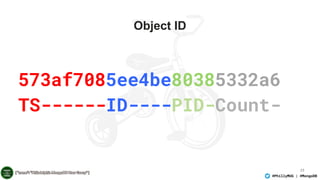
Object ID
573af7085ee4be80385332a6
TS------ID----PID-Count-
24
@PhillyMUG | @MongoDB@PhillyMUG | @MongoDB
A Simple
Blogging
Application
25
@PhillyMUG | @MongoDB
A Simple Blog Application
• Lets create a blogging application with:
– Articles
– Users
– Comments
26
@PhillyMUG | @MongoDB
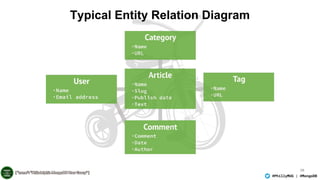
Typical Entity Relation Diagram
27
@PhillyMUG | @MongoDB
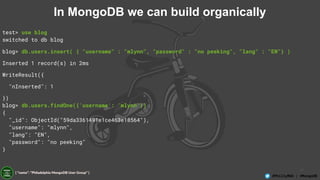
In MongoDB we can build organically
test> use blog
switched to db blog
blog> db.users.insert( { "username" : "mlynn", "password" : "no peeking", "lang" : "EN"} )
Inserted 1 record(s) in 2ms
WriteResult({
"nInserted": 1
})
blog> db.users.findOne({'username': 'mlynn'})
{
"_id": ObjectId("59da3361491e1ce463e18564"),
"username": "mlynn",
"lang": "EN",
"password": "no peeking"
}
28
@PhillyMUG | @MongoDB
How do we do this in a program?
import pymongo
client = pymongo.MongoClient()
blogDatabase = client[ "blog" ]
usersCollection = blogDatabase[ "users" ]
usersCollection.insert_one( { "username" : "mlynn",
"password" : "no peeking",
"lang" : "EN" })
user = usersCollection.find_one()
print( user )
29
@PhillyMUG | @MongoDB
Ok - now let’s find it
import pymongo
client = pymongo.MongoClient()
blogDatabase = client[ "blog" ]
usersCollection = blogDatabase[ "users" ]
user = usersCollection.find_one({'username': 'mlynn'})
print( user )
python 1a-find-user.py
{u'username': u'mlynn', u'lang': u'EN', u'password': u'no peeking', u'_id':
ObjectId('59da5dac491e1cfb5e0abe6b')}
Michaels-MBP-3:code mlynn$
30
@PhillyMUG | @MongoDB
Now you see it… now you delete it
import pymongo
client = pymongo.MongoClient()
blogDatabase = client[ "blog" ]
usersCollection = blogDatabase[ "users" ]
result = usersCollection.delete_many({'username': 'mlynn'})
print( result )
31
@PhillyMUG | @MongoDB
Next Up - Articles
import pymongo
client = pymongo.MongoClient()
blogDatabase = client[ "blog" ]
usersCollection = blogDatabase[ "users" ]
articlesCollection = blogDatabase[ "articles" ]
author = "mlynn"
article = { "title" : "This is my first post",
"body" : "The is the longer body text for my blog post. We can add lots of text here.",
"author" : author,
"tags" : [ "mlynn", "general", "Philly", "admin" ]
}
if usersCollection.find_one( { "username" : author }) :
result = articlesCollection.insert_one( article )
print result
else:
raise ValueError( "Author %s does not exist" % author )
32
@PhillyMUG | @MongoDB
Create a new type of article
import pymongo
import datetime
client = pymongo.MongoClient()
blogDatabase = client[ "blog" ]
usersCollection = blogDatabase[ "users" ]
articlesCollection = blogDatabase[ "articles" ]
author = "mlynn"
title = "This is a post on MongoDB"
newPost = { "title" : title,
"body" : "MongoDB is the worlds most popular NoSQL database. It is a document database",
"author" : author,
"tags" : [ "mike", "mongodb", "Philly" ],
"section" : "technology",
"postDate" : datetime.datetime.now(),
}
if usersCollection.find_one( { "username" : author }) :
articlesCollection.insert_one( newPost )
33
@PhillyMUG | @MongoDB
Create a new type of article
import pymongo
import string
import datetime
import random
def randomString( size, letters = string.letters ):
return "".join( [random.choice( letters ) for _ in xrange( size )] )
client = pymongo.MongoClient()
def makeArticle( count, author, timestamp ):
return { "_id" : count,
"title" : randomString( 20 ),
"body" : randomString( 80 ),
"author" : author,
"postdate" : timestamp }
def makeUser( username ):
return { "username" : username,
"password" : randomString( 10 ) ,
"karma" : random.randint( 0, 500 ),
"lang" : "EN" }
blogDatabase = client[ "blog" ]
usersCollection = blogDatabase[ "users" ]
articlesCollection = blogDatabase[ "articles" ]
bulkUsers = usersCollection.initialize_ordered_bulk_op()
bulkArticles = articlesCollection.initialize_ordered_bulk_op()
ts = datetime.datetime.now()
for i in range( 100000 ) :
#username = randomString( 10, string.ascii_uppercase ) + "_"
+ str( i )
username = "USER_" + str( i )
bulkUsers.insert( makeUser( username ) )
ts = ts + datetime.timedelta( seconds = 1 )
bulkArticles.insert( makeArticle( i, username, ts ))
if ( i % 500 == 0 ) :
bulkUsers.execute()
bulkArticles.execute()
bulkUsers = usersCollection.initialize_ordered_bulk_op()
bulkArticles =
articlesCollection.initialize_ordered_bulk_op()
bulkUsers.execute()
bulkArticles.execute()
34
@PhillyMUG | @MongoDB
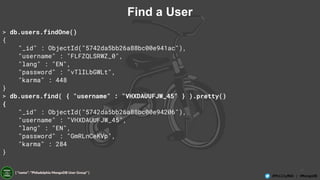
Find a User
> db.users.findOne()
{
"_id" : ObjectId("5742da5bb26a88bc00e941ac"),
"username" : "FLFZQLSRWZ_0",
"lang" : "EN",
"password" : "vTlILbGWLt",
"karma" : 448
}
> db.users.find( { "username" : "VHXDAUUFJW_45" } ).pretty()
{
"_id" : ObjectId("5742da5bb26a88bc00e94206"),
"username" : "VHXDAUUFJW_45",
"lang" : "EN",
"password" : "GmRLnCeKVp",
"karma" : 284
}
35
@PhillyMUG | @MongoDB
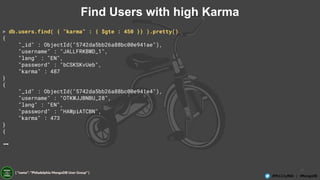
Find Users with high Karma
> db.users.find( { "karma" : { $gte : 450 }} ).pretty()
{
"_id" : ObjectId("5742da5bb26a88bc00e941ae"),
"username" : "JALLFRKBWD_1",
"lang" : "EN",
"password" : "bCSKSKvUeb",
"karma" : 487
}
{
"_id" : ObjectId("5742da5bb26a88bc00e941e4"),
"username" : "OTKWJJBNBU_28",
"lang" : "EN",
"password" : "HAWpiATCBN",
"karma" : 473
}
{
…
36
@PhillyMUG | @MongoDB
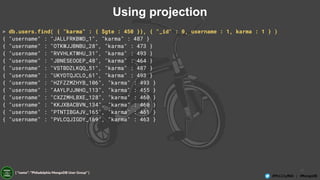
Using projection
> db.users.find( { "karma" : { $gte : 450 }}, { "_id" : 0, username : 1, karma : 1 } )
{ "username" : "JALLFRKBWD_1", "karma" : 487 }
{ "username" : "OTKWJJBNBU_28", "karma" : 473 }
{ "username" : "RVVHLKTWHU_31", "karma" : 493 }
{ "username" : "JBNESEOOEP_48", "karma" : 464 }
{ "username" : "VSTBDZLKQQ_51", "karma" : 487 }
{ "username" : "UKYDTQJCLO_61", "karma" : 493 }
{ "username" : "HZFZZMZHYB_106", "karma" : 493 }
{ "username" : "AAYLPJJNHO_113", "karma" : 455 }
{ "username" : "CXZZMHLBXE_128", "karma" : 460 }
{ "username" : "KKJXBACBVN_134", "karma" : 460 }
{ "username" : "PTNTIBGAJV_165", "karma" : 461 }
{ "username" : "PVLCQJIGDY_169", "karma" : 463 }
37
@PhillyMUG | @MongoDB
Update an Article to Add Comments 1
> db.articles.find( { "_id" : 18 } ).pretty()
{
"_id" : 18,
"body" :
"nTzOofOcnHKkJxpjKAyqTTnKZMFzzkWFeXtBRuEKsctuGBgWIrEBrYdvFIVHJWaXLUTVUXblOZZgUqWu",
"postdate" : ISODate("2016-05-23T12:02:46.830Z"),
"author" : "ASWTOMMABN_19",
"title" : "CPMaqHtAdRwLXhlUvsej"
}
> db.articles.update( { _id : 18 }, { $set : { comments : [] }} )
WriteResult({ "nMatched" : 1, "nUpserted" : 0, "nModified" : 1 })
38
@PhillyMUG | @MongoDB
Update an article to add Comments 2
> db.articles.find( { _id :18 } ).pretty()
{
"_id" : 18,
"body" :
"KmwFSIMQGcIsRNTDBFPuclwcVJkoMcrIPwTiSZDYyatoKzeQiKvJkiVSrndXqrALVIYZxGpaMjucgXUV",
"postdate" : ISODate("2016-05-23T16:04:39.497Z"),
"author" : "USER_18",
"title" : "wTLreIEyPfovEkBhJZZe",
"comments" : [ ]
}
>
39
@PhillyMUG | @MongoDB
Update an Article to Add Comments 3
> db.articles.update( { _id : 18 }, { $push : { comments : { username : "mlynn", comment :
"hey first post" }}} )
WriteResult({ "nMatched" : 1, "nUpserted" : 0, "nModified" : 1 })
> db.articles.find( { _id :18 } ).pretty()
{
"_id" : 18,
"body" :
"KmwFSIMQGcIsRNTDBFPuclwcVJkoMcrIPwTiSZDYyatoKzeQiKvJkiVSrndXqrALVIYZxGpaMjucgXUV",
"postdate" : ISODate("2016-05-23T16:04:39.497Z"),
"author" : "USER_18",
"title" : "wTLreIEyPfovEkBhJZZe",
"comments" : [
{
"username" : "mlynn",
"comment" : "hey first post"
}
]
}
>
40
@PhillyMUG | @MongoDB
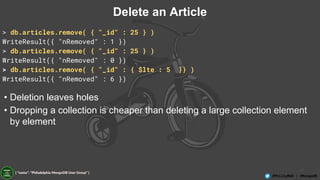
Delete an Article
> db.articles.remove( { "_id" : 25 } )
WriteResult({ "nRemoved" : 1 })
> db.articles.remove( { "_id" : 25 } )
WriteResult({ "nRemoved" : 0 })
> db.articles.remove( { "_id" : { $lte : 5 }} )
WriteResult({ "nRemoved" : 6 })
• Deletion leaves holes
• Dropping a collection is cheaper than deleting a large collection element
by element
41
@PhillyMUG | @MongoDB
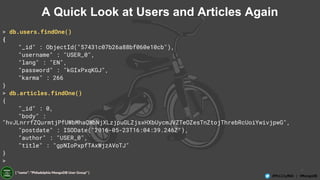
A Quick Look at Users and Articles Again
> db.users.findOne()
{
"_id" : ObjectId("57431c07b26a88bf060e10cb"),
"username" : "USER_0",
"lang" : "EN",
"password" : "kGIxPxqKGJ",
"karma" : 266
}
> db.articles.findOne()
{
"_id" : 0,
"body" :
"hvJLnrrfZQurmtjPfUWbMhaQWbNjXLzjpuGLZjsxHXbUycmJVZTeOZesTnZtojThrebRcUoiYwivjpwG",
"postdate" : ISODate("2016-05-23T16:04:39.246Z"),
"author" : "USER_0",
"title" : "gpNIoPxpfTAxWjzAVoTJ"
}
>
42
@PhillyMUG | @MongoDB
Find a User
> db.users.find( { "username" : "ABOXHWKBYS_199" } ).explain()
{
"queryPlanner" : {
"plannerVersion" : 1,
"namespace" : "blog.users",
"indexFilterSet" : false,
"parsedQuery" : {
"username" : {
"$eq" : "ABOXHWKBYS_199"
}
},
"winningPlan" : {
"stage" : "COLLSCAN",
"filter" : {
"username" : {
"$eq" : "ABOXHWKBYS_199"
}
},
"direction" : "forward"
},
"rejectedPlans" : [ ]
},
"serverInfo" : {
"host" : "JD10Gen.local",
"port" : 27017,
"version" : "3.2.6",
"gitVersion" : "05552b562c7a0b3143a729aaa0838e558dc49b25"
},
"ok" : 1
}
43
@PhillyMUG | @MongoDB
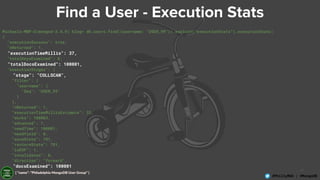
Find a User - Execution Stats
Michaels-MBP-3(mongod-3.4.9) blog> db.users.find({username: "USER_99"}).explain("executionStats").executionStats;
{
"executionSuccess": true,
"nReturned": 1,
"executionTimeMillis": 37,
"totalKeysExamined": 0,
"totalDocsExamined": 100001,
"executionStages": {
"stage": "COLLSCAN",
"filter": {
"username": {
"$eq": "USER_99"
}
},
"nReturned": 1,
"executionTimeMillisEstimate": 33,
"works": 100003,
"advanced": 1,
"needTime": 100001,
"needYield": 0,
"saveState": 781,
"restoreState": 781,
"isEOF": 1,
"invalidates": 0,
"direction": "forward",
"docsExamined": 100001
}
}
44
@PhillyMUG | @MongoDB
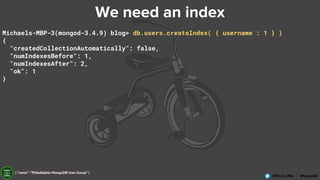
We need an index
Michaels-MBP-3(mongod-3.4.9) blog> db.users.createIndex( { username : 1 } )
{
"createdCollectionAutomatically": false,
"numIndexesBefore": 1,
"numIndexesAfter": 2,
"ok": 1
}
45
@PhillyMUG | @MongoDB
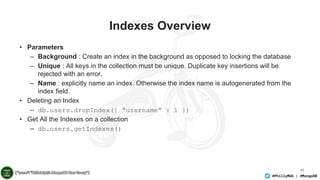
Indexes Overview
• Parameters
– Background : Create an index in the background as opposed to locking the database
– Unique : All keys in the collection must be unique. Duplicate key insertions will be
rejected with an error.
– Name : explicitly name an index. Otherwise the index name is autogenerated from the
index field.
• Deleting an Index
– db.users.dropIndex({ “username” : 1 })
• Get All the Indexes on a collection
– db.users.getIndexes()
46
@PhillyMUG | @MongoDB
Query Plan Execution Stages
• COLLSCAN : for a collection scan
• IXSCAN : for scanning index keys
• FETCH : for retrieving documents
• SHARD_MERGE : for merging results from shards
47
@PhillyMUG | @MongoDB
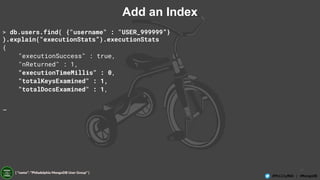
Add an Index
> db.users.find( {"username" : "USER_999999”}
).explain("executionStats”).executionStats
{
"executionSuccess" : true,
"nReturned" : 1,
"executionTimeMillis" : 0,
"totalKeysExamined" : 1,
"totalDocsExamined" : 1,
…
48
@PhillyMUG | @MongoDB
Find a User - Execution Stats
Michaels-MBP-3(mongod-3.4.9) blog> db.users.find({username: "USER_99"}).explain("executionStats").executionStats;
{
"executionSuccess": true,
"nReturned": 1,
"executionTimeMillis": 0,
"totalKeysExamined": 1,
"totalDocsExamined": 1,
"executionStages": {
"stage": "FETCH",
"nReturned": 1,
"executionTimeMillisEstimate": 0,
...
"inputStage": {
"stage": "IXSCAN",
"nReturned": 1,
"executionTimeMillisEstimate": 0,
"works": 2,
...
"keyPattern": {
"username": 1
},
"indexName": "username_1",
"isMultiKey": false,
"multiKeyPaths": {
"username": [ ]
},
"isUnique": false,
"isSparse": false,
"isPartial": false,
"indexVersion": 2,
"direction": "forward",
"indexBounds": {
"username": [
"["USER_99", "USER_99"]"
]
},
"keysExamined": 1,
"seeks": 1,
"dupsTested": 0,
"dupsDropped": 0,
"seenInvalidated": 0
}
}
}
49
@PhillyMUG | @MongoDB
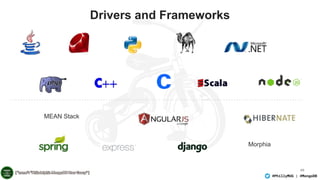
Drivers and Frameworks
Morphia
MEAN Stack
50
@PhillyMUG | @MongoDB
What we have learned
• How to create a database and a collection
• How to insert content into that collection
• How to query the collection
• How to update a document in place
• How to delete a document
• How to check the efficiency of an operation
• How to add an index
• How to check an index is being used in an operation
51
@PhillyMUG | @MongoDB
Next Webinar : Thinking in Documents
• Rather than normalisation we look at a hybrid approach to
schema that provides a coherent mapping between objects in
your application and objects in your database.
• Then we will optimise that schema for query purposes based on
the pattern of queries we expect to see.
• Finally we will show how dynamic schema and schema validation
allow you to extend your schema in a controlled fashion
52
@PhillyMUG | @MongoDB
Q&A
53
@PhillyMUG | @MongoDB
Big Thanks to
WeWork!
Wifi: WeWorkGuest (pw: ...)

Philadelphia MongoDB User Group - Your First MongoDB Application

  • 1.
    1 @PhillyMUG | @MongoDB@PhillyMUG| @MongoDB Your First MongoDB Application Michael Lynn, October 2017 Wifi: WeWork Guest (pw: ...)
  • 2.
    2 @PhillyMUG | @MongoDB Preparingfor Beginner MongoDB MUG 1. Install MongoDB a. See here: https://docs.mongodb.com/manual/installation/ 2. Test Launching MongoDB a. See here: https://docs.mongodb.com/manual/tutorial/manage-mongodb-pr ocesses/ 3. Load Some Data a. http://bit.ly/2xmQMYl b. Once you have restaurants.json downloaded, use mongoimport to import the collection. c. http://bit.ly/2xZpUdX
  • 3.
    3 @PhillyMUG | @MongoDB Logistics 1.Want to follow along with the presentation? a. https://bluejeans.com/345654833/5523 2. Need Wifi? a. WWGuest - No Password 3. Pizza is on the way (7:30) 4. Questions during the preso are ok! 5. Please sign-in a. http://signin.phillymug.org 6. https://github.com/mrlynn/phillymug-october-2017 7. Have a beer!
  • 4.
    4 @PhillyMUG | @MongoDB@PhillyMUG| @MongoDB 1. Introduce you to NoSQL and related concepts 2. Increase your understanding of MongoDB through exposure and exercise of the following activities a. Install MongoDB b. Create a Database, Collection, Document c. Read from a Database, Collection, Document d. Update a Document e. Delete a Document GOALS We are here to:
  • 5.
    5 @PhillyMUG | @MongoDB@PhillyMUG| @MongoDB 1. Do a technical deep dive. 2. Debate about the best way to choose a shard key, deploy a cluster or convert a replica set to a sharded cluster or any other 300 level topic. 3. Teach you about your operating system. 4. To sell you. I am not here to sell you on MongoDB. 5. Make you feel stupid… there are no stupid questions. We are not here to:
  • 6.
    6 @PhillyMUG | @MongoDB 1 2 3 4 5 AGENDA Databaseconcepts Installing MongoDB Building a basic blogging application Adding an index Query optimization with explain Questions6
  • 7.
    7 @PhillyMUG | @MongoDB Summaryof Database Concepts • Why NoSQL exists • The types of NoSQL database • The key features of MongoDB • Data durability in MongoDB – Replica Sets • Scalability in MongoDB - Sharding
  • 8.
    8 @PhillyMUG | @MongoDB Expressive QueryLanguage & Secondary Indexes Strong Consistency Enterprise Integrations Flexibility Scalability Performance Relational
  • 9.
    9 @PhillyMUG | @MongoDB TheWorld Has Changed Data • Volume • Velocity • Variety Time • Iterative • Agile • Short Cycles Risk • Always On • Scale • Global Cost • Open-Source • Cloud • Commodity
  • 10.
    10 @PhillyMUG | @MongoDB NoSQL Flexibility Scalability Performance Expressive QueryLanguage & Secondary Indexes Strong Consistency Enterprise Integrations
  • 11.
    11 @PhillyMUG | @MongoDB Flexibility Scalability Performance Relational NoSQL NexusArchitecture Relational + NoSQL Expressive Query Language & Secondary Indexes Strong Consistency Enterprise Integrations
  • 12.
    12 @PhillyMUG | @MongoDB 5thMost Popular Database - Fastest Growing RANK DBMS MODEL SCORE GROWTH (20 MO) 1. Oracle Relational DBMS 1359.09 -8.78 2. MySQL Relational DBMS 1312.61 -27.69 3. Microsoft SQL Server Relational DBMS 1212.54 -12.93 4. PostgreSQL Relational DBMS 372.36 +2.60 5. MongoDB Document store 332.73 +2.24 6. DB2 Relational DBMS 198.34 +0.87 7. Microsoft Access Relational DBMS 128.81 +1.78 8. Cassandra Wide column store 126.20 -0.52 9. Redis Key-value store 120.41 -1.49 Source: DB-engines database popularity rankings; October 2017
  • 13.
    13 @PhillyMUG | @MongoDB Concepts RelationalMongoDB Database Database Table Collection Row Document Index Index Join Lookup Foreign Key Reference Multi-table transaction Single document transaction
  • 14.
    14 @PhillyMUG | @MongoDB DocumentStore { name: “Michael Lynn”, title: “Sr. Solutions Architect”, address: { address1: “1601 Market Street”, address2: “19th Floor”, city: “Philadelphia”, state: “PA”, zipcode: “19123” }, expertise: [ “MongoDB”, “Python”, “Javascript” ], employee_number: 798, location: { type: “point”, coords: [ 39.953097, -75.167352] } }
  • 15.
    15 @PhillyMUG | @MongoDB DocumentStore { name: “Michael Lynn”, title: “Sr. Solutions Architect”, address: { address1: “1601 Market Street”, address2: “19th Floor”, city: “Philadelphia”, state: “PA”, zipcode: “19123” }, expertise: [ “MongoDB”, “Python”, “Javascript” ], employee_number: 798, location: { type: “point”, coords: [ 39.953097, -75.167352] } } { name: “Joe Drumgoole”, title: “Director of Developer Advocacy”, address: { address1: “Latin Hall”, address2: “Golden Lane”, eircode: “D09 N623”, }, expertise: [ “MongoDB”, “Python”, “Javascript” ], employee_number: 320, location: { type: “point”, coords: [ 53.34, -6.26 ] } POLYMORPHISM
  • 16.
    16 @PhillyMUG | @MongoDB DocumentStore { name: “Michael Lynn”, title: “Sr. Solutions Architect”, address: { address1: “1601 Market Street”, address2: “19th Floor”, city: “Philadelphia”, state: “PA”, zipcode: “19123” }, expertise: [ “MongoDB”, “Python”, “Javascript” ], employee_number: 798, location: { type: “point”, coords: [ 39.953097, -75.167352] } } Strings Nested Document Array Geo Location
  • 17.
    17 @PhillyMUG | @MongoDB InstallingMongoDB Download the binaries from the MongoDB Download Center. You can also download directly from the command line: curl -O https://fastdl.mongodb.org/osx/mongodb-osx-x86_64-3.4.9.tgz Once you have the archive downloaded, extract it: tar -zxvf mongodb-osx-x86_64-3.4.9.tgz Copy the extracted folder to the location from which MongoDB will run. mkdir -p mongodb cp -R -n mongodb-osx-x86_64-3.4.9/ mongodb The MongoDB binaries are in the bin/ directory of the archive. To ensure that the binaries are in your PATH, you can modify your PATH. For example, you can add the following line to your shell’s rc file (e.g. ~/.bashrc): export PATH=<mongodb-install-directory>/bin:$PATH
  • 18.
  • 19.
  • 20.
    20 @PhillyMUG | @MongoDB RunningMongod Michaels-MBP-3:data mlynn$ mongod --dbpath /data/phillymug 2017-10-08T13:11:31.050-0400 I CONTROL [initandlisten] MongoDB starting : pid=64082 port=27017 dbpath=/data/phillymug 64-bit host=Michaels-MBP-3.fios-router.home 2017-10-08T13:11:31.051-0400 I CONTROL [initandlisten] db version v3.4.9 2017-10-08T13:11:31.051-0400 I CONTROL [initandlisten] git version: 876ebee8c7dd0e2d992f36a848ff4dc50ee6603e 2017-10-08T13:11:31.051-0400 I CONTROL [initandlisten] OpenSSL version: OpenSSL 0.9.8zh 14 Jan 2016 2017-10-08T13:11:31.051-0400 I CONTROL [initandlisten] allocator: system 2017-10-08T13:11:31.051-0400 I CONTROL [initandlisten] modules: enterprise 2017-10-08T13:11:31.051-0400 I CONTROL [initandlisten] build environment: 2017-10-08T13:11:31.051-0400 I CONTROL [initandlisten] distarch: x86_64 2017-10-08T13:11:31.051-0400 I CONTROL [initandlisten] target_arch: x86_64 2017-10-08T13:11:31.051-0400 I CONTROL [initandlisten] options: { storage: { dbPath: "/data/phillymug" } } 2017-10-08T13:11:31.051-0400 I STORAGE [initandlisten] wiredtiger_open config: create,cache_size=7680M,session_max=20000,eviction=(threads_min=4,threads_max=4),config_base=false,statistics=(fast),log=(enabled=true,archive=true,path=journal,compres sor=snappy),file_manager=(close_idle_time=100000),checkpoint=(wait=60,log_size=2GB),statistics_log=(wait=0), 2017-10-08T13:11:31.811-0400 I CONTROL [initandlisten] 2017-10-08T13:11:31.811-0400 I CONTROL [initandlisten] ** WARNING: Access control is not enabled for the database. 2017-10-08T13:11:31.811-0400 I CONTROL [initandlisten] ** Read and write access to data and configuration is unrestricted. 2017-10-08T13:11:31.811-0400 I CONTROL [initandlisten] 2017-10-08T13:11:31.970-0400 I FTDC [initandlisten] Initializing full-time diagnostic data capture with directory '/data/phillymug/diagnostic.data' 2017-10-08T13:11:32.294-0400 I INDEX [initandlisten] build index on: admin.system.version properties: { v: 2, key: { version: 1 }, name: "incompatible_with_version_32", ns: "admin.system.version" } 2017-10-08T13:11:32.294-0400 I INDEX [initandlisten] building index using bulk method; build may temporarily use up to 500 megabytes of RAM 2017-10-08T13:11:32.306-0400 I INDEX [initandlisten] build index done. scanned 0 total records. 0 secs 2017-10-08T13:11:32.306-0400 I COMMAND [initandlisten] setting featureCompatibilityVersion to 3.4 2017-10-08T13:11:32.307-0400 I NETWORK [thread1] waiting for connections on port 27017 2017-10-08T13:11:32.644-0400 I NETWORK [thread1] connection accepted from 127.0.0.1:60241 #1 (1 connection now open)
  • 21.
    21 @PhillyMUG | @MongoDB ConnectingVia The Shell Michaels-MBP-3:phillymug-october-2017 mlynn$ mongo MongoDB shell version v3.4.9 connecting to: mongodb://127.0.0.1:27017 MongoDB server version: 3.4.9 Server has startup warnings: 2017-10-08T13:12:42.791-0400 I CONTROL [initandlisten] 2017-10-08T13:12:42.791-0400 I CONTROL [initandlisten] ** WARNING: Access control is not enabled for the database. 2017-10-08T13:12:42.791-0400 I CONTROL [initandlisten] ** Read and write access to data and configuration is unrestricted. 2017-10-08T13:12:42.791-0400 I CONTROL [initandlisten] 2017-10-08T13:12:59.746-0400 E QUERY [thread1] uncaught exception: don't know how to show [automationNotices]
  • 22.
    22 @PhillyMUG | @MongoDB Insertingyour first record > show databases local 0.000GB > use test switched to db test > show databases local 0.000GB > db.demo.insert( { "key" : "value" } ) WriteResult({ "nInserted" : 1 }) > show databases local 0.000GB test 0.000GB > show collections demo > db.demo.findOne() { "_id" : ObjectId("573af7085ee4be80385332a6"), "key" : "value" } >
  • 23.
    23 @PhillyMUG | @MongoDB ObjectID 573af7085ee4be80385332a6 TS------ID----PID-Count-
  • 24.
    24 @PhillyMUG | @MongoDB@PhillyMUG| @MongoDB A Simple Blogging Application
  • 25.
    25 @PhillyMUG | @MongoDB ASimple Blog Application • Lets create a blogging application with: – Articles – Users – Comments
  • 26.
    26 @PhillyMUG | @MongoDB TypicalEntity Relation Diagram
  • 27.
    27 @PhillyMUG | @MongoDB InMongoDB we can build organically test> use blog switched to db blog blog> db.users.insert( { "username" : "mlynn", "password" : "no peeking", "lang" : "EN"} ) Inserted 1 record(s) in 2ms WriteResult({ "nInserted": 1 }) blog> db.users.findOne({'username': 'mlynn'}) { "_id": ObjectId("59da3361491e1ce463e18564"), "username": "mlynn", "lang": "EN", "password": "no peeking" }
  • 28.
    28 @PhillyMUG | @MongoDB Howdo we do this in a program? import pymongo client = pymongo.MongoClient() blogDatabase = client[ "blog" ] usersCollection = blogDatabase[ "users" ] usersCollection.insert_one( { "username" : "mlynn", "password" : "no peeking", "lang" : "EN" }) user = usersCollection.find_one() print( user )
  • 29.
    29 @PhillyMUG | @MongoDB Ok- now let’s find it import pymongo client = pymongo.MongoClient() blogDatabase = client[ "blog" ] usersCollection = blogDatabase[ "users" ] user = usersCollection.find_one({'username': 'mlynn'}) print( user ) python 1a-find-user.py {u'username': u'mlynn', u'lang': u'EN', u'password': u'no peeking', u'_id': ObjectId('59da5dac491e1cfb5e0abe6b')} Michaels-MBP-3:code mlynn$
  • 30.
    30 @PhillyMUG | @MongoDB Nowyou see it… now you delete it import pymongo client = pymongo.MongoClient() blogDatabase = client[ "blog" ] usersCollection = blogDatabase[ "users" ] result = usersCollection.delete_many({'username': 'mlynn'}) print( result )
  • 31.
    31 @PhillyMUG | @MongoDB NextUp - Articles import pymongo client = pymongo.MongoClient() blogDatabase = client[ "blog" ] usersCollection = blogDatabase[ "users" ] articlesCollection = blogDatabase[ "articles" ] author = "mlynn" article = { "title" : "This is my first post", "body" : "The is the longer body text for my blog post. We can add lots of text here.", "author" : author, "tags" : [ "mlynn", "general", "Philly", "admin" ] } if usersCollection.find_one( { "username" : author }) : result = articlesCollection.insert_one( article ) print result else: raise ValueError( "Author %s does not exist" % author )
  • 32.
    32 @PhillyMUG | @MongoDB Createa new type of article import pymongo import datetime client = pymongo.MongoClient() blogDatabase = client[ "blog" ] usersCollection = blogDatabase[ "users" ] articlesCollection = blogDatabase[ "articles" ] author = "mlynn" title = "This is a post on MongoDB" newPost = { "title" : title, "body" : "MongoDB is the worlds most popular NoSQL database. It is a document database", "author" : author, "tags" : [ "mike", "mongodb", "Philly" ], "section" : "technology", "postDate" : datetime.datetime.now(), } if usersCollection.find_one( { "username" : author }) : articlesCollection.insert_one( newPost )
  • 33.
    33 @PhillyMUG | @MongoDB Createa new type of article import pymongo import string import datetime import random def randomString( size, letters = string.letters ): return "".join( [random.choice( letters ) for _ in xrange( size )] ) client = pymongo.MongoClient() def makeArticle( count, author, timestamp ): return { "_id" : count, "title" : randomString( 20 ), "body" : randomString( 80 ), "author" : author, "postdate" : timestamp } def makeUser( username ): return { "username" : username, "password" : randomString( 10 ) , "karma" : random.randint( 0, 500 ), "lang" : "EN" } blogDatabase = client[ "blog" ] usersCollection = blogDatabase[ "users" ] articlesCollection = blogDatabase[ "articles" ] bulkUsers = usersCollection.initialize_ordered_bulk_op() bulkArticles = articlesCollection.initialize_ordered_bulk_op() ts = datetime.datetime.now() for i in range( 100000 ) : #username = randomString( 10, string.ascii_uppercase ) + "_" + str( i ) username = "USER_" + str( i ) bulkUsers.insert( makeUser( username ) ) ts = ts + datetime.timedelta( seconds = 1 ) bulkArticles.insert( makeArticle( i, username, ts )) if ( i % 500 == 0 ) : bulkUsers.execute() bulkArticles.execute() bulkUsers = usersCollection.initialize_ordered_bulk_op() bulkArticles = articlesCollection.initialize_ordered_bulk_op() bulkUsers.execute() bulkArticles.execute()
  • 34.
    34 @PhillyMUG | @MongoDB Finda User > db.users.findOne() { "_id" : ObjectId("5742da5bb26a88bc00e941ac"), "username" : "FLFZQLSRWZ_0", "lang" : "EN", "password" : "vTlILbGWLt", "karma" : 448 } > db.users.find( { "username" : "VHXDAUUFJW_45" } ).pretty() { "_id" : ObjectId("5742da5bb26a88bc00e94206"), "username" : "VHXDAUUFJW_45", "lang" : "EN", "password" : "GmRLnCeKVp", "karma" : 284 }
  • 35.
    35 @PhillyMUG | @MongoDB FindUsers with high Karma > db.users.find( { "karma" : { $gte : 450 }} ).pretty() { "_id" : ObjectId("5742da5bb26a88bc00e941ae"), "username" : "JALLFRKBWD_1", "lang" : "EN", "password" : "bCSKSKvUeb", "karma" : 487 } { "_id" : ObjectId("5742da5bb26a88bc00e941e4"), "username" : "OTKWJJBNBU_28", "lang" : "EN", "password" : "HAWpiATCBN", "karma" : 473 } { …
  • 36.
    36 @PhillyMUG | @MongoDB Usingprojection > db.users.find( { "karma" : { $gte : 450 }}, { "_id" : 0, username : 1, karma : 1 } ) { "username" : "JALLFRKBWD_1", "karma" : 487 } { "username" : "OTKWJJBNBU_28", "karma" : 473 } { "username" : "RVVHLKTWHU_31", "karma" : 493 } { "username" : "JBNESEOOEP_48", "karma" : 464 } { "username" : "VSTBDZLKQQ_51", "karma" : 487 } { "username" : "UKYDTQJCLO_61", "karma" : 493 } { "username" : "HZFZZMZHYB_106", "karma" : 493 } { "username" : "AAYLPJJNHO_113", "karma" : 455 } { "username" : "CXZZMHLBXE_128", "karma" : 460 } { "username" : "KKJXBACBVN_134", "karma" : 460 } { "username" : "PTNTIBGAJV_165", "karma" : 461 } { "username" : "PVLCQJIGDY_169", "karma" : 463 }
  • 37.
    37 @PhillyMUG | @MongoDB Updatean Article to Add Comments 1 > db.articles.find( { "_id" : 18 } ).pretty() { "_id" : 18, "body" : "nTzOofOcnHKkJxpjKAyqTTnKZMFzzkWFeXtBRuEKsctuGBgWIrEBrYdvFIVHJWaXLUTVUXblOZZgUqWu", "postdate" : ISODate("2016-05-23T12:02:46.830Z"), "author" : "ASWTOMMABN_19", "title" : "CPMaqHtAdRwLXhlUvsej" } > db.articles.update( { _id : 18 }, { $set : { comments : [] }} ) WriteResult({ "nMatched" : 1, "nUpserted" : 0, "nModified" : 1 })
  • 38.
    38 @PhillyMUG | @MongoDB Updatean article to add Comments 2 > db.articles.find( { _id :18 } ).pretty() { "_id" : 18, "body" : "KmwFSIMQGcIsRNTDBFPuclwcVJkoMcrIPwTiSZDYyatoKzeQiKvJkiVSrndXqrALVIYZxGpaMjucgXUV", "postdate" : ISODate("2016-05-23T16:04:39.497Z"), "author" : "USER_18", "title" : "wTLreIEyPfovEkBhJZZe", "comments" : [ ] } >
  • 39.
    39 @PhillyMUG | @MongoDB Updatean Article to Add Comments 3 > db.articles.update( { _id : 18 }, { $push : { comments : { username : "mlynn", comment : "hey first post" }}} ) WriteResult({ "nMatched" : 1, "nUpserted" : 0, "nModified" : 1 }) > db.articles.find( { _id :18 } ).pretty() { "_id" : 18, "body" : "KmwFSIMQGcIsRNTDBFPuclwcVJkoMcrIPwTiSZDYyatoKzeQiKvJkiVSrndXqrALVIYZxGpaMjucgXUV", "postdate" : ISODate("2016-05-23T16:04:39.497Z"), "author" : "USER_18", "title" : "wTLreIEyPfovEkBhJZZe", "comments" : [ { "username" : "mlynn", "comment" : "hey first post" } ] } >
  • 40.
    40 @PhillyMUG | @MongoDB Deletean Article > db.articles.remove( { "_id" : 25 } ) WriteResult({ "nRemoved" : 1 }) > db.articles.remove( { "_id" : 25 } ) WriteResult({ "nRemoved" : 0 }) > db.articles.remove( { "_id" : { $lte : 5 }} ) WriteResult({ "nRemoved" : 6 }) • Deletion leaves holes • Dropping a collection is cheaper than deleting a large collection element by element
  • 41.
    41 @PhillyMUG | @MongoDB AQuick Look at Users and Articles Again > db.users.findOne() { "_id" : ObjectId("57431c07b26a88bf060e10cb"), "username" : "USER_0", "lang" : "EN", "password" : "kGIxPxqKGJ", "karma" : 266 } > db.articles.findOne() { "_id" : 0, "body" : "hvJLnrrfZQurmtjPfUWbMhaQWbNjXLzjpuGLZjsxHXbUycmJVZTeOZesTnZtojThrebRcUoiYwivjpwG", "postdate" : ISODate("2016-05-23T16:04:39.246Z"), "author" : "USER_0", "title" : "gpNIoPxpfTAxWjzAVoTJ" } >
  • 42.
    42 @PhillyMUG | @MongoDB Finda User > db.users.find( { "username" : "ABOXHWKBYS_199" } ).explain() { "queryPlanner" : { "plannerVersion" : 1, "namespace" : "blog.users", "indexFilterSet" : false, "parsedQuery" : { "username" : { "$eq" : "ABOXHWKBYS_199" } }, "winningPlan" : { "stage" : "COLLSCAN", "filter" : { "username" : { "$eq" : "ABOXHWKBYS_199" } }, "direction" : "forward" }, "rejectedPlans" : [ ] }, "serverInfo" : { "host" : "JD10Gen.local", "port" : 27017, "version" : "3.2.6", "gitVersion" : "05552b562c7a0b3143a729aaa0838e558dc49b25" }, "ok" : 1 }
  • 43.
    43 @PhillyMUG | @MongoDB Finda User - Execution Stats Michaels-MBP-3(mongod-3.4.9) blog> db.users.find({username: "USER_99"}).explain("executionStats").executionStats; { "executionSuccess": true, "nReturned": 1, "executionTimeMillis": 37, "totalKeysExamined": 0, "totalDocsExamined": 100001, "executionStages": { "stage": "COLLSCAN", "filter": { "username": { "$eq": "USER_99" } }, "nReturned": 1, "executionTimeMillisEstimate": 33, "works": 100003, "advanced": 1, "needTime": 100001, "needYield": 0, "saveState": 781, "restoreState": 781, "isEOF": 1, "invalidates": 0, "direction": "forward", "docsExamined": 100001 } }
  • 44.
    44 @PhillyMUG | @MongoDB Weneed an index Michaels-MBP-3(mongod-3.4.9) blog> db.users.createIndex( { username : 1 } ) { "createdCollectionAutomatically": false, "numIndexesBefore": 1, "numIndexesAfter": 2, "ok": 1 }
  • 45.
    45 @PhillyMUG | @MongoDB IndexesOverview • Parameters – Background : Create an index in the background as opposed to locking the database – Unique : All keys in the collection must be unique. Duplicate key insertions will be rejected with an error. – Name : explicitly name an index. Otherwise the index name is autogenerated from the index field. • Deleting an Index – db.users.dropIndex({ “username” : 1 }) • Get All the Indexes on a collection – db.users.getIndexes()
  • 46.
    46 @PhillyMUG | @MongoDB QueryPlan Execution Stages • COLLSCAN : for a collection scan • IXSCAN : for scanning index keys • FETCH : for retrieving documents • SHARD_MERGE : for merging results from shards
  • 47.
    47 @PhillyMUG | @MongoDB Addan Index > db.users.find( {"username" : "USER_999999”} ).explain("executionStats”).executionStats { "executionSuccess" : true, "nReturned" : 1, "executionTimeMillis" : 0, "totalKeysExamined" : 1, "totalDocsExamined" : 1, …
  • 48.
    48 @PhillyMUG | @MongoDB Finda User - Execution Stats Michaels-MBP-3(mongod-3.4.9) blog> db.users.find({username: "USER_99"}).explain("executionStats").executionStats; { "executionSuccess": true, "nReturned": 1, "executionTimeMillis": 0, "totalKeysExamined": 1, "totalDocsExamined": 1, "executionStages": { "stage": "FETCH", "nReturned": 1, "executionTimeMillisEstimate": 0, ... "inputStage": { "stage": "IXSCAN", "nReturned": 1, "executionTimeMillisEstimate": 0, "works": 2, ... "keyPattern": { "username": 1 }, "indexName": "username_1", "isMultiKey": false, "multiKeyPaths": { "username": [ ] }, "isUnique": false, "isSparse": false, "isPartial": false, "indexVersion": 2, "direction": "forward", "indexBounds": { "username": [ "["USER_99", "USER_99"]" ] }, "keysExamined": 1, "seeks": 1, "dupsTested": 0, "dupsDropped": 0, "seenInvalidated": 0 } } }
  • 49.
    49 @PhillyMUG | @MongoDB Driversand Frameworks Morphia MEAN Stack
  • 50.
    50 @PhillyMUG | @MongoDB Whatwe have learned • How to create a database and a collection • How to insert content into that collection • How to query the collection • How to update a document in place • How to delete a document • How to check the efficiency of an operation • How to add an index • How to check an index is being used in an operation
  • 51.
    51 @PhillyMUG | @MongoDB NextWebinar : Thinking in Documents • Rather than normalisation we look at a hybrid approach to schema that provides a coherent mapping between objects in your application and objects in your database. • Then we will optimise that schema for query purposes based on the pattern of queries we expect to see. • Finally we will show how dynamic schema and schema validation allow you to extend your schema in a controlled fashion
  • 52.
  • 53.
    53 @PhillyMUG | @MongoDB BigThanks to WeWork! Wifi: WeWorkGuest (pw: ...)