
MongoDB Management Service
(MMS)
Rick Houlihan
Solutions Architect
2
Agenda
Introduction
MMS Overview
Setup Demo
MMS Backup Overview
Summary
3
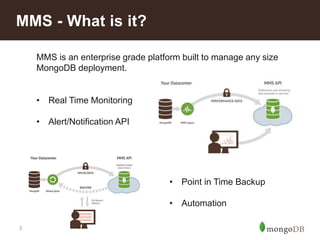
MMS - What is it?
MMS is an enterprise grade platform built to manage any size
MongoDB deployment.
• Real Time Monitoring
• Alert/Notification API
• Point in Time Backup
• Automation
4
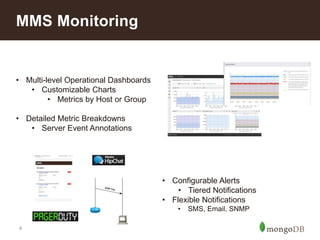
MMS Monitoring
• Multi-level Operational Dashboards
• Customizable Charts
• Metrics by Host or Group
• Detailed Metric Breakdowns
• Server Event Annotations
• Configurable Alerts
• Tiered Notifications
• Flexible Notifications
• SMS, Email, SNMP
5
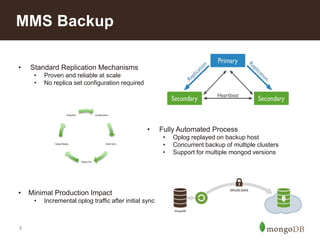
MMS Backup
• Fully Automated Process
• Oplog replayed on backup host
• Concurrent backup of multiple clusters
• Support for multiple mongod versions
• Standard Replication Mechanisms
• Proven and reliable at scale
• No replica set configuration required
Configuration
Initial Sync
Oplog Tail
Oplog Replay
Snapshot
• Minimal Production Impact
• Incremental oplog traffic after initial sync
6
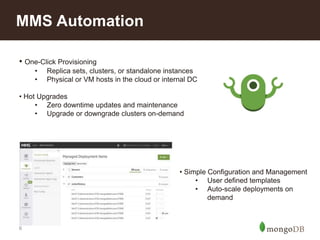
MMS Automation
• One-Click Provisioning
• Replica sets, clusters, or standalone instances
• Physical or VM hosts in the cloud or internal DC
• Hot Upgrades
• Zero downtime updates and maintenance
• Upgrade or downgrade clusters on-demand
• Simple Configuration and Management
• User defined templates
• Auto-scale deployments on
demand
7
MMS – Get Started Fast
• Create an MMS Group
• http://mms.mongodb.com (cloud)
• http://yourhost:8080 (on prem)
• Install the Agent(s)
• Monitoring is required
• Backup is optional
• Start Managing MongoDB!
8
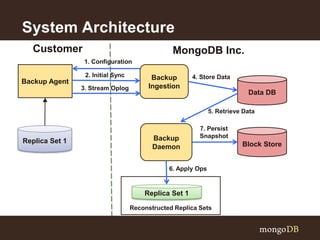
System Architecture
Reconstructed Replica Sets
Backup Agent
Replica Set 1
Customer
Backup
Ingestion
MongoDB Inc.
Backup
Daemon
Data DB
Block Store
Replica Set 1
1. Configuration
2. Initial Sync
3. Stream Oplog
4. Store Data
7. Persist
Snapshot
5. Retrieve Data
6. Apply Ops
9
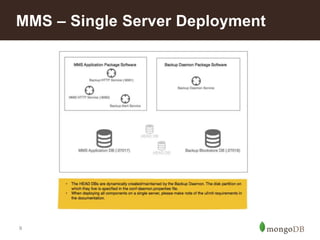
MMS – Single Server Deployment
10
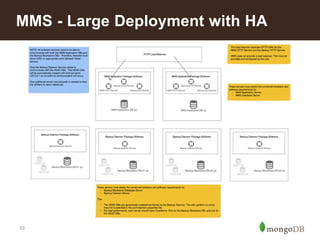
MMS - Large Deployment with HA
11
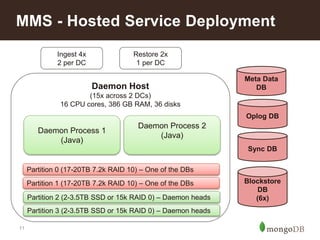
MMS - Hosted Service Deployment
Meta Data
DB
Oplog DB
Sync DB
Blockstore
DB
(6x)
Daemon Host
(15x across 2 DCs)
16 CPU cores, 386 GB RAM, 36 disks
Ingest 4x
2 per DC
Restore 2x
1 per DC
Partition 0 (17-20TB 7.2k RAID 10) – One of the DBs
Partition 1 (17-20TB 7.2k RAID 10) – One of the DBs
Partition 2 (2-3.5TB SSD or 15k RAID 0) – Daemon heads
Partition 3 (2-3.5TB SSD or 15k RAID 0) – Daemon heads
Daemon Process 1
(Java)
Daemon Process 2
(Java)
12
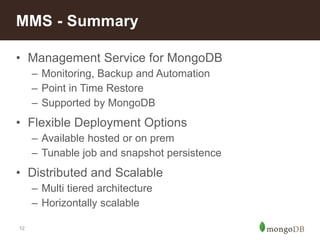
• Management Service for MongoDB
– Monitoring, Backup and Automation
– Point in Time Restore
– Supported by MongoDB
• Flexible Deployment Options
– Available hosted or on prem
– Tunable job and snapshot persistence
• Distributed and Scalable
– Multi tiered architecture
– Horizontally scalable
MMS - Summary
How to Install and Use MMS

How to Install and Use MMS

  • 1.
    MongoDB Management Service (MMS) RickHoulihan Solutions Architect
  • 2.
  • 3.
    3 MMS - Whatis it? MMS is an enterprise grade platform built to manage any size MongoDB deployment. • Real Time Monitoring • Alert/Notification API • Point in Time Backup • Automation
  • 4.
    4 MMS Monitoring • Multi-levelOperational Dashboards • Customizable Charts • Metrics by Host or Group • Detailed Metric Breakdowns • Server Event Annotations • Configurable Alerts • Tiered Notifications • Flexible Notifications • SMS, Email, SNMP
  • 5.
    5 MMS Backup • FullyAutomated Process • Oplog replayed on backup host • Concurrent backup of multiple clusters • Support for multiple mongod versions • Standard Replication Mechanisms • Proven and reliable at scale • No replica set configuration required Configuration Initial Sync Oplog Tail Oplog Replay Snapshot • Minimal Production Impact • Incremental oplog traffic after initial sync
  • 6.
    6 MMS Automation • One-ClickProvisioning • Replica sets, clusters, or standalone instances • Physical or VM hosts in the cloud or internal DC • Hot Upgrades • Zero downtime updates and maintenance • Upgrade or downgrade clusters on-demand • Simple Configuration and Management • User defined templates • Auto-scale deployments on demand
  • 7.
    7 MMS – GetStarted Fast • Create an MMS Group • http://mms.mongodb.com (cloud) • http://yourhost:8080 (on prem) • Install the Agent(s) • Monitoring is required • Backup is optional • Start Managing MongoDB!
  • 8.
    8 System Architecture Reconstructed ReplicaSets Backup Agent Replica Set 1 Customer Backup Ingestion MongoDB Inc. Backup Daemon Data DB Block Store Replica Set 1 1. Configuration 2. Initial Sync 3. Stream Oplog 4. Store Data 7. Persist Snapshot 5. Retrieve Data 6. Apply Ops
  • 9.
    9 MMS – SingleServer Deployment
  • 10.
    10 MMS - LargeDeployment with HA
  • 11.
    11 MMS - HostedService Deployment Meta Data DB Oplog DB Sync DB Blockstore DB (6x) Daemon Host (15x across 2 DCs) 16 CPU cores, 386 GB RAM, 36 disks Ingest 4x 2 per DC Restore 2x 1 per DC Partition 0 (17-20TB 7.2k RAID 10) – One of the DBs Partition 1 (17-20TB 7.2k RAID 10) – One of the DBs Partition 2 (2-3.5TB SSD or 15k RAID 0) – Daemon heads Partition 3 (2-3.5TB SSD or 15k RAID 0) – Daemon heads Daemon Process 1 (Java) Daemon Process 2 (Java)
  • 12.
    12 • Management Servicefor MongoDB – Monitoring, Backup and Automation – Point in Time Restore – Supported by MongoDB • Flexible Deployment Options – Available hosted or on prem – Tunable job and snapshot persistence • Distributed and Scalable – Multi tiered architecture – Horizontally scalable MMS - Summary

Editor's Notes

  • #4 TOUCH ON BEST PRACTICES
  • #5 Expand on metrics by group – Cluster/Shard/Host/Type aggregation
  • #6 Completely stateless, will pull down configuration from MMS on startup Local oplog cache is transient, agent will resume oplog tail from last timestamp sent by MMS If offline for too long (Oplog rollover), full resync is required before snapshots can resume
  • #9 HIT ON COMPLEXITY OF IMPLEMENTATION FOR POINT IN TIME BACKUP REINFORCE BEST PRACTICES Backup Agent = External program, similar to MMS Agent. Written in Go. Ingestion = RESTful interface. Responsible for all agent communication (configuration and ingestion) Daemons = Background process that does actual processing
  • #12 Oplog DB – DB per MMS group, collection per replica set Sync DB – DB per replica set Blockstore DB – application sharded. DB per replica set + metadata 35K MMS Users 500 Customers