Overview of C#
Overview
 Structure of a C# Program
 Basic Input/Output Operations
 Recommended Practices
 Compiling, Running, and Debugging
Structure of a C# Program
 Hello, World
 The Class
 The Main Method
 The using Directive and the System Namespace
 Demonstration: Using Visual Studio to Create
a C# Program
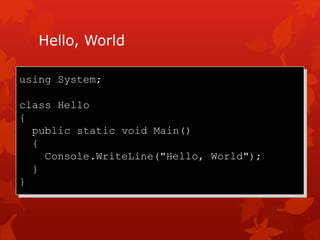
Hello, World
using System;
class Hello
{
public static void Main()
{
Console.WriteLine("Hello, World");
}
}
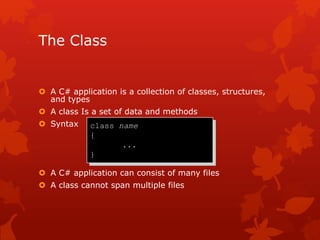
The Class
 A C# application is a collection of classes, structures,
and types
 A class Is a set of data and methods
 Syntax
 A C# application can consist of many files
 A class cannot span multiple files
class name
{
...
}
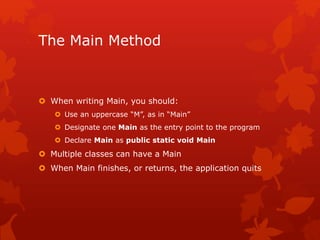
The Main Method
 When writing Main, you should:
 Use an uppercase “M”, as in “Main”
 Designate one Main as the entry point to the program
 Declare Main as public static void Main
 Multiple classes can have a Main
 When Main finishes, or returns, the application quits
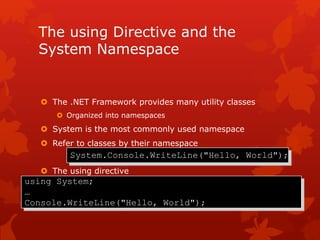
The using Directive and the
System Namespace
 The .NET Framework provides many utility classes
 Organized into namespaces
 System is the most commonly used namespace
 Refer to classes by their namespace
 The using directive
System.Console.WriteLine("Hello, World");
using System;
…
Console.WriteLine("Hello, World");
Basic Input/Output Operations
 The Console Class
 Write and WriteLine Methods
 Read and ReadLine Methods
The Console Class
 Provides access to the standard input, standard output,
and standard error streams
 Only meaningful for console applications
 Standard input – keyboard
 Standard output – screen
 Standard error – screen
 All streams may be redirected
Write and WriteLine Methods
 Console.Write and Console.WriteLine display information
on the console screen
 WriteLine outputs a line feed/carriage return
 Both methods are overloaded
 A format string and parameters can be used
 Text formatting
 Numeric formatting
Read and ReadLine Methods
 Console.Read and Console.ReadLine read user input
 Read reads the next character
 ReadLine reads the entire input line
Recommended Practices
 Commenting Applications
 Generating XML Documentation
 Demonstration: Generating and Viewing XML
Documentation
 Exception Handling
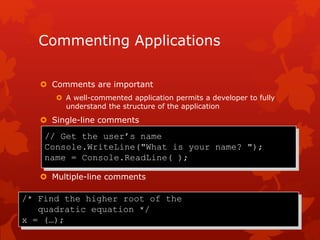
Commenting Applications
 Comments are important
 A well-commented application permits a developer to fully
understand the structure of the application
 Single-line comments
 Multiple-line comments
/* Find the higher root of the
quadratic equation */
x = (…);
// Get the user’s name
Console.WriteLine("What is your name? ");
name = Console.ReadLine( );
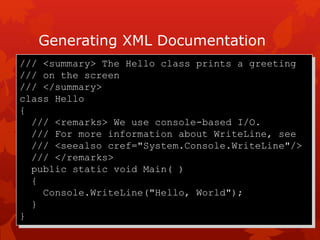
Generating XML Documentation
/// <summary> The Hello class prints a greeting
/// on the screen
/// </summary>
class Hello
{
/// <remarks> We use console-based I/O.
/// For more information about WriteLine, see
/// <seealso cref="System.Console.WriteLine"/>
/// </remarks>
public static void Main( )
{
Console.WriteLine("Hello, World");
}
}
Exception Handling
using System;
public class Hello
{
public static void Main(string[ ] args)
{
try{
Console.WriteLine(args[0]);
}
catch (Exception e) {
Console.WriteLine("Exception at
{0}", e.StackTrace);
}
}
}
Compiling, Running, and Debugging
 Invoking the Compiler
 Running the Application
 Demonstration: Compiling and Running
a C# Program
 Debugging
 Demonstration: Using the Visual Studio Debugger
 The SDK Tools
 Demonstration: Using ILDASM
Invoking the Compiler
 Common Compiler Switches
 Compiling from the Command Line
 Compiling from Visual Studio
 Locating Errors
Running the Application
 Running from the Command Line
 Type the name of the application
 Running from Visual Studio
 Click Start Without Debugging on the Debug menu
Debugging
 Exceptions and JIT Debugging
 The Visual Studio Debugger
 Setting breakpoints and watches
 Stepping through code
 Examining and modifying variables
The SDK Tools
 General Tools and Utilities
 Windows Forms Design Tools and Utilities
 Security Tools and Utilities
 Configuration and Deployment Tools and Utilities
Review
 Structure of a C# Program
 Basic Input/Output Operations
 Recommended Practices
 Compiling, Running, and Debugging

Module 2: Overview of c#

  • 1.
  • 2.
    Overview  Structure ofa C# Program  Basic Input/Output Operations  Recommended Practices  Compiling, Running, and Debugging
  • 3.
    Structure of aC# Program  Hello, World  The Class  The Main Method  The using Directive and the System Namespace  Demonstration: Using Visual Studio to Create a C# Program
  • 4.
    Hello, World using System; classHello { public static void Main() { Console.WriteLine("Hello, World"); } }
  • 5.
    The Class  AC# application is a collection of classes, structures, and types  A class Is a set of data and methods  Syntax  A C# application can consist of many files  A class cannot span multiple files class name { ... }
  • 6.
    The Main Method When writing Main, you should:  Use an uppercase “M”, as in “Main”  Designate one Main as the entry point to the program  Declare Main as public static void Main  Multiple classes can have a Main  When Main finishes, or returns, the application quits
  • 7.
    The using Directiveand the System Namespace  The .NET Framework provides many utility classes  Organized into namespaces  System is the most commonly used namespace  Refer to classes by their namespace  The using directive System.Console.WriteLine("Hello, World"); using System; … Console.WriteLine("Hello, World");
  • 8.
    Basic Input/Output Operations The Console Class  Write and WriteLine Methods  Read and ReadLine Methods
  • 9.
    The Console Class Provides access to the standard input, standard output, and standard error streams  Only meaningful for console applications  Standard input – keyboard  Standard output – screen  Standard error – screen  All streams may be redirected
  • 10.
    Write and WriteLineMethods  Console.Write and Console.WriteLine display information on the console screen  WriteLine outputs a line feed/carriage return  Both methods are overloaded  A format string and parameters can be used  Text formatting  Numeric formatting
  • 11.
    Read and ReadLineMethods  Console.Read and Console.ReadLine read user input  Read reads the next character  ReadLine reads the entire input line
  • 12.
    Recommended Practices  CommentingApplications  Generating XML Documentation  Demonstration: Generating and Viewing XML Documentation  Exception Handling
  • 13.
    Commenting Applications  Commentsare important  A well-commented application permits a developer to fully understand the structure of the application  Single-line comments  Multiple-line comments /* Find the higher root of the quadratic equation */ x = (…); // Get the user’s name Console.WriteLine("What is your name? "); name = Console.ReadLine( );
  • 14.
    Generating XML Documentation ///<summary> The Hello class prints a greeting /// on the screen /// </summary> class Hello { /// <remarks> We use console-based I/O. /// For more information about WriteLine, see /// <seealso cref="System.Console.WriteLine"/> /// </remarks> public static void Main( ) { Console.WriteLine("Hello, World"); } }
  • 15.
    Exception Handling using System; publicclass Hello { public static void Main(string[ ] args) { try{ Console.WriteLine(args[0]); } catch (Exception e) { Console.WriteLine("Exception at {0}", e.StackTrace); } } }
  • 16.
    Compiling, Running, andDebugging  Invoking the Compiler  Running the Application  Demonstration: Compiling and Running a C# Program  Debugging  Demonstration: Using the Visual Studio Debugger  The SDK Tools  Demonstration: Using ILDASM
  • 17.
    Invoking the Compiler Common Compiler Switches  Compiling from the Command Line  Compiling from Visual Studio  Locating Errors
  • 18.
    Running the Application Running from the Command Line  Type the name of the application  Running from Visual Studio  Click Start Without Debugging on the Debug menu
  • 19.
    Debugging  Exceptions andJIT Debugging  The Visual Studio Debugger  Setting breakpoints and watches  Stepping through code  Examining and modifying variables
  • 20.
    The SDK Tools General Tools and Utilities  Windows Forms Design Tools and Utilities  Security Tools and Utilities  Configuration and Deployment Tools and Utilities
  • 21.
    Review  Structure ofa C# Program  Basic Input/Output Operations  Recommended Practices  Compiling, Running, and Debugging