Structure of a C# Program
The Look and Feel Of a C# code is similar to that of C++
and Java. At First this syntax can look confusing ,and is lot
less like written in English than some other languages.
However, You will find as you immense yourself in the
world of C# programming that the style used is sensible,
and it is possible to write a very readable code without too
much trouble.
Syntax
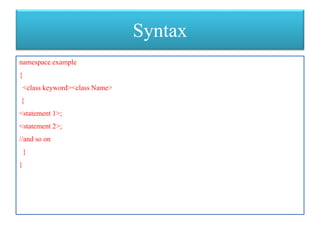
namespace example
{
<class keyword><class Name>
{
<statement 1>;
<statement 2>;
//and so on
}
}
Basic C# Console Application
• using System;
• namespace HelloWorldApplication
• {
• class HelloWorld
• {
• static void Main(string[] args)
• {
• /* my first program in C# */
• Console.WriteLine("Hello World");
• Console.ReadKey();
• }
• }
• }
Let us look at the various parts of the given program:
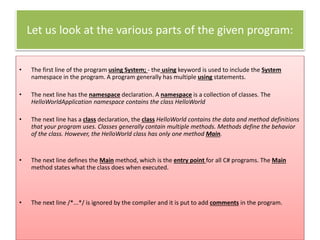
• The first line of the program using System; - the using keyword is used to include the System
namespace in the program. A program generally has multiple using statements.
• The next line has the namespace declaration. A namespace is a collection of classes. The
HelloWorldApplication namespace contains the class HelloWorld
• The next line has a class declaration, the class HelloWorld contains the data and method definitions
that your program uses. Classes generally contain multiple methods. Methods define the behavior
of the class. However, the HelloWorld class has only one method Main.
• The next line defines the Main method, which is the entry point for all C# programs. The Main
method states what the class does when executed.
• The next line /*...*/ is ignored by the compiler and it is put to add comments in the program.
• The Main method specifies its behavior with the statement
Console.WriteLine("Hello World");
• WriteLine is a method of the Console class defined in the
System namespace. This statement causes the message
"Hello, World!" to be displayed on the screen.
• The last line Console.ReadKey(); is for the VS.NET Users. This
makes the program wait for a key press and it prevents the
screen from running and closing quickly when the program is
launched from Visual Studio .NET.
Things To Note:
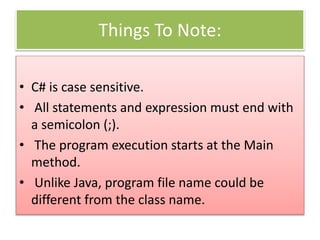
• C# is case sensitive.
• All statements and expression must end with
a semicolon (;).
• The program execution starts at the Main
method.
• Unlike Java, program file name could be
different from the class name.
Thank you

Structure of a C# Program

  • 1.
    Structure of aC# Program The Look and Feel Of a C# code is similar to that of C++ and Java. At First this syntax can look confusing ,and is lot less like written in English than some other languages. However, You will find as you immense yourself in the world of C# programming that the style used is sensible, and it is possible to write a very readable code without too much trouble.
  • 2.
    Syntax namespace example { <class keyword><className> { <statement 1>; <statement 2>; //and so on } }
  • 3.
    Basic C# ConsoleApplication • using System; • namespace HelloWorldApplication • { • class HelloWorld • { • static void Main(string[] args) • { • /* my first program in C# */ • Console.WriteLine("Hello World"); • Console.ReadKey(); • } • } • }
  • 4.
    Let us lookat the various parts of the given program: • The first line of the program using System; - the using keyword is used to include the System namespace in the program. A program generally has multiple using statements. • The next line has the namespace declaration. A namespace is a collection of classes. The HelloWorldApplication namespace contains the class HelloWorld • The next line has a class declaration, the class HelloWorld contains the data and method definitions that your program uses. Classes generally contain multiple methods. Methods define the behavior of the class. However, the HelloWorld class has only one method Main. • The next line defines the Main method, which is the entry point for all C# programs. The Main method states what the class does when executed. • The next line /*...*/ is ignored by the compiler and it is put to add comments in the program.
  • 5.
    • The Mainmethod specifies its behavior with the statement Console.WriteLine("Hello World"); • WriteLine is a method of the Console class defined in the System namespace. This statement causes the message "Hello, World!" to be displayed on the screen. • The last line Console.ReadKey(); is for the VS.NET Users. This makes the program wait for a key press and it prevents the screen from running and closing quickly when the program is launched from Visual Studio .NET.
  • 6.
    Things To Note: •C# is case sensitive. • All statements and expression must end with a semicolon (;). • The program execution starts at the Main method. • Unlike Java, program file name could be different from the class name.
  • 7.