Aggregation,
Namespaces, and
Advanced Scope
Overview
 Using Internal Classes, Methods, and Data
 Using Aggregation
 Using Namespaces
 Using Modules and Assemblies
Using Internal Classes, Methods, and
Data
 Why Use Internal Access?
 Internal Access
 Syntax
 Internal Access Example
Why Use Internal Access?
 Small objects are not very useful on their own
 Objects need to collaborate to form larger objects
 Access beyond the individual object is required
public
internal
private
Internal Access
 Comparing access levels
 Public access is logical
 Private access is logical
 Internal access is physical
internal
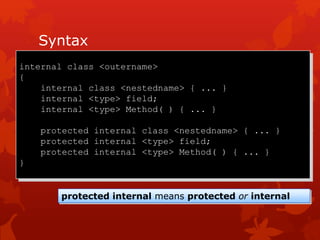
Syntax
internal class <outername>
{
internal class <nestedname> { ... }
internal <type> field;
internal <type> Method( ) { ... }
protected internal class <nestedname> { ... }
protected internal <type> field;
protected internal <type> Method( ) { ... }
}
protected internal means protected or internal
Internal Access Example
public interface IBankAccount { ... }
internal abstract class CommonBankAccount { ... }
internal class DepositAccount: CommonBankAccount,
IBankAccount { ... }
public class Bank
{
public IBankAccount OpenAccount( )
{
return new DepositAccount( );
}
}
Using Aggregation
 Objects Within Objects
 Comparing Aggregation to Inheritance
 Factories
 Example Factory
Objects Within Objects
 Complex objects are built from simpler objects
 Simpler objects are parts of complex whole objects
 This is called aggregation
CarWhole
Part EngineChassis Wheel
1 41
Comparing Aggregation to
Inheritance
 Aggregation
 Specifies an object relationship
 A weak whole-to-part dependency
 Dynamically flexible
 Inheritance
 Specifies a class relationship
 A strong derived-to-base dependency
 Statically inflexible
Part
Whole
Base
Derived
Factories
 Creation is often complex and restricted
 Many objects are made only in specialist factories
 The factory encapsulates the complex creation
 Factories are useful patterns when modelling software
Factory Example
public class Bank
{
public BankAccount OpenAccount( )
{
BankAccount opened = new BankAccount( );
accounts[opened.Number( )] = opened;
return opened;
}
private Hashtable accounts = new Hashtable( );
}
public class BankAccount
{
internal BankAccount( ) { ... }
public long Number( ) { ... }
public void Deposit(decimal amount) { ... }
}
Using Namespaces
 Scope Revisited
 Resolving Name Clashes
 Declaring Namespaces
 Fully Qualified Names
 Declaring using-namespace-directives
 Declaring using-alias-directives
 Guidelines for Naming Namespaces
Scope Revisited
 The scope of a name is the region of program text in
which you can refer to the name without qualification
public class Bank
{
public class Account
{
public void Deposit(decimal amount)
{
balance += amount;
}
private decimal balance;
}
public Account OpenAccount( ) { ... }
}
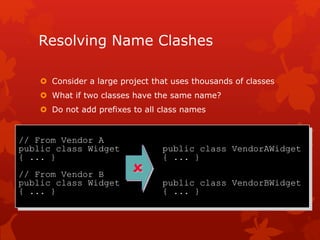
Resolving Name Clashes
 Consider a large project that uses thousands of classes
 What if two classes have the same name?
 Do not add prefixes to all class names
// From Vendor A
public class Widget public class VendorAWidget
{ ... } { ... }
// From Vendor B
public class Widget public class VendorBWidget
{ ... } { ... }

Declaring Namespaces
namespace VendorA
{
public class Widget
{ ... }
}
namespace VendorB
{
public class Widget
{ ... }
}
namespace Microsoft
{
namespace Office
{
...
}
}
namespace Microsoft.Office
{
}
shorthand
Fully Qualified Names
 A fully qualified class name includes its namespace
 Unqualified class names can only be used in scope
namespace VendorA
{
public class Widget { ... }
...
}
class Application
{
static void Main( )
{
Widget w = new Widget( );
VendorA.Widget w = new VendorA.Widget( );
}
}
 
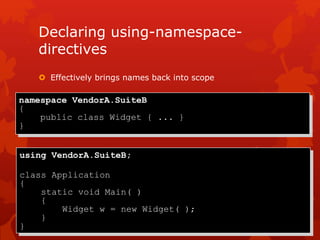
Declaring using-namespace-
directives
 Effectively brings names back into scope
using VendorA.SuiteB;
class Application
{
static void Main( )
{
Widget w = new Widget( );
}
}
namespace VendorA.SuiteB
{
public class Widget { ... }
}
Declaring using-alias-directives
 Creates an alias for a deeply nested namespace or type
using Widget = VendorA.SuiteB.Widget;
class Application
{
static void Main( )
{
Widget w = new Widget( );
}
}
namespace VendorA.SuiteB
{
public class Widget { ... }
}
Guidelines for Naming
Namespaces
 Use PascalCasing to separate logical components
 Example: VendorA.SuiteB
 Prefix namespace names with a company name or well-
established brand
 Example: Microsoft.Office
 Use plural names when appropriate
 Example: System.Collections
 Avoid name clashes between namespaces and classes
Using Modules and Assemblies
 Creating Modules
 Using Assemblies
 Creating Assemblies
 Comparing Namespaces to Assemblies
 Using Versioning
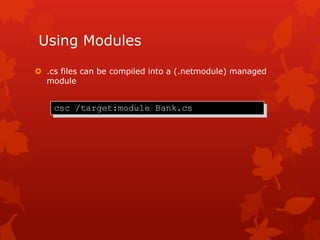
Using Modules
 .cs files can be compiled into a (.netmodule) managed
module
csc /target:module Bank.cs
Using Assemblies
 Group of collaborating classes
 Reusable, versionable, and secure deployment unit
 Physical access control at assembly level
 Internal
an assembly
of four classes
public
internal
private
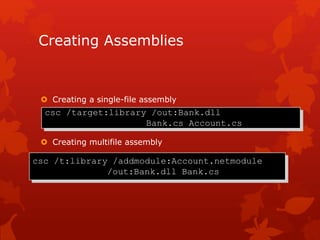
Creating Assemblies
 Creating a single-file assembly
 Creating multifile assembly
csc /target:library /out:Bank.dll
Bank.cs Account.cs
csc /t:library /addmodule:Account.netmodule
/out:Bank.dll Bank.cs
Comparing Namespaces to
Assemblies
 Namespace: logical naming mechanism
 Classes from one namespace can reside in
many assemblies
 Classes from many namespaces can reside in
one assembly
 Assembly: physical grouping mechanism
 Assembly MSIL and manifest are contained directly
 Assembly modules and resources can be external links
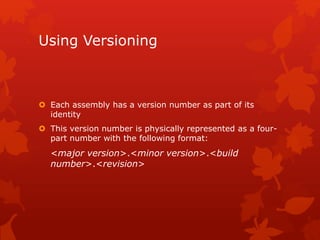
Using Versioning
 Each assembly has a version number as part of its
identity
 This version number is physically represented as a four-
part number with the following format:
<major version>.<minor version>.<build
number>.<revision>
Review
 Using Internal Classes, Methods, and Data
 Using Aggregation
 Using Namespaces
 Using Modules and Assemblies

Module 12 aggregation, namespaces, and advanced scope

  • 1.
  • 2.
    Overview  Using InternalClasses, Methods, and Data  Using Aggregation  Using Namespaces  Using Modules and Assemblies
  • 3.
    Using Internal Classes,Methods, and Data  Why Use Internal Access?  Internal Access  Syntax  Internal Access Example
  • 4.
    Why Use InternalAccess?  Small objects are not very useful on their own  Objects need to collaborate to form larger objects  Access beyond the individual object is required public internal private
  • 5.
    Internal Access  Comparingaccess levels  Public access is logical  Private access is logical  Internal access is physical internal
  • 6.
    Syntax internal class <outername> { internalclass <nestedname> { ... } internal <type> field; internal <type> Method( ) { ... } protected internal class <nestedname> { ... } protected internal <type> field; protected internal <type> Method( ) { ... } } protected internal means protected or internal
  • 7.
    Internal Access Example publicinterface IBankAccount { ... } internal abstract class CommonBankAccount { ... } internal class DepositAccount: CommonBankAccount, IBankAccount { ... } public class Bank { public IBankAccount OpenAccount( ) { return new DepositAccount( ); } }
  • 8.
    Using Aggregation  ObjectsWithin Objects  Comparing Aggregation to Inheritance  Factories  Example Factory
  • 9.
    Objects Within Objects Complex objects are built from simpler objects  Simpler objects are parts of complex whole objects  This is called aggregation CarWhole Part EngineChassis Wheel 1 41
  • 10.
    Comparing Aggregation to Inheritance Aggregation  Specifies an object relationship  A weak whole-to-part dependency  Dynamically flexible  Inheritance  Specifies a class relationship  A strong derived-to-base dependency  Statically inflexible Part Whole Base Derived
  • 11.
    Factories  Creation isoften complex and restricted  Many objects are made only in specialist factories  The factory encapsulates the complex creation  Factories are useful patterns when modelling software
  • 12.
    Factory Example public classBank { public BankAccount OpenAccount( ) { BankAccount opened = new BankAccount( ); accounts[opened.Number( )] = opened; return opened; } private Hashtable accounts = new Hashtable( ); } public class BankAccount { internal BankAccount( ) { ... } public long Number( ) { ... } public void Deposit(decimal amount) { ... } }
  • 13.
    Using Namespaces  ScopeRevisited  Resolving Name Clashes  Declaring Namespaces  Fully Qualified Names  Declaring using-namespace-directives  Declaring using-alias-directives  Guidelines for Naming Namespaces
  • 14.
    Scope Revisited  Thescope of a name is the region of program text in which you can refer to the name without qualification public class Bank { public class Account { public void Deposit(decimal amount) { balance += amount; } private decimal balance; } public Account OpenAccount( ) { ... } }
  • 15.
    Resolving Name Clashes Consider a large project that uses thousands of classes  What if two classes have the same name?  Do not add prefixes to all class names // From Vendor A public class Widget public class VendorAWidget { ... } { ... } // From Vendor B public class Widget public class VendorBWidget { ... } { ... } 
  • 16.
    Declaring Namespaces namespace VendorA { publicclass Widget { ... } } namespace VendorB { public class Widget { ... } } namespace Microsoft { namespace Office { ... } } namespace Microsoft.Office { } shorthand
  • 17.
    Fully Qualified Names A fully qualified class name includes its namespace  Unqualified class names can only be used in scope namespace VendorA { public class Widget { ... } ... } class Application { static void Main( ) { Widget w = new Widget( ); VendorA.Widget w = new VendorA.Widget( ); } }  
  • 18.
    Declaring using-namespace- directives  Effectivelybrings names back into scope using VendorA.SuiteB; class Application { static void Main( ) { Widget w = new Widget( ); } } namespace VendorA.SuiteB { public class Widget { ... } }
  • 19.
    Declaring using-alias-directives  Createsan alias for a deeply nested namespace or type using Widget = VendorA.SuiteB.Widget; class Application { static void Main( ) { Widget w = new Widget( ); } } namespace VendorA.SuiteB { public class Widget { ... } }
  • 20.
    Guidelines for Naming Namespaces Use PascalCasing to separate logical components  Example: VendorA.SuiteB  Prefix namespace names with a company name or well- established brand  Example: Microsoft.Office  Use plural names when appropriate  Example: System.Collections  Avoid name clashes between namespaces and classes
  • 21.
    Using Modules andAssemblies  Creating Modules  Using Assemblies  Creating Assemblies  Comparing Namespaces to Assemblies  Using Versioning
  • 22.
    Using Modules  .csfiles can be compiled into a (.netmodule) managed module csc /target:module Bank.cs
  • 23.
    Using Assemblies  Groupof collaborating classes  Reusable, versionable, and secure deployment unit  Physical access control at assembly level  Internal an assembly of four classes public internal private
  • 24.
    Creating Assemblies  Creatinga single-file assembly  Creating multifile assembly csc /target:library /out:Bank.dll Bank.cs Account.cs csc /t:library /addmodule:Account.netmodule /out:Bank.dll Bank.cs
  • 25.
    Comparing Namespaces to Assemblies Namespace: logical naming mechanism  Classes from one namespace can reside in many assemblies  Classes from many namespaces can reside in one assembly  Assembly: physical grouping mechanism  Assembly MSIL and manifest are contained directly  Assembly modules and resources can be external links
  • 26.
    Using Versioning  Eachassembly has a version number as part of its identity  This version number is physically represented as a four- part number with the following format: <major version>.<minor version>.<build number>.<revision>
  • 27.
    Review  Using InternalClasses, Methods, and Data  Using Aggregation  Using Namespaces  Using Modules and Assemblies