Logging Configuration
In Mule
 There’s no need to state the importance of debuggers
for developers, and Mule developers are no exception.
The goal of this blog post is to provide you with a few
handy tips for debugging your custom Java code in Mule
Studio.
 Through the logging configuration it’s possible to configure what gets
logged, where it gets logged, and how it gets logged.
 Mule internally logs multiple messages along with some specific elements
in the application’s flows.
 The logger component can also be included to output any desired
messages.
 By creating a configuration file, it’s possible to define what kinds of
messages to log, in what way (asynchronously or synchronously), and
where they get logged (To console, To disk or to a database).
Logging Configuration In Mule
 For logging Mule uses slf4j.
 Slf4j is a logging facade, that discovers and uses a logging strategy from
the classpath, such as log4j2 or the JDK Logger.
 By Default Mule includes log4j2.
 The configuration used for it is log4j2.xml.
 The Mule server has a log4j2.xml file in the conf directory.
 This file can be customized when running the server in standalone mode.
Logging Configuration In Mule
 To view Anypoint Studio logs:
 Error Log :
 Logs can be viewed in Studio by clicking: Anypoint Studio > About Anypoint
Studio > Installation Details > Configuration tab > View Error Log
 Workspace Logs :
 The output from View Error Log is in the workspace’s ’.metadata/.log’ file
 Project Log:
 The logs for the mule application are present in the workspace’s
‘.mule/logs/<project>.log’ file.
Logging Configuration In Mule
 Types of logging :
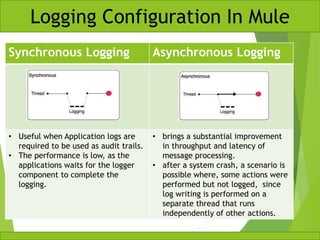
 Synchronous :
 The execution of the thread that is processing the message is interrupted to wait for
the log message to be fully handled before it can continue.
 Asynchronous:
 The logging operation occurs in a separate thread, so the actual processing of your
message won’t be delayed to wait for the logging to complete.
 Note :
 By Default Mule uses the Asynchronous logging in the applications.
Logging Configuration In Mule
Synchronous Logging Asynchronous Logging
• Useful when Application logs are
required to be used as audit trails.
• The performance is low, as the
applications waits for the logger
component to complete the
logging.
• brings a substantial improvement
in throughput and latency of
message processing.
• after a system crash, a scenario is
possible where, some actions were
performed but not logged, since
log writing is performed on a
separate thread that runs
independently of other actions.
Logging Configuration In Mule
 By default, logging in Mule is done asynchronously and at a level greater
than or equal to INFO.
 Hence it ignores the messages at the DEBUG or TRACE level.
Logging Configuration In Mule
 Defining the Logging type, logging level or custom categories can be done
by modifying the log4j2.xml file.
 This file is located at different locations depending on the where the
application is running.
 In Standalone Mule Runtime :
 $MULE_HOME/conf/log4j2.xml
 In Anypoint Studio:
 src/main/resources
Logging Configuration In Mule
 If the file is not edited then the default
configuration is assumed for the application.
 The configuration can be overridden at the
domain or the application level.
 Create a custom file at a custom folder location
and point to it in the application’s deployment
properties.
 To point the application to use this file :
 open the application’s mule-deploy.properties file
in src/main/app and add a log.configFile property
with this location specified in it.
 Example :
log.configFile=myCustomFolder/myCustomlog4j2.xm
l
Logging Configuration In Mule
 If the deployment property is not set then mule searches for the config
file following child–first pattern as follows :
 Look for a file called log4j2-test.xml in the application
classpath
 Look for a file called log4j2.xml in the application
classpath
 Look for a file called log4j2-test.xml in the domain
classpath
 Look for a file called log4j2.xml in the domain classpath
 Look for a file called log4j2-test.xml in MULE_HOME/conf
 Look for a file called log4j2.xml in MULE_HOME/conf
 Apply default configuration.
Logging Configuration In Mule

Logging configuration in mule

  • 1.
  • 2.
     There’s noneed to state the importance of debuggers for developers, and Mule developers are no exception. The goal of this blog post is to provide you with a few handy tips for debugging your custom Java code in Mule Studio.
  • 3.
     Through thelogging configuration it’s possible to configure what gets logged, where it gets logged, and how it gets logged.  Mule internally logs multiple messages along with some specific elements in the application’s flows.  The logger component can also be included to output any desired messages.  By creating a configuration file, it’s possible to define what kinds of messages to log, in what way (asynchronously or synchronously), and where they get logged (To console, To disk or to a database). Logging Configuration In Mule
  • 4.
     For loggingMule uses slf4j.  Slf4j is a logging facade, that discovers and uses a logging strategy from the classpath, such as log4j2 or the JDK Logger.  By Default Mule includes log4j2.  The configuration used for it is log4j2.xml.  The Mule server has a log4j2.xml file in the conf directory.  This file can be customized when running the server in standalone mode. Logging Configuration In Mule
  • 5.
     To viewAnypoint Studio logs:  Error Log :  Logs can be viewed in Studio by clicking: Anypoint Studio > About Anypoint Studio > Installation Details > Configuration tab > View Error Log  Workspace Logs :  The output from View Error Log is in the workspace’s ’.metadata/.log’ file  Project Log:  The logs for the mule application are present in the workspace’s ‘.mule/logs/<project>.log’ file. Logging Configuration In Mule
  • 6.
     Types oflogging :  Synchronous :  The execution of the thread that is processing the message is interrupted to wait for the log message to be fully handled before it can continue.  Asynchronous:  The logging operation occurs in a separate thread, so the actual processing of your message won’t be delayed to wait for the logging to complete.  Note :  By Default Mule uses the Asynchronous logging in the applications. Logging Configuration In Mule
  • 7.
    Synchronous Logging AsynchronousLogging • Useful when Application logs are required to be used as audit trails. • The performance is low, as the applications waits for the logger component to complete the logging. • brings a substantial improvement in throughput and latency of message processing. • after a system crash, a scenario is possible where, some actions were performed but not logged, since log writing is performed on a separate thread that runs independently of other actions. Logging Configuration In Mule
  • 8.
     By default,logging in Mule is done asynchronously and at a level greater than or equal to INFO.  Hence it ignores the messages at the DEBUG or TRACE level. Logging Configuration In Mule
  • 9.
     Defining theLogging type, logging level or custom categories can be done by modifying the log4j2.xml file.  This file is located at different locations depending on the where the application is running.  In Standalone Mule Runtime :  $MULE_HOME/conf/log4j2.xml  In Anypoint Studio:  src/main/resources Logging Configuration In Mule
  • 10.
     If thefile is not edited then the default configuration is assumed for the application.  The configuration can be overridden at the domain or the application level.  Create a custom file at a custom folder location and point to it in the application’s deployment properties.  To point the application to use this file :  open the application’s mule-deploy.properties file in src/main/app and add a log.configFile property with this location specified in it.  Example : log.configFile=myCustomFolder/myCustomlog4j2.xm l Logging Configuration In Mule
  • 11.
     If thedeployment property is not set then mule searches for the config file following child–first pattern as follows :  Look for a file called log4j2-test.xml in the application classpath  Look for a file called log4j2.xml in the application classpath  Look for a file called log4j2-test.xml in the domain classpath  Look for a file called log4j2.xml in the domain classpath  Look for a file called log4j2-test.xml in MULE_HOME/conf  Look for a file called log4j2.xml in MULE_HOME/conf  Apply default configuration. Logging Configuration In Mule