MODULE 4_ DIAGNOSE & TROUBLESHOOT COMPUTER
SYSTEM (DT)
LESSON 2_ DIAGNOSE & CONFIGURE COMPUTER SYSTEMS
Occupational Health and Safety (OHS)
 refers to the legislation, policies, procedures and
activities that aim to protect the health, safety and
welfare of all people at the workplace.
Personal safety while working with PC’s
 Before doing anything, listen to your
teacher’s instruction to prevent accidents or
any unwanted events that may occur on
your workplace.
Personal safety while working with PC’s
 Do not work on computer when you are wet
because you might get electrocuted.
Personal safety while working with PC’s
 Do not remove internal devices of the
computer when it is turned on.
Personal safety while working with PC’s
 Avoid playing or running while inside the
room.
Personal safety while working with PC’s
 Always wear personal protective
equipments (PPE) like coverall, shoes with
rubber sole, anti-static wrist strap, etc.
Personal safety while working with PC’s
 Ask for assistance from your teacher when
it comes on dealing with computer devices.
Personal safety while working with PC’s
 Applying safety measure when handling
tools and equipment are necessary to avoid
certain damages
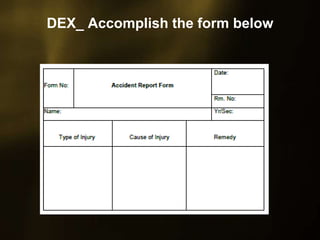
DEX_ Accomplish the form below
MODULE 4_ DIAGNOSE & TROUBLESHOOT COMPUTER
SYSTEM (DT)
LESSON 2_ DIAGNOSE & CONFIGURE COMPUTER SYSTEMS

Mod4 l2.1

  • 1.
    MODULE 4_ DIAGNOSE& TROUBLESHOOT COMPUTER SYSTEM (DT) LESSON 2_ DIAGNOSE & CONFIGURE COMPUTER SYSTEMS
  • 2.
    Occupational Health andSafety (OHS)  refers to the legislation, policies, procedures and activities that aim to protect the health, safety and welfare of all people at the workplace.
  • 3.
    Personal safety whileworking with PC’s  Before doing anything, listen to your teacher’s instruction to prevent accidents or any unwanted events that may occur on your workplace.
  • 4.
    Personal safety whileworking with PC’s  Do not work on computer when you are wet because you might get electrocuted.
  • 5.
    Personal safety whileworking with PC’s  Do not remove internal devices of the computer when it is turned on.
  • 6.
    Personal safety whileworking with PC’s  Avoid playing or running while inside the room.
  • 7.
    Personal safety whileworking with PC’s  Always wear personal protective equipments (PPE) like coverall, shoes with rubber sole, anti-static wrist strap, etc.
  • 8.
    Personal safety whileworking with PC’s  Ask for assistance from your teacher when it comes on dealing with computer devices.
  • 9.
    Personal safety whileworking with PC’s  Applying safety measure when handling tools and equipment are necessary to avoid certain damages
  • 10.
  • 11.
    MODULE 4_ DIAGNOSE& TROUBLESHOOT COMPUTER SYSTEM (DT) LESSON 2_ DIAGNOSE & CONFIGURE COMPUTER SYSTEMS