
Elements of
Responsive
Web Design
“So, I’ve been hearing about
  Responsive Web Design.
    What is it, exactly?”
“We can embrace the flexibility inherent to the web,
without surrendering the control we require as designers.
All by embedding standards-based technologies in our
work, and by making a slight change in our philosophy
toward online design.”


                                        – Ethan Marcotte,
                                              Responsive Web Design
We can use the fluidity of HTML, CSS and
Javascript to create designs that provide optimal
 experiences by responding to device context.
“Ok, but why should I care about
  Responsive Web Design?”
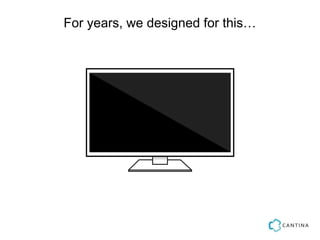
For years, we designed for this…
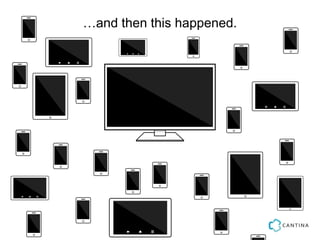
…and then this happened.
Responsive Web Design gives us the tools to handle
the ever-increasing number of devices in the wild in
             a future-friendly* fashion.


                      http://futurefriend.ly/
“Well, how do I implement a responsive site?”
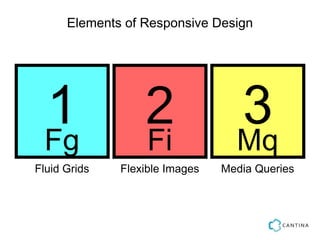
Elements of Responsive Design


 1
 Fg
                  2
                  Fi
                                  3
                                  Mq
Fluid Grids   Flexible Images   Media Queries
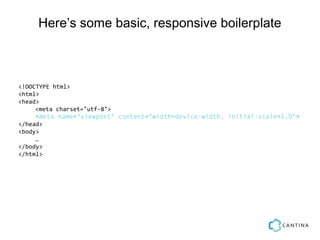
Here’s some basic, responsive boilerplate


<!DOCTYPE html>
<html>
<head>
     <meta charset="utf-8">
     <meta name="viewport" content="width=device-width, initial-scale=1.0">
</head>
<body>
     …
</body>
</html>
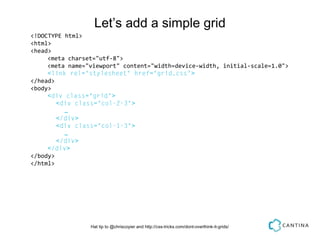
Let’s add a simple grid
<!DOCTYPE html>
<html>
<head>
     <meta charset="utf-8">
     <meta name="viewport" content="width=device-width, initial-scale=1.0">
     <link rel="stylesheet" href="grid.css">
</head>
<body>
     <div class="grid">
        <div class="col-2-3">
          …
        </div>
        <div class="col-1-3">
          …
        </div>
     </div>
</body>
</html>


                 Hat tip to @chriscoyier and http://css-tricks.com/dont-overthink-it-grids/
And now some styles to make the grid work


 *:before {    -webkit-box-sizing: border-box;    -moz-box-sizing: border-box;                         box-sizing:
ding: 1em 0 1em 1em }
 {    content: "";    display: table;    clear: both;}

l-'] {    float: left;    padding-right: 1em;}
width: 66.66% }
width: 33.33% }


                          Hat tip to @chriscoyier and http://css-tricks.com/dont-overthink-it-grids/
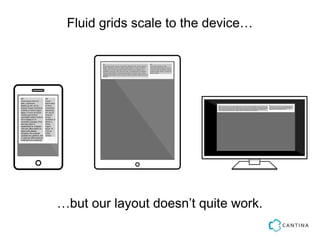
Fluid grids scale to the device…


…but our layout doesn’t quite work.
Let’s use a media query to refine the layout.


after, *:before {    -webkit-box-sizing: border-box;    -moz-box-sizing: border-box;                    box-si
 { padding: 1em 0 1em 1em }
:after {    content: "";    display: table;    clear: both;}

s*='col-'] {    float: left;        padding-right: 1em;}

a screen and (min-device-width: 480px ) {
col-2-3 { width: 66.66% }
col-1-3 { width: 33.33% }


                           Hat tip to @chriscoyier and http://css-tricks.com/dont-overthink-it-grids/
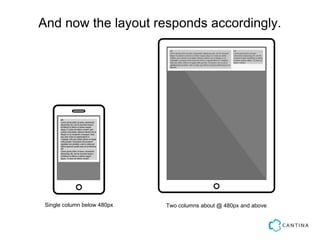
And now the layout responds accordingly.


 Single column below 480px   Two columns about @ 480px and above
Now, let’s make our images flex.


*:before {    -webkit-box-sizing: border-box;    -moz-box-sizing: border-box;   box-sizing: b
ing: 1em 0 1em 1em }
{    content: "";    display: table;    clear: both;}

-'] {    float: left;    padding-right: 1em;}

dth: 100% } // yep, that’s it

n and (min-device-width: 480px ) {
 { width: 66.66% }
 { width: 33.33% }
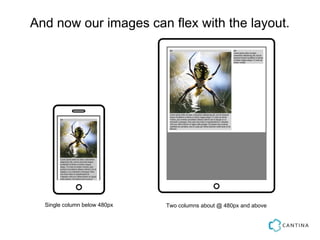
And now our images can flex with the layout.


  Single column below 480px   Two columns about @ 480px and above
Of course, this requires scaling a single, larger
                       image.

There’s a lot of work going on to find better solutions
 for flexible images, such as the <picture> element.
There’s a lot more to it, but that covers the basics* of
              Responsive Web Design.


               *Your mileage may vary. Support for IE quirks will require more work!
Buzz phrases to consider when thinking
            responsively
Mobile First
Design for the constraints of mobile devices first and craft your
design to respond as capabilities increase.


Content Out
Design responsive sites around content needs.


Progressive Enhancement
Start with a simple core and add features when capabilities appear
on various devices.


Speed Wins
Design for the fastest display you can; eject everything you don’t
need.
“...the purpose behind “responsive design”—the concept
of what it strives to achieve—should be separated from
the specific techniques used to achieve it. As the
worldwide community embraces [Ethan’s] idea (and as
new methods of CSS layout become practical), the
techniques of responsive design will continue to improve
and, dare I say it, adapt.”


                                                                       Jeffrey Zeldman,
            Responsive Design. I don’t think that word means what you think it means.http://bit.ly/oP8eei
The original concept is fine, but it only addresses
 some needs. We need to broaden our notion of
                  ‘responsive’.
Other approaches to being responsive

Adaptive Web Design
http://www.lullabot.com/articles/responsive-adaptive-web-design


RESS: Responsive Design + Server Side
Components
http://www.lukew.com/ff/entry.asp?1392
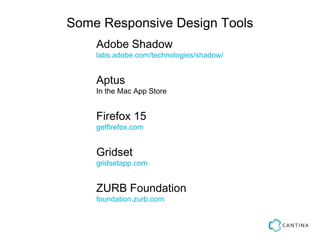
Some Responsive Design Tools
    Adobe Shadow
    labs.adobe.com/technologies/shadow/


    Aptus
    In the Mac App Store


    Firefox 15
    getfirefox.com


    Gridset
    gridsetapp.com


    ZURB Foundation
    foundation.zurb.com
“Ok, I get it!
  So all of my sites should be
responsive from now on, right?”
YES
Ok, maybe not “always”.

Ask your doctor if an alternative approach
          may be right for you.
Thanks!
 Questions?
George White
Principal Consultant, Mobile Practice Lead
george@cantina.co
@stonehippo

Mobile Monday Presentation: Responsive Web Design

  • 1.
  • 2.
    “So, I’ve beenhearing about Responsive Web Design. What is it, exactly?”
  • 3.
    “We can embracethe flexibility inherent to the web, without surrendering the control we require as designers. All by embedding standards-based technologies in our work, and by making a slight change in our philosophy toward online design.” – Ethan Marcotte, Responsive Web Design
  • 4.
    We can usethe fluidity of HTML, CSS and Javascript to create designs that provide optimal experiences by responding to device context.
  • 5.
    “Ok, but whyshould I care about Responsive Web Design?”
  • 6.
    For years, wedesigned for this…
  • 7.
  • 8.
    Responsive Web Designgives us the tools to handle the ever-increasing number of devices in the wild in a future-friendly* fashion. http://futurefriend.ly/
  • 9.
    “Well, how doI implement a responsive site?”
  • 10.
    Elements of ResponsiveDesign 1 Fg 2 Fi 3 Mq Fluid Grids Flexible Images Media Queries
  • 11.
    Here’s some basic,responsive boilerplate <!DOCTYPE html> <html> <head> <meta charset="utf-8"> <meta name="viewport" content="width=device-width, initial-scale=1.0"> </head> <body> … </body> </html>
  • 12.
    Let’s add asimple grid <!DOCTYPE html> <html> <head> <meta charset="utf-8"> <meta name="viewport" content="width=device-width, initial-scale=1.0"> <link rel="stylesheet" href="grid.css"> </head> <body> <div class="grid"> <div class="col-2-3"> … </div> <div class="col-1-3"> … </div> </div> </body> </html> Hat tip to @chriscoyier and http://css-tricks.com/dont-overthink-it-grids/
  • 13.
    And now somestyles to make the grid work *:before { -webkit-box-sizing: border-box; -moz-box-sizing: border-box; box-sizing: ding: 1em 0 1em 1em } { content: ""; display: table; clear: both;} l-'] { float: left; padding-right: 1em;} width: 66.66% } width: 33.33% } Hat tip to @chriscoyier and http://css-tricks.com/dont-overthink-it-grids/
  • 14.
    Fluid grids scaleto the device… …but our layout doesn’t quite work.
  • 15.
    Let’s use amedia query to refine the layout. after, *:before { -webkit-box-sizing: border-box; -moz-box-sizing: border-box; box-si { padding: 1em 0 1em 1em } :after { content: ""; display: table; clear: both;} s*='col-'] { float: left; padding-right: 1em;} a screen and (min-device-width: 480px ) { col-2-3 { width: 66.66% } col-1-3 { width: 33.33% } Hat tip to @chriscoyier and http://css-tricks.com/dont-overthink-it-grids/
  • 16.
    And now thelayout responds accordingly. Single column below 480px Two columns about @ 480px and above
  • 17.
    Now, let’s makeour images flex. *:before { -webkit-box-sizing: border-box; -moz-box-sizing: border-box; box-sizing: b ing: 1em 0 1em 1em } { content: ""; display: table; clear: both;} -'] { float: left; padding-right: 1em;} dth: 100% } // yep, that’s it n and (min-device-width: 480px ) { { width: 66.66% } { width: 33.33% }
  • 18.
    And now ourimages can flex with the layout. Single column below 480px Two columns about @ 480px and above
  • 19.
    Of course, thisrequires scaling a single, larger image. There’s a lot of work going on to find better solutions for flexible images, such as the <picture> element.
  • 20.
    There’s a lotmore to it, but that covers the basics* of Responsive Web Design. *Your mileage may vary. Support for IE quirks will require more work!
  • 21.
    Buzz phrases toconsider when thinking responsively Mobile First Design for the constraints of mobile devices first and craft your design to respond as capabilities increase. Content Out Design responsive sites around content needs. Progressive Enhancement Start with a simple core and add features when capabilities appear on various devices. Speed Wins Design for the fastest display you can; eject everything you don’t need.
  • 22.
    “...the purpose behind“responsive design”—the concept of what it strives to achieve—should be separated from the specific techniques used to achieve it. As the worldwide community embraces [Ethan’s] idea (and as new methods of CSS layout become practical), the techniques of responsive design will continue to improve and, dare I say it, adapt.” Jeffrey Zeldman, Responsive Design. I don’t think that word means what you think it means.http://bit.ly/oP8eei
  • 23.
    The original conceptis fine, but it only addresses some needs. We need to broaden our notion of ‘responsive’.
  • 24.
    Other approaches tobeing responsive Adaptive Web Design http://www.lullabot.com/articles/responsive-adaptive-web-design RESS: Responsive Design + Server Side Components http://www.lukew.com/ff/entry.asp?1392
  • 25.
    Some Responsive DesignTools Adobe Shadow labs.adobe.com/technologies/shadow/ Aptus In the Mac App Store Firefox 15 getfirefox.com Gridset gridsetapp.com ZURB Foundation foundation.zurb.com
  • 26.
    “Ok, I getit! So all of my sites should be responsive from now on, right?”
  • 27.
  • 28.
    Ok, maybe not“always”. Ask your doctor if an alternative approach may be right for you.
  • 29.
  • 30.
    George White Principal Consultant,Mobile Practice Lead george@cantina.co @stonehippo