Continuous Integration &
Delivery Example
1
https://oncoscape.sttrcancer.org
Robert McDermott
rmcdermo@fredhutch.org
Center IT
“Continuous Integration is a software development practice where members of a
team integrate their work frequently; usually each person integrates at least daily –
leading to multiple integrations per day.” --Martin Fowler
“Continuous Delivery is a software development discipline where you build
software in such a way that the software can be released to production at any
time” --Martin Fowler
Continuous Deployment is a third term that’s sometimes confused with Continuous
Delivery. Where Continuous Delivery provides a process to create frequent releases
but not necessarily deploy them, Continuous Deployment means that every change
you make automatically gets deployed through the deployment pipeline.
Continuous Integration, Delivery and Deployment
2
Oncoscape
 Project Overview: Oncoscape is a web application that hosts an integrated suite
of analysis tools for users to explore hypotheses related to molecular and clinical
data in order to better understand cancer biology and treatment options
o Technology stack: JavaScript, R, Angular.js, Node.js, Docker, AWS
o Team: 4 internal developers, 1 part time IT engineer and external developers
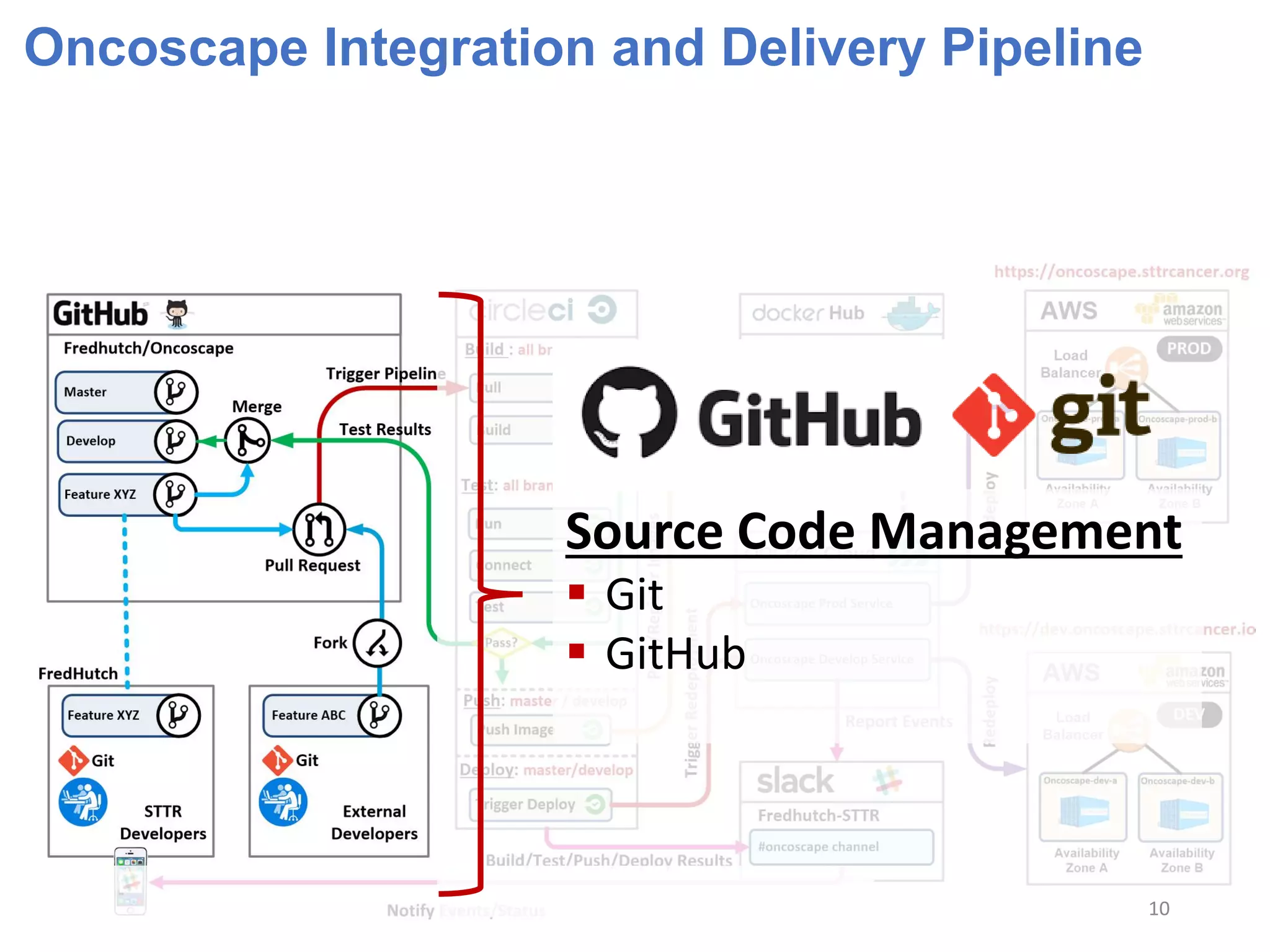
 Source Code Management
o GitHub: https://github.com/FredHutch/Oncoscape
o Public repository for external collaboration
 Development Workflow
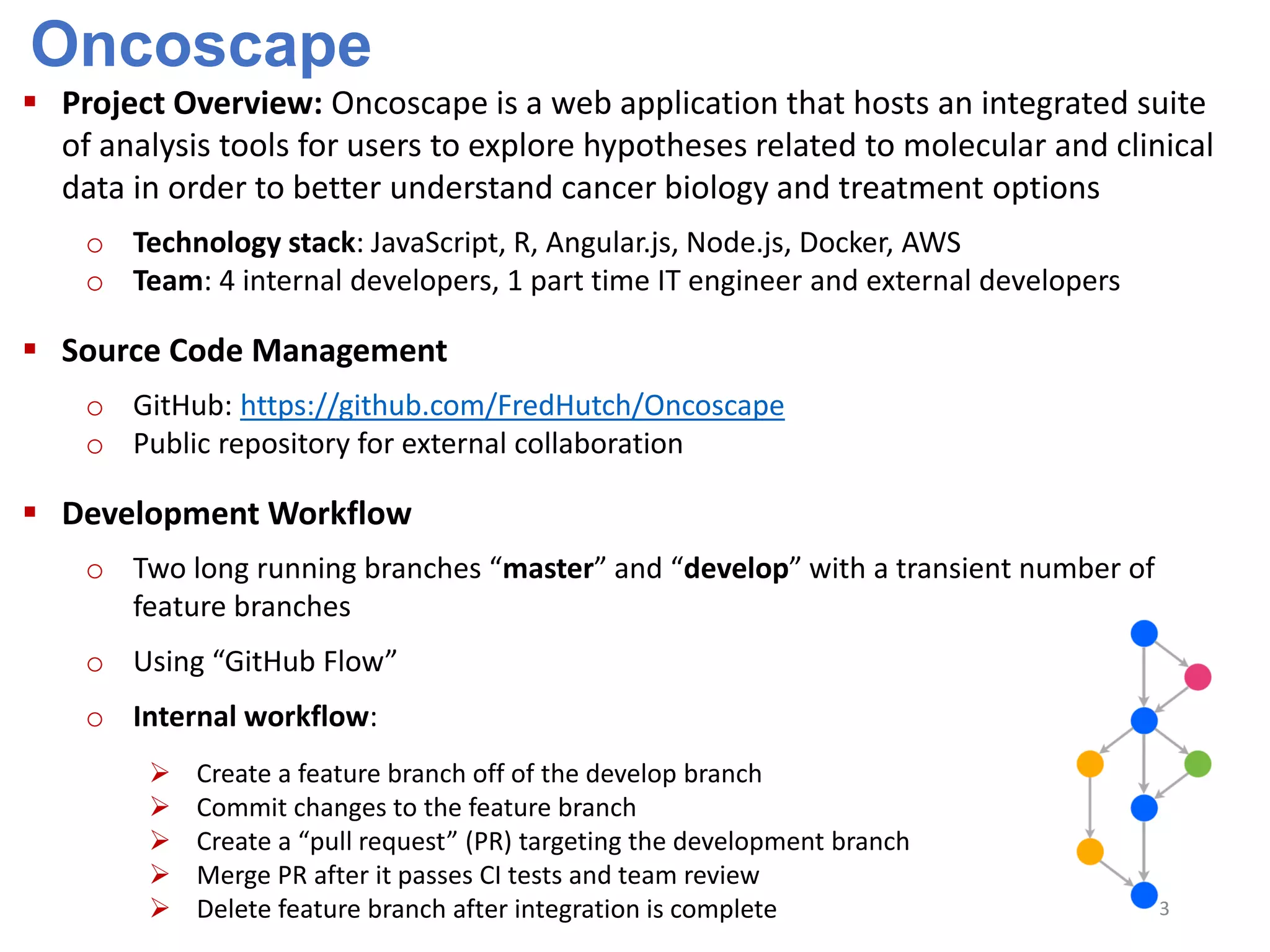
o Two long running branches “master” and “develop” with a transient number of
feature branches
o Using “GitHub Flow”
o Internal workflow:
 Create a feature branch off of the develop branch
 Commit changes to the feature branch
 Create a “pull request” (PR) targeting the development branch
 Merge PR after it passes CI tests and team review
 Delete feature branch after integration is complete 3
Oncoscape Continuous Integration and Delivery
 Development Workflow (continued)
o External workflow:
 Create a fork of the Oncoscape repository
 Create a feature branch
 Commit changes to the feature branch
 Create a “pull request” (PR ) targeting the development branch
 Merge PR after it passes CI tests and team review
 Delete feature branch after integration is complete
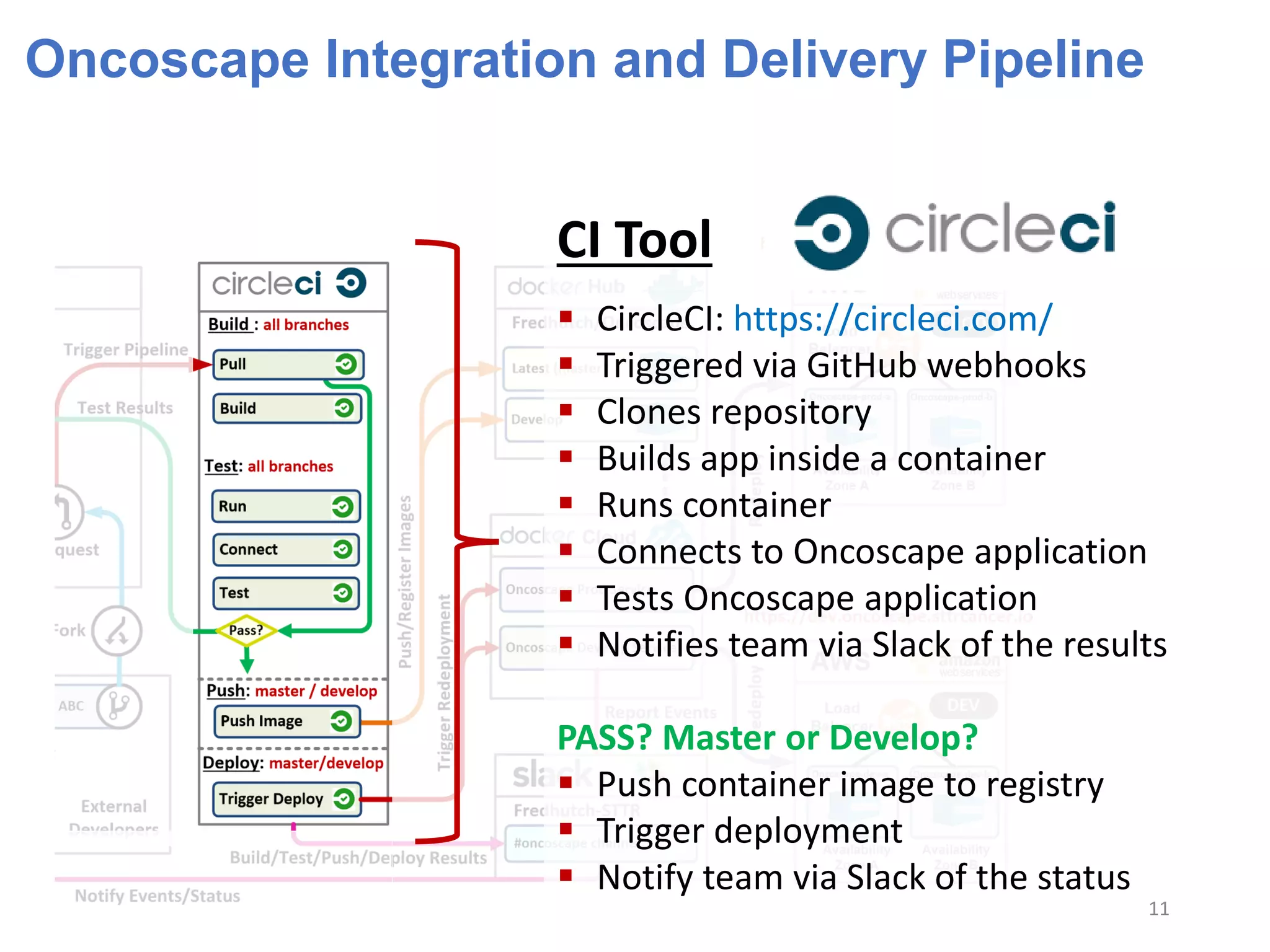
 Continuous Integration
o Using CircleCI: https://circleci.com/
o CircleCI integrated with GitHub via Webhooks
o Any commits, merges or pull requests trigger the CI pipeline
o Oncoscape is automatically built, run and tested on CircleCI
o Merges to Master and Develop branches create and register deployable containers
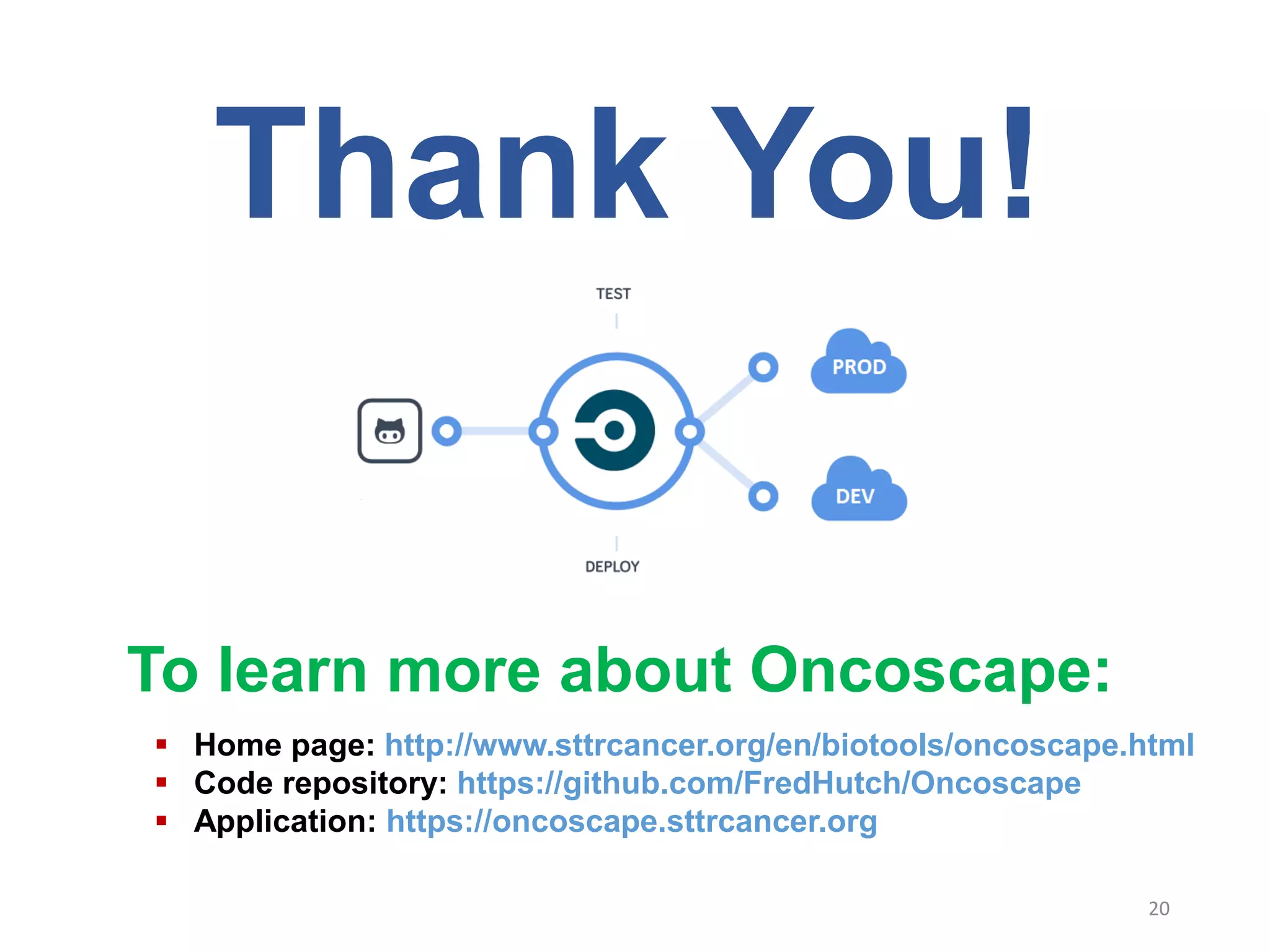
o Passing CI tests on Master and Develop branches trigger deployment
4
Oncoscape Continuous Integration and Delivery
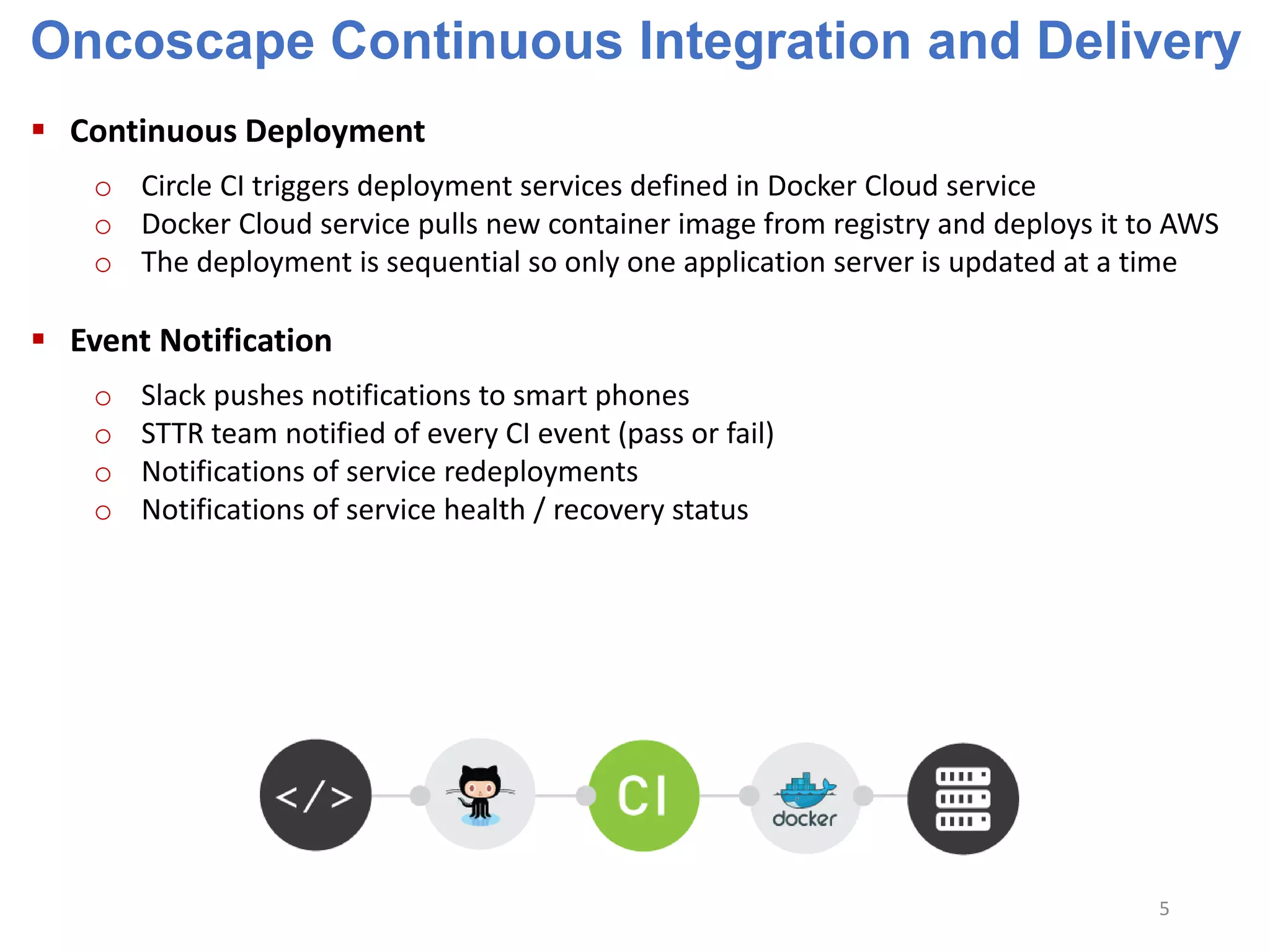
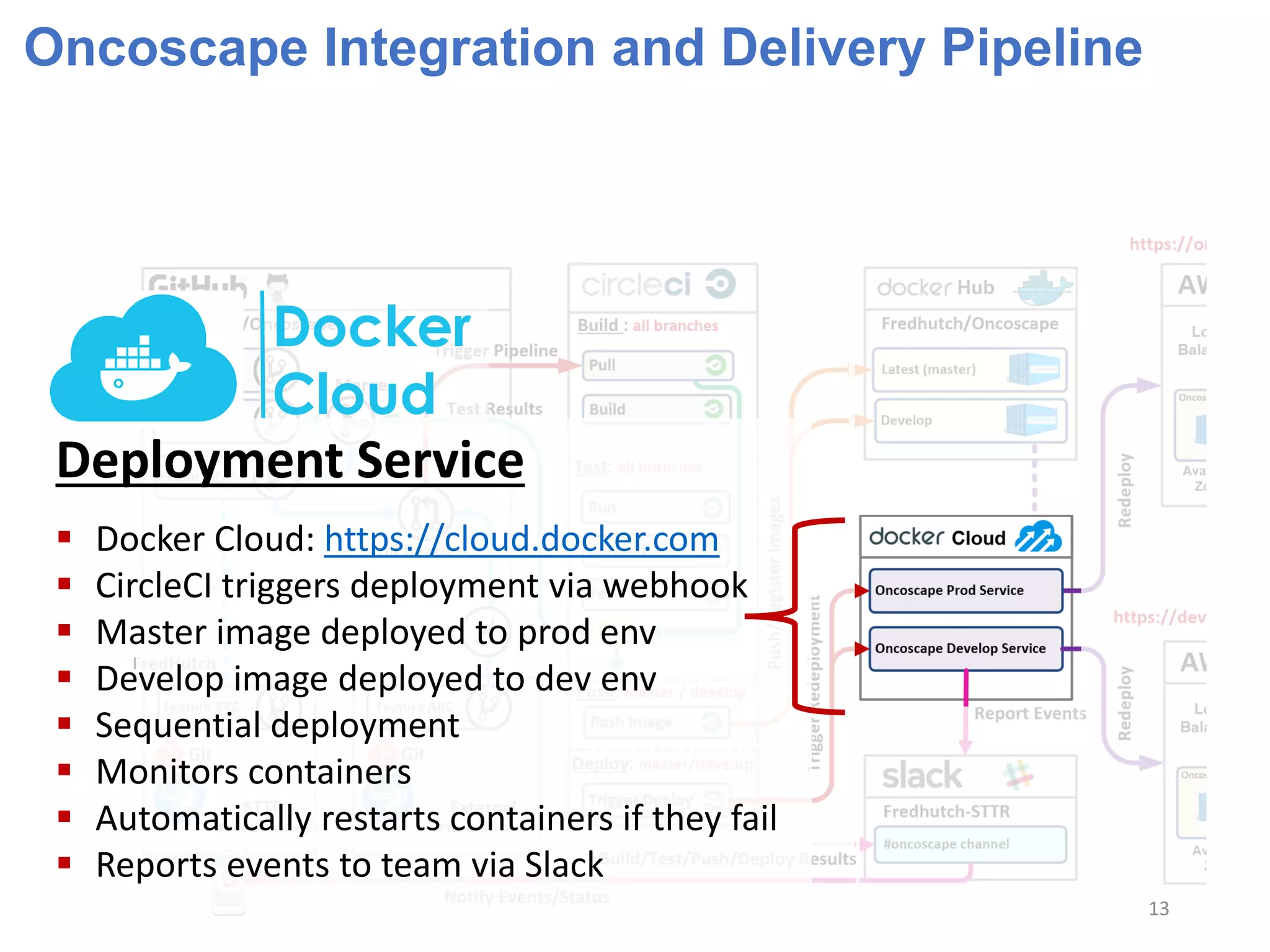
 Continuous Deployment
o Circle CI triggers deployment services defined in Docker Cloud service
o Docker Cloud service pulls new container image from registry and deploys it to AWS
o The deployment is sequential so only one application server is updated at a time
 Event Notification
o Slack pushes notifications to smart phones
o STTR team notified of every CI event (pass or fail)
o Notifications of service redeployments
o Notifications of service health / recovery status
5
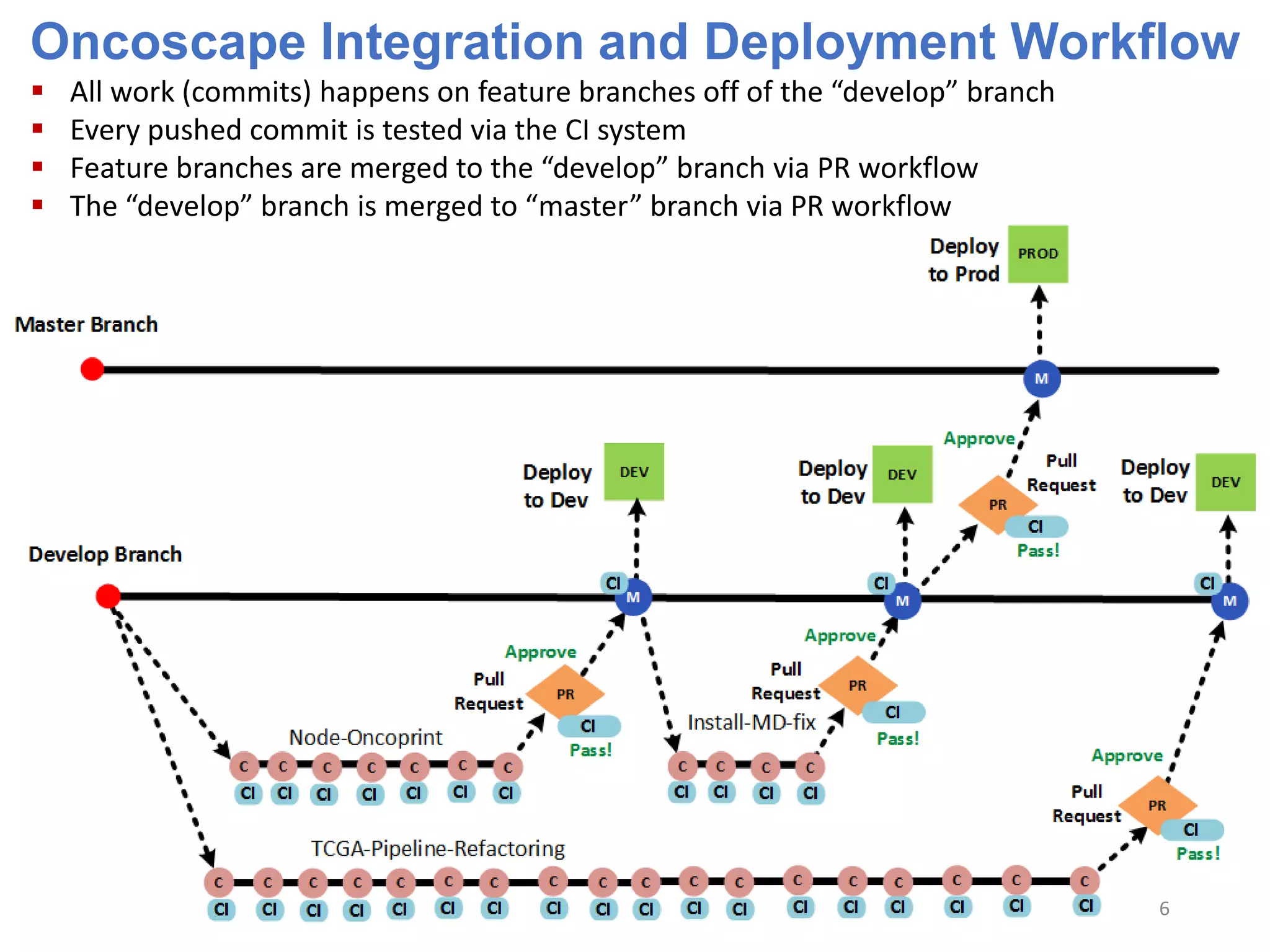
Oncoscape Integration and Deployment Workflow
 All work (commits) happens on feature branches off of the “develop” branch
 Every pushed commit is tested via the CI system
 Feature branches are merged to the “develop” branch via PR workflow
 The “develop” branch is merged to “master” branch via PR workflow
6
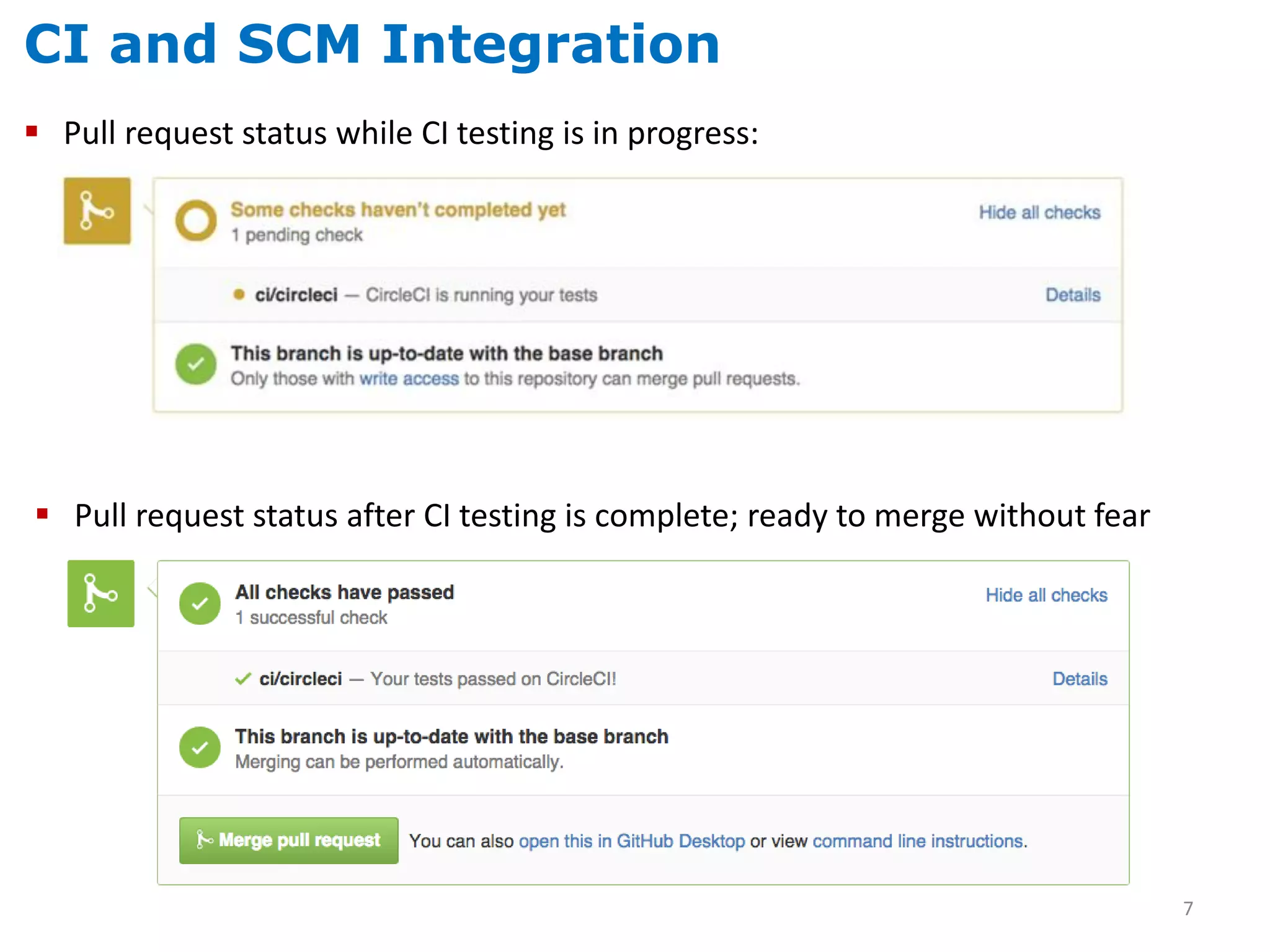
CI and SCM Integration
 Pull request status while CI testing is in progress:
 Pull request status after CI testing is complete; ready to merge without fear
7
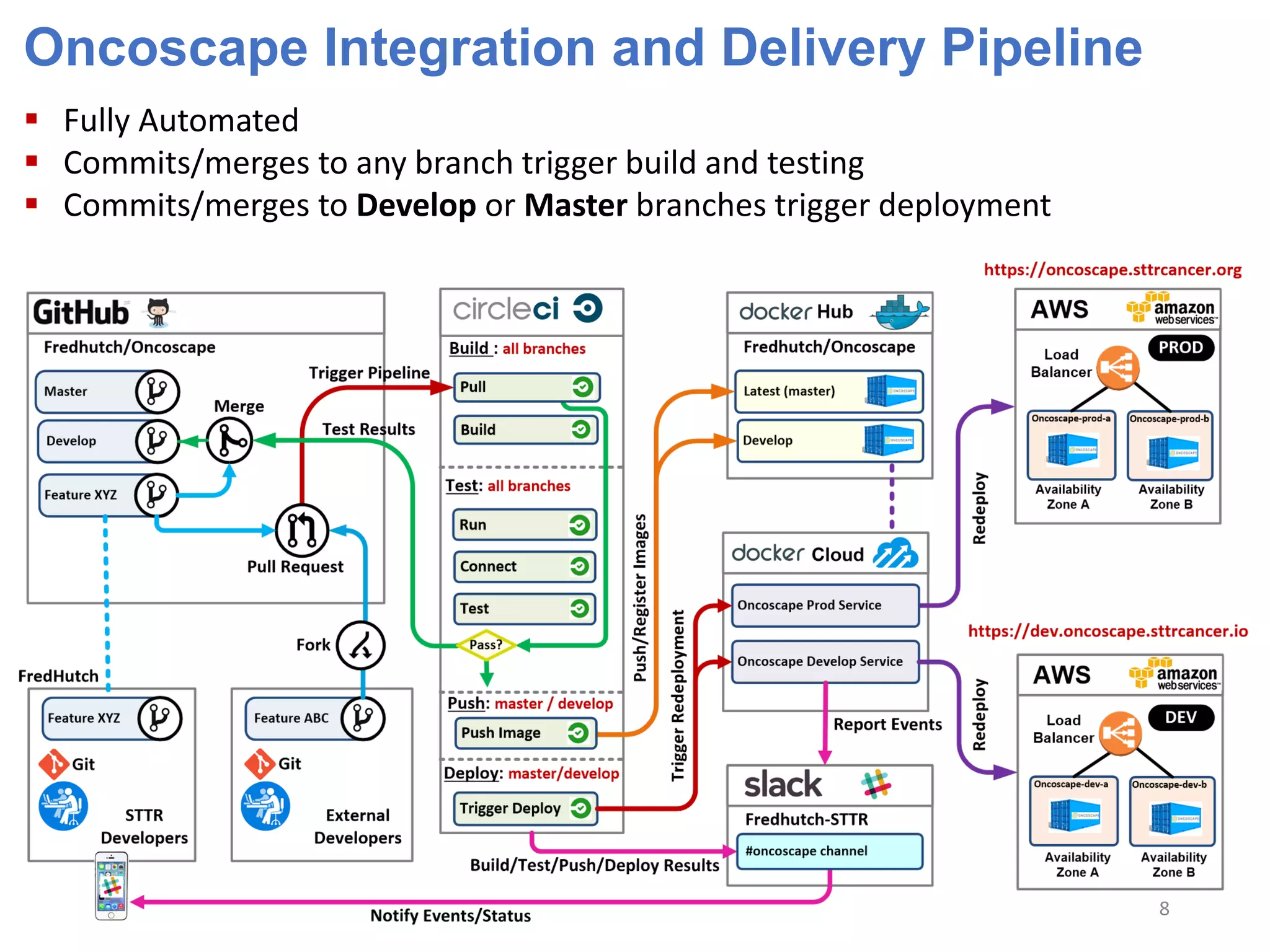
Oncoscape Integration and Delivery Pipeline
 Fully Automated
 Commits/merges to any branch trigger build and testing
 Commits/merges to Develop or Master branches trigger deployment
8
Oncoscape Integration and Delivery Pipeline
 Fully Automated
 Commits/merges to any branch trigger build and testing
 Commits/merges to Develop or Master branches trigger deployment
9
Oncoscape Integration and Delivery Pipeline
Source Code Management
 Git
 GitHub
10
Oncoscape Integration and Delivery Pipeline
CI Tool
 CircleCI: https://circleci.com/
 Triggered via GitHub webhooks
 Clones repository
 Builds app inside a container
 Runs container
 Connects to Oncoscape application
 Tests Oncoscape application
 Notifies team via Slack of the results
PASS? Master or Develop?
 Push container image to registry
 Trigger deployment
 Notify team via Slack of the status
11
Oncoscape Integration and Delivery Pipeline
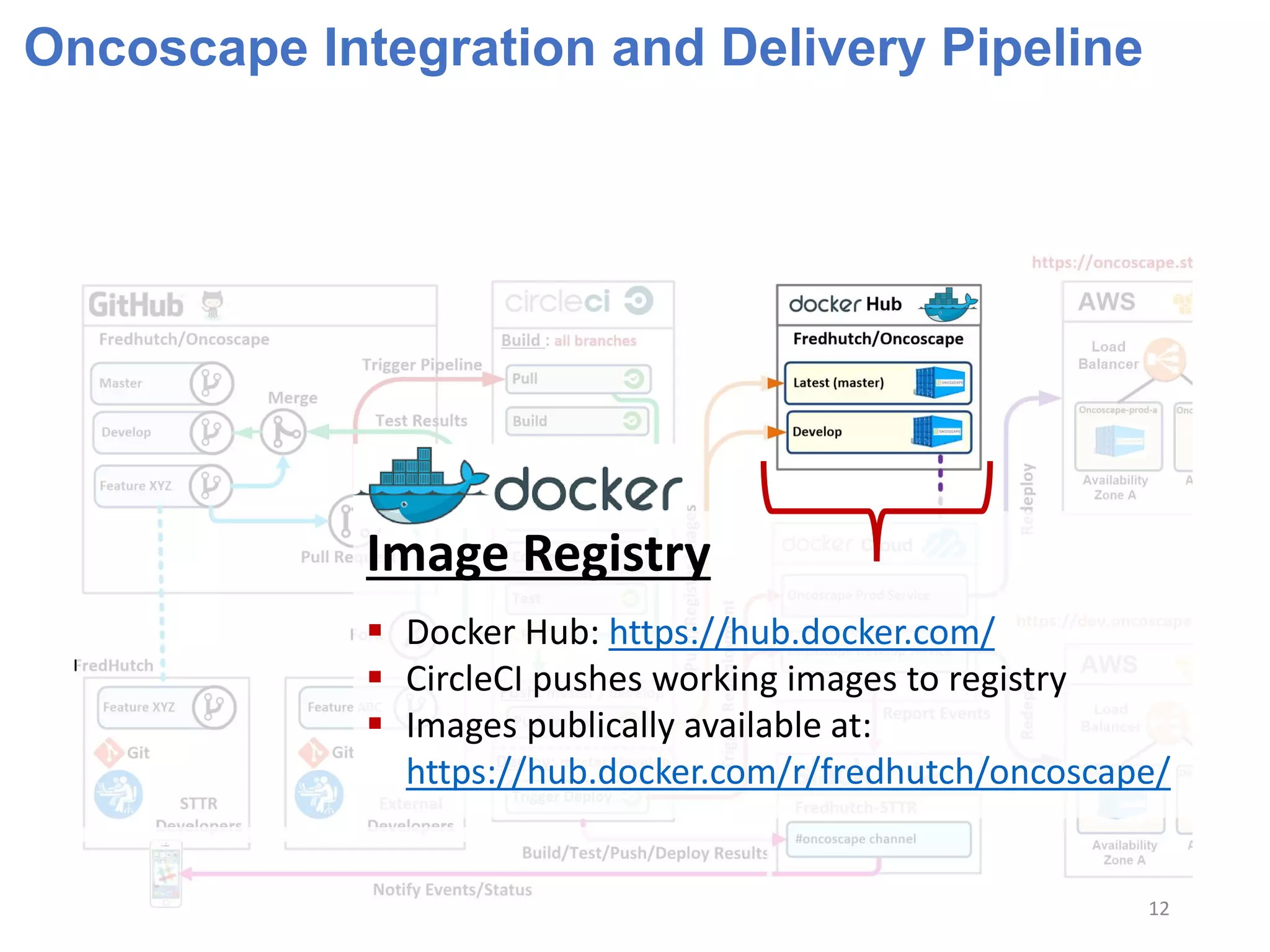
Image Registry
 Docker Hub: https://hub.docker.com/
 CircleCI pushes working images to registry
 Images publically available at:
https://hub.docker.com/r/fredhutch/oncoscape/
12
Oncoscape Integration and Delivery Pipeline
Deployment Service
 Docker Cloud: https://cloud.docker.com
 CircleCI triggers deployment via webhook
 Master image deployed to prod env
 Develop image deployed to dev env
 Sequential deployment
 Monitors containers
 Automatically restarts containers if they fail
 Reports events to team via Slack
Docker
Cloud
13
Oncoscape Integration and Delivery Pipeline
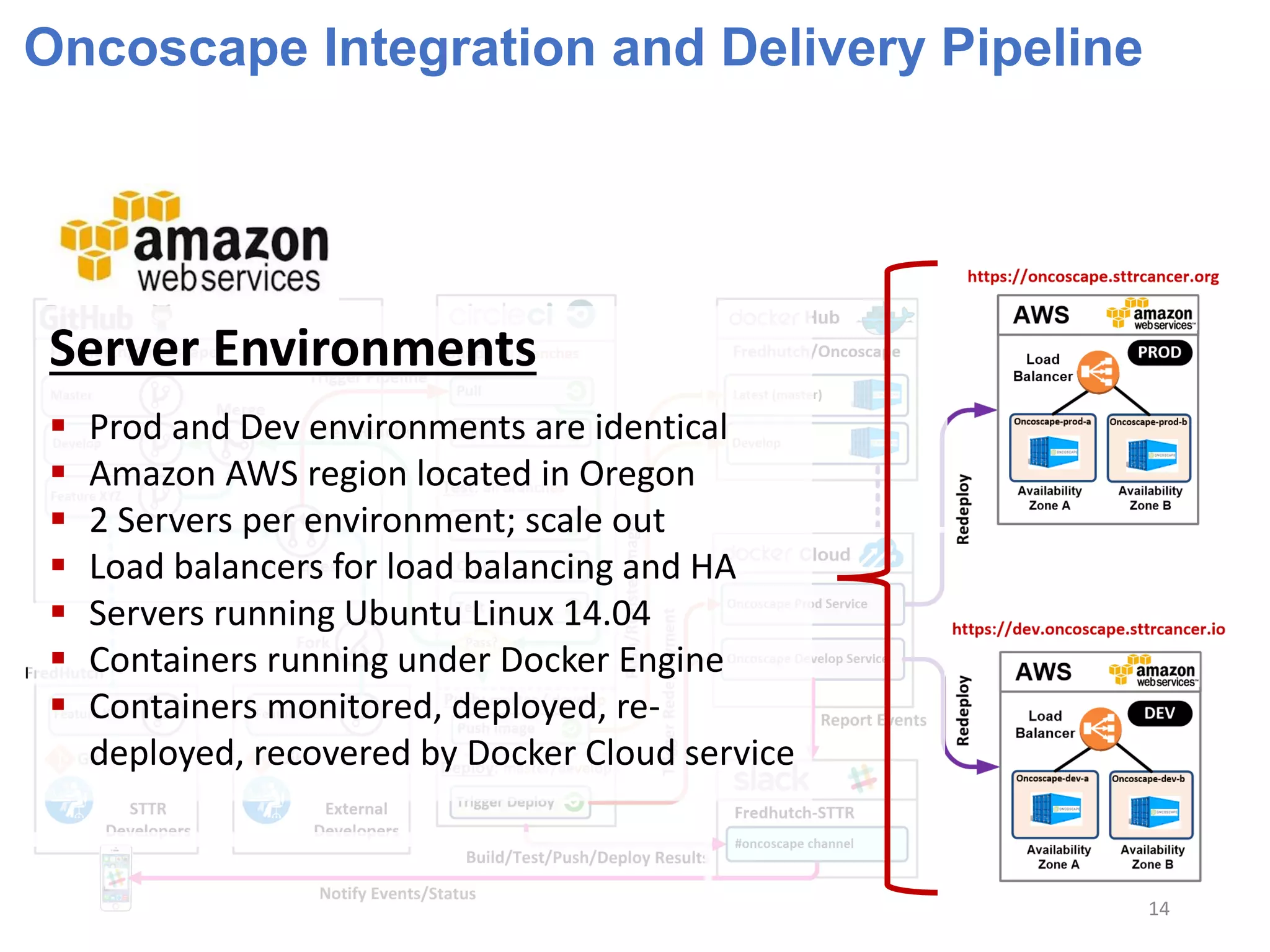
Server Environments
 Prod and Dev environments are identical
 Amazon AWS region located in Oregon
 2 Servers per environment; scale out
 Load balancers for load balancing and HA
 Servers running Ubuntu Linux 14.04
 Containers running under Docker Engine
 Containers monitored, deployed, re-
deployed, recovered by Docker Cloud service
14
Oncoscape Integration and Delivery Pipeline
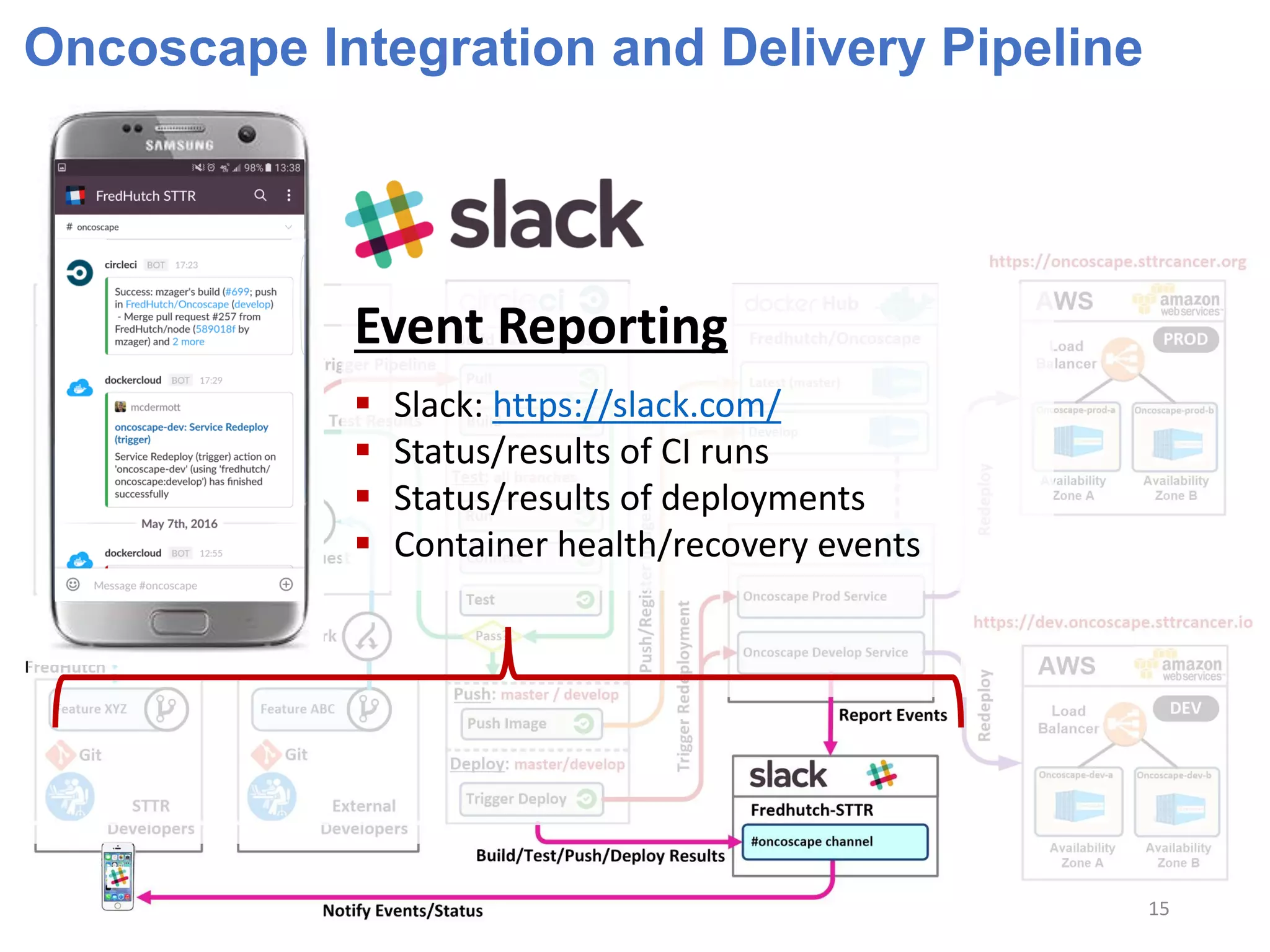
Event Reporting
 Slack: https://slack.com/
 Status/results of CI runs
 Status/results of deployments
 Container health/recovery events
15
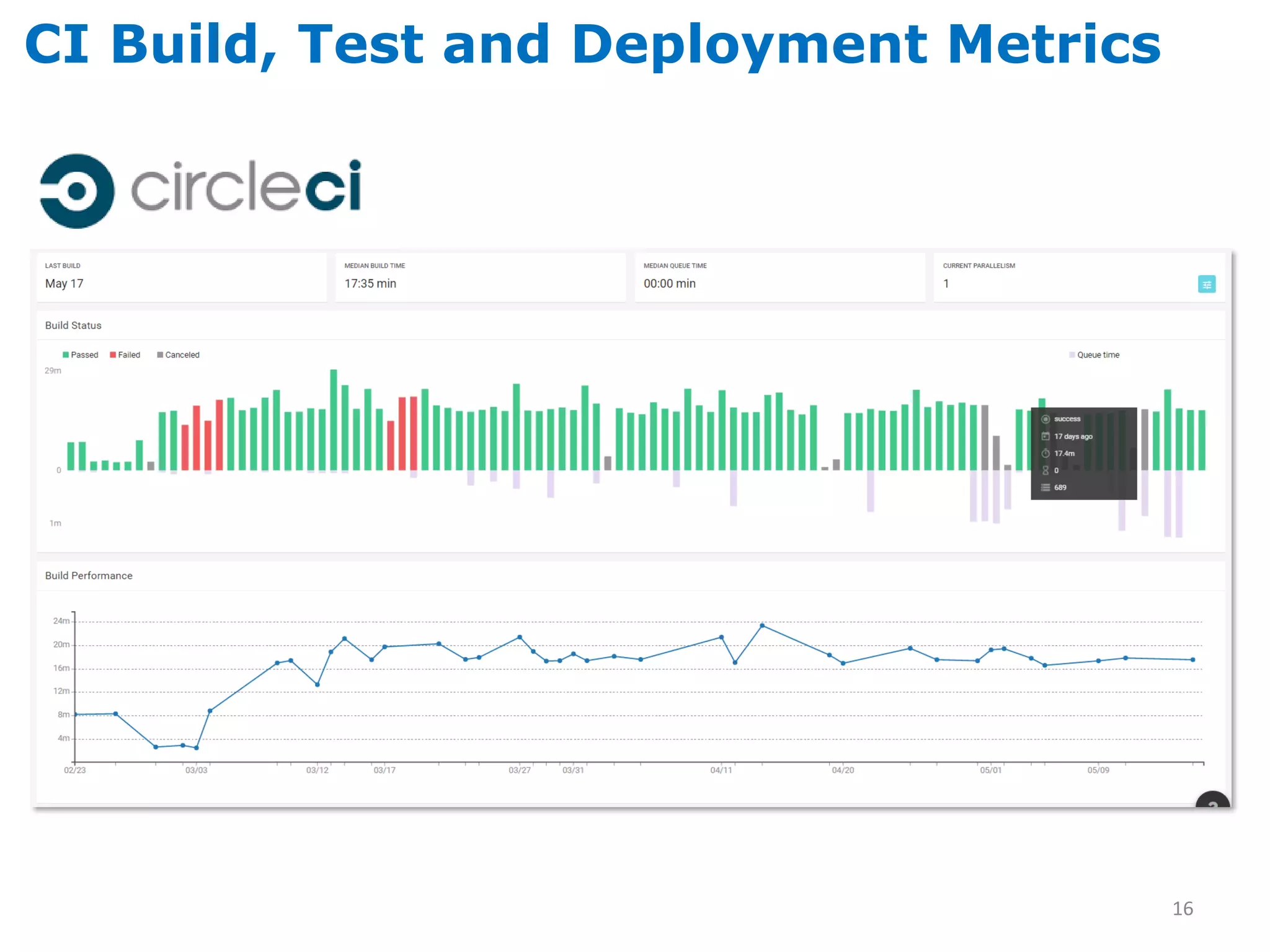
CI Build, Test and Deployment Metrics
16
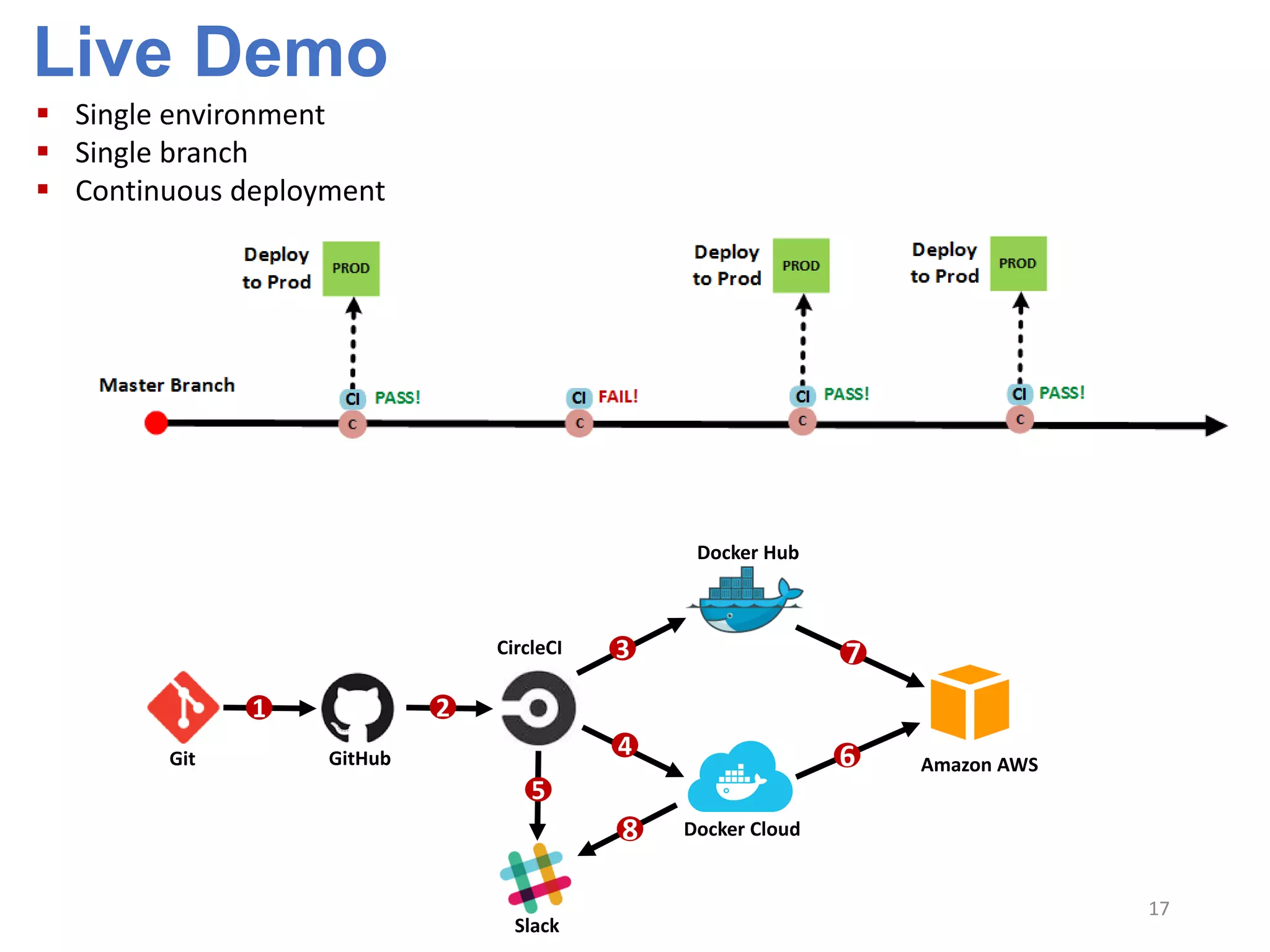
Live Demo
17
 Single environment
 Single branch
 Continuous deployment
1 2
5
3 7
4
8
6Git GitHub
CircleCI
Slack
Docker Hub
Docker Cloud
Amazon AWS
Continuous Integration Tool Options
Solution Site SCM Support
Travis CI https://travis-ci.org GitHub
Circle CI https://circleci.com GitHub
CodeShip https://codeship.com GitHub, Bitbucket
Drone.io https://drone.io GitHub, Bitbucket
Shippable https://app.shippable.com GitHub, Bitbucket
Appveyor http://www.appveyor.com GitHub, Bitbucket, VSTS (visual studio online)
Distelli https://www.distelli.com GitHub, Bitbucket
Jenkins https://jenkins.io/ SVN, GitHub, Bitbucket, CVS, Perforce, TFS, …
Jenkins
18
CI & CD Principles
 Automate everything: build, test and deployment
 Keep everything in a source code management system (use GitHub)
 Keep absolutely everything in a source code management system
 Use a CI tool that integrates tightly (webhooks) with your source code repository
 Commit your code to the repository frequently
 Don’t commit directly to a delivery branch; use a feature branch and PR workflow
 Don’t ignore failing CI tests even on feature branches
 Don’t merge broken code to a delivery branch; it must pass the CI system first
 Deploy the same way to every environment
 No-downtime deployments; stateless frontend, load balancer and sequential
deployment
 Automated feedback on the entire process
 Use a container technology (Docker) if possible as makes deployment simple
 If the process is painful, you’re doing it wrong
19
20
Thank You!
To learn more about Oncoscape:
 Home page: http://www.sttrcancer.org/en/biotools/oncoscape.html
 Code repository: https://github.com/FredHutch/Oncoscape
 Application: https://oncoscape.sttrcancer.org

Anatomy of a Continuous Integration and Delivery (CICD) Pipeline

  • 1.
    Continuous Integration & DeliveryExample 1 https://oncoscape.sttrcancer.org Robert McDermott rmcdermo@fredhutch.org Center IT
  • 2.
    “Continuous Integration isa software development practice where members of a team integrate their work frequently; usually each person integrates at least daily – leading to multiple integrations per day.” --Martin Fowler “Continuous Delivery is a software development discipline where you build software in such a way that the software can be released to production at any time” --Martin Fowler Continuous Deployment is a third term that’s sometimes confused with Continuous Delivery. Where Continuous Delivery provides a process to create frequent releases but not necessarily deploy them, Continuous Deployment means that every change you make automatically gets deployed through the deployment pipeline. Continuous Integration, Delivery and Deployment 2
  • 3.
    Oncoscape  Project Overview:Oncoscape is a web application that hosts an integrated suite of analysis tools for users to explore hypotheses related to molecular and clinical data in order to better understand cancer biology and treatment options o Technology stack: JavaScript, R, Angular.js, Node.js, Docker, AWS o Team: 4 internal developers, 1 part time IT engineer and external developers  Source Code Management o GitHub: https://github.com/FredHutch/Oncoscape o Public repository for external collaboration  Development Workflow o Two long running branches “master” and “develop” with a transient number of feature branches o Using “GitHub Flow” o Internal workflow:  Create a feature branch off of the develop branch  Commit changes to the feature branch  Create a “pull request” (PR) targeting the development branch  Merge PR after it passes CI tests and team review  Delete feature branch after integration is complete 3
  • 4.
    Oncoscape Continuous Integrationand Delivery  Development Workflow (continued) o External workflow:  Create a fork of the Oncoscape repository  Create a feature branch  Commit changes to the feature branch  Create a “pull request” (PR ) targeting the development branch  Merge PR after it passes CI tests and team review  Delete feature branch after integration is complete  Continuous Integration o Using CircleCI: https://circleci.com/ o CircleCI integrated with GitHub via Webhooks o Any commits, merges or pull requests trigger the CI pipeline o Oncoscape is automatically built, run and tested on CircleCI o Merges to Master and Develop branches create and register deployable containers o Passing CI tests on Master and Develop branches trigger deployment 4
  • 5.
    Oncoscape Continuous Integrationand Delivery  Continuous Deployment o Circle CI triggers deployment services defined in Docker Cloud service o Docker Cloud service pulls new container image from registry and deploys it to AWS o The deployment is sequential so only one application server is updated at a time  Event Notification o Slack pushes notifications to smart phones o STTR team notified of every CI event (pass or fail) o Notifications of service redeployments o Notifications of service health / recovery status 5
  • 6.
    Oncoscape Integration andDeployment Workflow  All work (commits) happens on feature branches off of the “develop” branch  Every pushed commit is tested via the CI system  Feature branches are merged to the “develop” branch via PR workflow  The “develop” branch is merged to “master” branch via PR workflow 6
  • 7.
    CI and SCMIntegration  Pull request status while CI testing is in progress:  Pull request status after CI testing is complete; ready to merge without fear 7
  • 8.
    Oncoscape Integration andDelivery Pipeline  Fully Automated  Commits/merges to any branch trigger build and testing  Commits/merges to Develop or Master branches trigger deployment 8
  • 9.
    Oncoscape Integration andDelivery Pipeline  Fully Automated  Commits/merges to any branch trigger build and testing  Commits/merges to Develop or Master branches trigger deployment 9
  • 10.
    Oncoscape Integration andDelivery Pipeline Source Code Management  Git  GitHub 10
  • 11.
    Oncoscape Integration andDelivery Pipeline CI Tool  CircleCI: https://circleci.com/  Triggered via GitHub webhooks  Clones repository  Builds app inside a container  Runs container  Connects to Oncoscape application  Tests Oncoscape application  Notifies team via Slack of the results PASS? Master or Develop?  Push container image to registry  Trigger deployment  Notify team via Slack of the status 11
  • 12.
    Oncoscape Integration andDelivery Pipeline Image Registry  Docker Hub: https://hub.docker.com/  CircleCI pushes working images to registry  Images publically available at: https://hub.docker.com/r/fredhutch/oncoscape/ 12
  • 13.
    Oncoscape Integration andDelivery Pipeline Deployment Service  Docker Cloud: https://cloud.docker.com  CircleCI triggers deployment via webhook  Master image deployed to prod env  Develop image deployed to dev env  Sequential deployment  Monitors containers  Automatically restarts containers if they fail  Reports events to team via Slack Docker Cloud 13
  • 14.
    Oncoscape Integration andDelivery Pipeline Server Environments  Prod and Dev environments are identical  Amazon AWS region located in Oregon  2 Servers per environment; scale out  Load balancers for load balancing and HA  Servers running Ubuntu Linux 14.04  Containers running under Docker Engine  Containers monitored, deployed, re- deployed, recovered by Docker Cloud service 14
  • 15.
    Oncoscape Integration andDelivery Pipeline Event Reporting  Slack: https://slack.com/  Status/results of CI runs  Status/results of deployments  Container health/recovery events 15
  • 16.
    CI Build, Testand Deployment Metrics 16
  • 17.
    Live Demo 17  Singleenvironment  Single branch  Continuous deployment 1 2 5 3 7 4 8 6Git GitHub CircleCI Slack Docker Hub Docker Cloud Amazon AWS
  • 18.
    Continuous Integration ToolOptions Solution Site SCM Support Travis CI https://travis-ci.org GitHub Circle CI https://circleci.com GitHub CodeShip https://codeship.com GitHub, Bitbucket Drone.io https://drone.io GitHub, Bitbucket Shippable https://app.shippable.com GitHub, Bitbucket Appveyor http://www.appveyor.com GitHub, Bitbucket, VSTS (visual studio online) Distelli https://www.distelli.com GitHub, Bitbucket Jenkins https://jenkins.io/ SVN, GitHub, Bitbucket, CVS, Perforce, TFS, … Jenkins 18
  • 19.
    CI & CDPrinciples  Automate everything: build, test and deployment  Keep everything in a source code management system (use GitHub)  Keep absolutely everything in a source code management system  Use a CI tool that integrates tightly (webhooks) with your source code repository  Commit your code to the repository frequently  Don’t commit directly to a delivery branch; use a feature branch and PR workflow  Don’t ignore failing CI tests even on feature branches  Don’t merge broken code to a delivery branch; it must pass the CI system first  Deploy the same way to every environment  No-downtime deployments; stateless frontend, load balancer and sequential deployment  Automated feedback on the entire process  Use a container technology (Docker) if possible as makes deployment simple  If the process is painful, you’re doing it wrong 19
  • 20.
    20 Thank You! To learnmore about Oncoscape:  Home page: http://www.sttrcancer.org/en/biotools/oncoscape.html  Code repository: https://github.com/FredHutch/Oncoscape  Application: https://oncoscape.sttrcancer.org