Power Apps
Office 365 Services
Data Governance, Compliance and
Security
Click to edit Master text styles
Isha Kapoor
Microsoft MVP
SharePoint and
Office Services
(2012 – 2018)Office 365 and SharePoint
Consultant & Trainer.
Twitter : @Learningsp
LinkedIn Profile
Website : https://learningsharepoint.com/
Presenter
Power Apps
(and it’s three phases)
Licensing
Power Apps License can be assigned by the Office 365
team via 365 Admin center.
“Power Apps for Office 365” is a service included within
the E3 license of all Office 365 users.
Access Management
Controlling Access to Power Apps through
Environments and by assigning explicit read-only
access to the consumers of Apps developed by the
Office 365 team is a recommended access
management solution.
Compliance & Security
• Configuring DLP Policies to categorize Connectors
in Business and non-Business Data Groups.
• Data Groups will restrict users to combine the
connectors and create Apps of their own.
• Compliance center Reports can help analyze
recently created Apps and connectors that they
use.
PROBLEM STATEMENT
When a new user is assigned Power Apps
License, they automatically gets added to
the Maker role (Contributor) of the default
environment.
Removing user from Maker role is not
possible by design as it might break
default SharePoint Integration with Power
Apps.
Any restrictions put in place for Power
Apps will also have the same impact on
MS Flow as they share common
connectors.
Problem Solution
DATA LOSS PREVENTION POLICIES & DATA GROUPS
• Creating new Data Loss Prevention policies to prevent users from combining connectors critical to
business data.
• Connectors for Power Apps and MS flow will be categorized into two data groups – Business & non-
business.
• Users can’t combine connectors from the two groups and publish an app of their own.
• Users can create an app by combining connectors within the Data Group only.
• Business critical connectors, for example, SharePoint, Outlook can be isolated in Business only
group.
Problem Solution
Power Apps and Compliance center Reporting
To get a comprehensive report of what connectors are being used in Power Apps, In Power Apps admin
center –> go to Environments –> Select environment –> Resources. Download the .csv.
The list specifies Connectors being used per Power App in your environment. Admins can manually
remove unwanted Connections and Power Apps from the environment using the csv report.
I can be configured per
environment, or for All
Environments of Power
Apps and MS Flow.
Allows configuring Data Groups
for arranging like-minded
Connectors.
Data Loss Prevention
policies
Can create multiple DLP policies
to isolate business-critical data.
For example, a policy to Isolate
SQL connector or OneDrive for
business connector.
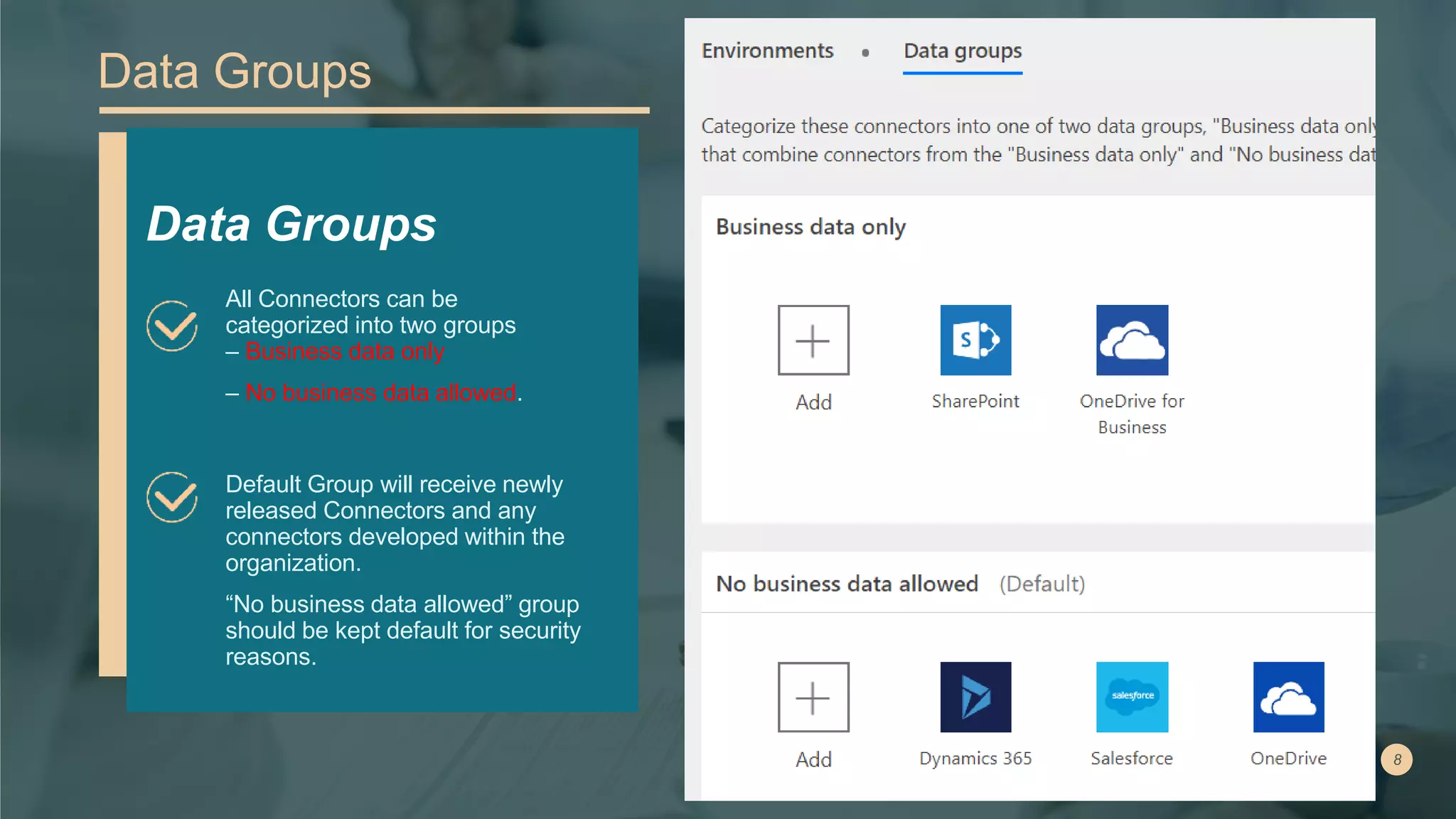
Data Groups
Default Group will receive newly
released Connectors and any
connectors developed within the
organization.
“No business data allowed” group
should be kept default for security
reasons.
Data Groups
All Connectors can be
categorized into two groups
– Business data only
– No business data allowed.
•
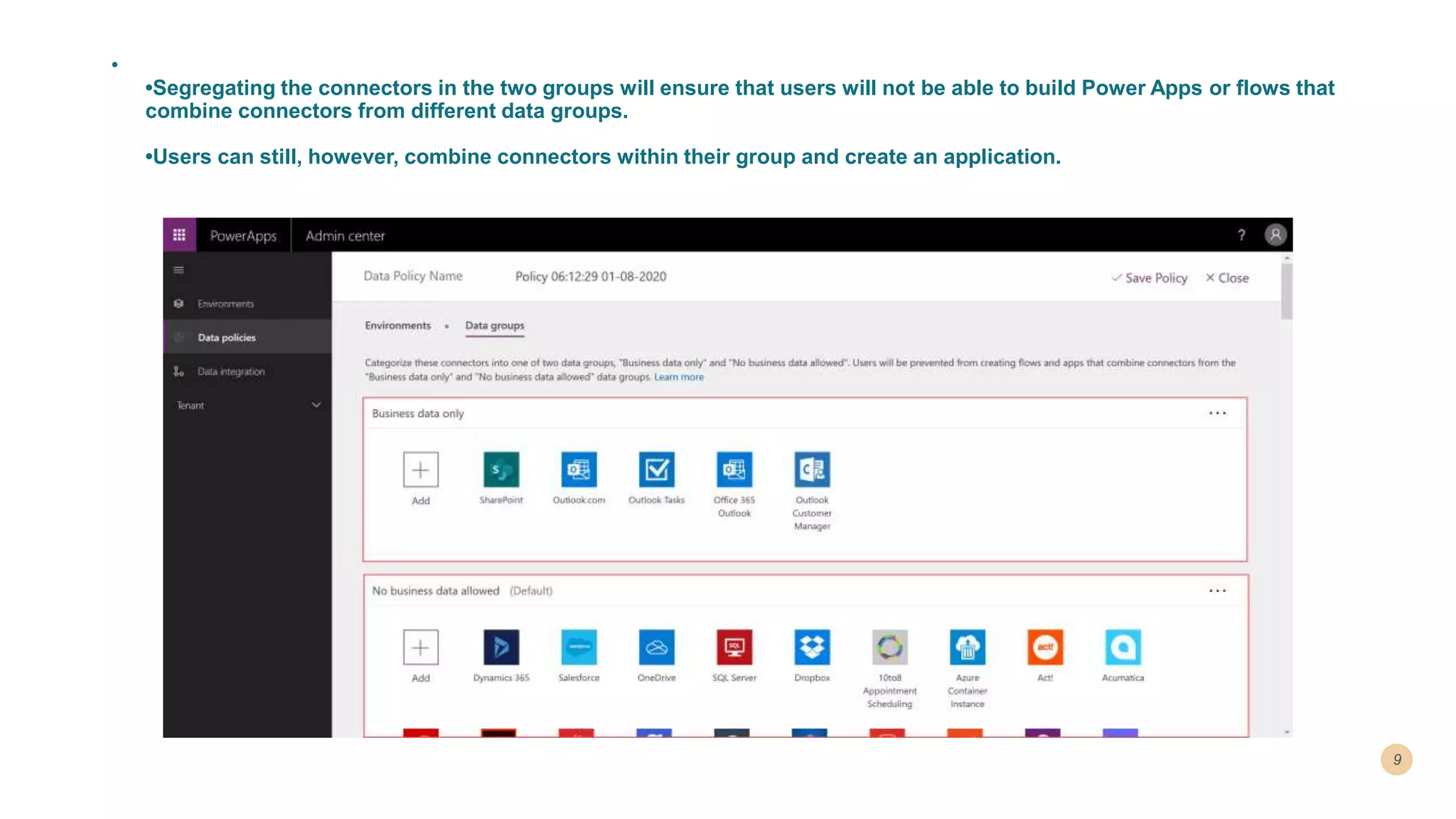
•Segregating the connectors in the two groups will ensure that users will not be able to build Power Apps or flows that
combine connectors from different data groups.
•Users can still, however, combine connectors within their group and create an application.
Challenges implementing DLP Policies
Power Apps and
Flow Governance
Rules (follows)
Global admins and
Power Platform service
admins can administer
without a license but
require additional
License for Sales,
Marketing, and Service
areas.
Continuous
Monitoring of new
Connectors being
released.
• Flow and PowerApps make use of the same set of
connectors.
• Data Loss Prevention policies or any restrictions setup for
Power Apps will also be implemented for MS Flow
PowerApps and Flow
Governance Rules
Things to Consider
Considrations New Connectors are added in
default environment
Make sure you set the non-business data group as the
default environment to receive new connectors.
All Power Apps users can Create a
basic App in Default envionemtn
Restricting users to Create an App in the default
environment is not possible yet. Moreover, any app
published in the default environment will be
consuming from tenant Shared storage.
Continuous Monitoring of
Connectors is needed.
An MS flow can be configured to Notify admins of
new connectors being released in the default
environment.
THANK YOU!

Power Apps - Data governance, compliance and security

  • 1.
    Power Apps Office 365Services Data Governance, Compliance and Security
  • 2.
    Click to editMaster text styles Isha Kapoor Microsoft MVP SharePoint and Office Services (2012 – 2018)Office 365 and SharePoint Consultant & Trainer. Twitter : @Learningsp LinkedIn Profile Website : https://learningsharepoint.com/ Presenter
  • 3.
    Power Apps (and it’sthree phases) Licensing Power Apps License can be assigned by the Office 365 team via 365 Admin center. “Power Apps for Office 365” is a service included within the E3 license of all Office 365 users. Access Management Controlling Access to Power Apps through Environments and by assigning explicit read-only access to the consumers of Apps developed by the Office 365 team is a recommended access management solution. Compliance & Security • Configuring DLP Policies to categorize Connectors in Business and non-Business Data Groups. • Data Groups will restrict users to combine the connectors and create Apps of their own. • Compliance center Reports can help analyze recently created Apps and connectors that they use.
  • 4.
    PROBLEM STATEMENT When anew user is assigned Power Apps License, they automatically gets added to the Maker role (Contributor) of the default environment. Removing user from Maker role is not possible by design as it might break default SharePoint Integration with Power Apps. Any restrictions put in place for Power Apps will also have the same impact on MS Flow as they share common connectors.
  • 5.
    Problem Solution DATA LOSSPREVENTION POLICIES & DATA GROUPS • Creating new Data Loss Prevention policies to prevent users from combining connectors critical to business data. • Connectors for Power Apps and MS flow will be categorized into two data groups – Business & non- business. • Users can’t combine connectors from the two groups and publish an app of their own. • Users can create an app by combining connectors within the Data Group only. • Business critical connectors, for example, SharePoint, Outlook can be isolated in Business only group.
  • 6.
    Problem Solution Power Appsand Compliance center Reporting To get a comprehensive report of what connectors are being used in Power Apps, In Power Apps admin center –> go to Environments –> Select environment –> Resources. Download the .csv. The list specifies Connectors being used per Power App in your environment. Admins can manually remove unwanted Connections and Power Apps from the environment using the csv report.
  • 7.
    I can beconfigured per environment, or for All Environments of Power Apps and MS Flow. Allows configuring Data Groups for arranging like-minded Connectors. Data Loss Prevention policies Can create multiple DLP policies to isolate business-critical data. For example, a policy to Isolate SQL connector or OneDrive for business connector.
  • 8.
    Data Groups Default Groupwill receive newly released Connectors and any connectors developed within the organization. “No business data allowed” group should be kept default for security reasons. Data Groups All Connectors can be categorized into two groups – Business data only – No business data allowed.
  • 9.
    • •Segregating the connectorsin the two groups will ensure that users will not be able to build Power Apps or flows that combine connectors from different data groups. •Users can still, however, combine connectors within their group and create an application.
  • 10.
    Challenges implementing DLPPolicies Power Apps and Flow Governance Rules (follows) Global admins and Power Platform service admins can administer without a license but require additional License for Sales, Marketing, and Service areas. Continuous Monitoring of new Connectors being released.
  • 11.
    • Flow andPowerApps make use of the same set of connectors. • Data Loss Prevention policies or any restrictions setup for Power Apps will also be implemented for MS Flow PowerApps and Flow Governance Rules Things to Consider
  • 12.
    Considrations New Connectorsare added in default environment Make sure you set the non-business data group as the default environment to receive new connectors. All Power Apps users can Create a basic App in Default envionemtn Restricting users to Create an App in the default environment is not possible yet. Moreover, any app published in the default environment will be consuming from tenant Shared storage. Continuous Monitoring of Connectors is needed. An MS flow can be configured to Notify admins of new connectors being released in the default environment.
  • 13.