Device Management For Your Business
MOBIMANAGER
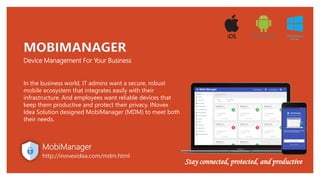
In the business world, IT admins want a secure, robust
mobile ecosystem that integrates easily with their
infrastructure. And employees want reliable devices that
keep them productive and protect their privacy. INovex
Idea Solution designed MobiManager (MDM) to meet both
their needs.
MobiManager
http://inovexidea.com/mdm.html
Stay connected, protected, and productive
Theft of data via uploading to a personal device.
The sensitive data present on a device that is lost, stolen or in
the possession of someone who leaves the company.
An infected personal device connecting to the corporate
network.
Malicious apps downloaded by an user.
Problem analysis
The Problem
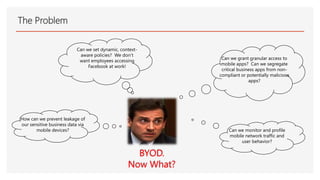
Can we set dynamic, context-
aware policies? We don’t
want employees accessing
Facebook at work!
Can we grant granular access to
mobile apps? Can we segregate
critical business apps from non-
compliant or potentially malicious
apps?
How can we prevent leakage of
our sensitive business data via
mobile devices? Can we monitor and profile
mobile network traffic and
user behavior?
BYOD.
Now What?
MobiManager helps you to manage, control, and secure company-owned
Android devices. It allows you to distribute apps and contents across a wide range
of mobile devices from the cloud.
MobiManager platform consists of overlapping defense and security
mechanisms that protect against intrusion, malware, and more malicious threats.
A secure device is a reliable device!!
MobiManager
http://inovexidea.com/mdm.html
Transform your business with MobiManager – bulletproof security and
reliability, simple to use
Basic Functionality
With MobiManager, You can manage, control and secure your company-
owned Android devices by locking them into Kiosk Mode
Password Protected Kiosk Lockdown
Exiting the MobiManager App and
accessing setting of the app and device
are password protected.
Copy Settings
Copy app settings from one device to
another, including blocked/unblocked
status, visibility of apps, default app &
exit passcode.
Clear Data
Remotely wipe images, audio & video
files from the device gallery.
Broadcast Message
Send a message by instant notification
to any device(s) directly from the
dashboard.
Custom Branding
Change the look of your device home
screen to reflect your company branding
with your logo, company name and
custom wallpaper.
Device Tracking, Send Alarm / Buzz
Remotely track your device, device
movements, send an alarm to any of
your registered devices to ring instantly
MobiManager Features
❑ Device Enrollment
Enroll devices manually, in bulk or make users'
self-enroll their Android devices with two factor
authentication (QR code scan/OTP input).
❑ App Management
Install in-house and store apps silently, create
your own app catalog, restrict blacklisted apps
and more.
❑ Profile Management
Create and configure policies and profiles for
different departments/roles and associate them
with appropriate groups.
❑ Audit and Reports
Audit mobile devices with out-of-the-box reports such
as Rooted Devices, Devices with Blacklist Apps, etc. View
detailed reports of data usage, location history and get email
notifications on various functions and activities related to
your devices.
❑ OTA (Over The Air) Update
Support over the air update (application, policy or any
other change update by OTA).
❑ Kiosk Mode
Restrict your device to access a single or a specific set of
apps.
❑ Email Management
Manage and secure corporate emails through Platform
Containerization and Exchange ActiveSync.
MobiManager
http://inovexidea.com/mdm.html
MobiManager Features Cont..
❑ Content Management
Remotely share documents to the devices over-
the-air. No need for uploading files elsewhere or
attaching in email. Send files to users directly
from the portal conveniently. Securely save and
view documents on the devices.
❑ Security Management
Configure stringent security policies such as the
passcode, device lock to protect corporate data
from outside threats.
❑ Asset Management
Scan to fetch the details of installed apps,
enforced restrictions, installed certificates and
device hardware details.
❑ Built-in content viewer
No need to white-list 3rd party content viewer.
Open and view shared content right within
MobiManager MDM app.
❑ Quick messaging tools
Message users directly from the portal. No need
to use Email or SMS to send a quick message to
users during management. Broadcast
announcements and reminder also.
❑ Secured Browsing
MobiManager custom Browser is a secure &
highly configurable web browser. It allows you to
lock your Android devices to a specific website or
group of sites preventing end users from
accessing any other websites.
App Management
❑ Application Inventory
View all apps installed on
devices with real-time
inventory reports
❑ Application Push
Push critical apps and
security polices to devices
and endpoints
❑ Blacklist Applications
Blacklist and require the removal
of prohibited apps
❑ Block Applications per
user
Block undesirable or
suspicious applications on a
group or on a individual basis
❑ Application place on home
screen
Set application on hot seat and
workspace of device home
screen.
❑ Application Store
Add your chosen range of mobile
apps to your enterprise
application store
Device Tracking
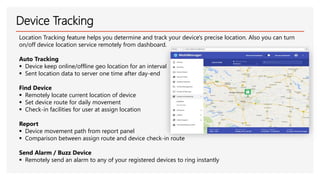
Location Tracking feature helps you determine and track your device's precise location. Also you can turn
on/off device location service remotely from dashboard.
Auto Tracking
▪ Device keep online/offline geo location for an interval
▪ Sent location data to server one time after day-end
Find Device
▪ Remotely locate current location of device
▪ Set device route for daily movement
▪ Check-in facilities for user at assign location
Report
▪ Device movement path from report panel
▪ Comparison between assign route and device check-in route
Send Alarm / Buzz Device
▪ Remotely send an alarm to any of your registered devices to ring instantly
Content Management
❑ Mobile Content Management
✓ Remotely share documents to the devices over-the-
air. Securely save and view documents on the
devices.
✓ End point can access corporate data from file server
❑ MobiManager Browser
✓ MobiManager Browser allows you to whitelist
and block access to other websites. You can also
hide the address bar of the browser. This will
enable full Kiosk browser mode on your device.
Security Management
❑ Remote Data Wipe
Prevent data leaks by remotely
clearing all corporate and/or
personal data should a mobile
device be mislaid or an
employee leaves the company
❑ Mobile Anti-Theft
Mobile Anti-Theft Remotely locate,
lock or wipe lost or stolen mobile
devices.
❑ Data Isolation
Isolate data between managed
and unmanaged applications
❑ Unified Security
Deploy and manage security
for mobile devices and
Windows endpoints from a
single console
❑ Enforce Mobile Policies
Force strict passcode and
data encryption polices,
place restrictions on rooted
or jail broken devices and ensure
only verified apps are installed
MobiManager
http://inovexidea.com/mdm.html
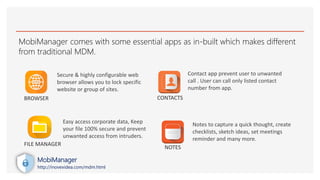
MobiManager comes with some essential apps as in-built which makes different
from traditional MDM.
Secure & highly configurable web
browser allows you to lock specific
website or group of sites.
Easy access corporate data, Keep
your file 100% secure and prevent
unwanted access from intruders.
Contact app prevent user to unwanted
call . User can call only listed contact
number from app.
Notes to capture a quick thought, create
checklists, sketch ideas, set meetings
reminder and many more.
BROWSER
FILE MANAGER
CONTACTS
NOTES
MobiManager
http://inovexidea.com/mdm.html
We use our smartphones to stay in touch, take photos, shop, access business information, and so much
more. And the more we use them, the more sensitive data they store. What could happen if your phone
falls into the wrong hands?
Bring your own device (BYOD)
Covered every step of the way
Availability
Server options
Cloud or on-premise
License types
Monthly or yearly
Supported devices
Any device Android 6+
Transform your business with MobiManager – bulletproof
security and reliability, simple to use
Email: product.inforcloud@gmail.com
Phone: +8801916574623
Web: http://www.inovexidea.com/mdm.html
MobiManager
http://inovexidea.com/mdm.html
INfor- Mobile cloud Solution
Bring your essentials wherever your Mobile takes you.
INforcloud puts your data at your fingertips, under your control. Store
your documents, calendar, contacts and photos on a server at home,
at one of our providers or in a data center you know.
http://www.inovexidea.com/cloud.html

Mobi manager mdm

  • 1.
    Device Management ForYour Business MOBIMANAGER In the business world, IT admins want a secure, robust mobile ecosystem that integrates easily with their infrastructure. And employees want reliable devices that keep them productive and protect their privacy. INovex Idea Solution designed MobiManager (MDM) to meet both their needs. MobiManager http://inovexidea.com/mdm.html Stay connected, protected, and productive
  • 2.
    Theft of datavia uploading to a personal device. The sensitive data present on a device that is lost, stolen or in the possession of someone who leaves the company. An infected personal device connecting to the corporate network. Malicious apps downloaded by an user. Problem analysis
  • 3.
    The Problem Can weset dynamic, context- aware policies? We don’t want employees accessing Facebook at work! Can we grant granular access to mobile apps? Can we segregate critical business apps from non- compliant or potentially malicious apps? How can we prevent leakage of our sensitive business data via mobile devices? Can we monitor and profile mobile network traffic and user behavior? BYOD. Now What?
  • 4.
    MobiManager helps youto manage, control, and secure company-owned Android devices. It allows you to distribute apps and contents across a wide range of mobile devices from the cloud. MobiManager platform consists of overlapping defense and security mechanisms that protect against intrusion, malware, and more malicious threats. A secure device is a reliable device!! MobiManager http://inovexidea.com/mdm.html Transform your business with MobiManager – bulletproof security and reliability, simple to use
  • 5.
    Basic Functionality With MobiManager,You can manage, control and secure your company- owned Android devices by locking them into Kiosk Mode Password Protected Kiosk Lockdown Exiting the MobiManager App and accessing setting of the app and device are password protected. Copy Settings Copy app settings from one device to another, including blocked/unblocked status, visibility of apps, default app & exit passcode. Clear Data Remotely wipe images, audio & video files from the device gallery. Broadcast Message Send a message by instant notification to any device(s) directly from the dashboard. Custom Branding Change the look of your device home screen to reflect your company branding with your logo, company name and custom wallpaper. Device Tracking, Send Alarm / Buzz Remotely track your device, device movements, send an alarm to any of your registered devices to ring instantly
  • 6.
    MobiManager Features ❑ DeviceEnrollment Enroll devices manually, in bulk or make users' self-enroll their Android devices with two factor authentication (QR code scan/OTP input). ❑ App Management Install in-house and store apps silently, create your own app catalog, restrict blacklisted apps and more. ❑ Profile Management Create and configure policies and profiles for different departments/roles and associate them with appropriate groups. ❑ Audit and Reports Audit mobile devices with out-of-the-box reports such as Rooted Devices, Devices with Blacklist Apps, etc. View detailed reports of data usage, location history and get email notifications on various functions and activities related to your devices. ❑ OTA (Over The Air) Update Support over the air update (application, policy or any other change update by OTA). ❑ Kiosk Mode Restrict your device to access a single or a specific set of apps. ❑ Email Management Manage and secure corporate emails through Platform Containerization and Exchange ActiveSync. MobiManager http://inovexidea.com/mdm.html
  • 7.
    MobiManager Features Cont.. ❑Content Management Remotely share documents to the devices over- the-air. No need for uploading files elsewhere or attaching in email. Send files to users directly from the portal conveniently. Securely save and view documents on the devices. ❑ Security Management Configure stringent security policies such as the passcode, device lock to protect corporate data from outside threats. ❑ Asset Management Scan to fetch the details of installed apps, enforced restrictions, installed certificates and device hardware details. ❑ Built-in content viewer No need to white-list 3rd party content viewer. Open and view shared content right within MobiManager MDM app. ❑ Quick messaging tools Message users directly from the portal. No need to use Email or SMS to send a quick message to users during management. Broadcast announcements and reminder also. ❑ Secured Browsing MobiManager custom Browser is a secure & highly configurable web browser. It allows you to lock your Android devices to a specific website or group of sites preventing end users from accessing any other websites.
  • 8.
    App Management ❑ ApplicationInventory View all apps installed on devices with real-time inventory reports ❑ Application Push Push critical apps and security polices to devices and endpoints ❑ Blacklist Applications Blacklist and require the removal of prohibited apps ❑ Block Applications per user Block undesirable or suspicious applications on a group or on a individual basis ❑ Application place on home screen Set application on hot seat and workspace of device home screen. ❑ Application Store Add your chosen range of mobile apps to your enterprise application store
  • 9.
    Device Tracking Location Trackingfeature helps you determine and track your device's precise location. Also you can turn on/off device location service remotely from dashboard. Auto Tracking ▪ Device keep online/offline geo location for an interval ▪ Sent location data to server one time after day-end Find Device ▪ Remotely locate current location of device ▪ Set device route for daily movement ▪ Check-in facilities for user at assign location Report ▪ Device movement path from report panel ▪ Comparison between assign route and device check-in route Send Alarm / Buzz Device ▪ Remotely send an alarm to any of your registered devices to ring instantly
  • 10.
    Content Management ❑ MobileContent Management ✓ Remotely share documents to the devices over-the- air. Securely save and view documents on the devices. ✓ End point can access corporate data from file server ❑ MobiManager Browser ✓ MobiManager Browser allows you to whitelist and block access to other websites. You can also hide the address bar of the browser. This will enable full Kiosk browser mode on your device.
  • 11.
    Security Management ❑ RemoteData Wipe Prevent data leaks by remotely clearing all corporate and/or personal data should a mobile device be mislaid or an employee leaves the company ❑ Mobile Anti-Theft Mobile Anti-Theft Remotely locate, lock or wipe lost or stolen mobile devices. ❑ Data Isolation Isolate data between managed and unmanaged applications ❑ Unified Security Deploy and manage security for mobile devices and Windows endpoints from a single console ❑ Enforce Mobile Policies Force strict passcode and data encryption polices, place restrictions on rooted or jail broken devices and ensure only verified apps are installed MobiManager http://inovexidea.com/mdm.html
  • 12.
    MobiManager comes withsome essential apps as in-built which makes different from traditional MDM. Secure & highly configurable web browser allows you to lock specific website or group of sites. Easy access corporate data, Keep your file 100% secure and prevent unwanted access from intruders. Contact app prevent user to unwanted call . User can call only listed contact number from app. Notes to capture a quick thought, create checklists, sketch ideas, set meetings reminder and many more. BROWSER FILE MANAGER CONTACTS NOTES MobiManager http://inovexidea.com/mdm.html
  • 13.
    We use oursmartphones to stay in touch, take photos, shop, access business information, and so much more. And the more we use them, the more sensitive data they store. What could happen if your phone falls into the wrong hands? Bring your own device (BYOD) Covered every step of the way
  • 14.
    Availability Server options Cloud oron-premise License types Monthly or yearly Supported devices Any device Android 6+
  • 15.
    Transform your businesswith MobiManager – bulletproof security and reliability, simple to use Email: product.inforcloud@gmail.com Phone: +8801916574623 Web: http://www.inovexidea.com/mdm.html MobiManager http://inovexidea.com/mdm.html
  • 16.
    INfor- Mobile cloudSolution Bring your essentials wherever your Mobile takes you. INforcloud puts your data at your fingertips, under your control. Store your documents, calendar, contacts and photos on a server at home, at one of our providers or in a data center you know. http://www.inovexidea.com/cloud.html