MICROLINE
720/721


Printer Handbook
Every effort has been made to ensure that the information in this document is com-
plete, accurate and up-to-date. OKI assumes no responsibility for the results of errors
beyond its control. OKI also cannot guarantee that changes in software and equip-
ment made by other manufacturers, and referred to in this handbook, will not affect
the applicability of the information in this manual. Mention of software products manu-
factured by other companies does not necessarily constitute endorsement by OKI.

OKI and MICROLINE are registered trademarks of OKI Electric Industry Company,
Ltd..
IBM and PC are registered trademarks of International Business Machines Corpora-
tion.
Epson is a registered trademark of Seiko Epson Corp. Lotus and 1-2-3 are registered
trademarks of Lotus Development Corporation. Microsoft and MS-DOS are regis-
tered trademarks and Windows is a trademark of Microsoft Corporation.
WordPerfect is a registered trademark of WordPerfect Corporation.
Important Safety Instructions
Your OKI printer has been carefully designed to give you years of safe, reliable per-
formance. As with all electrical equipment, however, there are a few basic precau-
tions you should take to avoid hurting yourself or damaging the unit:

  • Read the setup and operation instructions in this manual carefully. Be sure to
    save it for future reference.
  • Read and follow all warning and instruction labels on the printer itself.
  • Unplug the printer before you clean it. Use only a damp cloth; do not use liquid
    or aerosol cleaners.
  • Place your printer on a firm, solid surface. If you put it on something unsteady,
    it might fall and be damaged; if you place it on a soft surface, such as a rug, sofa,
    or bed, the vents may be blocked, causing it to overheat.
  • To protect your printer from overheating, make sure no openings on the printer
    are blocked. Don’t put the printer on or near a heat source, such as a radiator or
    heat register. If you put the printer in any kind of enclosure, make sure it is well
    ventilated.
  • Do not put anything into the ventilation slots on the sides of printer, you could
    get a shock or cause a fire.
  • The printhead can get quite hot when it has been printing for a length of time.
    Do not touch the printhead untill it has had a chance to cool off.
  • Do not use your printer near water, or spill liquid of any kind into it.
  • Be certain that your power source matches the rating listed on the back of the
    printer. If you’re not sure, check with your dealer or with your local power com-
    pany.
  • Your printer has a grounded plug as a safety feature, and it will only fit into a
    grounded outlet. If you can’t plug it in, chances are you have a non-grounded
    ontlet; contact an electrician to have it replaced with a grounded outlet. Do not
    use an adapter to defeat the grounding.
  • To avoid damaging the power cord, don’t put anything on it or place it where it
    will be walked on. If the cord becomes damaged or frayed, replace it immedi-
    ately.
• If you’re using an extension cord or power strip with the printer, make sure that
  the total of the amperes required by all the equipment on the extension is less
  than the extension’s rating. Generally, the total ratings of all equipment plugged
  into any one power line should not exceed 15 amperes. Don’t exceed this unless
  you know that the power line your equipment is plugged into has a rating above
  15 amperes.
• Aside from the routine maintenance described in this handbook, don’t try to
  service the printer yourself; opening the cover may expose you to shocks or
  other hazards. Don’t make any adjustments other than those outlined in the
  manual – you might cause damage requiring extensive repair work.
• If anything happens that indicates that your printer is not working properly or
  has been damaged, unplug it immediately and follow the procedures in Chap-
  ter 5. These are some of the things to look for:
    The power cord or plug is frayed or damaged.
    Liquid has been spilled into the housing, or the printer has been exposed to
    water.
    The printer has been dropped or its cabinet has been damaged.
    The printer doesn’t function normally when you’re following the operating
    instructions.
• Screen jitter on your CRT may occur in an environment where the space be-
  tween your printer and CRT is narrow (200 mm or less). In such cases, open up
  the space.
Contents
Introduction ............................................................................................................. 1

Chapter 1: Installation ........................................................................................... 3
        Unpacking ................................................................................................................... 3
              Removing Shipping Retainers ........................................................................ 4
        Installing Ribbon Cartridge ...................................................................................... 5
        Making Connections .................................................................................................. 6
              Connection with Computer ............................................................................ 6
              Connection with Power ................................................................................... 8

Chapter 2: Loading Paper ...................................................................................... 9
        Loading Single-Sheet Paper .................................................................................... 11
        Loading Rear-Feed Paper ........................................................................................ 14
        Paper Handling ......................................................................................................... 21
             Tear Feature ..................................................................................................... 21
             Forms Tear-off Feature .................................................................................. 22
             Paper Park Feature ......................................................................................... 22
             Switching Paper Paths ................................................................................... 23

Chapter 3: Operation ............................................................................................ 25
        Control Panel ............................................................................................................. 25
        Print Mode ................................................................................................................. 27
              Indicator Lights .............................................................................................. 27
              Buttons ............................................................................................................. 28
        Menu Mode ............................................................................................................... 32
              Sample Menu .................................................................................................. 33
              Summary of Menu Settings .......................................................................... 34
              Menu Mode Indicator Lights ....................................................................... 37
              Menu Mode Buttons ...................................................................................... 37
              Resetting Menu to Factory Defaults ............................................................38
Performing Basic Tasks ............................................................................................ 39
             Selecting Print Quality .................................................................................. 39
             Selecting Character Pitch .............................................................................. 40
             Testing Your printer ....................................................................................... 41
             Resetting Top of Form ................................................................................... 45
             Using Bar codes .............................................................................................. 45

Chapter 4: Working with Software ................................................................... 49
       Basic Terminology .................................................................................................... 49
             Printer Commands ......................................................................................... 49
             Emulations ...................................................................................................... 50
       Printer Drivers .......................................................................................................... 50
             Compatible Printer Drivers (DOS) .............................................................. 50
             Windows Printer Drivers .............................................................................. 51

Chapter 5: Problem Solving, Maintenance, & Service................................... 53
       Problem Solving ....................................................................................................... 53
       Maintenance .............................................................................................................. 56
            Replacing the Ribbon Cartridge................................................................... 56
            Clearing Paper Jams ...................................................................................... 59
            Cleaning the Housing .................................................................................... 63
       Accessories ................................................................................................................ 64
            Replacement Parts .......................................................................................... 66

Appendix A: Specifications ................................................................................ 67

Appendix B: Menu Selections ............................................................................ 71
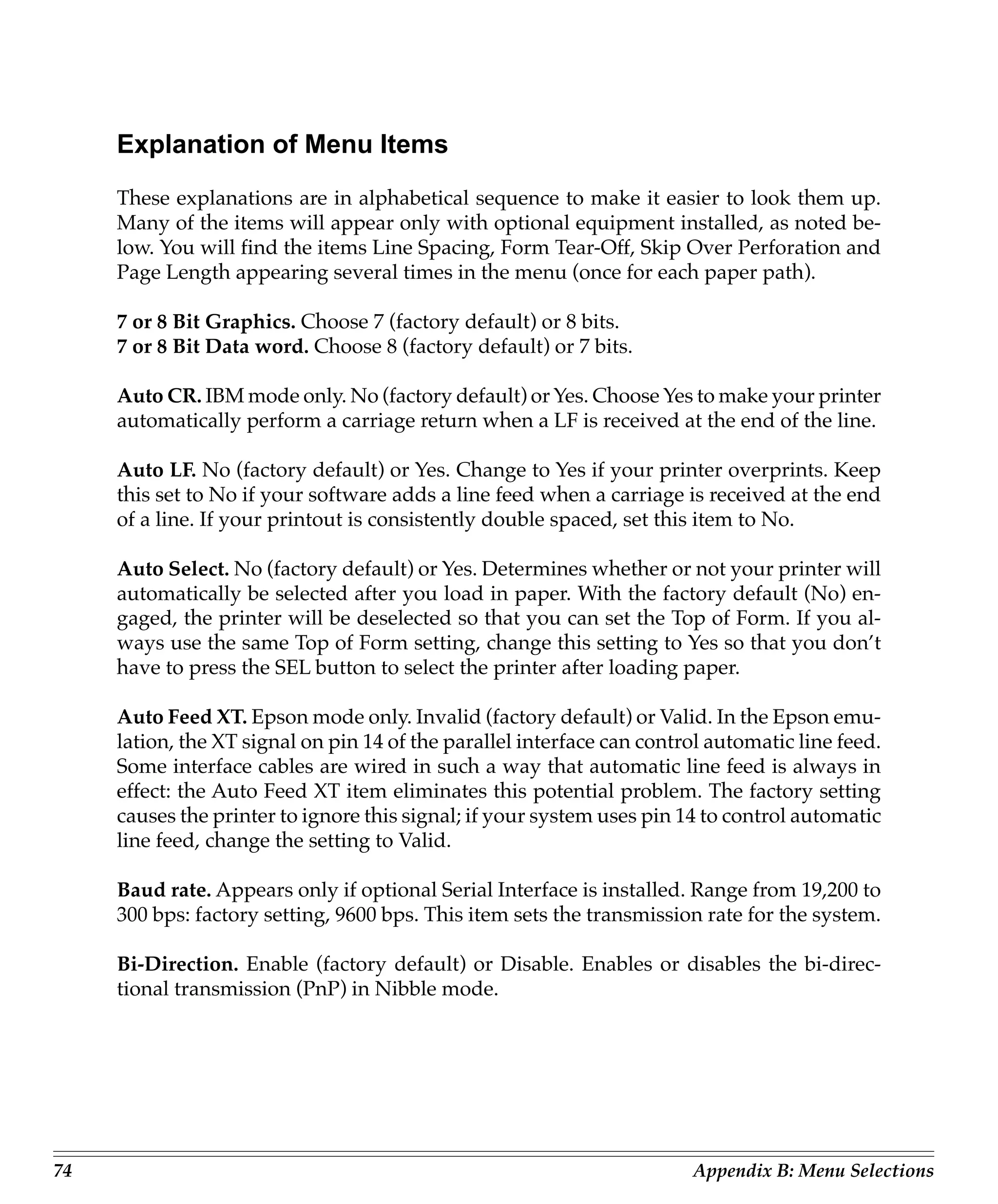
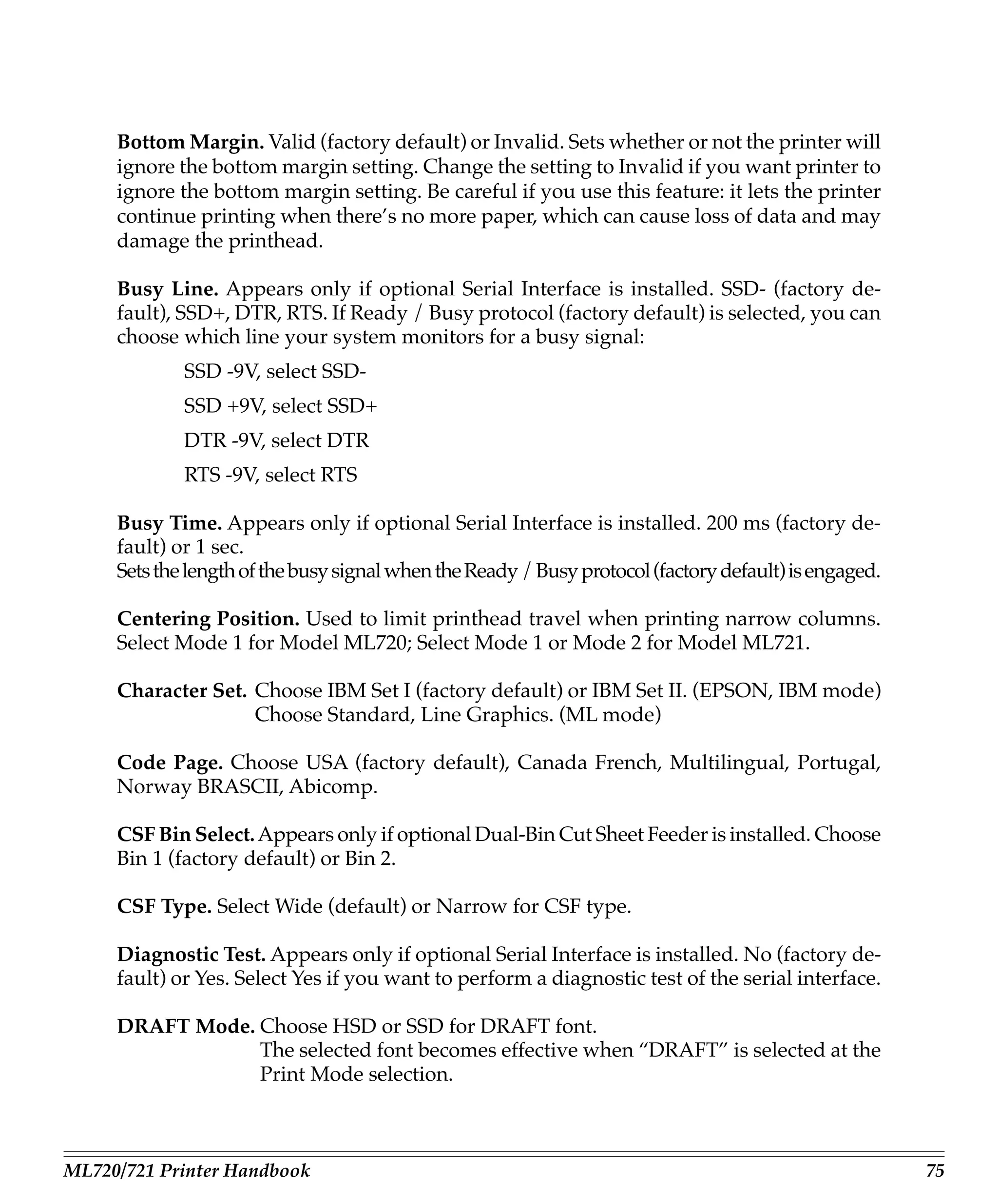
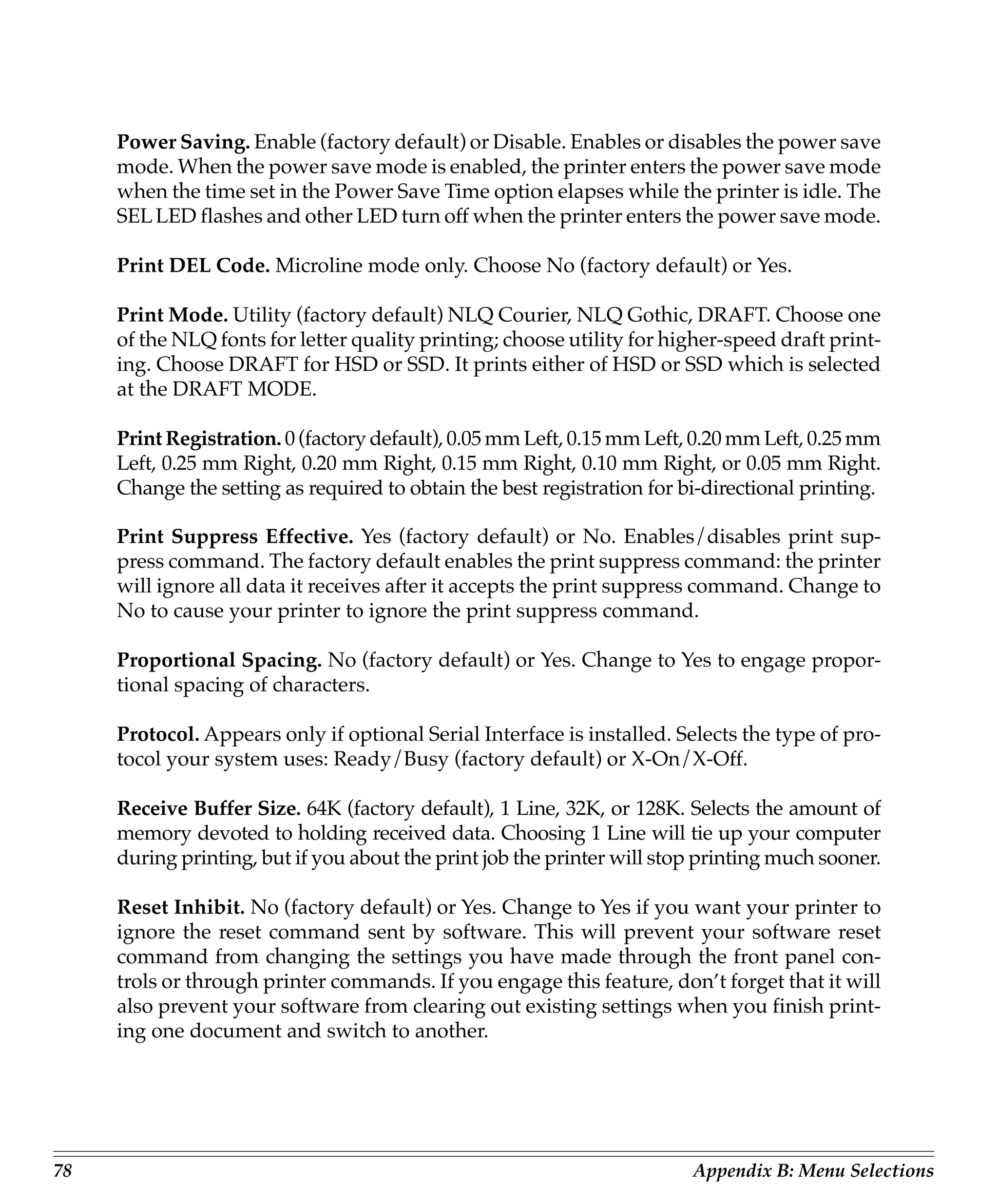
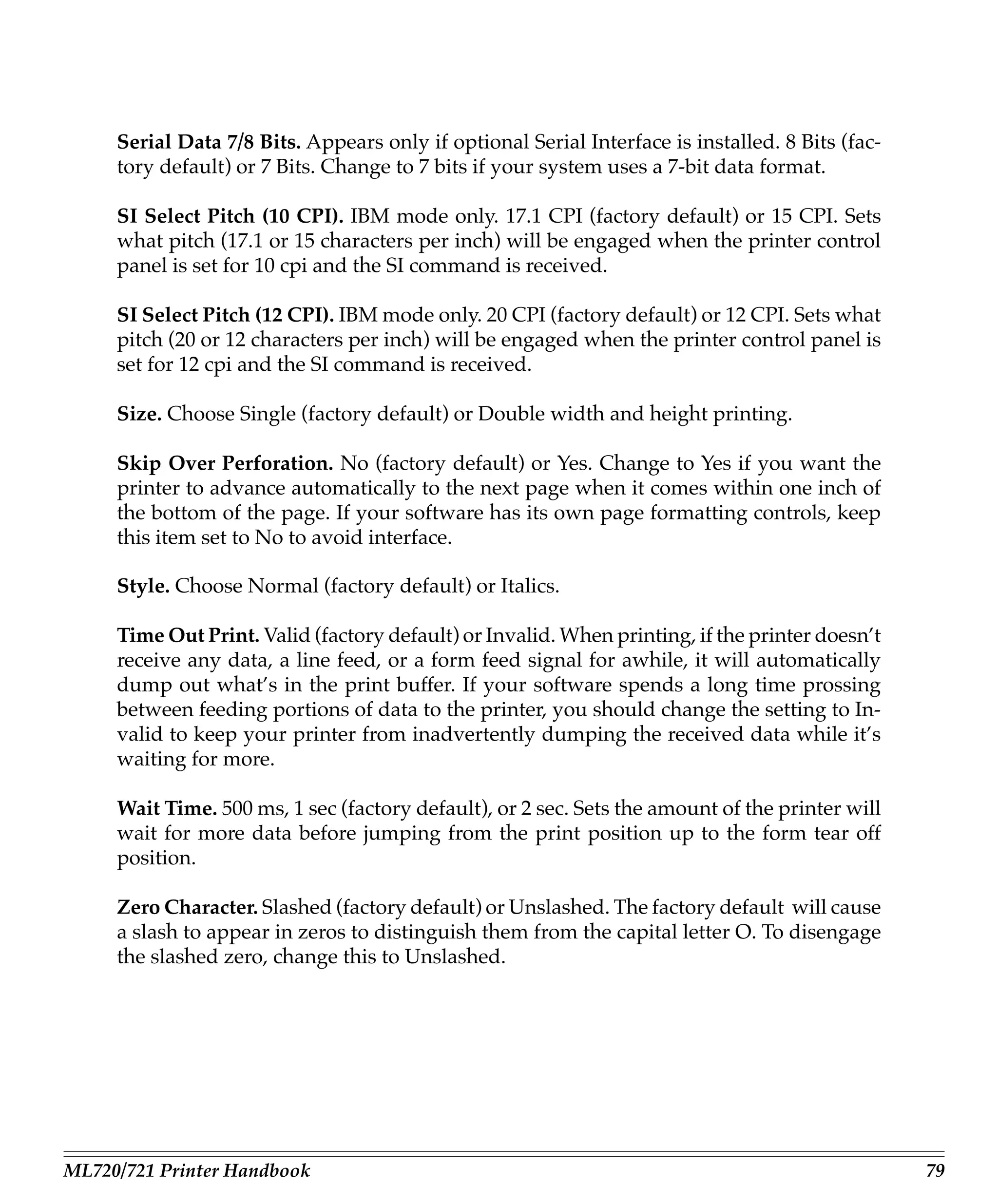
       Explanation of Menu Items ..................................................................................... 74

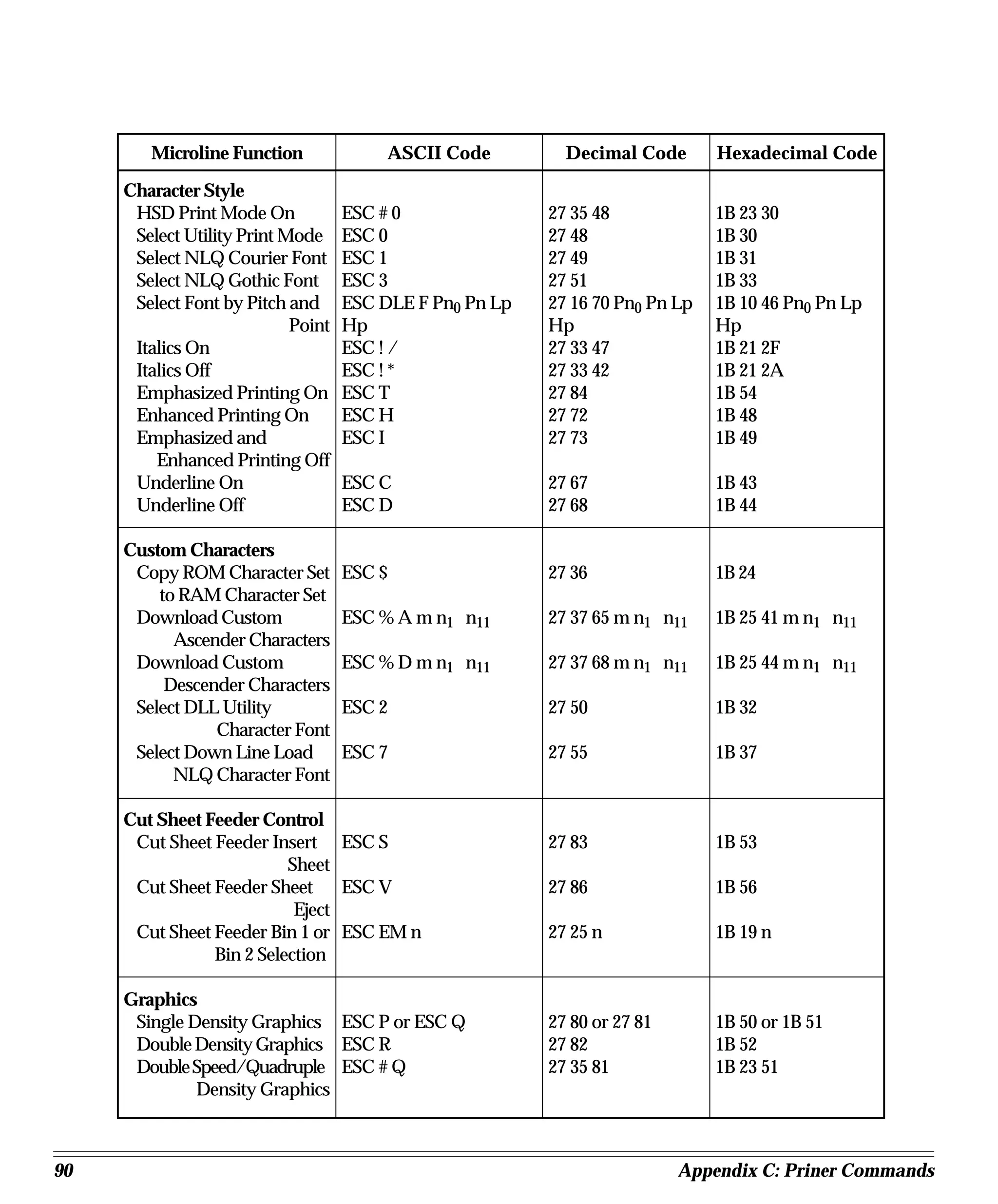
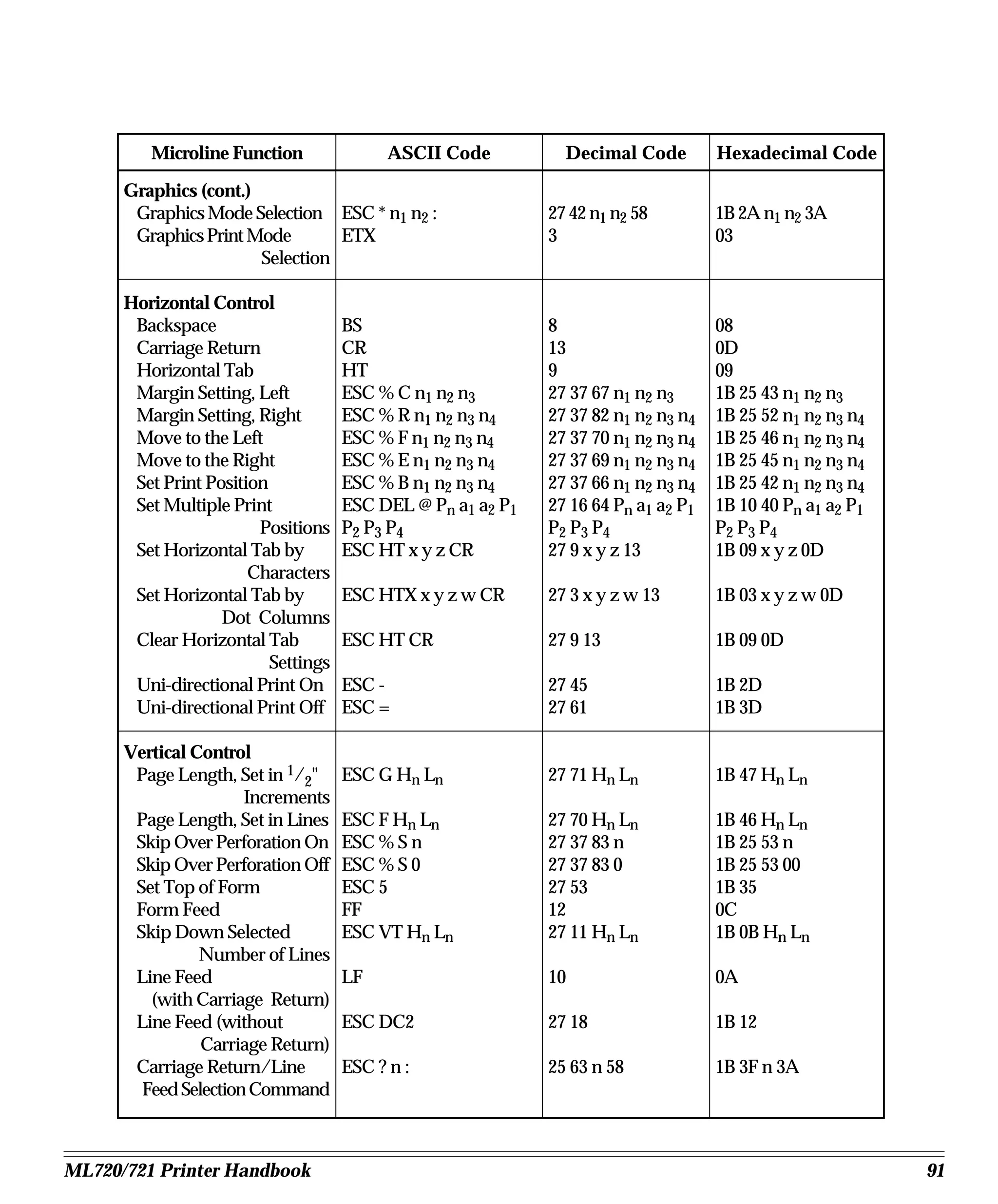
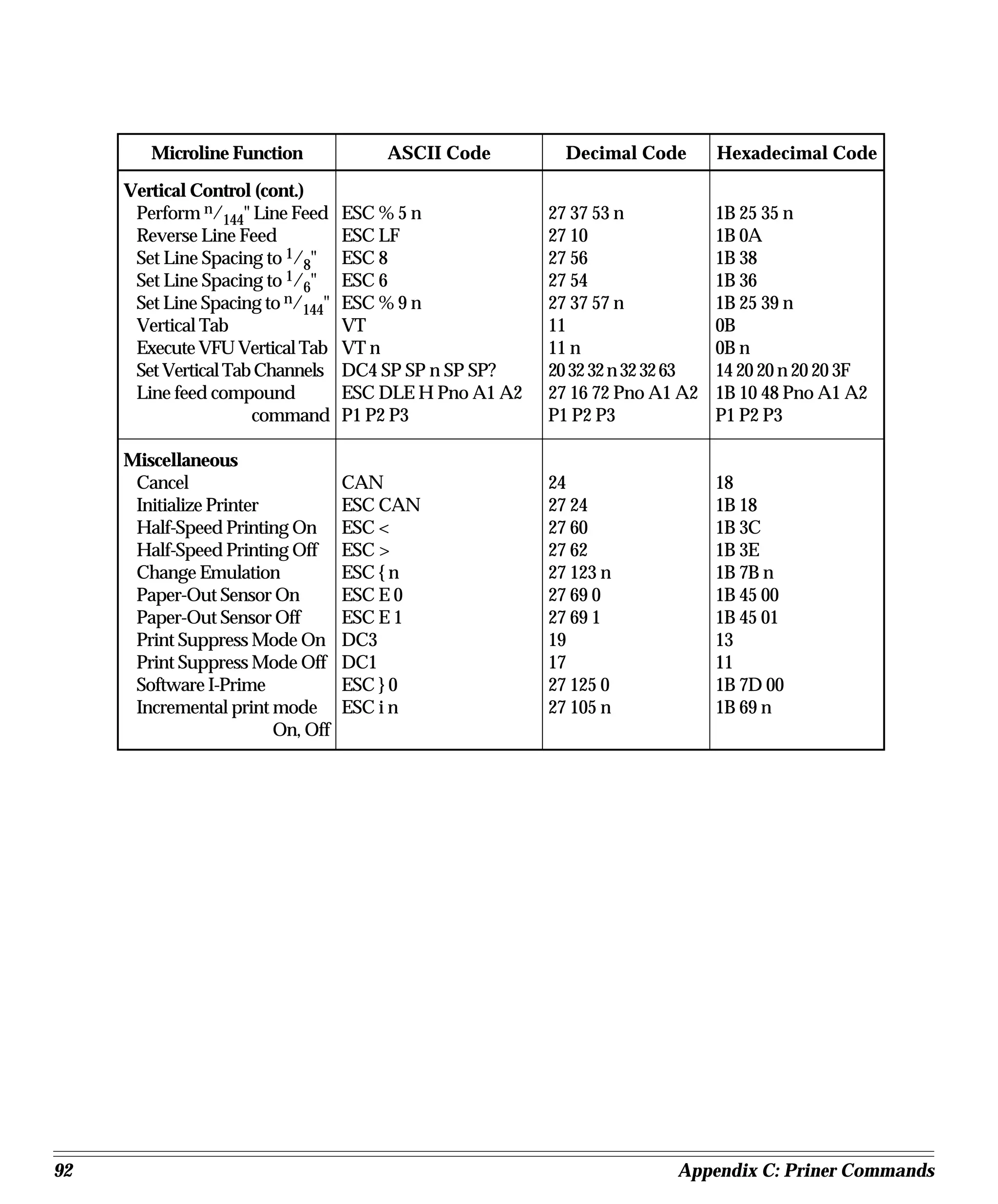
Appendix C: Printer Commands........................................................................ 81
       IBM Proprinter Printer Commands ....................................................................... 81
       Epson FX Printer Commands ................................................................................. 85
       OKI Microline (ML) Printer Commands ............................................................... 89
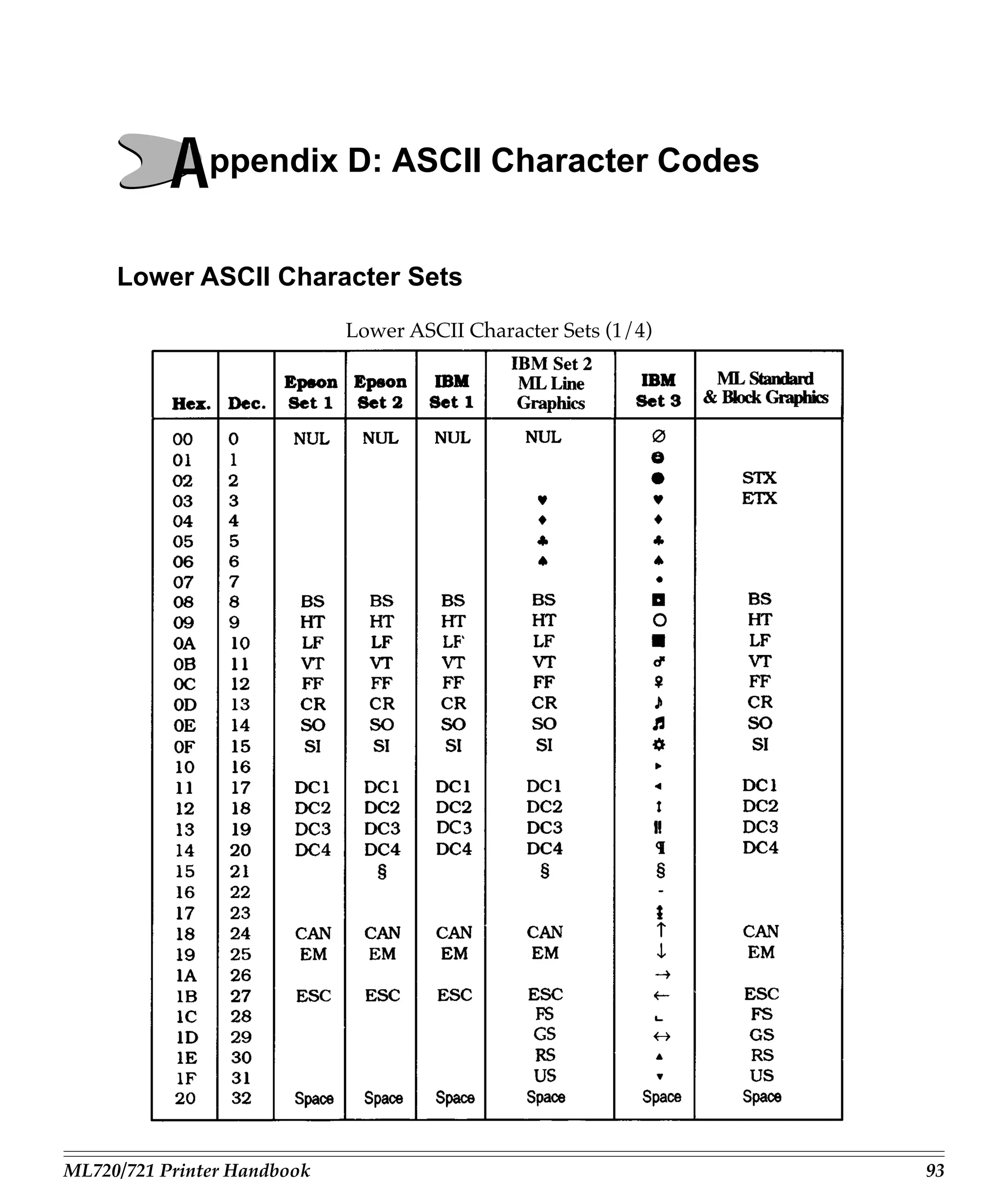
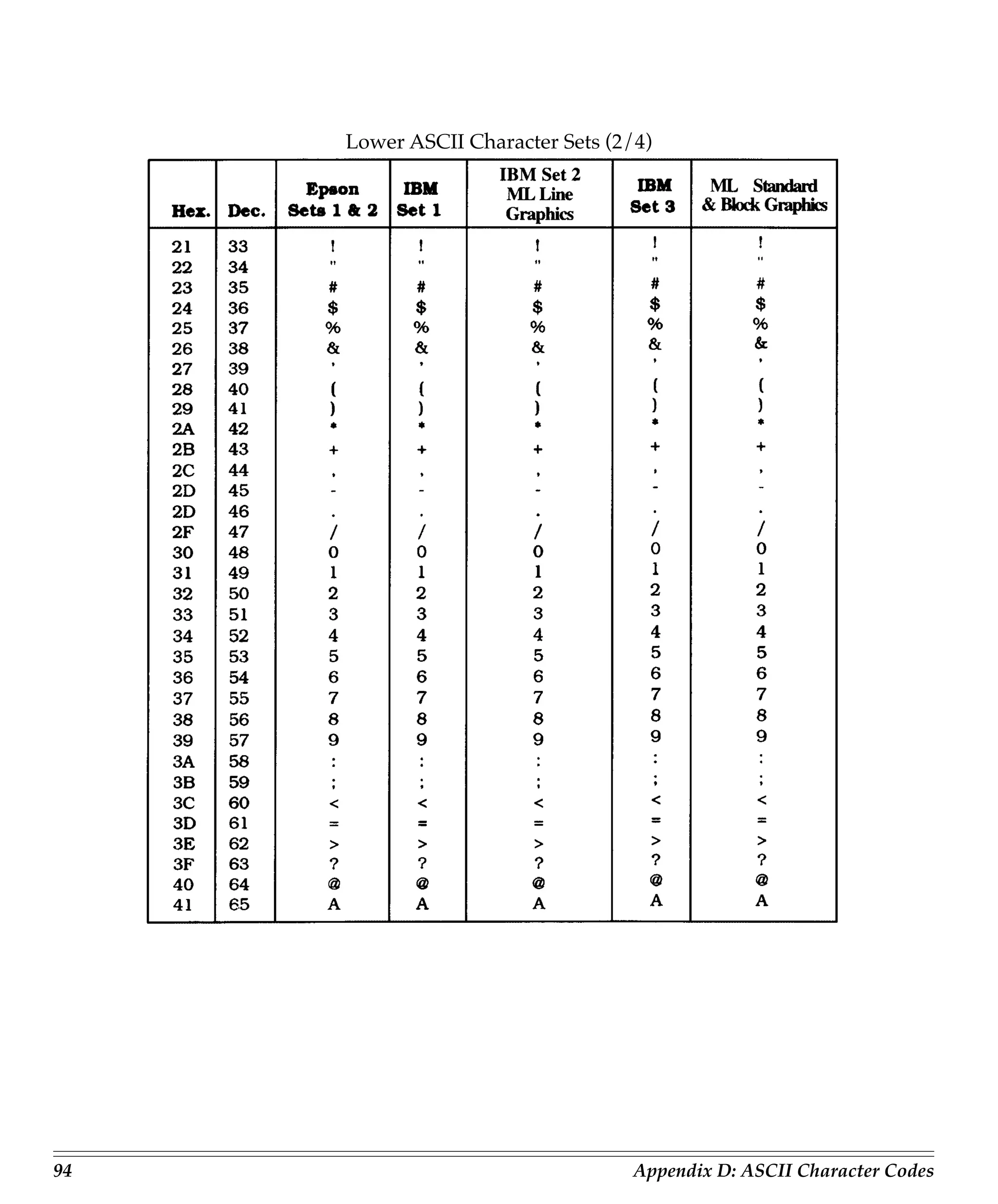
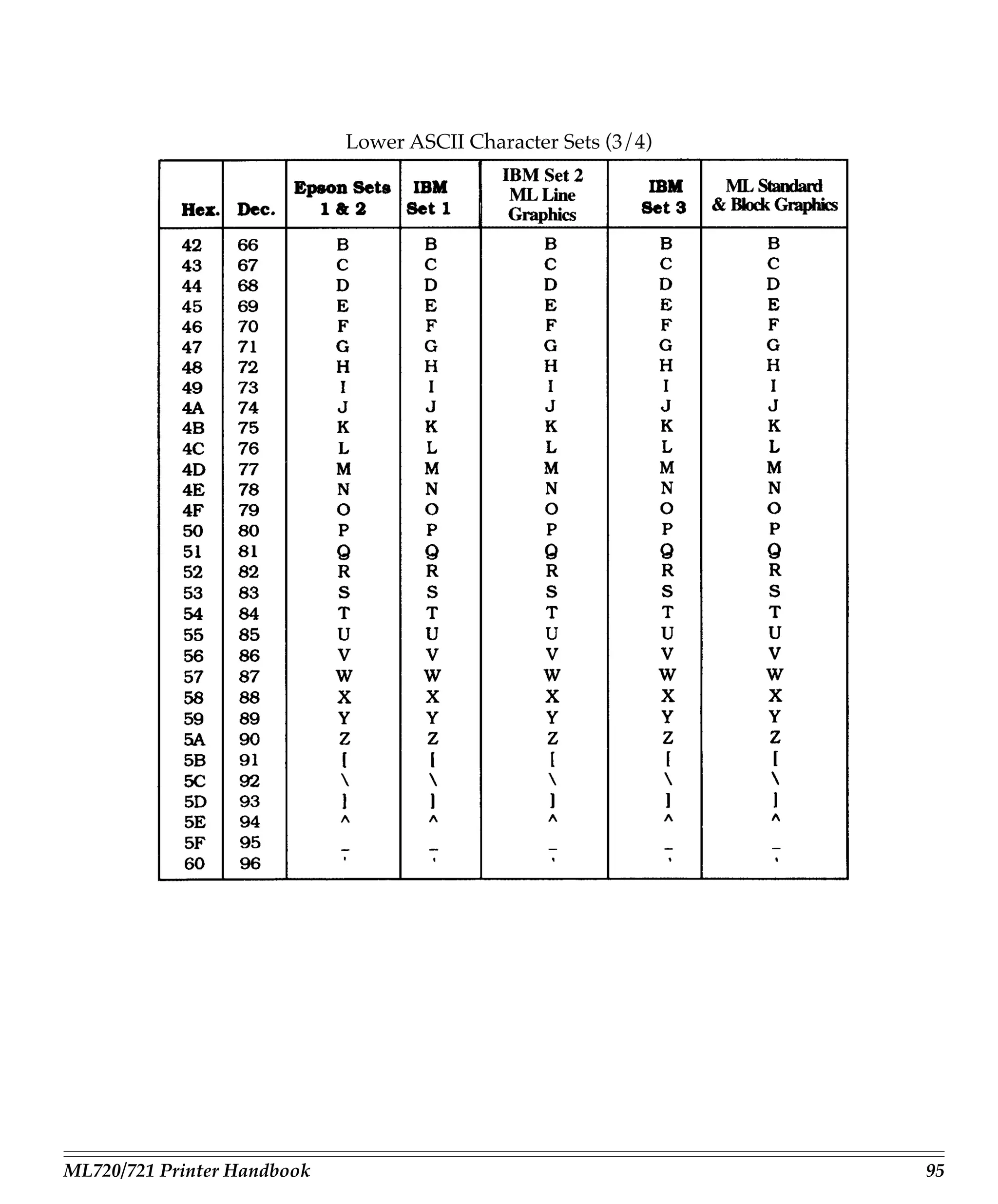
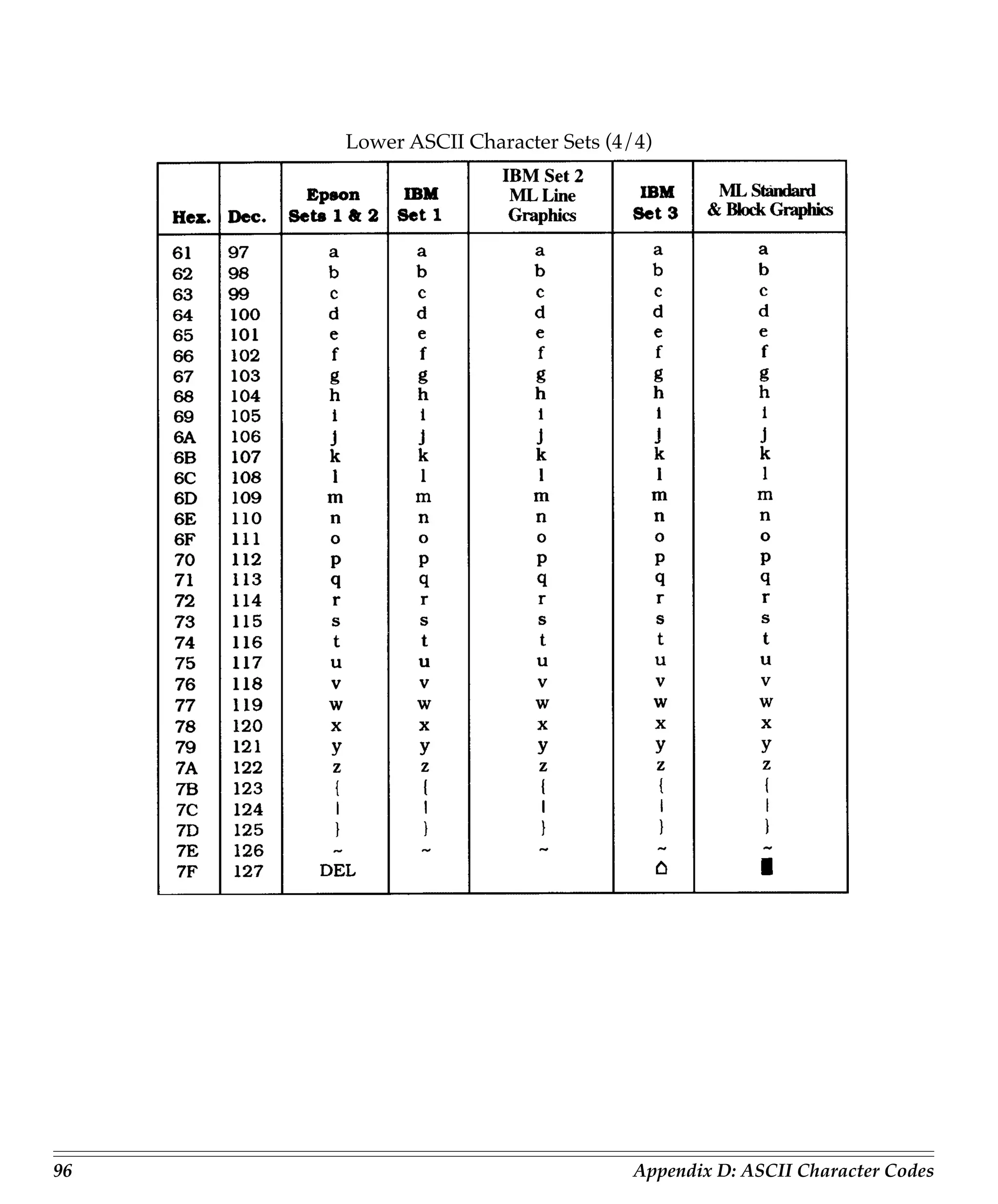
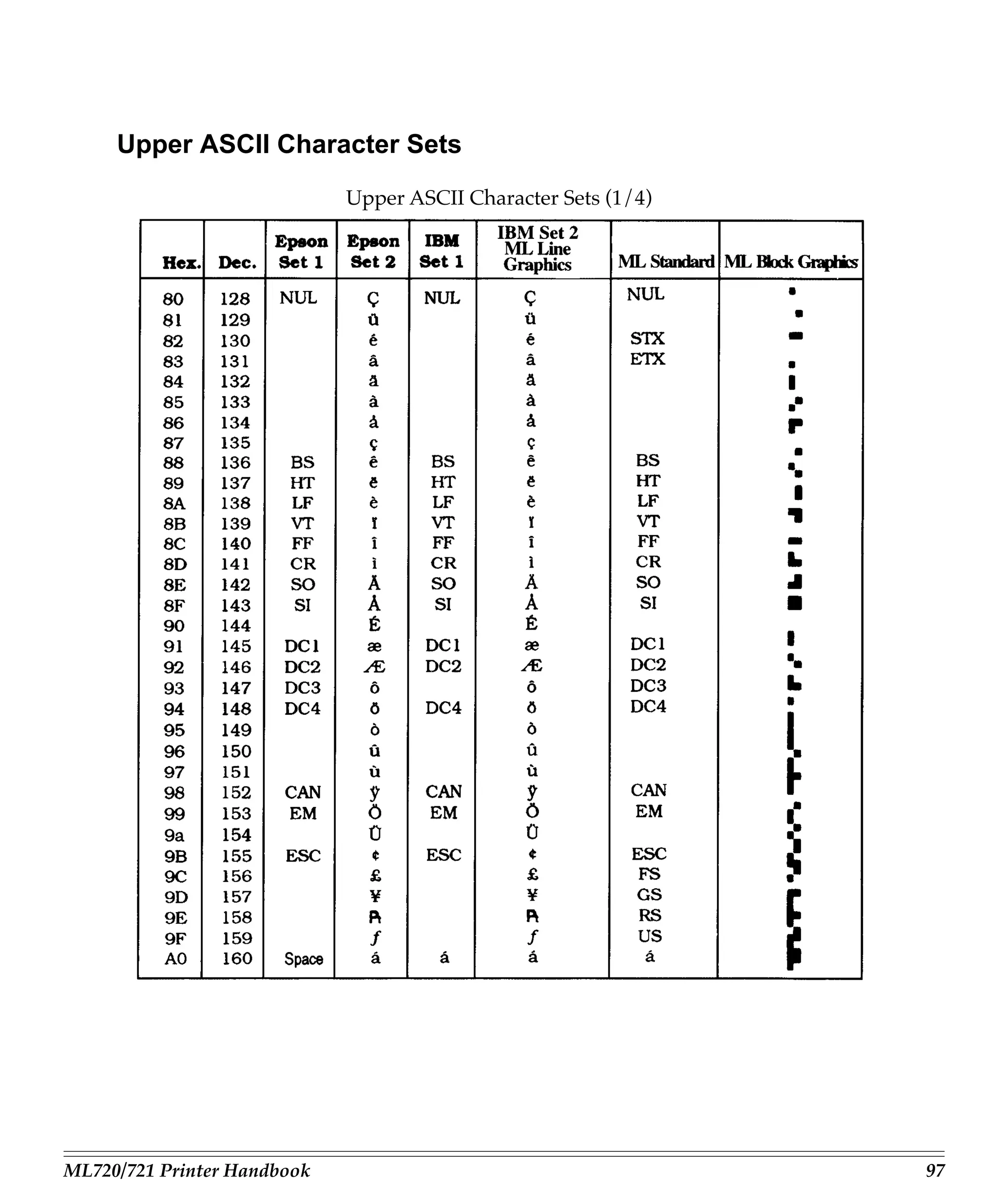
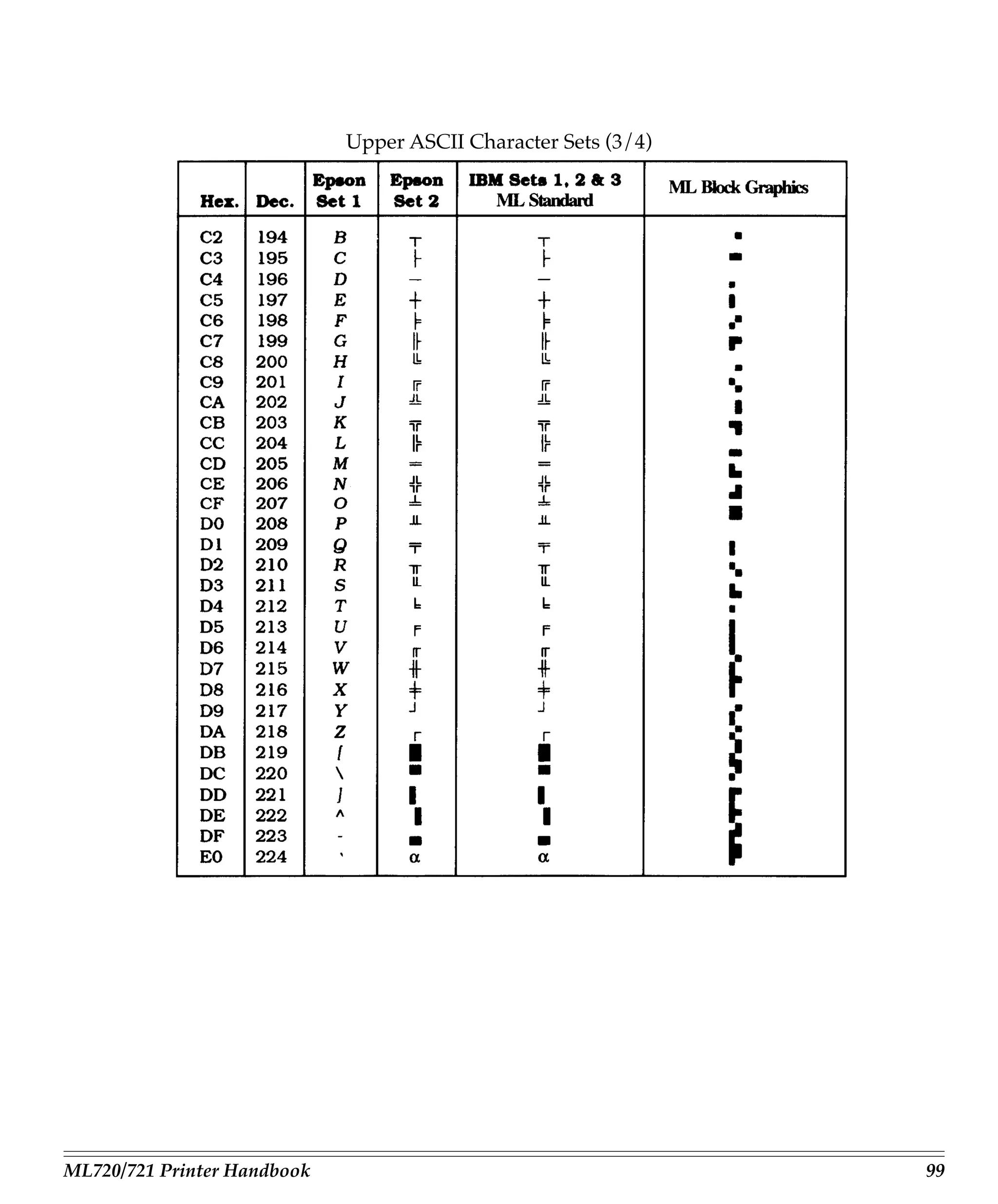
Appendix D: ASCII Character Codes ............................................................... 93
       Lower ASCII Character Sets ................................................................................... 93
       Upper ASCII Character Sets .................................................................................... 97
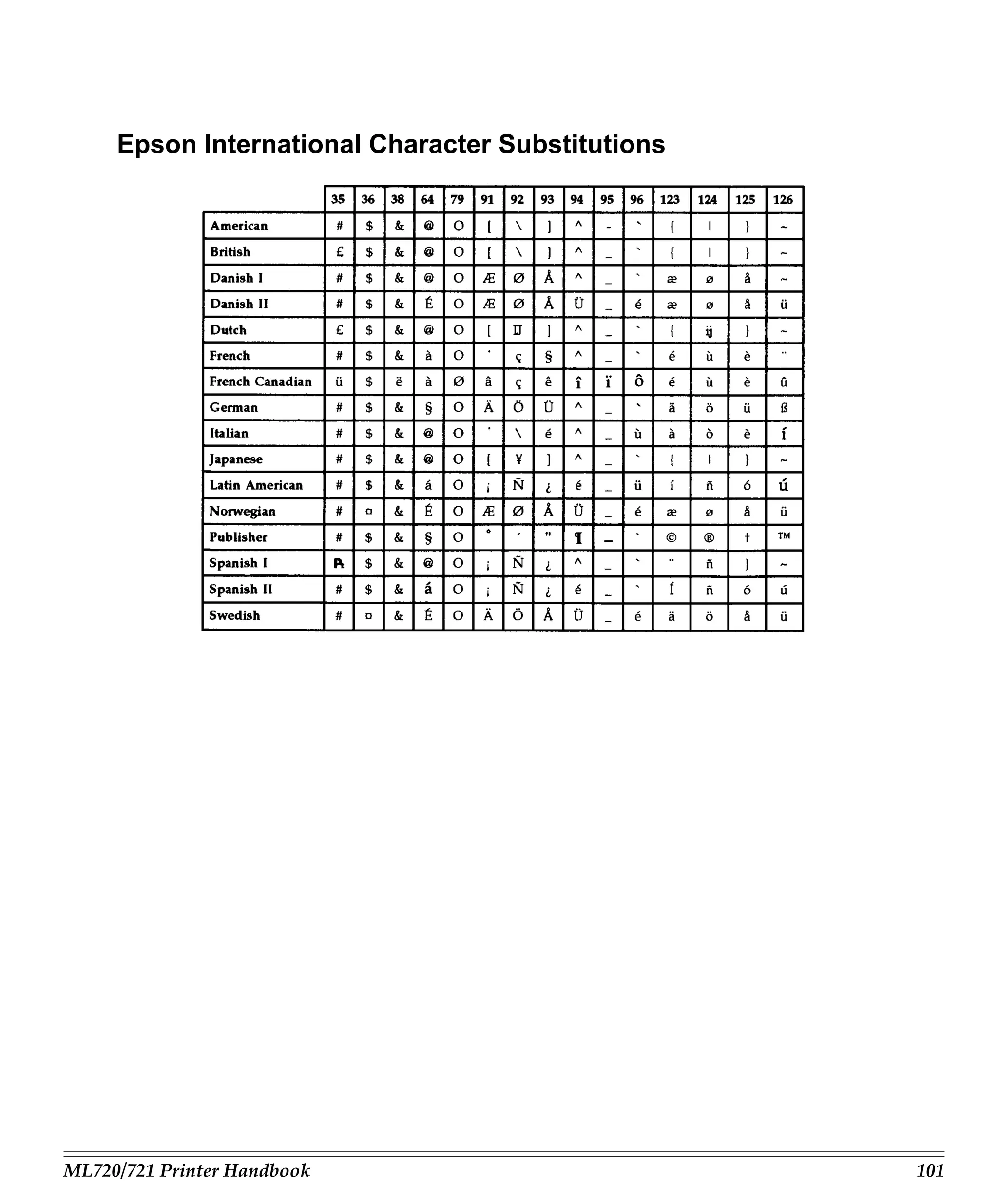
       Epson International Character Substitutions ..................................................... 101
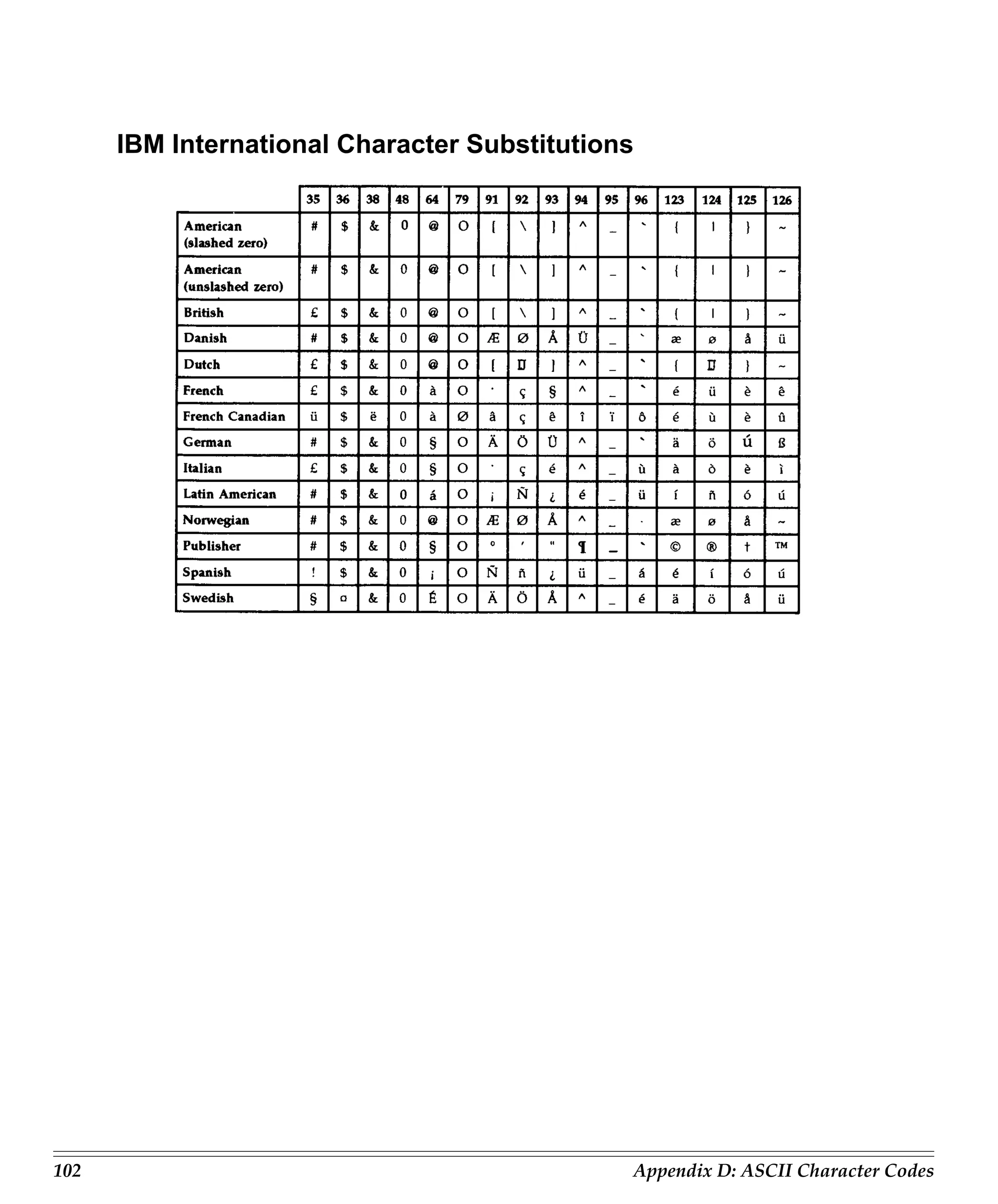
       IBM International Character Substitutions ......................................................... 102
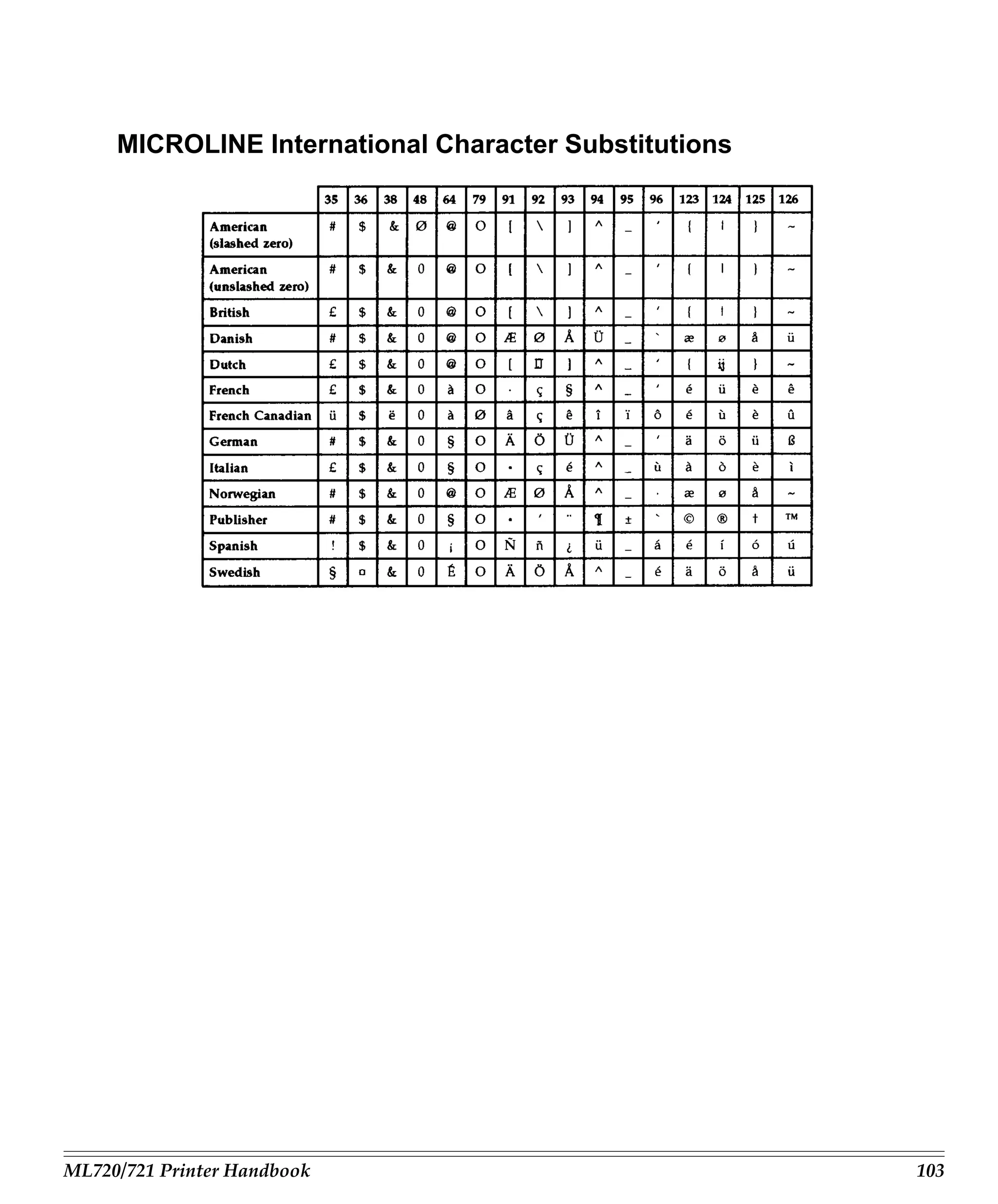
       MICROLINE International Character Substitutions ......................................... 103
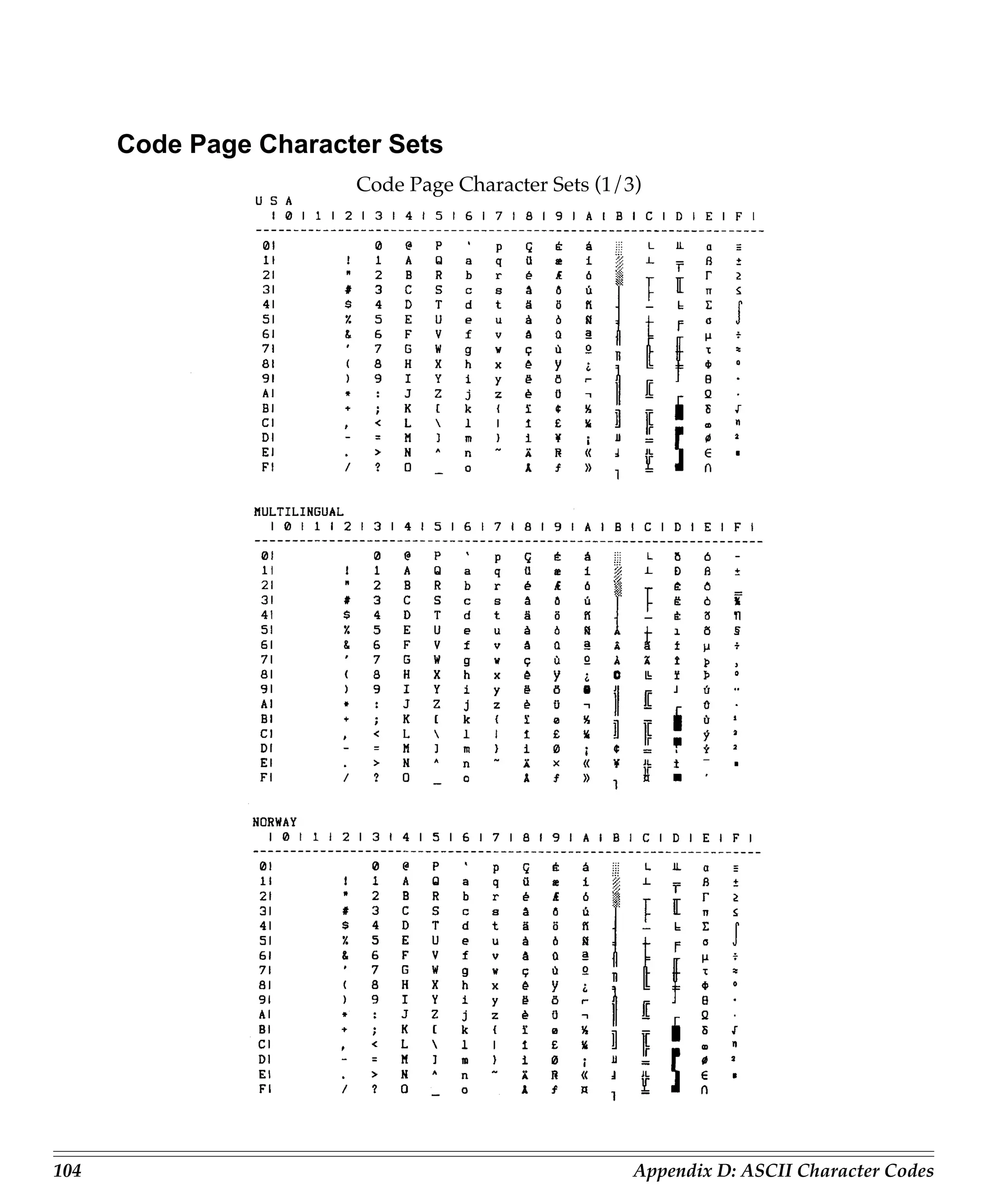
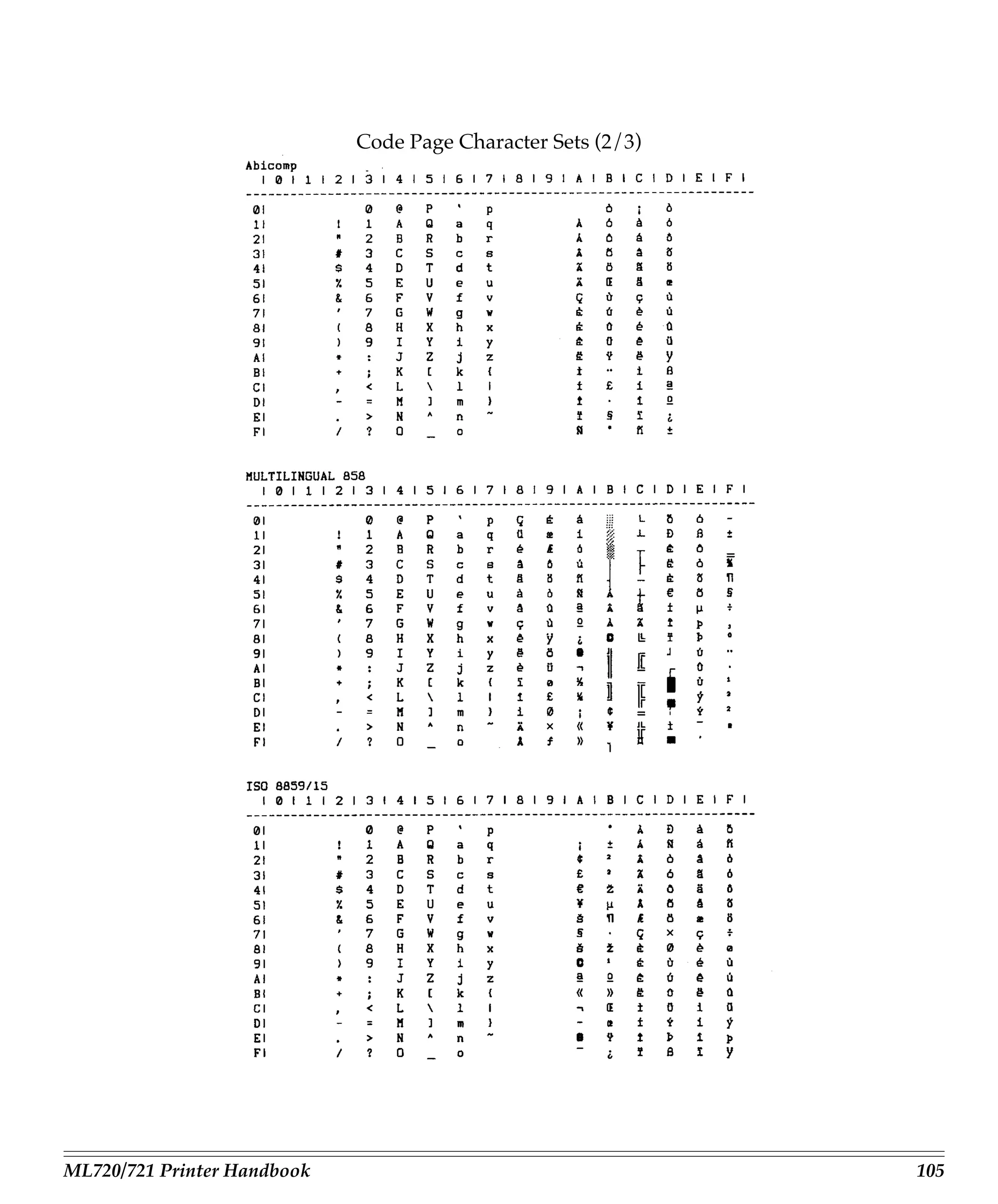
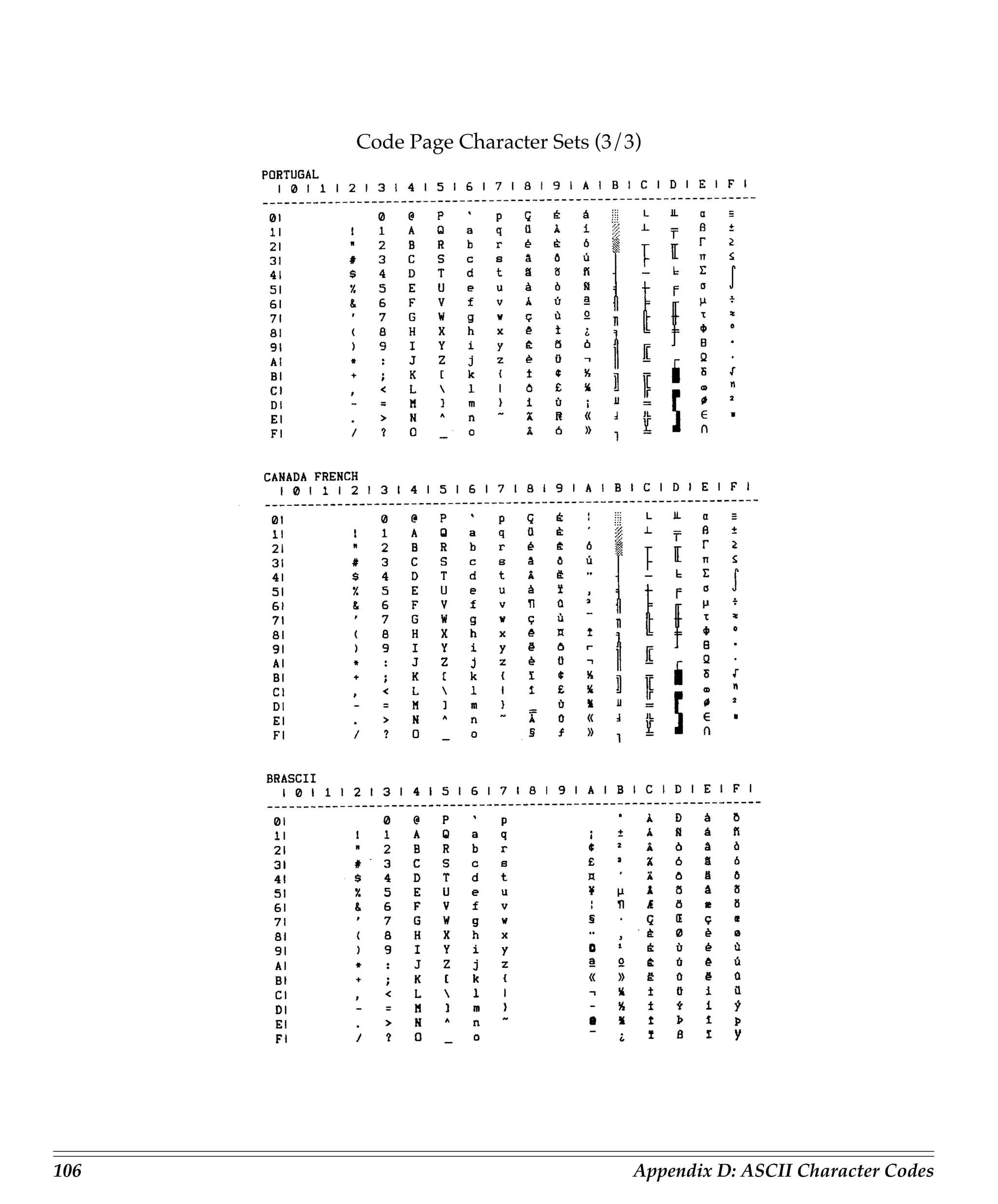
       Code Page Character Sets ...................................................................................... 104

Appendix E: Interfacing .................................................................................... 107
       Pin Assignments for Parallel Interface Signals .................................................. 107
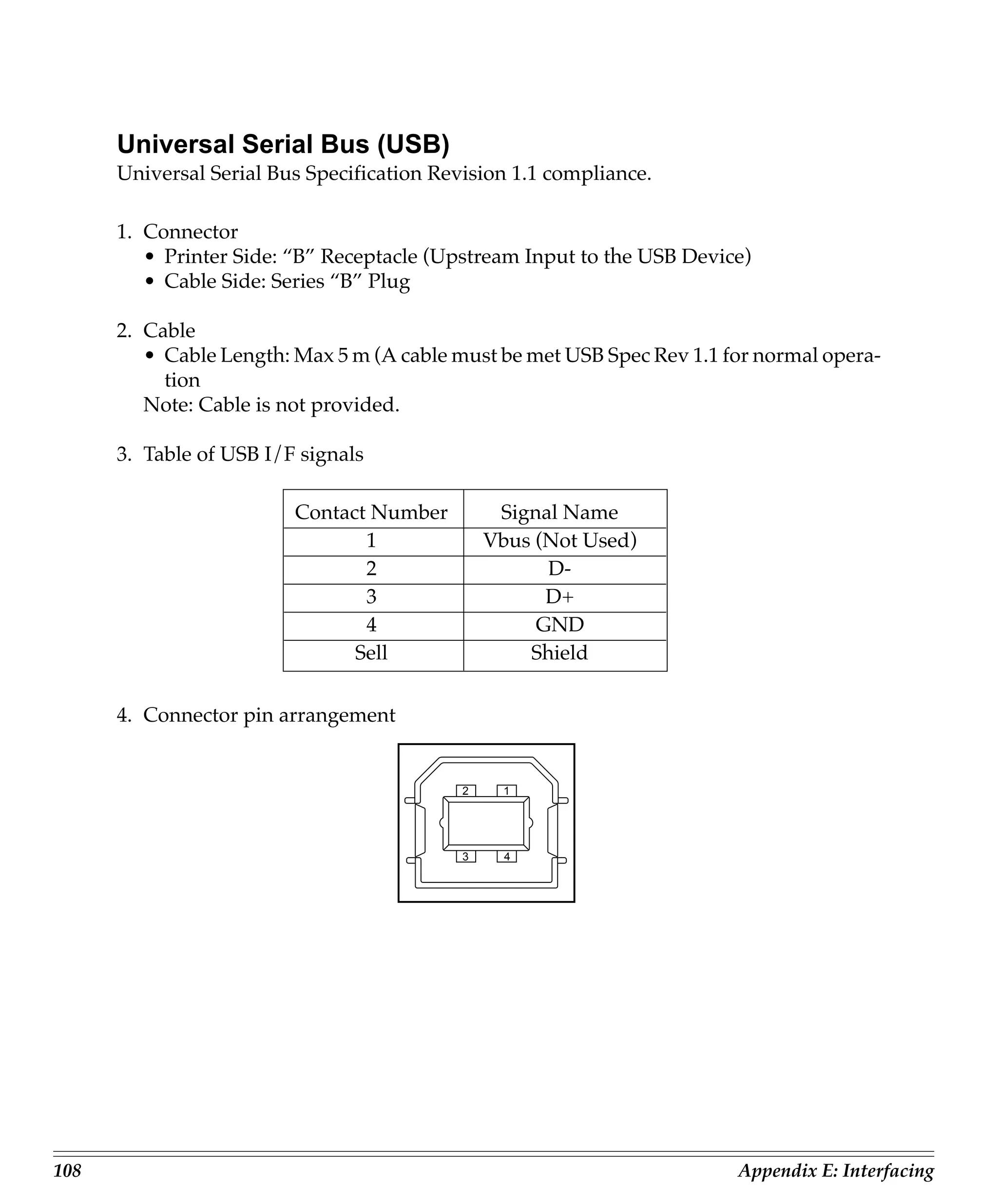
       Universal Serial Bus (USB) .................................................................................... 108
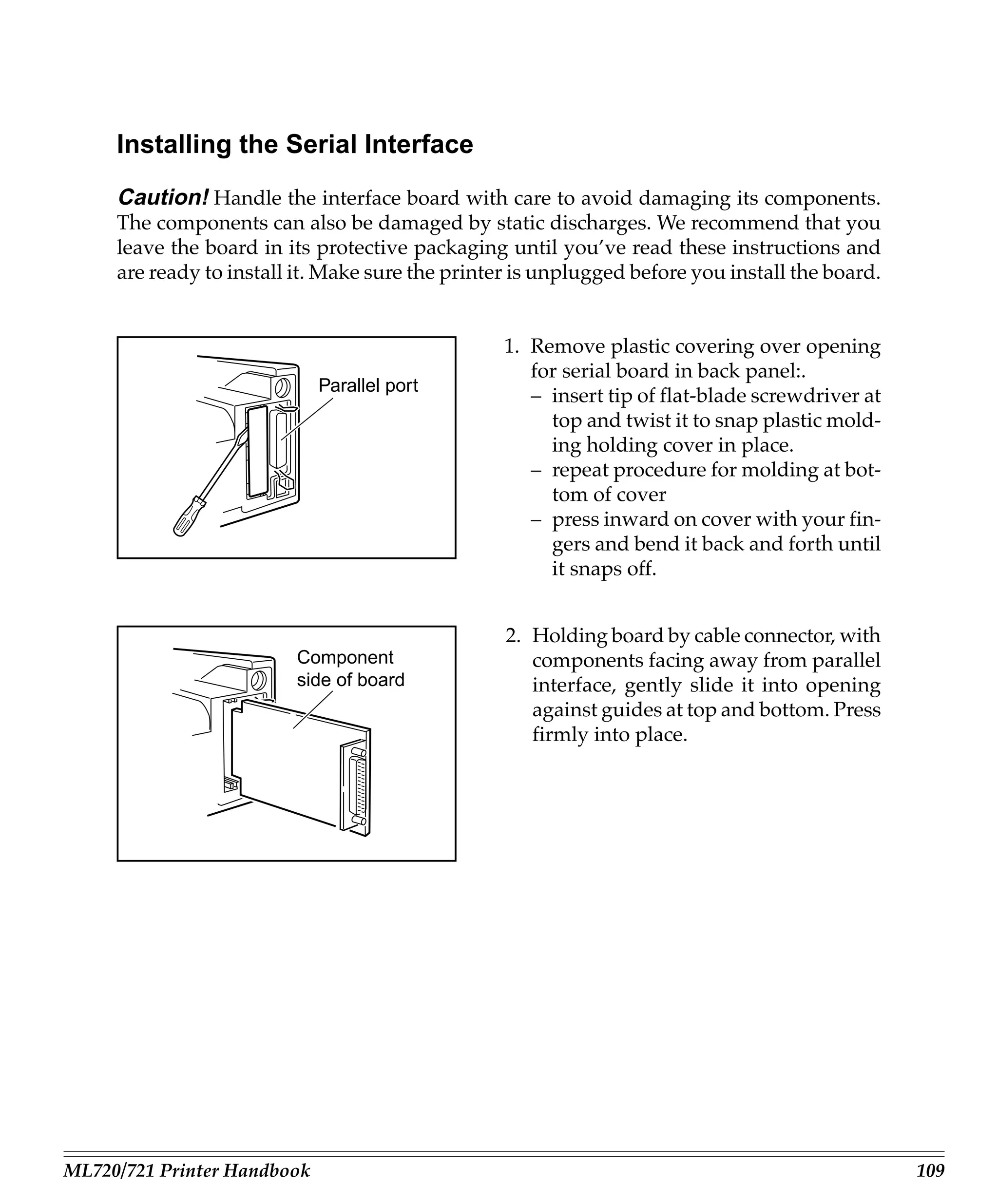
       Installing the Serial Interface ................................................................................ 109
       Pin Assignments for Serial Interface Signals ...................................................... 111
Introduction
     This Guide is arranged to help you get your new MICROLINE 720 or 721 printer set
     up and running quickly as well as providing you with more detailed information for
     future reference. Here’s how it’s organised:

        • Chapter 1 (Installation) shows you how to get your printer ready to run and
          how to connect it to your computer.
        • Chapter 2 (Loading Paper) explains how to load paper for any of the two meth-
          ods of paper feed.
        • Chapter 3 (Operation) describes how to control your printer from the front panel.
          It also explains how to change the defaults, how to test your printer and how to
          use bar codes.
        • Chapter 4 (Working with Software) gives you information on selecting a driver
          and installing your printer on popular software packages.
        • Chapter 5 (Problem Solving/Maintenance/Service) gives helpful hints on how
          to solve common printer problems and how to maintain your printer in tip-top
          shape.
        • Appendices A through E contain a variety of reference material, including speci-
          fications, menu listings, lists of printer programming commands and ASCII
          characters.


ML720/721 Printer Handbook                                                                    1
2   Introduction
Chapter 1: Installation
     This chapter explains how to unpack and install your new printer.


     Unpacking
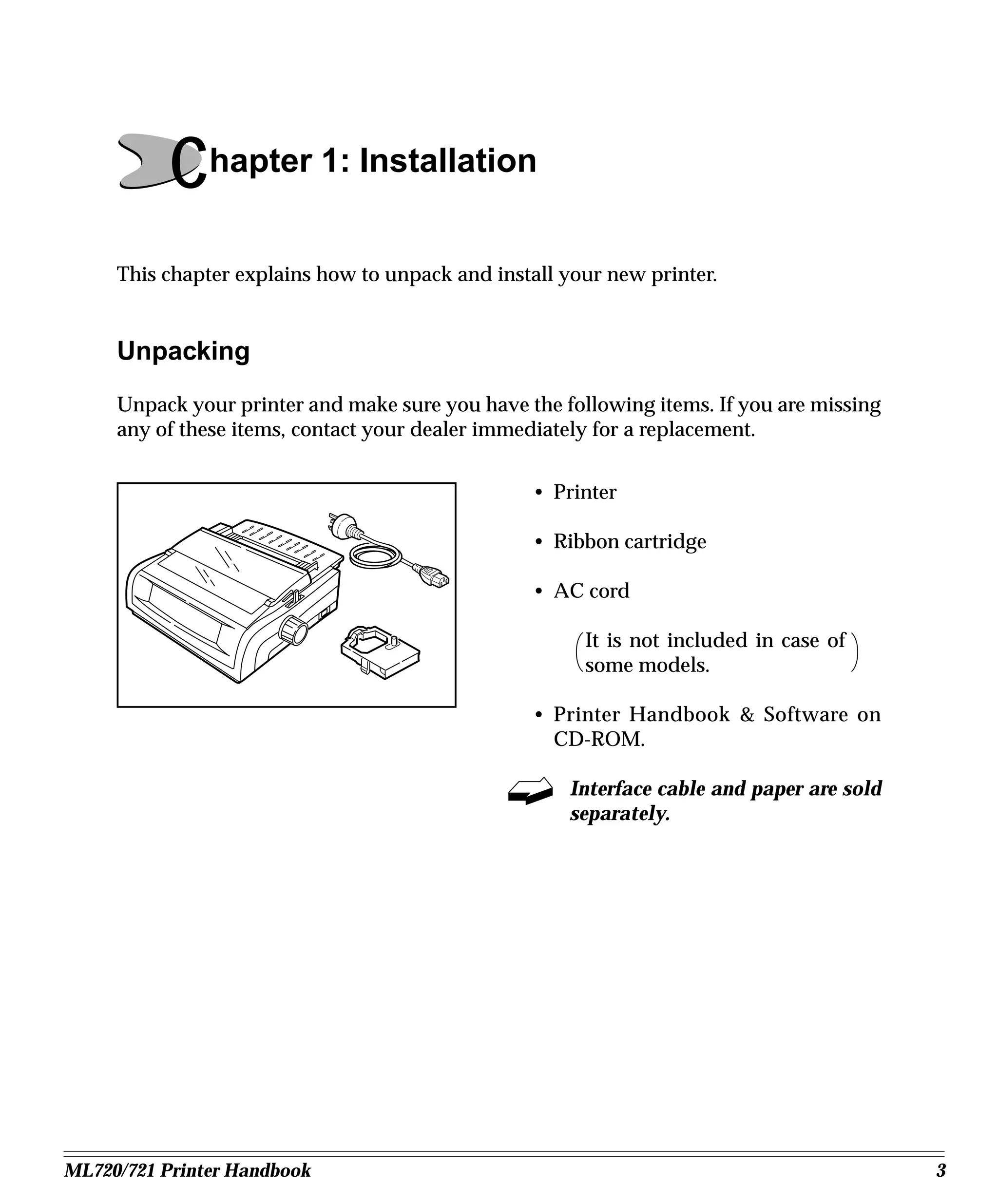
     Unpack your printer and make sure you have the following items. If you are missing
     any of these items, contact your dealer immediately for a replacement.


                                                 • Printer

                                                 • Ribbon cartridge

                                                 • AC cord

                                                       It is not included in case of
                                                       some models.

                                                 • Printer Handbook & Software on
                                                   CD-ROM.

                                                     Interface cable and paper are sold
                                                     separately.


ML720/721 Printer Handbook                                                                3
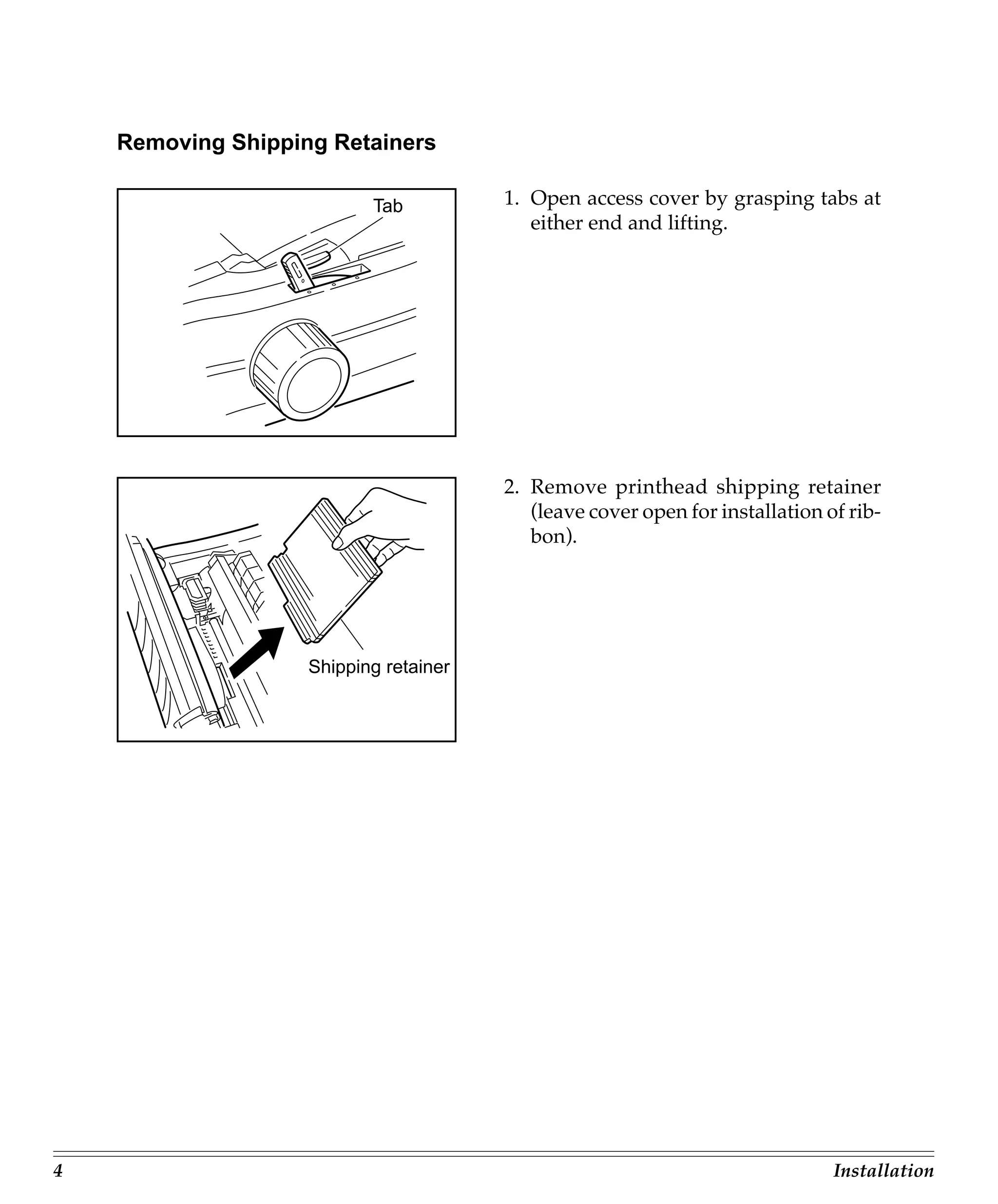
Removing Shipping Retainers

                           Tab          1. Open access cover by grasping tabs at
                                           either end and lifting.


                                        2. Remove printhead shipping retainer
                                           (leave cover open for installation of rib-
                                           bon).


                    Shipping retainer


4                                                                              Installation
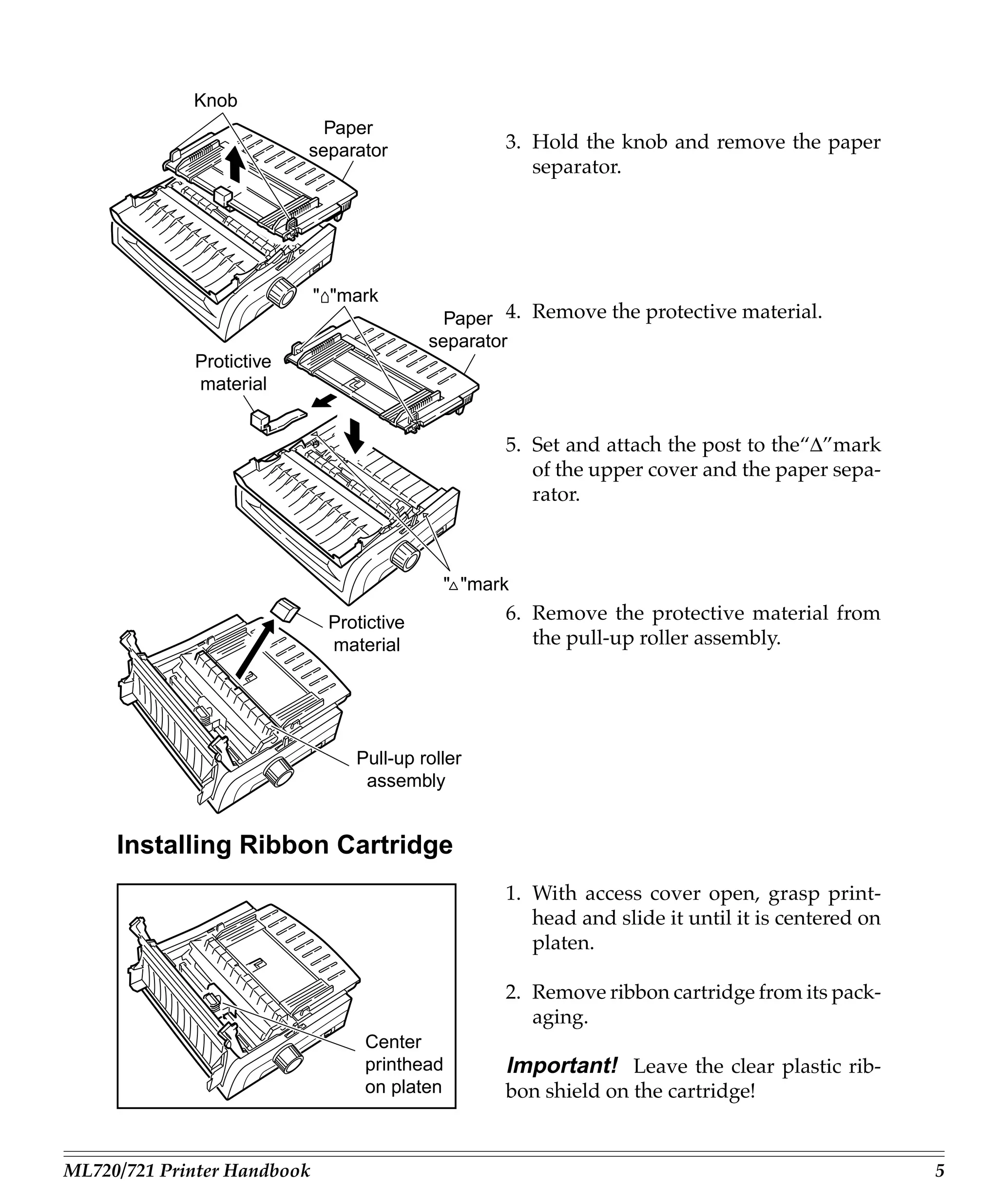
Knob
                            Paper
                          separator                3. Hold the knob and remove the paper
                                                      separator.


                             " "mark
                                             Paper 4. Remove the protective material.
                                           separator
             Protictive
             material


                                                   5. Set and attach the post to the“∆”mark
                                                      of the upper cover and the paper sepa-
                                                      rator.


                                            " "mark

                              Protictive           6. Remove the protective material from
                              material                the pull-up roller assembly.


                                 Pull-up roller
                                  assembly


     Installing Ribbon Cartridge
                                                   1. With access cover open, grasp print-
                                                      head and slide it until it is centered on
                                                      platen.

                                                   2. Remove ribbon cartridge from its pack-
                                                      aging.
                                  Center
                                  printhead        Important! Leave the clear plastic rib-
                                  on platen        bon shield on the cartridge!


ML720/721 Printer Handbook                                                                        5
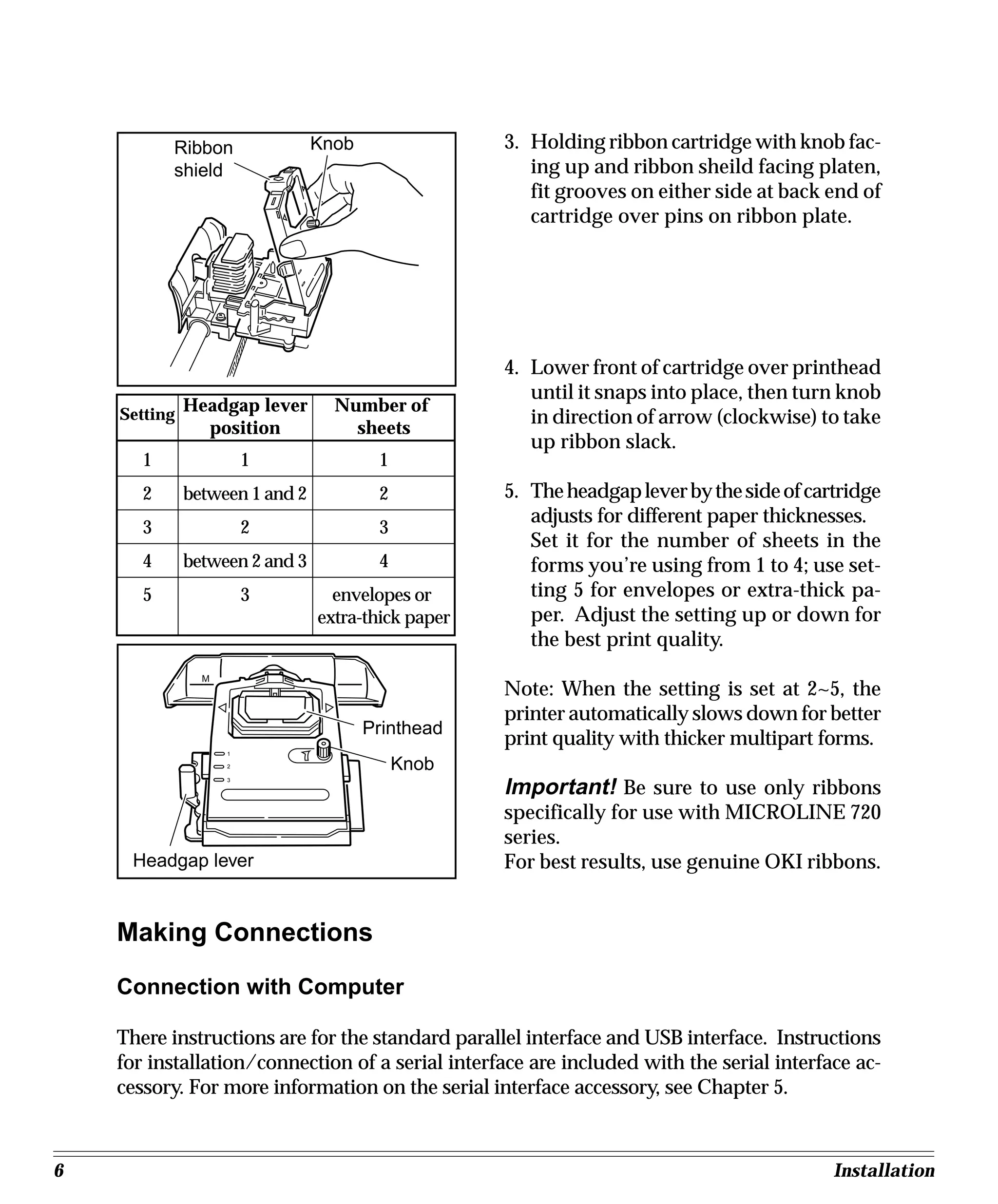
Ribbon               Knob                3. Holding ribbon cartridge with knob fac-
           shield                                      ing up and ribbon sheild facing platen,
                                                       fit grooves on either side at back end of
                                                       cartridge over pins on ribbon plate.


                                                    4. Lower front of cartridge over printhead
                                                       until it snaps into place, then turn knob
    Setting
              Headgap lever       Number of
                                                       in direction of arrow (clockwise) to take
                position            sheets
                                                       up ribbon slack.
       1                1               1
       2      between 1 and 2           2           5. The headgap lever by the side of cartridge
                                                       adjusts for different paper thicknesses.
       3                2               3
                                                       Set it for the number of sheets in the
       4      between 2 and 3           4              forms you’re using from 1 to 4; use set-
       5                3         envelopes or         ting 5 for envelopes or extra-thick pa-
                                extra-thick paper      per. Adjust the setting up or down for
                                                       the best print quality.
                M
                                                    Note: When the setting is set at 2~5, the
                                                    printer automatically slows down for better
                                       Printhead
                                                    print quality with thicker multipart forms.
                    1

                    2                       Knob
                                                    Important! Be sure to use only ribbons
                    3


                                                    specifically for use with MICROLINE 720
                                                    series.
     Headgap lever                                  For best results, use genuine OKI ribbons.


    Making Connections

    Connection with Computer

    There instructions are for the standard parallel interface and USB interface. Instructions
    for installation/connection of a serial interface are included with the serial interface ac-
    cessory. For more information on the serial interface accessory, see Chapter 5.


6                                                                                          Installation
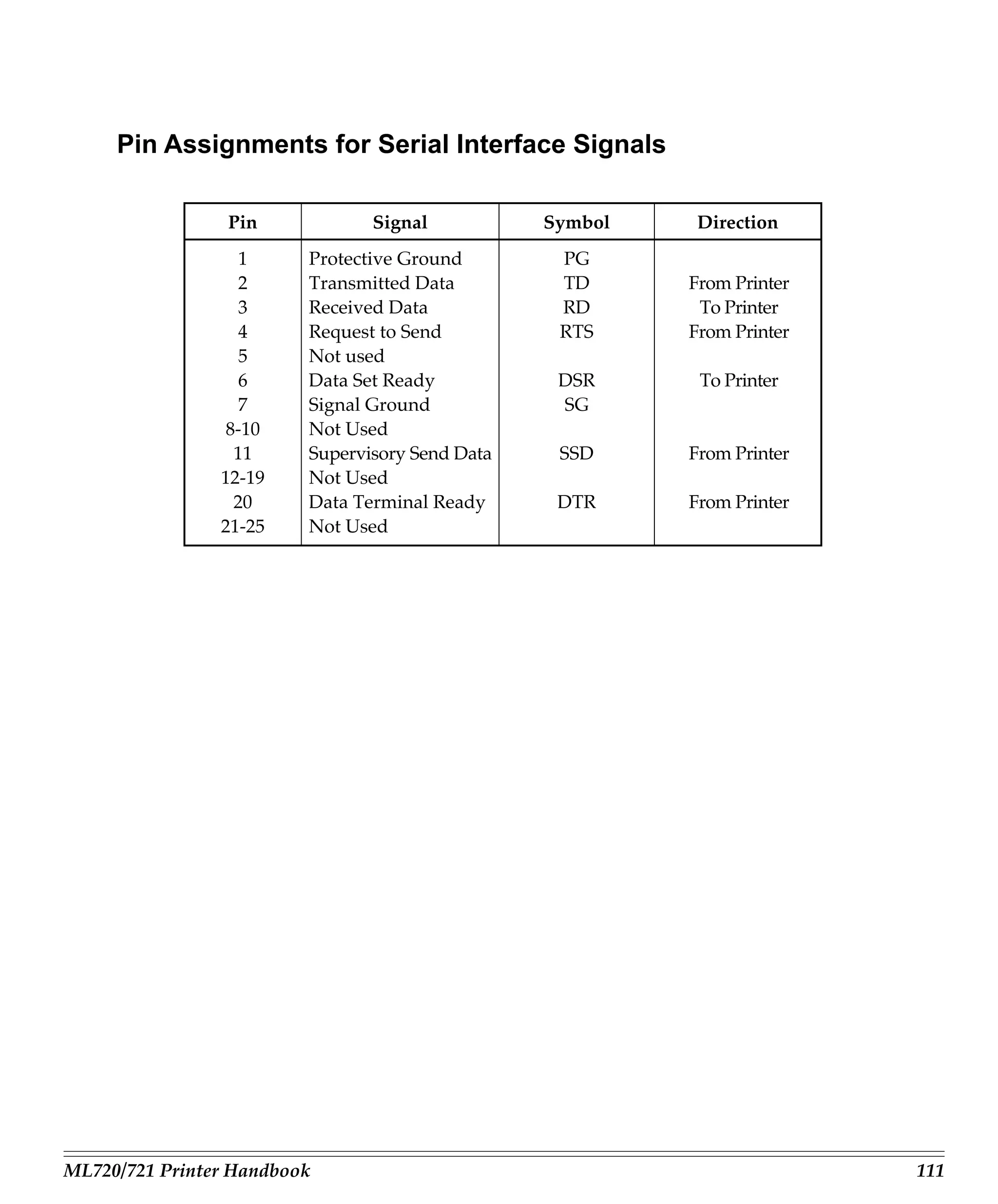
Pin assignments for the parallel, USB and the serial interfaces are listed in
            appendix E.

     You must supply the cable for connecting your printer to your computer.
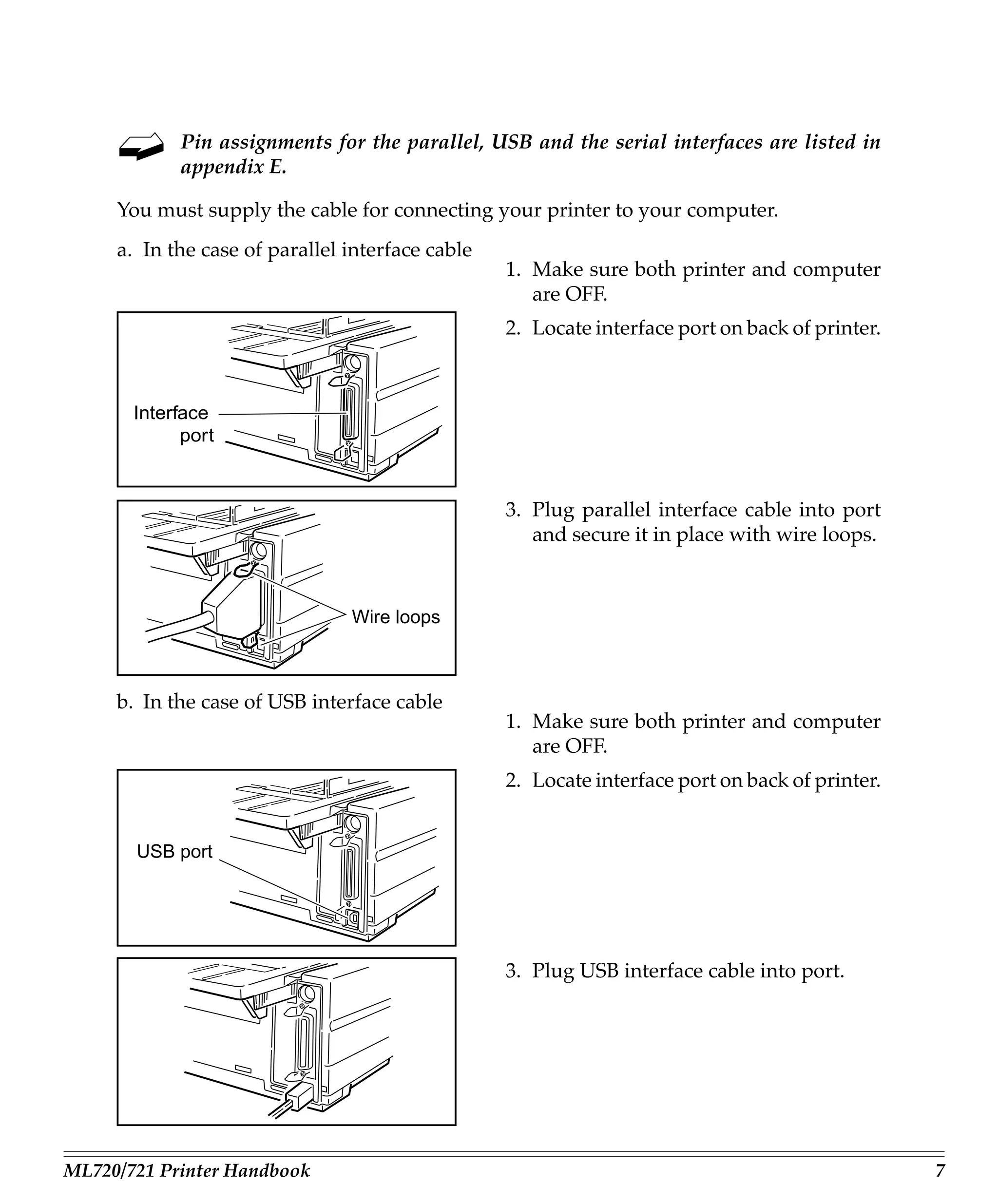
     a. In the case of parallel interface cable
                                                  1. Make sure both printer and computer
                                                     are OFF.
                                                  2. Locate interface port on back of printer.


       Interface
             port


                                                  3. Plug parallel interface cable into port
                                                     and secure it in place with wire loops.


                                Wire loops


     b. In the case of USB interface cable
                                                  1. Make sure both printer and computer
                                                     are OFF.
                                                  2. Locate interface port on back of printer.


       USB port


                                                  3. Plug USB interface cable into port.


ML720/721 Printer Handbook                                                                       7
Connection with Power

                                      1. Make sure both printer and computer
                                         are OFF.

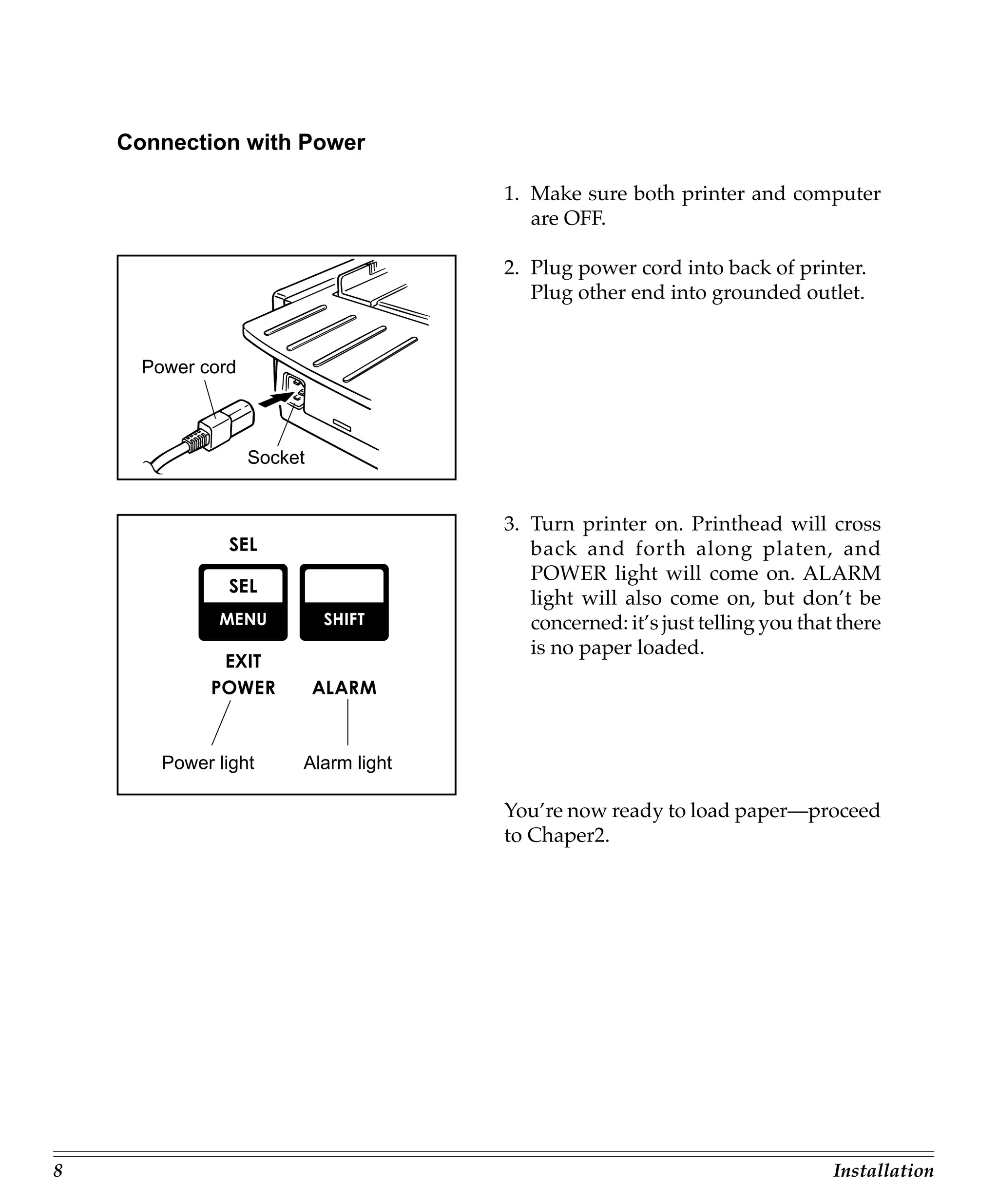
                                      2. Plug power cord into back of printer.
                                         Plug other end into grounded outlet.


      Power cord


                   Socket


                                      3. Turn printer on. Printhead will cross
                                         back and forth along platen, and
                                         POWER light will come on. ALARM
                                         light will also come on, but don’t be
                                         concerned: it’s just telling you that there
                                         is no paper loaded.


        Power light     Alarm light

                                      You’re now ready to load paper—proceed
                                      to Chaper2.


8                                                                             Installation
Chapter 2: Loading Paper
     Your printer has provision for single-sheet paper feed from the top and for continu-
     ous-form paper feed from the rear. You can also install options: the Cut Sheet Feeder,
     which holds a stack of 100 sheets for feeding from the top and the Push and/or Pull
     Tractors for feeding continuous-form labels, heavy card stock or multi-part forms from
     the bottom. See Chapter 5 for more information on these options.

     Top Feed
        • Single sheets (basis weight 14 to 24 lbs)
        • Single envelopes
          – 24-lb maximum
          – 6.5” to 9.5” wide
        • Transparencies (8.5 x 11”)

     Rear feed (continuous forms only, thickness to 0.014” [0.36 mm])
        • Single-part continuous forms
          – 12 to 24 lb.
          – Minimum 3” wide (*1)
        • Carbonless, multi-part forms
          – Original, plus 4 copies
          – 9 to 11 lb
          – Minimum 3” wide (*1)
        • Interleaf, multi-part forms (with carbon paper)
          – Original, plus 4 copies
          – 10 to 12 lb paper, with 9 lb carbon
          – Minimum 3” wide (*1)


      (*1) Please change mentioned below centering Position within a set-up group fol-
           lowing indication of 32 pages when a form of 3” wide is used by Rear Feed.
           In the case of ML720 “Mode 1”.
           In the case of ML721 “Mode 2”.


ML720/721 Printer Handbook                                                                    9
Bottom feed (continuous forms only, thickness to 0.017” [0.44mm])
       • Single-part continuous forms
         – 12 to 24 lb
         – Minimum 3” wide (*2)
       • Carbonless, multi-part forms
         – Original, plus 5 copies
         – 9 to 11 lb
         – Minimum 3” wide (*2)
       • Interleaf, multi-part forms (with carbon paper)
         – Original, plus 4 copies
         – 10 to 12 lb paper, with 9 lb carbon
         – Minimum 3” wide (*2)
       • Continuous-feed envelopes
         – 24 lb maximum
         – 6.5” to 9.5” wide (envelope itself)
       • Labels
         – minimum 3” wide (*2)
         – maximum 10”(ML720) or 16” (ML721) wide
       • Card stock: papers up to 120 lb maximum


     (*2) Please change mentioned below centering Position within a set-up group fol-
          lowing indication of 32 pages when a form of 3” wide is used by Bottom Feed.
          In the case of ML720 “Mode 1”.
          In the case of ML721 “Mode 2”.


10                                                                            Loading Paper
Loading Single-Sheet Paper
     The single-sheet paper path is best for letterhead stationery, memos, and envelopes.
     We also recommend it for printing graphs and charts because it provides the most
     accurate control of the paper.

     To load in single sheets of paper:

            If you have any continuous-form paper in the paper path, you must press the
            PARK button on the front panel to remove it from the path before lading single
            sheets.

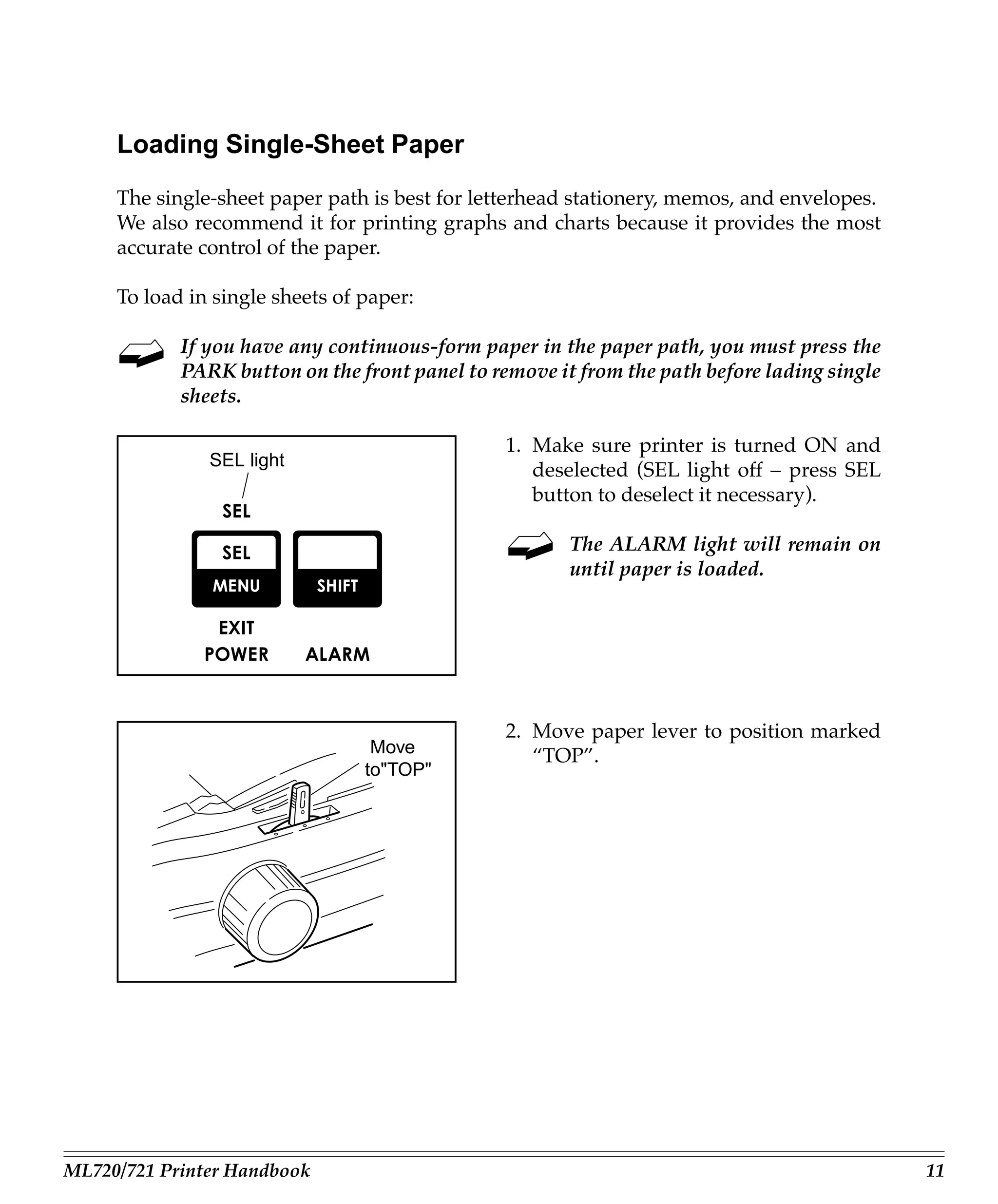
                                                1. Make sure printer is turned ON and
               SEL light
                                                   deselected (SEL light off – press SEL
                                                   button to deselect it necessary).

                                                       The ALARM light will remain on
                                                       until paper is loaded.


                                                2. Move paper lever to position marked
                                  Move             “TOP”.
                                 to"TOP"


ML720/721 Printer Handbook                                                                   11
Paper
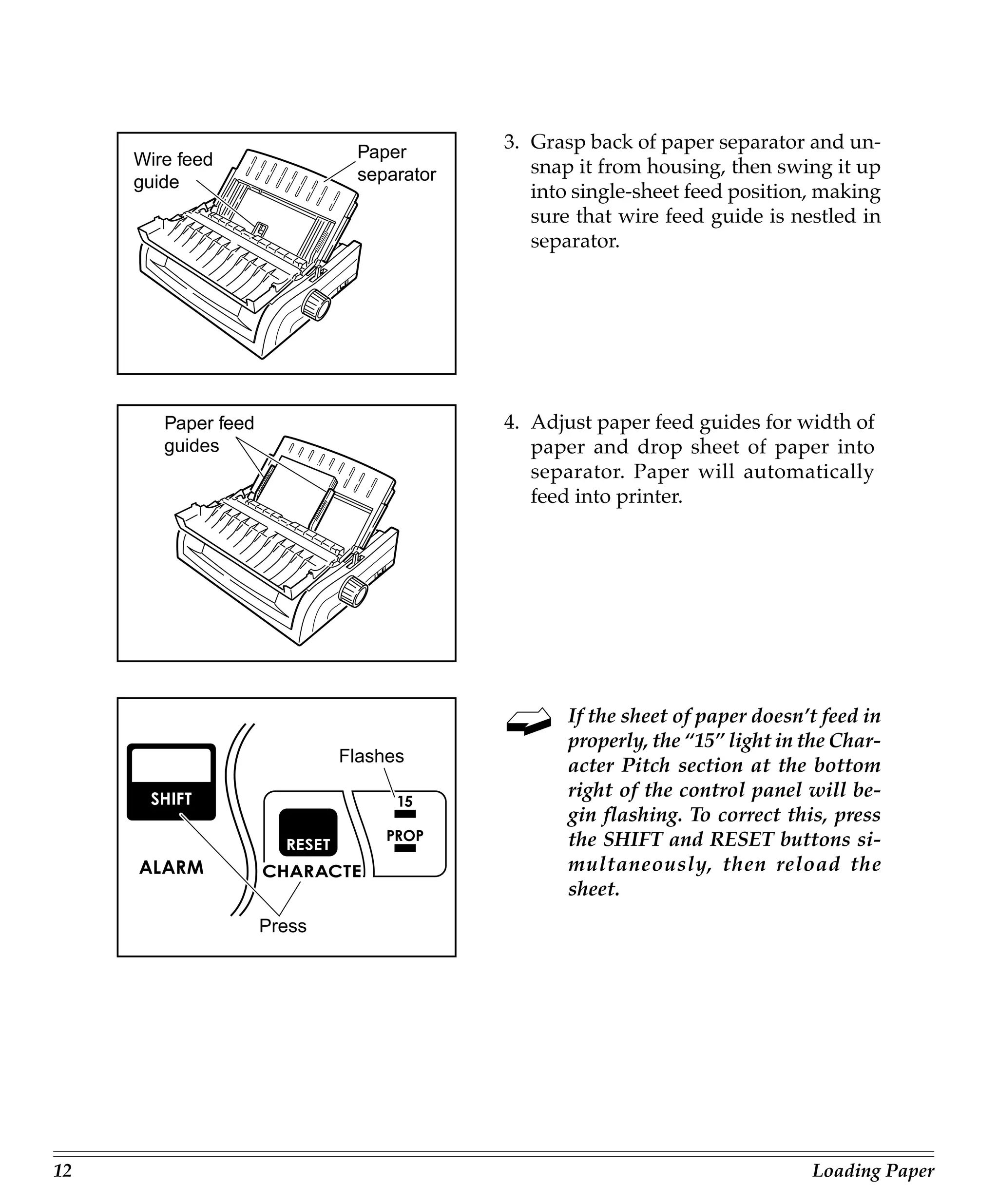
                                          3. Grasp back of paper separator and un-
     Wire feed                               snap it from housing, then swing it up
     guide                    separator
                                             into single-sheet feed position, making
                                             sure that wire feed guide is nestled in
                                             separator.


        Paper feed                        4. Adjust paper feed guides for width of
        guides                               paper and drop sheet of paper into
                                             separator. Paper will automatically
                                             feed into printer.


                                                 If the sheet of paper doesn’t feed in
                                                 properly, the “15” light in the Char-
                             Flashes
                                                 acter Pitch section at the bottom
                                                 right of the control panel will be-
                                                 gin flashing. To correct this, press
                                                 the SHIFT and RESET buttons si-
                                                 multaneously, then reload the
                                                 sheet.
                     Press


12                                                                           Loading Paper
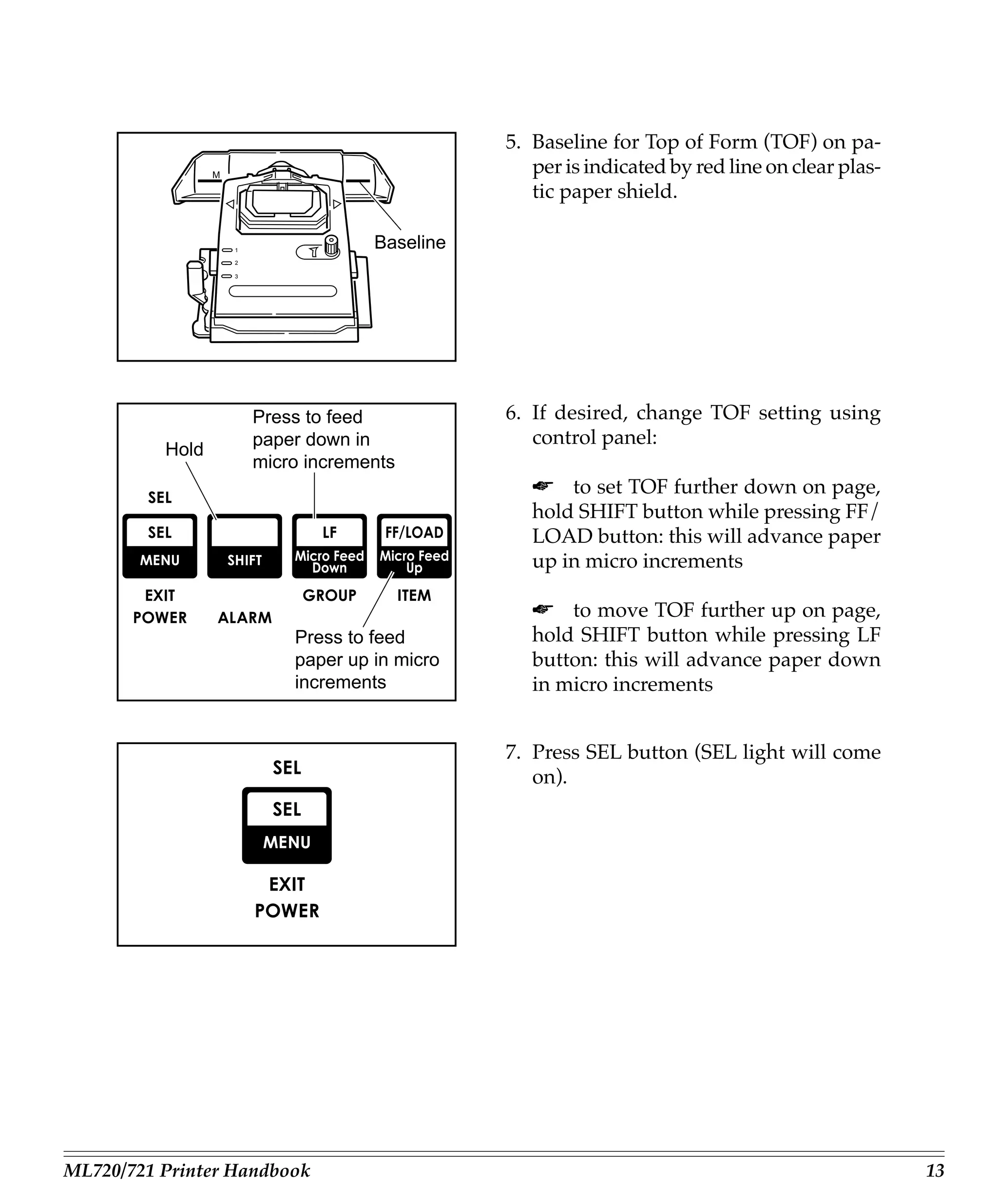
5. Baseline for Top of Form (TOF) on pa-
                 M
                                                    per is indicated by red line on clear plas-
                                                    tic paper shield.

                     1
                                      Baseline
                     2

                     3


                         Press to feed           6. If desired, change TOF setting using
                         paper down in              control panel:
          Hold
                         micro increments
                                                    ☛ to set TOF further down on page,
                                                    hold SHIFT button while pressing FF/
                                                    LOAD button: this will advance paper
                                                    up in micro increments

                                                    ☛ to move TOF further up on page,
                             Press to feed          hold SHIFT button while pressing LF
                             paper up in micro      button: this will advance paper down
                             increments             in micro increments


                                                 7. Press SEL button (SEL light will come
                                                    on).


ML720/721 Printer Handbook                                                                        13
Loading Rear-Feed Paper
     The rear-feed paper path is recommended for single-thickness, continuous fan-fold
     paper when printing spreadsheets, long reports, etc. For graphics or charts, it’s best to
     use the single-sheet paper path.

     To load continuous-form paper from the rear:

                                                  1. If you have paper in paper path, be sure
                                                     to remove it before installing rear-feed
                                                     paper. To remove single sheet, press FF/
                                                     LOAD button. To remove bottom-feed
                                                     paper, press PARK button.

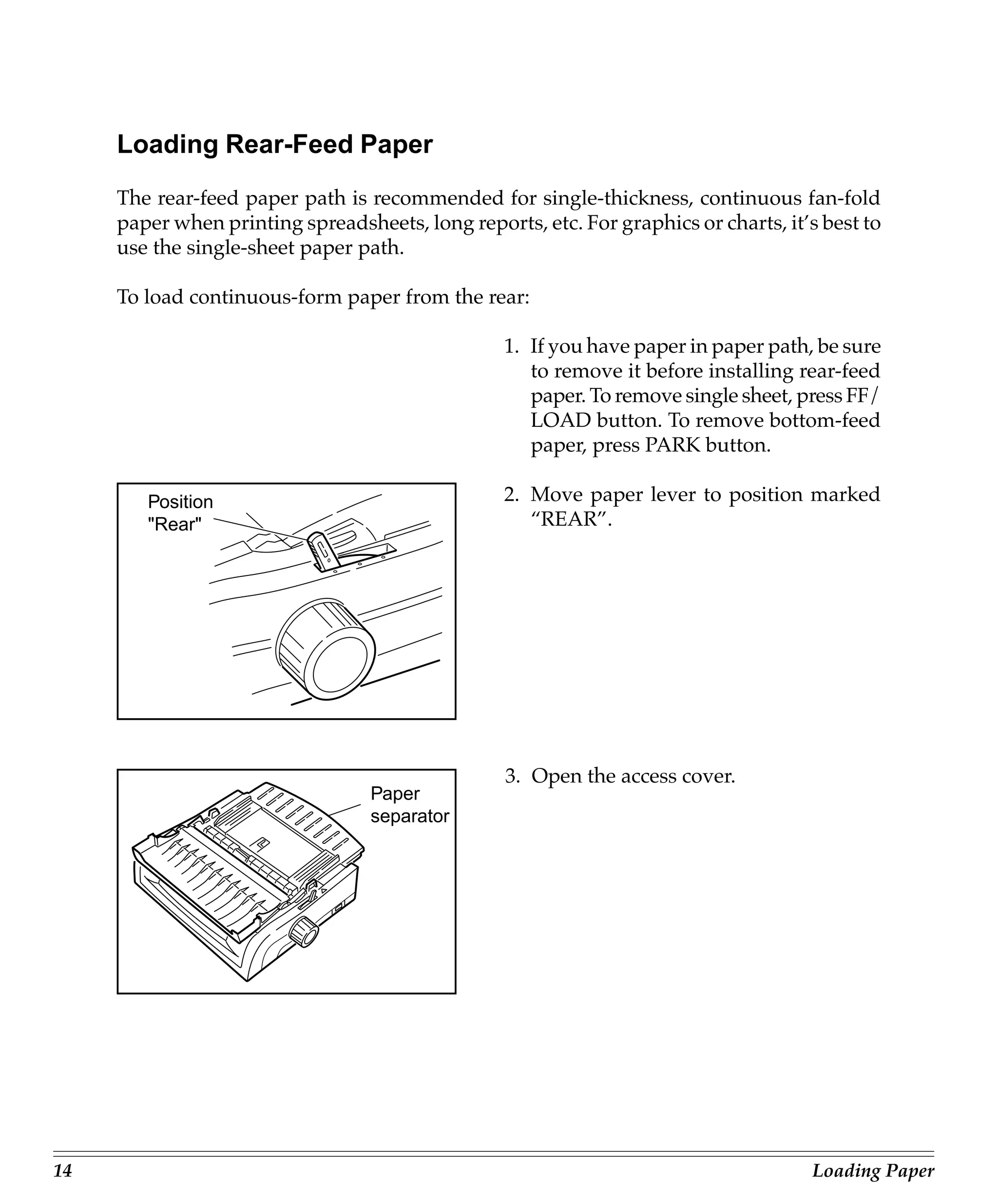
        Position                                  2. Move paper lever to position marked
        "Rear"                                       “REAR”.


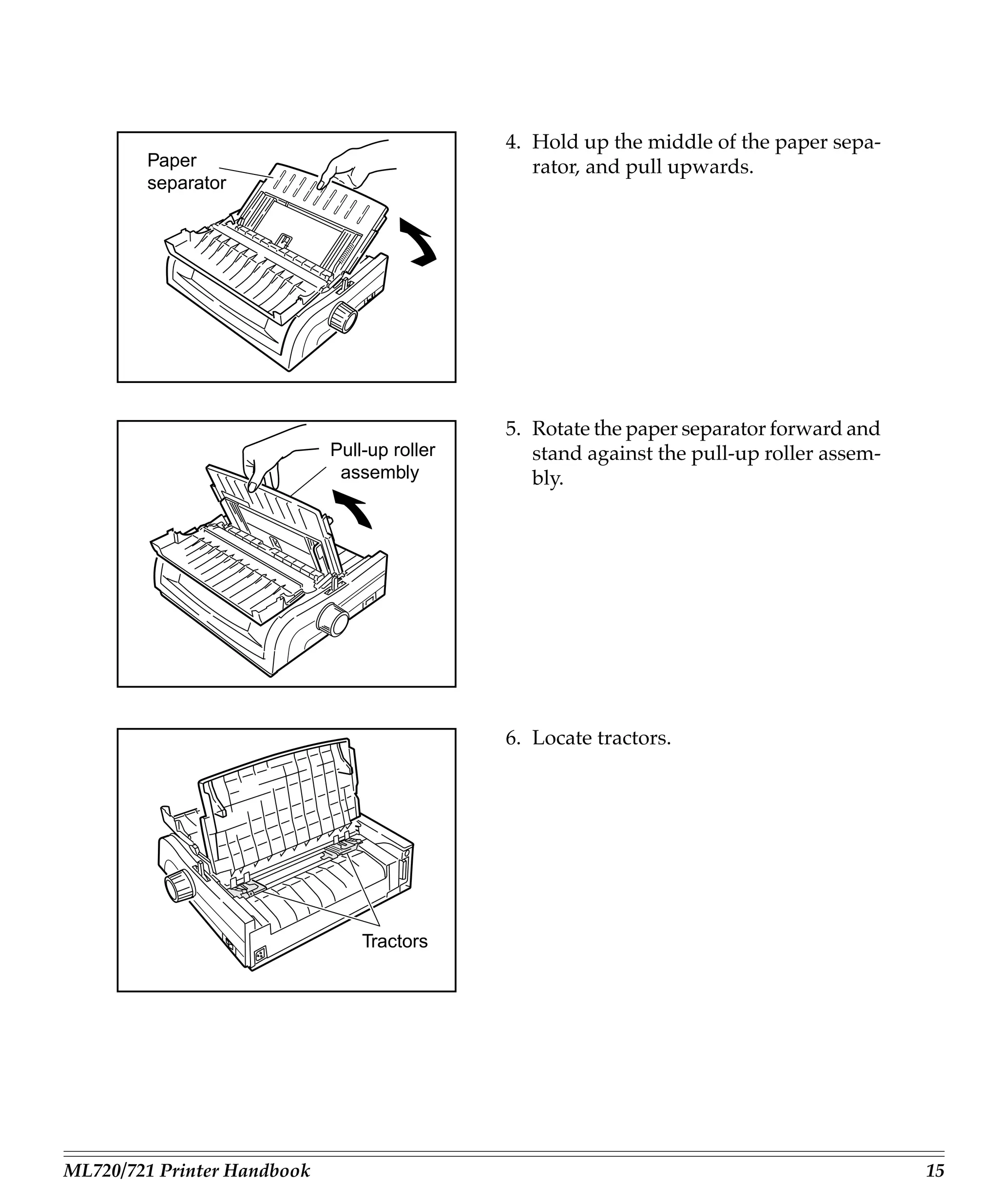
                                                  3. Open the access cover.
                                  Paper
                                  separator


14                                                                                   Loading Paper
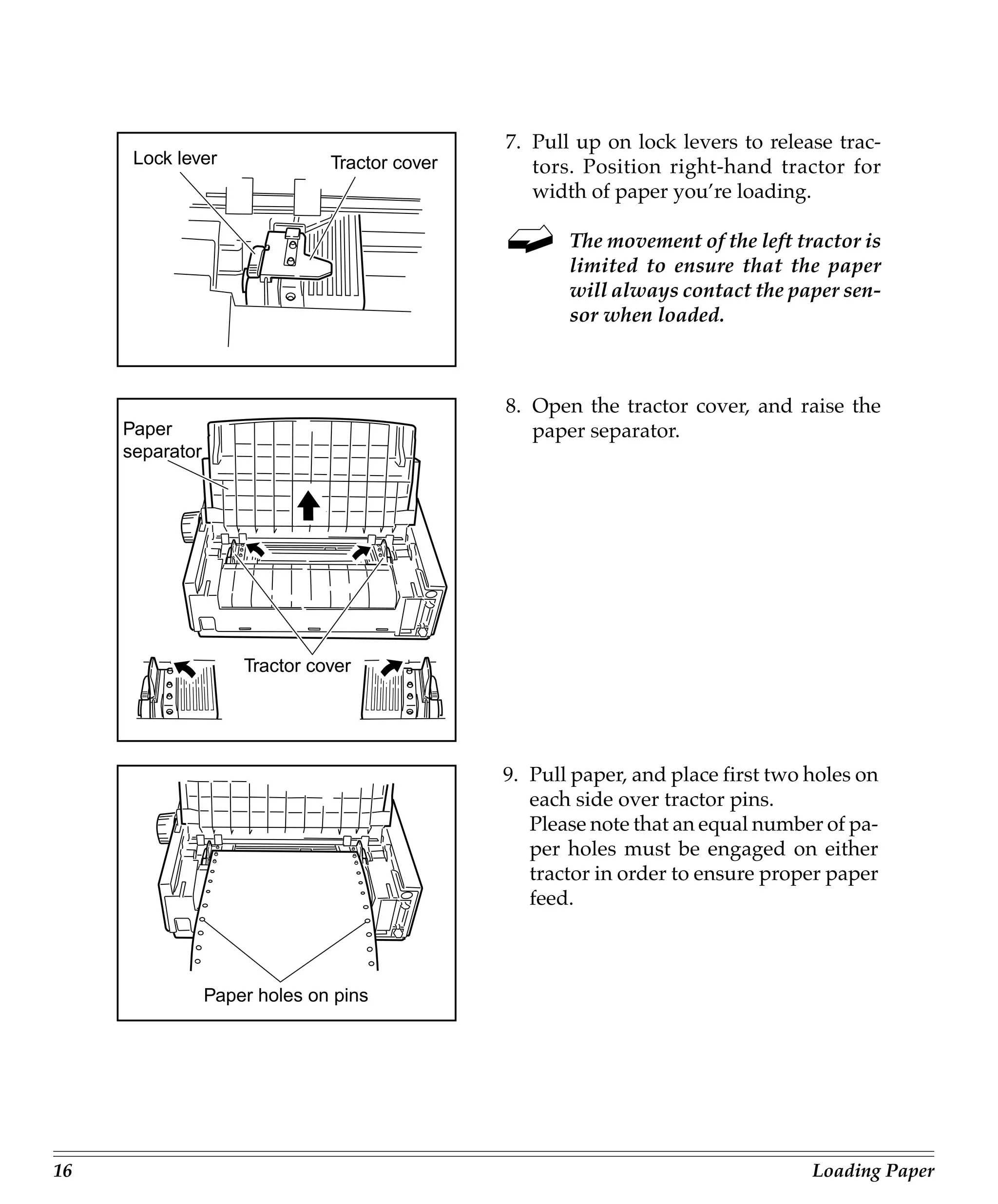
4. Hold up the middle of the paper sepa-
        Paper                                    rator, and pull upwards.
        separator


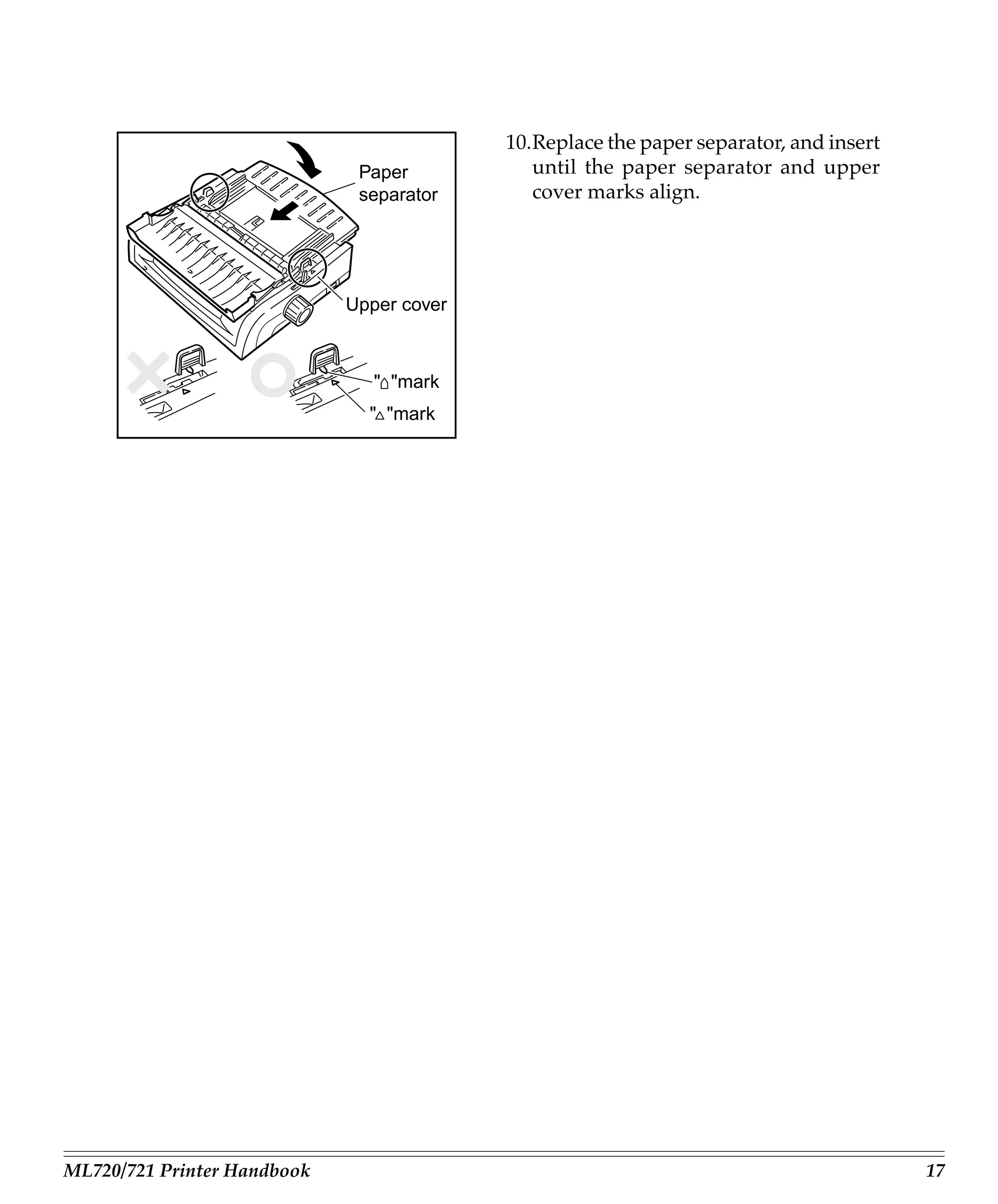
                                              5. Rotate the paper separator forward and
                             Pull-up roller      stand against the pull-up roller assem-
                              assembly           bly.


                                              6. Locate tractors.


                                 Tractors


ML720/721 Printer Handbook                                                                 15
7. Pull up on lock levers to release trac-
      Lock lever               Tractor cover      tors. Position right-hand tractor for
                                                  width of paper you’re loading.

                                                      The movement of the left tractor is
                                                      limited to ensure that the paper
                                                      will always contact the paper sen-
                                                      sor when loaded.


                                               8. Open the tractor cover, and raise the
     Paper                                        paper separator.
     separator


                     Tractor cover


                                               9. Pull paper, and place first two holes on
                                                  each side over tractor pins.
                                                  Please note that an equal number of pa-
                                                  per holes must be engaged on either
                                                  tractor in order to ensure proper paper
                                                  feed.


                 Paper holes on pins


16                                                                                Loading Paper
10.Replace the paper separator, and insert
                              Paper           until the paper separator and upper
                              separator       cover marks align.


                             Upper cover


                                " "mark
                               " "mark


ML720/721 Printer Handbook                                                              17
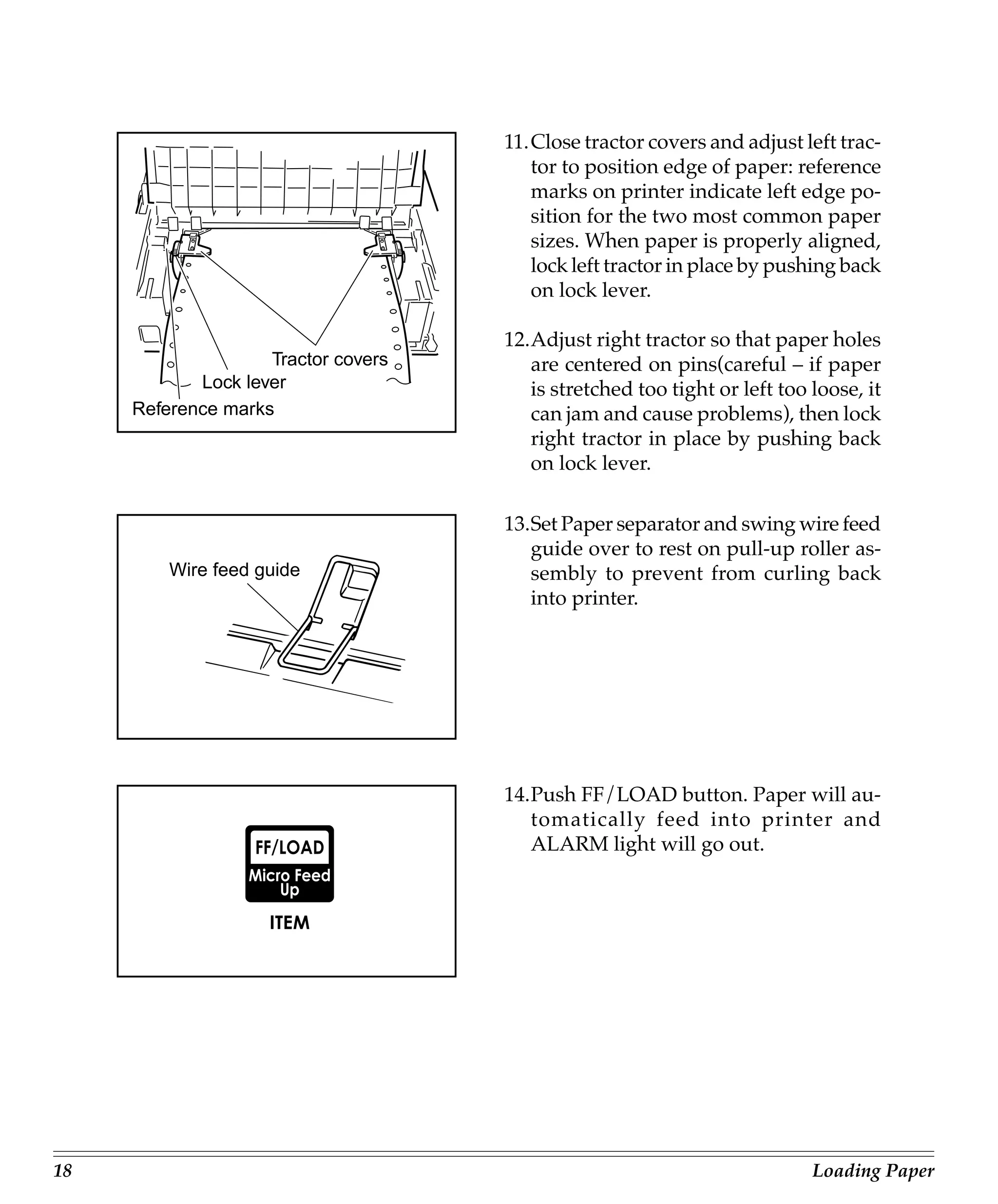
11.Close tractor covers and adjust left trac-
                                        tor to position edge of paper: reference
                                        marks on printer indicate left edge po-
                                        sition for the two most common paper
                                        sizes. When paper is properly aligned,
                                        lock left tractor in place by pushing back
                                        on lock lever.

                                     12.Adjust right tractor so that paper holes
                    Tractor covers      are centered on pins(careful – if paper
            Lock lever                  is stretched too tight or left too loose, it
     Reference marks                    can jam and cause problems), then lock
                                        right tractor in place by pushing back
                                        on lock lever.

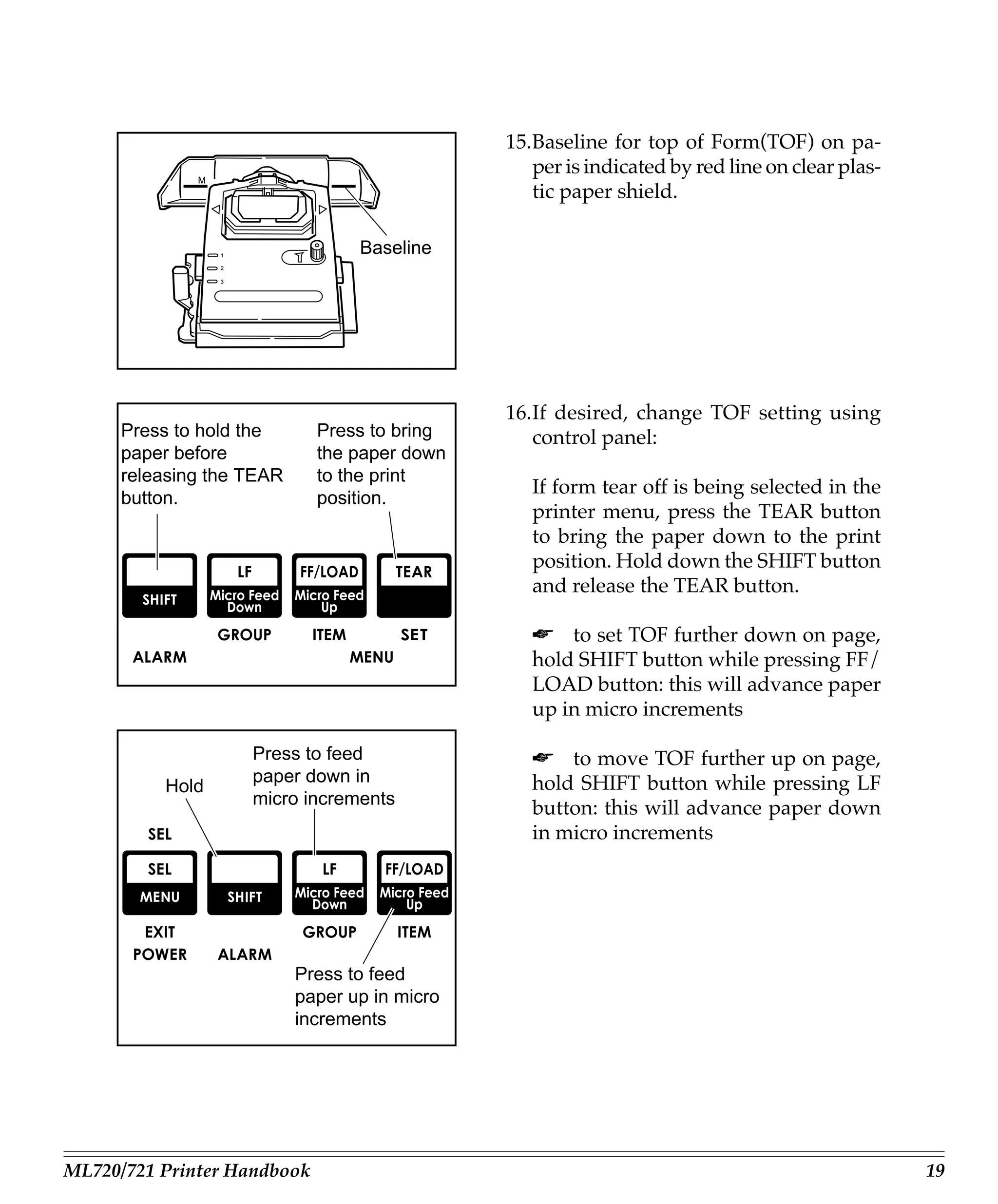
                                     13.Set Paper separator and swing wire feed
                                        guide over to rest on pull-up roller as-
         Wire feed guide                sembly to prevent from curling back
                                        into printer.


                                     14.Push FF/LOAD button. Paper will au-
                                        tomatically feed into printer and
                                        ALARM light will go out.


18                                                                         Loading Paper
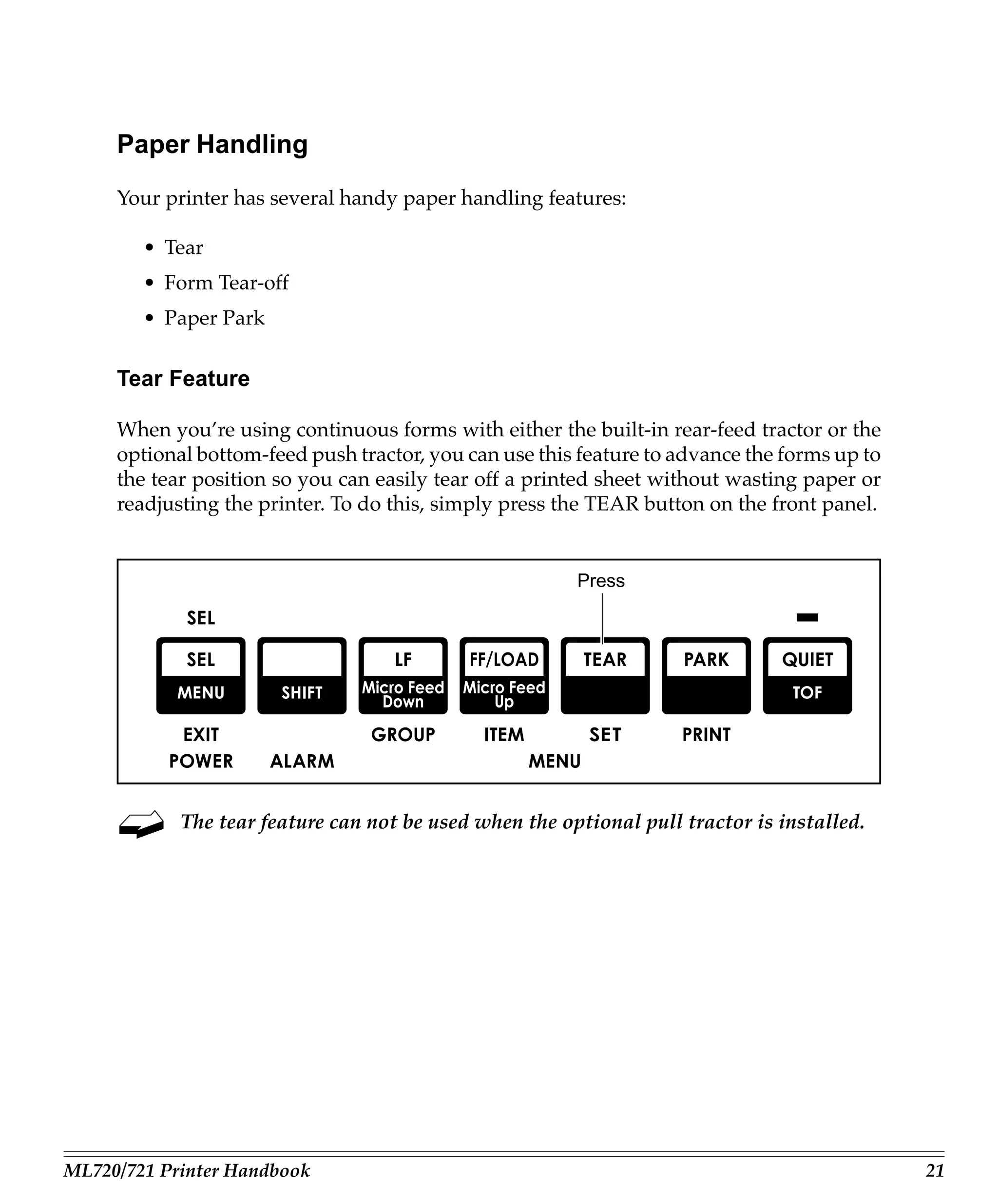
15.Baseline for top of Form(TOF) on pa-
                                                  per is indicated by red line on clear plas-
              M
                                                  tic paper shield.

                  1
                                  Baseline
                  2

                  3


                                               16.If desired, change TOF setting using
      Press to hold the      Press to bring       control panel:
      paper before           the paper down
      releasing the TEAR     to the print
                                                  If form tear off is being selected in the
      button.                position.
                                                  printer menu, press the TEAR button
                                                  to bring the paper down to the print
                                                  position. Hold down the SHIFT button
                                                  and release the TEAR button.

                                                  ☛ to set TOF further down on page,
                                                  hold SHIFT button while pressing FF/
                                                  LOAD button: this will advance paper
                                                  up in micro increments

                      Press to feed               ☛ to move TOF further up on page,
                      paper down in               hold SHIFT button while pressing LF
          Hold
                      micro increments
                                                  button: this will advance paper down
                                                  in micro increments


                           Press to feed
                           paper up in micro
                           increments


ML720/721 Printer Handbook                                                                      19
17.Press SEL button (SEL light will come
        on).


           To temporarily change the Top of
           Form setting for a particular print
           job, deselect the printer and press
           the LF button until you reach the
           TOF position you want to use. The
           printer will retain this setting un-
           til you turn it off.


20                                     Loading Paper
Paper Handling
     Your printer has several handy paper handling features:

        • Tear
        • Form Tear-off
        • Paper Park

     Tear Feature

     When you’re using continuous forms with either the built-in rear-feed tractor or the
     optional bottom-feed push tractor, you can use this feature to advance the forms up to
     the tear position so you can easily tear off a printed sheet without wasting paper or
     readjusting the printer. To do this, simply press the TEAR button on the front panel.


                                                        Press


            The tear feature can not be used when the optional pull tractor is installed.


ML720/721 Printer Handbook                                                                    21
Forms Tear-off Feature

     Caution! Do not engage Forms Tear-off when printing on labels!

     The Forms Tear-off feature can be engaged to automatically move the paper up to the
     tear position after the selected interval (500 milliseconds, one second, or two seconds).
     The page will stay in the tear-off position until the printer receives data. It will then
     move down to the initial printing position.

     This feature is normally turned off. To activate it, enter the printer menu (see Menu
     Mode in Chapter3) and choose one of the intervals.

            Some programs, such as high resolution graphics packages, pause occasion-
            ally while sending data to the printer. If the pause lasts more than the selected
            interval, the paper will advance to the tear-off position until more data is
            received. No data will be lost, but this extra paper movement can cause un-
            even print registration in graphics. If you have this problem, use the menu to
            deactivate Forms Tear-off.


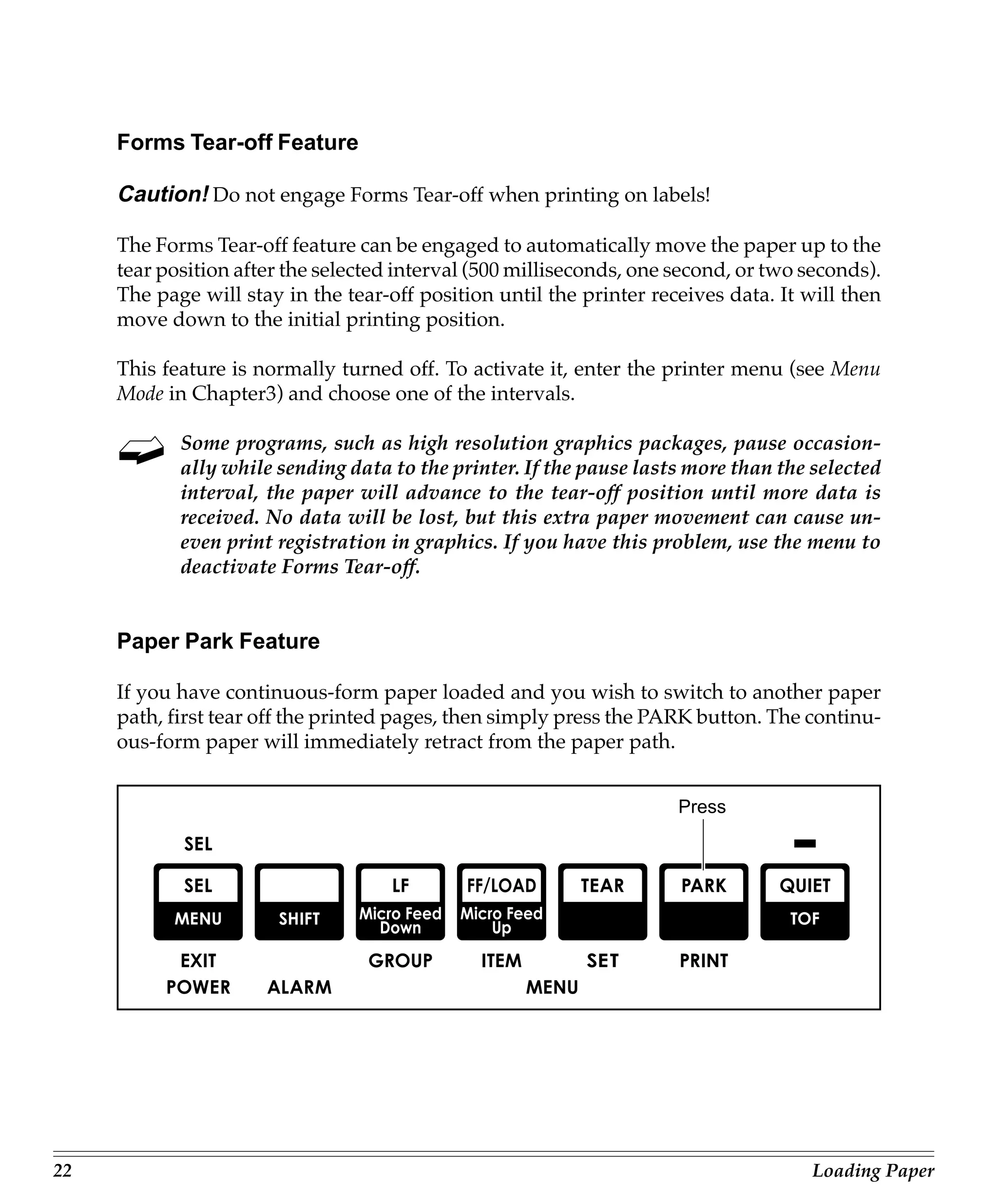
     Paper Park Feature

     If you have continuous-form paper loaded and you wish to switch to another paper
     path, first tear off the printed pages, then simply press the PARK button. The continu-
     ous-form paper will immediately retract from the paper path.


                                                                      Press


22                                                                                   Loading Paper
Switching Paper Paths

     To switch from continuous-form feed from the rear or bottom (optional push or pull
     tractor installed) of the printer to single-sheet feed from the top:

     1. Tear off printed pages.
     2. Press PARK button.
     3. Swing wire guide up into paper separator, then pivot separator to upright posi-
        tion.
     4. Move paper lever to position marked “TOP”.
     5. Load single sheet paper into paper separator.

     To switch from top feed to continuous-form tear or bottom (optional push or pull
     tractor installed) feed:

     1. Make sure no sheet is in paper path (press FF/LOAD to remove single sheet from
        path).
     2. Lower paper separator to continuous forms position and swing wire guide over
        onto pull-up roller assembly.
     3. Move paper lever to position marked “REAR” or “BOT”, as appropriate.
     4. Press FF/LOAD button. Continuous-form paper will advance into print position.


ML720/721 Printer Handbook                                                                23
24   Loading Paper
Chapter 3: Operation
     This chapter explains how to operate your printer. It also provides instructions on
     how to change the default settings and how to perform basic tasks, including select-
     ing typeface/print quality, selecting character pitch, testing your printer, and reset-
     ting Top of Form to the factory default.


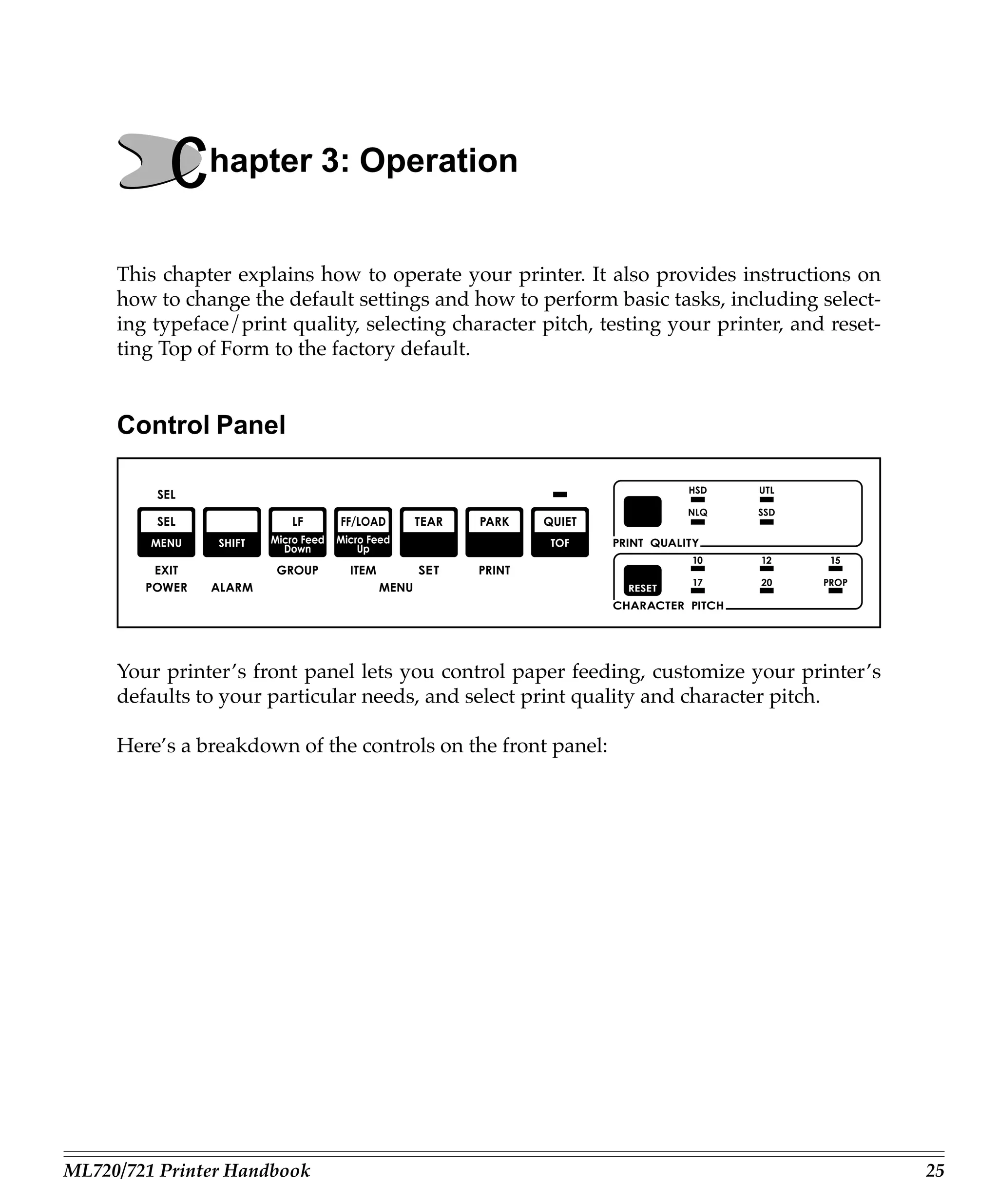
     Control Panel


     Your printer’s front panel lets you control paper feeding, customize your printer’s
     defaults to your particular needs, and select print quality and character pitch.

     Here’s a breakdown of the controls on the front panel:


ML720/721 Printer Handbook                                                                     25
The seven buttons to the left on your control panel are multi-function buttons. In
     routine printer operation, they are used to manipulate the paper, but you can also use
     them to enter and make changes in the printer’s program menu.


     The PRINT QUALITY and CHARACTER PITCH sections at the right on the front
     panel are used to select the quality and size of the printing. See “Performing Basic
     Tasks” later in this chapter for information on how to use these buttons.

     Important! The print quality and character pitch set by means of the front panel can
     be overridden by commands sent by the commercial software package from which
     you’re printing a document. If you run into this problem, see Chapter 5 for informa-
     tion on how to correct it.


26                                                                                     Operation
Print Mode
     In its normal operating state, your printer’s front panel is in the Print Mode.


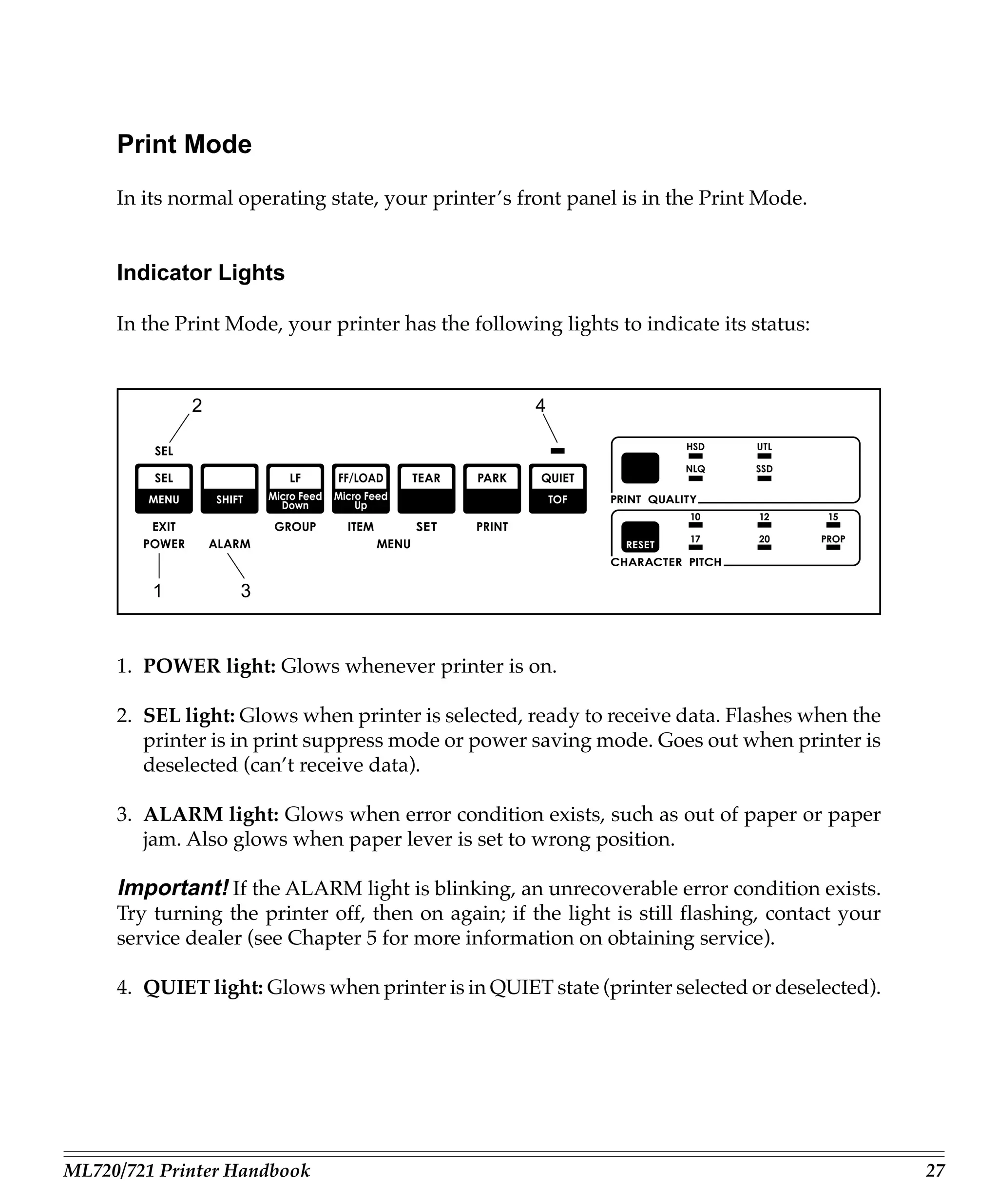
     Indicator Lights

     In the Print Mode, your printer has the following lights to indicate its status:


             2                                       4


         1         3


     1. POWER light: Glows whenever printer is on.

     2. SEL light: Glows when printer is selected, ready to receive data. Flashes when the
        printer is in print suppress mode or power saving mode. Goes out when printer is
        deselected (can’t receive data).

     3. ALARM light: Glows when error condition exists, such as out of paper or paper
        jam. Also glows when paper lever is set to wrong position.

     Important! If the ALARM light is blinking, an unrecoverable error condition exists.
     Try turning the printer off, then on again; if the light is still flashing, contact your
     service dealer (see Chapter 5 for more information on obtaining service).

     4. QUIET light: Glows when printer is in QUIET state (printer selected or deselected).


ML720/721 Printer Handbook                                                                      27
Buttons


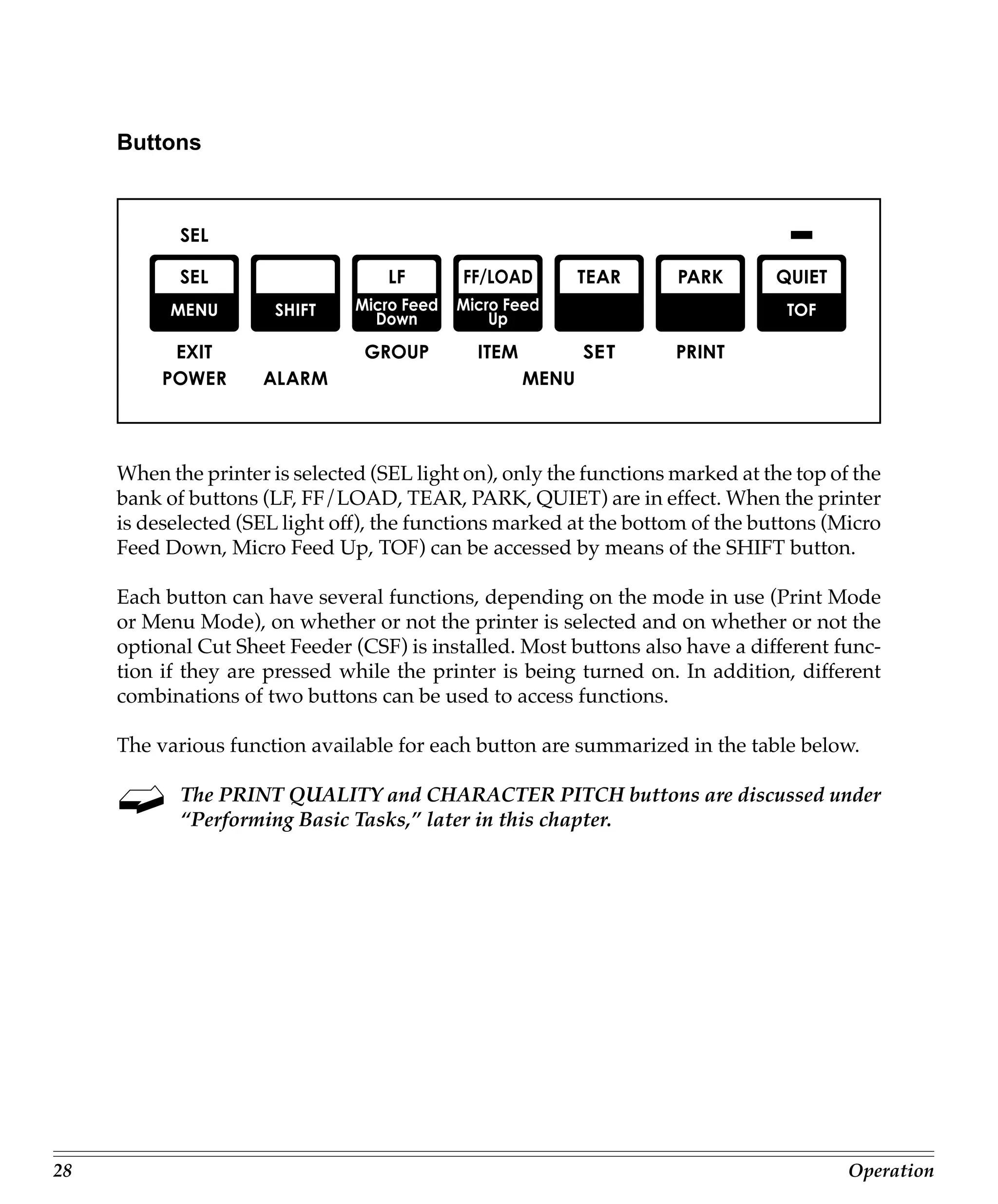
     When the printer is selected (SEL light on), only the functions marked at the top of the
     bank of buttons (LF, FF/LOAD, TEAR, PARK, QUIET) are in effect. When the printer
     is deselected (SEL light off), the functions marked at the bottom of the buttons (Micro
     Feed Down, Micro Feed Up, TOF) can be accessed by means of the SHIFT button.

     Each button can have several functions, depending on the mode in use (Print Mode
     or Menu Mode), on whether or not the printer is selected and on whether or not the
     optional Cut Sheet Feeder (CSF) is installed. Most buttons also have a different func-
     tion if they are pressed while the printer is being turned on. In addition, different
     combinations of two buttons can be used to access functions.

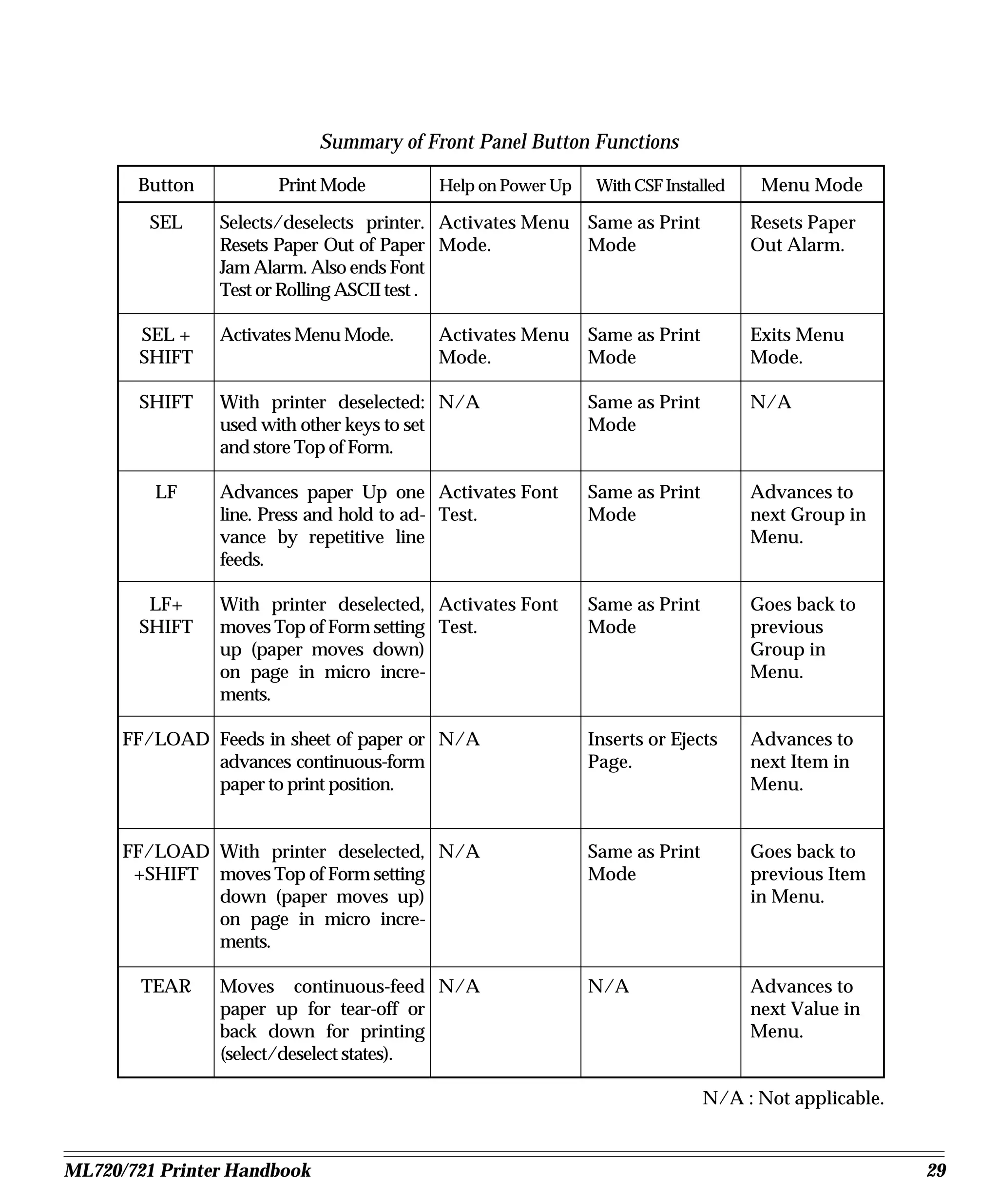
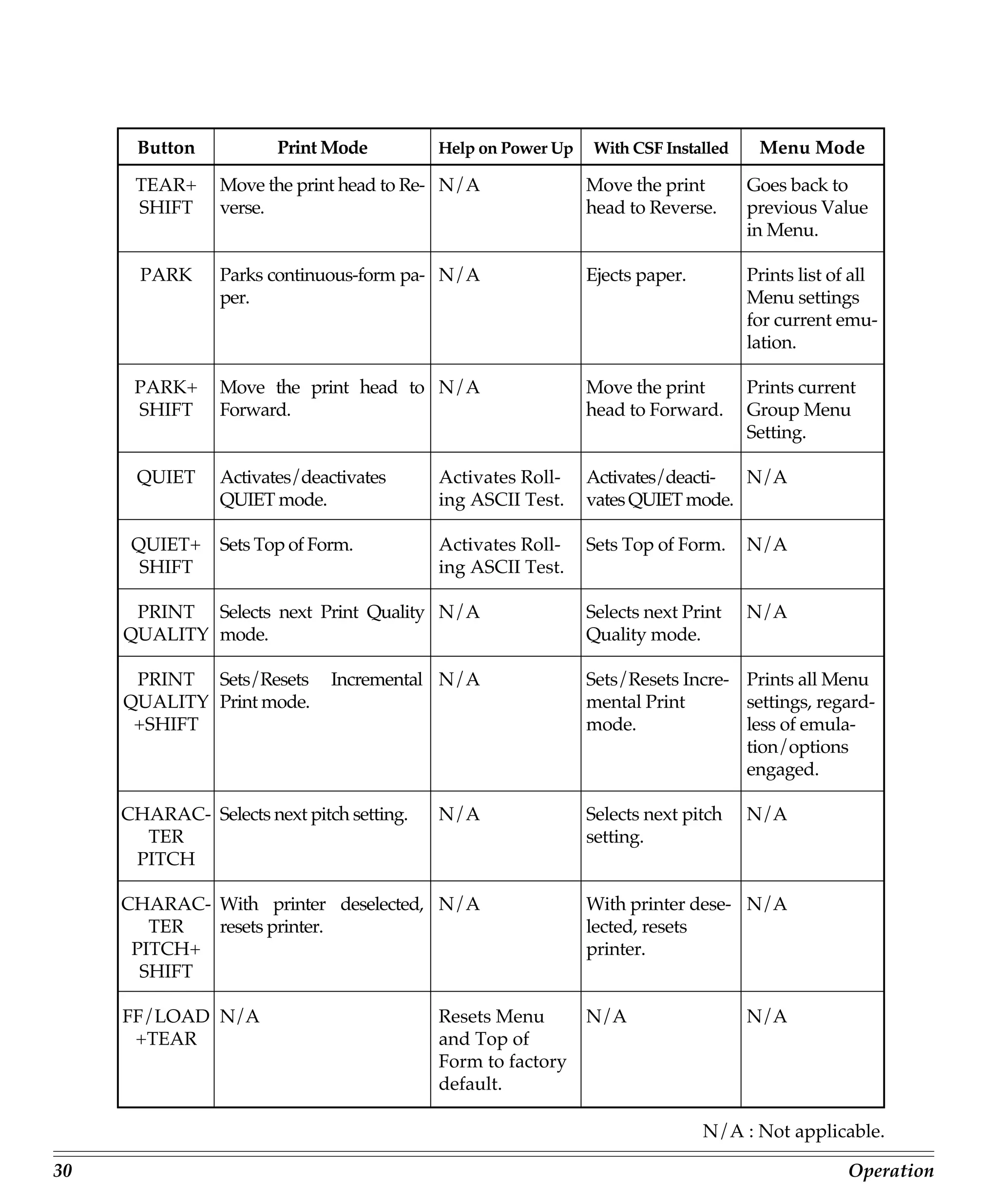
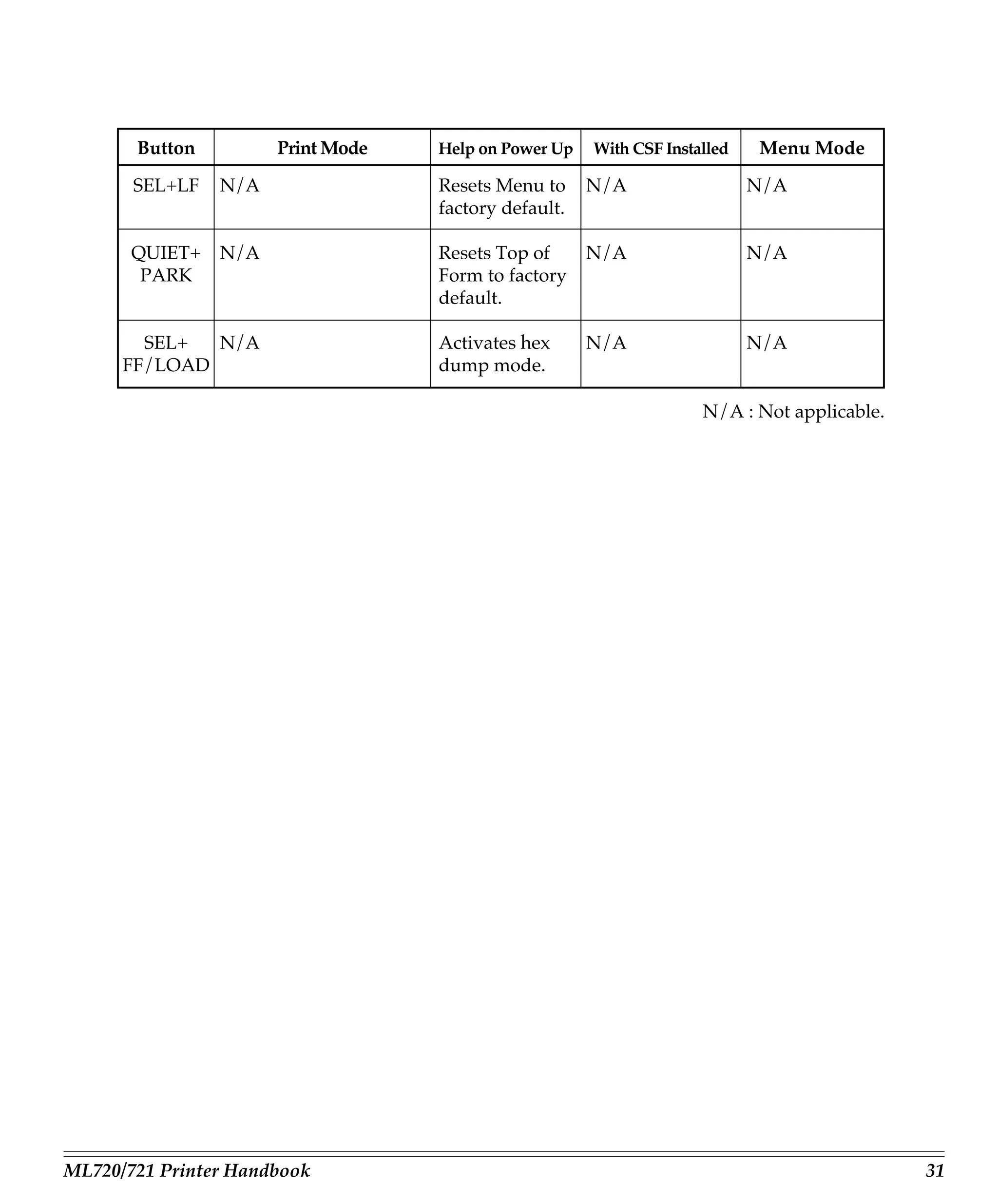
     The various function available for each button are summarized in the table below.

            The PRINT QUALITY and CHARACTER PITCH buttons are discussed under
            “Performing Basic Tasks,” later in this chapter.


28                                                                                       Operation
Summary of Front Panel Button Functions

       Button         Print Mode          Help on Power Up    With CSF Installed    Menu Mode
         SEL    Selects/deselects printer. Activates Menu Same as Print            Resets Paper
                Resets Paper Out of Paper Mode.           Mode                     Out Alarm.
                Jam Alarm. Also ends Font
                Test or Rolling ASCII test .

       SEL +    Activates Menu Mode.     Activates Menu Same as Print              Exits Menu
       SHIFT                             Mode.          Mode                       Mode.

       SHIFT    With printer deselected: N/A                 Same as Print         N/A
                used with other keys to set                  Mode
                and store Top of Form.

         LF     Advances paper Up one Activates Font         Same as Print         Advances to
                line. Press and hold to ad- Test.            Mode                  next Group in
                vance by repetitive line                                           Menu.
                feeds.

        LF+     With printer deselected, Activates Font      Same as Print         Goes back to
       SHIFT    moves Top of Form setting Test.              Mode                  previous
                up (paper moves down)                                              Group in
                on page in micro incre-                                            Menu.
                ments.

      FF/LOAD Feeds in sheet of paper or N/A                 Inserts or Ejects     Advances to
              advances continuous-form                       Page.                 next Item in
              paper to print position.                                             Menu.


      FF/LOAD With printer deselected, N/A                   Same as Print         Goes back to
       +SHIFT moves Top of Form setting                      Mode                  previous Item
              down (paper moves up)                                                in Menu.
              on page in micro incre-
              ments.

        TEAR    Moves continuous-feed N/A                    N/A                   Advances to
                paper up for tear-off or                                           next Value in
                back down for printing                                             Menu.
                (select/deselect states).

                                                                             N/A : Not applicable.


ML720/721 Printer Handbook                                                                           29
Button            Print Mode         Help on Power Up   With CSF Installed    Menu Mode

      TEAR+      Move the print head to Re- N/A               Move the print       Goes back to
      SHIFT      verse.                                       head to Reverse.     previous Value
                                                                                   in Menu.

       PARK      Parks continuous-form pa- N/A                Ejects paper.        Prints list of all
                 per.                                                              Menu settings
                                                                                   for current emu-
                                                                                   lation.

      PARK+      Move the print head to N/A                   Move the print       Prints current
      SHIFT      Forward.                                     head to Forward.     Group Menu
                                                                                   Setting.

      QUIET      Activates/deactivates     Activates Roll-    Activates/deacti- N/A
                 QUIET mode.               ing ASCII Test.    vates QUIET mode.

      QUIET+     Sets Top of Form.         Activates Roll-    Sets Top of Form.    N/A
       SHIFT                               ing ASCII Test.

      PRINT Selects next Print Quality N/A                    Selects next Print   N/A
     QUALITY mode.                                            Quality mode.

      PRINT Sets/Resets        Incremental N/A                Sets/Resets Incre- Prints all Menu
     QUALITY Print mode.                                      mental Print       settings, regard-
      +SHIFT                                                  mode.              less of emula-
                                                                                 tion/options
                                                                                 engaged.

     CHARAC- Selects next pitch setting.   N/A                Selects next pitch   N/A
       TER                                                    setting.
      PITCH

     CHARAC- With printer deselected, N/A                     With printer dese- N/A
        TER  resets printer.                                  lected, resets
      PITCH+                                                  printer.
       SHIFT

     FF/LOAD N/A                           Resets Menu        N/A                  N/A
      +TEAR                                and Top of
                                           Form to factory
                                           default.

                                                                              N/A : Not applicable.

30                                                                                              Operation
Button         Print Mode   Help on Power Up   With CSF Installed   Menu Mode

       SEL+LF   N/A                Resets Menu to     N/A                  N/A
                                   factory default.

       QUIET+   N/A                Resets Top of      N/A                  N/A
        PARK                       Form to factory
                                   default.

        SEL+  N/A                  Activates hex      N/A                  N/A
      FF/LOAD                      dump mode.

                                                                    N/A : Not applicable.


ML720/721 Printer Handbook                                                                  31
Menu Mode
     When your printer is in the Menu Mode, you can use the front panel controls to change
     the defaults for the printer parameters, including emulation, page length, line spac-
     ing, typeface, pitch, etc. For example, you might want to change the page length to 14
     inches if you’re printing on legal-size documents, or to 3 inches if you’re printing on
     labels or small cards.

     To place your printer in the Menu Mode, hold the SHIFT button while pressing the
     SEL button (printer either selected or deselected). The MENU light will come on and,
     if the printer was selected, the SEL light will go out.

     To exit the Menu Mode, hold the SHIFT button and press the SEL button. The MENU
     light will go out and the SEL light will come on.


32                                                                                      Operation
Sample Menu

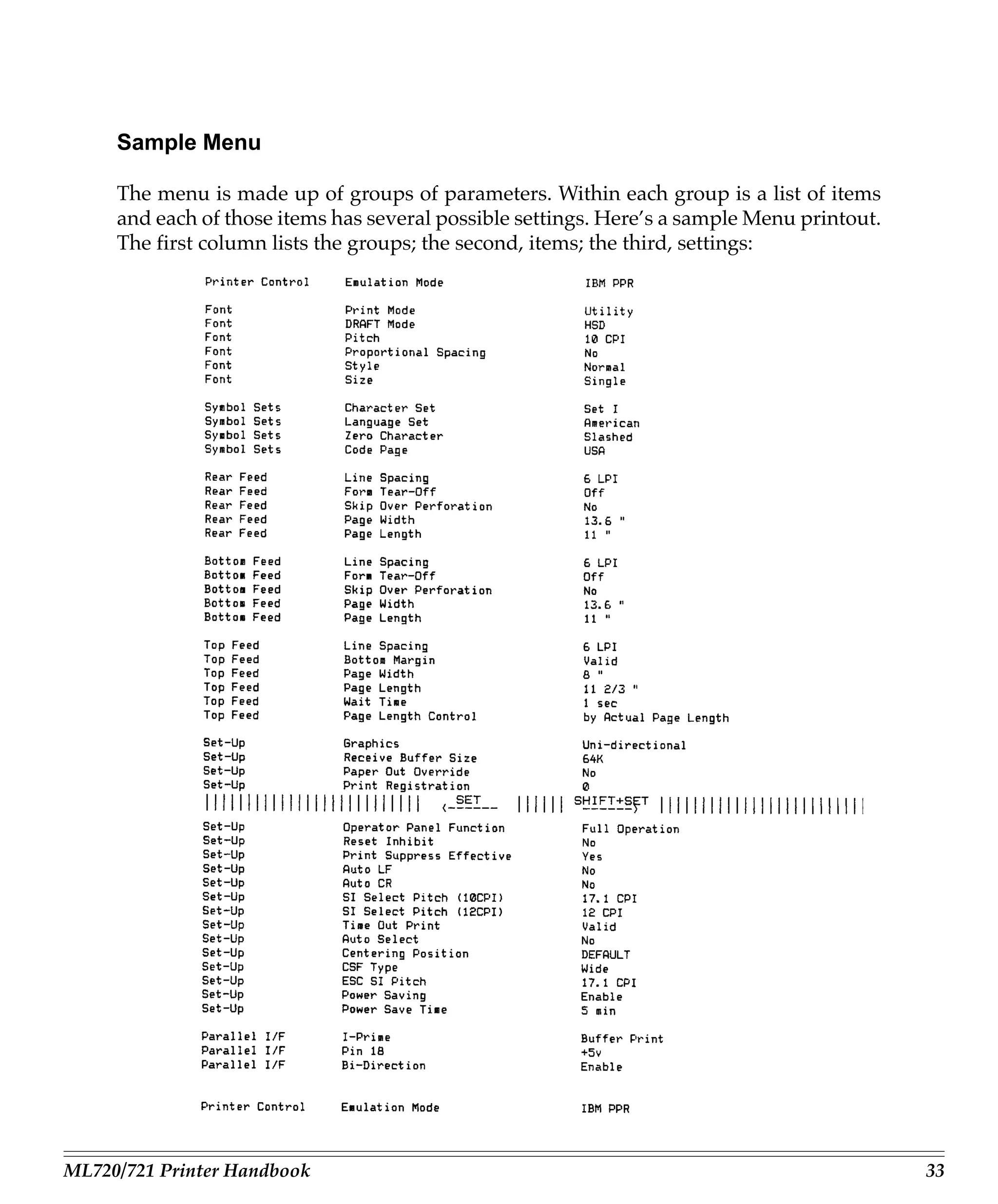
     The menu is made up of groups of parameters. Within each group is a list of items
     and each of those items has several possible settings. Here’s a sample Menu printout.
     The first column lists the groups; the second, items; the third, settings:


ML720/721 Printer Handbook                                                                   33
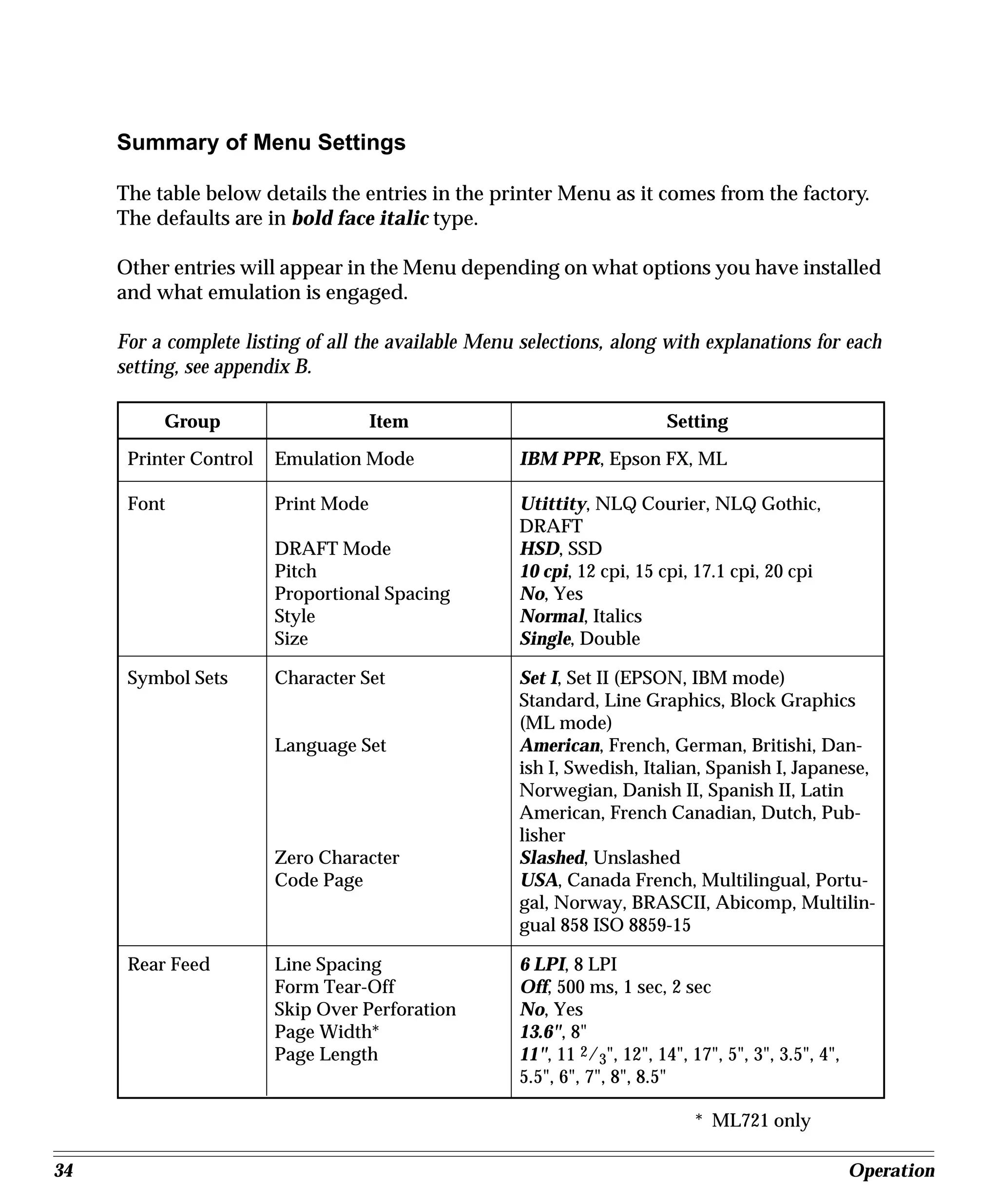
Summary of Menu Settings

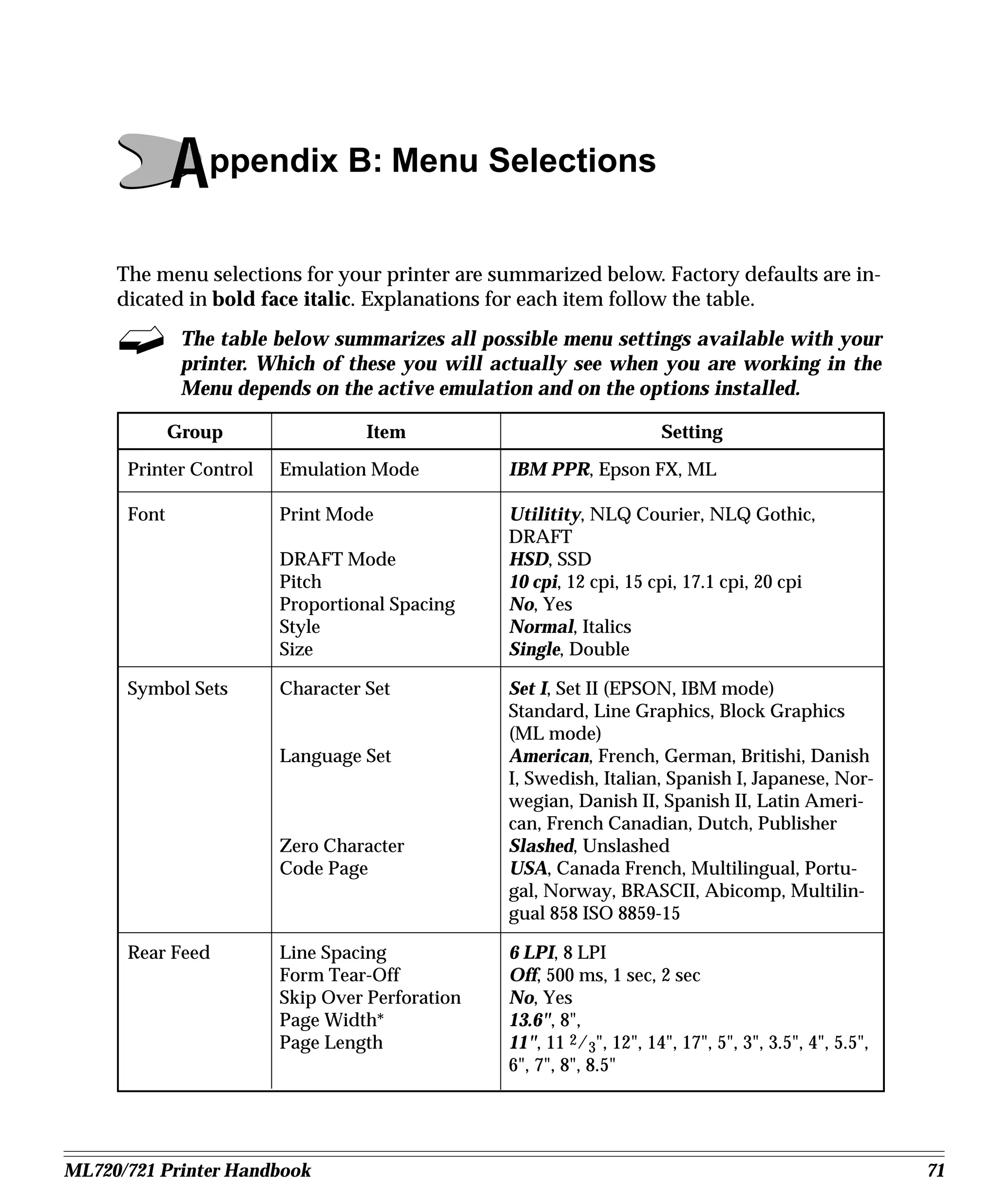
     The table below details the entries in the printer Menu as it comes from the factory.
     The defaults are in bold face italic type.

     Other entries will appear in the Menu depending on what options you have installed
     and what emulation is engaged.

     For a complete listing of all the available Menu selections, along with explanations for each
     setting, see appendix B.

          Group                      Item                                 Setting

      Printer Control   Emulation Mode               IBM PPR, Epson FX, ML

      Font              Print Mode                   Utittity, NLQ Courier, NLQ Gothic,
                                                     DRAFT
                        DRAFT Mode                   HSD, SSD
                        Pitch                        10 cpi, 12 cpi, 15 cpi, 17.1 cpi, 20 cpi
                        Proportional Spacing         No, Yes
                        Style                        Normal, Italics
                        Size                         Single, Double

      Symbol Sets       Character Set                Set I, Set II (EPSON, IBM mode)
                                                     Standard, Line Graphics, Block Graphics
                                                     (ML mode)
                        Language Set                 American, French, German, Britishi, Dan-
                                                     ish I, Swedish, Italian, Spanish I, Japanese,
                                                     Norwegian, Danish II, Spanish II, Latin
                                                     American, French Canadian, Dutch, Pub-
                                                     lisher
                        Zero Character               Slashed, Unslashed
                        Code Page                    USA, Canada French, Multilingual, Portu-
                                                     gal, Norway, BRASCII, Abicomp, Multilin-
                                                     gual 858 ISO 8859-15

      Rear Feed         Line Spacing                 6 LPI, 8 LPI
                        Form Tear-Off                Off, 500 ms, 1 sec, 2 sec
                        Skip Over Perforation        No, Yes
                        Page Width*                  13.6", 8"
                        Page Length                  11", 11 2/3", 12", 14", 17", 5", 3", 3.5", 4",
                                                     5.5", 6", 7", 8", 8.5"

                                                                              * ML721 only

34                                                                                                    Operation
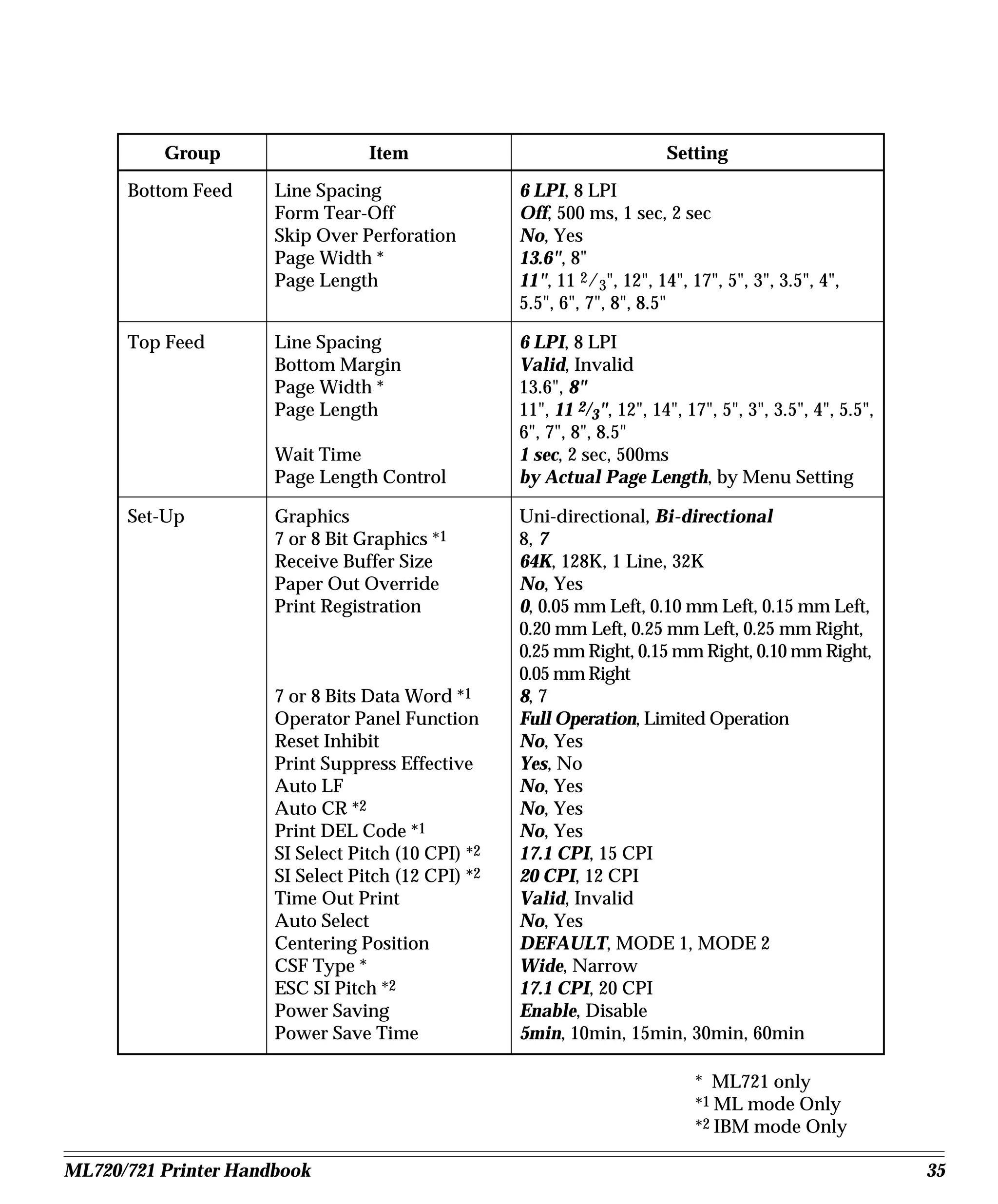
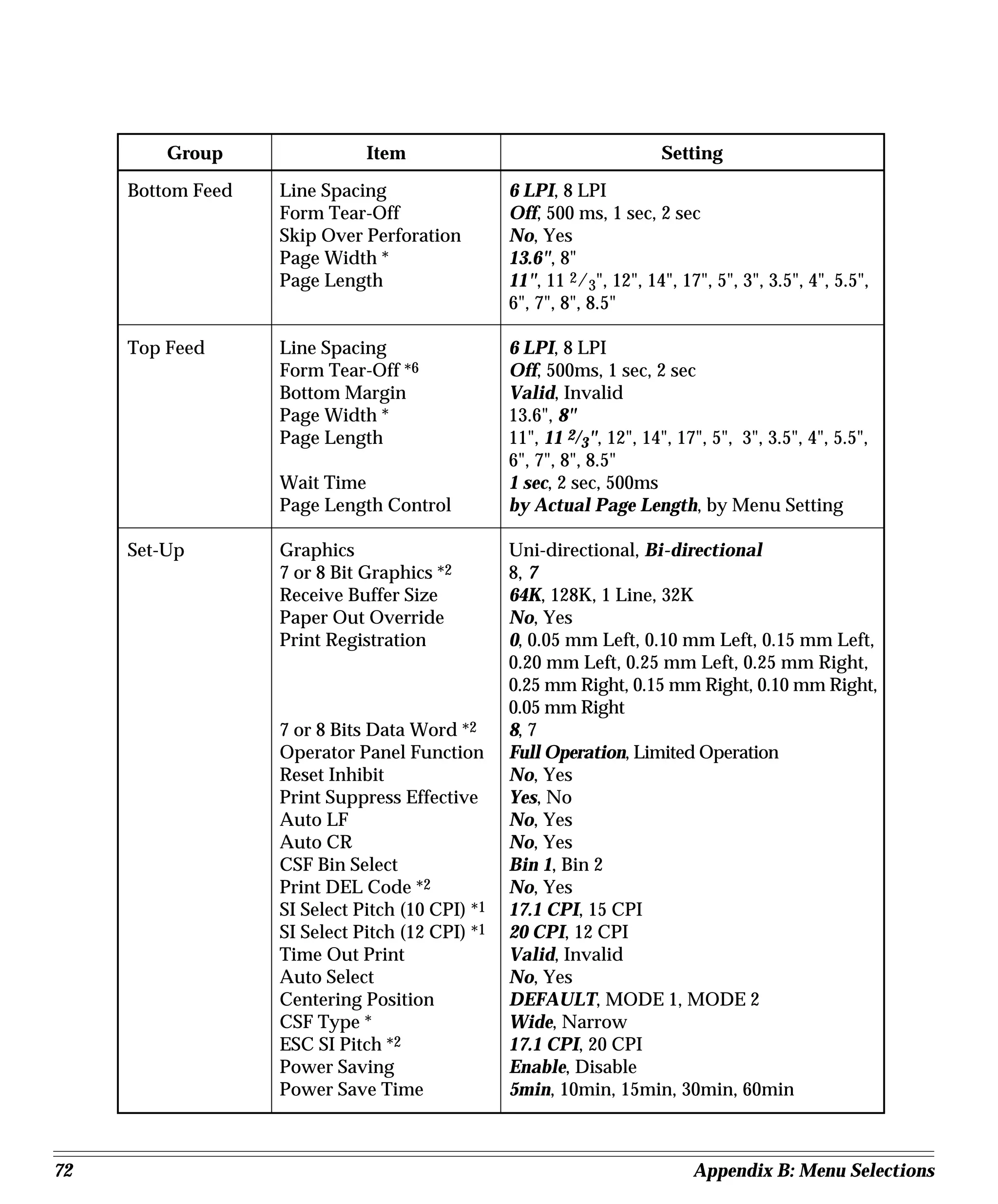
Group                   Item                                   Setting

      Bottom Feed     Line Spacing                  6 LPI, 8 LPI
                      Form Tear-Off                 Off, 500 ms, 1 sec, 2 sec
                      Skip Over Perforation         No, Yes
                      Page Width *                  13.6", 8"
                      Page Length                   11", 11 2/3", 12", 14", 17", 5", 3", 3.5", 4",
                                                    5.5", 6", 7", 8", 8.5"

      Top Feed        Line Spacing                  6 LPI, 8 LPI
                      Bottom Margin                 Valid, Invalid
                      Page Width *                  13.6", 8"
                      Page Length                   11", 11 2/3", 12", 14", 17", 5", 3", 3.5", 4", 5.5",
                                                    6", 7", 8", 8.5"
                      Wait Time                     1 sec, 2 sec, 500ms
                      Page Length Control           by Actual Page Length, by Menu Setting

      Set-Up          Graphics                      Uni-directional, Bi-directional
                      7 or 8 Bit Graphics *1        8, 7
                      Receive Buffer Size           64K, 128K, 1 Line, 32K
                      Paper Out Override            No, Yes
                      Print Registration            0, 0.05 mm Left, 0.10 mm Left, 0.15 mm Left,
                                                    0.20 mm Left, 0.25 mm Left, 0.25 mm Right,
                                                    0.25 mm Right, 0.15 mm Right, 0.10 mm Right,
                                                    0.05 mm Right
                      7 or 8 Bits Data Word *1      8, 7
                      Operator Panel Function       Full Operation, Limited Operation
                      Reset Inhibit                 No, Yes
                      Print Suppress Effective      Yes, No
                      Auto LF                       No, Yes
                      Auto CR *2                    No, Yes
                      Print DEL Code *1             No, Yes
                      SI Select Pitch (10 CPI) *2   17.1 CPI, 15 CPI
                      SI Select Pitch (12 CPI) *2   20 CPI, 12 CPI
                      Time Out Print                Valid, Invalid
                      Auto Select                   No, Yes
                      Centering Position            DEFAULT, MODE 1, MODE 2
                      CSF Type *                    Wide, Narrow
                      ESC SI Pitch *2               17.1 CPI, 20 CPI
                      Power Saving                  Enable, Disable
                      Power Save Time               5min, 10min, 15min, 30min, 60min

                                                                             * ML721 only
                                                                             *1 ML mode Only
                                                                             *2 IBM mode Only

ML720/721 Printer Handbook                                                                                 35
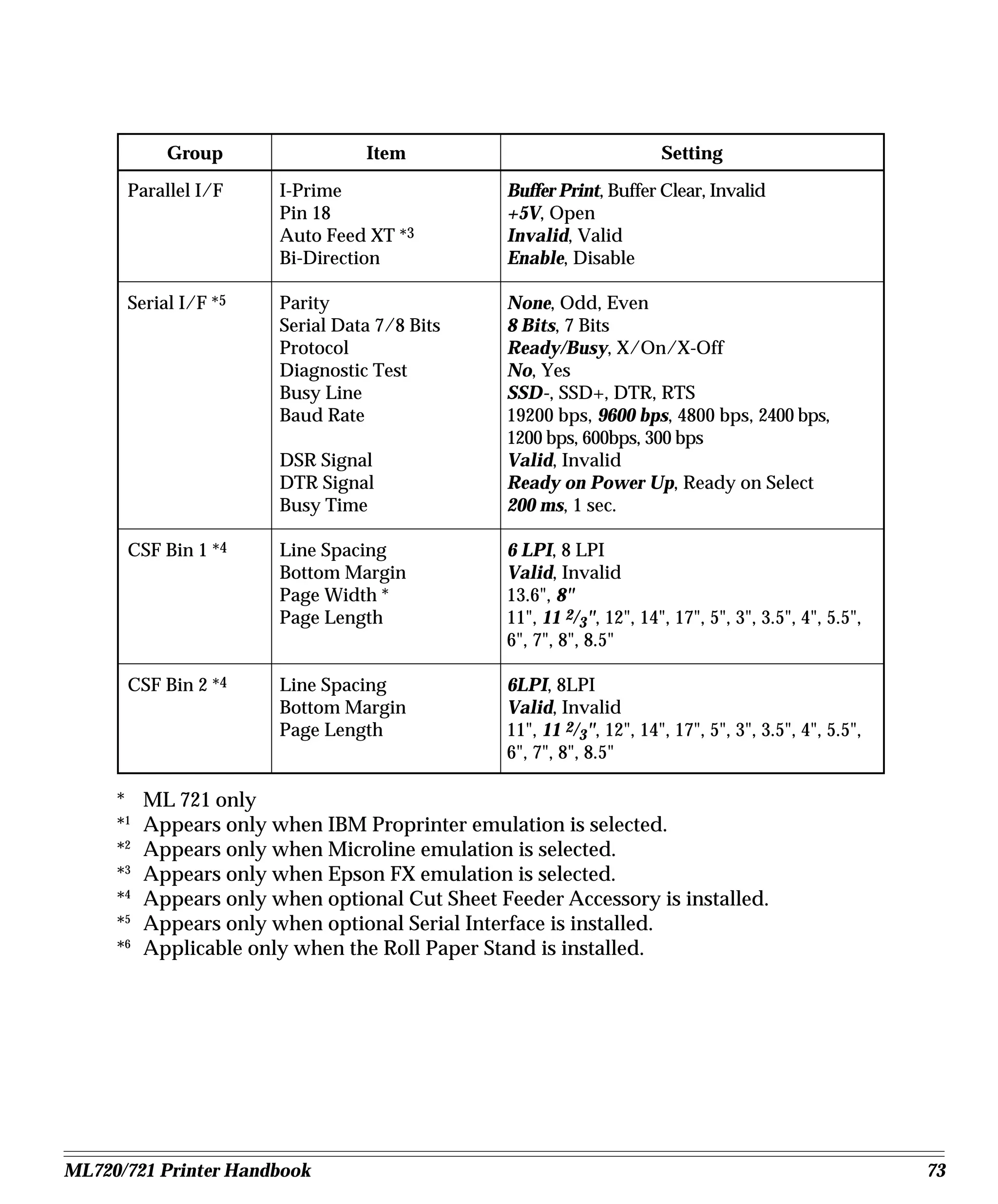
Group                Item                       Setting
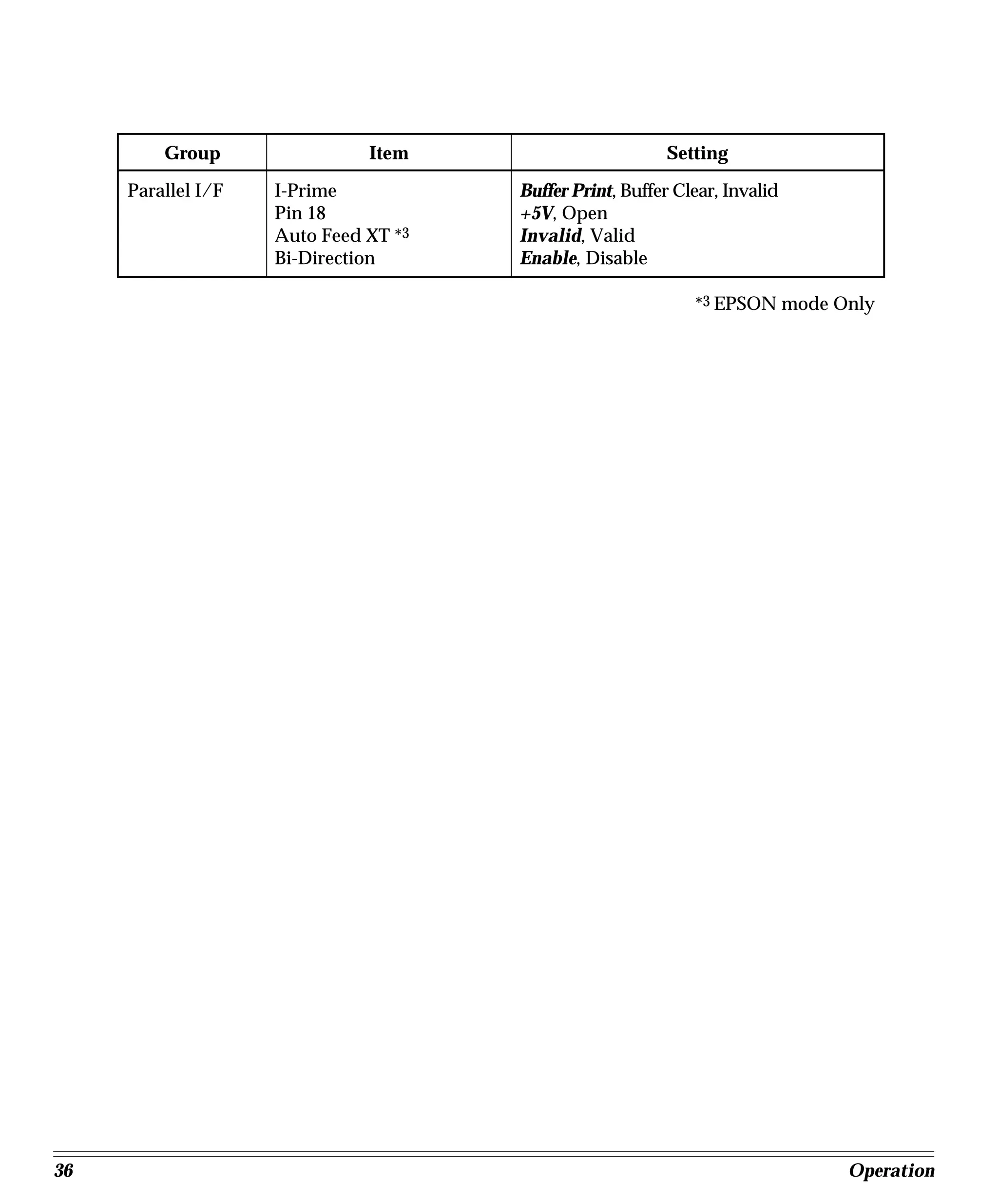
     Parallel I/F   I-Prime           Buffer Print, Buffer Clear, Invalid
                    Pin 18            +5V, Open
                    Auto Feed XT *3   Invalid, Valid
                    Bi-Direction      Enable, Disable

                                                             *3 EPSON mode Only


36                                                                          Operation
Menu Mode Indicator Lights

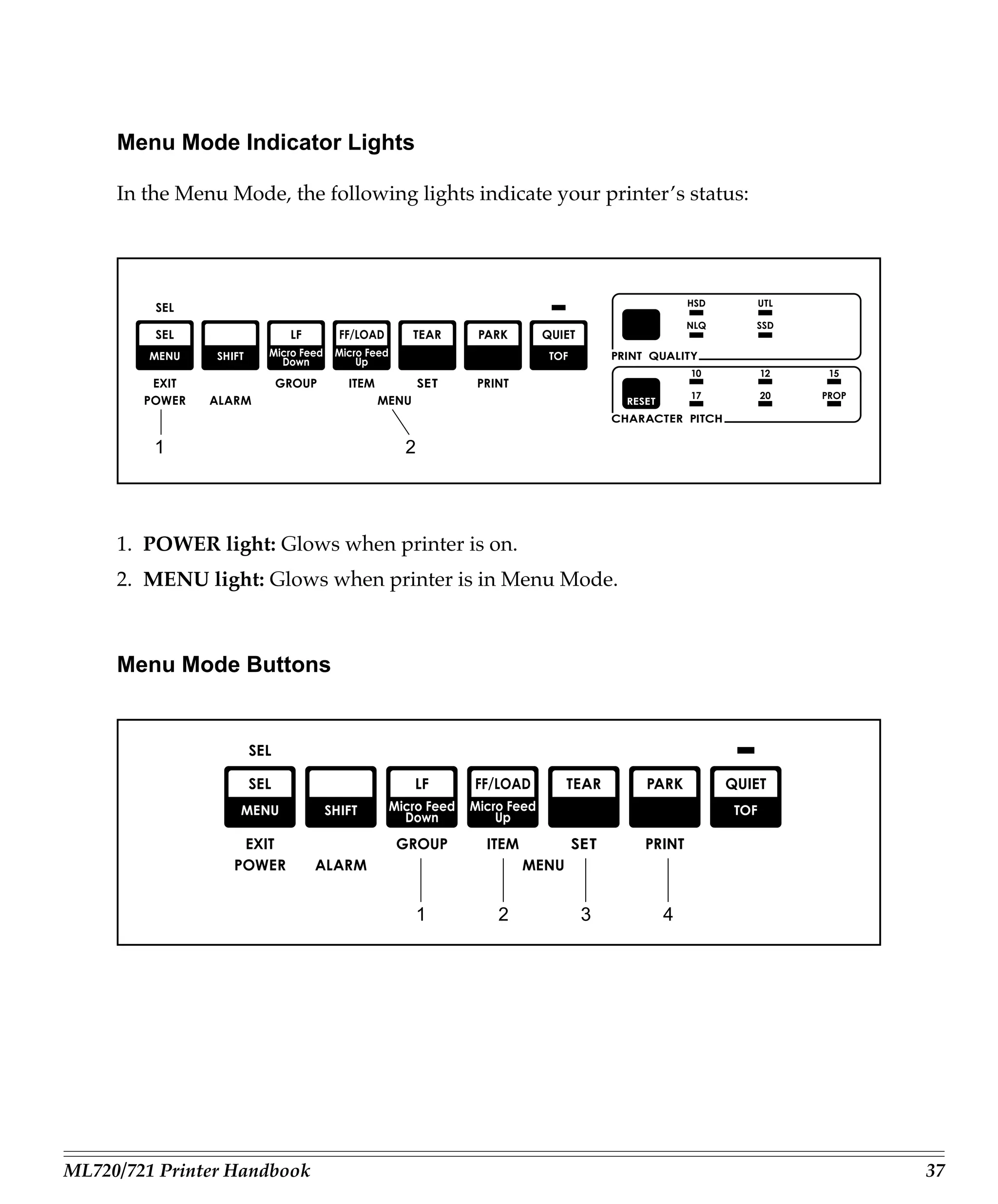
     In the Menu Mode, the following lights indicate your printer’s status:


         1                          2


     1. POWER light: Glows when printer is on.
     2. MENU light: Glows when printer is in Menu Mode.


     Menu Mode Buttons


                                        1      2        3        4


ML720/721 Printer Handbook                                                    37
Here is a summary of the buttons active in the Menu Mode:

     1. GROUP button: Press to scan through groups of listings. Each time you press the
        GROUP button, a line will print, showing the next group in the Menu. To go back
        one group, hold the SHIFT button while pressing the GROUP button.
     2. ITEM button: Press to scan through items for a particular group. Each time you
        press the ITEM button a line will print, showing the next item within the group. To
        go back one item, hold the SHIFT button while pressing the ITEM button.
     3. SET button: Press to change setting for the items. Each time you press the SET
        button, a line will print across the page showing the next setting for that item.
        Keep pressing the button until the setting you wish to engage appears. To go back
        one setting, hold the SHIFT button while pressing the SET button.
     4. PRINT button: Press to print out listing of current settings for each items, group
        by group.


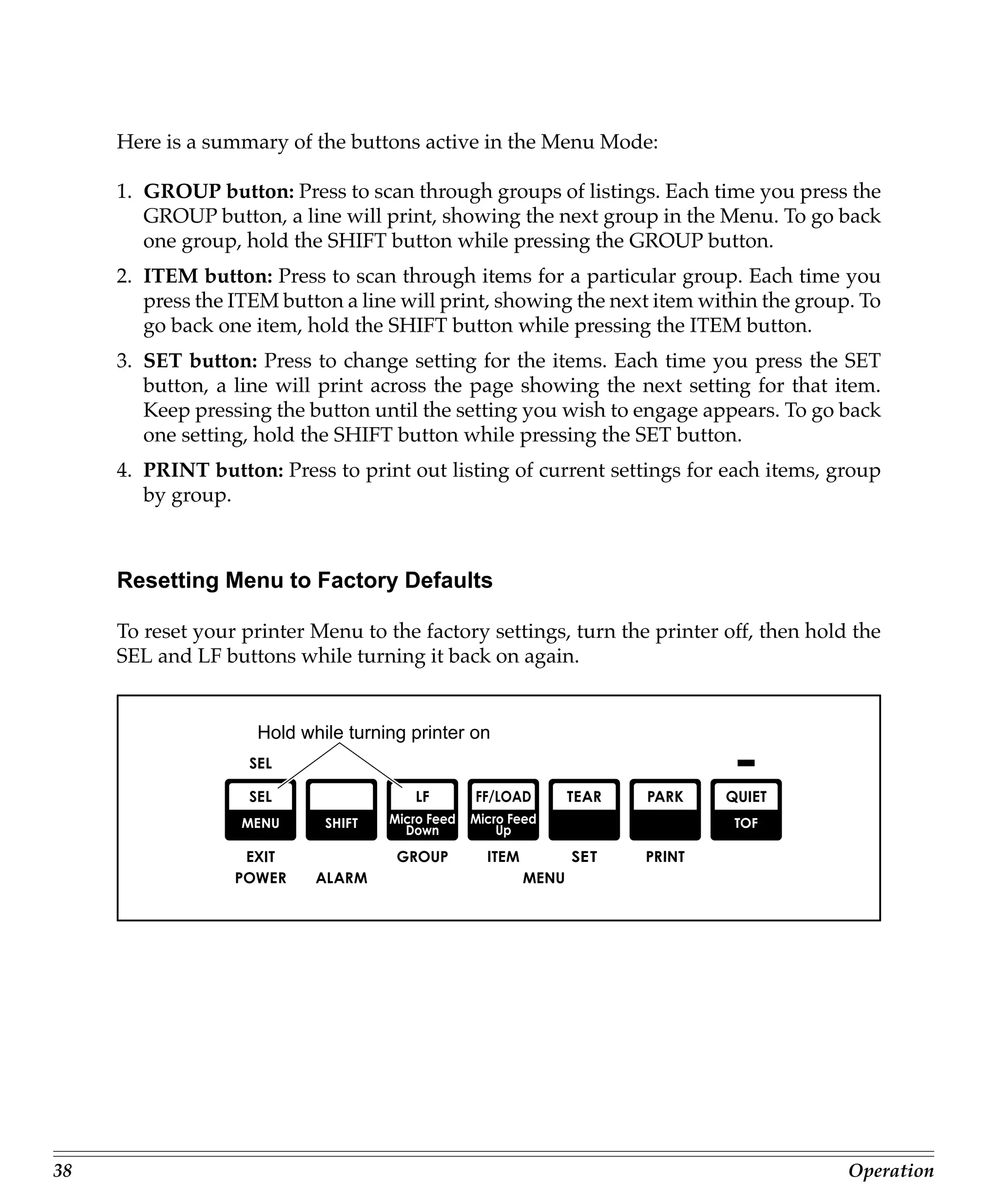
     Resetting Menu to Factory Defaults

     To reset your printer Menu to the factory settings, turn the printer off, then hold the
     SEL and LF buttons while turning it back on again.


                     Hold while turning printer on


38                                                                                      Operation
Performing Basic Tasks

     Selecting Print Quality


                               Print quality button


     Your printer allows you to select from four print qualities: utility, near letter quality
     (NLQ), high speed draft (HSD) and super speed draft (SSD). Utility printing, in Gothic,
     is the default, designed for preparing rough drafts or internal correspondence. NLQ
     printing, in Courier or Gothic (depending on MENU setting), gives you sharp, crisp
     characters for correspondence and important final documents that require a polished
     appearance. HSD and SSD printing, in Gothic, gives the fastest printing, but with the
     poorest quality.

     To select the print quality you want, press the PRINT QUALITY button successively
     until the light underneath the print quality you wish to engage is lit.

            Your printer also prints any of eight different bar codes accessible through
            printer commands. For more information on bar codes, see the end of this chap-
            ter.


ML720/721 Printer Handbook                                                                       39
Selecting Character Pitch


                                Character Pitch button


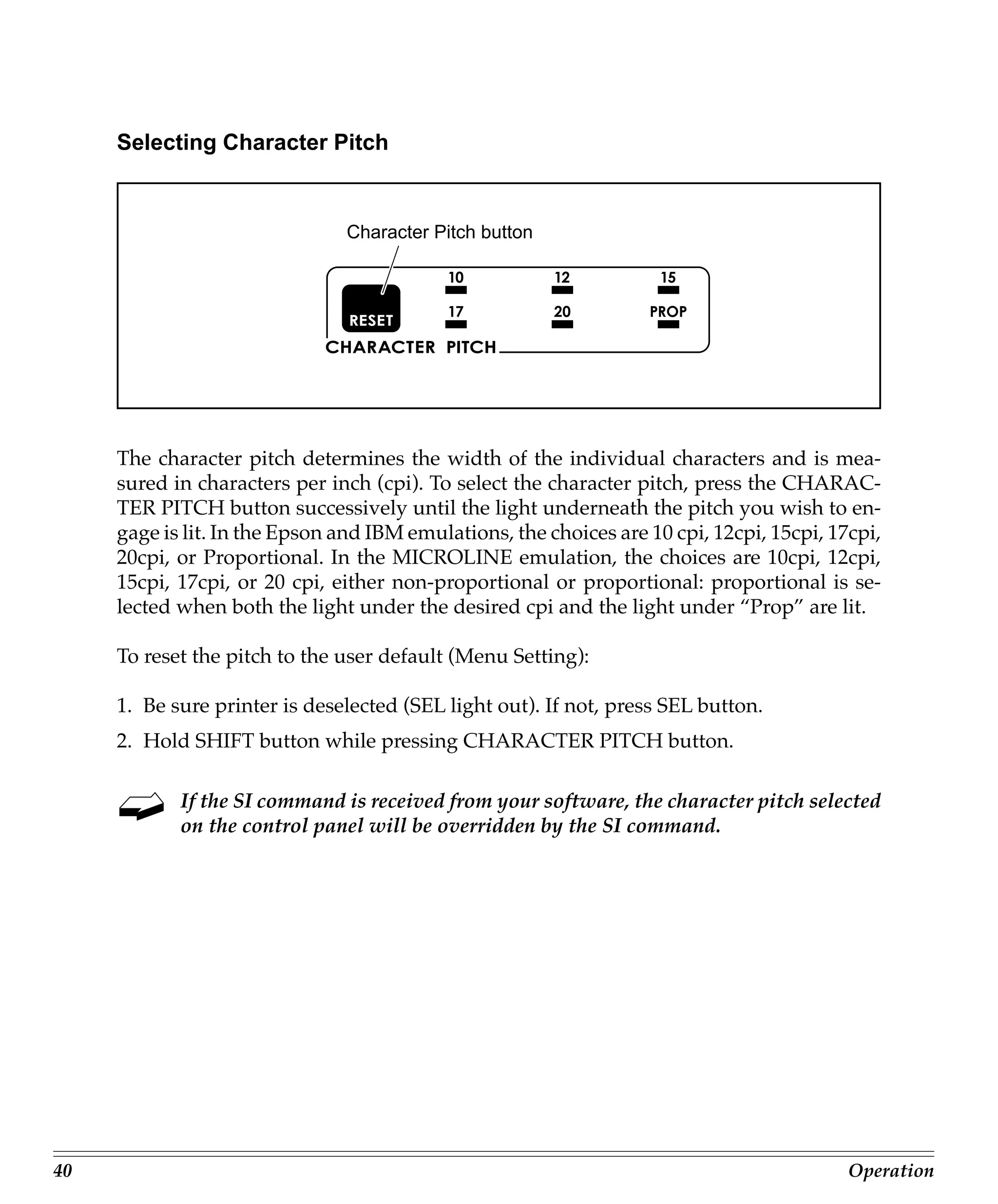
     The character pitch determines the width of the individual characters and is mea-
     sured in characters per inch (cpi). To select the character pitch, press the CHARAC-
     TER PITCH button successively until the light underneath the pitch you wish to en-
     gage is lit. In the Epson and IBM emulations, the choices are 10 cpi, 12cpi, 15cpi, 17cpi,
     20cpi, or Proportional. In the MICROLINE emulation, the choices are 10cpi, 12cpi,
     15cpi, 17cpi, or 20 cpi, either non-proportional or proportional: proportional is se-
     lected when both the light under the desired cpi and the light under “Prop” are lit.

     To reset the pitch to the user default (Menu Setting):

     1. Be sure printer is deselected (SEL light out). If not, press SEL button.
     2. Hold SHIFT button while pressing CHARACTER PITCH button.

            If the SI command is received from your software, the character pitch selected
            on the control panel will be overridden by the SI command.


40                                                                                         Operation
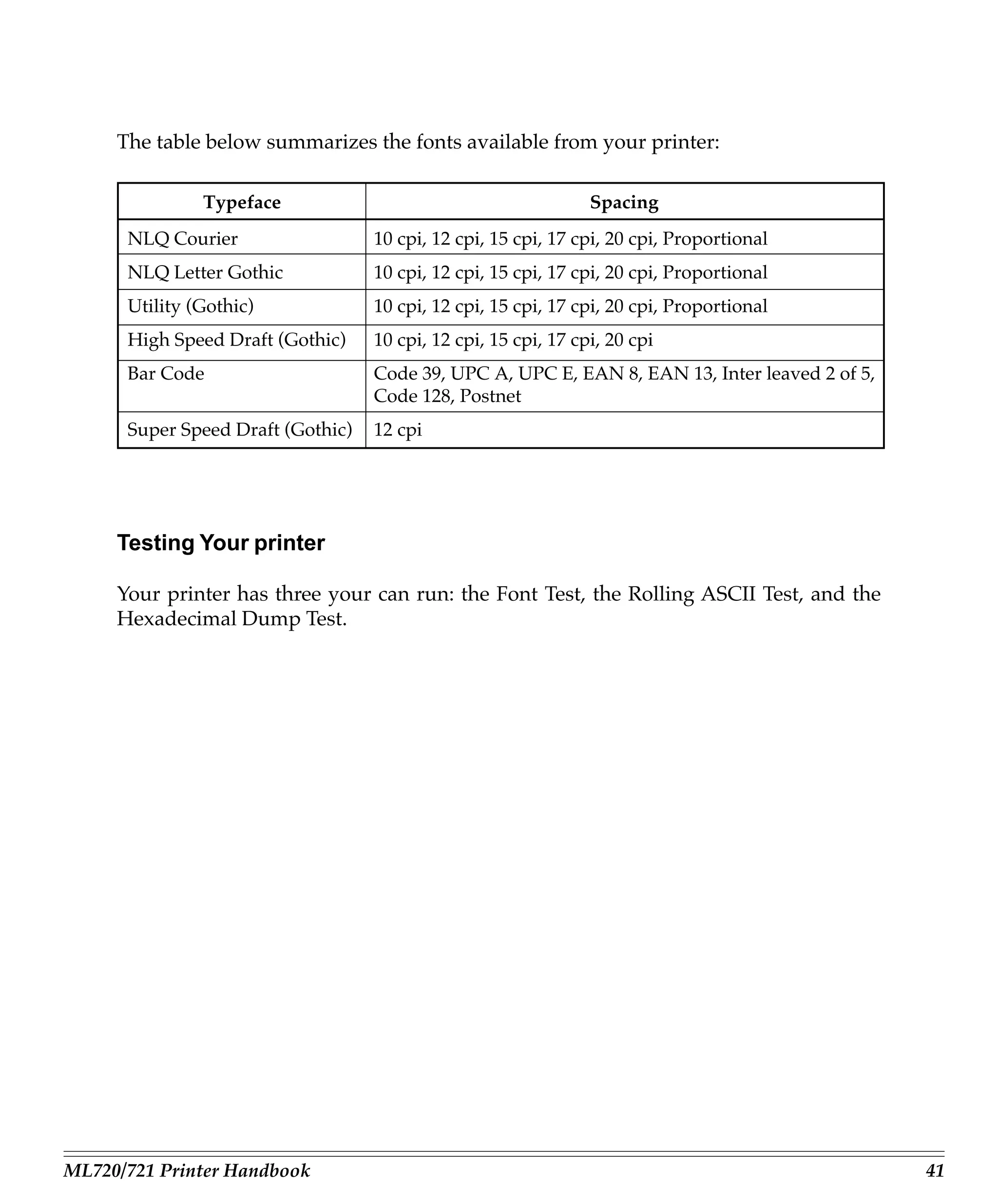
The table below summarizes the fonts available from your printer:

               Typeface                                         Spacing
      NLQ Courier                  10 cpi, 12 cpi, 15 cpi, 17 cpi, 20 cpi, Proportional
      NLQ Letter Gothic            10 cpi, 12 cpi, 15 cpi, 17 cpi, 20 cpi, Proportional
      Utility (Gothic)             10 cpi, 12 cpi, 15 cpi, 17 cpi, 20 cpi, Proportional
      High Speed Draft (Gothic)    10 cpi, 12 cpi, 15 cpi, 17 cpi, 20 cpi
      Bar Code                     Code 39, UPC A, UPC E, EAN 8, EAN 13, Inter leaved 2 of 5,
                                   Code 128, Postnet
      Super Speed Draft (Gothic)   12 cpi


     Testing Your printer

     Your printer has three your can run: the Font Test, the Rolling ASCII Test, and the
     Hexadecimal Dump Test.


ML720/721 Printer Handbook                                                                      41
Font Test

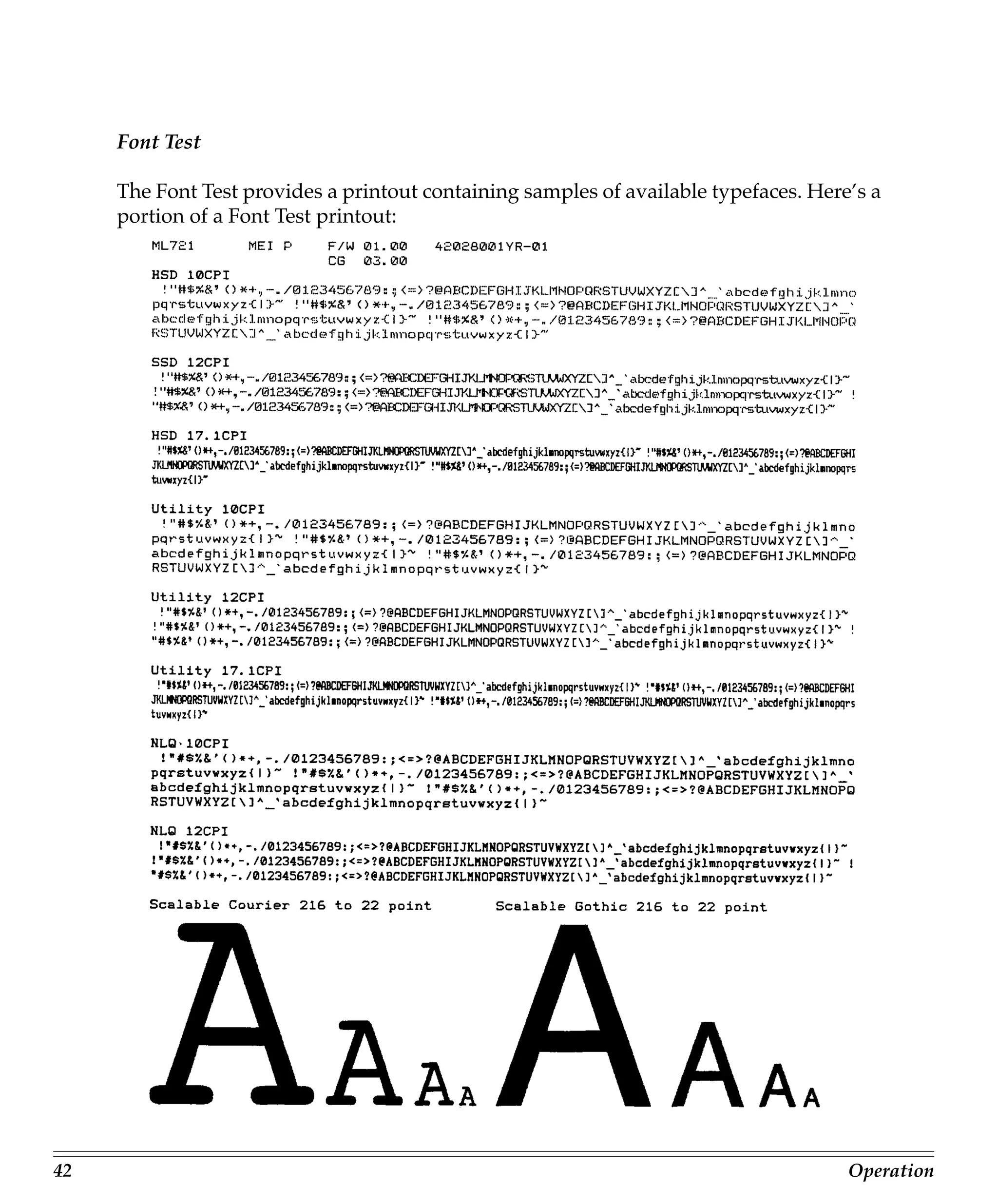
     The Font Test provides a printout containing samples of available typefaces. Here’s a
     portion of a Font Test printout:


42                                                                                    Operation
To run the Font Test:

     1. Be sure paper is loaded.
     2. Turn off printer.
     3. Hold LF button for several seconds while turning printer on. (IF printer simply
        turns on without starting to print, you didn’t hold down LF button long enough.)


     Rolling ASCII Test

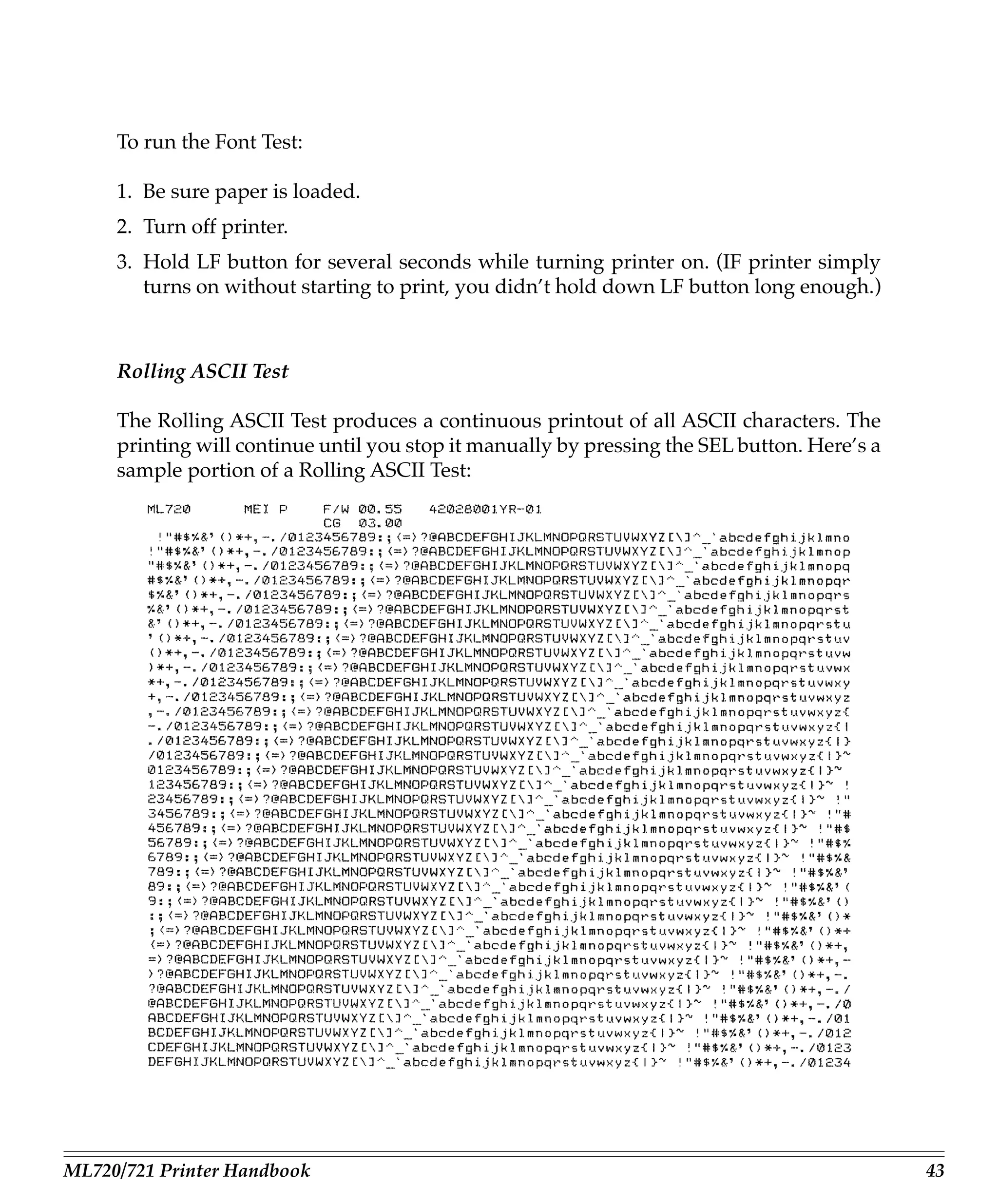
     The Rolling ASCII Test produces a continuous printout of all ASCII characters. The
     printing will continue until you stop it manually by pressing the SEL button. Here’s a
     sample portion of a Rolling ASCII Test:


ML720/721 Printer Handbook                                                                    43
To activate the Rolling ASCII Test:

     1. Be sure paper is loaded.

     Caution! For wide carriage Model 721, be sure you have wide paper loaded!

     2. Turn off printer.
     3. Hold QUIET button for several seconds while turning printer on. (If printer sim-
        ply turns on without starting to print, you didn’t hold down QUIET button long
        enough.)


     Hexadecimal Dump Test

     If you want to test the data your computer is sending to the printer, you can place the
     printer in the Hexadecimal Dump Mode. When the printer is in the Hex Dump Mode,
     all data received, including text and printer commands, will be printed in both hexa-
     decimal and ASCII format.

            In the ASCII format, all non-printable characters will be represented by a pe-
            riod.

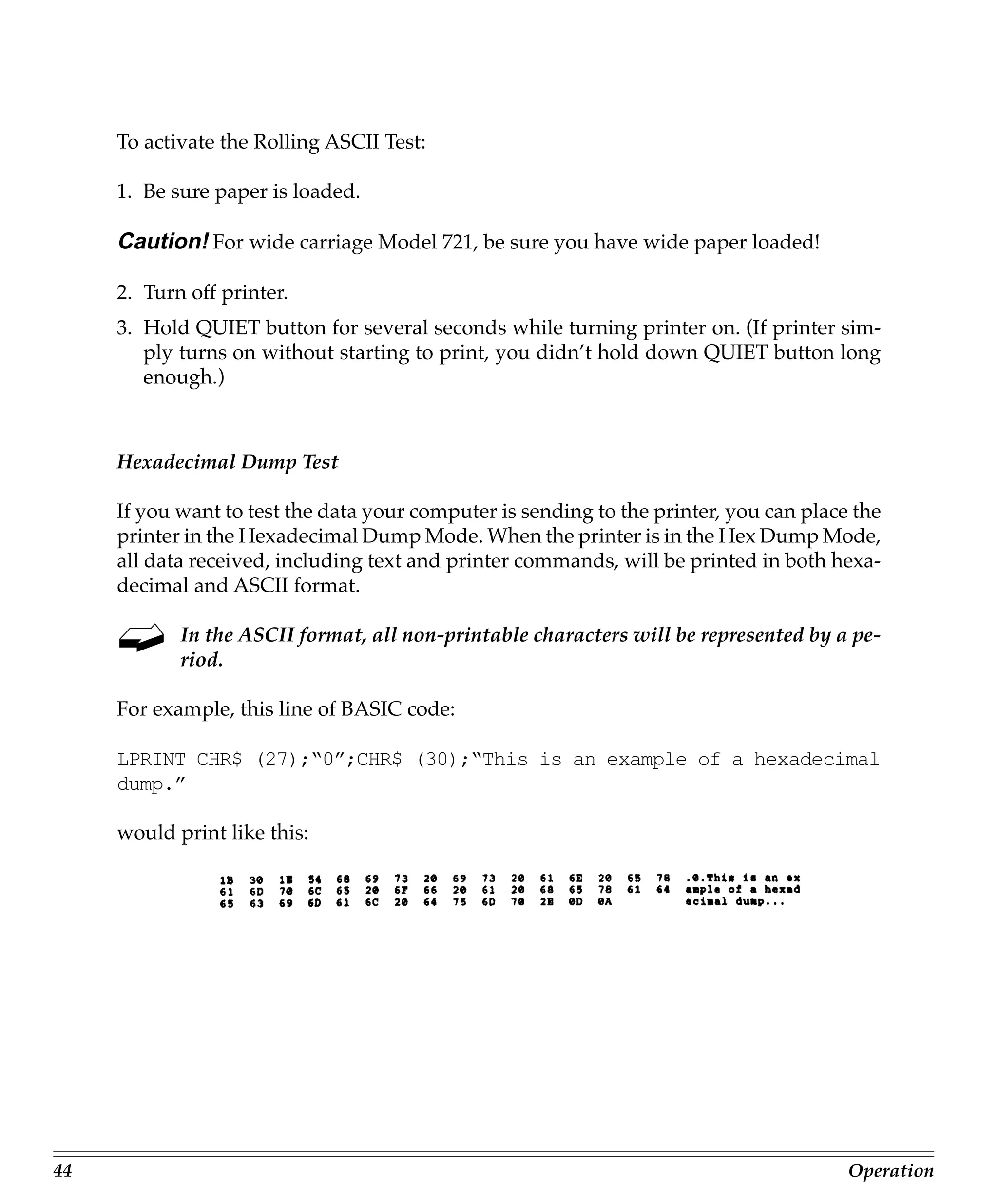
     For example, this line of BASIC code:

     LPRINT CHR$ (27);“0”;CHR$ (30);“This is an example of a hexadecimal
     dump.”

     would print like this:


44                                                                                      Operation
To engage the Hexadecimal Dump Mode:

     1. Be sure paper is loaded.
     2. Turn off printer.
     3. Hold SEL and FF/LOAD buttons for several seconds while turning on printer.

     The printer will print the line “Hex Data Dump” and be ready to receive data in the
     Hexadecimal Dump Mode. To run the test, simply send data to the printer while it is
     in the Hexadecimal Dump Mode.

     When you’re done, you can exit the Hexadecimal Dump Mode by either pressing the
     SEL button or by turning the printer off, then on again.


     Resetting Top of Form

     To reset the Top of Form to the factory default:

     1. Turn off printer.
     2. Hold down QUIET and PARK buttons while turning printer back on.


     Using Bar codes

     Your MICROLINE 320/321 Turbo printer incorporates eight different bar codes:

        • UPC A
        • UPC E
        • EAN 8
        • EAN 13
        • Code 39
        • Code 128
        • Interleaved 2 of 5
        • Postnet


ML720/721 Printer Handbook                                                                 45
You will find a list of the bar code printer commands for each emulation in appendix
     C.

     Here is a brief explanation of each of the available bar codes, along with a sample
     printout for each one.


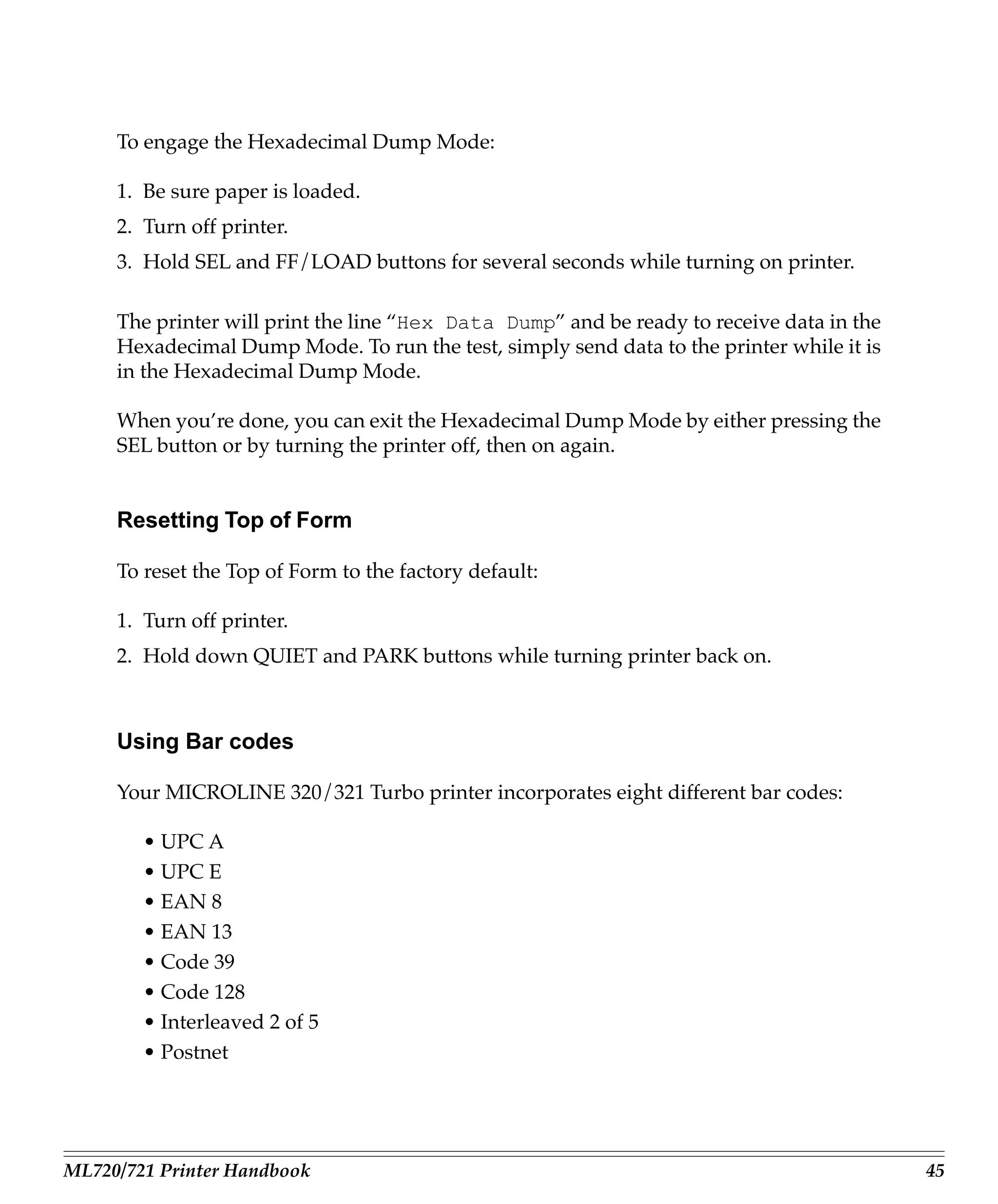
     UPC A Bar Code

     UPC (Universal Product Code) bar coding is used in the supermarket industry. UPC
     A coding contains ten digits: the first five digits represent the manufacturer, the sec-
     ond five digits identify the product.


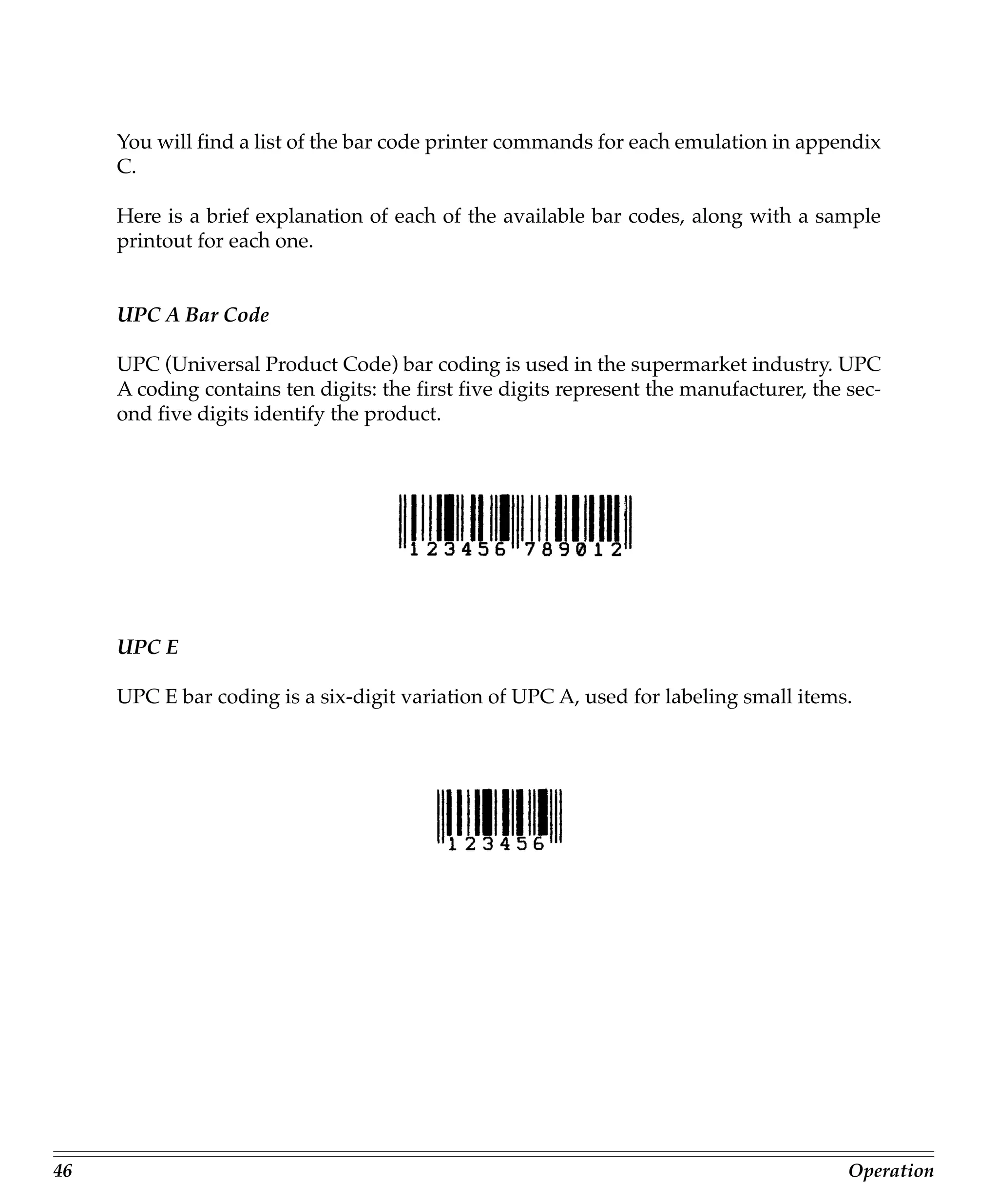
     UPC E

     UPC E bar coding is a six-digit variation of UPC A, used for labeling small items.


46                                                                                       Operation
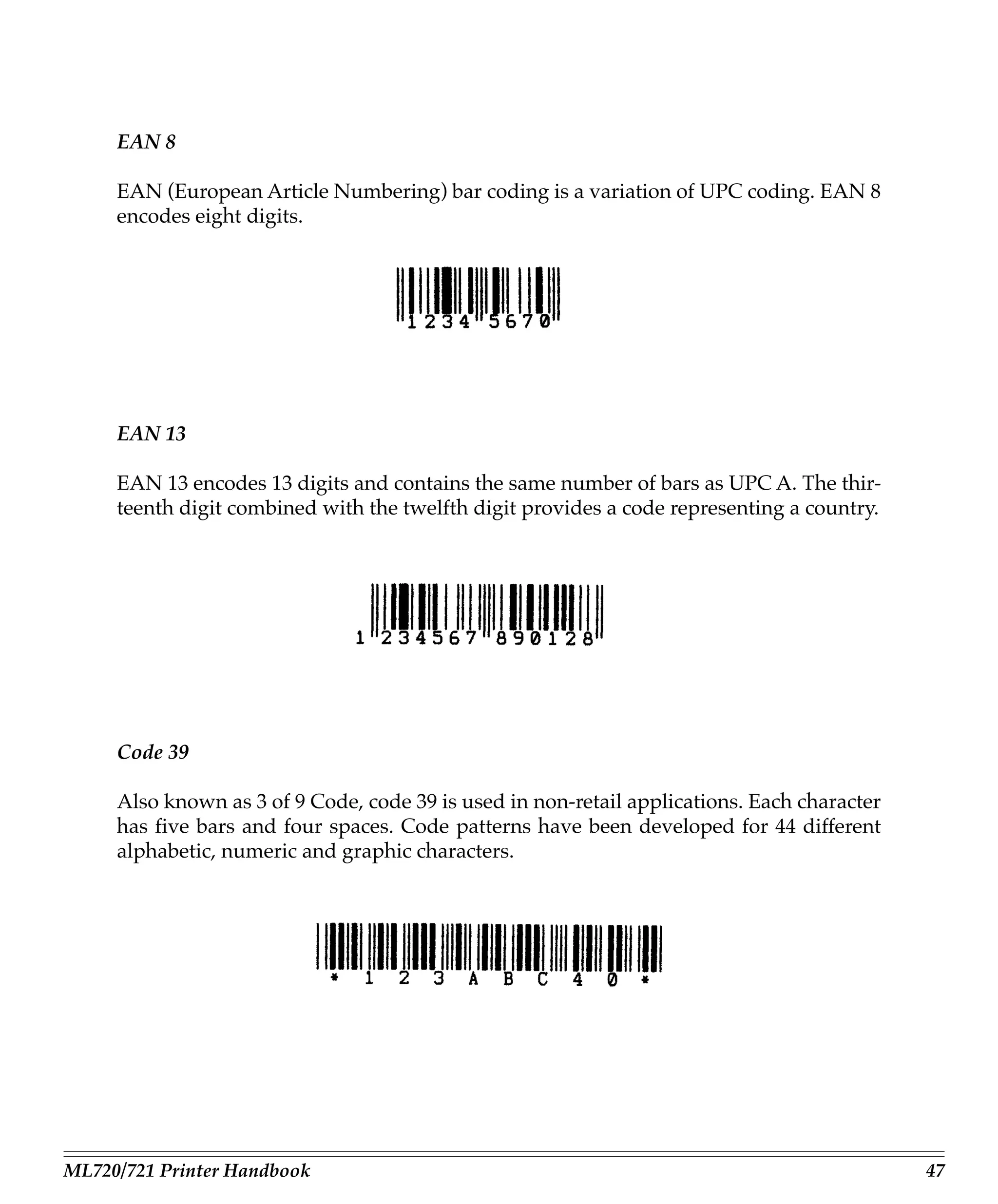
EAN 8

     EAN (European Article Numbering) bar coding is a variation of UPC coding. EAN 8
     encodes eight digits.


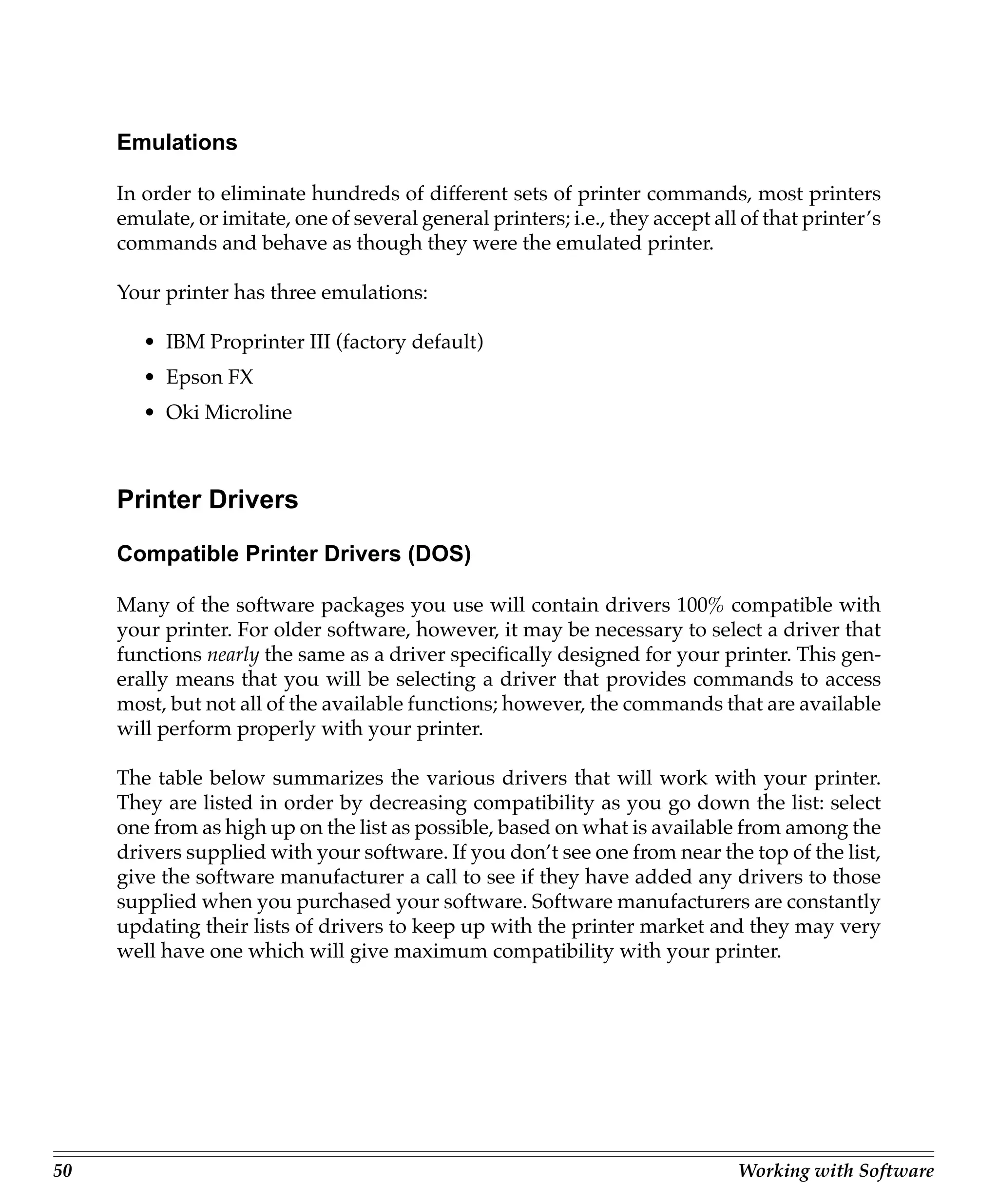
     EAN 13

     EAN 13 encodes 13 digits and contains the same number of bars as UPC A. The thir-
     teenth digit combined with the twelfth digit provides a code representing a country.


     Code 39

     Also known as 3 of 9 Code, code 39 is used in non-retail applications. Each character
     has five bars and four spaces. Code patterns have been developed for 44 different
     alphabetic, numeric and graphic characters.


ML720/721 Printer Handbook                                                                   47
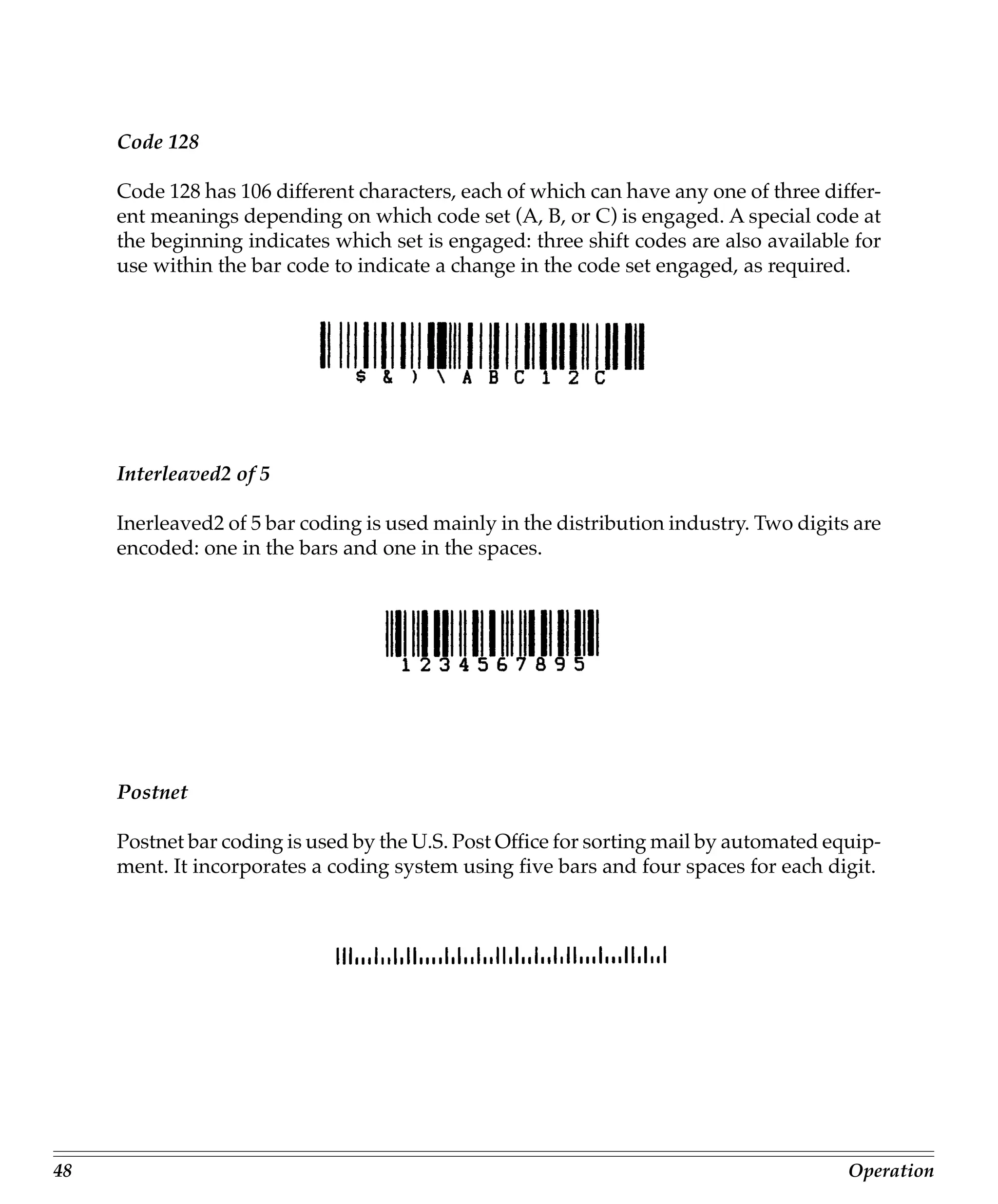
Code 128

     Code 128 has 106 different characters, each of which can have any one of three differ-
     ent meanings depending on which code set (A, B, or C) is engaged. A special code at
     the beginning indicates which set is engaged: three shift codes are also available for
     use within the bar code to indicate a change in the code set engaged, as required.


     Interleaved2 of 5

     Inerleaved2 of 5 bar coding is used mainly in the distribution industry. Two digits are
     encoded: one in the bars and one in the spaces.


     Postnet

     Postnet bar coding is used by the U.S. Post Office for sorting mail by automated equip-
     ment. It incorporates a coding system using five bars and four spaces for each digit.


48                                                                                      Operation
Chapter 4: Working with Software
     This chapter covers the fundamentals of setting up commercial software packages for
     use with your printer. Be sure to read your software documentation carefully for more
     details.


     Basic Terminology
     Before we start, let’s examine a few terms with which you may not be familiar.


     Printer Commands

            If you’re using commercial software with an appropriate printer driver (see
            “Printer Drivers” below), the printer commands will normally be sent to the
            printer by your software and you won’t even need to think about them.

     Printer commands are signals sent by your PC to the printer which guide and control
     its operation. Printer commands tell the printer what character pitch to use, what font
     to use, what margins to use, whether to use single or double spacing, when to en-
     gage/disengage double width or double height printing, etc.

     Printer commands can be sent in decimal, ASCII, or hexadecimal form. The values
     (decimal/ASCII/hexadecimal) for each type of command depend on which emula-
     tion is active (see Appendix C for a listing of printer commands for each emulation).

     With only a few exceptions, printer commands begin with the ESC character, decimal
     27 (hexadecimal 1B), which serves as signal to the printer that what follows is to be
     interpreted as a command rather than just a string of characters. Some printer com-
     mands expect you supply a numerical value, representing tab stops, line spacing, etc.


ML720/721 Printer Handbook                                                                     49
Emulations

     In order to eliminate hundreds of different sets of printer commands, most printers
     emulate, or imitate, one of several general printers; i.e., they accept all of that printer’s
     commands and behave as though they were the emulated printer.

     Your printer has three emulations:

        • IBM Proprinter III (factory default)
        • Epson FX
        • Oki Microline


     Printer Drivers

     Compatible Printer Drivers (DOS)

     Many of the software packages you use will contain drivers 100% compatible with
     your printer. For older software, however, it may be necessary to select a driver that
     functions nearly the same as a driver specifically designed for your printer. This gen-
     erally means that you will be selecting a driver that provides commands to access
     most, but not all of the available functions; however, the commands that are available
     will perform properly with your printer.

     The table below summarizes the various drivers that will work with your printer.
     They are listed in order by decreasing compatibility as you go down the list: select
     one from as high up on the list as possible, based on what is available from among the
     drivers supplied with your software. If you don’t see one from near the top of the list,
     give the software manufacturer a call to see if they have added any drivers to those
     supplied when you purchased your software. Software manufacturers are constantly
     updating their lists of drivers to keep up with the printer market and they may very
     well have one which will give maximum compatibility with your printer.


50                                                                              Working with Software
IBM Proprinter Emulation        Epson FX Emulation               OKI ML Emulation

      Oki ML 520/1                Oki ML 520/1                  Oki Microline 520/521
        IBM                         Epson                       Oki Microline 320/321
      IBM Proprinter III          Epson FX 850/1050             Oki Microline 292/293
      IBM Proprinter II           Epson FX 86/286               Oki Microline 192/193
      IBM Proprinter              Epson FX                      Oki Microline 182/183
                                  Epson EX800/1000


     Because there are some differences in characteristics such as speed or access to vari-
     ous features, you may wish to experiment with several different drivers. If you must
     select a driver that is not listed in the table, be sure to check it thoroughly for print
     features such as boldface, underline and changes in pitch. Don’t be surprised if bold-
     faced items are printed twice, underlines are misplaced, wide spaces are left between
     lines or the printer behaves chaotically (turn off the printer if the latter occurs). These
     are all characteristics of an incompatible driver selection.


     Windows Printer Drivers

     To use this printer on a Windows operating system, install the Windows printer driver,
     that is on the Printer Software CD-ROM provided with your printer, on your computer.

     For information about which Windows systems are compatible with the printer drivers
     on the Printer Software CD-ROM and the installation procedure open the Readme
     file on the Printer Software CD-ROM.


ML720/721 Printer Handbook                                                                         51
52   Working with Software
Chapter 5: Problem Solving,
                      Maintenance, & Service

     This chapter provides solutions to some common printer problems and explains the
     routine maintenance procedures that will help keep your printer in tip-top operating
     condition. It also tells you how to order parts, consumables and accessories, and pro-
     vides information on obtaining service for your printer. You will find your printer’s
     warranty at the back of this Printer Handbook.


     Problem Solving
     What if …

     …nothing happens when I turn on the printer?

     The printer may not be plugged in. Check the power cord connection to the outlet
     and to your printer. If you’re using a power strip, make sure it’s turned on. Check to
     be sure that the fuse hasn’t blown or that the circuit breaker hasn’t tripped.

     …the printer doesn’t print when the computer sends data?

     The printer may be deselected. If the SEL light is out, press the SEL button to select the
     printer.

     The printer cable may not be securely connected. Check the cable to be sure that it is
     properly connected to both the PC and the printer.

     If you have installed the serial I/F board, check to be sure that the board is firmly
     seated in the printer.


ML720/721 Printer Handbook                                                                        53
…I’m getting strange symbols, incorrect fonts, etc., when I try to print a document?

     The printer driver you have engaged does not agree with the emulation selected for
     your printer.

     To check the emulation selected, first make sure paper is loaded, then press the SEL
     and SHIFT buttons simultaneously to enter the MENU on your printer. Next, press
     the GROUP button: this will print the emulation selected.

     If the emulation is not the one you want to use, press the SET button to change it to
     the one you want before exiting the MENU (to exit, press SEL and SHIFT buttons).

     If the emulation is correct, check your software documentation on how to select a
     printer driver, then check to be sure that you have selected one of the drivers listed for
     that emulation on page 51). The closer the driver is to the top of the list, the more
     compatible it will be with your printer. If your software doesn’t have any of the indi-
     cated drivers available, check with the software manufacturer to see if they have added
     any additional drivers since you purchased your software.

     If you have embedded any printer commands in your software, check to be sure that
     you entered them correctly.

     …I’ve installed a brand new ribbon and the printing is smeared and streaked?
     The plastic shield on the ribbon is either loose or missing. The shield must be left on
     the ribbon when you are installing the cartridge. To remedy this situation, move the
     printhead to the center of the platen (careful – printhead may be HOT!) and lift off the
     ribbon cartridge. Check the ribbon shield. If it’s loose, secure it in place properly. If it’s
     missing, locate it and reinstall it.
     Problem: Ink smears on the paper when I print narrow columns.
     Solution: This may be caused by excessive printhead travel from the centering posi-
     tion. Enter the Menu and set the Centering Position to MODE 1 (see Menu Mode in
     Section 3). For wide-carriage Model ML391T, if MODE1 doesn’t work, try setting the
     Centering Position to MODE2.

     …there are dots missing in my printouts?
     The head gap may not be set correctly. Try moving the head gap lever to a lower
     setting. If that doesn’t help, the printhead may be damaged; call for service.


54                                                             Ploblem Solving, Maintenance, & Service
… the Alarm light is on and the Character Pitch 15 light is flashing?

     This indicates a paper loading error. To stop the flashing light, press the SEL button.
     Before trying to load paper in again, check to be sure that you have the paper lever in
     the correct position (BOT, TOP, REAR) for the path you’re using.

     Caution! Always turn the printer off before you turn the platen knob!

     If the paper lever is in the correct position and you’re using rear feed, lift up the paper
     separator and check to be sure that paper is properly on the tractors and has not
     jammed up somehow.

     If the paper lever is in the correct position and you’re using the optional bottom-feed
     push tractor, check the bottom tractor unit to be sure that paper is properly on the
     tractors and has not jammed up before entering the printer.

     Once the paper is correctly loaded, press and release the SEL button, then hold the
     SHIFT button and press the RESET (Character Pitch) button.

     …I need to load paper, but the Alarm light is not on?

     If the Alarm light is off, the printer thinks it has paper loaded. To correct this problem,
     press and release the SEL button, then hold the SHIFT button and press the RESET
     (Character Pitch) button. The Alarm light will come on and you’ll be able to load
     paper.

     …my word processor files don’t print the way I have the MENU and front panel set?

     Before sending a file to the printer, many word processors send either an “initializa-
     tion string” or an I-Prime signal to the printer.

     The initialization storing contains codes that reset the printer to a default set of fea-
     tures: otherwise the printer might accidentally print using features set for a previous
     job. These codes will override panel or MENU settings. To set your printer to ignore
     the reset code, enter the printer MENU (hold SHIFT button while pressing SEL/MENU
     button) and change the Reset Inhibit item (in the Set-Up group) to Yes. Please note
     that while this will stop the reset code from resetting your printer, other codes in the
     initialization string may still override the printer MENU and/ or front panel settings.


ML720/721 Printer Handbook                                                                         55
The I-Prime signal is sent over the parallel interface (pin 31) and will automatically
     override any settings you have made using the front panel buttons. To eliminate this
     problem, enter the program MENU (hold SHIFT button while pressing SEL/MENU
     button) and change the I-Prime item (in the Parallel I/F group) to Invalid.

     …the Print Quality and Character Pitch buttons on the front panel won’t work?

     The Operator Panel Function item on the printer MENU can be used to disable these
     buttons. If the printer is part of a customized system or if it is used by a number of
     people, the system manager may have used this option to make sure the printer is
     always set properly.

     …static electricity causes the paper to stick?

     In cold, dry weather, static charges can build up on continuous-form paper. This can
     make the paper cling to the paper separator. If you have this problem during high-
     volume printing jobs, try moving the single sheet paper guides on the separator to-
     gether so that the paper rests on the guides rather than on the separator itself.


     Maintenance
     This section explains how to change ribbons, clear paper jams and clean your printer.


     Replacing the Ribbon Cartridge

     When replacing the ribbon, be sure to use only ribbons specifically for use with
     MICROLINE 720/721 printers. For best results,use genuine OKI ribbons.

                                                1. Turn printer off.

                                                2. Disengage and swing open access cover.

                                                Caution! Be careful not to touch the
                                                printhead: it may be hot!


56                                                        Ploblem Solving, Maintenance, & Service
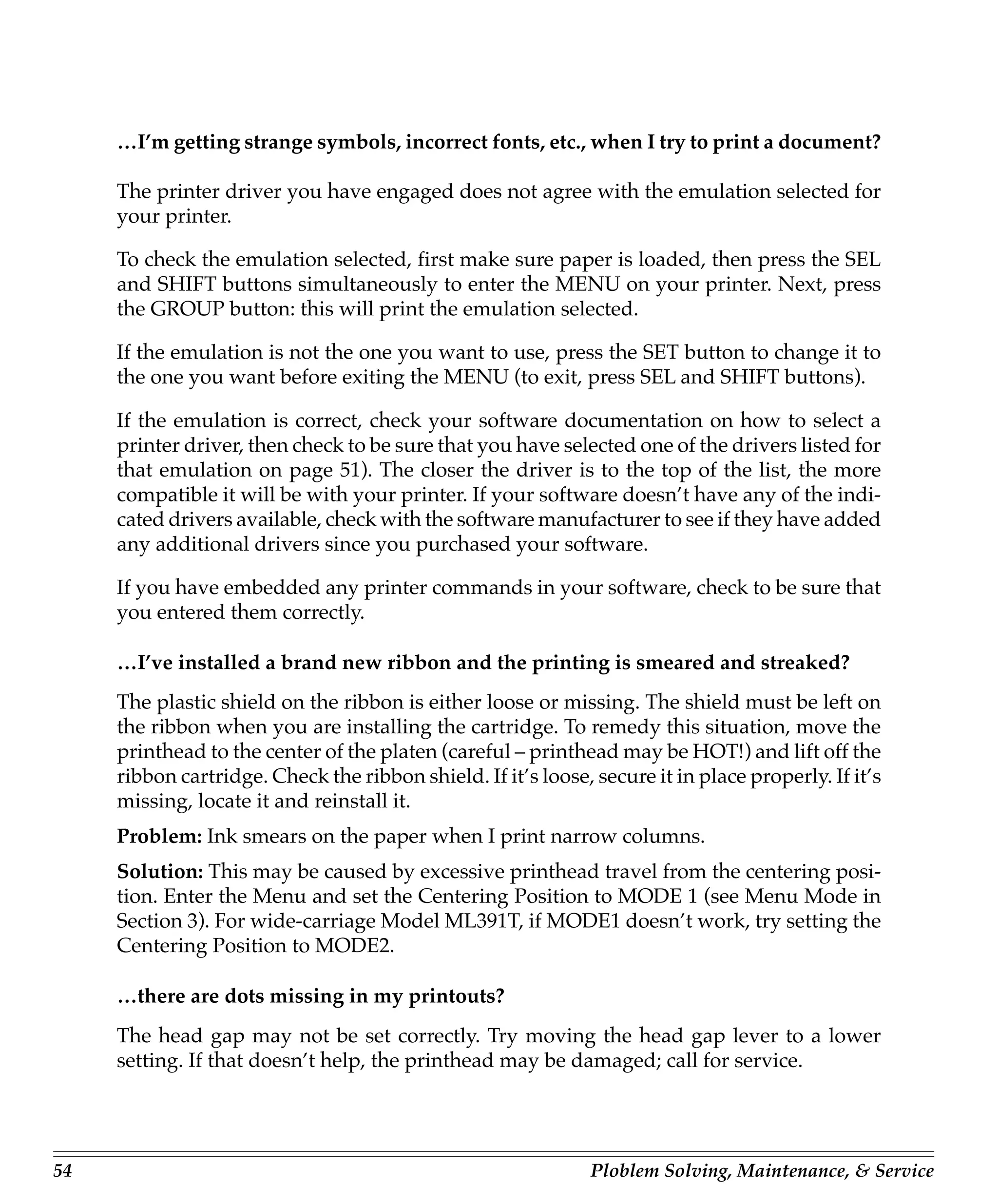
3. Slide ribbon cartridge along until it is
                                            centered on platen, being careful not to
                                            touch printhead.


                             Center
                             printhead


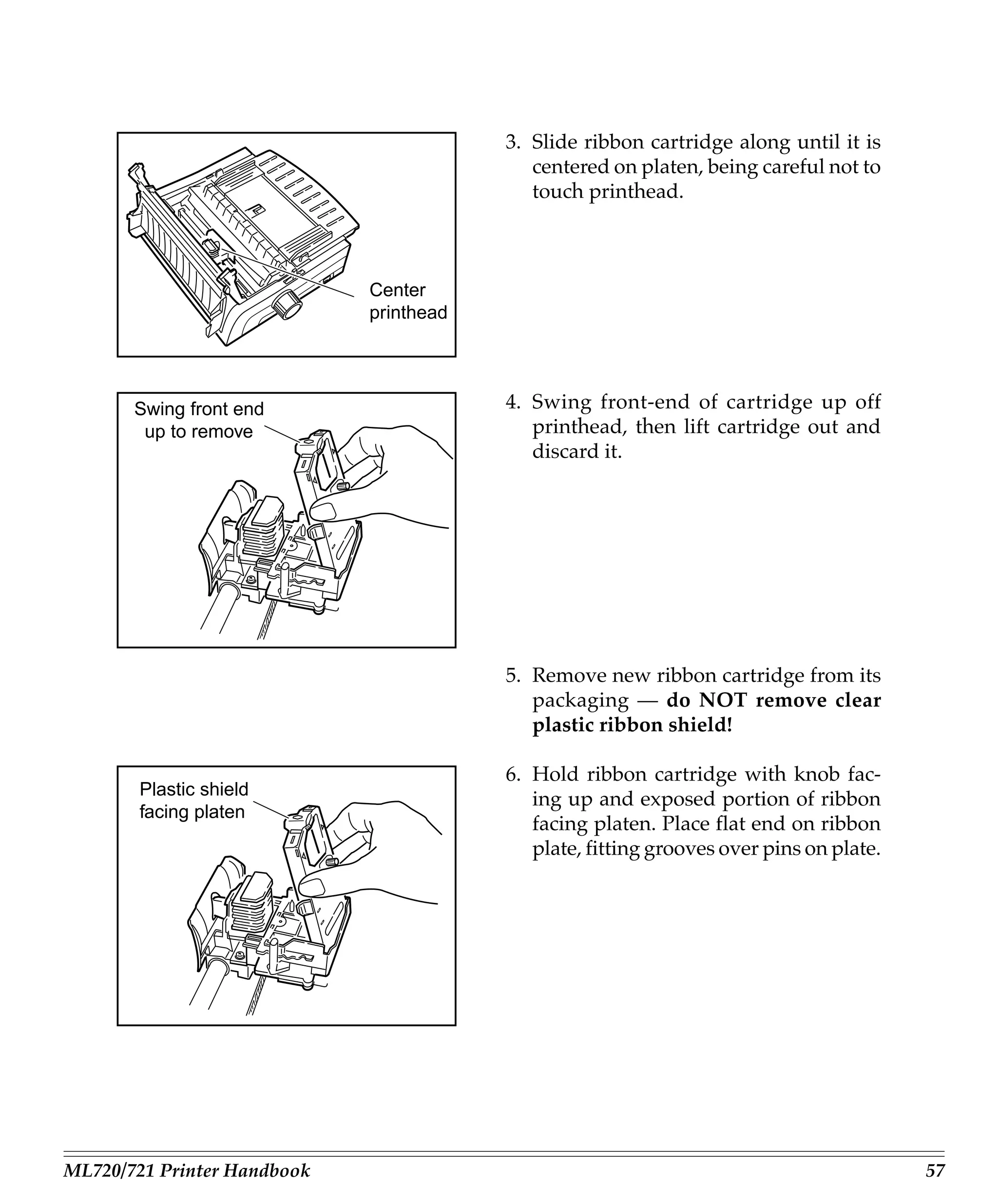
       Swing front end                   4. Swing front-end of cartridge up off
        up to remove                        printhead, then lift cartridge out and
                                            discard it.


                                         5. Remove new ribbon cartridge from its
                                            packaging — do NOT remove clear
                                            plastic ribbon shield!

                                         6. Hold ribbon cartridge with knob fac-
        Plastic shield
                                            ing up and exposed portion of ribbon
        facing platen
                                            facing platen. Place flat end on ribbon
                                            plate, fitting grooves over pins on plate.


ML720/721 Printer Handbook                                                               57
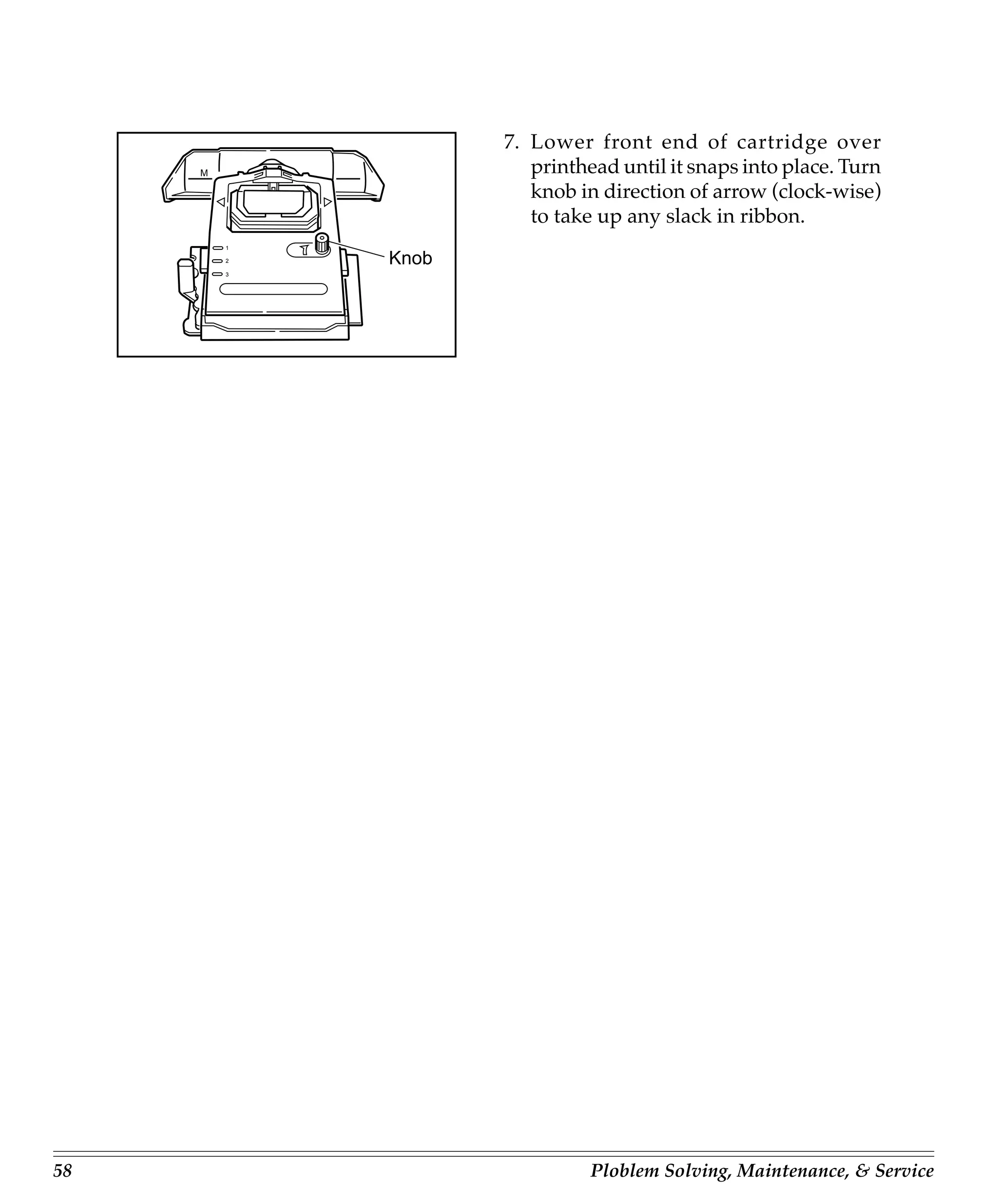
7. Lower front end of cartridge over
     M                 printhead until it snaps into place. Turn
                       knob in direction of arrow (clock-wise)
                       to take up any slack in ribbon.
         1

         2   Knob
         3


58                            Ploblem Solving, Maintenance, & Service
Clearing Paper Jams

     Caution! Always turn the printer off before you turn the platen knob!

     Rear Feed Jams

     To clear a rear-feed paper jam:

     1. Turn off printer
     2. Turn platen knob to back paper out of printer. Remove any ripped pieces of paper.
     3. Reload paper, turn printer back on and press FF/LOAD button.

     If your paper keeps jamming, the chances are excellent that you have bits of paper
     stuck in the paper path. To eliminate this problem:

                                               1. Turn off printer.

                                               2. Use platen knob to back paper out of
                                                  printer.

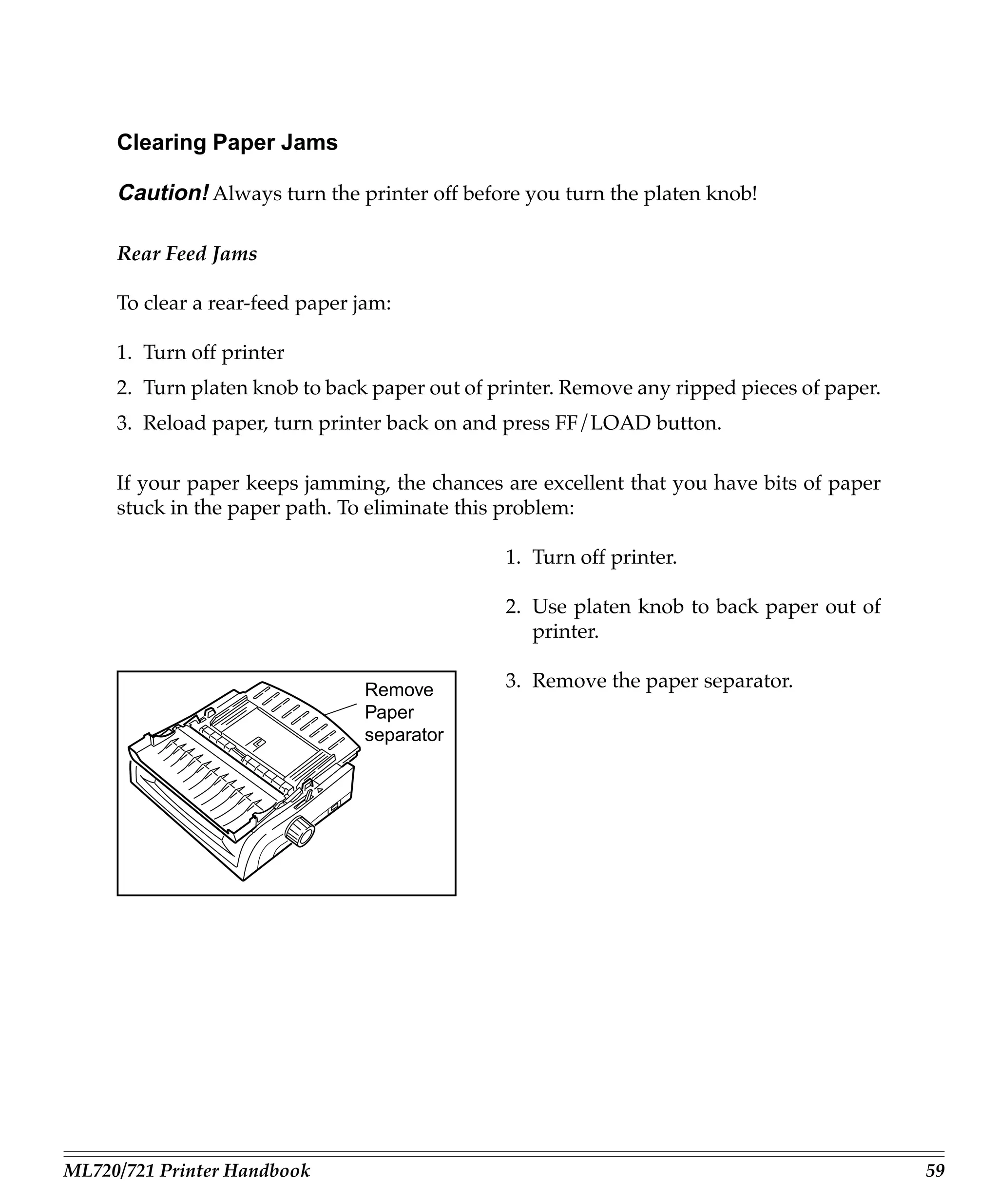
                                Remove         3. Remove the paper separator.
                                Paper
                                separator


ML720/721 Printer Handbook                                                                  59
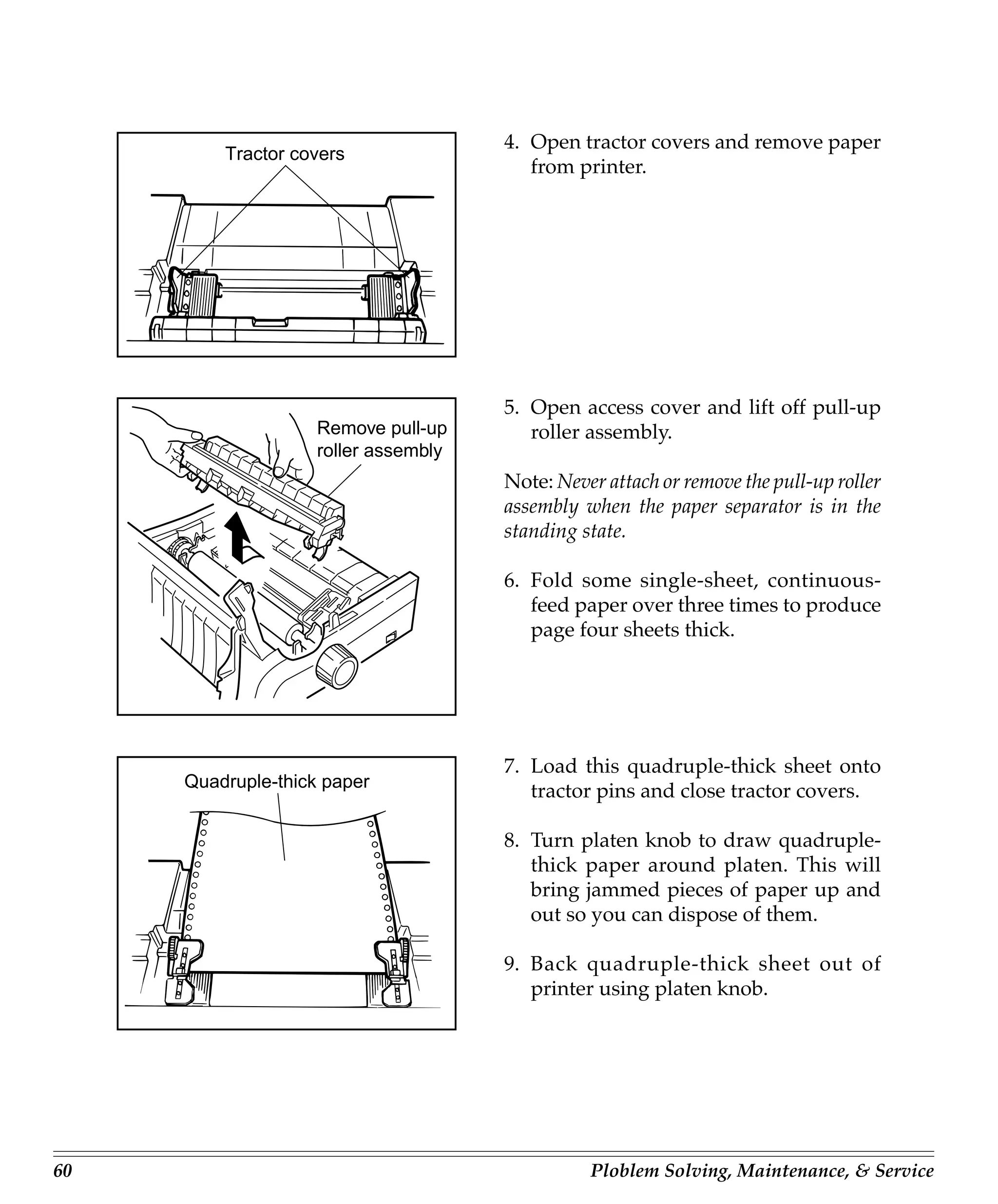
4. Open tractor covers and remove paper
         Tractor covers
                                         from printer.


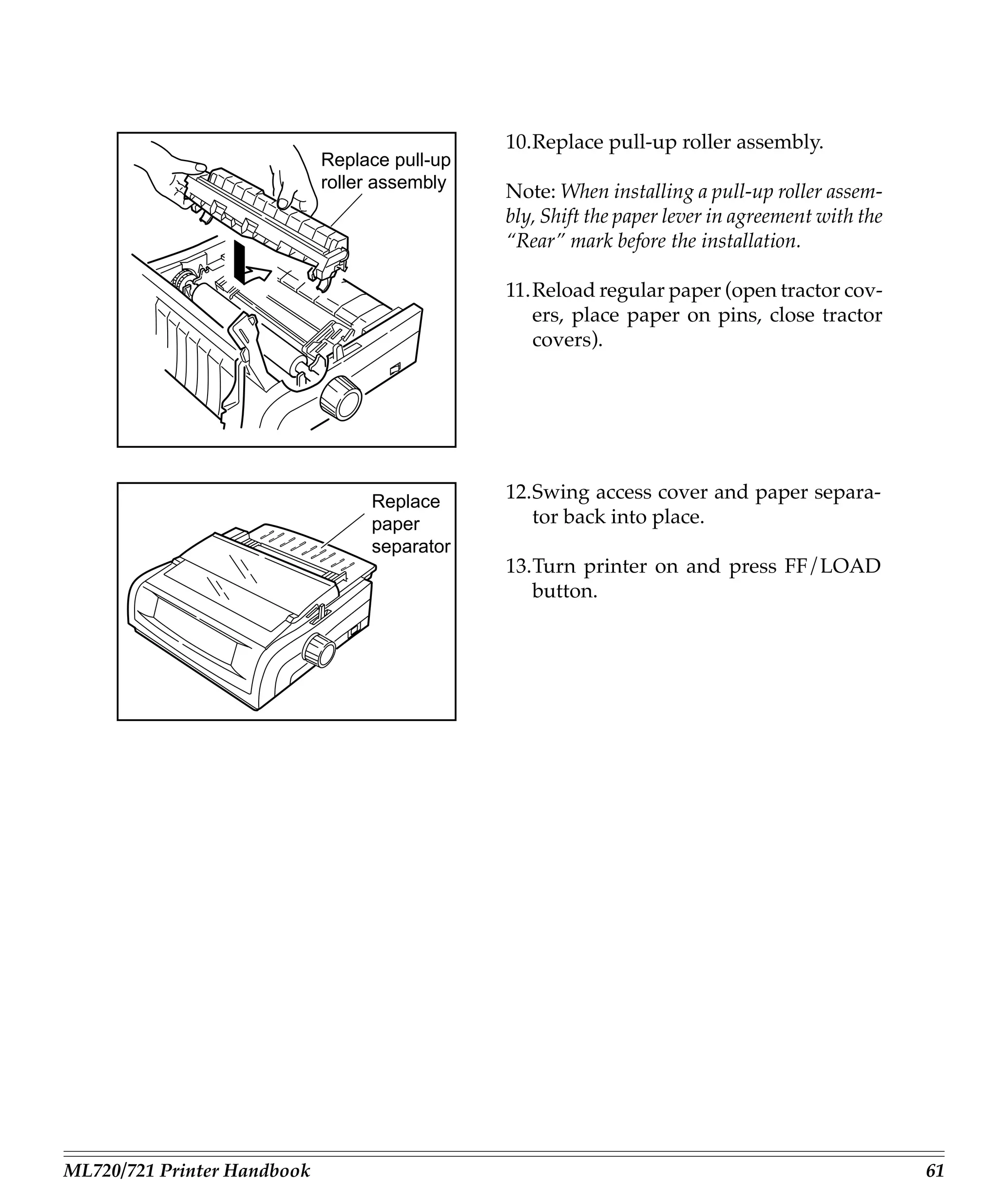
                                      5. Open access cover and lift off pull-up
                    Remove pull-up       roller assembly.
                    roller assembly
                                      Note: Never attach or remove the pull-up roller
                                      assembly when the paper separator is in the
                                      standing state.

                                      6. Fold some single-sheet, continuous-
                                         feed paper over three times to produce
                                         page four sheets thick.


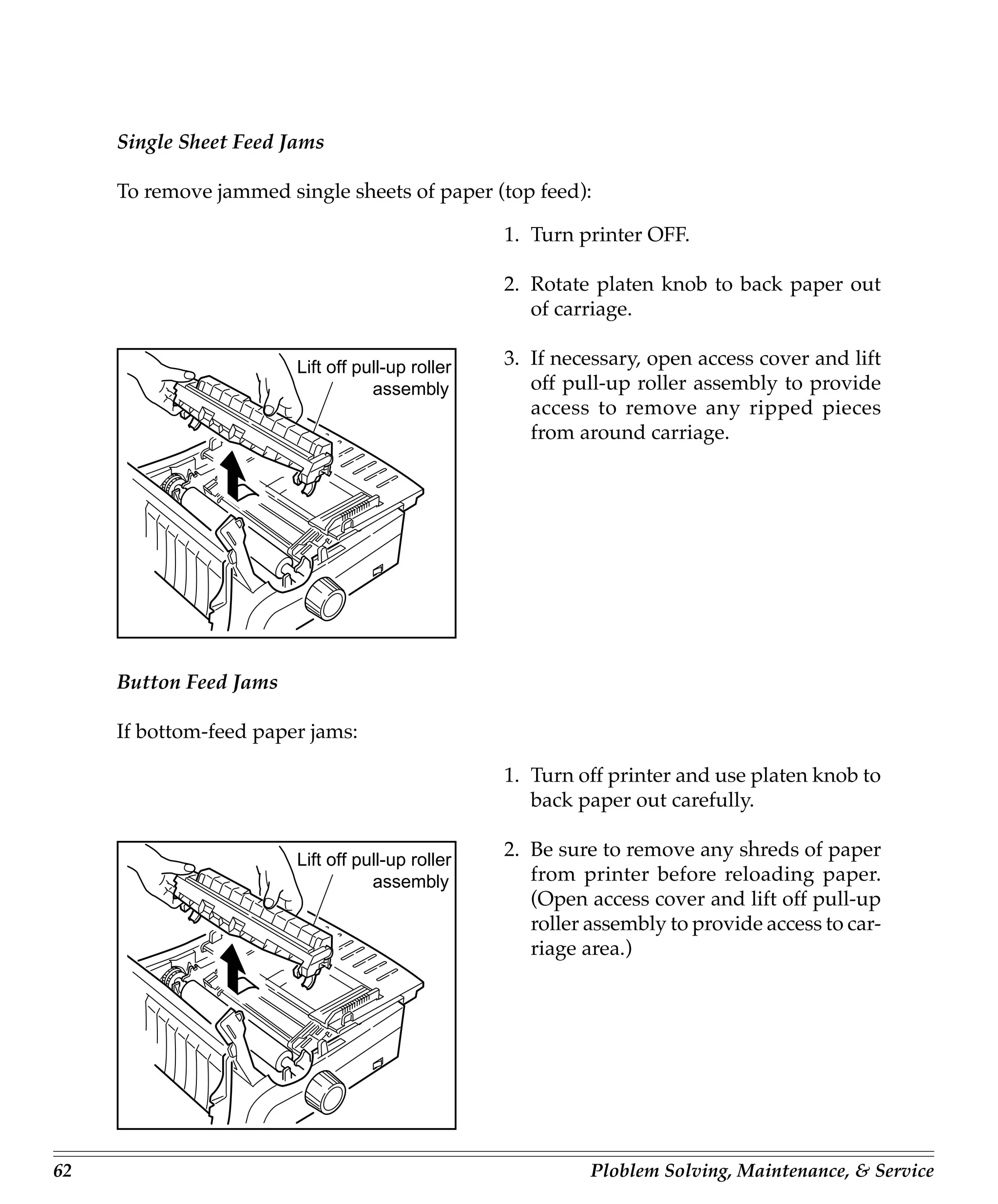
                                      7. Load this quadruple-thick sheet onto
     Quadruple-thick paper
                                         tractor pins and close tractor covers.

                                      8. Turn platen knob to draw quadruple-
                                         thick paper around platen. This will
                                         bring jammed pieces of paper up and
                                         out so you can dispose of them.

                                      9. Back quadruple-thick sheet out of
                                         printer using platen knob.


60                                              Ploblem Solving, Maintenance, & Service
10.Replace pull-up roller assembly.
                             Replace pull-up
                             roller assembly
                                               Note: When installing a pull-up roller assem-
                                               bly, Shift the paper lever in agreement with the
                                               “Rear” mark before the installation.

                                               11.Reload regular paper (open tractor cov-
                                                  ers, place paper on pins, close tractor
                                                  covers).


                                  Replace      12.Swing access cover and paper separa-
                                  paper           tor back into place.
                                  separator
                                               13.Turn printer on and press FF/LOAD
                                                  button.


ML720/721 Printer Handbook                                                                        61
Single Sheet Feed Jams

     To remove jammed single sheets of paper (top feed):

                                                  1. Turn printer OFF.

                                                  2. Rotate platen knob to back paper out
                                                     of carriage.

                        Lift off pull-up roller   3. If necessary, open access cover and lift
                                   assembly          off pull-up roller assembly to provide
                                                     access to remove any ripped pieces
                                                     from around carriage.


     Button Feed Jams

     If bottom-feed paper jams:

                                                  1. Turn off printer and use platen knob to
                                                     back paper out carefully.

                        Lift off pull-up roller
                                                  2. Be sure to remove any shreds of paper
                                   assembly          from printer before reloading paper.
                                                     (Open access cover and lift off pull-up
                                                     roller assembly to provide access to car-
                                                     riage area.)


62                                                          Ploblem Solving, Maintenance, & Service
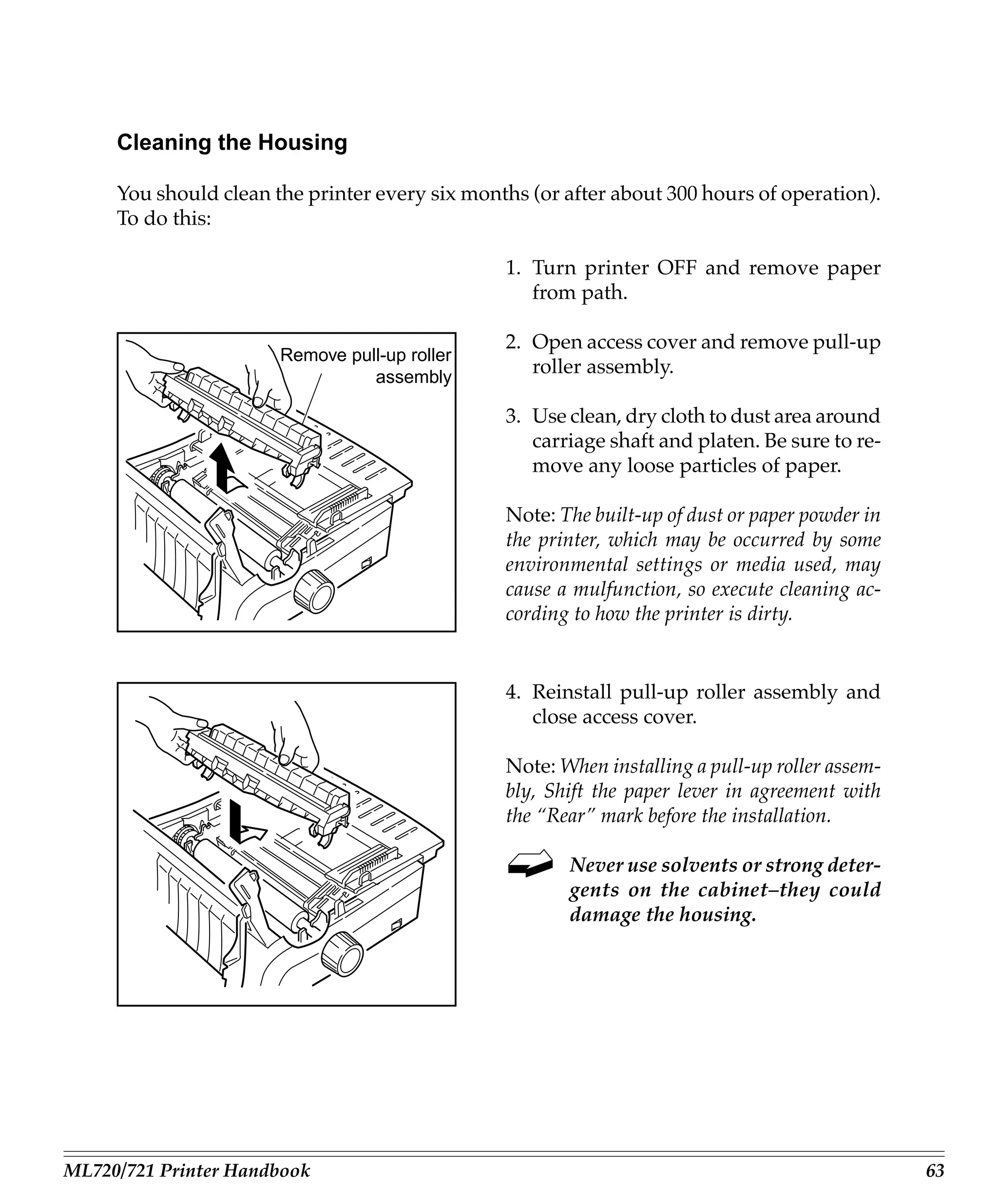
Cleaning the Housing

     You should clean the printer every six months (or after about 300 hours of operation).
     To do this:

                                                1. Turn printer OFF and remove paper
                                                   from path.

                                                2. Open access cover and remove pull-up
                       Remove pull-up roller
                                 assembly
                                                   roller assembly.

                                                3. Use clean, dry cloth to dust area around
                                                   carriage shaft and platen. Be sure to re-
                                                   move any loose particles of paper.

                                                Note: The built-up of dust or paper powder in
                                                the printer, which may be occurred by some
                                                environmental settings or media used, may
                                                cause a mulfunction, so execute cleaning ac-
                                                cording to how the printer is dirty.


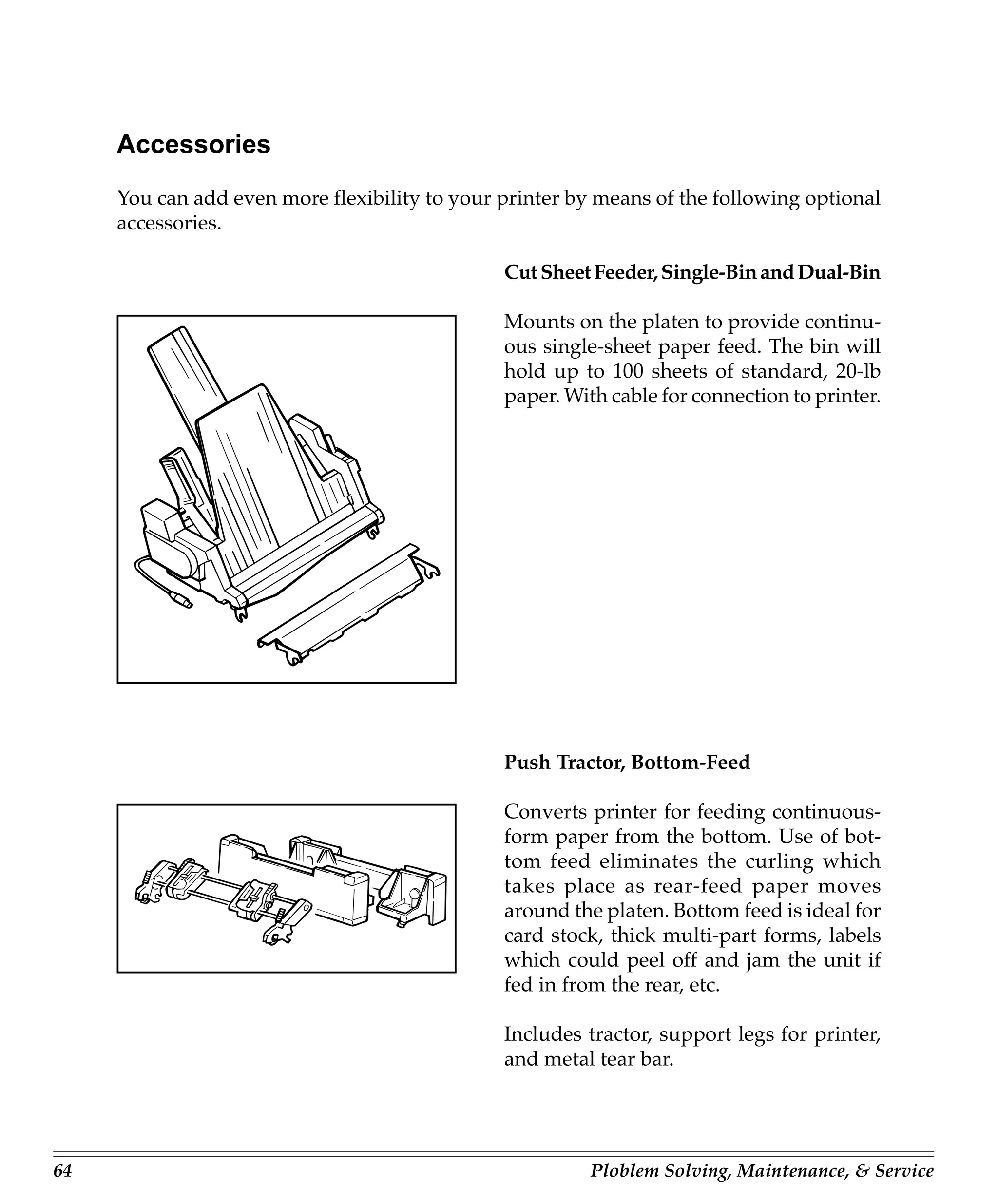
                                                4. Reinstall pull-up roller assembly and
                                                   close access cover.

                                                Note: When installing a pull-up roller assem-
                                                bly, Shift the paper lever in agreement with
                                                the “Rear” mark before the installation.

                                                       Never use solvents or strong deter-
                                                       gents on the cabinet–they could
                                                       damage the housing.


ML720/721 Printer Handbook                                                                      63
Accessories
     You can add even more flexibility to your printer by means of the following optional
     accessories.

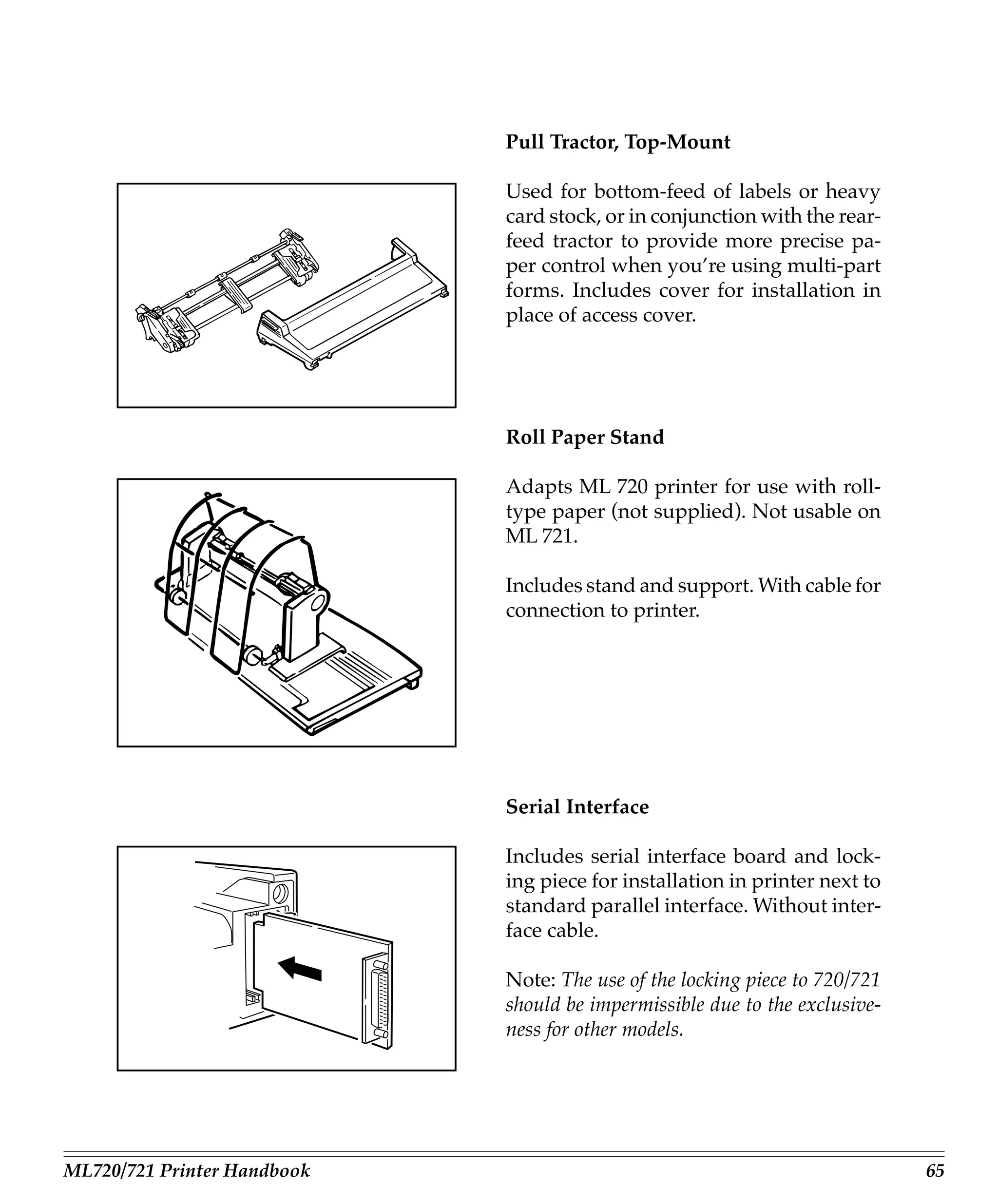
                                               Cut Sheet Feeder, Single-Bin and Dual-Bin

                                               Mounts on the platen to provide continu-
                                               ous single-sheet paper feed. The bin will
                                               hold up to 100 sheets of standard, 20-lb
                                               paper. With cable for connection to printer.


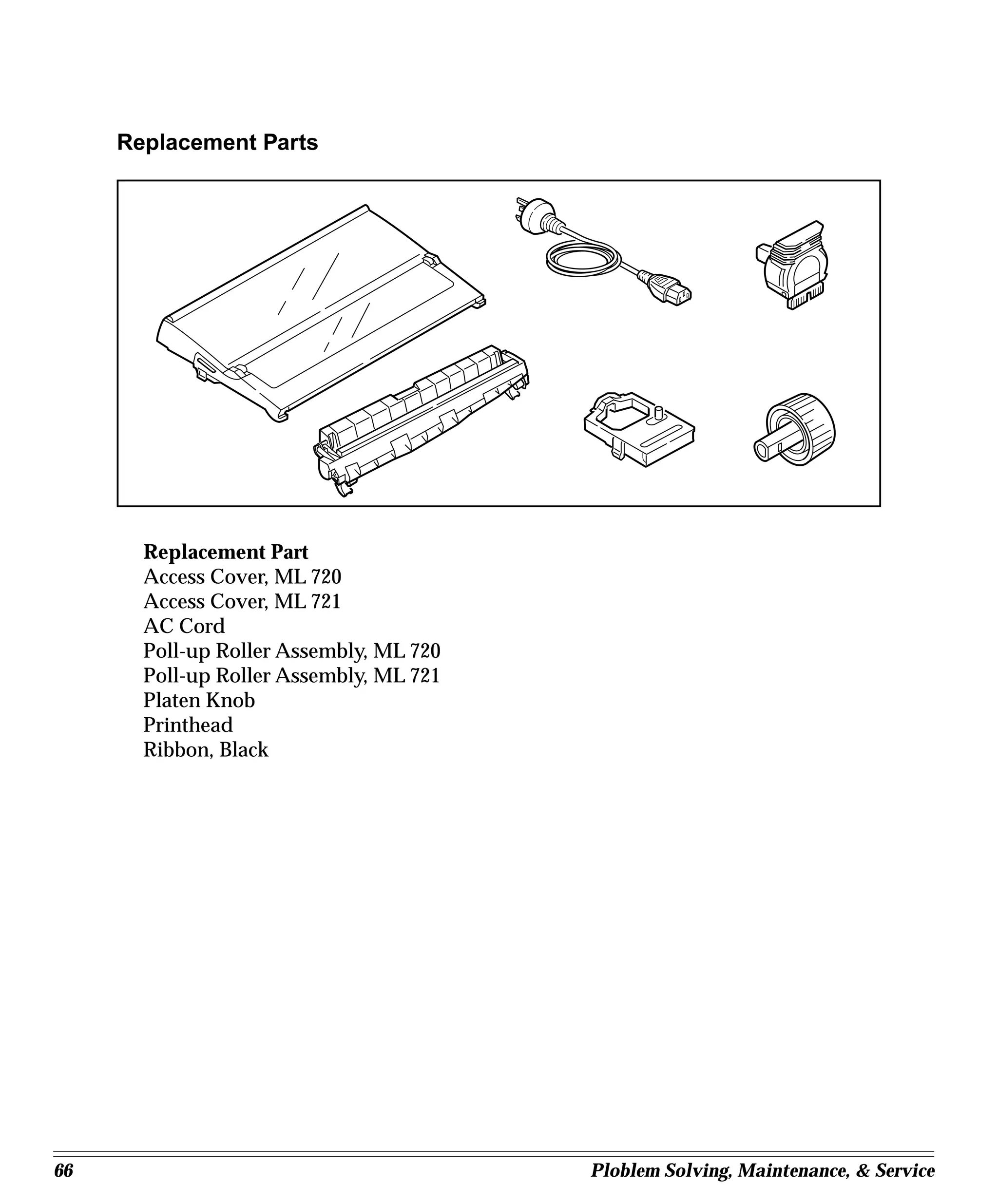
                                               Push Tractor, Bottom-Feed

                                               Converts printer for feeding continuous-
                                               form paper from the bottom. Use of bot-
                                               tom feed eliminates the curling which
                                               takes place as rear-feed paper moves
                                               around the platen. Bottom feed is ideal for
                                               card stock, thick multi-part forms, labels
                                               which could peel off and jam the unit if
                                               fed in from the rear, etc.

                                               Includes tractor, support legs for printer,
                                               and metal tear bar.


64                                                       Ploblem Solving, Maintenance, & Service
Pull Tractor, Top-Mount

                             Used for bottom-feed of labels or heavy
                             card stock, or in conjunction with the rear-
                             feed tractor to provide more precise pa-
                             per control when you’re using multi-part
                             forms. Includes cover for installation in
                             place of access cover.


                             Roll Paper Stand

                             Adapts ML 720 printer for use with roll-
                             type paper (not supplied). Not usable on
                             ML 721.

                             Includes stand and support. With cable for
                             connection to printer.


                             Serial Interface

                             Includes serial interface board and lock-
                             ing piece for installation in printer next to
                             standard parallel interface. Without inter-
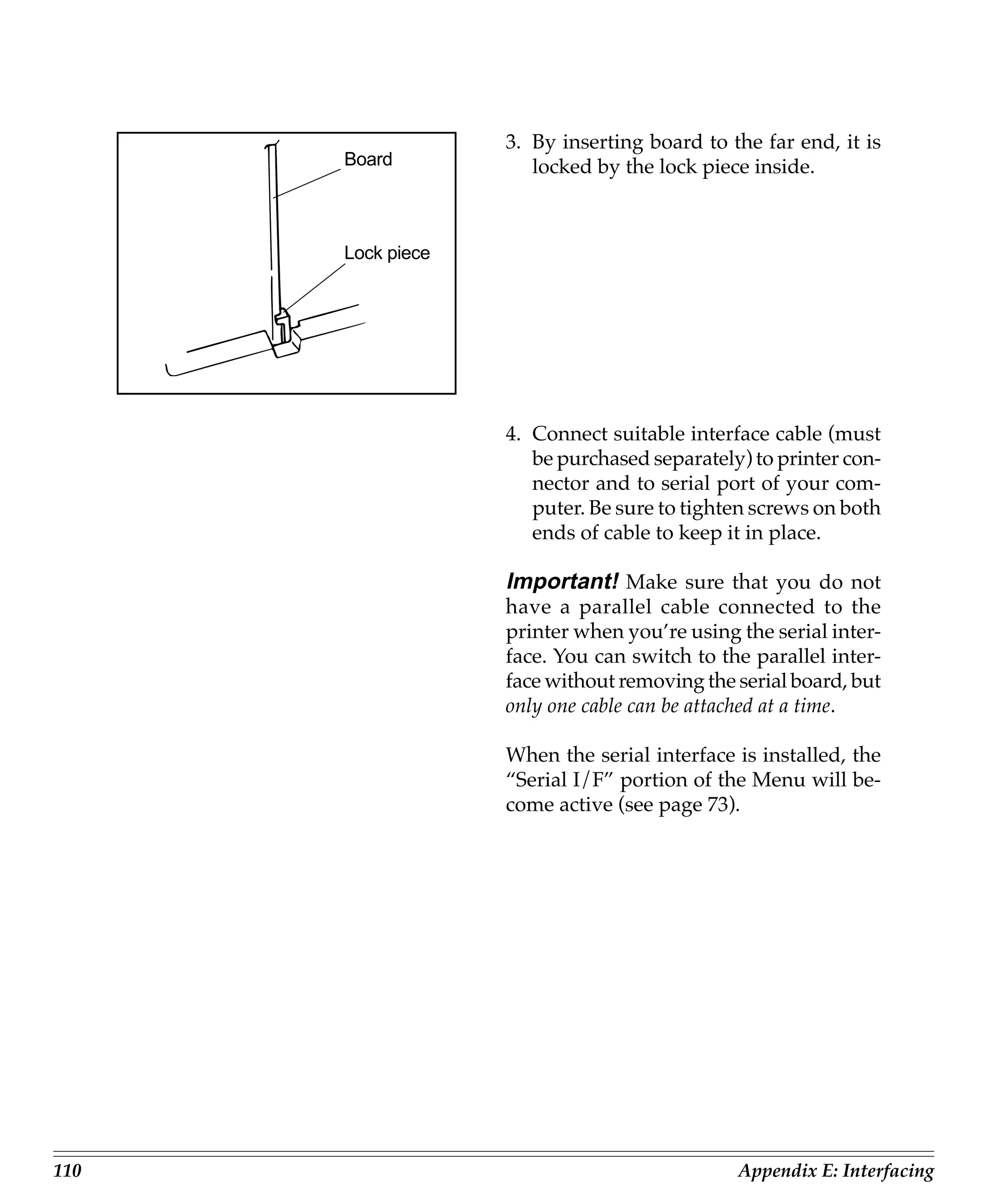
                             face cable.

                             Note: The use of the locking piece to 720/721
                             should be impermissible due to the exclusive-
                             ness for other models.


ML720/721 Printer Handbook                                                   65
Replacement Parts


       Replacement Part
       Access Cover, ML 720
       Access Cover, ML 721
       AC Cord
       Poll-up Roller Assembly, ML 720
       Poll-up Roller Assembly, ML 721
       Platen Knob
       Printhead
       Ribbon, Black


66                                       Ploblem Solving, Maintenance, & Service
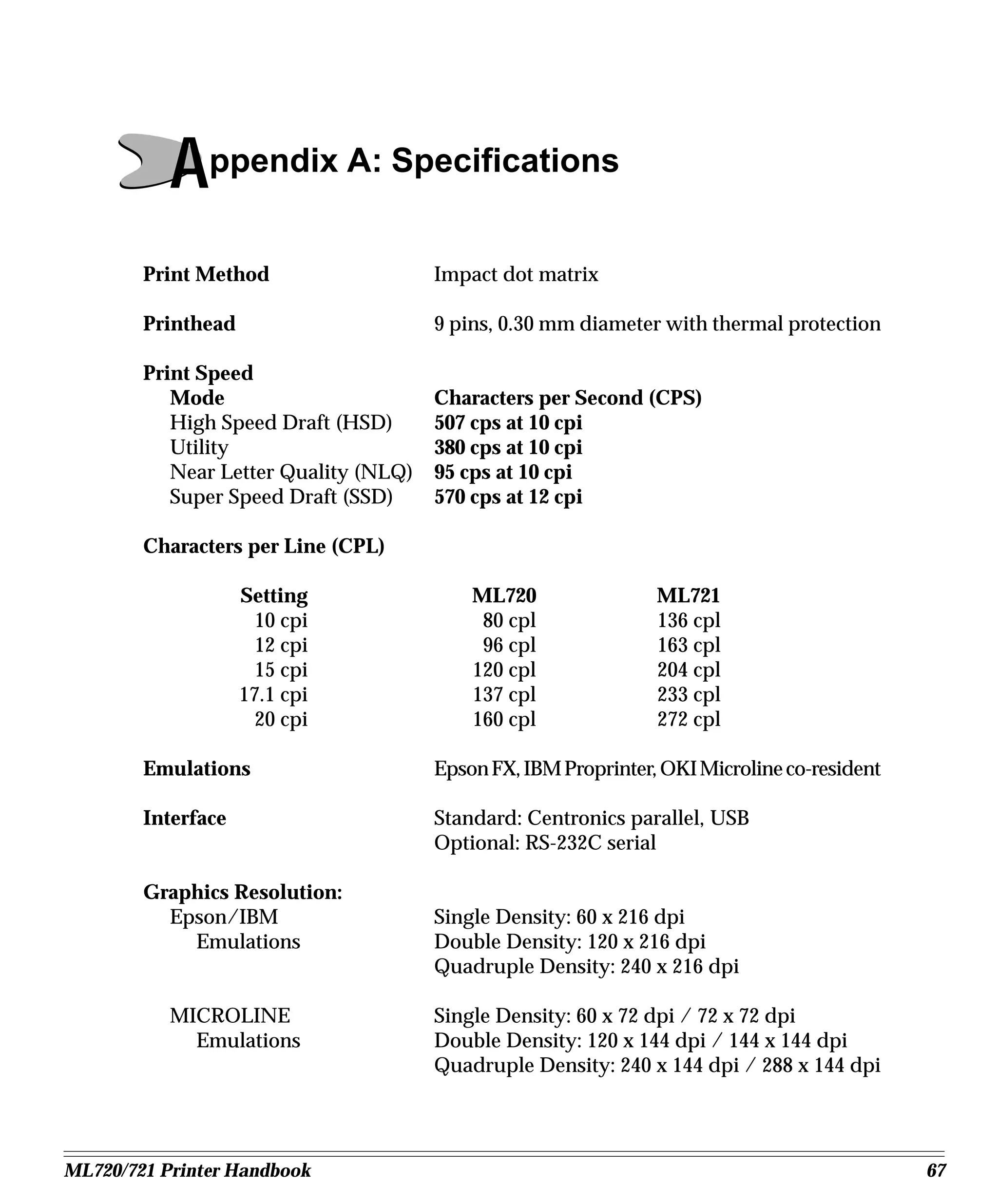
Appendix A: Specifications
        Print Method                   Impact dot matrix

        Printhead                      9 pins, 0.30 mm diameter with thermal protection

        Print Speed
           Mode                        Characters per Second (CPS)
           High Speed Draft (HSD)      507 cps at 10 cpi
           Utility                     380 cps at 10 cpi
           Near Letter Quality (NLQ)   95 cps at 10 cpi
           Super Speed Draft (SSD)     570 cps at 12 cpi

        Characters per Line (CPL)

                    Setting                ML720                ML721
                      10 cpi                80 cpl              136 cpl
                      12 cpi                96 cpl              163 cpl
                      15 cpi               120 cpl              204 cpl
                    17.1 cpi               137 cpl              233 cpl
                      20 cpi               160 cpl              272 cpl

        Emulations                     Epson FX, IBM Proprinter, OKI Microline co-resident

        Interface                      Standard: Centronics parallel, USB
                                       Optional: RS-232C serial

        Graphics Resolution:
          Epson/IBM                    Single Density: 60 x 216 dpi
            Emulations                 Double Density: 120 x 216 dpi
                                       Quadruple Density: 240 x 216 dpi

           MICROLINE                   Single Density: 60 x 72 dpi / 72 x 72 dpi
             Emulations                Double Density: 120 x 144 dpi / 144 x 144 dpi
                                       Quadruple Density: 240 x 144 dpi / 288 x 144 dpi


ML720/721 Printer Handbook                                                                   67
Resident Font
     Near Letter Quality            Courier, Gothic
     Utility                        Gothic
     High Speed Draft               Gothic
     Super Speed Draft              Gothic
     Bar Code:                      Code 39, UPC A, UPC E, EAN 8, EAN 13, Inter-
                                    leaved 2 of 5, Code 128, Postnet

     Receive Buffer Size            MAX 128K

     Reliability
       Mean Time Between            20,000 hours at 25% duty cycle and 35%
          Failures (MTBR)           Page density

        Mean Time to Repair (MTTR) 15 minutes

        Printhead life              200 million characters average in 10 cpi utility
                                    mode at 25% duty and 35% page density

     Ribbon Life                    4 million characters
     (on average, 10 cpi utility)


68                                                               Appendix A: Specifications
Paper Specifications
          Width
             Minimum                        3”
             Maximum                        ML 720: 10”
                                            ML 721: 16”
           Weight                           12 to 24 lb.
           Thickness
             Rear feed                      0.014”(0.36 mm)
             Bottom feed                    0.017”(0.44 mm)


               Paper type                   Feed           Weight              Width range

      Cut sheets                      Top only       14 to 24 lb.       ML720: 7.2" to 8.5"
                                                                        ML721: 7.2" to 14.3"

      Single-part continuous forms    Rear, Bottom   12 to 24 lb.       ML720: 3" to 10"
                                                                        ML721: 3" to 16"

      Carbonless, multipart contin-   Rear, Bottom   9 to 11 lb.        ML720: 3" to 10"
      uous form (orig. + 4 copies)                                      ML721: 3" to 16"

      Interleaf, multipart continu-   Rear, Bottom   10 to 12 lb paper, ML720: 3" to 10"
      ous form (orig. + 4 copies)                    9 lb carbon        ML721: 3" to 16"

      Labels                          Bottom only    N.A.               ML720: 3" to 10"
                                                                        ML721: 3" to 16"

      Envelopes, single feed          Top            24 lb. max.        6.5" to 9.5"

      Envelopes, continuous feed,     Bottom only    24 lb. max.        6.5" to 9.5"
      non-overlap type

      Card stock                      Bottom only    120 lb. max        N.A.

      Transparencies                  Top only                          8.5" x 11"


ML720/721 Printer Handbook                                                                     69
Dimensions (W x D x H)
       ML 720:                     15.7 x 13.6 x 6 inch (398 x 345 x 153 mm)
       ML 721:                     21.7 x 13.6 x 6 inch (552 x 345 x 153 mm)

     Weight
       ML 720:                     16.4 lb (7.5Kg)
       ML 721:                     20.8 lb (9.5Kg)

     Environmental Requirements
       Operating Temperature:      41 to 95˚F (5 to 35˚C)
       Storage Temperature:        14 to 122˚F (-10 to +50˚C)
       Operating Humidity:         20 to 80% RH
       Storage Humidity:           5 to 95% RH

     Electrical requirements       230 volts ac (+15%, -14%)
                                   50/60 Hz (±2%)

         Specifications subject to change without notice.


70                                                                Appendix A: Specifications
Appendix B: Menu Selections
     The menu selections for your printer are summarized below. Factory defaults are in-
     dicated in bold face italic. Explanations for each item follow the table.
              The table below summarizes all possible menu settings available with your
              printer. Which of these you will actually see when you are working in the
              Menu depends on the active emulation and on the options installed.

             Group                Item                                Setting

      Printer Control   Emulation Mode          IBM PPR, Epson FX, ML

      Font              Print Mode              Utilitity, NLQ Courier, NLQ Gothic,
                                                DRAFT
                        DRAFT Mode              HSD, SSD
                        Pitch                   10 cpi, 12 cpi, 15 cpi, 17.1 cpi, 20 cpi
                        Proportional Spacing    No, Yes
                        Style                   Normal, Italics
                        Size                    Single, Double

      Symbol Sets       Character Set           Set I, Set II (EPSON, IBM mode)
                                                Standard, Line Graphics, Block Graphics
                                                (ML mode)
                        Language Set            American, French, German, Britishi, Danish
                                                I, Swedish, Italian, Spanish I, Japanese, Nor-
                                                wegian, Danish II, Spanish II, Latin Ameri-
                                                can, French Canadian, Dutch, Publisher
                        Zero Character          Slashed, Unslashed
                        Code Page               USA, Canada French, Multilingual, Portu-
                                                gal, Norway, BRASCII, Abicomp, Multilin-
                                                gual 858 ISO 8859-15

      Rear Feed         Line Spacing            6 LPI, 8 LPI
                        Form Tear-Off           Off, 500 ms, 1 sec, 2 sec
                        Skip Over Perforation   No, Yes
                        Page Width*             13.6", 8",
                        Page Length             11", 11 2/3", 12", 14", 17", 5", 3", 3.5", 4", 5.5",
                                                6", 7", 8", 8.5"


ML720/721 Printer Handbook                                                                             71
Group                Item                                     Setting

     Bottom Feed   Line Spacing                  6 LPI, 8 LPI
                   Form Tear-Off                 Off, 500 ms, 1 sec, 2 sec
                   Skip Over Perforation         No, Yes
                   Page Width *                  13.6", 8"
                   Page Length                   11", 11 2/3", 12", 14", 17", 5", 3", 3.5", 4", 5.5",
                                                 6", 7", 8", 8.5"

     Top Feed      Line Spacing                  6 LPI, 8 LPI
                   Form Tear-Off *6              Off, 500ms, 1 sec, 2 sec
                   Bottom Margin                 Valid, Invalid
                   Page Width *                  13.6", 8"
                   Page Length                   11", 11 2/3", 12", 14", 17", 5", 3", 3.5", 4", 5.5",
                                                 6", 7", 8", 8.5"
                   Wait Time                     1 sec, 2 sec, 500ms
                   Page Length Control           by Actual Page Length, by Menu Setting

     Set-Up        Graphics                      Uni-directional, Bi-directional
                   7 or 8 Bit Graphics *2        8, 7
                   Receive Buffer Size           64K, 128K, 1 Line, 32K
                   Paper Out Override            No, Yes
                   Print Registration            0, 0.05 mm Left, 0.10 mm Left, 0.15 mm Left,
                                                 0.20 mm Left, 0.25 mm Left, 0.25 mm Right,
                                                 0.25 mm Right, 0.15 mm Right, 0.10 mm Right,
                                                 0.05 mm Right
                   7 or 8 Bits Data Word *2      8, 7
                   Operator Panel Function       Full Operation, Limited Operation
                   Reset Inhibit                 No, Yes
                   Print Suppress Effective      Yes, No
                   Auto LF                       No, Yes
                   Auto CR                       No, Yes
                   CSF Bin Select                Bin 1, Bin 2
                   Print DEL Code *2             No, Yes
                   SI Select Pitch (10 CPI) *1   17.1 CPI, 15 CPI
                   SI Select Pitch (12 CPI) *1   20 CPI, 12 CPI
                   Time Out Print                Valid, Invalid
                   Auto Select                   No, Yes
                   Centering Position            DEFAULT, MODE 1, MODE 2
                   CSF Type *                    Wide, Narrow
                   ESC SI Pitch *2               17.1 CPI, 20 CPI
                   Power Saving                  Enable, Disable
                   Power Save Time               5min, 10min, 15min, 30min, 60min


72                                                                         Appendix B: Menu Selections
Group                 Item                                Setting

      Parallel I/F      I-Prime                 Buffer Print, Buffer Clear, Invalid
                        Pin 18                  +5V, Open
                        Auto Feed XT *3         Invalid, Valid
                        Bi-Direction            Enable, Disable

      Serial I/F *5     Parity                  None, Odd, Even
                        Serial Data 7/8 Bits    8 Bits, 7 Bits
                        Protocol                Ready/Busy, X/On/X-Off
                        Diagnostic Test         No, Yes
                        Busy Line               SSD-, SSD+, DTR, RTS
                        Baud Rate               19200 bps, 9600 bps, 4800 bps, 2400 bps,
                                                1200 bps, 600bps, 300 bps
                        DSR Signal              Valid, Invalid
                        DTR Signal              Ready on Power Up, Ready on Select
                        Busy Time               200 ms, 1 sec.

      CSF Bin 1 *4      Line Spacing            6 LPI, 8 LPI
                        Bottom Margin           Valid, Invalid
                        Page Width *            13.6", 8"
                        Page Length             11", 11 2/3", 12", 14", 17", 5", 3", 3.5", 4", 5.5",
                                                6", 7", 8", 8.5"

      CSF Bin 2 *4      Line Spacing            6LPI, 8LPI
                        Bottom Margin           Valid, Invalid
                        Page Length             11", 11 2/3", 12", 14", 17", 5", 3", 3.5", 4", 5.5",
                                                6", 7", 8", 8.5"

     *    ML 721 only
     *1   Appears only when IBM Proprinter emulation is selected.
     *2   Appears only when Microline emulation is selected.
     *3   Appears only when Epson FX emulation is selected.
     *4   Appears only when optional Cut Sheet Feeder Accessory is installed.
     *5   Appears only when optional Serial Interface is installed.
     *6   Applicable only when the Roll Paper Stand is installed.


ML720/721 Printer Handbook                                                                             73
Explanation of Menu Items
     These explanations are in alphabetical sequence to make it easier to look them up.
     Many of the items will appear only with optional equipment installed, as noted be-
     low. You will find the items Line Spacing, Form Tear-Off, Skip Over Perforation and
     Page Length appearing several times in the menu (once for each paper path).

     7 or 8 Bit Graphics. Choose 7 (factory default) or 8 bits.
     7 or 8 Bit Data word. Choose 8 (factory default) or 7 bits.

     Auto CR. IBM mode only. No (factory default) or Yes. Choose Yes to make your printer
     automatically perform a carriage return when a LF is received at the end of the line.

     Auto LF. No (factory default) or Yes. Change to Yes if your printer overprints. Keep
     this set to No if your software adds a line feed when a carriage is received at the end
     of a line. If your printout is consistently double spaced, set this item to No.

     Auto Select. No (factory default) or Yes. Determines whether or not your printer will
     automatically be selected after you load in paper. With the factory default (No) en-
     gaged, the printer will be deselected so that you can set the Top of Form. If you al-
     ways use the same Top of Form setting, change this setting to Yes so that you don’t
     have to press the SEL button to select the printer after loading paper.

     Auto Feed XT. Epson mode only. Invalid (factory default) or Valid. In the Epson emu-
     lation, the XT signal on pin 14 of the parallel interface can control automatic line feed.
     Some interface cables are wired in such a way that automatic line feed is always in
     effect: the Auto Feed XT item eliminates this potential problem. The factory setting
     causes the printer to ignore this signal; if your system uses pin 14 to control automatic
     line feed, change the setting to Valid.

     Baud rate. Appears only if optional Serial Interface is installed. Range from 19,200 to
     300 bps: factory setting, 9600 bps. This item sets the transmission rate for the system.

     Bi-Direction. Enable (factory default) or Disable. Enables or disables the bi-direc-
     tional transmission (PnP) in Nibble mode.


74                                                                      Appendix B: Menu Selections
Bottom Margin. Valid (factory default) or Invalid. Sets whether or not the printer will
     ignore the bottom margin setting. Change the setting to Invalid if you want printer to
     ignore the bottom margin setting. Be careful if you use this feature: it lets the printer
     continue printing when there’s no more paper, which can cause loss of data and may
     damage the printhead.

     Busy Line. Appears only if optional Serial Interface is installed. SSD- (factory de-
     fault), SSD+, DTR, RTS. If Ready / Busy protocol (factory default) is selected, you can
     choose which line your system monitors for a busy signal:
             SSD -9V, select SSD-
             SSD +9V, select SSD+
             DTR -9V, select DTR
             RTS -9V, select RTS

     Busy Time. Appears only if optional Serial Interface is installed. 200 ms (factory de-
     fault) or 1 sec.
     Sets the length of the busy signal when the Ready / Busy protocol (factory default) is engaged.

     Centering Position. Used to limit printhead travel when printing narrow columns.
     Select Mode 1 for Model ML720; Select Mode 1 or Mode 2 for Model ML721.

     Character Set. Choose IBM Set I (factory default) or IBM Set II. (EPSON, IBM mode)
                    Choose Standard, Line Graphics. (ML mode)

     Code Page. Choose USA (factory default), Canada French, Multilingual, Portugal,
     Norway BRASCII, Abicomp.

     CSF Bin Select. Appears only if optional Dual-Bin Cut Sheet Feeder is installed. Choose
     Bin 1 (factory default) or Bin 2.

     CSF Type. Select Wide (default) or Narrow for CSF type.

     Diagnostic Test. Appears only if optional Serial Interface is installed. No (factory de-
     fault) or Yes. Select Yes if you want to perform a diagnostic test of the serial interface.

     DRAFT Mode. Choose HSD or SSD for DRAFT font.
                 The selected font becomes effective when “DRAFT” is selected at the
                 Print Mode selection.


ML720/721 Printer Handbook                                                                             75
DSR Signal. Applies only when optional Interface is installed. Valid (factory default) or In-
     valid. Used with Ready / Busy protocol to select the way your system handles the DSR Signal.

     DTR Signal. Applies only when optional Serial Interface is installed. Ready on Power
     Up (factory default) or Ready on Select. Change to Ready on Select if the DTR signal
     is required when the printer is selected; leave as Ready on Power Up if DTR signal is
     required when printer is turned on.

     Emulation Mode. IBM PPR (factory default), Epson FX, or ML. Selects the Printer com-
     mand set you want your printer to use: IBM Proprinter III, Epson FX, or OKI Microline.

     ESC SI Pitch. Designate the function of ESC SI command to 17 cpi setting (default) or
     20 cpi setting.

     Form Tear-Off. Off (factory default), 500 ms, 1 sec, or 2 sec. Form Tear-Off advances
     the paper to the perforation so that you can tear off a sheet of continuous-forms pa-
     per. You can turn this feature off, or you can select a time interval for the printer to
     wait before advancing the paper.

     Graphics. Bi-directional (factory default) or Uni-directional. Bi-directional graphics
     print faster than uni-directional graphics, but uni-directional graphics have better
     print registration. Bi-directional graphics printing can be optimized by adjusting the
     Print Registration setting in the Menu.

     I-Prime. Buffer Print (factory default), Buffer Clear, or Invalid. Determines how the printer
     will react to the I-Prime signal from your software. With the factory default engaged,
     when the printer receives the I-Prime signal, it will print out the contents of the buffer
     before resetting. Change the setting to Buffer Clear if you wish the printer to dump the
     contents of its buffer immediately upon receiving the I-Prime signal. Change to Invalid if
     you want the printer to ignore your software’s I-Prime signal. This will permit you to
     enter settings through the printer’s control panel which will not be automatically over-
     ridden by the software’s settings when the I-Prime signal is sent.

     Language Set. American (factory default), French, German, British, Danish I, Swed-
     ish, Italian, Spanish I, Japanese, Norwegian, Danish II, Spanish II, Latin American,
     French Canadian, Dutch, or Publisher. Replaces certain symbols with special charac-
     ters used in the respective foreign languages.


76                                                                         Appendix B: Menu Selections
Line Spacing. 6 lpi (factory default) or 8 lpi. Choose 8 lines per inch for tighter line
     spacing, to get more lines per page.

     Operator Panel Function. Full Operation (factory default) or Limited Operation.
     Change to Limited Operation to deactivate the PRINT QUARITY and CHARACTER
     PITCH buttons on the control panel. Then you can control these features only through
     your software. This can be useful when several people are using the printer and you
     don’t want its settings changed.

     Important! This feature also prevents access to the Menu. To access the Menu, turn
     the printer off, then hold down the SEL key while turning on the printer.

     Page Length. 11”, 11 2/3”, 12”, 14”, 17”, 5”, 3”, 3.5”, 4”, 5.5”, 6”, 7”, 8”, 8.5”. Selects the
     length of the paper you’ll be using in your printer. This enables the printer to keep
     track of the initial printing position on each page (Top of Form).

     Page Length Control. Choose page length control system for SASF mode.
       by Actual Page Length ..... Control page length by actual physical page length.
       by Menu Setting ................ Control page length by logical page length.

     Page Width. Appears in Menu for wide-carriage model only. Choose a page width of
     13.6” or 8”.

     Paper out Override. No (factory default) or Yes. The paper out detector senses when
     less than an inch of paper remains in the printer and stops printing at that point.
     Changing this setting to Yes overrides the detector so you can print closer to the bot-
     tom of the page if you’re using single sheets. Be careful if you use this feature: it lets
     the printer continue printing when there’s no more paper, which can cause loss of
     data and may damage the printhead.

     Parity. Appears only if optional Serial Interface is installed. None (factory default),
     Odd, or Even. Selects the type of parity your system uses.

     Pin 18. +5V (factory default) or Open. Sets the signal on pin 18.

     Pitch. 10 cpi (factory default), 12 cpi, 15 cpi, 17.1 cpi, or 20 cpi. Selects the character
     width measured in characters per inch (cpi).

     Power Save Time. 5min (factory default), 10min, 15min, 30min, 60min. Sets the time
     until the printer enters the power save mode. This setting is effective when the power
     saving option is enabled.


ML720/721 Printer Handbook                                                                             77
Power Saving. Enable (factory default) or Disable. Enables or disables the power save
     mode. When the power save mode is enabled, the printer enters the power save mode
     when the time set in the Power Save Time option elapses while the printer is idle. The
     SEL LED flashes and other LED turn off when the printer enters the power save mode.

     Print DEL Code. Microline mode only. Choose No (factory default) or Yes.

     Print Mode. Utility (factory default) NLQ Courier, NLQ Gothic, DRAFT. Choose one
     of the NLQ fonts for letter quality printing; choose utility for higher-speed draft print-
     ing. Choose DRAFT for HSD or SSD. It prints either of HSD or SSD which is selected
     at the DRAFT MODE.

     Print Registration. 0 (factory default), 0.05 mm Left, 0.15 mm Left, 0.20 mm Left, 0.25 mm
     Left, 0.25 mm Right, 0.20 mm Right, 0.15 mm Right, 0.10 mm Right, or 0.05 mm Right.
     Change the setting as required to obtain the best registration for bi-directional printing.

     Print Suppress Effective. Yes (factory default) or No. Enables/disables print sup-
     press command. The factory default enables the print suppress command: the printer
     will ignore all data it receives after it accepts the print suppress command. Change to
     No to cause your printer to ignore the print suppress command.

     Proportional Spacing. No (factory default) or Yes. Change to Yes to engage propor-
     tional spacing of characters.

     Protocol. Appears only if optional Serial Interface is installed. Selects the type of pro-
     tocol your system uses: Ready/Busy (factory default) or X-On/X-Off.

     Receive Buffer Size. 64K (factory default), 1 Line, 32K, or 128K. Selects the amount of
     memory devoted to holding received data. Choosing 1 Line will tie up your computer
     during printing, but if you about the print job the printer will stop printing much sooner.

     Reset Inhibit. No (factory default) or Yes. Change to Yes if you want your printer to
     ignore the reset command sent by software. This will prevent your software reset
     command from changing the settings you have made through the front panel con-
     trols or through printer commands. If you engage this feature, don’t forget that it will
     also prevent your software from clearing out existing settings when you finish print-
     ing one document and switch to another.


78                                                                       Appendix B: Menu Selections
Serial Data 7/8 Bits. Appears only if optional Serial Interface is installed. 8 Bits (fac-
     tory default) or 7 Bits. Change to 7 bits if your system uses a 7-bit data format.

     SI Select Pitch (10 CPI). IBM mode only. 17.1 CPI (factory default) or 15 CPI. Sets
     what pitch (17.1 or 15 characters per inch) will be engaged when the printer control
     panel is set for 10 cpi and the SI command is received.

     SI Select Pitch (12 CPI). IBM mode only. 20 CPI (factory default) or 12 CPI. Sets what
     pitch (20 or 12 characters per inch) will be engaged when the printer control panel is
     set for 12 cpi and the SI command is received.

     Size. Choose Single (factory default) or Double width and height printing.

     Skip Over Perforation. No (factory default) or Yes. Change to Yes if you want the
     printer to advance automatically to the next page when it comes within one inch of
     the bottom of the page. If your software has its own page formatting controls, keep
     this item set to No to avoid interface.

     Style. Choose Normal (factory default) or Italics.

     Time Out Print. Valid (factory default) or Invalid. When printing, if the printer doesn’t
     receive any data, a line feed, or a form feed signal for awhile, it will automatically
     dump out what’s in the print buffer. If your software spends a long time prossing
     between feeding portions of data to the printer, you should change the setting to In-
     valid to keep your printer from inadvertently dumping the received data while it’s
     waiting for more.

     Wait Time. 500 ms, 1 sec (factory default), or 2 sec. Sets the amount of the printer will
     wait for more data before jumping from the print position up to the form tear off
     position.

     Zero Character. Slashed (factory default) or Unslashed. The factory default will cause
     a slash to appear in zeros to distinguish them from the capital letter O. To disengage
     the slashed zero, change this to Unslashed.


ML720/721 Printer Handbook                                                                        79
80   Appendix B: Menu Selections
Appendix C: Printer Commands
     This appendix contains a listing of the printer commands for the IBM proprinter, Epson
     FX, and OKI MICROLINE emulations, grouped by function.

     IBM Proprinter Printer Commands
            IBM Function                   ASCII Code            Decimal Code        Hexadecimal Code
      Bar Code Commands
       Select Bar Code Type           ESC DLE A m n1 n8        27 16 65 m n1 n8      1B 10 41 m n1 n8
                        and Size
       Print Bar Code Data            ESC DLE B m n [data]     27 16 66 m n [data]   1B 10 42 m n [data]
       Print Postnet Bar Code         ESC DLE C n [data]       27 16 67 n [data]     1B 10 43 n [data]
                           Data
       Select Bar Code Type           ESC [ f Ln Hn Pk Pm Ps   27 91 102 Ln Hn Pk    1B 5B 66 Ln Hn Pk
                                      Lv Hv Pc                 Pm Ps Lv Hv Pc        Pm Ps Lv Hv Pc
       Print Bar Code                 ESC [ f Ln Hn DATA       27 91 112 Ln Hn       1B 5B 70 Ln Hn
                                                               DATA                  DATA

      Character Sets
       Select IBM Character Set I     ESC 7                    27 55                 1B 37
       Select IBM Character Set       ESC 6                    27 54                 1B 36
                                 II
       Print from IBM                 ESC  Ln Hn              27 92 Ln Hn           1B 5C Ln Hn
                  Character Set III
       Print One Character from       ESC n                    27 94 n               1B 5E n
            IBM Character Set III
       Select International           ESC ! n                  27 33 n               1B 21 n
                   Character Set *
       Select Code Page               ESC [ TLn Hn 0 0 Hcp Lcp 27 91 84 Ln Hn 0 0    1B 5B 54 Ln Hn 0 0
                                      0                        Hcp Lcp 0             Hcp Lcp 0

      Character Size/Spacing
       Select 10 cpi Pitch            DC2                      18                    12
       Select 12 cpi Pitch            ESC :                    27 58                 1B 3A
       Select 15 cpi Pitch *          ESC g                    27 103                1B 67
       Select 20 cpi Pitch *          ESC SI                   27 15                 1B 0F
       Set Compressed Pitch           SI                       15                    0F
       Superscript Printing On        ESC S 1                  27 83 1               1B 53 01
       Subscript Printing On          ESC S 0                  27 83 0               1B 53 00
       Super script/Subscript         ESC T                    27 84                 1B 54


ML720/721 Printer Handbook                                                                                 81
IBM Function                   ASCII Code           Decimal Code         Hexadecimal Code
     Character Size/Spacing
                          (cont.)
      Start Double Width            SO                       14                     0E
           Printing Line by Line
      End Double Width              DC4                      20                     14
           Printing Line by Line
      Double Width Printing         ESC W 1                  27 87 1                1B 57 1
                             On
      Double Width Printing         ESC W 0                  27 87 0                1B 57 00
                             Off
      Double Width and/or           ESC [ @ Ln Hn m1 mk      27 91 64 Ln Hn m1      1B 5B 40 Ln Hn m1
            Height Printing On                                mk                     mk
      Proportional Spacing On       ESC P1                   27 80 1                1B 50 01
      Proportional Spacing Off      ESC P0                   27 80 0                1B 50 00
      Set Intercharacter            ESC Vn                   27 86 n                1B 56 n
                       Spacing *

     Character Style
      HSD Print Mode On             ESC # 0                 27 35 48                1B 23 30
      Select Font                   ESC I n                 27 73 n                 1B 49 n
      Italics On                    ESC % G                 27 37 71                1B 25 47
      Italics Off                   ESC % H                 27 37 72                1B 25 48
      Emphasized Printing On        ESC E                   27 69                   1B 45
      Emphasized Printing Off       ESC F                   27 70                   1B 46
      Enhanced Printing On          ESC G                   27 71                   1B 47
      Enhanced Printing Off         ESC H                   27 72                   1B 48
      Underline On                  ESC - 1                 27 45 1                 1B 2D 01
      Underline Off                 ESC - 0                 27 45 0                 1B 2D 00
      Overscore On                  ESC 1                   27 95 1                 1B 5F 01
      Overscore Off                 ESC 0                   27 95 0                 1B 5F 00
      Select font by Pitch and      ESC DEL F Pn0 Pn Lp Hp  27 16 70 Pn0 Pn Lp      1B 10 46 Pn0 Pn Lp
                           Point                            Hp                      Hp
                                    ESC [ I Ln Hn Hfid Lfid 27 91 73 Ln Hn Hfid     1B 5B 49 Ln Hn Hfid
      Select Font                   Hfwd Lfwd fa Nul Hc Lc Lfid Hfwd Lfwd fa        Lfid Hfwd Lfwd fa
                                                            Nul Hc Lc               Nul Hc Lc
      Select Print Quality          ESC [ d Ln Hn Pn        27 91 100 Ln Hn Pn      1B 5B 64 Ln Hn Pn

     Custom Characters
      Down Line Load           ESC = c1 c2 m n a1 a2 d1      27 61c1 c2 m n a1 a2   1B 3D c1 c2 m n a1 a2
                  Characters dk                              d1 dk                  d1 dk
      Copy ROM Character Set ESC $                           27 36                  1B 24
        to RAM Character Set *

     Cut-Sheet Feeder Control
      Insert/Eject Paper *    ESC EM n                       27 25 n                1B 19 n


82                                                                            Appendix C: Priner Commands
IBM Function                 ASCII Code          Decimal Code         Hexadecimal Code
      Graphics
       Single Density Graphics      ESC K Ln Hn [data]     27 75 Ln Hn [data]     1B 4B Ln Hn [data]
       Double Density Graphics      ESC L Ln Hn [data]     27 76 Ln Hn [data]     1B 4C Ln Hn [data]
       Double Speed/Double          ESC Y Ln Hn [data]     27 89 Ln Hn [data]     1B 59 Ln Hn [data]
               Density Graphics
       Quadruple Density            ESC Z Ln Hn [data]     27 90 Ln Hn [data]     1B 5A Ln Hn [data]
                       Graphics

      Horizontal Control
       Backspace                    BS                     8                      08
       Carriage Return              CR                     13                     0D
       Margin Setting, Left &       ESC X n m              27 88 n m              1B 58 n m
                            Right
       Horizontal Tab               HT                     9                      09
       Set Horizontal Tab           ESC D n1 n2 nk 0       27 68 n1 n2 nk 0       1B 44 n1 n2 nk 0
       Clear Horizontal Tab         ESC D 0 0              27 68 0 0              1B 44 0 0
                         Settings
       Set 4-column Tabulation *   ESC % B n1 n2 n3 n4     27 37 66 n1 n2 n3 n4   1B 25 42 n1 n2 n3 n4
       Set Print Position *        ESC DLE @ Pn A1 A2 P1   27 16 64 Pn A1 A2      1B 10 40 Pn A1 A2 P1
                                   P2 P3 P4                P1 P2 P3 P4            P2 P3 P4
       Set Relative Dot Position * ESC | Ln Hn             27 124 Ln Hn           1B 7C Ln Hn
       Uni-directional Print On ESC U 1                    27 85 1                1B 55 1
       Uni-directional Print Off ESC U 0                   27 85 0                1B 55 00
       Set Relative Print Position ESC d Ln Hn             27 100 Ln Hn           1B 64 Ln Hn

      Vertical Control
       Page Length, Set in n        ESC C 0 n              27 67 0 n              1B 43 00 n
                          Inches
       Page Length, Set in Lines    ESC C n                27 67 n                1B 43 n
       Skip Over Perforation On     ESC N n                27 78 n                1B 4E n
       Skip Over Perforation Off    ESC O                  27 79                  1B 4F
       Set Top of Form at           ESC 4                  27 52                  1B 34
                Current Position
       Form Feed                    FF                     12                     0C
       Line Feed                    LF                     10                     0A
       Perform n/216" Line Feed     ESC J n                27 74 n                1B 4A n
       Perform n/144" Line Feed     ESC % 5 n              27 37 53 n             1B 25 35 n
       Auto Line Feed On            ESC 5 1                27 53 1                1B 35 01
       Auto Line Feed Off           ESC 5 0                27 53 0                1B 35 00
       Reverse Line Feed            ESC ]                  27 93                  1B 5D
       Set Line Spacing to 7/72"    ESC 1                  27 49                  1B 31
       Set Line Spacing to 1/8"     ESC 0                  27 48                  1B 30


ML720/721 Printer Handbook                                                                               83
IBM Function                    ASCII Code              Decimal Code         Hexadecimal Code

     Vertical Control (cont.)
      Set Line Spacing to n/216"     ESC 3 n                     27 51 n               1B 33 n
      Set Line Spacing to 7/144" *   ESC % 9 n                   27 35 57 n            1B 25 39 n
      Set Line Spacing to n/72"      ESC A n                     27 65 n               1B 41 n
      Line feed compound             ESC DLE H Pno A1 A2         27 16 72 Pno A1 A2    1B 10 48 Pno A1 A2
                      command        P1 P2 P3                    P1 P2 P3              P1 P2 P3
      Perform Line Feed Set by       ESC 2                       27 50                 1B 32

     ESC A n Command
      Vertical Tab              VT                               11                    0B
      Set Vertical Tab          ESC B n1 n2 nk 0                 27 66 n1 n2 nk 0      1B 42 n1 n2 nk 0
      Reset Vertical Tab to     ESC R                            27 82                 1B 52
                       Defaults

     Miscellaneous
      Cancel                         CAN                         24                    18
      Change Emulation *             ESC { n                     27 123 n              1B 7B n
      Paper-Out Sensor On            ESC 8                       27 56                 1B 38
      Paper-Out Sensor Off           ESC 9                       27 57                 1B 39
      Print Suppress Mode On,        ESC Q STX                   27 81 2               1B 51 02
                   ML 320 Turbo
      Print Suppress Mode On,        ESC Q STX                   27 81 22              1B 51 16
                   ML 321 Turbo
      Print Suppress Mode Off        DC1                         17                    11
                   (either Model)
      Set Initial Conditions         ESC [ K Ln Hn Init Id a1 a2 27 91 75 Ln Hn Init   1B 5B 4BLn Hn Init Id
                                                                 Id a1 a2              a1 a2
      Incremental print mode         ESC i n                     27 105 n              1B 69 n
                        On, Off
      Software I-Prime *        ESC } 0                          27 125 0              1B 7D 00
      Stop Printing             ESC j                            27 106

     * OKI-Unique command


84                                                                                  Appendix C: Priner Commands
Epson FX Printer Commands

           Epson Function                   ASCII Code         Decimal Code        Hexadecimal Code
      Bar Code Commands
       Select Bar Code Type          ESC DLE A m n1 n8       27 16 65 m n1 n8      1B 10 41 m n1 n8
                      and Size *
       Print Bar Code Data *         ESC DLE B m n [data]    27 16 66 m n [data]   1B 10 42 m n [data]
       Print Postnet Bar Code        ESC DLE C n [data]      27 16 67 n [data]     1B 10 43 n [data]
                          Data *
       Print Bar Code                ESC ( B Ln Hn Pk Pm Ps 27 40 66 Ln Hn Pk      1B 28 42 Ln Hn Pk
                                     Lv Hv Pc DATA          Pm Ps Lv Hv Pc         Pm Ps Lv Hv Pc
                                                            DATA                   DATA

      Character Sets
       Select International          ESC R n                 27 82 n               1B 52 n
                    Character Set
       Select Epson Character        ESC t n                 27 116 n              1B 74 n
                               Set
       Permit Printing of Upper      ESC 6 or ESC I 1        27 54 or 27 73 1      1B 36 or 1B 49 01
           Range Control Codes
       Cancel Printing of Upper      ESC 7 or ESC I 0        27 55 or 27 73 0      1B 37 or 1B 49 00
            Range Control Codes
       Character table selection     ESC ( t Ln Hn Pn1 Pn2   27 40 116 Ln Hn Pn1 1B 28 74 Ln Hn Pn1
                                     Pn3                     Pn2 Pn3             Pn2 Pn3

      Character Size/Spacing
       Select 10 cpi Pitch           ESC P                   27 80                 1B 50
       Select 12 cpi Pitch           ESC M                   27 77                 1B 4D
       Select 15 cpi Pitch           ESC g                   27 103                1B 67
       Select 20 cpi Pitch           ESC SI                  27 15                 1B 0F
       Cancel 20 cpi Pitch           DC2                     18                    12
       Set Compressed Pitch          SI                      15                    0F
       Superscript Printing On       ESC S 1                 27 83 1               1B 53 01
       Subscript Printing On         ESC S 0                 27 83 0               1B 53 00
       Superscript/Subscript         ESC T                   27 84                 1B 54
                    Printing Off
       Begin Double Width            ESC SO                  27 14                 1B 0E
           Printing Line by Line
       End Double Width              DC 4                    20                    14
           Printing Line by Line
       Double Width Printing         ESC W 1                 27 87 1               1B 57 01
                             On
       Double Width Printing         ESC W 0                 27 87 0               1B 57 00
                             Off


ML720/721 Printer Handbook                                                                               85
Epson Function                   ASCII Code           Decimal Code         Hexadecimal Code
     Character Size/Spacing
                           (cont.)
      Double Height Printing On      ESC w n                  27 119 n               1B 77 n
      Proportional Spacing On        ESC p 1                  27 112 1               1B 70 01
      Proportional Spacing Off       ESC p 0                  27 112 0               1B 70 00
      Set Intercharacter Spacing     ESC SP n                 27 32 n                1B 20 n

     Character Style
      Select HSD Print Mode *        ESC ( n                  27 40 n                1B 28 n
      Select Utility or NLQ          ESC x n                  27 120 n               1B 78 n
                      Print Mode
      Select Draft Font              ESC y Pn                 27 40 85 Pn            1B 28 55 Pn
      Select font by Pitch and       ESC X Pn Lp Hp           27 88 Pn Lp Hp         1B 58 Pn Lp Hp
                            Point
      Select NLQ Type                ESC k n                  27 107 n               1B 6B n
      Composite Command              ESC ! n                  27 33 n                1B 21 n
      Italics On                     ESC 4                    27 52                  1B 34
      Italics Off                    ESC 5                    27 53                  1B 35
      Emphasized Printing On         ESC E                    27 69                  1B 45
      Emphasized Printing Off        ESC F                    27 70                  1B 46
      Enhanced Printing On           ESC G                    27 71                  1B 47
      Enhanced Printing Off          ESC H                    27 72                  1B 48
      Underline On                   ESC - 1                  27 45 1                1B 2D 01
      Underline Off                  ESC - 0                  27 45 0                1B 2D 00

     Custom Characters
      Down Line Load Custom          ESC & 0 n1 n2 a [data]   27 38 0 n1 n2 a [data] 1B 26 00 n1 n2 a [data]
                   Characters
      Copy ROM Character Set         ESC : 0 n 0              27 58 0 n 0            1B 3A 0 n 0
         to RAM Character Set
      Custom Character Set On        ESC % 0                  27 37 0                1B 25 00
      Custom Character Set Off       ESC % 1                  27 37 1                1B 25 01

     Cut Sheet Feeder Control
      Insert/Eject Paper      ESC EM n                        27 25 n                1B 19 n

     Graphics
      Single Density Graphics        ESC K L n Hn [data]      27 75 L n Hn [data]    1B 4B L n Hn [data]
      Double Density Graphics        ESC L L n Hn [data]      27 76 L n Hn [data]    1B 4C L n Hn [data]
      Double Speed/Double            ESC Y L n Hn [data]      27 89 L n Hn [data]    1B 59 L n Hn [data]
              Density Graphics
      Quadruple Density              ESC Z L n Hn [data]      27 90 L n Hn [data]    1B 5A L n Hn [data]
                      Graphics


86                                                                              Appendix C: Priner Commands
Epson Function                  ASCII Code      Decimal Code       Hexadecimal Code

      Graphics (cont.)
       Graphics Select/Print     ESC * m Ln Hn [data]    27 42 m Ln Hn [data] 1B 2A m Ln Hn [data]
       Reassign Graphics         ESC ? m n               27 63 m n            1B 3F m n
       Select 9-pin Graphics     ESC m Ln Hn [data]      27 94 m Ln Hn [data] 1B 5E m Ln Hn [data]
                        Printing

      Horizontal Control
       Backspace                      BS                 8                   08
       Carriage Return                CR                 13                  0D
       Margin Setting, Left           ESC l n            27 108 n            1B 6C n
       Margin Setting, Right          ESC Q n            27 81 n             1B 51 n
       Horizontal Tab                 HT                 9                   09
       Set Horizontal Tab             ESC D n1 n2 nk 0   27 68 n1 n2 nk 0    1B 44 n1 n2 nk 00
       Clear Horizontal Tab           ESC D 0 0          27 68 0 0           1B 44 00 00
                          Settings
       Set Print Position        ESC DLE @ Pn A1 A2 P1   27 16 64 Pn A1 A2   1B 10 40 Pn A1 A2 P1
                                 P2 P3 P4                P1 P2 P3 P4         P2 P3 P4
       Set Absolute Dot Position ESC $ Ln Hn             27 36 Ln Hn         1B 24 Ln Hn
       Set Relative Dot Position ESC  Ln Hn             27 92 Ln Hn         1B 5C Ln Hn
       Uni-directional Print On ESC U 1                  27 85 1             1B 55 01
       Uni-directional Print Off ESC U 0                 27 85 0             1B 55 00
       Print Uni-directional for ESC <                   27 60               1B 3C
                        One Line

      Vertical Control
       Page Length, Set in n          ESC C 0 n          27 67 0 n           1B 43 00 n
                            Inches
       Page Length, Set in Lines      ESC C n            27 67 n             1B 43 n
       Skip Over Perforation Set      ESC N n            27 78 n             1B 4E n
       Skip Over Perforation          ESC O              27 79               1B 4F
                 Reset to Default
       Form Feed                      FF                 12                  0C
       Line Feed                      LF                 10                  0A
       Perform n/216" Line Feed       ESC J n            27 74 n             1B 4A n
       Perform n/144" Line Feed *     ESC % 5 n          27 37 53 n          1B 25 35 n
       n/216" Reverse Line Feed       ESC j n            27 106 n            1B 6A n
       Set Line Spacing to 1/6"       ESC 2              27 50               1B 32
       Set Line Spacing to 1/8"       ESC 0              27 48               1B 30
       Set Line Spacing to 7/72"      ESC 1              27 49               1B 31
       Set Line Spacing to n/72"      ESC A n            27 65 n             1B 41 n
       Set Line Spacing to n/144" *   ESC % 9 n          27 37 57 n          1B 25 39 n


ML720/721 Printer Handbook                                                                           87
Epson Function                 ASCII Code            Decimal Code       Hexadecimal Code
     Vertical Control (cont.)
      Set Line Spacing to n/216"    ESC 3 n                  27 51 n              1B 33 n
      Vertical Tab                  VT                       11                   0B
      Set Vertical Tab Stops        ESC B n1 n2 nk 0         27 66 n1 n2 nk 0     1B 42 n1 n2 nk 00
      Line feed compound            ESC DLE H Pno A1 A2      27 16 72 Pno A1 A2   1B 10 48 Pno A1 A2
                      command       P1 P2 P3                 P1 P2 P3             P1 P2 P3
      Reset Vertical Tab to         ESC B 0                  27 66 0              1B 42 00
                        Defaults
      Set Vertical Format Unit      ESC b m n1 n2 nk 0       27 98 m n1 n2 nk     1B 62 m n1 n2 nk 0
                          (VFU)                              0
      Set Vertical Tab Channel      ESC/n                    27 47 n              1B 2Fn
      Set Basic Unit                ESC ( U Ln Hn Pn         27 40 85 Ln Hn Pn    1B 28 55 Ln Hn Pn
      Set Page Length in            ESC ( C Ln Hn Lp Hp      27 40 67 C Ln Hn     1B 28 43 C Ln Hn Lp
                   Defined Unit                              Lp Hp                Hp
      Set Page Format               ESC ( c Ln Hn Lt Ht Lb   27 40 99 Ln Hn Lt    1B 28 63 Ln Hn Lt
                                    Hb                       Ht Lb Hb             Ht Lb Hb

     Miscellaneous
      Cancel                        CAN                      24                   18
      Change Emulation *            ESC { n                  27 123 n             1B 7B n
      Delete One Character          DEL                      127                  7F
      Initialize Printer            ESC @                    27 64                1B 40
      Half-Speed Printing On        ESC s 1                  27 115 1             1B 73 0
      Half-Speed Printing Off       ESC s 0                  27 115 0             1B 73 00
      Paper-Out Sensor On *         ESC 9                    27 57                1B 39
      Paper-Out Sensor Off *        ESC 8                    27 56                1B 38
      Print Suppress Mode On        DC3                      19                   13
      Print Suppress Mode Off       DC1                      17                   11
      Set Most Significant Bit to   ESC =                    27 61                1B 3D
                            Zero
      Set Most Significant Bit to   ESC >                    27 62                1B 3E
                            One
      Incremental print mode        ESC i n                  27 105 n             1B 69 n
                          On, Off
      Cancel Most Significant       ESC #                    27 35                1B 23
                      Bit Control
      Software I-Prime *            ESC } 0                  27 125 0             1B 7D 00

     Justification
       Left Justification           ESC a 0                  27 97 0              1B 61 00
       Center Justification         ESC a 1                  27 97 1              1B 61 01
       Right Justification          ESC a 2                  27 97 2              1B 61 02
       Within Line Justification    ESC a 3                  27 97 3              1B 61 03


     * OKI-Unique Command

88                                                                          Appendix C: Priner Commands
OKI Microline (ML) Printer Commands

         Microline Function               ASCII Code           Decimal Code         Hexadecimal Code

      Bar Code Commands
       Select Bar Code Type     ESC DLE A m n1 n8            27 16 65 m n1 n8       1B 10 41 m n1 n8
                       and Size
       Print Bar Code Data      ESC DLE B n [data]           27 16 66 n [data]      1B 10 42 n [data]
       Print Postnet Bar Code ESC DLE C n [data]             27 16 67 n [data]      1B 10 43 n [data]
                          Data

      Character Sets
       Select Standard Character     ESC ! 0                 27 33 48               1B 21 30
                              Set
       Select Line Character Set     ESC ! 2                 27 33 50               1B 21 32
       (comparable to IBM Set 2)
       Block character set           ESC ! 1                 27 33 49               1B 21 31
       Select International          ESC ! n                 27 33 n                1B 21 n
                    Character Set
       Select Code Page              ESC [ T Ln Hn 0 0 Hcp   27 91 84 Ln Hn 0 0     1B 5B 54 Ln Hn 0 0
                                     Lcp 0                   Hcp Lcp 0              Hcp Lcp 0

      Character Size/Spacing
       Select 10 cpi Pitch           RS                      30                     1E
       Select 12 cpi Pitch           FS                      28                     1C
       Select 15 cpi Pitch           ESC g                   27 103                 1B 67
       Select 17.1 cpi Pitch         GS                      29                     1D
       Select 20 cpi Pitch           ESC # 3                 27 35 51               1B 23 33
       Superscript Printing On       ESC J                   27 74                  1B 4A
       Superscript Printing Off      ESC K                   27 75                  1B 4B
       Subscript Printing On         ESC L                   27 76                  1B 4C
       Subscript Printing Off        ESC M                   27 77                  1B 4D
       Double Width Printing         US                      31                     1F
       Double Height Printing        ESC US 1                27 31 49               1B 1F 31
                               On
       Double Height Printing        ESC US 0                27 31 48               1B 1F 30
                               Off
       Select Print Mode             ESC & n1 n2 n3 n4 :     27 38 n1 n2 n3 n4 58   1B 26 n1 n2 n3 n4 3A
       Proportional Spacing On       ESC Y                   27 89                  1B 59
       Proportional Spacing Off      ESC Z                   27 90                  1B 5A
       Set Intercharacter Spacing    ESC N n                 27 78 n                1B 4E n


ML720/721 Printer Handbook                                                                                 89
Microline Function               ASCII Code         Decimal Code       Hexadecimal Code

     Character Style
      HSD Print Mode On             ESC # 0               27 35 48             1B 23 30
      Select Utility Print Mode     ESC 0                 27 48                1B 30
      Select NLQ Courier Font       ESC 1                 27 49                1B 31
      Select NLQ Gothic Font        ESC 3                 27 51                1B 33
      Select Font by Pitch and      ESC DLE F Pn0 Pn Lp   27 16 70 Pn0 Pn Lp   1B 10 46 Pn0 Pn Lp
                            Point   Hp                    Hp                   Hp
      Italics On                    ESC ! /               27 33 47             1B 21 2F
      Italics Off                   ESC ! *               27 33 42             1B 21 2A
      Emphasized Printing On        ESC T                 27 84                1B 54
      Enhanced Printing On          ESC H                 27 72                1B 48
      Emphasized and                ESC I                 27 73                1B 49
         Enhanced Printing Off
      Underline On                  ESC C                 27 67                1B 43
      Underline Off                 ESC D                 27 68                1B 44

     Custom Characters
      Copy ROM Character Set        ESC $                 27 36                1B 24
         to RAM Character Set
      Download Custom               ESC % A m n1 n11      27 37 65 m n1 n11    1B 25 41 m n1 n11
           Ascender Characters
      Download Custom               ESC % D m n1 n11      27 37 68 m n1 n11    1B 25 44 m n1 n11
          Descender Characters
      Select DLL Utility            ESC 2                 27 50                1B 32
                Character Font
      Select Down Line Load         ESC 7                 27 55                1B 37
           NLQ Character Font

     Cut Sheet Feeder Control
      Cut Sheet Feeder Insert ESC S                       27 83                1B 53
                          Sheet
      Cut Sheet Feeder Sheet     ESC V                    27 86                1B 56
                           Eject
      Cut Sheet Feeder Bin 1 or ESC EM n                  27 25 n              1B 19 n
                Bin 2 Selection

     Graphics
      Single Density Graphics ESC P or ESC Q              27 80 or 27 81       1B 50 or 1B 51
      Double Density Graphics ESC R                       27 82                1B 52
      Double Speed/Quadruple ESC # Q                      27 35 81             1B 23 51
              Density Graphics


90                                                                         Appendix C: Priner Commands
Microline Function                ASCII Code          Decimal Code         Hexadecimal Code

      Graphics (cont.)
       Graphics Mode Selection ESC * n1 n2 :                 27 42 n1 n2 58         1B 2A n1 n2 3A
       Graphics Print Mode       ETX                         3                      03
                       Selection

      Horizontal Control
       Backspace                     BS                      8                      08
       Carriage Return               CR                      13                     0D
       Horizontal Tab                HT                      9                      09
       Margin Setting, Left          ESC % C n1 n2 n3        27 37 67 n1 n2 n3      1B 25 43 n1 n2 n3
       Margin Setting, Right         ESC % R n1 n2 n3 n4     27 37 82 n1 n2 n3 n4   1B 25 52 n1 n2 n3 n4
       Move to the Left              ESC % F n1 n2 n3 n4     27 37 70 n1 n2 n3 n4   1B 25 46 n1 n2 n3 n4
       Move to the Right             ESC % E n1 n2 n3 n4     27 37 69 n1 n2 n3 n4   1B 25 45 n1 n2 n3 n4
       Set Print Position            ESC % B n1 n2 n3 n4     27 37 66 n1 n2 n3 n4   1B 25 42 n1 n2 n3 n4
       Set Multiple Print            ESC DEL @ Pn a1 a2 P1   27 16 64 Pn a1 a2 P1   1B 10 40 Pn a1 a2 P1
                        Positions    P2 P3 P4                P2 P3 P4               P2 P3 P4
       Set Horizontal Tab by         ESC HT x y z CR         27 9 x y z 13          1B 09 x y z 0D
                       Characters
       Set Horizontal Tab by         ESC HTX x y z w CR      27 3 x y z w 13        1B 03 x y z w 0D
                   Dot Columns
       Clear Horizontal Tab          ESC HT CR               27 9 13                1B 09 0D
                          Settings
       Uni-directional Print On      ESC -                   27 45                  1B 2D
       Uni-directional Print Off     ESC =                   27 61                  1B 3D

      Vertical Control
       Page Length, Set in 1/2"      ESC G Hn Ln             27 71 Hn Ln            1B 47 Hn Ln
                      Increments
       Page Length, Set in Lines     ESC F Hn Ln             27 70 Hn Ln            1B 46 Hn Ln
       Skip Over Perforation On      ESC % S n               27 37 83 n             1B 25 53 n
       Skip Over Perforation Off     ESC % S 0               27 37 83 0             1B 25 53 00
       Set Top of Form               ESC 5                   27 53                  1B 35
       Form Feed                     FF                      12                     0C
       Skip Down Selected            ESC VT Hn Ln            27 11 Hn Ln            1B 0B Hn Ln
                Number of Lines
       Line Feed                     LF                      10                     0A
         (with Carriage Return)
       Line Feed (without            ESC DC2                 27 18                  1B 12
                Carriage Return)
       Carriage Return/Line          ESC ? n :               25 63 n 58             1B 3F n 3A
        Feed Selection Command


ML720/721 Printer Handbook                                                                                 91
Microline Function             ASCII Code          Decimal Code        Hexadecimal Code

     Vertical Control (cont.)
      Perform n/144" Line Feed     ESC % 5 n             27 37 53 n            1B 25 35 n
      Reverse Line Feed            ESC LF                27 10                 1B 0A
      Set Line Spacing to 1/8"     ESC 8                 27 56                 1B 38
      Set Line Spacing to 1/6"     ESC 6                 27 54                 1B 36
      Set Line Spacing to n/144"   ESC % 9 n             27 37 57 n            1B 25 39 n
      Vertical Tab                 VT                    11                    0B
      Execute VFU Vertical Tab     VT n                  11 n                  0B n
      Set Vertical Tab Channels    DC4 SP SP n SP SP?    20 32 32 n 32 32 63   14 20 20 n 20 20 3F
      Line feed compound           ESC DLE H Pno A1 A2   27 16 72 Pno A1 A2    1B 10 48 Pno A1 A2
                      command      P1 P2 P3              P1 P2 P3              P1 P2 P3

     Miscellaneous
      Cancel                       CAN                   24                    18
      Initialize Printer           ESC CAN               27 24                 1B 18
      Half-Speed Printing On       ESC <                 27 60                 1B 3C
      Half-Speed Printing Off      ESC >                 27 62                 1B 3E
      Change Emulation             ESC { n               27 123 n              1B 7B n
      Paper-Out Sensor On          ESC E 0               27 69 0               1B 45 00
      Paper-Out Sensor Off         ESC E 1               27 69 1               1B 45 01
      Print Suppress Mode On       DC3                   19                    13
      Print Suppress Mode Off      DC1                   17                    11
      Software I-Prime             ESC } 0               27 125 0              1B 7D 00
      Incremental print mode       ESC i n               27 105 n              1B 69 n
                         On, Off


92                                                                       Appendix C: Priner Commands
Appendix D: ASCII Character Codes
     Lower ASCII Character Sets
                             Lower ASCII Character Sets (1/4)


ML720/721 Printer Handbook                                      93
Lower ASCII Character Sets (2/4)


94                                 Appendix D: ASCII Character Codes
Lower ASCII Character Sets (3/4)


ML720/721 Printer Handbook                                      95
Lower ASCII Character Sets (4/4)


96                                 Appendix D: ASCII Character Codes
Upper ASCII Character Sets
                             Upper ASCII Character Sets (1/4)


ML720/721 Printer Handbook                                      97
Upper ASCII Character Sets (2/4)


98                                 Appendix D: ASCII Character Codes
Upper ASCII Character Sets (3/4)


ML720/721 Printer Handbook                                      99
Upper ASCII Character Sets (4/4)


100                                 Appendix D: ASCII Character Codes
Epson International Character Substitutions


ML720/721 Printer Handbook                         101
IBM International Character Substitutions


102                                           Appendix D: ASCII Character Codes
MICROLINE International Character Substitutions


ML720/721 Printer Handbook                             103
Code Page Character Sets
                       Code Page Character Sets (1/3)


104                                                 Appendix D: ASCII Character Codes
Code Page Character Sets (2/3)


ML720/721 Printer Handbook                                    105
Code Page Character Sets (3/3)


106                                Appendix D: ASCII Character Codes
Appendix E: Interfacing
     This appendix gives the pin assignments for the parallel interface and Universal
     Serial Bus (USB). It also explains how to install the optional Serial Interface Board and
     gives the pin assignments for the serial interface.


     Pin Assignments for Parallel Interface Signals
                    Pin             Signal             Return Pin         Direction
                     1       Strobe                       19              To Printer
                     2       Data 1                       20              To Printer
                     3       Data 2                       21              To Printer
                     4       Data 3                       22              To Printer
                     5       Data 4                       23              To Printer
                     6       Data 5                       24              To Printer
                     7       Data 6                       25              To Printer
                     8       Data 7                       26              To Printer
                     9       Data 8                       27              To Printer
                    10       Acknowledge                  28             From Printer
                    11       Busy                         29             From Printer
                    12       Paper End                    30             From Printer
                    13       Select                    No Return         From Printer
                    14       Auto Feed                                    To Printer
                    15       Not used
                    16       0V                        No Return        Signal Ground
                    17       Chassis Ground            No Return        Frame Ground
                    18       +5V *                                       From Printer
                   19-30     0V                                            Ground
                    31       Input Prime                                  To Printer
                    32       Fault                                       From Printer
                    33       0V                                         Signal Ground
                    34-      Not used
                    35       Not used                                     High Level
                    36       Select In                                    To Printer

     * 1.2 mA maximum


ML720/721 Printer Handbook                                                                       107
Universal Serial Bus (USB)
      Universal Serial Bus Specification Revision 1.1 compliance.

      1. Connector
         • Printer Side: “B” Receptacle (Upstream Input to the USB Device)
         • Cable Side: Series “B” Plug

      2. Cable
         • Cable Length: Max 5 m (A cable must be met USB Spec Rev 1.1 for normal opera-
           tion
         Note: Cable is not provided.

      3. Table of USB I/F signals

                         Contact Number          Signal Name
                                1               Vbus (Not Used)
                                2                     D-
                                3                     D+
                                4                    GND
                               Sell                 Shield


      4. Connector pin arrangement


                                            2    1


                                            3     4


108                                                                     Appendix E: Interfacing
Installing the Serial Interface
     Caution! Handle the interface board with care to avoid damaging its components.
     The components can also be damaged by static discharges. We recommend that you
     leave the board in its protective packaging until you’ve read these instructions and
     are ready to install it. Make sure the printer is unplugged before you install the board.


                                                  1. Remove plastic covering over opening
                                                     for serial board in back panel:.
                             Parallel port
                                                     – insert tip of flat-blade screwdriver at
                                                       top and twist it to snap plastic mold-
                                                       ing holding cover in place.
                                                     – repeat procedure for molding at bot-
                                                       tom of cover
                                                     – press inward on cover with your fin-
                                                       gers and bend it back and forth until
                                                       it snaps off.


                                                  2. Holding board by cable connector, with
                         Component                   components facing away from parallel
                         side of board               interface, gently slide it into opening
                                                     against guides at top and bottom. Press
                                                     firmly into place.


ML720/721 Printer Handbook                                                                       109
3. By inserting board to the far end, it is
      Board           locked by the lock piece inside.


      Lock piece


                   4. Connect suitable interface cable (must
                      be purchased separately) to printer con-
                      nector and to serial port of your com-
                      puter. Be sure to tighten screws on both
                      ends of cable to keep it in place.

                   Important! Make sure that you do not
                   have a parallel cable connected to the
                   printer when you’re using the serial inter-
                   face. You can switch to the parallel inter-
                   face without removing the serial board, but
                   only one cable can be attached at a time.

                   When the serial interface is installed, the
                   “Serial I/F” portion of the Menu will be-
                   come active (see page 73).


110                                          Appendix E: Interfacing
Pin Assignments for Serial Interface Signals

                 Pin            Signal           Symbol    Direction
                  1      Protective Ground        PG
                  2      Transmitted Data         TD      From Printer
                  3      Received Data            RD       To Printer
                  4      Request to Send          RTS     From Printer
                  5      Not used
                  6      Data Set Ready           DSR      To Printer
                  7      Signal Ground            SG
                8-10     Not Used
                 11      Supervisory Send Data    SSD     From Printer
                12-19    Not Used
                 20      Data Terminal Ready      DTR     From Printer
                21-25    Not Used


ML720/721 Printer Handbook                                               111
Oki Data Corporation     4-11-22 Shibaura,         Tel : (81) 3 5445 6158
                         Minato-ku, Tokyo,         Fax : (81) 3 5445 6189
                         108-8551, Japan           www.okidata.co.jp

Oki Data (Singapore)     78 Shenton Way, #09-01,   Tel : (65) 6221 3722
Pte Ltd.                 Singapore 079120          Fax : (65) 6421 1688
                                                   www.okidata.com.sg

Oki Systems (Thailand)   956 Udomvidhya Building, Tel : (662) 636 2535
Ltd.                     6th Floor, Rama IV Rd.,  Fax : (662) 636 2536
                         Bangkok 10500, Thailand www.okisysthai.com

Oki Hong Kong Limited Suite 1909, Tower 3,         Tel : (852) 2736 0130
                      China Hong Kong City,        Fax : (852) 2376 3725
                      33 Canton Rd.,
                      Tsimshatsui, Kowloon,
                      Hong Kong

The IPL Group            63-85 Victoria Street     Tel : (02) 9690 8200
                         Beaconsfield NSW 2015,    Fax : (02) 9690 8300
                         Australia                 www.oki.com.au

Comworth Systems Ltd. 10 Constellation Drive       Tel : (09) 477 0500
                      Mairangi Bay, Auckland,      Fax : (09) 477 0549
                      New Zealand                  www.comworth.co.nz
Oki Data Corporation
4-11-22, Shibaura, Minato-ku
Tokyo 108-8551 Japan
Tel: (81) 3 5445 6158
Fax: (81) 3 5445 6189
42113904EE

Ml721

  • 1.
  • 2.
    Every effort hasbeen made to ensure that the information in this document is com- plete, accurate and up-to-date. OKI assumes no responsibility for the results of errors beyond its control. OKI also cannot guarantee that changes in software and equip- ment made by other manufacturers, and referred to in this handbook, will not affect the applicability of the information in this manual. Mention of software products manu- factured by other companies does not necessarily constitute endorsement by OKI. OKI and MICROLINE are registered trademarks of OKI Electric Industry Company, Ltd.. IBM and PC are registered trademarks of International Business Machines Corpora- tion. Epson is a registered trademark of Seiko Epson Corp. Lotus and 1-2-3 are registered trademarks of Lotus Development Corporation. Microsoft and MS-DOS are regis- tered trademarks and Windows is a trademark of Microsoft Corporation. WordPerfect is a registered trademark of WordPerfect Corporation.
  • 3.
    Important Safety Instructions YourOKI printer has been carefully designed to give you years of safe, reliable per- formance. As with all electrical equipment, however, there are a few basic precau- tions you should take to avoid hurting yourself or damaging the unit: • Read the setup and operation instructions in this manual carefully. Be sure to save it for future reference. • Read and follow all warning and instruction labels on the printer itself. • Unplug the printer before you clean it. Use only a damp cloth; do not use liquid or aerosol cleaners. • Place your printer on a firm, solid surface. If you put it on something unsteady, it might fall and be damaged; if you place it on a soft surface, such as a rug, sofa, or bed, the vents may be blocked, causing it to overheat. • To protect your printer from overheating, make sure no openings on the printer are blocked. Don’t put the printer on or near a heat source, such as a radiator or heat register. If you put the printer in any kind of enclosure, make sure it is well ventilated. • Do not put anything into the ventilation slots on the sides of printer, you could get a shock or cause a fire. • The printhead can get quite hot when it has been printing for a length of time. Do not touch the printhead untill it has had a chance to cool off. • Do not use your printer near water, or spill liquid of any kind into it. • Be certain that your power source matches the rating listed on the back of the printer. If you’re not sure, check with your dealer or with your local power com- pany. • Your printer has a grounded plug as a safety feature, and it will only fit into a grounded outlet. If you can’t plug it in, chances are you have a non-grounded ontlet; contact an electrician to have it replaced with a grounded outlet. Do not use an adapter to defeat the grounding. • To avoid damaging the power cord, don’t put anything on it or place it where it will be walked on. If the cord becomes damaged or frayed, replace it immedi- ately.
  • 4.
    • If you’reusing an extension cord or power strip with the printer, make sure that the total of the amperes required by all the equipment on the extension is less than the extension’s rating. Generally, the total ratings of all equipment plugged into any one power line should not exceed 15 amperes. Don’t exceed this unless you know that the power line your equipment is plugged into has a rating above 15 amperes. • Aside from the routine maintenance described in this handbook, don’t try to service the printer yourself; opening the cover may expose you to shocks or other hazards. Don’t make any adjustments other than those outlined in the manual – you might cause damage requiring extensive repair work. • If anything happens that indicates that your printer is not working properly or has been damaged, unplug it immediately and follow the procedures in Chap- ter 5. These are some of the things to look for: The power cord or plug is frayed or damaged. Liquid has been spilled into the housing, or the printer has been exposed to water. The printer has been dropped or its cabinet has been damaged. The printer doesn’t function normally when you’re following the operating instructions. • Screen jitter on your CRT may occur in an environment where the space be- tween your printer and CRT is narrow (200 mm or less). In such cases, open up the space.
  • 5.
    Contents Introduction ............................................................................................................. 1 Chapter1: Installation ........................................................................................... 3 Unpacking ................................................................................................................... 3 Removing Shipping Retainers ........................................................................ 4 Installing Ribbon Cartridge ...................................................................................... 5 Making Connections .................................................................................................. 6 Connection with Computer ............................................................................ 6 Connection with Power ................................................................................... 8 Chapter 2: Loading Paper ...................................................................................... 9 Loading Single-Sheet Paper .................................................................................... 11 Loading Rear-Feed Paper ........................................................................................ 14 Paper Handling ......................................................................................................... 21 Tear Feature ..................................................................................................... 21 Forms Tear-off Feature .................................................................................. 22 Paper Park Feature ......................................................................................... 22 Switching Paper Paths ................................................................................... 23 Chapter 3: Operation ............................................................................................ 25 Control Panel ............................................................................................................. 25 Print Mode ................................................................................................................. 27 Indicator Lights .............................................................................................. 27 Buttons ............................................................................................................. 28 Menu Mode ............................................................................................................... 32 Sample Menu .................................................................................................. 33 Summary of Menu Settings .......................................................................... 34 Menu Mode Indicator Lights ....................................................................... 37 Menu Mode Buttons ...................................................................................... 37 Resetting Menu to Factory Defaults ............................................................38
  • 6.
    Performing Basic Tasks............................................................................................ 39 Selecting Print Quality .................................................................................. 39 Selecting Character Pitch .............................................................................. 40 Testing Your printer ....................................................................................... 41 Resetting Top of Form ................................................................................... 45 Using Bar codes .............................................................................................. 45 Chapter 4: Working with Software ................................................................... 49 Basic Terminology .................................................................................................... 49 Printer Commands ......................................................................................... 49 Emulations ...................................................................................................... 50 Printer Drivers .......................................................................................................... 50 Compatible Printer Drivers (DOS) .............................................................. 50 Windows Printer Drivers .............................................................................. 51 Chapter 5: Problem Solving, Maintenance, & Service................................... 53 Problem Solving ....................................................................................................... 53 Maintenance .............................................................................................................. 56 Replacing the Ribbon Cartridge................................................................... 56 Clearing Paper Jams ...................................................................................... 59 Cleaning the Housing .................................................................................... 63 Accessories ................................................................................................................ 64 Replacement Parts .......................................................................................... 66 Appendix A: Specifications ................................................................................ 67 Appendix B: Menu Selections ............................................................................ 71 Explanation of Menu Items ..................................................................................... 74 Appendix C: Printer Commands........................................................................ 81 IBM Proprinter Printer Commands ....................................................................... 81 Epson FX Printer Commands ................................................................................. 85 OKI Microline (ML) Printer Commands ............................................................... 89
  • 7.
    Appendix D: ASCIICharacter Codes ............................................................... 93 Lower ASCII Character Sets ................................................................................... 93 Upper ASCII Character Sets .................................................................................... 97 Epson International Character Substitutions ..................................................... 101 IBM International Character Substitutions ......................................................... 102 MICROLINE International Character Substitutions ......................................... 103 Code Page Character Sets ...................................................................................... 104 Appendix E: Interfacing .................................................................................... 107 Pin Assignments for Parallel Interface Signals .................................................. 107 Universal Serial Bus (USB) .................................................................................... 108 Installing the Serial Interface ................................................................................ 109 Pin Assignments for Serial Interface Signals ...................................................... 111
  • 8.
    Introduction This Guide is arranged to help you get your new MICROLINE 720 or 721 printer set up and running quickly as well as providing you with more detailed information for future reference. Here’s how it’s organised: • Chapter 1 (Installation) shows you how to get your printer ready to run and how to connect it to your computer. • Chapter 2 (Loading Paper) explains how to load paper for any of the two meth- ods of paper feed. • Chapter 3 (Operation) describes how to control your printer from the front panel. It also explains how to change the defaults, how to test your printer and how to use bar codes. • Chapter 4 (Working with Software) gives you information on selecting a driver and installing your printer on popular software packages. • Chapter 5 (Problem Solving/Maintenance/Service) gives helpful hints on how to solve common printer problems and how to maintain your printer in tip-top shape. • Appendices A through E contain a variety of reference material, including speci- fications, menu listings, lists of printer programming commands and ASCII characters. ML720/721 Printer Handbook 1
  • 9.
    2 Introduction
  • 10.
    Chapter 1: Installation This chapter explains how to unpack and install your new printer. Unpacking Unpack your printer and make sure you have the following items. If you are missing any of these items, contact your dealer immediately for a replacement. • Printer • Ribbon cartridge • AC cord It is not included in case of some models. • Printer Handbook & Software on CD-ROM. Interface cable and paper are sold separately. ML720/721 Printer Handbook 3
  • 11.
    Removing Shipping Retainers Tab 1. Open access cover by grasping tabs at either end and lifting. 2. Remove printhead shipping retainer (leave cover open for installation of rib- bon). Shipping retainer 4 Installation
  • 12.
    Knob Paper separator 3. Hold the knob and remove the paper separator. " "mark Paper 4. Remove the protective material. separator Protictive material 5. Set and attach the post to the“∆”mark of the upper cover and the paper sepa- rator. " "mark Protictive 6. Remove the protective material from material the pull-up roller assembly. Pull-up roller assembly Installing Ribbon Cartridge 1. With access cover open, grasp print- head and slide it until it is centered on platen. 2. Remove ribbon cartridge from its pack- aging. Center printhead Important! Leave the clear plastic rib- on platen bon shield on the cartridge! ML720/721 Printer Handbook 5
  • 13.
    Ribbon Knob 3. Holding ribbon cartridge with knob fac- shield ing up and ribbon sheild facing platen, fit grooves on either side at back end of cartridge over pins on ribbon plate. 4. Lower front of cartridge over printhead until it snaps into place, then turn knob Setting Headgap lever Number of in direction of arrow (clockwise) to take position sheets up ribbon slack. 1 1 1 2 between 1 and 2 2 5. The headgap lever by the side of cartridge adjusts for different paper thicknesses. 3 2 3 Set it for the number of sheets in the 4 between 2 and 3 4 forms you’re using from 1 to 4; use set- 5 3 envelopes or ting 5 for envelopes or extra-thick pa- extra-thick paper per. Adjust the setting up or down for the best print quality. M Note: When the setting is set at 2~5, the printer automatically slows down for better Printhead print quality with thicker multipart forms. 1 2 Knob Important! Be sure to use only ribbons 3 specifically for use with MICROLINE 720 series. Headgap lever For best results, use genuine OKI ribbons. Making Connections Connection with Computer There instructions are for the standard parallel interface and USB interface. Instructions for installation/connection of a serial interface are included with the serial interface ac- cessory. For more information on the serial interface accessory, see Chapter 5. 6 Installation
  • 14.
    Pin assignments forthe parallel, USB and the serial interfaces are listed in appendix E. You must supply the cable for connecting your printer to your computer. a. In the case of parallel interface cable 1. Make sure both printer and computer are OFF. 2. Locate interface port on back of printer. Interface port 3. Plug parallel interface cable into port and secure it in place with wire loops. Wire loops b. In the case of USB interface cable 1. Make sure both printer and computer are OFF. 2. Locate interface port on back of printer. USB port 3. Plug USB interface cable into port. ML720/721 Printer Handbook 7
  • 15.
    Connection with Power 1. Make sure both printer and computer are OFF. 2. Plug power cord into back of printer. Plug other end into grounded outlet. Power cord Socket 3. Turn printer on. Printhead will cross back and forth along platen, and POWER light will come on. ALARM light will also come on, but don’t be concerned: it’s just telling you that there is no paper loaded. Power light Alarm light You’re now ready to load paper—proceed to Chaper2. 8 Installation
  • 16.
    Chapter 2: LoadingPaper Your printer has provision for single-sheet paper feed from the top and for continu- ous-form paper feed from the rear. You can also install options: the Cut Sheet Feeder, which holds a stack of 100 sheets for feeding from the top and the Push and/or Pull Tractors for feeding continuous-form labels, heavy card stock or multi-part forms from the bottom. See Chapter 5 for more information on these options. Top Feed • Single sheets (basis weight 14 to 24 lbs) • Single envelopes – 24-lb maximum – 6.5” to 9.5” wide • Transparencies (8.5 x 11”) Rear feed (continuous forms only, thickness to 0.014” [0.36 mm]) • Single-part continuous forms – 12 to 24 lb. – Minimum 3” wide (*1) • Carbonless, multi-part forms – Original, plus 4 copies – 9 to 11 lb – Minimum 3” wide (*1) • Interleaf, multi-part forms (with carbon paper) – Original, plus 4 copies – 10 to 12 lb paper, with 9 lb carbon – Minimum 3” wide (*1) (*1) Please change mentioned below centering Position within a set-up group fol- lowing indication of 32 pages when a form of 3” wide is used by Rear Feed. In the case of ML720 “Mode 1”. In the case of ML721 “Mode 2”. ML720/721 Printer Handbook 9
  • 17.
    Bottom feed (continuousforms only, thickness to 0.017” [0.44mm]) • Single-part continuous forms – 12 to 24 lb – Minimum 3” wide (*2) • Carbonless, multi-part forms – Original, plus 5 copies – 9 to 11 lb – Minimum 3” wide (*2) • Interleaf, multi-part forms (with carbon paper) – Original, plus 4 copies – 10 to 12 lb paper, with 9 lb carbon – Minimum 3” wide (*2) • Continuous-feed envelopes – 24 lb maximum – 6.5” to 9.5” wide (envelope itself) • Labels – minimum 3” wide (*2) – maximum 10”(ML720) or 16” (ML721) wide • Card stock: papers up to 120 lb maximum (*2) Please change mentioned below centering Position within a set-up group fol- lowing indication of 32 pages when a form of 3” wide is used by Bottom Feed. In the case of ML720 “Mode 1”. In the case of ML721 “Mode 2”. 10 Loading Paper
  • 18.
    Loading Single-Sheet Paper The single-sheet paper path is best for letterhead stationery, memos, and envelopes. We also recommend it for printing graphs and charts because it provides the most accurate control of the paper. To load in single sheets of paper: If you have any continuous-form paper in the paper path, you must press the PARK button on the front panel to remove it from the path before lading single sheets. 1. Make sure printer is turned ON and SEL light deselected (SEL light off – press SEL button to deselect it necessary). The ALARM light will remain on until paper is loaded. 2. Move paper lever to position marked Move “TOP”. to"TOP" ML720/721 Printer Handbook 11
  • 19.
    Paper 3. Grasp back of paper separator and un- Wire feed snap it from housing, then swing it up guide separator into single-sheet feed position, making sure that wire feed guide is nestled in separator. Paper feed 4. Adjust paper feed guides for width of guides paper and drop sheet of paper into separator. Paper will automatically feed into printer. If the sheet of paper doesn’t feed in properly, the “15” light in the Char- Flashes acter Pitch section at the bottom right of the control panel will be- gin flashing. To correct this, press the SHIFT and RESET buttons si- multaneously, then reload the sheet. Press 12 Loading Paper
  • 20.
    5. Baseline forTop of Form (TOF) on pa- M per is indicated by red line on clear plas- tic paper shield. 1 Baseline 2 3 Press to feed 6. If desired, change TOF setting using paper down in control panel: Hold micro increments ☛ to set TOF further down on page, hold SHIFT button while pressing FF/ LOAD button: this will advance paper up in micro increments ☛ to move TOF further up on page, Press to feed hold SHIFT button while pressing LF paper up in micro button: this will advance paper down increments in micro increments 7. Press SEL button (SEL light will come on). ML720/721 Printer Handbook 13
  • 21.
    Loading Rear-Feed Paper The rear-feed paper path is recommended for single-thickness, continuous fan-fold paper when printing spreadsheets, long reports, etc. For graphics or charts, it’s best to use the single-sheet paper path. To load continuous-form paper from the rear: 1. If you have paper in paper path, be sure to remove it before installing rear-feed paper. To remove single sheet, press FF/ LOAD button. To remove bottom-feed paper, press PARK button. Position 2. Move paper lever to position marked "Rear" “REAR”. 3. Open the access cover. Paper separator 14 Loading Paper
  • 22.
    4. Hold upthe middle of the paper sepa- Paper rator, and pull upwards. separator 5. Rotate the paper separator forward and Pull-up roller stand against the pull-up roller assem- assembly bly. 6. Locate tractors. Tractors ML720/721 Printer Handbook 15
  • 23.
    7. Pull upon lock levers to release trac- Lock lever Tractor cover tors. Position right-hand tractor for width of paper you’re loading. The movement of the left tractor is limited to ensure that the paper will always contact the paper sen- sor when loaded. 8. Open the tractor cover, and raise the Paper paper separator. separator Tractor cover 9. Pull paper, and place first two holes on each side over tractor pins. Please note that an equal number of pa- per holes must be engaged on either tractor in order to ensure proper paper feed. Paper holes on pins 16 Loading Paper
  • 24.
    10.Replace the paperseparator, and insert Paper until the paper separator and upper separator cover marks align. Upper cover " "mark " "mark ML720/721 Printer Handbook 17
  • 25.
    11.Close tractor coversand adjust left trac- tor to position edge of paper: reference marks on printer indicate left edge po- sition for the two most common paper sizes. When paper is properly aligned, lock left tractor in place by pushing back on lock lever. 12.Adjust right tractor so that paper holes Tractor covers are centered on pins(careful – if paper Lock lever is stretched too tight or left too loose, it Reference marks can jam and cause problems), then lock right tractor in place by pushing back on lock lever. 13.Set Paper separator and swing wire feed guide over to rest on pull-up roller as- Wire feed guide sembly to prevent from curling back into printer. 14.Push FF/LOAD button. Paper will au- tomatically feed into printer and ALARM light will go out. 18 Loading Paper
  • 26.
    15.Baseline for topof Form(TOF) on pa- per is indicated by red line on clear plas- M tic paper shield. 1 Baseline 2 3 16.If desired, change TOF setting using Press to hold the Press to bring control panel: paper before the paper down releasing the TEAR to the print If form tear off is being selected in the button. position. printer menu, press the TEAR button to bring the paper down to the print position. Hold down the SHIFT button and release the TEAR button. ☛ to set TOF further down on page, hold SHIFT button while pressing FF/ LOAD button: this will advance paper up in micro increments Press to feed ☛ to move TOF further up on page, paper down in hold SHIFT button while pressing LF Hold micro increments button: this will advance paper down in micro increments Press to feed paper up in micro increments ML720/721 Printer Handbook 19
  • 27.
    17.Press SEL button(SEL light will come on). To temporarily change the Top of Form setting for a particular print job, deselect the printer and press the LF button until you reach the TOF position you want to use. The printer will retain this setting un- til you turn it off. 20 Loading Paper
  • 28.
    Paper Handling Your printer has several handy paper handling features: • Tear • Form Tear-off • Paper Park Tear Feature When you’re using continuous forms with either the built-in rear-feed tractor or the optional bottom-feed push tractor, you can use this feature to advance the forms up to the tear position so you can easily tear off a printed sheet without wasting paper or readjusting the printer. To do this, simply press the TEAR button on the front panel. Press The tear feature can not be used when the optional pull tractor is installed. ML720/721 Printer Handbook 21
  • 29.
    Forms Tear-off Feature Caution! Do not engage Forms Tear-off when printing on labels! The Forms Tear-off feature can be engaged to automatically move the paper up to the tear position after the selected interval (500 milliseconds, one second, or two seconds). The page will stay in the tear-off position until the printer receives data. It will then move down to the initial printing position. This feature is normally turned off. To activate it, enter the printer menu (see Menu Mode in Chapter3) and choose one of the intervals. Some programs, such as high resolution graphics packages, pause occasion- ally while sending data to the printer. If the pause lasts more than the selected interval, the paper will advance to the tear-off position until more data is received. No data will be lost, but this extra paper movement can cause un- even print registration in graphics. If you have this problem, use the menu to deactivate Forms Tear-off. Paper Park Feature If you have continuous-form paper loaded and you wish to switch to another paper path, first tear off the printed pages, then simply press the PARK button. The continu- ous-form paper will immediately retract from the paper path. Press 22 Loading Paper
  • 30.
    Switching Paper Paths To switch from continuous-form feed from the rear or bottom (optional push or pull tractor installed) of the printer to single-sheet feed from the top: 1. Tear off printed pages. 2. Press PARK button. 3. Swing wire guide up into paper separator, then pivot separator to upright posi- tion. 4. Move paper lever to position marked “TOP”. 5. Load single sheet paper into paper separator. To switch from top feed to continuous-form tear or bottom (optional push or pull tractor installed) feed: 1. Make sure no sheet is in paper path (press FF/LOAD to remove single sheet from path). 2. Lower paper separator to continuous forms position and swing wire guide over onto pull-up roller assembly. 3. Move paper lever to position marked “REAR” or “BOT”, as appropriate. 4. Press FF/LOAD button. Continuous-form paper will advance into print position. ML720/721 Printer Handbook 23
  • 31.
    24 Loading Paper
  • 32.
    Chapter 3: Operation This chapter explains how to operate your printer. It also provides instructions on how to change the default settings and how to perform basic tasks, including select- ing typeface/print quality, selecting character pitch, testing your printer, and reset- ting Top of Form to the factory default. Control Panel Your printer’s front panel lets you control paper feeding, customize your printer’s defaults to your particular needs, and select print quality and character pitch. Here’s a breakdown of the controls on the front panel: ML720/721 Printer Handbook 25
  • 33.
    The seven buttonsto the left on your control panel are multi-function buttons. In routine printer operation, they are used to manipulate the paper, but you can also use them to enter and make changes in the printer’s program menu. The PRINT QUALITY and CHARACTER PITCH sections at the right on the front panel are used to select the quality and size of the printing. See “Performing Basic Tasks” later in this chapter for information on how to use these buttons. Important! The print quality and character pitch set by means of the front panel can be overridden by commands sent by the commercial software package from which you’re printing a document. If you run into this problem, see Chapter 5 for informa- tion on how to correct it. 26 Operation
  • 34.
    Print Mode In its normal operating state, your printer’s front panel is in the Print Mode. Indicator Lights In the Print Mode, your printer has the following lights to indicate its status: 2 4 1 3 1. POWER light: Glows whenever printer is on. 2. SEL light: Glows when printer is selected, ready to receive data. Flashes when the printer is in print suppress mode or power saving mode. Goes out when printer is deselected (can’t receive data). 3. ALARM light: Glows when error condition exists, such as out of paper or paper jam. Also glows when paper lever is set to wrong position. Important! If the ALARM light is blinking, an unrecoverable error condition exists. Try turning the printer off, then on again; if the light is still flashing, contact your service dealer (see Chapter 5 for more information on obtaining service). 4. QUIET light: Glows when printer is in QUIET state (printer selected or deselected). ML720/721 Printer Handbook 27
  • 35.
    Buttons When the printer is selected (SEL light on), only the functions marked at the top of the bank of buttons (LF, FF/LOAD, TEAR, PARK, QUIET) are in effect. When the printer is deselected (SEL light off), the functions marked at the bottom of the buttons (Micro Feed Down, Micro Feed Up, TOF) can be accessed by means of the SHIFT button. Each button can have several functions, depending on the mode in use (Print Mode or Menu Mode), on whether or not the printer is selected and on whether or not the optional Cut Sheet Feeder (CSF) is installed. Most buttons also have a different func- tion if they are pressed while the printer is being turned on. In addition, different combinations of two buttons can be used to access functions. The various function available for each button are summarized in the table below. The PRINT QUALITY and CHARACTER PITCH buttons are discussed under “Performing Basic Tasks,” later in this chapter. 28 Operation
  • 36.
    Summary of FrontPanel Button Functions Button Print Mode Help on Power Up With CSF Installed Menu Mode SEL Selects/deselects printer. Activates Menu Same as Print Resets Paper Resets Paper Out of Paper Mode. Mode Out Alarm. Jam Alarm. Also ends Font Test or Rolling ASCII test . SEL + Activates Menu Mode. Activates Menu Same as Print Exits Menu SHIFT Mode. Mode Mode. SHIFT With printer deselected: N/A Same as Print N/A used with other keys to set Mode and store Top of Form. LF Advances paper Up one Activates Font Same as Print Advances to line. Press and hold to ad- Test. Mode next Group in vance by repetitive line Menu. feeds. LF+ With printer deselected, Activates Font Same as Print Goes back to SHIFT moves Top of Form setting Test. Mode previous up (paper moves down) Group in on page in micro incre- Menu. ments. FF/LOAD Feeds in sheet of paper or N/A Inserts or Ejects Advances to advances continuous-form Page. next Item in paper to print position. Menu. FF/LOAD With printer deselected, N/A Same as Print Goes back to +SHIFT moves Top of Form setting Mode previous Item down (paper moves up) in Menu. on page in micro incre- ments. TEAR Moves continuous-feed N/A N/A Advances to paper up for tear-off or next Value in back down for printing Menu. (select/deselect states). N/A : Not applicable. ML720/721 Printer Handbook 29
  • 37.
    Button Print Mode Help on Power Up With CSF Installed Menu Mode TEAR+ Move the print head to Re- N/A Move the print Goes back to SHIFT verse. head to Reverse. previous Value in Menu. PARK Parks continuous-form pa- N/A Ejects paper. Prints list of all per. Menu settings for current emu- lation. PARK+ Move the print head to N/A Move the print Prints current SHIFT Forward. head to Forward. Group Menu Setting. QUIET Activates/deactivates Activates Roll- Activates/deacti- N/A QUIET mode. ing ASCII Test. vates QUIET mode. QUIET+ Sets Top of Form. Activates Roll- Sets Top of Form. N/A SHIFT ing ASCII Test. PRINT Selects next Print Quality N/A Selects next Print N/A QUALITY mode. Quality mode. PRINT Sets/Resets Incremental N/A Sets/Resets Incre- Prints all Menu QUALITY Print mode. mental Print settings, regard- +SHIFT mode. less of emula- tion/options engaged. CHARAC- Selects next pitch setting. N/A Selects next pitch N/A TER setting. PITCH CHARAC- With printer deselected, N/A With printer dese- N/A TER resets printer. lected, resets PITCH+ printer. SHIFT FF/LOAD N/A Resets Menu N/A N/A +TEAR and Top of Form to factory default. N/A : Not applicable. 30 Operation
  • 38.
    Button Print Mode Help on Power Up With CSF Installed Menu Mode SEL+LF N/A Resets Menu to N/A N/A factory default. QUIET+ N/A Resets Top of N/A N/A PARK Form to factory default. SEL+ N/A Activates hex N/A N/A FF/LOAD dump mode. N/A : Not applicable. ML720/721 Printer Handbook 31
  • 39.
    Menu Mode When your printer is in the Menu Mode, you can use the front panel controls to change the defaults for the printer parameters, including emulation, page length, line spac- ing, typeface, pitch, etc. For example, you might want to change the page length to 14 inches if you’re printing on legal-size documents, or to 3 inches if you’re printing on labels or small cards. To place your printer in the Menu Mode, hold the SHIFT button while pressing the SEL button (printer either selected or deselected). The MENU light will come on and, if the printer was selected, the SEL light will go out. To exit the Menu Mode, hold the SHIFT button and press the SEL button. The MENU light will go out and the SEL light will come on. 32 Operation
  • 40.
    Sample Menu The menu is made up of groups of parameters. Within each group is a list of items and each of those items has several possible settings. Here’s a sample Menu printout. The first column lists the groups; the second, items; the third, settings: ML720/721 Printer Handbook 33
  • 41.
    Summary of MenuSettings The table below details the entries in the printer Menu as it comes from the factory. The defaults are in bold face italic type. Other entries will appear in the Menu depending on what options you have installed and what emulation is engaged. For a complete listing of all the available Menu selections, along with explanations for each setting, see appendix B. Group Item Setting Printer Control Emulation Mode IBM PPR, Epson FX, ML Font Print Mode Utittity, NLQ Courier, NLQ Gothic, DRAFT DRAFT Mode HSD, SSD Pitch 10 cpi, 12 cpi, 15 cpi, 17.1 cpi, 20 cpi Proportional Spacing No, Yes Style Normal, Italics Size Single, Double Symbol Sets Character Set Set I, Set II (EPSON, IBM mode) Standard, Line Graphics, Block Graphics (ML mode) Language Set American, French, German, Britishi, Dan- ish I, Swedish, Italian, Spanish I, Japanese, Norwegian, Danish II, Spanish II, Latin American, French Canadian, Dutch, Pub- lisher Zero Character Slashed, Unslashed Code Page USA, Canada French, Multilingual, Portu- gal, Norway, BRASCII, Abicomp, Multilin- gual 858 ISO 8859-15 Rear Feed Line Spacing 6 LPI, 8 LPI Form Tear-Off Off, 500 ms, 1 sec, 2 sec Skip Over Perforation No, Yes Page Width* 13.6", 8" Page Length 11", 11 2/3", 12", 14", 17", 5", 3", 3.5", 4", 5.5", 6", 7", 8", 8.5" * ML721 only 34 Operation
  • 42.
    Group Item Setting Bottom Feed Line Spacing 6 LPI, 8 LPI Form Tear-Off Off, 500 ms, 1 sec, 2 sec Skip Over Perforation No, Yes Page Width * 13.6", 8" Page Length 11", 11 2/3", 12", 14", 17", 5", 3", 3.5", 4", 5.5", 6", 7", 8", 8.5" Top Feed Line Spacing 6 LPI, 8 LPI Bottom Margin Valid, Invalid Page Width * 13.6", 8" Page Length 11", 11 2/3", 12", 14", 17", 5", 3", 3.5", 4", 5.5", 6", 7", 8", 8.5" Wait Time 1 sec, 2 sec, 500ms Page Length Control by Actual Page Length, by Menu Setting Set-Up Graphics Uni-directional, Bi-directional 7 or 8 Bit Graphics *1 8, 7 Receive Buffer Size 64K, 128K, 1 Line, 32K Paper Out Override No, Yes Print Registration 0, 0.05 mm Left, 0.10 mm Left, 0.15 mm Left, 0.20 mm Left, 0.25 mm Left, 0.25 mm Right, 0.25 mm Right, 0.15 mm Right, 0.10 mm Right, 0.05 mm Right 7 or 8 Bits Data Word *1 8, 7 Operator Panel Function Full Operation, Limited Operation Reset Inhibit No, Yes Print Suppress Effective Yes, No Auto LF No, Yes Auto CR *2 No, Yes Print DEL Code *1 No, Yes SI Select Pitch (10 CPI) *2 17.1 CPI, 15 CPI SI Select Pitch (12 CPI) *2 20 CPI, 12 CPI Time Out Print Valid, Invalid Auto Select No, Yes Centering Position DEFAULT, MODE 1, MODE 2 CSF Type * Wide, Narrow ESC SI Pitch *2 17.1 CPI, 20 CPI Power Saving Enable, Disable Power Save Time 5min, 10min, 15min, 30min, 60min * ML721 only *1 ML mode Only *2 IBM mode Only ML720/721 Printer Handbook 35
  • 43.
    Group Item Setting Parallel I/F I-Prime Buffer Print, Buffer Clear, Invalid Pin 18 +5V, Open Auto Feed XT *3 Invalid, Valid Bi-Direction Enable, Disable *3 EPSON mode Only 36 Operation
  • 44.
    Menu Mode IndicatorLights In the Menu Mode, the following lights indicate your printer’s status: 1 2 1. POWER light: Glows when printer is on. 2. MENU light: Glows when printer is in Menu Mode. Menu Mode Buttons 1 2 3 4 ML720/721 Printer Handbook 37
  • 45.
    Here is asummary of the buttons active in the Menu Mode: 1. GROUP button: Press to scan through groups of listings. Each time you press the GROUP button, a line will print, showing the next group in the Menu. To go back one group, hold the SHIFT button while pressing the GROUP button. 2. ITEM button: Press to scan through items for a particular group. Each time you press the ITEM button a line will print, showing the next item within the group. To go back one item, hold the SHIFT button while pressing the ITEM button. 3. SET button: Press to change setting for the items. Each time you press the SET button, a line will print across the page showing the next setting for that item. Keep pressing the button until the setting you wish to engage appears. To go back one setting, hold the SHIFT button while pressing the SET button. 4. PRINT button: Press to print out listing of current settings for each items, group by group. Resetting Menu to Factory Defaults To reset your printer Menu to the factory settings, turn the printer off, then hold the SEL and LF buttons while turning it back on again. Hold while turning printer on 38 Operation
  • 46.
    Performing Basic Tasks Selecting Print Quality Print quality button Your printer allows you to select from four print qualities: utility, near letter quality (NLQ), high speed draft (HSD) and super speed draft (SSD). Utility printing, in Gothic, is the default, designed for preparing rough drafts or internal correspondence. NLQ printing, in Courier or Gothic (depending on MENU setting), gives you sharp, crisp characters for correspondence and important final documents that require a polished appearance. HSD and SSD printing, in Gothic, gives the fastest printing, but with the poorest quality. To select the print quality you want, press the PRINT QUALITY button successively until the light underneath the print quality you wish to engage is lit. Your printer also prints any of eight different bar codes accessible through printer commands. For more information on bar codes, see the end of this chap- ter. ML720/721 Printer Handbook 39
  • 47.
    Selecting Character Pitch Character Pitch button The character pitch determines the width of the individual characters and is mea- sured in characters per inch (cpi). To select the character pitch, press the CHARAC- TER PITCH button successively until the light underneath the pitch you wish to en- gage is lit. In the Epson and IBM emulations, the choices are 10 cpi, 12cpi, 15cpi, 17cpi, 20cpi, or Proportional. In the MICROLINE emulation, the choices are 10cpi, 12cpi, 15cpi, 17cpi, or 20 cpi, either non-proportional or proportional: proportional is se- lected when both the light under the desired cpi and the light under “Prop” are lit. To reset the pitch to the user default (Menu Setting): 1. Be sure printer is deselected (SEL light out). If not, press SEL button. 2. Hold SHIFT button while pressing CHARACTER PITCH button. If the SI command is received from your software, the character pitch selected on the control panel will be overridden by the SI command. 40 Operation
  • 48.
    The table belowsummarizes the fonts available from your printer: Typeface Spacing NLQ Courier 10 cpi, 12 cpi, 15 cpi, 17 cpi, 20 cpi, Proportional NLQ Letter Gothic 10 cpi, 12 cpi, 15 cpi, 17 cpi, 20 cpi, Proportional Utility (Gothic) 10 cpi, 12 cpi, 15 cpi, 17 cpi, 20 cpi, Proportional High Speed Draft (Gothic) 10 cpi, 12 cpi, 15 cpi, 17 cpi, 20 cpi Bar Code Code 39, UPC A, UPC E, EAN 8, EAN 13, Inter leaved 2 of 5, Code 128, Postnet Super Speed Draft (Gothic) 12 cpi Testing Your printer Your printer has three your can run: the Font Test, the Rolling ASCII Test, and the Hexadecimal Dump Test. ML720/721 Printer Handbook 41
  • 49.
    Font Test The Font Test provides a printout containing samples of available typefaces. Here’s a portion of a Font Test printout: 42 Operation
  • 50.
    To run theFont Test: 1. Be sure paper is loaded. 2. Turn off printer. 3. Hold LF button for several seconds while turning printer on. (IF printer simply turns on without starting to print, you didn’t hold down LF button long enough.) Rolling ASCII Test The Rolling ASCII Test produces a continuous printout of all ASCII characters. The printing will continue until you stop it manually by pressing the SEL button. Here’s a sample portion of a Rolling ASCII Test: ML720/721 Printer Handbook 43
  • 51.
    To activate theRolling ASCII Test: 1. Be sure paper is loaded. Caution! For wide carriage Model 721, be sure you have wide paper loaded! 2. Turn off printer. 3. Hold QUIET button for several seconds while turning printer on. (If printer sim- ply turns on without starting to print, you didn’t hold down QUIET button long enough.) Hexadecimal Dump Test If you want to test the data your computer is sending to the printer, you can place the printer in the Hexadecimal Dump Mode. When the printer is in the Hex Dump Mode, all data received, including text and printer commands, will be printed in both hexa- decimal and ASCII format. In the ASCII format, all non-printable characters will be represented by a pe- riod. For example, this line of BASIC code: LPRINT CHR$ (27);“0”;CHR$ (30);“This is an example of a hexadecimal dump.” would print like this: 44 Operation
  • 52.
    To engage theHexadecimal Dump Mode: 1. Be sure paper is loaded. 2. Turn off printer. 3. Hold SEL and FF/LOAD buttons for several seconds while turning on printer. The printer will print the line “Hex Data Dump” and be ready to receive data in the Hexadecimal Dump Mode. To run the test, simply send data to the printer while it is in the Hexadecimal Dump Mode. When you’re done, you can exit the Hexadecimal Dump Mode by either pressing the SEL button or by turning the printer off, then on again. Resetting Top of Form To reset the Top of Form to the factory default: 1. Turn off printer. 2. Hold down QUIET and PARK buttons while turning printer back on. Using Bar codes Your MICROLINE 320/321 Turbo printer incorporates eight different bar codes: • UPC A • UPC E • EAN 8 • EAN 13 • Code 39 • Code 128 • Interleaved 2 of 5 • Postnet ML720/721 Printer Handbook 45
  • 53.
    You will finda list of the bar code printer commands for each emulation in appendix C. Here is a brief explanation of each of the available bar codes, along with a sample printout for each one. UPC A Bar Code UPC (Universal Product Code) bar coding is used in the supermarket industry. UPC A coding contains ten digits: the first five digits represent the manufacturer, the sec- ond five digits identify the product. UPC E UPC E bar coding is a six-digit variation of UPC A, used for labeling small items. 46 Operation
  • 54.
    EAN 8 EAN (European Article Numbering) bar coding is a variation of UPC coding. EAN 8 encodes eight digits. EAN 13 EAN 13 encodes 13 digits and contains the same number of bars as UPC A. The thir- teenth digit combined with the twelfth digit provides a code representing a country. Code 39 Also known as 3 of 9 Code, code 39 is used in non-retail applications. Each character has five bars and four spaces. Code patterns have been developed for 44 different alphabetic, numeric and graphic characters. ML720/721 Printer Handbook 47
  • 55.
    Code 128 Code 128 has 106 different characters, each of which can have any one of three differ- ent meanings depending on which code set (A, B, or C) is engaged. A special code at the beginning indicates which set is engaged: three shift codes are also available for use within the bar code to indicate a change in the code set engaged, as required. Interleaved2 of 5 Inerleaved2 of 5 bar coding is used mainly in the distribution industry. Two digits are encoded: one in the bars and one in the spaces. Postnet Postnet bar coding is used by the U.S. Post Office for sorting mail by automated equip- ment. It incorporates a coding system using five bars and four spaces for each digit. 48 Operation
  • 56.
    Chapter 4: Workingwith Software This chapter covers the fundamentals of setting up commercial software packages for use with your printer. Be sure to read your software documentation carefully for more details. Basic Terminology Before we start, let’s examine a few terms with which you may not be familiar. Printer Commands If you’re using commercial software with an appropriate printer driver (see “Printer Drivers” below), the printer commands will normally be sent to the printer by your software and you won’t even need to think about them. Printer commands are signals sent by your PC to the printer which guide and control its operation. Printer commands tell the printer what character pitch to use, what font to use, what margins to use, whether to use single or double spacing, when to en- gage/disengage double width or double height printing, etc. Printer commands can be sent in decimal, ASCII, or hexadecimal form. The values (decimal/ASCII/hexadecimal) for each type of command depend on which emula- tion is active (see Appendix C for a listing of printer commands for each emulation). With only a few exceptions, printer commands begin with the ESC character, decimal 27 (hexadecimal 1B), which serves as signal to the printer that what follows is to be interpreted as a command rather than just a string of characters. Some printer com- mands expect you supply a numerical value, representing tab stops, line spacing, etc. ML720/721 Printer Handbook 49
  • 57.
    Emulations In order to eliminate hundreds of different sets of printer commands, most printers emulate, or imitate, one of several general printers; i.e., they accept all of that printer’s commands and behave as though they were the emulated printer. Your printer has three emulations: • IBM Proprinter III (factory default) • Epson FX • Oki Microline Printer Drivers Compatible Printer Drivers (DOS) Many of the software packages you use will contain drivers 100% compatible with your printer. For older software, however, it may be necessary to select a driver that functions nearly the same as a driver specifically designed for your printer. This gen- erally means that you will be selecting a driver that provides commands to access most, but not all of the available functions; however, the commands that are available will perform properly with your printer. The table below summarizes the various drivers that will work with your printer. They are listed in order by decreasing compatibility as you go down the list: select one from as high up on the list as possible, based on what is available from among the drivers supplied with your software. If you don’t see one from near the top of the list, give the software manufacturer a call to see if they have added any drivers to those supplied when you purchased your software. Software manufacturers are constantly updating their lists of drivers to keep up with the printer market and they may very well have one which will give maximum compatibility with your printer. 50 Working with Software
  • 58.
    IBM Proprinter Emulation Epson FX Emulation OKI ML Emulation Oki ML 520/1 Oki ML 520/1 Oki Microline 520/521 IBM Epson Oki Microline 320/321 IBM Proprinter III Epson FX 850/1050 Oki Microline 292/293 IBM Proprinter II Epson FX 86/286 Oki Microline 192/193 IBM Proprinter Epson FX Oki Microline 182/183 Epson EX800/1000 Because there are some differences in characteristics such as speed or access to vari- ous features, you may wish to experiment with several different drivers. If you must select a driver that is not listed in the table, be sure to check it thoroughly for print features such as boldface, underline and changes in pitch. Don’t be surprised if bold- faced items are printed twice, underlines are misplaced, wide spaces are left between lines or the printer behaves chaotically (turn off the printer if the latter occurs). These are all characteristics of an incompatible driver selection. Windows Printer Drivers To use this printer on a Windows operating system, install the Windows printer driver, that is on the Printer Software CD-ROM provided with your printer, on your computer. For information about which Windows systems are compatible with the printer drivers on the Printer Software CD-ROM and the installation procedure open the Readme file on the Printer Software CD-ROM. ML720/721 Printer Handbook 51
  • 59.
    52 Working with Software
  • 60.
    Chapter 5: ProblemSolving, Maintenance, & Service This chapter provides solutions to some common printer problems and explains the routine maintenance procedures that will help keep your printer in tip-top operating condition. It also tells you how to order parts, consumables and accessories, and pro- vides information on obtaining service for your printer. You will find your printer’s warranty at the back of this Printer Handbook. Problem Solving What if … …nothing happens when I turn on the printer? The printer may not be plugged in. Check the power cord connection to the outlet and to your printer. If you’re using a power strip, make sure it’s turned on. Check to be sure that the fuse hasn’t blown or that the circuit breaker hasn’t tripped. …the printer doesn’t print when the computer sends data? The printer may be deselected. If the SEL light is out, press the SEL button to select the printer. The printer cable may not be securely connected. Check the cable to be sure that it is properly connected to both the PC and the printer. If you have installed the serial I/F board, check to be sure that the board is firmly seated in the printer. ML720/721 Printer Handbook 53
  • 61.
    …I’m getting strangesymbols, incorrect fonts, etc., when I try to print a document? The printer driver you have engaged does not agree with the emulation selected for your printer. To check the emulation selected, first make sure paper is loaded, then press the SEL and SHIFT buttons simultaneously to enter the MENU on your printer. Next, press the GROUP button: this will print the emulation selected. If the emulation is not the one you want to use, press the SET button to change it to the one you want before exiting the MENU (to exit, press SEL and SHIFT buttons). If the emulation is correct, check your software documentation on how to select a printer driver, then check to be sure that you have selected one of the drivers listed for that emulation on page 51). The closer the driver is to the top of the list, the more compatible it will be with your printer. If your software doesn’t have any of the indi- cated drivers available, check with the software manufacturer to see if they have added any additional drivers since you purchased your software. If you have embedded any printer commands in your software, check to be sure that you entered them correctly. …I’ve installed a brand new ribbon and the printing is smeared and streaked? The plastic shield on the ribbon is either loose or missing. The shield must be left on the ribbon when you are installing the cartridge. To remedy this situation, move the printhead to the center of the platen (careful – printhead may be HOT!) and lift off the ribbon cartridge. Check the ribbon shield. If it’s loose, secure it in place properly. If it’s missing, locate it and reinstall it. Problem: Ink smears on the paper when I print narrow columns. Solution: This may be caused by excessive printhead travel from the centering posi- tion. Enter the Menu and set the Centering Position to MODE 1 (see Menu Mode in Section 3). For wide-carriage Model ML391T, if MODE1 doesn’t work, try setting the Centering Position to MODE2. …there are dots missing in my printouts? The head gap may not be set correctly. Try moving the head gap lever to a lower setting. If that doesn’t help, the printhead may be damaged; call for service. 54 Ploblem Solving, Maintenance, & Service
  • 62.
    … the Alarmlight is on and the Character Pitch 15 light is flashing? This indicates a paper loading error. To stop the flashing light, press the SEL button. Before trying to load paper in again, check to be sure that you have the paper lever in the correct position (BOT, TOP, REAR) for the path you’re using. Caution! Always turn the printer off before you turn the platen knob! If the paper lever is in the correct position and you’re using rear feed, lift up the paper separator and check to be sure that paper is properly on the tractors and has not jammed up somehow. If the paper lever is in the correct position and you’re using the optional bottom-feed push tractor, check the bottom tractor unit to be sure that paper is properly on the tractors and has not jammed up before entering the printer. Once the paper is correctly loaded, press and release the SEL button, then hold the SHIFT button and press the RESET (Character Pitch) button. …I need to load paper, but the Alarm light is not on? If the Alarm light is off, the printer thinks it has paper loaded. To correct this problem, press and release the SEL button, then hold the SHIFT button and press the RESET (Character Pitch) button. The Alarm light will come on and you’ll be able to load paper. …my word processor files don’t print the way I have the MENU and front panel set? Before sending a file to the printer, many word processors send either an “initializa- tion string” or an I-Prime signal to the printer. The initialization storing contains codes that reset the printer to a default set of fea- tures: otherwise the printer might accidentally print using features set for a previous job. These codes will override panel or MENU settings. To set your printer to ignore the reset code, enter the printer MENU (hold SHIFT button while pressing SEL/MENU button) and change the Reset Inhibit item (in the Set-Up group) to Yes. Please note that while this will stop the reset code from resetting your printer, other codes in the initialization string may still override the printer MENU and/ or front panel settings. ML720/721 Printer Handbook 55
  • 63.
    The I-Prime signalis sent over the parallel interface (pin 31) and will automatically override any settings you have made using the front panel buttons. To eliminate this problem, enter the program MENU (hold SHIFT button while pressing SEL/MENU button) and change the I-Prime item (in the Parallel I/F group) to Invalid. …the Print Quality and Character Pitch buttons on the front panel won’t work? The Operator Panel Function item on the printer MENU can be used to disable these buttons. If the printer is part of a customized system or if it is used by a number of people, the system manager may have used this option to make sure the printer is always set properly. …static electricity causes the paper to stick? In cold, dry weather, static charges can build up on continuous-form paper. This can make the paper cling to the paper separator. If you have this problem during high- volume printing jobs, try moving the single sheet paper guides on the separator to- gether so that the paper rests on the guides rather than on the separator itself. Maintenance This section explains how to change ribbons, clear paper jams and clean your printer. Replacing the Ribbon Cartridge When replacing the ribbon, be sure to use only ribbons specifically for use with MICROLINE 720/721 printers. For best results,use genuine OKI ribbons. 1. Turn printer off. 2. Disengage and swing open access cover. Caution! Be careful not to touch the printhead: it may be hot! 56 Ploblem Solving, Maintenance, & Service
  • 64.
    3. Slide ribboncartridge along until it is centered on platen, being careful not to touch printhead. Center printhead Swing front end 4. Swing front-end of cartridge up off up to remove printhead, then lift cartridge out and discard it. 5. Remove new ribbon cartridge from its packaging — do NOT remove clear plastic ribbon shield! 6. Hold ribbon cartridge with knob fac- Plastic shield ing up and exposed portion of ribbon facing platen facing platen. Place flat end on ribbon plate, fitting grooves over pins on plate. ML720/721 Printer Handbook 57
  • 65.
    7. Lower frontend of cartridge over M printhead until it snaps into place. Turn knob in direction of arrow (clock-wise) to take up any slack in ribbon. 1 2 Knob 3 58 Ploblem Solving, Maintenance, & Service
  • 66.
    Clearing Paper Jams Caution! Always turn the printer off before you turn the platen knob! Rear Feed Jams To clear a rear-feed paper jam: 1. Turn off printer 2. Turn platen knob to back paper out of printer. Remove any ripped pieces of paper. 3. Reload paper, turn printer back on and press FF/LOAD button. If your paper keeps jamming, the chances are excellent that you have bits of paper stuck in the paper path. To eliminate this problem: 1. Turn off printer. 2. Use platen knob to back paper out of printer. Remove 3. Remove the paper separator. Paper separator ML720/721 Printer Handbook 59
  • 67.
    4. Open tractorcovers and remove paper Tractor covers from printer. 5. Open access cover and lift off pull-up Remove pull-up roller assembly. roller assembly Note: Never attach or remove the pull-up roller assembly when the paper separator is in the standing state. 6. Fold some single-sheet, continuous- feed paper over three times to produce page four sheets thick. 7. Load this quadruple-thick sheet onto Quadruple-thick paper tractor pins and close tractor covers. 8. Turn platen knob to draw quadruple- thick paper around platen. This will bring jammed pieces of paper up and out so you can dispose of them. 9. Back quadruple-thick sheet out of printer using platen knob. 60 Ploblem Solving, Maintenance, & Service
  • 68.
    10.Replace pull-up rollerassembly. Replace pull-up roller assembly Note: When installing a pull-up roller assem- bly, Shift the paper lever in agreement with the “Rear” mark before the installation. 11.Reload regular paper (open tractor cov- ers, place paper on pins, close tractor covers). Replace 12.Swing access cover and paper separa- paper tor back into place. separator 13.Turn printer on and press FF/LOAD button. ML720/721 Printer Handbook 61
  • 69.
    Single Sheet FeedJams To remove jammed single sheets of paper (top feed): 1. Turn printer OFF. 2. Rotate platen knob to back paper out of carriage. Lift off pull-up roller 3. If necessary, open access cover and lift assembly off pull-up roller assembly to provide access to remove any ripped pieces from around carriage. Button Feed Jams If bottom-feed paper jams: 1. Turn off printer and use platen knob to back paper out carefully. Lift off pull-up roller 2. Be sure to remove any shreds of paper assembly from printer before reloading paper. (Open access cover and lift off pull-up roller assembly to provide access to car- riage area.) 62 Ploblem Solving, Maintenance, & Service
  • 70.
    Cleaning the Housing You should clean the printer every six months (or after about 300 hours of operation). To do this: 1. Turn printer OFF and remove paper from path. 2. Open access cover and remove pull-up Remove pull-up roller assembly roller assembly. 3. Use clean, dry cloth to dust area around carriage shaft and platen. Be sure to re- move any loose particles of paper. Note: The built-up of dust or paper powder in the printer, which may be occurred by some environmental settings or media used, may cause a mulfunction, so execute cleaning ac- cording to how the printer is dirty. 4. Reinstall pull-up roller assembly and close access cover. Note: When installing a pull-up roller assem- bly, Shift the paper lever in agreement with the “Rear” mark before the installation. Never use solvents or strong deter- gents on the cabinet–they could damage the housing. ML720/721 Printer Handbook 63
  • 71.
    Accessories You can add even more flexibility to your printer by means of the following optional accessories. Cut Sheet Feeder, Single-Bin and Dual-Bin Mounts on the platen to provide continu- ous single-sheet paper feed. The bin will hold up to 100 sheets of standard, 20-lb paper. With cable for connection to printer. Push Tractor, Bottom-Feed Converts printer for feeding continuous- form paper from the bottom. Use of bot- tom feed eliminates the curling which takes place as rear-feed paper moves around the platen. Bottom feed is ideal for card stock, thick multi-part forms, labels which could peel off and jam the unit if fed in from the rear, etc. Includes tractor, support legs for printer, and metal tear bar. 64 Ploblem Solving, Maintenance, & Service
  • 72.
    Pull Tractor, Top-Mount Used for bottom-feed of labels or heavy card stock, or in conjunction with the rear- feed tractor to provide more precise pa- per control when you’re using multi-part forms. Includes cover for installation in place of access cover. Roll Paper Stand Adapts ML 720 printer for use with roll- type paper (not supplied). Not usable on ML 721. Includes stand and support. With cable for connection to printer. Serial Interface Includes serial interface board and lock- ing piece for installation in printer next to standard parallel interface. Without inter- face cable. Note: The use of the locking piece to 720/721 should be impermissible due to the exclusive- ness for other models. ML720/721 Printer Handbook 65
  • 73.
    Replacement Parts Replacement Part Access Cover, ML 720 Access Cover, ML 721 AC Cord Poll-up Roller Assembly, ML 720 Poll-up Roller Assembly, ML 721 Platen Knob Printhead Ribbon, Black 66 Ploblem Solving, Maintenance, & Service
  • 74.
    Appendix A: Specifications Print Method Impact dot matrix Printhead 9 pins, 0.30 mm diameter with thermal protection Print Speed Mode Characters per Second (CPS) High Speed Draft (HSD) 507 cps at 10 cpi Utility 380 cps at 10 cpi Near Letter Quality (NLQ) 95 cps at 10 cpi Super Speed Draft (SSD) 570 cps at 12 cpi Characters per Line (CPL) Setting ML720 ML721 10 cpi 80 cpl 136 cpl 12 cpi 96 cpl 163 cpl 15 cpi 120 cpl 204 cpl 17.1 cpi 137 cpl 233 cpl 20 cpi 160 cpl 272 cpl Emulations Epson FX, IBM Proprinter, OKI Microline co-resident Interface Standard: Centronics parallel, USB Optional: RS-232C serial Graphics Resolution: Epson/IBM Single Density: 60 x 216 dpi Emulations Double Density: 120 x 216 dpi Quadruple Density: 240 x 216 dpi MICROLINE Single Density: 60 x 72 dpi / 72 x 72 dpi Emulations Double Density: 120 x 144 dpi / 144 x 144 dpi Quadruple Density: 240 x 144 dpi / 288 x 144 dpi ML720/721 Printer Handbook 67
  • 75.
    Resident Font Near Letter Quality Courier, Gothic Utility Gothic High Speed Draft Gothic Super Speed Draft Gothic Bar Code: Code 39, UPC A, UPC E, EAN 8, EAN 13, Inter- leaved 2 of 5, Code 128, Postnet Receive Buffer Size MAX 128K Reliability Mean Time Between 20,000 hours at 25% duty cycle and 35% Failures (MTBR) Page density Mean Time to Repair (MTTR) 15 minutes Printhead life 200 million characters average in 10 cpi utility mode at 25% duty and 35% page density Ribbon Life 4 million characters (on average, 10 cpi utility) 68 Appendix A: Specifications
  • 76.
    Paper Specifications Width Minimum 3” Maximum ML 720: 10” ML 721: 16” Weight 12 to 24 lb. Thickness Rear feed 0.014”(0.36 mm) Bottom feed 0.017”(0.44 mm) Paper type Feed Weight Width range Cut sheets Top only 14 to 24 lb. ML720: 7.2" to 8.5" ML721: 7.2" to 14.3" Single-part continuous forms Rear, Bottom 12 to 24 lb. ML720: 3" to 10" ML721: 3" to 16" Carbonless, multipart contin- Rear, Bottom 9 to 11 lb. ML720: 3" to 10" uous form (orig. + 4 copies) ML721: 3" to 16" Interleaf, multipart continu- Rear, Bottom 10 to 12 lb paper, ML720: 3" to 10" ous form (orig. + 4 copies) 9 lb carbon ML721: 3" to 16" Labels Bottom only N.A. ML720: 3" to 10" ML721: 3" to 16" Envelopes, single feed Top 24 lb. max. 6.5" to 9.5" Envelopes, continuous feed, Bottom only 24 lb. max. 6.5" to 9.5" non-overlap type Card stock Bottom only 120 lb. max N.A. Transparencies Top only 8.5" x 11" ML720/721 Printer Handbook 69
  • 77.
    Dimensions (W xD x H) ML 720: 15.7 x 13.6 x 6 inch (398 x 345 x 153 mm) ML 721: 21.7 x 13.6 x 6 inch (552 x 345 x 153 mm) Weight ML 720: 16.4 lb (7.5Kg) ML 721: 20.8 lb (9.5Kg) Environmental Requirements Operating Temperature: 41 to 95˚F (5 to 35˚C) Storage Temperature: 14 to 122˚F (-10 to +50˚C) Operating Humidity: 20 to 80% RH Storage Humidity: 5 to 95% RH Electrical requirements 230 volts ac (+15%, -14%) 50/60 Hz (±2%) Specifications subject to change without notice. 70 Appendix A: Specifications
  • 78.
    Appendix B: MenuSelections The menu selections for your printer are summarized below. Factory defaults are in- dicated in bold face italic. Explanations for each item follow the table. The table below summarizes all possible menu settings available with your printer. Which of these you will actually see when you are working in the Menu depends on the active emulation and on the options installed. Group Item Setting Printer Control Emulation Mode IBM PPR, Epson FX, ML Font Print Mode Utilitity, NLQ Courier, NLQ Gothic, DRAFT DRAFT Mode HSD, SSD Pitch 10 cpi, 12 cpi, 15 cpi, 17.1 cpi, 20 cpi Proportional Spacing No, Yes Style Normal, Italics Size Single, Double Symbol Sets Character Set Set I, Set II (EPSON, IBM mode) Standard, Line Graphics, Block Graphics (ML mode) Language Set American, French, German, Britishi, Danish I, Swedish, Italian, Spanish I, Japanese, Nor- wegian, Danish II, Spanish II, Latin Ameri- can, French Canadian, Dutch, Publisher Zero Character Slashed, Unslashed Code Page USA, Canada French, Multilingual, Portu- gal, Norway, BRASCII, Abicomp, Multilin- gual 858 ISO 8859-15 Rear Feed Line Spacing 6 LPI, 8 LPI Form Tear-Off Off, 500 ms, 1 sec, 2 sec Skip Over Perforation No, Yes Page Width* 13.6", 8", Page Length 11", 11 2/3", 12", 14", 17", 5", 3", 3.5", 4", 5.5", 6", 7", 8", 8.5" ML720/721 Printer Handbook 71
  • 79.
    Group Item Setting Bottom Feed Line Spacing 6 LPI, 8 LPI Form Tear-Off Off, 500 ms, 1 sec, 2 sec Skip Over Perforation No, Yes Page Width * 13.6", 8" Page Length 11", 11 2/3", 12", 14", 17", 5", 3", 3.5", 4", 5.5", 6", 7", 8", 8.5" Top Feed Line Spacing 6 LPI, 8 LPI Form Tear-Off *6 Off, 500ms, 1 sec, 2 sec Bottom Margin Valid, Invalid Page Width * 13.6", 8" Page Length 11", 11 2/3", 12", 14", 17", 5", 3", 3.5", 4", 5.5", 6", 7", 8", 8.5" Wait Time 1 sec, 2 sec, 500ms Page Length Control by Actual Page Length, by Menu Setting Set-Up Graphics Uni-directional, Bi-directional 7 or 8 Bit Graphics *2 8, 7 Receive Buffer Size 64K, 128K, 1 Line, 32K Paper Out Override No, Yes Print Registration 0, 0.05 mm Left, 0.10 mm Left, 0.15 mm Left, 0.20 mm Left, 0.25 mm Left, 0.25 mm Right, 0.25 mm Right, 0.15 mm Right, 0.10 mm Right, 0.05 mm Right 7 or 8 Bits Data Word *2 8, 7 Operator Panel Function Full Operation, Limited Operation Reset Inhibit No, Yes Print Suppress Effective Yes, No Auto LF No, Yes Auto CR No, Yes CSF Bin Select Bin 1, Bin 2 Print DEL Code *2 No, Yes SI Select Pitch (10 CPI) *1 17.1 CPI, 15 CPI SI Select Pitch (12 CPI) *1 20 CPI, 12 CPI Time Out Print Valid, Invalid Auto Select No, Yes Centering Position DEFAULT, MODE 1, MODE 2 CSF Type * Wide, Narrow ESC SI Pitch *2 17.1 CPI, 20 CPI Power Saving Enable, Disable Power Save Time 5min, 10min, 15min, 30min, 60min 72 Appendix B: Menu Selections
  • 80.
    Group Item Setting Parallel I/F I-Prime Buffer Print, Buffer Clear, Invalid Pin 18 +5V, Open Auto Feed XT *3 Invalid, Valid Bi-Direction Enable, Disable Serial I/F *5 Parity None, Odd, Even Serial Data 7/8 Bits 8 Bits, 7 Bits Protocol Ready/Busy, X/On/X-Off Diagnostic Test No, Yes Busy Line SSD-, SSD+, DTR, RTS Baud Rate 19200 bps, 9600 bps, 4800 bps, 2400 bps, 1200 bps, 600bps, 300 bps DSR Signal Valid, Invalid DTR Signal Ready on Power Up, Ready on Select Busy Time 200 ms, 1 sec. CSF Bin 1 *4 Line Spacing 6 LPI, 8 LPI Bottom Margin Valid, Invalid Page Width * 13.6", 8" Page Length 11", 11 2/3", 12", 14", 17", 5", 3", 3.5", 4", 5.5", 6", 7", 8", 8.5" CSF Bin 2 *4 Line Spacing 6LPI, 8LPI Bottom Margin Valid, Invalid Page Length 11", 11 2/3", 12", 14", 17", 5", 3", 3.5", 4", 5.5", 6", 7", 8", 8.5" * ML 721 only *1 Appears only when IBM Proprinter emulation is selected. *2 Appears only when Microline emulation is selected. *3 Appears only when Epson FX emulation is selected. *4 Appears only when optional Cut Sheet Feeder Accessory is installed. *5 Appears only when optional Serial Interface is installed. *6 Applicable only when the Roll Paper Stand is installed. ML720/721 Printer Handbook 73
  • 81.
    Explanation of MenuItems These explanations are in alphabetical sequence to make it easier to look them up. Many of the items will appear only with optional equipment installed, as noted be- low. You will find the items Line Spacing, Form Tear-Off, Skip Over Perforation and Page Length appearing several times in the menu (once for each paper path). 7 or 8 Bit Graphics. Choose 7 (factory default) or 8 bits. 7 or 8 Bit Data word. Choose 8 (factory default) or 7 bits. Auto CR. IBM mode only. No (factory default) or Yes. Choose Yes to make your printer automatically perform a carriage return when a LF is received at the end of the line. Auto LF. No (factory default) or Yes. Change to Yes if your printer overprints. Keep this set to No if your software adds a line feed when a carriage is received at the end of a line. If your printout is consistently double spaced, set this item to No. Auto Select. No (factory default) or Yes. Determines whether or not your printer will automatically be selected after you load in paper. With the factory default (No) en- gaged, the printer will be deselected so that you can set the Top of Form. If you al- ways use the same Top of Form setting, change this setting to Yes so that you don’t have to press the SEL button to select the printer after loading paper. Auto Feed XT. Epson mode only. Invalid (factory default) or Valid. In the Epson emu- lation, the XT signal on pin 14 of the parallel interface can control automatic line feed. Some interface cables are wired in such a way that automatic line feed is always in effect: the Auto Feed XT item eliminates this potential problem. The factory setting causes the printer to ignore this signal; if your system uses pin 14 to control automatic line feed, change the setting to Valid. Baud rate. Appears only if optional Serial Interface is installed. Range from 19,200 to 300 bps: factory setting, 9600 bps. This item sets the transmission rate for the system. Bi-Direction. Enable (factory default) or Disable. Enables or disables the bi-direc- tional transmission (PnP) in Nibble mode. 74 Appendix B: Menu Selections
  • 82.
    Bottom Margin. Valid(factory default) or Invalid. Sets whether or not the printer will ignore the bottom margin setting. Change the setting to Invalid if you want printer to ignore the bottom margin setting. Be careful if you use this feature: it lets the printer continue printing when there’s no more paper, which can cause loss of data and may damage the printhead. Busy Line. Appears only if optional Serial Interface is installed. SSD- (factory de- fault), SSD+, DTR, RTS. If Ready / Busy protocol (factory default) is selected, you can choose which line your system monitors for a busy signal: SSD -9V, select SSD- SSD +9V, select SSD+ DTR -9V, select DTR RTS -9V, select RTS Busy Time. Appears only if optional Serial Interface is installed. 200 ms (factory de- fault) or 1 sec. Sets the length of the busy signal when the Ready / Busy protocol (factory default) is engaged. Centering Position. Used to limit printhead travel when printing narrow columns. Select Mode 1 for Model ML720; Select Mode 1 or Mode 2 for Model ML721. Character Set. Choose IBM Set I (factory default) or IBM Set II. (EPSON, IBM mode) Choose Standard, Line Graphics. (ML mode) Code Page. Choose USA (factory default), Canada French, Multilingual, Portugal, Norway BRASCII, Abicomp. CSF Bin Select. Appears only if optional Dual-Bin Cut Sheet Feeder is installed. Choose Bin 1 (factory default) or Bin 2. CSF Type. Select Wide (default) or Narrow for CSF type. Diagnostic Test. Appears only if optional Serial Interface is installed. No (factory de- fault) or Yes. Select Yes if you want to perform a diagnostic test of the serial interface. DRAFT Mode. Choose HSD or SSD for DRAFT font. The selected font becomes effective when “DRAFT” is selected at the Print Mode selection. ML720/721 Printer Handbook 75
  • 83.
    DSR Signal. Appliesonly when optional Interface is installed. Valid (factory default) or In- valid. Used with Ready / Busy protocol to select the way your system handles the DSR Signal. DTR Signal. Applies only when optional Serial Interface is installed. Ready on Power Up (factory default) or Ready on Select. Change to Ready on Select if the DTR signal is required when the printer is selected; leave as Ready on Power Up if DTR signal is required when printer is turned on. Emulation Mode. IBM PPR (factory default), Epson FX, or ML. Selects the Printer com- mand set you want your printer to use: IBM Proprinter III, Epson FX, or OKI Microline. ESC SI Pitch. Designate the function of ESC SI command to 17 cpi setting (default) or 20 cpi setting. Form Tear-Off. Off (factory default), 500 ms, 1 sec, or 2 sec. Form Tear-Off advances the paper to the perforation so that you can tear off a sheet of continuous-forms pa- per. You can turn this feature off, or you can select a time interval for the printer to wait before advancing the paper. Graphics. Bi-directional (factory default) or Uni-directional. Bi-directional graphics print faster than uni-directional graphics, but uni-directional graphics have better print registration. Bi-directional graphics printing can be optimized by adjusting the Print Registration setting in the Menu. I-Prime. Buffer Print (factory default), Buffer Clear, or Invalid. Determines how the printer will react to the I-Prime signal from your software. With the factory default engaged, when the printer receives the I-Prime signal, it will print out the contents of the buffer before resetting. Change the setting to Buffer Clear if you wish the printer to dump the contents of its buffer immediately upon receiving the I-Prime signal. Change to Invalid if you want the printer to ignore your software’s I-Prime signal. This will permit you to enter settings through the printer’s control panel which will not be automatically over- ridden by the software’s settings when the I-Prime signal is sent. Language Set. American (factory default), French, German, British, Danish I, Swed- ish, Italian, Spanish I, Japanese, Norwegian, Danish II, Spanish II, Latin American, French Canadian, Dutch, or Publisher. Replaces certain symbols with special charac- ters used in the respective foreign languages. 76 Appendix B: Menu Selections
  • 84.
    Line Spacing. 6lpi (factory default) or 8 lpi. Choose 8 lines per inch for tighter line spacing, to get more lines per page. Operator Panel Function. Full Operation (factory default) or Limited Operation. Change to Limited Operation to deactivate the PRINT QUARITY and CHARACTER PITCH buttons on the control panel. Then you can control these features only through your software. This can be useful when several people are using the printer and you don’t want its settings changed. Important! This feature also prevents access to the Menu. To access the Menu, turn the printer off, then hold down the SEL key while turning on the printer. Page Length. 11”, 11 2/3”, 12”, 14”, 17”, 5”, 3”, 3.5”, 4”, 5.5”, 6”, 7”, 8”, 8.5”. Selects the length of the paper you’ll be using in your printer. This enables the printer to keep track of the initial printing position on each page (Top of Form). Page Length Control. Choose page length control system for SASF mode. by Actual Page Length ..... Control page length by actual physical page length. by Menu Setting ................ Control page length by logical page length. Page Width. Appears in Menu for wide-carriage model only. Choose a page width of 13.6” or 8”. Paper out Override. No (factory default) or Yes. The paper out detector senses when less than an inch of paper remains in the printer and stops printing at that point. Changing this setting to Yes overrides the detector so you can print closer to the bot- tom of the page if you’re using single sheets. Be careful if you use this feature: it lets the printer continue printing when there’s no more paper, which can cause loss of data and may damage the printhead. Parity. Appears only if optional Serial Interface is installed. None (factory default), Odd, or Even. Selects the type of parity your system uses. Pin 18. +5V (factory default) or Open. Sets the signal on pin 18. Pitch. 10 cpi (factory default), 12 cpi, 15 cpi, 17.1 cpi, or 20 cpi. Selects the character width measured in characters per inch (cpi). Power Save Time. 5min (factory default), 10min, 15min, 30min, 60min. Sets the time until the printer enters the power save mode. This setting is effective when the power saving option is enabled. ML720/721 Printer Handbook 77
  • 85.
    Power Saving. Enable(factory default) or Disable. Enables or disables the power save mode. When the power save mode is enabled, the printer enters the power save mode when the time set in the Power Save Time option elapses while the printer is idle. The SEL LED flashes and other LED turn off when the printer enters the power save mode. Print DEL Code. Microline mode only. Choose No (factory default) or Yes. Print Mode. Utility (factory default) NLQ Courier, NLQ Gothic, DRAFT. Choose one of the NLQ fonts for letter quality printing; choose utility for higher-speed draft print- ing. Choose DRAFT for HSD or SSD. It prints either of HSD or SSD which is selected at the DRAFT MODE. Print Registration. 0 (factory default), 0.05 mm Left, 0.15 mm Left, 0.20 mm Left, 0.25 mm Left, 0.25 mm Right, 0.20 mm Right, 0.15 mm Right, 0.10 mm Right, or 0.05 mm Right. Change the setting as required to obtain the best registration for bi-directional printing. Print Suppress Effective. Yes (factory default) or No. Enables/disables print sup- press command. The factory default enables the print suppress command: the printer will ignore all data it receives after it accepts the print suppress command. Change to No to cause your printer to ignore the print suppress command. Proportional Spacing. No (factory default) or Yes. Change to Yes to engage propor- tional spacing of characters. Protocol. Appears only if optional Serial Interface is installed. Selects the type of pro- tocol your system uses: Ready/Busy (factory default) or X-On/X-Off. Receive Buffer Size. 64K (factory default), 1 Line, 32K, or 128K. Selects the amount of memory devoted to holding received data. Choosing 1 Line will tie up your computer during printing, but if you about the print job the printer will stop printing much sooner. Reset Inhibit. No (factory default) or Yes. Change to Yes if you want your printer to ignore the reset command sent by software. This will prevent your software reset command from changing the settings you have made through the front panel con- trols or through printer commands. If you engage this feature, don’t forget that it will also prevent your software from clearing out existing settings when you finish print- ing one document and switch to another. 78 Appendix B: Menu Selections
  • 86.
    Serial Data 7/8Bits. Appears only if optional Serial Interface is installed. 8 Bits (fac- tory default) or 7 Bits. Change to 7 bits if your system uses a 7-bit data format. SI Select Pitch (10 CPI). IBM mode only. 17.1 CPI (factory default) or 15 CPI. Sets what pitch (17.1 or 15 characters per inch) will be engaged when the printer control panel is set for 10 cpi and the SI command is received. SI Select Pitch (12 CPI). IBM mode only. 20 CPI (factory default) or 12 CPI. Sets what pitch (20 or 12 characters per inch) will be engaged when the printer control panel is set for 12 cpi and the SI command is received. Size. Choose Single (factory default) or Double width and height printing. Skip Over Perforation. No (factory default) or Yes. Change to Yes if you want the printer to advance automatically to the next page when it comes within one inch of the bottom of the page. If your software has its own page formatting controls, keep this item set to No to avoid interface. Style. Choose Normal (factory default) or Italics. Time Out Print. Valid (factory default) or Invalid. When printing, if the printer doesn’t receive any data, a line feed, or a form feed signal for awhile, it will automatically dump out what’s in the print buffer. If your software spends a long time prossing between feeding portions of data to the printer, you should change the setting to In- valid to keep your printer from inadvertently dumping the received data while it’s waiting for more. Wait Time. 500 ms, 1 sec (factory default), or 2 sec. Sets the amount of the printer will wait for more data before jumping from the print position up to the form tear off position. Zero Character. Slashed (factory default) or Unslashed. The factory default will cause a slash to appear in zeros to distinguish them from the capital letter O. To disengage the slashed zero, change this to Unslashed. ML720/721 Printer Handbook 79
  • 87.
    80 Appendix B: Menu Selections
  • 88.
    Appendix C: PrinterCommands This appendix contains a listing of the printer commands for the IBM proprinter, Epson FX, and OKI MICROLINE emulations, grouped by function. IBM Proprinter Printer Commands IBM Function ASCII Code Decimal Code Hexadecimal Code Bar Code Commands Select Bar Code Type ESC DLE A m n1 n8 27 16 65 m n1 n8 1B 10 41 m n1 n8 and Size Print Bar Code Data ESC DLE B m n [data] 27 16 66 m n [data] 1B 10 42 m n [data] Print Postnet Bar Code ESC DLE C n [data] 27 16 67 n [data] 1B 10 43 n [data] Data Select Bar Code Type ESC [ f Ln Hn Pk Pm Ps 27 91 102 Ln Hn Pk 1B 5B 66 Ln Hn Pk Lv Hv Pc Pm Ps Lv Hv Pc Pm Ps Lv Hv Pc Print Bar Code ESC [ f Ln Hn DATA 27 91 112 Ln Hn 1B 5B 70 Ln Hn DATA DATA Character Sets Select IBM Character Set I ESC 7 27 55 1B 37 Select IBM Character Set ESC 6 27 54 1B 36 II Print from IBM ESC Ln Hn 27 92 Ln Hn 1B 5C Ln Hn Character Set III Print One Character from ESC n 27 94 n 1B 5E n IBM Character Set III Select International ESC ! n 27 33 n 1B 21 n Character Set * Select Code Page ESC [ TLn Hn 0 0 Hcp Lcp 27 91 84 Ln Hn 0 0 1B 5B 54 Ln Hn 0 0 0 Hcp Lcp 0 Hcp Lcp 0 Character Size/Spacing Select 10 cpi Pitch DC2 18 12 Select 12 cpi Pitch ESC : 27 58 1B 3A Select 15 cpi Pitch * ESC g 27 103 1B 67 Select 20 cpi Pitch * ESC SI 27 15 1B 0F Set Compressed Pitch SI 15 0F Superscript Printing On ESC S 1 27 83 1 1B 53 01 Subscript Printing On ESC S 0 27 83 0 1B 53 00 Super script/Subscript ESC T 27 84 1B 54 ML720/721 Printer Handbook 81
  • 89.
    IBM Function ASCII Code Decimal Code Hexadecimal Code Character Size/Spacing (cont.) Start Double Width SO 14 0E Printing Line by Line End Double Width DC4 20 14 Printing Line by Line Double Width Printing ESC W 1 27 87 1 1B 57 1 On Double Width Printing ESC W 0 27 87 0 1B 57 00 Off Double Width and/or ESC [ @ Ln Hn m1 mk 27 91 64 Ln Hn m1 1B 5B 40 Ln Hn m1 Height Printing On mk mk Proportional Spacing On ESC P1 27 80 1 1B 50 01 Proportional Spacing Off ESC P0 27 80 0 1B 50 00 Set Intercharacter ESC Vn 27 86 n 1B 56 n Spacing * Character Style HSD Print Mode On ESC # 0 27 35 48 1B 23 30 Select Font ESC I n 27 73 n 1B 49 n Italics On ESC % G 27 37 71 1B 25 47 Italics Off ESC % H 27 37 72 1B 25 48 Emphasized Printing On ESC E 27 69 1B 45 Emphasized Printing Off ESC F 27 70 1B 46 Enhanced Printing On ESC G 27 71 1B 47 Enhanced Printing Off ESC H 27 72 1B 48 Underline On ESC - 1 27 45 1 1B 2D 01 Underline Off ESC - 0 27 45 0 1B 2D 00 Overscore On ESC 1 27 95 1 1B 5F 01 Overscore Off ESC 0 27 95 0 1B 5F 00 Select font by Pitch and ESC DEL F Pn0 Pn Lp Hp 27 16 70 Pn0 Pn Lp 1B 10 46 Pn0 Pn Lp Point Hp Hp ESC [ I Ln Hn Hfid Lfid 27 91 73 Ln Hn Hfid 1B 5B 49 Ln Hn Hfid Select Font Hfwd Lfwd fa Nul Hc Lc Lfid Hfwd Lfwd fa Lfid Hfwd Lfwd fa Nul Hc Lc Nul Hc Lc Select Print Quality ESC [ d Ln Hn Pn 27 91 100 Ln Hn Pn 1B 5B 64 Ln Hn Pn Custom Characters Down Line Load ESC = c1 c2 m n a1 a2 d1 27 61c1 c2 m n a1 a2 1B 3D c1 c2 m n a1 a2 Characters dk d1 dk d1 dk Copy ROM Character Set ESC $ 27 36 1B 24 to RAM Character Set * Cut-Sheet Feeder Control Insert/Eject Paper * ESC EM n 27 25 n 1B 19 n 82 Appendix C: Priner Commands
  • 90.
    IBM Function ASCII Code Decimal Code Hexadecimal Code Graphics Single Density Graphics ESC K Ln Hn [data] 27 75 Ln Hn [data] 1B 4B Ln Hn [data] Double Density Graphics ESC L Ln Hn [data] 27 76 Ln Hn [data] 1B 4C Ln Hn [data] Double Speed/Double ESC Y Ln Hn [data] 27 89 Ln Hn [data] 1B 59 Ln Hn [data] Density Graphics Quadruple Density ESC Z Ln Hn [data] 27 90 Ln Hn [data] 1B 5A Ln Hn [data] Graphics Horizontal Control Backspace BS 8 08 Carriage Return CR 13 0D Margin Setting, Left & ESC X n m 27 88 n m 1B 58 n m Right Horizontal Tab HT 9 09 Set Horizontal Tab ESC D n1 n2 nk 0 27 68 n1 n2 nk 0 1B 44 n1 n2 nk 0 Clear Horizontal Tab ESC D 0 0 27 68 0 0 1B 44 0 0 Settings Set 4-column Tabulation * ESC % B n1 n2 n3 n4 27 37 66 n1 n2 n3 n4 1B 25 42 n1 n2 n3 n4 Set Print Position * ESC DLE @ Pn A1 A2 P1 27 16 64 Pn A1 A2 1B 10 40 Pn A1 A2 P1 P2 P3 P4 P1 P2 P3 P4 P2 P3 P4 Set Relative Dot Position * ESC | Ln Hn 27 124 Ln Hn 1B 7C Ln Hn Uni-directional Print On ESC U 1 27 85 1 1B 55 1 Uni-directional Print Off ESC U 0 27 85 0 1B 55 00 Set Relative Print Position ESC d Ln Hn 27 100 Ln Hn 1B 64 Ln Hn Vertical Control Page Length, Set in n ESC C 0 n 27 67 0 n 1B 43 00 n Inches Page Length, Set in Lines ESC C n 27 67 n 1B 43 n Skip Over Perforation On ESC N n 27 78 n 1B 4E n Skip Over Perforation Off ESC O 27 79 1B 4F Set Top of Form at ESC 4 27 52 1B 34 Current Position Form Feed FF 12 0C Line Feed LF 10 0A Perform n/216" Line Feed ESC J n 27 74 n 1B 4A n Perform n/144" Line Feed ESC % 5 n 27 37 53 n 1B 25 35 n Auto Line Feed On ESC 5 1 27 53 1 1B 35 01 Auto Line Feed Off ESC 5 0 27 53 0 1B 35 00 Reverse Line Feed ESC ] 27 93 1B 5D Set Line Spacing to 7/72" ESC 1 27 49 1B 31 Set Line Spacing to 1/8" ESC 0 27 48 1B 30 ML720/721 Printer Handbook 83
  • 91.
    IBM Function ASCII Code Decimal Code Hexadecimal Code Vertical Control (cont.) Set Line Spacing to n/216" ESC 3 n 27 51 n 1B 33 n Set Line Spacing to 7/144" * ESC % 9 n 27 35 57 n 1B 25 39 n Set Line Spacing to n/72" ESC A n 27 65 n 1B 41 n Line feed compound ESC DLE H Pno A1 A2 27 16 72 Pno A1 A2 1B 10 48 Pno A1 A2 command P1 P2 P3 P1 P2 P3 P1 P2 P3 Perform Line Feed Set by ESC 2 27 50 1B 32 ESC A n Command Vertical Tab VT 11 0B Set Vertical Tab ESC B n1 n2 nk 0 27 66 n1 n2 nk 0 1B 42 n1 n2 nk 0 Reset Vertical Tab to ESC R 27 82 1B 52 Defaults Miscellaneous Cancel CAN 24 18 Change Emulation * ESC { n 27 123 n 1B 7B n Paper-Out Sensor On ESC 8 27 56 1B 38 Paper-Out Sensor Off ESC 9 27 57 1B 39 Print Suppress Mode On, ESC Q STX 27 81 2 1B 51 02 ML 320 Turbo Print Suppress Mode On, ESC Q STX 27 81 22 1B 51 16 ML 321 Turbo Print Suppress Mode Off DC1 17 11 (either Model) Set Initial Conditions ESC [ K Ln Hn Init Id a1 a2 27 91 75 Ln Hn Init 1B 5B 4BLn Hn Init Id Id a1 a2 a1 a2 Incremental print mode ESC i n 27 105 n 1B 69 n On, Off Software I-Prime * ESC } 0 27 125 0 1B 7D 00 Stop Printing ESC j 27 106 * OKI-Unique command 84 Appendix C: Priner Commands
  • 92.
    Epson FX PrinterCommands Epson Function ASCII Code Decimal Code Hexadecimal Code Bar Code Commands Select Bar Code Type ESC DLE A m n1 n8 27 16 65 m n1 n8 1B 10 41 m n1 n8 and Size * Print Bar Code Data * ESC DLE B m n [data] 27 16 66 m n [data] 1B 10 42 m n [data] Print Postnet Bar Code ESC DLE C n [data] 27 16 67 n [data] 1B 10 43 n [data] Data * Print Bar Code ESC ( B Ln Hn Pk Pm Ps 27 40 66 Ln Hn Pk 1B 28 42 Ln Hn Pk Lv Hv Pc DATA Pm Ps Lv Hv Pc Pm Ps Lv Hv Pc DATA DATA Character Sets Select International ESC R n 27 82 n 1B 52 n Character Set Select Epson Character ESC t n 27 116 n 1B 74 n Set Permit Printing of Upper ESC 6 or ESC I 1 27 54 or 27 73 1 1B 36 or 1B 49 01 Range Control Codes Cancel Printing of Upper ESC 7 or ESC I 0 27 55 or 27 73 0 1B 37 or 1B 49 00 Range Control Codes Character table selection ESC ( t Ln Hn Pn1 Pn2 27 40 116 Ln Hn Pn1 1B 28 74 Ln Hn Pn1 Pn3 Pn2 Pn3 Pn2 Pn3 Character Size/Spacing Select 10 cpi Pitch ESC P 27 80 1B 50 Select 12 cpi Pitch ESC M 27 77 1B 4D Select 15 cpi Pitch ESC g 27 103 1B 67 Select 20 cpi Pitch ESC SI 27 15 1B 0F Cancel 20 cpi Pitch DC2 18 12 Set Compressed Pitch SI 15 0F Superscript Printing On ESC S 1 27 83 1 1B 53 01 Subscript Printing On ESC S 0 27 83 0 1B 53 00 Superscript/Subscript ESC T 27 84 1B 54 Printing Off Begin Double Width ESC SO 27 14 1B 0E Printing Line by Line End Double Width DC 4 20 14 Printing Line by Line Double Width Printing ESC W 1 27 87 1 1B 57 01 On Double Width Printing ESC W 0 27 87 0 1B 57 00 Off ML720/721 Printer Handbook 85
  • 93.
    Epson Function ASCII Code Decimal Code Hexadecimal Code Character Size/Spacing (cont.) Double Height Printing On ESC w n 27 119 n 1B 77 n Proportional Spacing On ESC p 1 27 112 1 1B 70 01 Proportional Spacing Off ESC p 0 27 112 0 1B 70 00 Set Intercharacter Spacing ESC SP n 27 32 n 1B 20 n Character Style Select HSD Print Mode * ESC ( n 27 40 n 1B 28 n Select Utility or NLQ ESC x n 27 120 n 1B 78 n Print Mode Select Draft Font ESC y Pn 27 40 85 Pn 1B 28 55 Pn Select font by Pitch and ESC X Pn Lp Hp 27 88 Pn Lp Hp 1B 58 Pn Lp Hp Point Select NLQ Type ESC k n 27 107 n 1B 6B n Composite Command ESC ! n 27 33 n 1B 21 n Italics On ESC 4 27 52 1B 34 Italics Off ESC 5 27 53 1B 35 Emphasized Printing On ESC E 27 69 1B 45 Emphasized Printing Off ESC F 27 70 1B 46 Enhanced Printing On ESC G 27 71 1B 47 Enhanced Printing Off ESC H 27 72 1B 48 Underline On ESC - 1 27 45 1 1B 2D 01 Underline Off ESC - 0 27 45 0 1B 2D 00 Custom Characters Down Line Load Custom ESC & 0 n1 n2 a [data] 27 38 0 n1 n2 a [data] 1B 26 00 n1 n2 a [data] Characters Copy ROM Character Set ESC : 0 n 0 27 58 0 n 0 1B 3A 0 n 0 to RAM Character Set Custom Character Set On ESC % 0 27 37 0 1B 25 00 Custom Character Set Off ESC % 1 27 37 1 1B 25 01 Cut Sheet Feeder Control Insert/Eject Paper ESC EM n 27 25 n 1B 19 n Graphics Single Density Graphics ESC K L n Hn [data] 27 75 L n Hn [data] 1B 4B L n Hn [data] Double Density Graphics ESC L L n Hn [data] 27 76 L n Hn [data] 1B 4C L n Hn [data] Double Speed/Double ESC Y L n Hn [data] 27 89 L n Hn [data] 1B 59 L n Hn [data] Density Graphics Quadruple Density ESC Z L n Hn [data] 27 90 L n Hn [data] 1B 5A L n Hn [data] Graphics 86 Appendix C: Priner Commands
  • 94.
    Epson Function ASCII Code Decimal Code Hexadecimal Code Graphics (cont.) Graphics Select/Print ESC * m Ln Hn [data] 27 42 m Ln Hn [data] 1B 2A m Ln Hn [data] Reassign Graphics ESC ? m n 27 63 m n 1B 3F m n Select 9-pin Graphics ESC m Ln Hn [data] 27 94 m Ln Hn [data] 1B 5E m Ln Hn [data] Printing Horizontal Control Backspace BS 8 08 Carriage Return CR 13 0D Margin Setting, Left ESC l n 27 108 n 1B 6C n Margin Setting, Right ESC Q n 27 81 n 1B 51 n Horizontal Tab HT 9 09 Set Horizontal Tab ESC D n1 n2 nk 0 27 68 n1 n2 nk 0 1B 44 n1 n2 nk 00 Clear Horizontal Tab ESC D 0 0 27 68 0 0 1B 44 00 00 Settings Set Print Position ESC DLE @ Pn A1 A2 P1 27 16 64 Pn A1 A2 1B 10 40 Pn A1 A2 P1 P2 P3 P4 P1 P2 P3 P4 P2 P3 P4 Set Absolute Dot Position ESC $ Ln Hn 27 36 Ln Hn 1B 24 Ln Hn Set Relative Dot Position ESC Ln Hn 27 92 Ln Hn 1B 5C Ln Hn Uni-directional Print On ESC U 1 27 85 1 1B 55 01 Uni-directional Print Off ESC U 0 27 85 0 1B 55 00 Print Uni-directional for ESC < 27 60 1B 3C One Line Vertical Control Page Length, Set in n ESC C 0 n 27 67 0 n 1B 43 00 n Inches Page Length, Set in Lines ESC C n 27 67 n 1B 43 n Skip Over Perforation Set ESC N n 27 78 n 1B 4E n Skip Over Perforation ESC O 27 79 1B 4F Reset to Default Form Feed FF 12 0C Line Feed LF 10 0A Perform n/216" Line Feed ESC J n 27 74 n 1B 4A n Perform n/144" Line Feed * ESC % 5 n 27 37 53 n 1B 25 35 n n/216" Reverse Line Feed ESC j n 27 106 n 1B 6A n Set Line Spacing to 1/6" ESC 2 27 50 1B 32 Set Line Spacing to 1/8" ESC 0 27 48 1B 30 Set Line Spacing to 7/72" ESC 1 27 49 1B 31 Set Line Spacing to n/72" ESC A n 27 65 n 1B 41 n Set Line Spacing to n/144" * ESC % 9 n 27 37 57 n 1B 25 39 n ML720/721 Printer Handbook 87
  • 95.
    Epson Function ASCII Code Decimal Code Hexadecimal Code Vertical Control (cont.) Set Line Spacing to n/216" ESC 3 n 27 51 n 1B 33 n Vertical Tab VT 11 0B Set Vertical Tab Stops ESC B n1 n2 nk 0 27 66 n1 n2 nk 0 1B 42 n1 n2 nk 00 Line feed compound ESC DLE H Pno A1 A2 27 16 72 Pno A1 A2 1B 10 48 Pno A1 A2 command P1 P2 P3 P1 P2 P3 P1 P2 P3 Reset Vertical Tab to ESC B 0 27 66 0 1B 42 00 Defaults Set Vertical Format Unit ESC b m n1 n2 nk 0 27 98 m n1 n2 nk 1B 62 m n1 n2 nk 0 (VFU) 0 Set Vertical Tab Channel ESC/n 27 47 n 1B 2Fn Set Basic Unit ESC ( U Ln Hn Pn 27 40 85 Ln Hn Pn 1B 28 55 Ln Hn Pn Set Page Length in ESC ( C Ln Hn Lp Hp 27 40 67 C Ln Hn 1B 28 43 C Ln Hn Lp Defined Unit Lp Hp Hp Set Page Format ESC ( c Ln Hn Lt Ht Lb 27 40 99 Ln Hn Lt 1B 28 63 Ln Hn Lt Hb Ht Lb Hb Ht Lb Hb Miscellaneous Cancel CAN 24 18 Change Emulation * ESC { n 27 123 n 1B 7B n Delete One Character DEL 127 7F Initialize Printer ESC @ 27 64 1B 40 Half-Speed Printing On ESC s 1 27 115 1 1B 73 0 Half-Speed Printing Off ESC s 0 27 115 0 1B 73 00 Paper-Out Sensor On * ESC 9 27 57 1B 39 Paper-Out Sensor Off * ESC 8 27 56 1B 38 Print Suppress Mode On DC3 19 13 Print Suppress Mode Off DC1 17 11 Set Most Significant Bit to ESC = 27 61 1B 3D Zero Set Most Significant Bit to ESC > 27 62 1B 3E One Incremental print mode ESC i n 27 105 n 1B 69 n On, Off Cancel Most Significant ESC # 27 35 1B 23 Bit Control Software I-Prime * ESC } 0 27 125 0 1B 7D 00 Justification Left Justification ESC a 0 27 97 0 1B 61 00 Center Justification ESC a 1 27 97 1 1B 61 01 Right Justification ESC a 2 27 97 2 1B 61 02 Within Line Justification ESC a 3 27 97 3 1B 61 03 * OKI-Unique Command 88 Appendix C: Priner Commands
  • 96.
    OKI Microline (ML)Printer Commands Microline Function ASCII Code Decimal Code Hexadecimal Code Bar Code Commands Select Bar Code Type ESC DLE A m n1 n8 27 16 65 m n1 n8 1B 10 41 m n1 n8 and Size Print Bar Code Data ESC DLE B n [data] 27 16 66 n [data] 1B 10 42 n [data] Print Postnet Bar Code ESC DLE C n [data] 27 16 67 n [data] 1B 10 43 n [data] Data Character Sets Select Standard Character ESC ! 0 27 33 48 1B 21 30 Set Select Line Character Set ESC ! 2 27 33 50 1B 21 32 (comparable to IBM Set 2) Block character set ESC ! 1 27 33 49 1B 21 31 Select International ESC ! n 27 33 n 1B 21 n Character Set Select Code Page ESC [ T Ln Hn 0 0 Hcp 27 91 84 Ln Hn 0 0 1B 5B 54 Ln Hn 0 0 Lcp 0 Hcp Lcp 0 Hcp Lcp 0 Character Size/Spacing Select 10 cpi Pitch RS 30 1E Select 12 cpi Pitch FS 28 1C Select 15 cpi Pitch ESC g 27 103 1B 67 Select 17.1 cpi Pitch GS 29 1D Select 20 cpi Pitch ESC # 3 27 35 51 1B 23 33 Superscript Printing On ESC J 27 74 1B 4A Superscript Printing Off ESC K 27 75 1B 4B Subscript Printing On ESC L 27 76 1B 4C Subscript Printing Off ESC M 27 77 1B 4D Double Width Printing US 31 1F Double Height Printing ESC US 1 27 31 49 1B 1F 31 On Double Height Printing ESC US 0 27 31 48 1B 1F 30 Off Select Print Mode ESC & n1 n2 n3 n4 : 27 38 n1 n2 n3 n4 58 1B 26 n1 n2 n3 n4 3A Proportional Spacing On ESC Y 27 89 1B 59 Proportional Spacing Off ESC Z 27 90 1B 5A Set Intercharacter Spacing ESC N n 27 78 n 1B 4E n ML720/721 Printer Handbook 89
  • 97.
    Microline Function ASCII Code Decimal Code Hexadecimal Code Character Style HSD Print Mode On ESC # 0 27 35 48 1B 23 30 Select Utility Print Mode ESC 0 27 48 1B 30 Select NLQ Courier Font ESC 1 27 49 1B 31 Select NLQ Gothic Font ESC 3 27 51 1B 33 Select Font by Pitch and ESC DLE F Pn0 Pn Lp 27 16 70 Pn0 Pn Lp 1B 10 46 Pn0 Pn Lp Point Hp Hp Hp Italics On ESC ! / 27 33 47 1B 21 2F Italics Off ESC ! * 27 33 42 1B 21 2A Emphasized Printing On ESC T 27 84 1B 54 Enhanced Printing On ESC H 27 72 1B 48 Emphasized and ESC I 27 73 1B 49 Enhanced Printing Off Underline On ESC C 27 67 1B 43 Underline Off ESC D 27 68 1B 44 Custom Characters Copy ROM Character Set ESC $ 27 36 1B 24 to RAM Character Set Download Custom ESC % A m n1 n11 27 37 65 m n1 n11 1B 25 41 m n1 n11 Ascender Characters Download Custom ESC % D m n1 n11 27 37 68 m n1 n11 1B 25 44 m n1 n11 Descender Characters Select DLL Utility ESC 2 27 50 1B 32 Character Font Select Down Line Load ESC 7 27 55 1B 37 NLQ Character Font Cut Sheet Feeder Control Cut Sheet Feeder Insert ESC S 27 83 1B 53 Sheet Cut Sheet Feeder Sheet ESC V 27 86 1B 56 Eject Cut Sheet Feeder Bin 1 or ESC EM n 27 25 n 1B 19 n Bin 2 Selection Graphics Single Density Graphics ESC P or ESC Q 27 80 or 27 81 1B 50 or 1B 51 Double Density Graphics ESC R 27 82 1B 52 Double Speed/Quadruple ESC # Q 27 35 81 1B 23 51 Density Graphics 90 Appendix C: Priner Commands
  • 98.
    Microline Function ASCII Code Decimal Code Hexadecimal Code Graphics (cont.) Graphics Mode Selection ESC * n1 n2 : 27 42 n1 n2 58 1B 2A n1 n2 3A Graphics Print Mode ETX 3 03 Selection Horizontal Control Backspace BS 8 08 Carriage Return CR 13 0D Horizontal Tab HT 9 09 Margin Setting, Left ESC % C n1 n2 n3 27 37 67 n1 n2 n3 1B 25 43 n1 n2 n3 Margin Setting, Right ESC % R n1 n2 n3 n4 27 37 82 n1 n2 n3 n4 1B 25 52 n1 n2 n3 n4 Move to the Left ESC % F n1 n2 n3 n4 27 37 70 n1 n2 n3 n4 1B 25 46 n1 n2 n3 n4 Move to the Right ESC % E n1 n2 n3 n4 27 37 69 n1 n2 n3 n4 1B 25 45 n1 n2 n3 n4 Set Print Position ESC % B n1 n2 n3 n4 27 37 66 n1 n2 n3 n4 1B 25 42 n1 n2 n3 n4 Set Multiple Print ESC DEL @ Pn a1 a2 P1 27 16 64 Pn a1 a2 P1 1B 10 40 Pn a1 a2 P1 Positions P2 P3 P4 P2 P3 P4 P2 P3 P4 Set Horizontal Tab by ESC HT x y z CR 27 9 x y z 13 1B 09 x y z 0D Characters Set Horizontal Tab by ESC HTX x y z w CR 27 3 x y z w 13 1B 03 x y z w 0D Dot Columns Clear Horizontal Tab ESC HT CR 27 9 13 1B 09 0D Settings Uni-directional Print On ESC - 27 45 1B 2D Uni-directional Print Off ESC = 27 61 1B 3D Vertical Control Page Length, Set in 1/2" ESC G Hn Ln 27 71 Hn Ln 1B 47 Hn Ln Increments Page Length, Set in Lines ESC F Hn Ln 27 70 Hn Ln 1B 46 Hn Ln Skip Over Perforation On ESC % S n 27 37 83 n 1B 25 53 n Skip Over Perforation Off ESC % S 0 27 37 83 0 1B 25 53 00 Set Top of Form ESC 5 27 53 1B 35 Form Feed FF 12 0C Skip Down Selected ESC VT Hn Ln 27 11 Hn Ln 1B 0B Hn Ln Number of Lines Line Feed LF 10 0A (with Carriage Return) Line Feed (without ESC DC2 27 18 1B 12 Carriage Return) Carriage Return/Line ESC ? n : 25 63 n 58 1B 3F n 3A Feed Selection Command ML720/721 Printer Handbook 91
  • 99.
    Microline Function ASCII Code Decimal Code Hexadecimal Code Vertical Control (cont.) Perform n/144" Line Feed ESC % 5 n 27 37 53 n 1B 25 35 n Reverse Line Feed ESC LF 27 10 1B 0A Set Line Spacing to 1/8" ESC 8 27 56 1B 38 Set Line Spacing to 1/6" ESC 6 27 54 1B 36 Set Line Spacing to n/144" ESC % 9 n 27 37 57 n 1B 25 39 n Vertical Tab VT 11 0B Execute VFU Vertical Tab VT n 11 n 0B n Set Vertical Tab Channels DC4 SP SP n SP SP? 20 32 32 n 32 32 63 14 20 20 n 20 20 3F Line feed compound ESC DLE H Pno A1 A2 27 16 72 Pno A1 A2 1B 10 48 Pno A1 A2 command P1 P2 P3 P1 P2 P3 P1 P2 P3 Miscellaneous Cancel CAN 24 18 Initialize Printer ESC CAN 27 24 1B 18 Half-Speed Printing On ESC < 27 60 1B 3C Half-Speed Printing Off ESC > 27 62 1B 3E Change Emulation ESC { n 27 123 n 1B 7B n Paper-Out Sensor On ESC E 0 27 69 0 1B 45 00 Paper-Out Sensor Off ESC E 1 27 69 1 1B 45 01 Print Suppress Mode On DC3 19 13 Print Suppress Mode Off DC1 17 11 Software I-Prime ESC } 0 27 125 0 1B 7D 00 Incremental print mode ESC i n 27 105 n 1B 69 n On, Off 92 Appendix C: Priner Commands
  • 100.
    Appendix D: ASCIICharacter Codes Lower ASCII Character Sets Lower ASCII Character Sets (1/4) ML720/721 Printer Handbook 93
  • 101.
    Lower ASCII CharacterSets (2/4) 94 Appendix D: ASCII Character Codes
  • 102.
    Lower ASCII CharacterSets (3/4) ML720/721 Printer Handbook 95
  • 103.
    Lower ASCII CharacterSets (4/4) 96 Appendix D: ASCII Character Codes
  • 104.
    Upper ASCII CharacterSets Upper ASCII Character Sets (1/4) ML720/721 Printer Handbook 97
  • 105.
    Upper ASCII CharacterSets (2/4) 98 Appendix D: ASCII Character Codes
  • 106.
    Upper ASCII CharacterSets (3/4) ML720/721 Printer Handbook 99
  • 107.
    Upper ASCII CharacterSets (4/4) 100 Appendix D: ASCII Character Codes
  • 108.
    Epson International CharacterSubstitutions ML720/721 Printer Handbook 101
  • 109.
    IBM International CharacterSubstitutions 102 Appendix D: ASCII Character Codes
  • 110.
    MICROLINE International CharacterSubstitutions ML720/721 Printer Handbook 103
  • 111.
    Code Page CharacterSets Code Page Character Sets (1/3) 104 Appendix D: ASCII Character Codes
  • 112.
    Code Page CharacterSets (2/3) ML720/721 Printer Handbook 105
  • 113.
    Code Page CharacterSets (3/3) 106 Appendix D: ASCII Character Codes
  • 114.
    Appendix E: Interfacing This appendix gives the pin assignments for the parallel interface and Universal Serial Bus (USB). It also explains how to install the optional Serial Interface Board and gives the pin assignments for the serial interface. Pin Assignments for Parallel Interface Signals Pin Signal Return Pin Direction 1 Strobe 19 To Printer 2 Data 1 20 To Printer 3 Data 2 21 To Printer 4 Data 3 22 To Printer 5 Data 4 23 To Printer 6 Data 5 24 To Printer 7 Data 6 25 To Printer 8 Data 7 26 To Printer 9 Data 8 27 To Printer 10 Acknowledge 28 From Printer 11 Busy 29 From Printer 12 Paper End 30 From Printer 13 Select No Return From Printer 14 Auto Feed To Printer 15 Not used 16 0V No Return Signal Ground 17 Chassis Ground No Return Frame Ground 18 +5V * From Printer 19-30 0V Ground 31 Input Prime To Printer 32 Fault From Printer 33 0V Signal Ground 34- Not used 35 Not used High Level 36 Select In To Printer * 1.2 mA maximum ML720/721 Printer Handbook 107
  • 115.
    Universal Serial Bus(USB) Universal Serial Bus Specification Revision 1.1 compliance. 1. Connector • Printer Side: “B” Receptacle (Upstream Input to the USB Device) • Cable Side: Series “B” Plug 2. Cable • Cable Length: Max 5 m (A cable must be met USB Spec Rev 1.1 for normal opera- tion Note: Cable is not provided. 3. Table of USB I/F signals Contact Number Signal Name 1 Vbus (Not Used) 2 D- 3 D+ 4 GND Sell Shield 4. Connector pin arrangement 2 1 3 4 108 Appendix E: Interfacing
  • 116.
    Installing the SerialInterface Caution! Handle the interface board with care to avoid damaging its components. The components can also be damaged by static discharges. We recommend that you leave the board in its protective packaging until you’ve read these instructions and are ready to install it. Make sure the printer is unplugged before you install the board. 1. Remove plastic covering over opening for serial board in back panel:. Parallel port – insert tip of flat-blade screwdriver at top and twist it to snap plastic mold- ing holding cover in place. – repeat procedure for molding at bot- tom of cover – press inward on cover with your fin- gers and bend it back and forth until it snaps off. 2. Holding board by cable connector, with Component components facing away from parallel side of board interface, gently slide it into opening against guides at top and bottom. Press firmly into place. ML720/721 Printer Handbook 109
  • 117.
    3. By insertingboard to the far end, it is Board locked by the lock piece inside. Lock piece 4. Connect suitable interface cable (must be purchased separately) to printer con- nector and to serial port of your com- puter. Be sure to tighten screws on both ends of cable to keep it in place. Important! Make sure that you do not have a parallel cable connected to the printer when you’re using the serial inter- face. You can switch to the parallel inter- face without removing the serial board, but only one cable can be attached at a time. When the serial interface is installed, the “Serial I/F” portion of the Menu will be- come active (see page 73). 110 Appendix E: Interfacing
  • 118.
    Pin Assignments forSerial Interface Signals Pin Signal Symbol Direction 1 Protective Ground PG 2 Transmitted Data TD From Printer 3 Received Data RD To Printer 4 Request to Send RTS From Printer 5 Not used 6 Data Set Ready DSR To Printer 7 Signal Ground SG 8-10 Not Used 11 Supervisory Send Data SSD From Printer 12-19 Not Used 20 Data Terminal Ready DTR From Printer 21-25 Not Used ML720/721 Printer Handbook 111
  • 119.
    Oki Data Corporation 4-11-22 Shibaura, Tel : (81) 3 5445 6158 Minato-ku, Tokyo, Fax : (81) 3 5445 6189 108-8551, Japan www.okidata.co.jp Oki Data (Singapore) 78 Shenton Way, #09-01, Tel : (65) 6221 3722 Pte Ltd. Singapore 079120 Fax : (65) 6421 1688 www.okidata.com.sg Oki Systems (Thailand) 956 Udomvidhya Building, Tel : (662) 636 2535 Ltd. 6th Floor, Rama IV Rd., Fax : (662) 636 2536 Bangkok 10500, Thailand www.okisysthai.com Oki Hong Kong Limited Suite 1909, Tower 3, Tel : (852) 2736 0130 China Hong Kong City, Fax : (852) 2376 3725 33 Canton Rd., Tsimshatsui, Kowloon, Hong Kong The IPL Group 63-85 Victoria Street Tel : (02) 9690 8200 Beaconsfield NSW 2015, Fax : (02) 9690 8300 Australia www.oki.com.au Comworth Systems Ltd. 10 Constellation Drive Tel : (09) 477 0500 Mairangi Bay, Auckland, Fax : (09) 477 0549 New Zealand www.comworth.co.nz
  • 120.
    Oki Data Corporation 4-11-22,Shibaura, Minato-ku Tokyo 108-8551 Japan Tel: (81) 3 5445 6158 Fax: (81) 3 5445 6189 42113904EE