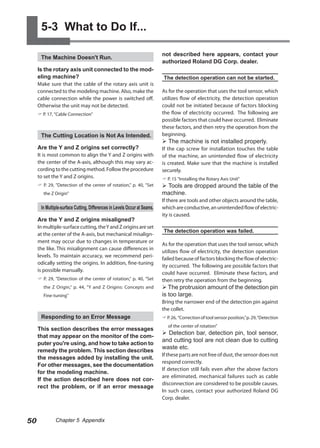
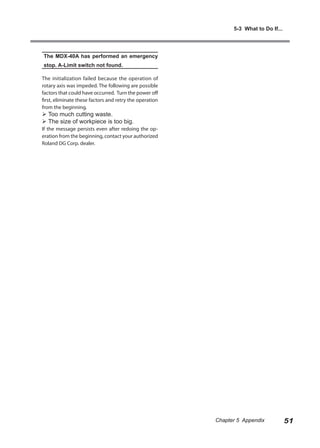
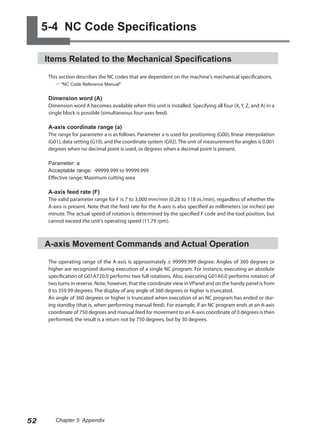
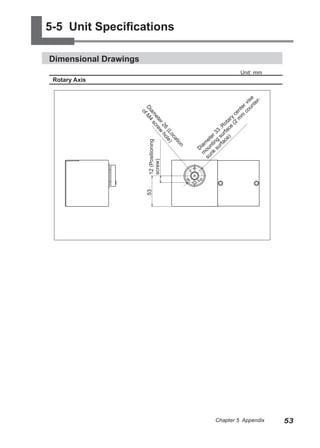
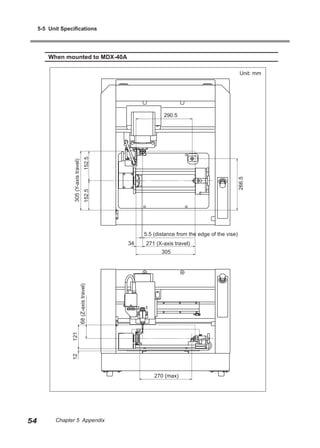
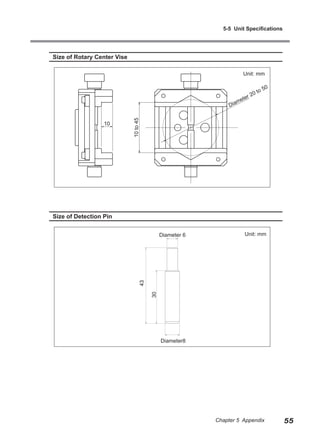
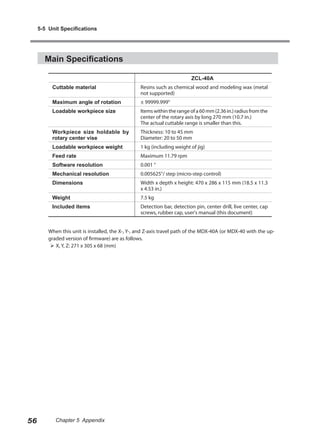
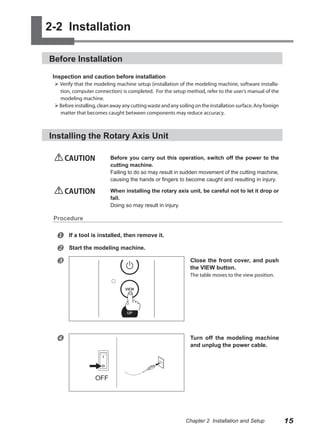
Here are the steps to install the rotary axis unit:
1. Switch off the power to the modeling machine.
2. Remove any installed tools.
3. Open the front cover of the modeling machine.
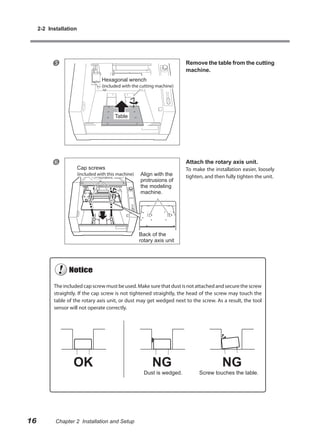
4. Carefully lift the rotary axis unit and place it on the modeling machine table.
5. Secure the rotary axis unit in place using the cap screws provided.
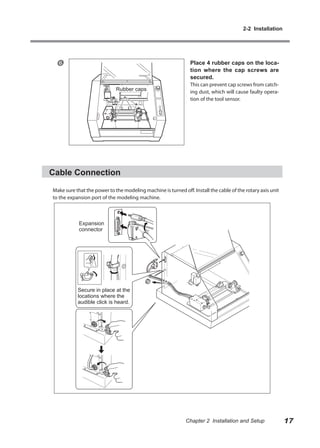
6. Close the front cover of the modeling machine.
7. Connect the cable from the rotary axis unit to the modeling machine.
8. Switch on the power to the modeling machine. The installation of the rotary axis unit is now complete.


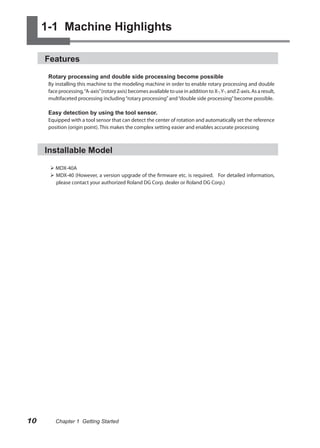
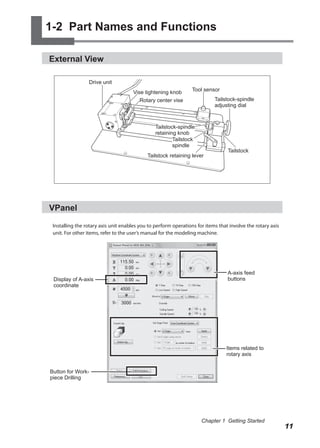


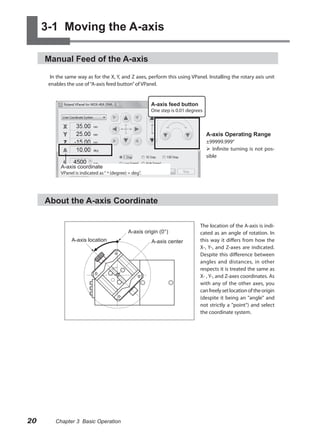
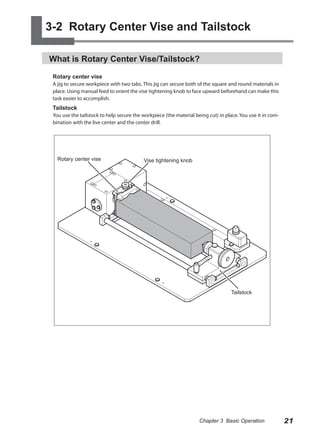
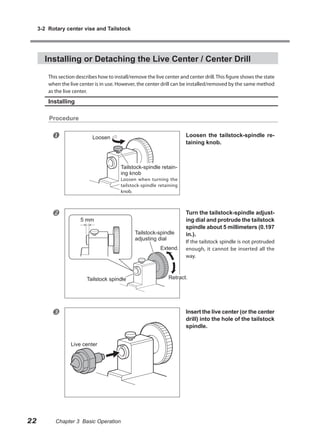
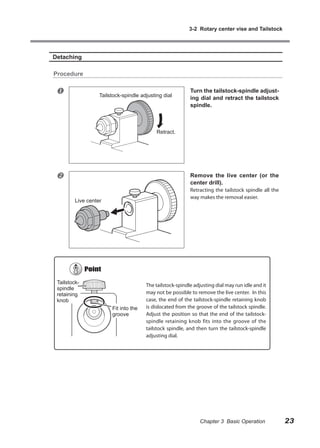

![4-1 STEP1: Preparation for Cutting
Operations at “STEP1: Preparation for Cutting”
“STEP1: Preparation for Cutting” is the operation which needs to be done when this machine is used for
the first time or reinstalled. It is not necessary to perform all of the following operations after the first
cutting. Follow the explanations of each item and perform each operation at an appropriate time.
Correction of Tool Sensor Position
WARNING Never inadvertently touch the operation panel while performing this
task.
Unintended operation of the machine may result in injury.
Tool sensor is used to measure the tool length when setting the Z origin. In this case, because the tool
needs to be placed at the center of the sensor, correct any error, which occurs per machine.
This operation must be performed when this machine is used for the first time or reinstalled.
Procedure
Open the front covers and install
Collet (diameter 6 mm) the detection pin.
Ensure Install the detection pin so that the
no gap. narrower end of the detection pin is
against the collet. If the detection pin is
protruded excessively, detection opera-
Detection pin tion may fail. The installation method is
the same as the cutting tool. Refer to the
user's manual of the modeling machine.
Also, use the collet with a 6-millimeter
(0.236 in) diameter that is included with
the modeling machine.
Close the front covers, then in
VPanel, click [Setup].
The [Setup] window appears.
26 Chapter 4 Preparation for and Performing Cutting](https://image.slidesharecdn.com/manual4asse-100422151512-phpapp02/85/Manual-4-asse-28-320.jpg)
![4-1 STEP1: Preparation for Cutting
Click [Adjust Location] on the
”Modeling Machine” tab.
The ”Tool-sensor Location Adjustment”
window appears.
Click [Start Sensing].
Make sure no buildup of cutting
waste is present on the tool sen-
sor, then click [Continue].
Start correction of tool sensor position.
When the window shown in the
figure appears, click [OK].
Click [OK].
Click [OK].
Correction of tool sensor position is
completed.
Chapter 4 Preparation for and Performing Cutting 27](https://image.slidesharecdn.com/manual4asse-100422151512-phpapp02/85/Manual-4-asse-29-320.jpg)
![4-1 STEP1: Preparation for Cutting
Setting for the A Origin
WARNING Never inadvertently touch the operation panel while performing this
task.
Unintended operation of the machine may result in injury.
There is no standard operating procedure for setting the position of the A origin. The position of the
A origin can be set freely in this machine. In this section, the position of the A origin is set so that the
vise tightening knob is located above the A origin. This is to make the vise tightening knob easier to
handle when mounting the workpiece.
This operation must be performed when this machine is used for the first time or reinstalled.
Procedure
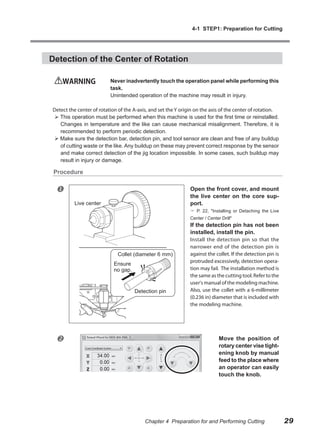
Rotate the A-axis by manual feed
so that the vise tightening knob
is above the A origin.
Select “Set [A origin] here” in the
VPanel and click [Apply] button.
The start position of the A origin has
now been set.
28 Chapter 4 Preparation for and Performing Cutting](https://image.slidesharecdn.com/manual4asse-100422151512-phpapp02/85/Manual-4-asse-30-320.jpg)
![4-1 STEP1: Preparation for Cutting
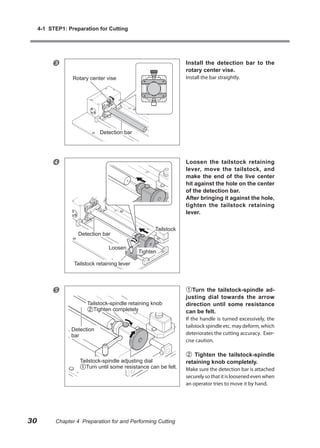
Close the front covers, then in
VPanel, click [Detect Jig].
The “Jig Setting” window appears.
Click [Start Sensing].
Normally, you should leave this
selected. Clearing the check
box makes it necessary to set Y
origin point manually.
Make sure no buildup of cutting
waste is present on the tool sen-
sor, then click [Continue].
Detection of the location of the jig
starts.
When the window shown in the
figure appears, click [OK].
Click [Close].
In the illustration for “Current Jig” on the
VPanel, a rotary center vise is displayed.
Chapter 4 Preparation for and Performing Cutting 31](https://image.slidesharecdn.com/manual4asse-100422151512-phpapp02/85/Manual-4-asse-33-320.jpg)
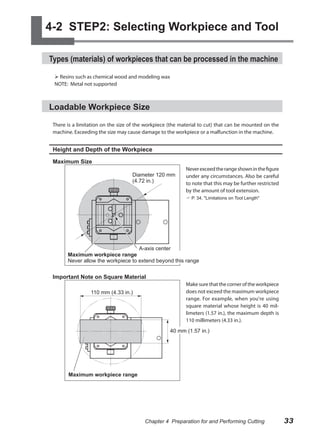
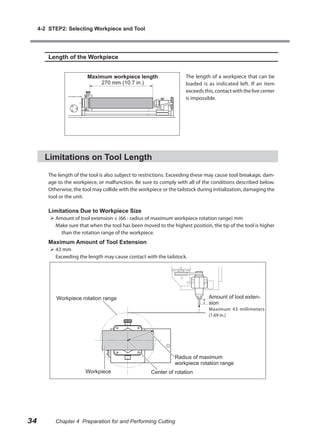
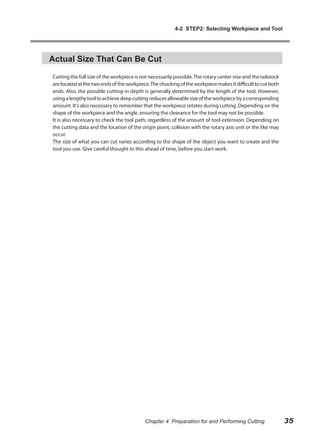
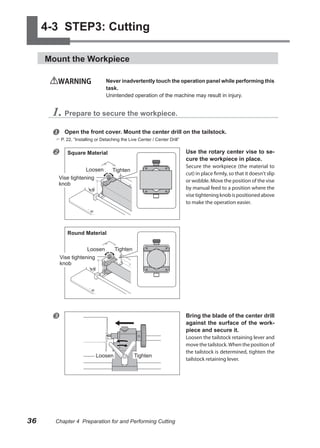
![4-3 STEP3: Cutting
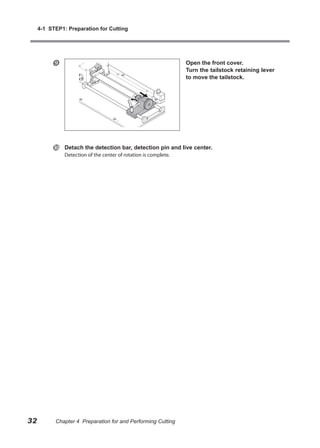
2. Drill a hole for retaining the workpiece.
Click [Drill Workpiece] on the
VPanel.
The “Drill Workpiece” dialog box ap-
pears.
Click [Rotate].
The rotary axis starts to turn.
Turn the tailstock-spindle adjust-
ing dial adjuster slowly to drill the
hole by center drill.
Cut in about 3 millimeters (0.12 in) from
3 mm (0.12 in.)
the blade tip.
Tailstock-spindle
adjusting dial
Click [Stop].
The rotation stops, then click
[Close].
Chapter 4 Preparation for and Performing Cutting 37](https://image.slidesharecdn.com/manual4asse-100422151512-phpapp02/85/Manual-4-asse-39-320.jpg)
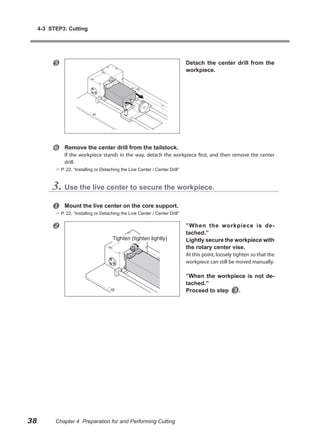
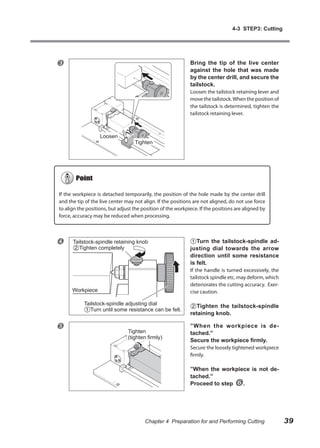
![4-3 STEP3: Cutting
Operate the VPanel to rotate the A-axis and check the status of the work-
piece.
OK: The workpiece and the live center rotate in the same way.
The workpiece was secured. Proceed to “Set the Z Origin”.
NG: Only the workpiece rotates, but not the live center.
The workpiece is not secured. Loosen the tailstock-spindle retaining knob once, and next turn
the tailstock-spindle adjusting dial. And then tighten the tailstock-spindle retaining knob.
Set the Z Origin
WARNING Never inadvertently touch the operation panel while performing this
task.
Unintended operation of the machine may result in injury.
CAUTION Never needlessly touch the tip of the center drill or the live cen-
ter.
Doing so may result in injury.
Detect the length of the tool (protrusion length) and set the Z origin to the center of the rotary axis
(the center of A-axis). Not necessary to set for each processing. However, when the tool is replaced or
the extension length is changed, be sure to perform this operation.
Procedure
Remove the detection pin and install the tool for cutting.
For installation of the tool, refer to the user’s manual of the modeling machine.
Adjust the amount of tool extension to match the size of the workpiece and the cutting depth.
Depending on the amount of tool extension, the tool may encounter interference with the rotary
axis unit or the workpiece. Exercise caution.
P. 34, "Limitations on Tool Length"
Select the [Set the position of “Z
origin" to the center of rotary axis]
on the VPanel and click [Apply]
button.
Make sure no buildup of cutting
waste is present on the tool sen-
sor, then click [Continue].
The tool moves and descends to the posi-
tion where it touches the tool sensor.
40 Chapter 4 Preparation for and Performing Cutting](https://image.slidesharecdn.com/manual4asse-100422151512-phpapp02/85/Manual-4-asse-42-320.jpg)
![4-3 STEP3: Cutting
When the window shown in the
figure appears, click [OK].
The Z origin (and Y origin) has been set
at the center of rotary axis (the location
shown by the red arrow at the illustration
of the rotary center vise on the VPanel).
The Z origin has now been set.
Set the X Origin
WARNING Never inadvertently touch the operation panel while performing this
task.
Unintended operation of the machine may result in injury.
Set the X origin based on the corresponding cutting data. The X origin differs according to the cutting
data. Therefore, decide the origin based on the corresponding data.
Procedure
Move the end of the tool to the position where an operator wants to set the X
origin.
Set the X origin so that neither the tool nor the spindle strikes the rotary center vise during
cutting.
Select [Set “X origin”
here] in the VPanel and
click [Apply] button.
The X origin has now been
set.
Chapter 4 Preparation for and Performing Cutting 41](https://image.slidesharecdn.com/manual4asse-100422151512-phpapp02/85/Manual-4-asse-43-320.jpg)
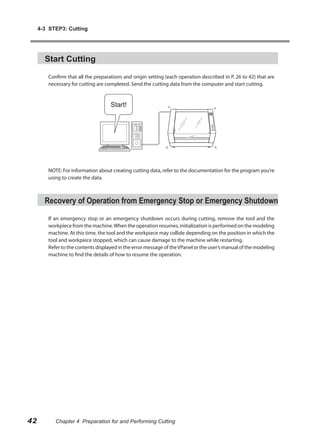
![5-1 Y and Z Origins: Concepts and Fine-tuning
Set the coordinate system to “Ma-
chine Coordinate System.”
Move the tool to the position above the Measurement Point 1 and record the
value of X-axis coordinate.
Move the tool to the position above the Measurement Point 2 and record the value of the X-axis
coordinate.
Detach the workpiece.
Click [Setup] button on the VPan-
el.
The operation setting screen appears.
Click the “Correction” tab.
Enter the X-axis coordinate at
Measurement 1 and 2, which were
recorded at step .
Measurement point 1 ”Point1 –
X(A)”
Measurement point 2 ”Point2 –
X(D)”
Measure how much the Y-axis and Z-axis coordinates are displaced at Measure-
ment Point 1, and 2, which were marked at step .
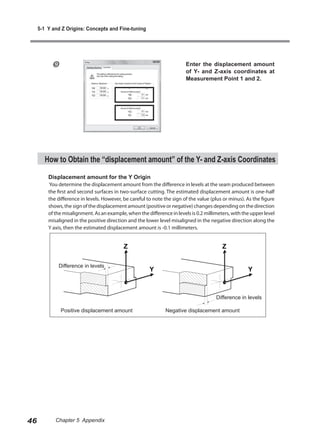
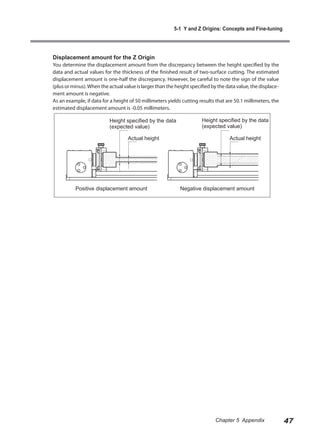
Refer to “How to obtain the "displacement amount" of Y- and Z-axis coordinates” on p. 46 to find
the detailed method of measuring the displacement amount.
Chapter 5 Appendix 45](https://image.slidesharecdn.com/manual4asse-100422151512-phpapp02/85/Manual-4-asse-47-320.jpg)