Flash Online Conference #6
Targeting Flash/Stage3D with C++ and GLSL
@Minko3D http://minko.io
LATEST ADDITIONS
Available today on minko.io
New feature: User Data
 Per-scene node custom data
 Such data can be re-used at runtime
 Complete tutorial available
– http://doc.minko.io/wiki/Working_with_User_Data
// Groups where a property 'middleName' is set inside the userData provider
scene.get("//Group[hasProperty(userData.middleName)]");
// Meshes where the property 'lastName' is 'Turanga' (String, Number, int only)
scene.get("//Mesh[userData.lastName='Turanga']");
// Nodes where 'firstName' matches the regular expression '^P.*' (starts with a P)
scene.get("//*[userData.firstName~='^P.*']");
Major fixes (new release next week)
 Collada files are now loaded properly in the left-handed
coordinates system
 Collada files units are used to scale the scene properly
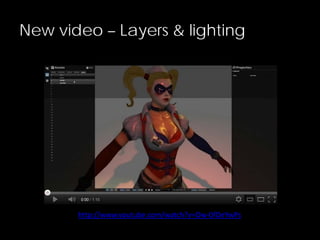
New video – Layers & lighting
http://www.youtube.com/watch?v=Ow-0fOeYwPs
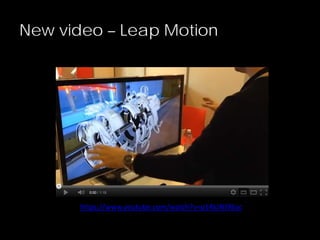
New video – Leap Motion
https://www.youtube.com/watch?v=p14kJNJ9Eoc
MINKO 3
Codename « Normandie »
Motivations
 Target new platforms
– Keep the « design once, deploy everywhere » workflow
– Larger community
 Increase performances, epecially CPU-wise
– Multi-threading?
 Leverage existing codebase
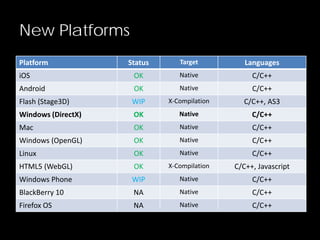
New Platforms
Platform Status Target Languages
iOS OK Native C/C++
Android OK Native C/C++
Flash (Stage3D) WIP X-Compilation C/C++, AS3
Windows (DirectX) OK Native C/C++
Mac OK Native C/C++
Windows (OpenGL) OK Native C/C++
Linux OK Native C/C++
HTML5 (WebGL) OK X-Compilation C/C++, Javascript
Windows Phone WIP Native C/C++
BlackBerry 10 NA Native C/C++
Firefox OS NA Native C/C++
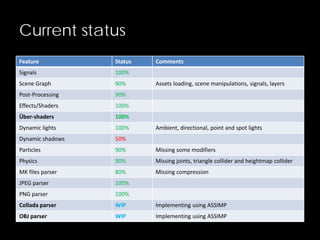
Current status
Feature Status Comments
Signals 100%
Scene Graph 90% Assets loading, scene manipulations, signals, layers
Post-Processing 90%
Effects/Shaders 100%
Über-shaders 100%
Dynamic lights 100% Ambient, directional, point and spot lights
Dynamic shadows 50%
Particles 90% Missing some modifiers
Physics 90% Missing joints, triangle collider and heightmap collider
MK files parser 80% Missing compression
JPEG parser 100%
PNG parser 100%
Collada parser WIP Implementing using ASSIMP
OBJ parser WIP Implementing using ASSIMP
Demo – HTML5 Sponza
http://minko.io/showcase/sponza-html5
TECHNOLOGICAL CHOICES
C++ 2011
 Standard, fast, well documented and supported by a vast
community
 Already fully supported by all major compilers (VS, GCC,
LLVM…)
 New additions make it closer to what we’re used to with
AS3/Javascript
– Closures/lambda functions
– Type inference (instead of dynamic typing)
– Shared pointers
FlasCC/Crossbridge http://adobe-flash.github.io/crossbridge/
 Open source project driven by Adobe
– Based on LLVM, which is supported by Google, Apple, Intel and
many more
 Cross-compiles C++ code to ActionScript 3.0
– No (stable) OpenGL bindings
– Provides virtual file system
– C++  AS3 bindings using SWIG
 Leverages LLVM/C++ based optimizations
– Strong typing
– Low level memory management: no GC!
 Still suffers from AS3/AVM2 performance issues
Premake http://industriousone.com/premake
 Cross-platform build system
– Windows, Mac and Linux
– Reference in the video game industry
– Well documented
 Compatible with most IDEs/tools
– gmake
– Visual Studio
– XCode
 Easy to extend and customize
– Based on LUA script configuration files
– Adding support for emscripten was easy
STAGE3D - MOTIVATIONS
AS3 API Bindings
 Provide an AS3 API that matches what is already available in
the AS3 SDK so far
 Allow AS3 devevelopers to continue working with Minko
 Give them an opportunity to smoothly switch to C++ to target
new platforms
– Common APIs and concepts
– Common documentation/community
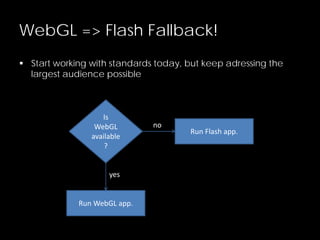
WebGL => Flash Fallback!
 Start working with standards today, but keep adressing the
largest audience possible
Is
WebGL
available
?
Run WebGL app.
Run Flash app.
no
yes
STAGE3D - IMPLEMENTATION
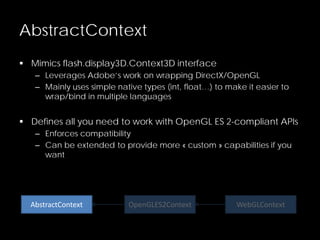
AbstractContext
 Mimics flash.display3D.Context3D interface
– Leverages Adobe’s work on wrapping DirectX/OpenGL
– Mainly uses simple native types (int, float…) to make it easier to
wrap/bind in multiple languages
 Defines all you need to work with OpenGL ES 2-compliant APIs
– Enforces compatibility
– Can be extended to provide more « custom » capabilities if you
want
AbstractContext OpenGLES2Context WebGLContext
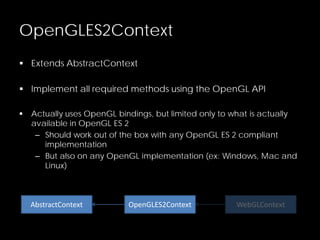
OpenGLES2Context
 Extends AbstractContext
 Implement all required methods using the OpenGL API
 Actually uses OpenGL bindings, but limited only to what is actually
available in OpenGL ES 2
– Should work out of the box with any OpenGL ES 2 compliant
implementation
– But also on any OpenGL implementation (ex: Windows, Mac and
Linux)
AbstractContext OpenGLES2Context WebGLContext
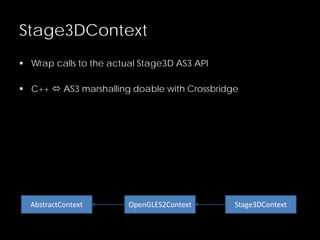
Stage3DContext
 Wrap calls to the actual Stage3D AS3 API
 C++  AS3 marshalling doable with Crossbridge
AbstractContext OpenGLES2Context Stage3DContext
MinkoMinko Sources
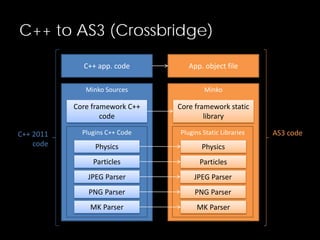
C++ to AS3 (Crossbridge)
C++ app. code
Plugins C++ Code
Physics
Particles
JPEG Parser
PNG Parser
MK Parser
Core framework C++
code
Plugins Static Libraries
Physics
Particles
JPEG Parser
PNG Parser
MK Parser
Core framework static
library
App. object file
AS3 codeC++ 2011
code
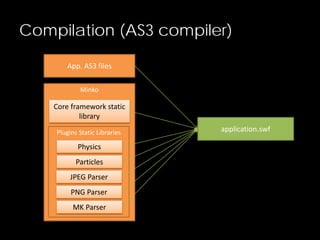
Compilation (AS3 compiler)
Minko
Plugins Static Libraries
Physics
Particles
JPEG Parser
PNG Parser
MK Parser
Core framework static
library
App. AS3 files
application.swf
Current Status
 Crossbridge integrated in the build system
– Just use –platform=crossbridge to generate the build files
– Then compile Minko core framework, plugins and applications
from C++ to AS3 in a single command line
– Plugged into premake4 just like emscripten: JavaScript and Flash
are now two possible targets for your project
 In practice, Crossbridge does not support C++ 2011
– LLVM/clang branch under development
– But doesn’t work yet…
– So we are kinda stuck for now 
But you can help!
 Show your love for Crossbridge and Minko on the dedicated
feature request on Github!
– https://github.com/adobe-flash/crossbridge/issues/28
 Please leave a comment, even just a +1
SHADER PROGRAMMING
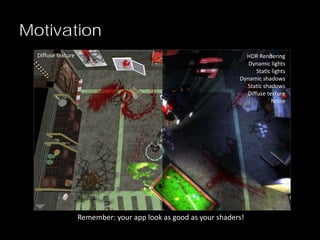
Motivation
HDR Rendering
Dynamic lights
Static lights
Dynamic shadows
Static shadows
Diffuse texture
Noise
Diffuse texture
Remember: your app look as good as your shaders!
Motivations
 Cross-platform
– Write once, run it everywhere
– Original code should be converted to the target « shader
language » transparently (ie AGAL for Stage3D)
 Data-driven rendering
– 100% customized using only asset files
– No C++ code, easier to integrate, distribute and share
– Plug-and-play: leverage all the samples/knowledge available
and plug it into the engine easily
CROSS-PLATFORM SHADERS
Problem 1
Solution: GLSL
 Support for GLSL 1 as defined by the OpenGL ES 2 standard
– Vertex shaders
– Fragment shaders
 Implementation could easily support earlier/more powerful
versions of GLSL
– Gives you the ability to leverage extended hardware capabilities
when available!
 Vast codebase, tutorials and various documentation articles
available on the web
GLSL2AGAL
 Crossbridge powered GLSL to AGAL compiler
– Made by Adobe (thanks guys!)
– https://github.com/adobe/glsl2agal
 Implemented as a library
– Based on the GLSL optimizer already used by Minko
 But can also be used as a standalone binary
– Cool for shaders pre-processing/compiling/packaging
 But it outputs AGAL assembly and not AGAL bytecode directly
– We’ll have to fix this!
PLUGGING SHADERS INTO THE
ENGINE
Problem 2
Problem: Plugging shaders into the
engine
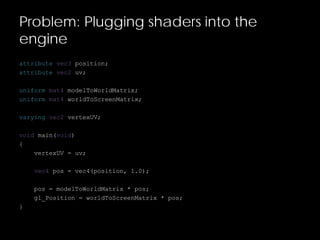
attribute vec3 position;
attribute vec2 uv;
uniform mat4 modelToWorldMatrix;
uniform mat4 worldToScreenMatrix;
varying vec2 vertexUV;
void main(void)
{
vertexUV = uv;
vec4 pos = vec4(position, 1.0);
pos = modelToWorldMatrix * pos;
gl_Position = worldToScreenMatrix * pos;
}
Problem: Plugging shaders into the
engine
attribute vec3 position;
attribute vec2 uv;
uniform mat4 modelToWorldMatrix;
uniform mat4 worldToScreenMatrix;
varying vec2 vertexUV;
void main(void)
{
vertexUV = uv;
vec4 pos = vec4(position, 1.0);
pos = modelToWorldMatrix * pos;
gl_Position = worldToScreenMatrix * pos;
}
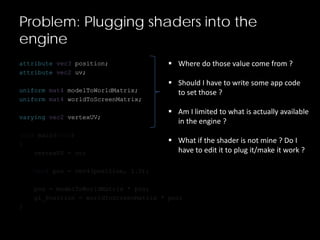
 Where do those value come from ?
 Should I have to write some app code
to set those ?
 Am I limited to what is actually available
in the engine ?
 What if the shader is not mine ? Do I
have to edit it to plug it/make it work ?
File
Pixel Color
Programmatic
Scene
CAO Tools
Problem: Plugging shaders into the
engine
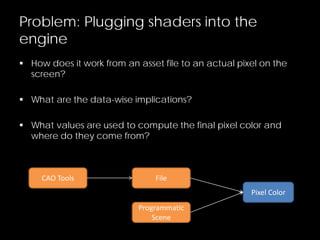
 How does it work from an asset file to an actual pixel on the
screen?
 What are the data-wise implications?
 What values are used to compute the final pixel color and
where do they come from?
Pixel ColorDiffuse Color
IlluminationLight Color
Light Factor
Vertex Normal
Light Direction
Texture
Vertex UV
Shininess
World
Screen
Position
View
Projection
Vertex Normal
Light Direction
Light Color
Texture
Vertex UVTextures
Vertex Buffers
Shininess
Fragment Shader
Constants
Vertex Shader
Constants
World
View
Projection
Draw Call
Textures
Vertex Buffers
Fragment Shader
Constants
Vertex Shader
Constants
Geometry
Material
Mesh
Transform
Camera
Group
Light
Draw Call
Textures
Vertex Buffers
Fragment Shader
Constants
Vertex Shader
Constants
Geometry
Material
Mesh
Transform
Camera
Group
Light
Draw Call
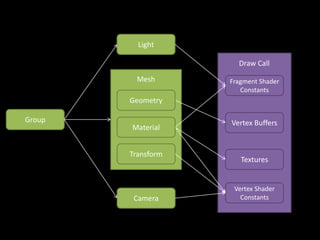
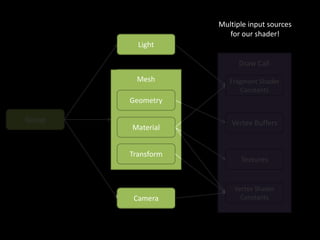
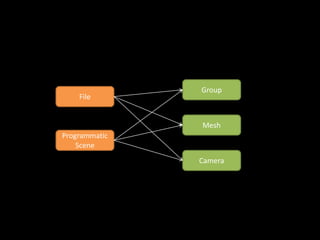
Multiple input sources
for our shader!
Group
Mesh
Camera
File
Programmatic
Scene
Conclusion
 Not that simple! 
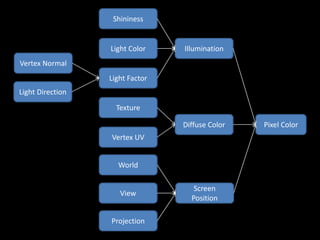
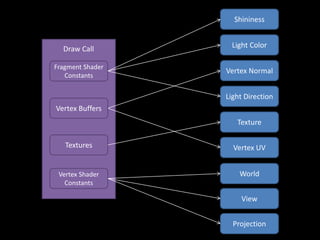
 Shaders take their inputs from many different sources in the
scene
– Some of them are « local » sources (material, transform…)
– Other are « global » (camera, lights…)
 Keeping a scene-dependant rendering process will break
often and will not be extensible
– Setting uniforms manually works but is not scalable
– Providing a limited set of pre-defined/plugged properties is not
extensible
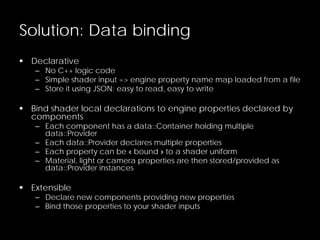
Solution: Data binding
 Declarative
– No C++ logic code
– Simple shader input => engine property name map loaded from a file
– Store it using JSON: easy to read, easy to write
 Bind shader local declarations to engine properties declared by
components
– Each component has a data::Container holding multiple
data::Provider
– Each data::Provider declares multiple properties
– Each property can be « bound » to a shader uniform
– Material, light or camera properties are then stored/provided as
data::Provider instances
 Extensible
– Declare new components providing new properties
– Bind those properties to your shader inputs
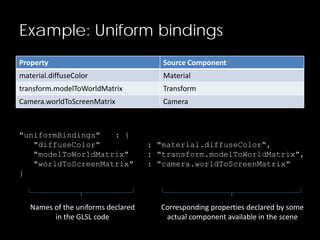
Example: Uniform bindings
Property Source Component
material.diffuseColor Material
transform.modelToWorldMatrix Transform
Camera.worldToScreenMatrix Camera
"uniformBindings" : {
"diffuseColor" : "material.diffuseColor",
"modelToWorldMatrix" : "transform.modelToWorldMatrix",
"worldToScreenMatrix" : "camera.worldToScreenMatrix"
}
Names of the uniforms declared
in the GLSL code
Corresponding properties declared by some
actual component available in the scene
ÜBER SHADERS
Problem 4
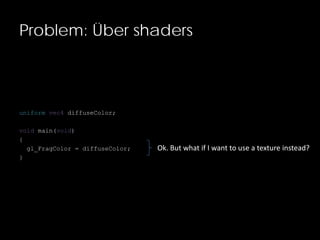
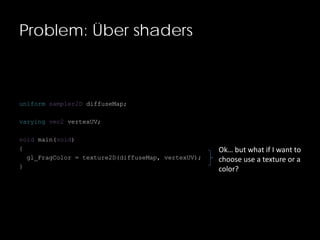
Problem: Über shaders
uniform vec4 diffuseColor;
void main(void)
{
gl_FragColor = diffuseColor;
}
Ok. But what if I want to use a texture instead?
Problem: Über shaders
uniform sampler2D diffuseMap;
varying vec2 vertexUV;
void main(void)
{
gl_FragColor = texture2D(diffuseMap, vertexUV);
}
Ok… but what if I want to
choose use a texture or a
color?
Solution: GLSL macros
 Use GLSL pre-processors and macros
– Use #define to declare a macro
– Use #ifdef to elimiate « dead » (or useless) code at compile time
 Easy to read
 Works exactly like in C, C++ and Objective-C
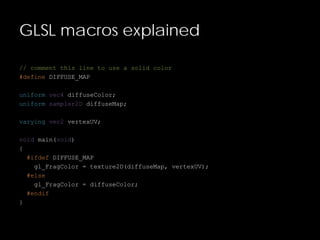
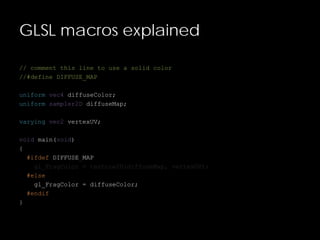
GLSL macros explained
// comment this line to use a solid color
#define DIFFUSE_MAP
uniform vec4 diffuseColor;
uniform sampler2D diffuseMap;
varying vec2 vertexUV;
void main(void)
{
#ifdef DIFFUSE_MAP
gl_FragColor = texture2D(diffuseMap, vertexUV);
#else
gl_FragColor = diffuseColor;
#endif
}
GLSL macros explained
// comment this line to use a solid color
#define DIFFUSE_MAP
uniform vec4 diffuseColor;
uniform sampler2D diffuseMap;
varying vec2 vertexUV;
void main(void)
{
#ifdef DIFFUSE_MAP
gl_FragColor = texture2D(diffuseMap, vertexUV);
#else
gl_FragColor = diffuseColor;
#endif
}
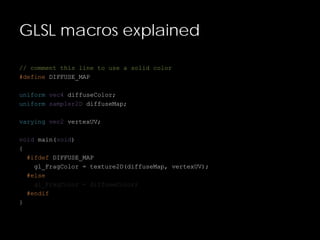
GLSL macros explained
// comment this line to use a solid color
//#define DIFFUSE_MAP
uniform vec4 diffuseColor;
uniform sampler2D diffuseMap;
varying vec2 vertexUV;
void main(void)
{
#ifdef DIFFUSE_MAP
gl_FragColor = texture2D(diffuseMap, vertexUV);
#else
gl_FragColor = diffuseColor;
#endif
}
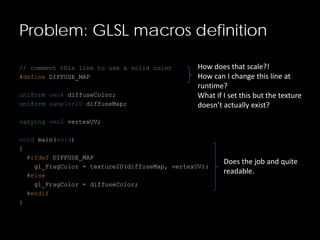
Problem: GLSL macros definition
// comment this line to use a solid color
#define DIFFUSE_MAP
uniform vec4 diffuseColor;
uniform sampler2D diffuseMap;
varying vec2 vertexUV;
void main(void)
{
#ifdef DIFFUSE_MAP
gl_FragColor = texture2D(diffuseMap, vertexUV);
#else
gl_FragColor = diffuseColor;
#endif
}
How does that scale?!
How can I change this line at
runtime?
What if I set this but the texture
doesn’t actually exist?
Does the job and quite
readable.
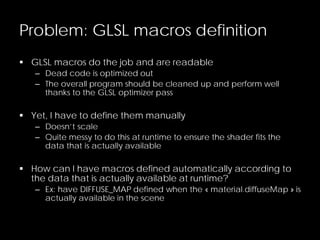
Problem: GLSL macros definition
 GLSL macros do the job and are readable
– Dead code is optimized out
– The overall program should be cleaned up and perform well
thanks to the GLSL optimizer pass
 Yet, I have to define them manually
– Doesn’t scale
– Quite messy to do this at runtime to ensure the shader fits the
data that is actually available
 How can I have macros defined automatically according to
the data that is actually available at runtime?
– Ex: have DIFFUSE_MAP defined when the « material.diffuseMap » is
actually available in the scene
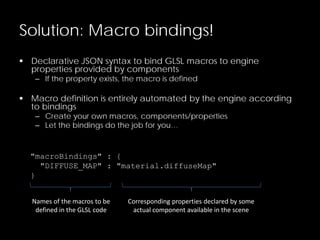
Solution: Macro bindings!
 Declarative JSON syntax to bind GLSL macros to engine
properties provided by components
– If the property exists, the macro is defined
 Macro definition is entirely automated by the engine according
to bindings
– Create your own macros, components/properties
– Let the bindings do the job for you…
"macroBindings" : {
"DIFFUSE_MAP" : "material.diffuseMap"
}
Names of the macros to be
defined in the GLSL code
Corresponding properties declared by some
actual component available in the scene
Macro bindings automation pseudo-
code
material->set("diffuseMap", texture)
_propertyChangedSignal->execute(material, "diffuseMap")
pass->selectProgram()
for each (shader in [vertexShader, fragmentShader])
{
for each (binding in macroBindings)
{
if (hasProperty(binding.propertyName))
defines += "#defines binding.macroName"
}
shader.code = defines + shader.code
}
return new Program(vertexShader, fragmentShader)
MULTI-PASS
Problem 5
Problem: Multi-pass
 Most interesting rendering effects require more than one single
pass
– Cel-shading
– Shadow mapping
– HDR bloom
– Pseudo-lens flare
– …
 A shader defines only one pass
– Vertex shader: compute the final screen position of a vertex
– Fragment shader: compute the final screen color of a pixel
 How can we efficiently define and distribute multi-pass
effects?
Solution: Effect files + target directive
"passes" : [
{
"name" : "first pass",
"target" : "depthmap",
"vertexShader" : "
// pass 1 vertex shader code…
",
"fragmentShader" : "
// pass 1 fragment shader code…
"
},
{
"name" : "second pass",
"vertexShader" : "
// pass 2 vertex shader code…
",
"fragmentShader" : "
// pass 2 fragment shader code…
vec4 depth = texture2D(depthmap…
"
}
]
First pass will write in the
« depthmap » render target.
Second pass will read the
« depthmap » texture to
compute the final pixel color.
Effect files
 Help us declaring multi-pass rendering effects by
– Declaring multiple shaders
– Linking them simply with render to texture
 They will also store
– Uniform bindings
– Macro bindings
– Render states (triangle culling, blending, …)
 Support an « includes » directive to reference external GLSL
files
– Easily integrate 3rd party shader code
FALLBACK
Problem 6
Problem: What if a shader is not
compatible with the target platform ?
 Use cases
– Our shader is using platform specific features/extensions
– Our shader is using more resources (registers, texture samplers,
instructions…) than available
– Some mandatory inputs are missing
– Our shader is broken
 What do we want?
– Be able to declare another rendering « technique »
– Gracefully fallback to this technique when necessary
Solution: The « techniques » directive
 Group passes in a named
« technique »
 Select that technique at
runtime
– Effect::technique(techniqueN
ame)
"techniques" : [
{
"name" : "single pass",
"passes" : [
{
"vertexShader" : …
"fragmentShader" : …
}
},
{
"name" : "multi pass",
"passes" : [
{
"vertexShader" : …
"fragmentShader" : …
},
{
"vertexShader" : …
"fragmentShader" : …
}
}
]
«singlepass»technique«multipass»technique
Solution: The « fallback » directive
 Declare the name of the technique we should switch to if the
current one fails
 Handled automatically by the engine
 Work in progress, not yet implemented
Effect files
 Store a fully setup multi-pass rendering effect
 Include 3rd party shaders and plug them in the engine using
bindings
 Support über-shaders using automated macro definition
based on bindings
 Handle multiple rendering techniques to choose from at
runtime
 Can fallback to another specific technique when the selected
one fails (WIP)
Future additions
 Select techniques/passes according to some requirements
(ex: extensions/capabilities available)
 Select techniques/passes according to the runtime platform
(ex: use this technique on iOS but another one in the browser)
 Pre-compile shaders to avoid compilation at runtime
 Effect files editor with live GLSL coding (WIP)
CONCLUSION
Conclusion
 Crossbridge has been plugged into Minko’s new build system
 But it’s not ready for C++ 2011, please vote
for the Adobe Crossbridge issue!
– https://github.com/adobe-flash/crossbridge/issues/28
 Effect files
– Provide a 100% data-driven rendering pipeline that you can
customize without a single line of C++.
– Will empower the community by making it possible to use 3rd
party code and distribute their work.
MERCI !
Don’t forget to check http://minko.io !

Minko - Targeting Flash/Stage3D with C++ and GLSL

  • 1.
    Flash Online Conference#6 Targeting Flash/Stage3D with C++ and GLSL @Minko3D http://minko.io
  • 2.
  • 3.
    New feature: UserData  Per-scene node custom data  Such data can be re-used at runtime  Complete tutorial available – http://doc.minko.io/wiki/Working_with_User_Data // Groups where a property 'middleName' is set inside the userData provider scene.get("//Group[hasProperty(userData.middleName)]"); // Meshes where the property 'lastName' is 'Turanga' (String, Number, int only) scene.get("//Mesh[userData.lastName='Turanga']"); // Nodes where 'firstName' matches the regular expression '^P.*' (starts with a P) scene.get("//*[userData.firstName~='^P.*']");
  • 4.
    Major fixes (newrelease next week)  Collada files are now loaded properly in the left-handed coordinates system  Collada files units are used to scale the scene properly
  • 5.
    New video –Layers & lighting http://www.youtube.com/watch?v=Ow-0fOeYwPs
  • 6.
    New video –Leap Motion https://www.youtube.com/watch?v=p14kJNJ9Eoc
  • 7.
    MINKO 3 Codename «Normandie »
  • 8.
    Motivations  Target newplatforms – Keep the « design once, deploy everywhere » workflow – Larger community  Increase performances, epecially CPU-wise – Multi-threading?  Leverage existing codebase
  • 9.
    New Platforms Platform StatusTarget Languages iOS OK Native C/C++ Android OK Native C/C++ Flash (Stage3D) WIP X-Compilation C/C++, AS3 Windows (DirectX) OK Native C/C++ Mac OK Native C/C++ Windows (OpenGL) OK Native C/C++ Linux OK Native C/C++ HTML5 (WebGL) OK X-Compilation C/C++, Javascript Windows Phone WIP Native C/C++ BlackBerry 10 NA Native C/C++ Firefox OS NA Native C/C++
  • 10.
    Current status Feature StatusComments Signals 100% Scene Graph 90% Assets loading, scene manipulations, signals, layers Post-Processing 90% Effects/Shaders 100% Über-shaders 100% Dynamic lights 100% Ambient, directional, point and spot lights Dynamic shadows 50% Particles 90% Missing some modifiers Physics 90% Missing joints, triangle collider and heightmap collider MK files parser 80% Missing compression JPEG parser 100% PNG parser 100% Collada parser WIP Implementing using ASSIMP OBJ parser WIP Implementing using ASSIMP
  • 11.
    Demo – HTML5Sponza http://minko.io/showcase/sponza-html5
  • 12.
  • 13.
    C++ 2011  Standard,fast, well documented and supported by a vast community  Already fully supported by all major compilers (VS, GCC, LLVM…)  New additions make it closer to what we’re used to with AS3/Javascript – Closures/lambda functions – Type inference (instead of dynamic typing) – Shared pointers
  • 14.
    FlasCC/Crossbridge http://adobe-flash.github.io/crossbridge/  Opensource project driven by Adobe – Based on LLVM, which is supported by Google, Apple, Intel and many more  Cross-compiles C++ code to ActionScript 3.0 – No (stable) OpenGL bindings – Provides virtual file system – C++  AS3 bindings using SWIG  Leverages LLVM/C++ based optimizations – Strong typing – Low level memory management: no GC!  Still suffers from AS3/AVM2 performance issues
  • 15.
    Premake http://industriousone.com/premake  Cross-platformbuild system – Windows, Mac and Linux – Reference in the video game industry – Well documented  Compatible with most IDEs/tools – gmake – Visual Studio – XCode  Easy to extend and customize – Based on LUA script configuration files – Adding support for emscripten was easy
  • 16.
  • 17.
    AS3 API Bindings Provide an AS3 API that matches what is already available in the AS3 SDK so far  Allow AS3 devevelopers to continue working with Minko  Give them an opportunity to smoothly switch to C++ to target new platforms – Common APIs and concepts – Common documentation/community
  • 18.
    WebGL => FlashFallback!  Start working with standards today, but keep adressing the largest audience possible Is WebGL available ? Run WebGL app. Run Flash app. no yes
  • 19.
  • 20.
    AbstractContext  Mimics flash.display3D.Context3Dinterface – Leverages Adobe’s work on wrapping DirectX/OpenGL – Mainly uses simple native types (int, float…) to make it easier to wrap/bind in multiple languages  Defines all you need to work with OpenGL ES 2-compliant APIs – Enforces compatibility – Can be extended to provide more « custom » capabilities if you want AbstractContext OpenGLES2Context WebGLContext
  • 21.
    OpenGLES2Context  Extends AbstractContext Implement all required methods using the OpenGL API  Actually uses OpenGL bindings, but limited only to what is actually available in OpenGL ES 2 – Should work out of the box with any OpenGL ES 2 compliant implementation – But also on any OpenGL implementation (ex: Windows, Mac and Linux) AbstractContext OpenGLES2Context WebGLContext
  • 22.
    Stage3DContext  Wrap callsto the actual Stage3D AS3 API  C++  AS3 marshalling doable with Crossbridge AbstractContext OpenGLES2Context Stage3DContext
  • 23.
    MinkoMinko Sources C++ toAS3 (Crossbridge) C++ app. code Plugins C++ Code Physics Particles JPEG Parser PNG Parser MK Parser Core framework C++ code Plugins Static Libraries Physics Particles JPEG Parser PNG Parser MK Parser Core framework static library App. object file AS3 codeC++ 2011 code
  • 24.
    Compilation (AS3 compiler) Minko PluginsStatic Libraries Physics Particles JPEG Parser PNG Parser MK Parser Core framework static library App. AS3 files application.swf
  • 25.
    Current Status  Crossbridgeintegrated in the build system – Just use –platform=crossbridge to generate the build files – Then compile Minko core framework, plugins and applications from C++ to AS3 in a single command line – Plugged into premake4 just like emscripten: JavaScript and Flash are now two possible targets for your project  In practice, Crossbridge does not support C++ 2011 – LLVM/clang branch under development – But doesn’t work yet… – So we are kinda stuck for now 
  • 26.
    But you canhelp!  Show your love for Crossbridge and Minko on the dedicated feature request on Github! – https://github.com/adobe-flash/crossbridge/issues/28  Please leave a comment, even just a +1
  • 27.
  • 28.
    Motivation HDR Rendering Dynamic lights Staticlights Dynamic shadows Static shadows Diffuse texture Noise Diffuse texture Remember: your app look as good as your shaders!
  • 29.
    Motivations  Cross-platform – Writeonce, run it everywhere – Original code should be converted to the target « shader language » transparently (ie AGAL for Stage3D)  Data-driven rendering – 100% customized using only asset files – No C++ code, easier to integrate, distribute and share – Plug-and-play: leverage all the samples/knowledge available and plug it into the engine easily
  • 30.
  • 31.
    Solution: GLSL  Supportfor GLSL 1 as defined by the OpenGL ES 2 standard – Vertex shaders – Fragment shaders  Implementation could easily support earlier/more powerful versions of GLSL – Gives you the ability to leverage extended hardware capabilities when available!  Vast codebase, tutorials and various documentation articles available on the web
  • 32.
    GLSL2AGAL  Crossbridge poweredGLSL to AGAL compiler – Made by Adobe (thanks guys!) – https://github.com/adobe/glsl2agal  Implemented as a library – Based on the GLSL optimizer already used by Minko  But can also be used as a standalone binary – Cool for shaders pre-processing/compiling/packaging  But it outputs AGAL assembly and not AGAL bytecode directly – We’ll have to fix this!
  • 33.
    PLUGGING SHADERS INTOTHE ENGINE Problem 2
  • 34.
    Problem: Plugging shadersinto the engine attribute vec3 position; attribute vec2 uv; uniform mat4 modelToWorldMatrix; uniform mat4 worldToScreenMatrix; varying vec2 vertexUV; void main(void) { vertexUV = uv; vec4 pos = vec4(position, 1.0); pos = modelToWorldMatrix * pos; gl_Position = worldToScreenMatrix * pos; }
  • 35.
    Problem: Plugging shadersinto the engine attribute vec3 position; attribute vec2 uv; uniform mat4 modelToWorldMatrix; uniform mat4 worldToScreenMatrix; varying vec2 vertexUV; void main(void) { vertexUV = uv; vec4 pos = vec4(position, 1.0); pos = modelToWorldMatrix * pos; gl_Position = worldToScreenMatrix * pos; }  Where do those value come from ?  Should I have to write some app code to set those ?  Am I limited to what is actually available in the engine ?  What if the shader is not mine ? Do I have to edit it to plug it/make it work ?
  • 36.
    File Pixel Color Programmatic Scene CAO Tools Problem:Plugging shaders into the engine  How does it work from an asset file to an actual pixel on the screen?  What are the data-wise implications?  What values are used to compute the final pixel color and where do they come from?
  • 37.
    Pixel ColorDiffuse Color IlluminationLightColor Light Factor Vertex Normal Light Direction Texture Vertex UV Shininess World Screen Position View Projection
  • 38.
    Vertex Normal Light Direction LightColor Texture Vertex UVTextures Vertex Buffers Shininess Fragment Shader Constants Vertex Shader Constants World View Projection Draw Call
  • 39.
    Textures Vertex Buffers Fragment Shader Constants VertexShader Constants Geometry Material Mesh Transform Camera Group Light Draw Call
  • 40.
    Textures Vertex Buffers Fragment Shader Constants VertexShader Constants Geometry Material Mesh Transform Camera Group Light Draw Call Multiple input sources for our shader!
  • 41.
  • 42.
    Conclusion  Not thatsimple!   Shaders take their inputs from many different sources in the scene – Some of them are « local » sources (material, transform…) – Other are « global » (camera, lights…)  Keeping a scene-dependant rendering process will break often and will not be extensible – Setting uniforms manually works but is not scalable – Providing a limited set of pre-defined/plugged properties is not extensible
  • 43.
    Solution: Data binding Declarative – No C++ logic code – Simple shader input => engine property name map loaded from a file – Store it using JSON: easy to read, easy to write  Bind shader local declarations to engine properties declared by components – Each component has a data::Container holding multiple data::Provider – Each data::Provider declares multiple properties – Each property can be « bound » to a shader uniform – Material, light or camera properties are then stored/provided as data::Provider instances  Extensible – Declare new components providing new properties – Bind those properties to your shader inputs
  • 44.
    Example: Uniform bindings PropertySource Component material.diffuseColor Material transform.modelToWorldMatrix Transform Camera.worldToScreenMatrix Camera "uniformBindings" : { "diffuseColor" : "material.diffuseColor", "modelToWorldMatrix" : "transform.modelToWorldMatrix", "worldToScreenMatrix" : "camera.worldToScreenMatrix" } Names of the uniforms declared in the GLSL code Corresponding properties declared by some actual component available in the scene
  • 45.
  • 46.
    Problem: Über shaders uniformvec4 diffuseColor; void main(void) { gl_FragColor = diffuseColor; } Ok. But what if I want to use a texture instead?
  • 47.
    Problem: Über shaders uniformsampler2D diffuseMap; varying vec2 vertexUV; void main(void) { gl_FragColor = texture2D(diffuseMap, vertexUV); } Ok… but what if I want to choose use a texture or a color?
  • 48.
    Solution: GLSL macros Use GLSL pre-processors and macros – Use #define to declare a macro – Use #ifdef to elimiate « dead » (or useless) code at compile time  Easy to read  Works exactly like in C, C++ and Objective-C
  • 49.
    GLSL macros explained //comment this line to use a solid color #define DIFFUSE_MAP uniform vec4 diffuseColor; uniform sampler2D diffuseMap; varying vec2 vertexUV; void main(void) { #ifdef DIFFUSE_MAP gl_FragColor = texture2D(diffuseMap, vertexUV); #else gl_FragColor = diffuseColor; #endif }
  • 50.
    GLSL macros explained //comment this line to use a solid color #define DIFFUSE_MAP uniform vec4 diffuseColor; uniform sampler2D diffuseMap; varying vec2 vertexUV; void main(void) { #ifdef DIFFUSE_MAP gl_FragColor = texture2D(diffuseMap, vertexUV); #else gl_FragColor = diffuseColor; #endif }
  • 51.
    GLSL macros explained //comment this line to use a solid color //#define DIFFUSE_MAP uniform vec4 diffuseColor; uniform sampler2D diffuseMap; varying vec2 vertexUV; void main(void) { #ifdef DIFFUSE_MAP gl_FragColor = texture2D(diffuseMap, vertexUV); #else gl_FragColor = diffuseColor; #endif }
  • 52.
    Problem: GLSL macrosdefinition // comment this line to use a solid color #define DIFFUSE_MAP uniform vec4 diffuseColor; uniform sampler2D diffuseMap; varying vec2 vertexUV; void main(void) { #ifdef DIFFUSE_MAP gl_FragColor = texture2D(diffuseMap, vertexUV); #else gl_FragColor = diffuseColor; #endif } How does that scale?! How can I change this line at runtime? What if I set this but the texture doesn’t actually exist? Does the job and quite readable.
  • 53.
    Problem: GLSL macrosdefinition  GLSL macros do the job and are readable – Dead code is optimized out – The overall program should be cleaned up and perform well thanks to the GLSL optimizer pass  Yet, I have to define them manually – Doesn’t scale – Quite messy to do this at runtime to ensure the shader fits the data that is actually available  How can I have macros defined automatically according to the data that is actually available at runtime? – Ex: have DIFFUSE_MAP defined when the « material.diffuseMap » is actually available in the scene
  • 54.
    Solution: Macro bindings! Declarative JSON syntax to bind GLSL macros to engine properties provided by components – If the property exists, the macro is defined  Macro definition is entirely automated by the engine according to bindings – Create your own macros, components/properties – Let the bindings do the job for you… "macroBindings" : { "DIFFUSE_MAP" : "material.diffuseMap" } Names of the macros to be defined in the GLSL code Corresponding properties declared by some actual component available in the scene
  • 55.
    Macro bindings automationpseudo- code material->set("diffuseMap", texture) _propertyChangedSignal->execute(material, "diffuseMap") pass->selectProgram() for each (shader in [vertexShader, fragmentShader]) { for each (binding in macroBindings) { if (hasProperty(binding.propertyName)) defines += "#defines binding.macroName" } shader.code = defines + shader.code } return new Program(vertexShader, fragmentShader)
  • 56.
  • 57.
    Problem: Multi-pass  Mostinteresting rendering effects require more than one single pass – Cel-shading – Shadow mapping – HDR bloom – Pseudo-lens flare – …  A shader defines only one pass – Vertex shader: compute the final screen position of a vertex – Fragment shader: compute the final screen color of a pixel  How can we efficiently define and distribute multi-pass effects?
  • 58.
    Solution: Effect files+ target directive "passes" : [ { "name" : "first pass", "target" : "depthmap", "vertexShader" : " // pass 1 vertex shader code… ", "fragmentShader" : " // pass 1 fragment shader code… " }, { "name" : "second pass", "vertexShader" : " // pass 2 vertex shader code… ", "fragmentShader" : " // pass 2 fragment shader code… vec4 depth = texture2D(depthmap… " } ] First pass will write in the « depthmap » render target. Second pass will read the « depthmap » texture to compute the final pixel color.
  • 59.
    Effect files  Helpus declaring multi-pass rendering effects by – Declaring multiple shaders – Linking them simply with render to texture  They will also store – Uniform bindings – Macro bindings – Render states (triangle culling, blending, …)  Support an « includes » directive to reference external GLSL files – Easily integrate 3rd party shader code
  • 60.
  • 61.
    Problem: What ifa shader is not compatible with the target platform ?  Use cases – Our shader is using platform specific features/extensions – Our shader is using more resources (registers, texture samplers, instructions…) than available – Some mandatory inputs are missing – Our shader is broken  What do we want? – Be able to declare another rendering « technique » – Gracefully fallback to this technique when necessary
  • 62.
    Solution: The «techniques » directive  Group passes in a named « technique »  Select that technique at runtime – Effect::technique(techniqueN ame) "techniques" : [ { "name" : "single pass", "passes" : [ { "vertexShader" : … "fragmentShader" : … } }, { "name" : "multi pass", "passes" : [ { "vertexShader" : … "fragmentShader" : … }, { "vertexShader" : … "fragmentShader" : … } } ] «singlepass»technique«multipass»technique
  • 63.
    Solution: The «fallback » directive  Declare the name of the technique we should switch to if the current one fails  Handled automatically by the engine  Work in progress, not yet implemented
  • 64.
    Effect files  Storea fully setup multi-pass rendering effect  Include 3rd party shaders and plug them in the engine using bindings  Support über-shaders using automated macro definition based on bindings  Handle multiple rendering techniques to choose from at runtime  Can fallback to another specific technique when the selected one fails (WIP)
  • 65.
    Future additions  Selecttechniques/passes according to some requirements (ex: extensions/capabilities available)  Select techniques/passes according to the runtime platform (ex: use this technique on iOS but another one in the browser)  Pre-compile shaders to avoid compilation at runtime  Effect files editor with live GLSL coding (WIP)
  • 66.
  • 67.
    Conclusion  Crossbridge hasbeen plugged into Minko’s new build system  But it’s not ready for C++ 2011, please vote for the Adobe Crossbridge issue! – https://github.com/adobe-flash/crossbridge/issues/28  Effect files – Provide a 100% data-driven rendering pipeline that you can customize without a single line of C++. – Will empower the community by making it possible to use 3rd party code and distribute their work.
  • 68.
    MERCI ! Don’t forgetto check http://minko.io !