Network Simulation
Traffic engineering study case
European MUM – 2015
Prague / Czech Republic
Wardner Maia
Copyright Notice
(Aviso sobre direitos autorais)
English:
This material is an effort intended to improve the level of knowledge of professionals
that work with Mikrotik RouterOS and should be used solely for self-study purposes.
Digital copies and/or any printed material contained in this presentation or derived
from it are property of MD Brasil TI & Telecom and cannot be used for any kind of
training, presentation or workshop, even non-commercial ones.
Reproduction of any part or picture requires previous written authorization of MD
Brasil. For information about how to obtain such authorization, please contact
mdbrasil@mdbrasil.com.br.
©Copyright md brasil - direitos reservados 2
Portuguese:
Este material é um esforço que visa aprimorar o grau de conhecimento de
profissionais que trabalham com Mikrotik RouterOS e deve ser usado apenas com
objetivos de auto estudo.
Cópias digitais e/ou materiais impressos com conteúdo desta apresentação ou dela
derivados são de propriedade a MD Brasil TI & Telecom a não podem ser usados para
qualquer tipo de treinamento, apresentação ou seminário, mesmo os de finalidades
não comerciais.
A reprodução de qualquer parte ou figura requer prévia autorização por escrito da
MD Brasil. Para informações sobre como obter esta autorização, por favor contate
mdbrasil@mdbrasil.com.br.
Introduction
Wardner Maia
Electronic and Telecommunications Engineer;
Internet Service Provider since 1995;
Training Business since 2002;
Certified Mikrotik Trainer since 2007;
MD Brasil IT & Telecom CTO;
Member of the board of directors of LACNIC.
3©Copyright md brasil - direitos reservados
Introduction
MD Brasil IT & Telecom
Internet Access Provider in São Paulo state - Brazil;
Telecom equipment manufacturer and integrator;
Mikrotik Training Center since 2007;
Consulting services worldwide.
http://mdbrasil.com.br http://mikrotikbrasil.com.br
4©Copyright md brasil - direitos reservados
Previous Participations on
European MUMs
Wireless Security (2008 – Krakow/PL)
Wireless Security for OLPC project (2009 – Prague/CZ)
Layer 2 Security (2010 – Wroclaw/PL)
Routing Security (2011 – Budapest/HU)
IPv6 Security (2012 - Warsaw/PL)
BGP Filtering (2013 – Zagreb/CR)
MPLS VPNs Security (2014 – Venice/IT)
http://mikrotikbrasil.com.br/artigos
5©Copyright md brasil - direitos reservados
Network Simulation
©Copyright md brasil - direitos reservados 6
Subject and goals
Subject
Network Simulation with focus on Mikrotik RouterOS
Goals
To share our experience with the use of GNS3
To foster the use of simulators as a prediction and
learning tool
To present a clear tutorial on how to install and use it.
7©Copyright md brasil - direitos reservados
Previous Work from other
Trainers
Previous work on installation and use of GNS3:
- Indonesia 2013 - Rofik Fauzi
GNS3 on Windows, and Qemu as RouterOS
emulator
- USA 2014 – Rick Frei
GNS3 on Windows, and VirtualBox as RouterOS
emulator
8©Copyright md brasil - direitos reservados
Network Simulators
There are many Network Simulators for several
platforms an purposes:
Cloonix, Core, Imunes, Marionnet, Mininet,
Netkit, Psimulator, VirtualSquare, GNS3,
etc;
The link below is an excellent guide to some Open Source
Network simulators:
http://www.brianlinkletter.com/open-source-network-
simulators/
9©Copyright md brasil - direitos reservados
Agenda
10
Motivations and General Talking about
Network Simulators
Installing all the stuff necessary to
simulate any type of IP network;
Creating a Simple and a Base Project and
interacting with them;
A real case demonstration – Traffic
Engineering Scenario;
Final considerations, conclusions and
download links.
©Copyright md brasil - direitos reservados
6’
Agenda
11
Motivations and General Talking about
Network Simulators
Installing all the stuff necessary to
simulate any type of IP network;
Creating a Simple and a Base Project and
interacting with them;
A real case demonstration – Traffic
Engineering Scenario;
Final considerations, conclusions and
download links.
©Copyright md brasil - direitos reservados
4’
Motivations
We do love REAL Routers, but…
©Copyright md brasil - direitos reservados 12
Motivation
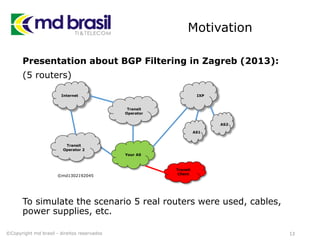
Presentation about BGP Filtering in Zagreb (2013):
(5 routers)
To simulate the scenario 5 real routers were used, cables,
power supplies, etc.
13©Copyright md brasil - direitos reservados
Internet
Transit
Operator
Your AS
IXP
AS1
AS2
Transit
Operator 2
©md1302192045
Transit
Client
Motivation
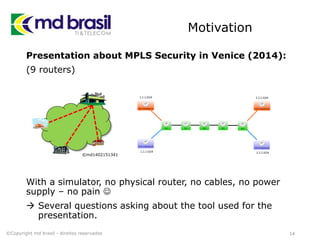
Presentation about MPLS Security in Venice (2014):
(9 routers)
With a simulator, no physical router, no cables, no power
supply – no pain 
 Several questions asking about the tool used for the
presentation.
14©Copyright md brasil - direitos reservados
©md1402151341
Applications of a
Network Simulator
15©Copyright md brasil - direitos reservados
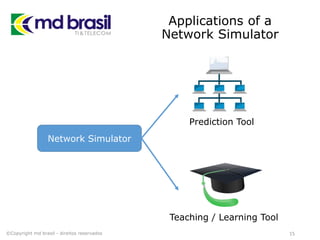
Network Simulator
Prediction Tool
Teaching / Learning Tool
Applications of a
Network Simulator
As a Prediction Tool:
Operators can anticipate how new implementations will
work before deploying them in the “real world”;
Software versions updates can be tested before the real
implementation avoiding problems;
Interoperation with other Vendors can be tested and
tuned without the need of the hardware;
In consulting services making possible fast and low cost
“proof of concepts” to customers.
16©Copyright md brasil - direitos reservados
Success case
Prediction Tool
Brazilian Army Network – 41 CT
(Region of Amazon rain forest)
Existing Network:
Network interconnecting several units, many in hard to reach
locations.
Scope of the work:
Implementation of dynamic routing, IPSec encryption and
QoS.
Challenge:
To make all implementations in a productions network
without any interruption.
17©Copyright md brasil - direitos reservados
Applications of a
Network Simulator
As a Teaching / Learning Tool:
Trainers can easily explain Protocols and complex
scenarios without the need of lots of equipment;
Students can have “on their pockets” all scenarios used in
class and reproduce them by their own;
On line trainings do not depend on physical hardware.
Scenarios can be exported and sent to the students.
18©Copyright md brasil - direitos reservados
Success Case
Teaching / Learning Tool
MD Brasil – Trainings
 Virtual environment simulating a “real” Internet for
BGP Labs. Students connect with real routers to this
network and can practice BGP filtering, traffic
manipulation, etc as they are connected to the
Internet;
 All MPLS Labs are now improved showing first what we
want with some setups and after doing so in real
routers
 In our 2015 roadmap several new labs, now possible
with simulation
19©Copyright md brasil - direitos reservados
Who will Benefit?
Trainers:
Can improve their methods of teaching;
Students:
Can get more from a Training with “scenarios
memories” and test their skills;
Operators:
Can use in their daily operations as a predicting
and testing tool
Mikrotik Community in general:
Can share information and scenarios
20©Copyright md brasil - direitos reservados
Agenda
21
Motivations and General Talking about
Network Simulators
Installing all the stuff necessary to
simulate any type of IP network;
Creating a Simple and a Base Project and
interacting with them;
A real case demonstration – Traffic
Engineering Scenario;
Final considerations, conclusions and
download links.
©Copyright md brasil - direitos reservados
18’
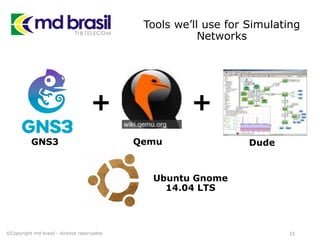
Tools we’ll use for Simulating
Networks
22©Copyright md brasil - direitos reservados
+ +
GNS3 Qemu Dude
Ubuntu Gnome
14.04 LTS
GNS3
GNS3:
 Originally developed with focus on Cisco;
 Uses Dynamips for emulating Cisco
Routers;
 Offers support for emulation with other
systems like Qemu and VirtualBox;
23©Copyright md brasil - direitos reservados
http://gns3.net
Qemu
Qemu (Quick Emulator) is an open source
software that can be used either as an
emulator or a virtualization system;
As an emulator, Qemu can run operating
Systems in a regular PC
Used as a Virtualization platform, Qemu
runs the guest system directly on the host
machine using KVM.
Several architectures are supported, like
Mips, ARM, PPC, x86, etc.
24©Copyright md brasil - direitos reservados
http://qemu.org
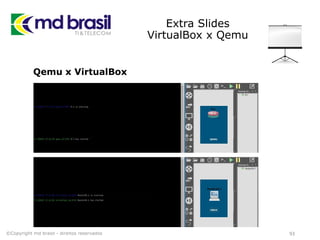
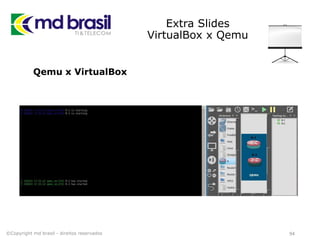
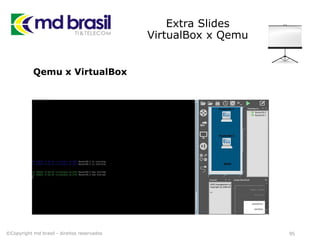
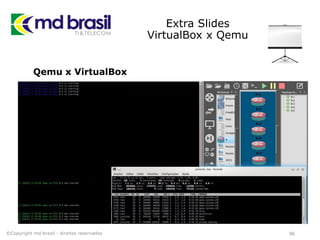
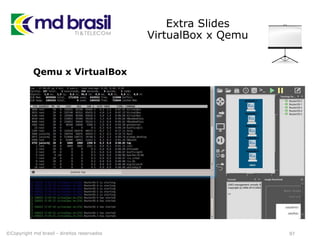
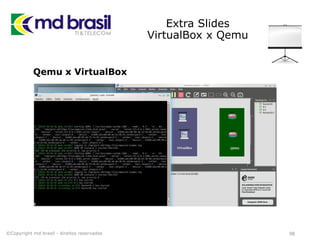
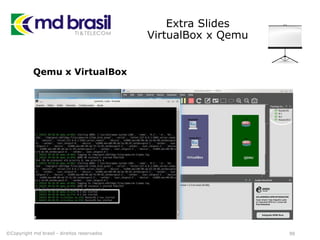
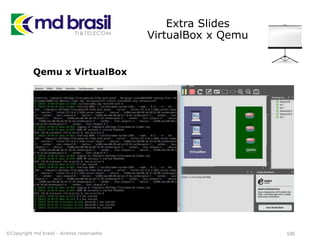
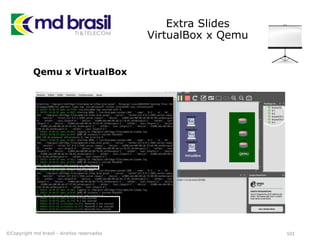
Qemu x VirtualBox
Another possibility could be use VirtualBox instead of
Qemu.
According to our tests Qemu is faster and saves CPU
resources. (see some tests at the end of this presentation)
25©Copyright md brasil - direitos reservados
http://qemu.org http://virtualbox.org
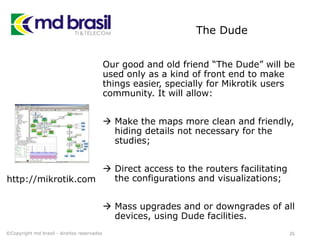
The Dude
Our good and old friend “The Dude” will be
used only as a kind of front end to make
things easier, specially for Mikrotik users
community. It will allow:
 Make the maps more clean and friendly,
hiding details not necessary for the
studies;
 Direct access to the routers facilitating
the configurations and visualizations;
 Mass upgrades and or downgrades of all
devices, using Dude facilities.
26©Copyright md brasil - direitos reservados
http://mikrotik.com
Installing the Stuff
©Copyright md brasil - direitos reservados 27
Installation
Installation successful for Ubuntu-gnome 14.04 LTS
# all following commands should run as root
sudo su
# all the stuff at root directory will make things
easier when sharing projects
mkdir /GNS3
cd /GNS3
28©Copyright md brasil - direitos reservados
Installation on Ubuntu
# preparing the dependencies:
apt-get update
apt-get install build-essential
apt-get install libelf-dev
apt-get install uuid-dev
apt-get install libpcap-dev
apt-get install python3-dev
apt-get install python3-pyqt4
apt-get install python3-netifaces
29©Copyright md brasil - direitos reservados
Installation on Ubuntu
# preparing the dependencies (cont.):
apt-get install git
apt-get install cmake
apt-get install bison
apt-get install flex
# installing phyton and pip:
wget -O get-pip.py
https://raw.github.com/pypa/pip/master/contrib/get-pip.py
python3 get-pip.py
pip3 install pyzmq && pip3 install tornado
30©Copyright md brasil - direitos reservados
Installation
# stuff for i386 support
dpkg --add-architecture i386
apt-get update
apt-get install libc6:i386
apt-get install libstdc++6:i386
apt-get install libssl1.0.0:i386
ln -s /lib/i386-linux-gnu/libcrypto.so.1.0.0 /lib/i386-linux-
gnu/libcrypto.so.4
31©Copyright md brasil - direitos reservados
Installation
# stuff for i386 support (cont.)
wget http://ndevilla.free.fr/iniparser/iniparser-3.1.tar.gz
tar xf iniparser-3.1.tar.gz
cd iniparser/
makecp libiniparser* /usr/lib
cp src/*.h /usr/include
cd ..
32©Copyright md brasil - direitos reservados
Installation
# Installing Dynamips
git clone git://github.com/GNS3/dynamips.git
cd dynamips
mkdir build
cd build
cmake ..
make install
cd ~/GNS3
33©Copyright md brasil - direitos reservados
Installation
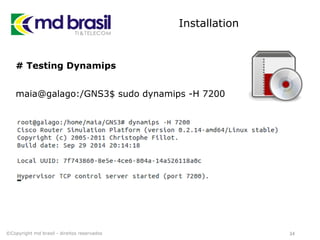
# Testing Dynamips
maia@galago:/GNS3$ sudo dynamips -H 7200
34©Copyright md brasil - direitos reservados
Installation
# Installing GNS3
wget https://github.com/GNS3/gns3-server/archive/v1.2.3.zip
unzip v1.2.3.zip
cd gns3-server-1.2.3
python3 setup.py install
cd ..
rm -r v1.2.3.zip
35©Copyright md brasil - direitos reservados
Installation
# Installing GNS3 GUI
wget https://github.com/GNS3/gns3-gui/archive/v1.2.3.zip
unzip v1.2.3.zip
cd gns3-gui-1.2.3/
python3 setup.py install
cd ..
rm -r v1.2.3.zip
36©Copyright md brasil - direitos reservados
Installation
# Installing IOU
get https://github.com/GNS3/iouyap/archive/master.zip
unzip master.zip
cd iouyap-master/
make install
cp iouyap /usr/local/bin/iouyap
cd ..
rm -r master.zip
37©Copyright md brasil - direitos reservados
Installation
# Creating License file for Cisco
pico CiscoKeyGen
! /usr/bin/python
print "*******************************************"
print "Cisco IOU License Generator - Kal 2011, python port of 2006 C
version"
import os
import socket
import hashlib
import struct
38©Copyright md brasil - direitos reservados
Installation
# Creating License file for Cisco (cont.)
# get the host id and host name to calculate the hostkey
hostid=os.popen("hostid").read().strip()
hostname = socket.gethostname()
ioukey=int(hostid,16)
for x in hostname:
ioukey = ioukey + ord(x)
print "hostid=" + hostid +", hostname="+ hostname + ", ioukey=" +
hex(ioukey)[2:]
39©Copyright md brasil - direitos reservados
Installation
# Creating License file for Cisco (cont.)
# create the license using md5sum
iouPad1='x4Bx58x21x81x56x7Bx0DxF3x21x43x9Bx7ExAC
x1DxE6x8A'
iouPad2='x80' + 39*'0'
md5input=iouPad1 + iouPad2 + struct.pack('!L', ioukey) + iouPad1
iouLicense=hashlib.md5(md5input).hexdigest()[:16]
print "nAdd the following text to ~/.iourc:"
print "[license]n" + hostname + " = " + iouLicense + ";n"
print "You can disable the phone home feature with something like:"
print " echo '127.0.0.127 xml.cisco.com' >> /etc/hostsn"
40©Copyright md brasil - direitos reservados
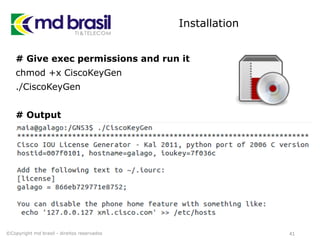
Installation
# Give exec permissions and run it
chmod +x CiscoKeyGen
./CiscoKeyGen
# Output
# Output:
41©Copyright md brasil - direitos reservados
Installation
# Add license to iourc.txt
pico iourc.txt
[license]
galago = 866eb729771e8752;
# Disable the phone feature
echo '127.0.0.127 xml.cisco.com' >> /etc/hosts
42©Copyright md brasil - direitos reservados
Installation
# Install Qemu
apt-get install qemu
# Install The DUDE
# If you don’t have wine, install it and after the Dude
sudo apt-get install wine
dude.exe
43©Copyright md brasil - direitos reservados
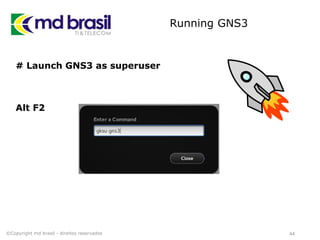
Running GNS3
# Launch GNS3 as superuser
Alt F2
44©Copyright md brasil - direitos reservados
Creating RouterOS
image to GNS3
©Copyright md brasil - direitos reservados 45
RouterOS Image
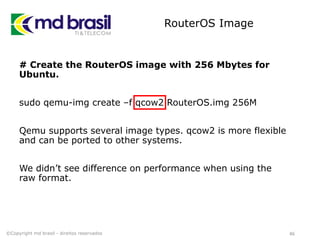
# Create the RouterOS image with 256 Mbytes for
Ubuntu.
sudo qemu-img create –f qcow2 RouterOS.img 256M
Qemu supports several image types. qcow2 is more flexible
and can be ported to other systems.
We didn’t see difference on performance when using the
raw format.
46©Copyright md brasil - direitos reservados
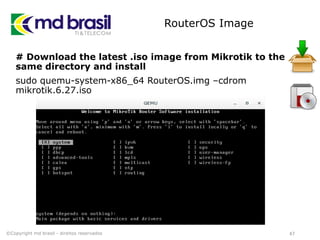
RouterOS Image
# Download the latest .iso image from Mikrotik to the
same directory and install
sudo quemu-system-x86_64 RouterOS.img –cdrom
mikrotik.6.27.iso
47©Copyright md brasil - direitos reservados
RouterOS Image
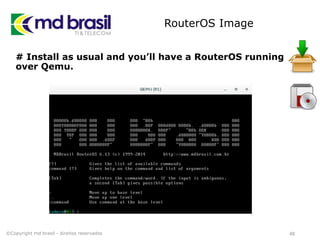
# Install as usual and you’ll have a RouterOS running
over Qemu.
48©Copyright md brasil - direitos reservados
RouterOS Image
# Licensing the image
You can use the demo license without problems, but if you
want to license the router, you can:
Type each character of the license by hand
or
You can communicate via Winbox after binding your
machine to the virtual environment (see further slides in
this presentation).
49©Copyright md brasil - direitos reservados
RouterOS Image
Even if you skip the licensing part, you can access direct
your router anytime by typing the script below:
# Licensing the image
qemu-system-x86_64 -enable-kvm -m 1024 -netdev
tap,id=t0,ifname=tap0,script=no,downscript=no -device
e1000,netdev=t0,id=nic0 <imagefile>
50©Copyright md brasil - direitos reservados
RouterOS Image
# Licensing the image
When you use the previous licensed image in a project,
every time you create a new Router, interface ether0
(GNS3) will have the same MAC address.
So, remember to reset the MAC to avoid problems:
/interface Ethernet reset-mac-address interface=ether1
N.B. ether0 (GNS3) = ether1 (RouterOS)
51©Copyright md brasil - direitos reservados
Inserting the image in
GNS3 and creating a
Base Project
©Copyright md brasil - direitos reservados 52
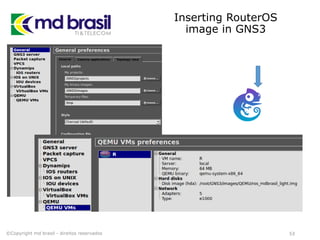
Inserting RouterOS
image in GNS3
©Copyright md brasil - direitos reservados 53
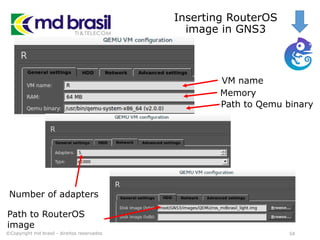
Inserting RouterOS
image in GNS3
©Copyright md brasil - direitos reservados 54
VM name
Memory
Number of adapters
Path to Qemu binary
Path to RouterOS
image
Using The Dude as a
frontend to the virtual
network
©Copyright md brasil - direitos reservados 55
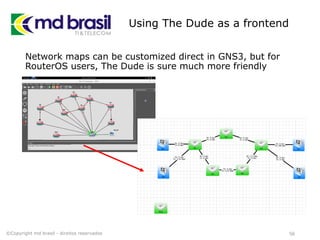
Using The Dude as a frontend
Network maps can be customized direct in GNS3, but for
RouterOS users, The Dude is sure much more friendly
©Copyright md brasil - direitos reservados 56
Agenda
57
Motivations and General Talking about
Network Simulators
Installing all the stuff necessary to
simulate any type of IP network;
Creating a Simple and a Base Project and
interacting with them;
A real case demonstration – Traffic
Engineering Scenario;
Final considerations, conclusions and
download links.
©Copyright md brasil - direitos reservados
35’
Hands ON
Creating a Simple Project
©Copyright md brasil - direitos reservados 58
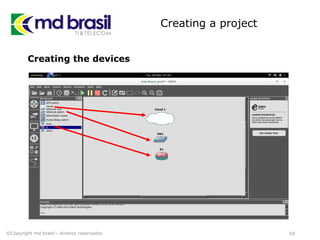
Creating a project
59©Copyright md brasil - direitos reservados
Creating the devices
Creating a project
60©Copyright md brasil - direitos reservados
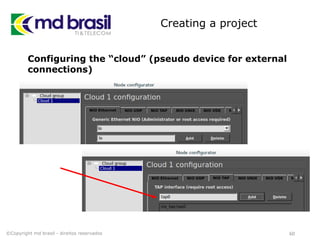
Configuring the “cloud” (pseudo device for external
connections)
Creating a project
61©Copyright md brasil - direitos reservados
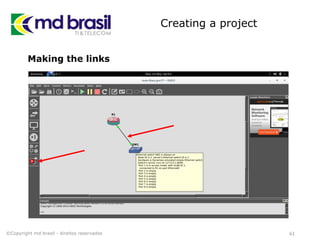
Making the links
Creating a project
62©Copyright md brasil - direitos reservados
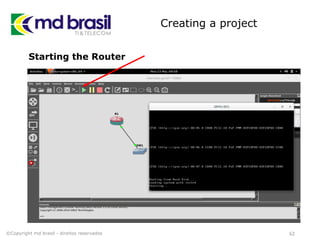
Starting the Router
Creating a project
63©Copyright md brasil - direitos reservados
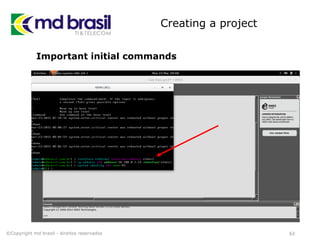
Important initial commands
Binding your machine to
the virtual environment
©Copyright md brasil - direitos reservados 64
Binding your machine to the
virtual environment
# Install utilities for configuring the Linux Ethernet
bridge
sudo apt-get install bridge-utils
# Install utilities for user mode Linux
sudo apt-get install uml-utilities
65©Copyright md brasil - direitos reservados
Binding your machine to the
virtual environment
# Type the below script and give it exec permissions
#!/bin/bash
sudo modprobe tun
sudo tunctl -t tap0
sudo ifconfig tap0 0.0.0.0 promisc up
sudo ifconfig wlan0 0.0.0.0 promisc up
sudo brctl addbr br0
sudo brctl addif br0 tap0
sudo brctl addif br0 eth0brctl show
sudo ifconfig br0 up
sudo ifconfig br0 x.x.x.x/x (IP to communicate with all devices)
66©Copyright md brasil - direitos reservados
Binding your machine to the
virtual environment
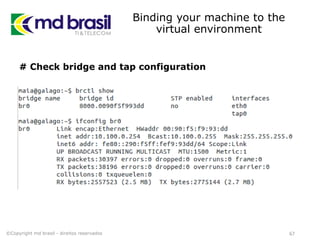
# Check bridge and tap configuration
67©Copyright md brasil - direitos reservados
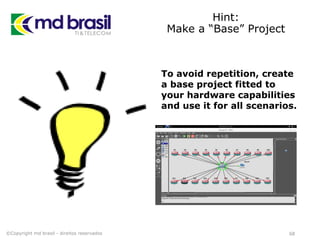
Hint:
Make a “Base” Project
68©Copyright md brasil - direitos reservados
To avoid repetition, create
a base project fitted to
your hardware capabilities
and use it for all scenarios.
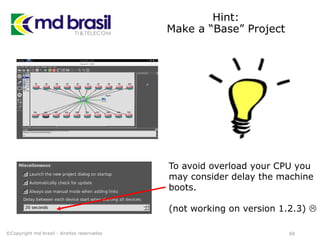
Hint:
Make a “Base” Project
69©Copyright md brasil - direitos reservados
To avoid overload your CPU you
may consider delay the machine
boots.
(not working on version 1.2.3) 
Agenda
70
Motivations and General Talking about
Network Simulators
Installing all the stuff necessary to
simulate any type of IP network;
Creating a Simple and a Base Project and
interacting with them;
A real case demonstration – Traffic
Engineering Scenario;
Final considerations, conclusions and
download links.
©Copyright md brasil - direitos reservados
47’
Hands ON
Traffic Engineering Study Case
©Copyright md brasil - direitos reservados 71
Some TE/MPLS Background
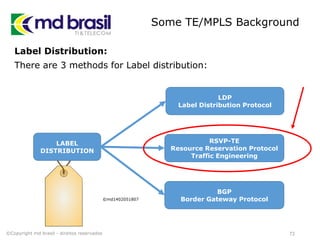
Label Distribution:
There are 3 methods for Label distribution:
LABEL
DISTRIBUTION
©md1402051807
LDP
Label Distribution Protocol
RSVP-TE
Resource Reservation Protocol
Traffic Engineering
BGP
Border Gateway Protocol
©Copyright md brasil - direitos reservados 72
Some TE/MPLS Background
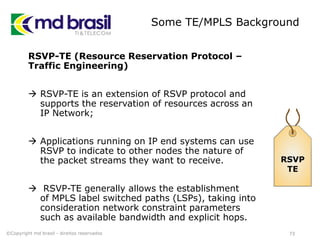
RSVP-TE (Resource Reservation Protocol –
Traffic Engineering)
 RSVP-TE is an extension of RSVP protocol and
supports the reservation of resources across an
IP Network;
 Applications running on IP end systems can use
RSVP to indicate to other nodes the nature of
the packet streams they want to receive.
 RSVP-TE generally allows the establishment
of MPLS label switched paths (LSPs), taking into
consideration network constraint parameters
such as available bandwidth and explicit hops.
RSVP
TE
©Copyright md brasil - direitos reservados 73
Some TE/MPLS Background
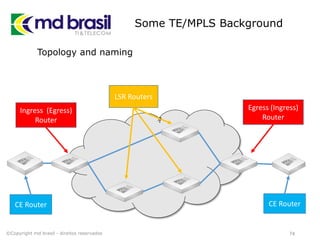
Topology and naming
74
??
©Copyright md brasil - direitos reservados
Ingress (Egress)
Router
LSR Routers
Egress (Ingress)
Router
CE Router CE Router
Some TE/MPLS Background
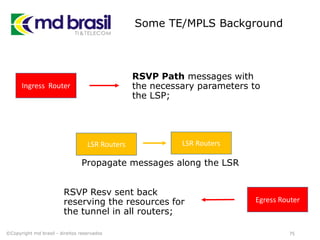
RSVP Path messages with
the necessary parameters to
the LSP;
75©Copyright md brasil - direitos reservados
Ingress Router
LSR Routers
Egress Router
LSR Routers
Propagate messages along the LSR
RSVP Resv sent back
reserving the resources for
the tunnel in all routers;
TE example
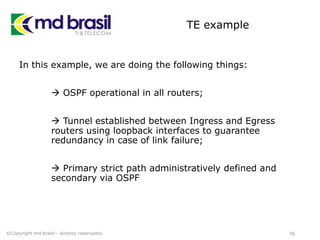
In this example, we are doing the following things:
 OSPF operational in all routers;
 Tunnel established between Ingress and Egress
routers using loopback interfaces to guarantee
redundancy in case of link failure;
 Primary strict path administratively defined and
secondary via OSPF
76©Copyright md brasil - direitos reservados
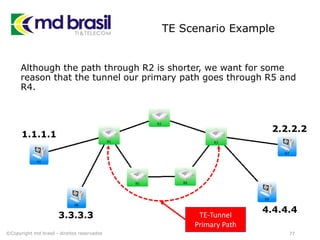
TE Scenario Example
Although the path through R2 is shorter, we want for some
reason that the tunnel our primary path goes through R5 and
R4.
77©Copyright md brasil - direitos reservados
TE-Tunnel
Primary Path
1.1.1.1
2.2.2.2
3.3.3.3
4.4.4.4
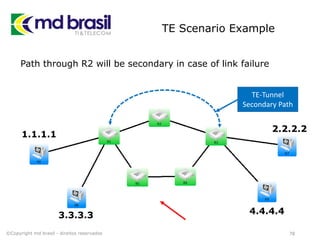
TE Scenario Example
Path through R2 will be secondary in case of link failure
78©Copyright md brasil - direitos reservados
TE-Tunnel
Secondary Path
1.1.1.1
3.3.3.3 4.4.4.4
2.2.2.2
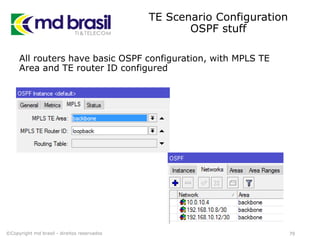
TE Scenario Configuration
OSPF stuff
All routers have basic OSPF configuration, with MPLS TE
Area and TE router ID configured
79©Copyright md brasil - direitos reservados
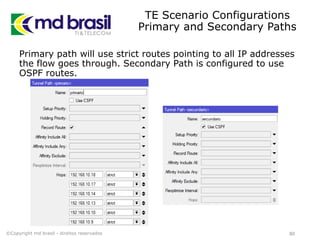
TE Scenario Configurations
Primary and Secondary Paths
Primary path will use strict routes pointing to all IP addresses
the flow goes through. Secondary Path is configured to use
OSPF routes.
80©Copyright md brasil - direitos reservados
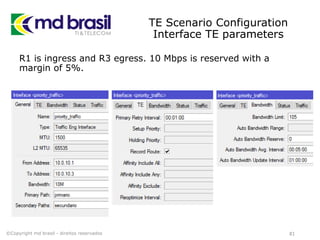
TE Scenario Configuration
Interface TE parameters
R1 is ingress and R3 egress. 10 Mbps is reserved with a
margin of 5%.
81©Copyright md brasil - direitos reservados
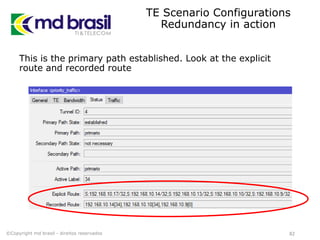
TE Scenario Configurations
Redundancy in action
This is the primary path established. Look at the explicit
route and recorded route
82©Copyright md brasil - direitos reservados
TE Scenario Configurations
Redundancy in action
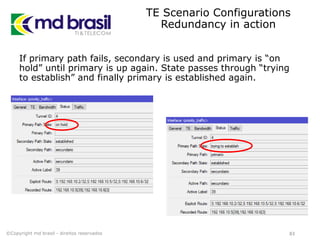
If primary path fails, secondary is used and primary is “on
hold” until primary is up again. State passes through “trying
to establish” and finally primary is established again.
83©Copyright md brasil - direitos reservados
TE Scenario Configurations
Routes and Route Policy
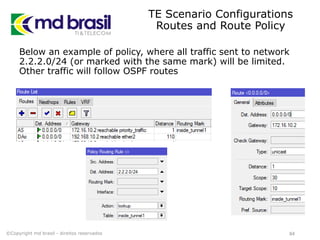
Below an example of policy, where all traffic sent to network
2.2.2.0/24 (or marked with the same mark) will be limited.
Other traffic will follow OSPF routes
84©Copyright md brasil - direitos reservados
TE Scenario Configurations
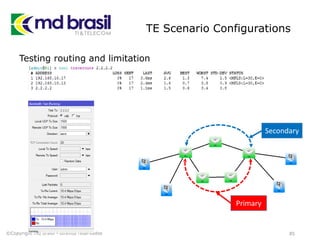
Testing routing and limitation
85©Copyright md brasil - direitos reservados
Primary
Secondary
Agenda
86
Motivations and General Talking about
Network Simulators
Installing all the stuff necessary to
simulate any type of IP network;
Creating a Simple and a Base Project and
interacting with them;
A real case demonstration – Traffic
Engineering Scenario;
Final considerations, references and
download links.
©Copyright md brasil - direitos reservados
50’
Issues and
Limitations
87
Unfortunately we cannot simulate and predict all practical
situations because of hardware specific things, like:
 Wireless capabilities;
 Switching features;
 Problems related to interface negotiation, MTU issues;
 etc.
Also software installation (Qemu and GNS3) could be
tricky for some users depending on operating system,
hardware and other dependencies not satisfied.
Trainings using simulators should be planned in advance to
avoid delays.
©Copyright md brasil - direitos reservados
GNS3
Live CD/USB
88
To circumvent issues related to
installation we have developed an .iso
image that can be run as a Live USB or
a Live CD;
At the time of this writing, the current
version of this image is using Ubuntu
14.04 LTS 32 bit and GNS3 1.2.3.
Downloads can be made at MD Brasil
Web site:
http://mdbrasil.com.br/downloads/gns3
Feedbacks are welcome:
maia@mdbrasil.com.br
©Copyright md brasil - direitos reservados
References
89
http://gns3.net
http://qemu.org
http://virtualbox.org
http://sourceforge.net/projects/gns-3/
http://brezular.com/2014/07/09/running-mikrotik-
routeros-x86-on-gns3/
https://wiki.debian.org/QEMU
http://mum.mikrotik.com/presentations/ID13/rofiq.pdf
©Copyright md brasil - direitos reservados
Thanks to
90
Many Thanks to
Sergio Souza who helped a lot with debugging the
installations and who exchange with me a lot of
projects;
Tom Smyth and Patrik Schaub for commercial
cooperation and technical information exchange;
Jaromir Cihák for the usual hospitality here in Prague
and for the efforts in the routed world project.
©Copyright md brasil - direitos reservados
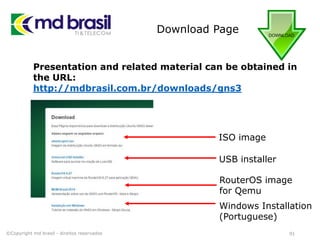
Download Page
91
Presentation and related material can be obtained in
the URL:
http://mdbrasil.com.br/downloads/gns3
©Copyright md brasil - direitos reservados
ISO image
USB installer
RouterOS image
for Qemu
Windows Installation
(Portuguese)
Extra Slides
©Copyright md brasil - direitos reservados 92
Extra Slides
VirtualBox x Qemu
93
Qemu x VirtualBox
©Copyright md brasil - direitos reservados
Extra Slides
VirtualBox x Qemu
94
Qemu x VirtualBox
©Copyright md brasil - direitos reservados
Extra Slides
VirtualBox x Qemu
95
Qemu x VirtualBox
©Copyright md brasil - direitos reservados
Extra Slides
VirtualBox x Qemu
96
Qemu x VirtualBox
©Copyright md brasil - direitos reservados
Extra Slides
VirtualBox x Qemu
97
Qemu x VirtualBox
©Copyright md brasil - direitos reservados
Extra Slides
VirtualBox x Qemu
98
Qemu x VirtualBox
©Copyright md brasil - direitos reservados
Extra Slides
VirtualBox x Qemu
99
Qemu x VirtualBox
©Copyright md brasil - direitos reservados
Extra Slides
VirtualBox x Qemu
100
Qemu x VirtualBox
©Copyright md brasil - direitos reservados
Extra Slides
VirtualBox x Qemu
101
Qemu x VirtualBox
©Copyright md brasil - direitos reservados
Děkuji

Network Simulation - Prague 2015

  • 1.
    Network Simulation Traffic engineeringstudy case European MUM – 2015 Prague / Czech Republic Wardner Maia
  • 2.
    Copyright Notice (Aviso sobredireitos autorais) English: This material is an effort intended to improve the level of knowledge of professionals that work with Mikrotik RouterOS and should be used solely for self-study purposes. Digital copies and/or any printed material contained in this presentation or derived from it are property of MD Brasil TI & Telecom and cannot be used for any kind of training, presentation or workshop, even non-commercial ones. Reproduction of any part or picture requires previous written authorization of MD Brasil. For information about how to obtain such authorization, please contact mdbrasil@mdbrasil.com.br. ©Copyright md brasil - direitos reservados 2 Portuguese: Este material é um esforço que visa aprimorar o grau de conhecimento de profissionais que trabalham com Mikrotik RouterOS e deve ser usado apenas com objetivos de auto estudo. Cópias digitais e/ou materiais impressos com conteúdo desta apresentação ou dela derivados são de propriedade a MD Brasil TI & Telecom a não podem ser usados para qualquer tipo de treinamento, apresentação ou seminário, mesmo os de finalidades não comerciais. A reprodução de qualquer parte ou figura requer prévia autorização por escrito da MD Brasil. Para informações sobre como obter esta autorização, por favor contate mdbrasil@mdbrasil.com.br.
  • 3.
    Introduction Wardner Maia Electronic andTelecommunications Engineer; Internet Service Provider since 1995; Training Business since 2002; Certified Mikrotik Trainer since 2007; MD Brasil IT & Telecom CTO; Member of the board of directors of LACNIC. 3©Copyright md brasil - direitos reservados
  • 4.
    Introduction MD Brasil IT& Telecom Internet Access Provider in São Paulo state - Brazil; Telecom equipment manufacturer and integrator; Mikrotik Training Center since 2007; Consulting services worldwide. http://mdbrasil.com.br http://mikrotikbrasil.com.br 4©Copyright md brasil - direitos reservados
  • 5.
    Previous Participations on EuropeanMUMs Wireless Security (2008 – Krakow/PL) Wireless Security for OLPC project (2009 – Prague/CZ) Layer 2 Security (2010 – Wroclaw/PL) Routing Security (2011 – Budapest/HU) IPv6 Security (2012 - Warsaw/PL) BGP Filtering (2013 – Zagreb/CR) MPLS VPNs Security (2014 – Venice/IT) http://mikrotikbrasil.com.br/artigos 5©Copyright md brasil - direitos reservados
  • 6.
    Network Simulation ©Copyright mdbrasil - direitos reservados 6
  • 7.
    Subject and goals Subject NetworkSimulation with focus on Mikrotik RouterOS Goals To share our experience with the use of GNS3 To foster the use of simulators as a prediction and learning tool To present a clear tutorial on how to install and use it. 7©Copyright md brasil - direitos reservados
  • 8.
    Previous Work fromother Trainers Previous work on installation and use of GNS3: - Indonesia 2013 - Rofik Fauzi GNS3 on Windows, and Qemu as RouterOS emulator - USA 2014 – Rick Frei GNS3 on Windows, and VirtualBox as RouterOS emulator 8©Copyright md brasil - direitos reservados
  • 9.
    Network Simulators There aremany Network Simulators for several platforms an purposes: Cloonix, Core, Imunes, Marionnet, Mininet, Netkit, Psimulator, VirtualSquare, GNS3, etc; The link below is an excellent guide to some Open Source Network simulators: http://www.brianlinkletter.com/open-source-network- simulators/ 9©Copyright md brasil - direitos reservados
  • 10.
    Agenda 10 Motivations and GeneralTalking about Network Simulators Installing all the stuff necessary to simulate any type of IP network; Creating a Simple and a Base Project and interacting with them; A real case demonstration – Traffic Engineering Scenario; Final considerations, conclusions and download links. ©Copyright md brasil - direitos reservados 6’
  • 11.
    Agenda 11 Motivations and GeneralTalking about Network Simulators Installing all the stuff necessary to simulate any type of IP network; Creating a Simple and a Base Project and interacting with them; A real case demonstration – Traffic Engineering Scenario; Final considerations, conclusions and download links. ©Copyright md brasil - direitos reservados 4’
  • 12.
    Motivations We do loveREAL Routers, but… ©Copyright md brasil - direitos reservados 12
  • 13.
    Motivation Presentation about BGPFiltering in Zagreb (2013): (5 routers) To simulate the scenario 5 real routers were used, cables, power supplies, etc. 13©Copyright md brasil - direitos reservados Internet Transit Operator Your AS IXP AS1 AS2 Transit Operator 2 ©md1302192045 Transit Client
  • 14.
    Motivation Presentation about MPLSSecurity in Venice (2014): (9 routers) With a simulator, no physical router, no cables, no power supply – no pain   Several questions asking about the tool used for the presentation. 14©Copyright md brasil - direitos reservados ©md1402151341
  • 15.
    Applications of a NetworkSimulator 15©Copyright md brasil - direitos reservados Network Simulator Prediction Tool Teaching / Learning Tool
  • 16.
    Applications of a NetworkSimulator As a Prediction Tool: Operators can anticipate how new implementations will work before deploying them in the “real world”; Software versions updates can be tested before the real implementation avoiding problems; Interoperation with other Vendors can be tested and tuned without the need of the hardware; In consulting services making possible fast and low cost “proof of concepts” to customers. 16©Copyright md brasil - direitos reservados
  • 17.
    Success case Prediction Tool BrazilianArmy Network – 41 CT (Region of Amazon rain forest) Existing Network: Network interconnecting several units, many in hard to reach locations. Scope of the work: Implementation of dynamic routing, IPSec encryption and QoS. Challenge: To make all implementations in a productions network without any interruption. 17©Copyright md brasil - direitos reservados
  • 18.
    Applications of a NetworkSimulator As a Teaching / Learning Tool: Trainers can easily explain Protocols and complex scenarios without the need of lots of equipment; Students can have “on their pockets” all scenarios used in class and reproduce them by their own; On line trainings do not depend on physical hardware. Scenarios can be exported and sent to the students. 18©Copyright md brasil - direitos reservados
  • 19.
    Success Case Teaching /Learning Tool MD Brasil – Trainings  Virtual environment simulating a “real” Internet for BGP Labs. Students connect with real routers to this network and can practice BGP filtering, traffic manipulation, etc as they are connected to the Internet;  All MPLS Labs are now improved showing first what we want with some setups and after doing so in real routers  In our 2015 roadmap several new labs, now possible with simulation 19©Copyright md brasil - direitos reservados
  • 20.
    Who will Benefit? Trainers: Canimprove their methods of teaching; Students: Can get more from a Training with “scenarios memories” and test their skills; Operators: Can use in their daily operations as a predicting and testing tool Mikrotik Community in general: Can share information and scenarios 20©Copyright md brasil - direitos reservados
  • 21.
    Agenda 21 Motivations and GeneralTalking about Network Simulators Installing all the stuff necessary to simulate any type of IP network; Creating a Simple and a Base Project and interacting with them; A real case demonstration – Traffic Engineering Scenario; Final considerations, conclusions and download links. ©Copyright md brasil - direitos reservados 18’
  • 22.
    Tools we’ll usefor Simulating Networks 22©Copyright md brasil - direitos reservados + + GNS3 Qemu Dude Ubuntu Gnome 14.04 LTS
  • 23.
    GNS3 GNS3:  Originally developedwith focus on Cisco;  Uses Dynamips for emulating Cisco Routers;  Offers support for emulation with other systems like Qemu and VirtualBox; 23©Copyright md brasil - direitos reservados http://gns3.net
  • 24.
    Qemu Qemu (Quick Emulator)is an open source software that can be used either as an emulator or a virtualization system; As an emulator, Qemu can run operating Systems in a regular PC Used as a Virtualization platform, Qemu runs the guest system directly on the host machine using KVM. Several architectures are supported, like Mips, ARM, PPC, x86, etc. 24©Copyright md brasil - direitos reservados http://qemu.org
  • 25.
    Qemu x VirtualBox Anotherpossibility could be use VirtualBox instead of Qemu. According to our tests Qemu is faster and saves CPU resources. (see some tests at the end of this presentation) 25©Copyright md brasil - direitos reservados http://qemu.org http://virtualbox.org
  • 26.
    The Dude Our goodand old friend “The Dude” will be used only as a kind of front end to make things easier, specially for Mikrotik users community. It will allow:  Make the maps more clean and friendly, hiding details not necessary for the studies;  Direct access to the routers facilitating the configurations and visualizations;  Mass upgrades and or downgrades of all devices, using Dude facilities. 26©Copyright md brasil - direitos reservados http://mikrotik.com
  • 27.
    Installing the Stuff ©Copyrightmd brasil - direitos reservados 27
  • 28.
    Installation Installation successful forUbuntu-gnome 14.04 LTS # all following commands should run as root sudo su # all the stuff at root directory will make things easier when sharing projects mkdir /GNS3 cd /GNS3 28©Copyright md brasil - direitos reservados
  • 29.
    Installation on Ubuntu #preparing the dependencies: apt-get update apt-get install build-essential apt-get install libelf-dev apt-get install uuid-dev apt-get install libpcap-dev apt-get install python3-dev apt-get install python3-pyqt4 apt-get install python3-netifaces 29©Copyright md brasil - direitos reservados
  • 30.
    Installation on Ubuntu #preparing the dependencies (cont.): apt-get install git apt-get install cmake apt-get install bison apt-get install flex # installing phyton and pip: wget -O get-pip.py https://raw.github.com/pypa/pip/master/contrib/get-pip.py python3 get-pip.py pip3 install pyzmq && pip3 install tornado 30©Copyright md brasil - direitos reservados
  • 31.
    Installation # stuff fori386 support dpkg --add-architecture i386 apt-get update apt-get install libc6:i386 apt-get install libstdc++6:i386 apt-get install libssl1.0.0:i386 ln -s /lib/i386-linux-gnu/libcrypto.so.1.0.0 /lib/i386-linux- gnu/libcrypto.so.4 31©Copyright md brasil - direitos reservados
  • 32.
    Installation # stuff fori386 support (cont.) wget http://ndevilla.free.fr/iniparser/iniparser-3.1.tar.gz tar xf iniparser-3.1.tar.gz cd iniparser/ makecp libiniparser* /usr/lib cp src/*.h /usr/include cd .. 32©Copyright md brasil - direitos reservados
  • 33.
    Installation # Installing Dynamips gitclone git://github.com/GNS3/dynamips.git cd dynamips mkdir build cd build cmake .. make install cd ~/GNS3 33©Copyright md brasil - direitos reservados
  • 34.
    Installation # Testing Dynamips maia@galago:/GNS3$sudo dynamips -H 7200 34©Copyright md brasil - direitos reservados
  • 35.
    Installation # Installing GNS3 wgethttps://github.com/GNS3/gns3-server/archive/v1.2.3.zip unzip v1.2.3.zip cd gns3-server-1.2.3 python3 setup.py install cd .. rm -r v1.2.3.zip 35©Copyright md brasil - direitos reservados
  • 36.
    Installation # Installing GNS3GUI wget https://github.com/GNS3/gns3-gui/archive/v1.2.3.zip unzip v1.2.3.zip cd gns3-gui-1.2.3/ python3 setup.py install cd .. rm -r v1.2.3.zip 36©Copyright md brasil - direitos reservados
  • 37.
    Installation # Installing IOU gethttps://github.com/GNS3/iouyap/archive/master.zip unzip master.zip cd iouyap-master/ make install cp iouyap /usr/local/bin/iouyap cd .. rm -r master.zip 37©Copyright md brasil - direitos reservados
  • 38.
    Installation # Creating Licensefile for Cisco pico CiscoKeyGen ! /usr/bin/python print "*******************************************" print "Cisco IOU License Generator - Kal 2011, python port of 2006 C version" import os import socket import hashlib import struct 38©Copyright md brasil - direitos reservados
  • 39.
    Installation # Creating Licensefile for Cisco (cont.) # get the host id and host name to calculate the hostkey hostid=os.popen("hostid").read().strip() hostname = socket.gethostname() ioukey=int(hostid,16) for x in hostname: ioukey = ioukey + ord(x) print "hostid=" + hostid +", hostname="+ hostname + ", ioukey=" + hex(ioukey)[2:] 39©Copyright md brasil - direitos reservados
  • 40.
    Installation # Creating Licensefile for Cisco (cont.) # create the license using md5sum iouPad1='x4Bx58x21x81x56x7Bx0DxF3x21x43x9Bx7ExAC x1DxE6x8A' iouPad2='x80' + 39*'0' md5input=iouPad1 + iouPad2 + struct.pack('!L', ioukey) + iouPad1 iouLicense=hashlib.md5(md5input).hexdigest()[:16] print "nAdd the following text to ~/.iourc:" print "[license]n" + hostname + " = " + iouLicense + ";n" print "You can disable the phone home feature with something like:" print " echo '127.0.0.127 xml.cisco.com' >> /etc/hostsn" 40©Copyright md brasil - direitos reservados
  • 41.
    Installation # Give execpermissions and run it chmod +x CiscoKeyGen ./CiscoKeyGen # Output # Output: 41©Copyright md brasil - direitos reservados
  • 42.
    Installation # Add licenseto iourc.txt pico iourc.txt [license] galago = 866eb729771e8752; # Disable the phone feature echo '127.0.0.127 xml.cisco.com' >> /etc/hosts 42©Copyright md brasil - direitos reservados
  • 43.
    Installation # Install Qemu apt-getinstall qemu # Install The DUDE # If you don’t have wine, install it and after the Dude sudo apt-get install wine dude.exe 43©Copyright md brasil - direitos reservados
  • 44.
    Running GNS3 # LaunchGNS3 as superuser Alt F2 44©Copyright md brasil - direitos reservados
  • 45.
    Creating RouterOS image toGNS3 ©Copyright md brasil - direitos reservados 45
  • 46.
    RouterOS Image # Createthe RouterOS image with 256 Mbytes for Ubuntu. sudo qemu-img create –f qcow2 RouterOS.img 256M Qemu supports several image types. qcow2 is more flexible and can be ported to other systems. We didn’t see difference on performance when using the raw format. 46©Copyright md brasil - direitos reservados
  • 47.
    RouterOS Image # Downloadthe latest .iso image from Mikrotik to the same directory and install sudo quemu-system-x86_64 RouterOS.img –cdrom mikrotik.6.27.iso 47©Copyright md brasil - direitos reservados
  • 48.
    RouterOS Image # Installas usual and you’ll have a RouterOS running over Qemu. 48©Copyright md brasil - direitos reservados
  • 49.
    RouterOS Image # Licensingthe image You can use the demo license without problems, but if you want to license the router, you can: Type each character of the license by hand or You can communicate via Winbox after binding your machine to the virtual environment (see further slides in this presentation). 49©Copyright md brasil - direitos reservados
  • 50.
    RouterOS Image Even ifyou skip the licensing part, you can access direct your router anytime by typing the script below: # Licensing the image qemu-system-x86_64 -enable-kvm -m 1024 -netdev tap,id=t0,ifname=tap0,script=no,downscript=no -device e1000,netdev=t0,id=nic0 <imagefile> 50©Copyright md brasil - direitos reservados
  • 51.
    RouterOS Image # Licensingthe image When you use the previous licensed image in a project, every time you create a new Router, interface ether0 (GNS3) will have the same MAC address. So, remember to reset the MAC to avoid problems: /interface Ethernet reset-mac-address interface=ether1 N.B. ether0 (GNS3) = ether1 (RouterOS) 51©Copyright md brasil - direitos reservados
  • 52.
    Inserting the imagein GNS3 and creating a Base Project ©Copyright md brasil - direitos reservados 52
  • 53.
    Inserting RouterOS image inGNS3 ©Copyright md brasil - direitos reservados 53
  • 54.
    Inserting RouterOS image inGNS3 ©Copyright md brasil - direitos reservados 54 VM name Memory Number of adapters Path to Qemu binary Path to RouterOS image
  • 55.
    Using The Dudeas a frontend to the virtual network ©Copyright md brasil - direitos reservados 55
  • 56.
    Using The Dudeas a frontend Network maps can be customized direct in GNS3, but for RouterOS users, The Dude is sure much more friendly ©Copyright md brasil - direitos reservados 56
  • 57.
    Agenda 57 Motivations and GeneralTalking about Network Simulators Installing all the stuff necessary to simulate any type of IP network; Creating a Simple and a Base Project and interacting with them; A real case demonstration – Traffic Engineering Scenario; Final considerations, conclusions and download links. ©Copyright md brasil - direitos reservados 35’
  • 58.
    Hands ON Creating aSimple Project ©Copyright md brasil - direitos reservados 58
  • 59.
    Creating a project 59©Copyrightmd brasil - direitos reservados Creating the devices
  • 60.
    Creating a project 60©Copyrightmd brasil - direitos reservados Configuring the “cloud” (pseudo device for external connections)
  • 61.
    Creating a project 61©Copyrightmd brasil - direitos reservados Making the links
  • 62.
    Creating a project 62©Copyrightmd brasil - direitos reservados Starting the Router
  • 63.
    Creating a project 63©Copyrightmd brasil - direitos reservados Important initial commands
  • 64.
    Binding your machineto the virtual environment ©Copyright md brasil - direitos reservados 64
  • 65.
    Binding your machineto the virtual environment # Install utilities for configuring the Linux Ethernet bridge sudo apt-get install bridge-utils # Install utilities for user mode Linux sudo apt-get install uml-utilities 65©Copyright md brasil - direitos reservados
  • 66.
    Binding your machineto the virtual environment # Type the below script and give it exec permissions #!/bin/bash sudo modprobe tun sudo tunctl -t tap0 sudo ifconfig tap0 0.0.0.0 promisc up sudo ifconfig wlan0 0.0.0.0 promisc up sudo brctl addbr br0 sudo brctl addif br0 tap0 sudo brctl addif br0 eth0brctl show sudo ifconfig br0 up sudo ifconfig br0 x.x.x.x/x (IP to communicate with all devices) 66©Copyright md brasil - direitos reservados
  • 67.
    Binding your machineto the virtual environment # Check bridge and tap configuration 67©Copyright md brasil - direitos reservados
  • 68.
    Hint: Make a “Base”Project 68©Copyright md brasil - direitos reservados To avoid repetition, create a base project fitted to your hardware capabilities and use it for all scenarios.
  • 69.
    Hint: Make a “Base”Project 69©Copyright md brasil - direitos reservados To avoid overload your CPU you may consider delay the machine boots. (not working on version 1.2.3) 
  • 70.
    Agenda 70 Motivations and GeneralTalking about Network Simulators Installing all the stuff necessary to simulate any type of IP network; Creating a Simple and a Base Project and interacting with them; A real case demonstration – Traffic Engineering Scenario; Final considerations, conclusions and download links. ©Copyright md brasil - direitos reservados 47’
  • 71.
    Hands ON Traffic EngineeringStudy Case ©Copyright md brasil - direitos reservados 71
  • 72.
    Some TE/MPLS Background LabelDistribution: There are 3 methods for Label distribution: LABEL DISTRIBUTION ©md1402051807 LDP Label Distribution Protocol RSVP-TE Resource Reservation Protocol Traffic Engineering BGP Border Gateway Protocol ©Copyright md brasil - direitos reservados 72
  • 73.
    Some TE/MPLS Background RSVP-TE(Resource Reservation Protocol – Traffic Engineering)  RSVP-TE is an extension of RSVP protocol and supports the reservation of resources across an IP Network;  Applications running on IP end systems can use RSVP to indicate to other nodes the nature of the packet streams they want to receive.  RSVP-TE generally allows the establishment of MPLS label switched paths (LSPs), taking into consideration network constraint parameters such as available bandwidth and explicit hops. RSVP TE ©Copyright md brasil - direitos reservados 73
  • 74.
    Some TE/MPLS Background Topologyand naming 74 ?? ©Copyright md brasil - direitos reservados Ingress (Egress) Router LSR Routers Egress (Ingress) Router CE Router CE Router
  • 75.
    Some TE/MPLS Background RSVPPath messages with the necessary parameters to the LSP; 75©Copyright md brasil - direitos reservados Ingress Router LSR Routers Egress Router LSR Routers Propagate messages along the LSR RSVP Resv sent back reserving the resources for the tunnel in all routers;
  • 76.
    TE example In thisexample, we are doing the following things:  OSPF operational in all routers;  Tunnel established between Ingress and Egress routers using loopback interfaces to guarantee redundancy in case of link failure;  Primary strict path administratively defined and secondary via OSPF 76©Copyright md brasil - direitos reservados
  • 77.
    TE Scenario Example Althoughthe path through R2 is shorter, we want for some reason that the tunnel our primary path goes through R5 and R4. 77©Copyright md brasil - direitos reservados TE-Tunnel Primary Path 1.1.1.1 2.2.2.2 3.3.3.3 4.4.4.4
  • 78.
    TE Scenario Example Paththrough R2 will be secondary in case of link failure 78©Copyright md brasil - direitos reservados TE-Tunnel Secondary Path 1.1.1.1 3.3.3.3 4.4.4.4 2.2.2.2
  • 79.
    TE Scenario Configuration OSPFstuff All routers have basic OSPF configuration, with MPLS TE Area and TE router ID configured 79©Copyright md brasil - direitos reservados
  • 80.
    TE Scenario Configurations Primaryand Secondary Paths Primary path will use strict routes pointing to all IP addresses the flow goes through. Secondary Path is configured to use OSPF routes. 80©Copyright md brasil - direitos reservados
  • 81.
    TE Scenario Configuration InterfaceTE parameters R1 is ingress and R3 egress. 10 Mbps is reserved with a margin of 5%. 81©Copyright md brasil - direitos reservados
  • 82.
    TE Scenario Configurations Redundancyin action This is the primary path established. Look at the explicit route and recorded route 82©Copyright md brasil - direitos reservados
  • 83.
    TE Scenario Configurations Redundancyin action If primary path fails, secondary is used and primary is “on hold” until primary is up again. State passes through “trying to establish” and finally primary is established again. 83©Copyright md brasil - direitos reservados
  • 84.
    TE Scenario Configurations Routesand Route Policy Below an example of policy, where all traffic sent to network 2.2.2.0/24 (or marked with the same mark) will be limited. Other traffic will follow OSPF routes 84©Copyright md brasil - direitos reservados
  • 85.
    TE Scenario Configurations Testingrouting and limitation 85©Copyright md brasil - direitos reservados Primary Secondary
  • 86.
    Agenda 86 Motivations and GeneralTalking about Network Simulators Installing all the stuff necessary to simulate any type of IP network; Creating a Simple and a Base Project and interacting with them; A real case demonstration – Traffic Engineering Scenario; Final considerations, references and download links. ©Copyright md brasil - direitos reservados 50’
  • 87.
    Issues and Limitations 87 Unfortunately wecannot simulate and predict all practical situations because of hardware specific things, like:  Wireless capabilities;  Switching features;  Problems related to interface negotiation, MTU issues;  etc. Also software installation (Qemu and GNS3) could be tricky for some users depending on operating system, hardware and other dependencies not satisfied. Trainings using simulators should be planned in advance to avoid delays. ©Copyright md brasil - direitos reservados GNS3
  • 88.
    Live CD/USB 88 To circumventissues related to installation we have developed an .iso image that can be run as a Live USB or a Live CD; At the time of this writing, the current version of this image is using Ubuntu 14.04 LTS 32 bit and GNS3 1.2.3. Downloads can be made at MD Brasil Web site: http://mdbrasil.com.br/downloads/gns3 Feedbacks are welcome: maia@mdbrasil.com.br ©Copyright md brasil - direitos reservados
  • 89.
  • 90.
    Thanks to 90 Many Thanksto Sergio Souza who helped a lot with debugging the installations and who exchange with me a lot of projects; Tom Smyth and Patrik Schaub for commercial cooperation and technical information exchange; Jaromir Cihák for the usual hospitality here in Prague and for the efforts in the routed world project. ©Copyright md brasil - direitos reservados
  • 91.
    Download Page 91 Presentation andrelated material can be obtained in the URL: http://mdbrasil.com.br/downloads/gns3 ©Copyright md brasil - direitos reservados ISO image USB installer RouterOS image for Qemu Windows Installation (Portuguese)
  • 92.
    Extra Slides ©Copyright mdbrasil - direitos reservados 92
  • 93.
    Extra Slides VirtualBox xQemu 93 Qemu x VirtualBox ©Copyright md brasil - direitos reservados
  • 94.
    Extra Slides VirtualBox xQemu 94 Qemu x VirtualBox ©Copyright md brasil - direitos reservados
  • 95.
    Extra Slides VirtualBox xQemu 95 Qemu x VirtualBox ©Copyright md brasil - direitos reservados
  • 96.
    Extra Slides VirtualBox xQemu 96 Qemu x VirtualBox ©Copyright md brasil - direitos reservados
  • 97.
    Extra Slides VirtualBox xQemu 97 Qemu x VirtualBox ©Copyright md brasil - direitos reservados
  • 98.
    Extra Slides VirtualBox xQemu 98 Qemu x VirtualBox ©Copyright md brasil - direitos reservados
  • 99.
    Extra Slides VirtualBox xQemu 99 Qemu x VirtualBox ©Copyright md brasil - direitos reservados
  • 100.
    Extra Slides VirtualBox xQemu 100 Qemu x VirtualBox ©Copyright md brasil - direitos reservados
  • 101.
    Extra Slides VirtualBox xQemu 101 Qemu x VirtualBox ©Copyright md brasil - direitos reservados
  • 102.