MENDELEY
By Margery Swan, Dietetic Intern
 at the University of Maryland
Mendeley
• Your own personal research
 database
 • Import articles to personal
   library
 • Generate citations in different
   formats
 • Interact with colleagues
 • Organize articles
   • Highlight and annotate articles
   • Add personalized notes
Step 1: Importing Articles
Adding Information:
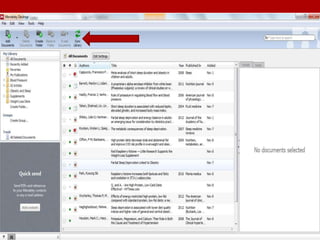
Step 2: Organize in Library
1. Mendeley Desktop
2. Mendeley Dashboard
Step 3: Highlight and Take Notes
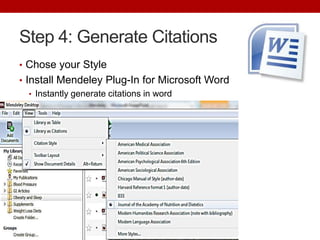
Step 4: Generate Citations
• Chose your Style
• Install Mendeley Plug-In for Microsoft Word
   • Instantly generate citations in word
Step 5: Collaborate
• Invite others to join group
   • Message, notifications, requests
• Add and share comments with group members
Pros and Cons
           Pros                                Cons

 • Compatible with Windows,      • Only 1 GB free
   Macs, and Linux               • Can’t highlight and take notes
 • Offers online and desktop      with app version
   versions that automatically
   sync
 • Citation maker
 • Collaboration feature
Practical Applications
• Research, research, research
• Personal Database
  • Organizes new research findings
  • Research is easily accessible and can
    be retrieved or referenced when clients
    ask a specific question
Questions:

Mendeley

  • 1.
    MENDELEY By Margery Swan,Dietetic Intern at the University of Maryland
  • 2.
    Mendeley • Your ownpersonal research database • Import articles to personal library • Generate citations in different formats • Interact with colleagues • Organize articles • Highlight and annotate articles • Add personalized notes
  • 3.
  • 4.
  • 5.
    Step 2: Organizein Library 1. Mendeley Desktop 2. Mendeley Dashboard
  • 8.
    Step 3: Highlightand Take Notes
  • 9.
    Step 4: GenerateCitations • Chose your Style • Install Mendeley Plug-In for Microsoft Word • Instantly generate citations in word
  • 10.
    Step 5: Collaborate •Invite others to join group • Message, notifications, requests • Add and share comments with group members
  • 11.
    Pros and Cons Pros Cons • Compatible with Windows, • Only 1 GB free Macs, and Linux • Can’t highlight and take notes • Offers online and desktop with app version versions that automatically sync • Citation maker • Collaboration feature
  • 12.
    Practical Applications • Research,research, research • Personal Database • Organizes new research findings • Research is easily accessible and can be retrieved or referenced when clients ask a specific question
  • 13.