Memory
Management
Background
▪ Memory management is the functionality of an operating system which
handles or manages primary memory and moves processes back and forth
between main memory and disk during execution.
▪ The CPU fetches instructions from memory according to the value of the
program counter
▪ These instructions may cause additional loading from and storing to
specific memory addresses.
2
Basic Hardware
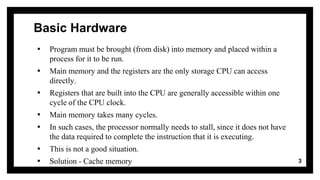
▪ Program must be brought (from disk) into memory and placed within a
process for it to be run.
▪ Main memory and the registers are the only storage CPU can access
directly.
▪ Registers that are built into the CPU are generally accessible within one
cycle of the CPU clock.
▪ Main memory takes many cycles.
▪ In such cases, the processor normally needs to stall, since it does not have
the data required to complete the instruction that it is executing.
▪ This is not a good situation.
▪ Solution - Cache memory 3
Basic Hardware
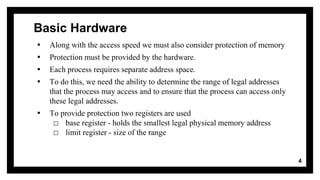
▪ Along with the access speed we must also consider protection of memory
▪ Protection must be provided by the hardware.
▪ Each process requires separate address space.
▪ To do this, we need the ability to determine the range of legal addresses
that the process may access and to ensure that the process can access only
these legal addresses.
▪ To provide protection two registers are used
□ base register - holds the smallest legal physical memory address
□ limit register - size of the range
4
Basic Hardware
5
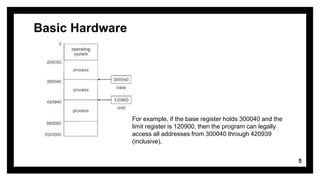
For example, if the base register holds 300040 and the
limit register is 120900, then the program can legally
access all addresses from 300040 through 420939
(inclusive).
Protection
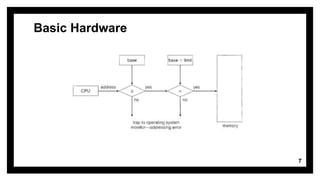
▪ CPU hardware compares every address generated in user mode with the
registers.
▪ Any attempt by a program executing in user mode to access operating-system
memory or other users' memory results in a trap to the operating system, which
treats the attempt as a fatal error.
▪ This scheme prevents a user program from (accidentally or deliberately)
modifying the code or data structures of either the operating system or other users.
▪ The base and limit registers can be loaded only by the operating system, which
uses a special privileged instruction. Since privileged instructions can be executed
only in kernel mode, and since only the operating system executes in kernel mode,
only the operating system can load the base and limit registers.
▪ This scheme allows the operating system to change the value of the registers but
prevents user programs from changing the registers' contents 6
Basic Hardware
7
Address Binding
▪ Logical address – generated by the CPU
▪ Physical address – address seen by the memory unit .
▪ Address binding is the process of mapping from one address space to
another address space.
▪ Logical and physical addresses are the same in compile time and load
time address binding schemes
▪ logical and physical addresses differ in execution time address binding
scheme
▪ An address binding can be done in three different ways:
□ Compile time
□ Load time
□ Execution time
8
Compile time:
▪ If you know at compile time where the process will reside in memory, then
absolute code can be generated.
▪ For example, if you know that a user process will reside starting at location R,
then the generated compiler code will start at that location and extend up from
there.
▪ If, at some later time, the starting location changes, then it will be necessary to
recompile this code.
▪ The MS-DOS .COM-format programs are bound at compile time.
9
Load time
▪ If it is not known at compile time where the process will reside in memory, then
the compiler must generate re-locatable code.
▪ In this case, final binding is delayed until load time.
▪ If the starting address changes, we need only reload the user code to incorporate
this changed value.
Execution time
▪ If the process can be moved during its execution from one memory segment to
another, then binding must be delayed until run time.
▪ Special hardware must be available for this scheme to work.
▪ Most general-purpose operating systems use this method.
10
Thanks!
11

Memory management basics

  • 1.
  • 2.
    Background ▪ Memory managementis the functionality of an operating system which handles or manages primary memory and moves processes back and forth between main memory and disk during execution. ▪ The CPU fetches instructions from memory according to the value of the program counter ▪ These instructions may cause additional loading from and storing to specific memory addresses. 2
  • 3.
    Basic Hardware ▪ Programmust be brought (from disk) into memory and placed within a process for it to be run. ▪ Main memory and the registers are the only storage CPU can access directly. ▪ Registers that are built into the CPU are generally accessible within one cycle of the CPU clock. ▪ Main memory takes many cycles. ▪ In such cases, the processor normally needs to stall, since it does not have the data required to complete the instruction that it is executing. ▪ This is not a good situation. ▪ Solution - Cache memory 3
  • 4.
    Basic Hardware ▪ Alongwith the access speed we must also consider protection of memory ▪ Protection must be provided by the hardware. ▪ Each process requires separate address space. ▪ To do this, we need the ability to determine the range of legal addresses that the process may access and to ensure that the process can access only these legal addresses. ▪ To provide protection two registers are used □ base register - holds the smallest legal physical memory address □ limit register - size of the range 4
  • 5.
    Basic Hardware 5 For example,if the base register holds 300040 and the limit register is 120900, then the program can legally access all addresses from 300040 through 420939 (inclusive).
  • 6.
    Protection ▪ CPU hardwarecompares every address generated in user mode with the registers. ▪ Any attempt by a program executing in user mode to access operating-system memory or other users' memory results in a trap to the operating system, which treats the attempt as a fatal error. ▪ This scheme prevents a user program from (accidentally or deliberately) modifying the code or data structures of either the operating system or other users. ▪ The base and limit registers can be loaded only by the operating system, which uses a special privileged instruction. Since privileged instructions can be executed only in kernel mode, and since only the operating system executes in kernel mode, only the operating system can load the base and limit registers. ▪ This scheme allows the operating system to change the value of the registers but prevents user programs from changing the registers' contents 6
  • 7.
  • 8.
    Address Binding ▪ Logicaladdress – generated by the CPU ▪ Physical address – address seen by the memory unit . ▪ Address binding is the process of mapping from one address space to another address space. ▪ Logical and physical addresses are the same in compile time and load time address binding schemes ▪ logical and physical addresses differ in execution time address binding scheme ▪ An address binding can be done in three different ways: □ Compile time □ Load time □ Execution time 8
  • 9.
    Compile time: ▪ Ifyou know at compile time where the process will reside in memory, then absolute code can be generated. ▪ For example, if you know that a user process will reside starting at location R, then the generated compiler code will start at that location and extend up from there. ▪ If, at some later time, the starting location changes, then it will be necessary to recompile this code. ▪ The MS-DOS .COM-format programs are bound at compile time. 9
  • 10.
    Load time ▪ Ifit is not known at compile time where the process will reside in memory, then the compiler must generate re-locatable code. ▪ In this case, final binding is delayed until load time. ▪ If the starting address changes, we need only reload the user code to incorporate this changed value. Execution time ▪ If the process can be moved during its execution from one memory segment to another, then binding must be delayed until run time. ▪ Special hardware must be available for this scheme to work. ▪ Most general-purpose operating systems use this method. 10
  • 11.