Building your first
           WordPress plugin
●
    Justin Foell
●
    Developer at 9seeds
●
    justin@9seeds.com
●
    @justinfoell
I found some sweet code,
           where does it go?
●
    Let's look at an example: admin bar
●
    Pitfalls of adding it to functions.php
When should code go in a
       theme's functions.php?
●
    One question:
    Would you still want the feature if the
    theme was changed?
●
    If YES, put it in a plugin
●   If NO, you can put it in functions.php, but
    consider renaming the theme or creating a
    child theme to avoid upgrade issues
Holy crap! Plugins sound hard!
●
    Writing a Plugin Documentation
●
    Let's start with the bare minimum
●
    Who knows how to type?
●
    You can build a plugin!
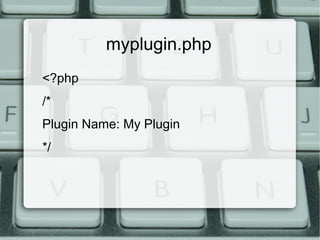
myplugin.php
<?php
/*
Plugin Name: My Plugin
*/
Going beyond WordPress basics
●
    I can't upload a certain file type
●
    There's a fix for that: upload types
Plugins can be as big or small as
            you want
●
    If you have a feature that you might want to
    turn on/off independently of others:
    Put it in it's own plugin
    Example: Disable upgrade notice
Getting Advanced: shortcode
●
    “Snippets” are a gateway into WordPress
    customization
●
    Advanced example:
    PayPal donation shortcode
Other Examples
●
    Shortcodes in widgets
    I'm not sure why the “Text” widget doesn't
    do this already – how to fix
●
    Audience Examples?
Be careful out there!
●
    But don't be afraid to experiment
●
    Create another WordPress instance to test
●
    I havent (yet) seen a “malicious”
    WordPress code snippet
●
    Some examples may be out of date, overly
    complex, or blatantly wrong
Knowing your limits
●
    Copying & Pasting will probably only get
    you so far
●
    If an example is very long, there's a chance
    it might already be a plugin – look there in
    stead
●
    Consult you friendly local developer – a
    local WordPress meetup (and/or mailing
    list) is probably your best bet
Thank You!
●
    Justin Foell - Developer
●
    9seeds.com – professional WordPress
    development
●
    justin@9seeds.com
●
    Code examples: bit.ly/jf-wclv2012
●
    Slides: bit.ly/jf-wclv2012-slides

Building your first WordPress plugin

  • 1.
    Building your first WordPress plugin ● Justin Foell ● Developer at 9seeds ● justin@9seeds.com ● @justinfoell
  • 2.
    I found somesweet code, where does it go? ● Let's look at an example: admin bar ● Pitfalls of adding it to functions.php
  • 3.
    When should codego in a theme's functions.php? ● One question: Would you still want the feature if the theme was changed? ● If YES, put it in a plugin ● If NO, you can put it in functions.php, but consider renaming the theme or creating a child theme to avoid upgrade issues
  • 4.
    Holy crap! Pluginssound hard! ● Writing a Plugin Documentation ● Let's start with the bare minimum ● Who knows how to type? ● You can build a plugin!
  • 5.
  • 6.
    Going beyond WordPressbasics ● I can't upload a certain file type ● There's a fix for that: upload types
  • 7.
    Plugins can beas big or small as you want ● If you have a feature that you might want to turn on/off independently of others: Put it in it's own plugin Example: Disable upgrade notice
  • 8.
    Getting Advanced: shortcode ● “Snippets” are a gateway into WordPress customization ● Advanced example: PayPal donation shortcode
  • 9.
    Other Examples ● Shortcodes in widgets I'm not sure why the “Text” widget doesn't do this already – how to fix ● Audience Examples?
  • 10.
    Be careful outthere! ● But don't be afraid to experiment ● Create another WordPress instance to test ● I havent (yet) seen a “malicious” WordPress code snippet ● Some examples may be out of date, overly complex, or blatantly wrong
  • 11.
    Knowing your limits ● Copying & Pasting will probably only get you so far ● If an example is very long, there's a chance it might already be a plugin – look there in stead ● Consult you friendly local developer – a local WordPress meetup (and/or mailing list) is probably your best bet
  • 12.
    Thank You! ● Justin Foell - Developer ● 9seeds.com – professional WordPress development ● justin@9seeds.com ● Code examples: bit.ly/jf-wclv2012 ● Slides: bit.ly/jf-wclv2012-slides