Mediator Pattern
(A Behavioral Pattern)
Mediator
Motivation
 Object-oriented design encourages the distribution of
   behavior among objects. Such distribution can result in an
   object structure with many connections between objects;
   in the worst case, every object ends up knowing about
   every other.

 As an example, consider the implementation of dialog
   boxes in a graphical user interface. A dialog box uses a
   window to present a collection of widgets such as buttons,
   menus, and entry fields, as shown here:

 Often there are dependencies between the widgets in the
   dialog. For example, a button gets disabled when a certain
   entry field is empty. Selecting an entry in a list of choices
   called a list box might change the contents of an entry
   field. Conversely, typing text into the entry field might
   automatically select one or more corresponding entries in
   the list box. Once text appears in the entry field, other
   buttons may become enabled that let the user do
   something with the text, such as changing or deleting the
   thing to which it refers.
Motivation
 Different dialog boxes will have different dependencies between widgets. So
  even though dialogs display the same kinds of widgets, they can't simply reuse
  stock widget classes.

 You can avoid these problems by encapsulating collective behavior in a
  separate mediator object. A mediator is responsible for controlling and
  coordinating the interactions of a group of objects. The mediator serves as an
  intermediary that keeps objects in the group from referring to each other
  explicitly. The objects only know the mediator, thereby reducing the number
  of interconnections.

 For example, FontDialogDirector can be the mediator between the widgets
  in a dialog box. A FontDialogDirector object knows the widgets in a dialog and
  coordinates their interaction. It acts as a hub of communication for widgets.
Motivation
Motivation
 Here's the succession of events by which a list box's selection passes
  to an entry field:

    The list box tells its director that it's changed.
    The director gets the selection from the list box.
    The director passes the selection to the entry field.
    Now that the entry field contains some text, the director enables
     button(s) for initiating an action (e.g., "demibold," "oblique").

 Note how the director mediates between the list box and the entry
  field. Widgets communicate with each other only indirectly, through
  the director. They don't have to know about each other; all they know
  is the director. Furthermore, because the behavior is localized in one
  class, it can be changed or replaced by extending or replacing that
  class.
Motivation
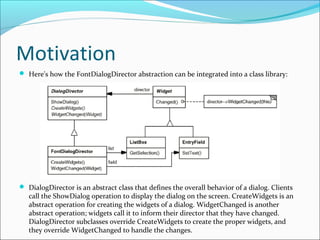
 Here's how the FontDialogDirector abstraction can be integrated into a class library:


 DialogDirector is an abstract class that defines the overall behavior of a dialog. Clients
   call the ShowDialog operation to display the dialog on the screen. CreateWidgets is an
   abstract operation for creating the widgets of a dialog. WidgetChanged is another
   abstract operation; widgets call it to inform their director that they have changed.
   DialogDirector subclasses override CreateWidgets to create the proper widgets, and
   they override WidgetChanged to handle the changes.
Applicability
Use the Mediator pattern when

   a set of objects communicate in well-defined but complex ways.
    The resulting interdependencies are unstructured and difficult
    to understand.
   reusing an object is difficult because it refers to and
    communicates with many other objects.
   a behavior that's distributed between several classes should be
    customizable without a lot of subclassing.
Structure
Participants
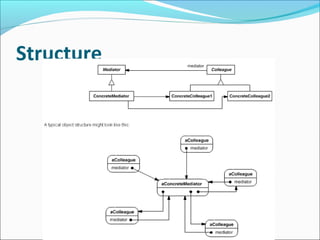
Mediator (DialogDirector)
   defines an interface for communicating with Colleague objects.

ConcreteMediator (FontDialogDirector)
   implements cooperative behavior by coordinating Colleague
    objects.
   knows and maintains its colleagues.

Colleague classes (ListBox, EntryField)
   each Colleague class knows its Mediator object.
   each colleague communicates with its mediator whenever it would
    have otherwise communicated with another colleague.
Collaborations
Colleagues send and receive requests from
 a Mediator object. The mediator
 implements the cooperative behavior by
 routing requests between the appropriate
 colleague(s).
Consequences
 The Mediator pattern has the following benefits and drawbacks:

     It limits subclassing. A mediator localizes behavior that otherwise would be distributed
       among several objects. Changing this behavior requires subclassing Mediator only;
       Colleague classes can be reused as is.

     It decouples colleagues. A mediator promotes loose coupling between colleagues. You can
       vary and reuse Colleague and Mediator classes independently.

     It simplifies object protocols. A mediator replaces many-to-many interactions with one-
       to-many interactions between the mediator and its colleagues. One-to-many
       relationships are easier to understand, maintain, and extend.

     It abstracts how objects cooperate. Making mediation an independent concept and
       encapsulating it in an object lets you focus on how objects interact apart from their
       individual behavior. That can help clarify how objects interact in a system.

     It centralizes control. The Mediator pattern trades complexity of interaction for
       complexity in the mediator. Because a mediator encapsulates protocols, it can become
       more complex than any individual colleague. This can make the mediator itself a
       monolith that's hard to maintain.
Implementation
 The following implementation issues are relevant to the Mediator pattern:

    Omitting the abstract Mediator class. There's no need to define an abstract
      Mediator class when colleagues work with only one mediator. The abstract
      coupling that the Mediator class provides lets colleagues work with different
      Mediator subclasses, and vice versa.

    Colleague-Mediator communication. Colleagues have to communicate with
      their mediator when an event of interest occurs. One approach is to
      implement the Mediator as an Observer using the Observer pattern. Colleague
      classes act as Subjects, sending notifications to the mediator whenever they
      change state. The mediator responds by propagating the effects of the change
      to other colleagues.

    Another approach defines a specialized notification interface in Mediator that
      lets colleagues be more direct in their communication. Smalltalk/V for
      Windows uses a form of delegation: When communicating with the mediator,
      a colleague passes itself as an argument, allowing the mediator to identify the
      sender. The Sample Code uses this approach, and the Smalltalk/V
      implementation is discussed further in the Known Uses.
Sample Code
Sample Code
Sample Code
Assignment
 Develop a calendar application to remind us tasks to do. When a
  reminder triggers, it shows a notification alarm / popup. In the
  notification, we can select snooze or close. If we select snooze, then
  after a certain time span(15 Min) the alarm will notify us again. If we
  don’t respond to the notification in 30 seconds it automatically goes
  into snooze mode. The alarm automatically closes, if it goes into
  snooze mode for 3 times and logs the failure.

Mediator pattern

  • 1.
  • 2.
  • 3.
    Motivation  Object-oriented designencourages the distribution of behavior among objects. Such distribution can result in an object structure with many connections between objects; in the worst case, every object ends up knowing about every other.  As an example, consider the implementation of dialog boxes in a graphical user interface. A dialog box uses a window to present a collection of widgets such as buttons, menus, and entry fields, as shown here:  Often there are dependencies between the widgets in the dialog. For example, a button gets disabled when a certain entry field is empty. Selecting an entry in a list of choices called a list box might change the contents of an entry field. Conversely, typing text into the entry field might automatically select one or more corresponding entries in the list box. Once text appears in the entry field, other buttons may become enabled that let the user do something with the text, such as changing or deleting the thing to which it refers.
  • 4.
    Motivation  Different dialogboxes will have different dependencies between widgets. So even though dialogs display the same kinds of widgets, they can't simply reuse stock widget classes.  You can avoid these problems by encapsulating collective behavior in a separate mediator object. A mediator is responsible for controlling and coordinating the interactions of a group of objects. The mediator serves as an intermediary that keeps objects in the group from referring to each other explicitly. The objects only know the mediator, thereby reducing the number of interconnections.  For example, FontDialogDirector can be the mediator between the widgets in a dialog box. A FontDialogDirector object knows the widgets in a dialog and coordinates their interaction. It acts as a hub of communication for widgets.
  • 5.
  • 6.
    Motivation  Here's thesuccession of events by which a list box's selection passes to an entry field:  The list box tells its director that it's changed.  The director gets the selection from the list box.  The director passes the selection to the entry field.  Now that the entry field contains some text, the director enables button(s) for initiating an action (e.g., "demibold," "oblique").  Note how the director mediates between the list box and the entry field. Widgets communicate with each other only indirectly, through the director. They don't have to know about each other; all they know is the director. Furthermore, because the behavior is localized in one class, it can be changed or replaced by extending or replacing that class.
  • 7.
    Motivation  Here's howthe FontDialogDirector abstraction can be integrated into a class library:  DialogDirector is an abstract class that defines the overall behavior of a dialog. Clients call the ShowDialog operation to display the dialog on the screen. CreateWidgets is an abstract operation for creating the widgets of a dialog. WidgetChanged is another abstract operation; widgets call it to inform their director that they have changed. DialogDirector subclasses override CreateWidgets to create the proper widgets, and they override WidgetChanged to handle the changes.
  • 8.
    Applicability Use the Mediatorpattern when  a set of objects communicate in well-defined but complex ways. The resulting interdependencies are unstructured and difficult to understand.  reusing an object is difficult because it refers to and communicates with many other objects.  a behavior that's distributed between several classes should be customizable without a lot of subclassing.
  • 9.
  • 10.
    Participants Mediator (DialogDirector)  defines an interface for communicating with Colleague objects. ConcreteMediator (FontDialogDirector)  implements cooperative behavior by coordinating Colleague objects.  knows and maintains its colleagues. Colleague classes (ListBox, EntryField)  each Colleague class knows its Mediator object.  each colleague communicates with its mediator whenever it would have otherwise communicated with another colleague.
  • 11.
    Collaborations Colleagues send andreceive requests from a Mediator object. The mediator implements the cooperative behavior by routing requests between the appropriate colleague(s).
  • 12.
    Consequences  The Mediatorpattern has the following benefits and drawbacks:  It limits subclassing. A mediator localizes behavior that otherwise would be distributed among several objects. Changing this behavior requires subclassing Mediator only; Colleague classes can be reused as is.  It decouples colleagues. A mediator promotes loose coupling between colleagues. You can vary and reuse Colleague and Mediator classes independently.  It simplifies object protocols. A mediator replaces many-to-many interactions with one- to-many interactions between the mediator and its colleagues. One-to-many relationships are easier to understand, maintain, and extend.  It abstracts how objects cooperate. Making mediation an independent concept and encapsulating it in an object lets you focus on how objects interact apart from their individual behavior. That can help clarify how objects interact in a system.  It centralizes control. The Mediator pattern trades complexity of interaction for complexity in the mediator. Because a mediator encapsulates protocols, it can become more complex than any individual colleague. This can make the mediator itself a monolith that's hard to maintain.
  • 13.
    Implementation  The followingimplementation issues are relevant to the Mediator pattern:  Omitting the abstract Mediator class. There's no need to define an abstract Mediator class when colleagues work with only one mediator. The abstract coupling that the Mediator class provides lets colleagues work with different Mediator subclasses, and vice versa.  Colleague-Mediator communication. Colleagues have to communicate with their mediator when an event of interest occurs. One approach is to implement the Mediator as an Observer using the Observer pattern. Colleague classes act as Subjects, sending notifications to the mediator whenever they change state. The mediator responds by propagating the effects of the change to other colleagues.  Another approach defines a specialized notification interface in Mediator that lets colleagues be more direct in their communication. Smalltalk/V for Windows uses a form of delegation: When communicating with the mediator, a colleague passes itself as an argument, allowing the mediator to identify the sender. The Sample Code uses this approach, and the Smalltalk/V implementation is discussed further in the Known Uses.
  • 14.
  • 15.
  • 16.
  • 17.
    Assignment  Develop acalendar application to remind us tasks to do. When a reminder triggers, it shows a notification alarm / popup. In the notification, we can select snooze or close. If we select snooze, then after a certain time span(15 Min) the alarm will notify us again. If we don’t respond to the notification in 30 seconds it automatically goes into snooze mode. The alarm automatically closes, if it goes into snooze mode for 3 times and logs the failure.