AnDevCon SF 2013

Mastering the
Master/Detail
Pattern
Copyright © 2013 CommonsWare, LLC
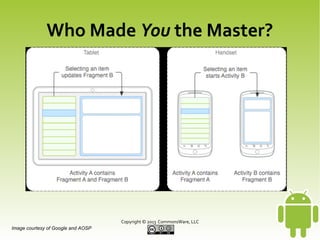
Who Made You the Master?
●

Master/Detail Pattern
–

Master = a collection of content
●
●

–
●

Title/display name
Other metadata

Detail = specifics about one piece of content

Pattern
–

Show master or detail on smaller screens

–

Show master and detail on larger screens
Copyright © 2013 CommonsWare, LLC
Who Made You the Master?

Copyright © 2013 CommonsWare, LLC
Image courtesy of Google and AOSP
Stamping Out a Template
●

Master/Detail Flow App Template
–

Option in Eclipse when creating a new project

–

Results
●

Two activities (master/detail and detail-only)

●

Two fragments (master and detail)

●

Four layouts (plus a layout alias)

●

Always single-pane or dual-pane, based on screen
size
Copyright © 2013 CommonsWare, LLC
Nuking an Activity
●

One Activity/Two Fragments
–

In single-pane mode, Activity executes a
FragmentTransaction to replace list with detail
●

–

Adds to back stack to allow BACK to reverse the
transaction and return to master

In dual-pane mode, just shows both fragments

Copyright © 2013 CommonsWare, LLC
Nuking an Activity
●

Pros
–

One less activity (class, manifest, etc.)

–

Not limited by Intent extras

Copyright © 2013 CommonsWare, LLC
Nuking an Activity
●

Cons: Too Many Scenarios
–

Do we have a master fragment in the FragmentManager?
●

–

If yes, is it visible? Should it be?

Do we have a detail fragment in the FragmentManager?
●

If yes, is it visible? Should it be?

–

What happens when the user presses BACK?

–

What happens if we rotate the screen and change
strategies?

Copyright © 2013 CommonsWare, LLC
Slip Sliding Away
●

SlidingPaneLayout
–

Android Support package

–

Handles complexity for you
●
●

●

Single-pane vs. dual-pane
Swipe gesture to show, hide master in single-pane
mode
All the configuration change idiosyncrasies

Copyright © 2013 CommonsWare, LLC
Slip Sliding Away
●

SlidingPaneLayout Pros
–

●

Simplicity

SlidingPaneLayout Cons
–

Confusion over swipe gesture

–

Detail-first single-pane flow
●

Can be fixed, requires a bit of extra code

Copyright © 2013 CommonsWare, LLC
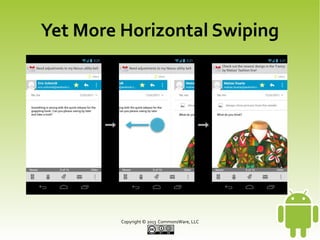
Yet More Horizontal Swiping
●

ViewPager
–

ViewGroup, attached to a PagerAdapter
●

FragmentPagerAdapter,
FragmentStatePagerAdapter, or custom
implementation

–

Horizontal swipes move between pages

–

Optional “indicators” to show where the user is
in the sea of pages
Copyright © 2013 CommonsWare, LLC
Yet More Horizontal Swiping
●

ViewPager and Design
–

“On a phone, since the master and detail are on
separate screens, this typically requires the user
to jump back and forth between the list and the
detail view, aka "pogo-sticking".”

–

“In cases where users will want to view multiple
detail items in succession, avoid pogo-sticking
by using the swipe gesture to navigate to the
next/previous detail view.”
Copyright © 2013 CommonsWare, LLC
Yet More Horizontal Swiping

Copyright © 2013 CommonsWare, LLC
Yet More Horizontal Swiping
●

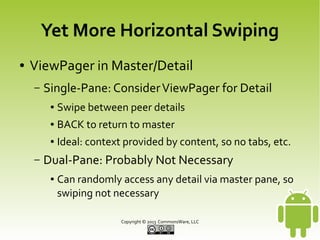
ViewPager in Master/Detail
–

Single-Pane: Consider ViewPager for Detail
●
●

BACK to return to master

●

–

Swipe between peer details
Ideal: context provided by content, so no tabs, etc.

Dual-Pane: Probably Not Necessary
●

Can randomly access any detail via master pane, so
swiping not necessary
Copyright © 2013 CommonsWare, LLC
Yet More Horizontal Swiping
●

ViewPager Challenges
–

Switching Between Single-Pane/Dual-Pane
●

●

–

Fragment*PagerAdapter is very “grabby”, does not
like others messing with its contents
Net: need another PagerAdapter implementation

Yet More Collisions with Horizontal Swipe
Gestures
●

Probably need to skip SlidingPaneLayout
Copyright © 2013 CommonsWare, LLC
Lights Mode! Camera Mode! Action Mode!
●

Action Modes
–

A.k.a., contextual action bar

–

Replaces regular action bar for contextual
actions
●
●

–

When 1+ selected for such actions
Can perform actions upon group of selected items,
such as “delete” or “move”

Dismissed via Done or BACK
Copyright © 2013 CommonsWare, LLC
Lights Mode! Camera Mode! Action Mode!
●

Action Modes and Design
–

Replacement for old-style context menu

–

Trigger Options
●
●

Always-available checklist
Long-press to select first, moves into a multi-select
mode

Copyright © 2013 CommonsWare, LLC
Lights Mode! Camera Mode! Action Mode!
●

Action Modes and Master/Detail
–

Master should support action modes
●
●

Read-only vs. read-write actions

●

–

Exception: no relevant actions (unlikely)
Emphasis on multiple-selection scenario

Detail should support actions
●

Single-pane: action bar

●

Dual-pane: action bar and action mode
Copyright © 2013 CommonsWare, LLC
Lights Mode! Camera Mode! Action Mode!
●

Action Mode Challenges
–

Multiple Flavors of Master List Highlighting
●
●

–

Single-pane: regular or multiple-selection
Dual-pane: activated or multiple-selection

Detail in Multiple-Selection?
●

–

First detail? Last detail? Empty? Special content?

Retaining Action Mode and Selections
●

Configuration changes, etc.
Copyright © 2013 CommonsWare, LLC
But Wait! There's More!
●

Presentation
–

●

What do we do when there is a secondary
screen?

Splitter
–

Should we allow resizing of panes in dual-pane
mode?

Copyright © 2013 CommonsWare, LLC
But Wait! There's More!
●

Action Bar Items
–

Need to ensure change properly
●
●

●

Moving between master, detail in single-pane mode
Reasonable blend of both in dual-pane mode

Navigation Drawer
–

Yet more conflict with horizontal gestures

–

Fallacy of the “bezel swipe”
Copyright © 2013 CommonsWare, LLC
CWAC-MasterDetail
●

Canned “best practices” in reusable form

●

Objectives
–

Maximum adherence to design guidelines

–

Minimum additional code to plug in your content

Copyright © 2013 CommonsWare, LLC
CWAC-MasterDetail
●

Library Usage
–

Subclass MasterDetailActivity

–

Override buildMasterDetailHelper(),
returning instance of own subclass of
MasterDetailHelper

–

Override buildPagerAdapter() and
buildModelCollection() in
MasterDetailHelper

–

Beer!

Copyright © 2013 CommonsWare, LLC
CWAC-MasterDetail
●

Library Functionality, Today
–

Automatic handling of configuration changes

–

ViewPager in single-pane mode

–

Splitter support

–

Custom empty views (list, detail) and
multiple-choice view (detail)

–

Optional action mode support

–

Optional custom master contents
Copyright © 2013 CommonsWare, LLC
CWAC-MasterDetail
●

Library Functionality, Future
–

Undo bar

–

Display vs. edit modes for detail

–

Presentation support

–

Filtering support

–

Ordered list support

–

And more!
Copyright © 2013 CommonsWare, LLC

Mastering the Master Detail Pattern

  • 1.
    AnDevCon SF 2013 Masteringthe Master/Detail Pattern Copyright © 2013 CommonsWare, LLC
  • 2.
    Who Made Youthe Master? ● Master/Detail Pattern – Master = a collection of content ● ● – ● Title/display name Other metadata Detail = specifics about one piece of content Pattern – Show master or detail on smaller screens – Show master and detail on larger screens Copyright © 2013 CommonsWare, LLC
  • 3.
    Who Made Youthe Master? Copyright © 2013 CommonsWare, LLC Image courtesy of Google and AOSP
  • 4.
    Stamping Out aTemplate ● Master/Detail Flow App Template – Option in Eclipse when creating a new project – Results ● Two activities (master/detail and detail-only) ● Two fragments (master and detail) ● Four layouts (plus a layout alias) ● Always single-pane or dual-pane, based on screen size Copyright © 2013 CommonsWare, LLC
  • 5.
    Nuking an Activity ● OneActivity/Two Fragments – In single-pane mode, Activity executes a FragmentTransaction to replace list with detail ● – Adds to back stack to allow BACK to reverse the transaction and return to master In dual-pane mode, just shows both fragments Copyright © 2013 CommonsWare, LLC
  • 6.
    Nuking an Activity ● Pros – Oneless activity (class, manifest, etc.) – Not limited by Intent extras Copyright © 2013 CommonsWare, LLC
  • 7.
    Nuking an Activity ● Cons:Too Many Scenarios – Do we have a master fragment in the FragmentManager? ● – If yes, is it visible? Should it be? Do we have a detail fragment in the FragmentManager? ● If yes, is it visible? Should it be? – What happens when the user presses BACK? – What happens if we rotate the screen and change strategies? Copyright © 2013 CommonsWare, LLC
  • 8.
    Slip Sliding Away ● SlidingPaneLayout – AndroidSupport package – Handles complexity for you ● ● ● Single-pane vs. dual-pane Swipe gesture to show, hide master in single-pane mode All the configuration change idiosyncrasies Copyright © 2013 CommonsWare, LLC
  • 9.
    Slip Sliding Away ● SlidingPaneLayoutPros – ● Simplicity SlidingPaneLayout Cons – Confusion over swipe gesture – Detail-first single-pane flow ● Can be fixed, requires a bit of extra code Copyright © 2013 CommonsWare, LLC
  • 10.
    Yet More HorizontalSwiping ● ViewPager – ViewGroup, attached to a PagerAdapter ● FragmentPagerAdapter, FragmentStatePagerAdapter, or custom implementation – Horizontal swipes move between pages – Optional “indicators” to show where the user is in the sea of pages Copyright © 2013 CommonsWare, LLC
  • 11.
    Yet More HorizontalSwiping ● ViewPager and Design – “On a phone, since the master and detail are on separate screens, this typically requires the user to jump back and forth between the list and the detail view, aka "pogo-sticking".” – “In cases where users will want to view multiple detail items in succession, avoid pogo-sticking by using the swipe gesture to navigate to the next/previous detail view.” Copyright © 2013 CommonsWare, LLC
  • 12.
    Yet More HorizontalSwiping Copyright © 2013 CommonsWare, LLC
  • 13.
    Yet More HorizontalSwiping ● ViewPager in Master/Detail – Single-Pane: Consider ViewPager for Detail ● ● BACK to return to master ● – Swipe between peer details Ideal: context provided by content, so no tabs, etc. Dual-Pane: Probably Not Necessary ● Can randomly access any detail via master pane, so swiping not necessary Copyright © 2013 CommonsWare, LLC
  • 14.
    Yet More HorizontalSwiping ● ViewPager Challenges – Switching Between Single-Pane/Dual-Pane ● ● – Fragment*PagerAdapter is very “grabby”, does not like others messing with its contents Net: need another PagerAdapter implementation Yet More Collisions with Horizontal Swipe Gestures ● Probably need to skip SlidingPaneLayout Copyright © 2013 CommonsWare, LLC
  • 15.
    Lights Mode! CameraMode! Action Mode! ● Action Modes – A.k.a., contextual action bar – Replaces regular action bar for contextual actions ● ● – When 1+ selected for such actions Can perform actions upon group of selected items, such as “delete” or “move” Dismissed via Done or BACK Copyright © 2013 CommonsWare, LLC
  • 16.
    Lights Mode! CameraMode! Action Mode! ● Action Modes and Design – Replacement for old-style context menu – Trigger Options ● ● Always-available checklist Long-press to select first, moves into a multi-select mode Copyright © 2013 CommonsWare, LLC
  • 17.
    Lights Mode! CameraMode! Action Mode! ● Action Modes and Master/Detail – Master should support action modes ● ● Read-only vs. read-write actions ● – Exception: no relevant actions (unlikely) Emphasis on multiple-selection scenario Detail should support actions ● Single-pane: action bar ● Dual-pane: action bar and action mode Copyright © 2013 CommonsWare, LLC
  • 18.
    Lights Mode! CameraMode! Action Mode! ● Action Mode Challenges – Multiple Flavors of Master List Highlighting ● ● – Single-pane: regular or multiple-selection Dual-pane: activated or multiple-selection Detail in Multiple-Selection? ● – First detail? Last detail? Empty? Special content? Retaining Action Mode and Selections ● Configuration changes, etc. Copyright © 2013 CommonsWare, LLC
  • 19.
    But Wait! There'sMore! ● Presentation – ● What do we do when there is a secondary screen? Splitter – Should we allow resizing of panes in dual-pane mode? Copyright © 2013 CommonsWare, LLC
  • 20.
    But Wait! There'sMore! ● Action Bar Items – Need to ensure change properly ● ● ● Moving between master, detail in single-pane mode Reasonable blend of both in dual-pane mode Navigation Drawer – Yet more conflict with horizontal gestures – Fallacy of the “bezel swipe” Copyright © 2013 CommonsWare, LLC
  • 21.
    Copyright © 2013CommonsWare, LLC
  • 22.
    CWAC-MasterDetail ● Canned “best practices”in reusable form ● Objectives – Maximum adherence to design guidelines – Minimum additional code to plug in your content Copyright © 2013 CommonsWare, LLC
  • 23.
    CWAC-MasterDetail ● Library Usage – Subclass MasterDetailActivity – OverridebuildMasterDetailHelper(), returning instance of own subclass of MasterDetailHelper – Override buildPagerAdapter() and buildModelCollection() in MasterDetailHelper – Beer! Copyright © 2013 CommonsWare, LLC
  • 24.
    CWAC-MasterDetail ● Library Functionality, Today – Automatichandling of configuration changes – ViewPager in single-pane mode – Splitter support – Custom empty views (list, detail) and multiple-choice view (detail) – Optional action mode support – Optional custom master contents Copyright © 2013 CommonsWare, LLC
  • 25.
    CWAC-MasterDetail ● Library Functionality, Future – Undobar – Display vs. edit modes for detail – Presentation support – Filtering support – Ordered list support – And more! Copyright © 2013 CommonsWare, LLC