Single Map Analysis


8 March 2011
Things to do with a single map
   Summary statistics
   Measure aspects of features (area,
   length, shape, etc.)
   Buffers
Summary statistics
   There are three ways to compute
   summary stats in ArcGIS
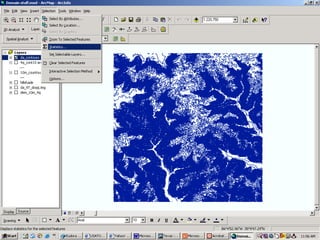
     1.) Selection Statistics
      • Selection  Statistics
     2.) Statistics from the attribute table
     3.) Summarize
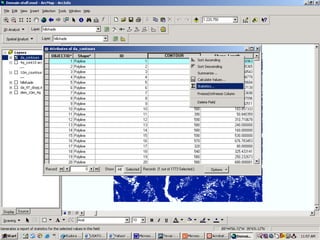
Selection statistics example
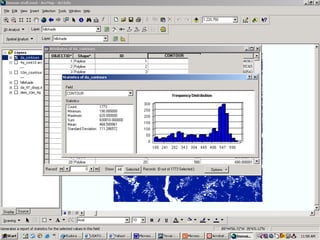
Attribute Table Statistics
Example
Summary Statistics example
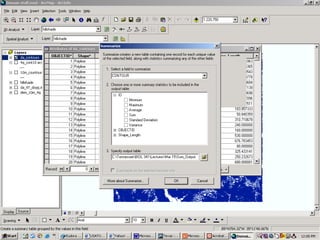
Summarize
  You can summarize attribute data
  based on unique occurrences of a value
  within a field containing any type of
  data
  Numerical field can be selected to
  summarize using a statistical method
  (e.g. min, max, mean, StDev, sum,
  variance, etc.)
Summarize example
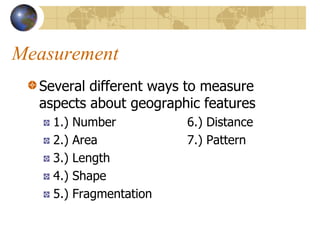
Measurement
  Several different ways to measure
  aspects about geographic features
    1.)   Number          6.) Distance
    2.)   Area            7.) Pattern
    3.)   Length
    4.)   Shape
    5.)   Fragmentation
Shape
  Compactness Index
  Zonal Geometry
  Sinuosity
Compactness
  Although the perimeter to area ratio
  can be used (see pg. 182-183 in
  Theobald for formulas), it is more
  common to measure shape by
  comparing a polygon to a circle
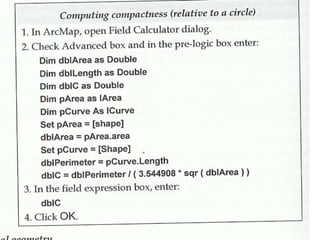
Computing Compactness
Zonal Geometry
   Zonal Geometry can be calculated for
   rasters using the raster calculator
   ZonalGeometery (<GRID>, [Geometry-
   Type], {MaxThickness})
   Calculates an aspect of the geometry of
   zones, based on the GeometryType
   keyword: AREA, PERIMETER,
   THICKNESS, ELLIPSE, and ALL
   See pg. 251 of Theobald
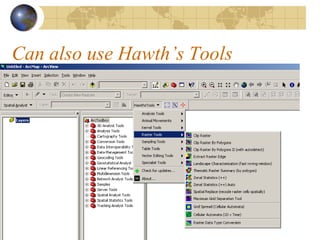
Can also use Hawth’s Tools
Sinuosity
   The sinuosity of a linear features
   represented as a polyline is measured
   as the ratio of the straight-line distance
   from the start to the end of a line,
   divided by the full (meandering) length
   of a line
   Measures “wiggliness”
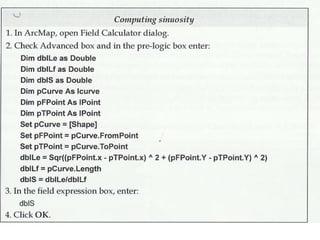
Calculating Sinuosity
Fragmentation
   Very useful in landscape ecology!
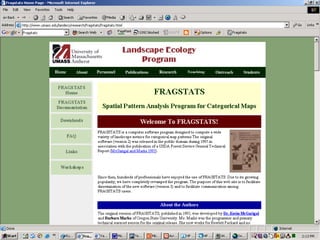
   Classic program is FRAGSTATS
     Go to
     http://www.umass.edu/landeco/research/fragstats
     /fragstats.html to download
   Can also calculate some basic things in
   ArcGIS
FragStats home page
ArcGIS Fragmentation
   Fragmentation Index
   Relative Size of the Largest Patch
   Landscape Signature
Fragmentation Index
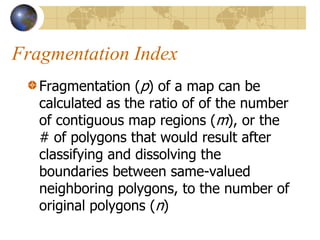
   Fragmentation (p) of a map can be
   calculated as the ratio of of the number
   of contiguous map regions (m), or the
   # of polygons that would result after
   classifying and dissolving the
   boundaries between same-valued
   neighboring polygons, to the number of
   original polygons (n)
Fragmentation Index2
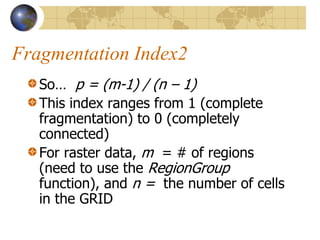
   So… p = (m-1) / (n – 1)
   This index ranges from 1 (complete
   fragmentation) to 0 (completely
   connected)
   For raster data, m = # of regions
   (need to use the RegionGroup
   function), and n = the number of cells
   in the GRID
Relative size of the largest patch
   The ratio of the area of the largest patch (a)
   to the area of all the patches of the same
   class as the largest patch (A). Represented as
   RS
   So… RS = a / (p * A)
   The area of a can be found using the
   Statistics tool (features) or the count field
   (GRIDs)
   RS for a connected landscape approaches
   1.0, while in a fragmented landscape it
   approaches 0.0
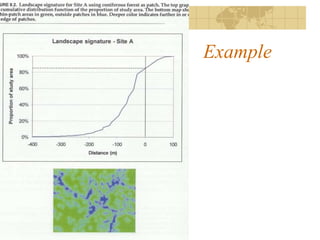
Landscape Signature
   Both the shape and configuration of
   patches can be examined by measuring
   how the proportion of a landscape that is
   occupied by patches changes when patches
   are enlarged and shrunk across a range of
   scales
   This is then normalized to the total study
   area and expressed as a cumulative
   distribution function
Example
Distance calculations
   Typically, the distances from the centroids
   are calculated
   However, you can calculate distance from
   the nearest part of the feature or the
   average distance from all parts of a feature
   (However, note that calculating distance
   surfaces involves the closest edge-to-edge
   distance)
Types of Distance Calculations
   1.)   Spherical
   2.)   Euclidean
   3.)   Constrained distance
   4.)   Weighted Distance
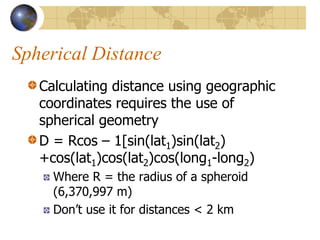
Spherical Distance
   Calculating distance using geographic
   coordinates requires the use of
   spherical geometry
   D = Rcos – 1[sin(lat1)sin(lat2)
   +cos(lat1)cos(lat2)cos(long1-long2)
     Where R = the radius of a spheroid
     (6,370,997 m)
     Don’t use it for distances < 2 km
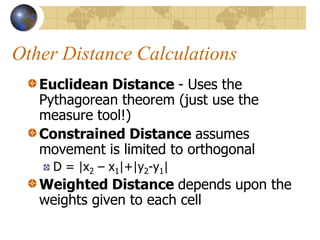
Other Distance Calculations
   Euclidean Distance - Uses the
   Pythagorean theorem (just use the
   measure tool!)
   Constrained Distance assumes
   movement is limited to orthogonal
     D = |x2 – x1|+|y2-y1|
   Weighted Distance depends upon the
   weights given to each cell
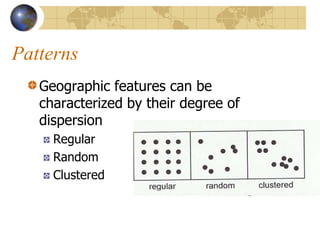
Patterns
   Geographic features can be
   characterized by their degree of
   dispersion
     Regular
     Random
     Clustered
Nearest Neighbor
   The nearest neighbor index measures
   the degree of spatial dispersion of
   features based on the minimum
   distanced between individual (point &
   line) features
   It can be computed using ArcToolbox
Buffering

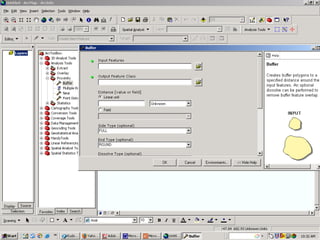
   Go to ArcToolbox Analysis Tools 
   Proximity  Buffer
     Can set the buffer as a specified distance,
     as multiple buffer rings or based on a
     distance from an attribute
Mar 8 single_map_analysis_1

Mar 8 single_map_analysis_1

  • 1.
  • 2.
    Things to dowith a single map Summary statistics Measure aspects of features (area, length, shape, etc.) Buffers
  • 3.
    Summary statistics There are three ways to compute summary stats in ArcGIS 1.) Selection Statistics • Selection  Statistics 2.) Statistics from the attribute table 3.) Summarize
  • 4.
  • 5.
  • 6.
  • 7.
    Summarize Youcan summarize attribute data based on unique occurrences of a value within a field containing any type of data Numerical field can be selected to summarize using a statistical method (e.g. min, max, mean, StDev, sum, variance, etc.)
  • 8.
  • 9.
    Measurement Severaldifferent ways to measure aspects about geographic features 1.) Number 6.) Distance 2.) Area 7.) Pattern 3.) Length 4.) Shape 5.) Fragmentation
  • 10.
    Shape CompactnessIndex Zonal Geometry Sinuosity
  • 11.
    Compactness Althoughthe perimeter to area ratio can be used (see pg. 182-183 in Theobald for formulas), it is more common to measure shape by comparing a polygon to a circle
  • 12.
  • 13.
    Zonal Geometry Zonal Geometry can be calculated for rasters using the raster calculator ZonalGeometery (<GRID>, [Geometry- Type], {MaxThickness}) Calculates an aspect of the geometry of zones, based on the GeometryType keyword: AREA, PERIMETER, THICKNESS, ELLIPSE, and ALL See pg. 251 of Theobald
  • 14.
    Can also useHawth’s Tools
  • 15.
    Sinuosity The sinuosity of a linear features represented as a polyline is measured as the ratio of the straight-line distance from the start to the end of a line, divided by the full (meandering) length of a line Measures “wiggliness”
  • 16.
  • 17.
    Fragmentation Very useful in landscape ecology! Classic program is FRAGSTATS Go to http://www.umass.edu/landeco/research/fragstats /fragstats.html to download Can also calculate some basic things in ArcGIS
  • 18.
  • 19.
    ArcGIS Fragmentation Fragmentation Index Relative Size of the Largest Patch Landscape Signature
  • 20.
    Fragmentation Index Fragmentation (p) of a map can be calculated as the ratio of of the number of contiguous map regions (m), or the # of polygons that would result after classifying and dissolving the boundaries between same-valued neighboring polygons, to the number of original polygons (n)
  • 21.
    Fragmentation Index2 So… p = (m-1) / (n – 1) This index ranges from 1 (complete fragmentation) to 0 (completely connected) For raster data, m = # of regions (need to use the RegionGroup function), and n = the number of cells in the GRID
  • 22.
    Relative size ofthe largest patch The ratio of the area of the largest patch (a) to the area of all the patches of the same class as the largest patch (A). Represented as RS So… RS = a / (p * A) The area of a can be found using the Statistics tool (features) or the count field (GRIDs) RS for a connected landscape approaches 1.0, while in a fragmented landscape it approaches 0.0
  • 23.
    Landscape Signature Both the shape and configuration of patches can be examined by measuring how the proportion of a landscape that is occupied by patches changes when patches are enlarged and shrunk across a range of scales This is then normalized to the total study area and expressed as a cumulative distribution function
  • 24.
  • 25.
    Distance calculations Typically, the distances from the centroids are calculated However, you can calculate distance from the nearest part of the feature or the average distance from all parts of a feature (However, note that calculating distance surfaces involves the closest edge-to-edge distance)
  • 26.
    Types of DistanceCalculations 1.) Spherical 2.) Euclidean 3.) Constrained distance 4.) Weighted Distance
  • 27.
    Spherical Distance Calculating distance using geographic coordinates requires the use of spherical geometry D = Rcos – 1[sin(lat1)sin(lat2) +cos(lat1)cos(lat2)cos(long1-long2) Where R = the radius of a spheroid (6,370,997 m) Don’t use it for distances < 2 km
  • 28.
    Other Distance Calculations Euclidean Distance - Uses the Pythagorean theorem (just use the measure tool!) Constrained Distance assumes movement is limited to orthogonal D = |x2 – x1|+|y2-y1| Weighted Distance depends upon the weights given to each cell
  • 29.
    Patterns Geographic features can be characterized by their degree of dispersion Regular Random Clustered
  • 30.
    Nearest Neighbor The nearest neighbor index measures the degree of spatial dispersion of features based on the minimum distanced between individual (point & line) features It can be computed using ArcToolbox
  • 31.
    Buffering Go to ArcToolbox Analysis Tools  Proximity  Buffer Can set the buffer as a specified distance, as multiple buffer rings or based on a distance from an attribute