

Microprocessor

 By: waqar ahmad
Agenda  
   •   Introduction.
   •   CPU.
   •   Memory.
   •   What is the Microprocessor?
   •   Kinds of Processors.
   •   Features & Benefits.
   •   Kinds of Desktop & Laptop Processors.
   •   How to Choose the Right Processor.
Preliminary Discussion
• Integrated circuit: An electronic circuit designed to perform some
  function, in which the electronic components (transistors, resistors,
  diodes, capacitors, etc.) are miniaturized, built into a small "chip" made
  of silicon and interconnected through tiny strands of aluminum. More
  commonly referred to as "microchips", or "IC chips“
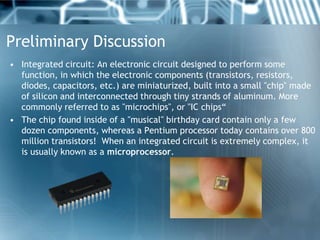
• The chip found inside of a "musical" birthday card contain only a few
  dozen components, whereas a Pentium processor today contains over 800
  million transistors! When an integrated circuit is extremely complex, it
  is usually known as a microprocessor.
What is a Microprocessor ?

    • The entire CPU with timing and control
      functions on a single chip is known as
      Microprocessor. Therefore a
      Microprocessor or MPU is an integrated
      circuit that contains many processing
      capabilities of a large computer.
Memory:
   • Rom (Read only Memory):
   ROM generally contains permanently stored data that
   cannot be changed. It can be read but not written into.
   The main feature of ROMs is that they are non-volatile,
   which means that the information stored in them is not
   lost when the power is removed.
   • Ram (Random Access Memory):
   RAM is memory that can be read or written to. RAM is
   actually read/write memory. RAM memory is volatile
   memory, that is, it is lost whenever the power is
   switched off.
Central Processing Unite:

   • The Central Processing unit or CPU
     controls the operation of the computer.
Features & Benefits:
    • Intel® Turbo Boost Technology 2.0:
    dynamically increases the processors frequency as needed by
    taking advantage of thermal and power headroom when
    operating below specified limits.
    • Intel® HT Technology:
    allows each core of your processor to work on two tasks at the
    same time.
    • Intel® HD Graphics 3000:
    delivers built-in performance for casual and mainstream
    gaming with no extra graphics hardware needed.
    • Intel® Quick Sync Video:
    makes editing and sharing videos simple.
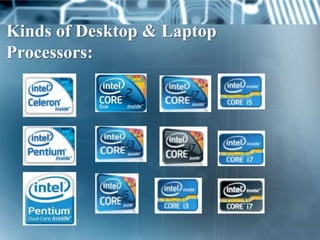
Kinds of Desktop & Laptop
Processors:
Intel® Core i3:
    • Laptop:
    Cores/Threads 2/4
    Cache 3MB
    Clock Speed 1.20-2.66 GHz
    HT technology – HD Graphics
    • Desktop:
    Cores/Threads 2/4
    Cache 3-4MB
    Clock Speed 2.5-3.4 GHz
    HT technology – HD Graphics
Intel® Core i5:
    • Laptop:
    Cores/Threads 2/4
    Cache 3MB
    Clock Speed 1.20-2.66 GHz
    HT technology – HD Graphics – Turbo Boost technology
    • Desktop:
    Cores/Threads 2-4/4
    Cache 3-8MB
    Clock Speed 2.3-3.6 GHz
    HT technology – HD Graphics – Turbo Boost technology
Intel® Core i7 Extreme :
   • Laptop:
   Cores/Threads 4/8
   Cache 8MB
   Clock Speed 2.00-2.7 GHz
   HT technology – HD Graphics – Turbo Boost
   technology
   • Desktop:
   Cores/Threads 6/12
   Cache 8-15MB
   Clock Speed 3.2-3.46 GHz
   HT technology – Turbo Boost technology
Intel® Core i7:
 • Laptop:
 Cores/Threads 2-4/4-8
 Cache 4-8MB
 Clock Speed 1.06-2.80 GHz
 HT technology – HD Graphics – Turbo Boost
 technology
 • Desktop:
 Cores/Threads 4-6/8-12
 Cache 8-12MB
 Clock Speed 2.53-3.50 GHz
 HT technology – HD Graphics – Turbo Boost
 technology
How to Choose the Right Processor:

    •   How will you use your computer?
    •   How will you enjoy photos and videos?
    •   How will you communicate with other?
    •   What kinds of games will you play?
    •   Which performance you need?
    •   How many program you want run at once
        time?
   Bill Gates   

  to be a good professional
engineer always start to study
   late for exams because it
 teaches you how to manage
time and tackle emergencies.
Thank you.

Manufacturingofmicroprocessor 120813121945-phpapp02

  • 1.
  • 2.
    Agenda   • Introduction. • CPU. • Memory. • What is the Microprocessor? • Kinds of Processors. • Features & Benefits. • Kinds of Desktop & Laptop Processors. • How to Choose the Right Processor.
  • 3.
    Preliminary Discussion • Integratedcircuit: An electronic circuit designed to perform some function, in which the electronic components (transistors, resistors, diodes, capacitors, etc.) are miniaturized, built into a small "chip" made of silicon and interconnected through tiny strands of aluminum. More commonly referred to as "microchips", or "IC chips“ • The chip found inside of a "musical" birthday card contain only a few dozen components, whereas a Pentium processor today contains over 800 million transistors! When an integrated circuit is extremely complex, it is usually known as a microprocessor.
  • 4.
    What is aMicroprocessor ? • The entire CPU with timing and control functions on a single chip is known as Microprocessor. Therefore a Microprocessor or MPU is an integrated circuit that contains many processing capabilities of a large computer.
  • 5.
    Memory: • Rom (Read only Memory): ROM generally contains permanently stored data that cannot be changed. It can be read but not written into. The main feature of ROMs is that they are non-volatile, which means that the information stored in them is not lost when the power is removed. • Ram (Random Access Memory): RAM is memory that can be read or written to. RAM is actually read/write memory. RAM memory is volatile memory, that is, it is lost whenever the power is switched off.
  • 6.
    Central Processing Unite: • The Central Processing unit or CPU controls the operation of the computer.
  • 7.
    Features & Benefits: • Intel® Turbo Boost Technology 2.0: dynamically increases the processors frequency as needed by taking advantage of thermal and power headroom when operating below specified limits. • Intel® HT Technology: allows each core of your processor to work on two tasks at the same time. • Intel® HD Graphics 3000: delivers built-in performance for casual and mainstream gaming with no extra graphics hardware needed. • Intel® Quick Sync Video: makes editing and sharing videos simple.
  • 8.
    Kinds of Desktop& Laptop Processors:
  • 9.
    Intel® Core i3: • Laptop: Cores/Threads 2/4 Cache 3MB Clock Speed 1.20-2.66 GHz HT technology – HD Graphics • Desktop: Cores/Threads 2/4 Cache 3-4MB Clock Speed 2.5-3.4 GHz HT technology – HD Graphics
  • 10.
    Intel® Core i5: • Laptop: Cores/Threads 2/4 Cache 3MB Clock Speed 1.20-2.66 GHz HT technology – HD Graphics – Turbo Boost technology • Desktop: Cores/Threads 2-4/4 Cache 3-8MB Clock Speed 2.3-3.6 GHz HT technology – HD Graphics – Turbo Boost technology
  • 11.
    Intel® Core i7Extreme : • Laptop: Cores/Threads 4/8 Cache 8MB Clock Speed 2.00-2.7 GHz HT technology – HD Graphics – Turbo Boost technology • Desktop: Cores/Threads 6/12 Cache 8-15MB Clock Speed 3.2-3.46 GHz HT technology – Turbo Boost technology
  • 12.
    Intel® Core i7: • Laptop: Cores/Threads 2-4/4-8 Cache 4-8MB Clock Speed 1.06-2.80 GHz HT technology – HD Graphics – Turbo Boost technology • Desktop: Cores/Threads 4-6/8-12 Cache 8-12MB Clock Speed 2.53-3.50 GHz HT technology – HD Graphics – Turbo Boost technology
  • 13.
    How to Choosethe Right Processor: • How will you use your computer? • How will you enjoy photos and videos? • How will you communicate with other? • What kinds of games will you play? • Which performance you need? • How many program you want run at once time?
  • 14.
      Bill Gates    to be a good professional engineer always start to study late for exams because it teaches you how to manage time and tackle emergencies.
  • 15.