

Building Pattern Libraries January 30, 2009
What is a design pattern?
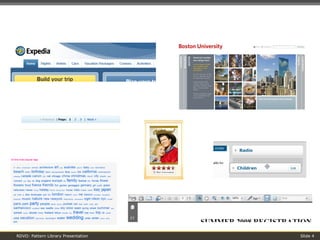
Design Patterns Solutions to common design problems, tailored to the situation at hand” – Jennifer Tidwell Page elements that have become industry standards
 
What is a pattern library?
Pattern Library A handbook of design patterns Definitions, implementation guidelines, and examples of existing implementations The purpose is to capture industry best practices, and to formally define in-house creations, for consistent future use Design patterns can also be encoded and used in wireframes as “shorthand” It’s an interaction design toolkit for everyone, to streamline and reuse ideas There is no authoritative, universal Pattern Library; pattern libraries are community-based and depend on intended use
Pattern Libraries at RDVO
Pattern Libraries at RDVO: A Case Study Challenges: Started with extensive list of client-requested design patterns for library These patterns had varying: Levels of complexity Environments (web, desktop, mobile, etc.) However, the goal was to create a simple library Our Approach: Consulted several famous pattern libraries: Welie, Tidwell, Yahoo! Categorized patterns: Control, Compound, Behavior, Best Practice Attempted to trim or modify patterns not related to the client’s UI
Our Design Pattern Categories
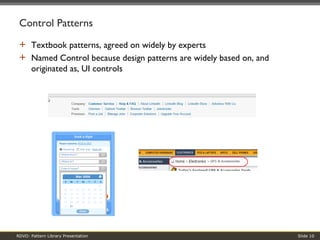
Control Patterns Textbook patterns, agreed on widely by experts Named Control because design patterns are widely based on, and originated as, UI controls
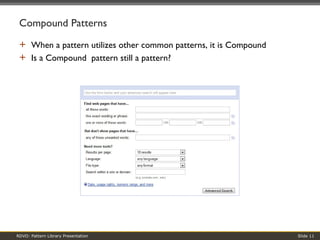
Compound Patterns When a pattern utilizes other common patterns, it is Compound Is a Compound  pattern still a pattern?
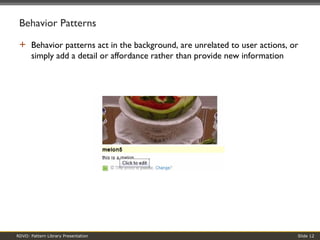
Behavior Patterns Behavior patterns act in the background, are unrelated to user actions, or simply add a detail or affordance rather than provide new information
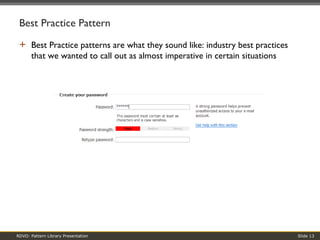
Best Practice Pattern Best Practice patterns are what they sound like: industry best practices that we wanted to call out as almost imperative in certain situations
Our Pattern Library Structure
Our Pattern Library Structure Word documents: two types of document for each design pattern Design Pattern Document Descriptive; meant for information architects or others using design patterns for planning purposes Interaction Design Specification Technical; includes implementation details, meant for developers implementing the design patterns
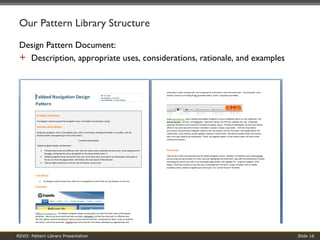
Our Pattern Library Structure Design Pattern Document:  Description, appropriate uses, considerations, rationale, and examples
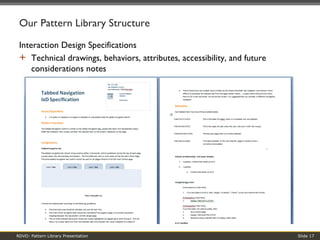
Our Pattern Library Structure Interaction Design Specifications Technical drawings, behaviors, attributes, accessibility, and future considerations notes
Related Topics
Patterns vs. Components From Nathan Curtis’s  “Components Versus Patterns” Design patterns offer a variety of basic implementation options and guidelines for design solutions Components specify the implementation details of the patterns used, as well as specific design styles used, to create documentation of the UI developed across the pages
General Pattern Library Challenges How do you know when something is a design pattern? Are IA tools, such as breadcrumbs, design patterns? Are development tools, such as lazy load scrollbar, design patterns? What happens when different experts use the same term differently, and vice versa? Progressive Disclosure: experts define this term slightly differently How do you know when a pattern is dying? Or emerging? Follow the trends, or throw a stake in the ground?
General Pattern Library Challenges Deciding what goes into a particular pattern library We’re a Web shop – should we include desktop patterns? Naming (and renaming) patterns We renamed Pop-out Panel to Hover Panel based on trigger action Reckoning with our categories: Behavior Patterns We need to make sure this distinction remains relevant over time Implementation: what is the purpose and intended use of a particular library? Static reference tool or toolkit full of code? Which software is best?
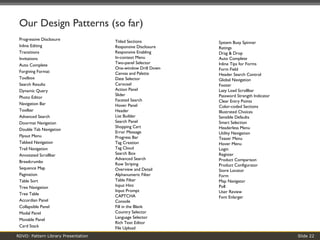
Our Design Patterns (so far) Progressive Disclosure  Inline Editing  Transitions  Invitations  Auto Complete  Forgiving Format  Toolbox  Search Results  Dynamic Query  Photo Editor  Navigation Bar  Toolbar  Advanced Search  Doormat Navigation  Double Tab Navigation  Flyout Menu  Tabbed Navigation  Trail Navigation  Annotated Scrollbar  Breadcrumbs  Sequence Map  Pagination  Table Sort  Tree Navigation  Tree Table  Accordian Panel  Collapsible Panel  Modal Panel  Movable Panel  Card Stack  Titled Sections  Responsive Disclosure  Responsive Enabling  In-context Menu  Two-panel Selector  One-window Drill Down  Canvas and Palette  Date Selector  Carousel  Action Panel  Slider  Faceted Search  Hover Panel  Header  List Builder  Search Panel  Shopping Cart  Error Message  Progress Bar  Tag Creation  Tag Cloud  Search Box  Advanced Search  Row Striping  Overview and Detail  Alphanumeric Filter  Table Filter  Input Hint  Input Prompt  CAPTCHA  Console  Fill in the Blank  Country Selector  Language Selector  Rich Text Editor  File Upload  System Busy Spinner  Ratings  Drag & Drop  Auto Complete  Inline Tips for Forms  Form Field  Header Search Control  Global Navigation  Footer  Lazy Load Scrollbar  Password Strength Indicator  Clear Entry Points  Color-coded Sections  Illustrated Choices  Sensible Defaults  Smart Selection  Headerless Menu  Utility Navigation  Teaser Menu  Hover Menu  Login  Register  Product Comparison  Product Configurator  Store Locator  Form  Map Navigator  Poll  User Review  Font Enlarger
More information? Contact: Ben Zipkin Director RDVO, Inc. 20 Holland Street, Suite 403 Somerville, MA 02144 617-629-9990 [email_address]

RDVO - Building UX Pattern Libraries

  • 1.
  • 2.
    What is adesign pattern?
  • 3.
    Design Patterns Solutionsto common design problems, tailored to the situation at hand” – Jennifer Tidwell Page elements that have become industry standards
  • 4.
  • 5.
    What is apattern library?
  • 6.
    Pattern Library Ahandbook of design patterns Definitions, implementation guidelines, and examples of existing implementations The purpose is to capture industry best practices, and to formally define in-house creations, for consistent future use Design patterns can also be encoded and used in wireframes as “shorthand” It’s an interaction design toolkit for everyone, to streamline and reuse ideas There is no authoritative, universal Pattern Library; pattern libraries are community-based and depend on intended use
  • 7.
  • 8.
    Pattern Libraries atRDVO: A Case Study Challenges: Started with extensive list of client-requested design patterns for library These patterns had varying: Levels of complexity Environments (web, desktop, mobile, etc.) However, the goal was to create a simple library Our Approach: Consulted several famous pattern libraries: Welie, Tidwell, Yahoo! Categorized patterns: Control, Compound, Behavior, Best Practice Attempted to trim or modify patterns not related to the client’s UI
  • 9.
  • 10.
    Control Patterns Textbookpatterns, agreed on widely by experts Named Control because design patterns are widely based on, and originated as, UI controls
  • 11.
    Compound Patterns Whena pattern utilizes other common patterns, it is Compound Is a Compound pattern still a pattern?
  • 12.
    Behavior Patterns Behaviorpatterns act in the background, are unrelated to user actions, or simply add a detail or affordance rather than provide new information
  • 13.
    Best Practice PatternBest Practice patterns are what they sound like: industry best practices that we wanted to call out as almost imperative in certain situations
  • 14.
  • 15.
    Our Pattern LibraryStructure Word documents: two types of document for each design pattern Design Pattern Document Descriptive; meant for information architects or others using design patterns for planning purposes Interaction Design Specification Technical; includes implementation details, meant for developers implementing the design patterns
  • 16.
    Our Pattern LibraryStructure Design Pattern Document: Description, appropriate uses, considerations, rationale, and examples
  • 17.
    Our Pattern LibraryStructure Interaction Design Specifications Technical drawings, behaviors, attributes, accessibility, and future considerations notes
  • 18.
  • 19.
    Patterns vs. ComponentsFrom Nathan Curtis’s “Components Versus Patterns” Design patterns offer a variety of basic implementation options and guidelines for design solutions Components specify the implementation details of the patterns used, as well as specific design styles used, to create documentation of the UI developed across the pages
  • 20.
    General Pattern LibraryChallenges How do you know when something is a design pattern? Are IA tools, such as breadcrumbs, design patterns? Are development tools, such as lazy load scrollbar, design patterns? What happens when different experts use the same term differently, and vice versa? Progressive Disclosure: experts define this term slightly differently How do you know when a pattern is dying? Or emerging? Follow the trends, or throw a stake in the ground?
  • 21.
    General Pattern LibraryChallenges Deciding what goes into a particular pattern library We’re a Web shop – should we include desktop patterns? Naming (and renaming) patterns We renamed Pop-out Panel to Hover Panel based on trigger action Reckoning with our categories: Behavior Patterns We need to make sure this distinction remains relevant over time Implementation: what is the purpose and intended use of a particular library? Static reference tool or toolkit full of code? Which software is best?
  • 22.
    Our Design Patterns(so far) Progressive Disclosure Inline Editing Transitions Invitations Auto Complete Forgiving Format Toolbox Search Results Dynamic Query Photo Editor Navigation Bar Toolbar Advanced Search Doormat Navigation Double Tab Navigation Flyout Menu Tabbed Navigation Trail Navigation Annotated Scrollbar Breadcrumbs Sequence Map Pagination Table Sort Tree Navigation Tree Table Accordian Panel Collapsible Panel Modal Panel Movable Panel Card Stack Titled Sections Responsive Disclosure Responsive Enabling In-context Menu Two-panel Selector One-window Drill Down Canvas and Palette Date Selector Carousel Action Panel Slider Faceted Search Hover Panel Header List Builder Search Panel Shopping Cart Error Message Progress Bar Tag Creation Tag Cloud Search Box Advanced Search Row Striping Overview and Detail Alphanumeric Filter Table Filter Input Hint Input Prompt CAPTCHA Console Fill in the Blank Country Selector Language Selector Rich Text Editor File Upload System Busy Spinner Ratings Drag & Drop Auto Complete Inline Tips for Forms Form Field Header Search Control Global Navigation Footer Lazy Load Scrollbar Password Strength Indicator Clear Entry Points Color-coded Sections Illustrated Choices Sensible Defaults Smart Selection Headerless Menu Utility Navigation Teaser Menu Hover Menu Login Register Product Comparison Product Configurator Store Locator Form Map Navigator Poll User Review Font Enlarger
  • 23.
    More information? Contact:Ben Zipkin Director RDVO, Inc. 20 Holland Street, Suite 403 Somerville, MA 02144 617-629-9990 [email_address]