Making Ethernet cable
UTP CABLE PINOUTS, TOOLS AND EQUIPMENT
Two kinds of Ethernet cable
 Straight through cable
 Crossover cable
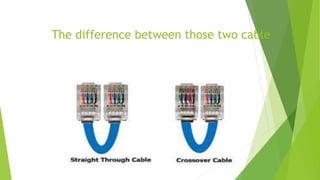
The difference between those two cable
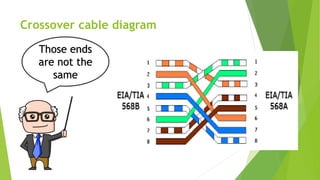
Crossover cable diagram
Those ends
are not the
same
Crossover cable
 It connects directly two computers to one
another.
 It can connects two device without passing
through networking device.
 it observes with different ends (pinouts).
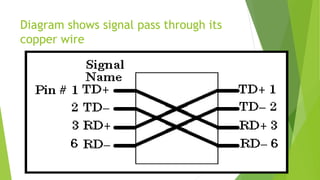
Diagram shows signal pass through its
copper wire
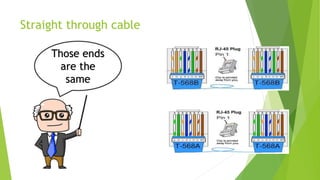
Straight through cable
Those ends
are the
same
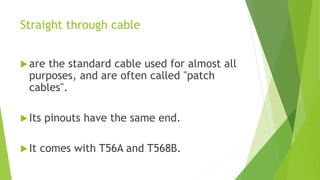
Straight through cable
are the standard cable used for almost all
purposes, and are often called "patch
cables".
Its pinouts have the same end.
It comes with T56A and T568B.
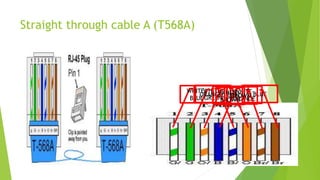
Straight through cable A (T568A)
WHITE-
GREENGREEN
WHITE-
ORANGE
BLUE
WHITE-
BLUE
ORANGEWHITE-
BROWN
BROWN
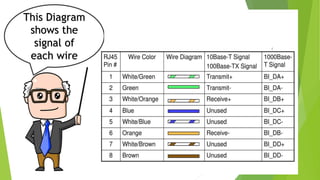
This Diagram
shows the
signal of
each wire
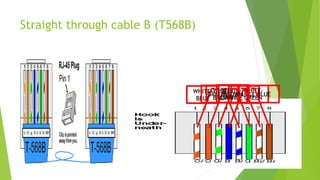
Straight through cable B (T568B)
WHITE-
ORANGE
ORANGE
WHITE-
GREEN
BLUE
WHITE-
BLUE
GREEN
WHITE-
BROWN
BROWN
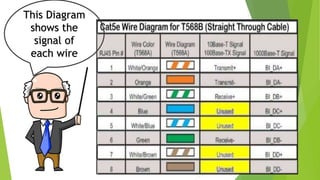
This Diagram
shows the
signal of
each wire
Tools and Equipment
 Crimping tools
 Wire stripper
 Network cable tester
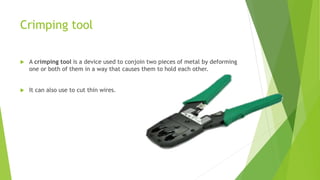
Crimping tool
 A crimping tool is a device used to conjoin two pieces of metal by deforming
one or both of them in a way that causes them to hold each other.
 It can also use to cut thin wires.
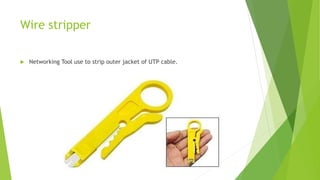
Wire stripper
 Networking Tool use to strip outer jacket of UTP cable.
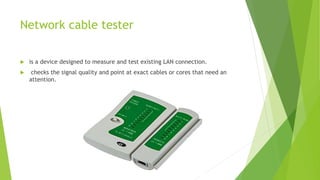
Network cable tester
 is a device designed to measure and test existing LAN connection.
 checks the signal quality and point at exact cables or cores that need an
attention.

Making ethernet cable (cable pinouts, tools and equipment)