Make Your Website
Work for You
MAKE YOUR WEBSITE WORK FOR YOU
A great website is...
Organized
Is your site easy
to navigate?
Useful
Does your website
provide useful info?
Goal-oriented
How will your website
grow your business?
Intuitive
Is it easy to use your
site, on all devices?
Functional
Does your website
do useful things?
Search-
friendly
Can search engines
find your website?
A great website is…
Goal-oriented
A GREAT WEBSITE IS...GOAL-ORIENTED
Why do you want a website?
How does your site help achieve business goals?
Make sales
Provide
support
Generate leads
Attract
employees
Build brand
Re-engage
customers
A GREAT WEBSITE IS...GOAL-ORIENTED
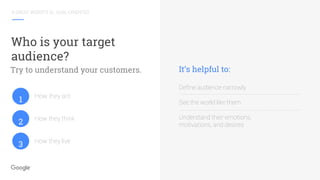
Who is your target
audience?
How they act
How they think
How they live
Try to understand your customers. It’s helpful to:
Define audience narrowly
See the world like them
Understand their emotions,
motivations, and desires
1
2
3
A GREAT WEBSITE IS...GOAL-ORIENTED
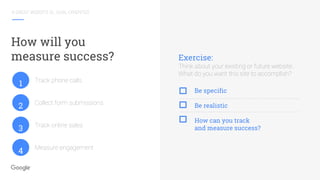
How will you
measure success? Exercise:
Think about your existing or future website.
What do you want this site to accomplish?
Be specific
Be realistic
How can you track
and measure success?
Track phone calls
Collect form submissions
Track online sales
Measure engagement
1
2
3
4
A great website is…
Intuitive
A GREAT WEBSITE IS...INTUITIVE
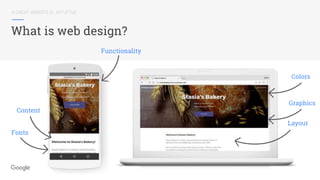
What is web design?
Content
Fonts
Layout
Graphics
Colors
Functionality
A GREAT WEBSITE IS...GOAL ORIENTED
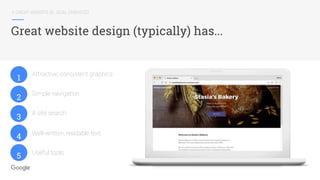
Great website design (typically) has...
Attractive, consistent graphics
Simple navigation
A site search
Well-written, readable text
Useful tools
1
2
3
4
5
A GREAT WEBSITE IS...GOAL ORIENTED
And, don’t forget mobile
Focus
on nav &
homepage
Make it easy
to complete
tasks
Make it easy
to fill out
forms
Optimize
for usability
A great website is…
Organized
A GREAT WEBSITE IS...ORGANIZED
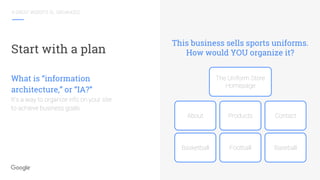
Start with a plan
This business sells sports uniforms.
How would YOU organize it?
What is “information
architecture,” or “IA?”
It’s a way to organize info on your site
to achieve business goals.
The Uniform Store
Homepage
About Products Contact
Basketball Football Baseball
A GREAT WEBSITE IS...ORGANIZED
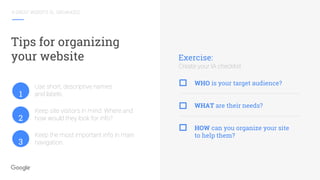
Tips for organizing
your website
Use short, descriptive names
and labels.
Keep site visitors in mind. Where and
how would they look for info?
Keep the most important info in main
navigation.
Exercise:
Create your IA checklist
WHO is your target audience?
WHAT are their needs?
HOW can you organize your site
to help them?
1
2
3
A great website is…
Useful
A GREAT WEBSITE IS...USEFUL
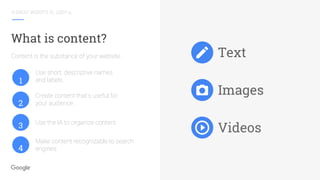
Text
Images
Videos
Use short, descriptive names
and labels.
Create content that’s useful for
your audience.
Use the IA to organize content.
Make content recognizable to search
engines.
What is content?
Content is the substance of your website.
1
2
3
4
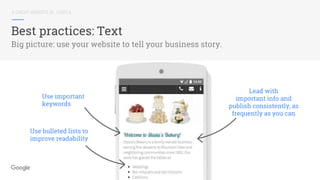
Use important
keywords
Use bulleted lists to
improve readability
Lead with
important info and
publish consistently, as
frequently as you can
A GREAT WEBSITE IS...USEFUL
Best practices: Text
Big picture: use your website to tell your business story.
A GREAT WEBSITE IS...USEFUL
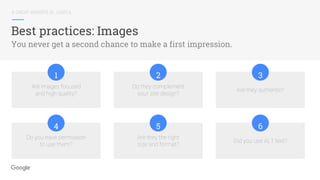
Best practices: Images
You never get a second chance to make a first impression.
Are images focused
and high quality?
Do they complement
your site design?
Are they authentic?
1 2 3
Do you have permission
to use them?
Are they the right
size and format?
Did you use ALT text?
4 5 6
A GREAT WEBSITE IS...USEFUL
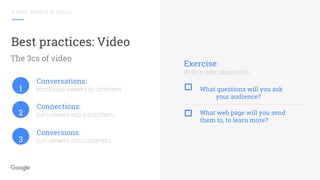
Best practices: Video
Conversations:
encourage viewers to comment.
Connections:
turn viewers into subscribers.
Conversions:
turn viewers into customers.
Exercise:
Write a video description
What questions will you ask
your audience?
What web page will you send
them to, to learn more?
The 3cs of video
1
2
3
A great website is…
Functional
A GREAT WEBSITE IS...FUNCTIONAL
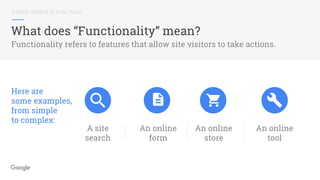
What does “Functionality” mean?
A site
search
An online
form
An online
store
An online
tool
Functionality refers to features that allow site visitors to take actions.
Here are
some examples,
from simple
to complex:
A GREAT WEBSITE IS...FUNCTIONAL
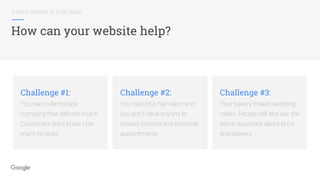
How can your website help?
Challenge #1:
You own a landscape
company that delivers mulch.
Customers don’t know how
much to order.
Challenge #2:
You started a hair salon and
you don’t have anyone to
answer phones and schedule
appointments.
Challenge #3:
Your bakery makes wedding
cakes. People call and ask the
same questions about price
and delivery.
A great website is…
Search-friendly
A GREAT WEBSITE IS...SEARCH-FRIENDLY
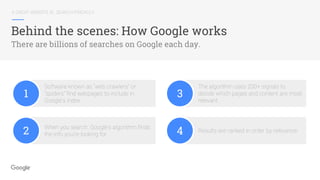
Behind the scenes: How Google works
There are billions of searches on Google each day.
1
Software known as “web crawlers” or
“spiders” find webpages to include in
Google’s index.
2 When you search, Google’s algorithm finds
the info you’re looking for.
3
The algorithm uses 200+ signals to
decide which pages and content are most
relevant.
4 Results are ranked in order by relevance.
A GREAT WEBSITE IS...SEARCH-FRIENDLY
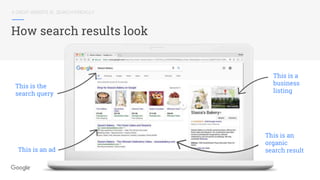
How search results look
This is the
search query
This is an ad
This is a
business
listing
This is an
organic
search result
A GREAT WEBSITE IS...SEARCH-FRIENDLY
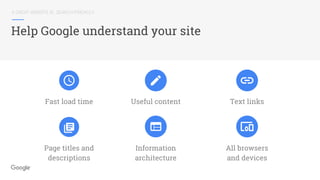
Help Google understand your site
Text links
All browsers
and devices
Useful content
Information
architecture
Fast load time
Page titles and
descriptions
Next steps
NEXT STEPS
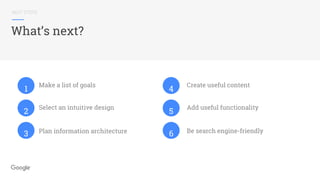
What’s next?
Make a list of goals
Select an intuitive design
Create useful content
Add useful functionality
Be search engine-friendlyPlan information architecture
1
2
3
4
5
6
READY FOR MORE?
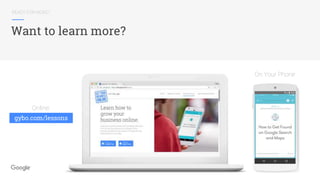
Want to learn more?
Online:
On Your Phone
gybo.com/lessons
Thank you

Make your website work for you

  • 3.
  • 4.
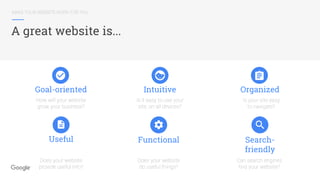
    MAKE YOUR WEBSITEWORK FOR YOU A great website is... Organized Is your site easy to navigate? Useful Does your website provide useful info? Goal-oriented How will your website grow your business? Intuitive Is it easy to use your site, on all devices? Functional Does your website do useful things? Search- friendly Can search engines find your website?
  • 5.
    A great websiteis… Goal-oriented
  • 6.
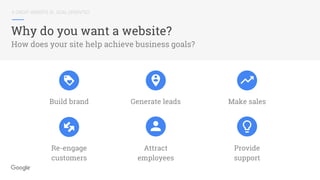
    A GREAT WEBSITEIS...GOAL-ORIENTED Why do you want a website? How does your site help achieve business goals? Make sales Provide support Generate leads Attract employees Build brand Re-engage customers
  • 7.
    A GREAT WEBSITEIS...GOAL-ORIENTED Who is your target audience? How they act How they think How they live Try to understand your customers. It’s helpful to: Define audience narrowly See the world like them Understand their emotions, motivations, and desires 1 2 3
  • 8.
    A GREAT WEBSITEIS...GOAL-ORIENTED How will you measure success? Exercise: Think about your existing or future website. What do you want this site to accomplish? Be specific Be realistic How can you track and measure success? Track phone calls Collect form submissions Track online sales Measure engagement 1 2 3 4
  • 9.
    A great websiteis… Intuitive
  • 10.
    A GREAT WEBSITEIS...INTUITIVE What is web design? Content Fonts Layout Graphics Colors Functionality
  • 11.
    A GREAT WEBSITEIS...GOAL ORIENTED Great website design (typically) has... Attractive, consistent graphics Simple navigation A site search Well-written, readable text Useful tools 1 2 3 4 5
  • 12.
    A GREAT WEBSITEIS...GOAL ORIENTED And, don’t forget mobile Focus on nav & homepage Make it easy to complete tasks Make it easy to fill out forms Optimize for usability
  • 13.
    A great websiteis… Organized
  • 14.
    A GREAT WEBSITEIS...ORGANIZED Start with a plan This business sells sports uniforms. How would YOU organize it? What is “information architecture,” or “IA?” It’s a way to organize info on your site to achieve business goals. The Uniform Store Homepage About Products Contact Basketball Football Baseball
  • 15.
    A GREAT WEBSITEIS...ORGANIZED Tips for organizing your website Use short, descriptive names and labels. Keep site visitors in mind. Where and how would they look for info? Keep the most important info in main navigation. Exercise: Create your IA checklist WHO is your target audience? WHAT are their needs? HOW can you organize your site to help them? 1 2 3
  • 16.
    A great websiteis… Useful
  • 17.
    A GREAT WEBSITEIS...USEFUL Text Images Videos Use short, descriptive names and labels. Create content that’s useful for your audience. Use the IA to organize content. Make content recognizable to search engines. What is content? Content is the substance of your website. 1 2 3 4
  • 18.
    Use important keywords Use bulletedlists to improve readability Lead with important info and publish consistently, as frequently as you can A GREAT WEBSITE IS...USEFUL Best practices: Text Big picture: use your website to tell your business story.
  • 19.
    A GREAT WEBSITEIS...USEFUL Best practices: Images You never get a second chance to make a first impression. Are images focused and high quality? Do they complement your site design? Are they authentic? 1 2 3 Do you have permission to use them? Are they the right size and format? Did you use ALT text? 4 5 6
  • 20.
    A GREAT WEBSITEIS...USEFUL Best practices: Video Conversations: encourage viewers to comment. Connections: turn viewers into subscribers. Conversions: turn viewers into customers. Exercise: Write a video description What questions will you ask your audience? What web page will you send them to, to learn more? The 3cs of video 1 2 3
  • 21.
    A great websiteis… Functional
  • 22.
    A GREAT WEBSITEIS...FUNCTIONAL What does “Functionality” mean? A site search An online form An online store An online tool Functionality refers to features that allow site visitors to take actions. Here are some examples, from simple to complex:
  • 23.
    A GREAT WEBSITEIS...FUNCTIONAL How can your website help? Challenge #1: You own a landscape company that delivers mulch. Customers don’t know how much to order. Challenge #2: You started a hair salon and you don’t have anyone to answer phones and schedule appointments. Challenge #3: Your bakery makes wedding cakes. People call and ask the same questions about price and delivery.
  • 24.
    A great websiteis… Search-friendly
  • 25.
    A GREAT WEBSITEIS...SEARCH-FRIENDLY Behind the scenes: How Google works There are billions of searches on Google each day. 1 Software known as “web crawlers” or “spiders” find webpages to include in Google’s index. 2 When you search, Google’s algorithm finds the info you’re looking for. 3 The algorithm uses 200+ signals to decide which pages and content are most relevant. 4 Results are ranked in order by relevance.
  • 26.
    A GREAT WEBSITEIS...SEARCH-FRIENDLY How search results look This is the search query This is an ad This is a business listing This is an organic search result
  • 27.
    A GREAT WEBSITEIS...SEARCH-FRIENDLY Help Google understand your site Text links All browsers and devices Useful content Information architecture Fast load time Page titles and descriptions
  • 28.
  • 29.
    NEXT STEPS What’s next? Makea list of goals Select an intuitive design Create useful content Add useful functionality Be search engine-friendlyPlan information architecture 1 2 3 4 5 6
  • 30.
    READY FOR MORE? Wantto learn more? Online: On Your Phone gybo.com/lessons
  • 31.

Editor's Notes

  • #2 Before I begin, I’d like to give you a little background about Foxxr. I started Foxxr 9 years ago. We are staffed with 10 full time employees supporting 30 SEO clients. We have built over 150 WordPress websites and offer a full range of services, including: SEO, Local SEO, Content Marketing, Paid Search Management, Link Building, Email Marketing, Social Media, Web Design, Website Maintenance, Website Hosting and Video Production and Marketing.
  • #4 Welcome to today’s workshop, “Make your website work for you.” Today I will talk about strategies to build or improve an existing website. Ask people “why do you have a site?”
  • #5 Whether you’ve had a website for 10 years or you’re just getting started, this workshop will give you the information you need to plan, create—or recreate—your site to accomplish business goals. We’ll look at six characteristics of a great website: It’s goal-oriented It’s intuitive to use, on any device It’s organized and easy-to-search It’s useful It’s functional; and Last not least, it’s findable by search engines Let’s get started.
  • #6 Many business owners know that building a website is an important early step. But, a website can be a lot more useful than a business card or brochure. With some advance planning, you can create a site that helps your business grow, right out of the gate. But how do you want to grow? You need to start by defining goals.
  • #7 Ask yourself, why do I want a website? What do you want it to do? Think of your site as a tool that can help you achieve business goals. The goals depend on your business, but some examples are: Build company brand Generate leads Make sales Re-engage customers Attract employees, Provide customer support And more
  • #8 Next, think about your target audience - who your website is for? This influences how you will build your site, to achieve your goals. Your audience impacts everything: from the graphic design to the words on the web pages. Your site should not try to be everything to everyone. Narrow in on your audience, not the world. Defining your target audience might sound simple, but it takes some effort. It’s relatively easy to define an audience with demographic data like gender, age, and employment status. But if you stop there, it makes it more difficult for your business to stand out among competitors. And, stereotypes about your audience can lead to false assumptions. Ask yourself: what makes your audience unique? Your goal is to develop a more complete picture of your target audience. For example: Examine specific age ranges rather than one large range Consider location: city, suburbs, rural, etc. Consider education level Consider type of employment Consider hobbies and interests Consider values Consider their view of your product or service: necessity, nice-to-have, special treat? Once you have defined your audience(s), keep them in mind when moving forward with your site. **** OPTIONAL PRIMER CONTENT: Exercise: think of one customer that you value What does he/she do for a living? Why do they have this job? What motivates them? How do they feel on a typical workday? If they had more free time, what would they do? What would they say your product does for them?
  • #9 Now that you’re thinking about your goals and your audience, let’s add another consideration to the mix: tracking and measuring success. If you don’t track and measure your website’s performance, you won’t have a way to make improvements (well, improvements based on data). Here’s another way to think about it. Let’s say you made some modifications to your bicycle, to make it go faster. If you don’t know your max speed before the modifications, how will you know if it worked? Similarly, you need to track and measure online success so you know what kind of improvements to make. You should always be testing. There are lots of ways to do it (some with more accuracy that others) You can start by simply asking your customers how they found you! Ask them when they call you on the phone, when the visit your store, or when you’re corresponding by email. You can also get more precise by setting up a trackable phone number. If you advertise with Google, you can set up free call-tracking, which records every time your ad results in a phone call! You can track the number of emails and form submissions from your website If you have an e-commerce website, you can track sales And, you can use web analytics software, like Google Analytics, to analyze visitor behavior and see exactly how they engage on your site. EXERCISE: Think about your website, or your future site. List at least one (new) goal that you would like to incorporate. Be specific Be realistic (and set deadlines) And, try to think about ways you can track and measure success? Once you have defined your goals, keep them in mind when moving forward with your site. *** PRIMER CONTENT - NOT SURE IT WILL FIT IN THIS PRESSO Exercise: Identify your macro-goals Identify your micro-goals List the ways your website it encouraging visitors to follow through on goals Are goals easy to find and complete on your website?
  • #10 We’ve covered some big picture topics, including goals, audience, and measurement. Let’s move on to the actual website. This section is focused on design, but not simply how pretty it looks (although an appealing design is important). This section is focused on how intuitive the design is. In other words, does your site design naturally lead visitors through a PROCESS on the site, to accomplish the goals you laid out. Here’s another way to think about it: Visitors should not have to think about—or worse, struggle—to find what they are looking for, do what they want to do on your site. The design can have a big impact on whether your site helps you reach your goals. Let’s start by taking a look at some of the typical elements of a website.
  • #11 When people think of “web design,” the often think of the overall template, the look-and-feel. That is, the graphics and layout that appear consistently throughout the website. That design, sometimes called the “skin” of the site, is just one component of a web design. Within the graphic template there are lots of common elements that appear on most websites, including: The header, or top section of the website. The header usually includes a company logo in the left corner, and most website visitors expect that the logo will link to the homepage. The footer, or bottom section of the website. The footer usually includes important links, contact info, and copyright info. Navigation: usually horizontally across the top of the site, below the header, or vertically on the left side of the website. The web design should lay out a set of guidelines that keep the web pages looking consistent: like the colors, font sizes, font styles, and types of content. For anyone out there using a content management system (CMS), like Wix, Weebly, Squarespace, Wordpress, Drupal, etc: A content management system is a popular option for building a website. There are many options out there, and they are all a little different. What most DO have in common is the ability to change/customize the web design (usually called a template). All the same principles apply -- whether you’re creating a design from scratch or using a pre-built template, navigating the site within that design should be effortless for visitors.
  • #12 Here are a few key factors to consider when you’re designing your website. Create or choose a professional, attractive design, and make that design consistent across the site. Many businesses are opting for, or shifting to, minimalist designs. In other words, focus on business goals rather than elaborate graphics. Make the navigation clear, simple, and easy-to-use. It should be easy for site visitors to get around the site. A search is a helpful feature, especially for sites with lots of pages. Most visitors will expect to find the site search at the top right corner of a web page. Your website is a way to share information with your target audience. Useful content (preferably original content you created) presented in a large, clear font with enough contrast to read, will serve you best. And, your website can help visitors “do stuff,” functionality that helps support business goals.
  • #13 A reminder about mobile. Did you know that more than 50% of all web traffic is now coming from smartphones and tablets. (Source: Google Analytics Data, U.S., Q1 2016.) So, making your website work on mobile phones is no longer an afterthought, it’s a priority. Remember your mobile users as you work through goals, audience, and site design. The good news: more and more, websites are being built, from the start, with technology that automatically optimizes the website format to best fit the device it’s being viewed on. This “responsive web design” adjusts the site’s appearance to best present the info based on the size of the screen and type of device. Using a mobile-friendly design is an important first step; here are a few additional tips, working within a mobile friendly template. First: make navigation easy and intuitive. For example, website visitors expect that clicking the logo will return them to the homepage. Another tip: keep your navigation menus short. On a desktop version of a website -- say, a luxurious 15” screen -- visitors usually don’t have trouble using drop down menus and sub navigations. Compare that to someone trying to navigate a site on a 4” screen. It’s more difficult, right? That’s why mobile optimized sites use relatively simple navigations and large easy-to-click buttons and links. Now, really think about the homepage -- chances are that’s the first web page a mobile visitor will see. What critical info does a website visitor need? A phone number? An address? Make sure that this info is front and center. Make it easy to complete tasks. For example, allow visitors to use the site without registering for an account, and if they want to buy something, give them the option to check out as a guest. If your site has forms minimize the number of fields - especially required fields. Auto-fill whenever possible. If it must be a big form, use clearly-labeled progress bars to help people get through them. If possible include features like autocomplete and filters Finally, optimize for usability on all pages. Research shows that with mobile design it’s best to take an all-or-nothing approach. In other words, build a website that optimizes ALL pages for mobile devices, not just few pages.
  • #14 Now that we’ve talked about goals and tips for choosing a design, let’s talk about the information within the website. A great website is WELL ORGANIZED. And, even if you don’t have a lot of web pages now, your site (will? should!) grow over time. Planning how existing and future content will fit into the framework of your website will serve you well. Let’s take a look.
  • #15 You may have heard the term, “information architecture” or “IA”. It sounds technical, but you don’t need to be a website designer, programmer, or an architect to create one. Simply put, it’s a plan to organize information on your website. The IA maps out the sections, pages and functionality of your site. There are several pages and sections found on most websites, including: The homepage An “about us” page or section A contact page Depending on your business, you will probably include a products or service section, too. But, how do you organize that info? The best way is by considering your business goals. Earlier in this workshop, you started a list of YOUR business goals. You can refer to that when you’re planning out your website. Let’s take a look at an example. This example business sells custom sports uniforms. In this example, their products are organized by Sport. But there are lots of ways to do this. What other ways can you think of (ASK AUDIENCE)?
  • #16 Here are a few tips to get you started. When you’re choosing names and labels for parts of your site, keep them short and descriptive. And, as you create your website plan, remember to keep the most important info in the main navigation. That depends on your business and your business goals. Your plan can help you create/select the most appropriate website design/template To get started: Define target audience (you already did that earlier; do you have any new ideas?) What do you want people to take away from this website? Ask people what THEY want to take away Make a list of keywords related to business. Can you incorporate any into your navigation/organization? Use list to keep site content, colors, icons, imagery is consistent with goals Make a list of info/features you have (or want to have) on your website. How will they help you reach your business goals?
  • #17 We’ve talked about goals, design, and organization, and we’re getting closer to building the site. Here’s another way to think about a website: it’s a “container.” It contains all the information you want to share with your target audience: your content. A great website has useful, interesting content. Let’s take a look.
  • #18 When you hear the term “website content,” the first thing that probably comes to mind is text, like the words in a book. That’s one type, but content doesn’t stop there. If you sell beautiful cakes, you might want to add a photo gallery section. If you deliver mulch to residential customers, you might want to add a video that shows people how to measure a flower bed, to help them order the right amount. If you sell cameras, you might want to add PDFs of product manuals, so your customers can download the info if they misplace the print manual. What kinds of content would be useful for YOUR target audience? What content would support your business goals? Whenever possible create original, unique content. This can set your business apart from the competition. Let’s take a closer look at three types of content: text, images, and video.
  • #19 For every business website, there are some basic tips to keep in mind. Try to include important keywords—naturally—in your text. For example, if you owned that mulch company in Nashville, the title on your homepage might say something like: “Mulch for Sale in Nashville Tennessee.” Always lead with your most important info. If your goal is to get people to call your business, keep your phone number prominent. Bulleted lists can help make text more readable. And, while there’s no rule of thumb, the more frequently you update your website, the more likely it will be to appear in the search engine results. But let’s talk more about WHAT you write. How can you make your content stand out? One way to set your business apart from the competition is by telling a “story.” If you tell your audience what inspires and drives you, rather than focusing on what you sell, you might connect with potential customers. Here are two possible approaches: the personal story, and the higher purpose story A personal story might focus on the moment or circumstances that sparked your business idea Here’s a made-up example, for a camera business: Raphael was 6 when he got the best birthday gift of his life: a Polaroid camera. Since then, he has spent every day trying to become a better photographer. This website is the culmination of 45 years of experience: the best cameras, lenses, and accessories he can find. A higher purpose story might focus on the the greater, shared goal of your business. Here’s a made-up example, for a mulch business Elena started this company when she was trying to create an environmentally friendly garden for the students at the elementary school where she taught. She discovered that many garden products were full of toxic chemicals, and many forests were being decimated for wood. So, she started her company to provide a better option: organically grown and treated garden products, harvested sustainably.
  • #20 Imagery can have an important influence on the success of your website. Here are some basic tips: Are they clear and focused, and do they “look right” in the overall design? It’s almost always better to use “real” photos rather than stock art. And before you add an image to your site, make sure you have permission. Digital images have two types of sizes: One is the “file size,” Larger file sizes can mean a higher quality images. But there’s a tradeoff: it takes longer for a web page to load with a bigger file. The second size refers to dimensions.. Without getting too technical: you can reduce an image’s dimensions, but if you increase the dimensions it will appear blurry (pixelated). And when you are looking for images for your website, you need to use one of these formats: JPG, GIF (jiff), or PNG. Other formats, like .EPS and .PSD will have to be converted before the can be used on a website. Last but not least: Every image on the web can have “alternative text” or ALT Text. If a visitor’s computer doesn’t display images, or if they are visually impaired and use software to help interpret images, ALT text can be used. It also helps search engines understand that image.
  • #21 Since this is a Google presentation, we’ll focus on YouTube. Video is a great type of content to add to your site: every day, people collectively watch 1 Billion hours of YouTube video content per day. (Source: YouTube Internal Data, Global, February 2017) You can create a free channel for your business. When you do, keep the 3Cs of online video strategy in mind: #1: Conversations. Rather than thinking of YouTube as place to host videos, think of it as a social media. Your goal is to build followers (subscribers), shares, likes and comments Ask questions in your video descriptions, to encourage comments Keep questions broad, positive and upbeat, and reply back to to foster conversation. #2: Connections. Create playlists to connect videos and encourage visitors to watch more than one Subscribers are automatically notified when new content is published Encourage viewers to subscribe with calls to action - in voiceover and visual cues And #3: Conversions Include short URLs in the video and description to help viewers find your site or app Track clicks by setting up a tracking link via Google Analytics Here’s an exercise to help you get started: write a video description. Start by asking yourself: What content would interest your target audience? AND - What content do you want to create? (how-to, unboxing, entertainment, etc.) What actions do you want viewers to take after watching? Do you know where on your website or app you want to send video watchers?
  • #22 Let’s move onto another aspect that can help your website achieve business goals: functionality.
  • #23 What does functionality mean, in this context? It refers to the parts of your website that allow visitors to take actions. If you are making a list of all the functionality you want on your site, it might include: A site search A contact form An online shopping cart/checkout Or a custom tool designed specifically for your customers.
  • #24 Functionality can help support your business goals. Let’s look at three scenarios. #1: A locally-owned landscaping company delivers mulch to homes...but most homeowners order too much, or too little. How could they help? Created an online “Mulch Calculator.” Customers enter the dimensions of their mulch beds and the depth they want, and the calculator tells them how many cubic yards they need to order. Challenge #2: You started your own salon, but you’re the only person working there and you can’t answer the phones when you’re with a client. What can you do? Create, or license an existing appointment scheduling tool, so customers can book online. Challenge #3: You answer the same set of questions on the phone every day. How can your website help? Create a simple web page - a frequently asked questions page - to help customers find answers to the most basic questions.
  • #25 Last but not least, a great website is search friendly. After all, if you made the time, effort, and expense to plan and create a website, you’ll want to make sure that potential customers can find you when they search online. The process of helping a website increase its visibility on search engines is called “Search Engine Optimization” or SEO. SEO merits its own presentation -- but this section will give you some tips to get your site off to a good start.
  • #26 Imagine that the web is a book, with trillions of pages. Google’s job is to read the book, categorize pages, and help searchers find the info on these pages. Easy right? To “read” the pages, Google uses software robots, called “web crawlers” or “spiders.” As new pages are found, they are added to Google’s index. The data in this index is stored in facilities called data centers. When people search, results shown are pulled from the data stored in these data centers. When you start your search, Google’s algorithm starts the process of finding the results. The algorithm looks at the word or phrase you typed in and uses over 200 signals to identify the most relevant results. Examples of these signals include: The freshness of content on a website content on the site The number of other websites linking to a particular site & the authority of those links Quality of the content on the site The URL and page title Whether the best result is a webpage, image, video, news article, etc.
  • #27 And after all that, the searcher sees a page like this: a search results page. At the top, you see a word or phrase that the searcher typed in -- called a search query. Below the search query you see the search results. The page can include ads, identified with an “Ad” label. Below the text ad in this example, you see the start of the natural or “organic” results. Creating a search-friendly site helps increase your chances of appearing on this area of the page. Organic results are web pages that Google’s algorithm identifies as the most useful matches for this search. Clicks on organic results are free. It’s important to note that websites cannot pay Google to appear in the organic results, and advertising does not influence a website’s organic presence or position. On the right sidebar you see a section that provides useful info for the searcher, this is called a Google My Business listing, it’s a free tool that helps you add your business info to Google Search and Maps.
  • #28 Here are a few tips specific to building your website that can help Optimize load time, especially for people viewing your site on mobile devices. Original content: useful, information-rich, clear and accurate. Include keywords users would type to find your pages, and make sure that your site actually includes those words. For links (especially in the navigation) use text when possible; if it is an image make sure to include relevant ALT tag. Good page titles and descriptions: Ensure that <title> elements and alt attributes are descriptive, specific, and accurate. Remember information architecture? It not only helps your human visitors, it helps Google interpret the content (including what’s important info, and what is less important) on your website. Last but not least: design your site for all browsers, device types and sizes, including desktops, tablets, and smartphones.
  • #29 We’ve covered a lot of information today! Let’s talk about what you should do next.
  • #30 Start by making a list of business goals that you want to support with your website. If you’re building a new site, choose a design that works on all browsers and devices. If you’ve had your site for a while, check to see how it performs on all devices, especially mobile. Remember to use the Mobile-Friendly test. Third, create (or re-create) a plan for your content, your website’s information architecture. Organization will help human visitors and search engines navigate your website more easily. Once you have your plan, start adding content. The more often you can publish useful, original content on your site, the better. Think about how your website can offer functionality that supports your business goals. Before investing the time and resources building a custom tool, it’s worth checking to see if existing software can be bought or licensed for your site. And last but not least, be search engine friendly. If search engines can’t find your website, neither can many potential customers.
  • #31 Are you ready to build on what you’ve learned so far? You can reinforce today’s workshop by taking free, interactive lessons about a variety of digital marketing topics. These fast, easy lessons cover take about 5 minutes to complete and can help you learn more about online marketing whenever you have a few minutes to spare. Select lessons are available online at gybo.com/lessons; you can also download Primer, a free mobile app that includes all the lessons. The Android version is available at Google Play; you can download the iPhone version by visiting The App Store. You can access links to the apps at gybo.com/lessons.
  • #32 Thank you so much for listening! On behalf of the entire team, I wish you great success growing your business online.