Facility
Management
Upscale your Operational Excellence
with systematic & streamlined
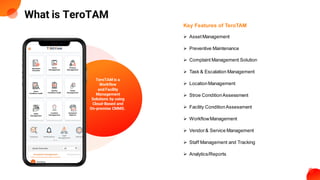
What is TeroTAM
Key Features of TeroTAM
➢ AssetManagement
➢ Preventive Maintenance
➢ Complaint Management Solution
➢ Task & Escalation Management
➢ LocationManagement
➢ Stroe ConditionAssessment
➢ Facility ConditionAssessment
➢ WorkflowManagement
➢ Vendor& Service Management
➢ Staff Management and Tracking
➢ Analytics/Reports
TeroTAM is a
Workflow
and Facility
Management
Solutions by using
Cloud-Based and
On-premise CMMS.
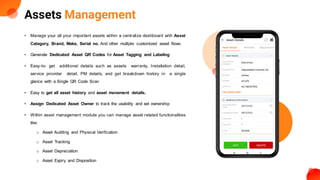
Assets Management
• Manage your all your important assets within a centralize dashboard with Asset
Category, Brand, Make, Serial no. And other multiple customized asset flows.
• Generate Dedicated Asset QR Codes for Asset Tagging and Labeling
• Easy-to- get additional details such as assets warranty, Installation detail,
service provider detail, PM details, and get breakdown history in a single
glance with a Single QR Code Scan
• Easy to get all asset history and asset movement details.
• Assign Dedicated Asset Owner to track the usability and set ownership
• Within asset management module you can manage asset related functionalities
like:
o Asset Auditing and Physical Verification
o Asset Tracking
o Asset Depreciation
o Asset Expiry and Disposition
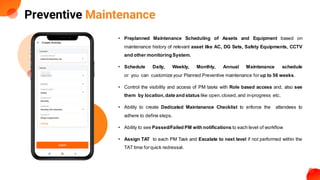
Preventive Maintenance
• Preplanned Maintenance Scheduling of Assets and Equipment based on
maintenance history of relevant asset like AC, DG Sets, Safety Equipments, CCTV
and other monitoringSystem.
• Schedule Daily, Weekly, Monthly, Annual Maintenance schedule
or you can customize your Planned Preventive maintenance for up to 56 weeks.
• Control the visibility and access of PM tasks with Role based access and, also see
them by location,date and status like open,closed,and in-progress etc.
• Ability to create Dedicated Maintenance Checklist to enforce the attendees to
adhere to define steps.
• Ability to see Passed/Failed PM with notifications to each level of workflow
• Assign TAT to each PM Task and Escalate to next level if not performed within the
TAT time forquick redressal.
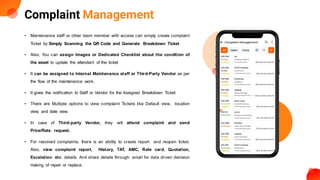
Complaint Management
• Maintenance staff or other team member with access can simply create complaint
Ticket by Simply Scanning the QR Code and Generate Breakdown Ticket
• Also, You can assign Images or Dedicated Checklist about the condition of
the asset to update the attendant of the ticket
• It can be assigned to Internal Maintenance staff or Third-Party Vendor as per
the flow of the maintenance work.
• It gives the notification to Staff or Vendor for the Assigned Breakdown Ticket
• There are Multiple options to view complaint Tickets like Default view, location
view, and date view.
• In case of Third-party Vendor, they will attend complaint and send
Price/Rate request.
• For resolved complaints, there is an ability to create report and reopen ticket.
Also, view complaint report, History, TAT, AMC, Rate card, Quotation,
Escalation etc. details. And share details through email for data driven decision
making of repair or replace.
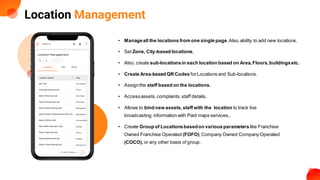
Location Management
• Manageall the locations from one single page.Also,ability to add new locations.
• Set Zone, City-based locations.
• Also, create sub-locationsin each location based on Area,Floors,buildingsetc.
• Create Area-based QR Codes forLocations and Sub-locations.
• Assignthe staff based on the locations.
• Accessassets,complaints,staff details.
• Allows to bind new assets,staff with the location to track live
broadcasting information with Paid maps services..
• Create Group of Locationsbasedon various parameterslike Franchise
Owned Franchise Operated (FOFO),Company Owned Company Operated
(COCO), or any other basis of group.
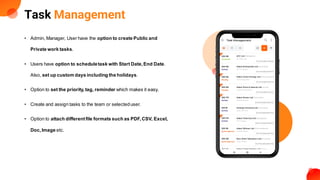
Task Management
• Admin, Manager, User have the option to create Public and
Private work tasks.
• Users have option to scheduletask with Start Date,End Date.
Also, set up custom days including the holidays.
• Option to set the priority,tag, reminder which makes it easy.
• Create and assign tasks to the team or selecteduser.
• Option to attach differentfile formats such as PDF,CSV, Excel,
Doc,Image etc.
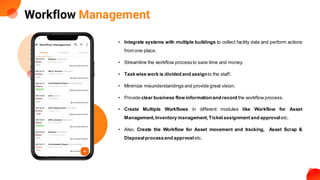
Workflow Management
• Integrate systems with multiple buildings to collect facility data and perform actions
from one place.
• Streamline the workflow processto save time and money.
• Taskwise work is divided and assignto the staff.
• Minimize misunderstandings and provide great vision.
• Provide clear business flow informationand record the workflow process.
• Create Multiple Workflows in different modules like Workflow for Asset
Management,Inventory management,Ticketassignmentand approval etc.
• Also, Create the Workflow for Asset movement and tracking, Asset Scrap &
Disposalprocessand approval etc.
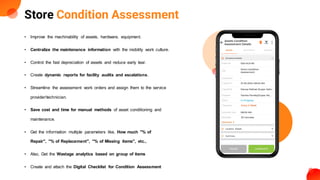
Store Condition Assessment
• Improve the machinability of assets, hardware, equipment.
• Centralize the maintenance information with the mobility work culture.
• Control the fast depreciation of assets and reduce early tear.
• Create dynamic reports for facility audits and escalations.
• Streamline the assessment work orders and assign them to the service
provider/technician.
• Save cost and time for manual methods of asset conditioning and
maintenance.
• Get the information multiple parameters like, How much "% of
Repair", "% of Replacement", "% of Missing items", etc.,
• Also, Get the Wastage analytics based on group of items
• Create and attach the Digital Checklist for Condition Assessment
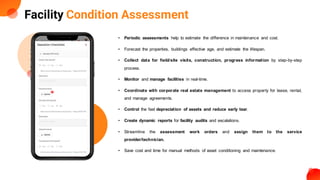
Facility Condition Assessment
• Periodic assessments help to estimate the difference in maintenance and cost.
• Forecast the properties, buildings effective age, and estimate the lifespan.
• Collect data for field/site visits, construction, progress information by step-by-step
process.
• Monitor and manage facilities in real-time.
• Coordinate with corporate real estate management to access property for lease, rental,
and manage agreements.
• Control the fast depreciation of assets and reduce early tear.
• Create dynamic reports for facility audits and escalations.
• Streamline the assessment work orders and assign them to the service
provider/technician.
• Save cost and time for manual methods of asset conditioning and maintenance.
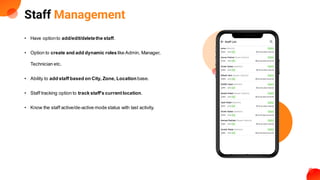
Staff Management
• Have optionto add/edit/deletethe staff.
• Option to create and add dynamic roles like Admin, Manager,
Technician etc.
• Ability to add staff based on City, Zone, Location base.
• Staff tracking option to track staff's currentlocation.
• Know the staff active/de-active mode status with last activity.
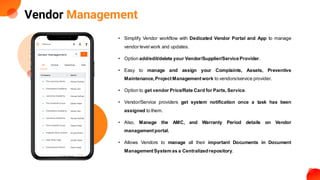
Vendor Management
• Simplify Vendor workflow with Dedicated Vendor Portal and App to manage
vendor level work and updates.
• Option add/edit/delete your Vendor/Supplier/ServiceProvider.
• Easy to manage and assign your Complaints, Assets, Preventive
Maintenance,ProjectManagement work to vendors/service provider.
• Option to get vendor Price/Rate Card for Parts,Service.
• Vendor/Service providers get system notification once a task has been
assigned to them.
• Also, Manage the AMC, and Warranty Period details on Vendor
managementportal.
• Allows Vendors to manage all their important Documents in Document
ManagementSystem as a Centralizedrepository.
Analytics/Reports
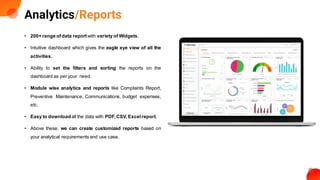
• 200+ range ofdata reportwith variety of Widgets.
• Intuitive dashboard which gives the eagle eye view of all the
activities.
• Ability to set the filters and sorting the reports on the
dashboard as per your need.
• Module wise analytics and reports like Complaints Report,
Preventive Maintenance, Communications, budget expenses,
etc.
• Easy to downloadall the data with PDF,CSV, Excelreport.
• Above these, we can create customized reports based on
your analytical requirements and use case.
Industry We Serves
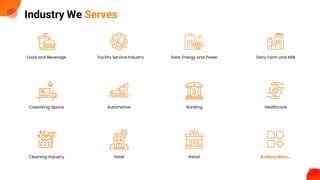
Food and Beverage Facility Service Industry Solar Energy and Power Dairy Farm and Milk
Coworking Space Automotive Banking Healthcare
Cleaning Industry Hotel Retail & Many More…
Our Valued Clients
Telecome
Food & Beverages
Education
Manufacturing
Healthcare & Pharma
Others
Technical Support
You can contact TeroTAMTechnicalSupport team by calling or sending
email to our help deskfacilities.
Support Team: +91 9033053010
Sales Team: +91 9033053011
contact@terotam.com
You can also share your feedbackon the Web at
https://terotam.com
Thank You

Facility Management Solution - TeroTAM CMMS Software

  • 1.
    Facility Management Upscale your OperationalExcellence with systematic & streamlined
  • 2.
    What is TeroTAM KeyFeatures of TeroTAM ➢ AssetManagement ➢ Preventive Maintenance ➢ Complaint Management Solution ➢ Task & Escalation Management ➢ LocationManagement ➢ Stroe ConditionAssessment ➢ Facility ConditionAssessment ➢ WorkflowManagement ➢ Vendor& Service Management ➢ Staff Management and Tracking ➢ Analytics/Reports TeroTAM is a Workflow and Facility Management Solutions by using Cloud-Based and On-premise CMMS.
  • 3.
    Assets Management • Manageyour all your important assets within a centralize dashboard with Asset Category, Brand, Make, Serial no. And other multiple customized asset flows. • Generate Dedicated Asset QR Codes for Asset Tagging and Labeling • Easy-to- get additional details such as assets warranty, Installation detail, service provider detail, PM details, and get breakdown history in a single glance with a Single QR Code Scan • Easy to get all asset history and asset movement details. • Assign Dedicated Asset Owner to track the usability and set ownership • Within asset management module you can manage asset related functionalities like: o Asset Auditing and Physical Verification o Asset Tracking o Asset Depreciation o Asset Expiry and Disposition
  • 4.
    Preventive Maintenance • PreplannedMaintenance Scheduling of Assets and Equipment based on maintenance history of relevant asset like AC, DG Sets, Safety Equipments, CCTV and other monitoringSystem. • Schedule Daily, Weekly, Monthly, Annual Maintenance schedule or you can customize your Planned Preventive maintenance for up to 56 weeks. • Control the visibility and access of PM tasks with Role based access and, also see them by location,date and status like open,closed,and in-progress etc. • Ability to create Dedicated Maintenance Checklist to enforce the attendees to adhere to define steps. • Ability to see Passed/Failed PM with notifications to each level of workflow • Assign TAT to each PM Task and Escalate to next level if not performed within the TAT time forquick redressal.
  • 5.
    Complaint Management • Maintenancestaff or other team member with access can simply create complaint Ticket by Simply Scanning the QR Code and Generate Breakdown Ticket • Also, You can assign Images or Dedicated Checklist about the condition of the asset to update the attendant of the ticket • It can be assigned to Internal Maintenance staff or Third-Party Vendor as per the flow of the maintenance work. • It gives the notification to Staff or Vendor for the Assigned Breakdown Ticket • There are Multiple options to view complaint Tickets like Default view, location view, and date view. • In case of Third-party Vendor, they will attend complaint and send Price/Rate request. • For resolved complaints, there is an ability to create report and reopen ticket. Also, view complaint report, History, TAT, AMC, Rate card, Quotation, Escalation etc. details. And share details through email for data driven decision making of repair or replace.
  • 6.
    Location Management • Manageallthe locations from one single page.Also,ability to add new locations. • Set Zone, City-based locations. • Also, create sub-locationsin each location based on Area,Floors,buildingsetc. • Create Area-based QR Codes forLocations and Sub-locations. • Assignthe staff based on the locations. • Accessassets,complaints,staff details. • Allows to bind new assets,staff with the location to track live broadcasting information with Paid maps services.. • Create Group of Locationsbasedon various parameterslike Franchise Owned Franchise Operated (FOFO),Company Owned Company Operated (COCO), or any other basis of group.
  • 7.
    Task Management • Admin,Manager, User have the option to create Public and Private work tasks. • Users have option to scheduletask with Start Date,End Date. Also, set up custom days including the holidays. • Option to set the priority,tag, reminder which makes it easy. • Create and assign tasks to the team or selecteduser. • Option to attach differentfile formats such as PDF,CSV, Excel, Doc,Image etc.
  • 8.
    Workflow Management • Integratesystems with multiple buildings to collect facility data and perform actions from one place. • Streamline the workflow processto save time and money. • Taskwise work is divided and assignto the staff. • Minimize misunderstandings and provide great vision. • Provide clear business flow informationand record the workflow process. • Create Multiple Workflows in different modules like Workflow for Asset Management,Inventory management,Ticketassignmentand approval etc. • Also, Create the Workflow for Asset movement and tracking, Asset Scrap & Disposalprocessand approval etc.
  • 9.
    Store Condition Assessment •Improve the machinability of assets, hardware, equipment. • Centralize the maintenance information with the mobility work culture. • Control the fast depreciation of assets and reduce early tear. • Create dynamic reports for facility audits and escalations. • Streamline the assessment work orders and assign them to the service provider/technician. • Save cost and time for manual methods of asset conditioning and maintenance. • Get the information multiple parameters like, How much "% of Repair", "% of Replacement", "% of Missing items", etc., • Also, Get the Wastage analytics based on group of items • Create and attach the Digital Checklist for Condition Assessment
  • 10.
    Facility Condition Assessment •Periodic assessments help to estimate the difference in maintenance and cost. • Forecast the properties, buildings effective age, and estimate the lifespan. • Collect data for field/site visits, construction, progress information by step-by-step process. • Monitor and manage facilities in real-time. • Coordinate with corporate real estate management to access property for lease, rental, and manage agreements. • Control the fast depreciation of assets and reduce early tear. • Create dynamic reports for facility audits and escalations. • Streamline the assessment work orders and assign them to the service provider/technician. • Save cost and time for manual methods of asset conditioning and maintenance.
  • 11.
    Staff Management • Haveoptionto add/edit/deletethe staff. • Option to create and add dynamic roles like Admin, Manager, Technician etc. • Ability to add staff based on City, Zone, Location base. • Staff tracking option to track staff's currentlocation. • Know the staff active/de-active mode status with last activity.
  • 12.
    Vendor Management • SimplifyVendor workflow with Dedicated Vendor Portal and App to manage vendor level work and updates. • Option add/edit/delete your Vendor/Supplier/ServiceProvider. • Easy to manage and assign your Complaints, Assets, Preventive Maintenance,ProjectManagement work to vendors/service provider. • Option to get vendor Price/Rate Card for Parts,Service. • Vendor/Service providers get system notification once a task has been assigned to them. • Also, Manage the AMC, and Warranty Period details on Vendor managementportal. • Allows Vendors to manage all their important Documents in Document ManagementSystem as a Centralizedrepository.
  • 13.
    Analytics/Reports • 200+ rangeofdata reportwith variety of Widgets. • Intuitive dashboard which gives the eagle eye view of all the activities. • Ability to set the filters and sorting the reports on the dashboard as per your need. • Module wise analytics and reports like Complaints Report, Preventive Maintenance, Communications, budget expenses, etc. • Easy to downloadall the data with PDF,CSV, Excelreport. • Above these, we can create customized reports based on your analytical requirements and use case.
  • 14.
    Industry We Serves Foodand Beverage Facility Service Industry Solar Energy and Power Dairy Farm and Milk Coworking Space Automotive Banking Healthcare Cleaning Industry Hotel Retail & Many More…
  • 15.
    Our Valued Clients Telecome Food& Beverages Education Manufacturing Healthcare & Pharma Others
  • 16.
    Technical Support You cancontact TeroTAMTechnicalSupport team by calling or sending email to our help deskfacilities. Support Team: +91 9033053010 Sales Team: +91 9033053011 contact@terotam.com You can also share your feedbackon the Web at https://terotam.com
  • 17.