



MAGENTO 2
It looks like ...
A day in July, Magento 2 Merchant Beta
was officially announced. This release brings
Magento to the last stage before the general
availability (GA) of
Magento 2 in Q4 2015
For Frontend only, it looks like Before & After
game of all girls. And of course, Magento 2 is
more attractive & optimized better for user
experience.
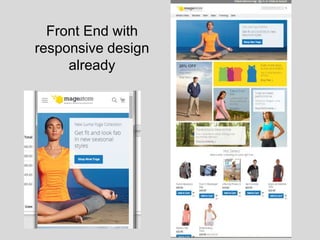
Front End with
responsive design
already
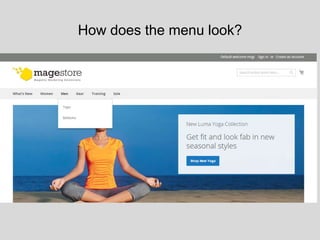
How does the menu look?
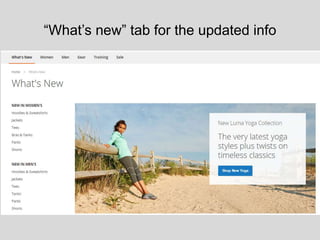
“What’s new” tab for the updated info
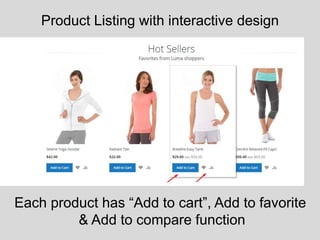
Product Listing with interactive design
Each product has “Add to cart”, Add to favorite
& Add to compare function
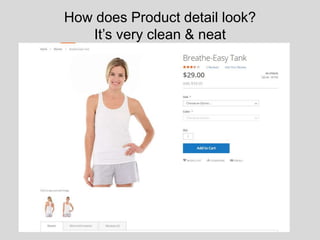
How does Product detail look?
It’s very clean & neat
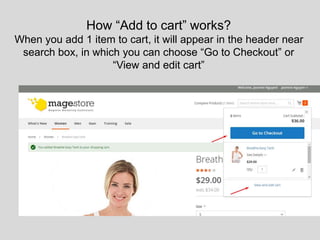
How “Add to cart” works?
When you add 1 item to cart, it will appear in the header near
search box, in which you can choose “Go to Checkout” or
“View and edit cart”
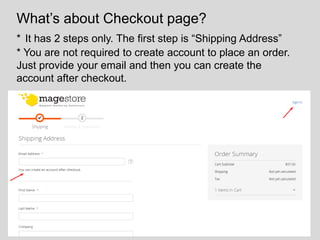
What’s about Checkout page?
* It has 2 steps only. The first step is “Shipping Address”
* You are not required to create account to place an order.
Just provide your email and then you can create the
account after checkout.
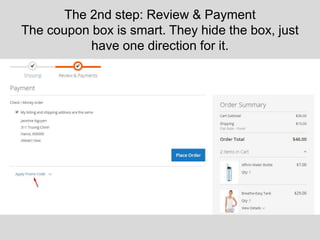
The 2nd step: Review & Payment
The coupon box is smart. They hide the box, just
have one direction for it.
This presentation is brought to you by
Magestore.com – the leading Magento
Marketing Extensions Provider
You can find link to access the demo at the end of this slide
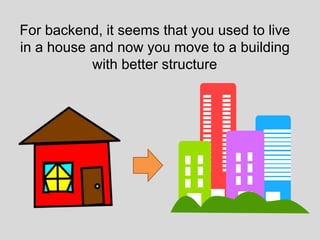
For backend, it seems that you used to live
in a house and now you move to a building
with better structure
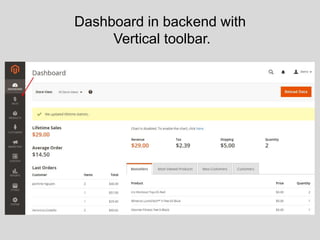
Dashboard in backend with
Vertical toolbar.
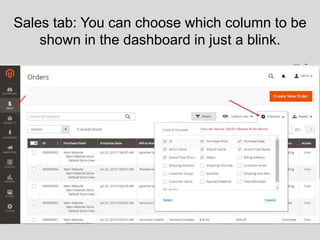
Sales tab: You can choose which column to be
shown in the dashboard in just a blink.
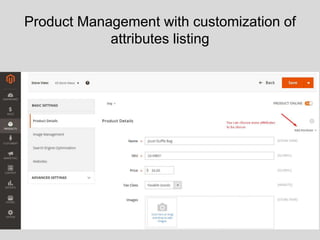
Product Management with customization of
attributes listing
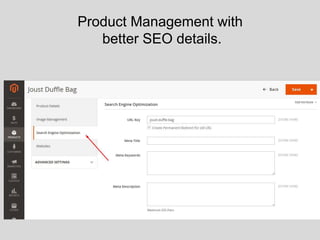
Product Management with
better SEO details.
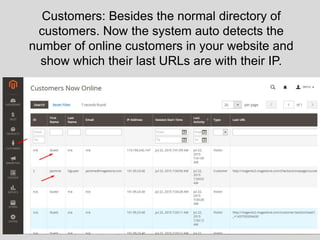
Customers: Besides the normal directory of
customers. Now the system auto detects the
number of online customers in your website and
show which their last URLs are with their IP.
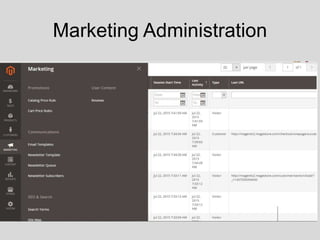
Marketing Administration
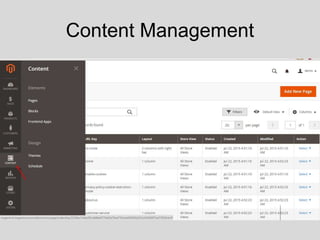
Content Management
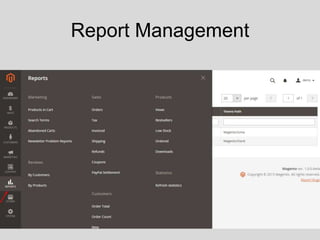
Report Management
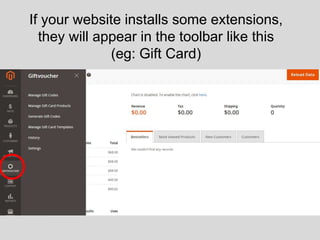
If your website installs some extensions,
they will appear in the toolbar like this
(eg: Gift Card)
For better engagement with Magento 2,
don’t hesitate to visit our demo:
• Front End
http://magento2.magestore.com/
• Backend
http://magento2.magestore.com/admin/
User: demo & Pass: demo123@
If the link doesn’t work, please choose another Browser.
THANK YOU

Magento 2 looks like.

  • 1.
  • 2.
    A day inJuly, Magento 2 Merchant Beta was officially announced. This release brings Magento to the last stage before the general availability (GA) of Magento 2 in Q4 2015
  • 3.
    For Frontend only,it looks like Before & After game of all girls. And of course, Magento 2 is more attractive & optimized better for user experience.
  • 4.
  • 5.
    How does themenu look?
  • 6.
    “What’s new” tabfor the updated info
  • 7.
    Product Listing withinteractive design Each product has “Add to cart”, Add to favorite & Add to compare function
  • 8.
    How does Productdetail look? It’s very clean & neat
  • 9.
    How “Add tocart” works? When you add 1 item to cart, it will appear in the header near search box, in which you can choose “Go to Checkout” or “View and edit cart”
  • 10.
    What’s about Checkoutpage? * It has 2 steps only. The first step is “Shipping Address” * You are not required to create account to place an order. Just provide your email and then you can create the account after checkout.
  • 11.
    The 2nd step:Review & Payment The coupon box is smart. They hide the box, just have one direction for it.
  • 12.
    This presentation isbrought to you by Magestore.com – the leading Magento Marketing Extensions Provider You can find link to access the demo at the end of this slide
  • 13.
    For backend, itseems that you used to live in a house and now you move to a building with better structure
  • 14.
    Dashboard in backendwith Vertical toolbar.
  • 15.
    Sales tab: Youcan choose which column to be shown in the dashboard in just a blink.
  • 16.
    Product Management withcustomization of attributes listing
  • 17.
  • 18.
    Customers: Besides thenormal directory of customers. Now the system auto detects the number of online customers in your website and show which their last URLs are with their IP.
  • 19.
  • 20.
  • 21.
  • 22.
    If your websiteinstalls some extensions, they will appear in the toolbar like this (eg: Gift Card)
  • 23.
    For better engagementwith Magento 2, don’t hesitate to visit our demo: • Front End http://magento2.magestore.com/ • Backend http://magento2.magestore.com/admin/ User: demo & Pass: demo123@ If the link doesn’t work, please choose another Browser.
  • 24.