MAD-Compiled by Biruk S. 1
2
Storing and Retrieving Data
Chapter Four
MAD-Compiled by Biruk S.
3
Introduction
MAD-Compiled by Biruk S.
 Android provides several options for you to save persistent application
data.
 The solution you choose depends on your specific needs, such as
whether the data should be private to your application or accessible to
other applications (and the user) and how much space your data
requires.
4
MAD-Compiled by Biruk S.
Continued…
 Your data storage options are the following:
Shared Preferences
Store private primitive data in key-value pairs.
Internal Storage
Store private data on the device memory.
External Storage
Store public data on the shared external storage.
SQLite Databases
Store structured data in a private database.
Network Connection
Store data on the web with your own network server.
5
MAD-Compiled by Biruk S.
Continued…
 Android provides a way for you to expose even your private data to
other applications — with a content provider.
 Using the External Storage
Every Android-compatible device supports a shared “external storage” that
you can use to save files.
 Using Databases
Android provides full support for SQLite databases. Any databases you
create will be accessible by name to any class in the application, but not
outside the application.
6
MAD-Compiled by Biruk S.
Continued…
 Using a Network Connection
You can use the network (when it’s available) to store and retrieve data on
your own web-based services. To do network operations, use classes in the
following packages:
java.net.*
android.net.*
7
MAD-Compiled by Biruk S.
Continued…
 Synchronization and Replication of Mobile Data
 Data synchronization is a method of establishing consistency among
data from a data source to the target data storage and vice versa.
 In data synchronization, we have to keep multiple copies of a dataset
in coherence with one another to maintain the data integrity.
8
MAD-Compiled by Biruk S.
Continued…
 Getting the Model Right
 Every business wants to provide services to their customers, wherever
they are and whatever they are doing. Some do this through their
website; others do use a mobile app.
 The challenge is that there is a multitude of different devices used by
customers.
 So which devices should the app be supported on? Can all be
supported?
9
MAD-Compiled by Biruk S.
Continued…
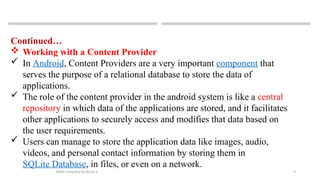
 Working with a Content Provider
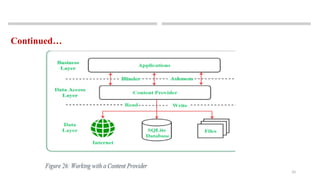
 In Android, Content Providers are a very important component that
serves the purpose of a relational database to store the data of
applications.
 The role of the content provider in the android system is like a central
repository in which data of the applications are stored, and it facilitates
other applications to securely access and modifies that data based on
the user requirements.
 Users can manage to store the application data like images, audio,
videos, and personal contact information by storing them in
SQLite Database, in files, or even on a network.
10
MAD-Compiled by Biruk S.
Continued…
11
MAD-Compiled by Biruk S.
Cont…
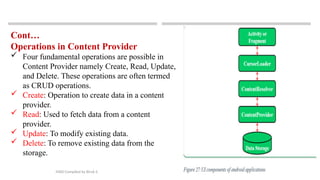
Operations in Content Provider
 Four fundamental operations are possible in
Content Provider namely Create, Read, Update,
and Delete. These operations are often termed
as CRUD operations.
 Create: Operation to create data in a content
provider.
 Read: Used to fetch data from a content
provider.
 Update: To modify existing data.
 Delete: To remove existing data from the
storage.
12
THANK YOU
?
MAD-Compiled by Biruk S.

MAD-4 (2).pptx mobile application development

  • 1.
  • 2.
    2 Storing and RetrievingData Chapter Four MAD-Compiled by Biruk S.
  • 3.
    3 Introduction MAD-Compiled by BirukS.  Android provides several options for you to save persistent application data.  The solution you choose depends on your specific needs, such as whether the data should be private to your application or accessible to other applications (and the user) and how much space your data requires.
  • 4.
    4 MAD-Compiled by BirukS. Continued…  Your data storage options are the following: Shared Preferences Store private primitive data in key-value pairs. Internal Storage Store private data on the device memory. External Storage Store public data on the shared external storage. SQLite Databases Store structured data in a private database. Network Connection Store data on the web with your own network server.
  • 5.
    5 MAD-Compiled by BirukS. Continued…  Android provides a way for you to expose even your private data to other applications — with a content provider.  Using the External Storage Every Android-compatible device supports a shared “external storage” that you can use to save files.  Using Databases Android provides full support for SQLite databases. Any databases you create will be accessible by name to any class in the application, but not outside the application.
  • 6.
    6 MAD-Compiled by BirukS. Continued…  Using a Network Connection You can use the network (when it’s available) to store and retrieve data on your own web-based services. To do network operations, use classes in the following packages: java.net.* android.net.*
  • 7.
    7 MAD-Compiled by BirukS. Continued…  Synchronization and Replication of Mobile Data  Data synchronization is a method of establishing consistency among data from a data source to the target data storage and vice versa.  In data synchronization, we have to keep multiple copies of a dataset in coherence with one another to maintain the data integrity.
  • 8.
    8 MAD-Compiled by BirukS. Continued…  Getting the Model Right  Every business wants to provide services to their customers, wherever they are and whatever they are doing. Some do this through their website; others do use a mobile app.  The challenge is that there is a multitude of different devices used by customers.  So which devices should the app be supported on? Can all be supported?
  • 9.
    9 MAD-Compiled by BirukS. Continued…  Working with a Content Provider  In Android, Content Providers are a very important component that serves the purpose of a relational database to store the data of applications.  The role of the content provider in the android system is like a central repository in which data of the applications are stored, and it facilitates other applications to securely access and modifies that data based on the user requirements.  Users can manage to store the application data like images, audio, videos, and personal contact information by storing them in SQLite Database, in files, or even on a network.
  • 10.
    10 MAD-Compiled by BirukS. Continued…
  • 11.
    11 MAD-Compiled by BirukS. Cont… Operations in Content Provider  Four fundamental operations are possible in Content Provider namely Create, Read, Update, and Delete. These operations are often termed as CRUD operations.  Create: Operation to create data in a content provider.  Read: Used to fetch data from a content provider.  Update: To modify existing data.  Delete: To remove existing data from the storage.
  • 12.