MAD-Compiled by Biruk S. 1
2
Intents and Services
Chapter Three
MAD-Compiled by Biruk S.
3
Introduction
MAD-Compiled by Biruk S.
 In our day-to-day life, we all come across a number of mobile
applications that runs in the background.
 Also, in many applications, certain tasks are being performed without
using any UI i.e. the task is being performed in the background.
 For example, the Music app of our mobile device or any other Music
application runs in the background and while using the Music app, you
can use any other application normally.
 So, this feature is implemented using the Service or IntentService.
4
Intents and Services
MAD-Compiled by Biruk S.
Service
 You can think service as an Android component that is used to perform
some long-running operations in the background like that in the Music
app, where we run the app in the background and use other applications
of the mobile parallelly.
 The best part is that you don’t need to provide some UI for the
operations to be performed in the background.
5
Intents and Services
MAD-Compiled by Biruk S.
There are three ways of using Service:
 Foreground: A foreground service is a Service that will let the user know about what is happening
in the background.
 For example, in the Music application, the user can see the ongoing song on the device as a form of
notification.
 Background: Here, the user will never know about what is happening in the background of the
application.
 For example, while sending some images over Whatsapp, Whatsapp compresses the image file to
reduce the size. This task is done in background and the user have no idea about what is going in
the background.
 Bound: The Bound Service is used when one or more than one application component binds the
6
What is Intent in android?
MAD-Compiled by Biruk S.
 An Intent is a messaging object you can use to request an action from another
app component.
 For example, searching for a location on the browser and witnessing a direct jump
into Google Maps or receiving payment links in Messages Application (SMS) and
on clicking jumping to PayPal or GPay (Google Pay).
 This process of taking users from one application to another is achieved by passing
the Intent to the system.
7
Types of intent in android
MAD-Compiled by Biruk S.
There are two types of intents in android
 Implicit
 Explicit
1. Implicit Intent
Implicit Intent doesn’t specify the component. In
such a case, intent provides information on
available components provided by the system
that is to be invoked. For example, you may
write the following code to view the webpage.
Syntax:
Intent intent=new Intent(Intent.ACTION_VIEW);
intent.setData(Uri.parse("https://www.geeksforgeeks.org
/")); startActivity(intent);
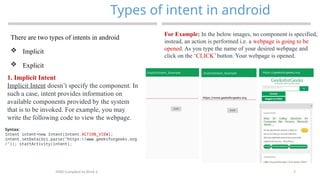
For Example: In the below images, no component is specified,
instead, an action is performed i.e. a webpage is going to be
opened. As you type the name of your desired webpage and
click on the ‘CLICK’ button. Your webpage is opened.
8
Types of intent in android
MAD-Compiled by Biruk S.
2. Explicit Intent
Explicit Intent specifies the component. In such
a case, intent provides the external class to be
invoked.
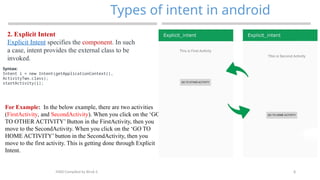
For Example: In the below example, there are two activities
(FirstActivity, and SecondActivity). When you click on the ‘GO
TO OTHER ACTIVITY’ Button in the FirstActivity, then you
move to the SecondActivity. When you click on the ‘GO TO
HOME ACTIVITY’ button in the SecondActivity, then you
move to the first activity. This is getting done through Explicit
Intent.
Syntax:
Intent i = new Intent(getApplicationContext(),
ActivityTwo.class);
startActivity(i);
9
Cont…
MAD-Compiled by Biruk S.
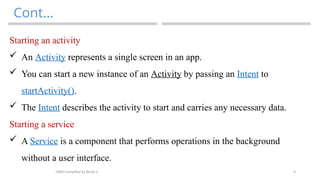
Starting an activity
 An Activity represents a single screen in an app.
 You can start a new instance of an Activity by passing an Intent to
startActivity().
 The Intent describes the activity to start and carries any necessary data.
Starting a service
 A Service is a component that performs operations in the background
without a user interface.
10
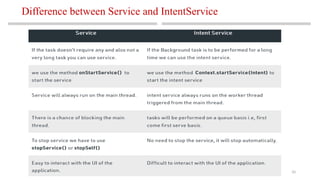
Difference between Service and IntentService
MAD-Compiled by Biruk S.
11
Characteristics of Mobile Applications
MAD-Compiled by Biruk S.
 Mobile is a rapidly growing industry that attracts companies from
many industries.
 Because of the growing popularity of smartphones and tablets, mobile
application development is becoming more popular among business
owners all over the world.
 A mobile application is a software program that runs on a mobile
device, such as a smartphone or tablet computer.
 Despite being little software units with limited functionality, apps
manage to provide high-quality services and experiences to users.
12
Successful Mobile Development
MAD-Compiled by Biruk S.
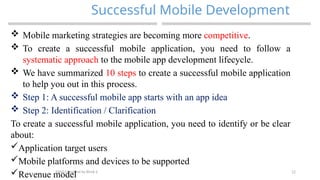
 Mobile marketing strategies are becoming more competitive.
 To create a successful mobile application, you need to follow a
systematic approach to the mobile app development lifecycle.
 We have summarized 10 steps to create a successful mobile application
to help you out in this process.
 Step 1: A successful mobile app starts with an app idea
 Step 2: Identification / Clarification
To create a successful mobile application, you need to identify or be clear
about:
Application target users
Mobile platforms and devices to be supported
Revenue model
13
Successful Mobile Development(2)
MAD-Compiled by Biruk S.
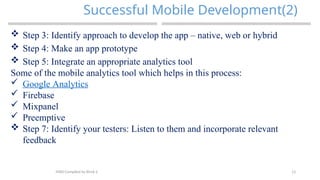
 Step 3: Identify approach to develop the app – native, web or hybrid
 Step 4: Make an app prototype
 Step 5: Integrate an appropriate analytics tool
Some of the mobile analytics tool which helps in this process:
 Google Analytics
 Firebase
 Mixpanel
 Preemptive
 Step 7: Identify your testers: Listen to them and incorporate relevant
feedback
14
Successful Mobile Development(3)
MAD-Compiled by Biruk S.
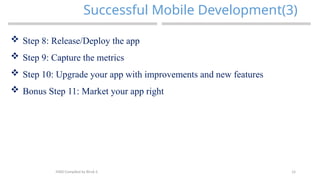
 Step 8: Release/Deploy the app
 Step 9: Capture the metrics
 Step 10: Upgrade your app with improvements and new features
 Bonus Step 11: Market your app right
15
THANK YOU
?
MAD-Compiled by Biruk S.

MAD-3 (2).pptx mobile application development

  • 1.
  • 2.
    2 Intents and Services ChapterThree MAD-Compiled by Biruk S.
  • 3.
    3 Introduction MAD-Compiled by BirukS.  In our day-to-day life, we all come across a number of mobile applications that runs in the background.  Also, in many applications, certain tasks are being performed without using any UI i.e. the task is being performed in the background.  For example, the Music app of our mobile device or any other Music application runs in the background and while using the Music app, you can use any other application normally.  So, this feature is implemented using the Service or IntentService.
  • 4.
    4 Intents and Services MAD-Compiledby Biruk S. Service  You can think service as an Android component that is used to perform some long-running operations in the background like that in the Music app, where we run the app in the background and use other applications of the mobile parallelly.  The best part is that you don’t need to provide some UI for the operations to be performed in the background.
  • 5.
    5 Intents and Services MAD-Compiledby Biruk S. There are three ways of using Service:  Foreground: A foreground service is a Service that will let the user know about what is happening in the background.  For example, in the Music application, the user can see the ongoing song on the device as a form of notification.  Background: Here, the user will never know about what is happening in the background of the application.  For example, while sending some images over Whatsapp, Whatsapp compresses the image file to reduce the size. This task is done in background and the user have no idea about what is going in the background.  Bound: The Bound Service is used when one or more than one application component binds the
  • 6.
    6 What is Intentin android? MAD-Compiled by Biruk S.  An Intent is a messaging object you can use to request an action from another app component.  For example, searching for a location on the browser and witnessing a direct jump into Google Maps or receiving payment links in Messages Application (SMS) and on clicking jumping to PayPal or GPay (Google Pay).  This process of taking users from one application to another is achieved by passing the Intent to the system.
  • 7.
    7 Types of intentin android MAD-Compiled by Biruk S. There are two types of intents in android  Implicit  Explicit 1. Implicit Intent Implicit Intent doesn’t specify the component. In such a case, intent provides information on available components provided by the system that is to be invoked. For example, you may write the following code to view the webpage. Syntax: Intent intent=new Intent(Intent.ACTION_VIEW); intent.setData(Uri.parse("https://www.geeksforgeeks.org /")); startActivity(intent); For Example: In the below images, no component is specified, instead, an action is performed i.e. a webpage is going to be opened. As you type the name of your desired webpage and click on the ‘CLICK’ button. Your webpage is opened.
  • 8.
    8 Types of intentin android MAD-Compiled by Biruk S. 2. Explicit Intent Explicit Intent specifies the component. In such a case, intent provides the external class to be invoked. For Example: In the below example, there are two activities (FirstActivity, and SecondActivity). When you click on the ‘GO TO OTHER ACTIVITY’ Button in the FirstActivity, then you move to the SecondActivity. When you click on the ‘GO TO HOME ACTIVITY’ button in the SecondActivity, then you move to the first activity. This is getting done through Explicit Intent. Syntax: Intent i = new Intent(getApplicationContext(), ActivityTwo.class); startActivity(i);
  • 9.
    9 Cont… MAD-Compiled by BirukS. Starting an activity  An Activity represents a single screen in an app.  You can start a new instance of an Activity by passing an Intent to startActivity().  The Intent describes the activity to start and carries any necessary data. Starting a service  A Service is a component that performs operations in the background without a user interface.
  • 10.
    10 Difference between Serviceand IntentService MAD-Compiled by Biruk S.
  • 11.
    11 Characteristics of MobileApplications MAD-Compiled by Biruk S.  Mobile is a rapidly growing industry that attracts companies from many industries.  Because of the growing popularity of smartphones and tablets, mobile application development is becoming more popular among business owners all over the world.  A mobile application is a software program that runs on a mobile device, such as a smartphone or tablet computer.  Despite being little software units with limited functionality, apps manage to provide high-quality services and experiences to users.
  • 12.
    12 Successful Mobile Development MAD-Compiledby Biruk S.  Mobile marketing strategies are becoming more competitive.  To create a successful mobile application, you need to follow a systematic approach to the mobile app development lifecycle.  We have summarized 10 steps to create a successful mobile application to help you out in this process.  Step 1: A successful mobile app starts with an app idea  Step 2: Identification / Clarification To create a successful mobile application, you need to identify or be clear about: Application target users Mobile platforms and devices to be supported Revenue model
  • 13.
    13 Successful Mobile Development(2) MAD-Compiledby Biruk S.  Step 3: Identify approach to develop the app – native, web or hybrid  Step 4: Make an app prototype  Step 5: Integrate an appropriate analytics tool Some of the mobile analytics tool which helps in this process:  Google Analytics  Firebase  Mixpanel  Preemptive  Step 7: Identify your testers: Listen to them and incorporate relevant feedback
  • 14.
    14 Successful Mobile Development(3) MAD-Compiledby Biruk S.  Step 8: Release/Deploy the app  Step 9: Capture the metrics  Step 10: Upgrade your app with improvements and new features  Bonus Step 11: Market your app right
  • 15.