MAD-Compiled by Biruk S. 1
2
Factors in Developing Mobile Applications
Chapter Two
MAD-Compiled by Biruk S.
3
Mobile Software Engineering
MAD-Compiled by Biruk S.
 Mobile application development : is the set of processes and
procedures involved in writing software for small, wireless computing
devices, such as smartphones and other hand-held devices.
 Let us see factors that influence your mobile app development process:
4
Mobile Software Engineering…
MAD-Compiled by Biruk S.
1. Distribution Channel
 As a developer, you must first identify which platform best supports
your grand idea.
 Though Google Play Store and Apple App Store serve the same
function, they have different guidelines.
 You can view the description, icon, logo, screenshots or image gallery,
and a snippet or a trailer of the app on both platforms.
5
Mobile Software Engineering…
MAD-Compiled by Biruk S.
2. Audience Research
 For your idea to become successful, you must first conduct audience
research.
 It is important because users tend to be diverse.
 You must track the demographics of the users of your app.
 That way, you can identify the age, gender, relevant businesses, and
potential customers you can target.
 If you want your app to solve a problem, you should not base your
decisions on assumptions.
 Creating different personas also helps you visualize the needs of
different users.
6
Mobile Software Engineering…
MAD-Compiled by Biruk S.
3. App Idea
 Apps don’t come out of thin air.
 They start as brilliant ideas. Unfortunately, not all ideas become great
and successful once you turn them into an app.
 Remember that working on an app development project requires
money, effort, and time.
 Therefore, you must first examine your idea before you can begin
working on it.
 Besides being unique, your app idea must satisfy a need.
7
Mobile Software Engineering…
MAD-Compiled by Biruk S.
4. App Development Strategy
 Apps don’t come out of thin air.
 To properly execute your app idea, you must come with a plan. In this
case, you must have a solid app development strategy.
 It clarifies how much of the design work you will undertake for the app
development.
 Part of your app development strategy must include the strengths and
weaknesses of each mobile device.
8
Mobile Software Engineering…
MAD-Compiled by Biruk S.
5. UI/UX
 Apps don’t come out of thin air.
 User interface (UI) and user experience (UX) are part of what keeps users hooked
on an app.
 Navigation and usability aren’t the only ones that matter to the users.
 They are also receptive to several UI/UX factors.
 Unnecessary micro-interactions, unresponsive clickable elements, inappropriate
spaces, and mismatch fonts types and size are some of the factors you should
watch out for when developing your app.
9
Mobile Software Engineering…
MAD-Compiled by Biruk S.
7. Security
 Security must be part of your app development process.
 Users should not have to think of the threat of malware when they use your app.
 You can also keep the user’s information safe through encryption.
 You should also restrict your app’s permissions to a minimum.
8. Monitoring
 You still have work to do after you publish your mobile app.
 You must be hands-on with fixes, performance improvements, changes, and
integrating new features.
10
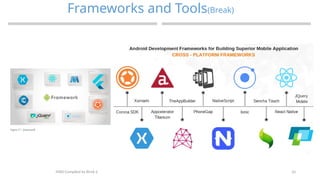
Frameworks and Tools(Break)
MAD-Compiled by Biruk S.
11
Frameworks and Tools
MAD-Compiled by Biruk S.
Android Development Frameworks
 In general, the basic method of creating an Android app is to use Android Studio
(As it is the official IDE for Android).
 However, there are many other Android Development Frameworks that are quite
popular in and to provide you a little variety, the list is given below…
1. Ionic
 Ionic Framework is a very popular open-source mobile framework that was released
in 2013.
 According to its website, Ionic can be used to “Build and ship beautiful cross-
platform hybrid and Progressive Web Apps with ease.”
2. Xamarin
 Xamarin is an extremely popular Mobile framework (With over 1.4 million
developers using it!) that was acquired by Microsoft in 2016 and is currently a
Microsoft subsidiary. According to Xamarin, “Apps built using Xamarin look and
feel native because they are.”
12
Frameworks and Tools
MAD-Compiled by Biruk S.
3. Adobe PhoneGap
 Adobe PhoneGap is an open-source mobile application development framework
that was purchased by Adobe Systems in 2011.
 Its unique feature is that it can be used to build mobile applications using HTML5,
CSS3, and JavaScript instead of using API like Android, iOS, or Windows Phone.
4. React Native
 React Native is an open-source mobile framework that was created by Facebook
and released in 2015.
 It provides support for various IDEs and mobile app development tools and that is
one of the main reasons it is used by many (popular!) companies such as Instagram,
Tesla, Walmart, Baidu, etc. to develop their mobile apps.
13
Frameworks and Tools
MAD-Compiled by Biruk S.
5. Flutter
 Flutter is a comparatively recent open-source development
framework that was released by Google in 2017.
 According to Google, “Flutter is Google’s portable UI toolkit
for building beautiful, natively-compiled applications for
mobile, web, and desktop from a single codebase.”
 Flutter is written in the Dart programming language (Also
developed by Google) and it is currently used by famous
companies such as Alibaba, Tencent, Google.
 Flutter provides rendering support by using the 2D rendering
engine Skia.
14
Frameworks and Tools
MAD-Compiled by Biruk S.
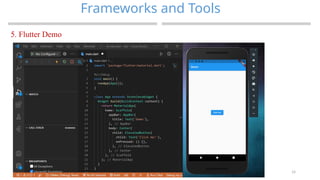
5. Flutter Demo
15
Frameworks and Tools
MAD-Compiled by Biruk S.
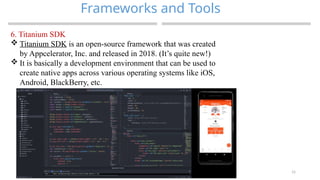
6. Titanium SDK
 Titanium SDK is an open-source framework that was created
by Appcelerator, Inc. and released in 2018. (It’s quite new!)
 It is basically a development environment that can be used to
create native apps across various operating systems like iOS,
Android, BlackBerry, etc.
16
Frameworks and Tools
MAD-Compiled by Biruk S.
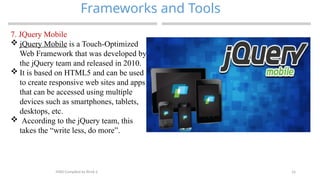
7. JQuery Mobile
 jQuery Mobile is a Touch-Optimized
Web Framework that was developed by
the jQuery team and released in 2010.
 It is based on HTML5 and can be used
to create responsive web sites and apps
that can be accessed using multiple
devices such as smartphones, tablets,
desktops, etc.
 According to the jQuery team, this
takes the “write less, do more”.
17
Frameworks and Tools
MAD-Compiled by Biruk S.
8. Corona SDK
 Corona Software Development Kit was developed by Corona Labs Inc. and released in
2009.
 It is a great platform for creating apps for mobile as well as desktop systems.
 Corona Labs states that “You can create your project once and publish it to multiple
types of devices, including Apple iPhone and iPad, Android phones and tablets,
Windows Desktop, etc.”
9. Native Script
Native Script is an open-source framework for creating native (duh!) mobile apps that
were developed by Progress and initially released in 2014.
It was developed using JavaScript and TypeScript (which is basically a superset of
JavaScript).
10. Mobile Angular UI
 Mobile Angular UI is a mobile UI framework (As is clear from the name!) that allows
the creation of HTML5 hybrid mobile apps using a combination of Angular JS and
Bootstrap.
18
Android User
MAD-Compiled by Biruk S.
 Android is the most popular operating system in the world, with over 2.5 billion
active users spanning over 190 countries.
 Created by Andy Rubin as the open-source alternative to iPhone and Palm OS,
Android quickly became the favorite operating system for most mobile
manufacturers in the early 2010s
19
Generic UI Development(wk
break)
MAD-Compiled by Biruk S.
 A good User Interface (UI) focuses on making user’s interactions simple and efficient
 User Interface (UI) design focuses on thinking of a user, what they might need to do
when they visit website and ensure that the interface has elements that are easy to
access and understand.
 The Generic User Interface (Generic UI, GUI) framework allows you to create UI
screens using Java and XML.
 XML is optional but it provides a declarative approach to the screen layout and
reduces the amount of code which is required for building the user interface.
20
Generic UI Development
MAD-Compiled by Biruk S.
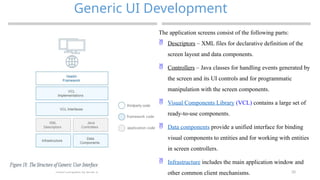
The application screens consist of the following parts:
 Descriptors – XML files for declarative definition of the
screen layout and data components.
 Controllers – Java classes for handling events generated by
the screen and its UI controls and for programmatic
manipulation with the screen components.
 Visual Components Library (VCL) contains a large set of
ready-to-use components.
 Data components provide a unified interface for binding
visual components to entities and for working with entities
in screen controllers.
 Infrastructure includes the main application window and
other common client mechanisms.
21
User Interfaces formats
MAD-Compiled by Biruk S.
 User interface (UI) design is the process designers use to build interfaces in software or computerized devices,
focusing on looks or style.
 Designers aim to create interfaces which users find easy to use and pleasurable. UI design refers to graphical
user interfaces and other forms—e.g., voice-controlled interfaces.
 User interfaces are the access points where users interact with designs.
 They come in three formats:
 Graphical user interfaces (GUIs)—Users interact with visual representations on digital control panels. A
computer’s desktop is a GUI.
 Voice-controlled interfaces (VUIs)—Users interact with these through their voices. Most smart assistants—e.g.,
Siri on iPhone and Alexa on Amazon devices—are VUIs.
 Gesture-based interfaces—Users engage with 3D design spaces through bodily motions: e.g., in virtual reality
(VR) games.
22
User Interfaces formats
MAD-Compiled by Biruk S.
A user interface can be judged by three main properties:
Ease-of-use; how easy it is to use a certain user interface
Efficiency for inputting information; how fast information can be input through the
user interface
Efficiency for outputting information; how fast the user can process the information
coming back from the system
23
VUIs and Mobile Apps, Text-to-Speech
Technique
MAD-Compiled by Biruk S.
 Voice user interfaces are user interfaces that are used through speech. Typical examples of voice
user interfaces include smart speakers and voice assistants.
 Voice UIs employ speech recognition and natural language understanding technologies to
transform user speech into text and meaning.
 Speech is a tool for enhancing traditional touch user interfaces into multimodal voice user
interfaces.
 Voice user interfaces are highly intuitive as they use the most natural way for us to
communicate: speech.
 The first voice user interfaces were IVR, Interactive Voice Response, systems that enabled users
to interact with a phone system by using speech. Typically, IVRs recognized only digits.
24
Designing the Right UI
MAD-Compiled by Biruk S.
 In mobile app development, the UI (user interface) and UX (user experience) play the most
significant roles in a mobile app’s success.
 Such UIs not only attract the user, but also help in retaining them in the long run. Check the UI
principles listed below:
 Consistency of the design layout
 Unambiguous Interactive Elements
 Single Trial Learning Experience
 Anticipate and Answer Users’ Queries
 Layered User Experience
25
Designing the Right UI
MAD-Compiled by Biruk S.
 Design an interface for a mobile app with more chances to succeed.
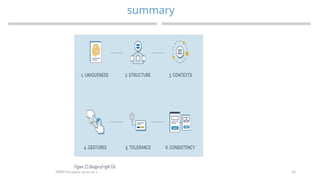
 1. Uniqueness
 There is no point in creating something that already exists, and it is the same with mobile app
design.
 Your app should definitely have a number of advantages, but presenting them the right way is
another story.
 Take Clear, for example, it is a to-do list, but its interface fundamentally differs from all other
to-do lists.
26
Designing the Right UI
MAD-Compiled by Biruk S.
 Design an interface for a mobile app with more chances to succeed.
 2. Structure
 User interfaces for mobile applications should be organized in such a way that users will find it
helpful and meaningful.
 Make sure similar items are grouped together and users won’t spend tons of time trying to find
what they need.
27
Designing the Right UI
MAD-Compiled by Biruk S.
 Design an interface for a mobile app with more chances to succeed.
 3. Contexts
 Some apps can be used only on the go, others can be used in a relaxed atmosphere, and some
apps can be used in both situations.
 Context seriously affects mobile user interface design, such as a bigger font, highlighted
buttons, and only vital content.
 Before moving ont, you need o find out in what context your app will be used and then build the
interface according to this information.
28
Designing the Right UI
MAD-Compiled by Biruk S.
 Design an interface for a mobile app with more chances to succeed.
 4. Gestures
 Gestures allow users to navigate apps intuitively. Gestures can also add some gamification and
may help you gain particular audiences, like teenagers.
 Mobile devices are designed for gestures, so try to get the most out of it and become a source of
inspiration for other apps.
29
Designing the Right UI
MAD-Compiled by Biruk S.
 Design an interface for a mobile app with more chances to succeed.
 5. Tolerance
 Tolerance means allowing users to make mistakes and giving them the opportunity to revoke
changes.
 Make sure your app allows users to undo certain actions and there are notifications showing that
some changes will be made and can be undone.
30
Designing the Right UI
MAD-Compiled by Biruk S.
 Design an interface for a mobile app with more chances to succeed.
 6. Consistency
 If there are several elements serving one and the same purpose in the app, they should look and
function the same way. No exceptions.
 Changing one element means changing all other variants.
 If there are several styles of “submit” buttons on different pages, it can be frustrating and the
app would look messy.
31
Designing the Right UI
MAD-Compiled by Biruk S.
 Design an interface for a mobile app with more chances to succeed.
 7. Communication
 The core idea here is to let users know your app registered the action and processing it even if it
is not possible to give an immediate result.
32
summary
MAD-Compiled by Biruk S.
33
THANK YOU
?
MAD-Compiled by Biruk S.

MAD-2.pptx mobile application development

  • 1.
  • 2.
    2 Factors in DevelopingMobile Applications Chapter Two MAD-Compiled by Biruk S.
  • 3.
    3 Mobile Software Engineering MAD-Compiledby Biruk S.  Mobile application development : is the set of processes and procedures involved in writing software for small, wireless computing devices, such as smartphones and other hand-held devices.  Let us see factors that influence your mobile app development process:
  • 4.
    4 Mobile Software Engineering… MAD-Compiledby Biruk S. 1. Distribution Channel  As a developer, you must first identify which platform best supports your grand idea.  Though Google Play Store and Apple App Store serve the same function, they have different guidelines.  You can view the description, icon, logo, screenshots or image gallery, and a snippet or a trailer of the app on both platforms.
  • 5.
    5 Mobile Software Engineering… MAD-Compiledby Biruk S. 2. Audience Research  For your idea to become successful, you must first conduct audience research.  It is important because users tend to be diverse.  You must track the demographics of the users of your app.  That way, you can identify the age, gender, relevant businesses, and potential customers you can target.  If you want your app to solve a problem, you should not base your decisions on assumptions.  Creating different personas also helps you visualize the needs of different users.
  • 6.
    6 Mobile Software Engineering… MAD-Compiledby Biruk S. 3. App Idea  Apps don’t come out of thin air.  They start as brilliant ideas. Unfortunately, not all ideas become great and successful once you turn them into an app.  Remember that working on an app development project requires money, effort, and time.  Therefore, you must first examine your idea before you can begin working on it.  Besides being unique, your app idea must satisfy a need.
  • 7.
    7 Mobile Software Engineering… MAD-Compiledby Biruk S. 4. App Development Strategy  Apps don’t come out of thin air.  To properly execute your app idea, you must come with a plan. In this case, you must have a solid app development strategy.  It clarifies how much of the design work you will undertake for the app development.  Part of your app development strategy must include the strengths and weaknesses of each mobile device.
  • 8.
    8 Mobile Software Engineering… MAD-Compiledby Biruk S. 5. UI/UX  Apps don’t come out of thin air.  User interface (UI) and user experience (UX) are part of what keeps users hooked on an app.  Navigation and usability aren’t the only ones that matter to the users.  They are also receptive to several UI/UX factors.  Unnecessary micro-interactions, unresponsive clickable elements, inappropriate spaces, and mismatch fonts types and size are some of the factors you should watch out for when developing your app.
  • 9.
    9 Mobile Software Engineering… MAD-Compiledby Biruk S. 7. Security  Security must be part of your app development process.  Users should not have to think of the threat of malware when they use your app.  You can also keep the user’s information safe through encryption.  You should also restrict your app’s permissions to a minimum. 8. Monitoring  You still have work to do after you publish your mobile app.  You must be hands-on with fixes, performance improvements, changes, and integrating new features.
  • 10.
  • 11.
    11 Frameworks and Tools MAD-Compiledby Biruk S. Android Development Frameworks  In general, the basic method of creating an Android app is to use Android Studio (As it is the official IDE for Android).  However, there are many other Android Development Frameworks that are quite popular in and to provide you a little variety, the list is given below… 1. Ionic  Ionic Framework is a very popular open-source mobile framework that was released in 2013.  According to its website, Ionic can be used to “Build and ship beautiful cross- platform hybrid and Progressive Web Apps with ease.” 2. Xamarin  Xamarin is an extremely popular Mobile framework (With over 1.4 million developers using it!) that was acquired by Microsoft in 2016 and is currently a Microsoft subsidiary. According to Xamarin, “Apps built using Xamarin look and feel native because they are.”
  • 12.
    12 Frameworks and Tools MAD-Compiledby Biruk S. 3. Adobe PhoneGap  Adobe PhoneGap is an open-source mobile application development framework that was purchased by Adobe Systems in 2011.  Its unique feature is that it can be used to build mobile applications using HTML5, CSS3, and JavaScript instead of using API like Android, iOS, or Windows Phone. 4. React Native  React Native is an open-source mobile framework that was created by Facebook and released in 2015.  It provides support for various IDEs and mobile app development tools and that is one of the main reasons it is used by many (popular!) companies such as Instagram, Tesla, Walmart, Baidu, etc. to develop their mobile apps.
  • 13.
    13 Frameworks and Tools MAD-Compiledby Biruk S. 5. Flutter  Flutter is a comparatively recent open-source development framework that was released by Google in 2017.  According to Google, “Flutter is Google’s portable UI toolkit for building beautiful, natively-compiled applications for mobile, web, and desktop from a single codebase.”  Flutter is written in the Dart programming language (Also developed by Google) and it is currently used by famous companies such as Alibaba, Tencent, Google.  Flutter provides rendering support by using the 2D rendering engine Skia.
  • 14.
    14 Frameworks and Tools MAD-Compiledby Biruk S. 5. Flutter Demo
  • 15.
    15 Frameworks and Tools MAD-Compiledby Biruk S. 6. Titanium SDK  Titanium SDK is an open-source framework that was created by Appcelerator, Inc. and released in 2018. (It’s quite new!)  It is basically a development environment that can be used to create native apps across various operating systems like iOS, Android, BlackBerry, etc.
  • 16.
    16 Frameworks and Tools MAD-Compiledby Biruk S. 7. JQuery Mobile  jQuery Mobile is a Touch-Optimized Web Framework that was developed by the jQuery team and released in 2010.  It is based on HTML5 and can be used to create responsive web sites and apps that can be accessed using multiple devices such as smartphones, tablets, desktops, etc.  According to the jQuery team, this takes the “write less, do more”.
  • 17.
    17 Frameworks and Tools MAD-Compiledby Biruk S. 8. Corona SDK  Corona Software Development Kit was developed by Corona Labs Inc. and released in 2009.  It is a great platform for creating apps for mobile as well as desktop systems.  Corona Labs states that “You can create your project once and publish it to multiple types of devices, including Apple iPhone and iPad, Android phones and tablets, Windows Desktop, etc.” 9. Native Script Native Script is an open-source framework for creating native (duh!) mobile apps that were developed by Progress and initially released in 2014. It was developed using JavaScript and TypeScript (which is basically a superset of JavaScript). 10. Mobile Angular UI  Mobile Angular UI is a mobile UI framework (As is clear from the name!) that allows the creation of HTML5 hybrid mobile apps using a combination of Angular JS and Bootstrap.
  • 18.
    18 Android User MAD-Compiled byBiruk S.  Android is the most popular operating system in the world, with over 2.5 billion active users spanning over 190 countries.  Created by Andy Rubin as the open-source alternative to iPhone and Palm OS, Android quickly became the favorite operating system for most mobile manufacturers in the early 2010s
  • 19.
    19 Generic UI Development(wk break) MAD-Compiledby Biruk S.  A good User Interface (UI) focuses on making user’s interactions simple and efficient  User Interface (UI) design focuses on thinking of a user, what they might need to do when they visit website and ensure that the interface has elements that are easy to access and understand.  The Generic User Interface (Generic UI, GUI) framework allows you to create UI screens using Java and XML.  XML is optional but it provides a declarative approach to the screen layout and reduces the amount of code which is required for building the user interface.
  • 20.
    20 Generic UI Development MAD-Compiledby Biruk S. The application screens consist of the following parts:  Descriptors – XML files for declarative definition of the screen layout and data components.  Controllers – Java classes for handling events generated by the screen and its UI controls and for programmatic manipulation with the screen components.  Visual Components Library (VCL) contains a large set of ready-to-use components.  Data components provide a unified interface for binding visual components to entities and for working with entities in screen controllers.  Infrastructure includes the main application window and other common client mechanisms.
  • 21.
    21 User Interfaces formats MAD-Compiledby Biruk S.  User interface (UI) design is the process designers use to build interfaces in software or computerized devices, focusing on looks or style.  Designers aim to create interfaces which users find easy to use and pleasurable. UI design refers to graphical user interfaces and other forms—e.g., voice-controlled interfaces.  User interfaces are the access points where users interact with designs.  They come in three formats:  Graphical user interfaces (GUIs)—Users interact with visual representations on digital control panels. A computer’s desktop is a GUI.  Voice-controlled interfaces (VUIs)—Users interact with these through their voices. Most smart assistants—e.g., Siri on iPhone and Alexa on Amazon devices—are VUIs.  Gesture-based interfaces—Users engage with 3D design spaces through bodily motions: e.g., in virtual reality (VR) games.
  • 22.
    22 User Interfaces formats MAD-Compiledby Biruk S. A user interface can be judged by three main properties: Ease-of-use; how easy it is to use a certain user interface Efficiency for inputting information; how fast information can be input through the user interface Efficiency for outputting information; how fast the user can process the information coming back from the system
  • 23.
    23 VUIs and MobileApps, Text-to-Speech Technique MAD-Compiled by Biruk S.  Voice user interfaces are user interfaces that are used through speech. Typical examples of voice user interfaces include smart speakers and voice assistants.  Voice UIs employ speech recognition and natural language understanding technologies to transform user speech into text and meaning.  Speech is a tool for enhancing traditional touch user interfaces into multimodal voice user interfaces.  Voice user interfaces are highly intuitive as they use the most natural way for us to communicate: speech.  The first voice user interfaces were IVR, Interactive Voice Response, systems that enabled users to interact with a phone system by using speech. Typically, IVRs recognized only digits.
  • 24.
    24 Designing the RightUI MAD-Compiled by Biruk S.  In mobile app development, the UI (user interface) and UX (user experience) play the most significant roles in a mobile app’s success.  Such UIs not only attract the user, but also help in retaining them in the long run. Check the UI principles listed below:  Consistency of the design layout  Unambiguous Interactive Elements  Single Trial Learning Experience  Anticipate and Answer Users’ Queries  Layered User Experience
  • 25.
    25 Designing the RightUI MAD-Compiled by Biruk S.  Design an interface for a mobile app with more chances to succeed.  1. Uniqueness  There is no point in creating something that already exists, and it is the same with mobile app design.  Your app should definitely have a number of advantages, but presenting them the right way is another story.  Take Clear, for example, it is a to-do list, but its interface fundamentally differs from all other to-do lists.
  • 26.
    26 Designing the RightUI MAD-Compiled by Biruk S.  Design an interface for a mobile app with more chances to succeed.  2. Structure  User interfaces for mobile applications should be organized in such a way that users will find it helpful and meaningful.  Make sure similar items are grouped together and users won’t spend tons of time trying to find what they need.
  • 27.
    27 Designing the RightUI MAD-Compiled by Biruk S.  Design an interface for a mobile app with more chances to succeed.  3. Contexts  Some apps can be used only on the go, others can be used in a relaxed atmosphere, and some apps can be used in both situations.  Context seriously affects mobile user interface design, such as a bigger font, highlighted buttons, and only vital content.  Before moving ont, you need o find out in what context your app will be used and then build the interface according to this information.
  • 28.
    28 Designing the RightUI MAD-Compiled by Biruk S.  Design an interface for a mobile app with more chances to succeed.  4. Gestures  Gestures allow users to navigate apps intuitively. Gestures can also add some gamification and may help you gain particular audiences, like teenagers.  Mobile devices are designed for gestures, so try to get the most out of it and become a source of inspiration for other apps.
  • 29.
    29 Designing the RightUI MAD-Compiled by Biruk S.  Design an interface for a mobile app with more chances to succeed.  5. Tolerance  Tolerance means allowing users to make mistakes and giving them the opportunity to revoke changes.  Make sure your app allows users to undo certain actions and there are notifications showing that some changes will be made and can be undone.
  • 30.
    30 Designing the RightUI MAD-Compiled by Biruk S.  Design an interface for a mobile app with more chances to succeed.  6. Consistency  If there are several elements serving one and the same purpose in the app, they should look and function the same way. No exceptions.  Changing one element means changing all other variants.  If there are several styles of “submit” buttons on different pages, it can be frustrating and the app would look messy.
  • 31.
    31 Designing the RightUI MAD-Compiled by Biruk S.  Design an interface for a mobile app with more chances to succeed.  7. Communication  The core idea here is to let users know your app registered the action and processing it even if it is not possible to give an immediate result.
  • 32.
  • 33.