MAD-Compiled by Biruk S. 1
2
Introduction to Mobile App Development
Chapter One
MAD-Compiled by Biruk S.
3
What is Mobile Application Development?
MAD-Compiled by Biruk S.
 Mobile application development : is the process of making software
for smartphones, tablets and digital assistants, most commonly for the
Android and iOS operating systems.
 The software can be preinstalled on the device, downloaded from a
mobile app store or accessed through a mobile web browser.
 The programming and markup languages used for this kind of software
development include Java, Swift, C# and HTML5.
4
Major Mobile Development Platforms
MAD-Compiled by Biruk S.
Mobile development platforms give developers a single environment
possessing all of the tools developers need to create a mobile application.
Below are main platforms:
5
Major Mobile Development Platforms
MAD-Compiled by Biruk S.
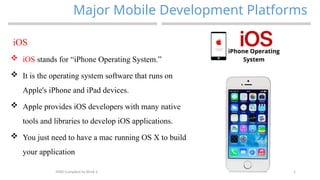
iOS
 iOS stands for “iPhone Operating System.”
 It is the operating system software that runs on
Apple's iPhone and iPad devices.
 Apple provides iOS developers with many native
tools and libraries to develop iOS applications.
 You just need to have a mac running OS X to build
your application
6
Major Mobile Development Platforms
MAD-Compiled by Biruk S.
Android
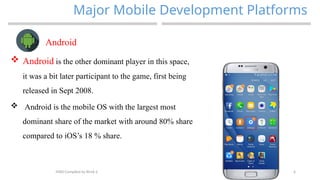
 Android is the other dominant player in this space,
it was a bit later participant to the game, first being
released in Sept 2008.
 Android is the mobile OS with the largest most
dominant share of the market with around 80% share
compared to iOS’s 18 % share.
7
Android
 Android is a mobile operating system that is
provided by Google LLC.
 It is based on the modified version of the
Linux kernel and other open-source software.
 It is specifically designed for touchscreen mobile
devices like smartphones and tablets.
 It was developed using C, Java, C++, and other
languages.
 The first version of Android was launched by
Google in 2008.
 The latest stable version of Android is Android 10.
 It is the most used operating system overall.
MAD-Compiled by Biruk S.
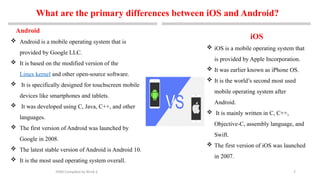
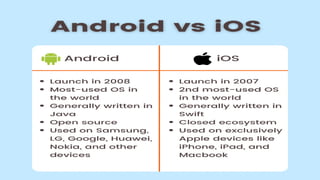
What are the primary differences between iOS and Android?
iOS
 iOS is a mobile operating system that
is provided by Apple Incorporation.
 It was earlier known as iPhone OS.
 It is the world’s second most used
mobile operating system after
Android.
 It is mainly written in C, C++,
Objective-C, assembly language, and
Swift.
 The first version of iOS was launched
in 2007.
8
MAD-Compiled by Biruk S.
9
p mobile application development trends in 2018
MAD-Compiled by Biruk S.
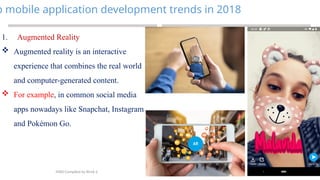
1. Augmented Reality
 Augmented reality is an interactive
experience that combines the real world
and computer-generated content.
 For example, in common social media
apps nowadays like Snapchat, Instagram
and Pokémon Go.
10
mobile application development trends in 2018…
MAD-Compiled by Biruk S.
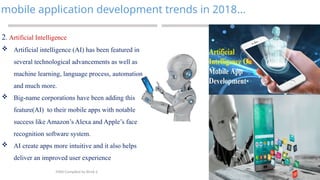
2. Artificial Intelligence
 Artificial intelligence (AI) has been featured in
several technological advancements as well as
machine learning, language process, automation
and much more.
 Big-name corporations have been adding this
feature(AI) to their mobile apps with notable
success like Amazon’s Alexa and Apple’s face
recognition software system.
 AI create apps more intuitive and it also helps
deliver an improved user experience
11
mobile application development trends in 2018…
MAD-Compiled by Biruk S.
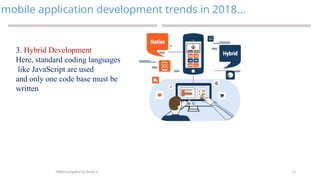
3. Hybrid Development
Here, standard coding languages
like JavaScript are used
and only one code base must be
written
12
mobile application development trends in 2018…
MAD-Compiled by Biruk S.
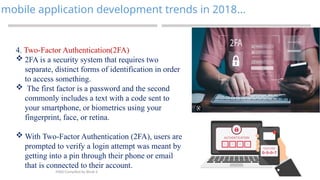
4. Two-Factor Authentication(2FA)
 2FA is a security system that requires two
separate, distinct forms of identification in order
to access something.
 The first factor is a password and the second
commonly includes a text with a code sent to
your smartphone, or biometrics using your
fingerprint, face, or retina.
 With Two-Factor Authentication (2FA), users are
prompted to verify a login attempt was meant by
getting into a pin through their phone or email
that is connected to their account.
13
mobile application development trends in 2018…
MAD-Compiled by Biruk S.
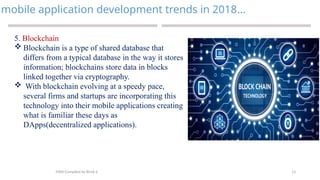
5. Blockchain
 Blockchain is a type of shared database that
differs from a typical database in the way it stores
information; blockchains store data in blocks
linked together via cryptography.
 With blockchain evolving at a speedy pace,
several firms and startups are incorporating this
technology into their mobile applications creating
what is familiar these days as
DApps(decentralized applications).
14
Key Drivers for Mobile Applications
MAD-Compiled by Biruk S.
The following are the key drivers of mobile apps:
 Consumer behavior: Customers are more used to
mobile devices and is easy for them to access
information on the move.
 Personalized content delivery: Enterprise can leverage
the location and sensors to offer more contextualized,
relevant and personalized content, offers and
advertisements.
 Mobile ecosystem: An explosive growth in Mobile
Applications stores such as Apple store, Google Play
store, Windows marketplace store was coupled with
availability of games, utilities and other apps.
 Social Networking: such as Facebook, Twitter users
are increasingly using the location-based features in
the social media platforms.
15
Introduction to Mobile Computing
MAD-Compiled by Biruk S.
 Mobile computing can be defined as a computing
environment over physical mobility.
 The user of the mobile computing environment will be
able to access data, information or logical objects from
any device in any network while on move.
 Wireless telecommunications networks are generally
implemented and administered using radio
communication.
 This implementation takes place at the physical level
(layer) of the OSI model network structure.
16
Introduction to Mobile Computing…
MAD-Compiled by Biruk S.
 Examples of wireless networks include cell
phone networks, wireless local area
networks (WLANs),wireless sensor networks, satellite
communication networks, and
terrestrial microwave networks.
 Mobility/Nomadic is that someone / something can
move or be moved easily and quickly from place to
place.
 Computing – is the operations of the computer.
17
Introduction to Mobile Computing…
MAD-Compiled by Biruk S.
 A computing environment is defined as mobile if it
supports one or more of these characteristics:
 User mobility: User should be able to move from one
physical location to another location and use same
service
 Network mobility: User should be able to move from
one network to another network and use same service
 Device mobility: User should be able to move from
one device to another and use same service
18
Introduction to Mobile Computing…
MAD-Compiled by Biruk S.
 Session mobility: A user session should be able to
move from one user-agent environment to another.
 Service mobility: User should be able to move from
one service to another.
 Host mobility: The user should be either a client or
server.
19
Introduction to Mobile Computing…
MAD-Compiled by Biruk S.
 The mobile computing functions can be logically
divided into following major segments:
1. User with device
2. Network
3. Gateway
20
1.2. Introduction to Android Development
Environment
MAD-Compiled by Biruk S.
21
Android Development Environment…
MAD-Compiled by Biruk S.
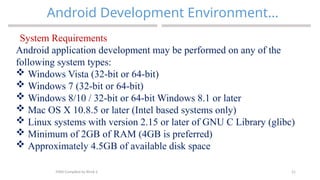
System Requirements
Android application development may be performed on any of the
following system types:
 Windows Vista (32-bit or 64-bit)
 Windows 7 (32-bit or 64-bit)
 Windows 8/10 / 32-bit or 64-bit Windows 8.1 or later
 Mac OS X 10.8.5 or later (Intel based systems only)
 Linux systems with version 2.15 or later of GNU C Library (glibc)
 Minimum of 2GB of RAM (4GB is preferred)
 Approximately 4.5GB of available disk space
22
Android Development Environment…
MAD-Compiled by Biruk S.
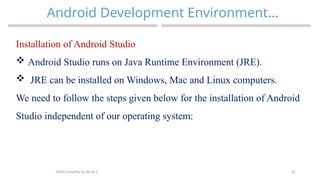
Installation of Android Studio
 Android Studio runs on Java Runtime Environment (JRE).
 JRE can be installed on Windows, Mac and Linux computers.
We need to follow the steps given below for the installation of Android
Studio independent of our operating system:
23
Android Development Environment…
MAD-Compiled by Biruk S.
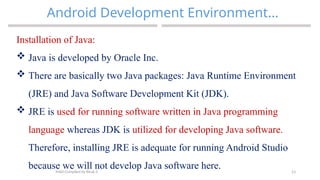
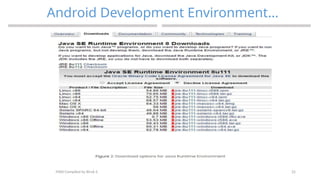
Installation of Java:
 Java is developed by Oracle Inc.
 There are basically two Java packages: Java Runtime Environment
(JRE) and Java Software Development Kit (JDK).
 JRE is used for running software written in Java programming
language whereas JDK is utilized for developing Java software.
Therefore, installing JRE is adequate for running Android Studio
because we will not develop Java software here.
24
Android Development Environment…
MAD-Compiled by Biruk S.
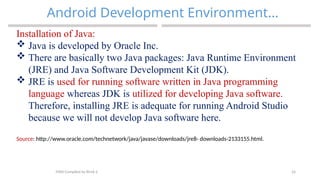
Installation of Java:
 Java is developed by Oracle Inc.
 There are basically two Java packages: Java Runtime Environment
(JRE) and Java Software Development Kit (JDK).
 JRE is used for running software written in Java programming
language whereas JDK is utilized for developing Java software.
Therefore, installing JRE is adequate for running Android Studio
because we will not develop Java software here.
Source: http://www.oracle.com/technetwork/java/javase/downloads/jre8- downloads-2133155.html.
25
Android Development Environment…
MAD-Compiled by Biruk S.
26
Android Development Environment…
MAD-Compiled by Biruk S.
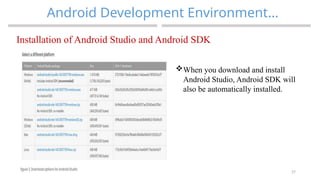
Installation of Android Studio and Android SDK
 Android Studio is bundled with Android Software Development Kit
(SDK). Please navigate to the official download site located at:
https://developer.android.com/studio/index.html.
27
Android Development Environment…
MAD-Compiled by Biruk S.
Installation of Android Studio and Android SDK
When you download and install
Android Studio, Android SDK will
also be automatically installed.
28
Android Development Environment…
MAD-Compiled by Biruk S.
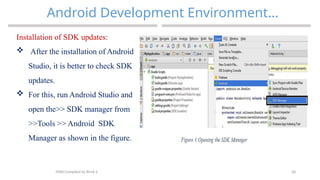
Installation of SDK updates:
 After the installation of Android
Studio, it is better to check SDK
updates.
 For this, run Android Studio and
open the>> SDK manager from
>>Tools >> Android SDK
Manager as shown in the figure.
29
Android Development Environment…
MAD-Compiled by Biruk S.
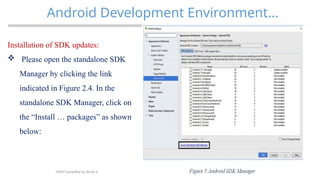
Installation of SDK updates:
 Please open the standalone SDK
Manager by clicking the link
indicated in Figure 2.4. In the
standalone SDK Manager, click on
the “Install … packages” as shown
below:
30
Android Development Environment…
MAD-Compiled by Biruk S.
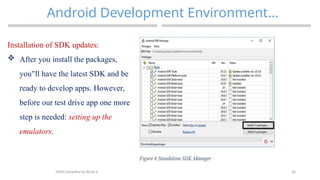
Installation of SDK updates:
 After you install the packages,
you ll have the latest SDK and be
‟
ready to develop apps. However,
before our test drive app one more
step is needed: setting up the
emulators.
31
Android Development Environment…
MAD-Compiled by Biruk S.
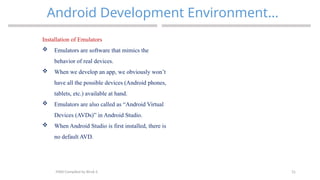
Installation of Emulators
 Emulators are software that mimics the
behavior of real devices.
 When we develop an app, we obviously won’t
have all the possible devices (Android phones,
tablets, etc.) available at hand.
 Emulators are also called as “Android Virtual
Devices (AVDs)” in Android Studio.
 When Android Studio is first installed, there is
no default AVD.
32
Android Development Environment…
MAD-Compiled by Biruk S.
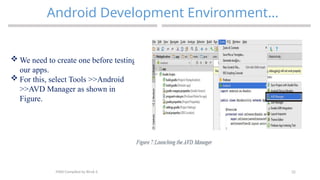
 We need to create one before testing
our apps.
 For this, select Tools >>Android
>>AVD Manager as shown in
Figure.
33
Android Development Environment…
MAD-Compiled by Biruk S.
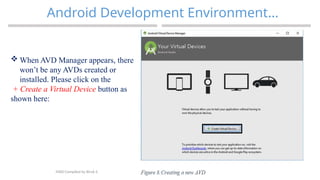
 When AVD Manager appears, there
won’t be any AVDs created or
installed. Please click on the
+ Create a Virtual Device button as
shown here:
34
Android Development Environment…
MAD-Compiled by Biruk S.
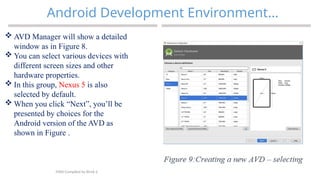
 AVD Manager will show a detailed
window as in Figure 8.
 You can select various devices with
different screen sizes and other
hardware properties.
 In this group, Nexus 5 is also
selected by default.
 When you click “Next”, you’ll be
presented by choices for the
Android version of the AVD as
shown in Figure .
35
Android Development Environment…
MAD-Compiled by Biruk S.
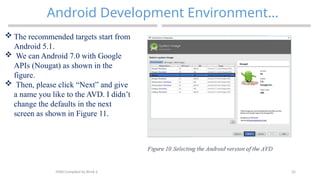
 The recommended targets start from
Android 5.1.
 We can Android 7.0 with Google
APIs (Nougat) as shown in the
figure.
 Then, please click “Next” and give
a name you like to the AVD. I didn’t
change the defaults in the next
screen as shown in Figure 11.
36
Android Development Environment…
MAD-Compiled by Biruk S.
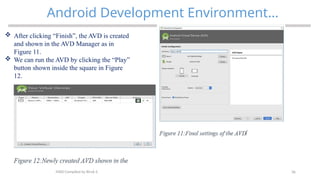
 After clicking “Finish”, the AVD is created
and shown in the AVD Manager as in
Figure 11.
 We can run the AVD by clicking the “Play”
button shown inside the square in Figure
12.
37
Android Development Environment…
MAD-Compiled by Biruk S.
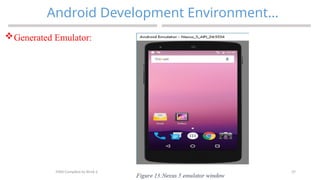
Generated Emulator:
38
Android Development Environment…
MAD-Compiled by Biruk S.
 Within the Android SDK Tools screen, make sure that the following packages are listed as
 Installed in the Status column:
 Android SDK Build-tools
 Android SDK Tools
 Android SDK Platform-tools
 Android Support Repository
 Android Support Library
 Google Repository
 Google USB Driver (Windows only)·
 Intel x86 Emulator Accelerator (HAXM installer)
 In the event that any of the above packages are listed as Not Installed or requiring an update, simply
select the checkboxes next to those packages and click on the Apply button to initiate the installation
process.
39
THANK YOU
?
MAD-Compiled by Biruk S.

MAD-1.pptx mobile application development

  • 1.
  • 2.
    2 Introduction to MobileApp Development Chapter One MAD-Compiled by Biruk S.
  • 3.
    3 What is MobileApplication Development? MAD-Compiled by Biruk S.  Mobile application development : is the process of making software for smartphones, tablets and digital assistants, most commonly for the Android and iOS operating systems.  The software can be preinstalled on the device, downloaded from a mobile app store or accessed through a mobile web browser.  The programming and markup languages used for this kind of software development include Java, Swift, C# and HTML5.
  • 4.
    4 Major Mobile DevelopmentPlatforms MAD-Compiled by Biruk S. Mobile development platforms give developers a single environment possessing all of the tools developers need to create a mobile application. Below are main platforms:
  • 5.
    5 Major Mobile DevelopmentPlatforms MAD-Compiled by Biruk S. iOS  iOS stands for “iPhone Operating System.”  It is the operating system software that runs on Apple's iPhone and iPad devices.  Apple provides iOS developers with many native tools and libraries to develop iOS applications.  You just need to have a mac running OS X to build your application
  • 6.
    6 Major Mobile DevelopmentPlatforms MAD-Compiled by Biruk S. Android  Android is the other dominant player in this space, it was a bit later participant to the game, first being released in Sept 2008.  Android is the mobile OS with the largest most dominant share of the market with around 80% share compared to iOS’s 18 % share.
  • 7.
    7 Android  Android isa mobile operating system that is provided by Google LLC.  It is based on the modified version of the Linux kernel and other open-source software.  It is specifically designed for touchscreen mobile devices like smartphones and tablets.  It was developed using C, Java, C++, and other languages.  The first version of Android was launched by Google in 2008.  The latest stable version of Android is Android 10.  It is the most used operating system overall. MAD-Compiled by Biruk S. What are the primary differences between iOS and Android? iOS  iOS is a mobile operating system that is provided by Apple Incorporation.  It was earlier known as iPhone OS.  It is the world’s second most used mobile operating system after Android.  It is mainly written in C, C++, Objective-C, assembly language, and Swift.  The first version of iOS was launched in 2007.
  • 8.
  • 9.
    9 p mobile applicationdevelopment trends in 2018 MAD-Compiled by Biruk S. 1. Augmented Reality  Augmented reality is an interactive experience that combines the real world and computer-generated content.  For example, in common social media apps nowadays like Snapchat, Instagram and Pokémon Go.
  • 10.
    10 mobile application developmenttrends in 2018… MAD-Compiled by Biruk S. 2. Artificial Intelligence  Artificial intelligence (AI) has been featured in several technological advancements as well as machine learning, language process, automation and much more.  Big-name corporations have been adding this feature(AI) to their mobile apps with notable success like Amazon’s Alexa and Apple’s face recognition software system.  AI create apps more intuitive and it also helps deliver an improved user experience
  • 11.
    11 mobile application developmenttrends in 2018… MAD-Compiled by Biruk S. 3. Hybrid Development Here, standard coding languages like JavaScript are used and only one code base must be written
  • 12.
    12 mobile application developmenttrends in 2018… MAD-Compiled by Biruk S. 4. Two-Factor Authentication(2FA)  2FA is a security system that requires two separate, distinct forms of identification in order to access something.  The first factor is a password and the second commonly includes a text with a code sent to your smartphone, or biometrics using your fingerprint, face, or retina.  With Two-Factor Authentication (2FA), users are prompted to verify a login attempt was meant by getting into a pin through their phone or email that is connected to their account.
  • 13.
    13 mobile application developmenttrends in 2018… MAD-Compiled by Biruk S. 5. Blockchain  Blockchain is a type of shared database that differs from a typical database in the way it stores information; blockchains store data in blocks linked together via cryptography.  With blockchain evolving at a speedy pace, several firms and startups are incorporating this technology into their mobile applications creating what is familiar these days as DApps(decentralized applications).
  • 14.
    14 Key Drivers forMobile Applications MAD-Compiled by Biruk S. The following are the key drivers of mobile apps:  Consumer behavior: Customers are more used to mobile devices and is easy for them to access information on the move.  Personalized content delivery: Enterprise can leverage the location and sensors to offer more contextualized, relevant and personalized content, offers and advertisements.  Mobile ecosystem: An explosive growth in Mobile Applications stores such as Apple store, Google Play store, Windows marketplace store was coupled with availability of games, utilities and other apps.  Social Networking: such as Facebook, Twitter users are increasingly using the location-based features in the social media platforms.
  • 15.
    15 Introduction to MobileComputing MAD-Compiled by Biruk S.  Mobile computing can be defined as a computing environment over physical mobility.  The user of the mobile computing environment will be able to access data, information or logical objects from any device in any network while on move.  Wireless telecommunications networks are generally implemented and administered using radio communication.  This implementation takes place at the physical level (layer) of the OSI model network structure.
  • 16.
    16 Introduction to MobileComputing… MAD-Compiled by Biruk S.  Examples of wireless networks include cell phone networks, wireless local area networks (WLANs),wireless sensor networks, satellite communication networks, and terrestrial microwave networks.  Mobility/Nomadic is that someone / something can move or be moved easily and quickly from place to place.  Computing – is the operations of the computer.
  • 17.
    17 Introduction to MobileComputing… MAD-Compiled by Biruk S.  A computing environment is defined as mobile if it supports one or more of these characteristics:  User mobility: User should be able to move from one physical location to another location and use same service  Network mobility: User should be able to move from one network to another network and use same service  Device mobility: User should be able to move from one device to another and use same service
  • 18.
    18 Introduction to MobileComputing… MAD-Compiled by Biruk S.  Session mobility: A user session should be able to move from one user-agent environment to another.  Service mobility: User should be able to move from one service to another.  Host mobility: The user should be either a client or server.
  • 19.
    19 Introduction to MobileComputing… MAD-Compiled by Biruk S.  The mobile computing functions can be logically divided into following major segments: 1. User with device 2. Network 3. Gateway
  • 20.
    20 1.2. Introduction toAndroid Development Environment MAD-Compiled by Biruk S.
  • 21.
    21 Android Development Environment… MAD-Compiledby Biruk S. System Requirements Android application development may be performed on any of the following system types:  Windows Vista (32-bit or 64-bit)  Windows 7 (32-bit or 64-bit)  Windows 8/10 / 32-bit or 64-bit Windows 8.1 or later  Mac OS X 10.8.5 or later (Intel based systems only)  Linux systems with version 2.15 or later of GNU C Library (glibc)  Minimum of 2GB of RAM (4GB is preferred)  Approximately 4.5GB of available disk space
  • 22.
    22 Android Development Environment… MAD-Compiledby Biruk S. Installation of Android Studio  Android Studio runs on Java Runtime Environment (JRE).  JRE can be installed on Windows, Mac and Linux computers. We need to follow the steps given below for the installation of Android Studio independent of our operating system:
  • 23.
    23 Android Development Environment… MAD-Compiledby Biruk S. Installation of Java:  Java is developed by Oracle Inc.  There are basically two Java packages: Java Runtime Environment (JRE) and Java Software Development Kit (JDK).  JRE is used for running software written in Java programming language whereas JDK is utilized for developing Java software. Therefore, installing JRE is adequate for running Android Studio because we will not develop Java software here.
  • 24.
    24 Android Development Environment… MAD-Compiledby Biruk S. Installation of Java:  Java is developed by Oracle Inc.  There are basically two Java packages: Java Runtime Environment (JRE) and Java Software Development Kit (JDK).  JRE is used for running software written in Java programming language whereas JDK is utilized for developing Java software. Therefore, installing JRE is adequate for running Android Studio because we will not develop Java software here. Source: http://www.oracle.com/technetwork/java/javase/downloads/jre8- downloads-2133155.html.
  • 25.
  • 26.
    26 Android Development Environment… MAD-Compiledby Biruk S. Installation of Android Studio and Android SDK  Android Studio is bundled with Android Software Development Kit (SDK). Please navigate to the official download site located at: https://developer.android.com/studio/index.html.
  • 27.
    27 Android Development Environment… MAD-Compiledby Biruk S. Installation of Android Studio and Android SDK When you download and install Android Studio, Android SDK will also be automatically installed.
  • 28.
    28 Android Development Environment… MAD-Compiledby Biruk S. Installation of SDK updates:  After the installation of Android Studio, it is better to check SDK updates.  For this, run Android Studio and open the>> SDK manager from >>Tools >> Android SDK Manager as shown in the figure.
  • 29.
    29 Android Development Environment… MAD-Compiledby Biruk S. Installation of SDK updates:  Please open the standalone SDK Manager by clicking the link indicated in Figure 2.4. In the standalone SDK Manager, click on the “Install … packages” as shown below:
  • 30.
    30 Android Development Environment… MAD-Compiledby Biruk S. Installation of SDK updates:  After you install the packages, you ll have the latest SDK and be ‟ ready to develop apps. However, before our test drive app one more step is needed: setting up the emulators.
  • 31.
    31 Android Development Environment… MAD-Compiledby Biruk S. Installation of Emulators  Emulators are software that mimics the behavior of real devices.  When we develop an app, we obviously won’t have all the possible devices (Android phones, tablets, etc.) available at hand.  Emulators are also called as “Android Virtual Devices (AVDs)” in Android Studio.  When Android Studio is first installed, there is no default AVD.
  • 32.
    32 Android Development Environment… MAD-Compiledby Biruk S.  We need to create one before testing our apps.  For this, select Tools >>Android >>AVD Manager as shown in Figure.
  • 33.
    33 Android Development Environment… MAD-Compiledby Biruk S.  When AVD Manager appears, there won’t be any AVDs created or installed. Please click on the + Create a Virtual Device button as shown here:
  • 34.
    34 Android Development Environment… MAD-Compiledby Biruk S.  AVD Manager will show a detailed window as in Figure 8.  You can select various devices with different screen sizes and other hardware properties.  In this group, Nexus 5 is also selected by default.  When you click “Next”, you’ll be presented by choices for the Android version of the AVD as shown in Figure .
  • 35.
    35 Android Development Environment… MAD-Compiledby Biruk S.  The recommended targets start from Android 5.1.  We can Android 7.0 with Google APIs (Nougat) as shown in the figure.  Then, please click “Next” and give a name you like to the AVD. I didn’t change the defaults in the next screen as shown in Figure 11.
  • 36.
    36 Android Development Environment… MAD-Compiledby Biruk S.  After clicking “Finish”, the AVD is created and shown in the AVD Manager as in Figure 11.  We can run the AVD by clicking the “Play” button shown inside the square in Figure 12.
  • 37.
    37 Android Development Environment… MAD-Compiledby Biruk S. Generated Emulator:
  • 38.
    38 Android Development Environment… MAD-Compiledby Biruk S.  Within the Android SDK Tools screen, make sure that the following packages are listed as  Installed in the Status column:  Android SDK Build-tools  Android SDK Tools  Android SDK Platform-tools  Android Support Repository  Android Support Library  Google Repository  Google USB Driver (Windows only)·  Intel x86 Emulator Accelerator (HAXM installer)  In the event that any of the above packages are listed as Not Installed or requiring an update, simply select the checkboxes next to those packages and click on the Apply button to initiate the installation process.
  • 39.