What is Marketing Analytics?
• Marketing analytics is the practice of using
data to evaluate the effectiveness and success
of marketing activities. Marketing analytics
allows you to gather deeper consumer
insights, optimize your marketing objectives,
and get a better return on investment.
• Marketing analytics benefits both marketers and
consumers. This analysis allows marketers to achieve
higher ROI on marketing investments by understanding
what is successful in driving either conversions, brand
awareness, or both. Analytics also ensures that
consumers see a greater number of targeted,
personalized ads that speak to their specific needs and
interests, rather than mass communications that tend
to annoy.
• Marketing data can be analyzed using a variety of
methods and models depending on the KPIs being
measured. For example, analysis of brand awareness
relies upon different data and models than analysis of
conversions.
Some popular analytics models and
methods include:
• Media Mix Models (MMM): Attribution models
that look at aggregate data over a long period of
time.
• Multi-Touch Attribution (MTA): Attribution
models that provide person-level data from
across the buyer’s journey.
• Unified Marketing Measurement (UMM): A form
of measurement that integrates various
attribution models including MMM and MTA into
comprehensive engagement metrics.
How Organizations Use Marketing
Analytics
• Marketing analytics data helps your business make decisions on
everything from ad spend to product updates, branding and more.
To give yourself a true 360 degree view of your campaigns and be
sure you are making the right decisions, it's important to take data
from multiple sources (online and offline). Using this data, your
team can gain insights into the following:
Product Intelligence
• Product intelligence involves taking a deep dive into the brand’s
products as well as analyzing how those products stack up within
the market. Typically done by speaking to consumers, polling target
audiences or engaging them with surveys, organizations can better
understand the differentiators and competitive advantages of their
products. From there, teams can better align products to the
unique consumer interests and problems that help drive
conversions.
Customer Trends and Preferences
• Analytics can tell a lot about your consumers. What
messaging / creative resonates with them? Which products
are they buying and which have they researched in the
past? Which ads are leading to conversions and which are
ignored?
Product Development Trends
• Analytics can also offer insight into the types of product
features consumers want. Marketing teams can pass this
information on to product development for future
iterations.
Customer Support
• Analytics also helps uncover areas of the buyer’s journey
that could be simplified or improved. Where are your
clients struggling? Are there ways you can simplify your
product or make the check-out process easier?
Messaging and Media
• Data analysis can determine where marketers choose to display
messages for particular consumers. This has become especially
important due to the sheer number of channels. In addition to
traditional marketing channels such as print, television and
broadcast, marketers must also know which digital channels and
social media networks consumers prefer. Analytics answers these
key questions:
• What media should you be buying?
• Which are driving the most sales?
• What message is resonating with your audience?
Competition
• How do your marketing efforts compare with the competition?
How can you close that gap if there is one? Are there opportunities
your competitors are capitalizing on that you may have missed?
Predictive Analysis
• Predictive analytics is a branch of advanced
analytics that makes predictions about future
outcomes using historical data combined with
statistical modeling, data mining techniques
and machine learning.
• Companies employ predictive analytics to find
patterns in this data to identify risks and
opportunities. Predictive analytics is often
associated with big data and data science.
• Today, companies are flooded with data from
log files to images and video, and all of this
data resides in disparate data repositories
across an organization.
• To gain insights from this data, data scientists
use deep learning and machine learning
algorithms to find patterns and make
predictions about future events.
• Some of these statistical techniques include
logistic and linear regression models, neural
networks and decision trees.
Types of predictive modeling
• Predictive analytics models are designed to
assess historical data, discover patterns,
observe trends, and use that information to
predict future trends. Popular predictive
analytics models include:
• Classification,
• Clustering, and
• Time series models.
Classification models
• Classification models fall under the branch
of supervised machine learning models.
• These models categorize data based on historical data,
describing relationships within a given dataset.
• For example, this model can be used to classify
customers or prospects into groups for segmentation
purposes.
• Alternatively, it can also be used to answer questions
with binary outputs, such answering yes or no or true
and false; popular use cases for this are fraud detection
and credit risk evaluation.
• Types of classification models include logistic
regression, decision trees, random forest, neural
networks, and Naive Bayes
Clustering models
• Clustering models fall under unsupervised learning.
• They group data based on similar attributes.
• For example, an e-commerce site can use the model to
separate customers into similar groups based on
common features and develop marketing strategies for
each group.
• Common clustering algorithms include k-means
clustering, mean-shift clustering, density-based spatial
clustering of applications with noise (DBSCAN),
expectation-maximization (EM) clustering using
Gaussian Mixture Models (GMM), and hierarchical
clustering.
Time series models
• Time series models use various data inputs at a specific
time frequency, such as daily, weekly, monthly, et
cetera.
• It is common to plot the dependent variable over time
to assess the data for seasonality, trends, and cyclical
behavior, which may indicate the need for specific
transformations and model types.
• Autoregressive (AR), moving average (MA), ARMA, and
ARIMA models are all frequently used time series
models.
• As an example, a call center can use a time series
model to forecast how many calls it will receive per
hour at different times of day.
Three of the most widely used predictive modeling
techniques are decision trees, regression and neural
networks.
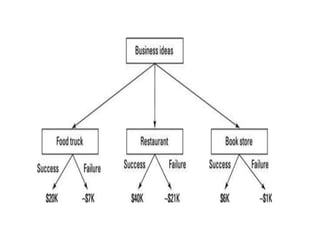
• Decision trees are classification models that partition data
into subsets based on categories of input variables.
• This helps you understand someone's path of decisions. A
decision tree looks like a tree with each branch
representing a choice between a number of alternatives,
and each leaf representing a classification or decision.
• This model looks at the data and tries to find the one
variable that splits the data into logical groups that are the
most different. Decision trees are popular because they are
easy to understand and interpret.
• They also handle missing values well and are useful for
preliminary variable selection. So, if you have a lot of
missing values or want a quick and easily interpretable
answer, you can start with a tree.
• Regression (linear and logistic) is one of the most popular method
in statistics. Regression analysis estimates relationships among
variables. Intended for continuous data that can be assumed to
follow a normal distribution, it finds key patterns in large data sets
and is often used to determine how much specific factors, such as
the price, influence the movement of an asset.
• With regression analysis, we want to predict a number, called the
response or Y variable. With linear regression, one independent
variable is used to explain and/or predict the outcome of Y. Multiple
regression uses two or more independent variables to predict the
outcome.
• With logistic regression, unknown variables of a discrete variable
are predicted based on known value of other variables. The
response variable is categorical, meaning it can assume only a
limited number of values.
• With binary logistic regression, a response variable has only two
values such as 0 or 1. In multiple logistic regression, a response
variable can have several levels, such as low, medium and high, or 1,
2 and 3.
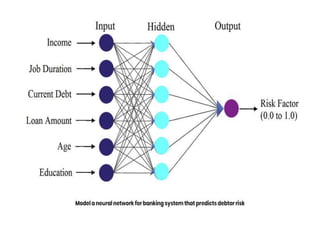
• Neural networks are sophisticated techniques capable of
modeling extremely complex relationships. They’re popular
because they’re powerful and flexible.
• The power comes in their ability to handle nonlinear
relationships in data, which is increasingly common as we
collect more data.
• They are often used to confirm findings from simple
techniques like regression and decision trees.
• Neural networks are based on pattern recognition and
some AI processes that graphically “model” parameters.
They work well when no mathematical formula is known
that relates inputs to outputs, prediction is more important
than explanation or there is a lot of training data. Artificial
neural networks were originally developed by researchers
who were trying to mimic the neurophysiology of the
human brain.
Predictive analytics industry use cases
• Predictive analytics can be deployed in across
various industries for different business
problems. Below are a few industry use cases
to illustrate how predictive analytics can
inform decision-making within real-world
situations.
• Banking: Financial services use machine learning and
quantitative tools to predict credit risk and detect fraud. As
an example, BondIT is a company that specializes in fixed-
income asset-management services. Predictive analytics
allows them to support dynamic market changes in real-
time in addition to static market constraints. This use of
technology allows it to both customize personal services for
clients and to minimize risk.
• Healthcare: Predictive analytics in health care is used to
detect and manage the care of chronically ill patients, as
well as to track specific infections such as sepsis. Geisinger
Health used predictive analytics to mine health records to
learn more about how sepsis is diagnosed and
treated. Geisinger created a predictive model based on
health records for more than 10,000 patients who had been
diagnosed with sepsis in the past. The model yielded
impressive results, correctly predicting patients with a high
rate of survival.
• Human resources (HR): HR teams use predictive analytics
and employee survey metrics to match prospective job
applicants, reduce employee turnover and increase
employee engagement. This combination of quantitative
and qualitative data allows businesses to reduce their
recruiting costs and increase employee satisfaction, which
is particularly useful when labor markets are volatile.
• Marketing and sales: While marketing and sales teams are
very familiar with business intelligence reports to
understand historical sales performance, predictive
analytics enables companies to be more proactive in the
way that they engage with their clients across the customer
lifecycle. For example, churn predictions can enable sales
teams to identify dissatisfied clients sooner, enabling them
to initiate conversations to promote retention. Marketing
teams can leverage predictive data analysis for cross-sell
strategies, and this commonly manifests itself through a
recommendation engine on a brand’s website.
• Supply chain: Businesses commonly use
predictive analytics to manage product
inventory and set pricing strategies. This type
of predictive analysis helps companies meet
customer demand without overstocking
warehouses. It also enables companies to
assess the cost and return on their products
over time. If one part of a given product
becomes more expensive to import,
companies can project the long-term impact
on revenue if they do or do not pass on
additional costs to their customer base.
Benefits of predictive modeling
An organization that knows what to expect based on past
patterns has a business advantage in managing inventories,
workforce, marketing campaigns, and most other facets of
operation.
• Security: Every modern organization must be concerned
with keeping data secure. A combination of automation
and predictive analytics improves security. Specific patterns
associated with suspicious and unusual end user behavior
can trigger specific security procedures.
• Risk reduction: In addition to keeping data secure, most
businesses are working to reduce their risk profiles. For
example, a company that extends credit can use data
analytics to better understand if a customer poses a
higher-than-average risk of defaulting. Other companies
may use predictive analytics to better understand whether
their insurance coverage is adequate.
• Operational efficiency:
More efficient workflows translate to improved profit
margins. For example, understanding when a vehicle
in a fleet used for delivery is going to need
maintenance before it’s broken down on the side of
the road means deliveries are made on time, without
the additional costs of having the vehicle towed and
bringing in another employee to complete the
delivery.
• Improved decision making: Running any business
involves making calculated decisions. Any expansion or
addition to a product line or other form of growth
requires balancing the inherent risk with the potential
outcome. Predictive analytics can provide insight to
inform the decision-making process and offer a
competitive advantage.
Why is predictive analytics
important?
Organizations are turning to predictive analytics to
help solve difficult problems and uncover new
opportunities. Common uses include:
• Detecting fraud. Combining multiple analytics methods can
improve pattern detection, identify criminal behavior
and prevent fraud. As cyber security becomes a growing
concern, high-performance behavioral analytics examines
all actions on a network in real time to spot abnormalities
that may indicate fraud, zero-day vulnerabilities and
advanced persistent threats.
• Optimizing marketing campaigns. Predictive analytics are
used to determine customer responses or purchases, as
well as promote cross-sell opportunities. Predictive models
help businesses attract, retain and grow their most
profitable customers.
• Improving operations. Many companies use predictive
models to forecast inventory and manage resources.
Airlines use predictive analytics to set ticket prices.
Hotels try to predict the number of guests for any given
night to maximize occupancy and increase revenue.
Predictive analytics enables organizations to function
more efficiently.
• Reducing risk. Credit scores are used to assess a
buyer’s likelihood of default for purchases and are a
well-known example of predictive analytics. A credit
score is a number generated by a predictive model that
incorporates all data relevant to a person’s
creditworthiness. Other risk-related uses include
insurance claims and collections.
Applications of Predictive Analytics:
• Customer Relationship Management (CRM): Predictive
analytics helps businesses predict customer behavior,
identify high-value customers, and personalize marketing
efforts.
• Financial Forecasting: In finance, predictive analytics is
used for stock price prediction, credit risk assessment, and
fraud detection.
• Healthcare: Predictive analytics can be used for patient
outcome prediction, disease outbreak detection, and
resource allocation in healthcare facilities.
• Manufacturing: Predictive maintenance uses sensor data
to predict when machinery or equipment is likely to fail,
allowing for proactive maintenance.
• Retail: Retailers use predictive analytics for demand
forecasting, inventory optimization, and pricing
optimization.
• Marketing: Predictive models help marketers identify
the most effective marketing channels and strategies
for reaching their target audience.
• Human Resources: Predictive analytics is used for
talent acquisition, employee retention, and workforce
planning.
• Transportation: In logistics and transportation,
predictive analytics can optimize routes, reduce fuel
consumption, and improve delivery times.
• Weather Forecasting: Meteorologists use predictive
analytics to forecast weather conditions and natural
disasters.
• Sports Analytics: In sports, predictive analytics is used
for player performance prediction, game outcome
prediction, and injury prevention.
Charts Using Excel
• Charts are a powerful tool for data presentation
and analysis, but their effectiveness depends on
careful design, appropriate choice of chart type,
and consideration of the audience. When used
correctly, charts can enhance understanding and
decision-making, but when used poorly, they can
lead to confusion and misinterpretation.
• In today's data-driven world, the ability to
effectively analyze and present data is a critical
skill. Charts, with their visual representation of
data, play a pivotal role in this process. Microsoft
Excel, a widely used spreadsheet software,
provides a powerful platform for creating,
customizing, and interpreting charts.
The Importance of Data Visualization
• Data visualization is the graphical representation
of data to uncover insights, trends, and patterns
that might not be evident in raw numbers or text.
• It transforms abstract data into a visual form that
is easier to comprehend and analyze.
Visualizations, such as charts and graphs, enable
decision-makers to quickly grasp the significance
of data, make informed choices, and
communicate findings effectively.
• Excel, as a versatile tool for data analysis, offers a
wide range of chart types, each suited to different
types of data and analytical needs. Let's delve
into the process of creating and interpreting
charts in Excel.
Creating Charts in Excel
The process of creating a chart in Excel is straightforward
and typically follows these steps:
Step 1: Data Preparation
• Before chart creation, it is essential to have your data well-
organized within Excel. Data should be arranged in a
structured manner with appropriate headers. For example,
if you have sales data for various products over several
months, the columns could represent products, and rows
represent months.
Step 2: Select Data
• Highlight the data you want to use in your chart. This data
selection process is crucial, as it determines what
information the chart will represent. Excel automatically
detects the selected data when creating a chart, but you
can modify it later if needed.
Step 3: Insert Chart
• With the data selected, navigate to the "Insert" tab in
Excel's ribbon. Here, you'll find a variety of chart types
to choose from, including bar charts, column charts,
line charts, pie charts, and more. Select the chart type
that best suits your data and analytical goals.
Step 4: Customize the Chart
• Excel generates a default chart based on your selected
data. However, customization is key to creating a chart
that effectively conveys your message. You can
customize various elements, such as titles, labels,
colors, and styles, to enhance the chart's visual appeal
and clarity. Right-clicking on chart elements allows you
to access formatting options.
Step 5: Data Labels and Annotations
• To make your chart more informative, consider adding
data labels, markers, or annotations. Data labels can
provide specific values, and annotations can highlight
key points or trends within the data.
Step 6: Save or Export the Chart
• You can save the chart as part of your Excel workbook
or export it as an image for use in other documents or
presentations. Saving the chart within the workbook
ensures that it updates when your data changes.
Step 7: Update Chart Data (If Necessary)
• Data is not static, and your chart may need to be
updated as new information becomes available. Excel
makes it easy to update your chart by allowing you to
modify the data range associated with it.
Interpreting Charts in Excel
• Creating charts is only half of the equation.
Interpreting the information presented by the chart is
equally crucial. Here are some key aspects to consider
when interpreting charts in Excel:
1. Chart Type Selection
• The choice of chart type should align with the data and
the message you want to convey. For instance, use bar
charts for comparing values across categories, line
charts for showing trends over time, and pie charts for
displaying proportions of a whole.
2. Axis Scaling
• Understanding the scaling of the chart's axes is vital.
Misleading scales can distort the perception of data.
Ensure that axes are appropriately labeled and scaled
to reflect the data accurately.
3. Data Labels and Legends
• Data labels on data points or bars can provide
precise values, while legends explain the
different elements within the chart. Labels
should be clear and concise.
4. Trends and Patterns
• Examine the chart for trends, patterns, and
outliers. Are there any noticeable spikes or
dips in the data? Do the lines on a line chart
show upward or downward trends over time?
5. Comparisons and Disparities
• Charts excel at facilitating comparisons.
Identify any disparities between data points or
categories and consider their implications. Are
certain products performing significantly
better than others?
6. Data Sources and Context
• Always provide context for your charts.
Mention the data source, date range, and any
relevant context that helps viewers understand
the significance of the data.
Advantages of Charts:
• Data Visualization: Charts provide a visual representation
of data, making it easier for individuals to comprehend
complex information at a glance. They can reveal trends,
patterns, and relationships in the data that might not be
apparent in raw numbers.
• Clarity and Simplicity: Charts simplify complex data sets,
making it simpler for users to understand and interpret the
information. They can distill large amounts of data into a
concise and comprehensible format.
• Comparison: Charts facilitate easy comparison of different
data points, whether it's comparing values over time,
across categories, or between different data series. This
helps in making informed decisions.
• Highlighting Key Points: Charts allow you to emphasize
specific data points or trends by using formatting options
like colors, labels, and annotations. This helps draw
attention to important information.
• Highlighting Key Points: Charts allow you to
emphasize specific data points or trends by using
formatting options like colors, labels, and
annotations. This helps draw attention to
important information.
• Engagement: Visual elements like charts can
engage your audience more effectively than
tables of numbers, making presentations, reports,
and dashboards more engaging and memorable.
• Universal Language: Charts can be understood by
a wide range of people, regardless of language
barriers, making them a valuable tool in global
communication.
Disadvantages of Charts:
• Misinterpretation: Poorly designed or misleading charts
can lead to misinterpretation of data. Choosing the wrong
chart type or using incorrect scales can distort the true
meaning of the data.
• Overcomplication: While charts simplify data, it's possible
to overcomplicate them by adding too many elements or
using overly complex chart types. This can confuse the
audience rather than clarify the data.
• Limited Detail: Charts are a summarized representation of
data. They may not convey all the details present in the raw
data, which can be a disadvantage in situations where
precision is crucial.
• Subjectivity: Design choices in charts, such as color
schemes and labeling, can introduce subjectivity and bias
into the presentation of data.
• Data Quality: Charts can't fix problems with
data quality. If the underlying data is
inaccurate or incomplete, the chart will reflect
those issues.
• Accessibility: Not all individuals may be able
to interpret charts effectively, particularly
those with visual impairments. Special
consideration is needed to ensure accessibility.
• Maintenance: Charts may need to be updated
when data changes. If not kept up-to-date,
outdated charts can lead to incorrect
conclusions.
Conclusion
• Charts in Excel serve as invaluable tools for
transforming raw data into meaningful
insights.
• They allow us to see, understand, and
communicate complex information efficiently.
Creating charts in Excel is a relatively
straightforward process, but effective
interpretation requires a critical eye and an
understanding of the data's context.
Pivot Table
• A pivot table is a powerful data analysis tool
used in spreadsheet software, primarily in
applications like Microsoft Excel, Google
Sheets, and other similar programs.
• It is designed to help users summarize,
analyze, and manipulate large sets of data in a
structured and meaningful way. Pivot tables
are particularly useful for tasks such as data
summarization, cross-tabulation, and
generating insights from complex datasets.
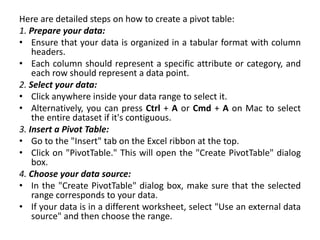
Here are detailed steps on how to create a pivot table:
1. Prepare your data:
• Ensure that your data is organized in a tabular format with column
headers.
• Each column should represent a specific attribute or category, and
each row should represent a data point.
2. Select your data:
• Click anywhere inside your data range to select it.
• Alternatively, you can press Ctrl + A or Cmd + A on Mac to select
the entire dataset if it's contiguous.
3. Insert a Pivot Table:
• Go to the "Insert" tab on the Excel ribbon at the top.
• Click on "PivotTable." This will open the "Create PivotTable" dialog
box.
4. Choose your data source:
• In the "Create PivotTable" dialog box, make sure that the selected
range corresponds to your data.
• If your data is in a different worksheet, select "Use an external data
source" and then choose the range.
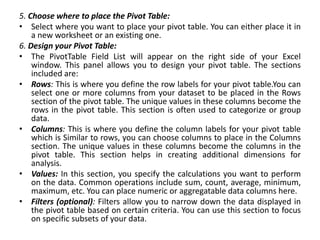
5. Choose where to place the Pivot Table:
• Select where you want to place your pivot table. You can either place it in
a new worksheet or an existing one.
6. Design your Pivot Table:
• The PivotTable Field List will appear on the right side of your Excel
window. This panel allows you to design your pivot table. The sections
included are:
• Rows: This is where you define the row labels for your pivot table.You can
select one or more columns from your dataset to be placed in the Rows
section of the pivot table. The unique values in these columns become the
rows in the pivot table. This section is often used to categorize or group
data.
• Columns: This is where you define the column labels for your pivot table
which is Similar to rows, you can choose columns to place in the Columns
section. The unique values in these columns become the columns in the
pivot table. This section helps in creating additional dimensions for
analysis.
• Values: In this section, you specify the calculations you want to perform
on the data. Common operations include sum, count, average, minimum,
maximum, etc. You can place numeric or aggregatable data columns here.
• Filters (optional): Filters allow you to narrow down the data displayed in
the pivot table based on certain criteria. You can use this section to focus
on specific subsets of your data.
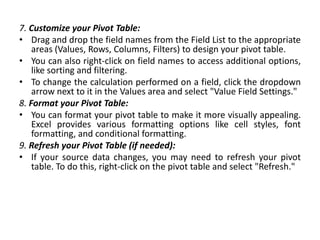
7. Customize your Pivot Table:
• Drag and drop the field names from the Field List to the appropriate
areas (Values, Rows, Columns, Filters) to design your pivot table.
• You can also right-click on field names to access additional options,
like sorting and filtering.
• To change the calculation performed on a field, click the dropdown
arrow next to it in the Values area and select "Value Field Settings."
8. Format your Pivot Table:
• You can format your pivot table to make it more visually appealing.
Excel provides various formatting options like cell styles, font
formatting, and conditional formatting.
9. Refresh your Pivot Table (if needed):
• If your source data changes, you may need to refresh your pivot
table. To do this, right-click on the pivot table and select "Refresh."
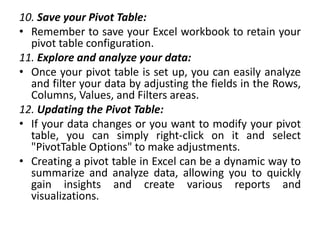
10. Save your Pivot Table:
• Remember to save your Excel workbook to retain your
pivot table configuration.
11. Explore and analyze your data:
• Once your pivot table is set up, you can easily analyze
and filter your data by adjusting the fields in the Rows,
Columns, Values, and Filters areas.
12. Updating the Pivot Table:
• If your data changes or you want to modify your pivot
table, you can simply right-click on it and select
"PivotTable Options" to make adjustments.
• Creating a pivot table in Excel can be a dynamic way to
summarize and analyze data, allowing you to quickly
gain insights and create various reports and
visualizations.
Advantages of Pivot Tables:
• Data Summarization: Pivot tables provide a simple and efficient
way to summarize large datasets. You can quickly create summaries
of data, such as sums, averages, counts, or percentages, without
writing complex formulas or manually sorting and filtering data.
• Flexibility: Pivot tables are highly flexible. You can easily change the
structure of the table by dragging and dropping fields into different
areas (rows, columns, values, and filters). This flexibility allows you
to explore different angles of your data without altering the original
dataset.
• Data Exploration: They are excellent for data exploration. You can
quickly switch between different dimensions and metrics to gain
insights into your data from various perspectives. This helps identify
trends, patterns, and outliers.
• Dynamic Updates: Pivot tables update dynamically when the
source data changes. So, if you add, delete, or modify data in the
source dataset, the pivot table will automatically reflect these
changes, saving you time on manual updates.
• Aggregation: Pivot tables make it easy to aggregate data by
multiple criteria. For example, you can summarize sales
data by product, region, and time period simultaneously,
providing a comprehensive view of your data.
• Customization: You can customize pivot tables to suit your
specific needs. You can format the table, change
column/row labels, add calculated fields, and apply various
styles to make your data presentation more visually
appealing and informative.
• Quick Filtering: Pivot tables include built-in filters that
allow you to quickly narrow down the data you want to
analyze. You can filter by values, labels, date ranges, and
more, making it easy to focus on specific aspects of your
data.
• Easy to Learn: Pivot tables are relatively easy to learn, even
for users with limited experience in data analysis. Many
spreadsheet programs offer intuitive drag-and-drop
interfaces for creating pivot tables.
• Reduced Risk of Errors: Since pivot tables automate
data summarization and calculations, they reduce the
risk of human errors that can occur when manually
manipulating data.
• Enhanced Decision-Making: Pivot tables enable better
decision-making by providing a clear, structured view
of data. They help users quickly identify trends,
anomalies, and key performance indicators, which are
essential for making informed decisions.
• Time Savings: Using pivot tables can save a significant
amount of time compared to manually performing the
same calculations and data summarization tasks.
• Scalability: Pivot tables are scalable, meaning they can
handle both small and large datasets efficiently. They
are particularly useful when dealing with substantial
amounts of data.
Disadvantages of Pivot Tables:
• Limited Chart Customization: Pivot tables are great for quickly
summarizing data and creating basic charts. However, if you need
highly customized or complex charts, you may find that pivot tables
don't offer the level of control and flexibility you need.
• Complexity with Large Datasets: When dealing with extremely
large datasets, pivot tables can become slow and may even cause
performance issues in your spreadsheet software. This can make it
challenging to work with big data sets.
• Data Aggregation Limitations: Pivot tables are primarily designed
for data aggregation, so if you need to perform more advanced
calculations or statistical analysis on your data, you may find them
limiting. You might have to export the summarized data and
perform further analysis in another tool.
• Limited Support for Hierarchical Data: While pivot tables can
handle hierarchical data to some extent, they may not be the best
choice for deeply nested hierarchies or when you need to perform
complex calculations on hierarchical data.
• Data Integrity: Pivot tables are dependent on the quality and
consistency of the source data. If the source data is messy or
contains errors, it can lead to incorrect or misleading results in the
pivot table.
• Limited Cross-Table Analysis: Pivot tables are typically designed to
work with a single data table. If you need to perform cross-table
analysis (e.g., combining data from multiple sources), you may need
to pre-process the data before using a pivot table.
• Learning Curve: While pivot tables are relatively easy to use for
basic tasks, they can become more complex when dealing with
advanced features or large datasets. Users with limited experience
may find them intimidating.
• Compatibility Issues: Pivot table features and
functionality may vary between different
spreadsheet software applications (e.g.,
Microsoft Excel, Google Sheets, and others).
Compatibility issues can arise when sharing pivot
table files across different platforms.
• Resource Intensive: Creating and refreshing pivot
tables can consume a significant amount of
system resources, especially for large datasets.
This can slow down your computer and make it
less responsive while working with pivot tables.
Exploratory Data Analysis (EDA)
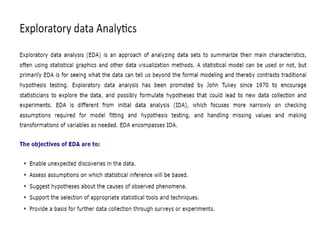
• Exploratory Data Analysis (EDA) is a
fundamental step in the data analysis process,
where raw data is examined, visualized, and
summarized to understand its underlying
structure and patterns. It is a crucial stage in
data science and statistics, serving as the
foundation for more advanced analyses.
EDA serves several essential purposes
in data analysis:
• Data Understanding: EDA helps analysts gain an
in-depth understanding of the data they are
working with. It involves exploring the data's
features, distribution, and basic statistics.
• Detecting Patterns: By visualizing and
summarizing data, EDA uncovers hidden patterns,
trends, and relationships within the dataset. This
can lead to valuable insights.
• Data Cleaning: Identifying and handling missing
values, outliers, or errors is a critical part of EDA.
Clean data is essential for accurate analysis.
• Hypothesis Generation: EDA often generates
hypotheses about relationships or phenomena in
the data, which can be tested later using more
advanced techniques.
• Feature Selection: EDA can help in identifying
which features or variables are most relevant for
further analysis, reducing dimensionality and
computational complexity.
• Communication: EDA results are often visual and
intuitive, making them an effective way to
communicate findings to both technical and non-
technical stakeholders.
Key Principles of Exploratory Data
Analysis
• Visualization: Visualization is a cornerstone of EDA. Tools
like scatter plots, histograms, box plots, and heatmaps
provide a visual overview of data distribution, relationships,
and anomalies.
• Summary Statistics: Basic statistics, such as mean, median,
standard deviation, and quartiles, offer insights into data
central tendency and variability.
• Data Transformation: Transforming data, such as
normalization or log transformation, can make it more
suitable for analysis and reveal patterns that might be
hidden in the original form.
• Handling Missing Data: EDA involves strategies for dealing
with missing data, which can include imputation or
exclusion based on the nature and extent of missingness.
• Outlier Detection: Identifying outliers—data
points significantly different from the majority—is
crucial, as outliers can skew analysis results.
• Correlation Analysis: Understanding correlations
between variables helps in identifying potential
relationships and dependencies within the data.
• Data Grouping: Grouping data based on
categorical variables allows for comparisons and
insights into how different categories affect the
data.
Techniques and Tools of EDA
• Exploratory Data Analysis employs a variety of
techniques and tools to extract meaningful insights
from data:
• Descriptive Statistics: This involves calculating and
examining summary statistics like mean, median,
mode, variance, and percentiles to understand the
data's central tendency and dispersion.
• Data Visualization: Visualization tools such as scatter
plots, bar charts, line graphs, and heatmaps help in
representing data graphically, making patterns and
trends more apparent.
• Histograms: Histograms display the distribution of
continuous data by dividing it into bins and counting
the number of observations in each bin.
• Box Plots: Box plots illustrate the distribution of
data and help identify outliers and the presence
of skewness.
• Correlation Heatmaps: Heatmaps visually
represent the correlation matrix between
variables, highlighting strong and weak
correlations.
• Pair Plots: Pair plots are useful for visualizing
relationships between multiple variables in a
dataset. ------- Pair plot visualizes given data to
find the relationship between them where the
variables can be continuous or categorical.
Plot pairwise relationships in a data-set.
• Dimensionality Reduction: Techniques like
Principal Component Analysis (PCA) can be
applied to reduce the dimensionality of data
while preserving as much information as possible.
• Cluster Analysis: Clustering algorithms can group
similar data points together, aiding in pattern
recognition and segmentation.
• Time Series Analysis: For time-dependent data,
time series analysis techniques, such as
autocorrelation and seasonal decomposition, can
reveal temporal patterns.
The Importance of Exploratory Data
Analysis
EDA offers significant value to organizations and
analysts in various domains:
• Data Quality Assurance: EDA helps identify and
address data quality issues, ensuring that subsequent
analyses are based on reliable information.
• Hypothesis Generation: The insights gained from EDA
can lead to the formulation of hypotheses for further
testing, guiding the research process.
• Data-Driven Decision Making: EDA equips decision-
makers with a deeper understanding of the data,
enabling them to make informed choices.
• Risk Assessment: EDA can uncover potential risks
or anomalies in data, allowing organizations to
mitigate them proactively.
• Innovation and Optimization: EDA can inspire
innovative solutions and optimizations by
revealing new perspectives on data.
• Resource Allocation: It aids in the efficient
allocation of resources by identifying areas where
interventions or improvements are needed.
• Competitive Advantage: Organizations that
harness EDA effectively gain a competitive edge
by making data-driven decisions and uncovering
market opportunities.
Conclusion
• Exploratory Data Analysis is an indispensable step
in the data analysis process. By scrutinizing,
visualizing, and summarizing data, EDA helps
analysts uncover hidden patterns, detect
anomalies, and gain a deep understanding of
their datasets.
• It serves as the foundation for more advanced
analyses and data-driven decision-making. In a
world inundated with data, EDA is the compass
that guides organizations and analysts on their
journey to extract valuable insights from the vast
sea of information.

MA- UNIT -1.pptx for ipu bba sem 5, complete pdf

  • 1.
    What is MarketingAnalytics? • Marketing analytics is the practice of using data to evaluate the effectiveness and success of marketing activities. Marketing analytics allows you to gather deeper consumer insights, optimize your marketing objectives, and get a better return on investment.
  • 2.
    • Marketing analyticsbenefits both marketers and consumers. This analysis allows marketers to achieve higher ROI on marketing investments by understanding what is successful in driving either conversions, brand awareness, or both. Analytics also ensures that consumers see a greater number of targeted, personalized ads that speak to their specific needs and interests, rather than mass communications that tend to annoy. • Marketing data can be analyzed using a variety of methods and models depending on the KPIs being measured. For example, analysis of brand awareness relies upon different data and models than analysis of conversions.
  • 3.
    Some popular analyticsmodels and methods include: • Media Mix Models (MMM): Attribution models that look at aggregate data over a long period of time. • Multi-Touch Attribution (MTA): Attribution models that provide person-level data from across the buyer’s journey. • Unified Marketing Measurement (UMM): A form of measurement that integrates various attribution models including MMM and MTA into comprehensive engagement metrics.
  • 4.
    How Organizations UseMarketing Analytics • Marketing analytics data helps your business make decisions on everything from ad spend to product updates, branding and more. To give yourself a true 360 degree view of your campaigns and be sure you are making the right decisions, it's important to take data from multiple sources (online and offline). Using this data, your team can gain insights into the following: Product Intelligence • Product intelligence involves taking a deep dive into the brand’s products as well as analyzing how those products stack up within the market. Typically done by speaking to consumers, polling target audiences or engaging them with surveys, organizations can better understand the differentiators and competitive advantages of their products. From there, teams can better align products to the unique consumer interests and problems that help drive conversions.
  • 5.
    Customer Trends andPreferences • Analytics can tell a lot about your consumers. What messaging / creative resonates with them? Which products are they buying and which have they researched in the past? Which ads are leading to conversions and which are ignored? Product Development Trends • Analytics can also offer insight into the types of product features consumers want. Marketing teams can pass this information on to product development for future iterations. Customer Support • Analytics also helps uncover areas of the buyer’s journey that could be simplified or improved. Where are your clients struggling? Are there ways you can simplify your product or make the check-out process easier?
  • 6.
    Messaging and Media •Data analysis can determine where marketers choose to display messages for particular consumers. This has become especially important due to the sheer number of channels. In addition to traditional marketing channels such as print, television and broadcast, marketers must also know which digital channels and social media networks consumers prefer. Analytics answers these key questions: • What media should you be buying? • Which are driving the most sales? • What message is resonating with your audience? Competition • How do your marketing efforts compare with the competition? How can you close that gap if there is one? Are there opportunities your competitors are capitalizing on that you may have missed?
  • 7.
    Predictive Analysis • Predictiveanalytics is a branch of advanced analytics that makes predictions about future outcomes using historical data combined with statistical modeling, data mining techniques and machine learning. • Companies employ predictive analytics to find patterns in this data to identify risks and opportunities. Predictive analytics is often associated with big data and data science.
  • 8.
    • Today, companiesare flooded with data from log files to images and video, and all of this data resides in disparate data repositories across an organization. • To gain insights from this data, data scientists use deep learning and machine learning algorithms to find patterns and make predictions about future events. • Some of these statistical techniques include logistic and linear regression models, neural networks and decision trees.
  • 9.
    Types of predictivemodeling • Predictive analytics models are designed to assess historical data, discover patterns, observe trends, and use that information to predict future trends. Popular predictive analytics models include: • Classification, • Clustering, and • Time series models.
  • 10.
    Classification models • Classificationmodels fall under the branch of supervised machine learning models. • These models categorize data based on historical data, describing relationships within a given dataset. • For example, this model can be used to classify customers or prospects into groups for segmentation purposes. • Alternatively, it can also be used to answer questions with binary outputs, such answering yes or no or true and false; popular use cases for this are fraud detection and credit risk evaluation. • Types of classification models include logistic regression, decision trees, random forest, neural networks, and Naive Bayes
  • 11.
    Clustering models • Clusteringmodels fall under unsupervised learning. • They group data based on similar attributes. • For example, an e-commerce site can use the model to separate customers into similar groups based on common features and develop marketing strategies for each group. • Common clustering algorithms include k-means clustering, mean-shift clustering, density-based spatial clustering of applications with noise (DBSCAN), expectation-maximization (EM) clustering using Gaussian Mixture Models (GMM), and hierarchical clustering.
  • 12.
    Time series models •Time series models use various data inputs at a specific time frequency, such as daily, weekly, monthly, et cetera. • It is common to plot the dependent variable over time to assess the data for seasonality, trends, and cyclical behavior, which may indicate the need for specific transformations and model types. • Autoregressive (AR), moving average (MA), ARMA, and ARIMA models are all frequently used time series models. • As an example, a call center can use a time series model to forecast how many calls it will receive per hour at different times of day.
  • 13.
    Three of themost widely used predictive modeling techniques are decision trees, regression and neural networks. • Decision trees are classification models that partition data into subsets based on categories of input variables. • This helps you understand someone's path of decisions. A decision tree looks like a tree with each branch representing a choice between a number of alternatives, and each leaf representing a classification or decision. • This model looks at the data and tries to find the one variable that splits the data into logical groups that are the most different. Decision trees are popular because they are easy to understand and interpret. • They also handle missing values well and are useful for preliminary variable selection. So, if you have a lot of missing values or want a quick and easily interpretable answer, you can start with a tree.
  • 15.
    • Regression (linearand logistic) is one of the most popular method in statistics. Regression analysis estimates relationships among variables. Intended for continuous data that can be assumed to follow a normal distribution, it finds key patterns in large data sets and is often used to determine how much specific factors, such as the price, influence the movement of an asset. • With regression analysis, we want to predict a number, called the response or Y variable. With linear regression, one independent variable is used to explain and/or predict the outcome of Y. Multiple regression uses two or more independent variables to predict the outcome. • With logistic regression, unknown variables of a discrete variable are predicted based on known value of other variables. The response variable is categorical, meaning it can assume only a limited number of values. • With binary logistic regression, a response variable has only two values such as 0 or 1. In multiple logistic regression, a response variable can have several levels, such as low, medium and high, or 1, 2 and 3.
  • 16.
    • Neural networksare sophisticated techniques capable of modeling extremely complex relationships. They’re popular because they’re powerful and flexible. • The power comes in their ability to handle nonlinear relationships in data, which is increasingly common as we collect more data. • They are often used to confirm findings from simple techniques like regression and decision trees. • Neural networks are based on pattern recognition and some AI processes that graphically “model” parameters. They work well when no mathematical formula is known that relates inputs to outputs, prediction is more important than explanation or there is a lot of training data. Artificial neural networks were originally developed by researchers who were trying to mimic the neurophysiology of the human brain.
  • 18.
    Predictive analytics industryuse cases • Predictive analytics can be deployed in across various industries for different business problems. Below are a few industry use cases to illustrate how predictive analytics can inform decision-making within real-world situations.
  • 19.
    • Banking: Financialservices use machine learning and quantitative tools to predict credit risk and detect fraud. As an example, BondIT is a company that specializes in fixed- income asset-management services. Predictive analytics allows them to support dynamic market changes in real- time in addition to static market constraints. This use of technology allows it to both customize personal services for clients and to minimize risk. • Healthcare: Predictive analytics in health care is used to detect and manage the care of chronically ill patients, as well as to track specific infections such as sepsis. Geisinger Health used predictive analytics to mine health records to learn more about how sepsis is diagnosed and treated. Geisinger created a predictive model based on health records for more than 10,000 patients who had been diagnosed with sepsis in the past. The model yielded impressive results, correctly predicting patients with a high rate of survival.
  • 20.
    • Human resources(HR): HR teams use predictive analytics and employee survey metrics to match prospective job applicants, reduce employee turnover and increase employee engagement. This combination of quantitative and qualitative data allows businesses to reduce their recruiting costs and increase employee satisfaction, which is particularly useful when labor markets are volatile. • Marketing and sales: While marketing and sales teams are very familiar with business intelligence reports to understand historical sales performance, predictive analytics enables companies to be more proactive in the way that they engage with their clients across the customer lifecycle. For example, churn predictions can enable sales teams to identify dissatisfied clients sooner, enabling them to initiate conversations to promote retention. Marketing teams can leverage predictive data analysis for cross-sell strategies, and this commonly manifests itself through a recommendation engine on a brand’s website.
  • 21.
    • Supply chain:Businesses commonly use predictive analytics to manage product inventory and set pricing strategies. This type of predictive analysis helps companies meet customer demand without overstocking warehouses. It also enables companies to assess the cost and return on their products over time. If one part of a given product becomes more expensive to import, companies can project the long-term impact on revenue if they do or do not pass on additional costs to their customer base.
  • 22.
    Benefits of predictivemodeling An organization that knows what to expect based on past patterns has a business advantage in managing inventories, workforce, marketing campaigns, and most other facets of operation. • Security: Every modern organization must be concerned with keeping data secure. A combination of automation and predictive analytics improves security. Specific patterns associated with suspicious and unusual end user behavior can trigger specific security procedures. • Risk reduction: In addition to keeping data secure, most businesses are working to reduce their risk profiles. For example, a company that extends credit can use data analytics to better understand if a customer poses a higher-than-average risk of defaulting. Other companies may use predictive analytics to better understand whether their insurance coverage is adequate.
  • 23.
    • Operational efficiency: Moreefficient workflows translate to improved profit margins. For example, understanding when a vehicle in a fleet used for delivery is going to need maintenance before it’s broken down on the side of the road means deliveries are made on time, without the additional costs of having the vehicle towed and bringing in another employee to complete the delivery. • Improved decision making: Running any business involves making calculated decisions. Any expansion or addition to a product line or other form of growth requires balancing the inherent risk with the potential outcome. Predictive analytics can provide insight to inform the decision-making process and offer a competitive advantage.
  • 24.
    Why is predictiveanalytics important? Organizations are turning to predictive analytics to help solve difficult problems and uncover new opportunities. Common uses include: • Detecting fraud. Combining multiple analytics methods can improve pattern detection, identify criminal behavior and prevent fraud. As cyber security becomes a growing concern, high-performance behavioral analytics examines all actions on a network in real time to spot abnormalities that may indicate fraud, zero-day vulnerabilities and advanced persistent threats. • Optimizing marketing campaigns. Predictive analytics are used to determine customer responses or purchases, as well as promote cross-sell opportunities. Predictive models help businesses attract, retain and grow their most profitable customers.
  • 25.
    • Improving operations.Many companies use predictive models to forecast inventory and manage resources. Airlines use predictive analytics to set ticket prices. Hotels try to predict the number of guests for any given night to maximize occupancy and increase revenue. Predictive analytics enables organizations to function more efficiently. • Reducing risk. Credit scores are used to assess a buyer’s likelihood of default for purchases and are a well-known example of predictive analytics. A credit score is a number generated by a predictive model that incorporates all data relevant to a person’s creditworthiness. Other risk-related uses include insurance claims and collections.
  • 26.
    Applications of PredictiveAnalytics: • Customer Relationship Management (CRM): Predictive analytics helps businesses predict customer behavior, identify high-value customers, and personalize marketing efforts. • Financial Forecasting: In finance, predictive analytics is used for stock price prediction, credit risk assessment, and fraud detection. • Healthcare: Predictive analytics can be used for patient outcome prediction, disease outbreak detection, and resource allocation in healthcare facilities. • Manufacturing: Predictive maintenance uses sensor data to predict when machinery or equipment is likely to fail, allowing for proactive maintenance. • Retail: Retailers use predictive analytics for demand forecasting, inventory optimization, and pricing optimization.
  • 27.
    • Marketing: Predictivemodels help marketers identify the most effective marketing channels and strategies for reaching their target audience. • Human Resources: Predictive analytics is used for talent acquisition, employee retention, and workforce planning. • Transportation: In logistics and transportation, predictive analytics can optimize routes, reduce fuel consumption, and improve delivery times. • Weather Forecasting: Meteorologists use predictive analytics to forecast weather conditions and natural disasters. • Sports Analytics: In sports, predictive analytics is used for player performance prediction, game outcome prediction, and injury prevention.
  • 28.
    Charts Using Excel •Charts are a powerful tool for data presentation and analysis, but their effectiveness depends on careful design, appropriate choice of chart type, and consideration of the audience. When used correctly, charts can enhance understanding and decision-making, but when used poorly, they can lead to confusion and misinterpretation. • In today's data-driven world, the ability to effectively analyze and present data is a critical skill. Charts, with their visual representation of data, play a pivotal role in this process. Microsoft Excel, a widely used spreadsheet software, provides a powerful platform for creating, customizing, and interpreting charts.
  • 29.
    The Importance ofData Visualization • Data visualization is the graphical representation of data to uncover insights, trends, and patterns that might not be evident in raw numbers or text. • It transforms abstract data into a visual form that is easier to comprehend and analyze. Visualizations, such as charts and graphs, enable decision-makers to quickly grasp the significance of data, make informed choices, and communicate findings effectively. • Excel, as a versatile tool for data analysis, offers a wide range of chart types, each suited to different types of data and analytical needs. Let's delve into the process of creating and interpreting charts in Excel.
  • 30.
    Creating Charts inExcel The process of creating a chart in Excel is straightforward and typically follows these steps: Step 1: Data Preparation • Before chart creation, it is essential to have your data well- organized within Excel. Data should be arranged in a structured manner with appropriate headers. For example, if you have sales data for various products over several months, the columns could represent products, and rows represent months. Step 2: Select Data • Highlight the data you want to use in your chart. This data selection process is crucial, as it determines what information the chart will represent. Excel automatically detects the selected data when creating a chart, but you can modify it later if needed.
  • 31.
    Step 3: InsertChart • With the data selected, navigate to the "Insert" tab in Excel's ribbon. Here, you'll find a variety of chart types to choose from, including bar charts, column charts, line charts, pie charts, and more. Select the chart type that best suits your data and analytical goals. Step 4: Customize the Chart • Excel generates a default chart based on your selected data. However, customization is key to creating a chart that effectively conveys your message. You can customize various elements, such as titles, labels, colors, and styles, to enhance the chart's visual appeal and clarity. Right-clicking on chart elements allows you to access formatting options.
  • 32.
    Step 5: DataLabels and Annotations • To make your chart more informative, consider adding data labels, markers, or annotations. Data labels can provide specific values, and annotations can highlight key points or trends within the data. Step 6: Save or Export the Chart • You can save the chart as part of your Excel workbook or export it as an image for use in other documents or presentations. Saving the chart within the workbook ensures that it updates when your data changes. Step 7: Update Chart Data (If Necessary) • Data is not static, and your chart may need to be updated as new information becomes available. Excel makes it easy to update your chart by allowing you to modify the data range associated with it.
  • 33.
    Interpreting Charts inExcel • Creating charts is only half of the equation. Interpreting the information presented by the chart is equally crucial. Here are some key aspects to consider when interpreting charts in Excel: 1. Chart Type Selection • The choice of chart type should align with the data and the message you want to convey. For instance, use bar charts for comparing values across categories, line charts for showing trends over time, and pie charts for displaying proportions of a whole. 2. Axis Scaling • Understanding the scaling of the chart's axes is vital. Misleading scales can distort the perception of data. Ensure that axes are appropriately labeled and scaled to reflect the data accurately.
  • 34.
    3. Data Labelsand Legends • Data labels on data points or bars can provide precise values, while legends explain the different elements within the chart. Labels should be clear and concise. 4. Trends and Patterns • Examine the chart for trends, patterns, and outliers. Are there any noticeable spikes or dips in the data? Do the lines on a line chart show upward or downward trends over time?
  • 35.
    5. Comparisons andDisparities • Charts excel at facilitating comparisons. Identify any disparities between data points or categories and consider their implications. Are certain products performing significantly better than others? 6. Data Sources and Context • Always provide context for your charts. Mention the data source, date range, and any relevant context that helps viewers understand the significance of the data.
  • 36.
    Advantages of Charts: •Data Visualization: Charts provide a visual representation of data, making it easier for individuals to comprehend complex information at a glance. They can reveal trends, patterns, and relationships in the data that might not be apparent in raw numbers. • Clarity and Simplicity: Charts simplify complex data sets, making it simpler for users to understand and interpret the information. They can distill large amounts of data into a concise and comprehensible format. • Comparison: Charts facilitate easy comparison of different data points, whether it's comparing values over time, across categories, or between different data series. This helps in making informed decisions. • Highlighting Key Points: Charts allow you to emphasize specific data points or trends by using formatting options like colors, labels, and annotations. This helps draw attention to important information.
  • 37.
    • Highlighting KeyPoints: Charts allow you to emphasize specific data points or trends by using formatting options like colors, labels, and annotations. This helps draw attention to important information. • Engagement: Visual elements like charts can engage your audience more effectively than tables of numbers, making presentations, reports, and dashboards more engaging and memorable. • Universal Language: Charts can be understood by a wide range of people, regardless of language barriers, making them a valuable tool in global communication.
  • 38.
    Disadvantages of Charts: •Misinterpretation: Poorly designed or misleading charts can lead to misinterpretation of data. Choosing the wrong chart type or using incorrect scales can distort the true meaning of the data. • Overcomplication: While charts simplify data, it's possible to overcomplicate them by adding too many elements or using overly complex chart types. This can confuse the audience rather than clarify the data. • Limited Detail: Charts are a summarized representation of data. They may not convey all the details present in the raw data, which can be a disadvantage in situations where precision is crucial. • Subjectivity: Design choices in charts, such as color schemes and labeling, can introduce subjectivity and bias into the presentation of data.
  • 39.
    • Data Quality:Charts can't fix problems with data quality. If the underlying data is inaccurate or incomplete, the chart will reflect those issues. • Accessibility: Not all individuals may be able to interpret charts effectively, particularly those with visual impairments. Special consideration is needed to ensure accessibility. • Maintenance: Charts may need to be updated when data changes. If not kept up-to-date, outdated charts can lead to incorrect conclusions.
  • 40.
    Conclusion • Charts inExcel serve as invaluable tools for transforming raw data into meaningful insights. • They allow us to see, understand, and communicate complex information efficiently. Creating charts in Excel is a relatively straightforward process, but effective interpretation requires a critical eye and an understanding of the data's context.
  • 41.
    Pivot Table • Apivot table is a powerful data analysis tool used in spreadsheet software, primarily in applications like Microsoft Excel, Google Sheets, and other similar programs. • It is designed to help users summarize, analyze, and manipulate large sets of data in a structured and meaningful way. Pivot tables are particularly useful for tasks such as data summarization, cross-tabulation, and generating insights from complex datasets.
  • 42.
    Here are detailedsteps on how to create a pivot table: 1. Prepare your data: • Ensure that your data is organized in a tabular format with column headers. • Each column should represent a specific attribute or category, and each row should represent a data point. 2. Select your data: • Click anywhere inside your data range to select it. • Alternatively, you can press Ctrl + A or Cmd + A on Mac to select the entire dataset if it's contiguous. 3. Insert a Pivot Table: • Go to the "Insert" tab on the Excel ribbon at the top. • Click on "PivotTable." This will open the "Create PivotTable" dialog box. 4. Choose your data source: • In the "Create PivotTable" dialog box, make sure that the selected range corresponds to your data. • If your data is in a different worksheet, select "Use an external data source" and then choose the range.
  • 43.
    5. Choose whereto place the Pivot Table: • Select where you want to place your pivot table. You can either place it in a new worksheet or an existing one. 6. Design your Pivot Table: • The PivotTable Field List will appear on the right side of your Excel window. This panel allows you to design your pivot table. The sections included are: • Rows: This is where you define the row labels for your pivot table.You can select one or more columns from your dataset to be placed in the Rows section of the pivot table. The unique values in these columns become the rows in the pivot table. This section is often used to categorize or group data. • Columns: This is where you define the column labels for your pivot table which is Similar to rows, you can choose columns to place in the Columns section. The unique values in these columns become the columns in the pivot table. This section helps in creating additional dimensions for analysis. • Values: In this section, you specify the calculations you want to perform on the data. Common operations include sum, count, average, minimum, maximum, etc. You can place numeric or aggregatable data columns here. • Filters (optional): Filters allow you to narrow down the data displayed in the pivot table based on certain criteria. You can use this section to focus on specific subsets of your data.
  • 44.
    7. Customize yourPivot Table: • Drag and drop the field names from the Field List to the appropriate areas (Values, Rows, Columns, Filters) to design your pivot table. • You can also right-click on field names to access additional options, like sorting and filtering. • To change the calculation performed on a field, click the dropdown arrow next to it in the Values area and select "Value Field Settings." 8. Format your Pivot Table: • You can format your pivot table to make it more visually appealing. Excel provides various formatting options like cell styles, font formatting, and conditional formatting. 9. Refresh your Pivot Table (if needed): • If your source data changes, you may need to refresh your pivot table. To do this, right-click on the pivot table and select "Refresh."
  • 45.
    10. Save yourPivot Table: • Remember to save your Excel workbook to retain your pivot table configuration. 11. Explore and analyze your data: • Once your pivot table is set up, you can easily analyze and filter your data by adjusting the fields in the Rows, Columns, Values, and Filters areas. 12. Updating the Pivot Table: • If your data changes or you want to modify your pivot table, you can simply right-click on it and select "PivotTable Options" to make adjustments. • Creating a pivot table in Excel can be a dynamic way to summarize and analyze data, allowing you to quickly gain insights and create various reports and visualizations.
  • 46.
    Advantages of PivotTables: • Data Summarization: Pivot tables provide a simple and efficient way to summarize large datasets. You can quickly create summaries of data, such as sums, averages, counts, or percentages, without writing complex formulas or manually sorting and filtering data. • Flexibility: Pivot tables are highly flexible. You can easily change the structure of the table by dragging and dropping fields into different areas (rows, columns, values, and filters). This flexibility allows you to explore different angles of your data without altering the original dataset. • Data Exploration: They are excellent for data exploration. You can quickly switch between different dimensions and metrics to gain insights into your data from various perspectives. This helps identify trends, patterns, and outliers. • Dynamic Updates: Pivot tables update dynamically when the source data changes. So, if you add, delete, or modify data in the source dataset, the pivot table will automatically reflect these changes, saving you time on manual updates.
  • 47.
    • Aggregation: Pivottables make it easy to aggregate data by multiple criteria. For example, you can summarize sales data by product, region, and time period simultaneously, providing a comprehensive view of your data. • Customization: You can customize pivot tables to suit your specific needs. You can format the table, change column/row labels, add calculated fields, and apply various styles to make your data presentation more visually appealing and informative. • Quick Filtering: Pivot tables include built-in filters that allow you to quickly narrow down the data you want to analyze. You can filter by values, labels, date ranges, and more, making it easy to focus on specific aspects of your data. • Easy to Learn: Pivot tables are relatively easy to learn, even for users with limited experience in data analysis. Many spreadsheet programs offer intuitive drag-and-drop interfaces for creating pivot tables.
  • 48.
    • Reduced Riskof Errors: Since pivot tables automate data summarization and calculations, they reduce the risk of human errors that can occur when manually manipulating data. • Enhanced Decision-Making: Pivot tables enable better decision-making by providing a clear, structured view of data. They help users quickly identify trends, anomalies, and key performance indicators, which are essential for making informed decisions. • Time Savings: Using pivot tables can save a significant amount of time compared to manually performing the same calculations and data summarization tasks. • Scalability: Pivot tables are scalable, meaning they can handle both small and large datasets efficiently. They are particularly useful when dealing with substantial amounts of data.
  • 49.
    Disadvantages of PivotTables: • Limited Chart Customization: Pivot tables are great for quickly summarizing data and creating basic charts. However, if you need highly customized or complex charts, you may find that pivot tables don't offer the level of control and flexibility you need. • Complexity with Large Datasets: When dealing with extremely large datasets, pivot tables can become slow and may even cause performance issues in your spreadsheet software. This can make it challenging to work with big data sets. • Data Aggregation Limitations: Pivot tables are primarily designed for data aggregation, so if you need to perform more advanced calculations or statistical analysis on your data, you may find them limiting. You might have to export the summarized data and perform further analysis in another tool.
  • 50.
    • Limited Supportfor Hierarchical Data: While pivot tables can handle hierarchical data to some extent, they may not be the best choice for deeply nested hierarchies or when you need to perform complex calculations on hierarchical data. • Data Integrity: Pivot tables are dependent on the quality and consistency of the source data. If the source data is messy or contains errors, it can lead to incorrect or misleading results in the pivot table. • Limited Cross-Table Analysis: Pivot tables are typically designed to work with a single data table. If you need to perform cross-table analysis (e.g., combining data from multiple sources), you may need to pre-process the data before using a pivot table. • Learning Curve: While pivot tables are relatively easy to use for basic tasks, they can become more complex when dealing with advanced features or large datasets. Users with limited experience may find them intimidating.
  • 51.
    • Compatibility Issues:Pivot table features and functionality may vary between different spreadsheet software applications (e.g., Microsoft Excel, Google Sheets, and others). Compatibility issues can arise when sharing pivot table files across different platforms. • Resource Intensive: Creating and refreshing pivot tables can consume a significant amount of system resources, especially for large datasets. This can slow down your computer and make it less responsive while working with pivot tables.
  • 52.
    Exploratory Data Analysis(EDA) • Exploratory Data Analysis (EDA) is a fundamental step in the data analysis process, where raw data is examined, visualized, and summarized to understand its underlying structure and patterns. It is a crucial stage in data science and statistics, serving as the foundation for more advanced analyses.
  • 54.
    EDA serves severalessential purposes in data analysis: • Data Understanding: EDA helps analysts gain an in-depth understanding of the data they are working with. It involves exploring the data's features, distribution, and basic statistics. • Detecting Patterns: By visualizing and summarizing data, EDA uncovers hidden patterns, trends, and relationships within the dataset. This can lead to valuable insights. • Data Cleaning: Identifying and handling missing values, outliers, or errors is a critical part of EDA. Clean data is essential for accurate analysis.
  • 55.
    • Hypothesis Generation:EDA often generates hypotheses about relationships or phenomena in the data, which can be tested later using more advanced techniques. • Feature Selection: EDA can help in identifying which features or variables are most relevant for further analysis, reducing dimensionality and computational complexity. • Communication: EDA results are often visual and intuitive, making them an effective way to communicate findings to both technical and non- technical stakeholders.
  • 56.
    Key Principles ofExploratory Data Analysis • Visualization: Visualization is a cornerstone of EDA. Tools like scatter plots, histograms, box plots, and heatmaps provide a visual overview of data distribution, relationships, and anomalies. • Summary Statistics: Basic statistics, such as mean, median, standard deviation, and quartiles, offer insights into data central tendency and variability. • Data Transformation: Transforming data, such as normalization or log transformation, can make it more suitable for analysis and reveal patterns that might be hidden in the original form. • Handling Missing Data: EDA involves strategies for dealing with missing data, which can include imputation or exclusion based on the nature and extent of missingness.
  • 57.
    • Outlier Detection:Identifying outliers—data points significantly different from the majority—is crucial, as outliers can skew analysis results. • Correlation Analysis: Understanding correlations between variables helps in identifying potential relationships and dependencies within the data. • Data Grouping: Grouping data based on categorical variables allows for comparisons and insights into how different categories affect the data.
  • 58.
    Techniques and Toolsof EDA • Exploratory Data Analysis employs a variety of techniques and tools to extract meaningful insights from data: • Descriptive Statistics: This involves calculating and examining summary statistics like mean, median, mode, variance, and percentiles to understand the data's central tendency and dispersion. • Data Visualization: Visualization tools such as scatter plots, bar charts, line graphs, and heatmaps help in representing data graphically, making patterns and trends more apparent. • Histograms: Histograms display the distribution of continuous data by dividing it into bins and counting the number of observations in each bin.
  • 59.
    • Box Plots:Box plots illustrate the distribution of data and help identify outliers and the presence of skewness. • Correlation Heatmaps: Heatmaps visually represent the correlation matrix between variables, highlighting strong and weak correlations. • Pair Plots: Pair plots are useful for visualizing relationships between multiple variables in a dataset. ------- Pair plot visualizes given data to find the relationship between them where the variables can be continuous or categorical. Plot pairwise relationships in a data-set.
  • 60.
    • Dimensionality Reduction:Techniques like Principal Component Analysis (PCA) can be applied to reduce the dimensionality of data while preserving as much information as possible. • Cluster Analysis: Clustering algorithms can group similar data points together, aiding in pattern recognition and segmentation. • Time Series Analysis: For time-dependent data, time series analysis techniques, such as autocorrelation and seasonal decomposition, can reveal temporal patterns.
  • 61.
    The Importance ofExploratory Data Analysis EDA offers significant value to organizations and analysts in various domains: • Data Quality Assurance: EDA helps identify and address data quality issues, ensuring that subsequent analyses are based on reliable information. • Hypothesis Generation: The insights gained from EDA can lead to the formulation of hypotheses for further testing, guiding the research process. • Data-Driven Decision Making: EDA equips decision- makers with a deeper understanding of the data, enabling them to make informed choices.
  • 62.
    • Risk Assessment:EDA can uncover potential risks or anomalies in data, allowing organizations to mitigate them proactively. • Innovation and Optimization: EDA can inspire innovative solutions and optimizations by revealing new perspectives on data. • Resource Allocation: It aids in the efficient allocation of resources by identifying areas where interventions or improvements are needed. • Competitive Advantage: Organizations that harness EDA effectively gain a competitive edge by making data-driven decisions and uncovering market opportunities.
  • 63.
    Conclusion • Exploratory DataAnalysis is an indispensable step in the data analysis process. By scrutinizing, visualizing, and summarizing data, EDA helps analysts uncover hidden patterns, detect anomalies, and gain a deep understanding of their datasets. • It serves as the foundation for more advanced analyses and data-driven decision-making. In a world inundated with data, EDA is the compass that guides organizations and analysts on their journey to extract valuable insights from the vast sea of information.