“HD Surveillance Camera 
using Raspberry PI”
Introduction 
HD Surveillance Camera using Raspberry PI is a 
camera which records HD videos when some 
motion is detected in the monitored area. 
• See live stream in any web browse from anywhere.
Introduction 
Live Picture or video can be viewed from 
anywhere from any web browser even 
from our mobile browsers. 
• Record any motion into video file.
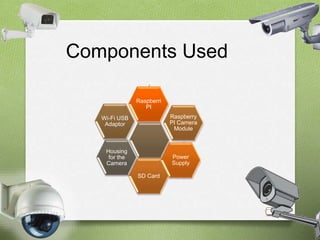
Components Used 
Wi-Fi USB 
Adaptor 
Housing 
for the 
Camera 
Raspberry 
PI Camera 
Module 
SD Card 
Power 
Supply 
Raspberri 
PI
Raspberry PI 
O It is a low cost, credit-card sized computer 
that plugs into a computer monitor or a 
TV.
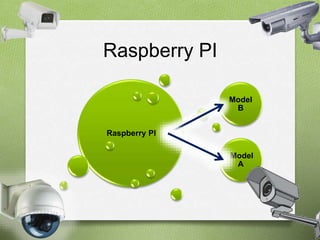
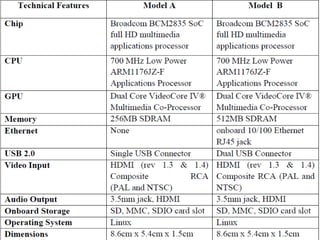
Raspberry PI 
Raspberry PI 
Model 
B 
Model 
A
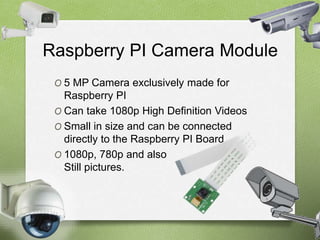
Raspberry PI Camera Module 
O 5 MP Camera exclusively made for 
Raspberry PI 
O Can take 1080p High Definition Videos 
O Small in size and can be connected 
directly to the Raspberry PI Board. 
O 1080p, 780p and also 
Still pictures.
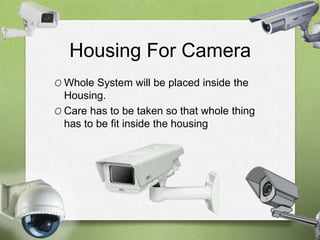
Housing For Camera 
O Whole System will be placed inside the 
Housing. 
O Care has to be taken so that whole thing 
has to be fit inside the housing
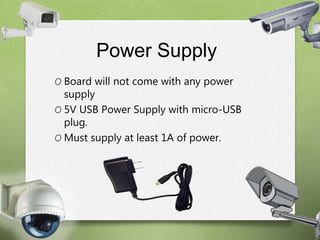
Power Supply 
O Board will not come with any power 
supply 
O 5V USB Power Supply with micro-USB 
plug. 
O Must supply at least 1A of power.
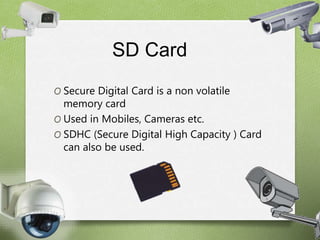
SD Card 
O Secure Digital Card is a non volatile 
memory card 
O Used in Mobiles, Cameras etc. 
O SDHC (Secure Digital High Capacity ) Card 
can also be used.
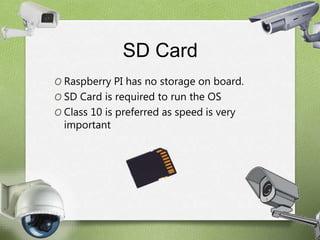
SD Card 
O Raspberry PI has no storage on board. 
O SD Card is required to run the OS 
O Class 10 is preferred as speed is very 
important
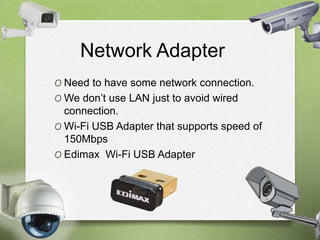
Network Adapter 
O Need to have some network connection. 
O We don’t use LAN just to avoid wired 
connection. 
O Wi-Fi USB Adapter that supports speed of 
150Mbps 
O Edimax Wi-Fi USB Adapter
SoftWares Required 
O 1. Raspbian OS 
O 2. PuTTY 
O 3. Motion Software
Operating System 
O Raspberry PI requires LINUX Kernel 
based OS 
O “Raspbian” – Free OS for Raspberry PI 
Hardware. 
O Optimized for best performance on 
Raspberry PI.
PuTTY 
O Open-source terminal emulator. 
O Serial console and network file transfer 
application . 
O Supports several network protocols, 
including SCP , Telnet etc. 
O Can be connected to a Serial Port.
Motion Software 
O Program that monitors the video signal 
from cameras. 
O Used to detect motion. 
O Open Software.
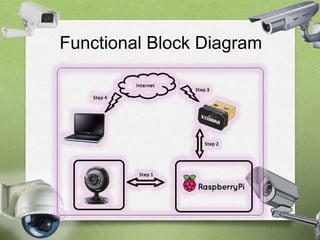
Functional Block Diagram
STEPS 
O "Rasbian" Operating System is loaded 
into the "Raspberry Pi" SoC and 
Raspberry Pi 'Camera Module' is 
interfaced to it 
O Motion Software is installed in Raspberry 
PI using Command Line. 
O Wi-Fi adapter is interfaced with Raspberry 
PI board. 
O Internet Access is given to Raspberry PI 
Board
Contd.. 
O Need a software to connect to LINUX 
Console in Raspberry PI. 
OWe install PuTTY in our windows 
computer to fulfill the need. 
O Further share a folder on the server to 
store the recorded video. 
O Using a “Static IP “ the live video can be 
streamed on any browser across the 
world.
Conclusion 
O HD Surveillance Camera is set up in the 
area which we want to monitor, video 
containing detected motion is stored in a 
server and live video can be accessed 
from anywhere just by entering the static 
IP assigned to the System in a web 
browser.
Low Cost HD Surveillance Camera using Raspberry PI

Low Cost HD Surveillance Camera using Raspberry PI

  • 1.
    “HD Surveillance Camera using Raspberry PI”
  • 2.
    Introduction HD SurveillanceCamera using Raspberry PI is a camera which records HD videos when some motion is detected in the monitored area. • See live stream in any web browse from anywhere.
  • 3.
    Introduction Live Pictureor video can be viewed from anywhere from any web browser even from our mobile browsers. • Record any motion into video file.
  • 4.
    Components Used Wi-FiUSB Adaptor Housing for the Camera Raspberry PI Camera Module SD Card Power Supply Raspberri PI
  • 5.
    Raspberry PI OIt is a low cost, credit-card sized computer that plugs into a computer monitor or a TV.
  • 6.
    Raspberry PI RaspberryPI Model B Model A
  • 8.
    Raspberry PI CameraModule O 5 MP Camera exclusively made for Raspberry PI O Can take 1080p High Definition Videos O Small in size and can be connected directly to the Raspberry PI Board. O 1080p, 780p and also Still pictures.
  • 9.
    Housing For Camera O Whole System will be placed inside the Housing. O Care has to be taken so that whole thing has to be fit inside the housing
  • 10.
    Power Supply OBoard will not come with any power supply O 5V USB Power Supply with micro-USB plug. O Must supply at least 1A of power.
  • 11.
    SD Card OSecure Digital Card is a non volatile memory card O Used in Mobiles, Cameras etc. O SDHC (Secure Digital High Capacity ) Card can also be used.
  • 12.
    SD Card ORaspberry PI has no storage on board. O SD Card is required to run the OS O Class 10 is preferred as speed is very important
  • 13.
    Network Adapter ONeed to have some network connection. O We don’t use LAN just to avoid wired connection. O Wi-Fi USB Adapter that supports speed of 150Mbps O Edimax Wi-Fi USB Adapter
  • 14.
    SoftWares Required O1. Raspbian OS O 2. PuTTY O 3. Motion Software
  • 15.
    Operating System ORaspberry PI requires LINUX Kernel based OS O “Raspbian” – Free OS for Raspberry PI Hardware. O Optimized for best performance on Raspberry PI.
  • 16.
    PuTTY O Open-sourceterminal emulator. O Serial console and network file transfer application . O Supports several network protocols, including SCP , Telnet etc. O Can be connected to a Serial Port.
  • 17.
    Motion Software OProgram that monitors the video signal from cameras. O Used to detect motion. O Open Software.
  • 18.
  • 19.
    STEPS O "Rasbian"Operating System is loaded into the "Raspberry Pi" SoC and Raspberry Pi 'Camera Module' is interfaced to it O Motion Software is installed in Raspberry PI using Command Line. O Wi-Fi adapter is interfaced with Raspberry PI board. O Internet Access is given to Raspberry PI Board
  • 20.
    Contd.. O Needa software to connect to LINUX Console in Raspberry PI. OWe install PuTTY in our windows computer to fulfill the need. O Further share a folder on the server to store the recorded video. O Using a “Static IP “ the live video can be streamed on any browser across the world.
  • 21.
    Conclusion O HDSurveillance Camera is set up in the area which we want to monitor, video containing detected motion is stored in a server and live video can be accessed from anywhere just by entering the static IP assigned to the System in a web browser.