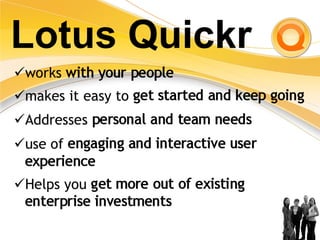
Team Collaboration & Collaborative Document Management:   IBM Lotus Quickr
Agenda Lotus Quickr overview Relationship between Lotus Quickr and other products in the IBM portfolio  Benefits Business and market trends
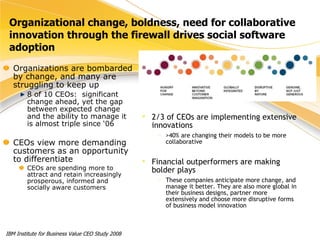
Organizational change, boldness, need for collaborative innovation through the firewall drives social software adoption Organizations are bombarded by change, and many are struggling to keep up 8 of 10 CEOs:  significant change ahead, yet the gap between expected change and the ability to manage it is almost triple since ‘06 CEOs view more demanding customers as an opportunity to differentiate CEOs are spending more to attract and retain increasingly prosperous, informed and socially aware customers IBM Institute for Business Value CEO Study 2008 2/3 of CEOs are implementing extensive innovations >40% are changing their models to be more collaborative Financial outperformers are making bolder plays These companies anticipate more change, and manage it better. They are also more global in their business designs, partner more extensively and choose more disruptive forms of business model innovation
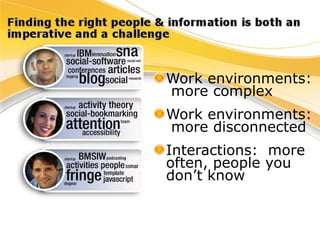
Work environments:  more complex Work environments:  more disconnected  Interactions:  more  often, people you don’t know
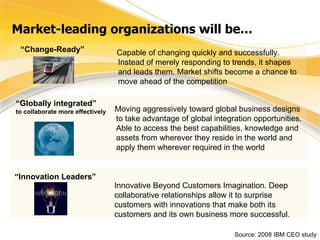
Market-leading organizations will be… Source: 2008 IBM CEO study  “ Change-Ready” Capable of changing quickly and successfully. Instead of merely responding to trends, it shapes and leads them. Market shifts become a chance to move ahead of the competition “ Globally integrated”  to collaborate more effectively Moving aggressively toward global business designs to take advantage of global integration opportunities. Able to access the best capabilities, knowledge and assets from wherever they reside in the world and apply them wherever required in the world “ Innovation Leaders” Innovative Beyond Customers Imagination. Deep collaborative relationships allow it to surprise customers with innovations that make both its customers and its own business more successful.
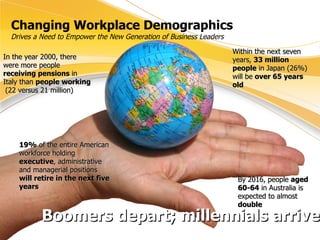
Changing Workplace Demographics Drives a Need to Empower the New Generation of Business Leaders 19%  of the entire American workforce holding  executive , administrative and managerial positions  will retire in the next five years In the year 2000, there were more people  receiving pensions  in Italy than  people working  (22 versus 21 million) Within the next seven years,  33 million people  in Japan (26%) will be  over 65 years old   By 2016, people  aged 60-64  in Australia is expected to almost  double Boomers depart; millennials arrive
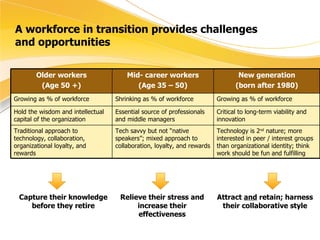
A workforce in transition provides challenges  and opportunities Capture their knowledge before they retire Relieve their stress and increase their effectiveness Attract  and  retain; harness their collaborative style Older workers (Age 50 +) Mid- career workers (Age 35 – 50) New generation (born after 1980) Growing as % of workforce  Shrinking as % of workforce Growing as % of workforce Hold the wisdom and intellectual capital of the organization Essential source of professionals and middle managers Critical to long-term viability and innovation Traditional approach to technology, collaboration, organizational loyalty, and rewards Tech savvy but not “native speakers”; mixed approach to collaboration, loyalty, and rewards Technology is 2 nd  nature; more interested in peer / interest groups than organizational identity; think work should be fun and fulfilling
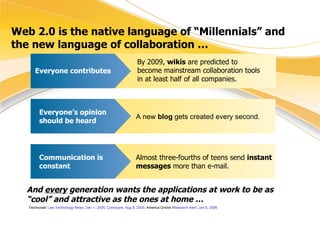
Web 2.0 is the native language of “Millennials” and the new language of collaboration … Almost three-fourths of teens send  instant messages  more than e-mail. A new  blog  gets created every second. Everyone’s opinion should be heard By 2009,  wikis  are predicted to become mainstream collaboration tools in at least half of all companies. Everyone contributes Communication is constant And  every  generation wants the applications at work to be as “cool” and attractive as the ones at home … Technorati/  Law Technology News, Dec 1, 2005 ;  Comscore, Aug 8, 2005 ; America Online / Research Alert, Jan 6, 2006
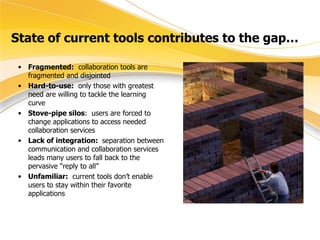
State of current tools contributes to the gap… Fragmented:   collaboration tools are fragmented and disjointed Hard-to-use:   only those with greatest need are willing to tackle the learning curve Stove-pipe silos :  users are forced to change applications to access needed collaboration services  Lack of integration:  separation between communication and collaboration services leads many users to fall back to the pervasive “reply to all” Unfamiliar:   current tools don’t enable users to stay within their favorite applications
Agenda Business and market trends Relationship between Lotus Quickr and other products in the IBM portfolio  Benefits Lotus Quickr overview
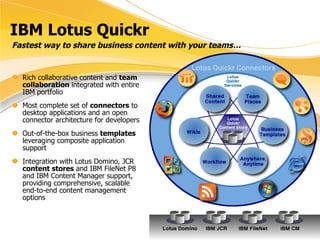
IBM Lotus Quickr Rich collaborative content and  team collaboration  integrated with entire IBM portfolio Most complete set of  connectors  to desktop applications and an open connector architecture for developers Out-of-the-box business  templates  leveraging composite application support Integration with Lotus Domino, JCR  content stores  and IBM FileNet P8 and IBM Content Manager support, providing comprehensive, scalable end-to-end content management options Quickr  Content Stores Fastest way to share business content with your teams…
Lotus Quickr
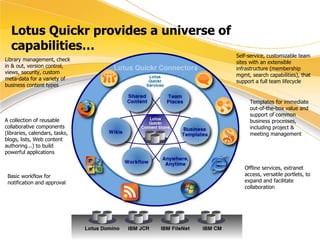
Lotus Quickr provides a universe of capabilities… Library management, check in & out, version control, views, security, custom meta-data for a variety of business content types Self-service, customizable team sites with an extensible infrastructure (membership mgmt, search capabilities), that support a full team lifecycle A collection of reusable collaborative components (libraries, calendars, tasks, blogs, lists, Web content authoring...) to build powerful applications Templates for immediate  out-of-the-box value and support of common business processes, including project & meeting management Basic workflow for notification and approval Offline services, extranet access, versatile portlets, to expand and facilitate collaboration
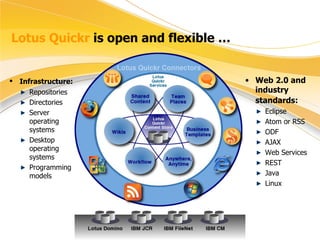
Lotus Quickr  is open and flexible … Infrastructure:   Repositories Directories Server operating systems Desktop operating systems Programming models Web 2.0 and industry standards:   Eclipse Atom or RSS ODF AJAX Web Services REST Java Linux
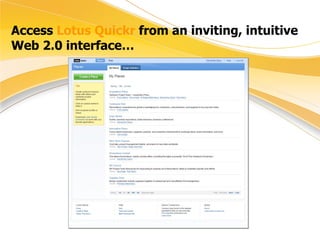
Access  Lotus Quickr  from an inviting, intuitive Web 2.0 interface…
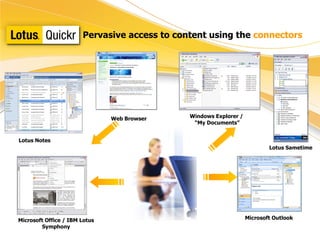
Pervasive access to content using the  connectors Lotus Notes Microsoft Office / IBM Lotus Symphony Windows Explorer /  “ My Documents” Lotus Sametime Web Browser Microsoft Outlook
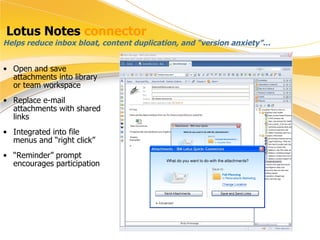
Lotus Notes  connector Open and save attachments into library or team workspace Replace e-mail attachments with shared links Integrated into file menus and “right click” “ Reminder” prompt encourages participation Helps reduce inbox bloat, content duplication, and “version anxiety”…
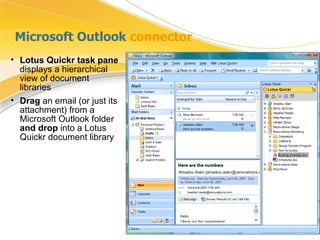
Microsoft Outlook  connector Lotus Quickr task pane  displays a hierarchical view of document libraries Drag  an email (or just its attachment) from a Microsoft Outlook folder  and drop  into a Lotus Quickr document library
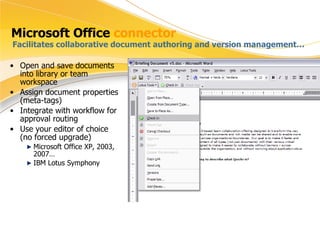
Microsoft Office  connector Open and save documents into library or team workspace Assign document properties (meta-tags) Integrate with workflow for approval routing Use your editor of choice (no forced upgrade) Microsoft Office XP, 2003, 2007… IBM Lotus Symphony Facilitates collaborative document authoring and version management…
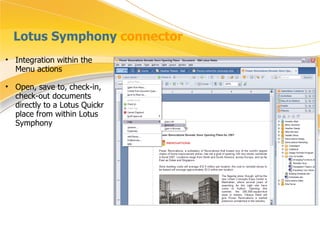
Lotus Symphony  connector Integration within the Menu actions  Open, save to, check-in, check-out documents directly to a Lotus Quickr place from within Lotus Symphony
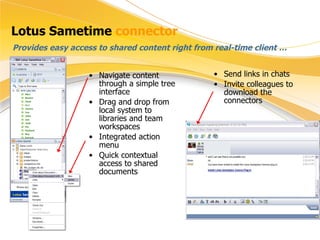
Lotus Sametime  connector Navigate content through a simple tree interface Drag and drop from local system to libraries and team workspaces Integrated action menu Quick contextual access to shared documents Provides easy access to shared content right from real-time client …  Send links in chats Invite colleagues to download the connectors
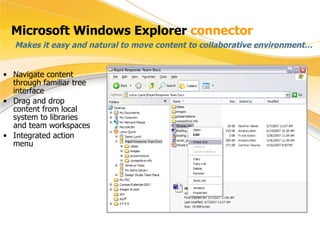
Microsoft Windows Explorer  connector Makes it easy and natural to move content to collaborative environment… Navigate content through familiar tree interface Drag and drop content from local system to libraries and team workspaces Integrated action menu
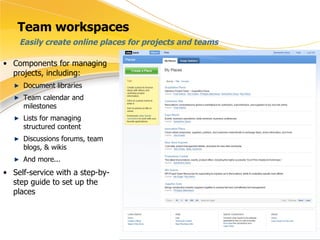
Team workspaces Components for managing projects, including: Document libraries Team calendar and milestones Lists for managing structured content Discussions forums, team blogs, & wikis And more... Self-service with a step-by-step guide to set up the places Easily create online places for projects and teams
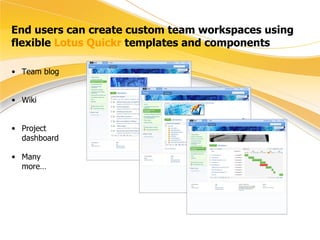
End users can create custom team workspaces using flexible  Lotus Quickr  templates and components Team blog Wiki Project dashboard Many more…
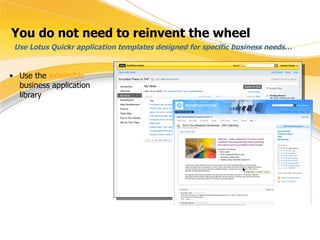
You do not need to reinvent the wheel Use the  extensible  business application library Use Lotus Quickr application templates designed for specific business needs…
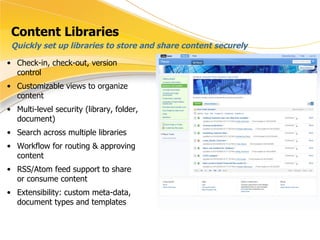
Content Libraries Check-in, check-out, version control Customizable views to organize content Multi-level security (library, folder, document) Search across multiple libraries Workflow for routing & approving content RSS/Atom feed support to share or consume content Extensibility: custom meta-data, document types and templates Quickly set up libraries to store and share content securely
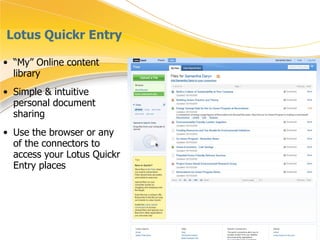
Lotus Quickr Entry “ My” Online content library Simple & intuitive personal document sharing Use the browser or any of the connectors to access your Lotus Quickr Entry places
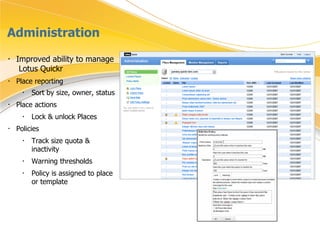
Administration Improved ability to manage  Lotus Quickr Place reporting Sort by size, owner, status   Place actions Lock & unlock Places Policies Track size quota & inactivity  Warning thresholds Policy is assigned to place or template
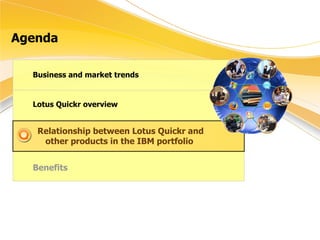
Agenda Business and market trends Lotus Quickr overview Relationship between Lotus Quickr and other products in the IBM portfolio  Benefits
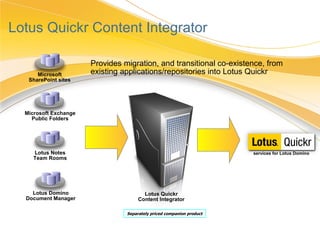
Lotus Quickr Content Integrator Microsoft SharePoint sites Microsoft Exchange Public Folders Lotus Notes Team Rooms Lotus Domino Document Manager Lotus Quickr Content Integrator Provides migration, and transitional co-existence, from existing applications/repositories into Lotus Quickr services for Lotus Domino Separately priced companion product
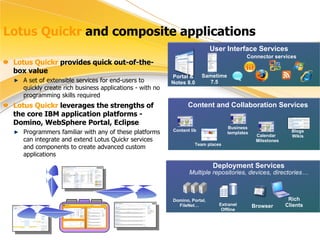
Lotus Quickr  and composite applications User Interface Services Connector services Portal & Notes 8.0 Content and Collaboration Services Team places Calendar  Milestones Blogs Wikis Content lib Deployment Services Multiple repositories, devices, directories… Domino, Portal, FileNet… Rich Clients Browser Extranet Offline Lotus Quickr  provides quick out-of-the-box value A set of extensible services for end-users to quickly create rich business applications - with no programming skills required Lotus Quickr  leverages the strengths of the core IBM application platforms - Domino, WebSphere Portal, Eclipse Programmers familiar with any of these platforms can integrate and extend Lotus Quickr services and components to create advanced custom applications Sametime 7.5 Business templates
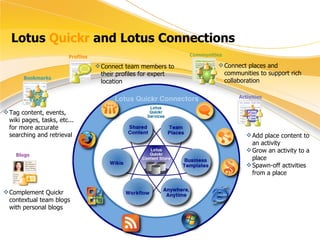
Lotus  Quickr  and Lotus Connections Connect team members to their profiles for expert location Connect places and communities to support rich collaboration Add place content to an activity Grow an activity to a place Spawn-off activities from a place Tag content, events, wiki pages, tasks, etc... for more accurate searching and retrieval Complement Quickr contextual team blogs with personal blogs Profiles Blogs Communities Bookmarks Activities
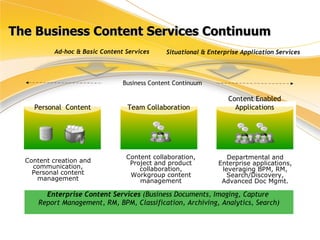
The Business Content Services Continuum Personal  Content Content creation and communication, Personal content management Content collaboration, Project and product collaboration, Workgroup content management Ad-hoc & Basic Content Services Situational & Enterprise Application Services  Departmental and Enterprise applications, leveraging BPM, RM, Search/Discovery, Advanced Doc Mgmt. Business Content Continuum Enterprise Content Services  (Business Documents, Imaging, Capture  Report Management, RM, BPM, Classification, Archiving, Analytics, Search) Team Collaboration Content Enabled Applications
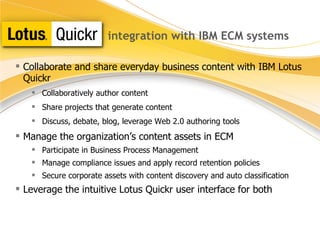
integration with IBM ECM systems Collaborate and share everyday business content with  IBM Lotus   Quickr Collaboratively author content Share projects that generate content Discuss, debate, blog, leverage Web 2.0 authoring tools Manage the organization’s content assets in ECM Participate in Business Process Management Manage compliance issues and apply record retention policies Secure corporate assets with content discovery and auto classification Leverage the intuitive Lotus Quickr user interface for both
Lotus Quickr  integrates easily & provides flexibility For end users, Lotus Quickr connectors integrate into desktop applications Increases adoption of collaborative tools Simplifies collaboration among users with different styles and preferences Improves effectiveness For IT, Lotus Quickr leverages current software and hardware investment Works with multiple versions of Notes clients, Sametime, Domino and Microsoft Office, Microsoft Outlook (no forced upgrades) Supports open standards Support for additional repositories and clients Designed for a heterogeneous environment; doesn’t force adoption of a single set of tools
Agenda Business and market trends Lotus Quickr overview Relationship between Lotus Quickr and other products in the IBM portfolio  Benefits
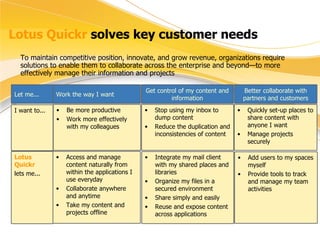
Lotus Quickr  solves key customer needs To maintain competitive position, innovate, and grow revenue, organizations require solutions to enable them to collaborate across the enterprise and beyond—to more effectively manage their information and projects Let me... Work the way I want Get control of my content and information Integrate my mail client with my shared places and libraries Organize my files in a secured environment Share simply and easily Reuse and expose content across applications Stop using my inbox to dump content Reduce the duplication and inconsistencies of content Be more productive Work more effectively with my colleagues I want to... Lotus Quickr   lets me... Access and manage content naturally from within the applications I use everyday Collaborate anywhere and anytime Take my content and projects offline Better collaborate with partners and customers Quickly set-up places to share content with anyone I want Manage projects securely Add users to my spaces myself Provide tools to track and manage my team activities
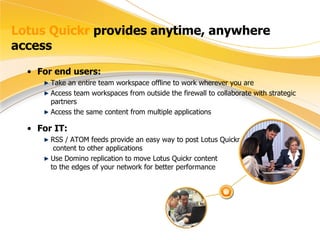
Lotus Quickr  provides anytime, anywhere access For end users: Take an entire team workspace offline to work wherever you are Access team workspaces from outside the firewall to collaborate with strategic partners Access the same content from multiple applications For IT: RSS / ATOM feeds provide an easy way to post Lotus Quickr   content to other applications Use Domino replication to move Lotus Quickr content  to the edges of your network for better performance
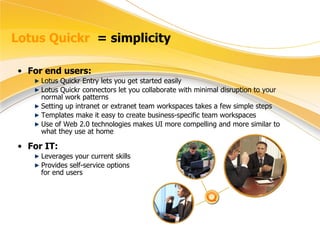
Lotus Quickr  = simplicity For end users: Lotus Quickr Entry lets you get started easily  Lotus Quickr connectors let you collaborate with minimal disruption to your normal work patterns Setting up intranet or extranet team workspaces takes a few simple steps Templates make it easy to create business-specific team workspaces Use of Web 2.0 technologies makes UI more compelling and more similar to what they use at home For IT: Leverages your current skills Provides self-service options  for end users
The fine print The screenshots in this presentation show views of both Lotus Quickr services for Domino and Lotus Quickr services for J2EE. Since the two services may not have identical features, you may not be able to recreate the views.   Some material in this presentation is directional in nature and does not imply any product plan commitment on the part of IBM.  Plans are subject to change at any time without notice.
Thank you!!
© IBM Corporation 2008. All Rights Reserved. The workshops, sessions and materials have been prepared by IBM or the session speakers and reflect their own views.  They are provided for informational purposes only, and are neither intended to, nor shall have the effect of being, legal or other guidance or advice to any participant.  While efforts were made to verify the completeness and accuracy of the information contained in this presentation, it is provided AS IS without warranty of any kind, express or implied. IBM shall not be responsible for any damages arising out of the use of, or otherwise related to, this presentation or any other materials. Nothing contained in this presentation is intended to, nor shall have the effect of, creating any warranties or representations from IBM or its suppliers or licensors, or altering the terms and conditions of the applicable license agreement governing the use of IBM software. References in this presentation to IBM products, programs, or services do not imply that they will be available in all countries in which IBM operates. Product release dates and/or capabilities referenced in this presentation may change at any time at IBM’s sole discretion based on market opportunities or other factors, and are not intended to be a commitment to future product or feature availability in any way.  Nothing contained in these materials is intended to, nor shall have the effect of, stating or implying that any activities undertaken by you will result in any specific sales, revenue growth or other results.  IBM, the IBM logo, Lotus, Lotus Notes, Notes, Domino, Domino.Doc, Sametime, WebSphere, Workplace, WebSphere, Lotusphere, QuickPlace, and Quickr are trademarks of International Business Machines Corporation in the United States, other countries, or both.  Java and all Java-based trademarks are trademarks of Sun Microsystems, Inc. in the United States, other countries, or both. Microsoft and Windows are trademarks of Microsoft Corporation in the United States, other countries, or both. Other company, product, or service names may be trademarks or service marks of others. All references to Renovations refer to a fictitious company and are used for illustration purposes only.

Lotus Quickr 8.2 Overview May2009

  • 1.
    Team Collaboration &Collaborative Document Management: IBM Lotus Quickr
  • 2.
    Agenda Lotus Quickroverview Relationship between Lotus Quickr and other products in the IBM portfolio Benefits Business and market trends
  • 3.
    Organizational change, boldness,need for collaborative innovation through the firewall drives social software adoption Organizations are bombarded by change, and many are struggling to keep up 8 of 10 CEOs: significant change ahead, yet the gap between expected change and the ability to manage it is almost triple since ‘06 CEOs view more demanding customers as an opportunity to differentiate CEOs are spending more to attract and retain increasingly prosperous, informed and socially aware customers IBM Institute for Business Value CEO Study 2008 2/3 of CEOs are implementing extensive innovations >40% are changing their models to be more collaborative Financial outperformers are making bolder plays These companies anticipate more change, and manage it better. They are also more global in their business designs, partner more extensively and choose more disruptive forms of business model innovation
  • 4.
    Work environments: more complex Work environments: more disconnected Interactions: more often, people you don’t know
  • 5.
    Market-leading organizations willbe… Source: 2008 IBM CEO study “ Change-Ready” Capable of changing quickly and successfully. Instead of merely responding to trends, it shapes and leads them. Market shifts become a chance to move ahead of the competition “ Globally integrated” to collaborate more effectively Moving aggressively toward global business designs to take advantage of global integration opportunities. Able to access the best capabilities, knowledge and assets from wherever they reside in the world and apply them wherever required in the world “ Innovation Leaders” Innovative Beyond Customers Imagination. Deep collaborative relationships allow it to surprise customers with innovations that make both its customers and its own business more successful.
  • 6.
    Changing Workplace DemographicsDrives a Need to Empower the New Generation of Business Leaders 19% of the entire American workforce holding executive , administrative and managerial positions will retire in the next five years In the year 2000, there were more people receiving pensions in Italy than people working (22 versus 21 million) Within the next seven years, 33 million people in Japan (26%) will be over 65 years old By 2016, people aged 60-64 in Australia is expected to almost double Boomers depart; millennials arrive
  • 7.
    A workforce intransition provides challenges and opportunities Capture their knowledge before they retire Relieve their stress and increase their effectiveness Attract and retain; harness their collaborative style Older workers (Age 50 +) Mid- career workers (Age 35 – 50) New generation (born after 1980) Growing as % of workforce Shrinking as % of workforce Growing as % of workforce Hold the wisdom and intellectual capital of the organization Essential source of professionals and middle managers Critical to long-term viability and innovation Traditional approach to technology, collaboration, organizational loyalty, and rewards Tech savvy but not “native speakers”; mixed approach to collaboration, loyalty, and rewards Technology is 2 nd nature; more interested in peer / interest groups than organizational identity; think work should be fun and fulfilling
  • 8.
    Web 2.0 isthe native language of “Millennials” and the new language of collaboration … Almost three-fourths of teens send instant messages more than e-mail. A new blog gets created every second. Everyone’s opinion should be heard By 2009, wikis are predicted to become mainstream collaboration tools in at least half of all companies. Everyone contributes Communication is constant And every generation wants the applications at work to be as “cool” and attractive as the ones at home … Technorati/ Law Technology News, Dec 1, 2005 ; Comscore, Aug 8, 2005 ; America Online / Research Alert, Jan 6, 2006
  • 9.
    State of currenttools contributes to the gap… Fragmented: collaboration tools are fragmented and disjointed Hard-to-use: only those with greatest need are willing to tackle the learning curve Stove-pipe silos : users are forced to change applications to access needed collaboration services Lack of integration: separation between communication and collaboration services leads many users to fall back to the pervasive “reply to all” Unfamiliar: current tools don’t enable users to stay within their favorite applications
  • 10.
    Agenda Business andmarket trends Relationship between Lotus Quickr and other products in the IBM portfolio Benefits Lotus Quickr overview
  • 11.
    IBM Lotus QuickrRich collaborative content and team collaboration integrated with entire IBM portfolio Most complete set of connectors to desktop applications and an open connector architecture for developers Out-of-the-box business templates leveraging composite application support Integration with Lotus Domino, JCR content stores and IBM FileNet P8 and IBM Content Manager support, providing comprehensive, scalable end-to-end content management options Quickr Content Stores Fastest way to share business content with your teams…
  • 12.
  • 13.
    Lotus Quickr providesa universe of capabilities… Library management, check in & out, version control, views, security, custom meta-data for a variety of business content types Self-service, customizable team sites with an extensible infrastructure (membership mgmt, search capabilities), that support a full team lifecycle A collection of reusable collaborative components (libraries, calendars, tasks, blogs, lists, Web content authoring...) to build powerful applications Templates for immediate out-of-the-box value and support of common business processes, including project & meeting management Basic workflow for notification and approval Offline services, extranet access, versatile portlets, to expand and facilitate collaboration
  • 14.
    Lotus Quickr is open and flexible … Infrastructure: Repositories Directories Server operating systems Desktop operating systems Programming models Web 2.0 and industry standards: Eclipse Atom or RSS ODF AJAX Web Services REST Java Linux
  • 15.
    Access LotusQuickr from an inviting, intuitive Web 2.0 interface…
  • 16.
    Pervasive access tocontent using the connectors Lotus Notes Microsoft Office / IBM Lotus Symphony Windows Explorer / “ My Documents” Lotus Sametime Web Browser Microsoft Outlook
  • 17.
    Lotus Notes connector Open and save attachments into library or team workspace Replace e-mail attachments with shared links Integrated into file menus and “right click” “ Reminder” prompt encourages participation Helps reduce inbox bloat, content duplication, and “version anxiety”…
  • 18.
    Microsoft Outlook connector Lotus Quickr task pane displays a hierarchical view of document libraries Drag an email (or just its attachment) from a Microsoft Outlook folder and drop into a Lotus Quickr document library
  • 19.
    Microsoft Office connector Open and save documents into library or team workspace Assign document properties (meta-tags) Integrate with workflow for approval routing Use your editor of choice (no forced upgrade) Microsoft Office XP, 2003, 2007… IBM Lotus Symphony Facilitates collaborative document authoring and version management…
  • 20.
    Lotus Symphony connector Integration within the Menu actions Open, save to, check-in, check-out documents directly to a Lotus Quickr place from within Lotus Symphony
  • 21.
    Lotus Sametime connector Navigate content through a simple tree interface Drag and drop from local system to libraries and team workspaces Integrated action menu Quick contextual access to shared documents Provides easy access to shared content right from real-time client … Send links in chats Invite colleagues to download the connectors
  • 22.
    Microsoft Windows Explorer connector Makes it easy and natural to move content to collaborative environment… Navigate content through familiar tree interface Drag and drop content from local system to libraries and team workspaces Integrated action menu
  • 23.
    Team workspaces Componentsfor managing projects, including: Document libraries Team calendar and milestones Lists for managing structured content Discussions forums, team blogs, & wikis And more... Self-service with a step-by-step guide to set up the places Easily create online places for projects and teams
  • 24.
    End users cancreate custom team workspaces using flexible Lotus Quickr templates and components Team blog Wiki Project dashboard Many more…
  • 25.
    You do notneed to reinvent the wheel Use the extensible business application library Use Lotus Quickr application templates designed for specific business needs…
  • 26.
    Content Libraries Check-in,check-out, version control Customizable views to organize content Multi-level security (library, folder, document) Search across multiple libraries Workflow for routing & approving content RSS/Atom feed support to share or consume content Extensibility: custom meta-data, document types and templates Quickly set up libraries to store and share content securely
  • 27.
    Lotus Quickr Entry“ My” Online content library Simple & intuitive personal document sharing Use the browser or any of the connectors to access your Lotus Quickr Entry places
  • 28.
    Administration Improved abilityto manage Lotus Quickr Place reporting Sort by size, owner, status Place actions Lock & unlock Places Policies Track size quota & inactivity Warning thresholds Policy is assigned to place or template
  • 29.
    Agenda Business andmarket trends Lotus Quickr overview Relationship between Lotus Quickr and other products in the IBM portfolio Benefits
  • 30.
    Lotus Quickr ContentIntegrator Microsoft SharePoint sites Microsoft Exchange Public Folders Lotus Notes Team Rooms Lotus Domino Document Manager Lotus Quickr Content Integrator Provides migration, and transitional co-existence, from existing applications/repositories into Lotus Quickr services for Lotus Domino Separately priced companion product
  • 31.
    Lotus Quickr and composite applications User Interface Services Connector services Portal & Notes 8.0 Content and Collaboration Services Team places Calendar Milestones Blogs Wikis Content lib Deployment Services Multiple repositories, devices, directories… Domino, Portal, FileNet… Rich Clients Browser Extranet Offline Lotus Quickr provides quick out-of-the-box value A set of extensible services for end-users to quickly create rich business applications - with no programming skills required Lotus Quickr leverages the strengths of the core IBM application platforms - Domino, WebSphere Portal, Eclipse Programmers familiar with any of these platforms can integrate and extend Lotus Quickr services and components to create advanced custom applications Sametime 7.5 Business templates
  • 32.
    Lotus Quickr and Lotus Connections Connect team members to their profiles for expert location Connect places and communities to support rich collaboration Add place content to an activity Grow an activity to a place Spawn-off activities from a place Tag content, events, wiki pages, tasks, etc... for more accurate searching and retrieval Complement Quickr contextual team blogs with personal blogs Profiles Blogs Communities Bookmarks Activities
  • 33.
    The Business ContentServices Continuum Personal Content Content creation and communication, Personal content management Content collaboration, Project and product collaboration, Workgroup content management Ad-hoc & Basic Content Services Situational & Enterprise Application Services Departmental and Enterprise applications, leveraging BPM, RM, Search/Discovery, Advanced Doc Mgmt. Business Content Continuum Enterprise Content Services (Business Documents, Imaging, Capture Report Management, RM, BPM, Classification, Archiving, Analytics, Search) Team Collaboration Content Enabled Applications
  • 34.
    integration with IBMECM systems Collaborate and share everyday business content with IBM Lotus  Quickr Collaboratively author content Share projects that generate content Discuss, debate, blog, leverage Web 2.0 authoring tools Manage the organization’s content assets in ECM Participate in Business Process Management Manage compliance issues and apply record retention policies Secure corporate assets with content discovery and auto classification Leverage the intuitive Lotus Quickr user interface for both
  • 35.
    Lotus Quickr integrates easily & provides flexibility For end users, Lotus Quickr connectors integrate into desktop applications Increases adoption of collaborative tools Simplifies collaboration among users with different styles and preferences Improves effectiveness For IT, Lotus Quickr leverages current software and hardware investment Works with multiple versions of Notes clients, Sametime, Domino and Microsoft Office, Microsoft Outlook (no forced upgrades) Supports open standards Support for additional repositories and clients Designed for a heterogeneous environment; doesn’t force adoption of a single set of tools
  • 36.
    Agenda Business andmarket trends Lotus Quickr overview Relationship between Lotus Quickr and other products in the IBM portfolio Benefits
  • 37.
    Lotus Quickr solves key customer needs To maintain competitive position, innovate, and grow revenue, organizations require solutions to enable them to collaborate across the enterprise and beyond—to more effectively manage their information and projects Let me... Work the way I want Get control of my content and information Integrate my mail client with my shared places and libraries Organize my files in a secured environment Share simply and easily Reuse and expose content across applications Stop using my inbox to dump content Reduce the duplication and inconsistencies of content Be more productive Work more effectively with my colleagues I want to... Lotus Quickr lets me... Access and manage content naturally from within the applications I use everyday Collaborate anywhere and anytime Take my content and projects offline Better collaborate with partners and customers Quickly set-up places to share content with anyone I want Manage projects securely Add users to my spaces myself Provide tools to track and manage my team activities
  • 38.
    Lotus Quickr provides anytime, anywhere access For end users: Take an entire team workspace offline to work wherever you are Access team workspaces from outside the firewall to collaborate with strategic partners Access the same content from multiple applications For IT: RSS / ATOM feeds provide an easy way to post Lotus Quickr content to other applications Use Domino replication to move Lotus Quickr content to the edges of your network for better performance
  • 39.
    Lotus Quickr = simplicity For end users: Lotus Quickr Entry lets you get started easily Lotus Quickr connectors let you collaborate with minimal disruption to your normal work patterns Setting up intranet or extranet team workspaces takes a few simple steps Templates make it easy to create business-specific team workspaces Use of Web 2.0 technologies makes UI more compelling and more similar to what they use at home For IT: Leverages your current skills Provides self-service options for end users
  • 40.
    The fine printThe screenshots in this presentation show views of both Lotus Quickr services for Domino and Lotus Quickr services for J2EE. Since the two services may not have identical features, you may not be able to recreate the views.  Some material in this presentation is directional in nature and does not imply any product plan commitment on the part of IBM. Plans are subject to change at any time without notice.
  • 41.
  • 42.
    © IBM Corporation2008. All Rights Reserved. The workshops, sessions and materials have been prepared by IBM or the session speakers and reflect their own views. They are provided for informational purposes only, and are neither intended to, nor shall have the effect of being, legal or other guidance or advice to any participant. While efforts were made to verify the completeness and accuracy of the information contained in this presentation, it is provided AS IS without warranty of any kind, express or implied. IBM shall not be responsible for any damages arising out of the use of, or otherwise related to, this presentation or any other materials. Nothing contained in this presentation is intended to, nor shall have the effect of, creating any warranties or representations from IBM or its suppliers or licensors, or altering the terms and conditions of the applicable license agreement governing the use of IBM software. References in this presentation to IBM products, programs, or services do not imply that they will be available in all countries in which IBM operates. Product release dates and/or capabilities referenced in this presentation may change at any time at IBM’s sole discretion based on market opportunities or other factors, and are not intended to be a commitment to future product or feature availability in any way. Nothing contained in these materials is intended to, nor shall have the effect of, stating or implying that any activities undertaken by you will result in any specific sales, revenue growth or other results. IBM, the IBM logo, Lotus, Lotus Notes, Notes, Domino, Domino.Doc, Sametime, WebSphere, Workplace, WebSphere, Lotusphere, QuickPlace, and Quickr are trademarks of International Business Machines Corporation in the United States, other countries, or both. Java and all Java-based trademarks are trademarks of Sun Microsystems, Inc. in the United States, other countries, or both. Microsoft and Windows are trademarks of Microsoft Corporation in the United States, other countries, or both. Other company, product, or service names may be trademarks or service marks of others. All references to Renovations refer to a fictitious company and are used for illustration purposes only.