Extend FileNet With Email & Desktop Integration and Web 2.0 Collaboration   Session:  1181A; Friday 6 June, 2008 10:00 - 10:45 hrs The Hague – World Forum - Yangtze 1
Introduction Rob van Gils Enterprise Content Management   Consultant – Lotus & Portal    +31 (0)6 22997345 Richard van Delft Enterprise Content Management Delivery manager – Lotus & Portal    +31 (0)6 54265474 Willem van Tol Philips IP&S Program manager ICT    +31 (0)6 10756296
Desktop integration & Collaboration 2.0 End-to-end content and collaboration solution Session: 1181A; Friday 6 June, 2008 10:00 - 10:45 hrs The Hague – World Forum - Yangtze 1
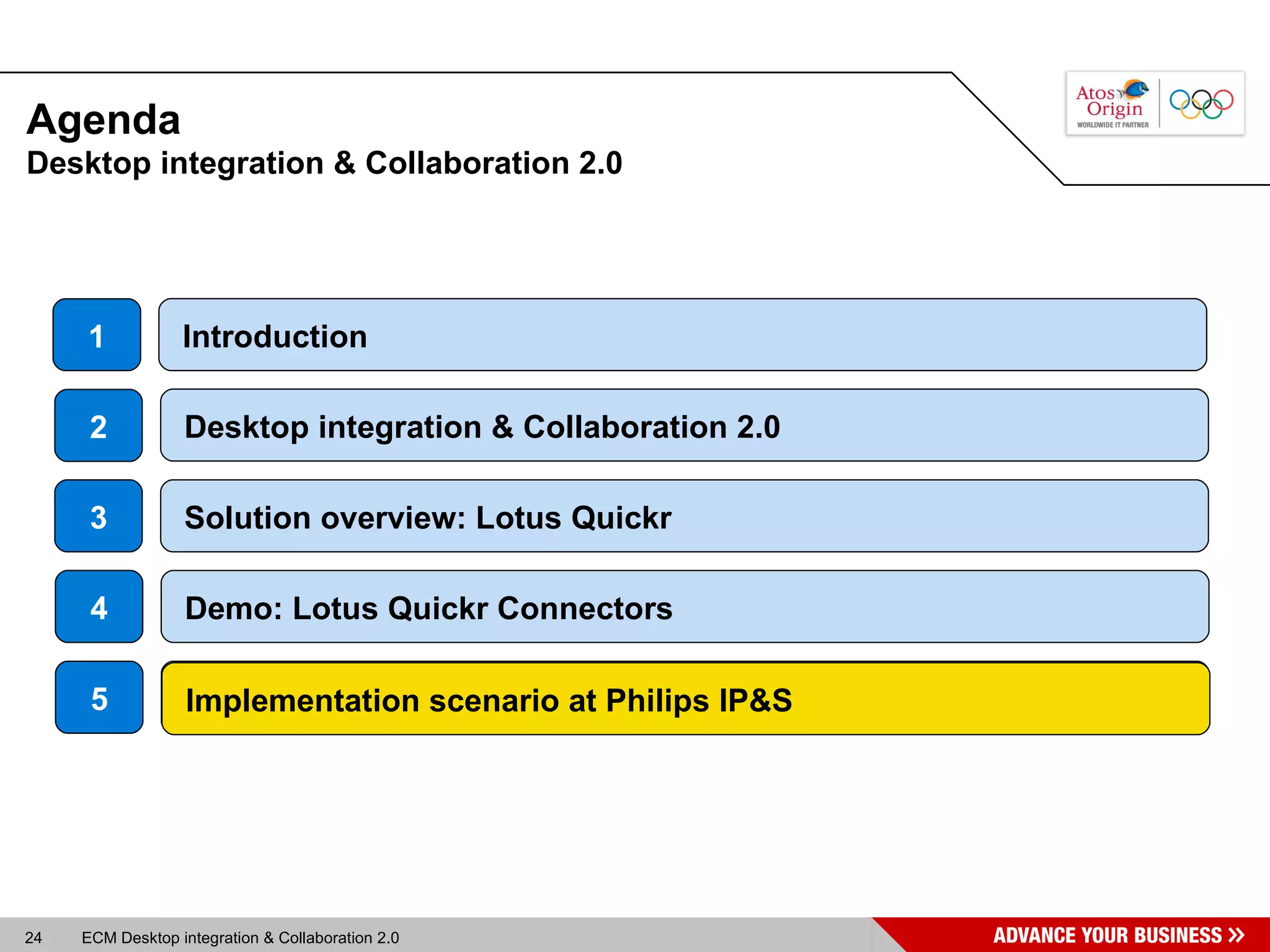
Agenda Introduction Introduction 1 Desktop integration & Collaboration 2.0  3 Solution overview: Lotus Quickr Desktop integration & Collaboration 2.0 2 4 Demo: Lotus Quickr Connectors 5 Implementation scenario at Philips IP&S
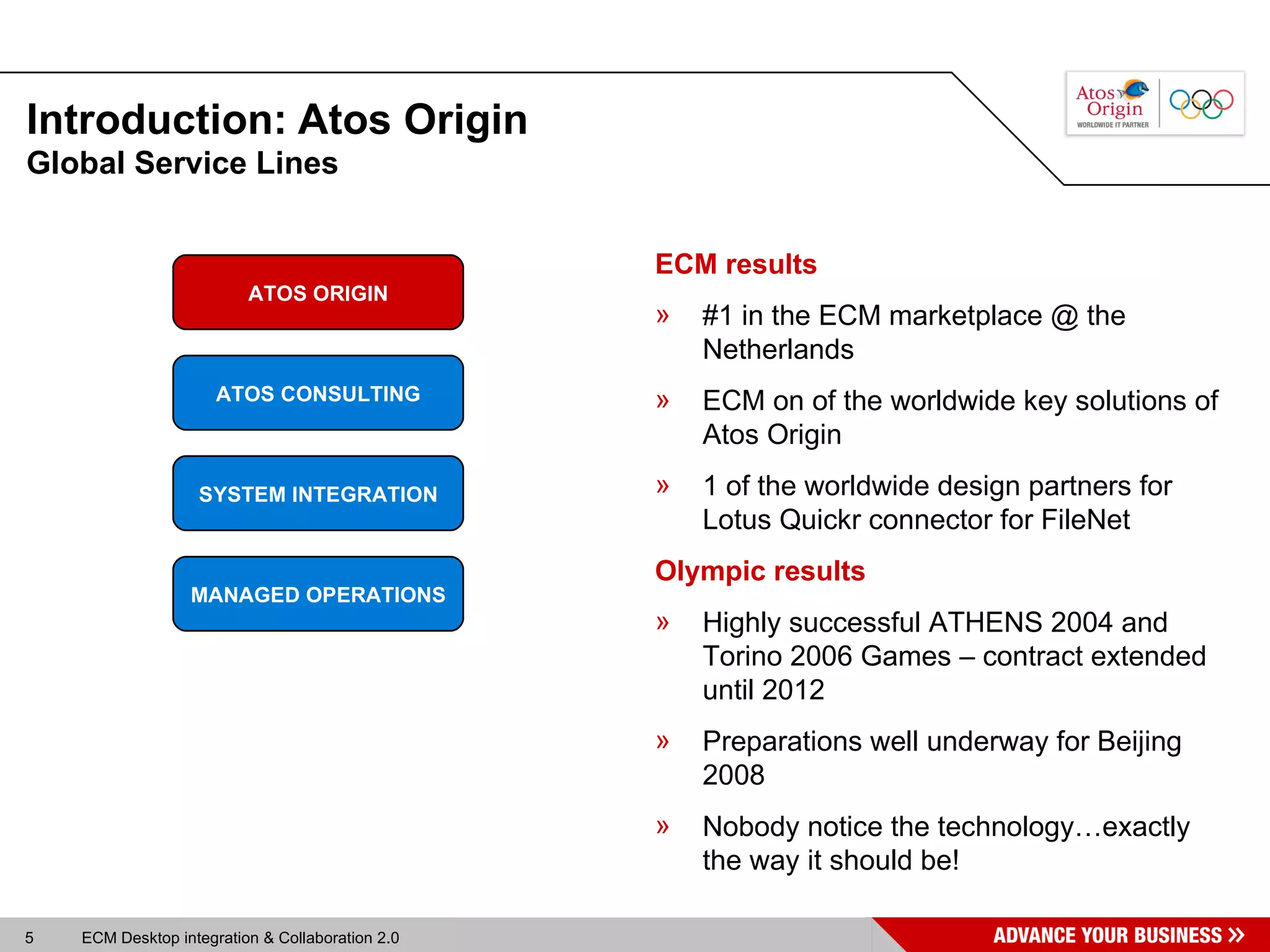
Introduction: Atos Origin Global Service Lines ECM results #1 in the ECM marketplace @ the Netherlands ECM on of the worldwide key solutions of Atos Origin 1 of the worldwide design partners for Lotus Quickr connector for FileNet Olympic results Highly successful ATHENS 2004 and Torino 2006 Games – contract extended until 2012 Preparations well underway for Beijing 2008 Nobody notice the technology…exactly the way it should be! ATOS ORIGIN ATOS CONSULTING SYSTEM INTEGRATION MANAGED OPERATIONS
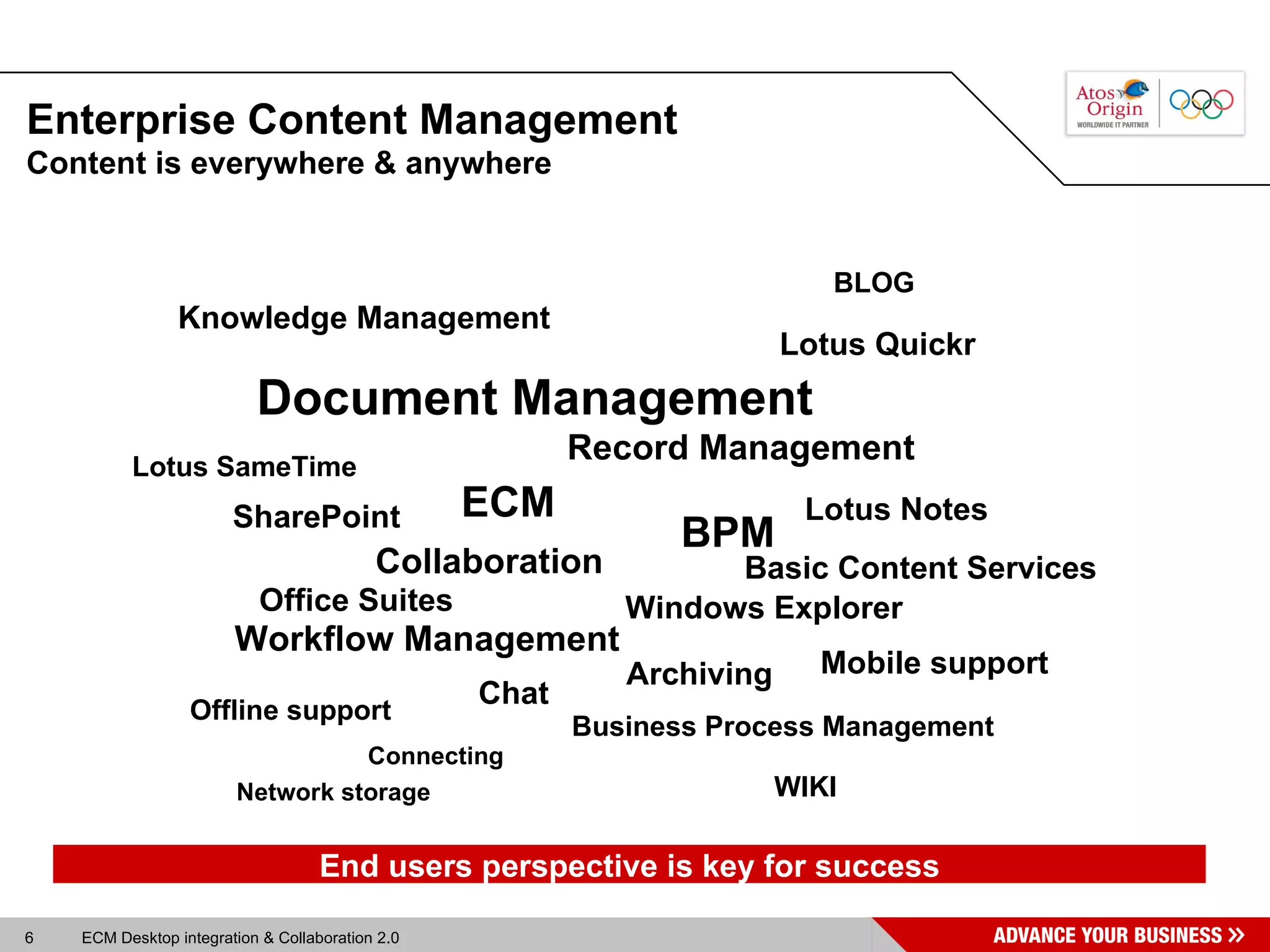
Enterprise Content Management Content is everywhere & anywhere Lotus SameTime Collaboration BPM Business Process Management Offline support Lotus Quickr Record Management Document Management Mobile support Office Suites Windows Explorer Lotus Notes SharePoint Chat Knowledge Management Connecting Archiving ECM WIKI BLOG Basic Content Services End users perspective is key for success Workflow Management Network storage
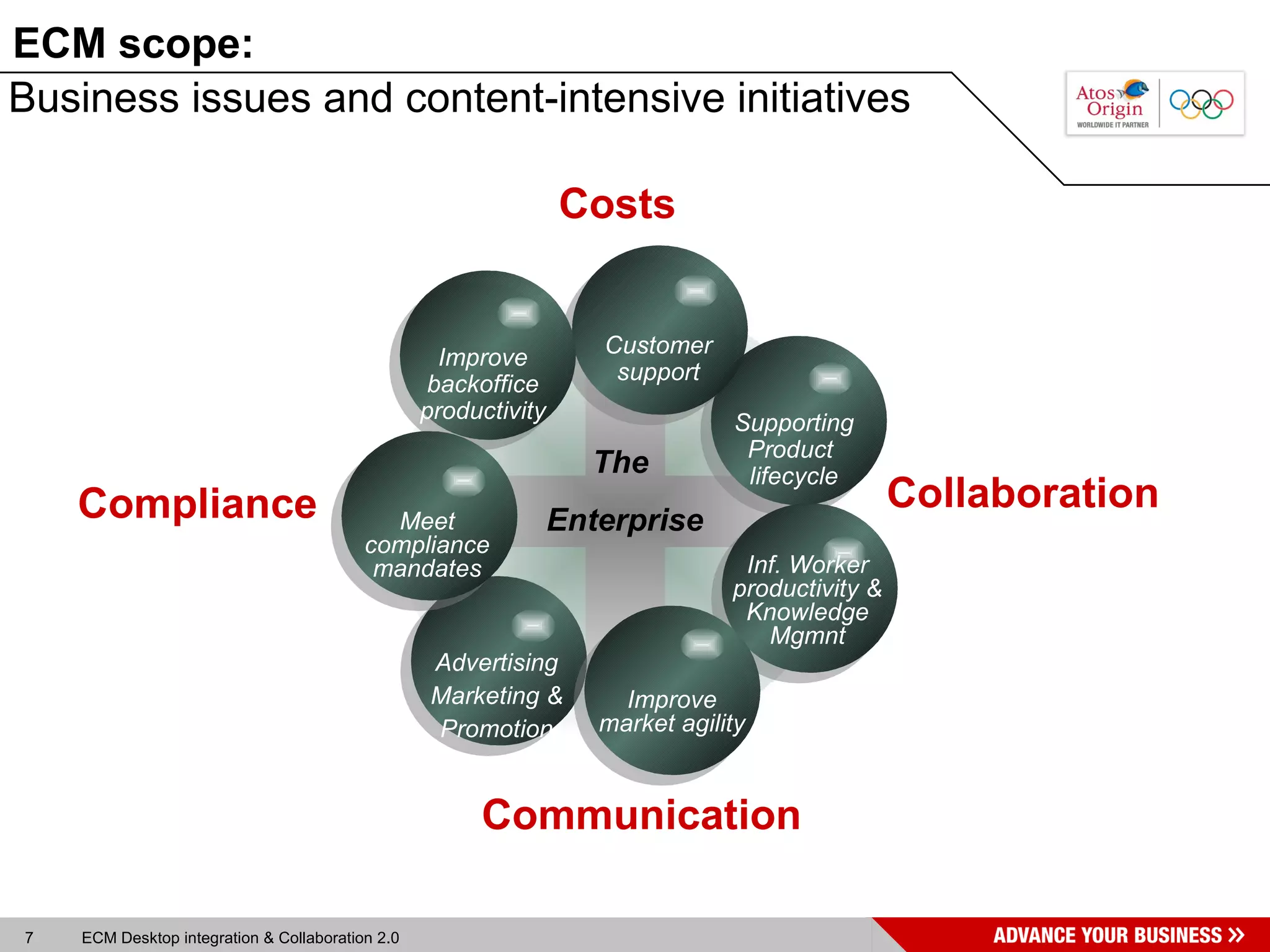
Business issues and content-intensive initiatives The  Enterprise Costs Compliance Collaboration Communication ECM scope: Supporting Product  lifecycle Advertising Marketing & Promotion Customer support Inf. Worker productivity & Knowledge Mgmnt Improve market agility Improve backoffice productivity Meet compliance mandates
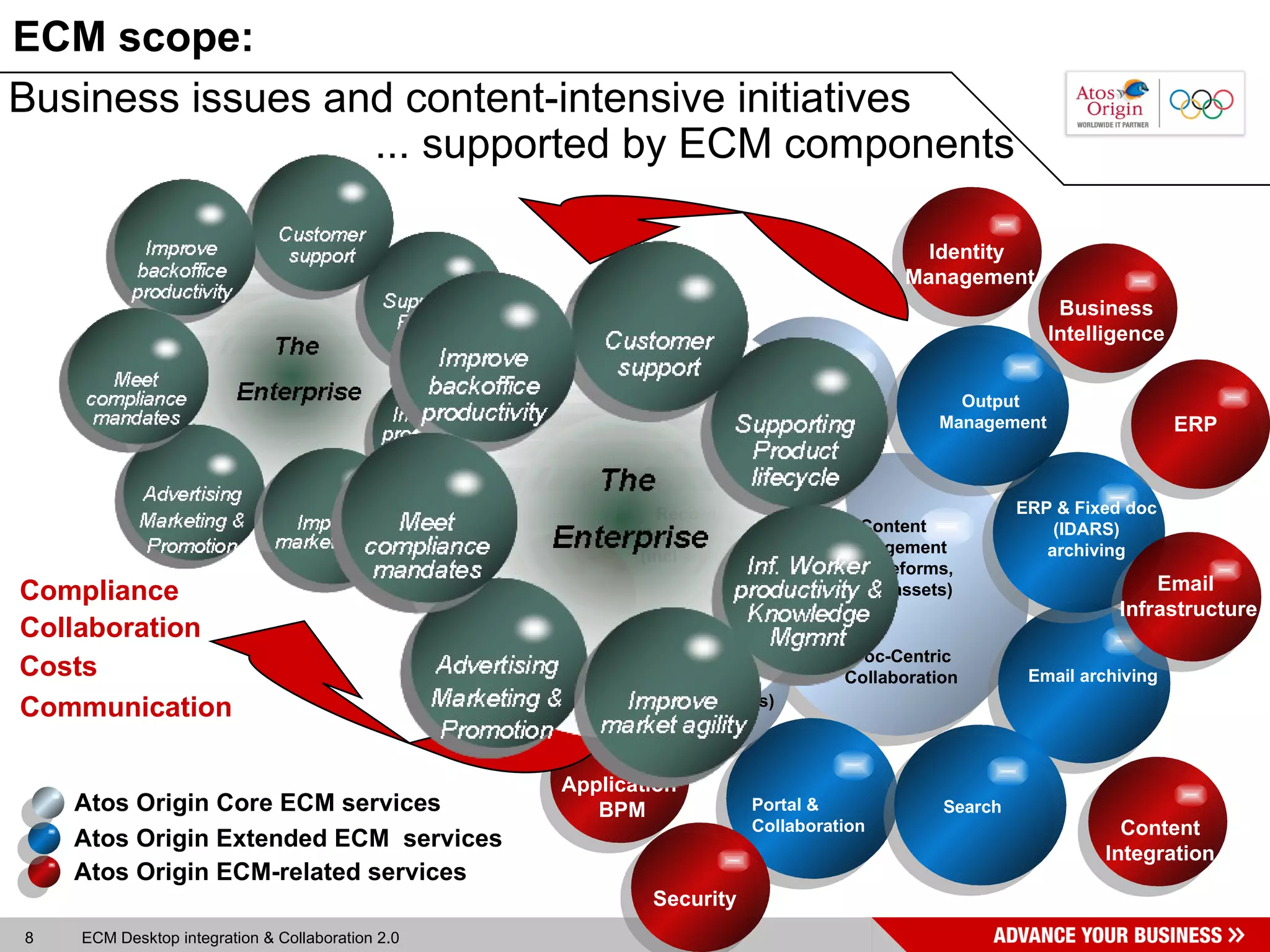
Business issues and content-intensive initiatives ... supported by ECM components Costs Compliance Collaboration Communication Atos Origin Core ECM services   Atos Origin ECM-related services Atos Origin Extended ECM  services ECM scope: Content Management (docs, eforms, Digital assets) Doc-Centric Collaboration Portal &  Collaboration Email archiving Search Capture  Records  Management  (incl archiving)  Human BPM (Workflow, business Rules) ERP & Fixed doc (IDARS) archiving Output  Management Identity  Management Application  BPM Network Infrastructures Security ERP  Email  Infrastructure Content Integration Business Intelligence
Agenda Desktop integration & Collaboration 2.0 2 Desktop integration & Collaboration 2.0  Introduction 1 Desktop integration & Collaboration 2.0 3 Solution overview: Lotus Quickr 4 Demo: Lotus Quickr Connectors 5 Implementation scenario at Philips IP&S
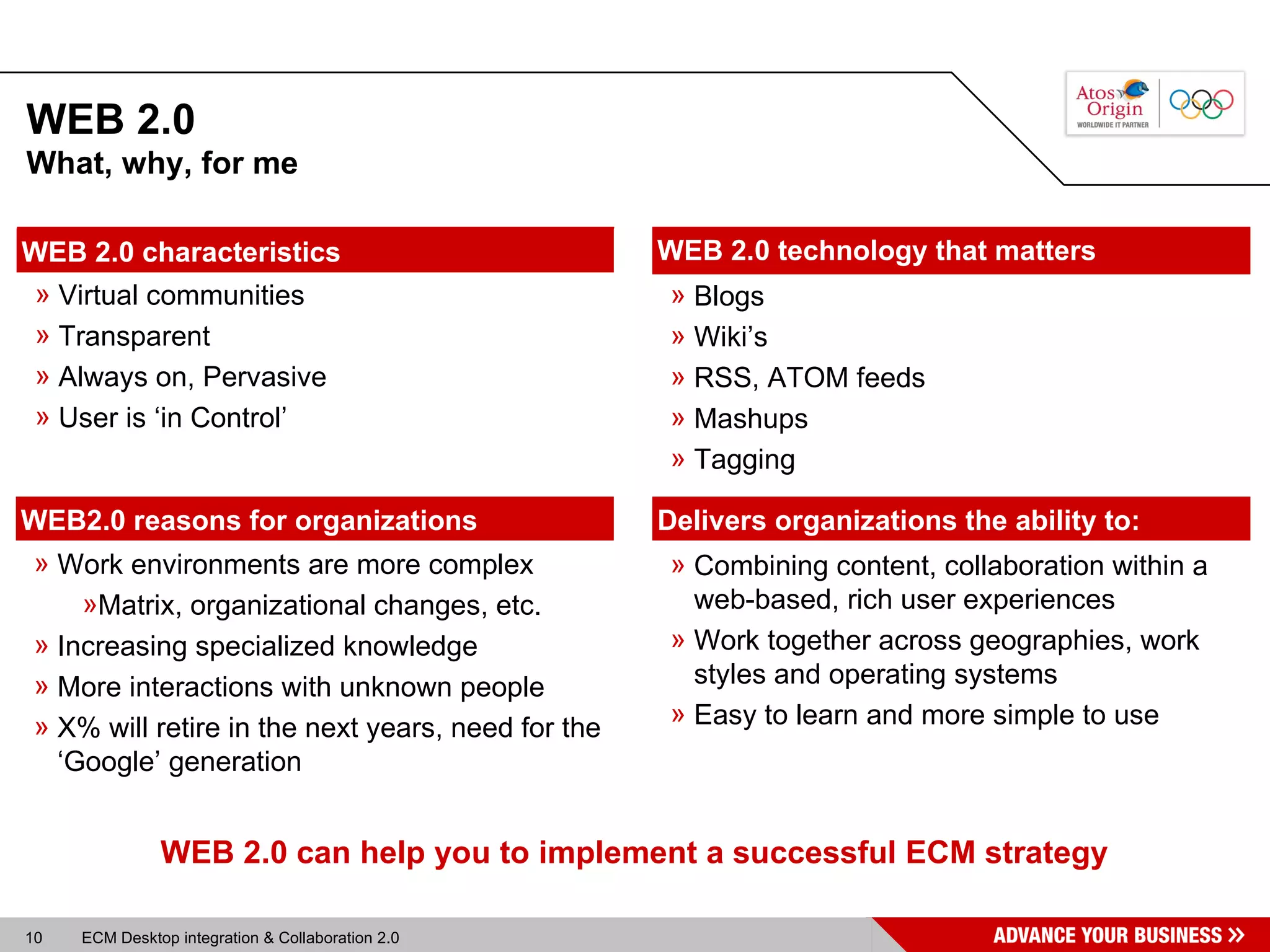
WEB 2.0 Work environments are more complex Matrix, organizational changes, etc. Increasing specialized knowledge More interactions with unknown people X% will retire in the next years, need for the ‘Google’ generation WEB2.0 reasons for organizations Blogs Wiki’s RSS, ATOM feeds Mashups Tagging WEB 2.0 technology that matters WEB 2.0 can help you to implement a successful ECM strategy What, why, for me Virtual communities Transparent Always on, Pervasive User is ‘in Control’ WEB 2.0 characteristics Combining content, collaboration within a web-based, rich user experiences Work together across geographies, work styles and operating systems  Easy to learn and more simple to use Delivers organizations the ability to:
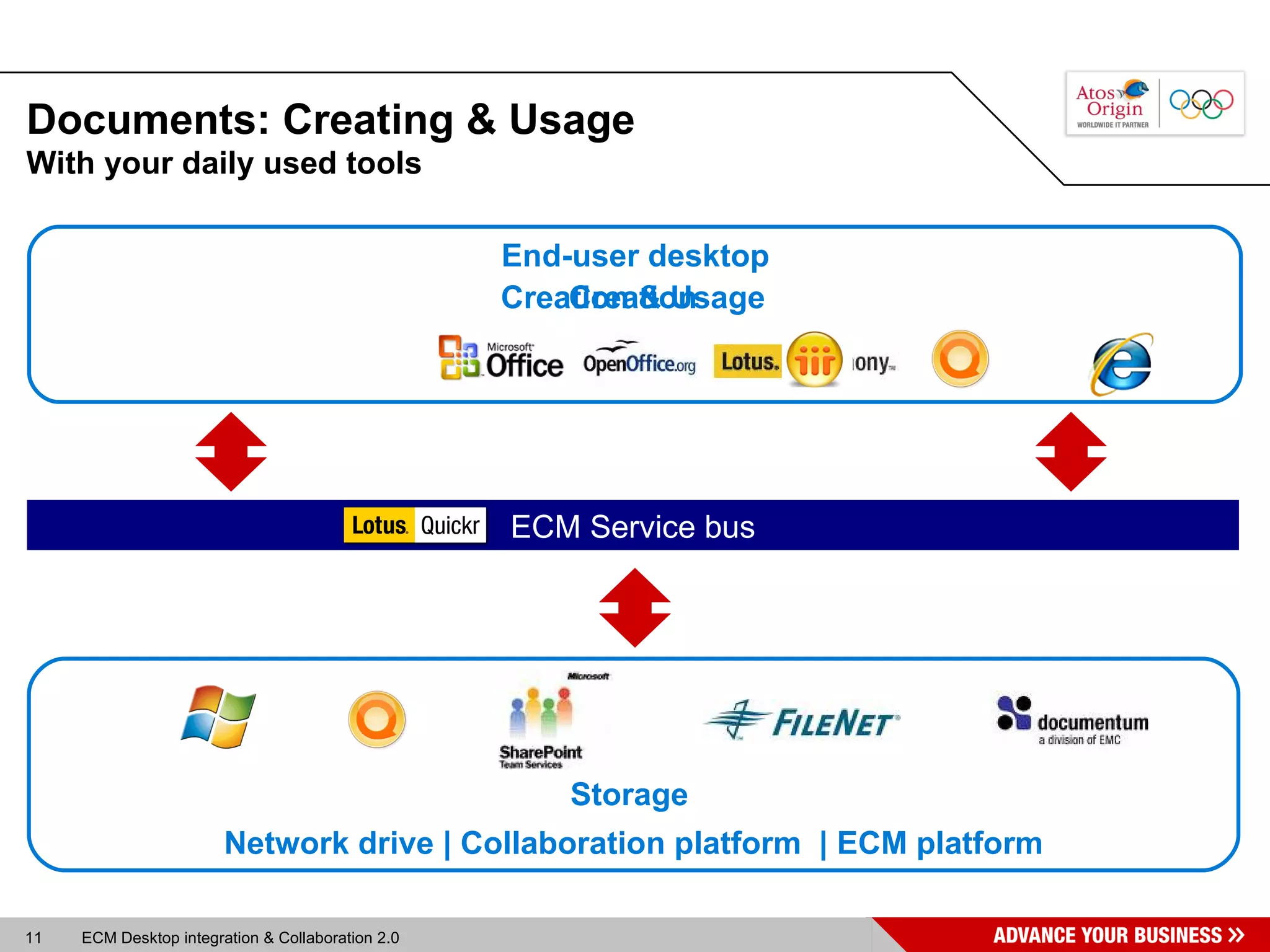
Documents: Creating & Usage ECM Service bus With your daily used tools  Network drive | Collaboration platform  | ECM platform Creation & Usage Creation Storage End-user desktop
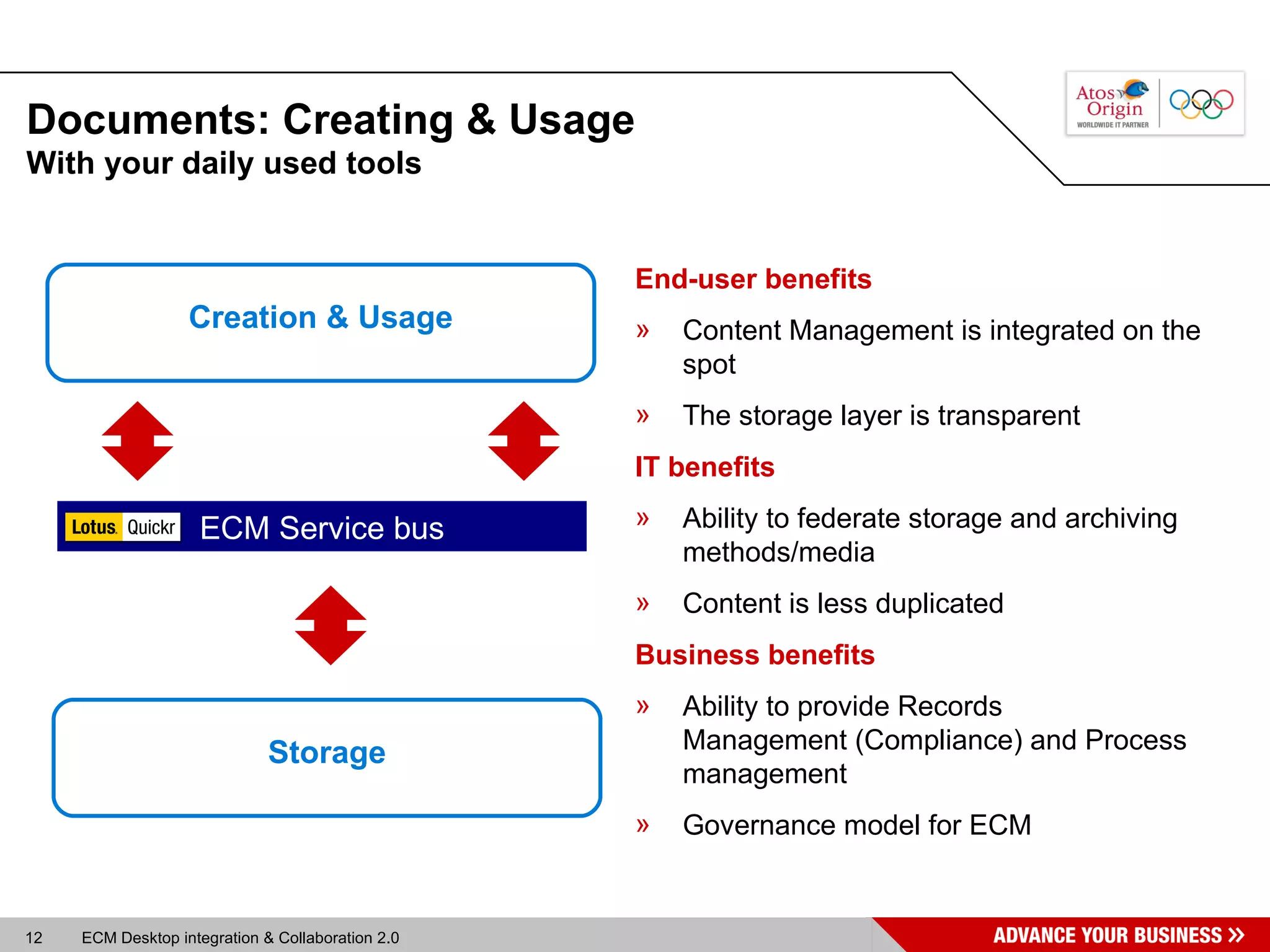
Documents: Creating & Usage With your daily used tools  Creation & Usage Storage ECM Service bus End-user benefits Content Management is integrated on the spot The storage layer is transparent IT benefits Ability to federate storage and archiving methods/media Content is less duplicated Business benefits Ability to provide Records  Management (Compliance) and Process management  Governance model for ECM
Agenda Desktop integration & Collaboration 2.0  Desktop integration & Collaboration 2.0 2 Introduction 3 Solution overview: Lotus Quickr 1 Solution overview: Lotus Quickr 4 Demo: Lotus Quickr Connectors 5 Implementation scenario at Philips IP&S
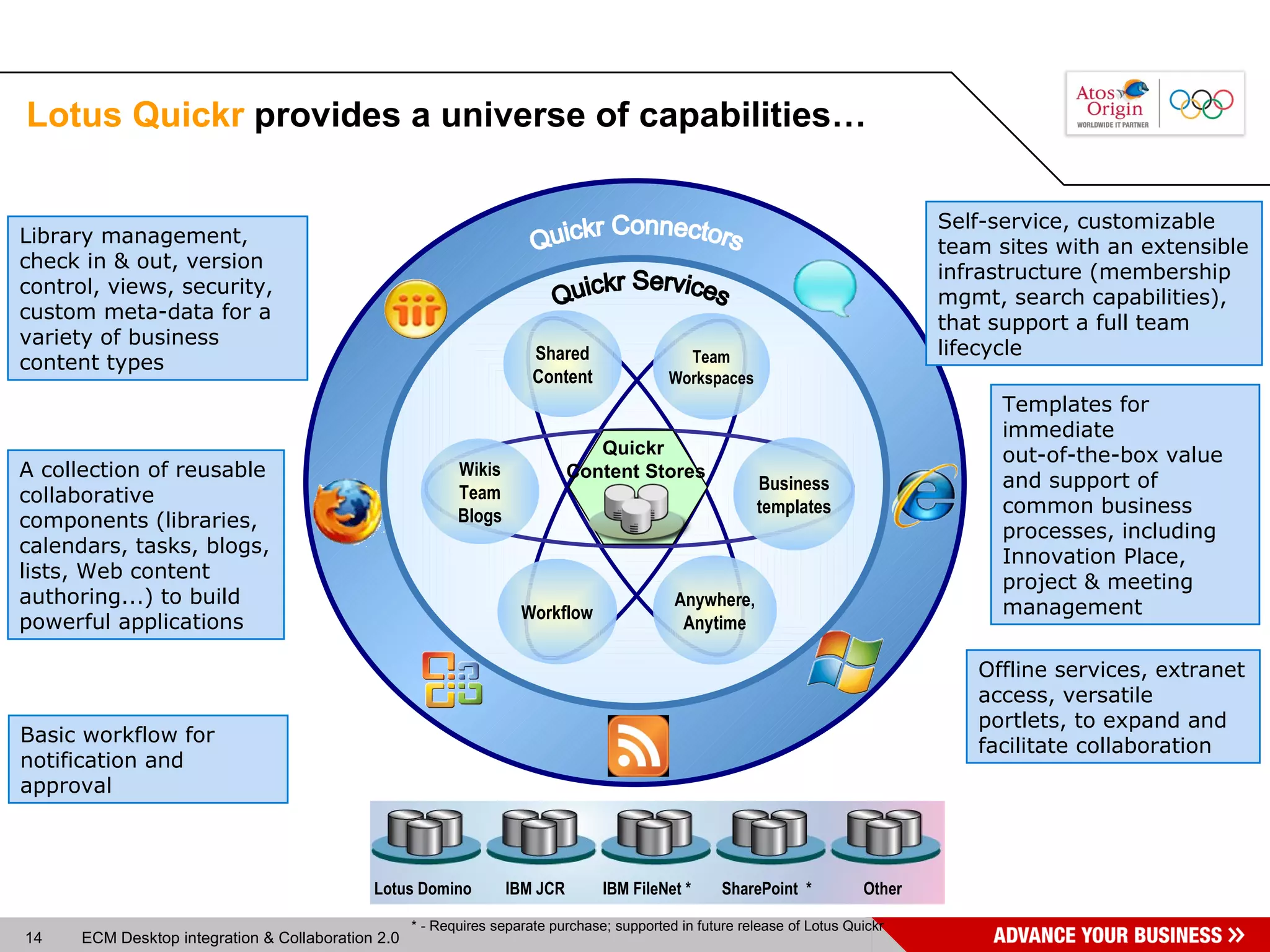
Lotus Quickr  provides a universe of capabilities… Quickr Connectors Shared Content Team Workspaces Anywhere, Anytime Workflow Wikis Team Blogs Business templates Quickr Services Library management, check in & out, version control, views, security, custom meta-data for a variety of business content types Self-service, customizable team sites with an extensible infrastructure (membership mgmt, search capabilities), that support a full team lifecycle A collection of reusable collaborative components (libraries, calendars, tasks, blogs, lists, Web content authoring...) to build powerful applications Templates for immediate  out-of-the-box value and support of common business processes, including Innovation Place, project & meeting management Basic workflow for notification and approval Offline services, extranet access, versatile portlets, to expand and facilitate collaboration * - Requires separate purchase; supported in future release of Lotus Quickr Lotus Domino IBM JCR IBM FileNet * SharePoint  * Other Quickr Content Stores
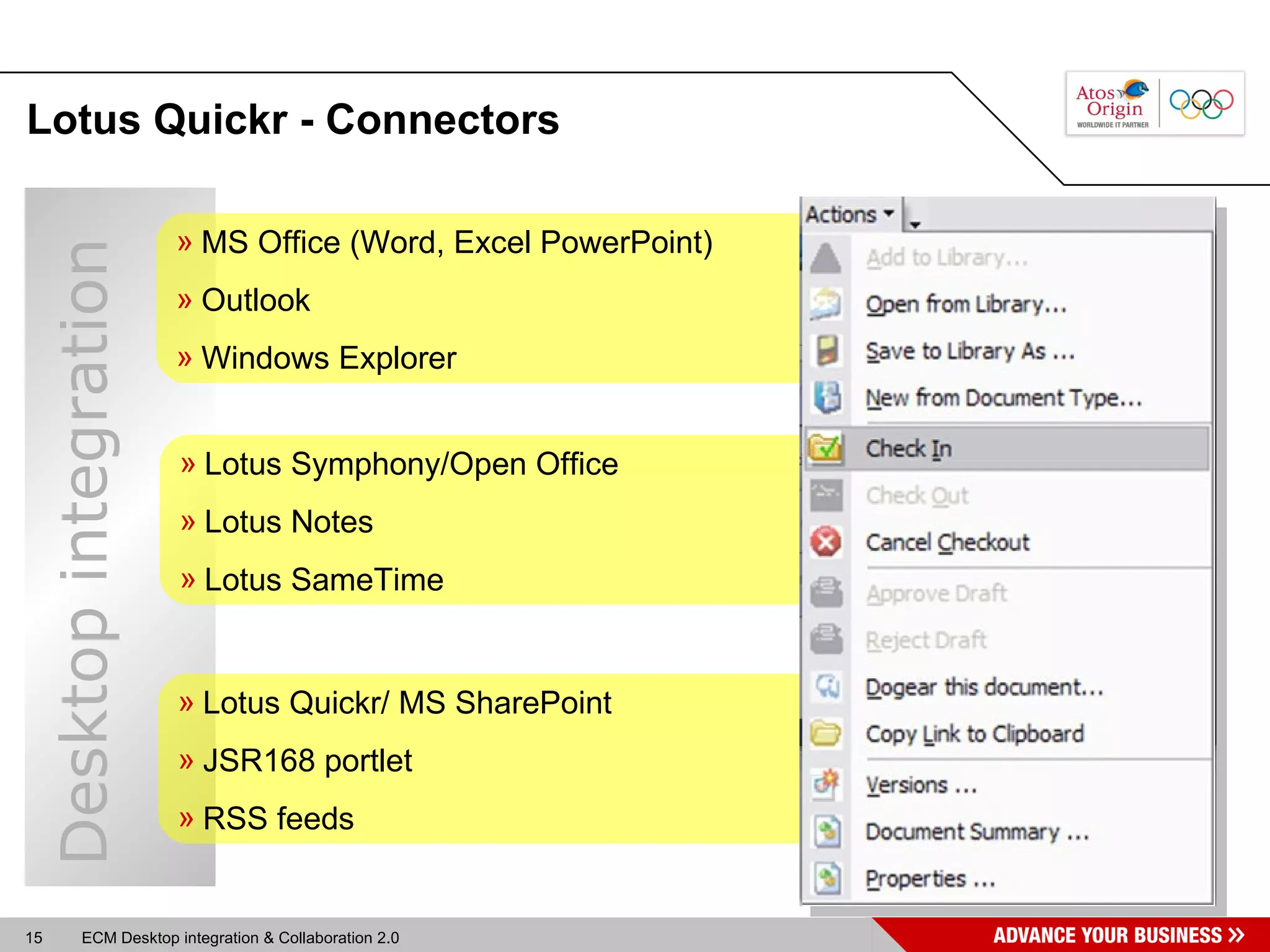
Lotus Quickr -  Connectors MS Office (Word, Excel PowerPoint) Outlook Windows Explorer Lotus Quickr/ MS SharePoint JSR168 portlet RSS feeds Lotus Symphony/Open Office Lotus Notes Lotus SameTime Desktop integration
Agenda Desktop integration & Collaboration 2.0  Desktop integration & Collaboration 2.0 2 Introduction 3 Solution overview: Lotus Quickr 1 4 Demo: Lotus Quickr Connectors Demo: Lotus Quickr Connectors 5 Implementation scenario at Philips IP&S
Demo environment Clien side: Quickr Connectors 8.1.0.90  Hotfix, seperate download and install MS Office 2003 SP3 MS Outlook 2003 SP3 Lotus Notes 8.0.1 Server side: Domino server 8.0.1 Lotus Quickr 8.1 Hardware and software configuration
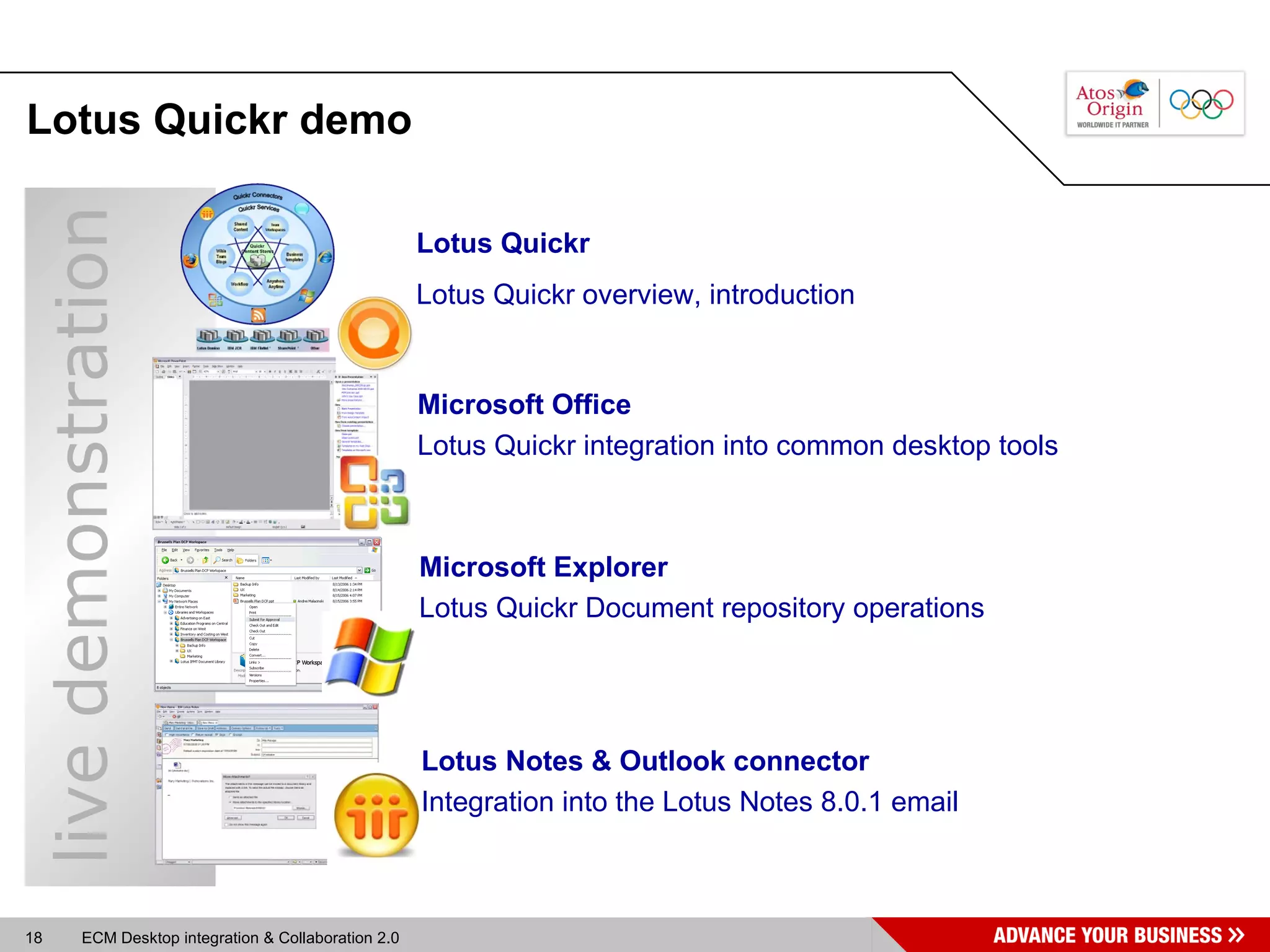
Lotus Quickr demo Lotus Quickr Lotus Quickr overview, introduction Microsoft Explorer Lotus Quickr Document repository operations Microsoft Office Lotus Quickr integration into common desktop tools Lotus Notes & Outlook connector Integration into the Lotus Notes 8.0.1 email live demonstration
Lotus Quickr  templates Free downloads from SNAPSS.com QActivities : Activities Integration, Web 2.0 Theme QAnnounce : Corporate Communications Management QContacts : Contact Management QProject : Project Management QIdeas : Ideas and Innovation QIssues : Issues Escalation, Workflow and Management QMeeting : Meeting and Agenda Management QPhotos : Image Repository QPresent : Collaborative Presentation Development QSurvey : Dynamic Surveys QSite : All-In-One, plus a Blog and Wiki AnyPlace  SiteMap Blog Wiki Project teamplace Many more… End users can create custom team workspaces using flexible
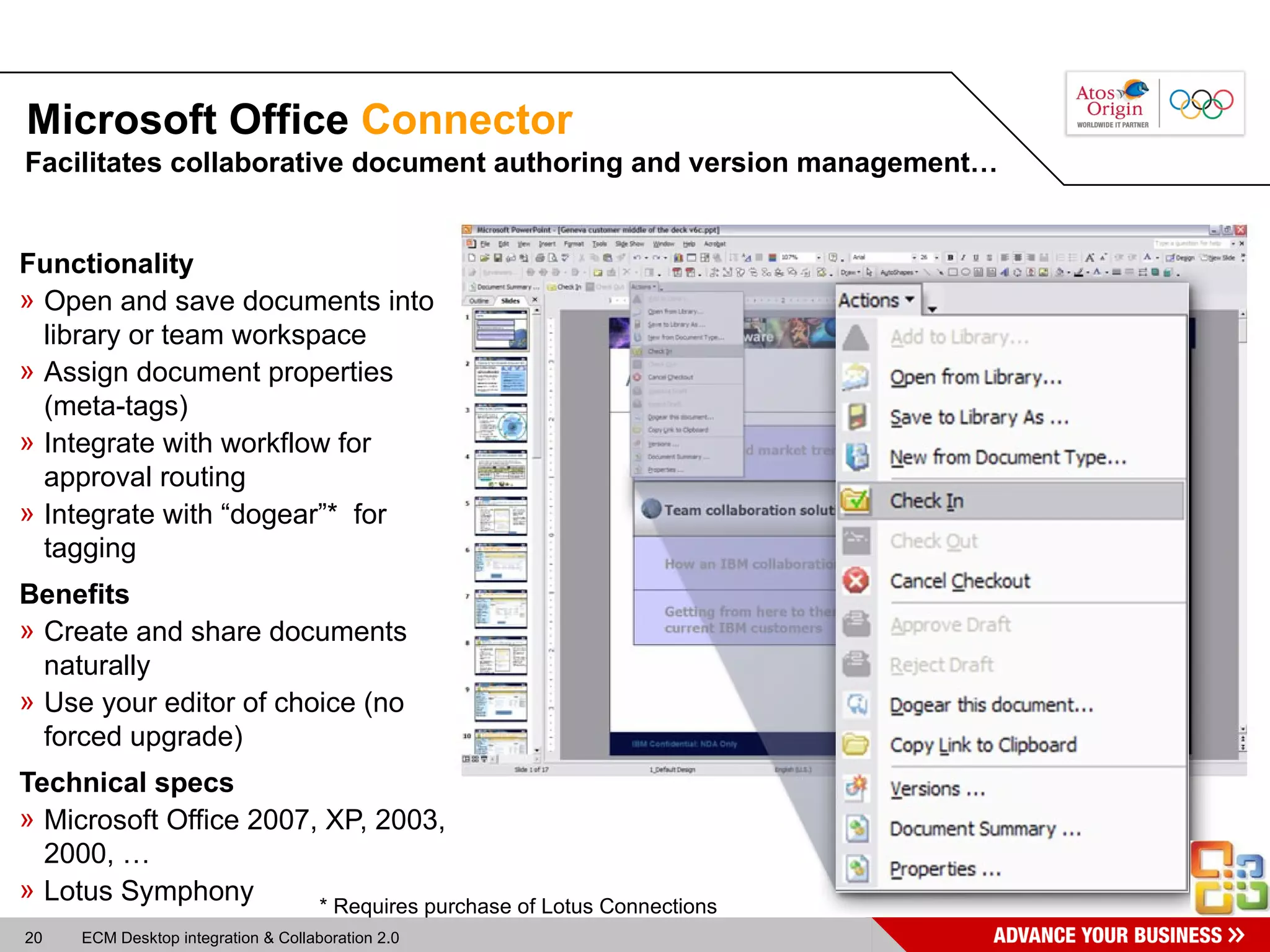
Microsoft Office  Connector Functionality Open and save documents into library or team workspace Assign document properties (meta-tags) Integrate with workflow for approval routing Integrate with “dogear”*  for tagging Benefits Create and share documents naturally  Use your editor of choice (no forced upgrade) Technical specs Microsoft Office 2007, XP, 2003, 2000, … Lotus Symphony Facilitates collaborative document authoring and version management… * Requires purchase of Lotus Connections
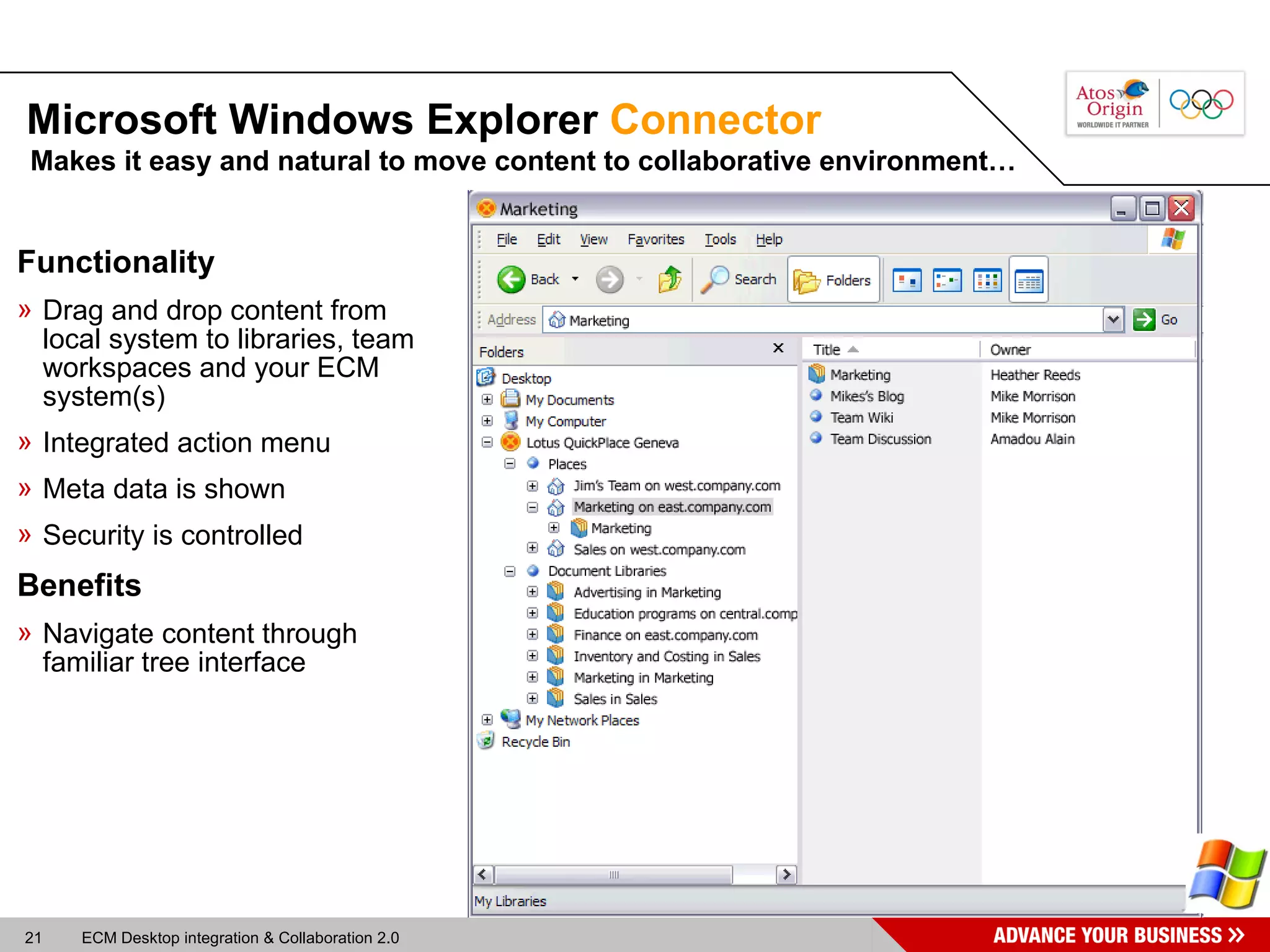
Microsoft Windows Explorer  Connector Makes it easy and natural to move content to collaborative environment… Functionality Drag and drop content from local system to libraries, team workspaces and your ECM system(s) Integrated action menu Meta data is shown Security is controlled Benefits Navigate content through familiar tree interface
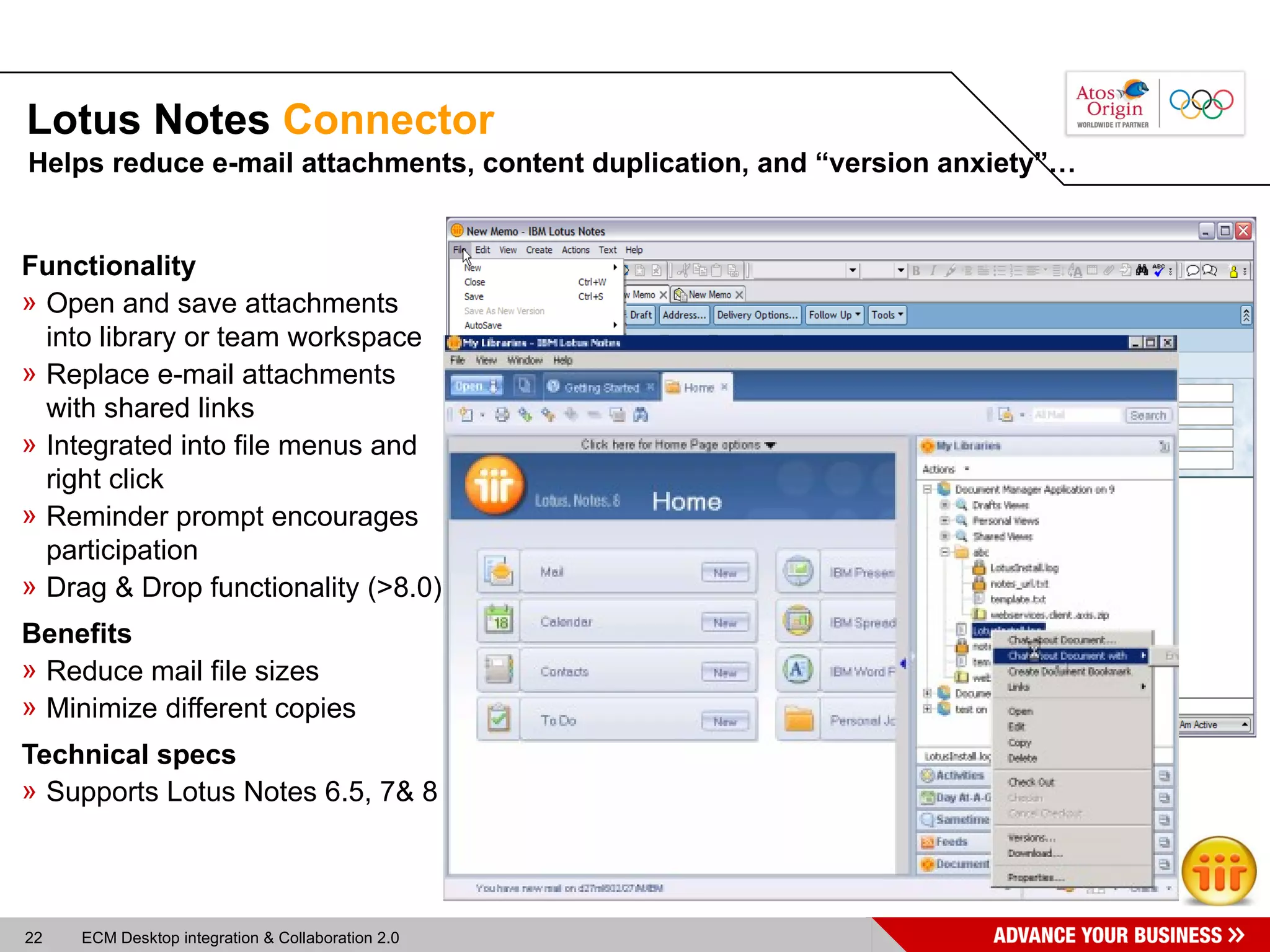
Lotus Notes  Connector Functionality Open and save attachments into library or team workspace Replace e-mail attachments with shared links Integrated into file menus and right click Reminder prompt encourages participation Drag & Drop functionality (>8.0) Benefits Reduce mail file sizes Minimize different copies Technical specs Supports Lotus Notes 6.5, 7& 8 Helps reduce e-mail attachments, content duplication, and “version anxiety”…
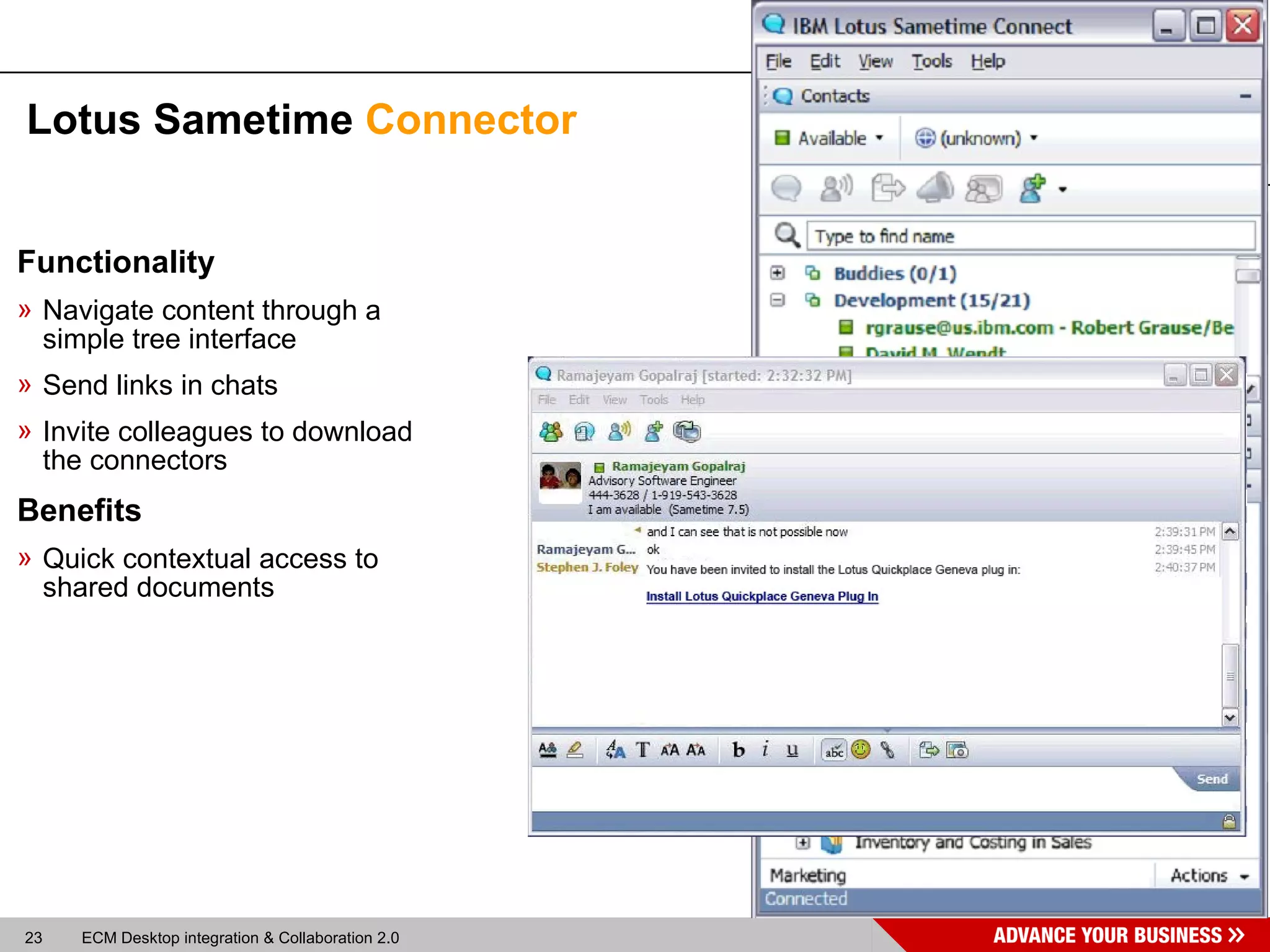
Lotus Sametime  Connector Functionality Navigate content through a simple tree interface Send links in chats Invite colleagues to download the connectors Benefits Quick contextual access to shared documents
Agenda Desktop integration & Collaboration 2.0  Desktop integration & Collaboration 2.0 2 Introduction 3 Solution overview: Lotus Quickr 1 4 Demo: Lotus Quickr Connectors Implementation scenario at Philips IP&S 5 Implementation scenario at Philips IP&S
FileNet  April 08, 2008 W. van Tol Philips Intellectual Property & Standards
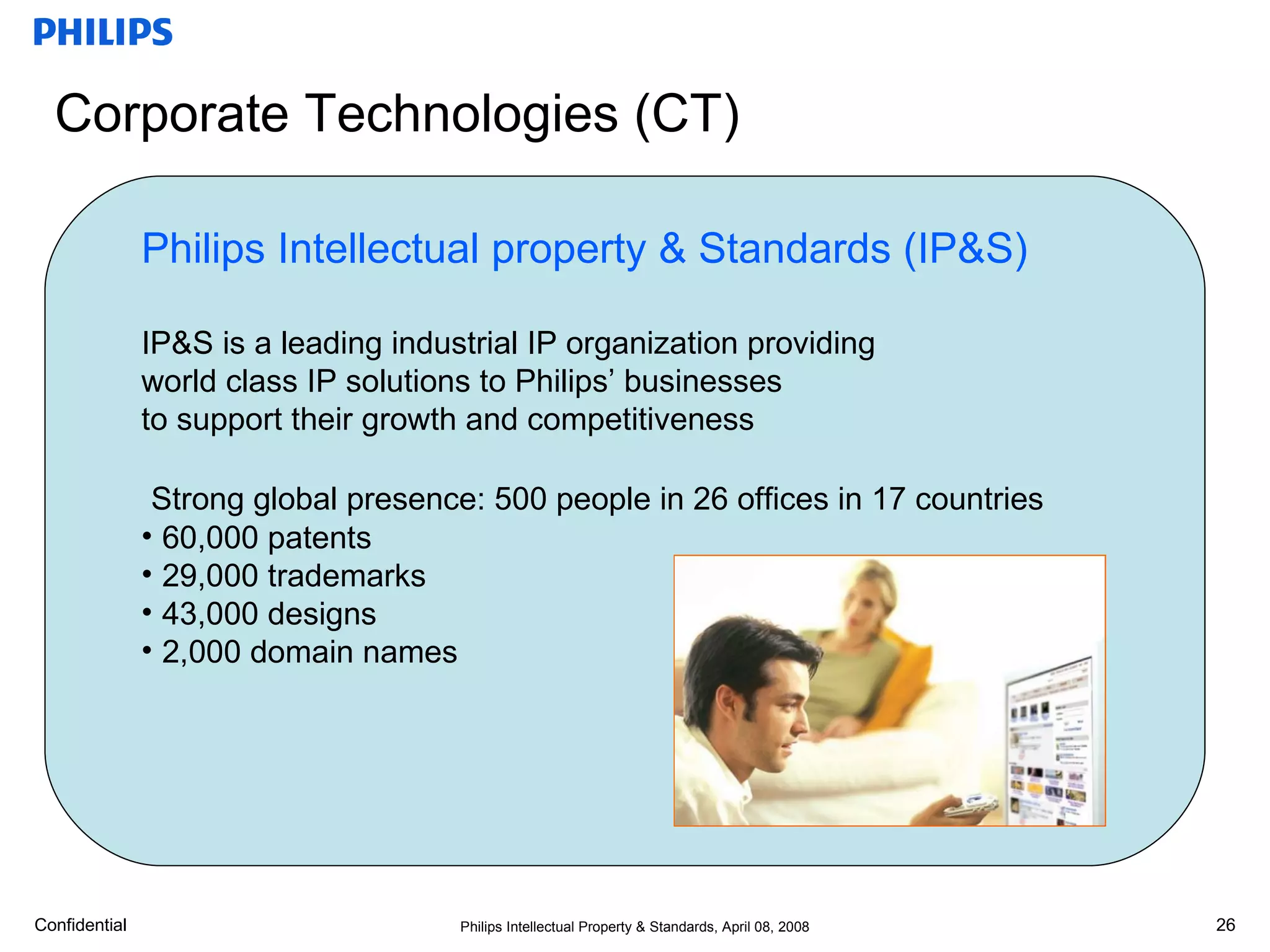
Corporate Technologies (CT) CTO-Philips CFO HRM CTO Office Bus.Dev. Innov.Excell Technology Incubator Healthcare Incubator Lifestyle Incubator Molecular Diagnostics Research Applied Technologies IP&S Innovation Campus Philips Intellectual property & Standards (IP&S) IP&S is a leading industrial IP organization providing world class IP solutions to Philips’ businesses to support their growth and competitiveness Strong global presence: 500 people in 26 offices in 17 countries 60,000 patents 29,000 trademarks 43,000 designs 2,000 domain names
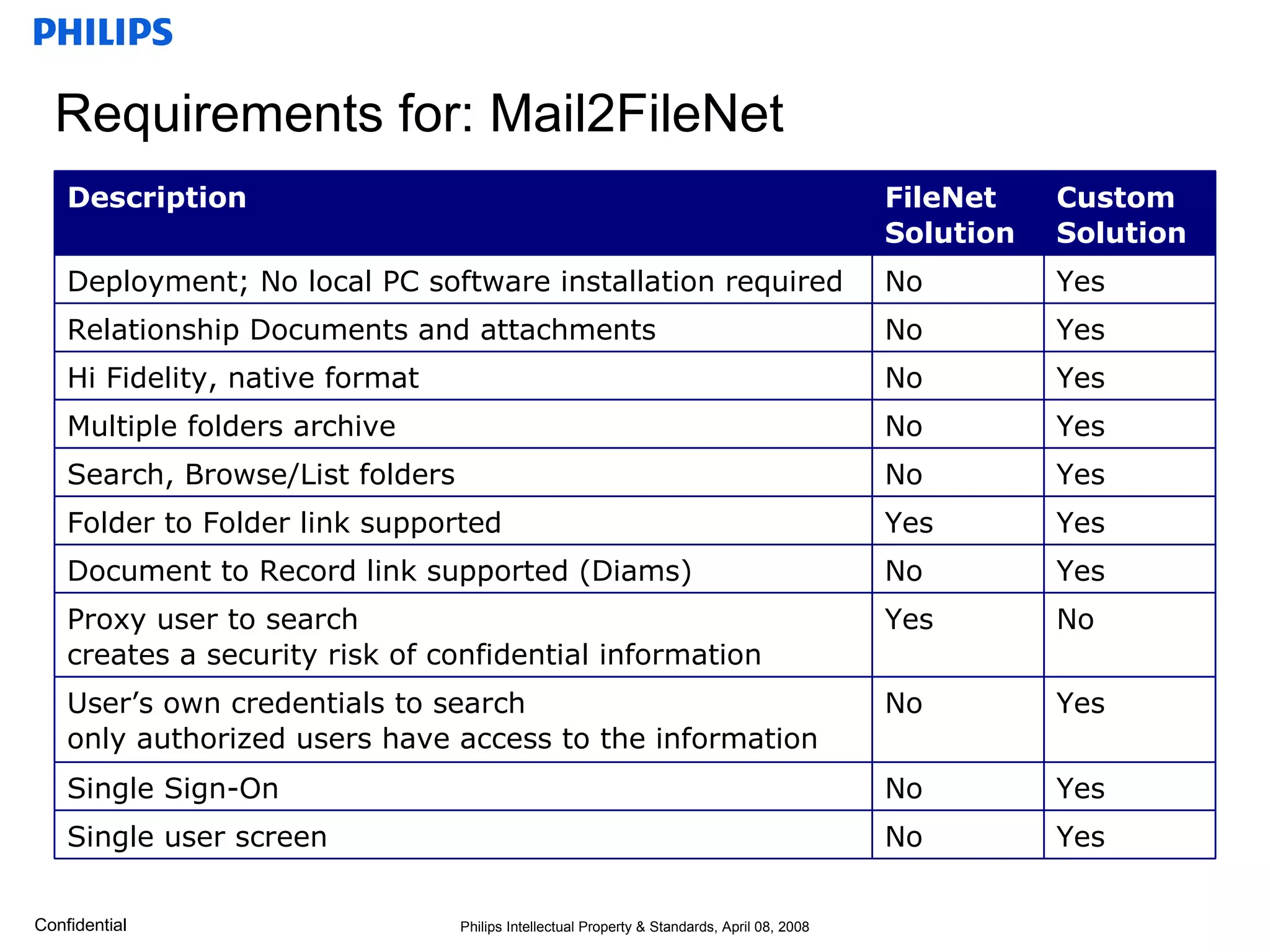
Requirements for: Mail2FileNet Yes No Single user screen Yes No Single Sign-On Yes No User’s own credentials to search  only authorized users have access to the information No Yes Proxy user to search  creates a security risk of confidential information Yes No Document to Record link supported (Diams) Yes Yes Folder to Folder link supported  Yes No Search, Browse/List folders Yes No Multiple folders archive Yes No Hi Fidelity, native format Yes No Relationship Documents and attachments Yes No Deployment; No local PC software installation required Custom  Solution FileNet Solution Description
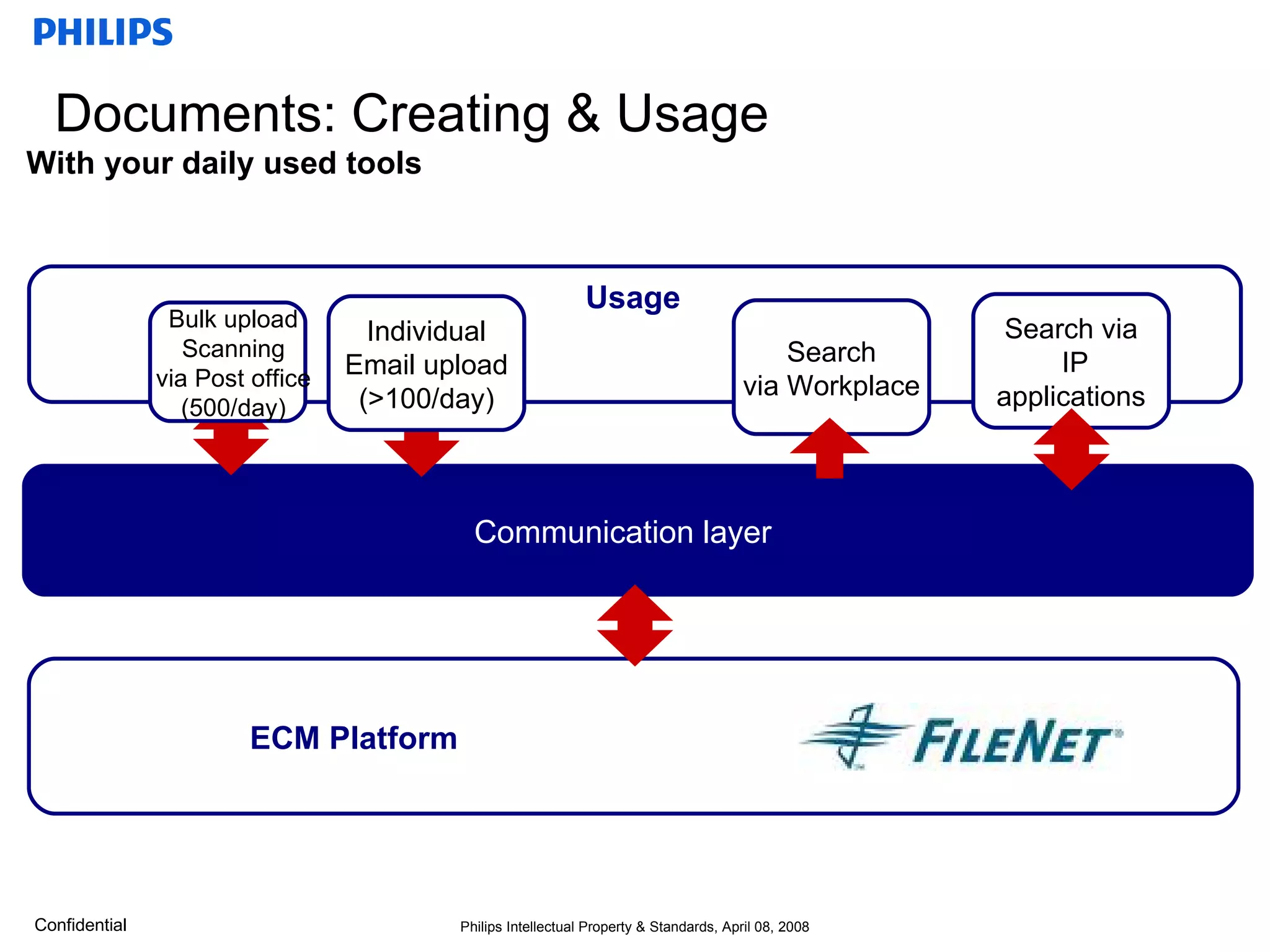
Documents: Creating & Usage Communication layer With your daily used tools  ECM Platform Usage Bulk upload Scanning via Post office (500/day) Search via IP applications Search via Workplace Individual Email upload (>100/day)
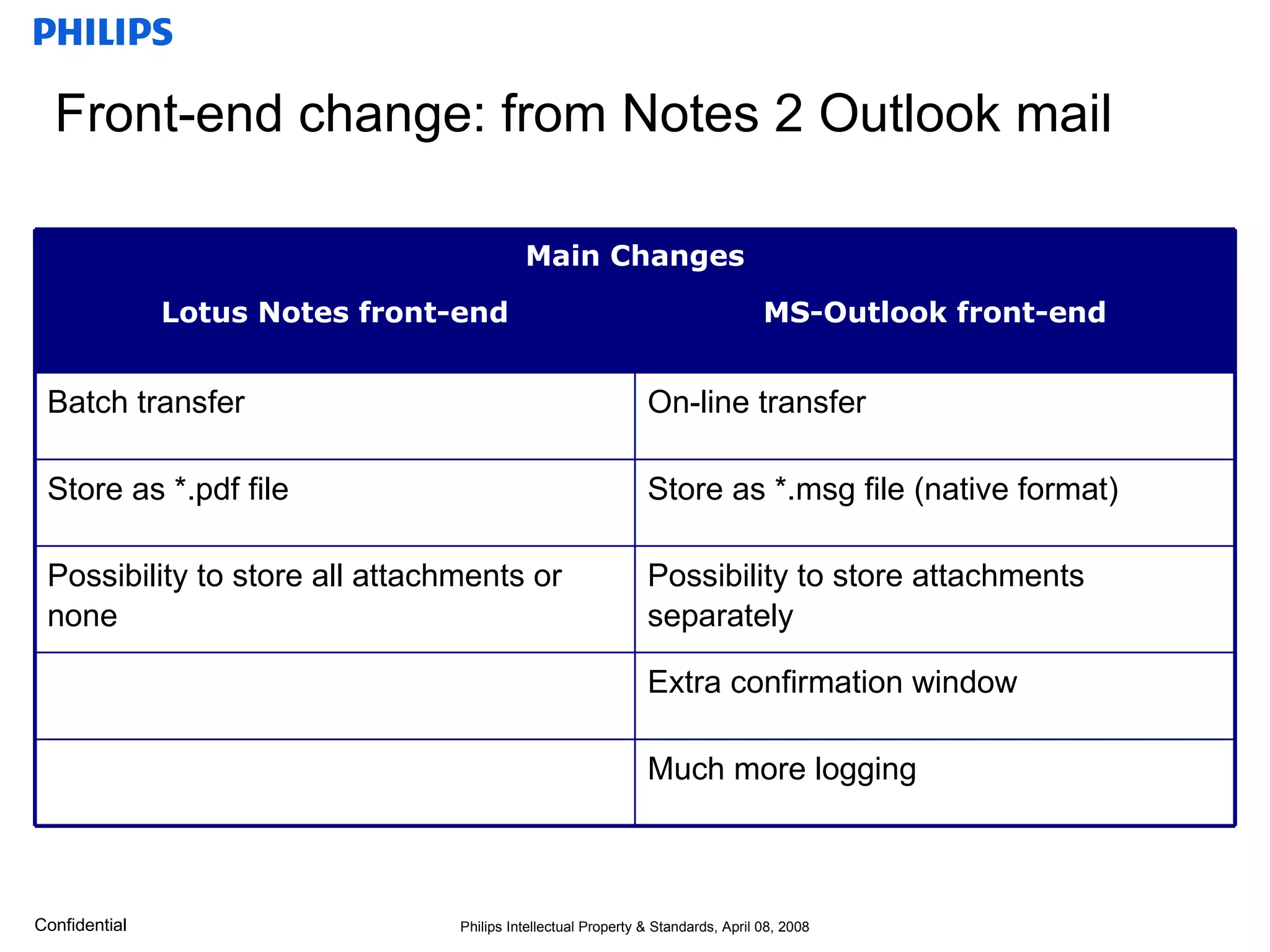
Front-end change: from Notes 2 Outlook mail Main Changes Possibility to store all attachments or none Store as *.pdf file Batch transfer Lotus Notes front-end Extra confirmation window Much more logging Possibility to store attachments separately Store as *.msg file (native format) On-line transfer MS-Outlook front-end
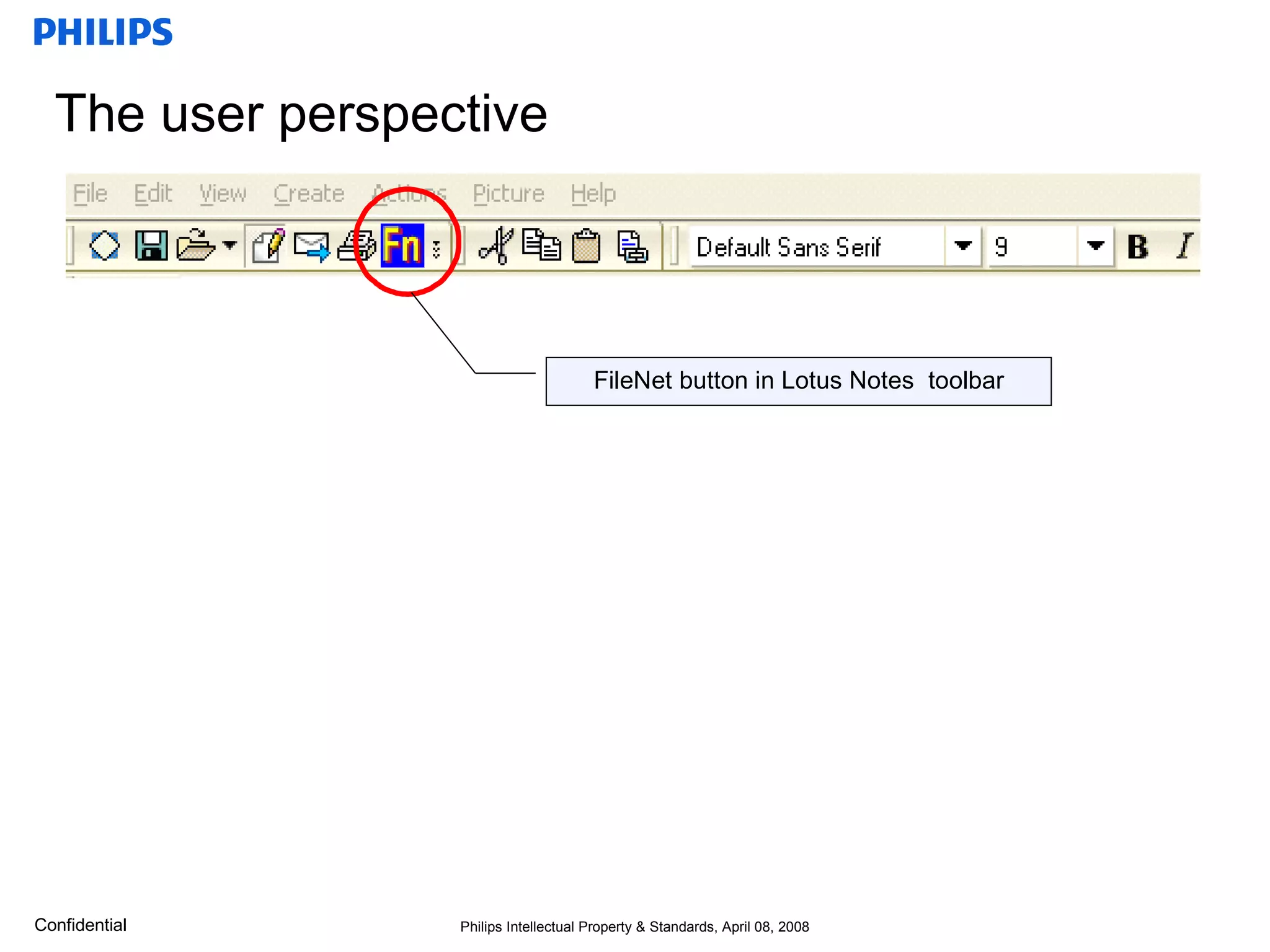
The user perspective FileNet button in Lotus Notes  toolbar
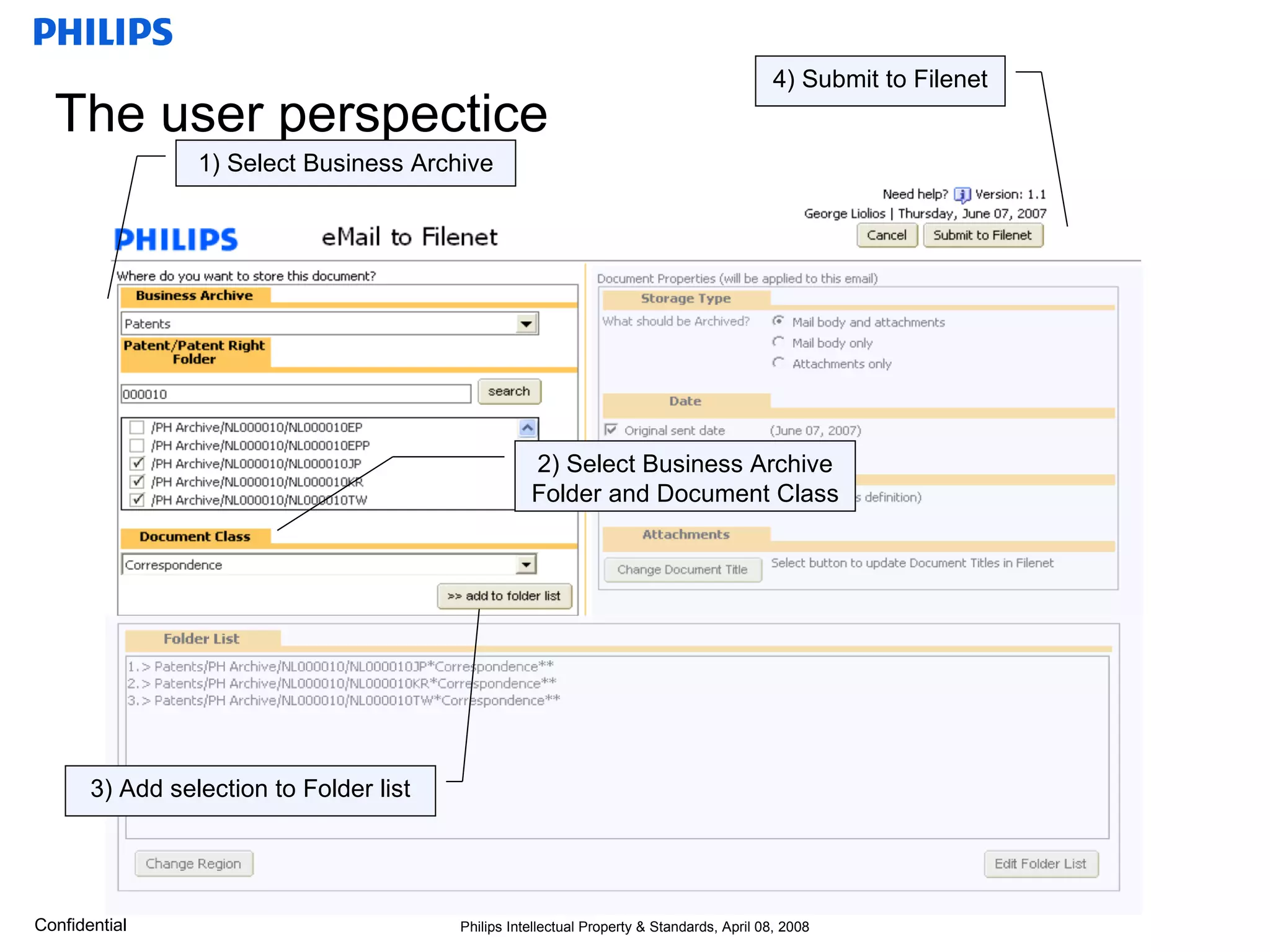
The user perspectice 1) Select Business Archive 4) Submit to Filenet 2) Select Business Archive Folder and Document Class 3) Add selection to Folder list
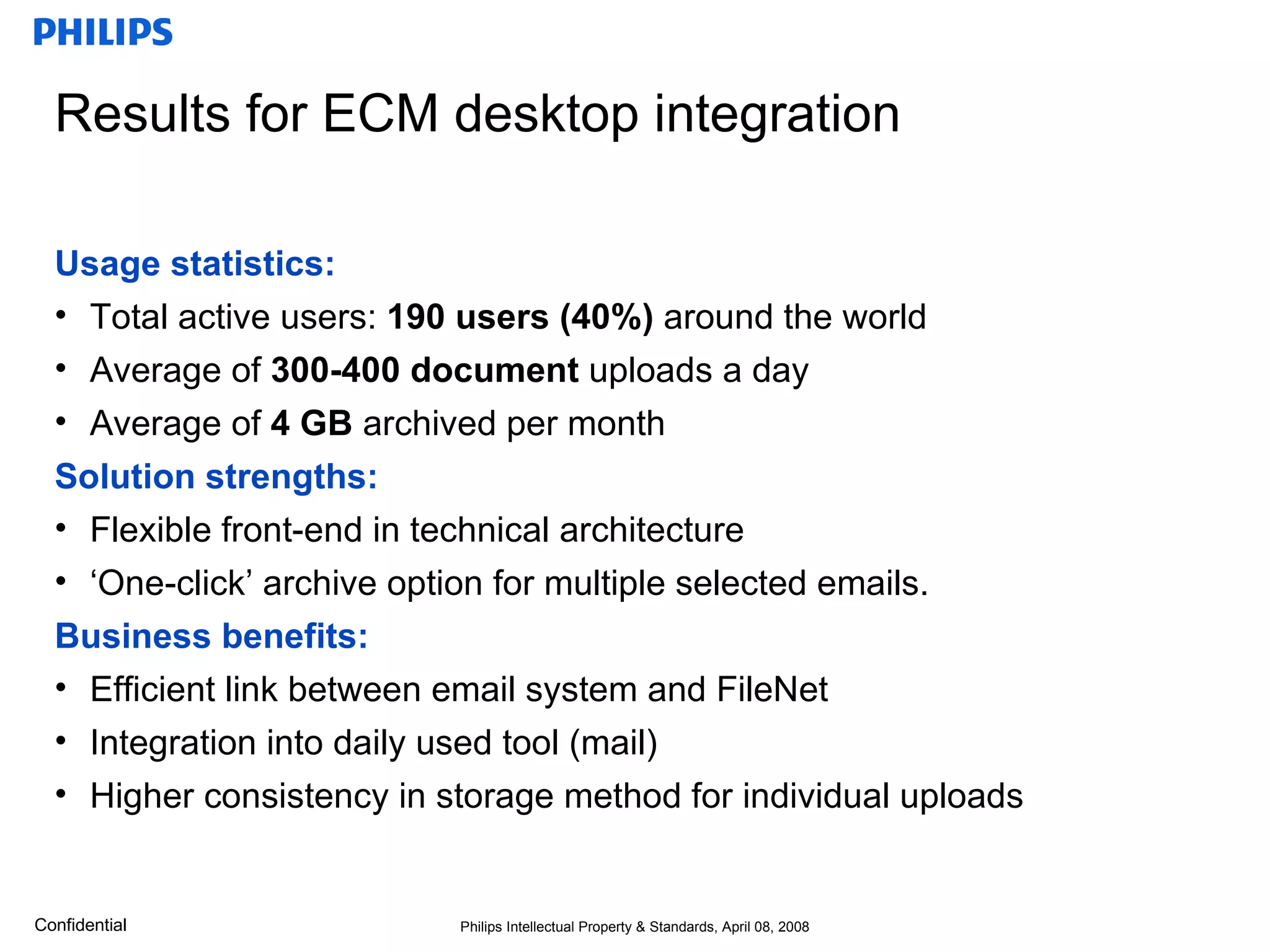
Results for ECM desktop integration  Usage statistics: Total active users:  190 users (40%)  around the world Average of  300-400 document  uploads a day Average of  4 GB  archived per month Solution strengths: Flexible front-end in technical architecture ‘One-click’ archive option for multiple selected emails. Business benefits: Efficient link between email system and FileNet Integration into daily used tool (mail) Higher consistency in storage method for individual uploads
Questions?
Other session for you interest Collaboration & End2End Content management Tue 3/jun:  Making Better Decisions, Faster with Lotus Quickr, ECM and BPM Tue 3/jun:  Bring IBM FileNet P8 ECM to Microsoft Office SharePoint Wed 4/jun:  Unlocking the Hidden Value of Your ECM System with Lotus Quickr Thur 5/jun:  Team Based Document Management meets Enterprise Content Management Fri 6/jun:  Maximize Your Collaborative Content with New OmniFind Enterprise Search Other Atos Origin topics: Wed 4/jun: Improve Business Performance of Insurance Companies with Filenet P8   Thu 5/jun:  Combining Collaboration, ECM & BPM to Accelerated Processes
Thank you See download option on IOD website Session:  1181A

Desktop integration & ECM

  • 1.
    Extend FileNet WithEmail & Desktop Integration and Web 2.0 Collaboration Session: 1181A; Friday 6 June, 2008 10:00 - 10:45 hrs The Hague – World Forum - Yangtze 1
  • 2.
    Introduction Rob vanGils Enterprise Content Management Consultant – Lotus & Portal  +31 (0)6 22997345 Richard van Delft Enterprise Content Management Delivery manager – Lotus & Portal  +31 (0)6 54265474 Willem van Tol Philips IP&S Program manager ICT  +31 (0)6 10756296
  • 3.
    Desktop integration &Collaboration 2.0 End-to-end content and collaboration solution Session: 1181A; Friday 6 June, 2008 10:00 - 10:45 hrs The Hague – World Forum - Yangtze 1
  • 4.
    Agenda Introduction Introduction1 Desktop integration & Collaboration 2.0 3 Solution overview: Lotus Quickr Desktop integration & Collaboration 2.0 2 4 Demo: Lotus Quickr Connectors 5 Implementation scenario at Philips IP&S
  • 5.
    Introduction: Atos OriginGlobal Service Lines ECM results #1 in the ECM marketplace @ the Netherlands ECM on of the worldwide key solutions of Atos Origin 1 of the worldwide design partners for Lotus Quickr connector for FileNet Olympic results Highly successful ATHENS 2004 and Torino 2006 Games – contract extended until 2012 Preparations well underway for Beijing 2008 Nobody notice the technology…exactly the way it should be! ATOS ORIGIN ATOS CONSULTING SYSTEM INTEGRATION MANAGED OPERATIONS
  • 6.
    Enterprise Content ManagementContent is everywhere & anywhere Lotus SameTime Collaboration BPM Business Process Management Offline support Lotus Quickr Record Management Document Management Mobile support Office Suites Windows Explorer Lotus Notes SharePoint Chat Knowledge Management Connecting Archiving ECM WIKI BLOG Basic Content Services End users perspective is key for success Workflow Management Network storage
  • 7.
    Business issues andcontent-intensive initiatives The Enterprise Costs Compliance Collaboration Communication ECM scope: Supporting Product lifecycle Advertising Marketing & Promotion Customer support Inf. Worker productivity & Knowledge Mgmnt Improve market agility Improve backoffice productivity Meet compliance mandates
  • 8.
    Business issues andcontent-intensive initiatives ... supported by ECM components Costs Compliance Collaboration Communication Atos Origin Core ECM services Atos Origin ECM-related services Atos Origin Extended ECM services ECM scope: Content Management (docs, eforms, Digital assets) Doc-Centric Collaboration Portal & Collaboration Email archiving Search Capture Records Management (incl archiving) Human BPM (Workflow, business Rules) ERP & Fixed doc (IDARS) archiving Output Management Identity Management Application BPM Network Infrastructures Security ERP Email Infrastructure Content Integration Business Intelligence
  • 9.
    Agenda Desktop integration& Collaboration 2.0 2 Desktop integration & Collaboration 2.0 Introduction 1 Desktop integration & Collaboration 2.0 3 Solution overview: Lotus Quickr 4 Demo: Lotus Quickr Connectors 5 Implementation scenario at Philips IP&S
  • 10.
    WEB 2.0 Workenvironments are more complex Matrix, organizational changes, etc. Increasing specialized knowledge More interactions with unknown people X% will retire in the next years, need for the ‘Google’ generation WEB2.0 reasons for organizations Blogs Wiki’s RSS, ATOM feeds Mashups Tagging WEB 2.0 technology that matters WEB 2.0 can help you to implement a successful ECM strategy What, why, for me Virtual communities Transparent Always on, Pervasive User is ‘in Control’ WEB 2.0 characteristics Combining content, collaboration within a web-based, rich user experiences Work together across geographies, work styles and operating systems Easy to learn and more simple to use Delivers organizations the ability to:
  • 11.
    Documents: Creating &Usage ECM Service bus With your daily used tools Network drive | Collaboration platform | ECM platform Creation & Usage Creation Storage End-user desktop
  • 12.
    Documents: Creating &Usage With your daily used tools Creation & Usage Storage ECM Service bus End-user benefits Content Management is integrated on the spot The storage layer is transparent IT benefits Ability to federate storage and archiving methods/media Content is less duplicated Business benefits Ability to provide Records Management (Compliance) and Process management Governance model for ECM
  • 13.
    Agenda Desktop integration& Collaboration 2.0 Desktop integration & Collaboration 2.0 2 Introduction 3 Solution overview: Lotus Quickr 1 Solution overview: Lotus Quickr 4 Demo: Lotus Quickr Connectors 5 Implementation scenario at Philips IP&S
  • 14.
    Lotus Quickr provides a universe of capabilities… Quickr Connectors Shared Content Team Workspaces Anywhere, Anytime Workflow Wikis Team Blogs Business templates Quickr Services Library management, check in & out, version control, views, security, custom meta-data for a variety of business content types Self-service, customizable team sites with an extensible infrastructure (membership mgmt, search capabilities), that support a full team lifecycle A collection of reusable collaborative components (libraries, calendars, tasks, blogs, lists, Web content authoring...) to build powerful applications Templates for immediate out-of-the-box value and support of common business processes, including Innovation Place, project & meeting management Basic workflow for notification and approval Offline services, extranet access, versatile portlets, to expand and facilitate collaboration * - Requires separate purchase; supported in future release of Lotus Quickr Lotus Domino IBM JCR IBM FileNet * SharePoint * Other Quickr Content Stores
  • 15.
    Lotus Quickr - Connectors MS Office (Word, Excel PowerPoint) Outlook Windows Explorer Lotus Quickr/ MS SharePoint JSR168 portlet RSS feeds Lotus Symphony/Open Office Lotus Notes Lotus SameTime Desktop integration
  • 16.
    Agenda Desktop integration& Collaboration 2.0 Desktop integration & Collaboration 2.0 2 Introduction 3 Solution overview: Lotus Quickr 1 4 Demo: Lotus Quickr Connectors Demo: Lotus Quickr Connectors 5 Implementation scenario at Philips IP&S
  • 17.
    Demo environment Clienside: Quickr Connectors 8.1.0.90 Hotfix, seperate download and install MS Office 2003 SP3 MS Outlook 2003 SP3 Lotus Notes 8.0.1 Server side: Domino server 8.0.1 Lotus Quickr 8.1 Hardware and software configuration
  • 18.
    Lotus Quickr demoLotus Quickr Lotus Quickr overview, introduction Microsoft Explorer Lotus Quickr Document repository operations Microsoft Office Lotus Quickr integration into common desktop tools Lotus Notes & Outlook connector Integration into the Lotus Notes 8.0.1 email live demonstration
  • 19.
    Lotus Quickr templates Free downloads from SNAPSS.com QActivities : Activities Integration, Web 2.0 Theme QAnnounce : Corporate Communications Management QContacts : Contact Management QProject : Project Management QIdeas : Ideas and Innovation QIssues : Issues Escalation, Workflow and Management QMeeting : Meeting and Agenda Management QPhotos : Image Repository QPresent : Collaborative Presentation Development QSurvey : Dynamic Surveys QSite : All-In-One, plus a Blog and Wiki AnyPlace SiteMap Blog Wiki Project teamplace Many more… End users can create custom team workspaces using flexible
  • 20.
    Microsoft Office Connector Functionality Open and save documents into library or team workspace Assign document properties (meta-tags) Integrate with workflow for approval routing Integrate with “dogear”* for tagging Benefits Create and share documents naturally Use your editor of choice (no forced upgrade) Technical specs Microsoft Office 2007, XP, 2003, 2000, … Lotus Symphony Facilitates collaborative document authoring and version management… * Requires purchase of Lotus Connections
  • 21.
    Microsoft Windows Explorer Connector Makes it easy and natural to move content to collaborative environment… Functionality Drag and drop content from local system to libraries, team workspaces and your ECM system(s) Integrated action menu Meta data is shown Security is controlled Benefits Navigate content through familiar tree interface
  • 22.
    Lotus Notes Connector Functionality Open and save attachments into library or team workspace Replace e-mail attachments with shared links Integrated into file menus and right click Reminder prompt encourages participation Drag & Drop functionality (>8.0) Benefits Reduce mail file sizes Minimize different copies Technical specs Supports Lotus Notes 6.5, 7& 8 Helps reduce e-mail attachments, content duplication, and “version anxiety”…
  • 23.
    Lotus Sametime Connector Functionality Navigate content through a simple tree interface Send links in chats Invite colleagues to download the connectors Benefits Quick contextual access to shared documents
  • 24.
    Agenda Desktop integration& Collaboration 2.0 Desktop integration & Collaboration 2.0 2 Introduction 3 Solution overview: Lotus Quickr 1 4 Demo: Lotus Quickr Connectors Implementation scenario at Philips IP&S 5 Implementation scenario at Philips IP&S
  • 25.
    FileNet April08, 2008 W. van Tol Philips Intellectual Property & Standards
  • 26.
    Corporate Technologies (CT)CTO-Philips CFO HRM CTO Office Bus.Dev. Innov.Excell Technology Incubator Healthcare Incubator Lifestyle Incubator Molecular Diagnostics Research Applied Technologies IP&S Innovation Campus Philips Intellectual property & Standards (IP&S) IP&S is a leading industrial IP organization providing world class IP solutions to Philips’ businesses to support their growth and competitiveness Strong global presence: 500 people in 26 offices in 17 countries 60,000 patents 29,000 trademarks 43,000 designs 2,000 domain names
  • 27.
    Requirements for: Mail2FileNetYes No Single user screen Yes No Single Sign-On Yes No User’s own credentials to search only authorized users have access to the information No Yes Proxy user to search creates a security risk of confidential information Yes No Document to Record link supported (Diams) Yes Yes Folder to Folder link supported Yes No Search, Browse/List folders Yes No Multiple folders archive Yes No Hi Fidelity, native format Yes No Relationship Documents and attachments Yes No Deployment; No local PC software installation required Custom Solution FileNet Solution Description
  • 28.
    Documents: Creating &Usage Communication layer With your daily used tools ECM Platform Usage Bulk upload Scanning via Post office (500/day) Search via IP applications Search via Workplace Individual Email upload (>100/day)
  • 29.
    Front-end change: fromNotes 2 Outlook mail Main Changes Possibility to store all attachments or none Store as *.pdf file Batch transfer Lotus Notes front-end Extra confirmation window Much more logging Possibility to store attachments separately Store as *.msg file (native format) On-line transfer MS-Outlook front-end
  • 30.
    The user perspectiveFileNet button in Lotus Notes toolbar
  • 31.
    The user perspectice1) Select Business Archive 4) Submit to Filenet 2) Select Business Archive Folder and Document Class 3) Add selection to Folder list
  • 32.
    Results for ECMdesktop integration Usage statistics: Total active users: 190 users (40%) around the world Average of 300-400 document uploads a day Average of 4 GB archived per month Solution strengths: Flexible front-end in technical architecture ‘One-click’ archive option for multiple selected emails. Business benefits: Efficient link between email system and FileNet Integration into daily used tool (mail) Higher consistency in storage method for individual uploads
  • 33.
  • 34.
    Other session foryou interest Collaboration & End2End Content management Tue 3/jun: Making Better Decisions, Faster with Lotus Quickr, ECM and BPM Tue 3/jun: Bring IBM FileNet P8 ECM to Microsoft Office SharePoint Wed 4/jun: Unlocking the Hidden Value of Your ECM System with Lotus Quickr Thur 5/jun: Team Based Document Management meets Enterprise Content Management Fri 6/jun: Maximize Your Collaborative Content with New OmniFind Enterprise Search Other Atos Origin topics: Wed 4/jun: Improve Business Performance of Insurance Companies with Filenet P8 Thu 5/jun: Combining Collaboration, ECM & BPM to Accelerated Processes
  • 35.
    Thank you Seedownload option on IOD website Session: 1181A