Testing for Android
When, Where, and How to
Successfully Use Test
Automation

Trent Peterson | @tdpeterson | trent@appthwack.com
Who?
AGENDA
What is testing?
What’s the problem?
Why should I care?
When: Choosing our battles
Where: Best Practices
How: Tools & Frameworks
Q&A
INTRO TO TESTING
Types of tests
•
•
•
•
•
•
•
•

Functional
Non-functional
Integration
Unit
Regression
Smoke
Usability
Performance

• Stress
• Acceptance
• Load
• Sanity
• End-to-End
• System
• Security
And on and on…
Testing distilled for this discussion

Functional Testing
Non-functional Testing
THE PROBLEM
Building things is hard.
WHY SHOULD I CARE?
So what’s the big deal?

1,000,000+ apps in
2 crashes and 84% will uninstall
- Compuware as reported in TechCrunch
We’ve been here before.
CHOOSING OUR BATTLES
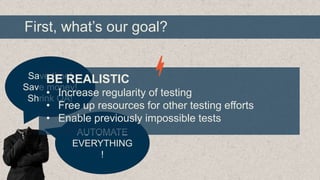
First, what’s our goal?

Save time!
BE REALISTIC
Save money!
• Increase regularity of testing
Shrink QA!

• Free up resources for other testing efforts
• Enable previously impossible tests
AUTOMATE
EVERYTHING
!
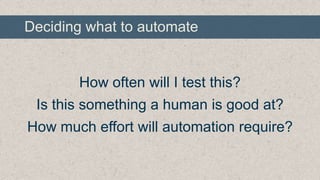
Deciding what to automate

How often will I test this?
Is this something a human is good at?
How much effort will automation require?
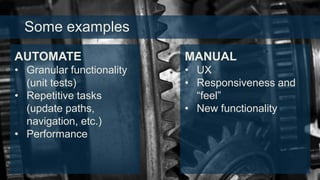
Some examples
AUTOMATE

MANUAL

• Granular functionality
(unit tests)
• Repetitive tasks
(update paths,
navigation, etc.)
• Performance

• UX
• Responsiveness and
“feel”
• New functionality
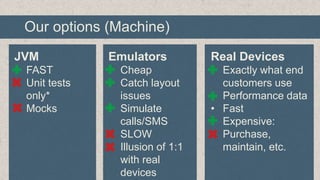
Our options (Machine)
JVM

Emulators

Real Devices

• FAST
• Unit tests
only*
• Mocks

• Cheap
• Catch layout
issues
• Simulate
calls/SMS
• SLOW
• Illusion of 1:1
with real
devices

• Exactly what end
customers use
• Performance data
• Fast
• Expensive:
Purchase,
maintain, etc.
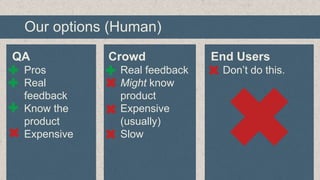
Our options (Human)
QA

Crowd

End Users

• Pros
• Real
feedback
• Know the
product
• Expensive

• Real feedback
• Might know
product
• Expensive
(usually)
• Slow

• Don’t do this.
BEST PRACTICES
No barriers between Dev & QA
Automation is a software project
Automation is a tool, not a solution
Automate with precision
It’s all about data
Know your matrix
Abstraction is important

…but don’t obsess
TOOLS and FRAMEWORKS
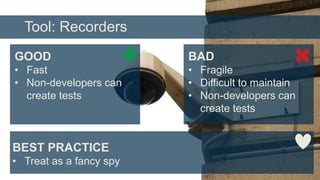
Tool: Recorders
GOOD

BAD

• Fast
• Non-developers can
create tests

• Fragile
• Difficult to maintain
• Non-developers can
create tests

BEST PRACTICE
• Treat as a fancy spy
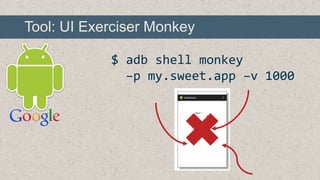
Tool: UI Exerciser Monkey
$ adb shell monkey
–p my.sweet.app –v 1000
Framework: Android Testing Framework
SUMMARY
• JUnit/Java
• Instrumentation provides hooks into Android
SDK to control Android-specific functionality
• Very basic functionality supported
• The foundation for most Android testing. Learn
it, use it, love it.
Framework: UI Automator
SUMMARY
• JUnit/Java
• Extends testing framework with UI selectors
and manipulators
• Handle/control system dialogs, etc
• 4.1+ only
• Excellent choice if you have the luxury of
supporting 4.1+.
Framework: Robolectric
SUMMARY
• JUnit
• Runs in JVM
• Mocks Android functionality with “shadow”
objects
• Super fast
• Not everything is mocked (also, mocks)
• Great for staying sane while developing
Framework: Robotium
SUMMARY
• JUnit extension
• Runs on emulators and real devices
• Oriented towards black-box testing and
ensuring real-world outcomes
• Limited to the app under test

• Great choice for developers going beyond
basic unit testing and testing UI.
Framework: Cucumber-based
SUMMARY
• Human-readable tests
• Runs on emulators and real devices
• Cross-platform
• Complex scenarios require development
• Behavior-driven design. Be careful!
• Great choice for simple flows and teams with
limited developer resources.
Framework: Appium
SUMMARY
• Supports many language adapters
• Runs on emulators and real devices
• Cross-platform
• New, and not all WebDriver concepts map
intuitively to native apps
• Great choice for teams happy with Selenium
and expanding to native.

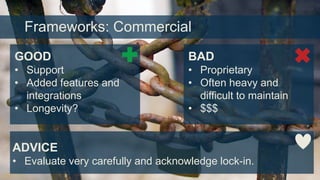
Frameworks: Commercial
GOOD

BAD

• Support
• Added features and
integrations
• Longevity?

• Proprietary
• Often heavy and
difficult to maintain
• $$$

ADVICE
• Evaluate very carefully and acknowledge lock-in.
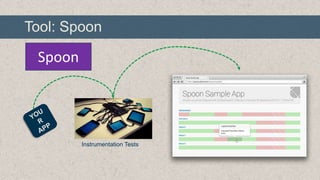
Tool: Spoon

Spoon

Instrumentation Tests
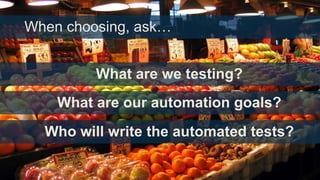
When choosing, ask…

What are we testing?
What are our automation goals?

Who will write the automated tests?
SHAMELESS PLUG
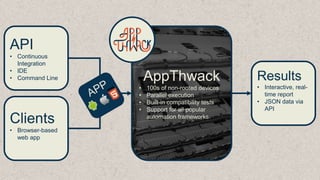
API
• Continuous
Integration
• IDE
• Command Line

Clients
• Browser-based
web app

AppThwack
•
•
•
•

100s of non-rooted devices
Parallel execution
Built-in compatibility tests
Support for all popular
automation frameworks

Results
• Interactive, realtime report
• JSON data via
API
Q&A
Trent Peterson | @tdpeterson | trent@appthwack.com

Testing for Android: When, Where, and How to Successfully Use Test Automation

Editor's Notes

  • #6 Picture courtesy of http://www.flickr.com/photos/schrierc/ (Creative Commons Attribution 2.0 Generic)
  • #7 Picture courtesy of http://www.flickr.com/photos/conbon/ (Creative Commons Attribution 2.0 Generic)
  • #9 Programming image by http://www.flickr.com/photos/riebart/ (Creative Commons Attribution 2.0 Generic)
  • #11 TechCrunch article: http://techcrunch.com/2013/03/12/users-have-low-tolerance-for-buggy-apps-only-16-will-try-a-failing-app-more-than-twice/Trash can by Yellow Icon Design (http://www.yellowicon.com/) under GPU General Public License
  • #12 Picture courtesy of http://www.flickr.com/photos/mulad/ (Creative Commons Attribution 2.0 Generic)
  • #14 Suit image by http://www.flickr.com/photos/charlesfettinger/ (Creative Commons Attribution 2.0 Generic)
  • #16 Picture courtesy of http://www.flickr.com/photos/wwarby/ (Creative Commons Attribution 2.0 Generic)
  • #20 Wall image by http://www.flickr.com/photos/easylocum/ (Creative Commons Attribution 2.0 Generic)
  • #21 Wall image by http://www.flickr.com/photos/riebart/ (Creative Commons Attribution 2.0 Generic)
  • #22 Wall image by http://www.flickr.com/photos/zomgitsbrian/ (Creative Commons Attribution 2.0 Generic)
  • #23 Wall image by http://www.flickr.com/photos/andreweason/ (Creative Commons Attribution 2.0 Generic)
  • #24 Data image by http://www.flickr.com/photos/tensafefrogs/ (Creative Commons Attribution 2.0 Generic)
  • #25 Wall image by http://www.flickr.com/photos/riebart/ (Creative Commons Attribution 2.0 Generic)
  • #26 Wall image by http://www.flickr.com/photos/carbonnyc/ (Creative Commons Attribution 2.0 Generic)
  • #28 Security image by http://www.flickr.com/photos/zigazou76/ (Creative Commons Attribution 2.0 Generic)
  • #29 http://developer.android.com/tools/help/monkey.html
  • #30 http://developer.android.com/tools/testing/testing_android.html
  • #31 http://developer.android.com/tools/testing/testing_ui.html
  • #32 http://robolectric.org
  • #34 http://calaba.sh
  • #35 http://calaba.sh
  • #36 Chains image by http://www.flickr.com/photos/colinsd40/ (Creative Commons Attribution 2.0 Generic)
  • #37 http://square.github.io/spoon/
  • #38 Surgical tools image by http://www.flickr.com/photos/wien/ (Creative Commons Attribution 2.0 Generic)
  • #40 https://appthwack.com