LOAD TESTING
using continuous integration tools
Richard Pitts
Sr. Load Test Engineer | CommerceHub
Agenda
 Our experience adding NeoLoad to our Continuous
Integration process.
1. Benefits of using CI to run NeoLoad
2. Why we run NeoLoad using CI
3. How NeoLoad + CI has helped us
4. Common pitfalls to avoid
5. Getting started + best practices
About CommerceHub
 Hosted services for e-commerce & retail.
 [B2B] Connection between 200+ retailers and 8,900 brands/distributors.
 Translate & route drop shipment orders amongst business partners.
 Goal: Facilitate e-commerce sales growth for our customers
 Processed $10bil GrossMerchValue for our customers in 2014 [33.7mil orders]
 Why performance matters to us:
 “retail busy season”: Black Friday  Christmas
 38k+ users  8.25 mil logins/yr
 2 mil hits per month on most visited web page
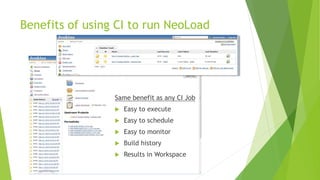
Benefits of using CI to run NeoLoad
Same benefit as any CI Job
 Easy to execute
 Easy to schedule
 Easy to monitor
 Build history
 Results in Workspace
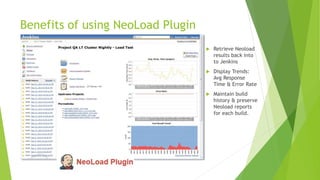
Benefits of using NeoLoad Plugin
 Retrieve Neoload
results back into
to Jenkins
 Display Trends:
Avg Response
Time & Error Rate
 Maintain build
history & preserve
Neoload reports
for each build.
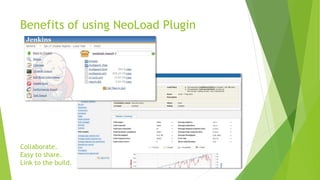
Benefits of using NeoLoad Plugin
Collaborate.
Easy to share.
Link to the build.
Why you should run NeoLoad using CI
 If load testing occurs less frequently than desired
 New development methodologies  more frequent releases
 Scheduled automation avoids waiting on humans, keeps a faster pace.
 Our Story…
 before NeoLoad
 with NeoLoad
 with NeoLoad plus CI
Load Testing before NeoLoad
• Close to the release date
• Late testing  Late Discoveries  Delayed Releases.
feature complete build
Monthly releases
Performance test
@ end of dev cycle
Load Testing before NeoLoad
 An automated tool could help us load test.
 Hopefully one that would inspire us to load test earlier + more often.
 Started to Trial + Assess several load testing tools
NeoLoad pilot
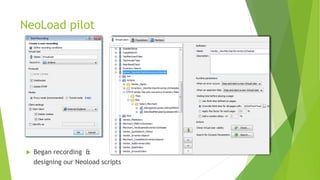
 Began recording &
designing our Neoload scripts
A better Load Test environment
 Properly designed for load testing @ high volume [150+ users]
 Used CI to automate deployment & configuration of this env
 On-premise Load Generators
 Web cluster behind Load Balancer
NeoLoad pilot: real progress
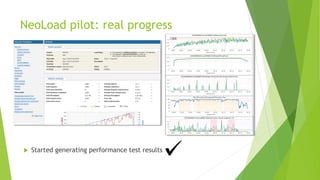
 Started generating performance test results
Success
 implement an automated load testing tool
 library of scripts
 now easier to include load testing for releases
 load testing more things, more often
 stockpile load test results for future benchmark comparisons
NeoLoad + Waterfall: How to?
So, how did we regularly include NeoLoad
tests as part of our waterfall releases?
NeoLoad + Waterfall: Option 1
Three options to include Neoload testing for a release:
1) author new NeoLoad scripts designed to target specific concerns.
 Record/Playback
 Configure for multi-user concurrency & unique data
 Run scripts
 Share results
NeoLoad + Waterfall: Option 2
Three options to include Neoload testing for a release:
2) run existing NeoLoad scripts + compare w/ previous release results
 Try/validate the scripts
 Update/fix outdated scripts
 Run scripts
 Share results
NeoLoad + Waterfall: Option 3
Three options to include Neoload testing for a release:
3) run NeoLoad scripts on project vs mainline branches, comparing results
 Run scripts on mainline branch to obtain baseline results
 Run scripts on project branch
 Compare project results to baseline results
 Is performance of the project branch better/no worse/worse than mainline
Results: Still a Waterfall
 Performance testing still occurred @ end of dev cycles
 Limited time to re-work performance issues before release dates.
 Often, the tests were short samples due to time constraints.
 The most recent set of results for comparison was often many weeks old.
 Centralized around performance engineer (bottleneck risk)
 Sometimes it was “testing for the sake of testing”
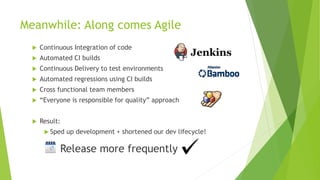
Meanwhile: Along comes Agile
 Continuous Integration of code
 Automated CI builds
 Continuous Delivery to test environments
 Automated regressions using CI builds
 Cross functional team members
 “Everyone is responsible for quality” approach
 Result:
 Sped up development + shortened our dev lifecycle!
Release more frequently
Load Testing + Agile Teams
 Team mindset: “Performance is everybody's job”
 But, most team members had little load testing experience.
 Result:
 Still had all of the same problems getting Load Tests done.
 Completed “in the margins” by perf engineer + agile team member.
 Relied upon Ops and/or performance engineer (bottleneck risk)
 Load testing wasn’t keeping pace with our Agile teams.
 Needed a way to bake Load Testing into our Agile process.
Load Testing + Agile Teams
 How could we include LT more often, under Agile process?
 Manual performance testing? [+leverage firebug, Yslow, Fiddler, etc.]
 Collect performance metrics while we run our automated regression?
 WebPagetest.org?
 Schedule NeoLoad to run using Cron jobs?
 Schedule NeoLoad to run using NeoLoad internal scheduler?
 Schedule Neoload to run using CI? Hmmmm… we do have Jenkins.
Jenkins NeoLoad plugin v4.2 [Nov 2013]
 Retrieve Neoload
results back into
to Jenkins
 Display Trends:
Avg Response
Time & Error Rate
 Maintain build
history & preserve
Neoload reports
for each build.
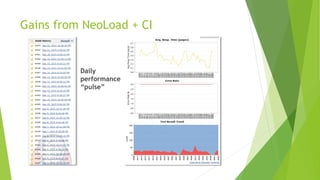
Gains from NeoLoad + CI
Daily
performance
“pulse”
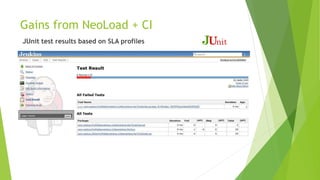
Gains from NeoLoad + CI
JUnit test results based on SLA profiles
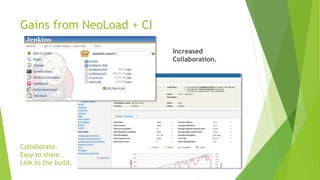
Gains from NeoLoad + CI
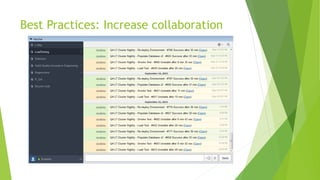
Collaborate.
Easy to share.
Link to the build.
Increased
Collaboration.
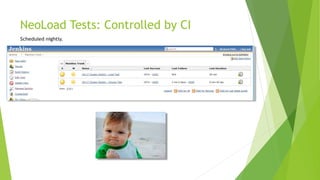
NeoLoad Tests: Controlled by CI
Scheduled nightly.
Lessons learned
Pitfalls to Avoid:
 Using only “happy path” scripts
 Comparing results over long gaps time  risky
 Comparing multiple short samples  inaccurate
 Swap sharing the Load Testing environment  bottlenecks
 Requiring involvement from Ops or perf. engineer  bottlenecks
Your turn!
 Run NeoLoad using Continuous Integration
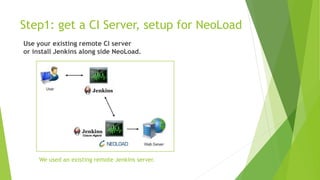
Step1: get a CI Server, setup for NeoLoad
We used an existing remote Jenkins server.
Use your existing remote CI server
or install Jenkins along side NeoLoad.
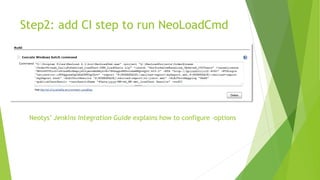
Step2: add CI step to run NeoLoadCmd
Neotys’ Jenkins Integration Guide explains how to configure –options
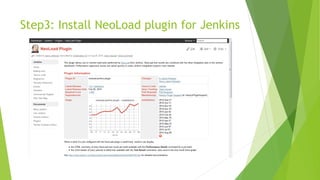
Step3: Install NeoLoad plugin for Jenkins
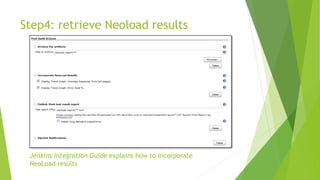
Step4: retrieve Neoload results
Jenkins Integration Guide explains how to incorporate
NeoLoad results
Where to go from here?
Best practices & Pro Tips:
 Incorporate performance testing into every DevOps team
 Intelligent testing: only run load scripts that test the code that was changed
 Reduce the amount of time & resources needed for load testing
 For “hardening sprints”- setup a Stress test scenario. Run on-demand using CI
 Make use of email alerts and chat notifications in CI
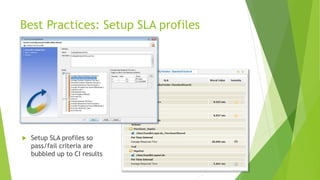
Best Practices: Setup SLA profiles
 Setup SLA profiles so
pass/fail criteria are
bubbled up to CI results
Best Practices: Increase collaboration
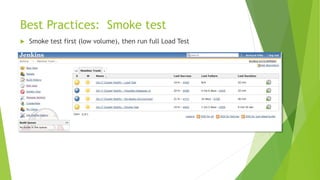
Best Practices: Smoke test
 Smoke test first (low volume), then run full Load Test
Richard Pitts We are hiring:
pittsrt@gmail.com http://www.commercehub.com/about-us/careers/
Share with me:
How are you using CI to drive your NeoLoad process? Let me know.
Learn more:
http://www.neotys.com/introduction/neoload-continuous-integration.html
http://www.neotys.com/webcast/Continuous-Performance-Testing-with-NeoLoad.html
https://wiki.jenkins-ci.org/display/JENKINS/NeoLoad+Plugin
https://github.com/jenkinsci/neoload-plugin

Load Testing using Continuous Integration tools

  • 1.
    LOAD TESTING using continuousintegration tools Richard Pitts Sr. Load Test Engineer | CommerceHub
  • 2.
    Agenda  Our experienceadding NeoLoad to our Continuous Integration process. 1. Benefits of using CI to run NeoLoad 2. Why we run NeoLoad using CI 3. How NeoLoad + CI has helped us 4. Common pitfalls to avoid 5. Getting started + best practices
  • 3.
    About CommerceHub  Hostedservices for e-commerce & retail.  [B2B] Connection between 200+ retailers and 8,900 brands/distributors.  Translate & route drop shipment orders amongst business partners.  Goal: Facilitate e-commerce sales growth for our customers  Processed $10bil GrossMerchValue for our customers in 2014 [33.7mil orders]  Why performance matters to us:  “retail busy season”: Black Friday  Christmas  38k+ users  8.25 mil logins/yr  2 mil hits per month on most visited web page
  • 4.
    Benefits of usingCI to run NeoLoad Same benefit as any CI Job  Easy to execute  Easy to schedule  Easy to monitor  Build history  Results in Workspace
  • 5.
    Benefits of usingNeoLoad Plugin  Retrieve Neoload results back into to Jenkins  Display Trends: Avg Response Time & Error Rate  Maintain build history & preserve Neoload reports for each build.
  • 6.
    Benefits of usingNeoLoad Plugin Collaborate. Easy to share. Link to the build.
  • 7.
    Why you shouldrun NeoLoad using CI  If load testing occurs less frequently than desired  New development methodologies  more frequent releases  Scheduled automation avoids waiting on humans, keeps a faster pace.  Our Story…  before NeoLoad  with NeoLoad  with NeoLoad plus CI
  • 8.
    Load Testing beforeNeoLoad • Close to the release date • Late testing  Late Discoveries  Delayed Releases. feature complete build Monthly releases Performance test @ end of dev cycle
  • 9.
    Load Testing beforeNeoLoad  An automated tool could help us load test.  Hopefully one that would inspire us to load test earlier + more often.  Started to Trial + Assess several load testing tools
  • 10.
    NeoLoad pilot  Beganrecording & designing our Neoload scripts
  • 11.
    A better LoadTest environment  Properly designed for load testing @ high volume [150+ users]  Used CI to automate deployment & configuration of this env  On-premise Load Generators  Web cluster behind Load Balancer
  • 12.
    NeoLoad pilot: realprogress  Started generating performance test results
  • 13.
    Success  implement anautomated load testing tool  library of scripts  now easier to include load testing for releases  load testing more things, more often  stockpile load test results for future benchmark comparisons
  • 14.
    NeoLoad + Waterfall:How to? So, how did we regularly include NeoLoad tests as part of our waterfall releases?
  • 15.
    NeoLoad + Waterfall:Option 1 Three options to include Neoload testing for a release: 1) author new NeoLoad scripts designed to target specific concerns.  Record/Playback  Configure for multi-user concurrency & unique data  Run scripts  Share results
  • 16.
    NeoLoad + Waterfall:Option 2 Three options to include Neoload testing for a release: 2) run existing NeoLoad scripts + compare w/ previous release results  Try/validate the scripts  Update/fix outdated scripts  Run scripts  Share results
  • 17.
    NeoLoad + Waterfall:Option 3 Three options to include Neoload testing for a release: 3) run NeoLoad scripts on project vs mainline branches, comparing results  Run scripts on mainline branch to obtain baseline results  Run scripts on project branch  Compare project results to baseline results  Is performance of the project branch better/no worse/worse than mainline
  • 18.
    Results: Still aWaterfall  Performance testing still occurred @ end of dev cycles  Limited time to re-work performance issues before release dates.  Often, the tests were short samples due to time constraints.  The most recent set of results for comparison was often many weeks old.  Centralized around performance engineer (bottleneck risk)  Sometimes it was “testing for the sake of testing”
  • 19.
    Meanwhile: Along comesAgile  Continuous Integration of code  Automated CI builds  Continuous Delivery to test environments  Automated regressions using CI builds  Cross functional team members  “Everyone is responsible for quality” approach  Result:  Sped up development + shortened our dev lifecycle! Release more frequently
  • 20.
    Load Testing +Agile Teams  Team mindset: “Performance is everybody's job”  But, most team members had little load testing experience.  Result:  Still had all of the same problems getting Load Tests done.  Completed “in the margins” by perf engineer + agile team member.  Relied upon Ops and/or performance engineer (bottleneck risk)  Load testing wasn’t keeping pace with our Agile teams.  Needed a way to bake Load Testing into our Agile process.
  • 21.
    Load Testing +Agile Teams  How could we include LT more often, under Agile process?  Manual performance testing? [+leverage firebug, Yslow, Fiddler, etc.]  Collect performance metrics while we run our automated regression?  WebPagetest.org?  Schedule NeoLoad to run using Cron jobs?  Schedule NeoLoad to run using NeoLoad internal scheduler?  Schedule Neoload to run using CI? Hmmmm… we do have Jenkins.
  • 22.
    Jenkins NeoLoad pluginv4.2 [Nov 2013]  Retrieve Neoload results back into to Jenkins  Display Trends: Avg Response Time & Error Rate  Maintain build history & preserve Neoload reports for each build.
  • 23.
    Gains from NeoLoad+ CI Daily performance “pulse”
  • 24.
    Gains from NeoLoad+ CI JUnit test results based on SLA profiles
  • 25.
    Gains from NeoLoad+ CI Collaborate. Easy to share. Link to the build. Increased Collaboration.
  • 26.
    NeoLoad Tests: Controlledby CI Scheduled nightly.
  • 27.
    Lessons learned Pitfalls toAvoid:  Using only “happy path” scripts  Comparing results over long gaps time  risky  Comparing multiple short samples  inaccurate  Swap sharing the Load Testing environment  bottlenecks  Requiring involvement from Ops or perf. engineer  bottlenecks
  • 28.
    Your turn!  RunNeoLoad using Continuous Integration
  • 29.
    Step1: get aCI Server, setup for NeoLoad We used an existing remote Jenkins server. Use your existing remote CI server or install Jenkins along side NeoLoad.
  • 30.
    Step2: add CIstep to run NeoLoadCmd Neotys’ Jenkins Integration Guide explains how to configure –options
  • 31.
    Step3: Install NeoLoadplugin for Jenkins
  • 32.
    Step4: retrieve Neoloadresults Jenkins Integration Guide explains how to incorporate NeoLoad results
  • 33.
    Where to gofrom here? Best practices & Pro Tips:  Incorporate performance testing into every DevOps team  Intelligent testing: only run load scripts that test the code that was changed  Reduce the amount of time & resources needed for load testing  For “hardening sprints”- setup a Stress test scenario. Run on-demand using CI  Make use of email alerts and chat notifications in CI
  • 34.
    Best Practices: SetupSLA profiles  Setup SLA profiles so pass/fail criteria are bubbled up to CI results
  • 35.
  • 36.
    Best Practices: Smoketest  Smoke test first (low volume), then run full Load Test
  • 37.
    Richard Pitts Weare hiring: pittsrt@gmail.com http://www.commercehub.com/about-us/careers/ Share with me: How are you using CI to drive your NeoLoad process? Let me know. Learn more: http://www.neotys.com/introduction/neoload-continuous-integration.html http://www.neotys.com/webcast/Continuous-Performance-Testing-with-NeoLoad.html https://wiki.jenkins-ci.org/display/JENKINS/NeoLoad+Plugin https://github.com/jenkinsci/neoload-plugin

Editor's Notes

  • #4 38,000+ active users (out of 86k) 2 million hits per month on most popular page. Dashboard. (On AVG) For busy season, we expect hits on that page to be higher by a factor of 2 or 2.5
  • #5 CI tools themselves bring lots of value to the table.
  • #6 Available starting with Version 4.2 (Nov 2013)
  • #7 Archived report for every build. Easy to share Neoload test results. Provide a link to the build and everyone on the team, plus other stakeholders, can view Neoload reports and trends.
  • #9 Occasionally with Jmeter, but mostly manual tests
  • #10 Adopted Neoload and began our journey into Automated Performance Testing Technology Radar by ThoughtWorks (Hold, Assess, Trial, Adopt)
  • #11 Record/Playback, configure for concurrency and unique data, add error handling
  • #24 Build History + Test result trend graphs help us keep a daily “pulse” of the performance of our mainline branch We finally have constant monitoring of application performance.. Trends over several builds SLA pass/fall criteria bubble up to CI results
  • #25 SLA pass/fall criteria bubble up to CI results
  • #26 Archived report for every build. Easy to share Neoload test results. Provide a link to the build and everyone on the team, plus other stakeholders, can view Neoload reports and trends.
  • #28 Drawbacks, Tradeoffs, and Fallacies to avoid
  • #33 Add Post-build actions to incorporate Neoload Results, and archive results. If using SLAs, also Publish Junit test result XMLs
  • #36 First thing every morning, check the status of nightly Jenkins job in a HipChat room