Performance Test Strategy Best Practices
Early (Continuous) Vs System level Performance tests
Ramya R Moorthy
Agile versus DevOps Performance Testing
Building Continuous Performance Testing Framework
Early (Continuous ) vs System Performance Tests – Do’s & Dont’s
Case Study
Introductionto Agile & DevOps
 Strictly “Performance is everyone’s responsibility”
 Agile - Promotes continuous iterative software development methodology
 DevOps - A culture where Dev, QA and Ops collaborate with automation being the
crucial success factor (Deliver Fast with high Quality)
Shift from Traditional (reactive) Waterfall performance Testing to
 Agile (Be Proactive / Test Early on all iterative releases)
 DevOps (Test Continuously / Automate as much as possible)
Most Performance Testing tools now support DevOps (provides plug-ins for CI server)
Little Background
Requirement
Analysis
Requirement
Analysis
DesignDesign ImplementImplement TestTest
Deployment &
Maintenance
Deployment &
Maintenance
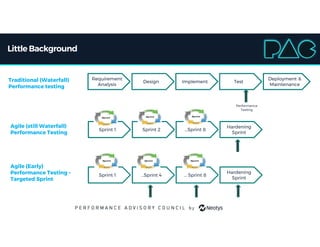
Traditional (Waterfall)
Performance testing
Agile (still Waterfall)
Performance Testing
Sprint 1Sprint 1 Sprint 2Sprint 2 ...Sprint 8...Sprint 8
Hardening
Sprint
Hardening
Sprint
Agile (Early)
Performance Testing –
Targeted Sprint
Sprint 1Sprint 1 …Sprint 4…Sprint 4 … Sprint 8… Sprint 8
Hardening
Sprint
Hardening
Sprint
Performance
Testing
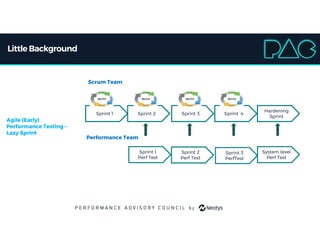
Little Background
Sprint 1Sprint 1 Sprint 2Sprint 2 Sprint 3Sprint 3 Sprint 4Sprint 4
Hardening
Sprint
Hardening
Sprint
Scrum Team
Sprint 1
Perf Test
Sprint 1
Perf Test
System level
Perf Test
System level
Perf Test
Performance Team
Sprint 2
Perf Test
Sprint 2
Perf Test
Sprint 3
PerfTest
Sprint 3
PerfTest
Agile (Early)
Performance Testing –
Lazy Sprint
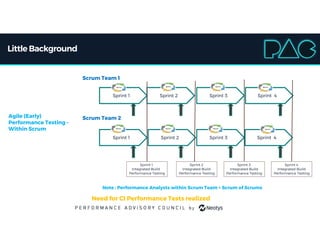
Little Background
Sprint 1Sprint 1 Sprint 2Sprint 2 Sprint 3Sprint 3 Sprint 4Sprint 4
Scrum Team 1
Sprint 1Sprint 1 Sprint 2Sprint 2 Sprint 3Sprint 3 Sprint 4Sprint 4
Scrum Team 2
Sprint 1
Integrated Build
Performance Testing
Sprint 2
Integrated Build
Performance Testing
Sprint 3
Integrated Build
Performance Testing
Sprint 4
Integrated Build
Performance Testing
Agile (Early)
Performance Testing –
Within Scrum
Note : Performance Analysts within Scrum Team + Scrum of Scrums
Need for CI Performance Tests realized
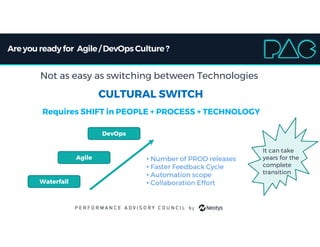
Areyou readyfor Agile/ DevOps Culture?
Not as easy as switching between Technologies
CULTURAL SWITCH
Requires SHIFT in PEOPLE + PROCESS + TECHNOLOGY
Waterfall
Agile
DevOps
• Number of PROD releases
• Faster Feedback Cycle
• Automation scope
• Collaboration Effort
It can take
years for the
complete
transition
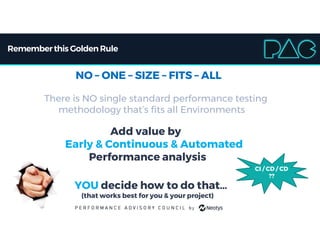
Rememberthis Golden Rule
NO – ONE – SIZE – FITS – ALL
There is NO single standard performance testing
methodology that’s fits all Environments
Add value by
Early & Continuous & Automated
Performance analysis
YOU decide how to do that…
(that works best for you & your project)
CI / CD / CD
??
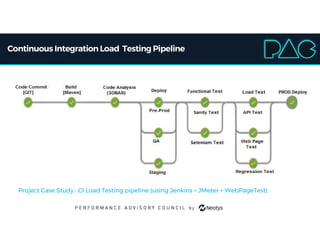
Continuous IntegrationLoad Testing Pipeline
Project Case Study : CI Load Testing pipeline (using Jenkins + JMeter + WebPageTest)
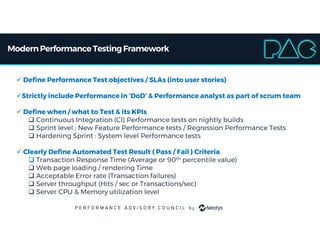
ModernPerformance TestingFramework
 Define Performance Test objectives / SLAs (into user stories)
Strictly include Performance in ‘DoD’ & Performance analyst as part of scrum team
 Define when / what to Test & its KPIs
 Continuous Integration (CI) Performance tests on nightly builds
 Sprint level : New Feature Performance tests / Regression Performance Tests
 Hardening Sprint : System level Performance tests
 Clearly Define Automated Test Result ( Pass / Fail ) Criteria
 Transaction Response Time (Average or 90th percentile value)
 Web page loading / rendering Time
 Acceptable Error rate (Transaction failures)
 Server throughput (Hits / sec or Transactions/sec)
 Server CPU & Memory utilization level
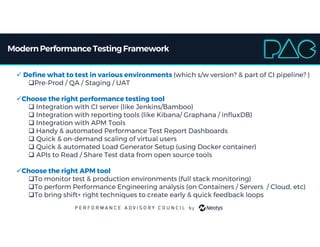
ModernPerformance TestingFramework
 Define what to test in various environments (which s/w version? & part of CI pipeline? )
Pre-Prod / QA / Staging / UAT
Choose the right performance testing tool
 Integration with CI server (like Jenkins/Bamboo)
 Integration with reporting tools (like Kibana/ Graphana / influxDB)
 Integration with APM Tools
 Handy & automated Performance Test Report Dashboards
 Quick & on-demand scaling of virtual users
 Quick & automated Load Generator Setup (using Docker container)
 APIs to Read / Share Test data from open source tools
Choose the right APM tool
To monitor test & production environments (full stack monitoring)
To perform Performance Engineering analysis (on Containers / Servers / Cloud, etc)
To bring shift+ right techniques to create early & quick feedback loops
You Decide When/ Whatto Performance Test ?
Continuously Evolving Performance Test strategy
[ APIs  Components  Microservices  Individual Use cases  System-wide ]
 Every Sprint (on Dev or QA Environment) :
 Quick CI performance tests to validate against baseline
 Baseline API/component/query performance for 1 user
 Validate (thru short tests) the feature for small load levels
 Targeted Sprint (on Staging / Perf-Test Environment) :
 Regression Testing for Integrated builds
 Regression Test suite continuously evolves
Hardening Sprint (on Perf-Test / Pre-Prod Environment) :
 System level Tests - Load , Stress, Spike , Soak, etc
 Use realistic workload model to validate the performance, scalability & capacity
to handle real world usage conditions.
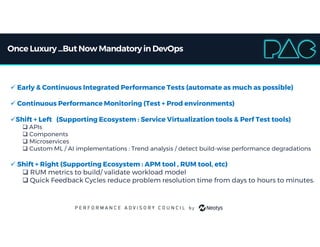
Once Luxury...But Now Mandatoryin DevOps
 Early & Continuous Integrated Performance Tests (automate as much as possible)
 Continuous Performance Monitoring (Test + Prod environments)
Shift + Left (Supporting Ecosystem : Service Virtualization tools & Perf Test tools)
 APIs
 Components
 Microservices
 Custom ML / AI implementations : Trend analysis / detect build-wise performance degradations
 Shift + Right (Supporting Ecosystem : APM tool , RUM tool, etc)
 RUM metrics to build/ validate workload model
 Quick Feedback Cycles reduce problem resolution time from days to hours to minutes.
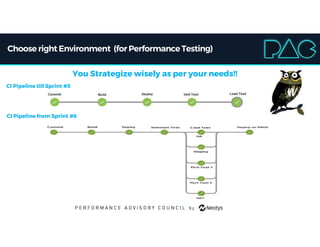
Choose right Environment (for PerformanceTesting)
You Strategize wisely as per your needs!!
CI Pipeline till Sprint #5
CI Pipeline from Sprint #6
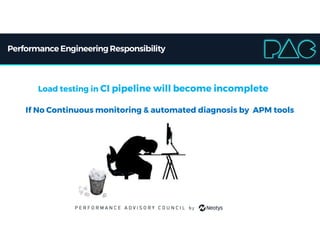
Performance EngineeringResponsibility
Load testing in CI pipeline will become incomplete
If No Continuous monitoring & automated diagnosis by APM tools
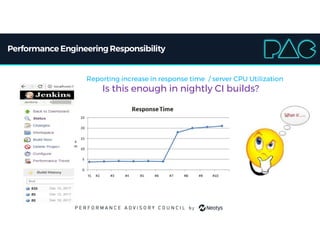
Performance EngineeringResponsibility
Reporting increase in response time / server CPU Utilization
Is this enough in nightly CI builds?
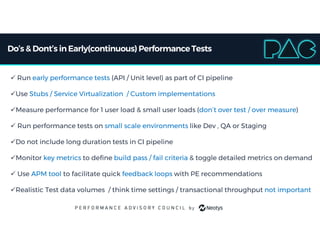
Do’s & Dont’s inEarly(continuous) PerformanceTests
 Run early performance tests (API / Unit level) as part of CI pipeline
Use Stubs / Service Virtualization / Custom implementations
Measure performance for 1 user load & small user loads (don’t over test / over measure)
 Run performance tests on small scale environments like Dev , QA or Staging
Do not include long duration tests in CI pipeline
Monitor key metrics to define build pass / fail criteria & toggle detailed metrics on demand
 Use APM tool to facilitate quick feedback loops with PE recommendations
Realistic Test data volumes / think time settings / transactional throughput not important
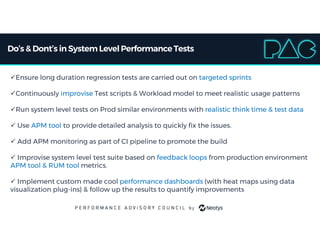
Do’s & Dont’s inSystem LevelPerformanceTests
Ensure long duration regression tests are carried out on targeted sprints
Continuously improvise Test scripts & Workload model to meet realistic usage patterns
Run system level tests on Prod similar environments with realistic think time & test data
 Use APM tool to provide detailed analysis to quickly fix the issues.
 Add APM monitoring as part of CI pipeline to promote the build
 Improvise system level test suite based on feedback loops from production environment
APM tool & RUM tool metrics.
 Implement custom made cool performance dashboards (with heat maps using data
visualization plug-ins) & follow up the results to quantify improvements
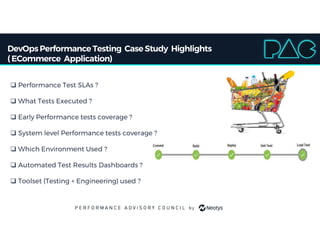
DevOpsPerformance Testing Case Study Highlights
(ECommerce Application)
 Performance Test SLAs ?
 What Tests Executed ?
 Early Performance tests coverage ?
 System level Performance tests coverage ?
 Which Environment Used ?
 Automated Test Results Dashboards ?
 Toolset (Testing + Engineering) used ?
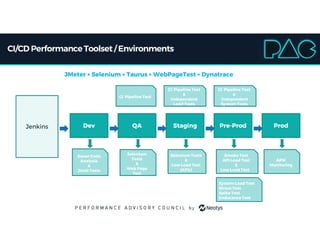
CI/CD PerformanceToolset / Environments
Jenkins ProdQA Staging Pre-ProdDev
Sonar Code
Analysis
&
JUnit Tests
Selenium
Tests
&
Web Page
Test
Selenium Tests
&
Low Load Test
(APIs)
Smoke Test
API Load Test
&
Low Load Test
System Load Test
Stress Test
Spike Test
Endurance Test
CI Pipeline Test
APM
Monitoring
CI Pipeline Test
&
Independent
Load Tests
CI Pipeline Test
&
Independent
System Tests
JMeter + Selenium + Taurus + WebPageTest + Dynatrace
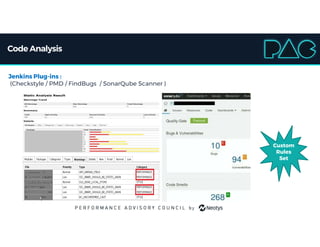
Code Analysis
Jenkins Plug-ins :
(Checkstyle / PMD / FindBugs / SonarQube Scanner )
Custom
Rules
Set
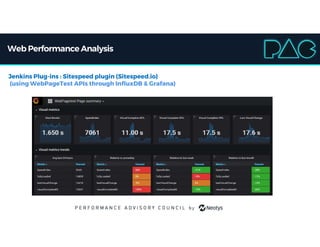
Web Performance Analysis
Jenkins Plug-ins : Sitespeed plugin (Sitespeed.io)
(using WebPageTest APIs through InfluxDB & Grafana)
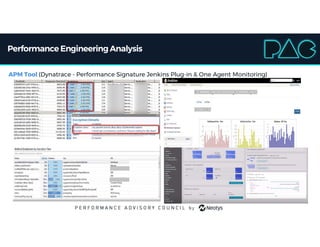
Performance EngineeringAnalysis
APM Tool (Dynatrace - Performance Signature Jenkins Plug-in & One Agent Monitoring)
Summary
 Understand the big picture "The WHOLE system"
 Cultivate early performance analysis culture
 Add early & continuous feedback loops
 Do not compromise system level performance tests (due to early CI tests)
 Continuous Performance Testing approach one & only if combined with performance
diagnosis tools (Performance Engineering) can aid in fast delivery in DevOps environment.
Neotys PAC 2018 - Ramya Ramalinga Moorthy

Neotys PAC 2018 - Ramya Ramalinga Moorthy

  • 1.
    Performance Test StrategyBest Practices Early (Continuous) Vs System level Performance tests Ramya R Moorthy
  • 2.
    Agile versus DevOpsPerformance Testing Building Continuous Performance Testing Framework Early (Continuous ) vs System Performance Tests – Do’s & Dont’s Case Study
  • 3.
    Introductionto Agile &DevOps  Strictly “Performance is everyone’s responsibility”  Agile - Promotes continuous iterative software development methodology  DevOps - A culture where Dev, QA and Ops collaborate with automation being the crucial success factor (Deliver Fast with high Quality) Shift from Traditional (reactive) Waterfall performance Testing to  Agile (Be Proactive / Test Early on all iterative releases)  DevOps (Test Continuously / Automate as much as possible) Most Performance Testing tools now support DevOps (provides plug-ins for CI server)
  • 4.
    Little Background Requirement Analysis Requirement Analysis DesignDesign ImplementImplementTestTest Deployment & Maintenance Deployment & Maintenance Traditional (Waterfall) Performance testing Agile (still Waterfall) Performance Testing Sprint 1Sprint 1 Sprint 2Sprint 2 ...Sprint 8...Sprint 8 Hardening Sprint Hardening Sprint Agile (Early) Performance Testing – Targeted Sprint Sprint 1Sprint 1 …Sprint 4…Sprint 4 … Sprint 8… Sprint 8 Hardening Sprint Hardening Sprint Performance Testing
  • 5.
    Little Background Sprint 1Sprint1 Sprint 2Sprint 2 Sprint 3Sprint 3 Sprint 4Sprint 4 Hardening Sprint Hardening Sprint Scrum Team Sprint 1 Perf Test Sprint 1 Perf Test System level Perf Test System level Perf Test Performance Team Sprint 2 Perf Test Sprint 2 Perf Test Sprint 3 PerfTest Sprint 3 PerfTest Agile (Early) Performance Testing – Lazy Sprint
  • 6.
    Little Background Sprint 1Sprint1 Sprint 2Sprint 2 Sprint 3Sprint 3 Sprint 4Sprint 4 Scrum Team 1 Sprint 1Sprint 1 Sprint 2Sprint 2 Sprint 3Sprint 3 Sprint 4Sprint 4 Scrum Team 2 Sprint 1 Integrated Build Performance Testing Sprint 2 Integrated Build Performance Testing Sprint 3 Integrated Build Performance Testing Sprint 4 Integrated Build Performance Testing Agile (Early) Performance Testing – Within Scrum Note : Performance Analysts within Scrum Team + Scrum of Scrums Need for CI Performance Tests realized
  • 7.
    Areyou readyfor Agile/DevOps Culture? Not as easy as switching between Technologies CULTURAL SWITCH Requires SHIFT in PEOPLE + PROCESS + TECHNOLOGY Waterfall Agile DevOps • Number of PROD releases • Faster Feedback Cycle • Automation scope • Collaboration Effort It can take years for the complete transition
  • 8.
    Rememberthis Golden Rule NO– ONE – SIZE – FITS – ALL There is NO single standard performance testing methodology that’s fits all Environments Add value by Early & Continuous & Automated Performance analysis YOU decide how to do that… (that works best for you & your project) CI / CD / CD ??
  • 9.
    Continuous IntegrationLoad TestingPipeline Project Case Study : CI Load Testing pipeline (using Jenkins + JMeter + WebPageTest)
  • 10.
    ModernPerformance TestingFramework  DefinePerformance Test objectives / SLAs (into user stories) Strictly include Performance in ‘DoD’ & Performance analyst as part of scrum team  Define when / what to Test & its KPIs  Continuous Integration (CI) Performance tests on nightly builds  Sprint level : New Feature Performance tests / Regression Performance Tests  Hardening Sprint : System level Performance tests  Clearly Define Automated Test Result ( Pass / Fail ) Criteria  Transaction Response Time (Average or 90th percentile value)  Web page loading / rendering Time  Acceptable Error rate (Transaction failures)  Server throughput (Hits / sec or Transactions/sec)  Server CPU & Memory utilization level
  • 11.
    ModernPerformance TestingFramework  Definewhat to test in various environments (which s/w version? & part of CI pipeline? ) Pre-Prod / QA / Staging / UAT Choose the right performance testing tool  Integration with CI server (like Jenkins/Bamboo)  Integration with reporting tools (like Kibana/ Graphana / influxDB)  Integration with APM Tools  Handy & automated Performance Test Report Dashboards  Quick & on-demand scaling of virtual users  Quick & automated Load Generator Setup (using Docker container)  APIs to Read / Share Test data from open source tools Choose the right APM tool To monitor test & production environments (full stack monitoring) To perform Performance Engineering analysis (on Containers / Servers / Cloud, etc) To bring shift+ right techniques to create early & quick feedback loops
  • 12.
    You Decide When/Whatto Performance Test ? Continuously Evolving Performance Test strategy [ APIs  Components  Microservices  Individual Use cases  System-wide ]  Every Sprint (on Dev or QA Environment) :  Quick CI performance tests to validate against baseline  Baseline API/component/query performance for 1 user  Validate (thru short tests) the feature for small load levels  Targeted Sprint (on Staging / Perf-Test Environment) :  Regression Testing for Integrated builds  Regression Test suite continuously evolves Hardening Sprint (on Perf-Test / Pre-Prod Environment) :  System level Tests - Load , Stress, Spike , Soak, etc  Use realistic workload model to validate the performance, scalability & capacity to handle real world usage conditions.
  • 13.
    Once Luxury...But NowMandatoryin DevOps  Early & Continuous Integrated Performance Tests (automate as much as possible)  Continuous Performance Monitoring (Test + Prod environments) Shift + Left (Supporting Ecosystem : Service Virtualization tools & Perf Test tools)  APIs  Components  Microservices  Custom ML / AI implementations : Trend analysis / detect build-wise performance degradations  Shift + Right (Supporting Ecosystem : APM tool , RUM tool, etc)  RUM metrics to build/ validate workload model  Quick Feedback Cycles reduce problem resolution time from days to hours to minutes.
  • 14.
    Choose right Environment(for PerformanceTesting) You Strategize wisely as per your needs!! CI Pipeline till Sprint #5 CI Pipeline from Sprint #6
  • 15.
    Performance EngineeringResponsibility Load testingin CI pipeline will become incomplete If No Continuous monitoring & automated diagnosis by APM tools
  • 16.
    Performance EngineeringResponsibility Reporting increasein response time / server CPU Utilization Is this enough in nightly CI builds?
  • 17.
    Do’s & Dont’sinEarly(continuous) PerformanceTests  Run early performance tests (API / Unit level) as part of CI pipeline Use Stubs / Service Virtualization / Custom implementations Measure performance for 1 user load & small user loads (don’t over test / over measure)  Run performance tests on small scale environments like Dev , QA or Staging Do not include long duration tests in CI pipeline Monitor key metrics to define build pass / fail criteria & toggle detailed metrics on demand  Use APM tool to facilitate quick feedback loops with PE recommendations Realistic Test data volumes / think time settings / transactional throughput not important
  • 18.
    Do’s & Dont’sinSystem LevelPerformanceTests Ensure long duration regression tests are carried out on targeted sprints Continuously improvise Test scripts & Workload model to meet realistic usage patterns Run system level tests on Prod similar environments with realistic think time & test data  Use APM tool to provide detailed analysis to quickly fix the issues.  Add APM monitoring as part of CI pipeline to promote the build  Improvise system level test suite based on feedback loops from production environment APM tool & RUM tool metrics.  Implement custom made cool performance dashboards (with heat maps using data visualization plug-ins) & follow up the results to quantify improvements
  • 19.
    DevOpsPerformance Testing CaseStudy Highlights (ECommerce Application)  Performance Test SLAs ?  What Tests Executed ?  Early Performance tests coverage ?  System level Performance tests coverage ?  Which Environment Used ?  Automated Test Results Dashboards ?  Toolset (Testing + Engineering) used ?
  • 20.
    CI/CD PerformanceToolset /Environments Jenkins ProdQA Staging Pre-ProdDev Sonar Code Analysis & JUnit Tests Selenium Tests & Web Page Test Selenium Tests & Low Load Test (APIs) Smoke Test API Load Test & Low Load Test System Load Test Stress Test Spike Test Endurance Test CI Pipeline Test APM Monitoring CI Pipeline Test & Independent Load Tests CI Pipeline Test & Independent System Tests JMeter + Selenium + Taurus + WebPageTest + Dynatrace
  • 21.
    Code Analysis Jenkins Plug-ins: (Checkstyle / PMD / FindBugs / SonarQube Scanner ) Custom Rules Set
  • 22.
    Web Performance Analysis JenkinsPlug-ins : Sitespeed plugin (Sitespeed.io) (using WebPageTest APIs through InfluxDB & Grafana)
  • 23.
    Performance EngineeringAnalysis APM Tool(Dynatrace - Performance Signature Jenkins Plug-in & One Agent Monitoring)
  • 24.
    Summary  Understand thebig picture "The WHOLE system"  Cultivate early performance analysis culture  Add early & continuous feedback loops  Do not compromise system level performance tests (due to early CI tests)  Continuous Performance Testing approach one & only if combined with performance diagnosis tools (Performance Engineering) can aid in fast delivery in DevOps environment.