Smarter. Faster. Closer.

www.ness.com
Smarter. Faster. Closer.

www.ness.com
CONTINUOUS INTEGRATION
AND
AUTOMATION TESTING
November 2013

Smarter. Faster. Closer.
© 2012 Ness Technologies
Continuous Integration & Automation Testing
Summary

Continuous Integration Process
Continuous Integration Practices
Automation Testing in Continuous Integration Environment
Case Study

Q&A

Smarter. Faster. Closer.

4

www.ness.com
Continuous Integration & Automation Testing
Problem definition

Why should we improve our
development process?
►

►

Lower maintenance costs

►

Less bugs

►

Be flexible – adapt to change more
easily

►

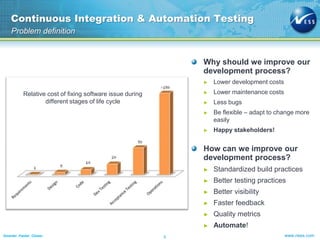
Relative cost of fixing software issue during
different stages of life cycle

Lower development costs

Happy stakeholders!

How can we improve our
development process?
►
►

Better visibility

►

Faster feedback

►

Quality metrics

►
5

Better testing practices

►

Smarter. Faster. Closer.

Standardized build practices

Automate!
www.ness.com
Continuous Integration & Automation Testing
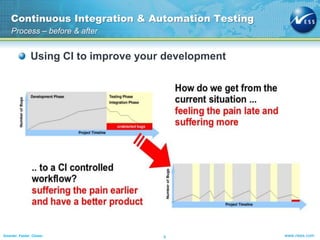
Process – before & after

Using CI to improve your development

Smarter. Faster. Closer.

6

www.ness.com
Continuous Integration & Automation Testing
CI Process
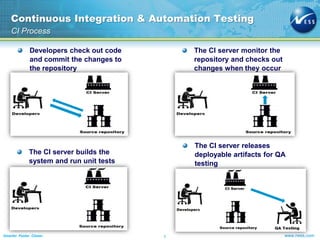
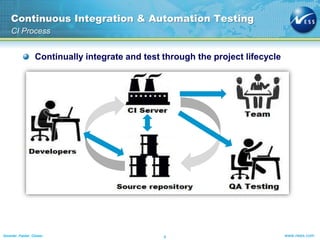
Developers check out code
and commit the changes to
the repository

The CI server monitor the
repository and checks out
changes when they occur

The CI server builds the
system and run unit tests

The CI server releases
deployable artifacts for QA
testing

Smarter. Faster. Closer.

7

www.ness.com
Continuous Integration & Automation Testing
CI Process
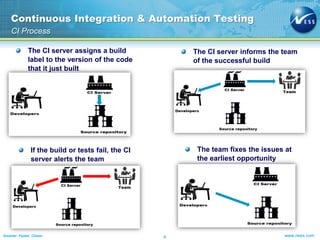
The CI server assigns a build
label to the version of the code
that it just built

The CI server informs the team
of the successful build

If the build or tests fail, the CI
server alerts the team

The team fixes the issues at
the earliest opportunity

Smarter. Faster. Closer.

8

www.ness.com
Continuous Integration & Automation Testing
CI Process

Continually integrate and test through the project lifecycle

Smarter. Faster. Closer.

9

www.ness.com
Continuous Integration & Automation Testing
Practices

Maintain a single Source Repository

Automate the build
Make your build self-testable
Every commit should build on an integration machine
Keep the build fast

Make it easy for anyone to get the latest executable
Everyone can see what’s happening
Automate deployment

Smarter. Faster. Closer.

10

www.ness.com
Continuous Integration & Automation Testing
Automation Testing in CI Environment

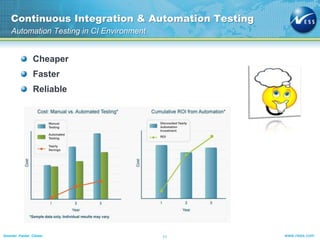
Cheaper
Faster

Reliable

Smarter. Faster. Closer.

11

www.ness.com
Continuous Integration & Automation Testing
CI Process with Automation Testing

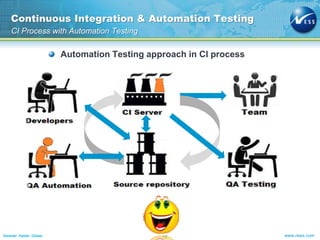
Automation Testing approach in CI process

Smarter. Faster. Closer.

12

www.ness.com
Continuous Integration & Automation Testing
Automation Testing in CI Environment - Benefits

Scheduling execution of the automation tests

CI platform supports parallel test execution
Notification is a built-in step
Reporting is available to the entire team
Speed up the testing process
Early feedback on products quality
Improving the quality and accuracy
Reducing testing risk and time

Providing better project visibility
Quick defect detection

Smarter. Faster. Closer.

13

www.ness.com
Continuous Integration & Automation Testing
Business Case

Business case

Smarter. Faster. Closer.

14

www.ness.com
Continuous Integration & Automation Testing
TeamCity – real-time business case

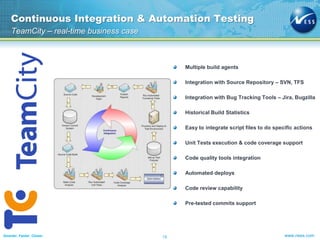
Multiple build agents
Integration with Source Repository – SVN, TFS
Integration with Bug Tracking Tools – Jira, Bugzilla
Historical Build Statistics
Easy to integrate script files to do specific actions
Unit Tests execution & code coverage support
Code quality tools integration
Automated deploys
Code review capability
Pre-tested commits support

Smarter. Faster. Closer.

15

www.ness.com
Continuous Integration & Automation Testing
TeamCity – real-time business case

Continuous Integration Build – for each commit / pre-tested commit –
just sanity build, no release / deploy – triggered automatically

Nightly Build – executed each night together with UnitTests, Automation
Tests, code quality step, code coverage step, eventually deploy on test
server if needed – triggered automatically

Sprint Build – manually executed on-demand for each end-sprint version
together with UnitTests, Automation Tests, code quality step, code
coverage step, deploy on test server – triggered manually

Release Build – manually executed on-demand for an official release
together with UnitTests, Automation Tests, code quality step, code
coverage step, deploy on test server – triggered manually

UAT Build - manually executed on-demand for an official release together
with UnitTests, Automation Tests, code quality step, code coverage
step, deploy on UAT server – triggered manually

Smarter. Faster. Closer.

16

www.ness.com
Continuous Integration & Automation Testing
TeamCity – real-time business case

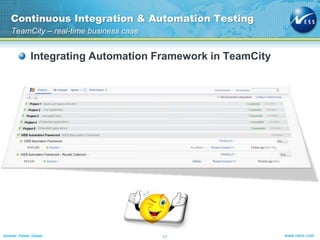
Integrating Automation Framework in TeamCity

Smarter. Faster. Closer.

17

www.ness.com
Continuous Integration & Automation Testing
TeamCity – real-time business case

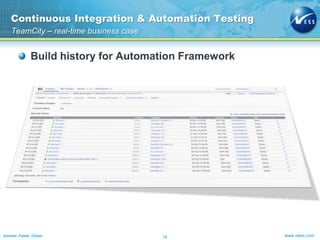
Build history for Automation Framework

Smarter. Faster. Closer.

18

www.ness.com
Continuous Integration & Automation Testing
Reporting

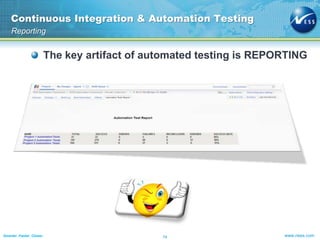
The key artifact of automated testing is REPORTING

Smarter. Faster. Closer.

19

www.ness.com
Continuous Integration & Automation Testing
Reporting

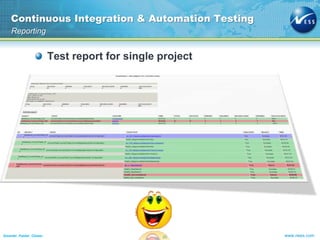
Test report for single project

Smarter. Faster. Closer.

20

www.ness.com
Continuous Integration & Automation Testing
Reporting

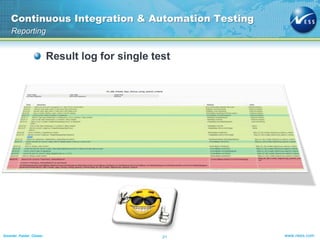
Result log for single test

Smarter. Faster. Closer.

21

www.ness.com
Continuous Integration & Automation Testing
Short summary - conclusion

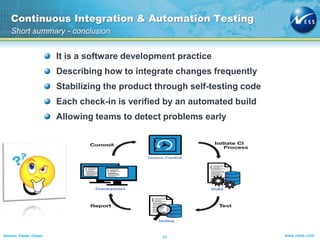
It is a software development practice
Describing how to integrate changes frequently
Stabilizing the product through self-testing code
Each check-in is verified by an automated build
Allowing teams to detect problems early

Smarter. Faster. Closer.

22

www.ness.com
Continuous Integration & Automation Testing
Q&A

Smarter. Faster. Closer.

23

www.ness.com
Smarter. Faster. Closer.

24

www.ness.com

Test Automation and Continuous Integration

  • 1.
  • 2.
  • 3.
    CONTINUOUS INTEGRATION AND AUTOMATION TESTING November2013 Smarter. Faster. Closer. © 2012 Ness Technologies
  • 4.
    Continuous Integration &Automation Testing Summary Continuous Integration Process Continuous Integration Practices Automation Testing in Continuous Integration Environment Case Study Q&A Smarter. Faster. Closer. 4 www.ness.com
  • 5.
    Continuous Integration &Automation Testing Problem definition Why should we improve our development process? ► ► Lower maintenance costs ► Less bugs ► Be flexible – adapt to change more easily ► Relative cost of fixing software issue during different stages of life cycle Lower development costs Happy stakeholders! How can we improve our development process? ► ► Better visibility ► Faster feedback ► Quality metrics ► 5 Better testing practices ► Smarter. Faster. Closer. Standardized build practices Automate! www.ness.com
  • 6.
    Continuous Integration &Automation Testing Process – before & after Using CI to improve your development Smarter. Faster. Closer. 6 www.ness.com
  • 7.
    Continuous Integration &Automation Testing CI Process Developers check out code and commit the changes to the repository The CI server monitor the repository and checks out changes when they occur The CI server builds the system and run unit tests The CI server releases deployable artifacts for QA testing Smarter. Faster. Closer. 7 www.ness.com
  • 8.
    Continuous Integration &Automation Testing CI Process The CI server assigns a build label to the version of the code that it just built The CI server informs the team of the successful build If the build or tests fail, the CI server alerts the team The team fixes the issues at the earliest opportunity Smarter. Faster. Closer. 8 www.ness.com
  • 9.
    Continuous Integration &Automation Testing CI Process Continually integrate and test through the project lifecycle Smarter. Faster. Closer. 9 www.ness.com
  • 10.
    Continuous Integration &Automation Testing Practices Maintain a single Source Repository Automate the build Make your build self-testable Every commit should build on an integration machine Keep the build fast Make it easy for anyone to get the latest executable Everyone can see what’s happening Automate deployment Smarter. Faster. Closer. 10 www.ness.com
  • 11.
    Continuous Integration &Automation Testing Automation Testing in CI Environment Cheaper Faster Reliable Smarter. Faster. Closer. 11 www.ness.com
  • 12.
    Continuous Integration &Automation Testing CI Process with Automation Testing Automation Testing approach in CI process Smarter. Faster. Closer. 12 www.ness.com
  • 13.
    Continuous Integration &Automation Testing Automation Testing in CI Environment - Benefits Scheduling execution of the automation tests CI platform supports parallel test execution Notification is a built-in step Reporting is available to the entire team Speed up the testing process Early feedback on products quality Improving the quality and accuracy Reducing testing risk and time Providing better project visibility Quick defect detection Smarter. Faster. Closer. 13 www.ness.com
  • 14.
    Continuous Integration &Automation Testing Business Case Business case Smarter. Faster. Closer. 14 www.ness.com
  • 15.
    Continuous Integration &Automation Testing TeamCity – real-time business case Multiple build agents Integration with Source Repository – SVN, TFS Integration with Bug Tracking Tools – Jira, Bugzilla Historical Build Statistics Easy to integrate script files to do specific actions Unit Tests execution & code coverage support Code quality tools integration Automated deploys Code review capability Pre-tested commits support Smarter. Faster. Closer. 15 www.ness.com
  • 16.
    Continuous Integration &Automation Testing TeamCity – real-time business case Continuous Integration Build – for each commit / pre-tested commit – just sanity build, no release / deploy – triggered automatically Nightly Build – executed each night together with UnitTests, Automation Tests, code quality step, code coverage step, eventually deploy on test server if needed – triggered automatically Sprint Build – manually executed on-demand for each end-sprint version together with UnitTests, Automation Tests, code quality step, code coverage step, deploy on test server – triggered manually Release Build – manually executed on-demand for an official release together with UnitTests, Automation Tests, code quality step, code coverage step, deploy on test server – triggered manually UAT Build - manually executed on-demand for an official release together with UnitTests, Automation Tests, code quality step, code coverage step, deploy on UAT server – triggered manually Smarter. Faster. Closer. 16 www.ness.com
  • 17.
    Continuous Integration &Automation Testing TeamCity – real-time business case Integrating Automation Framework in TeamCity Smarter. Faster. Closer. 17 www.ness.com
  • 18.
    Continuous Integration &Automation Testing TeamCity – real-time business case Build history for Automation Framework Smarter. Faster. Closer. 18 www.ness.com
  • 19.
    Continuous Integration &Automation Testing Reporting The key artifact of automated testing is REPORTING Smarter. Faster. Closer. 19 www.ness.com
  • 20.
    Continuous Integration &Automation Testing Reporting Test report for single project Smarter. Faster. Closer. 20 www.ness.com
  • 21.
    Continuous Integration &Automation Testing Reporting Result log for single test Smarter. Faster. Closer. 21 www.ness.com
  • 22.
    Continuous Integration &Automation Testing Short summary - conclusion It is a software development practice Describing how to integrate changes frequently Stabilizing the product through self-testing code Each check-in is verified by an automated build Allowing teams to detect problems early Smarter. Faster. Closer. 22 www.ness.com
  • 23.
    Continuous Integration &Automation Testing Q&A Smarter. Faster. Closer. 23 www.ness.com
  • 24.