Shama Ahsan
Agenda
   What is Automation Testing
   Test Automation Framework
   Automation Test Tools
   Why Load Runner
   Architecture
   Load Runner Components
   Think Time
   Playback
   Script Failure & it`s Solution
   Benefits of Automation for your company
What is Automation Testing
 Automation Testing is the use of software to control
  the execution of tests, the comparison of actual
  outcomes to predicted outcomes, the setting up of test
  preconditions, and other test control and test
  reporting functions.
 Automation is the use of strategies, tools and artifacts
  that reduce the need of manual or human involvement
  or interaction in unskilled, repetitive or redundant
  tasks.
Need of Automation Testing
 Automation testing is the best way to increase the
 effectiveness, efficiency and coverage of your software.

 Automated Testing Saves Time and Money
 Automated Testing Improves Accuracy
 Automated Testing Helps Developers and Testers
 Automated Testing Increases Test Coverage
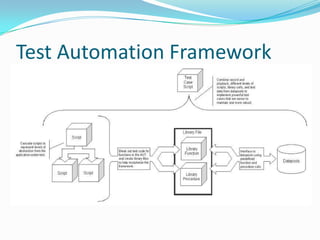
Test Automation Framework
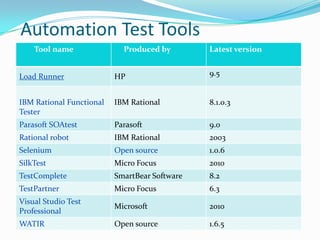
Automation Test Tools
    Tool name               Produced by        Latest version


Load Runner               HP                   9.5


IBM Rational Functional   IBM Rational         8.1.0.3
Tester
Parasoft SOAtest          Parasoft             9.0
Rational robot            IBM Rational         2003
Selenium                  Open source          1.0.6
SilkTest                  Micro Focus          2010
TestComplete              SmartBear Software   8.2
TestPartner               Micro Focus          6.3
Visual Studio Test
                          Microsoft            2010
Professional
WATIR                     Open source          1.6.5
Why Load Runner?
1.   Load Runner reduces the human resource requirement by replacing real
     human users with virtual users known as Vusers.

2.   Load Runner reduces the hardware requirements by running multiple
     Vusers in a single computer.

3.   Load Runner automatically records performance of application under test.
     LoadRunner provides graph and reporting options for the analysis of
     performance test results.

4.   Various kinds of delays can be identified using LoadRunner. During the test
     execution, LoadRunner monitors network and server resources
     continuously.

5.   Load Runner makes performance testing very easy – LoadRunner tests are
     fully automated, you can easily repeat them as often as you need.
What is load runner?
 HP's (formerly Mercury's) load/stress testing tool for
  web and other applications.
 supports a wide variety of application environments,
  platforms, databases and tracing of bottlenecks.
 Load Runner enables you to test your system under
  controlled and peak load conditions.
What is Performance Testing?
 Performance testing is an empirical, technical
 investigation conducted to provide stakeholders with
 information about the quality of the product under
 test with regard to speed, scalability and stability
 characteristics.
System Requirements
 Processor:
    CPU Type: Intel Core, Pentium, AMD or compatible
    Speed: 1 GHz minimum. 2 GHz or higher recommended
    Intel Hyper-Threading technology is not supported.
 Operating System: The following 32-bit Windows operating systems are
  supported:
    Windows Vista SP1
    Windows XP Professional SP2 or SP3
    Windows Server 2003 Standard
    Edition/Enterprise Edition SP2
    Windows Server 2003 Standard
    Edition/Enterprise Edition R2 SP2
 RAM:
    Minimum: 512 MB
    Recommended: 1 GB or higher
Architecture
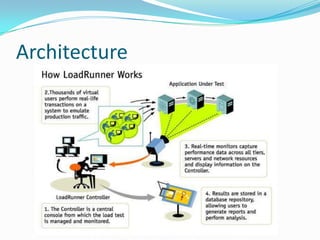
How Load Runner Works
 Load Runner works by creating virtual users who take
 the place of real users operating client software
 sending requests using the HTTP protocol to web
 servers.

 Requests from many virtual user clients are generated
 by "Load Generators" in order to create a load on
 various servers under test

 The Controller controls load test runs based on
 "Scenarios" invoking compiled "Scripts" and associated
 "Run-time Settings".
                                              (cont.)
 Scripts are crafted using "Virtual user script
  Generator" (named "VU Gen)
 During runs, the status of each machine is
  monitored by the Controller.

 At the end of each run, the Controller combines its
  monitoring logs with logs obtained from load
  generators, and makes them available to the
  "Analysis" program, which can then create run
 result reports and graphs for Microsoft Word,
 Crystal Reports, or an HTML webpage browser.
Load Runner components
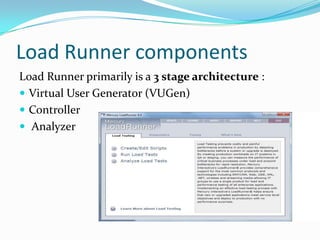
Load Runner primarily is a 3 stage architecture :
 Virtual User Generator (VUGen)
 Controller
 Analyzer
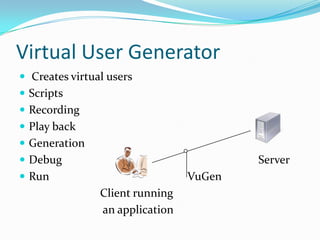
Virtual User Generator
 Creates virtual users
 Scripts
 Recording
 Play back
 Generation
 Debug                                  Server
 Run                            VuGen
                Client running
                an application
Controller
 The load is tested here.


The Controller has two sections
 Design Section - Used to design the load testing
  scenario

 Run Section - Used to monitor scenarios which are in
  execution.
Analyzer
 The executed script result is displayed in the analyzer.


 Analyzer section is used to observe reports and
  graphs, it would determine the performance of our
  recoded scenarios at different user load.
Think Time
 Think Time is the time taken by a user (usually to
 think ) before user takes the next action.
Script Failure
 Why a script fails when it was working properly
  earlier?
 It is because the dynamic values such as Cookies ,
  Checksums , Session Id's at the backend change every
  time the application is used.
Solution to the script failure?
 Correlation is the solution to the script failure.
 The user parameterizes the values. For instance, the
  user parameterizes the session ID and use that
  parameter instead of the hard-coded values.
How Automation testing can be
beneficial for your company
 Manual testing is time-consuming or costly. In automated
 testing, companies can focus on improving the automated
 business processes. This will increase the speed and accuracy of
 the development and QA team’s testing process. The entire IT
 departments can be a higher return on investment, but also
 reduces a great deal of risk.
 Reduced test cycle time:
 Since automation testing tools run considerably faster than
 human users, this eventually leads to a considerably reduced test
 cycle time resulting in sustainable time savings.
Load Runner Installation
 Run the setup.exe file in the root directory of the installation disk.
 The Load Runner Setup program begins and displays the installation
    menu page.
   Load Runner Full Setup. Provides the option to install the main Load
    Runner features and components including the Controller, the VuGen,
    Analysis, and the Load Generator.
   Load Generator. Installs the components needed for running virtual
    users to generate load.
   Click OK and follow the on-screen instructions to install the listed
    software before continuing with the Load Runner installation.
   If you click Cancel, the installer will exit because Load Runner cannot
    be installed without the prerequisite software.
                                                                  (cont.)
References
 http://en.wikipedia.org/wiki/Automation_Testing
 http://guru99.com/loadrunner-tutorials.html
 http://www.devbistro.com/articles/Testing/Role-of-
  Test-Automation-Engineer
 http://learnloadrunner.com/
 http://www.geekinterview.com/
 www.softwaretestinggenius.com
Q&A
Thank you!!

Load Runner

  • 1.
  • 2.
    Agenda  What is Automation Testing  Test Automation Framework  Automation Test Tools  Why Load Runner  Architecture  Load Runner Components  Think Time  Playback  Script Failure & it`s Solution  Benefits of Automation for your company
  • 3.
    What is AutomationTesting  Automation Testing is the use of software to control the execution of tests, the comparison of actual outcomes to predicted outcomes, the setting up of test preconditions, and other test control and test reporting functions.  Automation is the use of strategies, tools and artifacts that reduce the need of manual or human involvement or interaction in unskilled, repetitive or redundant tasks.
  • 4.
    Need of AutomationTesting  Automation testing is the best way to increase the effectiveness, efficiency and coverage of your software.  Automated Testing Saves Time and Money  Automated Testing Improves Accuracy  Automated Testing Helps Developers and Testers  Automated Testing Increases Test Coverage
  • 5.
  • 6.
    Automation Test Tools Tool name Produced by Latest version Load Runner HP 9.5 IBM Rational Functional IBM Rational 8.1.0.3 Tester Parasoft SOAtest Parasoft 9.0 Rational robot IBM Rational 2003 Selenium Open source 1.0.6 SilkTest Micro Focus 2010 TestComplete SmartBear Software 8.2 TestPartner Micro Focus 6.3 Visual Studio Test Microsoft 2010 Professional WATIR Open source 1.6.5
  • 7.
    Why Load Runner? 1. Load Runner reduces the human resource requirement by replacing real human users with virtual users known as Vusers. 2. Load Runner reduces the hardware requirements by running multiple Vusers in a single computer. 3. Load Runner automatically records performance of application under test. LoadRunner provides graph and reporting options for the analysis of performance test results. 4. Various kinds of delays can be identified using LoadRunner. During the test execution, LoadRunner monitors network and server resources continuously. 5. Load Runner makes performance testing very easy – LoadRunner tests are fully automated, you can easily repeat them as often as you need.
  • 8.
    What is loadrunner?  HP's (formerly Mercury's) load/stress testing tool for web and other applications.  supports a wide variety of application environments, platforms, databases and tracing of bottlenecks.  Load Runner enables you to test your system under controlled and peak load conditions.
  • 9.
    What is PerformanceTesting?  Performance testing is an empirical, technical investigation conducted to provide stakeholders with information about the quality of the product under test with regard to speed, scalability and stability characteristics.
  • 10.
    System Requirements  Processor:  CPU Type: Intel Core, Pentium, AMD or compatible  Speed: 1 GHz minimum. 2 GHz or higher recommended  Intel Hyper-Threading technology is not supported.  Operating System: The following 32-bit Windows operating systems are supported:  Windows Vista SP1  Windows XP Professional SP2 or SP3  Windows Server 2003 Standard  Edition/Enterprise Edition SP2  Windows Server 2003 Standard  Edition/Enterprise Edition R2 SP2  RAM:  Minimum: 512 MB  Recommended: 1 GB or higher
  • 11.
  • 12.
    How Load RunnerWorks  Load Runner works by creating virtual users who take the place of real users operating client software sending requests using the HTTP protocol to web servers.  Requests from many virtual user clients are generated by "Load Generators" in order to create a load on various servers under test  The Controller controls load test runs based on "Scenarios" invoking compiled "Scripts" and associated "Run-time Settings". (cont.)
  • 13.
     Scripts arecrafted using "Virtual user script Generator" (named "VU Gen)  During runs, the status of each machine is monitored by the Controller.  At the end of each run, the Controller combines its monitoring logs with logs obtained from load generators, and makes them available to the "Analysis" program, which can then create run result reports and graphs for Microsoft Word, Crystal Reports, or an HTML webpage browser.
  • 14.
    Load Runner components LoadRunner primarily is a 3 stage architecture :  Virtual User Generator (VUGen)  Controller  Analyzer
  • 15.
    Virtual User Generator Creates virtual users  Scripts  Recording  Play back  Generation  Debug Server  Run VuGen Client running an application
  • 16.
    Controller  The loadis tested here. The Controller has two sections  Design Section - Used to design the load testing scenario  Run Section - Used to monitor scenarios which are in execution.
  • 17.
    Analyzer  The executedscript result is displayed in the analyzer.  Analyzer section is used to observe reports and graphs, it would determine the performance of our recoded scenarios at different user load.
  • 18.
    Think Time  ThinkTime is the time taken by a user (usually to think ) before user takes the next action.
  • 19.
    Script Failure  Whya script fails when it was working properly earlier?  It is because the dynamic values such as Cookies , Checksums , Session Id's at the backend change every time the application is used.
  • 20.
    Solution to thescript failure?  Correlation is the solution to the script failure.  The user parameterizes the values. For instance, the user parameterizes the session ID and use that parameter instead of the hard-coded values.
  • 21.
    How Automation testingcan be beneficial for your company Manual testing is time-consuming or costly. In automated testing, companies can focus on improving the automated business processes. This will increase the speed and accuracy of the development and QA team’s testing process. The entire IT departments can be a higher return on investment, but also reduces a great deal of risk. Reduced test cycle time: Since automation testing tools run considerably faster than human users, this eventually leads to a considerably reduced test cycle time resulting in sustainable time savings.
  • 22.
    Load Runner Installation Run the setup.exe file in the root directory of the installation disk.  The Load Runner Setup program begins and displays the installation menu page.  Load Runner Full Setup. Provides the option to install the main Load Runner features and components including the Controller, the VuGen, Analysis, and the Load Generator.  Load Generator. Installs the components needed for running virtual users to generate load.  Click OK and follow the on-screen instructions to install the listed software before continuing with the Load Runner installation.  If you click Cancel, the installer will exit because Load Runner cannot be installed without the prerequisite software. (cont.)
  • 23.
    References  http://en.wikipedia.org/wiki/Automation_Testing  http://guru99.com/loadrunner-tutorials.html http://www.devbistro.com/articles/Testing/Role-of- Test-Automation-Engineer  http://learnloadrunner.com/  http://www.geekinterview.com/  www.softwaretestinggenius.com
  • 24.
  • 25.