RESEARCHING WITH PROQUEST SIRS
DISCOVERER
This presentation is meant as a guide for grade school students working
on research papers or projects; for the teachers or school librarians
helping those students; for parents of students; and for public youth
services librarians.
Screen shots for this presentation are from the Teton County Library
website, the Wyoming State Library GoWYLD database page, and the
ProQuest SIRS Discover database.
PROQUEST SIRS
DISCOVERER
This database is a great place to start
when you might not know where to
start. It offers resources on a variety of
topics and is an excellent jumping off
point when beginning research for a
grade school research paper or project.
This resource is available to Teton
County Library patrons with a valid
library card and PIN.
Image from: https://gowyld.libguides.com/KidsK-8
HOW DO I
ACCESS
DISCOVERER?
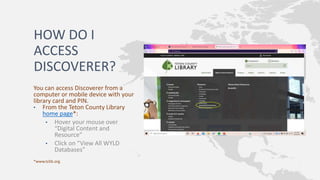
You can access Discoverer from a
computer or mobile device with your
library card and PIN.
• From the Teton County Library
home page*:
• Hover your mouse over
“Digital Content and
Resource”
• Click on “View All WYLD
Databases”
*www.tclib.org
ACCESS (CONTINUED):
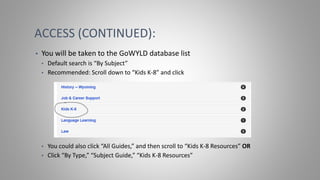
• You will be taken to the GoWYLD database list
• Default search is “By Subject”
• Recommended: Scroll down to “Kids K-8” and click
• You could also click “All Guides,” and then scroll to “Kids K-8 Resources” OR
• Click “By Type,” “Subject Guide,” “Kids K-8 Resources”
ACCESS (CONTINUED):
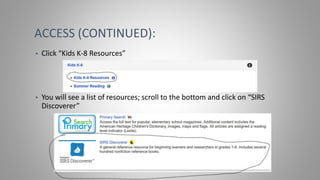
• Click “Kids K-8 Resources”
• You will see a list of resources; scroll to the bottom and click on “SIRS
Discoverer”
ACCESS (CONTINUED):
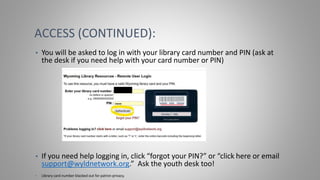
• You will be asked to log in with your library card number and PIN (ask at
the desk if you need help with your card number or PIN)
• If you need help logging in, click “forgot your PIN?” or “click here or email
support@wyldnetwork.org.” Ask the youth desk too!
• Library card number blacked out for patron privacy.
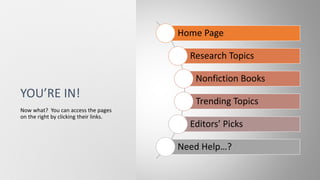
YOU’RE IN!
Home Page
Research Topics
Nonfiction Books
Trending Topics
Editors’ Picks
Need Help…?
Now what? You can access the pages
on the right by clicking their links.
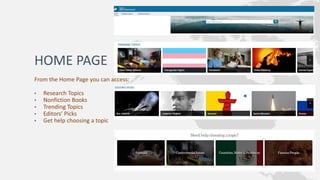
HOME PAGE
From the Home Page you can access:
• Research Topics
• Nonfiction Books
• Trending Topics
• Editors’ Picks
• Get help choosing a topic
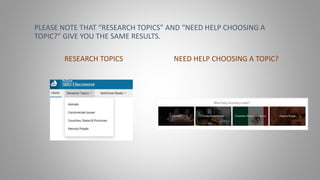
PLEASE NOTE THAT “RESEARCH TOPICS” AND “NEED HELP CHOOSING A
TOPIC?” GIVE YOU THE SAME RESULTS.
RESEARCH TOPICS NEED HELP CHOOSING A TOPIC?
RESEARCH TOPICS
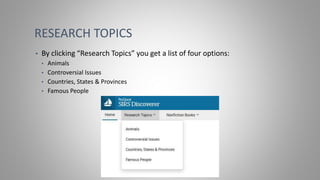
• By clicking “Research Topics” you get a list of four options:
• Animals
• Controversial Issues
• Countries, States & Provinces
• Famous People
RESEARCH TOPICS (CONTINUED)
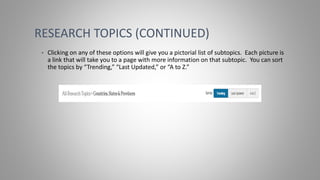
• Clicking on any of these options will give you a pictorial list of subtopics. Each picture is
a link that will take you to a page with more information on that subtopic. You can sort
the topics by “Trending,” “Last Updated,” or “A to Z.”
RESEARCH TOPICS—AN EXAMPLE
Let’s say you want to know more about China since you are excited about the 2021
Olympics in Beijing.
• Click on “Countries, States & Provinces”
• A page will open with images of national flags.
• Each flag has a caption for the country it belongs to.
• Scroll until you find the Chinese flag and click on it
• The default sort is “Trending”
• Note that more images will load as you scroll down
RESEARCH TOPICS—AN EXAMPLE
(CONTINUED)
• A new page will open with China as the research topic.
• Try it out!
• Where is China located? (Hint: check under “Basic Facts”)
• What is the climate?
• What is the population?
• Can you find the map?
• When was the Golden Age? (Hint: check out the timeline)
• What do the links in the timeline do?
RESEARCH TOPICS—AN EXAMPLE
(CONTINUED)
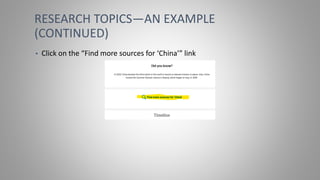
• Click on the “Find more sources for ‘China’” link
RESEARCH TOPICS—AN EXAMPLE
(CONTINUED)
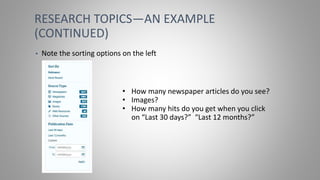
• Note the sorting options on the left
• How many newspaper articles do you see?
• Images?
• How many hits do you get when you click
on “Last 30 days?” “Last 12 months?”
RESEARCH TOPICS—AN EXAMPLE
(CONTINUED)
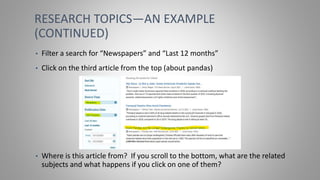
• Filter a search for “Newspapers” and “Last 12 months”
• Click on the third article from the top (about pandas)
• Where is this article from? If you scroll to the bottom, what are the related
subjects and what happens if you click on one of them?
NONFICTION BOOKS
You can also search nonfiction books for grade schoolers on various
topics. Like the research topics, these can also be sorted by “Trending,”
“Last Updated,” and “A to Z.” The pictures on the page are also links.
To search the nonfiction books, navigate back to the home page:
• Click the sailboat in the upper left corner
• Click “Proquest SIRS Discoverer” in the upper left corner
• Click “Home” in the upper left corner
NONFICTION BOOKS (CONTINUED)
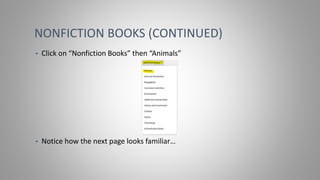
• Click on “Nonfiction Books” then “Animals”
• Notice how the next page looks familiar…
NONFICTION BOOKS (CONTINUED)
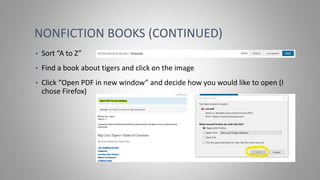
• Sort “A to Z”
• Find a book about tigers and click on the image
• Click “Open PDF in new window” and decide how you would like to open (I
chose Firefox)
NONFICTION BOOKS (CONTINUED)
• Can you find any reference to tigers in China?
• Hint: You can use the quick keys CTRL+F to find
• OR find the index and search for “China”
TRENDING TOPICS
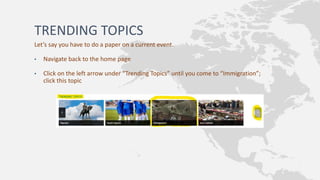
Let’s say you have to do a paper on a current event.
• Navigate back to the home page
• Click on the left arrow under “Trending Topics” until you come to “Immigration”;
click this topic
TRENDING TOPICS (CONTINUED)
• Check out the features on this page. Of note, especially for research
papers, are the “Viewpoint 1” and “Viewpoint 2” sections
• The “Critical Questions” section can also give you ideas for paper topics
• Scroll to the bottom and click on “Find more sources for ‘Immigration’
TRENDING TOPICS (CONTINUED)
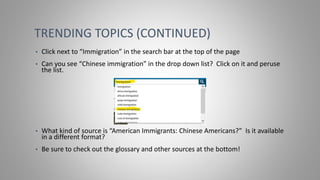
• Click next to “Immigration” in the search bar at the top of the page
• Can you see “Chinese immigration” in the drop down list? Click on it and peruse
the list.
• What kind of source is “American Immigrants: Chinese Americans?” Is it available
in a different format?
• Be sure to check out the glossary and other sources at the bottom!
EDITORS’ PICKS
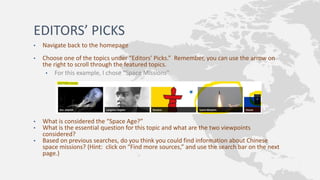
• Navigate back to the homepage
• Choose one of the topics under “Editors’ Picks.” Remember, you can use the arrow on
the right to scroll through the featured topics.
• For this example, I chose “Space Missions”
• What is considered the “Space Age?”
• What is the essential question for this topic and what are the two viewpoints
considered?
• Based on previous searches, do you think you could find information about Chinese
space missions? (Hint: click on “Find more sources,” and use the search bar on the next
page.)
DID YOU NOTICE THAT THE NAVIGATION
FOR EACH OF THESE SPACES IS SIMILAR
TO ALL THE OTHERS?
Whether you are looking at famous people or trending topics, once you
are in the page for that topic, many of the features are the same.
Links, highlighted blue, will take you to another page within Discoverer
and may direct you to external links, especially for articles related to your
search.
The layout is the same throughout the topic pages.
It is simple to navigate back to the homepage.
There is always an option to listen to the text.
I hope this presentation has been useful and that you have found some
helpful tips for your research—or helping your students with theirs! Please
reach out with any questions you may have:
Cayla Broseus
Tuesday-Friday, 8AM to 6 PM
cbroseus@my.dom.edu
123-456-7890 x. 9999
Youth Desk
Monday-Friday, 9AM to 6PM – Saturday, 9AM to 5PM
libraryyouth@library.org
987-654-3210 x. 9999
CITATION
Teton County Library. (n.d.). Retrieved December 10, 2021, from
http://www.tclib.org/.
Wyoming’s Online Library Resources. (n.d.). Retrieved December 10,
2021, from https://gowyld.libguides.com/?b=s.
ProQuest SIRS Discoverer. (n.d.). Retrieved December 12, 2021, from
https://explore.proquest.com/sirsdiscoverer/home?accountid=29653.

Lis 70203 proquest discoverer instructional presentation

  • 1.
    RESEARCHING WITH PROQUESTSIRS DISCOVERER This presentation is meant as a guide for grade school students working on research papers or projects; for the teachers or school librarians helping those students; for parents of students; and for public youth services librarians. Screen shots for this presentation are from the Teton County Library website, the Wyoming State Library GoWYLD database page, and the ProQuest SIRS Discover database.
  • 2.
    PROQUEST SIRS DISCOVERER This databaseis a great place to start when you might not know where to start. It offers resources on a variety of topics and is an excellent jumping off point when beginning research for a grade school research paper or project. This resource is available to Teton County Library patrons with a valid library card and PIN. Image from: https://gowyld.libguides.com/KidsK-8
  • 3.
    HOW DO I ACCESS DISCOVERER? Youcan access Discoverer from a computer or mobile device with your library card and PIN. • From the Teton County Library home page*: • Hover your mouse over “Digital Content and Resource” • Click on “View All WYLD Databases” *www.tclib.org
  • 4.
    ACCESS (CONTINUED): • Youwill be taken to the GoWYLD database list • Default search is “By Subject” • Recommended: Scroll down to “Kids K-8” and click • You could also click “All Guides,” and then scroll to “Kids K-8 Resources” OR • Click “By Type,” “Subject Guide,” “Kids K-8 Resources”
  • 5.
    ACCESS (CONTINUED): • Click“Kids K-8 Resources” • You will see a list of resources; scroll to the bottom and click on “SIRS Discoverer”
  • 6.
    ACCESS (CONTINUED): • Youwill be asked to log in with your library card number and PIN (ask at the desk if you need help with your card number or PIN) • If you need help logging in, click “forgot your PIN?” or “click here or email support@wyldnetwork.org.” Ask the youth desk too! • Library card number blacked out for patron privacy.
  • 7.
    YOU’RE IN! Home Page ResearchTopics Nonfiction Books Trending Topics Editors’ Picks Need Help…? Now what? You can access the pages on the right by clicking their links.
  • 8.
    HOME PAGE From theHome Page you can access: • Research Topics • Nonfiction Books • Trending Topics • Editors’ Picks • Get help choosing a topic
  • 9.
    PLEASE NOTE THAT“RESEARCH TOPICS” AND “NEED HELP CHOOSING A TOPIC?” GIVE YOU THE SAME RESULTS. RESEARCH TOPICS NEED HELP CHOOSING A TOPIC?
  • 10.
    RESEARCH TOPICS • Byclicking “Research Topics” you get a list of four options: • Animals • Controversial Issues • Countries, States & Provinces • Famous People
  • 11.
    RESEARCH TOPICS (CONTINUED) •Clicking on any of these options will give you a pictorial list of subtopics. Each picture is a link that will take you to a page with more information on that subtopic. You can sort the topics by “Trending,” “Last Updated,” or “A to Z.”
  • 12.
    RESEARCH TOPICS—AN EXAMPLE Let’ssay you want to know more about China since you are excited about the 2021 Olympics in Beijing. • Click on “Countries, States & Provinces” • A page will open with images of national flags. • Each flag has a caption for the country it belongs to. • Scroll until you find the Chinese flag and click on it • The default sort is “Trending” • Note that more images will load as you scroll down
  • 13.
    RESEARCH TOPICS—AN EXAMPLE (CONTINUED) •A new page will open with China as the research topic. • Try it out! • Where is China located? (Hint: check under “Basic Facts”) • What is the climate? • What is the population? • Can you find the map? • When was the Golden Age? (Hint: check out the timeline) • What do the links in the timeline do?
  • 14.
    RESEARCH TOPICS—AN EXAMPLE (CONTINUED) •Click on the “Find more sources for ‘China’” link
  • 15.
    RESEARCH TOPICS—AN EXAMPLE (CONTINUED) •Note the sorting options on the left • How many newspaper articles do you see? • Images? • How many hits do you get when you click on “Last 30 days?” “Last 12 months?”
  • 16.
    RESEARCH TOPICS—AN EXAMPLE (CONTINUED) •Filter a search for “Newspapers” and “Last 12 months” • Click on the third article from the top (about pandas) • Where is this article from? If you scroll to the bottom, what are the related subjects and what happens if you click on one of them?
  • 17.
    NONFICTION BOOKS You canalso search nonfiction books for grade schoolers on various topics. Like the research topics, these can also be sorted by “Trending,” “Last Updated,” and “A to Z.” The pictures on the page are also links. To search the nonfiction books, navigate back to the home page: • Click the sailboat in the upper left corner • Click “Proquest SIRS Discoverer” in the upper left corner • Click “Home” in the upper left corner
  • 18.
    NONFICTION BOOKS (CONTINUED) •Click on “Nonfiction Books” then “Animals” • Notice how the next page looks familiar…
  • 19.
    NONFICTION BOOKS (CONTINUED) •Sort “A to Z” • Find a book about tigers and click on the image • Click “Open PDF in new window” and decide how you would like to open (I chose Firefox)
  • 20.
    NONFICTION BOOKS (CONTINUED) •Can you find any reference to tigers in China? • Hint: You can use the quick keys CTRL+F to find • OR find the index and search for “China”
  • 21.
    TRENDING TOPICS Let’s sayyou have to do a paper on a current event. • Navigate back to the home page • Click on the left arrow under “Trending Topics” until you come to “Immigration”; click this topic
  • 22.
    TRENDING TOPICS (CONTINUED) •Check out the features on this page. Of note, especially for research papers, are the “Viewpoint 1” and “Viewpoint 2” sections • The “Critical Questions” section can also give you ideas for paper topics • Scroll to the bottom and click on “Find more sources for ‘Immigration’
  • 23.
    TRENDING TOPICS (CONTINUED) •Click next to “Immigration” in the search bar at the top of the page • Can you see “Chinese immigration” in the drop down list? Click on it and peruse the list. • What kind of source is “American Immigrants: Chinese Americans?” Is it available in a different format? • Be sure to check out the glossary and other sources at the bottom!
  • 24.
    EDITORS’ PICKS • Navigateback to the homepage • Choose one of the topics under “Editors’ Picks.” Remember, you can use the arrow on the right to scroll through the featured topics. • For this example, I chose “Space Missions” • What is considered the “Space Age?” • What is the essential question for this topic and what are the two viewpoints considered? • Based on previous searches, do you think you could find information about Chinese space missions? (Hint: click on “Find more sources,” and use the search bar on the next page.)
  • 25.
    DID YOU NOTICETHAT THE NAVIGATION FOR EACH OF THESE SPACES IS SIMILAR TO ALL THE OTHERS? Whether you are looking at famous people or trending topics, once you are in the page for that topic, many of the features are the same. Links, highlighted blue, will take you to another page within Discoverer and may direct you to external links, especially for articles related to your search. The layout is the same throughout the topic pages. It is simple to navigate back to the homepage. There is always an option to listen to the text.
  • 26.
    I hope thispresentation has been useful and that you have found some helpful tips for your research—or helping your students with theirs! Please reach out with any questions you may have: Cayla Broseus Tuesday-Friday, 8AM to 6 PM cbroseus@my.dom.edu 123-456-7890 x. 9999 Youth Desk Monday-Friday, 9AM to 6PM – Saturday, 9AM to 5PM libraryyouth@library.org 987-654-3210 x. 9999
  • 27.
    CITATION Teton County Library.(n.d.). Retrieved December 10, 2021, from http://www.tclib.org/. Wyoming’s Online Library Resources. (n.d.). Retrieved December 10, 2021, from https://gowyld.libguides.com/?b=s. ProQuest SIRS Discoverer. (n.d.). Retrieved December 12, 2021, from https://explore.proquest.com/sirsdiscoverer/home?accountid=29653.