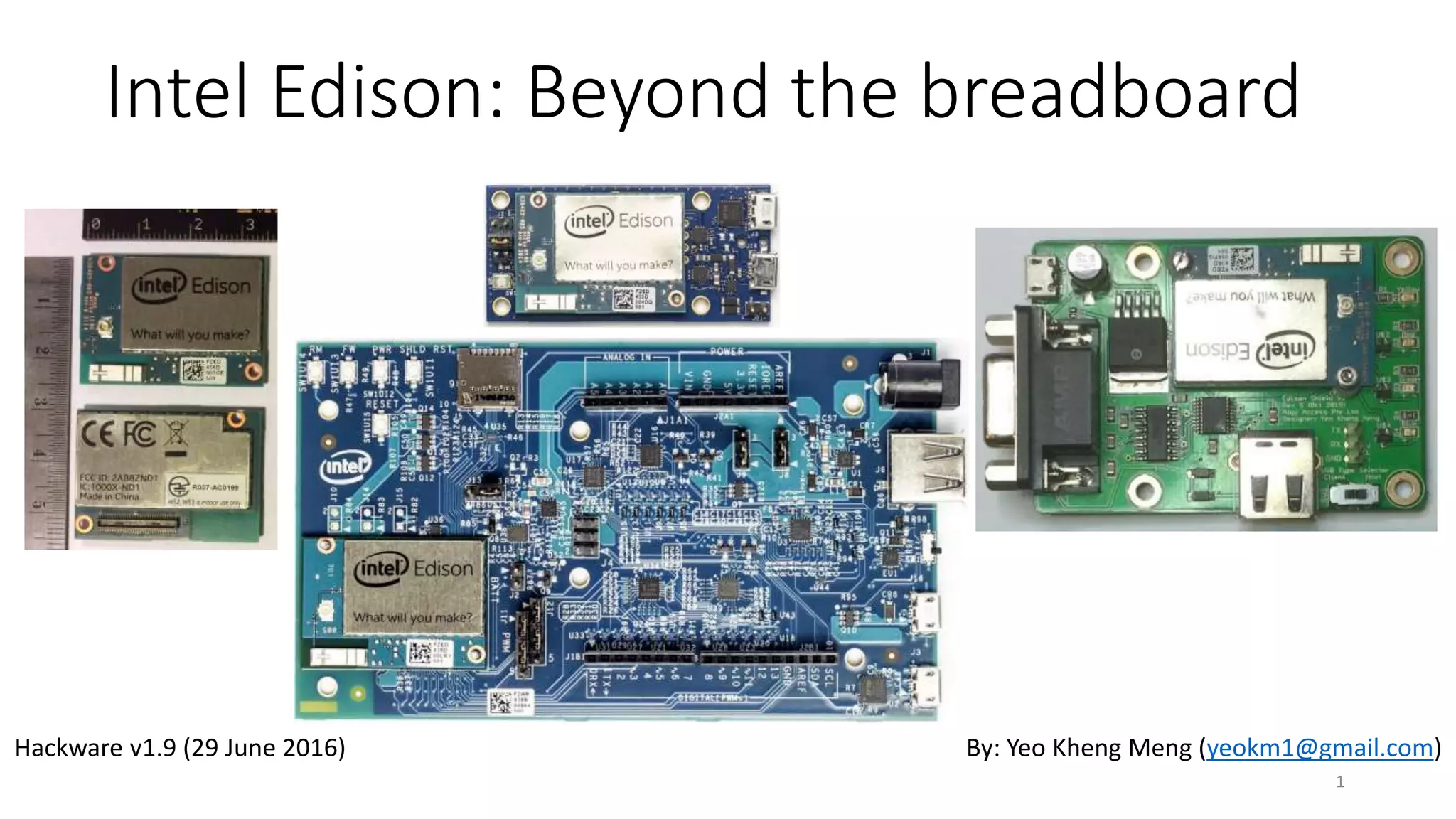
Intel Edison: Beyond the breadboard
1
By: Yeo Kheng Meng (yeokm1@gmail.com)Hackware v1.9 (29 June 2016)
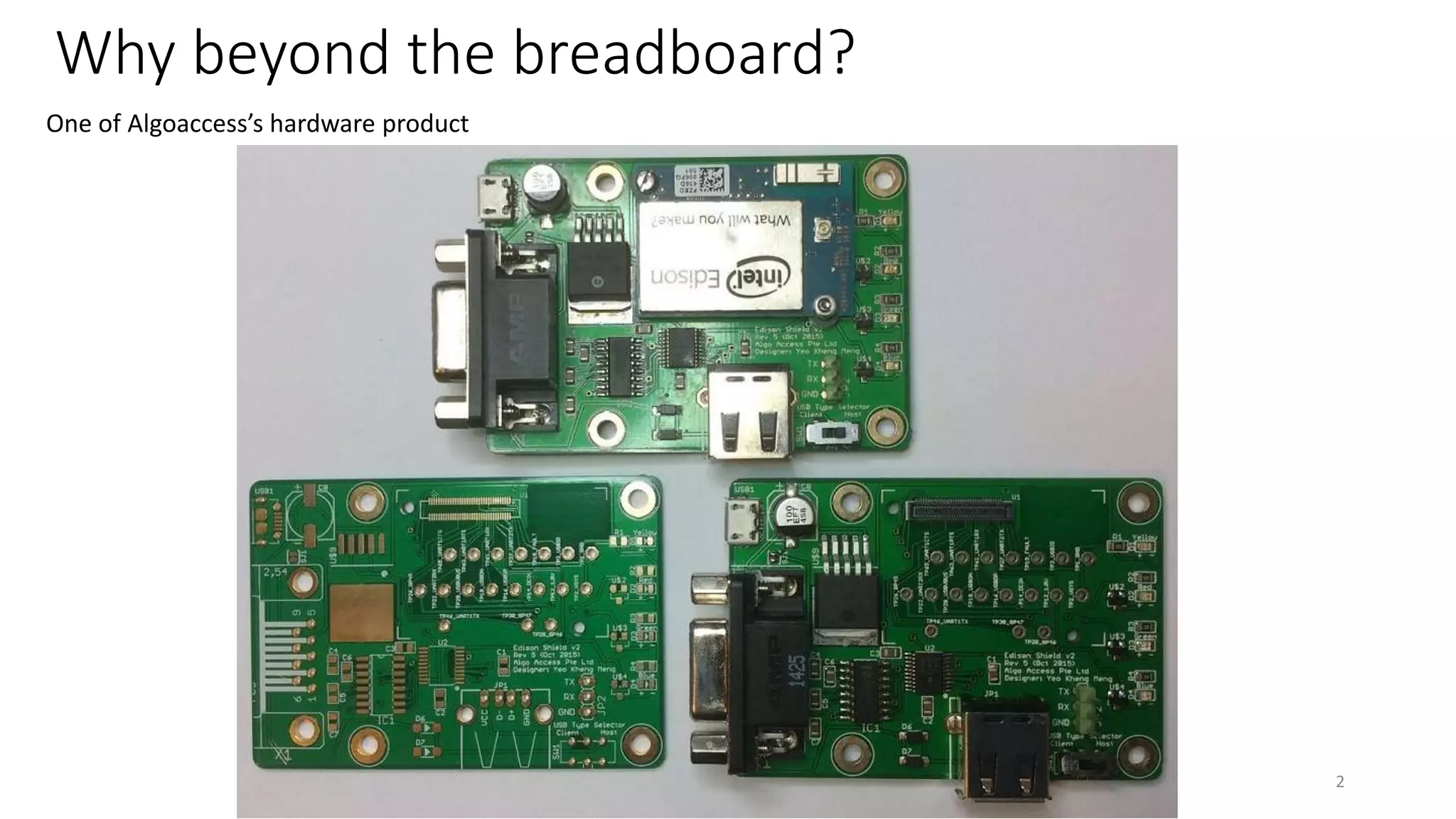
Why beyond the breadboard?
2
One of Algoaccess’s hardware product
3
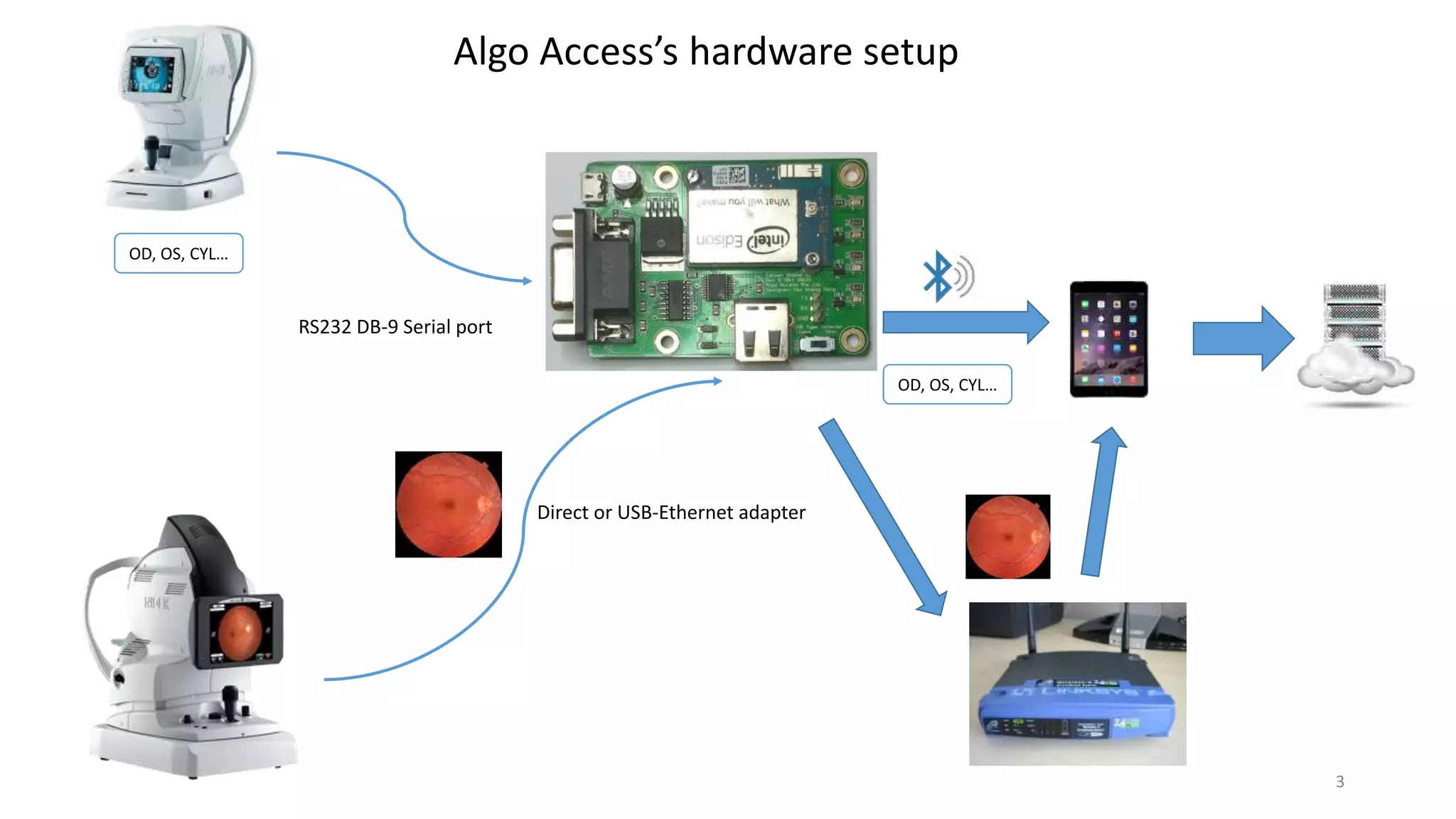
Algo Access’s hardware setup
OD, OS, CYL…
OD, OS, CYL…
Direct or USB-Ethernet adapter
RS232 DB-9 Serial port
Agenda
1. Intel Edison Basics
2. Hardware experience
3. Software experience
4
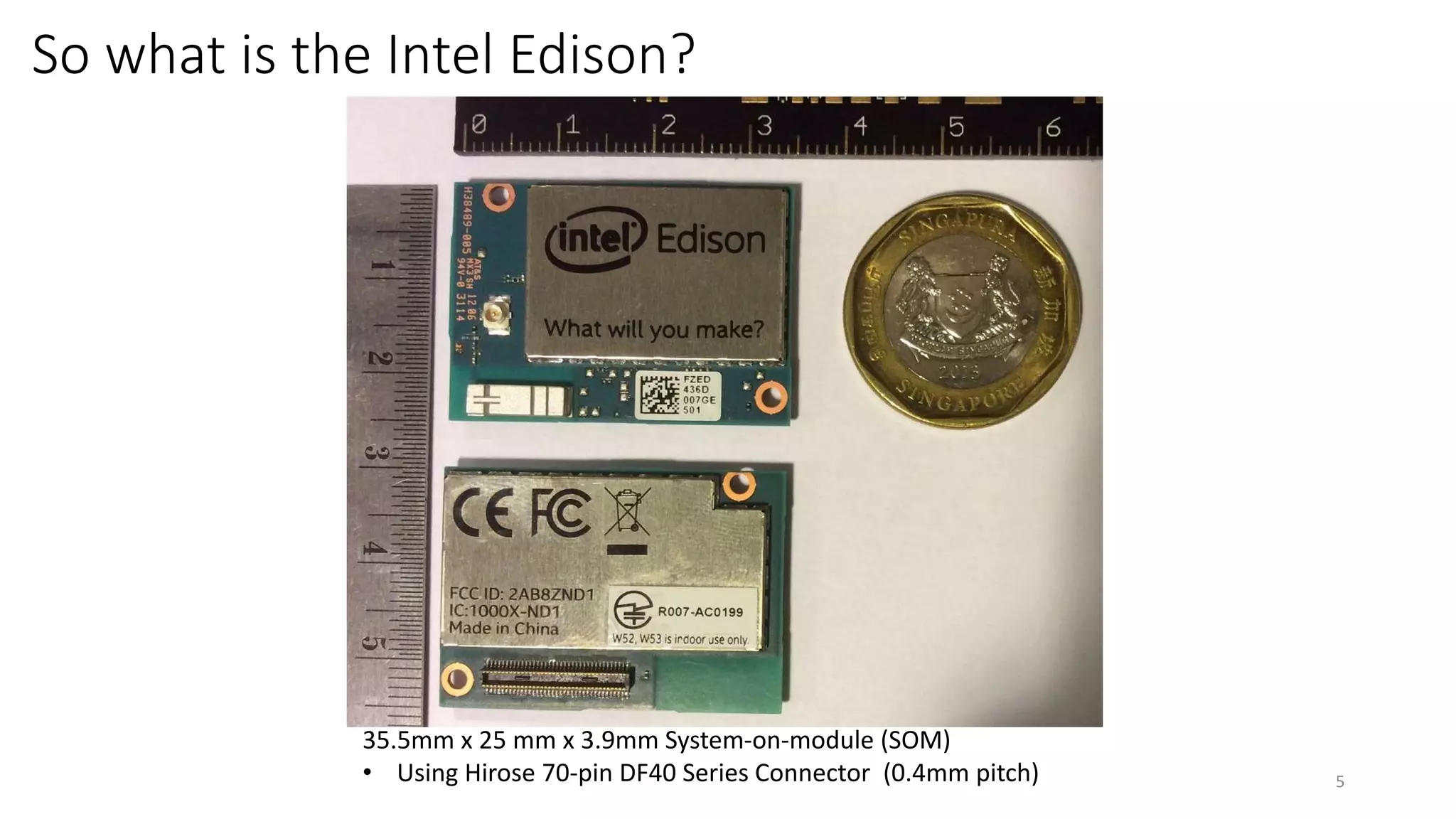
So what is the Intel Edison?
5
35.5mm x 25 mm x 3.9mm System-on-module (SOM)
• Using Hirose 70-pin DF40 Series Connector (0.4mm pitch)
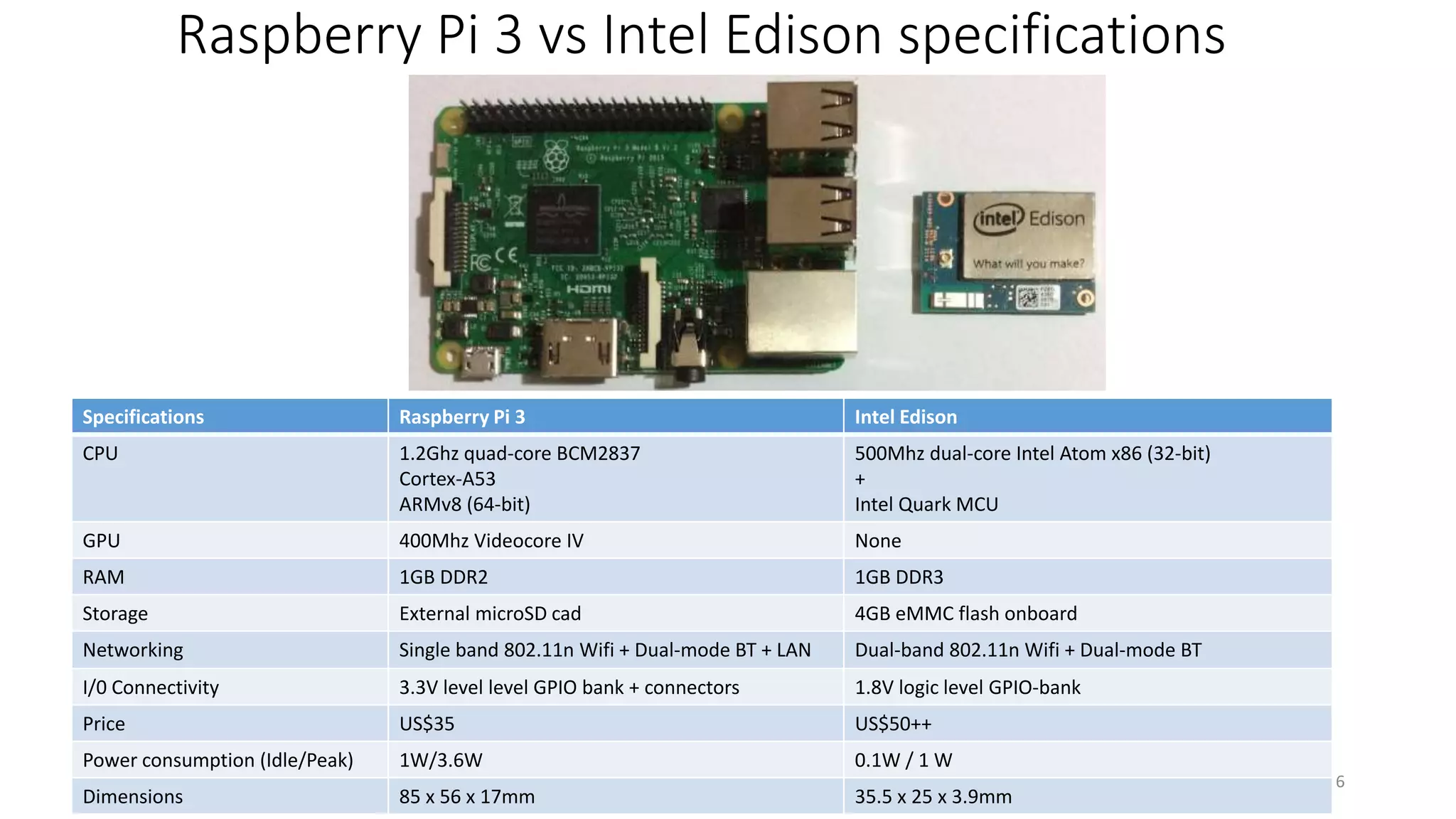
Raspberry Pi 3 vs Intel Edison specifications
6
Specifications Raspberry Pi 3 Intel Edison
CPU 1.2Ghz quad-core BCM2837
Cortex-A53
ARMv8 (64-bit)
500Mhz dual-core Intel Atom x86 (32-bit)
+
Intel Quark MCU
GPU 400Mhz Videocore IV None
RAM 1GB DDR2 1GB DDR3
Storage External microSD cad 4GB eMMC flash onboard
Networking Single band 802.11n Wifi + Dual-mode BT + LAN Dual-band 802.11n Wifi + Dual-mode BT
I/0 Connectivity 3.3V level level GPIO bank + connectors 1.8V logic level GPIO-bank
Price US$35 US$50++
Power consumption (Idle/Peak) 1W/3.6W 0.1W / 1 W
Dimensions 85 x 56 x 17mm 35.5 x 25 x 3.9mm
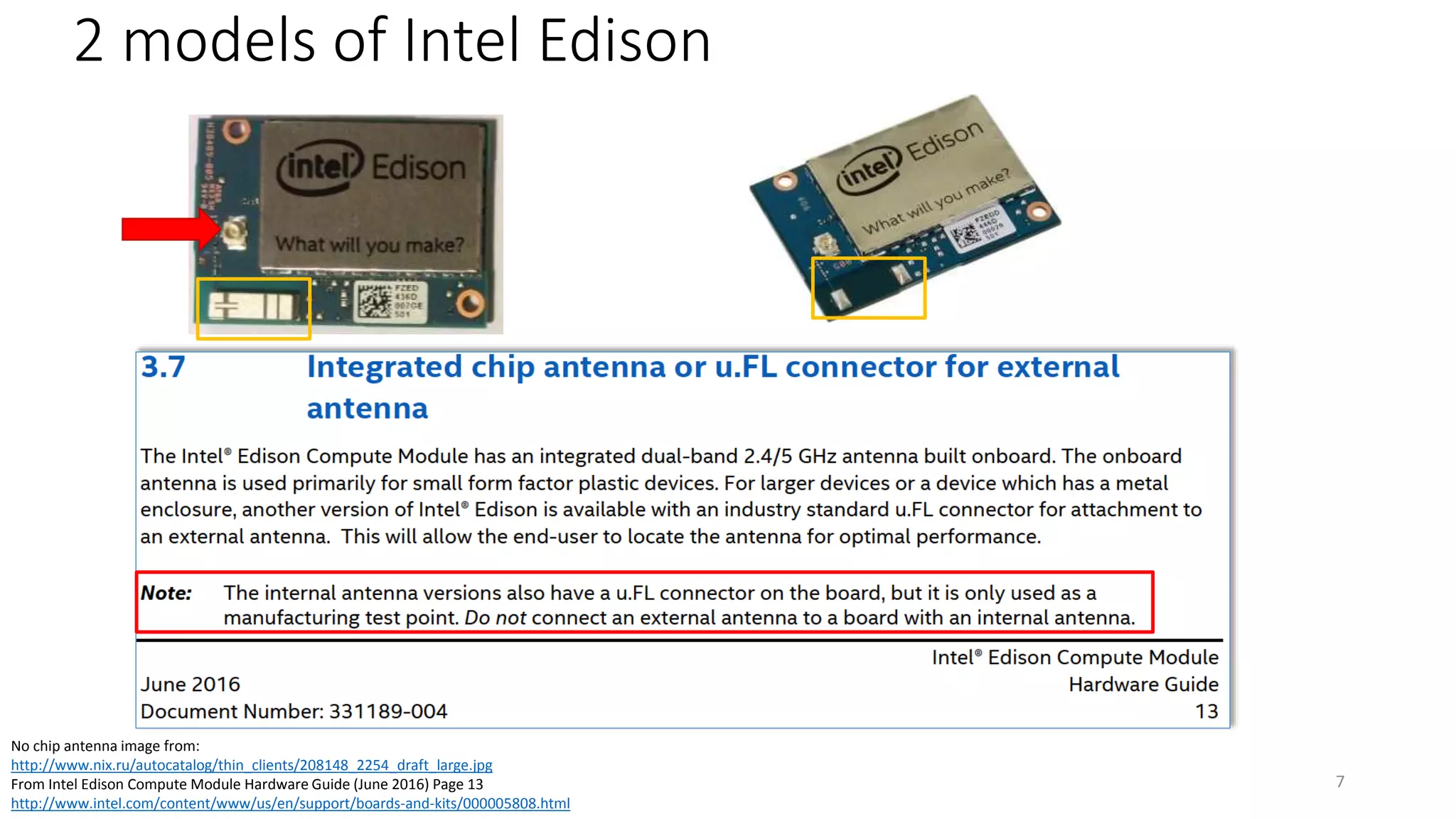
2 models of Intel Edison
7
No chip antenna image from:
http://www.nix.ru/autocatalog/thin_clients/208148_2254_draft_large.jpg
From Intel Edison Compute Module Hardware Guide (June 2016) Page 13
http://www.intel.com/content/www/us/en/support/boards-and-kits/000005808.html
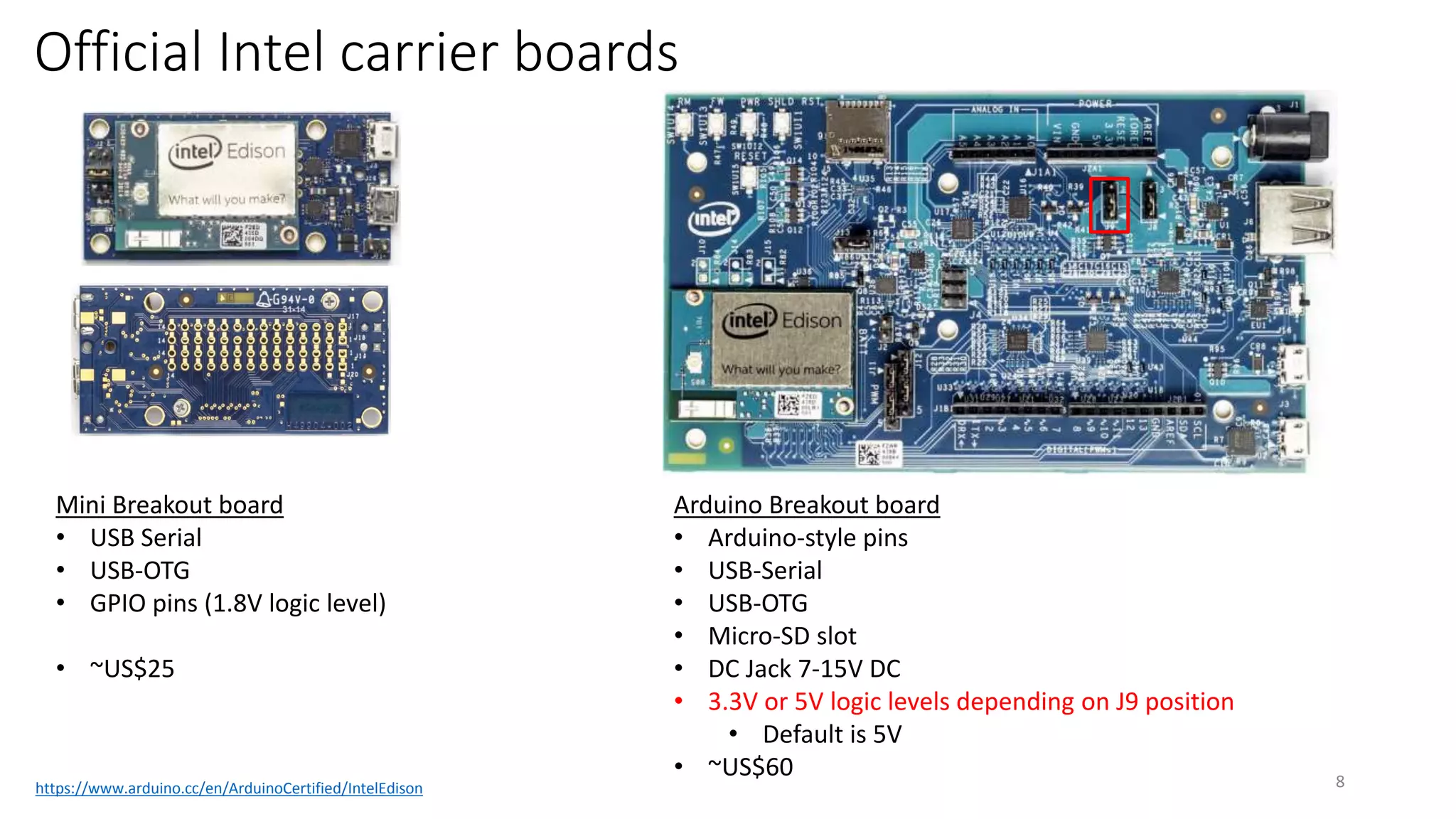
Official Intel carrier boards
8
Mini Breakout board
• USB Serial
• USB-OTG
• GPIO pins (1.8V logic level)
• ~US$25
Arduino Breakout board
• Arduino-style pins
• USB-Serial
• USB-OTG
• Micro-SD slot
• DC Jack 7-15V DC
• 3.3V or 5V logic levels depending on J9 position
• Default is 5V
• ~US$60
https://www.arduino.cc/en/ArduinoCertified/IntelEdison
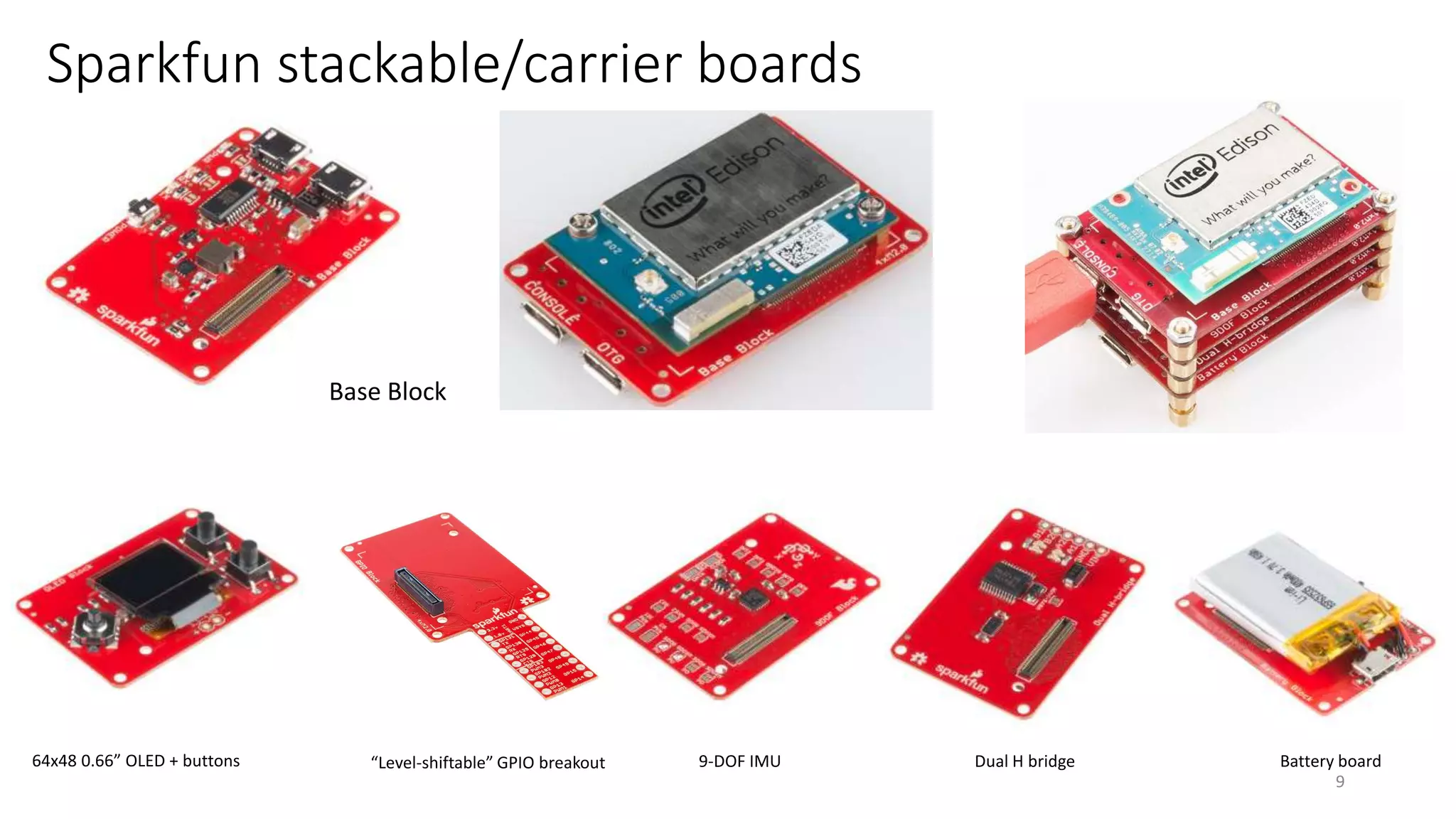
Sparkfun stackable/carrier boards
9
Base Block
64x48 0.66” OLED + buttons “Level-shiftable” GPIO breakout 9-DOF IMU Dual H bridge Battery board
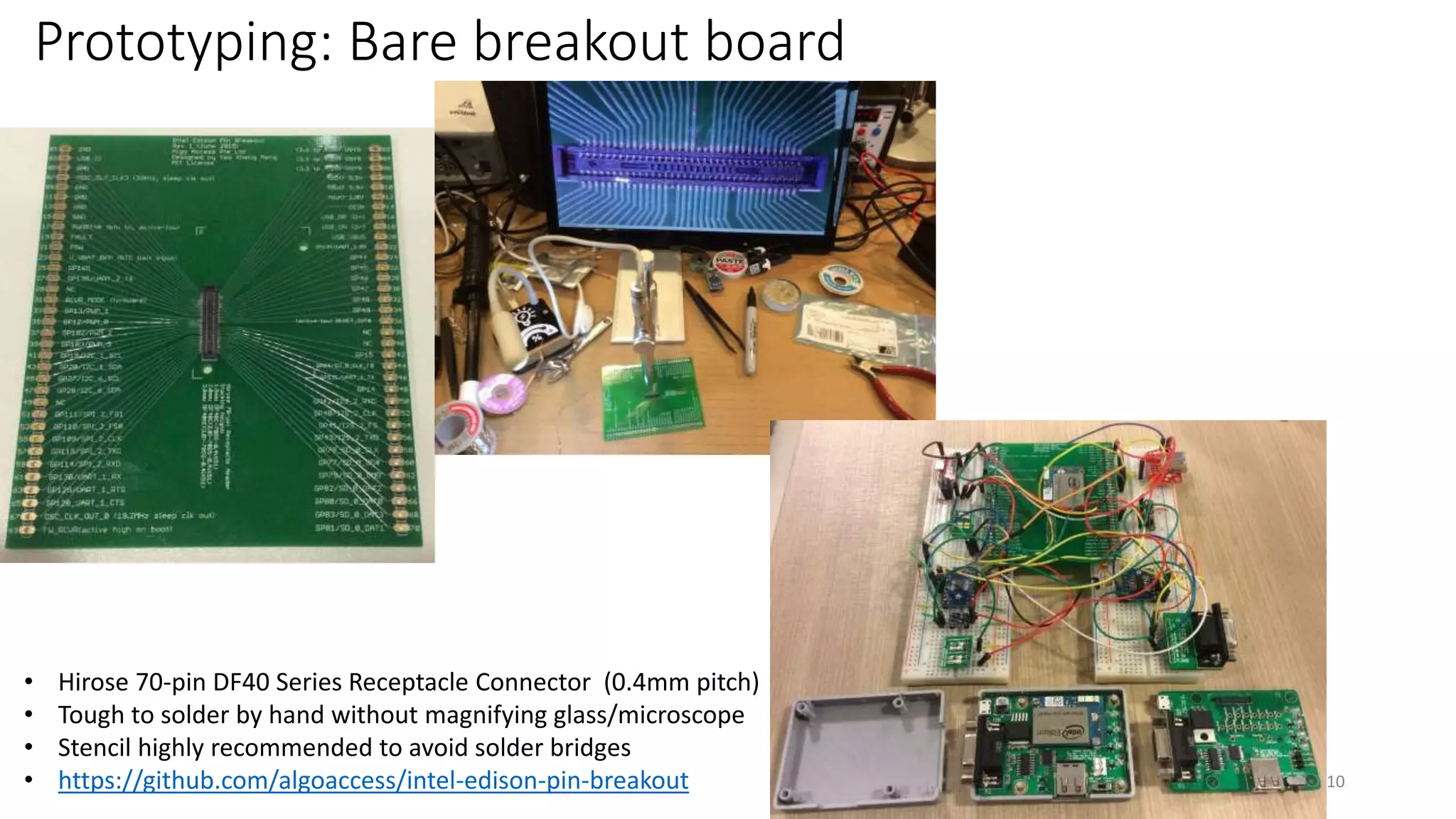
Prototyping: Bare breakout board
10
• Hirose 70-pin DF40 Series Receptacle Connector (0.4mm pitch)
• Tough to solder by hand without magnifying glass/microscope
• Stencil highly recommended to avoid solder bridges
• https://github.com/algoaccess/intel-edison-pin-breakout
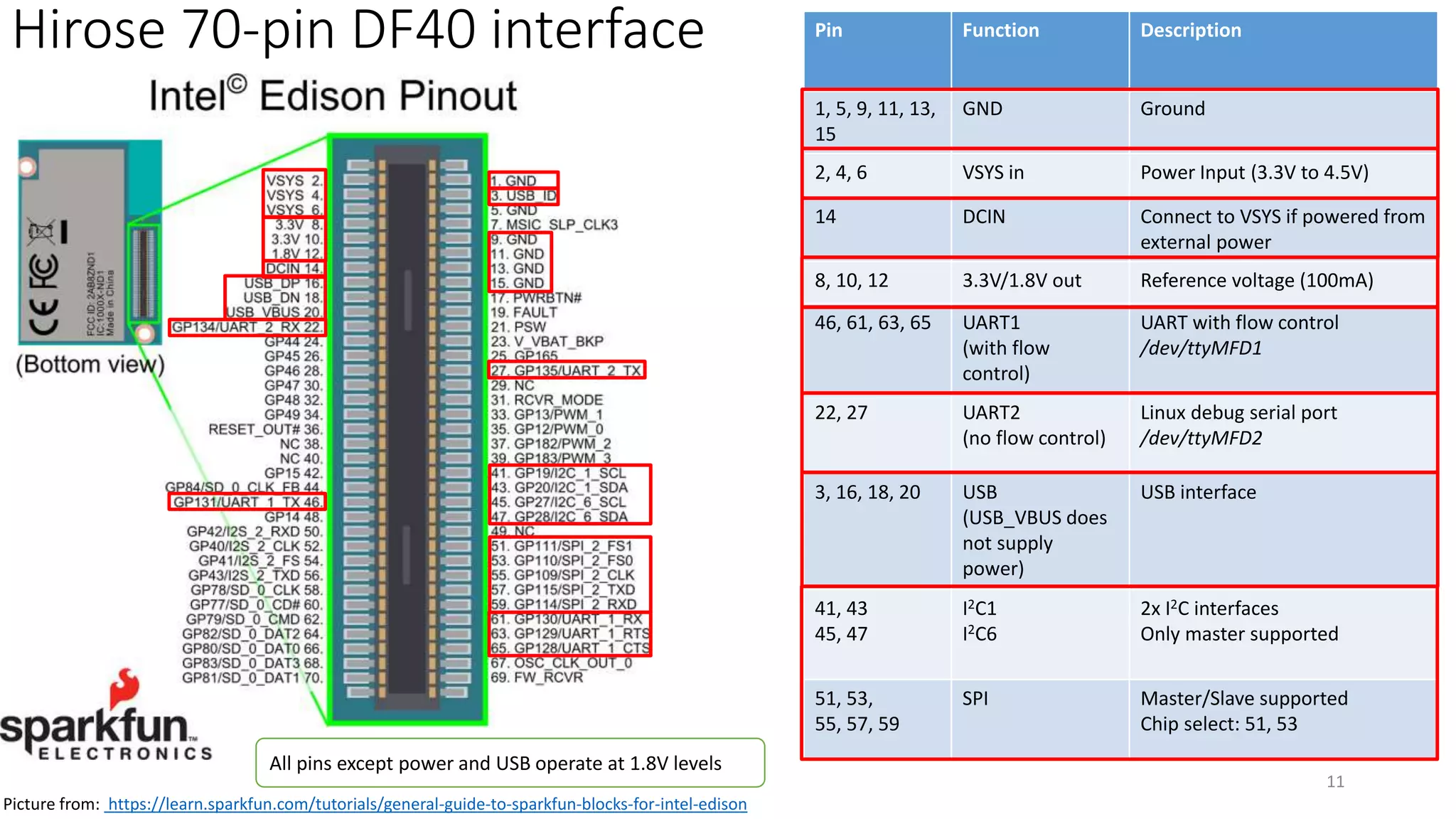
Hirose 70-pin DF40 interface
11
Pin Function Description
1, 5, 9, 11, 13,
15
GND Ground
2, 4, 6 VSYS in Power Input (3.3V to 4.5V)
14 DCIN Connect to VSYS if powered from
external power
8, 10, 12 3.3V/1.8V out Reference voltage (100mA)
46, 61, 63, 65 UART1
(with flow
control)
UART with flow control
/dev/ttyMFD1
22, 27 UART2
(no flow control)
Linux debug serial port
/dev/ttyMFD2
3, 16, 18, 20 USB
(USB_VBUS does
not supply
power)
USB interface
41, 43
45, 47
I2C1
I2C6
2x I2C interfaces
Only master supported
51, 53,
55, 57, 59
SPI Master/Slave supported
Chip select: 51, 53
Picture from: https://learn.sparkfun.com/tutorials/general-guide-to-sparkfun-blocks-for-intel-edison
All pins except power and USB operate at 1.8V levels
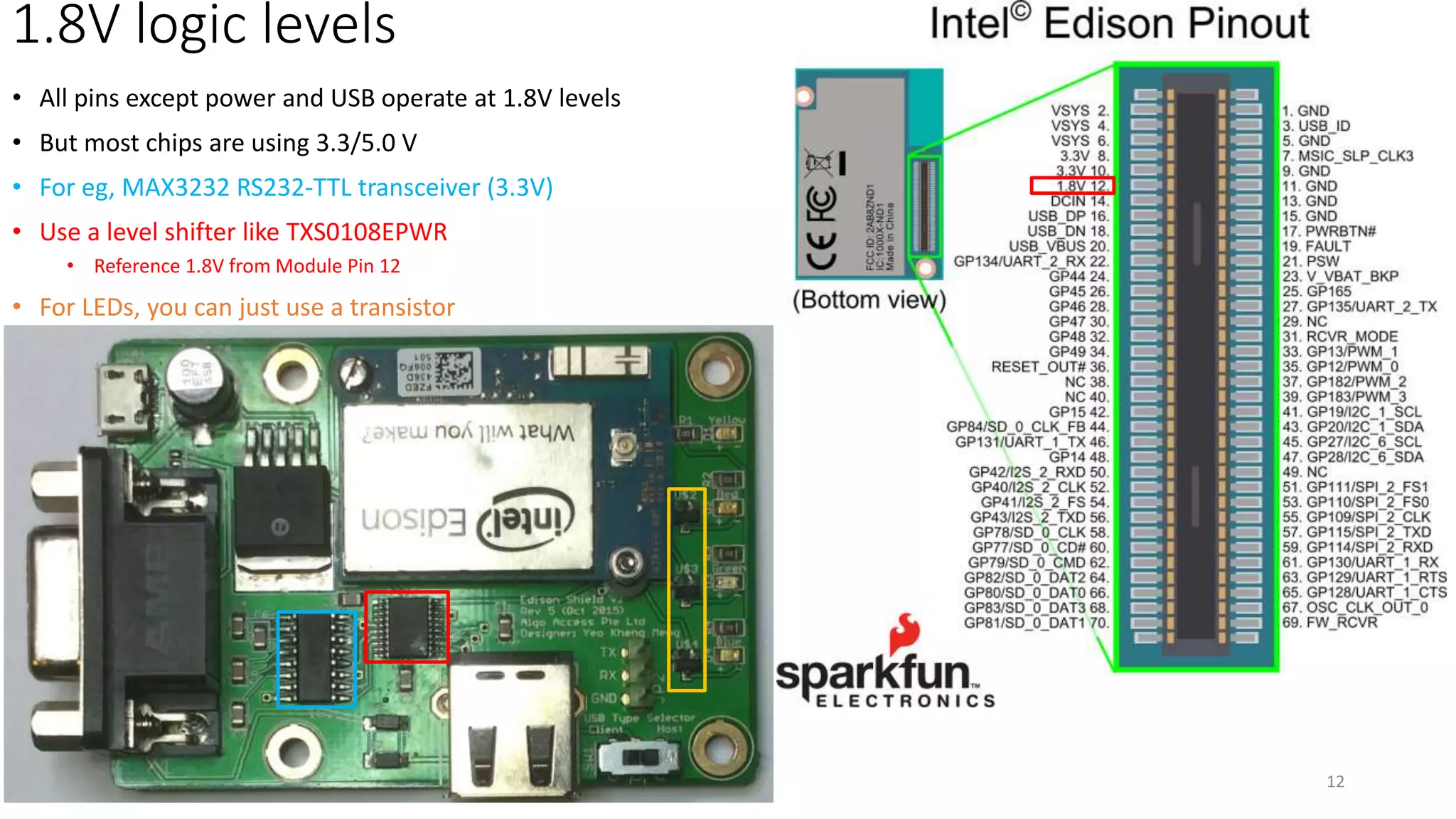
1.8V logic levels
• All pins except power and USB operate at 1.8V levels
• But most chips are using 3.3/5.0 V
• For eg, MAX3232 RS232-TTL transceiver (3.3V)
• Use a level shifter like TXS0108EPWR
• Reference 1.8V from Module Pin 12
• For LEDs, you can just use a transistor
12
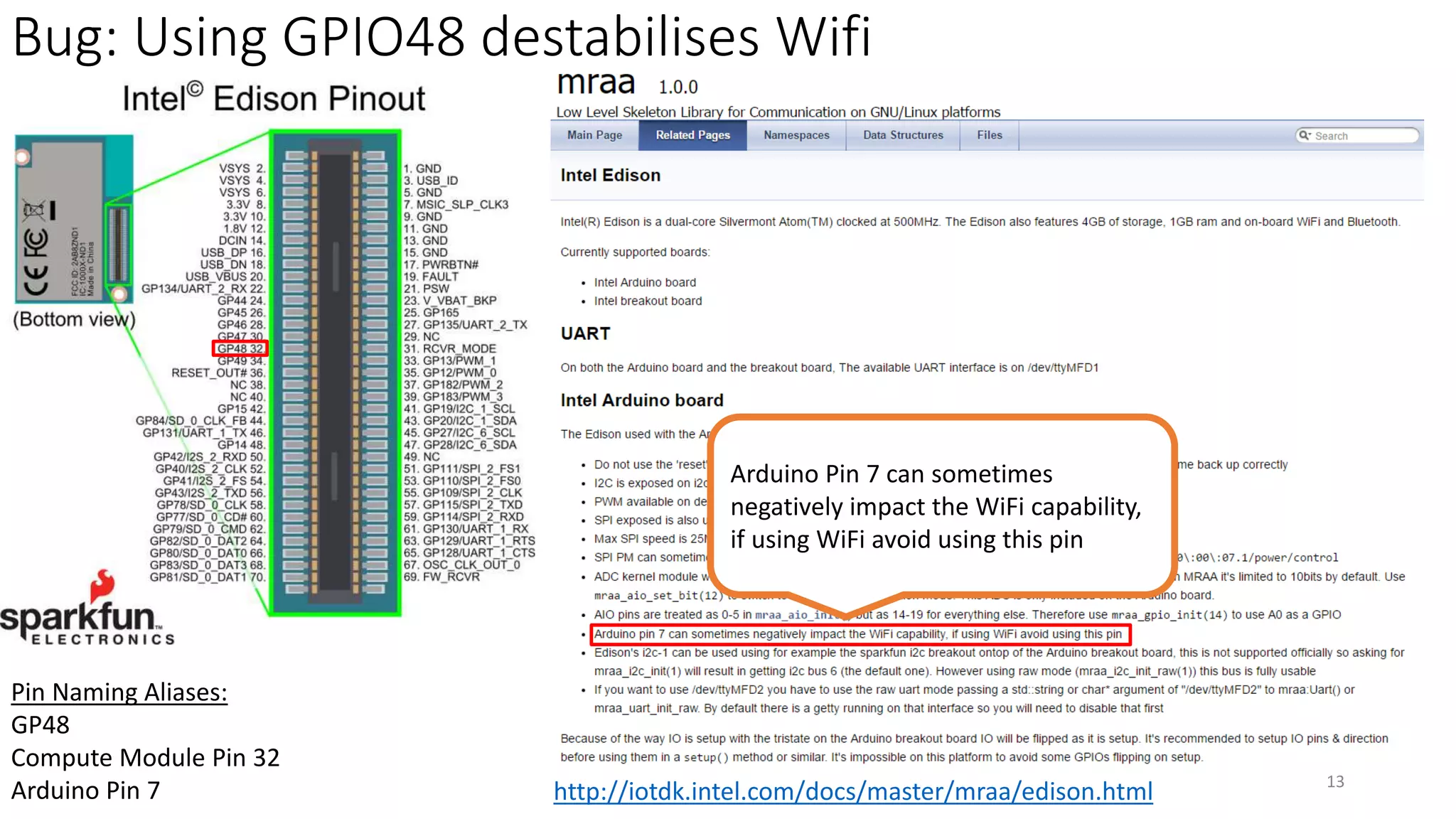
Bug: Using GPIO48 destabilises Wifi
13
http://iotdk.intel.com/docs/master/mraa/edison.html
Arduino Pin 7 can sometimes
negatively impact the WiFi capability,
if using WiFi avoid using this pin
Pin Naming Aliases:
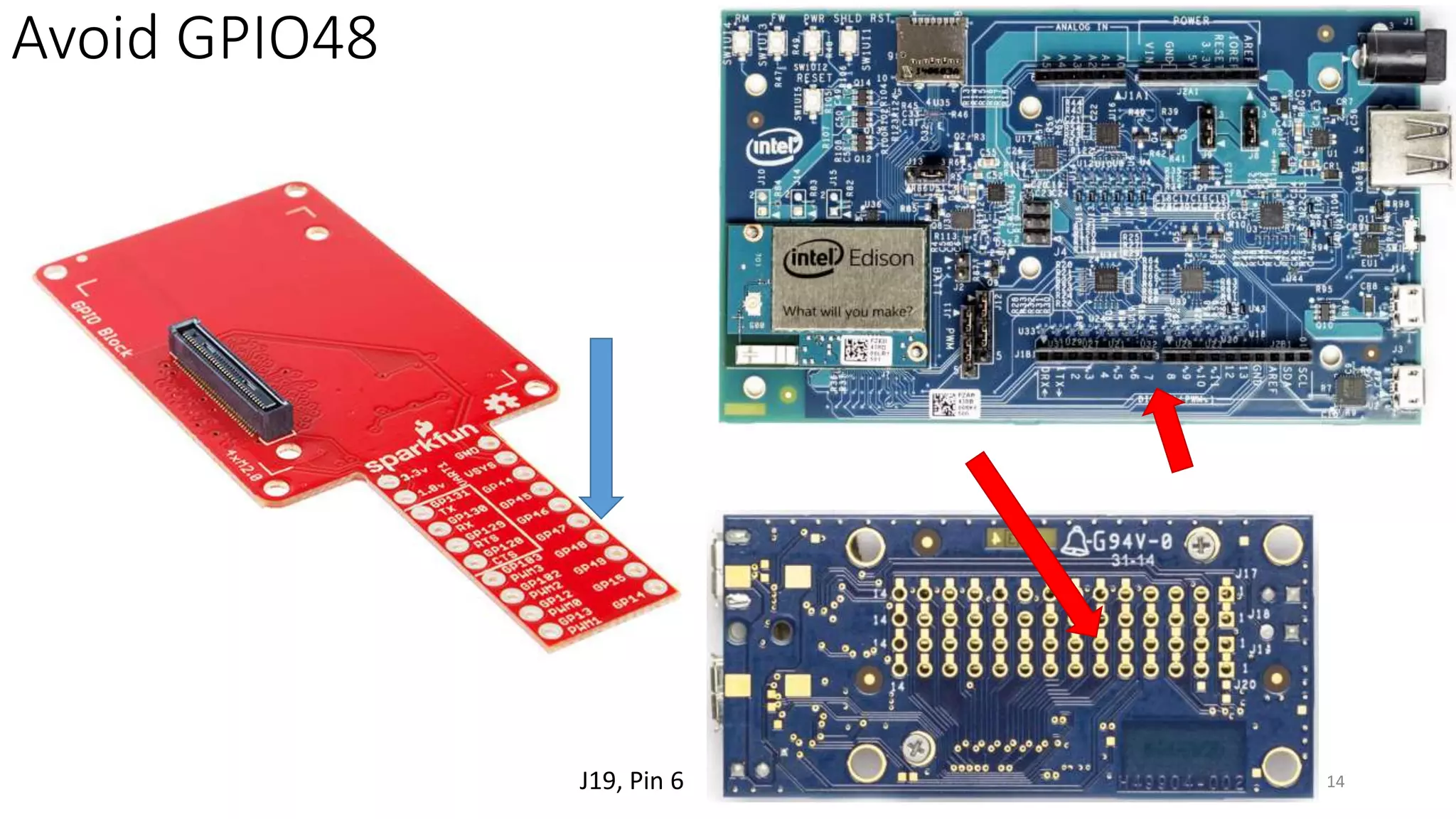
GP48
Compute Module Pin 32
Arduino Pin 7
Avoid GPIO48
14J19, Pin 6
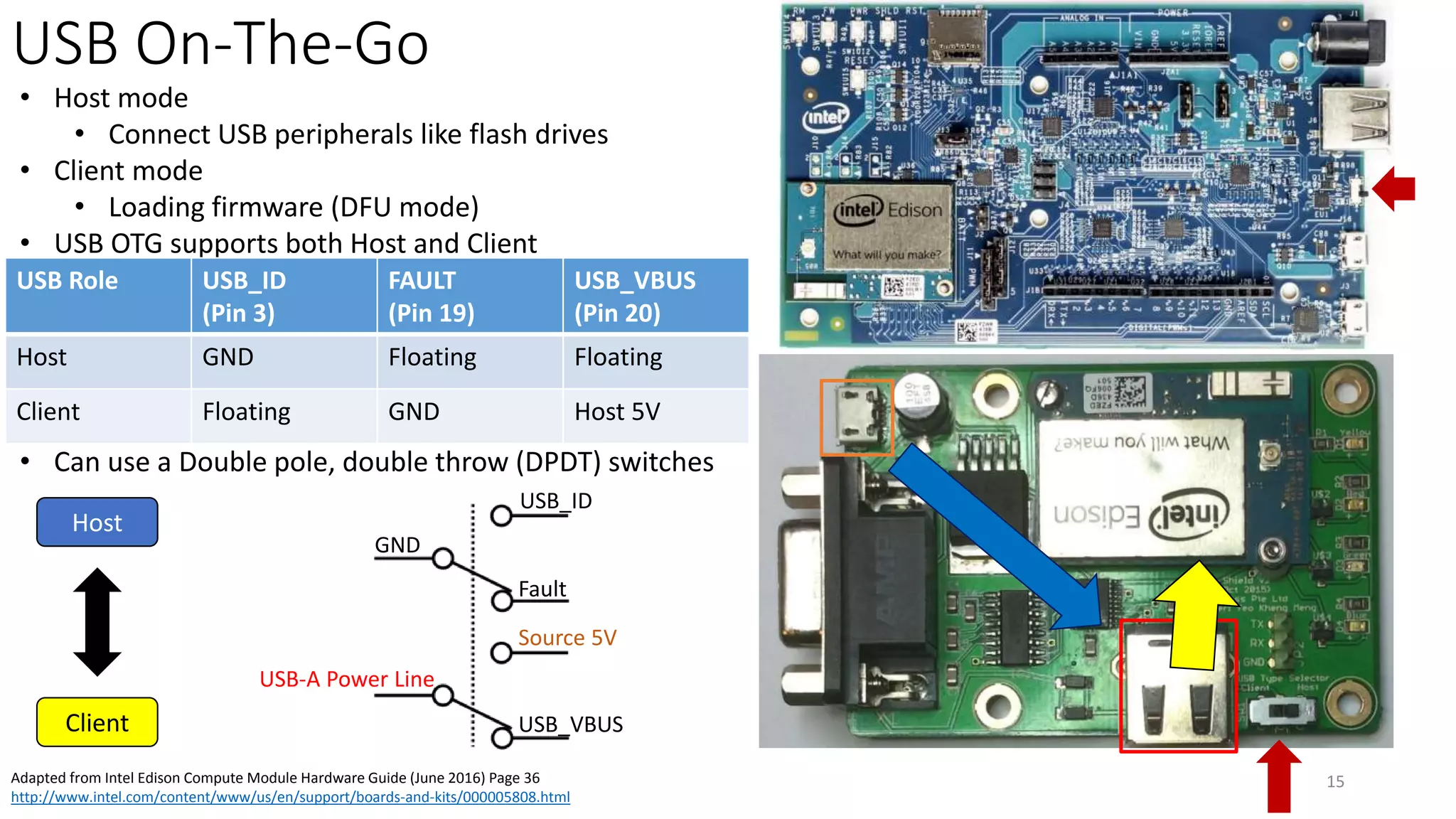
USB On-The-Go
15Adapted from Intel Edison Compute Module Hardware Guide (June 2016) Page 36
http://www.intel.com/content/www/us/en/support/boards-and-kits/000005808.html
• Host mode
• Connect USB peripherals like flash drives
• Client mode
• Loading firmware (DFU mode)
• USB OTG supports both Host and Client
• Can use a Double pole, double throw (DPDT) switches
USB Role USB_ID
(Pin 3)
FAULT
(Pin 19)
USB_VBUS
(Pin 20)
Host GND Floating Floating
Client Floating GND Host 5V
GND
Fault
USB_ID
USB-A Power Line
USB_VBUS
Source 5V
Client
Host
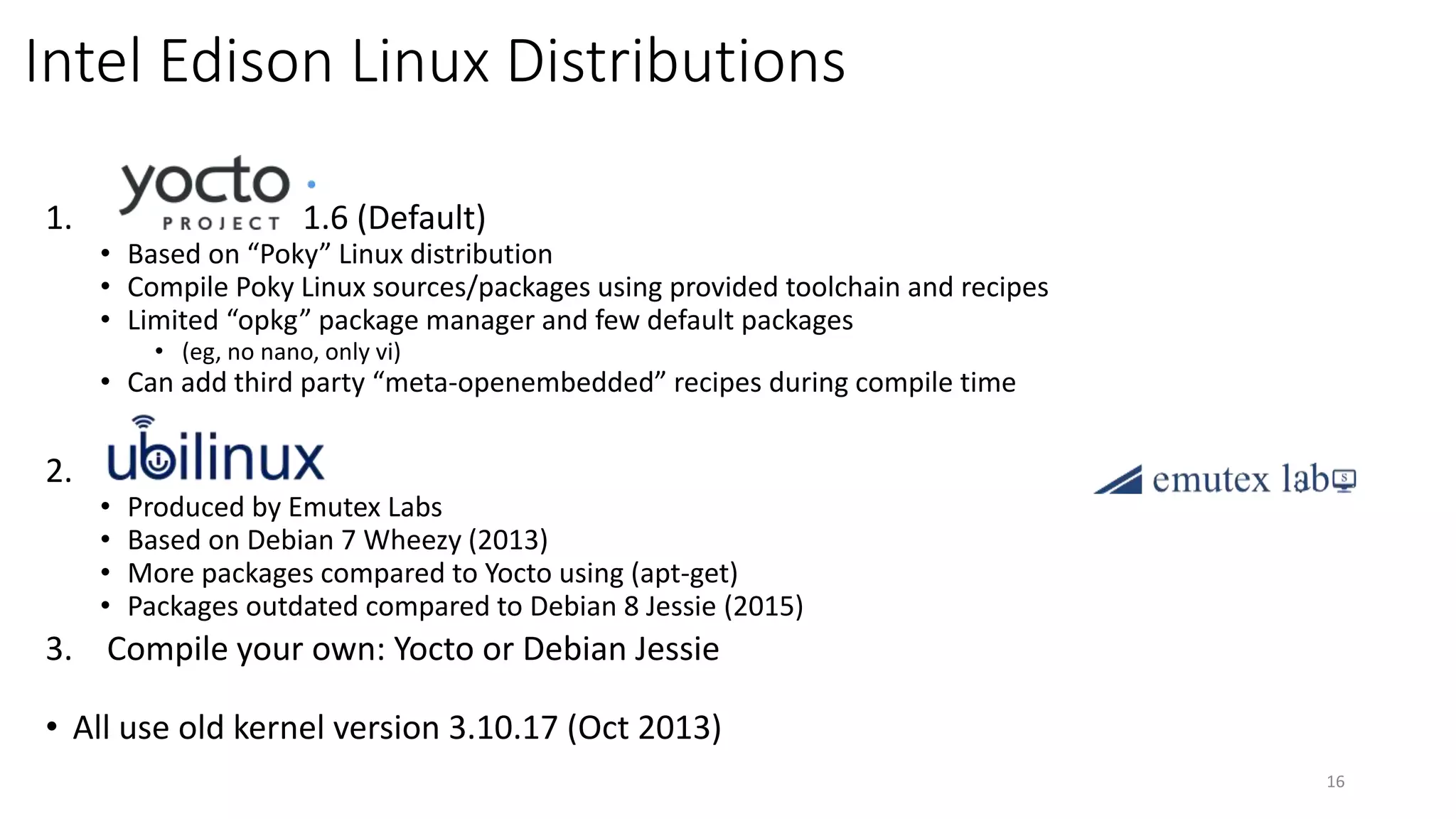
Intel Edison Linux Distributions
1. 1.6 (Default)
• Based on “Poky” Linux distribution
• Compile Poky Linux sources/packages using provided toolchain and recipes
• Limited “opkg” package manager and few default packages
• (eg, no nano, only vi)
• Can add third party “meta-openembedded” recipes during compile time
2.
• Produced by Emutex Labs
• Based on Debian 7 Wheezy (2013)
• More packages compared to Yocto using (apt-get)
• Packages outdated compared to Debian 8 Jessie (2015)
3. Compile your own: Yocto or Debian Jessie
• All use old kernel version 3.10.17 (Oct 2013)
16
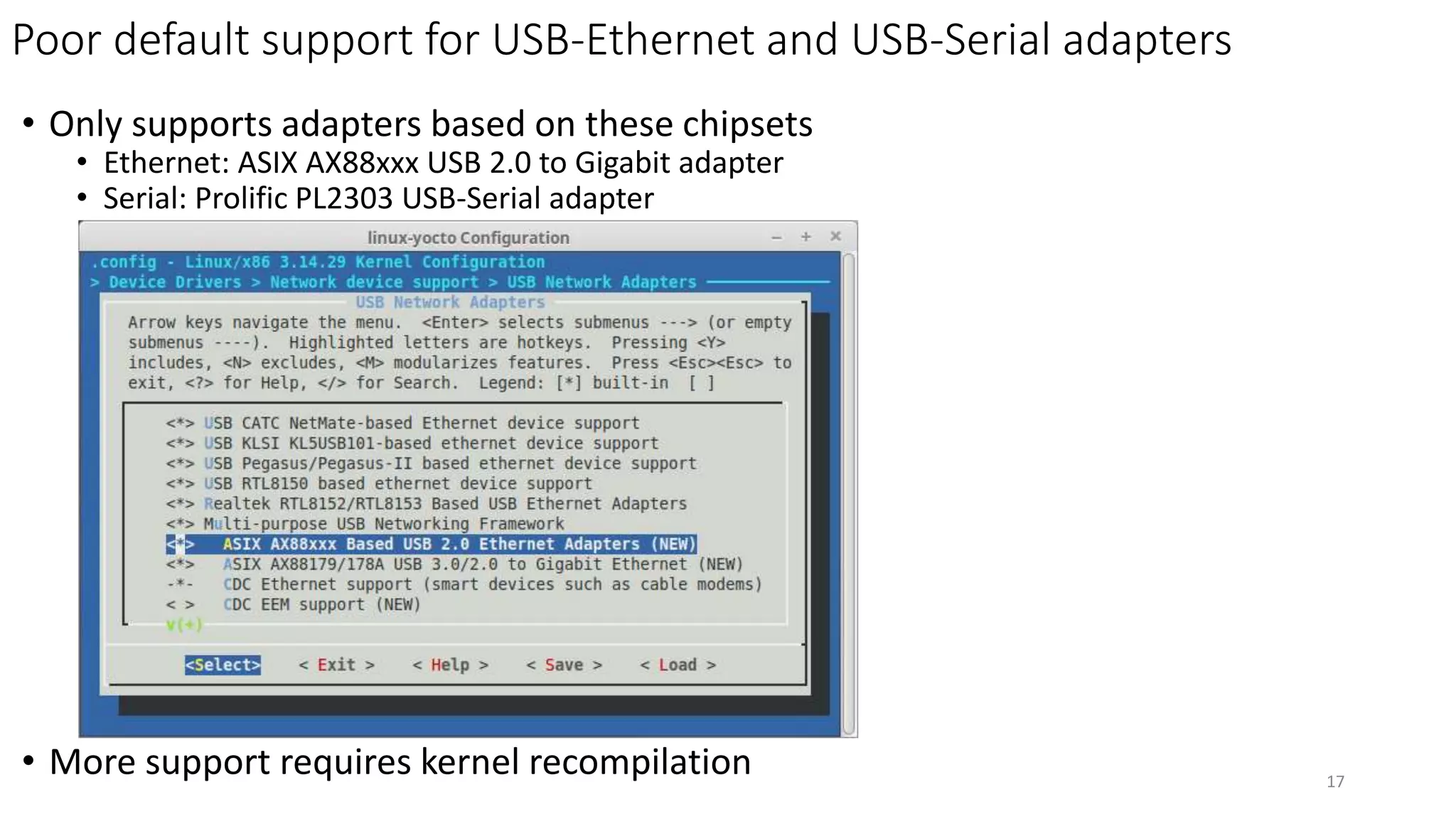
Poor default support for USB-Ethernet and USB-Serial adapters
• Only supports adapters based on these chipsets
• Ethernet: ASIX AX88xxx USB 2.0 to Gigabit adapter
• Serial: Prolific PL2303 USB-Serial adapter
• More support requires kernel recompilation 17
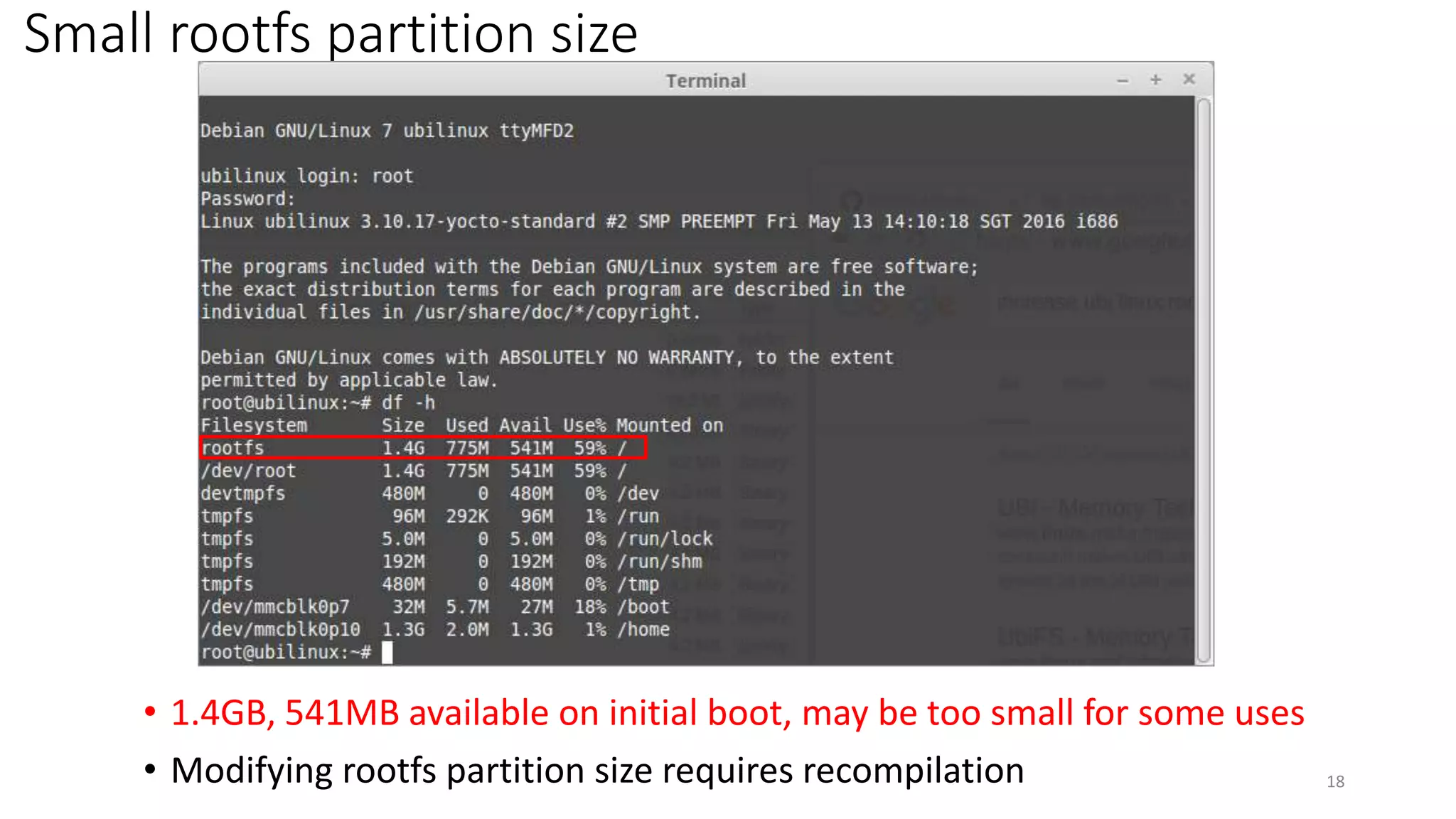
Small rootfs partition size
18
• 1.4GB, 541MB available on initial boot, may be too small for some uses
• Modifying rootfs partition size requires recompilation
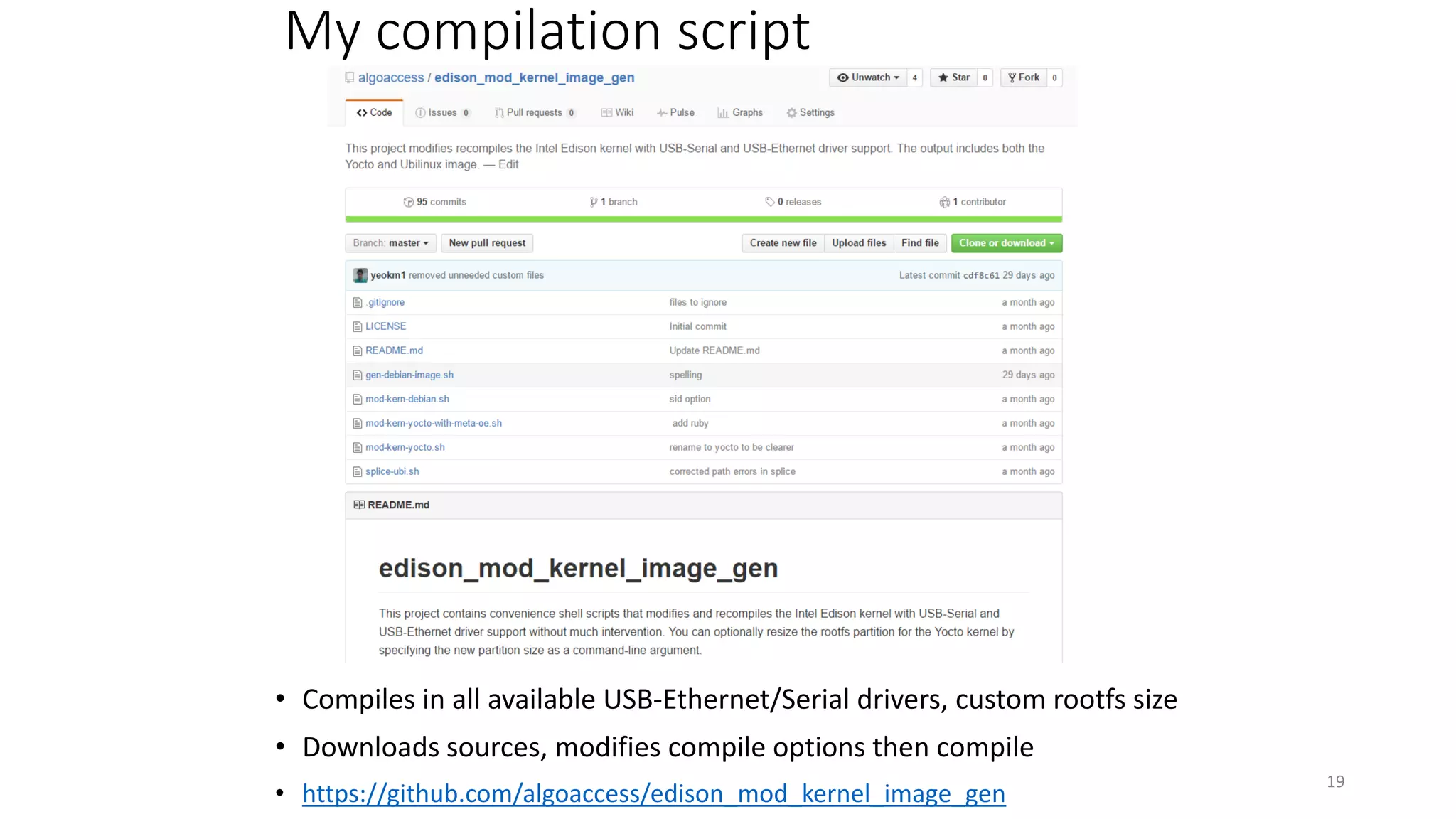
My compilation script
• Compiles in all available USB-Ethernet/Serial drivers, custom rootfs size
• Downloads sources, modifies compile options then compile
• https://github.com/algoaccess/edison_mod_kernel_image_gen
19
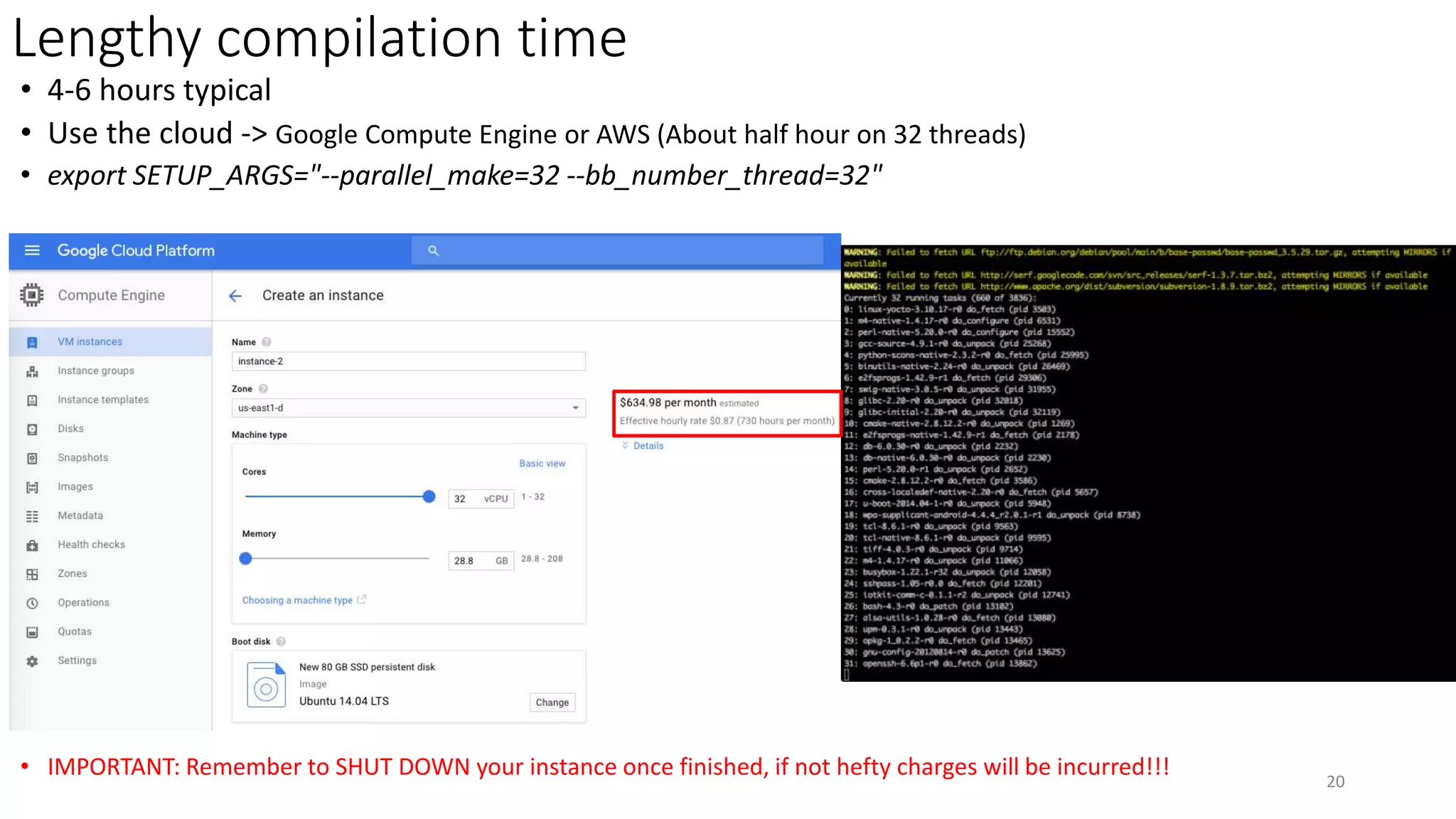
Lengthy compilation time
• 4-6 hours typical
• Use the cloud -> Google Compute Engine or AWS (About half hour on 32 threads)
• export SETUP_ARGS="--parallel_make=32 --bb_number_thread=32"
• IMPORTANT: Remember to SHUT DOWN your instance once finished, if not hefty charges will be incurred!!! 20
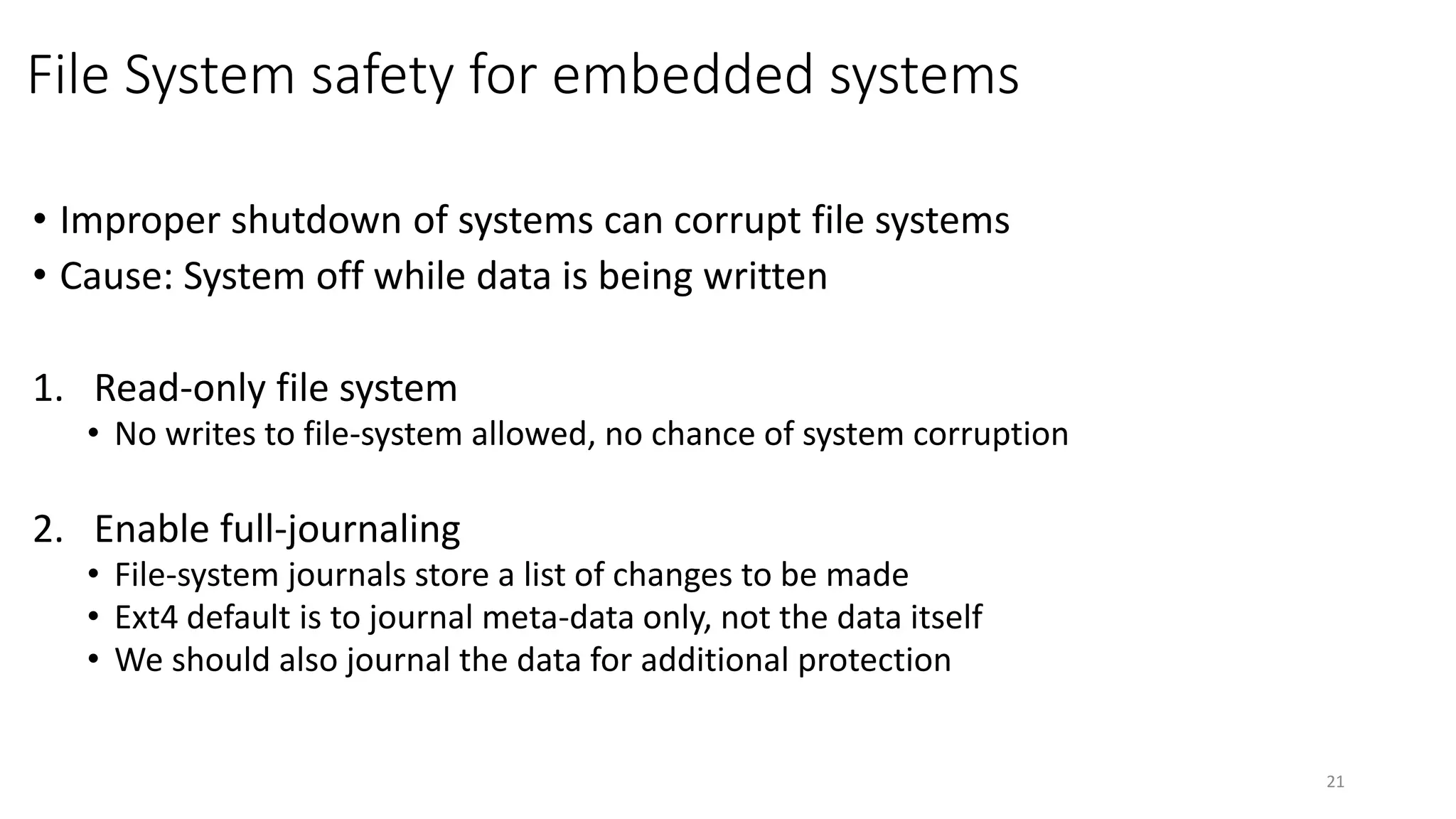
File System safety for embedded systems
• Improper shutdown of systems can corrupt file systems
• Cause: System off while data is being written
1. Read-only file system
• No writes to file-system allowed, no chance of system corruption
2. Enable full-journaling
• File-system journals store a list of changes to be made
• Ext4 default is to journal meta-data only, not the data itself
• We should also journal the data for additional protection
21
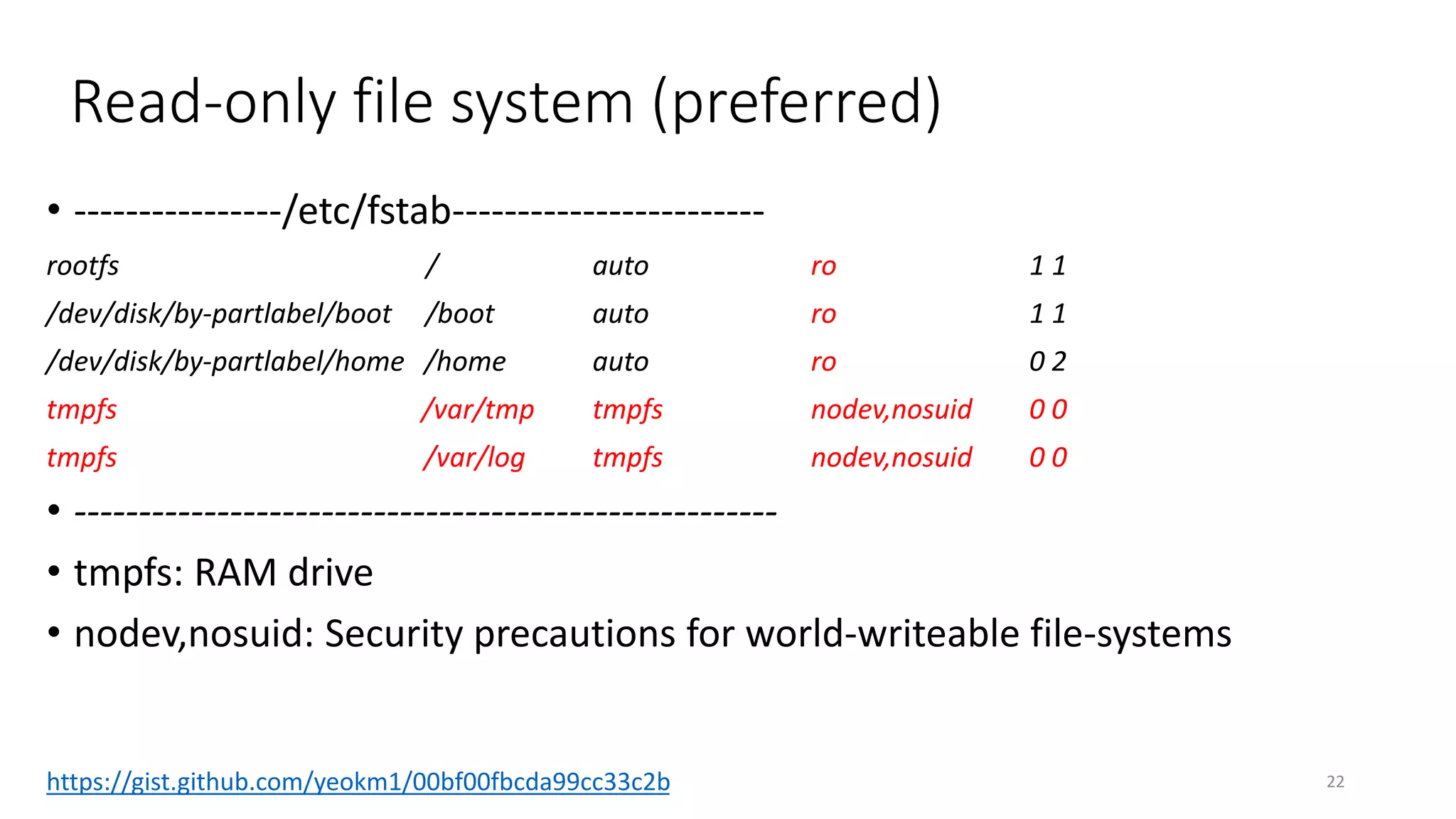
Read-only file system (preferred)
• ----------------/etc/fstab------------------------
rootfs / auto ro 1 1
/dev/disk/by-partlabel/boot /boot auto ro 1 1
/dev/disk/by-partlabel/home /home auto ro 0 2
tmpfs /var/tmp tmpfs nodev,nosuid 0 0
tmpfs /var/log tmpfs nodev,nosuid 0 0
• ------------------------------------------------------
• tmpfs: RAM drive
• nodev,nosuid: Security precautions for world-writeable file-systems
22https://gist.github.com/yeokm1/00bf00fbcda99cc33c2b
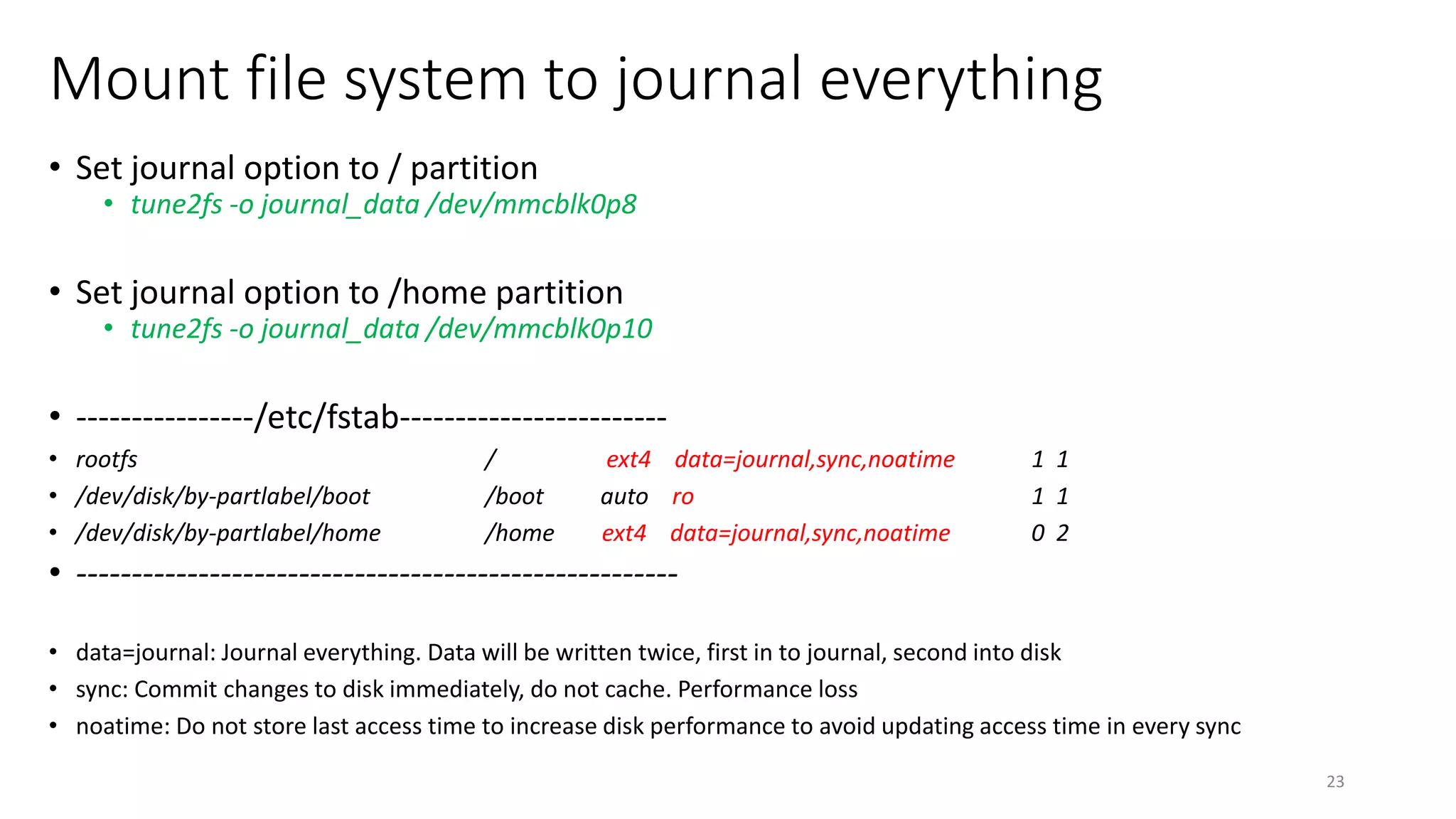
Mount file system to journal everything
• Set journal option to / partition
• tune2fs -o journal_data /dev/mmcblk0p8
• Set journal option to /home partition
• tune2fs -o journal_data /dev/mmcblk0p10
• ----------------/etc/fstab------------------------
• rootfs / ext4 data=journal,sync,noatime 1 1
• /dev/disk/by-partlabel/boot /boot auto ro 1 1
• /dev/disk/by-partlabel/home /home ext4 data=journal,sync,noatime 0 2
• ------------------------------------------------------
• data=journal: Journal everything. Data will be written twice, first in to journal, second into disk
• sync: Commit changes to disk immediately, do not cache. Performance loss
• noatime: Do not store last access time to increase disk performance to avoid updating access time in every sync
23
QnA
24

Intel Edison: Beyond the Breadboard

  • 1.
    Intel Edison: Beyondthe breadboard 1 By: Yeo Kheng Meng (yeokm1@gmail.com)Hackware v1.9 (29 June 2016)
  • 2.
    Why beyond thebreadboard? 2 One of Algoaccess’s hardware product
  • 3.
    3 Algo Access’s hardwaresetup OD, OS, CYL… OD, OS, CYL… Direct or USB-Ethernet adapter RS232 DB-9 Serial port
  • 4.
    Agenda 1. Intel EdisonBasics 2. Hardware experience 3. Software experience 4
  • 5.
    So what isthe Intel Edison? 5 35.5mm x 25 mm x 3.9mm System-on-module (SOM) • Using Hirose 70-pin DF40 Series Connector (0.4mm pitch)
  • 6.
    Raspberry Pi 3vs Intel Edison specifications 6 Specifications Raspberry Pi 3 Intel Edison CPU 1.2Ghz quad-core BCM2837 Cortex-A53 ARMv8 (64-bit) 500Mhz dual-core Intel Atom x86 (32-bit) + Intel Quark MCU GPU 400Mhz Videocore IV None RAM 1GB DDR2 1GB DDR3 Storage External microSD cad 4GB eMMC flash onboard Networking Single band 802.11n Wifi + Dual-mode BT + LAN Dual-band 802.11n Wifi + Dual-mode BT I/0 Connectivity 3.3V level level GPIO bank + connectors 1.8V logic level GPIO-bank Price US$35 US$50++ Power consumption (Idle/Peak) 1W/3.6W 0.1W / 1 W Dimensions 85 x 56 x 17mm 35.5 x 25 x 3.9mm
  • 7.
    2 models ofIntel Edison 7 No chip antenna image from: http://www.nix.ru/autocatalog/thin_clients/208148_2254_draft_large.jpg From Intel Edison Compute Module Hardware Guide (June 2016) Page 13 http://www.intel.com/content/www/us/en/support/boards-and-kits/000005808.html
  • 8.
    Official Intel carrierboards 8 Mini Breakout board • USB Serial • USB-OTG • GPIO pins (1.8V logic level) • ~US$25 Arduino Breakout board • Arduino-style pins • USB-Serial • USB-OTG • Micro-SD slot • DC Jack 7-15V DC • 3.3V or 5V logic levels depending on J9 position • Default is 5V • ~US$60 https://www.arduino.cc/en/ArduinoCertified/IntelEdison
  • 9.
    Sparkfun stackable/carrier boards 9 BaseBlock 64x48 0.66” OLED + buttons “Level-shiftable” GPIO breakout 9-DOF IMU Dual H bridge Battery board
  • 10.
    Prototyping: Bare breakoutboard 10 • Hirose 70-pin DF40 Series Receptacle Connector (0.4mm pitch) • Tough to solder by hand without magnifying glass/microscope • Stencil highly recommended to avoid solder bridges • https://github.com/algoaccess/intel-edison-pin-breakout
  • 11.
    Hirose 70-pin DF40interface 11 Pin Function Description 1, 5, 9, 11, 13, 15 GND Ground 2, 4, 6 VSYS in Power Input (3.3V to 4.5V) 14 DCIN Connect to VSYS if powered from external power 8, 10, 12 3.3V/1.8V out Reference voltage (100mA) 46, 61, 63, 65 UART1 (with flow control) UART with flow control /dev/ttyMFD1 22, 27 UART2 (no flow control) Linux debug serial port /dev/ttyMFD2 3, 16, 18, 20 USB (USB_VBUS does not supply power) USB interface 41, 43 45, 47 I2C1 I2C6 2x I2C interfaces Only master supported 51, 53, 55, 57, 59 SPI Master/Slave supported Chip select: 51, 53 Picture from: https://learn.sparkfun.com/tutorials/general-guide-to-sparkfun-blocks-for-intel-edison All pins except power and USB operate at 1.8V levels
  • 12.
    1.8V logic levels •All pins except power and USB operate at 1.8V levels • But most chips are using 3.3/5.0 V • For eg, MAX3232 RS232-TTL transceiver (3.3V) • Use a level shifter like TXS0108EPWR • Reference 1.8V from Module Pin 12 • For LEDs, you can just use a transistor 12
  • 13.
    Bug: Using GPIO48destabilises Wifi 13 http://iotdk.intel.com/docs/master/mraa/edison.html Arduino Pin 7 can sometimes negatively impact the WiFi capability, if using WiFi avoid using this pin Pin Naming Aliases: GP48 Compute Module Pin 32 Arduino Pin 7
  • 14.
  • 15.
    USB On-The-Go 15Adapted fromIntel Edison Compute Module Hardware Guide (June 2016) Page 36 http://www.intel.com/content/www/us/en/support/boards-and-kits/000005808.html • Host mode • Connect USB peripherals like flash drives • Client mode • Loading firmware (DFU mode) • USB OTG supports both Host and Client • Can use a Double pole, double throw (DPDT) switches USB Role USB_ID (Pin 3) FAULT (Pin 19) USB_VBUS (Pin 20) Host GND Floating Floating Client Floating GND Host 5V GND Fault USB_ID USB-A Power Line USB_VBUS Source 5V Client Host
  • 16.
    Intel Edison LinuxDistributions 1. 1.6 (Default) • Based on “Poky” Linux distribution • Compile Poky Linux sources/packages using provided toolchain and recipes • Limited “opkg” package manager and few default packages • (eg, no nano, only vi) • Can add third party “meta-openembedded” recipes during compile time 2. • Produced by Emutex Labs • Based on Debian 7 Wheezy (2013) • More packages compared to Yocto using (apt-get) • Packages outdated compared to Debian 8 Jessie (2015) 3. Compile your own: Yocto or Debian Jessie • All use old kernel version 3.10.17 (Oct 2013) 16
  • 17.
    Poor default supportfor USB-Ethernet and USB-Serial adapters • Only supports adapters based on these chipsets • Ethernet: ASIX AX88xxx USB 2.0 to Gigabit adapter • Serial: Prolific PL2303 USB-Serial adapter • More support requires kernel recompilation 17
  • 18.
    Small rootfs partitionsize 18 • 1.4GB, 541MB available on initial boot, may be too small for some uses • Modifying rootfs partition size requires recompilation
  • 19.
    My compilation script •Compiles in all available USB-Ethernet/Serial drivers, custom rootfs size • Downloads sources, modifies compile options then compile • https://github.com/algoaccess/edison_mod_kernel_image_gen 19
  • 20.
    Lengthy compilation time •4-6 hours typical • Use the cloud -> Google Compute Engine or AWS (About half hour on 32 threads) • export SETUP_ARGS="--parallel_make=32 --bb_number_thread=32" • IMPORTANT: Remember to SHUT DOWN your instance once finished, if not hefty charges will be incurred!!! 20
  • 21.
    File System safetyfor embedded systems • Improper shutdown of systems can corrupt file systems • Cause: System off while data is being written 1. Read-only file system • No writes to file-system allowed, no chance of system corruption 2. Enable full-journaling • File-system journals store a list of changes to be made • Ext4 default is to journal meta-data only, not the data itself • We should also journal the data for additional protection 21
  • 22.
    Read-only file system(preferred) • ----------------/etc/fstab------------------------ rootfs / auto ro 1 1 /dev/disk/by-partlabel/boot /boot auto ro 1 1 /dev/disk/by-partlabel/home /home auto ro 0 2 tmpfs /var/tmp tmpfs nodev,nosuid 0 0 tmpfs /var/log tmpfs nodev,nosuid 0 0 • ------------------------------------------------------ • tmpfs: RAM drive • nodev,nosuid: Security precautions for world-writeable file-systems 22https://gist.github.com/yeokm1/00bf00fbcda99cc33c2b
  • 23.
    Mount file systemto journal everything • Set journal option to / partition • tune2fs -o journal_data /dev/mmcblk0p8 • Set journal option to /home partition • tune2fs -o journal_data /dev/mmcblk0p10 • ----------------/etc/fstab------------------------ • rootfs / ext4 data=journal,sync,noatime 1 1 • /dev/disk/by-partlabel/boot /boot auto ro 1 1 • /dev/disk/by-partlabel/home /home ext4 data=journal,sync,noatime 0 2 • ------------------------------------------------------ • data=journal: Journal everything. Data will be written twice, first in to journal, second into disk • sync: Commit changes to disk immediately, do not cache. Performance loss • noatime: Do not store last access time to increase disk performance to avoid updating access time in every sync 23
  • 24.