Introduction to JTAG
Marek Vaˇsut <marek.vasut+er2019@gmail.com>
September 23, 2019
Marek Vasut
Contractor at multiple
Linux kernel developer
U-Boot bootloader custodian
OE contributor
FPGA enthusiast
Structure of the talk
What is JTAG, history
JTAG hardware and protocol
Boundary Scan Testing
Debugging software
Conclusion
JTAG
JTAG – Joint Test Action Group
Industry standard for PCB testing
Formed around the time of first BGAs
Problem: Testing on inaccessible BGA pads
Solution: Put test logic into the BGA chip
Eventually grew other capabilities
(SW debugging, flash programming . . . )
Electrical interface
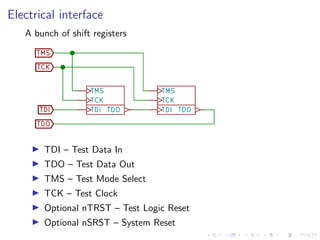
A bunch of shift registers
TDI – Test Data In
TDO – Test Data Out
TMS – Test Mode Select
TCK – Test Clock
Optional nTRST – Test Logic Reset
Optional nSRST – System Reset
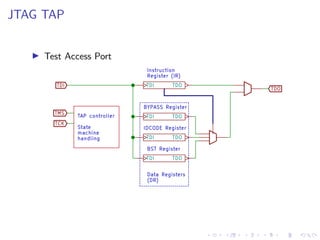
JTAG TAP
Test Access Port
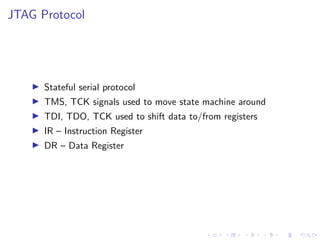
JTAG Protocol
Stateful serial protocol
TMS, TCK signals used to move state machine around
TDI, TDO, TCK used to shift data to/from registers
IR – Instruction Register
DR – Data Register
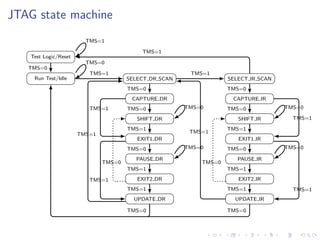
JTAG state machine
Test Logic/Reset
Run Test/Idle SELECT DR SCAN
CAPTURE DR
SHIFT DR
EXIT1 DR
PAUSE DR
EXIT2 DR
UPDATE DR
SELECT IR SCAN
CAPTURE IR
SHIFT IR
EXIT1 IR
PAUSE IR
EXIT2 IR
UPDATE IR
TMS=1
TMS=0
TMS=0
TMS=1
TMS=0
TMS=0TMS=1
TMS=1
TMS=0
TMS=0
TMS=1
TMS=1
TMS=0
TMS=1
TMS=0
TMS=1
TMS=0
TMS=1
TMS=0
TMS=0
TMS=1
TMS=1
TMS=0
TMS=0
TMS=1
TMS=1
TMS=0
TMS=1
TMS=0
TMS=1
TMS=0
TMS=1
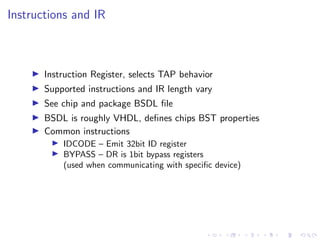
Instructions and IR
Instruction Register, selects TAP behavior
Supported instructions and IR length vary
See chip and package BSDL file
BSDL is roughly VHDL, defines chips BST properties
Common instructions
IDCODE – Emit 32bit ID register
BYPASS – DR is 1bit bypass registers
(used when communicating with specific device)
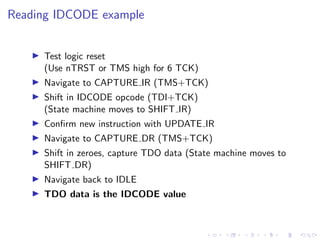
Reading IDCODE example
Test logic reset
(Use nTRST or TMS high for 6 TCK)
Navigate to CAPTURE IR (TMS+TCK)
Shift in IDCODE opcode (TDI+TCK)
(State machine moves to SHIFT IR)
Confirm new instruction with UPDATE IR
Navigate to CAPTURE DR (TMS+TCK)
Shift in zeroes, capture TDO data (State machine moves to
SHIFT DR)
Navigate back to IDLE
TDO data is the IDCODE value
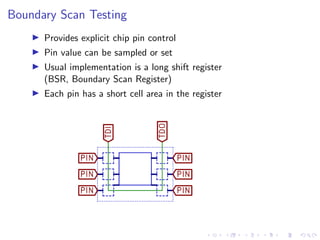
Boundary Scan Testing
Provides explicit chip pin control
Pin value can be sampled or set
Usual implementation is a long shift register
(BSR, Boundary Scan Register)
Each pin has a short cell area in the register
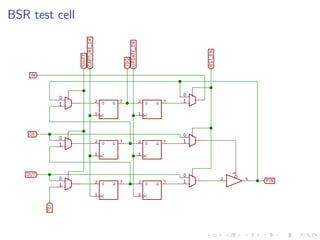
BSR test cell
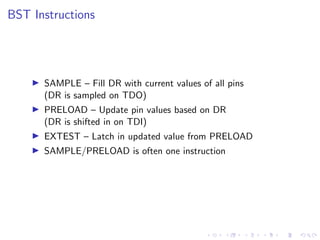
BST Instructions
SAMPLE – Fill DR with current values of all pins
(DR is sampled on TDO)
PRELOAD – Update pin values based on DR
(DR is shifted in on TDI)
EXTEST – Latch in updated value from PRELOAD
SAMPLE/PRELOAD is often one instruction
BST LED demo
Load SAMPLE instruction into IR
Sample length-of-BSR bits from DR
Flip desired bit in the BSR (nOE+OUT)
Latch PRELOAD instruction into IR
Shift updated BSR into DR
Latch EXTEST instruction into IR
Observe result
Debugging software
Custom TAPs per vendor
Basic functionality:
Halt/Run CPU core
Read/Write CPU registers
Instruction stuffing
Memory access via various means
Tools
Hardware:
Any FT2232H (MPSSE) JTAG adapter 80EUR
BDI2000/BDI3000 or Peedi
Lauterbach tools
Software
OpenWinCE JTAG / urJTAG
OpenOCD
urJTAG
Successor of OpenWinCE JTAG
http://urjtag.org/
Supports older probes/chips
Supports various memory-mapped CFI NORs
Supports BSDL files and easy BST
Not much support for SW debugging
Not much activity recently
OpenOCD
Current go-to FOSS JTAG tool
http://openocd.org/
Supports modern debug probes and hardware
Scriptable in TCL
Provides easy to use telnet interface
Provides GDB interface Rightarrow Easy debugging
BST requires considerable TCL scripting
Supports programming both CFI NORs and even SPI NORs
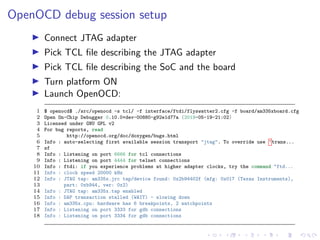
OpenOCD debug session setup
Connect JTAG adapter
Pick TCL file describing the JTAG adapter
Pick TCL file describing the SoC and the board
Turn platform ON
Launch OpenOCD:
1 $ openocd$ ./src/openocd -s tcl/ -f interface/ftdi/flyswatter2.cfg -f board/am335xboard.cfg
2 Open On-Chip Debugger 0.10.0+dev-00880-g92e1d77a (2019-05-19-21:02)
3 Licensed under GNU GPL v2
4 For bug reports, read
5 http://openocd.org/doc/doxygen/bugs.html
6 Info : auto-selecting first available session transport "jtag". To override use 'trans...
7 sf
8 Info : Listening on port 6666 for tcl connections
9 Info : Listening on port 4444 for telnet connections
10 Info : ftdi: if you experience problems at higher adapter clocks, try the command "ftd...
11 Info : clock speed 20000 kHz
12 Info : JTAG tap: am335x.jrc tap/device found: 0x2b94402f (mfg: 0x017 (Texas Instruments),
13 part: 0xb944, ver: 0x2)
14 Info : JTAG tap: am335x.tap enabled
15 Info : DAP transaction stalled (WAIT) - slowing down
16 Info : am335x.cpu: hardware has 6 breakpoints, 2 watchpoints
17 Info : Listening on port 3333 for gdb connections
18 Info : Listening on port 3334 for gdb connections
OpenOCD telnet interface
Halt CPU, examine CPU state – halt
Single step, resume execution – step, resume
Read/Write memory – mdb/mdh/mdw, mwb/mwh/mww
(Be careful of cache memory, JTAG vs. CPU view)
Upload or download memory – load, dump
1 $ telnet localhost 4444
2 Trying 127.0.0.1...
3 Connected to localhost.
4 Escape character is '^]'.
5 Open On-Chip Debugger
6
7 > halt
8 am335x.cpu rev 2, partnum c08, arch f, variant 3, implementor 41
9 MPIDR not in multiprocessor format
10 target halted in Thumb state due to debug-request, current mode: Supervisor
11 cpsr: 0x800001b3 pc: 0x402fc892
12 MMU: disabled, D-Cache: disabled, I-Cache: enabled
OpenOCD telnet interface (2)
Read first few instructions of U-Boot SPL in SRAM
1 > mdw 0x402f0400 0x4
2 0x402f0400: ea00000f e59ff014 e59ff014 e59ff014
3 ...
4 $ arm-linux-gnueabi-objdump -d spl/u-boot-spl
5 Disassembly of section .text:
6 402f0400 <__start>:
7 402f0400: ea00000f b 402f0444 <reset>
8 402f0404: e59ff014 ldr pc, [pc, #20]
9 402f0408: e59ff014 ldr pc, [pc, #20]
10 402f040c: e59ff014 ldr pc, [pc, #20]
1 > step
2 am335x.cpu rev 2, partnum c08, arch f, variant 3, implementor 41
3 target halted in Thumb state due to breakpoint, current mode: Supervisor
4 cpsr: 0x600001b3 pc: 0x402fc896
5 MMU: disabled, D-Cache: disabled, I-Cache: enabled
6 > step
7 am335x.cpu rev 2, partnum c08, arch f, variant 3, implementor 41
8 target halted in Thumb state due to breakpoint, current mode: Supervisor
9 cpsr: 0x600001b3 pc: 0x402fc89a
10 MMU: disabled, D-Cache: disabled, I-Cache: enabled
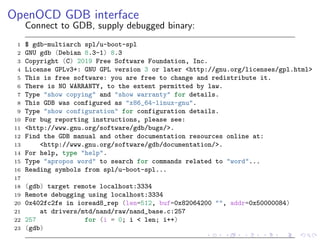
OpenOCD GDB interface
Connect to GDB, supply debugged binary:
1 $ gdb-multiarch spl/u-boot-spl
2 GNU gdb (Debian 8.3-1) 8.3
3 Copyright (C) 2019 Free Software Foundation, Inc.
4 License GPLv3+: GNU GPL version 3 or later <http://gnu.org/licenses/gpl.html>
5 This is free software: you are free to change and redistribute it.
6 There is NO WARRANTY, to the extent permitted by law.
7 Type "show copying" and "show warranty" for details.
8 This GDB was configured as "x86_64-linux-gnu".
9 Type "show configuration" for configuration details.
10 For bug reporting instructions, please see:
11 <http://www.gnu.org/software/gdb/bugs/>.
12 Find the GDB manual and other documentation resources online at:
13 <http://www.gnu.org/software/gdb/documentation/>.
14 For help, type "help".
15 Type "apropos word" to search for commands related to "word"...
16 Reading symbols from spl/u-boot-spl...
17
18 (gdb) target remote localhost:3334
19 Remote debugging using localhost:3334
20 0x402fc2fe in ioread8_rep (len=512, buf=0x82064200 "", addr=0x50000084)
21 at drivers/mtd/nand/raw/nand_base.c:257
22 257 for (i = 0; i < len; i++)
23 (gdb)
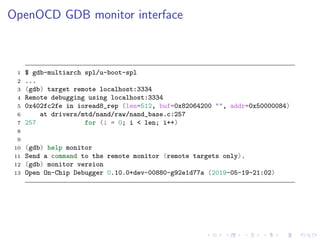
OpenOCD GDB monitor interface
1 $ gdb-multiarch spl/u-boot-spl
2 ...
3 (gdb) target remote localhost:3334
4 Remote debugging using localhost:3334
5 0x402fc2fe in ioread8_rep (len=512, buf=0x82064200 "", addr=0x50000084)
6 at drivers/mtd/nand/raw/nand_base.c:257
7 257 for (i = 0; i < len; i++)
8
9
10 (gdb) help monitor
11 Send a command to the remote monitor (remote targets only).
12 (gdb) monitor version
13 Open On-Chip Debugger 0.10.0+dev-00880-g92e1d77a (2019-05-19-21:02)
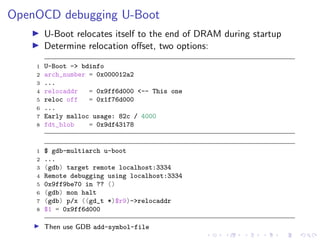
OpenOCD debugging U-Boot
U-Boot relocates itself to the end of DRAM during startup
Determine relocation offset, two options:
1 U-Boot => bdinfo
2 arch_number = 0x000012a2
3 ...
4 relocaddr = 0x9ff6d000 <-- This one
5 reloc off = 0x1f76d000
6 ...
7 Early malloc usage: 82c / 4000
8 fdt_blob = 0x9df43178
1 $ gdb-multiarch u-boot
2 ...
3 (gdb) target remote localhost:3334
4 Remote debugging using localhost:3334
5 0x9ff9be70 in ?? ()
6 (gdb) mon halt
7 (gdb) p/x ((gd_t *)$r9)->relocaddr
8 $1 = 0x9ff6d000
Then use GDB add-symbol-file
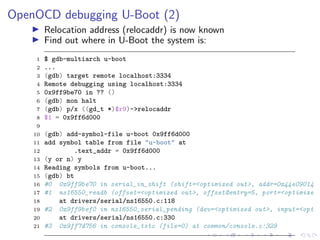
OpenOCD debugging U-Boot (2)
Relocation address (relocaddr) is now known
Find out where in U-Boot the system is:
1 $ gdb-multiarch u-boot
2 ...
3 (gdb) target remote localhost:3334
4 Remote debugging using localhost:3334
5 0x9ff9be70 in ?? ()
6 (gdb) mon halt
7 (gdb) p/x ((gd_t *)$r9)->relocaddr
8 $1 = 0x9ff6d000
9
10 (gdb) add-symbol-file u-boot 0x9ff6d000
11 add symbol table from file "u-boot" at
12 .text_addr = 0x9ff6d000
13 (y or n) y
14 Reading symbols from u-boot...
15 (gdb) bt
16 #0 0x9ff9be70 in serial_in_shift (shift=<optimized out>, addr=0x44e09014
17 #1 ns16550_readb (offset=<optimized out>, offset@entry=5, port=<optimize
18 at drivers/serial/ns16550.c:118
19 #2 0x9ff9bef0 in ns16550_serial_pending (dev=<optimized out>, input=<opt
20 at drivers/serial/ns16550.c:330
21 #3 0x9ff7d756 in console_tstc (file=0) at common/console.c:329
Conclusion
JTAG interface provides powerful debug functionality
FOSS tools in usable shape, but need work
The End
Thank you for your attention!
Contact: Marek Vasut <marek.vasut+er2019@gmail.com>

Embedded Recipes 2019 - Introduction to JTAG debugging

  • 1.
    Introduction to JTAG MarekVaˇsut <marek.vasut+er2019@gmail.com> September 23, 2019
  • 2.
    Marek Vasut Contractor atmultiple Linux kernel developer U-Boot bootloader custodian OE contributor FPGA enthusiast
  • 3.
    Structure of thetalk What is JTAG, history JTAG hardware and protocol Boundary Scan Testing Debugging software Conclusion
  • 4.
    JTAG JTAG – JointTest Action Group Industry standard for PCB testing Formed around the time of first BGAs Problem: Testing on inaccessible BGA pads Solution: Put test logic into the BGA chip Eventually grew other capabilities (SW debugging, flash programming . . . )
  • 5.
    Electrical interface A bunchof shift registers TDI – Test Data In TDO – Test Data Out TMS – Test Mode Select TCK – Test Clock Optional nTRST – Test Logic Reset Optional nSRST – System Reset
  • 6.
  • 7.
    JTAG Protocol Stateful serialprotocol TMS, TCK signals used to move state machine around TDI, TDO, TCK used to shift data to/from registers IR – Instruction Register DR – Data Register
  • 8.
    JTAG state machine TestLogic/Reset Run Test/Idle SELECT DR SCAN CAPTURE DR SHIFT DR EXIT1 DR PAUSE DR EXIT2 DR UPDATE DR SELECT IR SCAN CAPTURE IR SHIFT IR EXIT1 IR PAUSE IR EXIT2 IR UPDATE IR TMS=1 TMS=0 TMS=0 TMS=1 TMS=0 TMS=0TMS=1 TMS=1 TMS=0 TMS=0 TMS=1 TMS=1 TMS=0 TMS=1 TMS=0 TMS=1 TMS=0 TMS=1 TMS=0 TMS=0 TMS=1 TMS=1 TMS=0 TMS=0 TMS=1 TMS=1 TMS=0 TMS=1 TMS=0 TMS=1 TMS=0 TMS=1
  • 9.
    Instructions and IR InstructionRegister, selects TAP behavior Supported instructions and IR length vary See chip and package BSDL file BSDL is roughly VHDL, defines chips BST properties Common instructions IDCODE – Emit 32bit ID register BYPASS – DR is 1bit bypass registers (used when communicating with specific device)
  • 10.
    Reading IDCODE example Testlogic reset (Use nTRST or TMS high for 6 TCK) Navigate to CAPTURE IR (TMS+TCK) Shift in IDCODE opcode (TDI+TCK) (State machine moves to SHIFT IR) Confirm new instruction with UPDATE IR Navigate to CAPTURE DR (TMS+TCK) Shift in zeroes, capture TDO data (State machine moves to SHIFT DR) Navigate back to IDLE TDO data is the IDCODE value
  • 11.
    Boundary Scan Testing Providesexplicit chip pin control Pin value can be sampled or set Usual implementation is a long shift register (BSR, Boundary Scan Register) Each pin has a short cell area in the register
  • 12.
  • 13.
    BST Instructions SAMPLE –Fill DR with current values of all pins (DR is sampled on TDO) PRELOAD – Update pin values based on DR (DR is shifted in on TDI) EXTEST – Latch in updated value from PRELOAD SAMPLE/PRELOAD is often one instruction
  • 14.
    BST LED demo LoadSAMPLE instruction into IR Sample length-of-BSR bits from DR Flip desired bit in the BSR (nOE+OUT) Latch PRELOAD instruction into IR Shift updated BSR into DR Latch EXTEST instruction into IR Observe result
  • 15.
    Debugging software Custom TAPsper vendor Basic functionality: Halt/Run CPU core Read/Write CPU registers Instruction stuffing Memory access via various means
  • 16.
    Tools Hardware: Any FT2232H (MPSSE)JTAG adapter 80EUR BDI2000/BDI3000 or Peedi Lauterbach tools Software OpenWinCE JTAG / urJTAG OpenOCD
  • 17.
    urJTAG Successor of OpenWinCEJTAG http://urjtag.org/ Supports older probes/chips Supports various memory-mapped CFI NORs Supports BSDL files and easy BST Not much support for SW debugging Not much activity recently
  • 18.
    OpenOCD Current go-to FOSSJTAG tool http://openocd.org/ Supports modern debug probes and hardware Scriptable in TCL Provides easy to use telnet interface Provides GDB interface Rightarrow Easy debugging BST requires considerable TCL scripting Supports programming both CFI NORs and even SPI NORs
  • 19.
    OpenOCD debug sessionsetup Connect JTAG adapter Pick TCL file describing the JTAG adapter Pick TCL file describing the SoC and the board Turn platform ON Launch OpenOCD: 1 $ openocd$ ./src/openocd -s tcl/ -f interface/ftdi/flyswatter2.cfg -f board/am335xboard.cfg 2 Open On-Chip Debugger 0.10.0+dev-00880-g92e1d77a (2019-05-19-21:02) 3 Licensed under GNU GPL v2 4 For bug reports, read 5 http://openocd.org/doc/doxygen/bugs.html 6 Info : auto-selecting first available session transport "jtag". To override use 'trans... 7 sf 8 Info : Listening on port 6666 for tcl connections 9 Info : Listening on port 4444 for telnet connections 10 Info : ftdi: if you experience problems at higher adapter clocks, try the command "ftd... 11 Info : clock speed 20000 kHz 12 Info : JTAG tap: am335x.jrc tap/device found: 0x2b94402f (mfg: 0x017 (Texas Instruments), 13 part: 0xb944, ver: 0x2) 14 Info : JTAG tap: am335x.tap enabled 15 Info : DAP transaction stalled (WAIT) - slowing down 16 Info : am335x.cpu: hardware has 6 breakpoints, 2 watchpoints 17 Info : Listening on port 3333 for gdb connections 18 Info : Listening on port 3334 for gdb connections
  • 20.
    OpenOCD telnet interface HaltCPU, examine CPU state – halt Single step, resume execution – step, resume Read/Write memory – mdb/mdh/mdw, mwb/mwh/mww (Be careful of cache memory, JTAG vs. CPU view) Upload or download memory – load, dump 1 $ telnet localhost 4444 2 Trying 127.0.0.1... 3 Connected to localhost. 4 Escape character is '^]'. 5 Open On-Chip Debugger 6 7 > halt 8 am335x.cpu rev 2, partnum c08, arch f, variant 3, implementor 41 9 MPIDR not in multiprocessor format 10 target halted in Thumb state due to debug-request, current mode: Supervisor 11 cpsr: 0x800001b3 pc: 0x402fc892 12 MMU: disabled, D-Cache: disabled, I-Cache: enabled
  • 21.
    OpenOCD telnet interface(2) Read first few instructions of U-Boot SPL in SRAM 1 > mdw 0x402f0400 0x4 2 0x402f0400: ea00000f e59ff014 e59ff014 e59ff014 3 ... 4 $ arm-linux-gnueabi-objdump -d spl/u-boot-spl 5 Disassembly of section .text: 6 402f0400 <__start>: 7 402f0400: ea00000f b 402f0444 <reset> 8 402f0404: e59ff014 ldr pc, [pc, #20] 9 402f0408: e59ff014 ldr pc, [pc, #20] 10 402f040c: e59ff014 ldr pc, [pc, #20] 1 > step 2 am335x.cpu rev 2, partnum c08, arch f, variant 3, implementor 41 3 target halted in Thumb state due to breakpoint, current mode: Supervisor 4 cpsr: 0x600001b3 pc: 0x402fc896 5 MMU: disabled, D-Cache: disabled, I-Cache: enabled 6 > step 7 am335x.cpu rev 2, partnum c08, arch f, variant 3, implementor 41 8 target halted in Thumb state due to breakpoint, current mode: Supervisor 9 cpsr: 0x600001b3 pc: 0x402fc89a 10 MMU: disabled, D-Cache: disabled, I-Cache: enabled
  • 22.
    OpenOCD GDB interface Connectto GDB, supply debugged binary: 1 $ gdb-multiarch spl/u-boot-spl 2 GNU gdb (Debian 8.3-1) 8.3 3 Copyright (C) 2019 Free Software Foundation, Inc. 4 License GPLv3+: GNU GPL version 3 or later <http://gnu.org/licenses/gpl.html> 5 This is free software: you are free to change and redistribute it. 6 There is NO WARRANTY, to the extent permitted by law. 7 Type "show copying" and "show warranty" for details. 8 This GDB was configured as "x86_64-linux-gnu". 9 Type "show configuration" for configuration details. 10 For bug reporting instructions, please see: 11 <http://www.gnu.org/software/gdb/bugs/>. 12 Find the GDB manual and other documentation resources online at: 13 <http://www.gnu.org/software/gdb/documentation/>. 14 For help, type "help". 15 Type "apropos word" to search for commands related to "word"... 16 Reading symbols from spl/u-boot-spl... 17 18 (gdb) target remote localhost:3334 19 Remote debugging using localhost:3334 20 0x402fc2fe in ioread8_rep (len=512, buf=0x82064200 "", addr=0x50000084) 21 at drivers/mtd/nand/raw/nand_base.c:257 22 257 for (i = 0; i < len; i++) 23 (gdb)
  • 23.
    OpenOCD GDB monitorinterface 1 $ gdb-multiarch spl/u-boot-spl 2 ... 3 (gdb) target remote localhost:3334 4 Remote debugging using localhost:3334 5 0x402fc2fe in ioread8_rep (len=512, buf=0x82064200 "", addr=0x50000084) 6 at drivers/mtd/nand/raw/nand_base.c:257 7 257 for (i = 0; i < len; i++) 8 9 10 (gdb) help monitor 11 Send a command to the remote monitor (remote targets only). 12 (gdb) monitor version 13 Open On-Chip Debugger 0.10.0+dev-00880-g92e1d77a (2019-05-19-21:02)
  • 24.
    OpenOCD debugging U-Boot U-Bootrelocates itself to the end of DRAM during startup Determine relocation offset, two options: 1 U-Boot => bdinfo 2 arch_number = 0x000012a2 3 ... 4 relocaddr = 0x9ff6d000 <-- This one 5 reloc off = 0x1f76d000 6 ... 7 Early malloc usage: 82c / 4000 8 fdt_blob = 0x9df43178 1 $ gdb-multiarch u-boot 2 ... 3 (gdb) target remote localhost:3334 4 Remote debugging using localhost:3334 5 0x9ff9be70 in ?? () 6 (gdb) mon halt 7 (gdb) p/x ((gd_t *)$r9)->relocaddr 8 $1 = 0x9ff6d000 Then use GDB add-symbol-file
  • 25.
    OpenOCD debugging U-Boot(2) Relocation address (relocaddr) is now known Find out where in U-Boot the system is: 1 $ gdb-multiarch u-boot 2 ... 3 (gdb) target remote localhost:3334 4 Remote debugging using localhost:3334 5 0x9ff9be70 in ?? () 6 (gdb) mon halt 7 (gdb) p/x ((gd_t *)$r9)->relocaddr 8 $1 = 0x9ff6d000 9 10 (gdb) add-symbol-file u-boot 0x9ff6d000 11 add symbol table from file "u-boot" at 12 .text_addr = 0x9ff6d000 13 (y or n) y 14 Reading symbols from u-boot... 15 (gdb) bt 16 #0 0x9ff9be70 in serial_in_shift (shift=<optimized out>, addr=0x44e09014 17 #1 ns16550_readb (offset=<optimized out>, offset@entry=5, port=<optimize 18 at drivers/serial/ns16550.c:118 19 #2 0x9ff9bef0 in ns16550_serial_pending (dev=<optimized out>, input=<opt 20 at drivers/serial/ns16550.c:330 21 #3 0x9ff7d756 in console_tstc (file=0) at common/console.c:329
  • 26.
    Conclusion JTAG interface providespowerful debug functionality FOSS tools in usable shape, but need work
  • 27.
    The End Thank youfor your attention! Contact: Marek Vasut <marek.vasut+er2019@gmail.com>